1

‫دارای‬
‫شیراز‬ ‫دانشگاه‬ ‫از‬ ‫افزار‬ ‫نرم‬ ‫مهندسی‬ ‫در‬ ‫دکتری‬ ‫مدرک‬

‫و‬ ‫دیتا‬ ‫بیگ‬ ‫حوزه‬ ‫در‬ ‫وین‬ ‫دانشگاه‬ ‫از‬ ‫دکتری‬ ‫فوق‬ ‫مدرک‬ ‫دارای‬
HPC

‫بنیان‬ ‫دانش‬ ‫شرکت‬ ‫چندین‬ ‫بنیانگذار‬ ‫و‬ ‫دانشگاه‬ ‫مدرس‬

‫دیت‬ ‫بیگ‬ ‫و‬ ‫داده‬ ‫مدیریت‬ ‫و‬ ‫حاکمیت‬ ‫متعدد‬ ‫های‬ ‫پروژه‬ ‫مجری‬ ‫و‬ ‫مشاور‬
،‫ا‬
‫کشور‬ ‫بانکها‬ ‫و‬ ‫اپراتور‬ ‫در‬ ،‫مصنوعی‬ ‫هوش‬

‫سیمرغ‬ ‫ملی‬ ‫ابرکامپیوتر‬ ‫مشاورین‬ ‫و‬ ‫طراحی‬ ‫تیم‬ ‫عضو‬

‫مصنوعی‬ ‫هوش‬ ‫مرکز‬ ‫محاسباتی‬ ‫بستر‬ ‫مشاورین‬ ‫و‬ ‫طراحی‬ ‫تیم‬ ‫عضو‬
‫ایران‬

‫های‬ ‫پروژه‬ ‫از‬ ‫یکی‬ ‫در‬ ‫عضویت‬
EuroHPC
‫اروپا‬ ‫اتحادیه‬
‫من‬ ‫درباره‬
:
2
Copyright © 2012, Elsevier Inc. All rights reserved. 1 - 2
Distributed and Cloud Computing
K. Hwang, G. Fox and J. Dongarra
Presented by: Dr. Amin Nezarat
aminnezarat@gmail.com
Chapter 1: Enabling Technologies
and Distributed System Models
3
Copyright © 2012, Elsevier Inc. All rights reserved. 1 - 3
Data Deluge Enabling New Challenges
(Courtesy of Judy Qiu, Indiana University, 2011)
4
From Desktop/HPC/Grids to
Internet Clouds in 30 Years
 HPC moving from centralized supercomputers
to geographically distributed desktops, desksides,
clusters, and grids to clouds over last 30 years
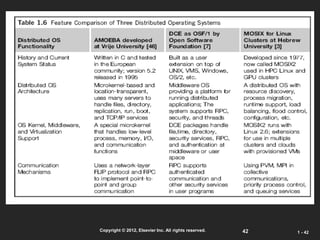
 R/D efforts on HPC, clusters, Grids, P2P, and virtual
machines has laid the foundation of cloud computing
that has been greatly advocated since 2007
 Location of computing infrastructure in areas with
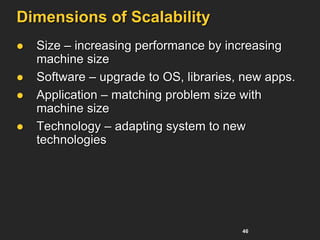
lower costs in hardware, software, datasets,
space, and power requirements – moving from
desktop computing to datacenter-based clouds
5
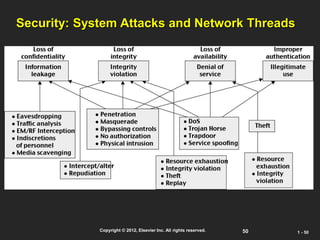
Copyright © 2012, Elsevier Inc. All rights reserved. 1 - 5
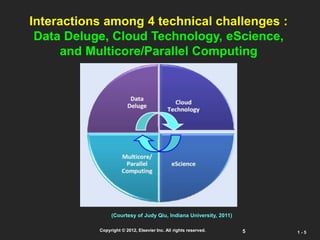
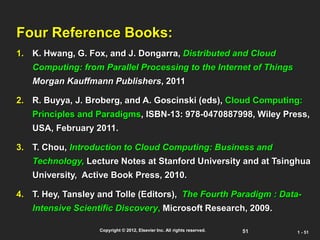
Interactions among 4 technical challenges :
Data Deluge, Cloud Technology, eScience,
and Multicore/Parallel Computing
(Courtesy of Judy Qiu, Indiana University, 2011)
6
Copyright © 2012, Elsevier Inc. All rights reserved. 1 - 6
Clouds and Internet of Things
HPC: High-
Performance
Computing
HTC: High-
Throughput
Computing
P2P:
Peer to Peer
MPP:
Massively Parallel
Processors
Source: K. Hwang, G. Fox, and J. Dongarra,
Distributed and Cloud Computing,
Morgan Kaufmann, 2012.
7
Computing Paradigm Distinctions
 Centralized Computing
 All computer resources are centralized in one physical system.
 Parallel Computing
 All processors are either tightly coupled with central shard
memory or loosely coupled with distributed memory
 Distributed Computing
 Field of CS/CE that studies distributed systems. A distributed
system consists of multiple autonomous computers, each with
its own private memory, communicating over a network.
 Cloud Computing
 An Internet cloud of resources that may be either centralized or
decentralized. The cloud apples to parallel or distributed
computing or both. Clouds may be built from physical or
virtualized resources.
8
Technology Convergence toward HPC for Science
and HTC for Business: Utility Computing
(Courtesy of Raj Buyya, University of Melbourne, 2011)
Copyright © 2012, Elsevier Inc. All rights reserved.
9
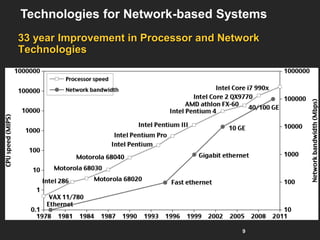
33 year Improvement in Processor and Network
Technologies
Technologies for Network-based Systems
10
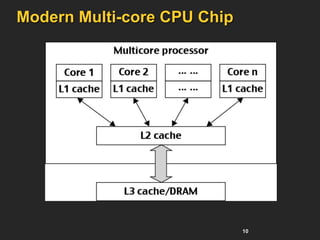
Modern Multi-core CPU Chip
11
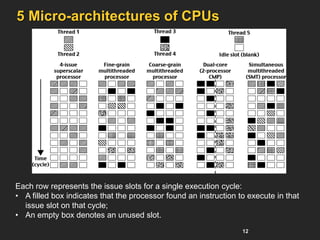
Multi-threading Processors
 Four-issue superscalar (e.g. Sun Ultrasparc I)
 Implements instruction level parallelism (ILP) within a single
processor.
 Executes more than one instruction during a clock cycle by
sending multiple instructions to redundant functional units.
 Fine-grain multithreaded processor
 Switch threads after each cycle
 Interleave instruction execution
 If one thread stalls, others are executed
 Coarse-grain multithreaded processor
 Executes a single thread until it reaches certain situations
 Simultaneous multithread processor (SMT)
 Instructions from more than one thread can execute in any
given pipeline stage at a time.
12
5 Micro-architectures of CPUs
Each row represents the issue slots for a single execution cycle:
• A filled box indicates that the processor found an instruction to execute in that
issue slot on that cycle;
• An empty box denotes an unused slot.
13
Copyright © 2012, Elsevier Inc. All rights reserved. 1 - 13
33 year Improvement in Memory and Disk
Technologies
14
Copyright © 2012, Elsevier Inc. All rights reserved. 1 - 14
Architecture of A Many-Core
Multiprocessor GPU interacting
with a CPU Processor
15
NVIDIA Fermi GPU
16
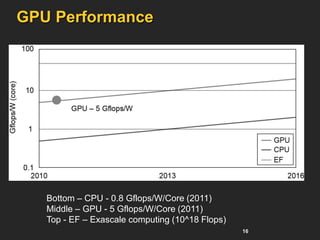
GPU Performance
Bottom – CPU - 0.8 Gflops/W/Core (2011)
Middle – GPU - 5 Gflops/W/Core (2011)
Top - EF – Exascale computing (10^18 Flops)
17
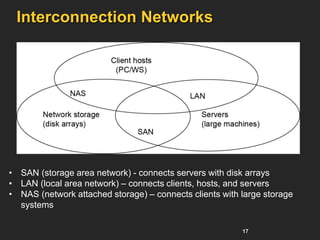
Interconnection Networks
• SAN (storage area network) - connects servers with disk arrays
• LAN (local area network) – connects clients, hosts, and servers
• NAS (network attached storage) – connects clients with large storage
systems
18
Copyright © 2012, Elsevier Inc. All rights reserved. 1 - 18
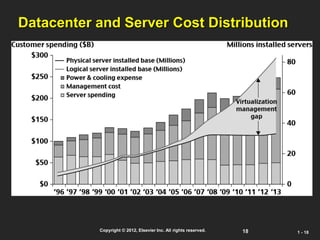
Datacenter and Server Cost Distribution
19
Virtual Machines
 Eliminate real machine constraint
 Increases portability and flexibility
 Virtual machine adds software to a physical
machine to give it the appearance of a different
platform or multiple platforms.
 Benefits
 Cross platform compatibility
 Increase Security
 Enhance Performance
 Simplify software migration
20
Initial Hardware Model
 All applications access hardware resources (i.e.
memory, i/o) through system calls to operating
system (privileged instructions)
 Advantages
 Design is decoupled (i.e. OS people can develop
OS separate of Hardware people developing
hardware)
 Hardware and software can be upgraded without
notifying the Application programs
 Disadvantage
 Application compiled on one ISA will not run on
another ISA..
 Applications compiled for Mac use different
operating system calls then application designed
for windows.
 ISA’s must support old software
 Can often be inhibiting in terms of performance
 Since software is developed separately from
hardware… Software is not necessarily optimized
for hardware.
21
Virtual Machine Basics
 Virtual software placed
between underlying machine
and conventional software
 Conventional software sees
different ISA from the one
supported by the hardware
 Virtualization process
involves:
 Mapping of virtual resources
(registers and memory) to
real hardware resources
 Using real machine
instructions to carry out the
actions specified by the
virtual machine instructions
22
Three VM Architectures
23
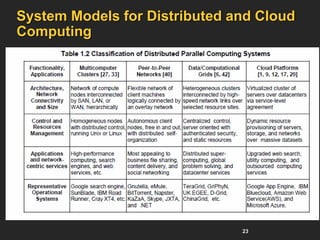
System Models for Distributed and Cloud
Computing
24
Copyright © 2012, Elsevier Inc. All rights reserved. 1 - 24
A Typical Cluster Architecture
25
Computational or Data Grid
26
Copyright © 2012, Elsevier Inc. All rights reserved. 1 - 26
A Typical Computational Grid
27
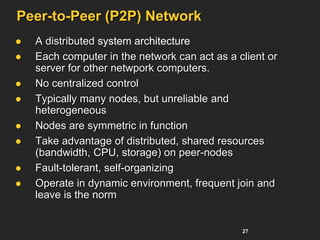
Peer-to-Peer (P2P) Network
 A distributed system architecture
 Each computer in the network can act as a client or
server for other netwpork computers.
 No centralized control
 Typically many nodes, but unreliable and
heterogeneous
 Nodes are symmetric in function
 Take advantage of distributed, shared resources
(bandwidth, CPU, storage) on peer-nodes
 Fault-tolerant, self-organizing
 Operate in dynamic environment, frequent join and
leave is the norm
28
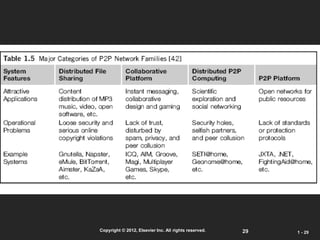
Peer-to-Peer (P2P) Network
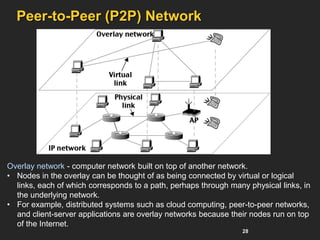
Overlay network - computer network built on top of another network.
• Nodes in the overlay can be thought of as being connected by virtual or logical
links, each of which corresponds to a path, perhaps through many physical links, in
the underlying network.
• For example, distributed systems such as cloud computing, peer-to-peer networks,
and client-server applications are overlay networks because their nodes run on top
of the Internet.
29
Copyright © 2012, Elsevier Inc. All rights reserved. 1 - 29
30
The Cloud
 Historical roots in today’s
Internet apps
 Search, email, social networks
 File storage (Live Mesh, Mobile
Me, Flicker, …)
 A cloud infrastructure provides a
framework to manage scalable, reliable,
on-demand access to applications
 A cloud is the “invisible” backend to
many of our mobile applications
 A model of computation and data
storage based on “pay as you go”
access to “unlimited” remote data
center capabilities
Copyright © 2012, Elsevier Inc. All rights reserved.
31
Copyright © 2012, Elsevier Inc. All rights reserved. 1 - 31
Basic Concept of Internet Clouds
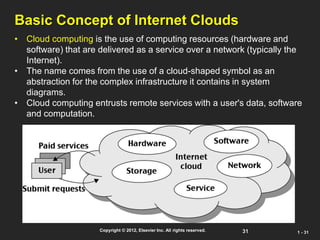
• Cloud computing is the use of computing resources (hardware and
software) that are delivered as a service over a network (typically the
Internet).
• The name comes from the use of a cloud-shaped symbol as an
abstraction for the complex infrastructure it contains in system
diagrams.
• Cloud computing entrusts remote services with a user's data, software
and computation.
32
The Next Revolution in IT
Cloud Computing
 Classical
Computing
 Buy & Own
 Hardware, System
Software,
Applications often to
meet peak needs.
 Install, Configure, Test,
Verify, Evaluate
 Manage
 ..
 Finally, use it
 $$$$....$(High CapEx)
 Cloud Computing
 Subscribe
 Use
 $ - pay for what you use,
based on QoS
Every
18
months?
Copyright © 2012, Elsevier Inc. All rights reserved.
(Courtesy of Raj Buyya, 2012)
33
Cloud Service Models (1)
Infrastructure as a service (IaaS)
 Most basic cloud service model
 Cloud providers offer computers, as physical or more often as
virtual machines, and other resources.
 Virtual machines are run as guests by a hypervisor, such as Xen or
KVM.
 Cloud users deploy their applications by then installing operating
system images on the machines as well as their application
software.
 Cloud providers typically bill IaaS services on a utility computing
basis, that is, cost will reflect the amount of resources allocated and
consumed.
 Examples of IaaS include: Amazon CloudFormation (and
underlying services such as Amazon EC2), Rackspace Cloud,
Terremark, and Google Compute Engine.
34
Cloud Service Models (2)
Platform as a service (PaaS)
 Cloud providers deliver a computing platform typically
including operating system, programming language
execution environment, database, and web server.
 Application developers develop and run their software
on a cloud platform without the cost and complexity of
buying and managing the underlying hardware and
software layers.
 Examples of PaaS include: Amazon Elastic Beanstalk,
Cloud Foundry, Heroku, Force.com, EngineYard,
Mendix, Google App Engine, Microsoft Azure and
OrangeScape.
35
Cloud Service Models (3)
Software as a service (SaaS)
 Cloud providers install and operate application software
in the cloud and cloud users access the software from
cloud clients.
 The pricing model for SaaS applications is typically a
monthly or yearly flat fee per user, so price is scalable
and adjustable if users are added or removed at any
point.
 Examples of SaaS include: Google Apps, innkeypos,
Quickbooks Online, Limelight Video Platform,
Salesforce.com, and Microsoft Office 365.
36
Service-oriented architecture (SOA)
 SOA is an evolution of distributed computing based on
the request/reply design paradigm for synchronous and
asynchronous applications.
 An application's business logic or individual functions
are modularized and presented as services for
consumer/client applications.
 Key to these services - their loosely coupled nature;
 i.e., the service interface is independent of the implementation.
 Application developers or system integrators can build
applications by composing one or more services without
knowing the services' underlying implementations.
 For example, a service can be implemented either in .Net or
J2EE, and the application consuming the service can be on a
different platform or language.
37
SOA key characteristics:
 SOA services have self-describing interfaces in platform-independent XML
documents.
 Web Services Description Language (WSDL) is the standard used to describe
the services.
 SOA services communicate with messages formally defined via XML
Schema (also called XSD).
 Communication among consumers and providers or services typically happens
in heterogeneous environments, with little or no knowledge about the provider.
 Messages between services can be viewed as key business documents
processed in an enterprise.
 SOA services are maintained in the enterprise by a registry that acts as a
directory listing.
 Applications can look up the services in the registry and invoke the service.
 Universal Description, Definition, and Integration (UDDI) is the standard used
for service registry.
 Each SOA service has a quality of service (QoS) associated with it.
 Some of the key QoS elements are security requirements, such as
authentication and authorization, reliable messaging, and policies regarding
who can invoke services.
38
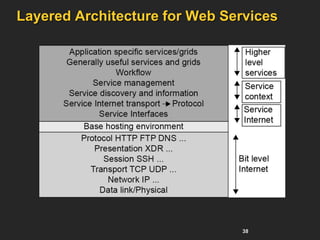
Layered Architecture for Web Services
39
Copyright © 2012, Elsevier Inc. All rights reserved. 1 - 39
Cloud Computing Challenges:
Dealing with too many issues (Courtesy of R. Buyya)
Billing
Utility & Risk
Management
Scalability
Reliability
Software Eng.
Complexity
Programming Env.
& Application Dev.
40
Copyright © 2012, Elsevier Inc. All rights reserved. 1 - 40
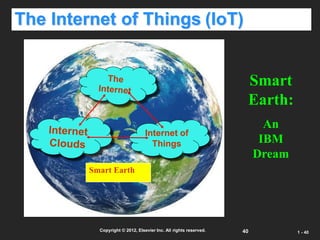
The Internet of Things (IoT)
Internet of
Things
Smart Earth
Smart
Earth:
An
IBM
Dream
41
Copyright © 2012, Elsevier Inc. All rights reserved. 1 - 41
Opportunities of IoT in 3 Dimensions
(courtesy of Wikipedia, 2010)
42
Copyright © 2012, Elsevier Inc. All rights reserved. 1 - 42
43
Transparent Cloud Computing Environment
Separates user data, application, OS, and space – good for
cloud computing.
44
Copyright © 2012, Elsevier Inc. All rights reserved. 1 - 44
Parallel and Distributed Programming
45
Copyright © 2012, Elsevier Inc. All rights reserved. 1 - 45
Grid Standards and Middleware :
46
Dimensions of Scalability
 Size – increasing performance by increasing
machine size
 Software – upgrade to OS, libraries, new apps.
 Application – matching problem size with
machine size
 Technology – adapting system to new
technologies
47
Copyright © 2012, Elsevier Inc. All rights reserved. 1 - 47
System Scalability vs. OS Multiplicity
48
Copyright © 2012, Elsevier Inc. All rights reserved. 1 - 48
System Availability vs. Configuration Size :
49
Operational Layers of Distributed Computing
System
50
Copyright © 2012, Elsevier Inc. All rights reserved. 1 - 50
Security: System Attacks and Network Threads
51
Copyright © 2012, Elsevier Inc. All rights reserved. 1 - 51
Four Reference Books:
1. K. Hwang, G. Fox, and J. Dongarra, Distributed and Cloud
Computing: from Parallel Processing to the Internet of Things
Morgan Kauffmann Publishers, 2011
2. R. Buyya, J. Broberg, and A. Goscinski (eds), Cloud Computing:
Principles and Paradigms, ISBN-13: 978-0470887998, Wiley Press,
USA, February 2011.
3. T. Chou, Introduction to Cloud Computing: Business and
Technology, Lecture Notes at Stanford University and at Tsinghua
University, Active Book Press, 2010.
4. T. Hey, Tansley and Tolle (Editors), The Fourth Paradigm : Data-
Intensive Scientific Discovery, Microsoft Research, 2009.

00 - BigData-Chapter_01-PDC.pdf

  • 1.
    1  ‫دارای‬ ‫شیراز‬ ‫دانشگاه‬ ‫از‬‫افزار‬ ‫نرم‬ ‫مهندسی‬ ‫در‬ ‫دکتری‬ ‫مدرک‬  ‫و‬ ‫دیتا‬ ‫بیگ‬ ‫حوزه‬ ‫در‬ ‫وین‬ ‫دانشگاه‬ ‫از‬ ‫دکتری‬ ‫فوق‬ ‫مدرک‬ ‫دارای‬ HPC  ‫بنیان‬ ‫دانش‬ ‫شرکت‬ ‫چندین‬ ‫بنیانگذار‬ ‫و‬ ‫دانشگاه‬ ‫مدرس‬  ‫دیت‬ ‫بیگ‬ ‫و‬ ‫داده‬ ‫مدیریت‬ ‫و‬ ‫حاکمیت‬ ‫متعدد‬ ‫های‬ ‫پروژه‬ ‫مجری‬ ‫و‬ ‫مشاور‬ ،‫ا‬ ‫کشور‬ ‫بانکها‬ ‫و‬ ‫اپراتور‬ ‫در‬ ،‫مصنوعی‬ ‫هوش‬  ‫سیمرغ‬ ‫ملی‬ ‫ابرکامپیوتر‬ ‫مشاورین‬ ‫و‬ ‫طراحی‬ ‫تیم‬ ‫عضو‬  ‫مصنوعی‬ ‫هوش‬ ‫مرکز‬ ‫محاسباتی‬ ‫بستر‬ ‫مشاورین‬ ‫و‬ ‫طراحی‬ ‫تیم‬ ‫عضو‬ ‫ایران‬  ‫های‬ ‫پروژه‬ ‫از‬ ‫یکی‬ ‫در‬ ‫عضویت‬ EuroHPC ‫اروپا‬ ‫اتحادیه‬ ‫من‬ ‫درباره‬ :
  • 2.
    2 Copyright © 2012,Elsevier Inc. All rights reserved. 1 - 2 Distributed and Cloud Computing K. Hwang, G. Fox and J. Dongarra Presented by: Dr. Amin Nezarat aminnezarat@gmail.com Chapter 1: Enabling Technologies and Distributed System Models
  • 3.
    3 Copyright © 2012,Elsevier Inc. All rights reserved. 1 - 3 Data Deluge Enabling New Challenges (Courtesy of Judy Qiu, Indiana University, 2011)
  • 4.
    4 From Desktop/HPC/Grids to InternetClouds in 30 Years  HPC moving from centralized supercomputers to geographically distributed desktops, desksides, clusters, and grids to clouds over last 30 years  R/D efforts on HPC, clusters, Grids, P2P, and virtual machines has laid the foundation of cloud computing that has been greatly advocated since 2007  Location of computing infrastructure in areas with lower costs in hardware, software, datasets, space, and power requirements – moving from desktop computing to datacenter-based clouds
  • 5.
    5 Copyright © 2012,Elsevier Inc. All rights reserved. 1 - 5 Interactions among 4 technical challenges : Data Deluge, Cloud Technology, eScience, and Multicore/Parallel Computing (Courtesy of Judy Qiu, Indiana University, 2011)
  • 6.
    6 Copyright © 2012,Elsevier Inc. All rights reserved. 1 - 6 Clouds and Internet of Things HPC: High- Performance Computing HTC: High- Throughput Computing P2P: Peer to Peer MPP: Massively Parallel Processors Source: K. Hwang, G. Fox, and J. Dongarra, Distributed and Cloud Computing, Morgan Kaufmann, 2012.
  • 7.
    7 Computing Paradigm Distinctions Centralized Computing  All computer resources are centralized in one physical system.  Parallel Computing  All processors are either tightly coupled with central shard memory or loosely coupled with distributed memory  Distributed Computing  Field of CS/CE that studies distributed systems. A distributed system consists of multiple autonomous computers, each with its own private memory, communicating over a network.  Cloud Computing  An Internet cloud of resources that may be either centralized or decentralized. The cloud apples to parallel or distributed computing or both. Clouds may be built from physical or virtualized resources.
  • 8.
    8 Technology Convergence towardHPC for Science and HTC for Business: Utility Computing (Courtesy of Raj Buyya, University of Melbourne, 2011) Copyright © 2012, Elsevier Inc. All rights reserved.
  • 9.
    9 33 year Improvementin Processor and Network Technologies Technologies for Network-based Systems
  • 10.
  • 11.
    11 Multi-threading Processors  Four-issuesuperscalar (e.g. Sun Ultrasparc I)  Implements instruction level parallelism (ILP) within a single processor.  Executes more than one instruction during a clock cycle by sending multiple instructions to redundant functional units.  Fine-grain multithreaded processor  Switch threads after each cycle  Interleave instruction execution  If one thread stalls, others are executed  Coarse-grain multithreaded processor  Executes a single thread until it reaches certain situations  Simultaneous multithread processor (SMT)  Instructions from more than one thread can execute in any given pipeline stage at a time.
  • 12.
    12 5 Micro-architectures ofCPUs Each row represents the issue slots for a single execution cycle: • A filled box indicates that the processor found an instruction to execute in that issue slot on that cycle; • An empty box denotes an unused slot.
  • 13.
    13 Copyright © 2012,Elsevier Inc. All rights reserved. 1 - 13 33 year Improvement in Memory and Disk Technologies
  • 14.
    14 Copyright © 2012,Elsevier Inc. All rights reserved. 1 - 14 Architecture of A Many-Core Multiprocessor GPU interacting with a CPU Processor
  • 15.
  • 16.
    16 GPU Performance Bottom –CPU - 0.8 Gflops/W/Core (2011) Middle – GPU - 5 Gflops/W/Core (2011) Top - EF – Exascale computing (10^18 Flops)
  • 17.
    17 Interconnection Networks • SAN(storage area network) - connects servers with disk arrays • LAN (local area network) – connects clients, hosts, and servers • NAS (network attached storage) – connects clients with large storage systems
  • 18.
    18 Copyright © 2012,Elsevier Inc. All rights reserved. 1 - 18 Datacenter and Server Cost Distribution
  • 19.
    19 Virtual Machines  Eliminatereal machine constraint  Increases portability and flexibility  Virtual machine adds software to a physical machine to give it the appearance of a different platform or multiple platforms.  Benefits  Cross platform compatibility  Increase Security  Enhance Performance  Simplify software migration
  • 20.
    20 Initial Hardware Model All applications access hardware resources (i.e. memory, i/o) through system calls to operating system (privileged instructions)  Advantages  Design is decoupled (i.e. OS people can develop OS separate of Hardware people developing hardware)  Hardware and software can be upgraded without notifying the Application programs  Disadvantage  Application compiled on one ISA will not run on another ISA..  Applications compiled for Mac use different operating system calls then application designed for windows.  ISA’s must support old software  Can often be inhibiting in terms of performance  Since software is developed separately from hardware… Software is not necessarily optimized for hardware.
  • 21.
    21 Virtual Machine Basics Virtual software placed between underlying machine and conventional software  Conventional software sees different ISA from the one supported by the hardware  Virtualization process involves:  Mapping of virtual resources (registers and memory) to real hardware resources  Using real machine instructions to carry out the actions specified by the virtual machine instructions
  • 22.
  • 23.
    23 System Models forDistributed and Cloud Computing
  • 24.
    24 Copyright © 2012,Elsevier Inc. All rights reserved. 1 - 24 A Typical Cluster Architecture
  • 25.
  • 26.
    26 Copyright © 2012,Elsevier Inc. All rights reserved. 1 - 26 A Typical Computational Grid
  • 27.
    27 Peer-to-Peer (P2P) Network A distributed system architecture  Each computer in the network can act as a client or server for other netwpork computers.  No centralized control  Typically many nodes, but unreliable and heterogeneous  Nodes are symmetric in function  Take advantage of distributed, shared resources (bandwidth, CPU, storage) on peer-nodes  Fault-tolerant, self-organizing  Operate in dynamic environment, frequent join and leave is the norm
  • 28.
    28 Peer-to-Peer (P2P) Network Overlaynetwork - computer network built on top of another network. • Nodes in the overlay can be thought of as being connected by virtual or logical links, each of which corresponds to a path, perhaps through many physical links, in the underlying network. • For example, distributed systems such as cloud computing, peer-to-peer networks, and client-server applications are overlay networks because their nodes run on top of the Internet.
  • 29.
    29 Copyright © 2012,Elsevier Inc. All rights reserved. 1 - 29
  • 30.
    30 The Cloud  Historicalroots in today’s Internet apps  Search, email, social networks  File storage (Live Mesh, Mobile Me, Flicker, …)  A cloud infrastructure provides a framework to manage scalable, reliable, on-demand access to applications  A cloud is the “invisible” backend to many of our mobile applications  A model of computation and data storage based on “pay as you go” access to “unlimited” remote data center capabilities Copyright © 2012, Elsevier Inc. All rights reserved.
  • 31.
    31 Copyright © 2012,Elsevier Inc. All rights reserved. 1 - 31 Basic Concept of Internet Clouds • Cloud computing is the use of computing resources (hardware and software) that are delivered as a service over a network (typically the Internet). • The name comes from the use of a cloud-shaped symbol as an abstraction for the complex infrastructure it contains in system diagrams. • Cloud computing entrusts remote services with a user's data, software and computation.
  • 32.
    32 The Next Revolutionin IT Cloud Computing  Classical Computing  Buy & Own  Hardware, System Software, Applications often to meet peak needs.  Install, Configure, Test, Verify, Evaluate  Manage  ..  Finally, use it  $$$$....$(High CapEx)  Cloud Computing  Subscribe  Use  $ - pay for what you use, based on QoS Every 18 months? Copyright © 2012, Elsevier Inc. All rights reserved. (Courtesy of Raj Buyya, 2012)
  • 33.
    33 Cloud Service Models(1) Infrastructure as a service (IaaS)  Most basic cloud service model  Cloud providers offer computers, as physical or more often as virtual machines, and other resources.  Virtual machines are run as guests by a hypervisor, such as Xen or KVM.  Cloud users deploy their applications by then installing operating system images on the machines as well as their application software.  Cloud providers typically bill IaaS services on a utility computing basis, that is, cost will reflect the amount of resources allocated and consumed.  Examples of IaaS include: Amazon CloudFormation (and underlying services such as Amazon EC2), Rackspace Cloud, Terremark, and Google Compute Engine.
  • 34.
    34 Cloud Service Models(2) Platform as a service (PaaS)  Cloud providers deliver a computing platform typically including operating system, programming language execution environment, database, and web server.  Application developers develop and run their software on a cloud platform without the cost and complexity of buying and managing the underlying hardware and software layers.  Examples of PaaS include: Amazon Elastic Beanstalk, Cloud Foundry, Heroku, Force.com, EngineYard, Mendix, Google App Engine, Microsoft Azure and OrangeScape.
  • 35.
    35 Cloud Service Models(3) Software as a service (SaaS)  Cloud providers install and operate application software in the cloud and cloud users access the software from cloud clients.  The pricing model for SaaS applications is typically a monthly or yearly flat fee per user, so price is scalable and adjustable if users are added or removed at any point.  Examples of SaaS include: Google Apps, innkeypos, Quickbooks Online, Limelight Video Platform, Salesforce.com, and Microsoft Office 365.
  • 36.
    36 Service-oriented architecture (SOA) SOA is an evolution of distributed computing based on the request/reply design paradigm for synchronous and asynchronous applications.  An application's business logic or individual functions are modularized and presented as services for consumer/client applications.  Key to these services - their loosely coupled nature;  i.e., the service interface is independent of the implementation.  Application developers or system integrators can build applications by composing one or more services without knowing the services' underlying implementations.  For example, a service can be implemented either in .Net or J2EE, and the application consuming the service can be on a different platform or language.
  • 37.
    37 SOA key characteristics: SOA services have self-describing interfaces in platform-independent XML documents.  Web Services Description Language (WSDL) is the standard used to describe the services.  SOA services communicate with messages formally defined via XML Schema (also called XSD).  Communication among consumers and providers or services typically happens in heterogeneous environments, with little or no knowledge about the provider.  Messages between services can be viewed as key business documents processed in an enterprise.  SOA services are maintained in the enterprise by a registry that acts as a directory listing.  Applications can look up the services in the registry and invoke the service.  Universal Description, Definition, and Integration (UDDI) is the standard used for service registry.  Each SOA service has a quality of service (QoS) associated with it.  Some of the key QoS elements are security requirements, such as authentication and authorization, reliable messaging, and policies regarding who can invoke services.
  • 38.
  • 39.
    39 Copyright © 2012,Elsevier Inc. All rights reserved. 1 - 39 Cloud Computing Challenges: Dealing with too many issues (Courtesy of R. Buyya) Billing Utility & Risk Management Scalability Reliability Software Eng. Complexity Programming Env. & Application Dev.
  • 40.
    40 Copyright © 2012,Elsevier Inc. All rights reserved. 1 - 40 The Internet of Things (IoT) Internet of Things Smart Earth Smart Earth: An IBM Dream
  • 41.
    41 Copyright © 2012,Elsevier Inc. All rights reserved. 1 - 41 Opportunities of IoT in 3 Dimensions (courtesy of Wikipedia, 2010)
  • 42.
    42 Copyright © 2012,Elsevier Inc. All rights reserved. 1 - 42
  • 43.
    43 Transparent Cloud ComputingEnvironment Separates user data, application, OS, and space – good for cloud computing.
  • 44.
    44 Copyright © 2012,Elsevier Inc. All rights reserved. 1 - 44 Parallel and Distributed Programming
  • 45.
    45 Copyright © 2012,Elsevier Inc. All rights reserved. 1 - 45 Grid Standards and Middleware :
  • 46.
    46 Dimensions of Scalability Size – increasing performance by increasing machine size  Software – upgrade to OS, libraries, new apps.  Application – matching problem size with machine size  Technology – adapting system to new technologies
  • 47.
    47 Copyright © 2012,Elsevier Inc. All rights reserved. 1 - 47 System Scalability vs. OS Multiplicity
  • 48.
    48 Copyright © 2012,Elsevier Inc. All rights reserved. 1 - 48 System Availability vs. Configuration Size :
  • 49.
    49 Operational Layers ofDistributed Computing System
  • 50.
    50 Copyright © 2012,Elsevier Inc. All rights reserved. 1 - 50 Security: System Attacks and Network Threads
  • 51.
    51 Copyright © 2012,Elsevier Inc. All rights reserved. 1 - 51 Four Reference Books: 1. K. Hwang, G. Fox, and J. Dongarra, Distributed and Cloud Computing: from Parallel Processing to the Internet of Things Morgan Kauffmann Publishers, 2011 2. R. Buyya, J. Broberg, and A. Goscinski (eds), Cloud Computing: Principles and Paradigms, ISBN-13: 978-0470887998, Wiley Press, USA, February 2011. 3. T. Chou, Introduction to Cloud Computing: Business and Technology, Lecture Notes at Stanford University and at Tsinghua University, Active Book Press, 2010. 4. T. Hey, Tansley and Tolle (Editors), The Fourth Paradigm : Data- Intensive Scientific Discovery, Microsoft Research, 2009.