Progressive Web Apps:
Bridging The Gap
Mail Me: akintayoshedrack@gmail.com
Speaker profile.
 TECH ENTHUSIAST
 PYTHON AND JAVASCRIPT NINJA
 OBVIOUSLY, AM HUMAN
 STUDENT
 FRONT-END DEVELOPER AT CAMERAMAN.NG
 FOOD LOVER
 VSCODE ADVOCATE
WINDOWS OS NO.1 FAN
Sheddy_Nathan Github.com/hactivist123
Contents
 Overview of PWA
 Native Apps Vs PWA
 PWA Baseline Implementation
 Case Studies
 Lacking Features
 PWA - Wish lists
 Conclusion
Overview of PWA
Overview
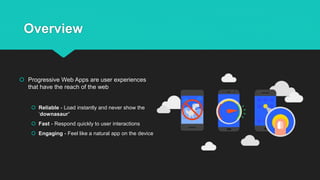
 Progressive Web Apps are user experiences
that have the reach of the web
 Reliable - Load instantly and never show the
‘downasaur’
 Fast - Respond quickly to user interactions
 Engaging - Feel like a natural app on the device
Overview
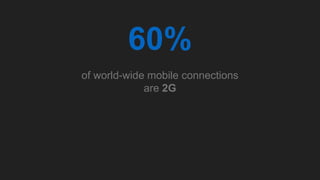
60%
of world-wide mobile connections
are 2G
PWA Baseline Implementation
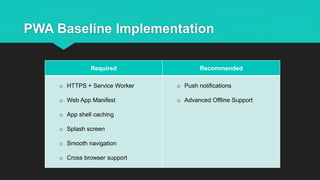
Required Recommended
o HTTPS + Service Worker
o Web App Manifest
o App shell caching
o Splash screen
o Smooth navigation
o Cross browser support
o Push notifications
o Advanced Offline Support
PWA Baseline Implementation
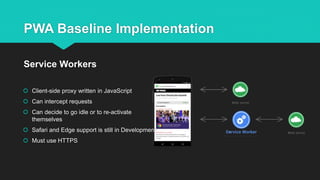
 Client-side proxy written in JavaScript
 Can intercept requests
 Can decide to go idle or to re-activate
themselves
 Safari and Edge support is still in Development
 Must use HTTPS
Service Workers
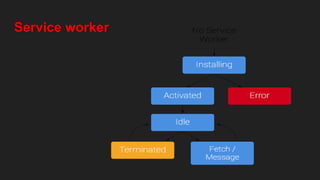
Service worker
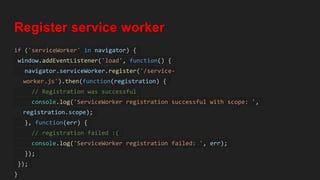
Register service worker
if ('serviceWorker' in navigator) {
window.addEventListener('load', function() {
navigator.serviceWorker.register('/service-
worker.js').then(function(registration) {
// Registration was successful
console.log('ServiceWorker registration successful with scope: ',
registration.scope);
}, function(err) {
// registration failed :(
console.log('ServiceWorker registration failed: ', err);
});
});
}
Install service worker (service-worker.js)
var cacheName = 'Cache-name-1';
var dataCacheName = 'dataCache-name-v1';
var filesToCache = [
'/',
'/index.html',
'/app/app_client.min.js',
'/assets/css/main.css',
'/images/resources/128.png',
'/images/resources/144.png',
'/images/resources/152.png',
];
self.addEventListener('install', function(e) {
console.log('[ServiceWorker] Install');
e.waitUntil(
caches.open(cacheName).then(function(cache) {
console.log('[ServiceWorker] Caching app shell');
return cache.addAll(filesToCache);
}).then(function(){
return self.skipWaiting();
})
Update service worker
self.addEventListener('activate', function(e) {
console.log('[ServiceWorker] Activate');
e.waitUntil(
caches.keys().then(function(keyList) {
return Promise.all(keyList.map(function(key) {
if (key !== cacheName) {
console.log('[ServiceWorker] Removing old cache', key);
return caches.delete(key);
}
}));
})
);
return self.clients.claim();
});
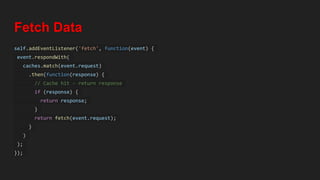
Fetch Data
self.addEventListener('fetch', function(event) {
event.respondWith(
caches.match(event.request)
.then(function(response) {
// Cache hit - return response
if (response) {
return response;
}
return fetch(event.request);
}
)
);
});
PWA Baseline Implementation
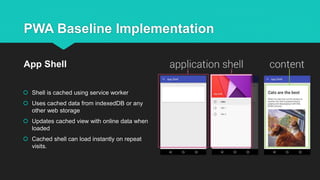
 Shell is cached using service worker
 Uses cached data from indexedDB or any
other web storage
 Updates cached view with online data when
loaded
 Cached shell can load instantly on repeat
visits.
App Shell
PWA Baseline Implementation
 Rich native presence on user’s home screen
 Launch app in full-screen mode
 Control the screen orientation for optimal
viewing
 Define “splash screen” launch, theme colour
for site
Web App Manifests {
"short_name": "My Cool App",
"name": "My Totally Cool Application",
"icons":[
{"src": "launcher-icon-3x.png",
"sizes": "192x192",
"type": "image/png"},
{"src": "launcher-splash.png",
"sizes": "512x512",
"type": "image/png"}],
"start_url": "index.html",
"display": "standalone",
"background_color" : "#aeaeae",
"theme_color" : "#aeaeae",
"orientation" : "landscape"
}
PWA Baseline Implementation
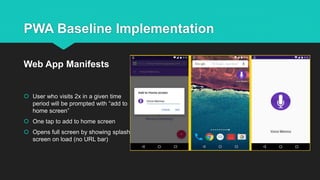
 User who visits 2x in a given time
period will be prompted with “add to
home screen”
 One tap to add to home screen
 Opens full screen by showing splash
screen on load (no URL bar)
Web App Manifests
PWA Baseline Implementation
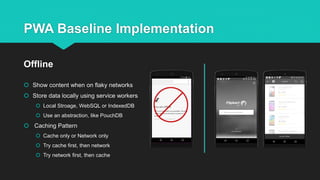
 Show content when on flaky networks
 Store data locally using service workers
 Local Stroage, WebSQL or IndexedDB
 Use an abstraction, like PouchDB
 Caching Pattern
 Cache only or Network only
 Try cache first, then network
 Try network first, then cache
Offline
PWA Baseline Implementation
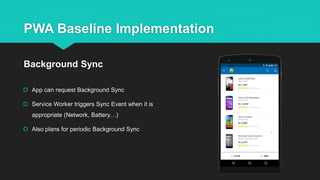
 App can request Background Sync
 Service Worker triggers Sync Event when it is
appropriate (Network, Battery…)
 Also plans for periodic Background Sync
Background Sync
PWA Baseline Implementation
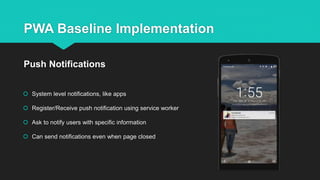
 System level notifications, like apps
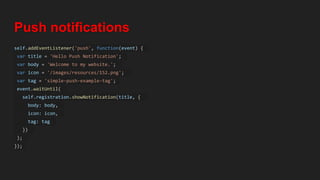
 Register/Receive push notification using service worker
 Ask to notify users with specific information
 Can send notifications even when page closed
Push Notifications
Push notifications
self.addEventListener('push', function(event) {
var title = 'Hello Push Notification';
var body = 'Welcome to my website.';
var icon = '/images/resources/152.png';
var tag = 'simple-push-example-tag';
event.waitUntil(
self.registration.showNotification(title, {
body: body,
icon: icon,
tag: tag
})
);
});
PWA Baseline Implementation
 For first-time visitors, load pages in <10s on 3G connections
 For repeat visitors, instant loading of page in <500 milliseconds
 Always scrolling at 60 frames/second
 Content shouldn’t jump as images are loaded
Instant loading and smooth navigation
Case Studies
Case Studies
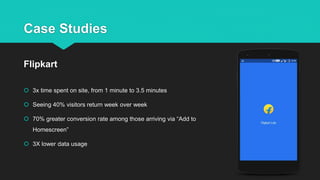
 3x time spent on site, from 1 minute to 3.5 minutes
 Seeing 40% visitors return week over week
 70% greater conversion rate among those arriving via “Add to
Homescreen”
 3X lower data usage
Flipkart
Case Studies
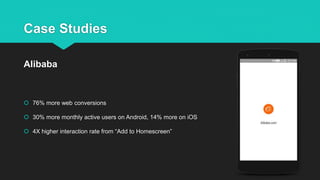
 76% more web conversions
 30% more monthly active users on Android, 14% more on iOS
 4X higher interaction rate from “Add to Homescreen”
Alibaba
Case Studies
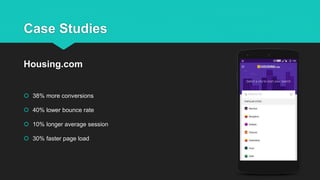
 38% more conversions
 40% lower bounce rate
 10% longer average session
 30% faster page load
Housing.com
PWA - Wish lists
PWA - Wishlists
 Automatic grant of permissions for Push notification when added to home screen.
 Events to instrument uninstalls
 Deduping between native and web app from the same publisher (Push notification)
 Deep linking into the installed web app
 Some equivalent of Device ID
 More top browsers including progressive features
 Discoverability on the store as well on the user’s phone
Conclusion
Conclusion
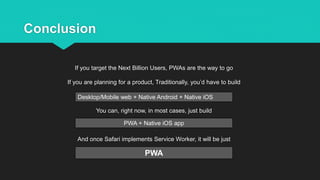
If you target the Next Billion Users, PWAs are the way to go
If you are planning for a product, Traditionally, you’d have to build
You can, right now, in most cases, just build
And once Safari implements Service Worker, it will be just
Desktop/Mobile web + Native Android + Native iOS
PWA + Native iOS app
PWA
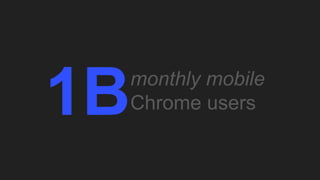
1Bmonthly mobile
Chrome users
Thank You!

Progressivewebapps by sheddy nathan for isdev2017

  • 1.
    Progressive Web Apps: BridgingThe Gap Mail Me: akintayoshedrack@gmail.com
  • 2.
    Speaker profile.  TECHENTHUSIAST  PYTHON AND JAVASCRIPT NINJA  OBVIOUSLY, AM HUMAN  STUDENT  FRONT-END DEVELOPER AT CAMERAMAN.NG  FOOD LOVER  VSCODE ADVOCATE WINDOWS OS NO.1 FAN Sheddy_Nathan Github.com/hactivist123
  • 3.
    Contents  Overview ofPWA  Native Apps Vs PWA  PWA Baseline Implementation  Case Studies  Lacking Features  PWA - Wish lists  Conclusion
  • 4.
  • 5.
    Overview  Progressive WebApps are user experiences that have the reach of the web  Reliable - Load instantly and never show the ‘downasaur’  Fast - Respond quickly to user interactions  Engaging - Feel like a natural app on the device
  • 6.
  • 7.
    60% of world-wide mobileconnections are 2G
  • 8.
  • 9.
    PWA Baseline Implementation RequiredRecommended o HTTPS + Service Worker o Web App Manifest o App shell caching o Splash screen o Smooth navigation o Cross browser support o Push notifications o Advanced Offline Support
  • 10.
    PWA Baseline Implementation Client-side proxy written in JavaScript  Can intercept requests  Can decide to go idle or to re-activate themselves  Safari and Edge support is still in Development  Must use HTTPS Service Workers
  • 11.
  • 12.
    Register service worker if('serviceWorker' in navigator) { window.addEventListener('load', function() { navigator.serviceWorker.register('/service- worker.js').then(function(registration) { // Registration was successful console.log('ServiceWorker registration successful with scope: ', registration.scope); }, function(err) { // registration failed :( console.log('ServiceWorker registration failed: ', err); }); }); }
  • 13.
    Install service worker(service-worker.js) var cacheName = 'Cache-name-1'; var dataCacheName = 'dataCache-name-v1'; var filesToCache = [ '/', '/index.html', '/app/app_client.min.js', '/assets/css/main.css', '/images/resources/128.png', '/images/resources/144.png', '/images/resources/152.png', ]; self.addEventListener('install', function(e) { console.log('[ServiceWorker] Install'); e.waitUntil( caches.open(cacheName).then(function(cache) { console.log('[ServiceWorker] Caching app shell'); return cache.addAll(filesToCache); }).then(function(){ return self.skipWaiting(); })
  • 16.
    Update service worker self.addEventListener('activate',function(e) { console.log('[ServiceWorker] Activate'); e.waitUntil( caches.keys().then(function(keyList) { return Promise.all(keyList.map(function(key) { if (key !== cacheName) { console.log('[ServiceWorker] Removing old cache', key); return caches.delete(key); } })); }) ); return self.clients.claim(); });
  • 17.
    Fetch Data self.addEventListener('fetch', function(event){ event.respondWith( caches.match(event.request) .then(function(response) { // Cache hit - return response if (response) { return response; } return fetch(event.request); } ) ); });
  • 23.
    PWA Baseline Implementation Shell is cached using service worker  Uses cached data from indexedDB or any other web storage  Updates cached view with online data when loaded  Cached shell can load instantly on repeat visits. App Shell
  • 24.
    PWA Baseline Implementation Rich native presence on user’s home screen  Launch app in full-screen mode  Control the screen orientation for optimal viewing  Define “splash screen” launch, theme colour for site Web App Manifests { "short_name": "My Cool App", "name": "My Totally Cool Application", "icons":[ {"src": "launcher-icon-3x.png", "sizes": "192x192", "type": "image/png"}, {"src": "launcher-splash.png", "sizes": "512x512", "type": "image/png"}], "start_url": "index.html", "display": "standalone", "background_color" : "#aeaeae", "theme_color" : "#aeaeae", "orientation" : "landscape" }
  • 25.
    PWA Baseline Implementation User who visits 2x in a given time period will be prompted with “add to home screen”  One tap to add to home screen  Opens full screen by showing splash screen on load (no URL bar) Web App Manifests
  • 26.
    PWA Baseline Implementation Show content when on flaky networks  Store data locally using service workers  Local Stroage, WebSQL or IndexedDB  Use an abstraction, like PouchDB  Caching Pattern  Cache only or Network only  Try cache first, then network  Try network first, then cache Offline
  • 27.
    PWA Baseline Implementation App can request Background Sync  Service Worker triggers Sync Event when it is appropriate (Network, Battery…)  Also plans for periodic Background Sync Background Sync
  • 28.
    PWA Baseline Implementation System level notifications, like apps  Register/Receive push notification using service worker  Ask to notify users with specific information  Can send notifications even when page closed Push Notifications
  • 29.
    Push notifications self.addEventListener('push', function(event){ var title = 'Hello Push Notification'; var body = 'Welcome to my website.'; var icon = '/images/resources/152.png'; var tag = 'simple-push-example-tag'; event.waitUntil( self.registration.showNotification(title, { body: body, icon: icon, tag: tag }) ); });
  • 30.
    PWA Baseline Implementation For first-time visitors, load pages in <10s on 3G connections  For repeat visitors, instant loading of page in <500 milliseconds  Always scrolling at 60 frames/second  Content shouldn’t jump as images are loaded Instant loading and smooth navigation
  • 31.
  • 32.
    Case Studies  3xtime spent on site, from 1 minute to 3.5 minutes  Seeing 40% visitors return week over week  70% greater conversion rate among those arriving via “Add to Homescreen”  3X lower data usage Flipkart
  • 33.
    Case Studies  76%more web conversions  30% more monthly active users on Android, 14% more on iOS  4X higher interaction rate from “Add to Homescreen” Alibaba
  • 34.
    Case Studies  38%more conversions  40% lower bounce rate  10% longer average session  30% faster page load Housing.com
  • 35.
  • 36.
    PWA - Wishlists Automatic grant of permissions for Push notification when added to home screen.  Events to instrument uninstalls  Deduping between native and web app from the same publisher (Push notification)  Deep linking into the installed web app  Some equivalent of Device ID  More top browsers including progressive features  Discoverability on the store as well on the user’s phone
  • 37.
  • 38.
    Conclusion If you targetthe Next Billion Users, PWAs are the way to go If you are planning for a product, Traditionally, you’d have to build You can, right now, in most cases, just build And once Safari implements Service Worker, it will be just Desktop/Mobile web + Native Android + Native iOS PWA + Native iOS app PWA
  • 39.
  • 40.

Editor's Notes

  • #8 Có đến 60% thiết bị mobile là kết nối 2G. Vậy chìa khóa cho giải pháp này là Service Worker.
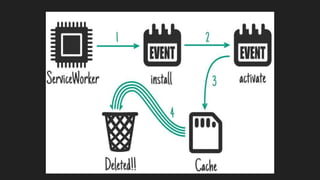
  • #12 Nó không tiêu tốn tài nguyên hệ thống nào. Nó được hoạt động khi có event nào được gọi. Nó còn được gọi khi trình duyệt đã được đóng. Khi sw được đăng ký thì nó sẽ kích hoạt event install, mà có thể tìm nạp và cache những dữ liệu. Nó kiểm soát cache tới mức tệp tin và nó được cập nhật. Khi nó được kích hoạt thì nó bắt đầu kiểm soát các hệ thống và cung cấp các dịch vụ cho user. Lần đầu tiên nó vẫn load từ mạng, sw chỉ hoạt động khi ở lần load thứ 2. Nó hoạt động như thế này : Lần đầu nó sẽ đăng ký và install, sau đó thì nó ở trạng thái tĩnh, không làm gì cả. Khi reload lại trang thì sw được kích hoạt và sẵn sàng xử lý các event Sau khi giải quyết xong các event thì nó chuyển sang trại thái tĩnh và sẵn sàng cho lần nạp tiếp theo. Nếu bạn có sự thay đổi cho sw thì ở lần load sau đó server sẽ update lại sw.
  • #13 Đặt vào trong file index.html hoặc trong file main.js
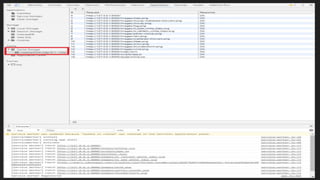
  • #14 Khi sw được install lần đầu thì nó không kiểm soát trang ngay mà phải đợi reload lại trang. Bạn muốn bỏ qua việc này và muốn nó làm việc ngay trong khi đợi thì dùng skipWaiting. Tìm nạp trước các tài nguyên mà site cần và cache lại trong local cache, đảm bảo rằng các tệp nó có thể tải ngay. Sau đó open file cache, sử dụng cache.addAll để lấy tất cả tài nguyên trong filesToCache đã liệt kê lưu vào bộ nhớ cache trình duyệt. Lưu ý : nếu trong số các file cache fail khi tải xuống thì toàn bộ sự kiện sẽ không thành công và sw không được activated. Sau khi add xong thì gọi skipWaiting để sw có quyền kiểm soát ngay. waitUntil để đảm bảo rằng sw không bị doán đoạn.
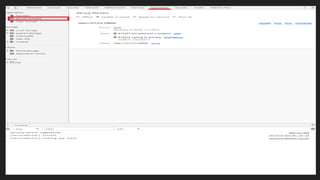
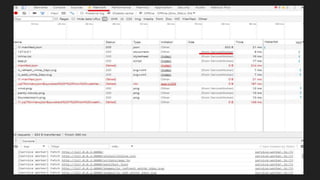
  • #15 Bật f12 để xem Dev Tool, vào tag Application->service worker.
  • #16 Dung lượng cache nó phụ thuộc vào sự cho phép của CPU và RAM.
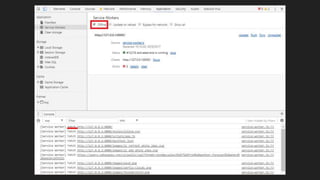
  • #17 Sau khi sw đã cache xong và chuyển sang trạng thái active thì clean up cache cũ. So sánh danh sách cache cũ với danh sách mới, cái nào khác thì nó xóa đi. Sau đó gọi client.claim để chạy lại. Nhưng nếu tới đây bạn tắt mạng và reload lại thì sao ?
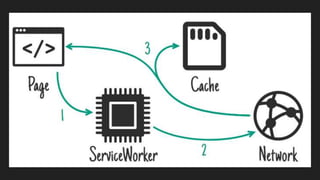
  • #18 Khi nhận được yêu cầu mạng từ site thì sw sẽ được gọi và fetch được kích hoạt. Sau đó kiểm tra xem dữ liệu có được cache chưa, có trả về dữ liệu trong cache, nếu không thì yêu cầu kết nối mạng hoặc trả lại yêu cầu.
  • #22 Load page khi lần đầu load.
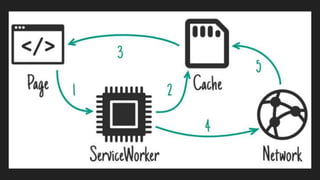
  • #23 Sau khi load site nó sẽ vào trong cache trước và show ra trước sau khi mạng có thì bắt đầu tải các tài nguyên còn lại. Nếu dữ liệu cache nào đã được thay đổi thì thông qua mạng nó sẽ cache lại. Thông thường đối với trường hợp offline thì mình thông báo cho user biết là đang ở trạng thái offline.
  • #40 Có đến 1 tỷ người sử dụng chrome trên mobile. Năm 2014 mới có khoảng 400 triệu người dùng chrome trên mobile. Trung bình mỗi tháng, người dùng chrome trên android ghé thăm 100 trang mỗi tháng. (Nguồn : google developer)