Learn Elixir
Manchester Lambda Lounge, Monday 20 Feb 2017, 7pm
Presented by Chi-chi Ekweozor
@thisischichi
“Elixir is a dynamic, functional language with
Ruby-like syntax that runs on the Erlang virtual
machine. It can be described as the language
for the modern, real time, hyper-connected
world with first class support for concurrency,
fault tolerance and high availability, all courtesy
of its Erlang pedigree.”
• Elixir is a functional language. There are two
things to remember:
Immutable data: any function that transforms
data will return a new copy of it
We can combine functions, and run them in
parallel if we please, using lightweight Elixir
‘processes’
Learn Elixir
• Install Elixir
• What is pattern matching?
• Meet Lists, and Modules
• Meet the Pipe Operator |>
• Resources for learning
Install Elixir
To install Elixir on your computer, follow the
instructions at:
http://elixir-lang.org/install.html
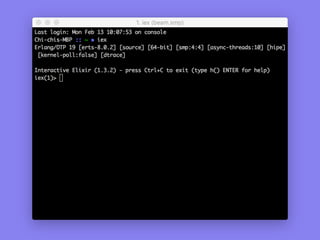
iex - Interactive Elixir
To test your Elixir installation was successful, start
an Elixir session. At your regular shell prompt,
type iex.
Elixir Basics
Learn Elixir
• Install Elixir
• What is pattern matching?
• Meet Lists, and Modules
• Meet the Pipe Operator |>
• Resources for learning
Pattern matching?
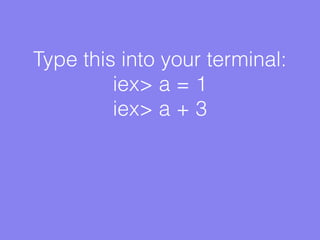
Type this into your terminal:
iex> a = 1
iex> a + 3
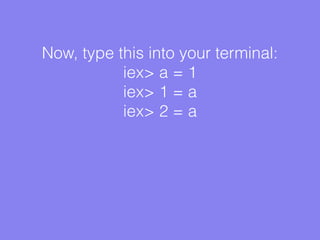
Now, type this into your terminal:
iex> a = 1
iex> 1 = a
iex> 2 = a
Lists, and pattern matching:
iex> list = [ 1, 2, 3 ]
iex> [ a, b, c ] = list
iex> a, iex> b, etc etc
More lists:
iex> list = [ 1, 2, 3 ]
iex> [ a, 2, b ] = list
iex> a, iex> b, etc etc
There’s more to this than might be
immediately apparent:
iex> list = [ 1, 2, 3 ]
iex> [ a, 1, b ] = list
Learn Elixir
• Install Elixir
• What is pattern matching?
• Meet Lists, and Modules
• Meet the Pipe Operator |>
• Resources for learning
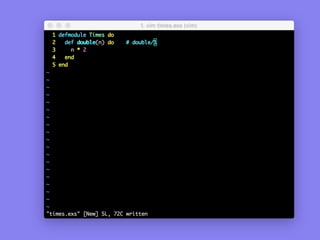
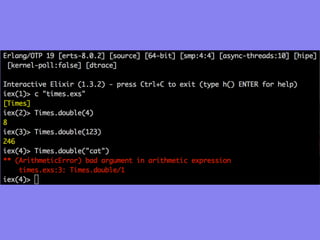
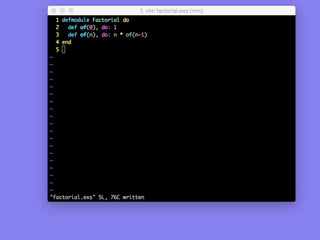
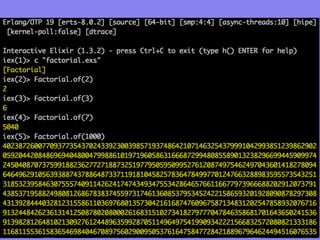
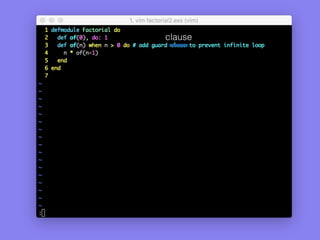
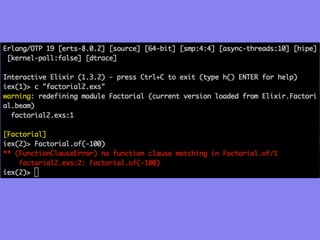
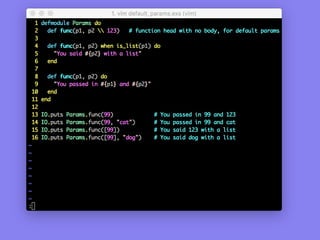
Now meet Modules
clause
Learn Elixir
• Install Elixir
• What is pattern matching?
• Meet Lists, and Modules
• Meet the Pipe Operator |>
• Resources for learning
The Pipe Operator |>
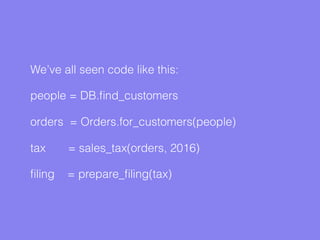
We’ve all seen code like this:
people = DB.find_customers
orders = Orders.for_customers(people)
tax = sales_tax(orders, 2016)
filing = prepare_filing(tax)
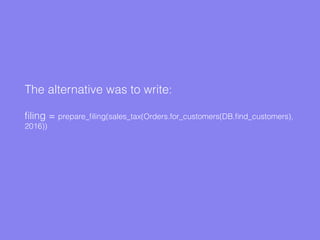
The alternative was to write:
filing = prepare_filing(sales_tax(Orders.for_customers(DB.find_customers),
2016))
Elixir has a better way of writing it…
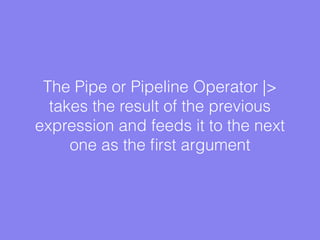
The Pipe or Pipeline Operator |>
takes the result of the previous
expression and feeds it to the next
one as the first argument
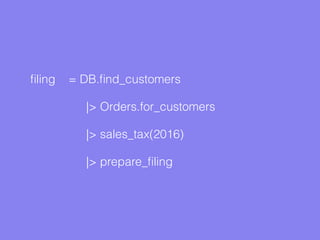
In Elixir, the awkward to read function becomes:
filing = DB.find_customers
|> Orders.for_customers
|> sales_tax(2016)
|> prepare_filing
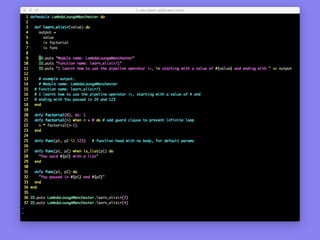
Putting it all together, a |> exercise:
Learn Elixir
• Install Elixir
• What is pattern matching?
• Meet Lists, and Modules
• Meet the Pipe Operator |>
• Resources for learning
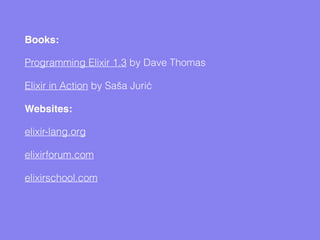
Learning Resources
Books:
Programming Elixir 1.3 by Dave Thomas
Elixir in Action by Saša Jurić
Websites:
elixir-lang.org
elixirforum.com
elixirschool.com

Learn Elixir at Manchester Lambda Lounge

  • 1.
    Learn Elixir Manchester LambdaLounge, Monday 20 Feb 2017, 7pm Presented by Chi-chi Ekweozor @thisischichi
  • 2.
    “Elixir is adynamic, functional language with Ruby-like syntax that runs on the Erlang virtual machine. It can be described as the language for the modern, real time, hyper-connected world with first class support for concurrency, fault tolerance and high availability, all courtesy of its Erlang pedigree.”
  • 3.
    • Elixir isa functional language. There are two things to remember: Immutable data: any function that transforms data will return a new copy of it We can combine functions, and run them in parallel if we please, using lightweight Elixir ‘processes’
  • 4.
    Learn Elixir • InstallElixir • What is pattern matching? • Meet Lists, and Modules • Meet the Pipe Operator |> • Resources for learning
  • 5.
  • 6.
    To install Elixiron your computer, follow the instructions at: http://elixir-lang.org/install.html
  • 7.
    iex - InteractiveElixir To test your Elixir installation was successful, start an Elixir session. At your regular shell prompt, type iex.
  • 8.
  • 9.
    Learn Elixir • InstallElixir • What is pattern matching? • Meet Lists, and Modules • Meet the Pipe Operator |> • Resources for learning
  • 10.
  • 11.
    Type this intoyour terminal: iex> a = 1 iex> a + 3
  • 12.
    Now, type thisinto your terminal: iex> a = 1 iex> 1 = a iex> 2 = a
  • 13.
    Lists, and patternmatching: iex> list = [ 1, 2, 3 ] iex> [ a, b, c ] = list iex> a, iex> b, etc etc
  • 14.
    More lists: iex> list= [ 1, 2, 3 ] iex> [ a, 2, b ] = list iex> a, iex> b, etc etc
  • 15.
    There’s more tothis than might be immediately apparent: iex> list = [ 1, 2, 3 ] iex> [ a, 1, b ] = list
  • 16.
    Learn Elixir • InstallElixir • What is pattern matching? • Meet Lists, and Modules • Meet the Pipe Operator |> • Resources for learning
  • 17.
  • 22.
  • 25.
    Learn Elixir • InstallElixir • What is pattern matching? • Meet Lists, and Modules • Meet the Pipe Operator |> • Resources for learning
  • 26.
  • 27.
    We’ve all seencode like this: people = DB.find_customers orders = Orders.for_customers(people) tax = sales_tax(orders, 2016) filing = prepare_filing(tax)
  • 28.
    The alternative wasto write: filing = prepare_filing(sales_tax(Orders.for_customers(DB.find_customers), 2016))
  • 29.
    Elixir has abetter way of writing it…
  • 30.
    The Pipe orPipeline Operator |> takes the result of the previous expression and feeds it to the next one as the first argument
  • 31.
    In Elixir, theawkward to read function becomes:
  • 32.
    filing = DB.find_customers |>Orders.for_customers |> sales_tax(2016) |> prepare_filing
  • 33.
    Putting it alltogether, a |> exercise:
  • 35.
    Learn Elixir • InstallElixir • What is pattern matching? • Meet Lists, and Modules • Meet the Pipe Operator |> • Resources for learning
  • 36.
  • 37.
    Books: Programming Elixir 1.3by Dave Thomas Elixir in Action by Saša Jurić Websites: elixir-lang.org elixirforum.com elixirschool.com