Continuous Delivery
with Perforce Helix
Sven Erik Knop
Senior Technical Specialist
2
Agenda
 Overview of Continuous Delivery
 Best practices for success
 Common Tools and Technologies
 Demo
3
Can’t we just do what we currently do only
faster?
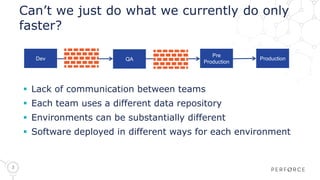
 Lack of communication between teams
 Each team uses a different data repository
 Environments can be substantially different
 Software deployed in different ways for each environment
Dev QA
Pre
Production
Production
4
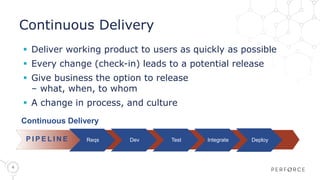
Continuous Delivery
 Deliver working product to users as quickly as possible
 Every change (check-in) leads to a potential release
 Give business the option to release
– what, when, to whom
 A change in process, and culture
Continuous Delivery
4
P I P E L I N E Reqs Dev Test Integrate Deploy
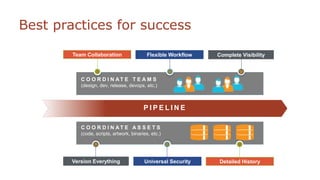
C O O R D I N AT E A S S E T S
(code, scripts, artwork, binaries, etc.)
C O O R D I N AT E T E A M S
(design, dev, release, devops, etc.)
P I P E L I N E
Best practices for success
Team Collaboration Flexible Workflow Complete Visibility
Detailed HistoryUniversal SecurityVersion Everything
6
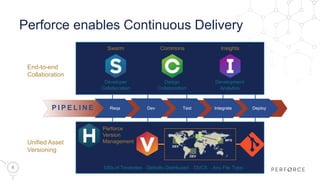
Perforce enables Continuous Delivery
Developer
Collaboration
Swarm
Design
Collaboration
Commons
Development
Analytics
Insights
Perforce
Version
Management
100s of Terabytes Globally Distributed DVCS Any File Type
DEV
DEV
HQ
MFG
End-to-end
Collaboration
Unified Asset
Versioning
P I P E L I N E Reqs Dev Test Integrate Deploy
7
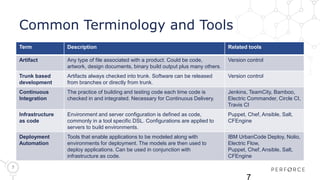
Common Terminology and Tools
Term Description Related tools
Artifact Any type of file associated with a product. Could be code,
artwork, design documents, binary build output plus many others.
Version control
Trunk based
development
Artifacts always checked into trunk. Software can be released
from branches or directly from trunk.
Version control
Continuous
Integration
The practice of building and testing code each time code is
checked in and integrated. Necessary for Continuous Delivery.
Jenkins, TeamCity, Bamboo,
Electric Commander, Circle CI,
Travis CI
Infrastructure
as code
Environment and server configuration is defined as code,
commonly in a tool specific DSL. Configurations are applied to
servers to build environments.
Puppet, Chef, Ansible, Salt,
CFEngine
Deployment
Automation
Tools that enable applications to be modeled along with
environments for deployment. The models are then used to
deploy applications. Can be used in conjunction with
infrastructure as code.
IBM UrbanCode Deploy, Nolio,
Electric Flow,
Puppet, Chef, Ansible, Salt,
CFEngine
7
8
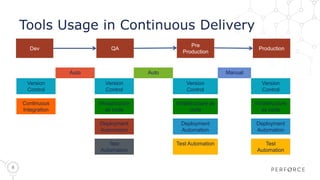
Tools Usage in Continuous Delivery
Dev QA
Pre
Production
Production
Auto Auto Manual
Version
Control
Version
Control
Version
Control
Version
Control
Continuous
Integration
Infrastructure
as code
Infrastructure as
code
Infrastructure
as code
Deployment
Automation
Deployment
Automation
Deployment
Automation
Test
Automation
Test Automation Test
Automation
Continuous Delivery
Demo
9
10
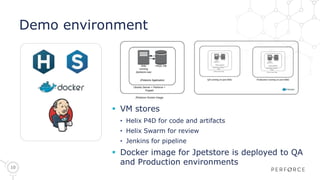
Demo environment
 VM stores
• Helix P4D for code and artifacts
• Helix Swarm for review
• Jenkins for pipeline
 Docker image for Jpetstore is deployed to QA
and Production environments
11
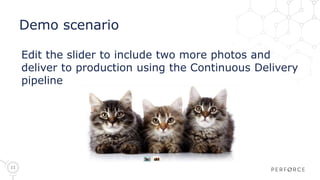
Demo scenario
Edit the slider to include two more photos and
deliver to production using the Continuous Delivery
pipeline
12
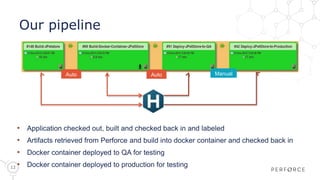
Our pipeline
• Application checked out, built and checked back in and labeled
• Artifacts retrieved from Perforce and build into docker container and checked back in
• Docker container deployed to QA for testing
• Docker container deployed to production for testing
Auto Auto Manual
13
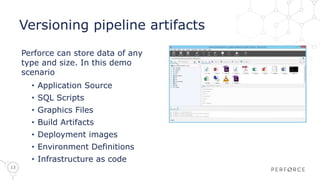
Versioning pipeline artifacts
Perforce can store data of any
type and size. In this demo
scenario
• Application Source
• SQL Scripts
• Graphics Files
• Build Artifacts
• Deployment images
• Environment Definitions
• Infrastructure as code
14
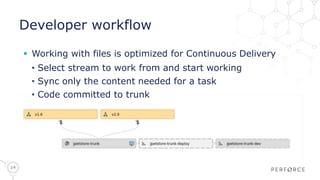
Developer workflow
 Working with files is optimized for Continuous Delivery
• Select stream to work from and start working
• Sync only the content needed for a task
• Code committed to trunk
15
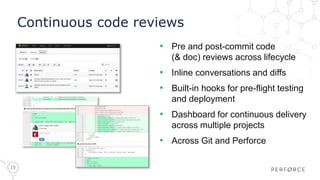
Continuous code reviews
• Pre and post-commit code
(& doc) reviews across lifecycle
• Inline conversations and diffs
• Built-in hooks for pre-flight testing
and deployment
• Dashboard for continuous delivery
across multiple projects
• Across Git and Perforce
16
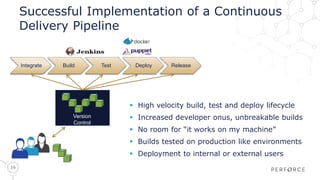
Successful Implementation of a Continuous
Delivery Pipeline
 High velocity build, test and deploy lifecycle
 Increased developer onus, unbreakable builds
 No room for “it works on my machine”
 Builds tested on production like environments
 Deployment to internal or external users
Integrate Build Test Deploy Release
Version
Control
17
Three Key Habits for successful
Continuous Delivery
 Collaboration
 Visibility
 Version Everything

Perforce on Tour 2015 - Optimising the Developer Pipeline: Deliver Faster & Better

  • 1.
    Continuous Delivery with PerforceHelix Sven Erik Knop Senior Technical Specialist
  • 2.
    2 Agenda  Overview ofContinuous Delivery  Best practices for success  Common Tools and Technologies  Demo
  • 3.
    3 Can’t we justdo what we currently do only faster?  Lack of communication between teams  Each team uses a different data repository  Environments can be substantially different  Software deployed in different ways for each environment Dev QA Pre Production Production
  • 4.
    4 Continuous Delivery  Deliverworking product to users as quickly as possible  Every change (check-in) leads to a potential release  Give business the option to release – what, when, to whom  A change in process, and culture Continuous Delivery 4 P I P E L I N E Reqs Dev Test Integrate Deploy
  • 5.
    C O OR D I N AT E A S S E T S (code, scripts, artwork, binaries, etc.) C O O R D I N AT E T E A M S (design, dev, release, devops, etc.) P I P E L I N E Best practices for success Team Collaboration Flexible Workflow Complete Visibility Detailed HistoryUniversal SecurityVersion Everything
  • 6.
    6 Perforce enables ContinuousDelivery Developer Collaboration Swarm Design Collaboration Commons Development Analytics Insights Perforce Version Management 100s of Terabytes Globally Distributed DVCS Any File Type DEV DEV HQ MFG End-to-end Collaboration Unified Asset Versioning P I P E L I N E Reqs Dev Test Integrate Deploy
  • 7.
    7 Common Terminology andTools Term Description Related tools Artifact Any type of file associated with a product. Could be code, artwork, design documents, binary build output plus many others. Version control Trunk based development Artifacts always checked into trunk. Software can be released from branches or directly from trunk. Version control Continuous Integration The practice of building and testing code each time code is checked in and integrated. Necessary for Continuous Delivery. Jenkins, TeamCity, Bamboo, Electric Commander, Circle CI, Travis CI Infrastructure as code Environment and server configuration is defined as code, commonly in a tool specific DSL. Configurations are applied to servers to build environments. Puppet, Chef, Ansible, Salt, CFEngine Deployment Automation Tools that enable applications to be modeled along with environments for deployment. The models are then used to deploy applications. Can be used in conjunction with infrastructure as code. IBM UrbanCode Deploy, Nolio, Electric Flow, Puppet, Chef, Ansible, Salt, CFEngine 7
  • 8.
    8 Tools Usage inContinuous Delivery Dev QA Pre Production Production Auto Auto Manual Version Control Version Control Version Control Version Control Continuous Integration Infrastructure as code Infrastructure as code Infrastructure as code Deployment Automation Deployment Automation Deployment Automation Test Automation Test Automation Test Automation
  • 9.
  • 10.
    10 Demo environment  VMstores • Helix P4D for code and artifacts • Helix Swarm for review • Jenkins for pipeline  Docker image for Jpetstore is deployed to QA and Production environments
  • 11.
    11 Demo scenario Edit theslider to include two more photos and deliver to production using the Continuous Delivery pipeline
  • 12.
    12 Our pipeline • Applicationchecked out, built and checked back in and labeled • Artifacts retrieved from Perforce and build into docker container and checked back in • Docker container deployed to QA for testing • Docker container deployed to production for testing Auto Auto Manual
  • 13.
    13 Versioning pipeline artifacts Perforcecan store data of any type and size. In this demo scenario • Application Source • SQL Scripts • Graphics Files • Build Artifacts • Deployment images • Environment Definitions • Infrastructure as code
  • 14.
    14 Developer workflow  Workingwith files is optimized for Continuous Delivery • Select stream to work from and start working • Sync only the content needed for a task • Code committed to trunk
  • 15.
    15 Continuous code reviews •Pre and post-commit code (& doc) reviews across lifecycle • Inline conversations and diffs • Built-in hooks for pre-flight testing and deployment • Dashboard for continuous delivery across multiple projects • Across Git and Perforce
  • 16.
    16 Successful Implementation ofa Continuous Delivery Pipeline  High velocity build, test and deploy lifecycle  Increased developer onus, unbreakable builds  No room for “it works on my machine”  Builds tested on production like environments  Deployment to internal or external users Integrate Build Test Deploy Release Version Control
  • 17.
    17 Three Key Habitsfor successful Continuous Delivery  Collaboration  Visibility  Version Everything

Editor's Notes

  • #3 I’ll go over the basics of continuous delivery , cover best practices and some common tools and technologies before showing you how to use some of these tools with the perforce platform in a demo.
  • #4 Agile software development solved some problems but caused others. Many smaller but more frequent releases were created but other areas of business were unable to keep up with the releases. Operations staff struggled in particular due to needing having opposing goals to development. Development tasked with creating change, operations tasked with stability. Lack of trust, tooling and repeatability make it impossible to continue down this path.
  • #5 In order to achieve continuous delivery of software all teams involved in creating and releasing software to customers need to work in an agile manner. Repeatable processes are key to success. This involves both culture and process change and affects all teams involved. If every change could lead to a potential release there needs to be a high level of trust between all parties involves. All teams need to have a common goal of getting quality products to users faster.
  • #6 There is no “one true way” to do continuous delivery, but there are some best practices that should be followed. Teams need to be collaborative. Responsibility of developers and QA does not end until after software is successfully running in production. There needs to be a flexible workflow, tools and processes vary, flexibility without sacrificing repeatability is key. Due to a potentially huge increase in the number of product releases it is important to know what work is in progress and how that work relates to requirements and code. Best practices dictate versioning everything. Anything that has been deployed to production should be able to be recreated in the future if needed. This can prove challenging in many environments. Delivering quality products quickly relies on extensive collaboration. This requires granting access to intellectual property to a wider range of people which maintaining control and auditability. It is critically important that in the event that something goes wrong, and things do go wrong from time to time, that there is detailed history of what has happened to your products. When was something updated? Who updated it? Why was the change made? Who accessed a file?
  • #7 The perforce platform not only keeps your intellectual property secure but also enables end-to-end collaboration and visibility without having to follow a predefined workflow to achieve it. This is a solid foundation for building your continuous delivery solution.
  • #8 When researching about continuous delivery you will hear some common terms, here are some of the terms and the tools they are related to. You’ll hear several of these terms mentioned during the demo today.
  • #9 In a continuous delivery pipeline there is a lot of common tooling between stages. For example, deployments should be done consistently across all environments so the same tools and scripts should be used in all environments. A key trait of successful continuous delivery initiatives is the use of version control by operations teams. If it isn’t in version control then it shouldn’t be in production. By following best practices, versioning everything and using common tools and technologies you will be able to create a robust, repeatable process without sacrificing security of control. Everyone wins.
  • #10 I’m now going to give you an overview of what we will show in the demo.
  • #11 We have used some commonly used technologies as part of our stack. Using Puppet and Docker to define our infrastructure as code in conjunction with the Perforce platform made producing easily reproducible environments simple.
  • #12 I’m going to make a change to our web application. I’m going to change the side menu background color from yellow to white.
  • #13 The continuous delivery pipeline is modeled in Jenkins using the build pipeline plugin. This approach is a common approach but other solutions can be used with the perforce platform to achieve the same results. Our pipeline uses both automated and manual transitions to move between stages.
  • #14 All artifacts used during the process of creating, building and deploying the JPetStore application are stored in version control.
  • #15 The demo uses trunk based development which is an approach commonly used with continuous delivery. When using trunk based development there is an emphasis on frequent, small checkins that are high quality. Don’t break trunk, if you do fixing it is your first priority!
  • #16 In order to help ensure quality code is checked into trunk we’ll show how code reviews can easily be added to your development process. Code reviews can be applied to many types of content and can also be used for things like test automation scripts, infrastructure as code and so on.
  • #17 While there are many discussions ongoing on the best models for implementing CD, here is what we see in our most successful customers – Versioning is used for all managing iterations of all aspects of the product, including code and content Every change is recorded, even if it is thought of as being irrelevant by the individual Automation is used at all stages to build, test, and deploy Managers have visibility into all aspects of development, developers adopt an open culture of collaboration Having a single hub of information makes delivery possible