
@mlteal | #WCPHX | 2019
Develop With Docker
Containers for everyone!
@mlteal | #WCPHX | 2019
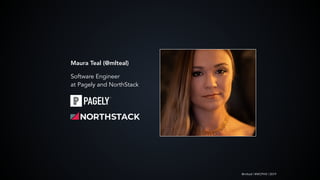
Maura Teal (@mlteal)
Software Engineer
at Pagely and NorthStack
@mlteal | #WCPHX | 2019
Docker Docker Docker…
@mlteal | #WCPHX | 2019
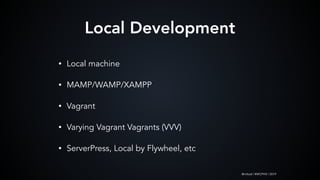
Local Development
• Local machine
• MAMP/WAMP/XAMPP
• Vagrant
• Varying Vagrant Vagrants (VVV)
• ServerPress, Local by Flywheel, etc
@mlteal | #WCPHX | 2019
What & Why?
1. https://aws.amazon.com/docker/
2. https://www.docker.com/why-docker
• “Software platform that allows you to build, test,
and deploy applications quickly”
• [Relatively] simple yet powerful tooling
• Performance
Docker Docker Docker…
@mlteal | #WCPHX | 2019
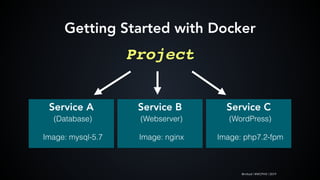
Project
Service A
(Database)
Image: mysql-5.7
Getting Started with Docker
Service B
(Webserver)
Image: nginx
Service C
(WordPress)
Image: php7.2-fpm
@mlteal | #WCPHX | 2019
Why Docker
• Consistency
• Consistency
• Consistency
@mlteal | #WCPHX | 2019
Required
• Docker for [your OS]
• Terminal
Getting Started with Docker
Optional
• Homebrew (MacOS/Linux)
• Docker Compose
@mlteal | #WCPHX | 2019
DockerHub
Images are published to
DockerHub and are
downloaded and used as
a quick-start for projects.
Starting with an Image
@mlteal | #WCPHX | 2019
Starting with an Image
@mlteal | #WCPHX | 2019
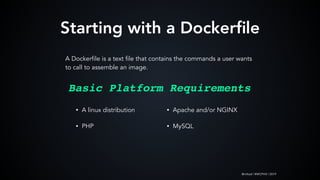
Starting with a Dockerfile
A Dockerfile is a text file that contains the commands a user wants
to call to assemble an image.
• A linux distribution
• PHP
Basic Platform Requirements
• Apache and/or NGINX
• MySQL
@mlteal | #WCPHX | 2019
Starting with a Dockerfile
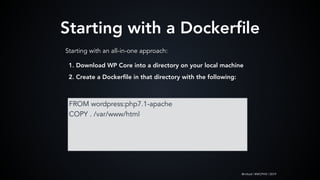
FROM wordpress:php7.1-apache
COPY . /var/www/html
Starting with an all-in-one approach:
1. Download WP Core into a directory on your local machine
2. Create a Dockerfile in that directory with the following:
@mlteal | #WCPHX | 2019
Starting with a Dockerfile
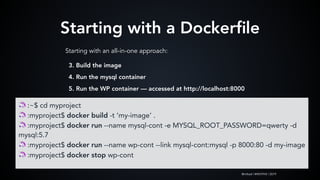
Starting with an all-in-one approach:
🦄 :~$ cd myproject
🦄 :myproject$ docker build -t ‘my-image’ .
🦄 :myproject$ docker run --name mysql-cont -e MYSQL_ROOT_PASSWORD=qwerty -d
mysql:5.7
🦄 :myproject$ docker run --name wp-cont --link mysql-cont:mysql -p 8000:80 -d my-image
🦄 :myproject$ docker stop wp-cont
3. Build the image
4. Run the mysql container
5. Run the WP container — accessed at http://localhost:8000
@mlteal | #WCPHX | 2019
Important Commands
🦄 :~$ docker image ls
🦄 :~$ docker inspect [IMAGE TAG or ID]
🦄 :~$ docker stop [CONTAINER NAME]
🦄 :~$ docker ps # lists ALL containers and their statuses
🦄 :~$ docker ps | grep [Container ID OR Name (can be partial)]
🦄 :~$ docker exec -ti [Container ID or Name] bash
Find docs and all commands at
https://docs.docker.com/engine/reference/commandline/
@mlteal | #WCPHX | 2019
A fork in the road
@mlteal | #WCPHX | 2019
Enter: Docker Compose
@mlteal | #WCPHX | 2019
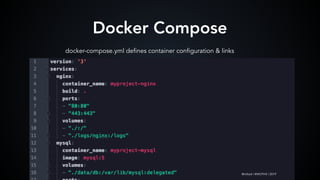
Docker Compose
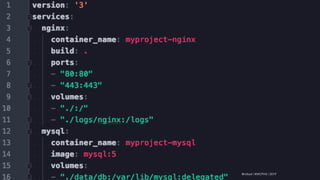
docker-compose.yml defines container configuration & links
@mlteal | #WCPHX | 2019
@mlteal | #WCPHX | 2019@mlteal | #WCPHX | 2019
@mlteal | #WCPHX | 2019
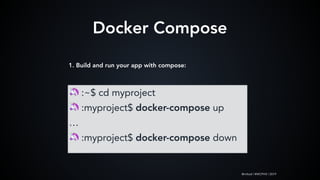
Docker Compose
🦄 :~$ cd myproject
🦄 :myproject$ docker-compose up
…
🦄 :myproject$ docker-compose down
1. Build and run your app with compose:
@mlteal | #WCPHX | 2019
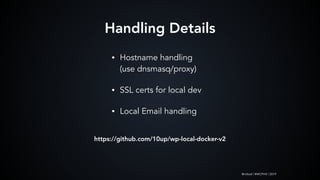
• Hostname handling

(use dnsmasq/proxy)
• SSL certs for local dev
• Local Email handling
Handling Details
https://github.com/10up/wp-local-docker-v2
@mlteal | #WCPHX | 2019
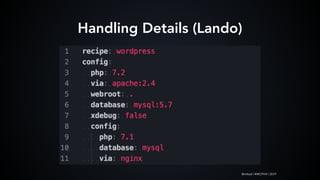
Handling Details (Lando)
@mlteal | #WCPHX | 2019
• DockerHub

https://hub.docker.com/
• Docker Compose Docs

https://docs.docker.com/compose/
• Lando

https://docs.devwithlando.io/
Moar Resources
@mlteal | #WCPHX | 2019
Maura Teal
@mlteal

Dev with Docker WCPHX 2019

  • 1.
    @mlteal | #WCPHX| 2019 Develop With Docker Containers for everyone!
  • 2.
    @mlteal | #WCPHX| 2019 Maura Teal (@mlteal) Software Engineer at Pagely and NorthStack
  • 3.
    @mlteal | #WCPHX| 2019 Docker Docker Docker…
  • 4.
    @mlteal | #WCPHX| 2019 Local Development • Local machine • MAMP/WAMP/XAMPP • Vagrant • Varying Vagrant Vagrants (VVV) • ServerPress, Local by Flywheel, etc
  • 5.
    @mlteal | #WCPHX| 2019 What & Why? 1. https://aws.amazon.com/docker/ 2. https://www.docker.com/why-docker • “Software platform that allows you to build, test, and deploy applications quickly” • [Relatively] simple yet powerful tooling • Performance Docker Docker Docker…
  • 6.
    @mlteal | #WCPHX| 2019 Project Service A (Database) Image: mysql-5.7 Getting Started with Docker Service B (Webserver) Image: nginx Service C (WordPress) Image: php7.2-fpm
  • 7.
    @mlteal | #WCPHX| 2019 Why Docker • Consistency • Consistency • Consistency
  • 8.
    @mlteal | #WCPHX| 2019 Required • Docker for [your OS] • Terminal Getting Started with Docker Optional • Homebrew (MacOS/Linux) • Docker Compose
  • 9.
    @mlteal | #WCPHX| 2019 DockerHub Images are published to DockerHub and are downloaded and used as a quick-start for projects. Starting with an Image
  • 10.
    @mlteal | #WCPHX| 2019 Starting with an Image
  • 11.
    @mlteal | #WCPHX| 2019 Starting with a Dockerfile A Dockerfile is a text file that contains the commands a user wants to call to assemble an image. • A linux distribution • PHP Basic Platform Requirements • Apache and/or NGINX • MySQL
  • 12.
    @mlteal | #WCPHX| 2019 Starting with a Dockerfile FROM wordpress:php7.1-apache COPY . /var/www/html Starting with an all-in-one approach: 1. Download WP Core into a directory on your local machine 2. Create a Dockerfile in that directory with the following:
  • 13.
    @mlteal | #WCPHX| 2019 Starting with a Dockerfile Starting with an all-in-one approach: 🦄 :~$ cd myproject 🦄 :myproject$ docker build -t ‘my-image’ . 🦄 :myproject$ docker run --name mysql-cont -e MYSQL_ROOT_PASSWORD=qwerty -d mysql:5.7 🦄 :myproject$ docker run --name wp-cont --link mysql-cont:mysql -p 8000:80 -d my-image 🦄 :myproject$ docker stop wp-cont 3. Build the image 4. Run the mysql container 5. Run the WP container — accessed at http://localhost:8000
  • 14.
    @mlteal | #WCPHX| 2019 Important Commands 🦄 :~$ docker image ls 🦄 :~$ docker inspect [IMAGE TAG or ID] 🦄 :~$ docker stop [CONTAINER NAME] 🦄 :~$ docker ps # lists ALL containers and their statuses 🦄 :~$ docker ps | grep [Container ID OR Name (can be partial)] 🦄 :~$ docker exec -ti [Container ID or Name] bash Find docs and all commands at https://docs.docker.com/engine/reference/commandline/
  • 15.
    @mlteal | #WCPHX| 2019 A fork in the road
  • 16.
    @mlteal | #WCPHX| 2019 Enter: Docker Compose
  • 17.
    @mlteal | #WCPHX| 2019 Docker Compose docker-compose.yml defines container configuration & links @mlteal | #WCPHX | 2019
  • 18.
    @mlteal | #WCPHX| 2019@mlteal | #WCPHX | 2019
  • 19.
    @mlteal | #WCPHX| 2019 Docker Compose 🦄 :~$ cd myproject 🦄 :myproject$ docker-compose up … 🦄 :myproject$ docker-compose down 1. Build and run your app with compose:
  • 20.
  • 21.
    @mlteal | #WCPHX| 2019 • Hostname handling
 (use dnsmasq/proxy) • SSL certs for local dev • Local Email handling Handling Details https://github.com/10up/wp-local-docker-v2
  • 22.
    @mlteal | #WCPHX| 2019 Handling Details (Lando)
  • 23.
    @mlteal | #WCPHX| 2019 • DockerHub
 https://hub.docker.com/ • Docker Compose Docs
 https://docs.docker.com/compose/ • Lando
 https://docs.devwithlando.io/ Moar Resources
  • 24.
  • 25.
    @mlteal | #WCPHX| 2019 Maura Teal @mlteal