Introduction to
GitHub Actions
Presented By: Aamir Shahab
Knolx Etiquette
1. Respect Knolx session timings, you are requested not to join sessions
after a 5 minutes threshold post the session start time.
2. Make sure to submit a constructive feedback for all sessions as it is very
helpful for the presenter.
3. Keep your mobile devices in silent mode, feel free to move out of session
in case you need to attend an urgent call.
4. Avoid unwanted chit chat during the session.
Agenda
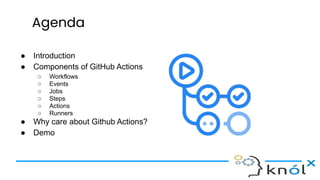
● Introduction
● Components of GitHub Actions
○ Workflows
○ Events
○ Jobs
○ Steps
○ Actions
○ Runners
● Why care about Github Actions?
● Demo
Introduction
● GitHub Actions help you automate tasks within your software development
life cycle.
● GitHub Actions are event-driven, meaning that you can run a series of
commands after a specified event has occurred.
● For example, every time someone creates a pull request for a repository,
you can automatically run a command that executes a software testing
script.
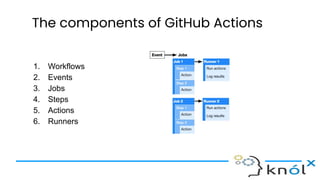
The components of GitHub Actions
1. Workflows
2. Events
3. Jobs
4. Steps
5. Actions
6. Runners
What are Workflows?
1. The workflow is an automated procedure that you add to your repository.
2. They are made up of one or more jobs and can be scheduled or triggered
by an event.
3. It can be used to build, test, package, release, or deploy a project on
GitHub.
4. Workflows can be created inside the .github/workflows directory by
adding a .yml workflow file.
For example, add .github/workflows/continuous-deployment.yml to your project.
What are Events?
1. An event is a specific activity that triggers a workflow. For example, activity
can originate from GitHub when someone pushes a commit to a repository
or when an issue or pull request is created.
2. You can also use the repository dispatch webhook to trigger a workflow
when an external event occurs.
What are Jobs?
1. A job is a set of steps that execute on the same runner.
2. By default, a workflow with multiple jobs will run those jobs in parallel. You
can also configure a workflow to run jobs sequentially.
3. For example, a workflow can have two sequential jobs that build and test
code, where the test job is dependent on the status of the build job. If the
build job fails, the test job will not run.
What are Steps?
1. A step is an individual task that can run commands in a job.
2. A step can be either an action or a shell command.
3. Each step in a job executes on the same runner, allowing the actions in
that job to share data with each other.
What are Actions?
1. Actions are standalone commands that are combined into steps to create a
job.
2. Actions are the smallest portable building block of a workflow.
3. You can create your own actions, or use actions created by the GitHub
community. To use an action in a workflow, you must include it as a step.
What are Runners?
1. A runner is a server that has the GitHub Actions runner application
installed.
2. You can use a runner hosted by GitHub, or you can host your own.
3. A runner listens for available jobs, runs one job at a time, and reports the
progress, logs, and results back to GitHub.
Types of Runners
1. GitHub-hosted runners are based on Ubuntu Linux, Microsoft Windows,
and macOS, and each job in a workflow runs in a fresh virtual
environment. (GitHub-hosted runner)
2. If you need a different operating system or require a specific hardware
configuration, you can host your own runners. (Self-hosted runner)
Supported runners and hardware resources
Hardware specification for Windows and Linux virtual machines:
● 2-core CPU
● 7 GB of RAM memory
● 14 GB of SSD disk space
Hardware specification for macOS virtual machines:
● 3-core CPU
● 14 GB of RAM memory
● 14 GB of SSD disk space
Why care about Github Actions?
● Build into Github
○ Github Actions is fully integrated into Github and therefore doesn't require and external
site.
● Multi-container testing
○ Actions allow you to test multi-container setups by adding support for Docker and
docker-compose files to your workflow.
● Multiple CI templates
○ Github provides multiple templates for all kinds of CI configurations which make it
extremely easy to get started.
● Great free plan
○ Actions are completely free for every open-source repository and include 2000 free build
minutes per month for all your private repositories. If that is not enough for your needs you
can pick another plan or go the self-hosted route.
Demo
Let’s see things in action…..
Thank you!

Introduction to GitHub Actions

  • 1.
  • 2.
    Knolx Etiquette 1. RespectKnolx session timings, you are requested not to join sessions after a 5 minutes threshold post the session start time. 2. Make sure to submit a constructive feedback for all sessions as it is very helpful for the presenter. 3. Keep your mobile devices in silent mode, feel free to move out of session in case you need to attend an urgent call. 4. Avoid unwanted chit chat during the session.
  • 3.
    Agenda ● Introduction ● Componentsof GitHub Actions ○ Workflows ○ Events ○ Jobs ○ Steps ○ Actions ○ Runners ● Why care about Github Actions? ● Demo
  • 4.
    Introduction ● GitHub Actionshelp you automate tasks within your software development life cycle. ● GitHub Actions are event-driven, meaning that you can run a series of commands after a specified event has occurred. ● For example, every time someone creates a pull request for a repository, you can automatically run a command that executes a software testing script.
  • 5.
    The components ofGitHub Actions 1. Workflows 2. Events 3. Jobs 4. Steps 5. Actions 6. Runners
  • 6.
    What are Workflows? 1.The workflow is an automated procedure that you add to your repository. 2. They are made up of one or more jobs and can be scheduled or triggered by an event. 3. It can be used to build, test, package, release, or deploy a project on GitHub. 4. Workflows can be created inside the .github/workflows directory by adding a .yml workflow file. For example, add .github/workflows/continuous-deployment.yml to your project.
  • 7.
    What are Events? 1.An event is a specific activity that triggers a workflow. For example, activity can originate from GitHub when someone pushes a commit to a repository or when an issue or pull request is created. 2. You can also use the repository dispatch webhook to trigger a workflow when an external event occurs.
  • 8.
    What are Jobs? 1.A job is a set of steps that execute on the same runner. 2. By default, a workflow with multiple jobs will run those jobs in parallel. You can also configure a workflow to run jobs sequentially. 3. For example, a workflow can have two sequential jobs that build and test code, where the test job is dependent on the status of the build job. If the build job fails, the test job will not run.
  • 9.
    What are Steps? 1.A step is an individual task that can run commands in a job. 2. A step can be either an action or a shell command. 3. Each step in a job executes on the same runner, allowing the actions in that job to share data with each other.
  • 10.
    What are Actions? 1.Actions are standalone commands that are combined into steps to create a job. 2. Actions are the smallest portable building block of a workflow. 3. You can create your own actions, or use actions created by the GitHub community. To use an action in a workflow, you must include it as a step.
  • 11.
    What are Runners? 1.A runner is a server that has the GitHub Actions runner application installed. 2. You can use a runner hosted by GitHub, or you can host your own. 3. A runner listens for available jobs, runs one job at a time, and reports the progress, logs, and results back to GitHub.
  • 12.
    Types of Runners 1.GitHub-hosted runners are based on Ubuntu Linux, Microsoft Windows, and macOS, and each job in a workflow runs in a fresh virtual environment. (GitHub-hosted runner) 2. If you need a different operating system or require a specific hardware configuration, you can host your own runners. (Self-hosted runner)
  • 13.
    Supported runners andhardware resources Hardware specification for Windows and Linux virtual machines: ● 2-core CPU ● 7 GB of RAM memory ● 14 GB of SSD disk space Hardware specification for macOS virtual machines: ● 3-core CPU ● 14 GB of RAM memory ● 14 GB of SSD disk space
  • 14.
    Why care aboutGithub Actions? ● Build into Github ○ Github Actions is fully integrated into Github and therefore doesn't require and external site. ● Multi-container testing ○ Actions allow you to test multi-container setups by adding support for Docker and docker-compose files to your workflow. ● Multiple CI templates ○ Github provides multiple templates for all kinds of CI configurations which make it extremely easy to get started. ● Great free plan ○ Actions are completely free for every open-source repository and include 2000 free build minutes per month for all your private repositories. If that is not enough for your needs you can pick another plan or go the self-hosted route.
  • 15.
  • 16.