Alexa Skills Kit
を使って自作の
Skillを作る
JAWS-UG IoT専門支部 IoTサロン 2016-09
@sparkgene
市川 純
好きなサービス:
Route 53、Lambda、AWS IoT
Alexa Skills KitはAPI、ツール、ドキュメント、サンプルコードを
含むSkillの開発を簡単に、速くできるコレクションのことです。
Skillの種類
▸Custom Skills
▸Smart Home Skills
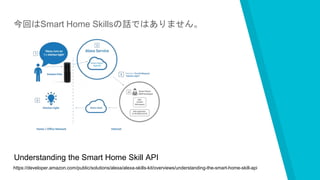
今回はSmart Home Skillsの話ではありません。
https://developer.amazon.com/public/solutions/alexa/alexa-skills-kit/overviews/understanding-the-smart-home-skill-api
Understanding the Smart Home Skill API
Demo動画
https://youtu.be/p5X-GjcJdiU
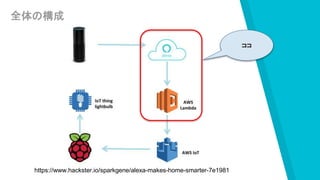
全体の構成
ココ
https://www.hackster.io/sparkgene/alexa-makes-home-smarter-7e1981
照明を操作するCustom Skillsを作る
このSkillは以下の機能を持っています
・照明のOn / Off
・ファンをOn / Off
・ファンの速度を調整
開発の事前準備
Skillの開発には以下のアカウントが必要
▸Amazon.comのアカウント
https://www.amazon.com/
▸Amazonのデベロッパーアカウント
https://developer.amazon.com/
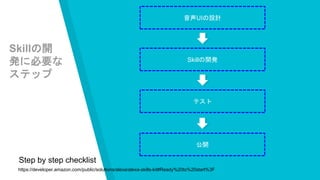
Skillの開発に必要な
ステップ
Skillの開
発に必要な
ステップ
音声UIの設計
Skillの開発
テスト
公開
https://developer.amazon.com/public/solutions/alexa/alexa-skills-kit#Ready%20to%20start%3F
Step by step checklist
音声UIの設計
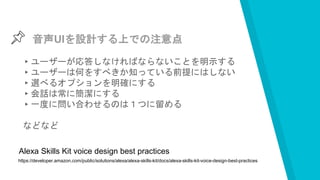
音声UIを設計する上での注意点
▸ユーザーが応答しなければならないことを明示する
▸ユーザーは何をすべきか知っている前提にはしない
▸選べるオプションを明確にする
▸会話は常に簡潔にする
▸一度に問い合わせるのは1つに留める
などなど
https://developer.amazon.com/public/solutions/alexa/alexa-skills-kit/docs/alexa-skills-kit-voice-design-best-practices
Alexa Skills Kit voice design best practices
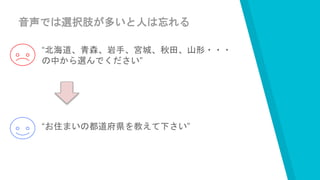
音声では選択肢が多いと人は忘れる
“北海道、青森、岩手、宮城、秋田、山形・・・
の中から選んでください”
“お住まいの都道府県を教えて下さい”
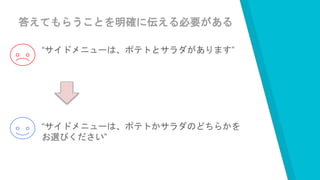
答えてもらうことを明確に伝える必要がある
“サイドメニューは、ポテトとサラダがあります”
“サイドメニューは、ポテトかサラダのどちらかを
お選びください”
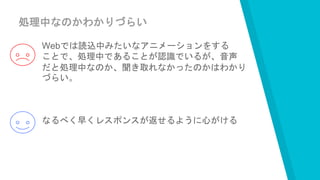
処理中なのかわかりづらい
Webでは読込中みたいなアニメーションをする
ことで、処理中であることが認識でいるが、音声
だと処理中なのか、聞き取れなかったのかはわかり
づらい。
なるべく早くレスポンスが返せるように心がける
“WebやアプリのUIと音声UIは違うの
で、best practiceを参考に音声に
合った設計を
https://developer.amazon.com/public/solutions/alexa/alexa-skills-kit/docs/alexa-skills-kit-voice-design-best-practices
Alexa Skills Kit voice design best practices
音声UIの設計
▸音声I/Fの定義
▸発話(Utterances)のサンプル定義
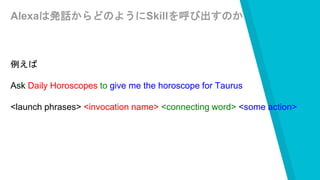
Alexaは発話からどのようにSkillを呼び出すのか
例えば
Ask Daily Horoscopes to give me the horoscope for Taurus
<launch phrases> <invocation name> <connecting word> <some action>
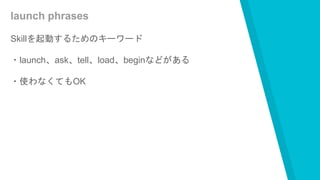
launch phrases
Skillを起動するためのキーワード
・launch、ask、tell、load、beginなどがある
・使わなくてもOK
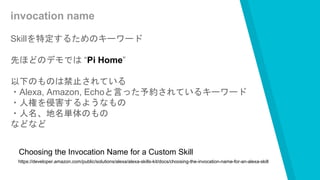
invocation name
Skillを特定するためのキーワード
先ほどのデモでは “Pi Home”
以下のものは禁止されている
・Alexa, Amazon, Echoと言った予約されているキーワード
・人権を侵害するようなもの
・人名、地名単体のもの
などなど
https://developer.amazon.com/public/solutions/alexa/alexa-skills-kit/docs/choosing-the-invocation-name-for-an-alexa-skill
Choosing the Invocation Name for a Custom Skill
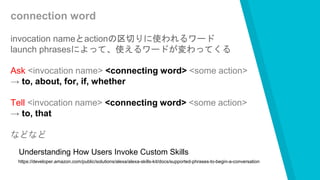
connection word
invocation nameとactionの区切りに使われるワード
launch phrasesによって、使えるワードが変わってくる
Ask <invocation name> <connecting word> <some action>
→ to, about, for, if, whether
Tell <invocation name> <connecting word> <some action>
→ to, that
などなど
https://developer.amazon.com/public/solutions/alexa/alexa-skills-kit/docs/supported-phrases-to-begin-a-conversation
Understanding How Users Invoke Custom Skills
some action
Skillに指示する何らかのワード
詳しくはこの後
Intent schemaの設計
Intentとは?
発話によってAlexaはSkillを実行するが、Intentは文脈によっ
て実行されるSkill内の機能のこと。
Intent schemaの設計
デモでは以下の操作を行いました
・照明のOn / Off
実際は以下の機能も持っています
・ファンをOn / Off
・照明の半分を点灯
・ファンの速度を変える
・ファンの回転方向を変える
Intent schema
{
"intents": [
{
"intent": "TurnOnLight"
},
{
"intent": "TurnOffLight"
},
{
"intent": "ChangeLightMode"
},
{
"intent": "TurnOnFan"
},
{
"intent": "TurnOffFan"
},
{
"intent": "SpeedUpFan"
},
{
"intent": "SlowDownFan"
},
{
"intent": "ReverseFan"
},
{
"intent": "ChangeFanSpeed",
"slots": [
{
"name": "action",
"type": "LIST_OF_FAN_ACTION"
}
]
},
{
"intent": "AMAZON.HelpIntent"
}
]
}
照明
ファン
ファン
ヘルプ
Slotの設計
Intentに対して変数を
定義することができる
{
"intent": "ChangeFanSpeed",
"slots": [
{
"name": "action",
"type": "LIST_OF_FAN_ACTION"
}
]
}
ファンの操作を行うので、以下の様なワードを想定され
るので、Slotとして定義する
slow、fast、low、medium、high、back、reverse
←変数名
デフォルトのSlot
デフォルトのSlotがいくつか用意されてます
・AMAZON.DATE
→ “today”、“tomorrow”、“july”などのワードを実際の日付形式(“2015-07-00T9”)に
変換
・AMAZON.DURATION
→ “five minutes”を“PT5M”と数値として扱いやすく変換
・AMAZON.US_CITY
→ アメリカの有名な10万都市分のワードが登録されている
・AMAZON.US_FIRST_NAME
→ 一般的な名前を数千種類登録されている
などなど
音声UIの設計
▸音声I/Fの定義
▸発話(Utterances)のサンプル定義
発話(Utterances)のサンプル定義
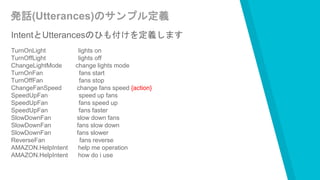
IntentとUtterancesのひも付けを定義します
TurnOnLight lights on
TurnOffLight lights off
ChangeLightMode change lights mode
TurnOnFan fans start
TurnOffFan fans stop
ChangeFanSpeed change fans speed {action}
SpeedUpFan speed up fans
SpeedUpFan fans speed up
SpeedUpFan fans faster
SlowDownFan slow down fans
SlowDownFan fans slow down
SlowDownFan fans slower
ReverseFan fans reverse
AMAZON.HelpIntent help me operation
AMAZON.HelpIntent how do i use
Utterancesは想定されるパターンをできるだけ書くことで
様々なユーザーのしゃべり方に対応することが出来ます。
Capital Oneが作っている銀行のSkillでは数字だけで
700パターン以上定義
登録しているそうです。
https://www.youtube.com/watch?v=1bE3WeVlhGM
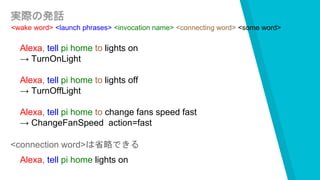
実際の発話
<wake word> <launch phrases> <invocation name> <connecting word> <some word>
Alexa, tell pi home to lights on
→ TurnOnLight
Alexa, tell pi home to lights off
→ TurnOffLight
Alexa, tell pi home to change fans speed fast
→ ChangeFanSpeed action=fast
<connection word>は省略できる
Alexa, tell pi home lights on

Intent schemaとUtterancesの
登録画面
Skillの開発
Skillの開発
ASKでは2種類の方法で作ることが可能です
▸ AWS Lambda Functionを使う
▸ 自分でホストする
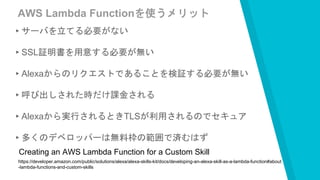
AWS Lambda Functionを使うメリット
▸サーバを立てる必要がない
▸SSL証明書を用意する必要が無い
▸Alexaからのリクエストであることを検証する必要が無い
▸呼び出しされた時だけ課金される
▸Alexaから実行されるときTLSが利用されるのでセキュア
▸多くのデベロッパーは無料枠の範囲で済むはず
https://developer.amazon.com/public/solutions/alexa/alexa-skills-kit/docs/developing-an-alexa-skill-as-a-lambda-function#about
-lambda-functions-and-custom-skills
Creating an AWS Lambda Function for a Custom Skill
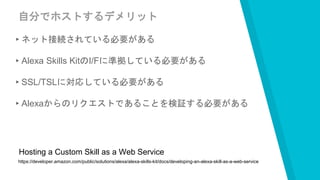
自分でホストするデメリット
▸ネット接続されている必要がある
▸Alexa Skills KitのI/Fに準拠している必要がある
▸SSL/TSLに対応している必要がある
▸Alexaからのリクエストであることを検証する必要がある
https://developer.amazon.com/public/solutions/alexa/alexa-skills-kit/docs/developing-an-alexa-skill-as-a-web-service
Hosting a Custom Skill as a Web Service
“完全にLambda推し
自分でホストする場合に使える便利モジュール
alexa-app
https://www.npmjs.com/package/alexa-app
nodejsを使ってSkillをホストできる
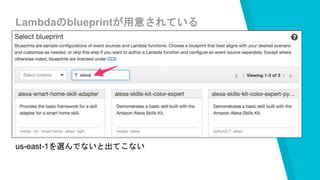
Lambdaのblueprintが用意されている
us-east-1を選んでないと出てこない
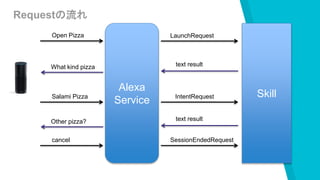
Skillに送られてくるリクエスト
▸LaunchRequest
・some commandが指定されずにSkillが呼び出された時
▸IntentRequest
・Utterancesのマッピングに紐付いたIntentが呼ばれた時
▸SessionEndedRequest
・ユーザーが“exit”と言ったり、一定時間応答がない場合、
エラーが有った時など
Alexa
Service
Skill
LaunchRequestOpen Pizza
text resultWhat kind pizza
Salami Pizza IntentRequest
text resultOther pizza?
Requestの流れ
cancel SessionEndedRequest
“Skillはリクエストの種類と呼びだされ
たIntentに対して処理を行うように実
装する
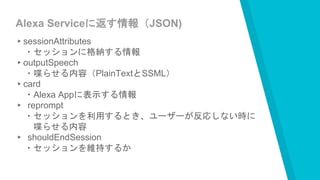
Alexa Serviceに返す情報(JSON)
▸sessionAttributes
・セッションに格納する情報
▸outputSpeech
・喋らせる内容(PlainTextとSSML)
▸card
・Alexa Appに表示する情報
▸ reprompt
・セッションを利用するとき、ユーザーが反応しない時に
喋らせる内容
▸ shouldEndSession
・セッションを維持するか
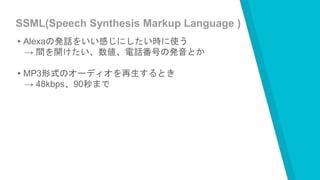
SSML(Speech Synthesis Markup Language )
▸Alexaの発話をいい感じにしたい時に使う
→ 間を開けたい、数値、電話番号の発音とか
▸MP3形式のオーディオを再生するとき
→ 48kbps、90秒まで
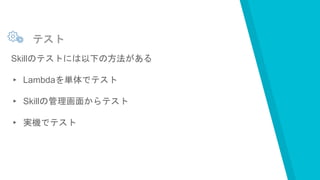
テスト
テスト
Skillのテストには以下の方法がある
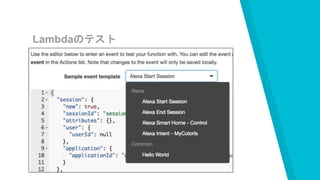
▸ Lambdaを単体でテスト
▸ Skillの管理画面からテスト
▸ 実機でテスト
Lambdaのテスト
Skillのテスト画面
Skillの公開
Skillの公開で必要なこと
▸ Policyの確認
▸ セキュリティーの確認
▸ 動作確認
▸ 音声UIの使い勝手を確認
公開設定の画面
アナリティクスの画面
実機がなくても
開発できる!
今はappstoreの初期の頃と同じ状況。
アイディア次第では人気のSkillを海外の人に使ってもらえる。
THANKS!
Any questions?
You can find me at @sparkgene

Alexa Skills Kitを使って自作のSkillを作る