Balena User	Group	Meeting
3rd February	2017
vasp-gpu on	Balena:
Usage	and	Some	Benchmarks
Ø The	VASP	SCF	cycle	in	a	nutshell
Ø Parallelisation	in	VASP
o Workload	and	data	distribution
o Parallelisation	control	parameters
o Some	rules	of	thumb	for	optimising	parallel	scaling
Ø The	GPU	(CUDA)	port	of	VASP
o Compiling	and	running
o Features
o Some	initial	benchmarks
Ø Thoughts	and	discussion	points
Balena User	Group	Meeting,	February	2017	|	Slide	2
Overview
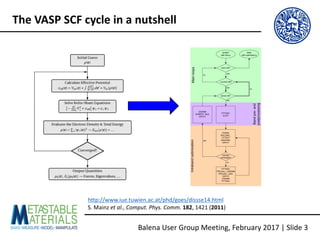
http://www.iue.tuwien.ac.at/phd/goes/dissse14.html
S.	Mainz	et	al.,	Comput.	Phys.	Comm. 182,	1421	(2011)
Balena User	Group	Meeting,	February	2017	|	Slide	3
The	VASP	SCF	cycle	in	a	nutshell
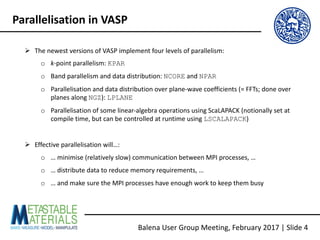
Ø The	newest	versions	of	VASP	implement	four	levels	of	parallelism:
o k-point	parallelism:	KPAR
o Band	parallelism	and	data	distribution:	NCORE and	NPAR
o Parallelisation	and	data	distribution	over	plane-wave	coefficients	(=	FFTs;	done	over	
planes	along	NGZ):	LPLANE
o Parallelisation	of	some	linear-algebra	operations	using	ScaLAPACK (notionally	set	at	
compile	time,	but	can	be	controlled	at	runtime	using	LSCALAPACK)
Ø Effective	parallelisation	will…:
o …	minimise	(relatively	slow)	communication	between	MPI	processes,	…
o …	distribute	data	to	reduce	memory	requirements,	…
o …	and	make	sure	the	MPI	processes	have	enough	work	to	keep	them	busy
Balena User	Group	Meeting,	February	2017	|	Slide	4
Parallelisation	in	VASP
MPI	processes
KPAR k-point
groups
NPAR band
groups
NGZ FFT
groups	(?)
Ø Workload	distribution	over	KPAR k-point	groups,	NBANDS band	groups	and	NGZ plane-
wave	coefficient	(FFT)	groups	[not	100	%	sure	how	this	works…]
Balena User	Group	Meeting,	February	2017	|	Slide	5
Parallelisation:	Workload	distribution
Data
KPAR k-point
groups
NPAR band
groups
NGZ FFT
groups	(?)
Ø Data	distribution	over	NBANDS band	groups	and	NGZ plane-wave	coefficient	(FFT)	groups	
[also	not	100	%	sure	how	this	works…]
Balena User	Group	Meeting,	February	2017	|	Slide	6
Parallelisation:	Data	distribution
Ø During	a	standard	DFT	calculation,	k-points	are	independent	->	k-point	parallelism	should
be	linearly	scaling,	although	perhaps	not	in	practice:	
https://www.nsc.liu.se/~pla/blog/2015/01/12/vasp-how-many-cores
Ø WARNING:	<#procs> must	be	divisible	by	KPAR,	but	the	parallelisation	is	via	a	round-
robin	algorithm,	so	<#k-points> does	not	need	to	be	divisible	by	KPAR ->	check	how	
many	irreducible k-points	you	have	(IBZKPT file)	and	set	KPAR accordingly
k1
k2
k3
k1 k2
k3
k1 k2 k3
KPAR = 1
t =	3	[OK]
KPAR = 2;	t =	2	[Bad]
KPAR = 3
t =	1	[Good]
R1
R2
R3
R1
R2
R1
Balena User	Group	Meeting,	February	2017	|	Slide	7
Parallelisation:	KPAR
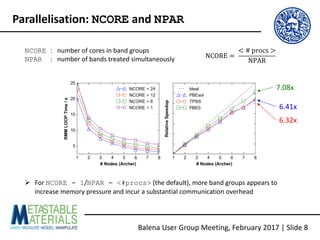
NCORE :			number	of	cores	in	band	groups
NPAR :			number	of	bands	treated	simultaneously NCORE =	
< #	procs >
NPAR
Ø For	NCORE = 1/NPAR = <#procs> (the	default),	more	band	groups	appears	to	
increase	memory	pressure	and	incur	a	substantial	communication	overhead
7.08x
6.41x
6.32x
Balena User	Group	Meeting,	February	2017	|	Slide	8
Parallelisation:	NCORE and	NPAR
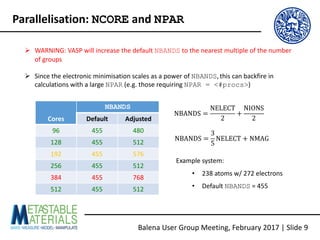
Ø WARNING:	VASP	will	increase	the	default	NBANDS to	the	nearest	multiple	of	the	number	
of	groups
Ø Since	the	electronic	minimisation	scales	as	a	power	of	NBANDS,this	can	backfire	in	
calculations	with	a	large	NPAR (e.g.	those	requiring	NPAR = <#procs>)
Cores
NBANDS
Default Adjusted
96 455 480
128 455 512
192 455 576
256 455 512
384 455 768
512 455 512
NBANDS =
NELECT
2
+
NIONS
2
Example	system:
• 238	atoms	w/	272	electrons
• Default	NBANDS =	455
NBANDS =
3
5
NELECT + NMAG
Balena User	Group	Meeting,	February	2017	|	Slide	9
Parallelisation:	NCORE and	NPAR
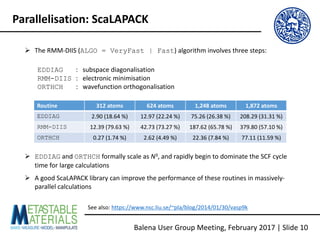
Ø The	RMM-DIIS	(ALGO = VeryFast | Fast)	algorithm	involves	three	steps:
EDDIAG :			subspace	diagonalisation
RMM-DIIS :			electronic	minimisation
ORTHCH :			wavefunction orthogonalisation
Routine 312	atoms 624 atoms 1,248	atoms 1,872 atoms
EDDIAG 2.90	(18.64	%) 12.97	(22.24	%) 75.26	(26.38	%) 208.29	(31.31	%)
RMM-DIIS 12.39	(79.63	%) 42.73	(73.27	%) 187.62	(65.78	%) 379.80	(57.10	%)
ORTHCH 0.27	(1.74 %) 2.62	(4.49	%) 22.36	(7.84	%) 77.11	(11.59	%)
Ø EDDIAG and	ORTHCH formally	scale	as	N3,	and	rapidly	begin	to	dominate	the	SCF	cycle	
time	for	large	calculations
Ø A	good	ScaLAPACK library	can	improve	the	performance	of	these	routines	in	massively-
parallel	calculations
See	also:	https://www.nsc.liu.se/~pla/blog/2014/01/30/vasp9k
Balena User	Group	Meeting,	February	2017	|	Slide	10
Parallelisation:	ScaLAPACK
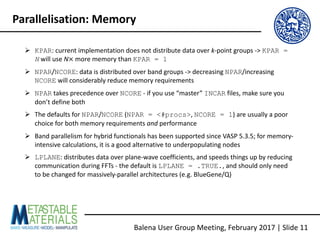
Ø KPAR:	current	implementation	does	not	distribute	data	over	k-point	groups	->	KPAR =
N will	use	N× more	memory	than	KPAR = 1
Ø NPAR/NCORE:	data	is	distributed	over	band	groups	->	decreasing	NPAR/increasing	
NCORE will	considerably	reduce	memory	requirements
Ø NPAR takes	precedence	over	NCORE - if	you	use	“master”	INCAR files,	make	sure	you	
don’t	define	both
Ø The	defaults	for	NPAR/NCORE (NPAR = <#procs>,	NCORE = 1)	are	usually	a	poor	
choice	for	both	memory	requirements	and performance
Ø Band	parallelism	for	hybrid	functionals has	been	supported	since	VASP	5.3.5;	for	memory-
intensive	calculations,	it	is	a	good	alternative	to	underpopulating nodes
Ø LPLANE:	distributes	data	over	plane-wave	coefficients,	and	speeds	things	up	by	reducing	
communication	during	FFTs	- the	default	is	LPLANE = .TRUE.,	and	should	only	need	
to	be	changed	for	massively-parallel	architectures	(e.g.	BlueGene/Q)
Balena User	Group	Meeting,	February	2017	|	Slide	11
Parallelisation:	Memory
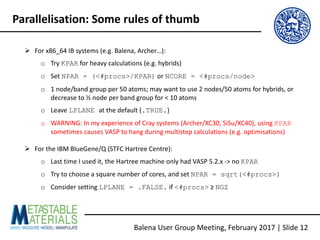
Ø For	x86_64	IB	systems	(e.g.	Balena,	Archer…):
o Try	KPAR for	heavy	calculations	(e.g.	hybrids)
o Set	NPAR = (<#procs>/KPAR) or	NCORE = <#procs/node>
o 1	node/band	group	per	50	atoms;	may	want	to	use	2	nodes/50	atoms	for	hybrids,	or	
decrease	to	½	node	per	band	group	for	<	10	atoms
o Leave	LPLANE at	the	default	(.TRUE.)
o WARNING:	In	my	experience	of	Cray	systems	(Archer/XC30,	SiSu/XC40),	using	KPAR
sometimes	causes	VASP	to	hang	during	multistep	calculations	(e.g.	optimisations)
Ø For	the	IBM	BlueGene/Q	(STFC	Hartree Centre):
o Last	time	I	used	it,	the	Hartree machine	only	had	VASP	5.2.x	->	no	KPAR
o Try	to	choose	a	square	number	of	cores,	and	set	NPAR = sqrt(<#procs>)
o Consider	setting	LPLANE = .FALSE. if	<#procs> ≥	NGZ
Balena User	Group	Meeting,	February	2017	|	Slide	12
Parallelisation:	Some	rules	of	thumb
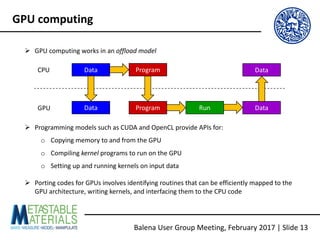
Ø GPU	computing	works	in	an	offload	model
Ø Programming	models	such	as	CUDA	and	OpenCL	provide	APIs	for:
o Copying	memory	to	and	from	the	GPU
o Compiling	kernel programs	to	run	on	the	GPU
o Setting	up	and	running	kernels	on	input	data
Ø Porting	codes	for	GPUs	involves	identifying	routines	that	can	be	efficiently	mapped	to	the	
GPU	architecture,	writing	kernels,	and	interfacing	them	to	the	CPU	code
Data
Data Program
Program
Run
Data
Data
CPU
GPU
Balena User	Group	Meeting,	February	2017	|	Slide	13
GPU	computing
Balena User	Group	Meeting,	February	2017	|	Slide	14
vasp-gpu
Ø Starting	from	the	February	2016	release	of	VASP	5.4.1,	the	distribution	includes	a	CUDA	
port	that	offloads	some	of	the	core	DFT	routines	onto	NVIDIA	GPUs
Ø A	culmination	of	research	at	the	University	of	Chicago,	Carnegie	Mellon and	ENS-Lyon,	and	
a	healthy	dose	of	optimisation	by	NVIDIA
Ø Three	papers	covering	the	implementation	and	testing:
o M.	Hacene et	al.,	J.	Comput.	Chem. 33,	2581	(2012),	10.1002/jcc.23096
o M.	Hutchinson	and	W.	Widom,	Comput.	Phys.	Comm. 183,	1422	(2012),	
10.1002/jcc.23096
o S.	Mainz	et	al.,	Comput.	Phys.	Comm. 182,	1421	(2011),	10.1016/j.cpc.2011.03.010
Balena User	Group	Meeting,	February	2017	|	Slide	15
Because	sharing	is	caring...
https://github.com/JMSkelton/VASP-GPU-Benchmarking
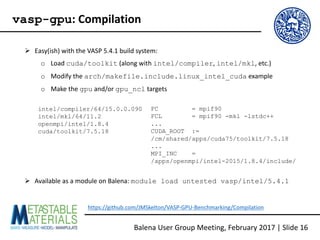
Ø Easy(ish)	with	the	VASP	5.4.1	build	system:
o Load	cuda/toolkit (along	with	intel/compiler,	intel/mkl,	etc.)
o Modify	the	arch/makefile.include.linux_intel_cuda example
o Make	the	gpu and/or	gpu_ncl targets
intel/compiler/64/15.0.0.090
intel/mkl/64/11.2
openmpi/intel/1.8.4
cuda/toolkit/7.5.18
FC = mpif90
FCL = mpif90 -mkl -lstdc++
...
CUDA_ROOT :=
/cm/shared/apps/cuda75/toolkit/7.5.18
...
MPI_INC =
/apps/openmpi/intel-2015/1.8.4/include/
https://github.com/JMSkelton/VASP-GPU-Benchmarking/Compilation
Balena User	Group	Meeting,	February	2017	|	Slide	16
vasp-gpu:	Compilation
Ø Available	as	a	module	on	Balena:	module load untested vasp/intel/5.4.1
Ø To	use	vasp-gpu on	Balena,	you	need	to	request	a	GPU-equipped	node	and	perform	
some	basic	setup	tasks	in	your	SLURM	scripts
#SBATCH --partition=batch-acc
# Node w/ 1 k20x card.
#SBATCH --gres=gpu:1
#SBATCH --constraint=k20x
# Node w/ 4 k20x cards.
##SBATCH --gres=gpu:4
##SBATCH --constraint=k20x
if [ ! -d "/tmp/nvidia-mps" ] ; then
mkdir "/tmp/nvidia-mps"
fi
export CUDA_MPS_PIPE_DIRECTORY=
"/tmp/nvidia-mps"
if [ ! -d "/tmp/nvidia-log" ] ; then
mkdir "/tmp/nvidia-log"
fi
export CUDA_MPS_LOG_DIRECTORY=
"/tmp/nvidia-log"
nvidia-cuda-mps-control -d
https://github.com/JMSkelton/VASP-GPU-Benchmarking/Scripts
Balena User	Group	Meeting,	February	2017	|	Slide	17
vasp-gpu:	Running	jobs
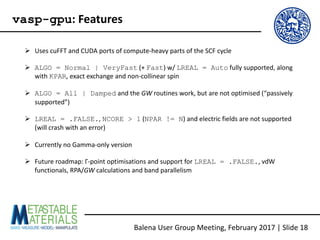
Ø Uses	cuFFT and	CUDA	ports	of	compute-heavy	parts	of	the	SCF	cycle
Ø ALGO = Normal | VeryFast (+	Fast)	w/	LREAL = Auto fully	supported,	along	
with	KPAR,	exact	exchange	and	non-collinear	spin
Ø ALGO = All | Damped and	the	GW routines	work,	but	are	not	optimised	(“passively	
supported”)
Ø LREAL = .FALSE.,	NCORE > 1 (NPAR != N)	and	electric	fields	are	not	supported	
(will	crash	with	an	error)
Ø Currently	no	Gamma-only	version
Ø Future	roadmap:	Γ-point	optimisations	and	support	for	LREAL = .FALSE.,	vdW
functionals,	RPA/GW calculations	and	band	parallelism
Balena User	Group	Meeting,	February	2017	|	Slide	18
vasp-gpu:	Features
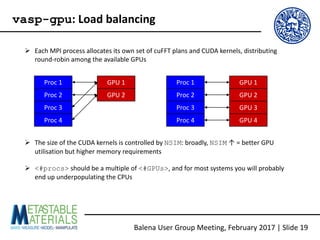
Ø Each	MPI	process	allocates	its	own	set	of	cuFFT plans	and	CUDA	kernels,	distributing	
round-robin	among	the	available	GPUs
Ø The	size	of	the	CUDA	kernels	is	controlled	by	NSIM:	broadly,	NSIM ↑	=	better	GPU	
utilisation	but	higher	memory	requirements
Ø <#procs> should	be	a	multiple	of	<#GPUs>,	and	for	most	systems	you	will	probably	
end	up	underpopulating the	CPUs
Proc	1
Proc	2
Proc	3
Proc	4
GPU	1
GPU	2
Proc	1
Proc	2
Proc	3
Proc	4
GPU	1
GPU	2
GPU	3
GPU	4
Balena User	Group	Meeting,	February	2017	|	Slide	19
vasp-gpu:	Load	balancing
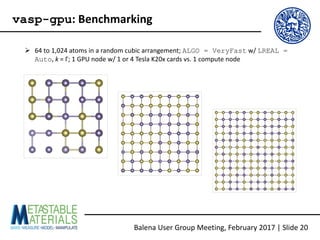
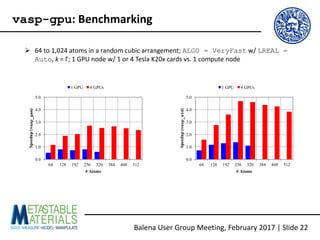
Ø 64	to	1,024	atoms	in	a	random	cubic	arrangement;	ALGO = VeryFast w/	LREAL =
Auto,	k =	Γ;	1	GPU	node	w/	1	or	4	Tesla	K20x	cards	vs.	1	compute	node
Balena User	Group	Meeting,	February	2017	|	Slide	20
vasp-gpu:	Benchmarking
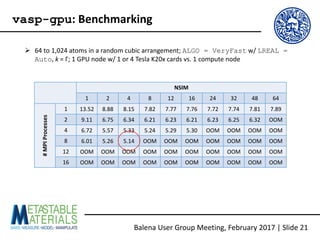
Ø 64	to	1,024	atoms	in	a	random	cubic	arrangement;	ALGO = VeryFast w/	LREAL =
Auto,	k =	Γ;	1	GPU	node	w/	1	or	4	Tesla	K20x	cards	vs.	1	compute	node
NSIM
1 2 4 8 12 16 24 32 48 64
#MPI	Processes
1 13.52 8.88 8.15 7.82 7.77 7.76 7.72 7.74 7.81 7.89
2 9.11 6.75 6.34 6.21 6.23 6.21 6.23 6.25 6.32 OOM
4 6.72 5.57 5.33 5.24 5.29 5.30 OOM OOM OOM OOM
8 6.01 5.26 5.14 OOM OOM OOM OOM OOM OOM OOM
12 OOM OOM OOM OOM OOM OOM OOM OOM OOM OOM
16 OOM OOM OOM OOM OOM OOM OOM OOM OOM OOM
Balena User	Group	Meeting,	February	2017	|	Slide	21
vasp-gpu:	Benchmarking
Ø 64	to	1,024	atoms	in	a	random	cubic	arrangement;	ALGO = VeryFast w/	LREAL =
Auto,	k =	Γ;	1	GPU	node	w/	1	or	4	Tesla	K20x	cards	vs.	1	compute	node
Balena User	Group	Meeting,	February	2017	|	Slide	22
vasp-gpu:	Benchmarking
0.0
1.0
2.0
3.0
4.0
5.0
64 128 192 256 320 384 448 512
Speedup(vasp_gam)
# Atoms
1 GPU 4 GPUs
0.0
1.0
2.0
3.0
4.0
5.0
64 128 192 256 320 384 448 512
Speedup(vasp_std)
# Atoms
1 GPU 4 GPUs
NSIM
1 2 4 8 16
#MPI	Processes
1 -14131.52 -158.39 -158.39 -158.39 -158.39
2 -14131.52 -158.39 -158.39 -158.39 -158.39
4 -14131.52 -158.39 -158.39 -158.39 -158.39
8 -14131.52 -158.39 -158.39 - -
12 - - - - -
16 - - - - -
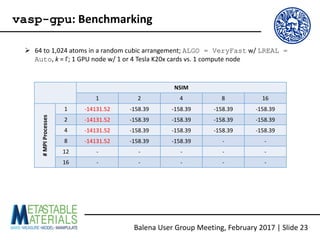
Ø 64	to	1,024	atoms	in	a	random	cubic	arrangement;	ALGO = VeryFast w/	LREAL =
Auto,	k =	Γ;	1	GPU	node	w/	1	or	4	Tesla	K20x	cards	vs.	1	compute	node
Balena User	Group	Meeting,	February	2017	|	Slide	23
vasp-gpu:	Benchmarking
Ø Three	papers	covering	the	implementation	and	testing…:
o M.	Hacene et	al.,	J.	Comput.	Chem. 33,	2581	(2012),	10.1002/jcc.23096
o M.	Hutchinson	and	W.	Widom,	Comput.	Phys.	Comm. 183,	1422	(2012),	
10.1002/jcc.23096
o S.	Mainz	et	al.,	Comput.	Phys.	Comm. 182,	1421	(2011),	10.1016/j.cpc.2011.03.010
Ø …	and	a	couple	of	other	links:
o https://www.vasp.at/index.php/news/44-administrative/115-new-release-vasp-5-4-
1-with-gpu-support
o https://www.nsc.liu.se/~pla/blog/2015/11/16/vaspgpu/
o http://images.nvidia.com/events/sc15/SC5120-vasp-gpus.html
Balena User	Group	Meeting,	February	2017	|	Slide	24
Further	reading
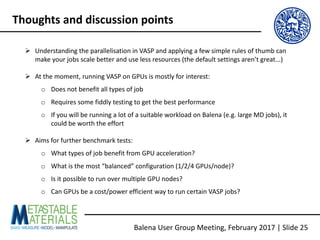
Ø Understanding	the	parallelisation	in	VASP	and	applying	a	few	simple	rules	of	thumb	can	
make	your	jobs	scale	better	and	use	less	resources	(the	default	settings	aren’t	great...)
Ø At	the	moment,	running	VASP	on	GPUs	is	mostly	for	interest:
o Does	not	benefit	all	types	of	job
o Requires	some	fiddly	testing	to	get	the	best	performance
o If	you	will	be	running	a	lot	of	a	suitable	workload	on	Balena (e.g.	large	MD	jobs),	it	
could	be	worth	the	effort
Ø Aims	for	further	benchmark	tests:
o What	types	of	job	benefit	from	GPU	acceleration?
o What	is	the	most	“balanced”	configuration	(1/2/4	GPUs/node)?
o Is	it	possible	to	run	over	multiple	GPU	nodes?
o Can	GPUs	be	a	cost/power	efficient	way	to	run	certain	VASP	jobs?
Balena User	Group	Meeting,	February	2017	|	Slide	25
Thoughts	and	discussion	points
Balena User	Group	Meeting,	February	2017	|	Slide	26
Acknowledgements

vasp-gpu on Balena: Usage and Some Benchmarks

  • 1.
    Balena User Group Meeting 3rd February 2017 vasp-gpuon Balena: Usage and Some Benchmarks
  • 2.
    Ø The VASP SCF cycle in a nutshell Ø Parallelisation in VASP oWorkload and data distribution o Parallelisation control parameters o Some rules of thumb for optimising parallel scaling Ø The GPU (CUDA) port of VASP o Compiling and running o Features o Some initial benchmarks Ø Thoughts and discussion points Balena User Group Meeting, February 2017 | Slide 2 Overview
  • 3.
  • 4.
    Ø The newest versions of VASP implement four levels of parallelism: o k-point parallelism: KPAR oBand parallelism and data distribution: NCORE and NPAR o Parallelisation and data distribution over plane-wave coefficients (= FFTs; done over planes along NGZ): LPLANE o Parallelisation of some linear-algebra operations using ScaLAPACK (notionally set at compile time, but can be controlled at runtime using LSCALAPACK) Ø Effective parallelisation will…: o … minimise (relatively slow) communication between MPI processes, … o … distribute data to reduce memory requirements, … o … and make sure the MPI processes have enough work to keep them busy Balena User Group Meeting, February 2017 | Slide 4 Parallelisation in VASP
  • 5.
    MPI processes KPAR k-point groups NPAR band groups NGZFFT groups (?) Ø Workload distribution over KPAR k-point groups, NBANDS band groups and NGZ plane- wave coefficient (FFT) groups [not 100 % sure how this works…] Balena User Group Meeting, February 2017 | Slide 5 Parallelisation: Workload distribution
  • 6.
    Data KPAR k-point groups NPAR band groups NGZFFT groups (?) Ø Data distribution over NBANDS band groups and NGZ plane-wave coefficient (FFT) groups [also not 100 % sure how this works…] Balena User Group Meeting, February 2017 | Slide 6 Parallelisation: Data distribution
  • 7.
    Ø During a standard DFT calculation, k-points are independent -> k-point parallelism should be linearly scaling, although perhaps not in practice: https://www.nsc.liu.se/~pla/blog/2015/01/12/vasp-how-many-cores Ø WARNING: <#procs>must be divisible by KPAR, but the parallelisation is via a round- robin algorithm, so <#k-points> does not need to be divisible by KPAR -> check how many irreducible k-points you have (IBZKPT file) and set KPAR accordingly k1 k2 k3 k1 k2 k3 k1 k2 k3 KPAR = 1 t = 3 [OK] KPAR = 2; t = 2 [Bad] KPAR = 3 t = 1 [Good] R1 R2 R3 R1 R2 R1 Balena User Group Meeting, February 2017 | Slide 7 Parallelisation: KPAR
  • 8.
    NCORE : number of cores in band groups NPAR : number of bands treated simultaneouslyNCORE = < # procs > NPAR Ø For NCORE = 1/NPAR = <#procs> (the default), more band groups appears to increase memory pressure and incur a substantial communication overhead 7.08x 6.41x 6.32x Balena User Group Meeting, February 2017 | Slide 8 Parallelisation: NCORE and NPAR
  • 9.
    Ø WARNING: VASP will increase the default NBANDS to the nearest multiple of the number of groups ØSince the electronic minimisation scales as a power of NBANDS,this can backfire in calculations with a large NPAR (e.g. those requiring NPAR = <#procs>) Cores NBANDS Default Adjusted 96 455 480 128 455 512 192 455 576 256 455 512 384 455 768 512 455 512 NBANDS = NELECT 2 + NIONS 2 Example system: • 238 atoms w/ 272 electrons • Default NBANDS = 455 NBANDS = 3 5 NELECT + NMAG Balena User Group Meeting, February 2017 | Slide 9 Parallelisation: NCORE and NPAR
  • 10.
    Ø The RMM-DIIS (ALGO =VeryFast | Fast) algorithm involves three steps: EDDIAG : subspace diagonalisation RMM-DIIS : electronic minimisation ORTHCH : wavefunction orthogonalisation Routine 312 atoms 624 atoms 1,248 atoms 1,872 atoms EDDIAG 2.90 (18.64 %) 12.97 (22.24 %) 75.26 (26.38 %) 208.29 (31.31 %) RMM-DIIS 12.39 (79.63 %) 42.73 (73.27 %) 187.62 (65.78 %) 379.80 (57.10 %) ORTHCH 0.27 (1.74 %) 2.62 (4.49 %) 22.36 (7.84 %) 77.11 (11.59 %) Ø EDDIAG and ORTHCH formally scale as N3, and rapidly begin to dominate the SCF cycle time for large calculations Ø A good ScaLAPACK library can improve the performance of these routines in massively- parallel calculations See also: https://www.nsc.liu.se/~pla/blog/2014/01/30/vasp9k Balena User Group Meeting, February 2017 | Slide 10 Parallelisation: ScaLAPACK
  • 11.
    Ø KPAR: current implementation does not distribute data over k-point groups -> KPAR = Nwill use N× more memory than KPAR = 1 Ø NPAR/NCORE: data is distributed over band groups -> decreasing NPAR/increasing NCORE will considerably reduce memory requirements Ø NPAR takes precedence over NCORE - if you use “master” INCAR files, make sure you don’t define both Ø The defaults for NPAR/NCORE (NPAR = <#procs>, NCORE = 1) are usually a poor choice for both memory requirements and performance Ø Band parallelism for hybrid functionals has been supported since VASP 5.3.5; for memory- intensive calculations, it is a good alternative to underpopulating nodes Ø LPLANE: distributes data over plane-wave coefficients, and speeds things up by reducing communication during FFTs - the default is LPLANE = .TRUE., and should only need to be changed for massively-parallel architectures (e.g. BlueGene/Q) Balena User Group Meeting, February 2017 | Slide 11 Parallelisation: Memory
  • 12.
    Ø For x86_64 IB systems (e.g. Balena, Archer…): o Try KPARfor heavy calculations (e.g. hybrids) o Set NPAR = (<#procs>/KPAR) or NCORE = <#procs/node> o 1 node/band group per 50 atoms; may want to use 2 nodes/50 atoms for hybrids, or decrease to ½ node per band group for < 10 atoms o Leave LPLANE at the default (.TRUE.) o WARNING: In my experience of Cray systems (Archer/XC30, SiSu/XC40), using KPAR sometimes causes VASP to hang during multistep calculations (e.g. optimisations) Ø For the IBM BlueGene/Q (STFC Hartree Centre): o Last time I used it, the Hartree machine only had VASP 5.2.x -> no KPAR o Try to choose a square number of cores, and set NPAR = sqrt(<#procs>) o Consider setting LPLANE = .FALSE. if <#procs> ≥ NGZ Balena User Group Meeting, February 2017 | Slide 12 Parallelisation: Some rules of thumb
  • 13.
    Ø GPU computing works in an offload model Ø Programming models such as CUDA and OpenCL provide APIs for: oCopying memory to and from the GPU o Compiling kernel programs to run on the GPU o Setting up and running kernels on input data Ø Porting codes for GPUs involves identifying routines that can be efficiently mapped to the GPU architecture, writing kernels, and interfacing them to the CPU code Data Data Program Program Run Data Data CPU GPU Balena User Group Meeting, February 2017 | Slide 13 GPU computing
  • 14.
    Balena User Group Meeting, February 2017 | Slide 14 vasp-gpu Ø Starting from the February 2016 release of VASP 5.4.1, the distribution includes a CUDA port that offloads some of the core DFT routines onto NVIDIA GPUs ØA culmination of research at the University of Chicago, Carnegie Mellon and ENS-Lyon, and a healthy dose of optimisation by NVIDIA Ø Three papers covering the implementation and testing: o M. Hacene et al., J. Comput. Chem. 33, 2581 (2012), 10.1002/jcc.23096 o M. Hutchinson and W. Widom, Comput. Phys. Comm. 183, 1422 (2012), 10.1002/jcc.23096 o S. Mainz et al., Comput. Phys. Comm. 182, 1421 (2011), 10.1016/j.cpc.2011.03.010
  • 15.
  • 16.
    Ø Easy(ish) with the VASP 5.4.1 build system: o Load cuda/toolkit(along with intel/compiler, intel/mkl, etc.) o Modify the arch/makefile.include.linux_intel_cuda example o Make the gpu and/or gpu_ncl targets intel/compiler/64/15.0.0.090 intel/mkl/64/11.2 openmpi/intel/1.8.4 cuda/toolkit/7.5.18 FC = mpif90 FCL = mpif90 -mkl -lstdc++ ... CUDA_ROOT := /cm/shared/apps/cuda75/toolkit/7.5.18 ... MPI_INC = /apps/openmpi/intel-2015/1.8.4/include/ https://github.com/JMSkelton/VASP-GPU-Benchmarking/Compilation Balena User Group Meeting, February 2017 | Slide 16 vasp-gpu: Compilation Ø Available as a module on Balena: module load untested vasp/intel/5.4.1
  • 17.
    Ø To use vasp-gpu on Balena, you need to request a GPU-equipped node and perform some basic setup tasks in your SLURM scripts #SBATCH--partition=batch-acc # Node w/ 1 k20x card. #SBATCH --gres=gpu:1 #SBATCH --constraint=k20x # Node w/ 4 k20x cards. ##SBATCH --gres=gpu:4 ##SBATCH --constraint=k20x if [ ! -d "/tmp/nvidia-mps" ] ; then mkdir "/tmp/nvidia-mps" fi export CUDA_MPS_PIPE_DIRECTORY= "/tmp/nvidia-mps" if [ ! -d "/tmp/nvidia-log" ] ; then mkdir "/tmp/nvidia-log" fi export CUDA_MPS_LOG_DIRECTORY= "/tmp/nvidia-log" nvidia-cuda-mps-control -d https://github.com/JMSkelton/VASP-GPU-Benchmarking/Scripts Balena User Group Meeting, February 2017 | Slide 17 vasp-gpu: Running jobs
  • 18.
    Ø Uses cuFFT and CUDA ports of compute-heavy parts of the SCF cycle ØALGO = Normal | VeryFast (+ Fast) w/ LREAL = Auto fully supported, along with KPAR, exact exchange and non-collinear spin Ø ALGO = All | Damped and the GW routines work, but are not optimised (“passively supported”) Ø LREAL = .FALSE., NCORE > 1 (NPAR != N) and electric fields are not supported (will crash with an error) Ø Currently no Gamma-only version Ø Future roadmap: Γ-point optimisations and support for LREAL = .FALSE., vdW functionals, RPA/GW calculations and band parallelism Balena User Group Meeting, February 2017 | Slide 18 vasp-gpu: Features
  • 19.
    Ø Each MPI process allocates its own set of cuFFT plans and CUDA kernels, distributing round-robin among the available GPUs ØThe size of the CUDA kernels is controlled by NSIM: broadly, NSIM ↑ = better GPU utilisation but higher memory requirements Ø <#procs> should be a multiple of <#GPUs>, and for most systems you will probably end up underpopulating the CPUs Proc 1 Proc 2 Proc 3 Proc 4 GPU 1 GPU 2 Proc 1 Proc 2 Proc 3 Proc 4 GPU 1 GPU 2 GPU 3 GPU 4 Balena User Group Meeting, February 2017 | Slide 19 vasp-gpu: Load balancing
  • 20.
    Ø 64 to 1,024 atoms in a random cubic arrangement; ALGO =VeryFast w/ LREAL = Auto, k = Γ; 1 GPU node w/ 1 or 4 Tesla K20x cards vs. 1 compute node Balena User Group Meeting, February 2017 | Slide 20 vasp-gpu: Benchmarking
  • 21.
    Ø 64 to 1,024 atoms in a random cubic arrangement; ALGO =VeryFast w/ LREAL = Auto, k = Γ; 1 GPU node w/ 1 or 4 Tesla K20x cards vs. 1 compute node NSIM 1 2 4 8 12 16 24 32 48 64 #MPI Processes 1 13.52 8.88 8.15 7.82 7.77 7.76 7.72 7.74 7.81 7.89 2 9.11 6.75 6.34 6.21 6.23 6.21 6.23 6.25 6.32 OOM 4 6.72 5.57 5.33 5.24 5.29 5.30 OOM OOM OOM OOM 8 6.01 5.26 5.14 OOM OOM OOM OOM OOM OOM OOM 12 OOM OOM OOM OOM OOM OOM OOM OOM OOM OOM 16 OOM OOM OOM OOM OOM OOM OOM OOM OOM OOM Balena User Group Meeting, February 2017 | Slide 21 vasp-gpu: Benchmarking
  • 22.
    Ø 64 to 1,024 atoms in a random cubic arrangement; ALGO =VeryFast w/ LREAL = Auto, k = Γ; 1 GPU node w/ 1 or 4 Tesla K20x cards vs. 1 compute node Balena User Group Meeting, February 2017 | Slide 22 vasp-gpu: Benchmarking 0.0 1.0 2.0 3.0 4.0 5.0 64 128 192 256 320 384 448 512 Speedup(vasp_gam) # Atoms 1 GPU 4 GPUs 0.0 1.0 2.0 3.0 4.0 5.0 64 128 192 256 320 384 448 512 Speedup(vasp_std) # Atoms 1 GPU 4 GPUs
  • 23.
    NSIM 1 2 48 16 #MPI Processes 1 -14131.52 -158.39 -158.39 -158.39 -158.39 2 -14131.52 -158.39 -158.39 -158.39 -158.39 4 -14131.52 -158.39 -158.39 -158.39 -158.39 8 -14131.52 -158.39 -158.39 - - 12 - - - - - 16 - - - - - Ø 64 to 1,024 atoms in a random cubic arrangement; ALGO = VeryFast w/ LREAL = Auto, k = Γ; 1 GPU node w/ 1 or 4 Tesla K20x cards vs. 1 compute node Balena User Group Meeting, February 2017 | Slide 23 vasp-gpu: Benchmarking
  • 24.
    Ø Three papers covering the implementation and testing…: o M. Haceneet al., J. Comput. Chem. 33, 2581 (2012), 10.1002/jcc.23096 o M. Hutchinson and W. Widom, Comput. Phys. Comm. 183, 1422 (2012), 10.1002/jcc.23096 o S. Mainz et al., Comput. Phys. Comm. 182, 1421 (2011), 10.1016/j.cpc.2011.03.010 Ø … and a couple of other links: o https://www.vasp.at/index.php/news/44-administrative/115-new-release-vasp-5-4- 1-with-gpu-support o https://www.nsc.liu.se/~pla/blog/2015/11/16/vaspgpu/ o http://images.nvidia.com/events/sc15/SC5120-vasp-gpus.html Balena User Group Meeting, February 2017 | Slide 24 Further reading
  • 25.
    Ø Understanding the parallelisation in VASP and applying a few simple rules of thumb can make your jobs scale better and use less resources (the default settings aren’t great...) Ø At the moment, running VASP on GPUs is mostly for interest: oDoes not benefit all types of job o Requires some fiddly testing to get the best performance o If you will be running a lot of a suitable workload on Balena (e.g. large MD jobs), it could be worth the effort Ø Aims for further benchmark tests: o What types of job benefit from GPU acceleration? o What is the most “balanced” configuration (1/2/4 GPUs/node)? o Is it possible to run over multiple GPU nodes? o Can GPUs be a cost/power efficient way to run certain VASP jobs? Balena User Group Meeting, February 2017 | Slide 25 Thoughts and discussion points
  • 26.