Building Modern Data
Streaming Apps with
Python
Tim Spann
Developer Advocate
2
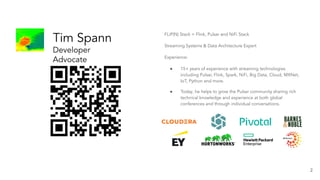
Tim Spann
Developer
Advocate
at StreamNative
FLiP(N) Stack = Flink, Pulsar and NiFi Stack
Streaming Systems & Data Architecture Expert
Experience:
● 15+ years of experience with streaming technologies
including Pulsar, Flink, Spark, NiFi, Big Data, Cloud, MXNet,
IoT, Python and more.
● Today, he helps to grow the Pulsar community sharing rich
technical knowledge and experience at both global
conferences and through individual conversations.
https://bit.ly/32dAJft
FLiP Stack Weekly
This week in Apache Flink, Apache
Pulsar, Apache NiFi, Apache Spark and
open source friends.
4
Building
Real-Time
Requires a Team
Apache Pulsar has a vibrant community
560+
Contributors
10,000+
Commits
7,000+
Slack Members
1,000+
Organizations
Using Pulsar
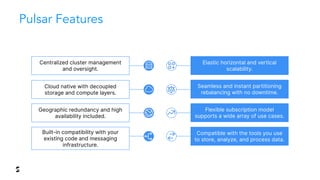
Cloud native with decoupled
storage and compute layers.
Built-in compatibility with your
existing code and messaging
infrastructure.
Geographic redundancy and high
availability included.
Centralized cluster management
and oversight.
Elastic horizontal and vertical
scalability.
Seamless and instant partitioning
rebalancing with no downtime.
Flexible subscription model
supports a wide array of use cases.
Compatible with the tools you use
to store, analyze, and process data.
Pulsar Features
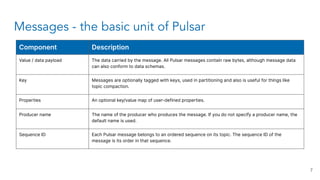
Messages - the basic unit of Pulsar
7
Component Description
Value / data payload The data carried by the message. All Pulsar messages contain raw bytes, although message data
can also conform to data schemas.
Key Messages are optionally tagged with keys, used in partitioning and also is useful for things like
topic compaction.
Properties An optional key/value map of user-defined properties.
Producer name The name of the producer who produces the message. If you do not specify a producer name, the
default name is used.
Sequence ID Each Pulsar message belongs to an ordered sequence on its topic. The sequence ID of the
message is its order in that sequence.
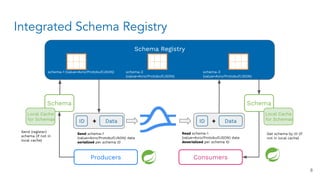
Integrated Schema Registry
Schema Registry
schema-1 (value=Avro/Protobuf/JSON) schema-2
(value=Avro/Protobuf/JSON)
schema-3
(value=Avro/Protobuf/JSON)
Schema
Data
ID
Local Cache
for Schemas
+
Schema
Data
ID +
Local Cache
for Schemas
Send schema-1
(value=Avro/Protobuf/JSON) data
serialized per schema ID
Send (register)
schema (if not in
local cache)
Read schema-1
(value=Avro/Protobuf/JSON) data
deserialized per schema ID
Get schema by ID (if
not in local cache)
Producers Consumers
8
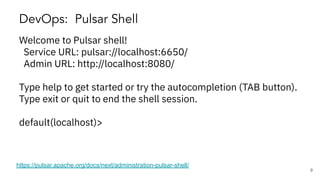
DevOps: Pulsar Shell
https://pulsar.apache.org/docs/next/administration-pulsar-shell/
Welcome to Pulsar shell!
Service URL: pulsar://localhost:6650/
Admin URL: http://localhost:8080/
Type help to get started or try the autocompletion (TAB button).
Type exit or quit to end the shell session.
default(localhost)>
9
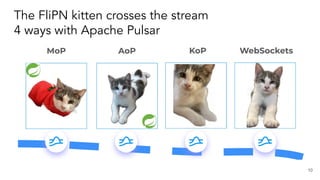
The FliPN kitten crosses the stream
4 ways with Apache Pulsar
10
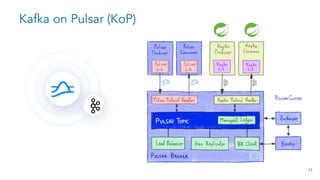
Kafka on Pulsar (KoP)
11
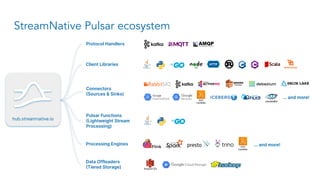
Data Offloaders
(Tiered Storage)
Client Libraries
StreamNative Pulsar ecosystem
hub.streamnative.io
Connectors
(Sources & Sinks)
Protocol Handlers
Pulsar Functions
(Lightweight Stream
Processing)
Processing Engines
… and more!
… and more!
13
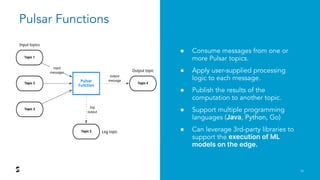
Pulsar Functions
● Consume messages from one or
more Pulsar topics.
● Apply user-supplied processing
logic to each message.
● Publish the results of the
computation to another topic.
● Support multiple programming
languages (Java, Python, Go)
● Can leverage 3rd-party libraries to
support the execution of ML
models on the edge.
from pulsar import Function
from vaderSentiment.vaderSentiment import SentimentIntensityAnalyzer
import json
class Chat(Function):
def __init__(self):
pass
def process(self, input, context):
fields = json.loads(input)
sid = SentimentIntensityAnalyzer()
ss = sid.polarity_scores(fields["comment"])
row = { }
row['id'] = str(msg_id)
if ss['compound'] < 0.00:
row['sentiment'] = 'Negative'
else:
row['sentiment'] = 'Positive'
row['comment'] = str(fields["comment"])
json_string = json.dumps(row)
return json_string
Entire Function
ML Function
14
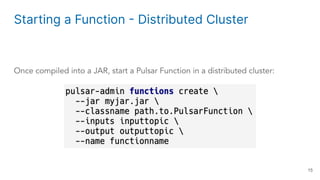
Starting a Function - Distributed Cluster
Once compiled into a JAR, start a Pulsar Function in a distributed cluster:
15
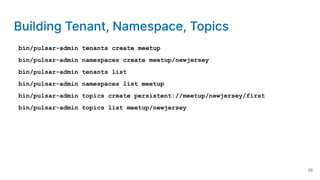
Building Tenant, Namespace, Topics
bin/pulsar-admin tenants create meetup
bin/pulsar-admin namespaces create meetup/newjersey
bin/pulsar-admin tenants list
bin/pulsar-admin namespaces list meetup
bin/pulsar-admin topics create persistent://meetup/newjersey/first
bin/pulsar-admin topics list meetup/newjersey
16
Install Python 3 Pulsar Client
pip3 install pulsar-client=='2.9.1[all]'
# Depending on Platform May Need C++ Client Built
For Python on Pulsar on Pi https://github.com/tspannhw/PulsarOnRaspberryPi
https://pulsar.apache.org/docs/en/client-libraries-python/
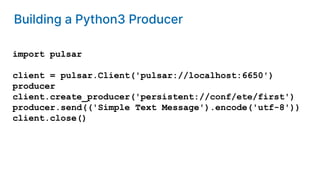
Building a Python3 Producer
import pulsar
client = pulsar.Client('pulsar://localhost:6650')
producer
client.create_producer('persistent://conf/ete/first')
producer.send(('Simple Text Message').encode('utf-8'))
client.close()
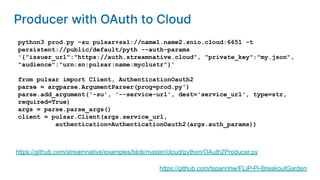
python3 prod.py -su pulsar+ssl://name1.name2.snio.cloud:6651 -t
persistent://public/default/pyth --auth-params
'{"issuer_url":"https://auth.streamnative.cloud", "private_key":"my.json",
"audience":"urn:sn:pulsar:name:myclustr"}'
from pulsar import Client, AuthenticationOauth2
parse = argparse.ArgumentParser(prog=prod.py')
parse.add_argument('-su', '--service-url', dest='service_url', type=str,
required=True)
args = parse.parse_args()
client = pulsar.Client(args.service_url,
authentication=AuthenticationOauth2(args.auth_params))
https://github.com/streamnative/examples/blob/master/cloud/python/OAuth2Producer.py
https://github.com/tspannhw/FLiP-Pi-BreakoutGarden
Producer with OAuth to Cloud
import pulsar
from pulsar.schema import *
from pulsar.schema import AvroSchema
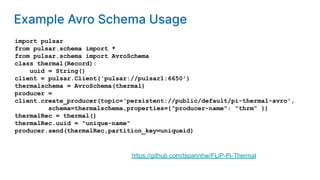
class thermal(Record):
uuid = String()
client = pulsar.Client('pulsar://pulsar1:6650')
thermalschema = AvroSchema(thermal)
producer =
client.create_producer(topic='persistent://public/default/pi-thermal-avro',
schema=thermalschema,properties={"producer-name": "thrm" })
thermalRec = thermal()
thermalRec.uuid = "unique-name"
producer.send(thermalRec,partition_key=uniqueid)
https://github.com/tspannhw/FLiP-Pi-Thermal
Example Avro Schema Usage
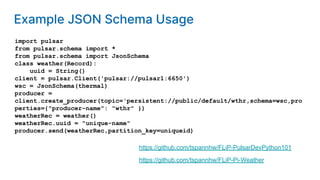
import pulsar
from pulsar.schema import *
from pulsar.schema import JsonSchema
class weather(Record):
uuid = String()
client = pulsar.Client('pulsar://pulsar1:6650')
wsc = JsonSchema(thermal)
producer =
client.create_producer(topic='persistent://public/default/wthr,schema=wsc,pro
perties={"producer-name": "wthr" })
weatherRec = weather()
weatherRec.uuid = "unique-name"
producer.send(weatherRec,partition_key=uniqueid)
https://github.com/tspannhw/FLiP-Pi-Weather
https://github.com/tspannhw/FLiP-PulsarDevPython101
Example JSON Schema Usage
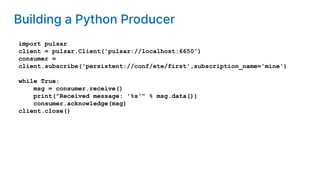
import pulsar
client = pulsar.Client('pulsar://localhost:6650')
consumer =
client.subscribe('persistent://conf/ete/first',subscription_name='mine')
while True:
msg = consumer.receive()
print("Received message: '%s'" % msg.data())
consumer.acknowledge(msg)
client.close()
Building a Python Producer
pip3 install paho-mqtt
import paho.mqtt.client as mqtt
client = mqtt.Client("rpi4-iot")
row = { }
row['gasKO'] = str(readings)
json_string = json.dumps(row)
json_string = json_string.strip()
client.connect("pulsar-server.com", 1883, 180)
client.publish("persistent://public/default/mqtt-2",
payload=json_string,qos=0,retain=True)
https://www.slideshare.net/bunkertor/data-minutes-2-apache-pulsar-with-mqtt-for-edge-computing-lightning-2022
Sending MQTT Messages
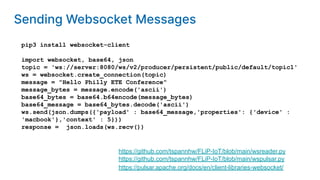
pip3 install websocket-client
import websocket, base64, json
topic = 'ws://server:8080/ws/v2/producer/persistent/public/default/topic1'
ws = websocket.create_connection(topic)
message = "Hello Philly ETE Conference"
message_bytes = message.encode('ascii')
base64_bytes = base64.b64encode(message_bytes)
base64_message = base64_bytes.decode('ascii')
ws.send(json.dumps({'payload' : base64_message,'properties': {'device' :
'macbook'},'context' : 5}))
response = json.loads(ws.recv())
https://pulsar.apache.org/docs/en/client-libraries-websocket/
https://github.com/tspannhw/FLiP-IoT/blob/main/wspulsar.py
https://github.com/tspannhw/FLiP-IoT/blob/main/wsreader.py
Sending Websocket Messages
pip3 install kafka-python
from kafka import KafkaProducer
from kafka.errors import KafkaError
row = { }
row['gasKO'] = str(readings)
json_string = json.dumps(row)
json_string = json_string.strip()
producer = KafkaProducer(bootstrap_servers='pulsar1:9092',retries=3)
producer.send('topic-kafka-1', json.dumps(row).encode('utf-8'))
producer.flush()
https://github.com/streamnative/kop
https://docs.streamnative.io/platform/v1.0.0/concepts/kop-concepts
Sending Kafka Messages
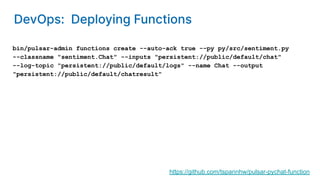
bin/pulsar-admin functions create --auto-ack true --py py/src/sentiment.py
--classname "sentiment.Chat" --inputs "persistent://public/default/chat"
--log-topic "persistent://public/default/logs" --name Chat --output
"persistent://public/default/chatresult"
https://github.com/tspannhw/pulsar-pychat-function
DevOps: Deploying Functions
27
Apache
Pulsar
in Action
@PassDev
https://www.linkedin.com/in/timothyspann
https://github.com/tspannhw
https://streamnative.io/pulsar-python/
28
Tim Spann
Developer Advocate
at StreamNative

Building Modern Data Streaming Apps with Python

  • 1.
    Building Modern Data StreamingApps with Python Tim Spann Developer Advocate
  • 2.
    2 Tim Spann Developer Advocate at StreamNative FLiP(N)Stack = Flink, Pulsar and NiFi Stack Streaming Systems & Data Architecture Expert Experience: ● 15+ years of experience with streaming technologies including Pulsar, Flink, Spark, NiFi, Big Data, Cloud, MXNet, IoT, Python and more. ● Today, he helps to grow the Pulsar community sharing rich technical knowledge and experience at both global conferences and through individual conversations.
  • 3.
    https://bit.ly/32dAJft FLiP Stack Weekly Thisweek in Apache Flink, Apache Pulsar, Apache NiFi, Apache Spark and open source friends.
  • 4.
  • 5.
    Apache Pulsar hasa vibrant community 560+ Contributors 10,000+ Commits 7,000+ Slack Members 1,000+ Organizations Using Pulsar
  • 6.
    Cloud native withdecoupled storage and compute layers. Built-in compatibility with your existing code and messaging infrastructure. Geographic redundancy and high availability included. Centralized cluster management and oversight. Elastic horizontal and vertical scalability. Seamless and instant partitioning rebalancing with no downtime. Flexible subscription model supports a wide array of use cases. Compatible with the tools you use to store, analyze, and process data. Pulsar Features
  • 7.
    Messages - thebasic unit of Pulsar 7 Component Description Value / data payload The data carried by the message. All Pulsar messages contain raw bytes, although message data can also conform to data schemas. Key Messages are optionally tagged with keys, used in partitioning and also is useful for things like topic compaction. Properties An optional key/value map of user-defined properties. Producer name The name of the producer who produces the message. If you do not specify a producer name, the default name is used. Sequence ID Each Pulsar message belongs to an ordered sequence on its topic. The sequence ID of the message is its order in that sequence.
  • 8.
    Integrated Schema Registry SchemaRegistry schema-1 (value=Avro/Protobuf/JSON) schema-2 (value=Avro/Protobuf/JSON) schema-3 (value=Avro/Protobuf/JSON) Schema Data ID Local Cache for Schemas + Schema Data ID + Local Cache for Schemas Send schema-1 (value=Avro/Protobuf/JSON) data serialized per schema ID Send (register) schema (if not in local cache) Read schema-1 (value=Avro/Protobuf/JSON) data deserialized per schema ID Get schema by ID (if not in local cache) Producers Consumers 8
  • 9.
    DevOps: Pulsar Shell https://pulsar.apache.org/docs/next/administration-pulsar-shell/ Welcometo Pulsar shell! Service URL: pulsar://localhost:6650/ Admin URL: http://localhost:8080/ Type help to get started or try the autocompletion (TAB button). Type exit or quit to end the shell session. default(localhost)> 9
  • 10.
    The FliPN kittencrosses the stream 4 ways with Apache Pulsar 10
  • 11.
  • 12.
    Data Offloaders (Tiered Storage) ClientLibraries StreamNative Pulsar ecosystem hub.streamnative.io Connectors (Sources & Sinks) Protocol Handlers Pulsar Functions (Lightweight Stream Processing) Processing Engines … and more! … and more!
  • 13.
    13 Pulsar Functions ● Consumemessages from one or more Pulsar topics. ● Apply user-supplied processing logic to each message. ● Publish the results of the computation to another topic. ● Support multiple programming languages (Java, Python, Go) ● Can leverage 3rd-party libraries to support the execution of ML models on the edge.
  • 14.
    from pulsar importFunction from vaderSentiment.vaderSentiment import SentimentIntensityAnalyzer import json class Chat(Function): def __init__(self): pass def process(self, input, context): fields = json.loads(input) sid = SentimentIntensityAnalyzer() ss = sid.polarity_scores(fields["comment"]) row = { } row['id'] = str(msg_id) if ss['compound'] < 0.00: row['sentiment'] = 'Negative' else: row['sentiment'] = 'Positive' row['comment'] = str(fields["comment"]) json_string = json.dumps(row) return json_string Entire Function ML Function 14
  • 15.
    Starting a Function- Distributed Cluster Once compiled into a JAR, start a Pulsar Function in a distributed cluster: 15
  • 16.
    Building Tenant, Namespace,Topics bin/pulsar-admin tenants create meetup bin/pulsar-admin namespaces create meetup/newjersey bin/pulsar-admin tenants list bin/pulsar-admin namespaces list meetup bin/pulsar-admin topics create persistent://meetup/newjersey/first bin/pulsar-admin topics list meetup/newjersey 16
  • 17.
    Install Python 3Pulsar Client pip3 install pulsar-client=='2.9.1[all]' # Depending on Platform May Need C++ Client Built For Python on Pulsar on Pi https://github.com/tspannhw/PulsarOnRaspberryPi https://pulsar.apache.org/docs/en/client-libraries-python/
  • 18.
    Building a Python3Producer import pulsar client = pulsar.Client('pulsar://localhost:6650') producer client.create_producer('persistent://conf/ete/first') producer.send(('Simple Text Message').encode('utf-8')) client.close()
  • 19.
    python3 prod.py -supulsar+ssl://name1.name2.snio.cloud:6651 -t persistent://public/default/pyth --auth-params '{"issuer_url":"https://auth.streamnative.cloud", "private_key":"my.json", "audience":"urn:sn:pulsar:name:myclustr"}' from pulsar import Client, AuthenticationOauth2 parse = argparse.ArgumentParser(prog=prod.py') parse.add_argument('-su', '--service-url', dest='service_url', type=str, required=True) args = parse.parse_args() client = pulsar.Client(args.service_url, authentication=AuthenticationOauth2(args.auth_params)) https://github.com/streamnative/examples/blob/master/cloud/python/OAuth2Producer.py https://github.com/tspannhw/FLiP-Pi-BreakoutGarden Producer with OAuth to Cloud
  • 20.
    import pulsar from pulsar.schemaimport * from pulsar.schema import AvroSchema class thermal(Record): uuid = String() client = pulsar.Client('pulsar://pulsar1:6650') thermalschema = AvroSchema(thermal) producer = client.create_producer(topic='persistent://public/default/pi-thermal-avro', schema=thermalschema,properties={"producer-name": "thrm" }) thermalRec = thermal() thermalRec.uuid = "unique-name" producer.send(thermalRec,partition_key=uniqueid) https://github.com/tspannhw/FLiP-Pi-Thermal Example Avro Schema Usage
  • 21.
    import pulsar from pulsar.schemaimport * from pulsar.schema import JsonSchema class weather(Record): uuid = String() client = pulsar.Client('pulsar://pulsar1:6650') wsc = JsonSchema(thermal) producer = client.create_producer(topic='persistent://public/default/wthr,schema=wsc,pro perties={"producer-name": "wthr" }) weatherRec = weather() weatherRec.uuid = "unique-name" producer.send(weatherRec,partition_key=uniqueid) https://github.com/tspannhw/FLiP-Pi-Weather https://github.com/tspannhw/FLiP-PulsarDevPython101 Example JSON Schema Usage
  • 22.
    import pulsar client =pulsar.Client('pulsar://localhost:6650') consumer = client.subscribe('persistent://conf/ete/first',subscription_name='mine') while True: msg = consumer.receive() print("Received message: '%s'" % msg.data()) consumer.acknowledge(msg) client.close() Building a Python Producer
  • 23.
    pip3 install paho-mqtt importpaho.mqtt.client as mqtt client = mqtt.Client("rpi4-iot") row = { } row['gasKO'] = str(readings) json_string = json.dumps(row) json_string = json_string.strip() client.connect("pulsar-server.com", 1883, 180) client.publish("persistent://public/default/mqtt-2", payload=json_string,qos=0,retain=True) https://www.slideshare.net/bunkertor/data-minutes-2-apache-pulsar-with-mqtt-for-edge-computing-lightning-2022 Sending MQTT Messages
  • 24.
    pip3 install websocket-client importwebsocket, base64, json topic = 'ws://server:8080/ws/v2/producer/persistent/public/default/topic1' ws = websocket.create_connection(topic) message = "Hello Philly ETE Conference" message_bytes = message.encode('ascii') base64_bytes = base64.b64encode(message_bytes) base64_message = base64_bytes.decode('ascii') ws.send(json.dumps({'payload' : base64_message,'properties': {'device' : 'macbook'},'context' : 5})) response = json.loads(ws.recv()) https://pulsar.apache.org/docs/en/client-libraries-websocket/ https://github.com/tspannhw/FLiP-IoT/blob/main/wspulsar.py https://github.com/tspannhw/FLiP-IoT/blob/main/wsreader.py Sending Websocket Messages
  • 25.
    pip3 install kafka-python fromkafka import KafkaProducer from kafka.errors import KafkaError row = { } row['gasKO'] = str(readings) json_string = json.dumps(row) json_string = json_string.strip() producer = KafkaProducer(bootstrap_servers='pulsar1:9092',retries=3) producer.send('topic-kafka-1', json.dumps(row).encode('utf-8')) producer.flush() https://github.com/streamnative/kop https://docs.streamnative.io/platform/v1.0.0/concepts/kop-concepts Sending Kafka Messages
  • 26.
    bin/pulsar-admin functions create--auto-ack true --py py/src/sentiment.py --classname "sentiment.Chat" --inputs "persistent://public/default/chat" --log-topic "persistent://public/default/logs" --name Chat --output "persistent://public/default/chatresult" https://github.com/tspannhw/pulsar-pychat-function DevOps: Deploying Functions
  • 27.
  • 28.