SECURITY ON THE MACINTOSH
Jamie Cox - MacMAD User’s Group
Security Against What?
▪ Security of what against what?
▫ Loss of Use of Computer
▫ Disclosure of Private Data
▫ IdentityTheft
▫ OutrightTheft of $$$
▫ Destruction of Data
▪ TheThreats
▫ Hardware Failures, Fires, etc.
▫ Malicious Software
▫ Phishing Attacks
Most Probable Events
▪ Hard Drive Failure
▪ Password Compromise for On-Line Service
▪ Malware Gets In BecauseYou:
▫ Clicked on a Link in an Email
▫ Visited a Malicious or Compromised Web Site
Common Fallacies
▪ “No One Would Bother to Hack My Computer”
▪ “My Account is not important enough to hack”
▪ “So What if someone reads my email?”
4
The Bad Guys:
▪ Use Shotgun approach
▪ Aim to get into as many computers as possible
▪ Use the Domino Theory: Any account provides
leverage to get into more important accounts
5
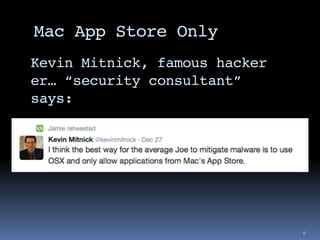
Mac App Store Only
6
Kevin Mitnick, famous hacker
er… “security consultant”
says:
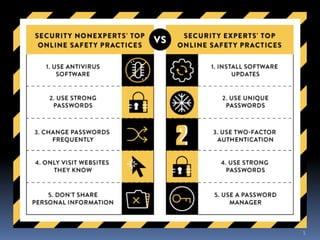
Top ~5 Things You Can Do
0. Regular Backups - (another meeting topic)
1. Frequent Software Updates
2. Strong, UNIQUE Passwords
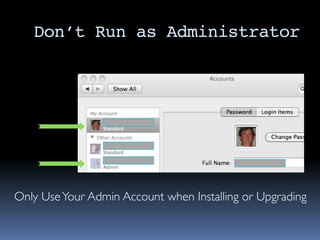
3. Don’t run as administrator
• Surf and read email on a user account
• Install Software from an admin account
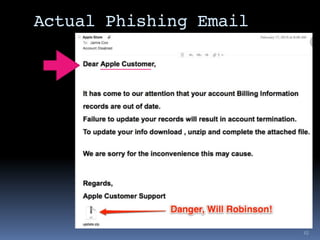
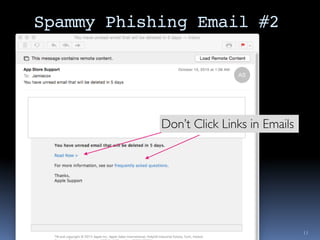
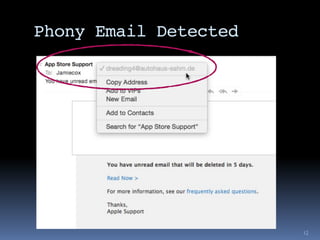
4. Never Click Links in Email
5. Use a Password Manager
6. Use 2-Factor Authentication
Prompt Software Updates
▪ The Software Update Cycle
▪ Software HasVulnerabilities
▪ (Security Bugs)
▪ Someone FindsThem
▪ Vendors Issue Security Patches
▪ TheVulnerabilities are now known publicly
▪ Bad Guys Use them against people who
haven’t updated
▪ Lather, Rinse & Repeat
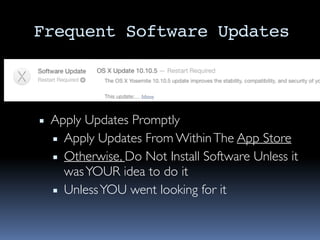
Frequent Software Updates
▪ Apply Updates Promptly
▪ Apply Updates From WithinThe App Store
▪ Otherwise, Do Not Install Software Unless it
wasYOUR idea to do it
▪ UnlessYOU went looking for it
Actual Phishing Email
10
Spammy Phishing Email #2
11
Don’t Click Links in Emails
Phony Email Detected
12
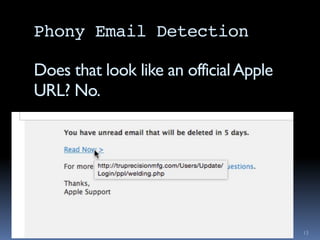
Phony Email Detection
13
Does that look like an officialApple
URL? No.
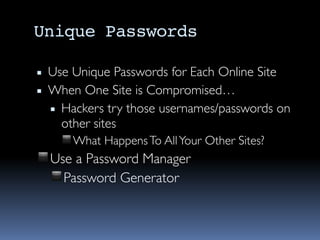
Unique Passwords
▪ Use Unique Passwords for Each Online Site
▪ When One Site is Compromised…
▪ Hackers try those usernames/passwords on
other sites
◾What HappensTo AllYour Other Sites?
◾Use a Password Manager
◾Password Generator
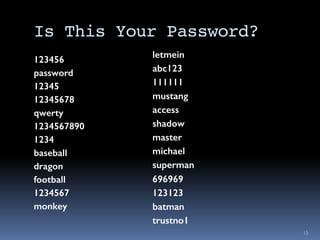
Is This Your Password?
123456
password
12345
12345678
qwerty
1234567890
1234
baseball
dragon
football
1234567
monkey
15
letmein
abc123
111111
mustang
access
shadow
master
michael
superman
696969
123123
batman
trustno1
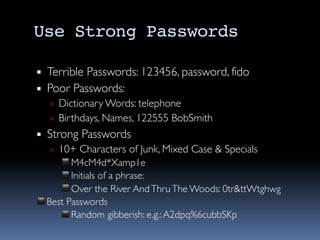
Use Strong Passwords
▪ Terrible Passwords: 123456, password, fido
▪ Poor Passwords:
▫ Dictionary Words: telephone
▫ Birthdays, Names, 122555 BobSmith
▪ Strong Passwords
▫ 10+ Characters of Junk, Mixed Case & Specials
◾M4cM4d*Xamp1e
◾Initials of a phrase:
◾Over the River AndThruThe Woods: 0tr&ttWtghwg
◾Best Passwords
◾Random gibberish: e.g.:A2dpq%6cubbSKp
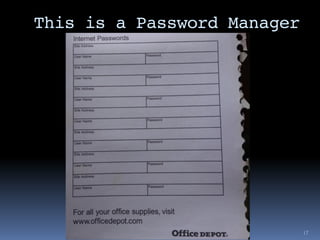
This is a Password Manager
17
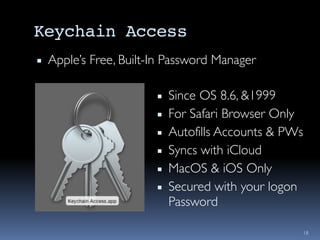
Keychain Access
▪ Apple’s Free, Built-In Password Manager
18
▪ Since OS 8.6, &1999
▪ For Safari Browser Only
▪ Autofills Accounts & PWs
▪ Syncs with iCloud
▪ MacOS & iOS Only
▪ Secured with your logon
Password
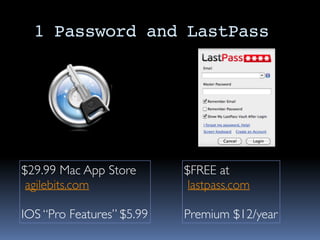
1 Password and LastPass
$29.99 Mac App Store
agilebits.com
IOS “Pro Features” $5.99
$FREE at
lastpass.com
Premium $12/year
Don’t Run as Administrator
Only UseYour Admin Account when Installing or Upgrading
Two Factor Authentication
▪ Varies by Site
▪ Not all Sites support 2nd Factor
▪ eBay, PayPal
▪ Google
▪ iCloud (Apple)
▪ Second Factor is Usually a Random-Looking
Number
▪ Sent to your phone
▪ Computed by an app or a dongle
21

MacMAD MacOS Security

  • 1.
    SECURITY ON THEMACINTOSH Jamie Cox - MacMAD User’s Group
  • 2.
    Security Against What? ▪Security of what against what? ▫ Loss of Use of Computer ▫ Disclosure of Private Data ▫ IdentityTheft ▫ OutrightTheft of $$$ ▫ Destruction of Data ▪ TheThreats ▫ Hardware Failures, Fires, etc. ▫ Malicious Software ▫ Phishing Attacks
  • 3.
    Most Probable Events ▪Hard Drive Failure ▪ Password Compromise for On-Line Service ▪ Malware Gets In BecauseYou: ▫ Clicked on a Link in an Email ▫ Visited a Malicious or Compromised Web Site
  • 4.
    Common Fallacies ▪ “NoOne Would Bother to Hack My Computer” ▪ “My Account is not important enough to hack” ▪ “So What if someone reads my email?” 4 The Bad Guys: ▪ Use Shotgun approach ▪ Aim to get into as many computers as possible ▪ Use the Domino Theory: Any account provides leverage to get into more important accounts
  • 5.
  • 6.
    Mac App StoreOnly 6 Kevin Mitnick, famous hacker er… “security consultant” says:
  • 7.
    Top ~5 ThingsYou Can Do 0. Regular Backups - (another meeting topic) 1. Frequent Software Updates 2. Strong, UNIQUE Passwords 3. Don’t run as administrator • Surf and read email on a user account • Install Software from an admin account 4. Never Click Links in Email 5. Use a Password Manager 6. Use 2-Factor Authentication
  • 8.
    Prompt Software Updates ▪The Software Update Cycle ▪ Software HasVulnerabilities ▪ (Security Bugs) ▪ Someone FindsThem ▪ Vendors Issue Security Patches ▪ TheVulnerabilities are now known publicly ▪ Bad Guys Use them against people who haven’t updated ▪ Lather, Rinse & Repeat
  • 9.
    Frequent Software Updates ▪Apply Updates Promptly ▪ Apply Updates From WithinThe App Store ▪ Otherwise, Do Not Install Software Unless it wasYOUR idea to do it ▪ UnlessYOU went looking for it
  • 10.
  • 11.
    Spammy Phishing Email#2 11 Don’t Click Links in Emails
  • 12.
  • 13.
    Phony Email Detection 13 Doesthat look like an officialApple URL? No.
  • 14.
    Unique Passwords ▪ UseUnique Passwords for Each Online Site ▪ When One Site is Compromised… ▪ Hackers try those usernames/passwords on other sites ◾What HappensTo AllYour Other Sites? ◾Use a Password Manager ◾Password Generator
  • 15.
    Is This YourPassword? 123456 password 12345 12345678 qwerty 1234567890 1234 baseball dragon football 1234567 monkey 15 letmein abc123 111111 mustang access shadow master michael superman 696969 123123 batman trustno1
  • 16.
    Use Strong Passwords ▪Terrible Passwords: 123456, password, fido ▪ Poor Passwords: ▫ Dictionary Words: telephone ▫ Birthdays, Names, 122555 BobSmith ▪ Strong Passwords ▫ 10+ Characters of Junk, Mixed Case & Specials ◾M4cM4d*Xamp1e ◾Initials of a phrase: ◾Over the River AndThruThe Woods: 0tr&ttWtghwg ◾Best Passwords ◾Random gibberish: e.g.:A2dpq%6cubbSKp
  • 17.
    This is aPassword Manager 17
  • 18.
    Keychain Access ▪ Apple’sFree, Built-In Password Manager 18 ▪ Since OS 8.6, &1999 ▪ For Safari Browser Only ▪ Autofills Accounts & PWs ▪ Syncs with iCloud ▪ MacOS & iOS Only ▪ Secured with your logon Password
  • 19.
    1 Password andLastPass $29.99 Mac App Store agilebits.com IOS “Pro Features” $5.99 $FREE at lastpass.com Premium $12/year
  • 20.
    Don’t Run asAdministrator Only UseYour Admin Account when Installing or Upgrading
  • 21.
    Two Factor Authentication ▪Varies by Site ▪ Not all Sites support 2nd Factor ▪ eBay, PayPal ▪ Google ▪ iCloud (Apple) ▪ Second Factor is Usually a Random-Looking Number ▪ Sent to your phone ▪ Computed by an app or a dongle 21