Fargate 를 사용하여
서버리스 컨테이너 활용하기
정영준
솔루션즈 아키텍트
AWS
유현성
수석
삼성전자 Cloud팀
김교탁
책임
삼성전자 Cloud팀
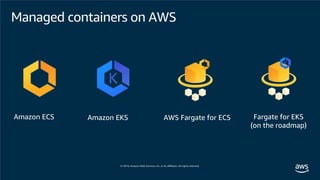
Amazon ECS Amazon EKS AWS Fargate for ECS Fargate for EKS
(on the roadmap)
Managed containers on AWS
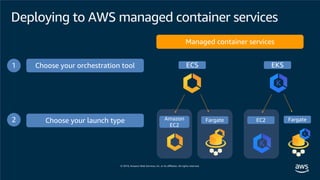
Managed container services
Choose your orchestration tool1
Choose your launch type2
ECS EKS
Amazon
EC2
Fargate EC2 Fargate
Deploying to AWS managed container services
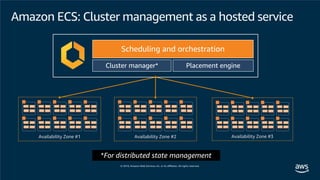
*For distributed state management
Availability Zone #1 Availability Zone #2 Availability Zone #3
Amazon ECS: Cluster management as a hosted service
Scheduling and orchestration
Cluster manager* Placement engine
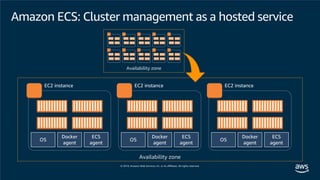
Amazon ECS: Cluster management as a hosted service
ECS
agent
Docker
agent
OS
EC2 instance
ECS
agent
Docker
agent
OS
EC2 instance
ECS
agent
Docker
agent
OS
EC2 instance
Availability zone
Availability zone
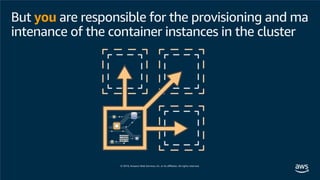
But you are responsible for the provisioning and ma
intenance of the container instances in the cluster
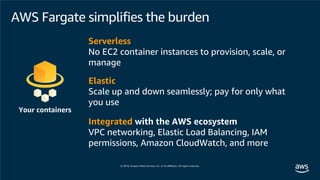
Serverless
No EC2 container instances to provision, scale, or
manage
Elastic
Scale up and down seamlessly; pay for only what
you use
Integrated with the AWS ecosystem
VPC networking, Elastic Load Balancing, IAM
permissions, Amazon CloudWatch, and more
Your containers
AWS Fargate simplifies the burden
And it lets you focus on the application
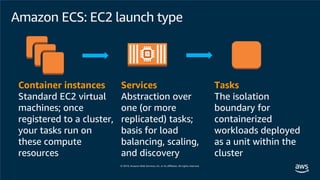
Container instances
Standard EC2 virtual
machines; once
registered to a cluster,
your tasks run on
these compute
resources
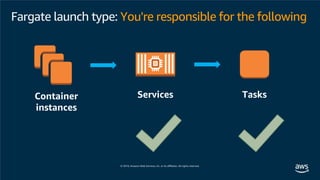
Services
Abstraction over
one (or more
replicated) tasks;
basis for load
balancing, scaling,
and discovery
Tasks
The isolation
boundary for
containerized
workloads deployed
as a unit within the
cluster
Amazon ECS: EC2 launch type
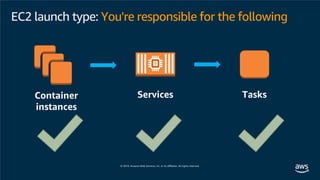
Container
instances
Services Tasks
EC2 launch type: You're responsible for the following
EC2 launch type: Configuration
• EC2 container instances for ECS are generally configured using the ECS-
optimized AMI, along with any additional optionally supplied user data
• Services/tasks/containers are configured through the ECS API; you can
access it directly, go through the CLI, or use AWS CloudFormation
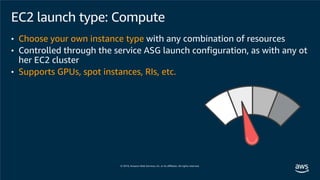
EC2 launch type: Compute
• Choose your own instance type with any combination of resources
• Controlled through the service ASG launch configuration, as with any ot
her EC2 cluster
• Supports GPUs, spot instances, RIs, etc.
Services Tasks
Fargate launch type: You're responsible for the following
Container
instances
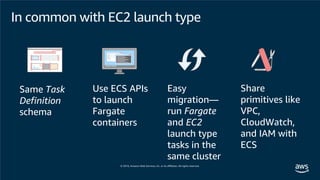
Same Task
Definition
schema
Use ECS APIs
to launch
Fargate
containers
Easy
migration—
run Fargate
and EC2
launch type
tasks in the
same cluster
Share
primitives like
VPC,
CloudWatch,
and IAM with
ECS
In common with EC2 launch type
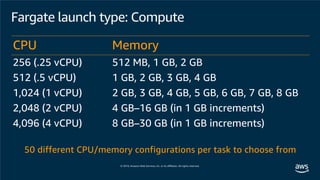
Fargate launch type: Compute
50 different CPU/memory configurations per task to choose from
CPU Memory
256 (.25 vCPU) 512 MB, 1 GB, 2 GB
512 (.5 vCPU) 1 GB, 2 GB, 3 GB, 4 GB
1,024 (1 vCPU) 2 GB, 3 GB, 4 GB, 5 GB, 6 GB, 7 GB, 8 GB
2,048 (2 vCPU) 4 GB–16 GB (in 1 GB increments)
4,096 (4 vCPU) 8 GB–30 GB (in 1 GB increments)
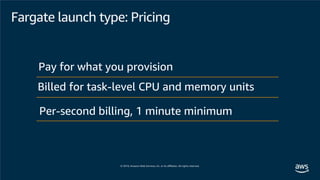
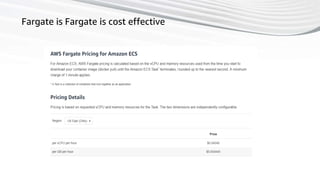
Fargate launch type: Pricing
Per-second billing, 1 minute minimum
Pay for what you provision
Billed for task-level CPU and memory units
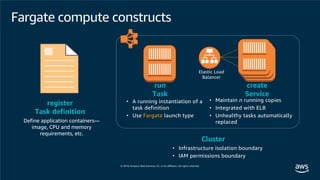
Fargate compute constructs
Define application containers—
image, CPU and memory
requirements, etc.
register
Task definition
Cluster
• Infrastructure isolation boundary
• IAM permissions boundary
run
Task
• A running instantiation of a
task definition
• Use Fargate launch type
create
Service
Elastic Load
Balancer
• Maintain n running copies
• Integrated with ELB
• Unhealthy tasks automatically
replaced
{
"family": “mytask",
"containerDefinitions": [
{
"name":“container1",
"image":"..."
},
{
"name":“container2",
"image":"..."
}
]
}
Task definition snippet
Task definition
• Immutable, versioned document
• Identified by family:version
• Contains a list of up to 10 contain
er definitions
• All containers will be collocated o
n the same host
• Each container definition has
• A name
• Image URL (Amazon ECR or public images)
• And more
CPU & memory specification
Units
• CPU: vCPU (string) or CPU units (integer)
(1 vCPU = 256 CPU units)
• Memory: MB (integer) or string (1 GB)
Task-level resources
Total CPU/memory across all containers
Container-level resources
Defines sharing of task resources among con
tainers
{
"family": "mytask",
"cpu": "1 vCPU",
"memory": "2 GB",
"containerDefinitions": [
{
"name":“container1",
"image":"...“,
"cpu": 256,
"memoryReservation": 512
},
{
"name":“container2",
"image":"...",
"cpu": 768,
"memoryReservation": 512
}
]
}
Task-level
resources
Container-
level resources
Task definition snippet
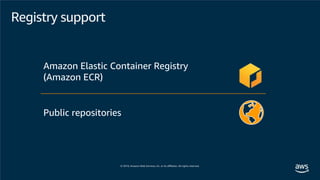
Public repositories
Amazon Elastic Container Registry
(Amazon ECR)
Registry support
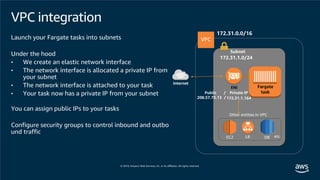
VPC integration
Launch your Fargate tasks into subnets
Under the hood
• We create an elastic network interface
• The network interface is allocated a private IP from
your subnet
• The network interface is attached to your task
• Your task now has a private IP from your subnet
You can assign public IPs to your tasks
Configure security groups to control inbound and outbo
und traffic
172.31.0.0/16
Subnet
172.31.1.0/24
Internet
Other entities in VPC
EC2 LB DB etc.
Private IP
172.31.1.164
ENI Fargate
taskPublic /
208.57.73.13 /
Configure task networ
king: awsvpc
{
"family": "mytask",
"cpu": "1 vCPU",
"memory": "2 GB",
"networkMode": "awsvpc",
"containerDefinitions": [
{
"name":“container1",
"image":"...",
"cpu": 256,
"memoryReservation": 512
},
{
"name":“container2",
"image":"...",
"cpu": 768,
"memoryReservation": 512
}
]
}
$ aws ecs run-task ...
--task-definition mytask:1
--launch-type "FARGATE"
--network-configuration
“awsvpcConfiguration = {
subnets=[subnet1-id, ...],
securityGroups=[sg-id] }”
Run task
Task definition
Enables network
interface creation &
attachment to task
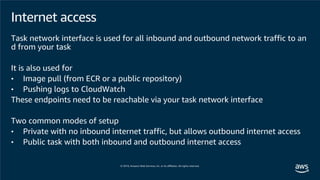
Internet access
Task network interface is used for all inbound and outbound network traffic to an
d from your task
It is also used for
• Image pull (from ECR or a public repository)
• Pushing logs to CloudWatch
These endpoints need to be reachable via your task network interface
Two common modes of setup
• Private with no inbound internet traffic, but allows outbound internet access
• Public task with both inbound and outbound internet access
Outbound
Inbound
Public task setup
Public subnet
Fargate
task
Public IP
54.191.135.66
Internet
gateway
172.31.0.0/16
172.31.2.0/24
Destination Target
172.31.0.0/16 Local
0.0.0.0/0 Internet gateway
Route table
Internet
ENI
$ aws ecs run-task ...
-- network-configuration
“awsvpcConfiguration = {
subnets=[public-subnet],
securityGroups=[sg-id],
assignPublicIp=ENABLED}”
Launch the task into a public subnet
Give it a public IP address
Security group to allow the expected inbound
traffic
Type Port Source
HTTP 8080 0.0.0.0/0
Inbound security group rule
Type Port Destination
All Traffic ALL 0.0.0.0/0
Outbound security group rules
Run task
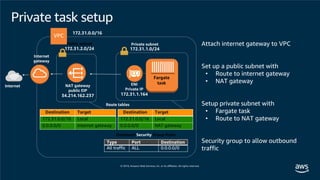
Public subnet Private subnet
Fargate
taskENI
Private IP
172.31.1.164
NAT gateway
public EIP
34.214.162.237
Internet
gateway
172.31.0.0/16
172.31.2.0/24 172.31.1.0/24
Destination Target
172.31.0.0/16 Local
0.0.0.0/0 NAT gateway
Destination Target
172.31.0.0/16 Local
0.0.0.0/0 Internet gateway
Route tables
Internet
Attach internet gateway to VPC
Set up a public subnet with
• Route to internet gateway
• NAT gateway
Setup private subnet with
• Fargate task
• Route to NAT gateway
Security group to allow outbound
traffic
Type Port Destination
All traffic ALL 0.0.0.0/0
Outbound Security Group Rules
Private task setup
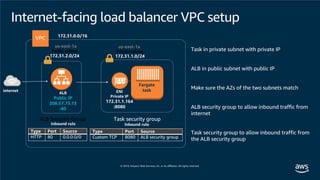
Public subnet Private subnet
Fargate
taskENI
Private IP
172.31.1.164
:8080
ALB
Public IP
208.57.73.13
:80
172.31.0.0/16
172.31.2.0/24 172.31.1.0/24
Internet
Task in private subnet with private IP
ALB in public subnet with public IP
Make sure the AZs of the two subnets match
ALB security group to allow inbound traffic from
internet
Task security group to allow inbound traffic from
the ALB security group
Task security groupALB Security Group
Type Port Source
HTTP 80 0.0.0.0/0
Inbound rule
Type Port Source
Custom TCP 8080 ALB security group
Inbound rule
us-east-1a us-east-1a
Internet-facing load balancer VPC setup
Load balancer configuration{
"family": "mytask",
"cpu": "1 vCPU",
"memory": "2 gb",
"networkMode": “awsvpc“,
"containerDefinitions": [
{
"name":“container1",
"image":"...",
"cpu": 256,
"memoryReservation": 512,
"portMappings": [
{ "containerPort": 8080 }
]
},
{
"name":“container2",
"image":"...",
"cpu": 768,
"memoryReservation": 512,
"portMappings": [
{ "containerPort": 5000 }
]
}
]
}
$ aws ecs create-service ...
-- task-definition mytask:1
--launch-type "FARGATE"
-- network-configuration
“awsvpcConfiguration = {
subnets=[subnet-id],
securityGroups=[sg-id]
}”
-- load-balancers
“[
{
"targetGroupArn": “<insert arn>",
"containerName": “container1",
"containerPort": 8080
}
]”
Create service
Task definition
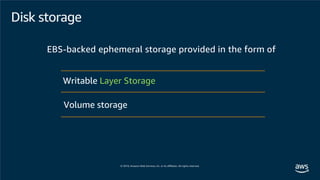
Disk storage
EBS-backed ephemeral storage provided in the form of
Volume storage
Writable Layer Storage
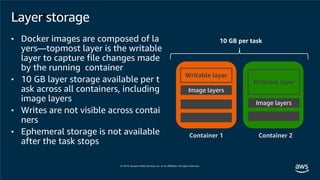
Layer storage
Writable layer
Image layers
Writable layer
Container 1 Container 2
10 GB per task
Layer storage
• Docker images are composed of la
yers—topmost layer is the writable
layer to capture file changes made
by the running container
• 10 GB layer storage available per t
ask across all containers, including
image layers
• Writes are not visible across contai
ners
• Ephemeral storage is not available
after the task stops
Image layers
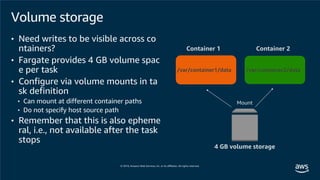
Container 1 Container 2
4 GB volume storage
Mount
/var/container1/data /var/container2/data
Volume storage
• Need writes to be visible across co
ntainers?
• Fargate provides 4 GB volume spac
e per task
• Configure via volume mounts in ta
sk definition
• Can mount at different container paths
• Do not specify host source path
• Remember that this is also epheme
ral, i.e., not available after the task
stops
AWS Fargate를 사용한 서버리스 컨테이너 활용 하기
- 삼성전자 개발자 포털 사례 -
Sep. 2019
Ashton Hyunsung Yu (ashton.yu@samsung.com)
Kyotack Tylor Kim (Kyotack.kim@samsung.com)
Cloud Team | Samsung Electronics
37
Agenda
• Samsung developer relations
• Journey to build Samsung developer portal and developer
workspace
• About our platform architecture
• Future plan
38
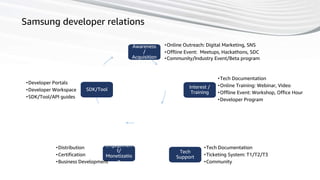
Samsung developer relations
Awareness
/
Acquisition
Interest /
Training
Tech
Support
Engagemen
t/
Monetizatio
n
SDK/Tool
•Online Outreach: Digital Marketing, SNS
•Offline Event: Meetups, Hackathons, SDC
•Community/Industry Event/Beta program
•Tech Documentation
•Online Training: Webinar, Video
•Offline Event: Workshop, Office Hour
•Developer Program
•Tech Documentation
•Ticketing System: T1/T2/T3
•Community
•Distribution
•Certification
•Business Development
•Developer Portals
•Developer Workspace
•SDK/Tool/API guides
39
SDC 2018
Video clip (About 1 min.)
40
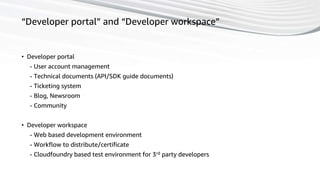
“Developer portal” and “Developer workspace”
• Developer portal
- User account management
- Technical documents (API/SDK guide documents)
- Ticketing system
- Blog, Newsroom
- Community
• Developer workspace
- Web based development environment
- Workflow to distribute/certificate
- Cloudfoundry based test environment for 3rd party developers
41
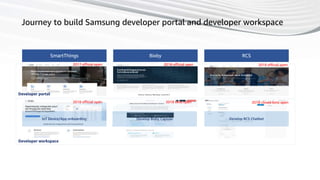
Journey to build Samsung developer portal and developer workspace
SmartThings Bixby RCS
Developer portal
Developer workspace
IoT Device/App onboarding Develop Bixby Capsule Develop RCS Chatbot
2017 official open 2018 official open 2018 officail open
2018 official open 2018 beta open 2018 closed beta open
42
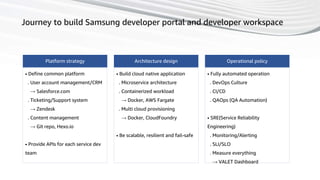
Journey to build Samsung developer portal and developer workspace
Platform strategy
• Define common platform
. User account management/CRM
→ Salesforce.com
. Ticketing/Support system
→ Zendesk
. Content management
→ Git repo, Hexo.io
• Provide APIs for each service dev
team
Architecture design
• Build cloud native application
. Microservice architecture
. Containerized workload
→ Docker, AWS Fargate
. Multi cloud provisioning
→ Docker, CloudFoundry
• Be scalable, resilient and fail-safe
Operational policy
• Fully automated operation
. DevOps Culture
. CI/CD
. QAOps (QA Automation)
• SRE(Service Reliability
Engineering)
. Monitoring/Alerting
. SLI/SLO
. Measure everything
→ VALET Dashboard
43
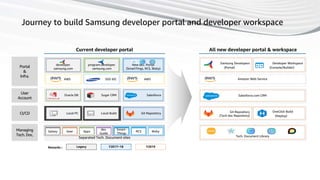
Journey to build Samsung developer portal and developer workspace
All new developer portal & workspaceCurrent developer portal
Portal
&
Infra.
User
Account
Git Repository
(Tech doc Repository)
OneClick Build
(Deploy)
CI/CD
Managing
Tech. Doc.
Oracle DB Sugar CRM Salesforce
AWS SDS IDC AWS
Local BuildLocal PC Git Repository
program.developer.
samsung.com
developer.
samsung.com
New dev. Portal
(SmartTings, RCS, Bixby)
Tech. Document Library
Samsung Developers
(Portal)
Developer Workspace
(Console/Builder)
Separated Tech. Document sites
Amazon Web Service
Salesforce.com CRM
Y2019Legacy Y2017~18Remarks :
Smart-
Things
RCS BixbyGalaxy Gear Apps
dev.
Guide
44
Architecture | developer portal
[AWS architecture blog]
https://aws.amazon.com/ko/blogs/archite
cture/samsung-builds-a-secure-developer-
portal-with-fargate-and-ecr/
45
Why we chose AWS Fargate for developer portal
• Easy to Use
- Good for quick horizontal scaling
- ECS CLI Supports Fargate
• Fast Deploy
- AWS support dedicated fleet for Fargate
- Fast provisioning
• Cost effective and reduce operational effort
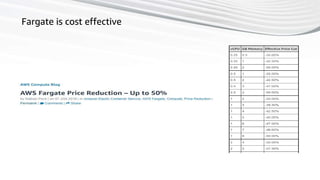
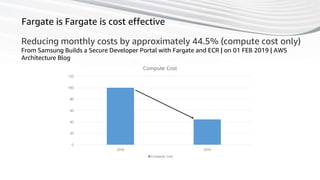
- Reducing monthly costs by approximately 44.5% (compute cost only)
46
Architecture | CloudFoundry platform for developer workspace
[Source : CloudFoundry.org]
47
Use cases of CloudFoundry
Developers can request the app as docker image
to install the created app in CloudFoundry to
their own cloud environments
Router
Build Pack
Process
Running Containers
App App App App
App App App App
Blob Store
buildpacks
CloudFoundry Platform
Node.js package Node-red package Flow.json
Gitlab
(2) Compilation
(1) CF push
(3) Package download
(4) Create container image
(5) Deploy
(6) Store flow
[CloudFoundry blog]
https://www.cloudfoundry.org/blog/samsung-chooses-cloud-foundry-3rd-party-developer-experience/
48
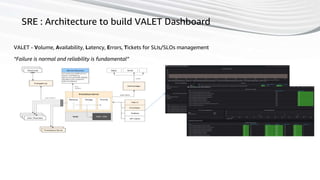
SRE : Architecture to build VALET Dashboard
VALET - Volume, Availability, Latency, Errors, Tickets for SLIs/SLOs management
“Failure is normal and reliability is fundamental”
49
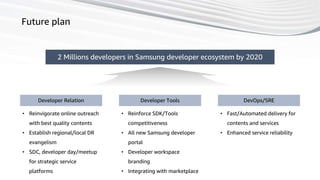
Future plan
2 Millions developers in Samsung developer ecosystem by 2020
Developer Relation Developer Tools DevOps/SRE
• Reinvigorate online outreach
with best quality contents
• Establish regional/local DR
evangelism
• SDC, developer day/meetup
for strategic service
platforms
• Reinforce SDK/Tools
competitiveness
• All new Samsung developer
portal
• Developer workspace
branding
• Integrating with marketplace
• Fast/Automated delivery for
contents and services
• Enhanced service reliability
50
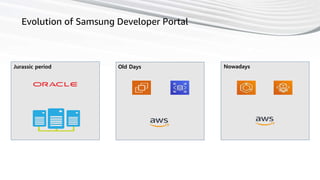
Evolution of Samsung Developer Portal
Jurassic period Old Days Nowadays
51
Fargate is cost effective
52
Fargate is Fargate is cost effective
53
Fargate is Fargate is cost effective
Reducing monthly costs by approximately 44.5% (compute cost only)
From Samsung Builds a Secure Developer Portal with Fargate and ECR | on 01 FEB 2019 | AWS
Architecture Blog
0
20
40
60
80
100
120
2018 2019
Compute Cost
Compute Cost
54
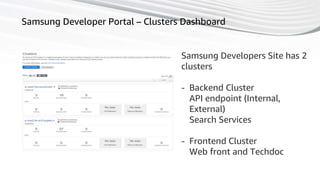
Samsung Developer Portal – Clusters Dashboard
Samsung Developers Site has 2
clusters
- Backend Cluster
API endpoint (Internal,
External)
Search Services
- Frontend Cluster
Web front and Techdoc
55
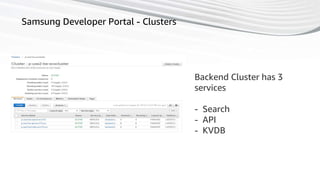
Samsung Developer Portal - Clusters
Backend Cluster has 3
services
- Search
- API
- KVDB
56
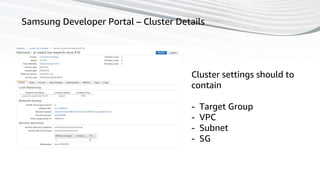
Samsung Developer Portal – Cluster Details
Cluster settings should to
contain
- Target Group
- VPC
- Subnet
- SG
57
Samsung Developer Portal - Task Definition
Samsung Developers Search Task
is
- 1024 Memory
- 512 Task CPU
58
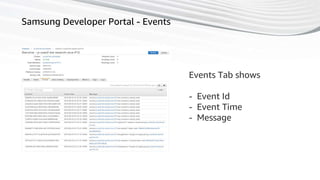
Samsung Developer Portal - Events
Events Tab shows
- Event Id
- Event Time
- Message
59
Demo
Fargate Demo
We’re gonna do..
- Build
- Task Setup
- Cluster Setup
- Deploy
60
Demo
Fargate Demo
We’re gonna do..
- Build
- Task Setup
- Cluster Setup
- Deploy
61
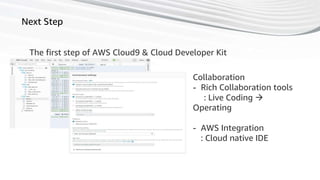
Next Step
The first step of AWS Cloud9 & Cloud Developer Kit
Collaboration
- Rich Collaboration tools
: Live Coding 
Operating
- AWS Integration
: Cloud native IDE
62
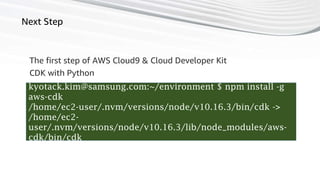
Next Step
The first step of AWS Cloud9 & Cloud Developer Kit
kyotack.kim@samsung.com:~/environment $ npm install -g
aws-cdk
/home/ec2-user/.nvm/versions/node/v10.16.3/bin/cdk ->
/home/ec2-
user/.nvm/versions/node/v10.16.3/lib/node_modules/aws-
cdk/bin/cdk
CDK with Python
63
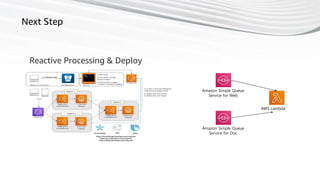
Next Step
Reactive Processing & Deploy
Amazon Simple Queue
Service for Web
Amazon Simple Queue
Service for Doc
AWS Lambda
64
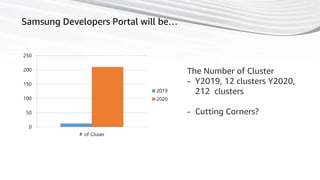
Samsung Developers Portal will be…
0
50
100
150
200
250
# of Cluser
2019
2020
The Number of Cluster
- Y2019, 12 clusters Y2020,
212 clusters
- Cutting Corners?
65
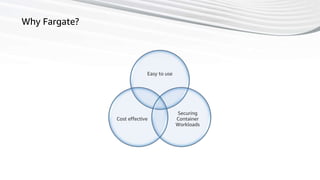
Why Fargate?
Easy to use
Securing
Container
Workloads
Cost effective
Thank you!
[AWS Architecture blog]
https://aws.amazon.com/ko/blogs/architecture/samsung-builds-a-secure-developer-portal-with-fargate-and-ecr/
[CloudFoundry blog]
https://www.cloudfoundry.org/blog/samsung-chooses-cloud-foundry-3rd-party-developer-experience/
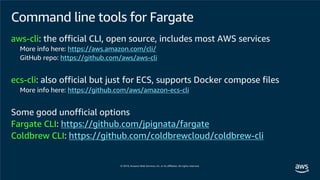
Command line tools for Fargate
aws-cli: the official CLI, open source, includes most AWS services
More info here: https://aws.amazon.com/cli/
GitHub repo: https://github.com/aws/aws-cli
ecs-cli: also official but just for ECS, supports Docker compose files
More info here: https://github.com/aws/amazon-ecs-cli
Some good unofficial options
Fargate CLI: https://github.com/jpignata/fargate
Coldbrew CLI: https://github.com/coldbrewcloud/coldbrew-cli
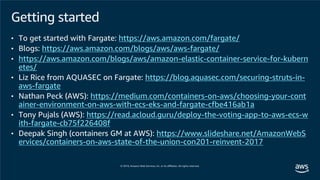
Getting started
• To get started with Fargate: https://aws.amazon.com/fargate/
• Blogs: https://aws.amazon.com/blogs/aws/aws-fargate/
• https://aws.amazon.com/blogs/aws/amazon-elastic-container-service-for-kubern
etes/
• Liz Rice from AQUASEC on Fargate: https://blog.aquasec.com/securing-struts-in-
aws-fargate
• Nathan Peck (AWS): https://medium.com/containers-on-aws/choosing-your-cont
ainer-environment-on-aws-with-ecs-eks-and-fargate-cfbe416ab1a
• Tony Pujals (AWS): https://read.acloud.guru/deploy-the-voting-app-to-aws-ecs-w
ith-fargate-cb75f226408f
• Deepak Singh (containers GM at AWS): https://www.slideshare.net/AmazonWebS
ervices/containers-on-aws-state-of-the-union-con201-reinvent-2017
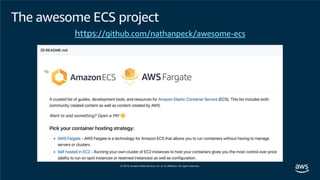
The awesome ECS project
https://github.com/nathanpeck/awesome-ecs
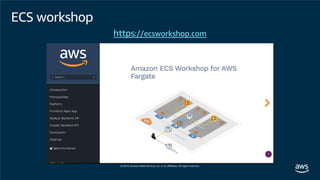
ECS workshop
https://ecsworkshop.com
여러분의 피드백을 기다립니다!
#AWSDEVDAYSEOUL

[AWS Dev Day] 앱 현대화 | AWS Fargate를 사용한 서버리스 컨테이너 활용 하기 - 삼성전자 개발자 포털 사례 - 정영준 AWS 솔루션즈 아키텍트,삼성전자 Cloud팀 유현성 수석, 삼성전자 Cloud팀 김교탁 책임

  • 2.
    Fargate 를 사용하여 서버리스컨테이너 활용하기 정영준 솔루션즈 아키텍트 AWS 유현성 수석 삼성전자 Cloud팀 김교탁 책임 삼성전자 Cloud팀
  • 3.
    Amazon ECS AmazonEKS AWS Fargate for ECS Fargate for EKS (on the roadmap) Managed containers on AWS
  • 4.
    Managed container services Chooseyour orchestration tool1 Choose your launch type2 ECS EKS Amazon EC2 Fargate EC2 Fargate Deploying to AWS managed container services
  • 5.
    *For distributed statemanagement Availability Zone #1 Availability Zone #2 Availability Zone #3 Amazon ECS: Cluster management as a hosted service Scheduling and orchestration Cluster manager* Placement engine
  • 6.
    Amazon ECS: Clustermanagement as a hosted service ECS agent Docker agent OS EC2 instance ECS agent Docker agent OS EC2 instance ECS agent Docker agent OS EC2 instance Availability zone Availability zone
  • 7.
    But you areresponsible for the provisioning and ma intenance of the container instances in the cluster
  • 8.
    Serverless No EC2 containerinstances to provision, scale, or manage Elastic Scale up and down seamlessly; pay for only what you use Integrated with the AWS ecosystem VPC networking, Elastic Load Balancing, IAM permissions, Amazon CloudWatch, and more Your containers AWS Fargate simplifies the burden
  • 9.
    And it letsyou focus on the application
  • 11.
    Container instances Standard EC2virtual machines; once registered to a cluster, your tasks run on these compute resources Services Abstraction over one (or more replicated) tasks; basis for load balancing, scaling, and discovery Tasks The isolation boundary for containerized workloads deployed as a unit within the cluster Amazon ECS: EC2 launch type
  • 12.
    Container instances Services Tasks EC2 launchtype: You're responsible for the following
  • 13.
    EC2 launch type:Configuration • EC2 container instances for ECS are generally configured using the ECS- optimized AMI, along with any additional optionally supplied user data • Services/tasks/containers are configured through the ECS API; you can access it directly, go through the CLI, or use AWS CloudFormation
  • 14.
    EC2 launch type:Compute • Choose your own instance type with any combination of resources • Controlled through the service ASG launch configuration, as with any ot her EC2 cluster • Supports GPUs, spot instances, RIs, etc.
  • 15.
    Services Tasks Fargate launchtype: You're responsible for the following Container instances
  • 16.
    Same Task Definition schema Use ECSAPIs to launch Fargate containers Easy migration— run Fargate and EC2 launch type tasks in the same cluster Share primitives like VPC, CloudWatch, and IAM with ECS In common with EC2 launch type
  • 17.
    Fargate launch type:Compute 50 different CPU/memory configurations per task to choose from CPU Memory 256 (.25 vCPU) 512 MB, 1 GB, 2 GB 512 (.5 vCPU) 1 GB, 2 GB, 3 GB, 4 GB 1,024 (1 vCPU) 2 GB, 3 GB, 4 GB, 5 GB, 6 GB, 7 GB, 8 GB 2,048 (2 vCPU) 4 GB–16 GB (in 1 GB increments) 4,096 (4 vCPU) 8 GB–30 GB (in 1 GB increments)
  • 18.
    Fargate launch type:Pricing Per-second billing, 1 minute minimum Pay for what you provision Billed for task-level CPU and memory units
  • 20.
    Fargate compute constructs Defineapplication containers— image, CPU and memory requirements, etc. register Task definition Cluster • Infrastructure isolation boundary • IAM permissions boundary run Task • A running instantiation of a task definition • Use Fargate launch type create Service Elastic Load Balancer • Maintain n running copies • Integrated with ELB • Unhealthy tasks automatically replaced
  • 21.
    { "family": “mytask", "containerDefinitions": [ { "name":“container1", "image":"..." }, { "name":“container2", "image":"..." } ] } Taskdefinition snippet Task definition • Immutable, versioned document • Identified by family:version • Contains a list of up to 10 contain er definitions • All containers will be collocated o n the same host • Each container definition has • A name • Image URL (Amazon ECR or public images) • And more
  • 22.
    CPU & memoryspecification Units • CPU: vCPU (string) or CPU units (integer) (1 vCPU = 256 CPU units) • Memory: MB (integer) or string (1 GB) Task-level resources Total CPU/memory across all containers Container-level resources Defines sharing of task resources among con tainers { "family": "mytask", "cpu": "1 vCPU", "memory": "2 GB", "containerDefinitions": [ { "name":“container1", "image":"...“, "cpu": 256, "memoryReservation": 512 }, { "name":“container2", "image":"...", "cpu": 768, "memoryReservation": 512 } ] } Task-level resources Container- level resources Task definition snippet
  • 23.
    Public repositories Amazon ElasticContainer Registry (Amazon ECR) Registry support
  • 25.
    VPC integration Launch yourFargate tasks into subnets Under the hood • We create an elastic network interface • The network interface is allocated a private IP from your subnet • The network interface is attached to your task • Your task now has a private IP from your subnet You can assign public IPs to your tasks Configure security groups to control inbound and outbo und traffic 172.31.0.0/16 Subnet 172.31.1.0/24 Internet Other entities in VPC EC2 LB DB etc. Private IP 172.31.1.164 ENI Fargate taskPublic / 208.57.73.13 /
  • 26.
    Configure task networ king:awsvpc { "family": "mytask", "cpu": "1 vCPU", "memory": "2 GB", "networkMode": "awsvpc", "containerDefinitions": [ { "name":“container1", "image":"...", "cpu": 256, "memoryReservation": 512 }, { "name":“container2", "image":"...", "cpu": 768, "memoryReservation": 512 } ] } $ aws ecs run-task ... --task-definition mytask:1 --launch-type "FARGATE" --network-configuration “awsvpcConfiguration = { subnets=[subnet1-id, ...], securityGroups=[sg-id] }” Run task Task definition Enables network interface creation & attachment to task
  • 27.
    Internet access Task networkinterface is used for all inbound and outbound network traffic to an d from your task It is also used for • Image pull (from ECR or a public repository) • Pushing logs to CloudWatch These endpoints need to be reachable via your task network interface Two common modes of setup • Private with no inbound internet traffic, but allows outbound internet access • Public task with both inbound and outbound internet access
  • 28.
    Outbound Inbound Public task setup Publicsubnet Fargate task Public IP 54.191.135.66 Internet gateway 172.31.0.0/16 172.31.2.0/24 Destination Target 172.31.0.0/16 Local 0.0.0.0/0 Internet gateway Route table Internet ENI $ aws ecs run-task ... -- network-configuration “awsvpcConfiguration = { subnets=[public-subnet], securityGroups=[sg-id], assignPublicIp=ENABLED}” Launch the task into a public subnet Give it a public IP address Security group to allow the expected inbound traffic Type Port Source HTTP 8080 0.0.0.0/0 Inbound security group rule Type Port Destination All Traffic ALL 0.0.0.0/0 Outbound security group rules Run task
  • 29.
    Public subnet Privatesubnet Fargate taskENI Private IP 172.31.1.164 NAT gateway public EIP 34.214.162.237 Internet gateway 172.31.0.0/16 172.31.2.0/24 172.31.1.0/24 Destination Target 172.31.0.0/16 Local 0.0.0.0/0 NAT gateway Destination Target 172.31.0.0/16 Local 0.0.0.0/0 Internet gateway Route tables Internet Attach internet gateway to VPC Set up a public subnet with • Route to internet gateway • NAT gateway Setup private subnet with • Fargate task • Route to NAT gateway Security group to allow outbound traffic Type Port Destination All traffic ALL 0.0.0.0/0 Outbound Security Group Rules Private task setup
  • 30.
    Public subnet Privatesubnet Fargate taskENI Private IP 172.31.1.164 :8080 ALB Public IP 208.57.73.13 :80 172.31.0.0/16 172.31.2.0/24 172.31.1.0/24 Internet Task in private subnet with private IP ALB in public subnet with public IP Make sure the AZs of the two subnets match ALB security group to allow inbound traffic from internet Task security group to allow inbound traffic from the ALB security group Task security groupALB Security Group Type Port Source HTTP 80 0.0.0.0/0 Inbound rule Type Port Source Custom TCP 8080 ALB security group Inbound rule us-east-1a us-east-1a Internet-facing load balancer VPC setup
  • 31.
    Load balancer configuration{ "family":"mytask", "cpu": "1 vCPU", "memory": "2 gb", "networkMode": “awsvpc“, "containerDefinitions": [ { "name":“container1", "image":"...", "cpu": 256, "memoryReservation": 512, "portMappings": [ { "containerPort": 8080 } ] }, { "name":“container2", "image":"...", "cpu": 768, "memoryReservation": 512, "portMappings": [ { "containerPort": 5000 } ] } ] } $ aws ecs create-service ... -- task-definition mytask:1 --launch-type "FARGATE" -- network-configuration “awsvpcConfiguration = { subnets=[subnet-id], securityGroups=[sg-id] }” -- load-balancers “[ { "targetGroupArn": “<insert arn>", "containerName": “container1", "containerPort": 8080 } ]” Create service Task definition
  • 33.
    Disk storage EBS-backed ephemeralstorage provided in the form of Volume storage Writable Layer Storage
  • 34.
    Layer storage Writable layer Imagelayers Writable layer Container 1 Container 2 10 GB per task Layer storage • Docker images are composed of la yers—topmost layer is the writable layer to capture file changes made by the running container • 10 GB layer storage available per t ask across all containers, including image layers • Writes are not visible across contai ners • Ephemeral storage is not available after the task stops Image layers
  • 35.
    Container 1 Container2 4 GB volume storage Mount /var/container1/data /var/container2/data Volume storage • Need writes to be visible across co ntainers? • Fargate provides 4 GB volume spac e per task • Configure via volume mounts in ta sk definition • Can mount at different container paths • Do not specify host source path • Remember that this is also epheme ral, i.e., not available after the task stops
  • 36.
    AWS Fargate를 사용한서버리스 컨테이너 활용 하기 - 삼성전자 개발자 포털 사례 - Sep. 2019 Ashton Hyunsung Yu (ashton.yu@samsung.com) Kyotack Tylor Kim (Kyotack.kim@samsung.com) Cloud Team | Samsung Electronics
  • 37.
    37 Agenda • Samsung developerrelations • Journey to build Samsung developer portal and developer workspace • About our platform architecture • Future plan
  • 38.
    38 Samsung developer relations Awareness / Acquisition Interest/ Training Tech Support Engagemen t/ Monetizatio n SDK/Tool •Online Outreach: Digital Marketing, SNS •Offline Event: Meetups, Hackathons, SDC •Community/Industry Event/Beta program •Tech Documentation •Online Training: Webinar, Video •Offline Event: Workshop, Office Hour •Developer Program •Tech Documentation •Ticketing System: T1/T2/T3 •Community •Distribution •Certification •Business Development •Developer Portals •Developer Workspace •SDK/Tool/API guides
  • 39.
    39 SDC 2018 Video clip(About 1 min.)
  • 40.
    40 “Developer portal” and“Developer workspace” • Developer portal - User account management - Technical documents (API/SDK guide documents) - Ticketing system - Blog, Newsroom - Community • Developer workspace - Web based development environment - Workflow to distribute/certificate - Cloudfoundry based test environment for 3rd party developers
  • 41.
    41 Journey to buildSamsung developer portal and developer workspace SmartThings Bixby RCS Developer portal Developer workspace IoT Device/App onboarding Develop Bixby Capsule Develop RCS Chatbot 2017 official open 2018 official open 2018 officail open 2018 official open 2018 beta open 2018 closed beta open
  • 42.
    42 Journey to buildSamsung developer portal and developer workspace Platform strategy • Define common platform . User account management/CRM → Salesforce.com . Ticketing/Support system → Zendesk . Content management → Git repo, Hexo.io • Provide APIs for each service dev team Architecture design • Build cloud native application . Microservice architecture . Containerized workload → Docker, AWS Fargate . Multi cloud provisioning → Docker, CloudFoundry • Be scalable, resilient and fail-safe Operational policy • Fully automated operation . DevOps Culture . CI/CD . QAOps (QA Automation) • SRE(Service Reliability Engineering) . Monitoring/Alerting . SLI/SLO . Measure everything → VALET Dashboard
  • 43.
    43 Journey to buildSamsung developer portal and developer workspace All new developer portal & workspaceCurrent developer portal Portal & Infra. User Account Git Repository (Tech doc Repository) OneClick Build (Deploy) CI/CD Managing Tech. Doc. Oracle DB Sugar CRM Salesforce AWS SDS IDC AWS Local BuildLocal PC Git Repository program.developer. samsung.com developer. samsung.com New dev. Portal (SmartTings, RCS, Bixby) Tech. Document Library Samsung Developers (Portal) Developer Workspace (Console/Builder) Separated Tech. Document sites Amazon Web Service Salesforce.com CRM Y2019Legacy Y2017~18Remarks : Smart- Things RCS BixbyGalaxy Gear Apps dev. Guide
  • 44.
    44 Architecture | developerportal [AWS architecture blog] https://aws.amazon.com/ko/blogs/archite cture/samsung-builds-a-secure-developer- portal-with-fargate-and-ecr/
  • 45.
    45 Why we choseAWS Fargate for developer portal • Easy to Use - Good for quick horizontal scaling - ECS CLI Supports Fargate • Fast Deploy - AWS support dedicated fleet for Fargate - Fast provisioning • Cost effective and reduce operational effort - Reducing monthly costs by approximately 44.5% (compute cost only)
  • 46.
    46 Architecture | CloudFoundryplatform for developer workspace [Source : CloudFoundry.org]
  • 47.
    47 Use cases ofCloudFoundry Developers can request the app as docker image to install the created app in CloudFoundry to their own cloud environments Router Build Pack Process Running Containers App App App App App App App App Blob Store buildpacks CloudFoundry Platform Node.js package Node-red package Flow.json Gitlab (2) Compilation (1) CF push (3) Package download (4) Create container image (5) Deploy (6) Store flow [CloudFoundry blog] https://www.cloudfoundry.org/blog/samsung-chooses-cloud-foundry-3rd-party-developer-experience/
  • 48.
    48 SRE : Architectureto build VALET Dashboard VALET - Volume, Availability, Latency, Errors, Tickets for SLIs/SLOs management “Failure is normal and reliability is fundamental”
  • 49.
    49 Future plan 2 Millionsdevelopers in Samsung developer ecosystem by 2020 Developer Relation Developer Tools DevOps/SRE • Reinvigorate online outreach with best quality contents • Establish regional/local DR evangelism • SDC, developer day/meetup for strategic service platforms • Reinforce SDK/Tools competitiveness • All new Samsung developer portal • Developer workspace branding • Integrating with marketplace • Fast/Automated delivery for contents and services • Enhanced service reliability
  • 50.
    50 Evolution of SamsungDeveloper Portal Jurassic period Old Days Nowadays
  • 51.
  • 52.
    52 Fargate is Fargateis cost effective
  • 53.
    53 Fargate is Fargateis cost effective Reducing monthly costs by approximately 44.5% (compute cost only) From Samsung Builds a Secure Developer Portal with Fargate and ECR | on 01 FEB 2019 | AWS Architecture Blog 0 20 40 60 80 100 120 2018 2019 Compute Cost Compute Cost
  • 54.
    54 Samsung Developer Portal– Clusters Dashboard Samsung Developers Site has 2 clusters - Backend Cluster API endpoint (Internal, External) Search Services - Frontend Cluster Web front and Techdoc
  • 55.
    55 Samsung Developer Portal- Clusters Backend Cluster has 3 services - Search - API - KVDB
  • 56.
    56 Samsung Developer Portal– Cluster Details Cluster settings should to contain - Target Group - VPC - Subnet - SG
  • 57.
    57 Samsung Developer Portal- Task Definition Samsung Developers Search Task is - 1024 Memory - 512 Task CPU
  • 58.
    58 Samsung Developer Portal- Events Events Tab shows - Event Id - Event Time - Message
  • 59.
    59 Demo Fargate Demo We’re gonnado.. - Build - Task Setup - Cluster Setup - Deploy
  • 60.
    60 Demo Fargate Demo We’re gonnado.. - Build - Task Setup - Cluster Setup - Deploy
  • 61.
    61 Next Step The firststep of AWS Cloud9 & Cloud Developer Kit Collaboration - Rich Collaboration tools : Live Coding  Operating - AWS Integration : Cloud native IDE
  • 62.
    62 Next Step The firststep of AWS Cloud9 & Cloud Developer Kit kyotack.kim@samsung.com:~/environment $ npm install -g aws-cdk /home/ec2-user/.nvm/versions/node/v10.16.3/bin/cdk -> /home/ec2- user/.nvm/versions/node/v10.16.3/lib/node_modules/aws- cdk/bin/cdk CDK with Python
  • 63.
    63 Next Step Reactive Processing& Deploy Amazon Simple Queue Service for Web Amazon Simple Queue Service for Doc AWS Lambda
  • 64.
    64 Samsung Developers Portalwill be… 0 50 100 150 200 250 # of Cluser 2019 2020 The Number of Cluster - Y2019, 12 clusters Y2020, 212 clusters - Cutting Corners?
  • 65.
    65 Why Fargate? Easy touse Securing Container Workloads Cost effective
  • 66.
    Thank you! [AWS Architectureblog] https://aws.amazon.com/ko/blogs/architecture/samsung-builds-a-secure-developer-portal-with-fargate-and-ecr/ [CloudFoundry blog] https://www.cloudfoundry.org/blog/samsung-chooses-cloud-foundry-3rd-party-developer-experience/
  • 68.
    Command line toolsfor Fargate aws-cli: the official CLI, open source, includes most AWS services More info here: https://aws.amazon.com/cli/ GitHub repo: https://github.com/aws/aws-cli ecs-cli: also official but just for ECS, supports Docker compose files More info here: https://github.com/aws/amazon-ecs-cli Some good unofficial options Fargate CLI: https://github.com/jpignata/fargate Coldbrew CLI: https://github.com/coldbrewcloud/coldbrew-cli
  • 69.
    Getting started • Toget started with Fargate: https://aws.amazon.com/fargate/ • Blogs: https://aws.amazon.com/blogs/aws/aws-fargate/ • https://aws.amazon.com/blogs/aws/amazon-elastic-container-service-for-kubern etes/ • Liz Rice from AQUASEC on Fargate: https://blog.aquasec.com/securing-struts-in- aws-fargate • Nathan Peck (AWS): https://medium.com/containers-on-aws/choosing-your-cont ainer-environment-on-aws-with-ecs-eks-and-fargate-cfbe416ab1a • Tony Pujals (AWS): https://read.acloud.guru/deploy-the-voting-app-to-aws-ecs-w ith-fargate-cb75f226408f • Deepak Singh (containers GM at AWS): https://www.slideshare.net/AmazonWebS ervices/containers-on-aws-state-of-the-union-con201-reinvent-2017
  • 70.
    The awesome ECSproject https://github.com/nathanpeck/awesome-ecs
  • 71.
  • 73.