A Program in Binary Searching Using Visual Basic 2008 (version 9.0)
                           By Ariel T. Sumagaysay, MSCS

A. Form Design

Design the form shown below using the Visual Basic 2008:


B. Components

        Components                             Properties / Settings
    Form1                  Name: frmMain
                           Font: Times New Roman
                           Font Style: Regular
                           Size: 10
                           FormBorderStyle: FixedDialog
                           Icon: Any
                           MaximizeBox: False
                           StartPosition: CenterScreen
                           Text: BINARY SEARCH PLUS
    GroupBox1              Name: GroupBox1
                           Text:
    Label1                 Name: Label1
                           Text: ENTER NUMBER OF ELEMENTS [AT LEAST 10]:
    Label2                 Name: Label2
                           Text: ENTERED ELEMENTS
    Label3                 Name: Label3
                           Text: ARRANGED:
    Label4                 Name: Label4
                           Text: Results
2


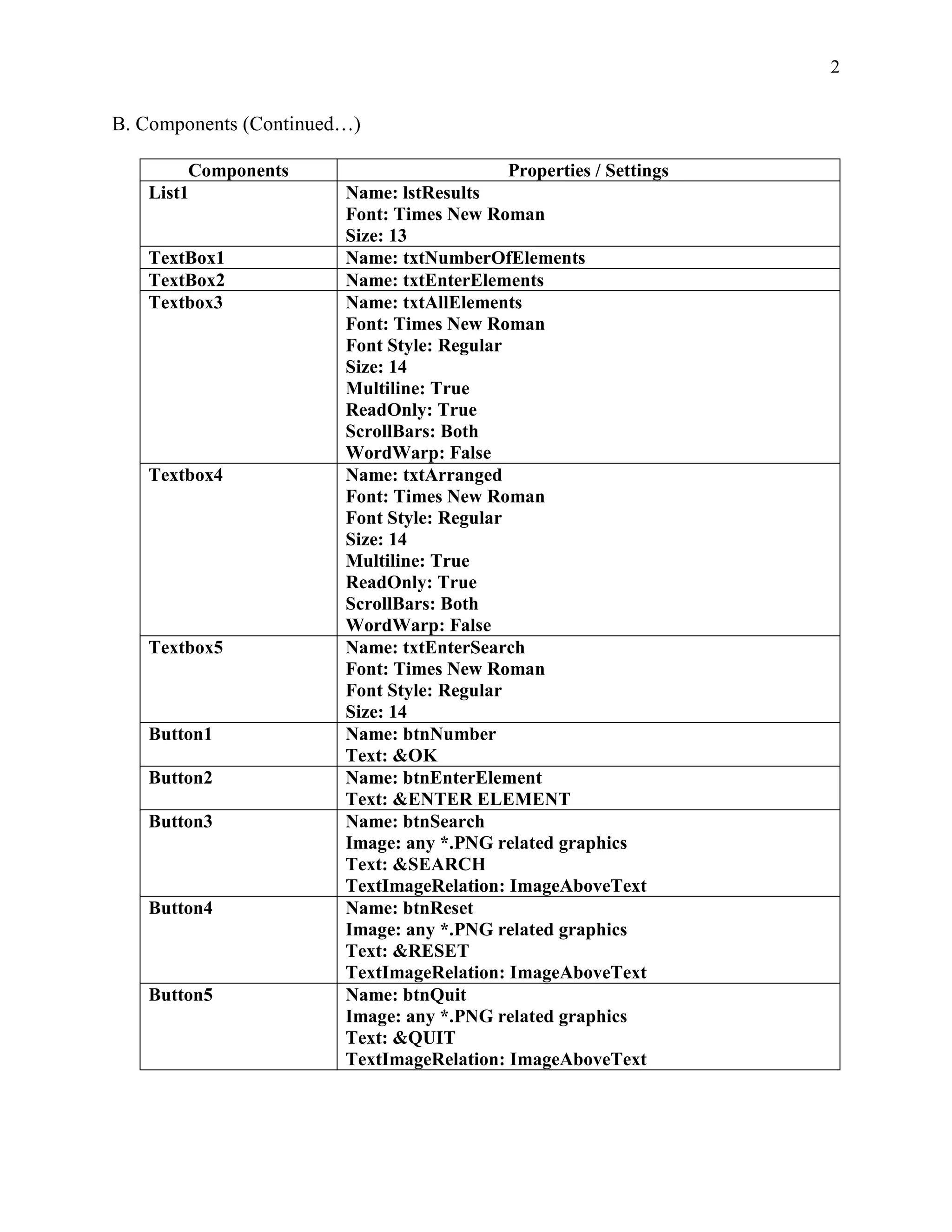
B. Components (Continued…)

        Components                          Properties / Settings
   List1                Name: lstResults
                        Font: Times New Roman
                        Size: 13
   TextBox1             Name: txtNumberOfElements
   TextBox2             Name: txtEnterElements
   Textbox3             Name: txtAllElements
                        Font: Times New Roman
                        Font Style: Regular
                        Size: 14
                        Multiline: True
                        ReadOnly: True
                        ScrollBars: Both
                        WordWarp: False
   Textbox4             Name: txtArranged
                        Font: Times New Roman
                        Font Style: Regular
                        Size: 14
                        Multiline: True
                        ReadOnly: True
                        ScrollBars: Both
                        WordWarp: False
   Textbox5             Name: txtEnterSearch
                        Font: Times New Roman
                        Font Style: Regular
                        Size: 14
   Button1              Name: btnNumber
                        Text: &OK
   Button2              Name: btnEnterElement
                        Text: &ENTER ELEMENT
   Button3              Name: btnSearch
                        Image: any *.PNG related graphics
                        Text: &SEARCH
                        TextImageRelation: ImageAboveText
   Button4              Name: btnReset
                        Image: any *.PNG related graphics
                        Text: &RESET
                        TextImageRelation: ImageAboveText
   Button5              Name: btnQuit
                        Image: any *.PNG related graphics
                        Text: &QUIT
                        TextImageRelation: ImageAboveText
3


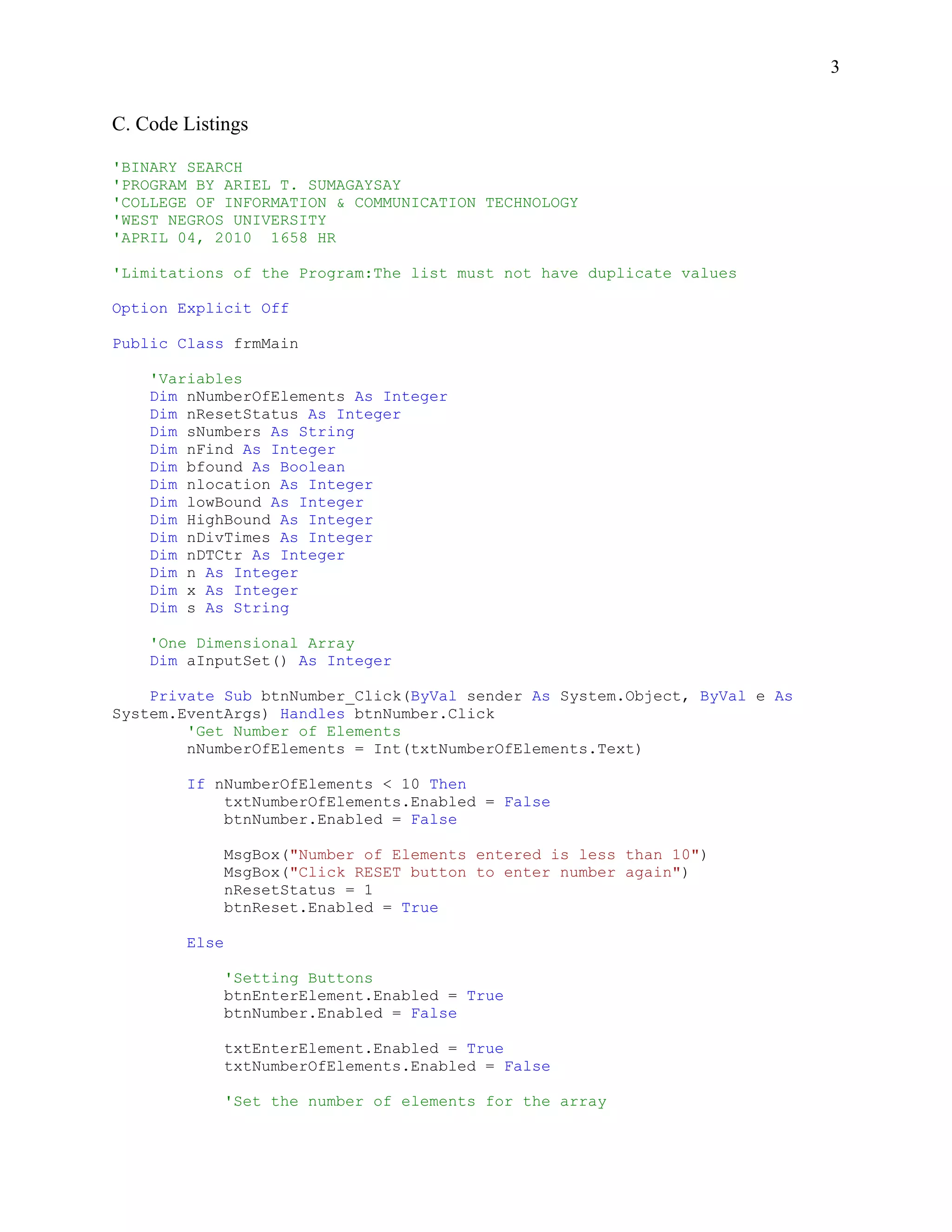
C. Code Listings

'BINARY SEARCH
'PROGRAM BY ARIEL T. SUMAGAYSAY
'COLLEGE OF INFORMATION & COMMUNICATION TECHNOLOGY
'WEST NEGROS UNIVERSITY
'APRIL 04, 2010 1658 HR

'Limitations of the Program:The list must not have duplicate values

Option Explicit Off

Public Class frmMain

    'Variables
    Dim nNumberOfElements As Integer
    Dim nResetStatus As Integer
    Dim sNumbers As String
    Dim nFind As Integer
    Dim bfound As Boolean
    Dim nlocation As Integer
    Dim lowBound As Integer
    Dim HighBound As Integer
    Dim nDivTimes As Integer
    Dim nDTCtr As Integer
    Dim n As Integer
    Dim x As Integer
    Dim s As String

    'One Dimensional Array
    Dim aInputSet() As Integer

    Private Sub btnNumber_Click(ByVal sender As System.Object, ByVal e As
System.EventArgs) Handles btnNumber.Click
        'Get Number of Elements
        nNumberOfElements = Int(txtNumberOfElements.Text)

        If nNumberOfElements < 10 Then
            txtNumberOfElements.Enabled = False
            btnNumber.Enabled = False

               MsgBox("Number of Elements entered is less than 10")
               MsgBox("Click RESET button to enter number again")
               nResetStatus = 1
               btnReset.Enabled = True

        Else

               'Setting Buttons
               btnEnterElement.Enabled = True
               btnNumber.Enabled = False

               txtEnterElement.Enabled = True
               txtNumberOfElements.Enabled = False

               'Set the number of elements for the array
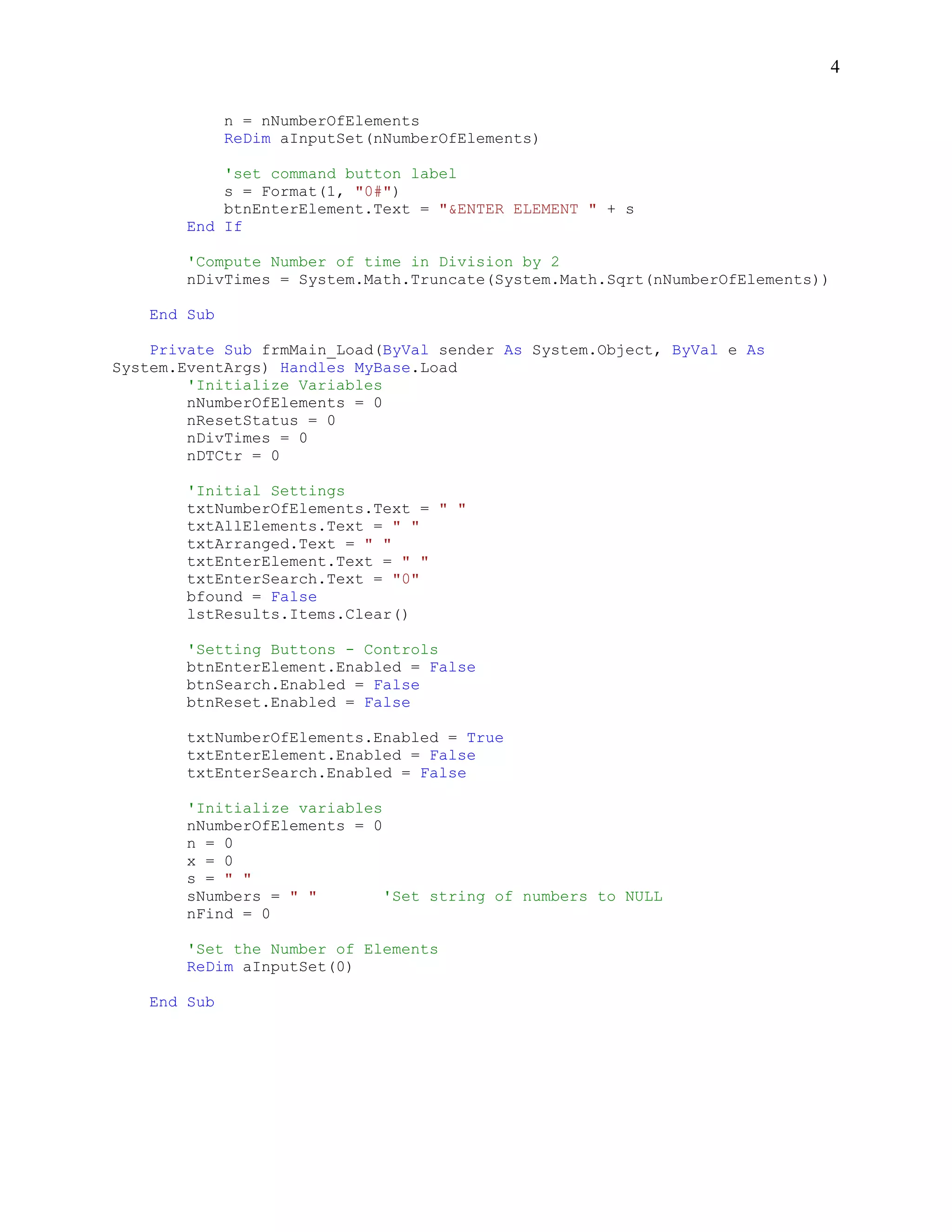
4

              n = nNumberOfElements
              ReDim aInputSet(nNumberOfElements)

            'set command button label
            s = Format(1, "0#")
            btnEnterElement.Text = "&ENTER ELEMENT " + s
        End If

        'Compute Number of time in Division by 2
        nDivTimes = System.Math.Truncate(System.Math.Sqrt(nNumberOfElements))

    End Sub

    Private Sub frmMain_Load(ByVal sender As System.Object, ByVal e As
System.EventArgs) Handles MyBase.Load
        'Initialize Variables
        nNumberOfElements = 0
        nResetStatus = 0
        nDivTimes = 0
        nDTCtr = 0

        'Initial Settings
        txtNumberOfElements.Text = " "
        txtAllElements.Text = " "
        txtArranged.Text = " "
        txtEnterElement.Text = " "
        txtEnterSearch.Text = "0"
        bfound = False
        lstResults.Items.Clear()

        'Setting Buttons - Controls
        btnEnterElement.Enabled = False
        btnSearch.Enabled = False
        btnReset.Enabled = False

        txtNumberOfElements.Enabled = True
        txtEnterElement.Enabled = False
        txtEnterSearch.Enabled = False

        'Initialize variables
        nNumberOfElements = 0
        n = 0
        x = 0
        s = " "
        sNumbers = " "        'Set string of numbers to NULL
        nFind = 0

        'Set the Number of Elements
        ReDim aInputSet(0)

    End Sub
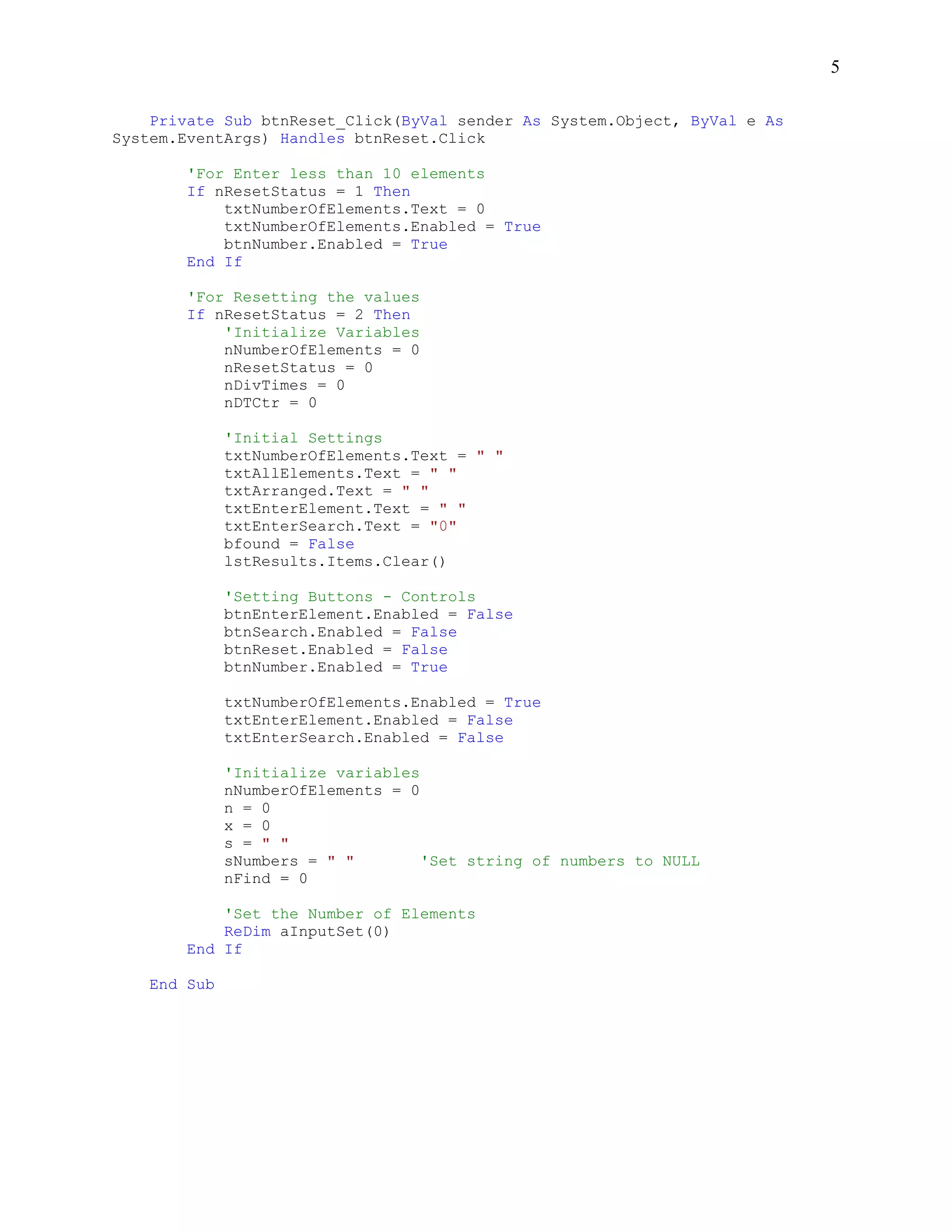
5

    Private Sub btnReset_Click(ByVal sender As System.Object, ByVal e As
System.EventArgs) Handles btnReset.Click

        'For Enter less than 10 elements
        If nResetStatus = 1 Then
            txtNumberOfElements.Text = 0
            txtNumberOfElements.Enabled = True
            btnNumber.Enabled = True
        End If

        'For Resetting the values
        If nResetStatus = 2 Then
            'Initialize Variables
            nNumberOfElements = 0
            nResetStatus = 0
            nDivTimes = 0
            nDTCtr = 0

              'Initial Settings
              txtNumberOfElements.Text = " "
              txtAllElements.Text = " "
              txtArranged.Text = " "
              txtEnterElement.Text = " "
              txtEnterSearch.Text = "0"
              bfound = False
              lstResults.Items.Clear()

              'Setting Buttons - Controls
              btnEnterElement.Enabled = False
              btnSearch.Enabled = False
              btnReset.Enabled = False
              btnNumber.Enabled = True

              txtNumberOfElements.Enabled = True
              txtEnterElement.Enabled = False
              txtEnterSearch.Enabled = False

              'Initialize variables
              nNumberOfElements = 0
              n = 0
              x = 0
              s = " "
              sNumbers = " "        'Set string of numbers to NULL
              nFind = 0

            'Set the Number of Elements
            ReDim aInputSet(0)
        End If

    End Sub
6

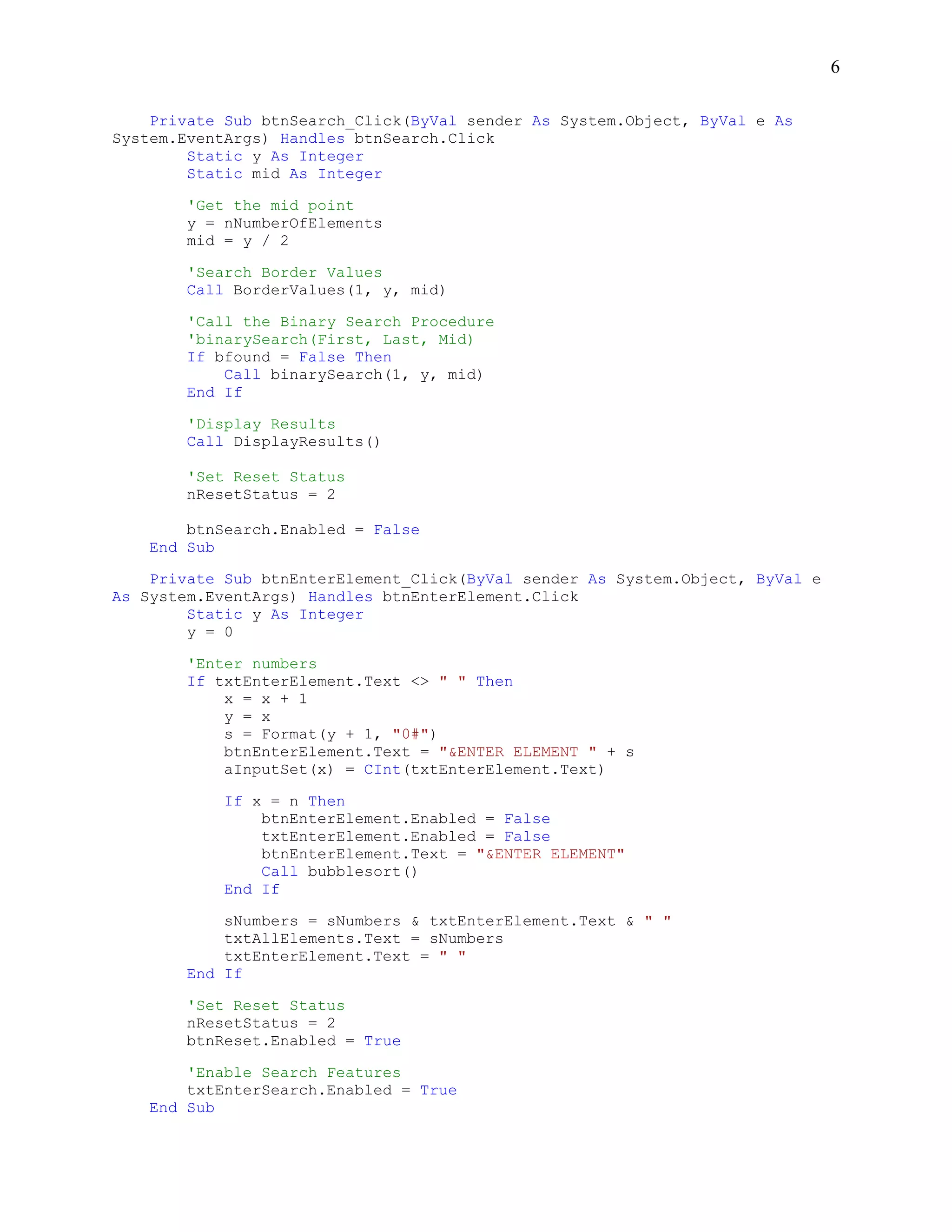
    Private Sub btnSearch_Click(ByVal sender As System.Object, ByVal e As
System.EventArgs) Handles btnSearch.Click
        Static y As Integer
        Static mid As Integer

       'Get the mid point
       y = nNumberOfElements
       mid = y / 2

        'Search Border Values
        Call BorderValues(1, y, mid)

        'Call the Binary Search Procedure
        'binarySearch(First, Last, Mid)
        If bfound = False Then
            Call binarySearch(1, y, mid)
        End If

        'Display Results
        Call DisplayResults()

       'Set Reset Status
       nResetStatus = 2

        btnSearch.Enabled = False
    End Sub

    Private Sub btnEnterElement_Click(ByVal sender As System.Object, ByVal e
As System.EventArgs) Handles btnEnterElement.Click
        Static y As Integer
        y = 0

        'Enter numbers
        If txtEnterElement.Text <> " " Then
            x = x + 1
            y = x
            s = Format(y + 1, "0#")
            btnEnterElement.Text = "&ENTER ELEMENT " + s
            aInputSet(x) = CInt(txtEnterElement.Text)

            If x = n Then
                btnEnterElement.Enabled = False
                txtEnterElement.Enabled = False
                btnEnterElement.Text = "&ENTER ELEMENT"
                Call bubblesort()
            End If

            sNumbers = sNumbers & txtEnterElement.Text & " "
            txtAllElements.Text = sNumbers
            txtEnterElement.Text = " "
        End If

       'Set Reset Status
       nResetStatus = 2
       btnReset.Enabled = True

        'Enable Search Features
        txtEnterSearch.Enabled = True
    End Sub
7

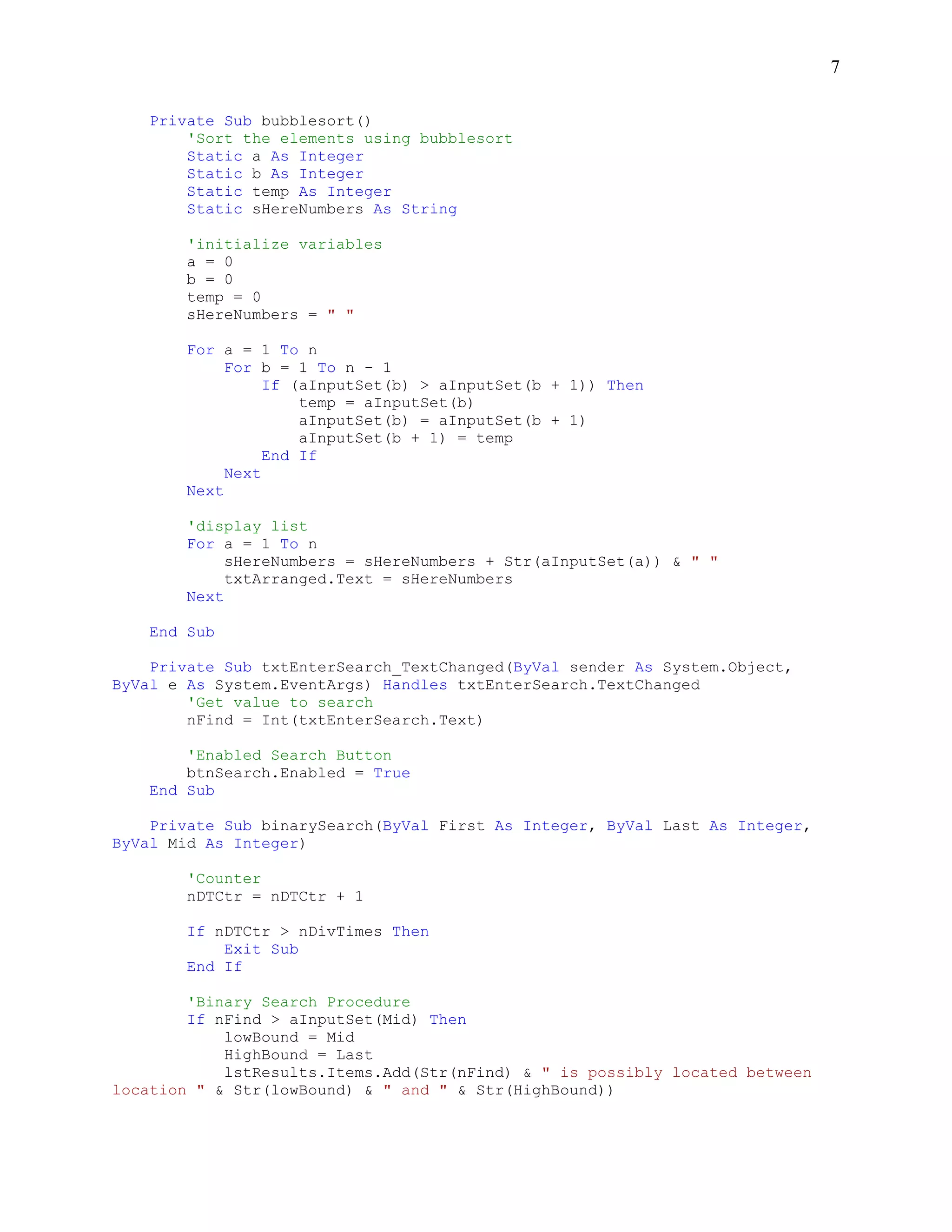
    Private Sub bubblesort()
        'Sort the elements using bubblesort
        Static a As Integer
        Static b As Integer
        Static temp As Integer
        Static sHereNumbers As String

        'initialize variables
        a = 0
        b = 0
        temp = 0
        sHereNumbers = " "

        For a = 1 To n
             For b = 1 To n - 1
                  If (aInputSet(b) > aInputSet(b + 1)) Then
                      temp = aInputSet(b)
                      aInputSet(b) = aInputSet(b + 1)
                      aInputSet(b + 1) = temp
                  End If
             Next
        Next

        'display list
        For a = 1 To n
             sHereNumbers = sHereNumbers + Str(aInputSet(a)) & " "
             txtArranged.Text = sHereNumbers
        Next

    End Sub

    Private Sub txtEnterSearch_TextChanged(ByVal sender As System.Object,
ByVal e As System.EventArgs) Handles txtEnterSearch.TextChanged
        'Get value to search
        nFind = Int(txtEnterSearch.Text)

        'Enabled Search Button
        btnSearch.Enabled = True
    End Sub

    Private Sub binarySearch(ByVal First As Integer, ByVal Last As Integer,
ByVal Mid As Integer)

        'Counter
        nDTCtr = nDTCtr + 1

        If nDTCtr > nDivTimes Then
            Exit Sub
        End If

        'Binary Search Procedure
        If nFind > aInputSet(Mid) Then
            lowBound = Mid
            HighBound = Last
            lstResults.Items.Add(Str(nFind) & " is possibly located between
location " & Str(lowBound) & " and " & Str(HighBound))
8

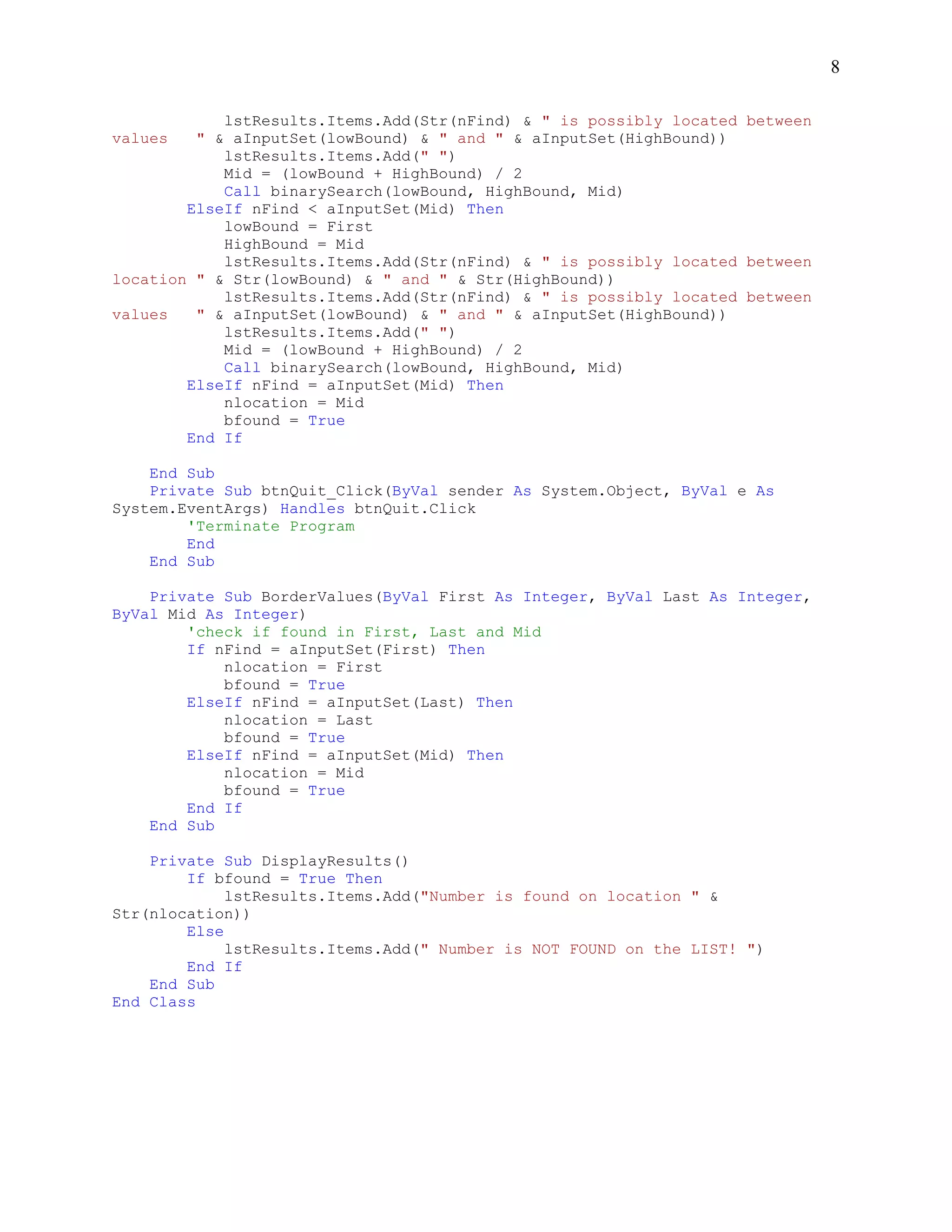
            lstResults.Items.Add(Str(nFind) & " is possibly located between
values   " & aInputSet(lowBound) & " and " & aInputSet(HighBound))
            lstResults.Items.Add(" ")
            Mid = (lowBound + HighBound) / 2
            Call binarySearch(lowBound, HighBound, Mid)
        ElseIf nFind < aInputSet(Mid) Then
            lowBound = First
            HighBound = Mid
            lstResults.Items.Add(Str(nFind) & " is possibly located between
location " & Str(lowBound) & " and " & Str(HighBound))
            lstResults.Items.Add(Str(nFind) & " is possibly located between
values   " & aInputSet(lowBound) & " and " & aInputSet(HighBound))
            lstResults.Items.Add(" ")
            Mid = (lowBound + HighBound) / 2
            Call binarySearch(lowBound, HighBound, Mid)
        ElseIf nFind = aInputSet(Mid) Then
            nlocation = Mid
            bfound = True
        End If

    End Sub
    Private Sub btnQuit_Click(ByVal sender As System.Object, ByVal e As
System.EventArgs) Handles btnQuit.Click
        'Terminate Program
        End
    End Sub

    Private Sub BorderValues(ByVal First As Integer, ByVal Last As Integer,
ByVal Mid As Integer)
        'check if found in First, Last and Mid
        If nFind = aInputSet(First) Then
            nlocation = First
            bfound = True
        ElseIf nFind = aInputSet(Last) Then
            nlocation = Last
            bfound = True
        ElseIf nFind = aInputSet(Mid) Then
            nlocation = Mid
            bfound = True
        End If
    End Sub

    Private Sub DisplayResults()
        If bfound = True Then
             lstResults.Items.Add("Number is found on location " &
Str(nlocation))
        Else
             lstResults.Items.Add(" Number is NOT FOUND on the LIST! ")
        End If
    End Sub
End Class

Binary Search Program in Visual Basic 2008

  • 1.
    A Program inBinary Searching Using Visual Basic 2008 (version 9.0) By Ariel T. Sumagaysay, MSCS A. Form Design Design the form shown below using the Visual Basic 2008: B. Components Components Properties / Settings Form1 Name: frmMain Font: Times New Roman Font Style: Regular Size: 10 FormBorderStyle: FixedDialog Icon: Any MaximizeBox: False StartPosition: CenterScreen Text: BINARY SEARCH PLUS GroupBox1 Name: GroupBox1 Text: Label1 Name: Label1 Text: ENTER NUMBER OF ELEMENTS [AT LEAST 10]: Label2 Name: Label2 Text: ENTERED ELEMENTS Label3 Name: Label3 Text: ARRANGED: Label4 Name: Label4 Text: Results
  • 2.
    2 B. Components (Continued…) Components Properties / Settings List1 Name: lstResults Font: Times New Roman Size: 13 TextBox1 Name: txtNumberOfElements TextBox2 Name: txtEnterElements Textbox3 Name: txtAllElements Font: Times New Roman Font Style: Regular Size: 14 Multiline: True ReadOnly: True ScrollBars: Both WordWarp: False Textbox4 Name: txtArranged Font: Times New Roman Font Style: Regular Size: 14 Multiline: True ReadOnly: True ScrollBars: Both WordWarp: False Textbox5 Name: txtEnterSearch Font: Times New Roman Font Style: Regular Size: 14 Button1 Name: btnNumber Text: &OK Button2 Name: btnEnterElement Text: &ENTER ELEMENT Button3 Name: btnSearch Image: any *.PNG related graphics Text: &SEARCH TextImageRelation: ImageAboveText Button4 Name: btnReset Image: any *.PNG related graphics Text: &RESET TextImageRelation: ImageAboveText Button5 Name: btnQuit Image: any *.PNG related graphics Text: &QUIT TextImageRelation: ImageAboveText
  • 3.
    3 C. Code Listings 'BINARYSEARCH 'PROGRAM BY ARIEL T. SUMAGAYSAY 'COLLEGE OF INFORMATION & COMMUNICATION TECHNOLOGY 'WEST NEGROS UNIVERSITY 'APRIL 04, 2010 1658 HR 'Limitations of the Program:The list must not have duplicate values Option Explicit Off Public Class frmMain 'Variables Dim nNumberOfElements As Integer Dim nResetStatus As Integer Dim sNumbers As String Dim nFind As Integer Dim bfound As Boolean Dim nlocation As Integer Dim lowBound As Integer Dim HighBound As Integer Dim nDivTimes As Integer Dim nDTCtr As Integer Dim n As Integer Dim x As Integer Dim s As String 'One Dimensional Array Dim aInputSet() As Integer Private Sub btnNumber_Click(ByVal sender As System.Object, ByVal e As System.EventArgs) Handles btnNumber.Click 'Get Number of Elements nNumberOfElements = Int(txtNumberOfElements.Text) If nNumberOfElements < 10 Then txtNumberOfElements.Enabled = False btnNumber.Enabled = False MsgBox("Number of Elements entered is less than 10") MsgBox("Click RESET button to enter number again") nResetStatus = 1 btnReset.Enabled = True Else 'Setting Buttons btnEnterElement.Enabled = True btnNumber.Enabled = False txtEnterElement.Enabled = True txtNumberOfElements.Enabled = False 'Set the number of elements for the array
  • 4.
    4 n = nNumberOfElements ReDim aInputSet(nNumberOfElements) 'set command button label s = Format(1, "0#") btnEnterElement.Text = "&ENTER ELEMENT " + s End If 'Compute Number of time in Division by 2 nDivTimes = System.Math.Truncate(System.Math.Sqrt(nNumberOfElements)) End Sub Private Sub frmMain_Load(ByVal sender As System.Object, ByVal e As System.EventArgs) Handles MyBase.Load 'Initialize Variables nNumberOfElements = 0 nResetStatus = 0 nDivTimes = 0 nDTCtr = 0 'Initial Settings txtNumberOfElements.Text = " " txtAllElements.Text = " " txtArranged.Text = " " txtEnterElement.Text = " " txtEnterSearch.Text = "0" bfound = False lstResults.Items.Clear() 'Setting Buttons - Controls btnEnterElement.Enabled = False btnSearch.Enabled = False btnReset.Enabled = False txtNumberOfElements.Enabled = True txtEnterElement.Enabled = False txtEnterSearch.Enabled = False 'Initialize variables nNumberOfElements = 0 n = 0 x = 0 s = " " sNumbers = " " 'Set string of numbers to NULL nFind = 0 'Set the Number of Elements ReDim aInputSet(0) End Sub
  • 5.
    5 Private Sub btnReset_Click(ByVal sender As System.Object, ByVal e As System.EventArgs) Handles btnReset.Click 'For Enter less than 10 elements If nResetStatus = 1 Then txtNumberOfElements.Text = 0 txtNumberOfElements.Enabled = True btnNumber.Enabled = True End If 'For Resetting the values If nResetStatus = 2 Then 'Initialize Variables nNumberOfElements = 0 nResetStatus = 0 nDivTimes = 0 nDTCtr = 0 'Initial Settings txtNumberOfElements.Text = " " txtAllElements.Text = " " txtArranged.Text = " " txtEnterElement.Text = " " txtEnterSearch.Text = "0" bfound = False lstResults.Items.Clear() 'Setting Buttons - Controls btnEnterElement.Enabled = False btnSearch.Enabled = False btnReset.Enabled = False btnNumber.Enabled = True txtNumberOfElements.Enabled = True txtEnterElement.Enabled = False txtEnterSearch.Enabled = False 'Initialize variables nNumberOfElements = 0 n = 0 x = 0 s = " " sNumbers = " " 'Set string of numbers to NULL nFind = 0 'Set the Number of Elements ReDim aInputSet(0) End If End Sub
  • 6.
    6 Private Sub btnSearch_Click(ByVal sender As System.Object, ByVal e As System.EventArgs) Handles btnSearch.Click Static y As Integer Static mid As Integer 'Get the mid point y = nNumberOfElements mid = y / 2 'Search Border Values Call BorderValues(1, y, mid) 'Call the Binary Search Procedure 'binarySearch(First, Last, Mid) If bfound = False Then Call binarySearch(1, y, mid) End If 'Display Results Call DisplayResults() 'Set Reset Status nResetStatus = 2 btnSearch.Enabled = False End Sub Private Sub btnEnterElement_Click(ByVal sender As System.Object, ByVal e As System.EventArgs) Handles btnEnterElement.Click Static y As Integer y = 0 'Enter numbers If txtEnterElement.Text <> " " Then x = x + 1 y = x s = Format(y + 1, "0#") btnEnterElement.Text = "&ENTER ELEMENT " + s aInputSet(x) = CInt(txtEnterElement.Text) If x = n Then btnEnterElement.Enabled = False txtEnterElement.Enabled = False btnEnterElement.Text = "&ENTER ELEMENT" Call bubblesort() End If sNumbers = sNumbers & txtEnterElement.Text & " " txtAllElements.Text = sNumbers txtEnterElement.Text = " " End If 'Set Reset Status nResetStatus = 2 btnReset.Enabled = True 'Enable Search Features txtEnterSearch.Enabled = True End Sub
  • 7.
    7 Private Sub bubblesort() 'Sort the elements using bubblesort Static a As Integer Static b As Integer Static temp As Integer Static sHereNumbers As String 'initialize variables a = 0 b = 0 temp = 0 sHereNumbers = " " For a = 1 To n For b = 1 To n - 1 If (aInputSet(b) > aInputSet(b + 1)) Then temp = aInputSet(b) aInputSet(b) = aInputSet(b + 1) aInputSet(b + 1) = temp End If Next Next 'display list For a = 1 To n sHereNumbers = sHereNumbers + Str(aInputSet(a)) & " " txtArranged.Text = sHereNumbers Next End Sub Private Sub txtEnterSearch_TextChanged(ByVal sender As System.Object, ByVal e As System.EventArgs) Handles txtEnterSearch.TextChanged 'Get value to search nFind = Int(txtEnterSearch.Text) 'Enabled Search Button btnSearch.Enabled = True End Sub Private Sub binarySearch(ByVal First As Integer, ByVal Last As Integer, ByVal Mid As Integer) 'Counter nDTCtr = nDTCtr + 1 If nDTCtr > nDivTimes Then Exit Sub End If 'Binary Search Procedure If nFind > aInputSet(Mid) Then lowBound = Mid HighBound = Last lstResults.Items.Add(Str(nFind) & " is possibly located between location " & Str(lowBound) & " and " & Str(HighBound))
  • 8.
    8 lstResults.Items.Add(Str(nFind) & " is possibly located between values " & aInputSet(lowBound) & " and " & aInputSet(HighBound)) lstResults.Items.Add(" ") Mid = (lowBound + HighBound) / 2 Call binarySearch(lowBound, HighBound, Mid) ElseIf nFind < aInputSet(Mid) Then lowBound = First HighBound = Mid lstResults.Items.Add(Str(nFind) & " is possibly located between location " & Str(lowBound) & " and " & Str(HighBound)) lstResults.Items.Add(Str(nFind) & " is possibly located between values " & aInputSet(lowBound) & " and " & aInputSet(HighBound)) lstResults.Items.Add(" ") Mid = (lowBound + HighBound) / 2 Call binarySearch(lowBound, HighBound, Mid) ElseIf nFind = aInputSet(Mid) Then nlocation = Mid bfound = True End If End Sub Private Sub btnQuit_Click(ByVal sender As System.Object, ByVal e As System.EventArgs) Handles btnQuit.Click 'Terminate Program End End Sub Private Sub BorderValues(ByVal First As Integer, ByVal Last As Integer, ByVal Mid As Integer) 'check if found in First, Last and Mid If nFind = aInputSet(First) Then nlocation = First bfound = True ElseIf nFind = aInputSet(Last) Then nlocation = Last bfound = True ElseIf nFind = aInputSet(Mid) Then nlocation = Mid bfound = True End If End Sub Private Sub DisplayResults() If bfound = True Then lstResults.Items.Add("Number is found on location " & Str(nlocation)) Else lstResults.Items.Add(" Number is NOT FOUND on the LIST! ") End If End Sub End Class