Connect With Me:
Email: Michelle@SpotOnDigitalMarketing.com
LinkedIn
Twitter
Facebook ( Feel Free to Like us  )
Website: SpotOnDigitalMarketing.com
What are Plugins
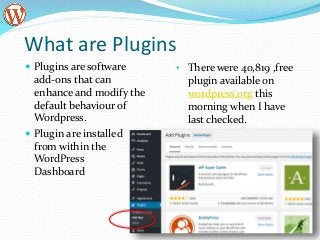
 Plugins are software
add-ons that can
enhance and modify the
default behaviour of
Wordpress.
 Plugin are installed
from within the
WordPress
Dashboard
• There were 40,819 ,free
plugin available on
wordpress.org this
morning when I have
last checked.
Some of the things plugins can do
 Spam protection
 SEO related tasks
 Add contact forms
 Social media sharing
 Ad management
 Speed up you website
 Add tables
 Add eCommerce functionality
 Automatic backup of your website
 Create a mobile version of your site
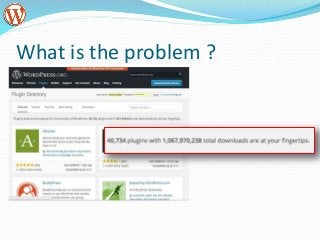
What is the problem ?
Not all plugins are the same
 Low quality code can impact:
 Site performance
 Security
 Cause conflicts with other plugins
 Plugins that are not being maintained:
 Can stop working one day because there is anew
WordPress version the plugin is not compatible with
 May not update when security updates required
How to choose plugins
Find WordPress Plugins that have High
Ratings
Check out how many people rated the
plugin!
Make sure the plugin is up to date
Ask yourself: Do I really need this plugin?
How good is the support for the plugin
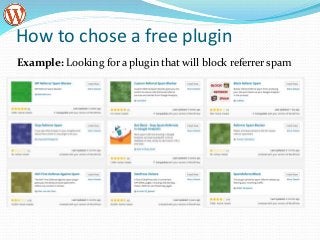
How to chose a free plugin
Example: Looking for a plugin that will block referrer spam
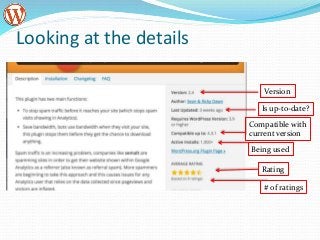
Looking at the details
Version
Is up-to-date?
Compatible with
current version
Being used
Rating
# of ratings
About Premium Plugin
 There are many of them and sometimes it is harder to
decide as they are not rated anywhere.
 They typical have better support but not always
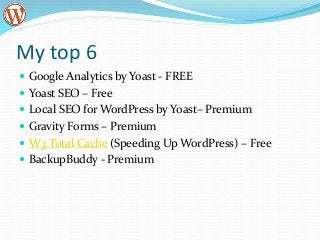
My top 6
 Google Analytics by Yoast - FREE
 Yoast SEO – Free
 Local SEO for WordPress by Yoast– Premium
 Gravity Forms – Premium
 W3 Total Cache (Speeding Up WordPress) – Free
 BackupBuddy - Premium
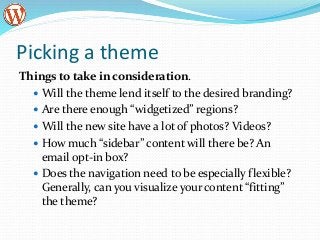
Picking a theme
Things to take in consideration.
 Will the theme lend itself to the desired branding?
 Are there enough “widgetized” regions?
 Will the new site have a lot of photos? Videos?
 How much “sidebar” content will there be? An
email opt-in box?
 Does the navigation need to be especially flexible?
Generally, can you visualize your content “fitting”
the theme?
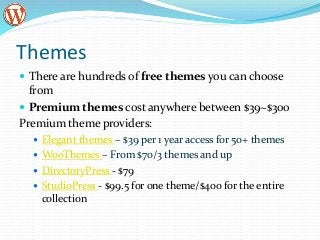
Themes
 There are hundreds of free themes you can choose
from
 Premium themes cost anywhere between $39~$300
Premium theme providers:
 Elegant themes – $39 per 1 year access for 50+ themes
 WooThemes – From $70/3 themes and up
 DirectoryPress - $79
 StudioPress - $99.5 for one theme/$400 for the entire
collection
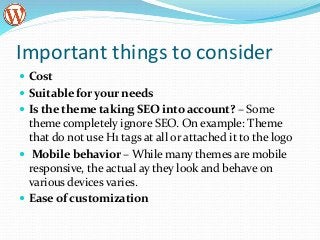
Important things to consider
 Cost
 Suitable for your needs
 Is the theme taking SEO into account? – Some
theme completely ignore SEO. On example: Theme
that do not use H1 tags at all or attached it to the logo
 Mobile behavior – While many themes are mobile
responsive, the actual ay they look and behave on
various devices varies.
 Ease of customization
Connect With Me:
Email: Michelle@CastilloMediaGroup.com
LinkedIn
Twitter
Facebook ( Feel Free to Like us  )
Website: WordPressInsider.org
This presentation can be found here: http://tinyurl.com/wordpress90

WordPress Insider Oct 2016

  • 1.
    Connect With Me: Email:Michelle@SpotOnDigitalMarketing.com LinkedIn Twitter Facebook ( Feel Free to Like us  ) Website: SpotOnDigitalMarketing.com
  • 2.
    What are Plugins Plugins are software add-ons that can enhance and modify the default behaviour of Wordpress.  Plugin are installed from within the WordPress Dashboard • There were 40,819 ,free plugin available on wordpress.org this morning when I have last checked.
  • 3.
    Some of thethings plugins can do  Spam protection  SEO related tasks  Add contact forms  Social media sharing  Ad management  Speed up you website  Add tables  Add eCommerce functionality  Automatic backup of your website  Create a mobile version of your site
  • 4.
    What is theproblem ?
  • 5.
    Not all pluginsare the same  Low quality code can impact:  Site performance  Security  Cause conflicts with other plugins  Plugins that are not being maintained:  Can stop working one day because there is anew WordPress version the plugin is not compatible with  May not update when security updates required
  • 6.
    How to chooseplugins Find WordPress Plugins that have High Ratings Check out how many people rated the plugin! Make sure the plugin is up to date Ask yourself: Do I really need this plugin? How good is the support for the plugin
  • 7.
    How to chosea free plugin Example: Looking for a plugin that will block referrer spam
  • 8.
    Looking at thedetails Version Is up-to-date? Compatible with current version Being used Rating # of ratings
  • 9.
    About Premium Plugin There are many of them and sometimes it is harder to decide as they are not rated anywhere.  They typical have better support but not always
  • 10.
    My top 6 Google Analytics by Yoast - FREE  Yoast SEO – Free  Local SEO for WordPress by Yoast– Premium  Gravity Forms – Premium  W3 Total Cache (Speeding Up WordPress) – Free  BackupBuddy - Premium
  • 11.
    Picking a theme Thingsto take in consideration.  Will the theme lend itself to the desired branding?  Are there enough “widgetized” regions?  Will the new site have a lot of photos? Videos?  How much “sidebar” content will there be? An email opt-in box?  Does the navigation need to be especially flexible? Generally, can you visualize your content “fitting” the theme?
  • 12.
    Themes  There arehundreds of free themes you can choose from  Premium themes cost anywhere between $39~$300 Premium theme providers:  Elegant themes – $39 per 1 year access for 50+ themes  WooThemes – From $70/3 themes and up  DirectoryPress - $79  StudioPress - $99.5 for one theme/$400 for the entire collection
  • 13.
    Important things toconsider  Cost  Suitable for your needs  Is the theme taking SEO into account? – Some theme completely ignore SEO. On example: Theme that do not use H1 tags at all or attached it to the logo  Mobile behavior – While many themes are mobile responsive, the actual ay they look and behave on various devices varies.  Ease of customization
  • 14.
    Connect With Me: Email:Michelle@CastilloMediaGroup.com LinkedIn Twitter Facebook ( Feel Free to Like us  ) Website: WordPressInsider.org This presentation can be found here: http://tinyurl.com/wordpress90

Editor's Notes

  • #13 Go Daddy acount# = 40451047 Magazine Basic 2.6.12 by c.bavota RedTime 1.1 by