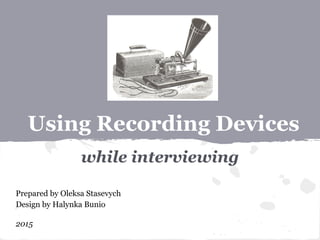
Using Recording Devices
while interviewing
Prepared by Oleksa Stasevych
Design by Halynka Bunio
2015
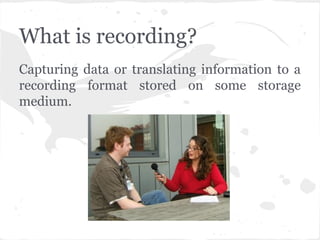
What is recording?
Capturing data or translating information to a
recording format stored on some storage
medium.
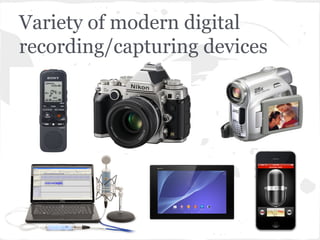
Variety of modern digital
recording/capturing devices
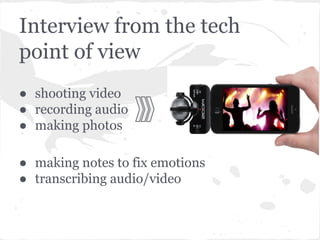
Interview from the tech
point of view
● shooting video
● recording audio
● making photos
● making notes to fix emotions
● transcribing audio/video
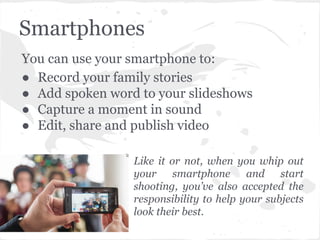
Smartphones
You can use your smartphone to:
● Record your family stories
● Add spoken word to your slideshows
● Capture a moment in sound
● Edit, share and publish video
Like it or not, when you whip out
your smartphone and start
shooting, you’ve also accepted the
responsibility to help your subjects
look their best.
Checking
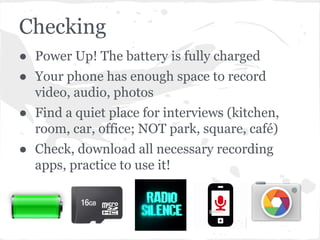
● Power Up! The battery is fully charged
● Your phone has enough space to record
video, audio, photos
● Find a quiet place for interviews (kitchen,
room, car, office; NOT park, square, café)
● Check, download all necessary recording
apps, practice to use it!
Preparing to interview
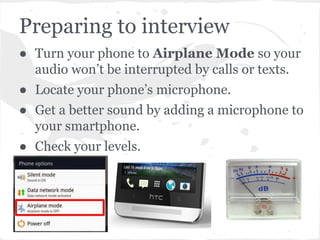
● Turn your phone to Airplane Mode so your
audio won’t be interrupted by calls or texts.
● Locate your phone’s microphone.
● Get a better sound by adding a microphone to
your smartphone.
● Check your levels.
Recording -> 1
● Place phone about 10 cm from person’s mouth.
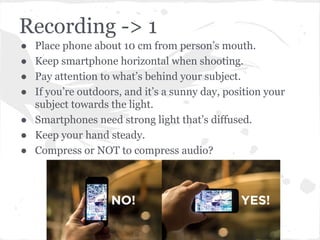
● Keep smartphone horizontal when shooting.
● Pay attention to what’s behind your subject.
● If you’re outdoors, and it’s a sunny day, position your
subject towards the light.
● Smartphones need strong light that’s diffused.
● Keep your hand steady.
● Compress or NOT to compress audio?
Recording -> 2
● Have source say name, age, hometown, occupation.
Have them spell their name.
● Be silent when source is speaking.
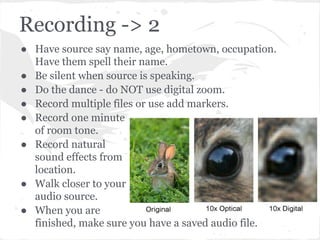
● Do the dance - do NOT use digital zoom.
● Record multiple files or use add markers.
● Record one minute
of room tone.
● Record natural
sound effects from
location.
● Walk closer to your
audio source.
● When you are
finished, make sure you have a saved audio file.
Post-production
● Transfer audio files from your phone to your
computer.
● Edit your audio, video and photos.
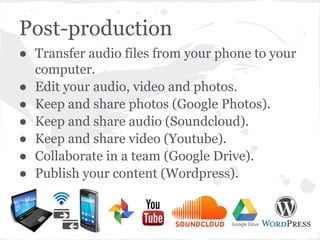
● Keep and share photos (Google Photos).
● Keep and share audio (Soundcloud).
● Keep and share video (Youtube).
● Collaborate in a team (Google Drive).
● Publish your content (Wordpress).
Sources
1. 12 Tips to Shooting Smartphone Videos Like a Pro by Barrett. At home with
tech
2. Recording audio with a smartphone (ABC Open)
3. Audio recording tips. Pacific transcription
4. 3 Tips for Recording Research Interviews. Academic transcription services
5. DIY Resource: How To Record High-Quality Sound With Your Phone. Youth
radio
6. 5 Great Tips For Recording Audio With Any Smartphone Or Tablet. Makeuseof
7. The Ultimate Freelance Writers’ Guide to Recording Interviews. The Renegade
writer
8. The Ultimate Guide to Creating Video With Your Smartphone or Tablet.
Mediacore
9. Step-by-Step Audio: From Digital Recorder, Editing in GarageBand, Posting on
WordPress.com. One journalism 1
10. Host your Podcasts on Google Drive for Free. Digital inspiration
11. Make Great Videos With Your Phone. About tech
12. Eight tips for recording better video with your smartphone. Pocket-lint
Thank you!

Using recording devices

  • 1.
    Using Recording Devices whileinterviewing Prepared by Oleksa Stasevych Design by Halynka Bunio 2015
  • 2.
    What is recording? Capturingdata or translating information to a recording format stored on some storage medium.
  • 3.
    Variety of moderndigital recording/capturing devices
  • 4.
    Interview from thetech point of view ● shooting video ● recording audio ● making photos ● making notes to fix emotions ● transcribing audio/video
  • 5.
    Smartphones You can useyour smartphone to: ● Record your family stories ● Add spoken word to your slideshows ● Capture a moment in sound ● Edit, share and publish video Like it or not, when you whip out your smartphone and start shooting, you’ve also accepted the responsibility to help your subjects look their best.
  • 6.
    Checking ● Power Up!The battery is fully charged ● Your phone has enough space to record video, audio, photos ● Find a quiet place for interviews (kitchen, room, car, office; NOT park, square, café) ● Check, download all necessary recording apps, practice to use it!
  • 7.
    Preparing to interview ●Turn your phone to Airplane Mode so your audio won’t be interrupted by calls or texts. ● Locate your phone’s microphone. ● Get a better sound by adding a microphone to your smartphone. ● Check your levels.
  • 8.
    Recording -> 1 ●Place phone about 10 cm from person’s mouth. ● Keep smartphone horizontal when shooting. ● Pay attention to what’s behind your subject. ● If you’re outdoors, and it’s a sunny day, position your subject towards the light. ● Smartphones need strong light that’s diffused. ● Keep your hand steady. ● Compress or NOT to compress audio?
  • 9.
    Recording -> 2 ●Have source say name, age, hometown, occupation. Have them spell their name. ● Be silent when source is speaking. ● Do the dance - do NOT use digital zoom. ● Record multiple files or use add markers. ● Record one minute of room tone. ● Record natural sound effects from location. ● Walk closer to your audio source. ● When you are finished, make sure you have a saved audio file.
  • 10.
    Post-production ● Transfer audiofiles from your phone to your computer. ● Edit your audio, video and photos. ● Keep and share photos (Google Photos). ● Keep and share audio (Soundcloud). ● Keep and share video (Youtube). ● Collaborate in a team (Google Drive). ● Publish your content (Wordpress).
  • 11.
    Sources 1. 12 Tipsto Shooting Smartphone Videos Like a Pro by Barrett. At home with tech 2. Recording audio with a smartphone (ABC Open) 3. Audio recording tips. Pacific transcription 4. 3 Tips for Recording Research Interviews. Academic transcription services 5. DIY Resource: How To Record High-Quality Sound With Your Phone. Youth radio 6. 5 Great Tips For Recording Audio With Any Smartphone Or Tablet. Makeuseof 7. The Ultimate Freelance Writers’ Guide to Recording Interviews. The Renegade writer 8. The Ultimate Guide to Creating Video With Your Smartphone or Tablet. Mediacore 9. Step-by-Step Audio: From Digital Recorder, Editing in GarageBand, Posting on WordPress.com. One journalism 1 10. Host your Podcasts on Google Drive for Free. Digital inspiration 11. Make Great Videos With Your Phone. About tech 12. Eight tips for recording better video with your smartphone. Pocket-lint
  • 12.