Fluke Calibration
Web Seminar Series
Principles and practical tips
about temperature, humidity, electrical,
flow, pressure, and RF calibration
How to Calibrate Sanitary
Temperature Sensors and
Transmitters
© 2017 Fluke Corporation
How to Calibrate Sanitary Temperature Sensors and Transmitters
Pharmaceutical, biotechnology, and food processing companies utilize many tri-clamp and sanitary sensors in
their process manufacturing. These sensors require periodic calibration which halts production. The new Fluke
Calibration 6109A and 7109A Portable Calibration Baths are clean room compatible and calibrate four times
more sanitary sensors per batch with twice the accuracy of other baths in their class, speeding the calibration
process to get plants back on line quickly.
Attend this free webinar where we’ll describe how these new portable calibration baths improve calibration
throughput of tri-clamp, sanitary sensors and temperature transmitters.
Today’s Webinar
Your Presenter
• Fluke Calibration
– Electrical (Everett, WA)
– RF (Norwich, UK)
– Temperature (American Fork, UT)
– Pressure/Flow (Phoenix, AZ)
Fluke Calibration, Temperature, American Fork, UT
• Presenter: Michael Coleman
– Fluke Corporate Temperature Metrologist
• With Fluke/Hart Scientific 19 years
– Primary Temperature Calibration Lab
– TCAL Service Department
Sanitary Temperature Sensors
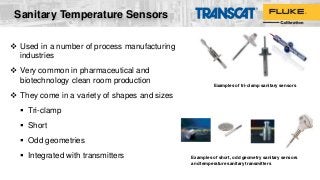
 Used in a number of process manufacturing
industries
 Very common in pharmaceutical and
biotechnology clean room production
 They come in a variety of shapes and sizes
 Tri-clamp
 Short
 Odd geometries
 Integrated with transmitters
Examples of tri-clamp sanitary sensors
Examples of short, odd geometry sanitary sensors
and temperature sanitary transmitters
What is a Tri-Clamp Sensor?
• “Tri-clamp” refers to the mechanical housing of
a temperature sensor used in process
manufacturing where a liquid seal is required
• A tri-clamp sensor includes a stainless steel
(SST) flange ranging from ½-in to 3-in
diameter that clamps to a pipe ferrule creating
a seal
SST
Flange
Transmitter
housing
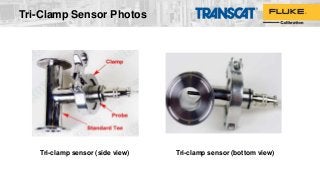
Tri-Clamp Sensor Photos
Tri-clamp sensor (side view) Tri-clamp sensor (bottom view)
Four Important Factors for
Good Sanitary Sensor Calibration
• Temperature source accuracy (bath or dry-block calibrator): Accuracy needs to cover all
sources of error including calibration uncertainty, stability, uniformity, and repeatability. Use
the most accurate source available to get the best calibration results.
• Immersion depth: Sanitary sensors need to be immersed to a proper depth in the source to
minimize the effects of temperature gradients and stem conduction.
• Calibration throughput: Calibrating more than one tri-clamp sensor or a batch of sanitary
RTDs and temperature transmitters at a time improves technician productivity. That leads to
shorter calibration time and getting production back on line quicker.
• Calibration traceability: Calibrating the transmitter only, while not calibrating the sensor,
breaks the path of traceability. Sensor drift can account for as much as 70% of system
tolerance
Temperature Sources for
Sanitary Sensor Calibration
• Dry-block calibrators: Typically use a special kit or liquid bath mode to improve
stability/uniformity for sanitary sensor calibration. Limited to one tri-clamp or small
batch of sensors at a time.
• Circulating baths: Sometimes used because of large working area – but not designed
for calibration. Stability/uniformity specs typically not provided and are usually not very
good.
• Fluke calibration baths:
– 6102/7102/7103 Micro-Baths: Good ± 0.25 °C accuracy. Working area limited to one tri-
clamp or small batch of sensors at a time.
– NEW 6109A/7109A Portable Calibration Baths: Designed for calibrating sanitary
sensors in clean room production areas.
6109A / 7109A Portable
Calibration Baths
Calibrate four tri-clamp sanitary
sensors at a time!
7109A6109A
Four times more calibration throughput
Much better accuracy than micro-baths and dry-block
calibrators
 Calibrate up to four tri-clamp sanitary sensors, or a batch of sanitary
RTDs and temperature transmitters, at the same time
 Wide temperature range covers most clean process applications:
6109A: 35 °C to 250 °C
7109A: –25 °C to 140 °C
 Excellent display accuracy of ±0.1 °C
[Accuracy covers all sources of error including calibration uncertainty, stability, uniformity, and repeatability]
 Perfect for clean room use -- Stainless steel panels and tank
withstand harsh sterilizing chemicals and are rust proof; Made from
materials that don’t harbor bacteria
 Easy to transport up stairs and across catwalks
Sanitary Sensor Immersion Depth
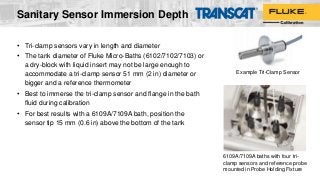
• Tri-clamp sensors vary in length and diameter
• The tank diameter of Fluke Micro-Baths (6102/7102/7103) or
a dry-block with liquid insert may not be large enough to
accommodate a tri-clamp sensor 51 mm (2 in) diameter or
bigger and a reference thermometer
• Best to immerse the tri-clamp sensor and flange in the bath
fluid during calibration
• For best results with a 6109A/7109A bath, position the
sensor tip 15 mm (0.6 in) above the bottom of the tank
Example Tri-Clamp Sensor
6109A/7109A baths with four tri-
clamp sensors and reference probe
mounted in Probe Holding Fixture
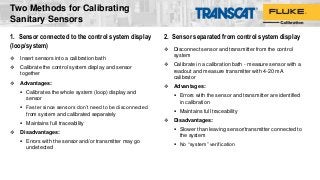
1. Sensor connected to the control system display
(loop/system)
 Insert sensors into a calibration bath
 Calibrate the control system display and sensor
together
 Advantages:
 Calibrates the whole system (loop) display and
sensor
 Faster since sensors don’t need to be disconnected
from system and calibrated separately
 Maintains full traceability
 Disadvantages:
 Errors with the sensor and/or transmitter may go
undetected
2. Sensor separated from control system display
 Disconnect sensor and transmitter from the control
system
 Calibrate in a calibration bath - measure sensor with a
readout and measure transmitter with 4-20 mA
calibrator
 Advantages:
 Errors with the sensor and transmitter are identified
in calibration
 Maintains full traceability
 Disadvantages:
 Slower than leaving sensor/transmitter connected to
the system
 No “system” verification
Two Methods for Calibrating
Sanitary Sensors
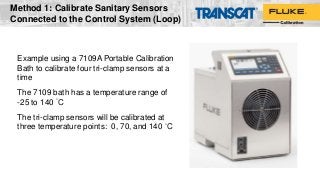
Example using a 7109A Portable Calibration
Bath to calibrate four tri-clamp sensors at a
time
The 7109 bath has a temperature range of
-25 to 140 °C
The tri-clamp sensors will be calibrated at
three temperature points: 0, 70, and 140 °C
Method 1: Calibrate Sanitary Sensors
Connected to the Control System (Loop)
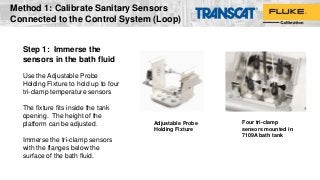
Step 1: Immerse the
sensors in the bath fluid
Use the Adjustable Probe
Holding Fixture to hold up to four
tri-clamp temperature sensors
The fixture fits inside the tank
opening. The height of the
platform can be adjusted.
Immerse the tri-clamp sensors
with the flanges below the
surface of the bath fluid.
Adjustable Probe
Holding Fixture
Four tri-clamp
sensors mounted in
7109A bath tank
Method 1: Calibrate Sanitary Sensors
Connected to the Control System (Loop)
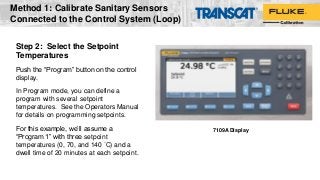
Step 2: Select the Setpoint
Temperatures
Push the “Program” button on the control
display.
In Program mode, you can define a
program with several setpoint
temperatures. See the Operators Manual
for details on programming setpoints.
For this example, we’ll assume a
“Program 1” with three setpoint
temperatures (0, 70, and 140 °C) and a
dwell time of 20 minutes at each setpoint.
7109A Display
Method 1: Calibrate Sanitary Sensors
Connected to the Control System (Loop)
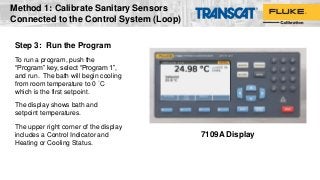
Step 3: Run the Program
To run a program, push the
“Program” key, select “Program 1”,
and run. The bath will begin cooling
from room temperature to 0 °C
which is the first setpoint.
The display shows bath and
setpoint temperatures.
The upper right corner of the display
includes a Control Indicator and
Heating or Cooling Status.
7109A Display
Method 1: Calibrate Sanitary Sensors
Connected to the Control System (Loop)
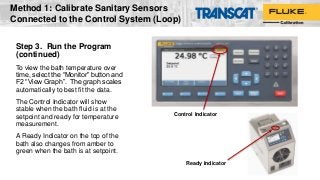
Step 3. Run the Program
(continued)
To view the bath temperature over
time, select the “Monitor” button and
F2 “View Graph”. The graph scales
automatically to best fit the data.
The Control Indicator will show
stable when the bath fluid is at the
setpoint and ready for temperature
measurement.
A Ready Indicator on the top of the
bath also changes from amber to
green when the bath is at setpoint.
Ready Indicator
Control Indicator
Method 1: Calibrate Sanitary Sensors
Connected to the Control System (Loop)
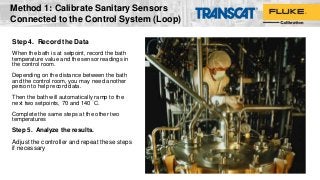
Step 4. Record the Data
When the bath is at setpoint, record the bath
temperature value and the sensor readings in
the control room.
Depending on the distance between the bath
and the control room, you may need another
person to help record data.
Then the bath will automatically ramp to the
next two setpoints, 70 and 140 °C.
Complete the same steps at the other two
temperatures
Step 5. Analyze the results.
Adjust the controller and repeat these steps
if necessary
Method 1: Calibrate Sanitary Sensors
Connected to the Control System (Loop)
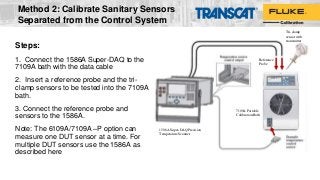
Steps:
1. Connect the 1586A Super-DAQ to the
7109A bath with the data cable
2. Insert a reference probe and the tri-
clamp sensors to be tested into the 7109A
bath.
3. Connect the reference probe and
sensors to the 1586A.
Note: The 6109A/7109A –P option can
measure one DUT sensor at a time. For
multiple DUT sensors use the 1586A as
described here
Reference
Probe
Tri-clamp
sensor with
transmitter
1586A Super-DAQ Precision
Temperature Scanner
7109A Portable
Calibration Bath
Method 2: Calibrate Sanitary Sensors
Separated from the Control System
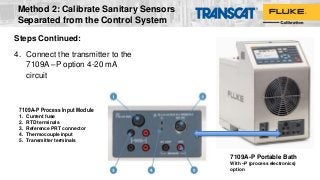
7109A-P Portable Bath
With –P (process electronics)
option
7109A-P Process Input Module
1. Current fuse
2. RTD terminals
3. Reference PRT connector
4. Thermocouple input
5. Transmitter terminals
Steps Continued:
4. Connect the transmitter to the
7109A –P option 4-20 mA
circuit
Method 2: Calibrate Sanitary Sensors
Separated from the Control System
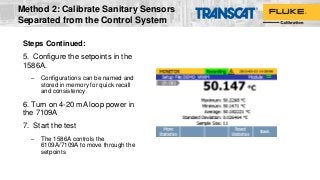
Steps Continued:
5. Configure the setpoints in the
1586A.
– Configurations can be named and
stored in memory for quick recall
and consistency
6. Turn on 4-20 mA loop power in
the 7109A
7. Start the test
– The 1586A controls the
6109A/7109A to move through the
setpoints
Method 2: Calibrate Sanitary Sensors
Separated from the Control System
Steps Continued:
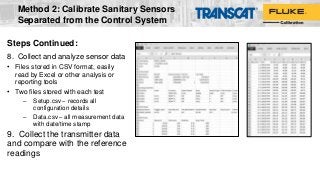
8. Collect and analyze sensor data
• Files stored in CSV format, easily
read by Excel or other analysis or
reporting tools
• Two files stored with each test
– Setup.csv – records all
configuration details
– Data.csv – all measurement data
with date/time stamp
9. Collect the transmitter data
and compare with the reference
readings
Method 2: Calibrate Sanitary Sensors
Separated from the Control System
Other Applications
• The large tank space and excellent specifications make the
6109A/7109A a useful multi-purpose calibration solution
– Thermocouple wire testing
– Temperature sensor validation
– PRT characterization heat source (system uncertainty as good
as ≈ 0.03 °C including readout, reference probe, and bath
uncertainties)
– Integrated (sensor and readout attached) thermometer
calibration
– Tank size accommodates other sensor styles with a large
measurement head or odd sensor shape
©2016 Fluke Calibration
Other Recommendations
• Will work with many conventional bath fluids but Fluke calibration
recommends 200.10 silicone oil for the 7109A and 200.50 oil for the
6109A
• When working at freezing temperature setpoints (<0 °C), use the access
cover to prevent ice build-up
• Specifications are applicable with the tank access cover removed (see
spec tables for details) but performance in general can be improved with
the lid installed
• The unit can be transported with the fluid installed. Ensure the transport
cover is installed and overflow port plug is installed
©2016 Fluke Calibration
Questions or Comments?
Email Nicole VanWert-Quinzi
nvanwert@Transcat.com
Transcat: 800-800-5001
www.Transcat.com
For related product information, go to:
www.Transcat.com/Fluke
2017 Temperature
Calibration Classes
Instructor-led Training
• Advanced Topics in Temperature Metrology, Sep 18-20
• Infrared Calibration, Sep 21-22
• Practical Temperature Calibration, Nov 7-9
• Installation and Training Supplemental Services
(courses scheduled on-demand)
Additional Resources
Free for download from Flukecal.com
• “6109A/7109A Portable Calibration Baths Operators Manual”
• “Automated Temperature Sensor Calibration with the 1586A Super-
DAQ” Application Note, 6002875A
• “Temperature Calibration Applications and Solutions” Brochure,
6005929A
©2016 Fluke Calibration
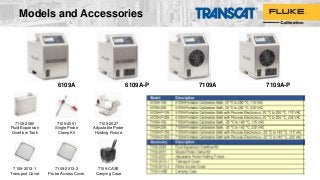
Models and Accessories
7109A-P6109A-P6109A 7109A
7109-2080
Fluid Expansion
Overflow Tank
7109-2051
Single Probe
Clamp Kit
7109-2027
Adjustable Probe
Holding Fixture
7109-2013-1
Transport Cover
7109-2013-2
Probe Access Cover
7109-CASE
Carrying Case
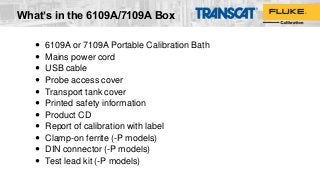
 6109A or 7109A Portable Calibration Bath
 Mains power cord
 USB cable
 Probe access cover
 Transport tank cover
 Printed safety information
 Product CD
 Report of calibration with label
 Clamp-on ferrite (-P models)
 DIN connector (-P models)
 Test lead kit (-P models)
What’s in the 6109A/7109A Box
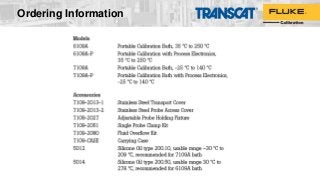
Ordering Information
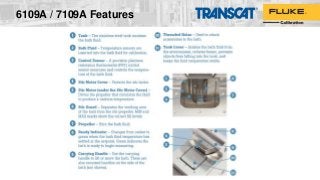
6109A / 7109A Features
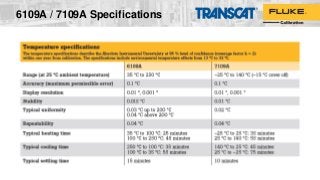
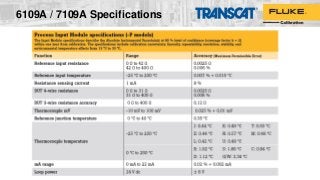
6109A / 7109A Specifications
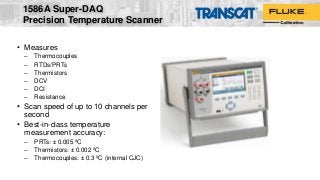
• Measures
– Thermocouples
– RTDs/PRTs
– Thermistors
– DCV
– DCI
– Resistance
• Scan speed of up to 10 channels per
second
• Best-in-class temperature
measurement accuracy:
– PRTs: ± 0.005 ºC
– Thermistors: ± 0.002 ºC
– Thermocouples: ± 0.3 ºC (internal CJC)
1586A Super-DAQ
Precision Temperature Scanner
1586A Super-DAQ (overview cont.)
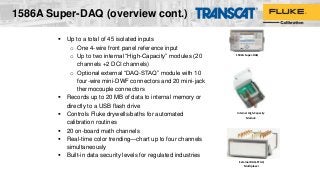
 Up to a total of 45 isolated inputs
o One 4-wire front panel reference input
o Up to two internal “High-Capacity” modules (20
channels +2 DCI channels)
o Optional external “DAQ-STAQ” module with 10
four-wire mini-DWF connectors and 20 mini-jack
thermocouple connectors
 Records up to 20 MB of data to internal memory or
directly to a USB flash drive
 Controls Fluke drywells/baths for automated
calibration routines
 20 on-board math channels
 Real-time color trending—chart up to four channels
simultaneously
 Built-in data security levels for regulated industries
Internal High-Capacity
Module
External DAQ-STAQ
Multiplexer
1586A Super-DAQ

Transcat Webinar: How to Calibrate Sanitary Sensors

  • 1.
    Fluke Calibration Web SeminarSeries Principles and practical tips about temperature, humidity, electrical, flow, pressure, and RF calibration How to Calibrate Sanitary Temperature Sensors and Transmitters © 2017 Fluke Corporation
  • 2.
    How to CalibrateSanitary Temperature Sensors and Transmitters Pharmaceutical, biotechnology, and food processing companies utilize many tri-clamp and sanitary sensors in their process manufacturing. These sensors require periodic calibration which halts production. The new Fluke Calibration 6109A and 7109A Portable Calibration Baths are clean room compatible and calibrate four times more sanitary sensors per batch with twice the accuracy of other baths in their class, speeding the calibration process to get plants back on line quickly. Attend this free webinar where we’ll describe how these new portable calibration baths improve calibration throughput of tri-clamp, sanitary sensors and temperature transmitters. Today’s Webinar
  • 3.
    Your Presenter • FlukeCalibration – Electrical (Everett, WA) – RF (Norwich, UK) – Temperature (American Fork, UT) – Pressure/Flow (Phoenix, AZ) Fluke Calibration, Temperature, American Fork, UT • Presenter: Michael Coleman – Fluke Corporate Temperature Metrologist • With Fluke/Hart Scientific 19 years – Primary Temperature Calibration Lab – TCAL Service Department
  • 4.
    Sanitary Temperature Sensors Used in a number of process manufacturing industries  Very common in pharmaceutical and biotechnology clean room production  They come in a variety of shapes and sizes  Tri-clamp  Short  Odd geometries  Integrated with transmitters Examples of tri-clamp sanitary sensors Examples of short, odd geometry sanitary sensors and temperature sanitary transmitters
  • 5.
    What is aTri-Clamp Sensor? • “Tri-clamp” refers to the mechanical housing of a temperature sensor used in process manufacturing where a liquid seal is required • A tri-clamp sensor includes a stainless steel (SST) flange ranging from ½-in to 3-in diameter that clamps to a pipe ferrule creating a seal SST Flange Transmitter housing
  • 6.
    Tri-Clamp Sensor Photos Tri-clampsensor (side view) Tri-clamp sensor (bottom view)
  • 7.
    Four Important Factorsfor Good Sanitary Sensor Calibration • Temperature source accuracy (bath or dry-block calibrator): Accuracy needs to cover all sources of error including calibration uncertainty, stability, uniformity, and repeatability. Use the most accurate source available to get the best calibration results. • Immersion depth: Sanitary sensors need to be immersed to a proper depth in the source to minimize the effects of temperature gradients and stem conduction. • Calibration throughput: Calibrating more than one tri-clamp sensor or a batch of sanitary RTDs and temperature transmitters at a time improves technician productivity. That leads to shorter calibration time and getting production back on line quicker. • Calibration traceability: Calibrating the transmitter only, while not calibrating the sensor, breaks the path of traceability. Sensor drift can account for as much as 70% of system tolerance
  • 8.
    Temperature Sources for SanitarySensor Calibration • Dry-block calibrators: Typically use a special kit or liquid bath mode to improve stability/uniformity for sanitary sensor calibration. Limited to one tri-clamp or small batch of sensors at a time. • Circulating baths: Sometimes used because of large working area – but not designed for calibration. Stability/uniformity specs typically not provided and are usually not very good. • Fluke calibration baths: – 6102/7102/7103 Micro-Baths: Good ± 0.25 °C accuracy. Working area limited to one tri- clamp or small batch of sensors at a time. – NEW 6109A/7109A Portable Calibration Baths: Designed for calibrating sanitary sensors in clean room production areas.
  • 9.
    6109A / 7109APortable Calibration Baths Calibrate four tri-clamp sanitary sensors at a time! 7109A6109A Four times more calibration throughput Much better accuracy than micro-baths and dry-block calibrators  Calibrate up to four tri-clamp sanitary sensors, or a batch of sanitary RTDs and temperature transmitters, at the same time  Wide temperature range covers most clean process applications: 6109A: 35 °C to 250 °C 7109A: –25 °C to 140 °C  Excellent display accuracy of ±0.1 °C [Accuracy covers all sources of error including calibration uncertainty, stability, uniformity, and repeatability]  Perfect for clean room use -- Stainless steel panels and tank withstand harsh sterilizing chemicals and are rust proof; Made from materials that don’t harbor bacteria  Easy to transport up stairs and across catwalks
  • 10.
    Sanitary Sensor ImmersionDepth • Tri-clamp sensors vary in length and diameter • The tank diameter of Fluke Micro-Baths (6102/7102/7103) or a dry-block with liquid insert may not be large enough to accommodate a tri-clamp sensor 51 mm (2 in) diameter or bigger and a reference thermometer • Best to immerse the tri-clamp sensor and flange in the bath fluid during calibration • For best results with a 6109A/7109A bath, position the sensor tip 15 mm (0.6 in) above the bottom of the tank Example Tri-Clamp Sensor 6109A/7109A baths with four tri- clamp sensors and reference probe mounted in Probe Holding Fixture
  • 11.
    1. Sensor connectedto the control system display (loop/system)  Insert sensors into a calibration bath  Calibrate the control system display and sensor together  Advantages:  Calibrates the whole system (loop) display and sensor  Faster since sensors don’t need to be disconnected from system and calibrated separately  Maintains full traceability  Disadvantages:  Errors with the sensor and/or transmitter may go undetected 2. Sensor separated from control system display  Disconnect sensor and transmitter from the control system  Calibrate in a calibration bath - measure sensor with a readout and measure transmitter with 4-20 mA calibrator  Advantages:  Errors with the sensor and transmitter are identified in calibration  Maintains full traceability  Disadvantages:  Slower than leaving sensor/transmitter connected to the system  No “system” verification Two Methods for Calibrating Sanitary Sensors
  • 12.
    Example using a7109A Portable Calibration Bath to calibrate four tri-clamp sensors at a time The 7109 bath has a temperature range of -25 to 140 °C The tri-clamp sensors will be calibrated at three temperature points: 0, 70, and 140 °C Method 1: Calibrate Sanitary Sensors Connected to the Control System (Loop)
  • 13.
    Step 1: Immersethe sensors in the bath fluid Use the Adjustable Probe Holding Fixture to hold up to four tri-clamp temperature sensors The fixture fits inside the tank opening. The height of the platform can be adjusted. Immerse the tri-clamp sensors with the flanges below the surface of the bath fluid. Adjustable Probe Holding Fixture Four tri-clamp sensors mounted in 7109A bath tank Method 1: Calibrate Sanitary Sensors Connected to the Control System (Loop)
  • 14.
    Step 2: Selectthe Setpoint Temperatures Push the “Program” button on the control display. In Program mode, you can define a program with several setpoint temperatures. See the Operators Manual for details on programming setpoints. For this example, we’ll assume a “Program 1” with three setpoint temperatures (0, 70, and 140 °C) and a dwell time of 20 minutes at each setpoint. 7109A Display Method 1: Calibrate Sanitary Sensors Connected to the Control System (Loop)
  • 15.
    Step 3: Runthe Program To run a program, push the “Program” key, select “Program 1”, and run. The bath will begin cooling from room temperature to 0 °C which is the first setpoint. The display shows bath and setpoint temperatures. The upper right corner of the display includes a Control Indicator and Heating or Cooling Status. 7109A Display Method 1: Calibrate Sanitary Sensors Connected to the Control System (Loop)
  • 16.
    Step 3. Runthe Program (continued) To view the bath temperature over time, select the “Monitor” button and F2 “View Graph”. The graph scales automatically to best fit the data. The Control Indicator will show stable when the bath fluid is at the setpoint and ready for temperature measurement. A Ready Indicator on the top of the bath also changes from amber to green when the bath is at setpoint. Ready Indicator Control Indicator Method 1: Calibrate Sanitary Sensors Connected to the Control System (Loop)
  • 17.
    Step 4. Recordthe Data When the bath is at setpoint, record the bath temperature value and the sensor readings in the control room. Depending on the distance between the bath and the control room, you may need another person to help record data. Then the bath will automatically ramp to the next two setpoints, 70 and 140 °C. Complete the same steps at the other two temperatures Step 5. Analyze the results. Adjust the controller and repeat these steps if necessary Method 1: Calibrate Sanitary Sensors Connected to the Control System (Loop)
  • 18.
    Steps: 1. Connect the1586A Super-DAQ to the 7109A bath with the data cable 2. Insert a reference probe and the tri- clamp sensors to be tested into the 7109A bath. 3. Connect the reference probe and sensors to the 1586A. Note: The 6109A/7109A –P option can measure one DUT sensor at a time. For multiple DUT sensors use the 1586A as described here Reference Probe Tri-clamp sensor with transmitter 1586A Super-DAQ Precision Temperature Scanner 7109A Portable Calibration Bath Method 2: Calibrate Sanitary Sensors Separated from the Control System
  • 19.
    7109A-P Portable Bath With–P (process electronics) option 7109A-P Process Input Module 1. Current fuse 2. RTD terminals 3. Reference PRT connector 4. Thermocouple input 5. Transmitter terminals Steps Continued: 4. Connect the transmitter to the 7109A –P option 4-20 mA circuit Method 2: Calibrate Sanitary Sensors Separated from the Control System
  • 20.
    Steps Continued: 5. Configurethe setpoints in the 1586A. – Configurations can be named and stored in memory for quick recall and consistency 6. Turn on 4-20 mA loop power in the 7109A 7. Start the test – The 1586A controls the 6109A/7109A to move through the setpoints Method 2: Calibrate Sanitary Sensors Separated from the Control System
  • 21.
    Steps Continued: 8. Collectand analyze sensor data • Files stored in CSV format, easily read by Excel or other analysis or reporting tools • Two files stored with each test – Setup.csv – records all configuration details – Data.csv – all measurement data with date/time stamp 9. Collect the transmitter data and compare with the reference readings Method 2: Calibrate Sanitary Sensors Separated from the Control System
  • 22.
    Other Applications • Thelarge tank space and excellent specifications make the 6109A/7109A a useful multi-purpose calibration solution – Thermocouple wire testing – Temperature sensor validation – PRT characterization heat source (system uncertainty as good as ≈ 0.03 °C including readout, reference probe, and bath uncertainties) – Integrated (sensor and readout attached) thermometer calibration – Tank size accommodates other sensor styles with a large measurement head or odd sensor shape ©2016 Fluke Calibration
  • 23.
    Other Recommendations • Willwork with many conventional bath fluids but Fluke calibration recommends 200.10 silicone oil for the 7109A and 200.50 oil for the 6109A • When working at freezing temperature setpoints (<0 °C), use the access cover to prevent ice build-up • Specifications are applicable with the tank access cover removed (see spec tables for details) but performance in general can be improved with the lid installed • The unit can be transported with the fluid installed. Ensure the transport cover is installed and overflow port plug is installed ©2016 Fluke Calibration
  • 24.
    Questions or Comments? EmailNicole VanWert-Quinzi nvanwert@Transcat.com Transcat: 800-800-5001 www.Transcat.com For related product information, go to: www.Transcat.com/Fluke
  • 25.
    2017 Temperature Calibration Classes Instructor-ledTraining • Advanced Topics in Temperature Metrology, Sep 18-20 • Infrared Calibration, Sep 21-22 • Practical Temperature Calibration, Nov 7-9 • Installation and Training Supplemental Services (courses scheduled on-demand)
  • 26.
    Additional Resources Free fordownload from Flukecal.com • “6109A/7109A Portable Calibration Baths Operators Manual” • “Automated Temperature Sensor Calibration with the 1586A Super- DAQ” Application Note, 6002875A • “Temperature Calibration Applications and Solutions” Brochure, 6005929A
  • 27.
  • 28.
    Models and Accessories 7109A-P6109A-P6109A7109A 7109-2080 Fluid Expansion Overflow Tank 7109-2051 Single Probe Clamp Kit 7109-2027 Adjustable Probe Holding Fixture 7109-2013-1 Transport Cover 7109-2013-2 Probe Access Cover 7109-CASE Carrying Case
  • 29.
     6109A or7109A Portable Calibration Bath  Mains power cord  USB cable  Probe access cover  Transport tank cover  Printed safety information  Product CD  Report of calibration with label  Clamp-on ferrite (-P models)  DIN connector (-P models)  Test lead kit (-P models) What’s in the 6109A/7109A Box
  • 30.
  • 31.
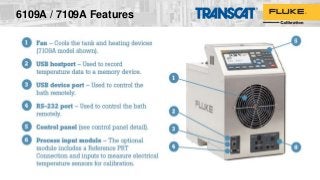
    6109A / 7109AFeatures
  • 32.
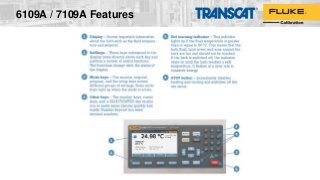
    6109A / 7109AFeatures
  • 33.
    6109A / 7109AFeatures
  • 34.
    6109A / 7109AFeatures
  • 35.
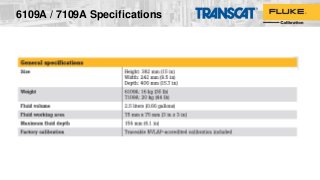
    6109A / 7109ASpecifications
  • 36.
    6109A / 7109ASpecifications
  • 37.
    6109A / 7109ASpecifications
  • 38.
    • Measures – Thermocouples –RTDs/PRTs – Thermistors – DCV – DCI – Resistance • Scan speed of up to 10 channels per second • Best-in-class temperature measurement accuracy: – PRTs: ± 0.005 ºC – Thermistors: ± 0.002 ºC – Thermocouples: ± 0.3 ºC (internal CJC) 1586A Super-DAQ Precision Temperature Scanner
  • 39.
    1586A Super-DAQ (overviewcont.)  Up to a total of 45 isolated inputs o One 4-wire front panel reference input o Up to two internal “High-Capacity” modules (20 channels +2 DCI channels) o Optional external “DAQ-STAQ” module with 10 four-wire mini-DWF connectors and 20 mini-jack thermocouple connectors  Records up to 20 MB of data to internal memory or directly to a USB flash drive  Controls Fluke drywells/baths for automated calibration routines  20 on-board math channels  Real-time color trending—chart up to four channels simultaneously  Built-in data security levels for regulated industries Internal High-Capacity Module External DAQ-STAQ Multiplexer 1586A Super-DAQ