Emulating Game Boy in Java
Tomek Rękawek, trekawek@gmail.com
Image: http://clipground.com/image-post/25612-game-boy-clipart-2.jpg.html
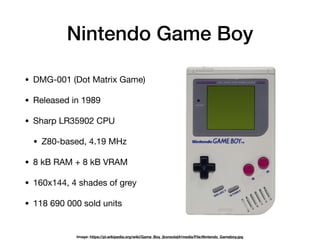
Nintendo Game Boy
• DMG-001 (Dot Matrix Game)

• Released in 1989

• Sharp LR35902 CPU

• Z80-based, 4.19 MHz

• 8 kB RAM + 8 kB VRAM

• 160x144, 4 shades of grey

• 118 690 000 sold units
Image: https://pl.wikipedia.org/wiki/Game_Boy_(konsola)#/media/File:Nintendo_Gameboy.jpg
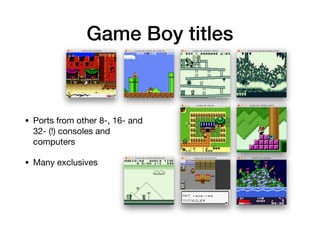
Game Boy titles
• Ports from other 8-, 16- and
32- (!) consoles and
computers

• Many exclusives
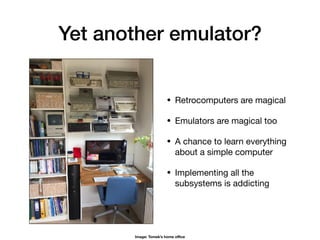
Yet another emulator?
• Retrocomputers are magical

• Emulators are magical too

• A chance to learn everything
about a simple computer

• Implementing all the
subsystems is addicting
Image: Tomek’s home office
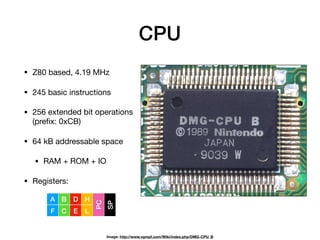
CPU
• Z80 based, 4.19 MHz

• 245 basic instructions

• 256 extended bit operations
(prefix: 0xCB)

• 64 kB addressable space

• RAM + ROM + IO

• Registers:
Image: http://www.vgmpf.com/Wiki/index.php/DMG-CPU_B
A
F
B
C
D
E
H
L
PC
SP
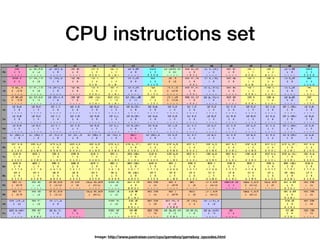
CPU instructions set
Image: http://www.pastraiser.com/cpu/gameboy/gameboy_opcodes.html
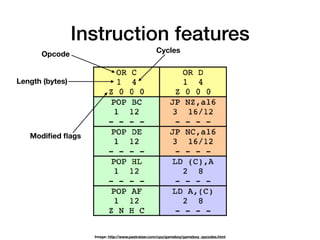
Instruction features
Length (bytes)
Cycles
Modified flags
Opcode
Image: http://www.pastraiser.com/cpu/gameboy/gameboy_opcodes.html
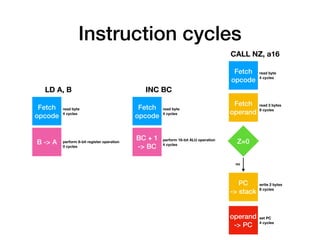
Instruction cycles
Fetch
opcode
Fetch
operand
Z=0
PC

-> stack
operand
-> PC
read byte

4 cycles
read 2 bytes

8 cycles
write 2 bytes

8 cycles
set PC

4 cycles
no
CALL NZ, a16
Fetch
opcode
BC + 1 

-> BC
read byte

4 cycles
INC BC
perform 16-bit ALU operation

4 cycles
LD A, B
Fetch
opcode
B -> A
read byte

4 cycles
perform 8-bit register operation
0 cycles
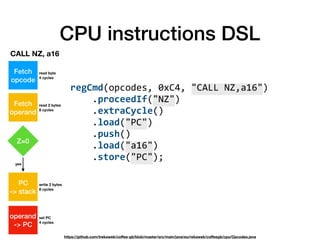
CPU instructions DSL
regCmd(opcodes,	0xC4,	"CALL	NZ,a16")

				.proceedIf("NZ")

				.extraCycle()

				.load("PC")

				.push()

				.load("a16")

				.store("PC");

https://github.com/trekawek/coffee-gb/blob/master/src/main/java/eu/rekawek/coffeegb/cpu/Opcodes.java
Fetch
opcode
Fetch
operand
Z=0
PC

-> stack
operand
-> PC
read byte

4 cycles
read 2 bytes

8 cycles
write 2 bytes

8 cycles
set PC

4 cycles
yes
CALL NZ, a16
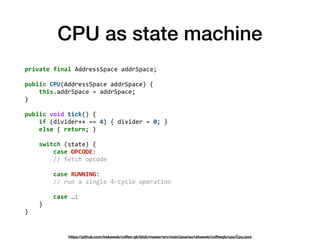
CPU as state machine
private	final	AddressSpace	addrSpace;


public	CPU(AddressSpace	addrSpace)	{

				this.addrSpace	=	addrSpace;

}


public	void	tick()	{

				if	(divider++	==	4)	{	divider	=	0;	}

				else	{	return;	}


				switch	(state)	{

								case	OPCODE:

								//	fetch	opcode


								case	RUNNING:

								//	run	a	single	4-cycle	operation


								case	…:

				}

}
https://github.com/trekawek/coffee-gb/blob/master/src/main/java/eu/rekawek/coffeegb/cpu/Cpu.java
Alternative CPU-driven
approach
static	void	call_cc_a16(GB_gameboy_t	*gb,	uint8_t	opcode)

{

				uint16_t	call_addr	=	gb->pc	-	1;

				if	(condition_code(gb,	opcode))	{

								GB_advance_cycles(gb,	4);

								gb->registers[GB_REGISTER_SP]	-=	2;

								uint16_t	addr	=	GB_read_memory(gb,	gb->pc++);

								GB_advance_cycles(gb,	4);

								addr	|=	(GB_read_memory(gb,	gb->pc++)	<<	8)

								GB_advance_cycles(gb,	8);

								GB_write_memory(gb,	gb->registers[GB_REGISTER_SP]	+	1,	(gb->pc)	>>	8);

								GB_advance_cycles(gb,	4);

								GB_write_memory(gb,	gb->registers[GB_REGISTER_SP],	(gb->pc)	&	0xFF);

								GB_advance_cycles(gb,	4);

								gb->pc	=	addr;

								GB_debugger_call_hook(gb,	call_addr);

				}

				else	{

								GB_advance_cycles(gb,	12);

								gb->pc	+=	2;

				}

}	
https://github.com/LIJI32/SameBoy/blob/master/Core/z80_cpu.c
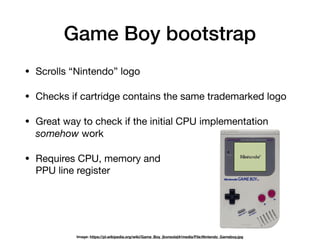
Game Boy bootstrap
• Scrolls “Nintendo” logo

• Checks if cartridge contains the same trademarked logo

• Great way to check if the initial CPU implementation
somehow work

• Requires CPU, memory and

PPU line register
Image: https://pl.wikipedia.org/wiki/Game_Boy_(konsola)#/media/File:Nintendo_Gameboy.jpg
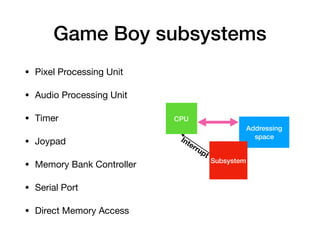
• Pixel Processing Unit

• Audio Processing Unit

• Timer

• Joypad

• Memory Bank Controller

• Serial Port

• Direct Memory Access
Game Boy subsystems
Addressing
space
Subsystem
CPU
Interrupt
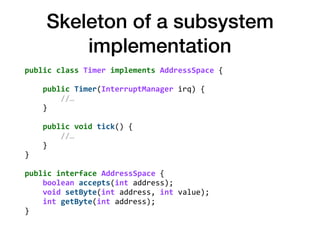
Skeleton of a subsystem
implementation
public	class	Timer	implements	AddressSpace	{


				public	Timer(InterruptManager	irq)	{

								//…

				}


				public	void	tick()	{

								//…

				}

}


public	interface	AddressSpace	{

				boolean	accepts(int	address);

				void	setByte(int	address,	int	value);

				int	getByte(int	address);

}
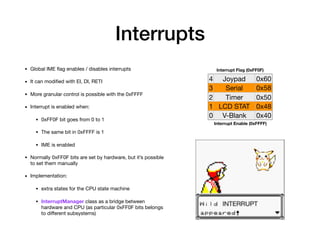
Interrupts
4 Joypad 0x60
3 Serial 0x58
2 Timer 0x50
1 LCD STAT 0x48
0 V-Blank 0x40
Interrupt Flag (0xFF0F)
Interrupt Enable (0xFFFF)
• Global IME flag enables / disables interrupts

• It can modified with EI, DI, RETI

• More granular control is possible with the 0xFFFF

• Interrupt is enabled when:

• 0xFF0F bit goes from 0 to 1

• The same bit in 0xFFFF is 1

• IME is enabled

• Normally 0xFF0F bits are set by hardware, but it’s possible
to set them manually

• Implementation:

• extra states for the CPU state machine

• InterruptManager class as a bridge between
hardware and CPU (as particular 0xFF0F bits belongs
to different subsystems)
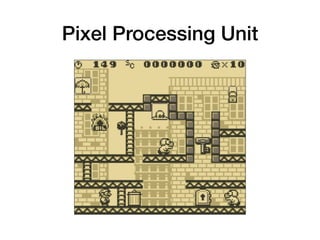
Pixel Processing Unit
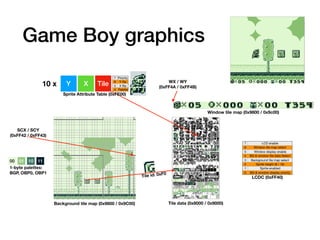
Game Boy graphics
Background tile map (0x9800 / 0x9C00) Tile data (0x8000 / 0x9000)
Tile id: 0xF0
1-byte palettes:

BGP, OBP0, OBP1
SCX / SCY

(0xFF42 / 0xFF43)
00 01 10 11
Y X Tile
7 Priority
6 Y flip
5 X flip
4 Palette
10 x
Sprite Attribute Table (0xFE00)
Window tile map (0x9800 / 0x9c00)
WX / WY

(0xFF4A / 0xFF4B)
7 LCD enable
6 Window tile map select
5 Window display enable
4 BG & window tile data Select
3 Background tile map select
2 Sprite height (8 / 16)
1 Sprite enabled
0 BG & window display priority
LCDC (0xFF40)
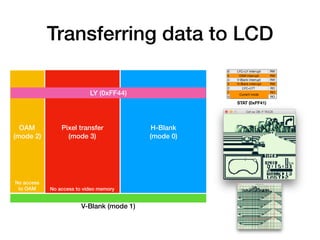
Transferring data to LCD
6 LYC=LY interrupt RW
5 OAM interrupt RW
4 V-Blank interrupt RW
3 H-Blank interrupt RW
2 LYC=LY? RO
1
Current mode
RO
0 RO
STAT (0xFF41)
OAM

(mode 2)
Pixel transfer
(mode 3)
H-Blank
(mode 0)
V-Blank (mode 1)
LY (0xFF44)
No access to video memory
No access
to OAM
PPU emulation issues
• STAT mode timing

• IRQ timing

• Performance

• Color accuracy

• Sprite RAM bug

• Complex priorities
OAM
Pixel
transfer
H-Blank
Put pixels to
an int[]
Update the JPanel
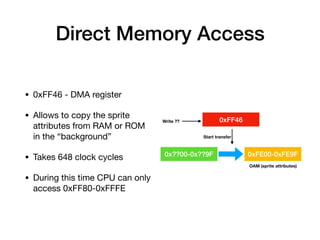
Direct Memory Access
• 0xFF46 - DMA register

• Allows to copy the sprite
attributes from RAM or ROM
in the “background”

• Takes 648 clock cycles

• During this time CPU can only
access 0xFF80-0xFFFE
0x??00-0x??9F 0xFE00-0xFE9F
0xFF46Write ??
Start transfer
OAM (sprite attributes)
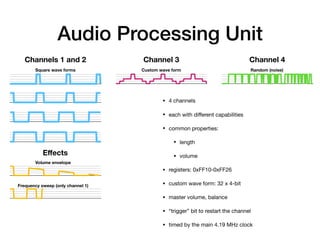
Audio Processing Unit
Channels 1 and 2 Channel 3 Channel 4
Effects
Square wave forms
Volume envelope
Frequency sweep (only channel 1)
Custom wave form Random (noise)
• 4 channels

• each with different capabilities

• common properties:

• length

• volume

• registers: 0xFF10-0xFF26

• custom wave form: 32 x 4-bit

• master volume, balance

• “trigger” bit to restart the channel

• timed by the main 4.19 MHz clock
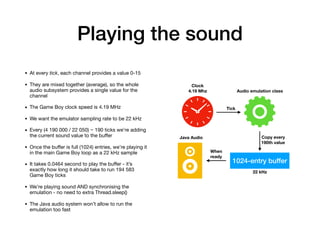
Playing the sound
• At every tick, each channel provides a value 0-15

• They are mixed together (average), so the whole
audio subsystem provides a single value for the
channel

• The Game Boy clock speed is 4.19 MHz

• We want the emulator sampling rate to be 22 kHz

• Every (4 190 000 / 22 050) ~ 190 ticks we’re adding
the current sound value to the buffer

• Once the buffer is full (1024) entries, we’re playing it
in the main Game Boy loop as a 22 kHz sample

• It takes 0.0464 second to play the buffer - it’s
exactly how long it should take to run 194 583
Game Boy ticks

• We’re playing sound AND synchronising the
emulation - no need to extra Thread.sleep()

• The Java audio system won’t allow to run the
emulation too fast
1024-entry buffer
22 kHz
Audio emulation class
Clock

4.19 Mhz
Tick
Copy every
190th value
When
ready
Java Audio
Timer
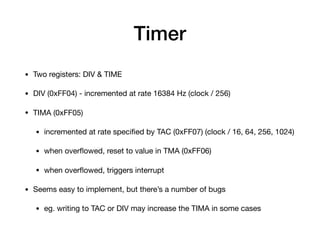
• Two registers: DIV & TIME

• DIV (0xFF04) - incremented at rate 16384 Hz (clock / 256)

• TIMA (0xFF05)

• incremented at rate specified by TAC (0xFF07) (clock / 16, 64, 256, 1024)

• when overflowed, reset to value in TMA (0xFF06)

• when overflowed, triggers interrupt

• Seems easy to implement, but there’s a number of bugs

• eg. writing to TAC or DIV may increase the TIMA in some cases
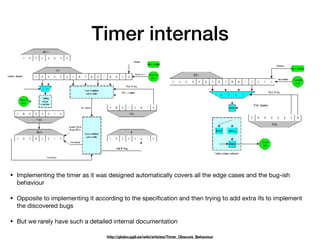
Timer internals
http://gbdev.gg8.se/wiki/articles/Timer_Obscure_Behaviour
• Implementing the timer as it was designed automatically covers all the edge cases and the bug-ish
behaviour

• Opposite to implementing it according to the specification and then trying to add extra ifs to implement
the discovered bugs

• But we rarely have such a detailed internal documentation
Joypad input
01
2
3
0
1
2 3
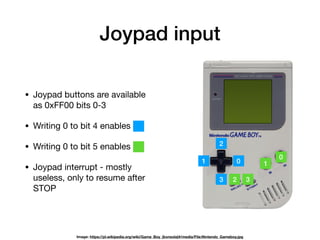
• Joypad buttons are available
as 0xFF00 bits 0-3

• Writing 0 to bit 4 enables

• Writing 0 to bit 5 enables

• Joypad interrupt - mostly
useless, only to resume after
STOP
Image: https://pl.wikipedia.org/wiki/Game_Boy_(konsola)#/media/File:Nintendo_Gameboy.jpg
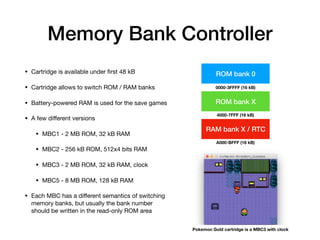
Memory Bank Controller
• Cartridge is available under first 48 kB

• Cartridge allows to switch ROM / RAM banks

• Battery-powered RAM is used for the save games

• A few different versions

• MBC1 - 2 MB ROM, 32 kB RAM

• MBC2 - 256 kB ROM, 512x4 bits RAM

• MBC3 - 2 MB ROM, 32 kB RAM, clock

• MBC5 - 8 MB ROM, 128 kB RAM

• Each MBC has a different semantics of switching
memory banks, but usually the bank number
should be written in the read-only ROM area
ROM bank 0
ROM bank X
0000-3FFFF (16 kB)
4000-7FFF (16 kB)
RAM bank X / RTC
A000-BFFF (16 kB)
Pokemon Gold cartridge is a MBC3 with clock
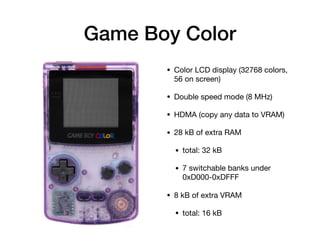
Game Boy Color
• Color LCD display (32768 colors,
56 on screen)

• Double speed mode (8 MHz)

• HDMA (copy any data to VRAM)

• 28 kB of extra RAM

• total: 32 kB

• 7 switchable banks under
0xD000-0xDFFF

• 8 kB of extra VRAM

• total: 16 kB
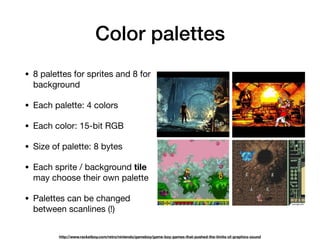
Color palettes
• 8 palettes for sprites and 8 for
background

• Each palette: 4 colors

• Each color: 15-bit RGB

• Size of palette: 8 bytes

• Each sprite / background tile
may choose their own palette

• Palettes can be changed
between scanlines (!)
http://www.racketboy.com/retro/nintendo/gameboy/game-boy-games-that-pushed-the-limits-of-graphics-sound
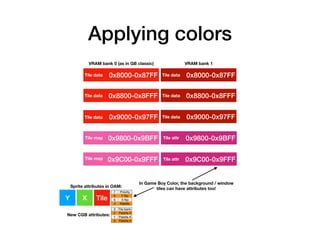
Applying colors
0x8000-0x87FF
0x8800-0x8FFFTile data
0x9000-0x97FFTile data
0x9800-0x9BFFTile map
0x9C00-0x9FFFTile map
Tile data 0x8000-0x87FFTile data
0x8800-0x8FFFTile data
0x9000-0x97FFTile data
0x9800-0x9BFFTile attr
0x9C00-0x9FFFTile attr
VRAM bank 1VRAM bank 0 (as in GB classic)
Y X Tile
7 Priority
6 Y flip
5 X flip
4 Palette
3 Tile bank
2 Palette #
1 Palette #
0 Palette #
New CGB attributes:
Sprite attributes in OAM:
In Game Boy Color, the background / window
tiles can have attributes too!
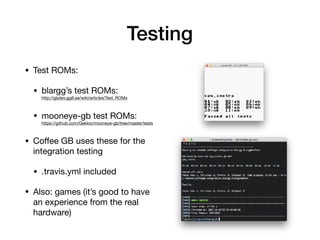
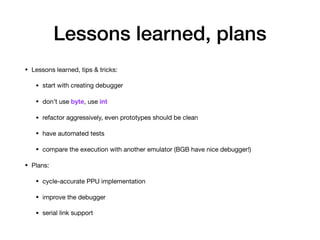
Testing
• Test ROMs:

• blargg’s test ROMs:

http://gbdev.gg8.se/wiki/articles/Test_ROMs

• mooneye-gb test ROMs:

https://github.com/Gekkio/mooneye-gb/tree/master/tests

• Coffee GB uses these for the
integration testing

• .travis.yml included

• Also: games (it’s good to have
an experience from the real
hardware)
Lessons learned, plans
• Lessons learned, tips & tricks:

• start with creating debugger

• don’t use byte, use int

• refactor aggressively, even prototypes should be clean

• have automated tests

• compare the execution with another emulator (BGB have nice debugger!)

• Plans:

• cycle-accurate PPU implementation

• improve the debugger

• serial link support
Resources
• My emulator: https://github.com/trekawek/coffee-gb

• Ultimate Game Boy talk: https://www.youtube.com/watch?v=HyzD8pNlpwI

• excellent, insightful, inspiring presentation

• Pan Docs: http://gbdev.gg8.se/wiki/articles/Pan_Docs

• the most comprehensive description of the GB hardware

• Game Boy CPU manual: http://marc.rawer.de/Gameboy/Docs/GBCPUman.pdf

• good but a bit inaccurate, aimed at developers

• Other accurate emulators:

• Mooneye GB: https://github.com/Gekkio/mooneye-gb

• Sameboy: https://sameboy.github.io/

• BGB: http://bgb.bircd.org/
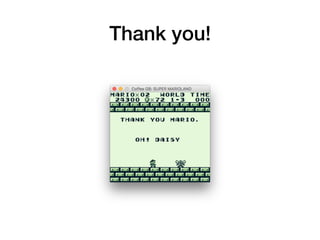
Thank you!

Emulating Game Boy in Java

  • 1.
    Emulating Game Boyin Java Tomek Rękawek, trekawek@gmail.com Image: http://clipground.com/image-post/25612-game-boy-clipart-2.jpg.html
  • 2.
    Nintendo Game Boy •DMG-001 (Dot Matrix Game) • Released in 1989 • Sharp LR35902 CPU • Z80-based, 4.19 MHz • 8 kB RAM + 8 kB VRAM • 160x144, 4 shades of grey • 118 690 000 sold units Image: https://pl.wikipedia.org/wiki/Game_Boy_(konsola)#/media/File:Nintendo_Gameboy.jpg
  • 3.
    Game Boy titles •Ports from other 8-, 16- and 32- (!) consoles and computers • Many exclusives
  • 4.
    Yet another emulator? •Retrocomputers are magical • Emulators are magical too • A chance to learn everything about a simple computer • Implementing all the subsystems is addicting Image: Tomek’s home office
  • 5.
    CPU • Z80 based,4.19 MHz • 245 basic instructions • 256 extended bit operations (prefix: 0xCB) • 64 kB addressable space • RAM + ROM + IO • Registers: Image: http://www.vgmpf.com/Wiki/index.php/DMG-CPU_B A F B C D E H L PC SP
  • 6.
    CPU instructions set Image:http://www.pastraiser.com/cpu/gameboy/gameboy_opcodes.html
  • 7.
    Instruction features Length (bytes) Cycles Modifiedflags Opcode Image: http://www.pastraiser.com/cpu/gameboy/gameboy_opcodes.html
  • 8.
    Instruction cycles Fetch opcode Fetch operand Z=0 PC
 -> stack operand ->PC read byte
 4 cycles read 2 bytes
 8 cycles write 2 bytes
 8 cycles set PC
 4 cycles no CALL NZ, a16 Fetch opcode BC + 1 
 -> BC read byte
 4 cycles INC BC perform 16-bit ALU operation
 4 cycles LD A, B Fetch opcode B -> A read byte
 4 cycles perform 8-bit register operation 0 cycles
  • 9.
  • 10.
    CPU as statemachine private final AddressSpace addrSpace;
 
 public CPU(AddressSpace addrSpace) {
 this.addrSpace = addrSpace;
 }
 
 public void tick() {
 if (divider++ == 4) { divider = 0; }
 else { return; }
 
 switch (state) {
 case OPCODE:
 // fetch opcode
 
 case RUNNING:
 // run a single 4-cycle operation
 
 case …:
 }
 } https://github.com/trekawek/coffee-gb/blob/master/src/main/java/eu/rekawek/coffeegb/cpu/Cpu.java
  • 11.
  • 12.
    Game Boy bootstrap •Scrolls “Nintendo” logo • Checks if cartridge contains the same trademarked logo • Great way to check if the initial CPU implementation somehow work • Requires CPU, memory and
 PPU line register Image: https://pl.wikipedia.org/wiki/Game_Boy_(konsola)#/media/File:Nintendo_Gameboy.jpg
  • 13.
    • Pixel ProcessingUnit • Audio Processing Unit • Timer • Joypad • Memory Bank Controller • Serial Port • Direct Memory Access Game Boy subsystems Addressing space Subsystem CPU Interrupt
  • 14.
    Skeleton of asubsystem implementation public class Timer implements AddressSpace {
 
 public Timer(InterruptManager irq) {
 //…
 }
 
 public void tick() {
 //…
 }
 }
 
 public interface AddressSpace {
 boolean accepts(int address);
 void setByte(int address, int value);
 int getByte(int address);
 }
  • 15.
    Interrupts 4 Joypad 0x60 3Serial 0x58 2 Timer 0x50 1 LCD STAT 0x48 0 V-Blank 0x40 Interrupt Flag (0xFF0F) Interrupt Enable (0xFFFF) • Global IME flag enables / disables interrupts • It can modified with EI, DI, RETI • More granular control is possible with the 0xFFFF • Interrupt is enabled when: • 0xFF0F bit goes from 0 to 1 • The same bit in 0xFFFF is 1 • IME is enabled • Normally 0xFF0F bits are set by hardware, but it’s possible to set them manually • Implementation: • extra states for the CPU state machine • InterruptManager class as a bridge between hardware and CPU (as particular 0xFF0F bits belongs to different subsystems)
  • 16.
  • 17.
    Game Boy graphics Backgroundtile map (0x9800 / 0x9C00) Tile data (0x8000 / 0x9000) Tile id: 0xF0 1-byte palettes:
 BGP, OBP0, OBP1 SCX / SCY
 (0xFF42 / 0xFF43) 00 01 10 11 Y X Tile 7 Priority 6 Y flip 5 X flip 4 Palette 10 x Sprite Attribute Table (0xFE00) Window tile map (0x9800 / 0x9c00) WX / WY
 (0xFF4A / 0xFF4B) 7 LCD enable 6 Window tile map select 5 Window display enable 4 BG & window tile data Select 3 Background tile map select 2 Sprite height (8 / 16) 1 Sprite enabled 0 BG & window display priority LCDC (0xFF40)
  • 18.
    Transferring data toLCD 6 LYC=LY interrupt RW 5 OAM interrupt RW 4 V-Blank interrupt RW 3 H-Blank interrupt RW 2 LYC=LY? RO 1 Current mode RO 0 RO STAT (0xFF41) OAM
 (mode 2) Pixel transfer (mode 3) H-Blank (mode 0) V-Blank (mode 1) LY (0xFF44) No access to video memory No access to OAM
  • 19.
    PPU emulation issues •STAT mode timing • IRQ timing • Performance • Color accuracy • Sprite RAM bug • Complex priorities OAM Pixel transfer H-Blank Put pixels to an int[] Update the JPanel
  • 20.
    Direct Memory Access •0xFF46 - DMA register • Allows to copy the sprite attributes from RAM or ROM in the “background” • Takes 648 clock cycles • During this time CPU can only access 0xFF80-0xFFFE 0x??00-0x??9F 0xFE00-0xFE9F 0xFF46Write ?? Start transfer OAM (sprite attributes)
  • 21.
    Audio Processing Unit Channels1 and 2 Channel 3 Channel 4 Effects Square wave forms Volume envelope Frequency sweep (only channel 1) Custom wave form Random (noise) • 4 channels • each with different capabilities • common properties: • length • volume • registers: 0xFF10-0xFF26 • custom wave form: 32 x 4-bit • master volume, balance • “trigger” bit to restart the channel • timed by the main 4.19 MHz clock
  • 22.
    Playing the sound •At every tick, each channel provides a value 0-15 • They are mixed together (average), so the whole audio subsystem provides a single value for the channel • The Game Boy clock speed is 4.19 MHz • We want the emulator sampling rate to be 22 kHz • Every (4 190 000 / 22 050) ~ 190 ticks we’re adding the current sound value to the buffer • Once the buffer is full (1024) entries, we’re playing it in the main Game Boy loop as a 22 kHz sample • It takes 0.0464 second to play the buffer - it’s exactly how long it should take to run 194 583 Game Boy ticks • We’re playing sound AND synchronising the emulation - no need to extra Thread.sleep() • The Java audio system won’t allow to run the emulation too fast 1024-entry buffer 22 kHz Audio emulation class Clock
 4.19 Mhz Tick Copy every 190th value When ready Java Audio
  • 23.
    Timer • Two registers:DIV & TIME • DIV (0xFF04) - incremented at rate 16384 Hz (clock / 256) • TIMA (0xFF05) • incremented at rate specified by TAC (0xFF07) (clock / 16, 64, 256, 1024) • when overflowed, reset to value in TMA (0xFF06) • when overflowed, triggers interrupt • Seems easy to implement, but there’s a number of bugs • eg. writing to TAC or DIV may increase the TIMA in some cases
  • 24.
    Timer internals http://gbdev.gg8.se/wiki/articles/Timer_Obscure_Behaviour • Implementingthe timer as it was designed automatically covers all the edge cases and the bug-ish behaviour • Opposite to implementing it according to the specification and then trying to add extra ifs to implement the discovered bugs • But we rarely have such a detailed internal documentation
  • 25.
    Joypad input 01 2 3 0 1 2 3 •Joypad buttons are available as 0xFF00 bits 0-3 • Writing 0 to bit 4 enables • Writing 0 to bit 5 enables • Joypad interrupt - mostly useless, only to resume after STOP Image: https://pl.wikipedia.org/wiki/Game_Boy_(konsola)#/media/File:Nintendo_Gameboy.jpg
  • 26.
    Memory Bank Controller •Cartridge is available under first 48 kB • Cartridge allows to switch ROM / RAM banks • Battery-powered RAM is used for the save games • A few different versions • MBC1 - 2 MB ROM, 32 kB RAM • MBC2 - 256 kB ROM, 512x4 bits RAM • MBC3 - 2 MB ROM, 32 kB RAM, clock • MBC5 - 8 MB ROM, 128 kB RAM • Each MBC has a different semantics of switching memory banks, but usually the bank number should be written in the read-only ROM area ROM bank 0 ROM bank X 0000-3FFFF (16 kB) 4000-7FFF (16 kB) RAM bank X / RTC A000-BFFF (16 kB) Pokemon Gold cartridge is a MBC3 with clock
  • 27.
    Game Boy Color •Color LCD display (32768 colors, 56 on screen) • Double speed mode (8 MHz) • HDMA (copy any data to VRAM) • 28 kB of extra RAM • total: 32 kB • 7 switchable banks under 0xD000-0xDFFF • 8 kB of extra VRAM • total: 16 kB
  • 28.
    Color palettes • 8palettes for sprites and 8 for background • Each palette: 4 colors • Each color: 15-bit RGB • Size of palette: 8 bytes • Each sprite / background tile may choose their own palette • Palettes can be changed between scanlines (!) http://www.racketboy.com/retro/nintendo/gameboy/game-boy-games-that-pushed-the-limits-of-graphics-sound
  • 29.
    Applying colors 0x8000-0x87FF 0x8800-0x8FFFTile data 0x9000-0x97FFTiledata 0x9800-0x9BFFTile map 0x9C00-0x9FFFTile map Tile data 0x8000-0x87FFTile data 0x8800-0x8FFFTile data 0x9000-0x97FFTile data 0x9800-0x9BFFTile attr 0x9C00-0x9FFFTile attr VRAM bank 1VRAM bank 0 (as in GB classic) Y X Tile 7 Priority 6 Y flip 5 X flip 4 Palette 3 Tile bank 2 Palette # 1 Palette # 0 Palette # New CGB attributes: Sprite attributes in OAM: In Game Boy Color, the background / window tiles can have attributes too!
  • 30.
    Testing • Test ROMs: •blargg’s test ROMs:
 http://gbdev.gg8.se/wiki/articles/Test_ROMs • mooneye-gb test ROMs:
 https://github.com/Gekkio/mooneye-gb/tree/master/tests • Coffee GB uses these for the integration testing • .travis.yml included • Also: games (it’s good to have an experience from the real hardware)
  • 31.
    Lessons learned, plans •Lessons learned, tips & tricks: • start with creating debugger • don’t use byte, use int • refactor aggressively, even prototypes should be clean • have automated tests • compare the execution with another emulator (BGB have nice debugger!) • Plans: • cycle-accurate PPU implementation • improve the debugger • serial link support
  • 32.
    Resources • My emulator:https://github.com/trekawek/coffee-gb • Ultimate Game Boy talk: https://www.youtube.com/watch?v=HyzD8pNlpwI • excellent, insightful, inspiring presentation • Pan Docs: http://gbdev.gg8.se/wiki/articles/Pan_Docs • the most comprehensive description of the GB hardware • Game Boy CPU manual: http://marc.rawer.de/Gameboy/Docs/GBCPUman.pdf • good but a bit inaccurate, aimed at developers • Other accurate emulators: • Mooneye GB: https://github.com/Gekkio/mooneye-gb • Sameboy: https://sameboy.github.io/ • BGB: http://bgb.bircd.org/
  • 33.