Writing a Persuasive Essay
GOODFELLAS (1990) - LIOTTA, RAY. Photography. Encyclopædia Britannica
ImageQuest. Web. 16 Jan 2015.
Choose a Topic
•200 Essay Prompts from The New
York Times
•Use Instagrok to help with keywords
Issues to Address for Arguments
•Financial impact
•Fairness to all parties involved
•Feasibility
•Impact on school, society or the
world
•Personal experience
Thesis Statement
•Focused—avoid being too broad
•Debatable—avoid a statement where
you
cannot argue for or against the topic
•Pick a Side—the point of this essay is to
pick
a side and stick with it
•Make Claims—give supporting evidence
Find Information
•Gale Databases for Books, Academic Journals,
Magazines, and Newspapers
•NBC Learn for Videos
•Procon.org a website that presents information
without bias
•Library OPAC for books
Cite your Sources
•Use Easybib
•Cite from Gale in two clicks
•Copy/Paste Citation from NBC Learn
or Procon.org
•Use ISBN Number to cite a book
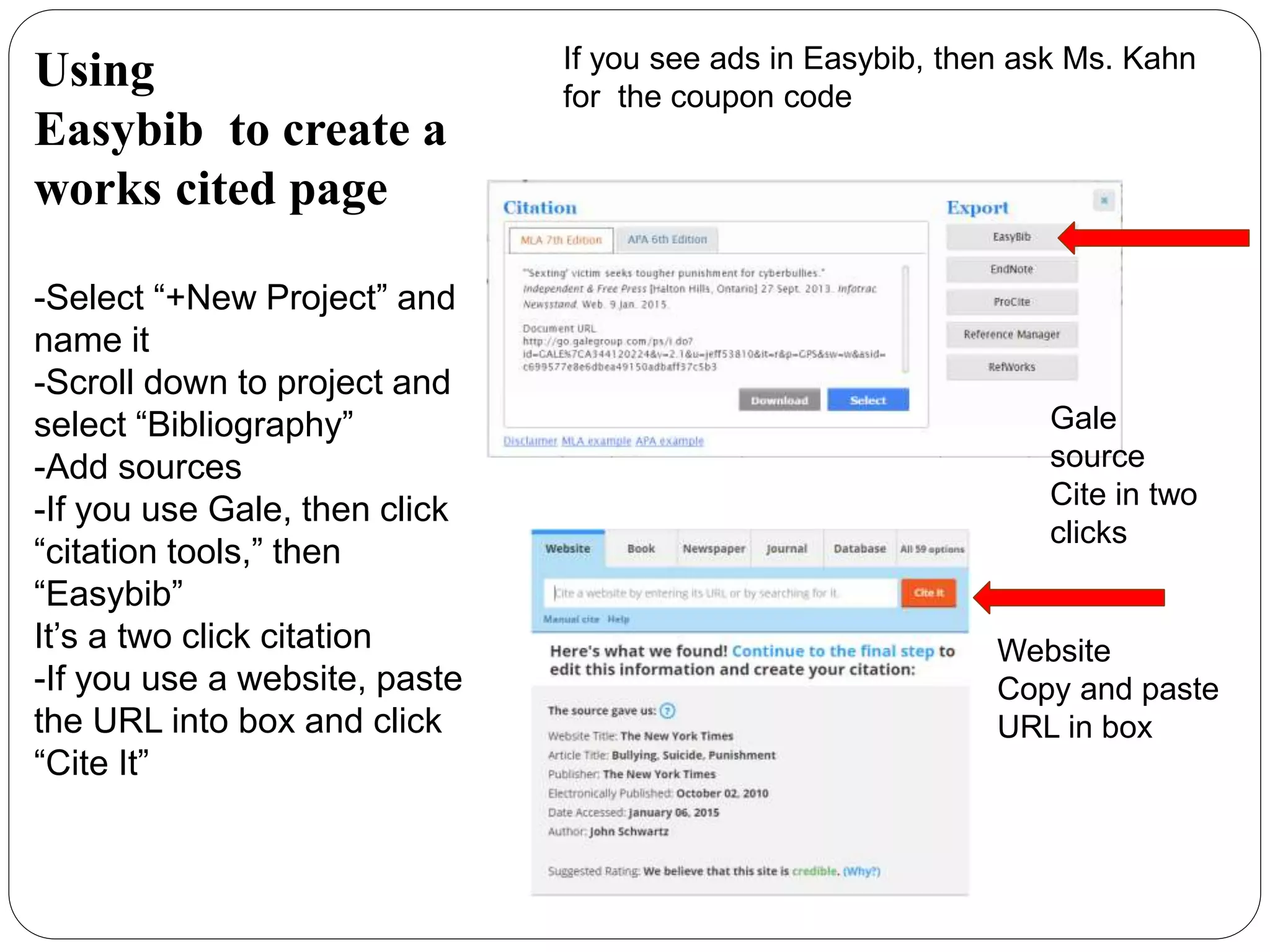
Using
Easybib to create a
works cited page
-Select “+New Project” and
name it
-Scroll down to project and
select “Bibliography”
-Add sources
-If you use Gale, then click
“citation tools,” then
“Easybib”
It’s a two click citation
-If you use a website, paste
the URL into box and click
“Cite It”
If you see ads in Easybib, then ask Ms. Kahn
for the coupon code
Website
Copy and paste
URL in box
Gale
source
Cite in two
clicks
Taking Notes
•Use Easybib
•If you copy/paste a quote, insert in
“Evidence from text” box
•Rewrite the information with bullets
in “Paraphrasing”
•Use fragments, not complete sentences
to take notes
Using
Easybib
Notecards
-Select “Notebook.”
-Click on “New Note”
-Select Source from the drop
down menu to add the
bibliographic information to
the note card
-If you use an online source,
copy and paste no more
than 4 sentences in the
Evidence from text box
-Add list of bullet fragments
in Paraphrasing with the
information found in source
-Save Note at the bottom of
the window
You must have an Easybib account with the
current coupon code to get the Notebook
option!
Ask Ms. Kahn for the coupon code.
Organize Notes in Easybib
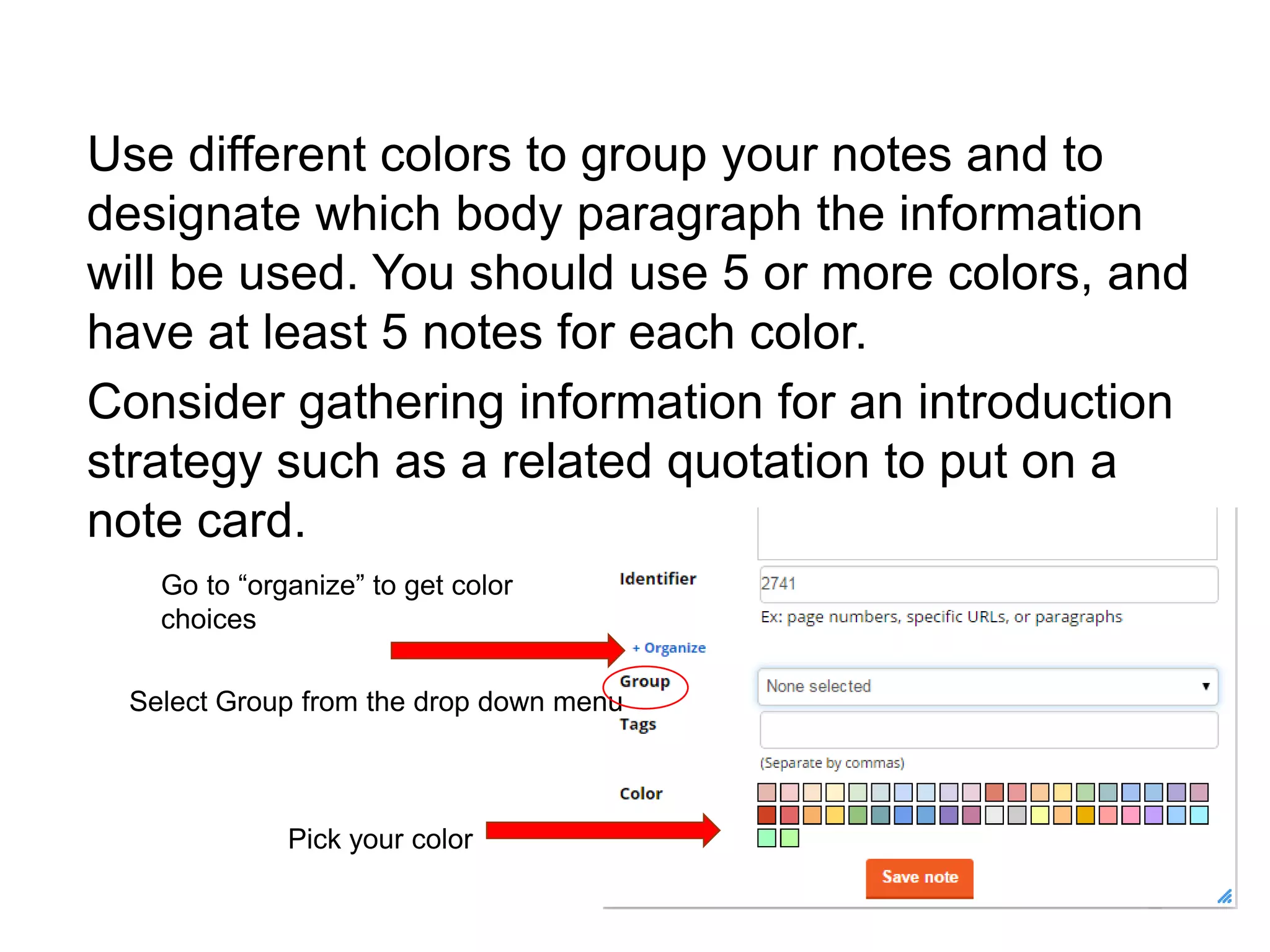
Use different colors to group your notes and to
designate which body paragraph the information
will be used. You should use 5 or more colors, and
have at least 5 notes for each color.
Consider gathering information for an introduction
strategy such as a related quotation to put on a
note card.
Go to “organize” to get color
choices
Select Group from the drop down menu
Pick your color
In-Text/Parenthetical Citations
•For every source cited in your paper, you must
list that source in the works cited
•For every source listed in the works cited, you must
have a parenthetical citation.
•Cite information found in secondary sources or is not
common knowledge.
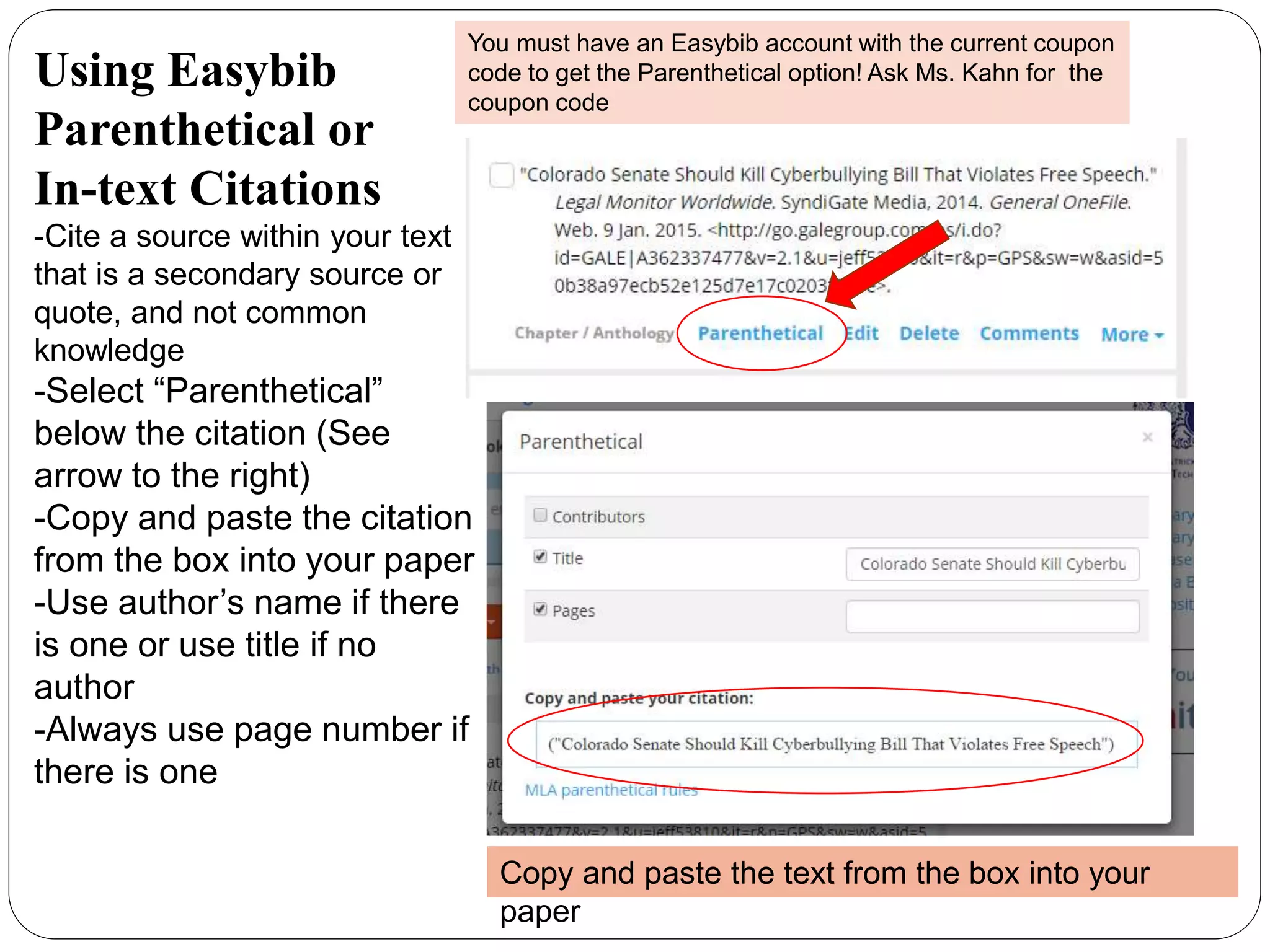
Using Easybib
Parenthetical or
In-text Citations
-Cite a source within your text
that is a secondary source or
quote, and not common
knowledge
-Select “Parenthetical”
below the citation (See
arrow to the right)
-Copy and paste the citation
from the box into your paper
-Use author’s name if there
is one or use title if no
author
-Always use page number if
there is one
You must have an Easybib account with the current coupon
code to get the Parenthetical option! Ask Ms. Kahn for the
coupon code
Copy and paste the text from the box into your
paper
Sample Parenthetical Citations
You do not need to cite common knowledge, well
known quotes, or proverbs. Author’s name,
no page number available
Author and page number,
preferred if info is available
Remember to insert citation before the period
Title only, no author or page
available
Use Easybib to Format
Works Cited Page
•Do NOT copy citation from Easybib
into your paper
•Let Easybib format the works cited page
correctly
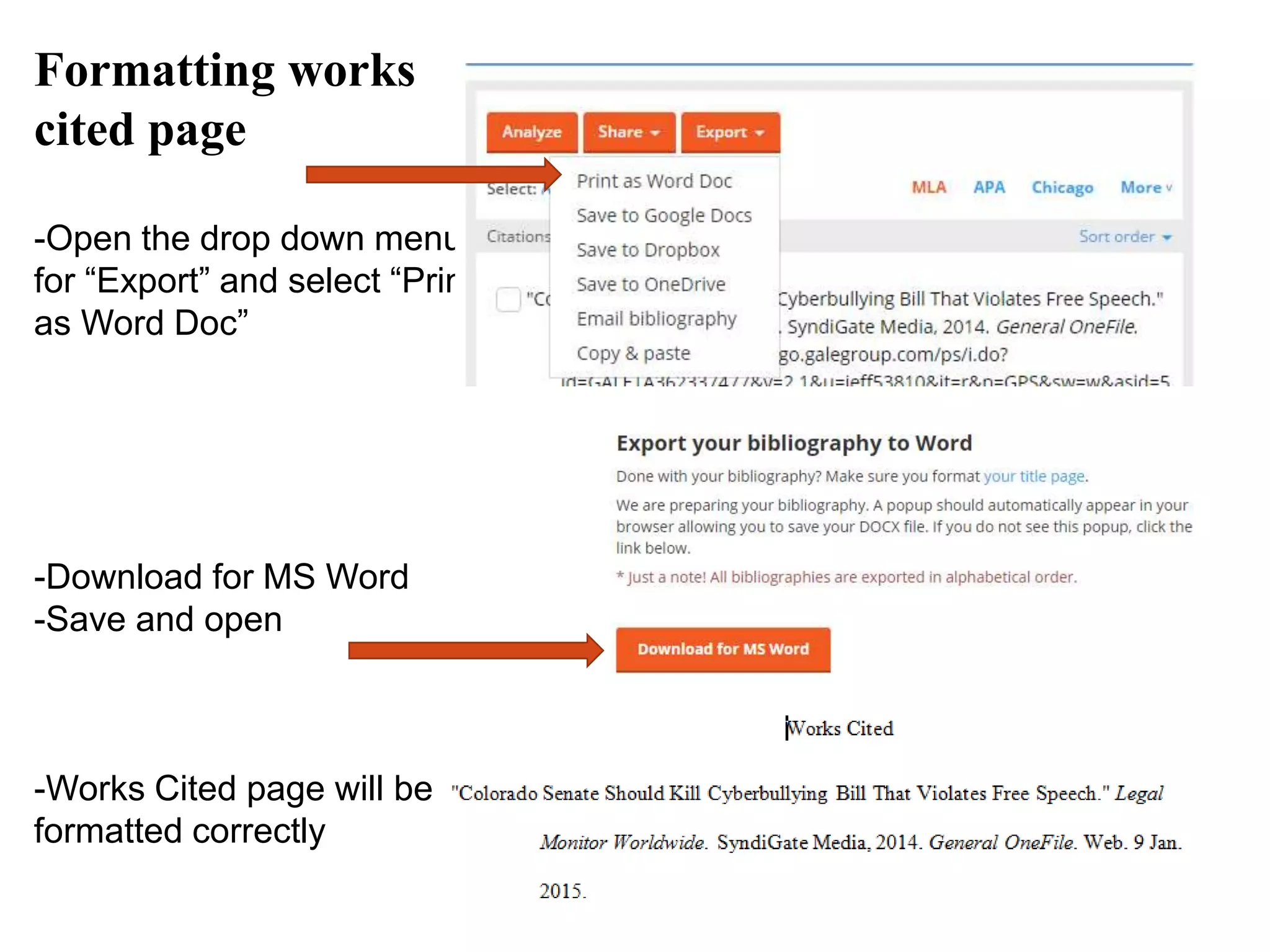
Formatting works
cited page
-Open the drop down menu
for “Export” and select “Print
as Word Doc”
-Download for MS Word
-Save and open
-Works Cited page will be
formatted correctly
Need More Help?
•Find short videos how to use Gale
•Find short videos how to use Easybib
•Find help from OWL Purdue on how to write
an argumentative essay
•Email Ms. Kahn: ekahn@pftsta.jppss.k12.la.us

Writing a persuasive essay

  • 1.
    Writing a PersuasiveEssay GOODFELLAS (1990) - LIOTTA, RAY. Photography. Encyclopædia Britannica ImageQuest. Web. 16 Jan 2015.
  • 2.
    Choose a Topic •200Essay Prompts from The New York Times •Use Instagrok to help with keywords
  • 3.
    Issues to Addressfor Arguments •Financial impact •Fairness to all parties involved •Feasibility •Impact on school, society or the world •Personal experience
  • 4.
    Thesis Statement •Focused—avoid beingtoo broad •Debatable—avoid a statement where you cannot argue for or against the topic •Pick a Side—the point of this essay is to pick a side and stick with it •Make Claims—give supporting evidence
  • 5.
    Find Information •Gale Databasesfor Books, Academic Journals, Magazines, and Newspapers •NBC Learn for Videos •Procon.org a website that presents information without bias •Library OPAC for books
  • 6.
    Cite your Sources •UseEasybib •Cite from Gale in two clicks •Copy/Paste Citation from NBC Learn or Procon.org •Use ISBN Number to cite a book
  • 7.
    Using Easybib to createa works cited page -Select “+New Project” and name it -Scroll down to project and select “Bibliography” -Add sources -If you use Gale, then click “citation tools,” then “Easybib” It’s a two click citation -If you use a website, paste the URL into box and click “Cite It” If you see ads in Easybib, then ask Ms. Kahn for the coupon code Website Copy and paste URL in box Gale source Cite in two clicks
  • 8.
    Taking Notes •Use Easybib •Ifyou copy/paste a quote, insert in “Evidence from text” box •Rewrite the information with bullets in “Paraphrasing” •Use fragments, not complete sentences to take notes
  • 9.
    Using Easybib Notecards -Select “Notebook.” -Click on“New Note” -Select Source from the drop down menu to add the bibliographic information to the note card -If you use an online source, copy and paste no more than 4 sentences in the Evidence from text box -Add list of bullet fragments in Paraphrasing with the information found in source -Save Note at the bottom of the window You must have an Easybib account with the current coupon code to get the Notebook option! Ask Ms. Kahn for the coupon code.
  • 10.
    Organize Notes inEasybib Use different colors to group your notes and to designate which body paragraph the information will be used. You should use 5 or more colors, and have at least 5 notes for each color. Consider gathering information for an introduction strategy such as a related quotation to put on a note card. Go to “organize” to get color choices Select Group from the drop down menu Pick your color
  • 11.
    In-Text/Parenthetical Citations •For everysource cited in your paper, you must list that source in the works cited •For every source listed in the works cited, you must have a parenthetical citation. •Cite information found in secondary sources or is not common knowledge.
  • 12.
    Using Easybib Parenthetical or In-textCitations -Cite a source within your text that is a secondary source or quote, and not common knowledge -Select “Parenthetical” below the citation (See arrow to the right) -Copy and paste the citation from the box into your paper -Use author’s name if there is one or use title if no author -Always use page number if there is one You must have an Easybib account with the current coupon code to get the Parenthetical option! Ask Ms. Kahn for the coupon code Copy and paste the text from the box into your paper
  • 13.
    Sample Parenthetical Citations Youdo not need to cite common knowledge, well known quotes, or proverbs. Author’s name, no page number available Author and page number, preferred if info is available Remember to insert citation before the period Title only, no author or page available
  • 14.
    Use Easybib toFormat Works Cited Page •Do NOT copy citation from Easybib into your paper •Let Easybib format the works cited page correctly
  • 15.
    Formatting works cited page -Openthe drop down menu for “Export” and select “Print as Word Doc” -Download for MS Word -Save and open -Works Cited page will be formatted correctly
  • 16.
    Need More Help? •Findshort videos how to use Gale •Find short videos how to use Easybib •Find help from OWL Purdue on how to write an argumentative essay •Email Ms. Kahn: ekahn@pftsta.jppss.k12.la.us