Open Sesame: Picking Locks with Cortana
Ron Marcovich, Yuval Ron, Amichai Shulman, Tal Be'ery
1
Amichai Shulman
• Independent Security Researcher
• Advisor for multiple cyber security start up
companies
• Former CTO and Co-Founder of Imperva
• Blackhat, RSA, Infosec speaker
• @amichaishulman
Tal Be’ery
• Co-Founder @ Kzen Networks
• Formerly VP Research @Aorato (Acquired by
Microsoft), Imperva, Singtel Innov8 VC
• Blackhat, RSA, SAS speaker
• @talbeerysec
2
Who are we?
Also Featuring…
Yuval Ron
Twitter: @RonYuval
LinkedIn: ronyuval
Ron Marcovich
Twitter: @RonMarcovich
LinkedIn: ronmarcovich
B.Sc. Software Engineering students at the Technion,
Israel Institute of Technology. Both will start their M.Sc.
In Computer Science this year.
3
Agenda
• Understanding Cortana
• What is it, how does it work and key elements
• Attacking Cortana on all fronts
• Cortana agent: Open Sesame (CVE-2018-8140)
• Cortana actions: The voice of Esau
• Cortana cloud: Malicious skills
• Protecting against Cortana attacks
• Voice Firewalls: NewSpeak
• Summary and Conclusions
4
Understanding Cortana
5
What is Cortana?
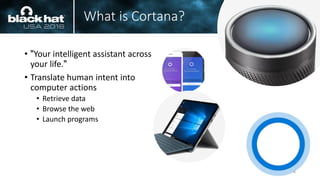
• "Your intelligent assistant across
your life."
• Translate human intent into
computer actions
• Retrieve data
• Browse the web
• Launch programs
6
What is Cortana?
• Multi-platform: Mobile, PC,
devices
• Multi inputs (“intents”):
keyboard, mouse, voice, touch,
…
7
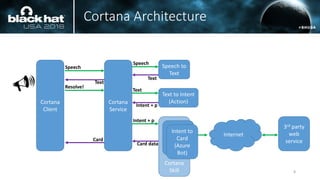
Cortana Architecture
8
Cortana
Service
Speech to
Text
Text to Intent
(Action)
Cortana
Skill
Internet
3rd party
web
service
Cortana
Client
Speech
Text
Text
Intent + p
Intent + p
Card data
Speech
Text
Resolve!
Card
Action
Provider
(Azure
Bot)
Intent to
Card
(Azure
Bot)
Cortana Architecture - Example
9
Cortana
Service
Speech to
Text
Text to Intent
(Action)
Action
Provider
(Azure
Bot)
Internet
3rd party
web
service
Cortana
Client
Speech
Who is George Washington
Search
Query = “George Washington”
Card data
Speech
Who is George Washington
Resolve!
Action
Provider
(Azure
Bot)
Intent to
Card
(Azure
Bot)
Search
Query = “George Washington”
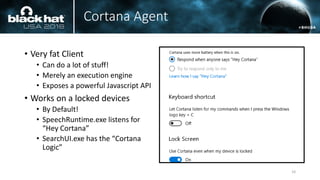
Cortana Agent
• Very fat Client
• Can do a lot of stuff!
• Merely an execution engine
• Exposes a powerful Javascript API
• Works on a locked devices
• By Default!
• SpeechRuntime.exe listens for
“Hey Cortana”
• SearchUI.exe has the “Cortana
Logic”
10
Cortana Cloud Service
• Processing and decision making is done in the cloud
• Two phases
• Audio processing – Speech to Text
• wss://websockets.platform.bing.com/ws/cu/v3
• Binary + JSON
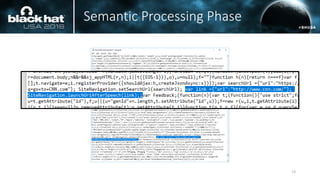
• Semantic processing – Text to Intent & Intent to Card
• https://www.bing.com/speech_render - GET request, HTML response
• https://www.bing.com/DialogPolicy - GET / POST request, Javascript response
• Machine Learning
• Improve speech recognition
• Extend intent resolution capabilities
11
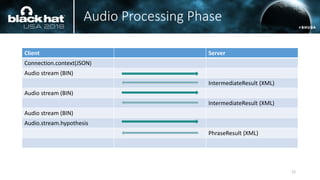
Audio Processing Phase
Client Server
Connection.context(JSON)
Audio stream (BIN)
IntermediateResult (XML)
Audio stream (BIN)
IntermediateResult (XML)
Audio stream (BIN)
Audio.stream.hypothesis
PhraseResult (XML)
12
Semantic Processing Phase
13
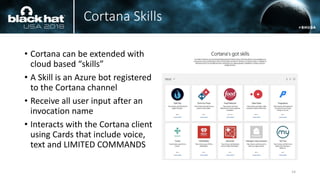
Cortana Skills
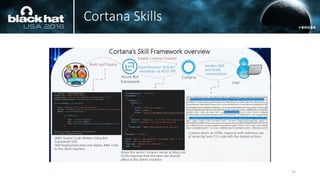
• Cortana can be extended with
cloud based “skills”
• A Skill is an Azure bot registered
to the Cortana channel
• Receive all user input after an
invocation name
• Interacts with the Cortana client
using Cards that include voice,
text and LIMITED COMMANDS
14
Cortana Skills
15
• Fat client executes on locked screen
• Many possible actions
• Action choice by cloud logic
• Can be changed without any apparent sign on the device
• Might depend on Machine Learning
• Choice of action can be affected by unknown 3rd parties
Summary
16
17
Putting Murphy to Work
• Set up a research project with the
Technion
• Undergraduate students exploring
different aspects of the system
• Some avenues we explored
• Local input to Cortana
• Intents that invoke exploitable actions
• Intents that retrieve malicious
content
• Capabilities of 3rd party Cortana skills
18
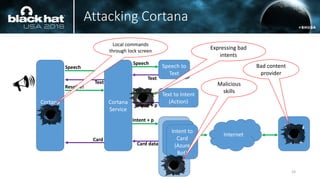
Attacking Cortana
19
Cortana
Service
Speech to
Text
Text to Intent
(Action)
Cortana
Skill
Internet
3rd party
web
service
Cortana
Client
Speech
Text
Text
Intent + p
Intent + p
Card data
Speech
Text
Resolve!
Card
Action
Provider
(Azure
Bot)
Intent to
Card
(Azure
Bot)
Expressing bad
intents
Local commands
through lock screen
Malicious
skills
Bad content
provider
Open Sesame
20
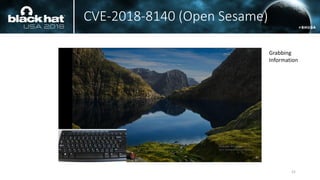
CVE-2018-8140 (Open Sesame)
21
Grabbing
Information
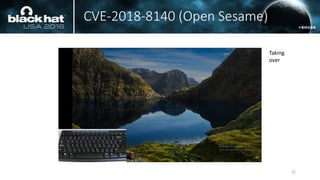
CVE-2018-8140 (Open Sesame)
22
Taking
over
Open Sesame: Attack Model
• Impact:
• by Abusing The “Open Sesame” vulnerability, “Evil Maid” attackers can gain
full control over a locked machine
• Evil Maid attack model:
• Attackers have physical access for a limited time, but the Computer is locked
• Why it’s called Evil Maid?
• Think of the laptop you left in your room last night when you went out…
• But also borders control, computers in the office during breaks and night, …
• But isn’t that exactly what Locked Screen suppose to stop?
23
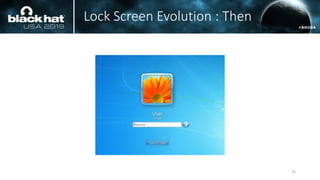
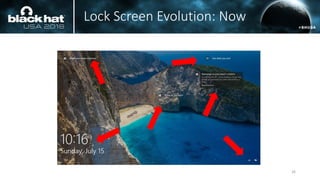
Lock Screen: You Had One Job
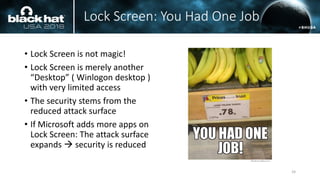
• Lock Screen is not magic!
• Lock Screen is merely another
“Desktop” ( Winlogon desktop )
with very limited access
• The security stems from the
reduced attack surface
• If Microsoft adds more apps on
Lock Screen: The attack surface
expands → security is reduced
24
Lock Screen Evolution : Then
25
Lock Screen Evolution: Now
26
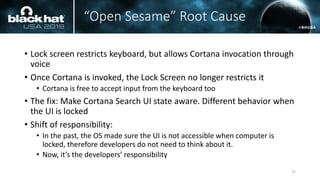
“Open Sesame” Root Cause
• Lock screen restricts keyboard, but allows Cortana invocation through
voice
• Once Cortana is invoked, the Lock Screen no longer restricts it
• Cortana is free to accept input from the keyboard too
• The fix: Make Cortana Search UI state aware. Different behavior when
the UI is locked
• Shift of responsibility:
• In the past, the OS made sure the UI is not accessible when computer is
locked, therefore developers do not need to think about it.
• Now, it’s the developers’ responsibility
27
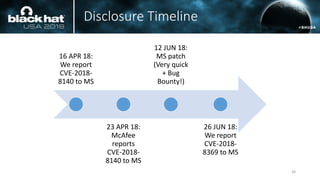
Disclosure Timeline
16 APR 18:
We report
CVE-2018-
8140 to MS
23 APR 18:
McAfee
reports
CVE-2018-
8140 to MS
12 JUN 18:
MS patch
(Very quick
+ Bug
Bounty!)
26 JUN 18:
We report
CVE-2018-
8369 to MS
28
“Open Sesame” Summary
• Impact: Evil Maid Attackers can gain full control on a locked machine
• The fix is
• Tactical: making Cortana Search aware of UI state
• Not Strategical: Cortana still gets keyboard input and launches processes from
a locked screen in some other scenarios
• There are more where it came from: CVE-2018-8369
• Design lessons: Adding more capabilities to Lock Screen is very
tempting, but dangerous
29
Cruel Intentions:
The Voice of Esau
30
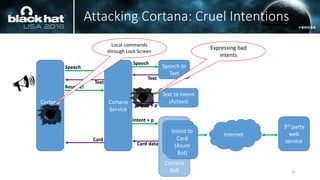
Attacking Cortana: Cruel Intentions
31
Cortana
Service
Speech to
Text
Text to Intent
(Action)
Cortana
Skill
Internet
3rd party
web
service
Cortana
Client
Speech
Text
Text
Intent + p
Intent + p
Card data
Speech
Text
Resolve!
Card
Action
Provider
(Azure
Bot)
Intent to
Card
(Azure
Bot)
Expressing bad
intents
Local commands
through Lock Screen
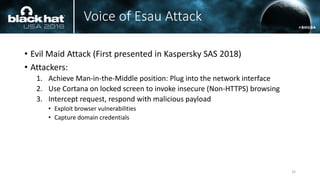
Voice of Esau Attack
• Evil Maid Attack (First presented in Kaspersky SAS 2018)
• Attackers:
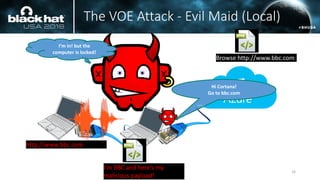
1. Achieve Man-in-the-Middle position: Plug into the network interface
2. Use Cortana on locked screen to invoke insecure (Non-HTTPS) browsing
3. Intercept request, respond with malicious payload
• Exploit browser vulnerabilities
• Capture domain credentials
32
The VOE Attack - Evil Maid (Local)
I’m in! but the
computer is locked!
Hi Cortana!
Go to bbc.com
Browse http://www.bbc.com
I’m BBC and here’s my
malicious payload!
http://www.bbc.com
33
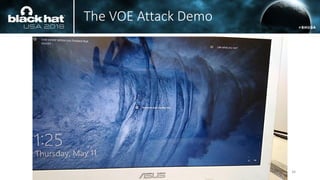
The VOE Attack Demo
34
VOE Attack – Lateral movement
• Use initial compromise to install agent on compromised machine
• Achieve Man-in-the-Middle position
• Some local routing attack: e.g. ARP spoofing
• Invoke Cortana insecure browsing
• Play sound file – “GOTO BBC DOT COM”
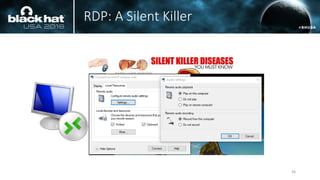
• RDP (Remote Desktop Protocol) sound file to target
• NLA must be disabled for it to work
• Intercept traffic of targeted machines and compromise, as in before.
35
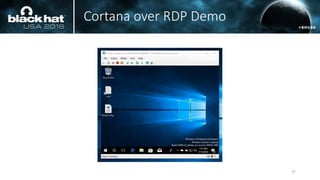
RDP: A Silent Killer
36
Cortana over RDP Demo
37
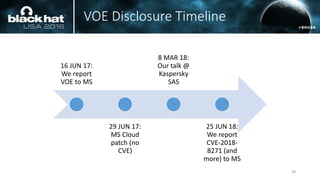
VOE Disclosure Timeline
16 JUN 17:
We report
VOE to MS
29 JUN 17:
MS Cloud
patch (no
CVE)
8 MAR 18:
Our talk @
Kaspersky
SAS
25 JUN 18:
We report
CVE-2018-
8271 (and
more) to MS
38
The Voice of Esau
• Impact: Evil Maid or even remote attacker can invoke unsafe
browsing on a locked machine. Using additional vulns attacker can
gain full control
• The fix is
• Tactical: making Cortana cloud aware of UI state and safely Bing instead of
direct browse in certain scenarios
• Not Strategical: Cortana may still allow unsafe browsing in some other
scenarios
• There are more where it came from: CVE-2018-8271 (and more)
• Design lessons: Adding more capabilities to Lock Screen is tempting
but dangerous
39
Skill of Death
40
Skill of Death
• VOE attack took advantage of
existing intent resolution
mechanisms
• What about adding our own
interpretation mechanism?
• Skills interact with client through
cards
• Cards have “limited
functionality”
41
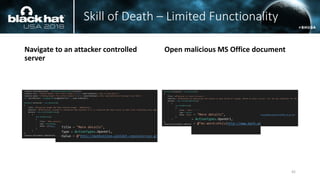
Navigate to an attacker controlled
server
Open malicious MS Office document
Skill of Death – Limited Functionality
42
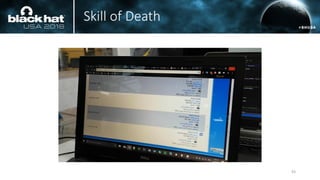
Skill of Death
43
Skill of Death
• How can attacker invoke a
“malicious” skill?
• Invoking a new skill on a machine
requires user consent
• Cortana Skill can be invoked and
granted consent from locked
screen!
44
Skill of Death
45
Skill of Death
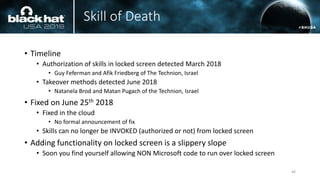
• Timeline
• Authorization of skills in locked screen detected March 2018
• Guy Feferman and Afik Friedberg of The Technion, Israel
• Takeover methods detected June 2018
• Natanela Brod and Matan Pugach of the Technion, Israel
• Fixed on June 25th 2018
• Fixed in the cloud
• No formal announcement of fix
• Skills can no longer be INVOKED (authorized or not) from locked screen
• Adding functionality on locked screen is a slippery slope
• Soon you find yourself allowing NON Microsoft code to run over locked screen
46
Protection
47
Preventing Voice Attacks:
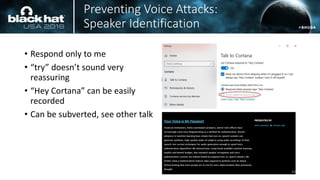
Speaker Identification
• Respond only to me
• “try” doesn’t sound very
reassuring
• “Hey Cortana” can be easily
recorded
• Can be subverted, see other talk
48
Preventing Voice Attacks:
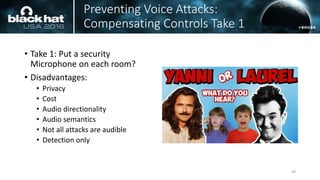
Compensating Controls Take 1
• Take 1: Put a security
Microphone on each room?
• Disadvantages:
• Privacy
• Cost
• Audio directionality
• Audio semantics
• Not all attacks are audible
• Detection only
49
Preventing Voice Attacks:
Compensating Controls Take 2
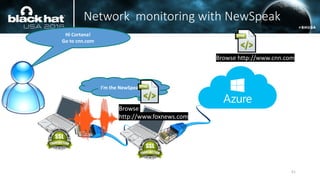
• NewSpeak: a Network-based Intercepting proxy
• TLS/SSL certificate must be installed on monitored devices
• In many organization already exists for web gateway monitoring, DLP
• Can monitor all Cortana requests and responses
• Origin details: IP, computer name, user, UI State, etc.
• Request audio and Text to Speech results
• Intents and Action cards
• Can block or modify all Cortana requests and responses
• Much better than previous suggestion: Centrally located, does not
rely on audio analogic capture, can mitigate not just detect
50
Network monitoring with NewSpeak
51
I’m the NewSpeak Proxy
Hi Cortana!
Go to cnn.com
Browse http://www.cnn.com
Browse
http://www.foxnews.com
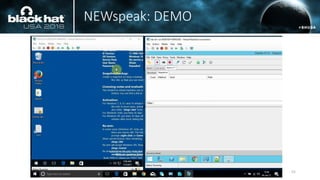
NEWspeak: DEMO
52
Summing up
53
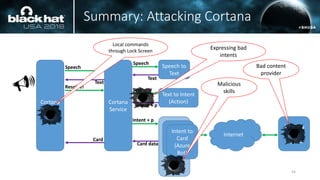
Summary: Attacking Cortana
54
Cortana
Service
Speech to
Text
Text to Intent
(Action)
Cortana
Skill
Internet
3rd party
web
service
Cortana
Client
Speech
Text
Text
Intent + p
Intent + p
Card data
Speech
Text
Resolve!
Card
Action
Provider
(Azure
Bot)
Intent to
Card
(Azure
Bot)
Expressing bad
intents
Local commands
through Lock Screen
Malicious
skills
Bad content
provider
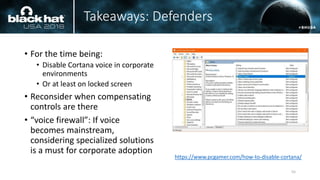
Takeaways: Defenders
• For the time being:
• Disable Cortana voice in corporate
environments
• Or at least on locked screen
• Reconsider when compensating
controls are there
• “voice firewall”: If voice
becomes mainstream,
considering specialized solutions
is a must for corporate adoption
55
https://www.pcgamer.com/how-to-disable-cortana/
Takeaways: Builders & Breakers
• New interfaces are much more than “just an interface”
• When introducing innovative concept into existing environments
• Secure Coding is not enough
• We need Secure System Engineering
• We found 3 different CVEs and numerous issues that enables
attackers to bypass the lock screen
56
Questions?
57

Open Sesame: Picking Locks with Cortana

  • 1.
    Open Sesame: PickingLocks with Cortana Ron Marcovich, Yuval Ron, Amichai Shulman, Tal Be'ery 1
  • 2.
    Amichai Shulman • IndependentSecurity Researcher • Advisor for multiple cyber security start up companies • Former CTO and Co-Founder of Imperva • Blackhat, RSA, Infosec speaker • @amichaishulman Tal Be’ery • Co-Founder @ Kzen Networks • Formerly VP Research @Aorato (Acquired by Microsoft), Imperva, Singtel Innov8 VC • Blackhat, RSA, SAS speaker • @talbeerysec 2 Who are we?
  • 3.
    Also Featuring… Yuval Ron Twitter:@RonYuval LinkedIn: ronyuval Ron Marcovich Twitter: @RonMarcovich LinkedIn: ronmarcovich B.Sc. Software Engineering students at the Technion, Israel Institute of Technology. Both will start their M.Sc. In Computer Science this year. 3
  • 4.
    Agenda • Understanding Cortana •What is it, how does it work and key elements • Attacking Cortana on all fronts • Cortana agent: Open Sesame (CVE-2018-8140) • Cortana actions: The voice of Esau • Cortana cloud: Malicious skills • Protecting against Cortana attacks • Voice Firewalls: NewSpeak • Summary and Conclusions 4
  • 5.
  • 6.
    What is Cortana? •"Your intelligent assistant across your life." • Translate human intent into computer actions • Retrieve data • Browse the web • Launch programs 6
  • 7.
    What is Cortana? •Multi-platform: Mobile, PC, devices • Multi inputs (“intents”): keyboard, mouse, voice, touch, … 7
  • 8.
    Cortana Architecture 8 Cortana Service Speech to Text Textto Intent (Action) Cortana Skill Internet 3rd party web service Cortana Client Speech Text Text Intent + p Intent + p Card data Speech Text Resolve! Card Action Provider (Azure Bot) Intent to Card (Azure Bot)
  • 9.
    Cortana Architecture -Example 9 Cortana Service Speech to Text Text to Intent (Action) Action Provider (Azure Bot) Internet 3rd party web service Cortana Client Speech Who is George Washington Who is George Washington Search Query = “George Washington” Card data Speech Who is George Washington Resolve! Action Provider (Azure Bot) Intent to Card (Azure Bot) Search Query = “George Washington”
  • 10.
    Cortana Agent • Veryfat Client • Can do a lot of stuff! • Merely an execution engine • Exposes a powerful Javascript API • Works on a locked devices • By Default! • SpeechRuntime.exe listens for “Hey Cortana” • SearchUI.exe has the “Cortana Logic” 10
  • 11.
    Cortana Cloud Service •Processing and decision making is done in the cloud • Two phases • Audio processing – Speech to Text • wss://websockets.platform.bing.com/ws/cu/v3 • Binary + JSON • Semantic processing – Text to Intent & Intent to Card • https://www.bing.com/speech_render - GET request, HTML response • https://www.bing.com/DialogPolicy - GET / POST request, Javascript response • Machine Learning • Improve speech recognition • Extend intent resolution capabilities 11
  • 12.
    Audio Processing Phase ClientServer Connection.context(JSON) Audio stream (BIN) IntermediateResult (XML) Audio stream (BIN) IntermediateResult (XML) Audio stream (BIN) Audio.stream.hypothesis PhraseResult (XML) 12
  • 13.
  • 14.
    Cortana Skills • Cortanacan be extended with cloud based “skills” • A Skill is an Azure bot registered to the Cortana channel • Receive all user input after an invocation name • Interacts with the Cortana client using Cards that include voice, text and LIMITED COMMANDS 14
  • 15.
  • 16.
    • Fat clientexecutes on locked screen • Many possible actions • Action choice by cloud logic • Can be changed without any apparent sign on the device • Might depend on Machine Learning • Choice of action can be affected by unknown 3rd parties Summary 16
  • 17.
  • 18.
    Putting Murphy toWork • Set up a research project with the Technion • Undergraduate students exploring different aspects of the system • Some avenues we explored • Local input to Cortana • Intents that invoke exploitable actions • Intents that retrieve malicious content • Capabilities of 3rd party Cortana skills 18
  • 19.
    Attacking Cortana 19 Cortana Service Speech to Text Textto Intent (Action) Cortana Skill Internet 3rd party web service Cortana Client Speech Text Text Intent + p Intent + p Card data Speech Text Resolve! Card Action Provider (Azure Bot) Intent to Card (Azure Bot) Expressing bad intents Local commands through lock screen Malicious skills Bad content provider
  • 20.
  • 21.
  • 22.
  • 23.
    Open Sesame: AttackModel • Impact: • by Abusing The “Open Sesame” vulnerability, “Evil Maid” attackers can gain full control over a locked machine • Evil Maid attack model: • Attackers have physical access for a limited time, but the Computer is locked • Why it’s called Evil Maid? • Think of the laptop you left in your room last night when you went out… • But also borders control, computers in the office during breaks and night, … • But isn’t that exactly what Locked Screen suppose to stop? 23
  • 24.
    Lock Screen: YouHad One Job • Lock Screen is not magic! • Lock Screen is merely another “Desktop” ( Winlogon desktop ) with very limited access • The security stems from the reduced attack surface • If Microsoft adds more apps on Lock Screen: The attack surface expands → security is reduced 24
  • 25.
  • 26.
  • 27.
    “Open Sesame” RootCause • Lock screen restricts keyboard, but allows Cortana invocation through voice • Once Cortana is invoked, the Lock Screen no longer restricts it • Cortana is free to accept input from the keyboard too • The fix: Make Cortana Search UI state aware. Different behavior when the UI is locked • Shift of responsibility: • In the past, the OS made sure the UI is not accessible when computer is locked, therefore developers do not need to think about it. • Now, it’s the developers’ responsibility 27
  • 28.
    Disclosure Timeline 16 APR18: We report CVE-2018- 8140 to MS 23 APR 18: McAfee reports CVE-2018- 8140 to MS 12 JUN 18: MS patch (Very quick + Bug Bounty!) 26 JUN 18: We report CVE-2018- 8369 to MS 28
  • 29.
    “Open Sesame” Summary •Impact: Evil Maid Attackers can gain full control on a locked machine • The fix is • Tactical: making Cortana Search aware of UI state • Not Strategical: Cortana still gets keyboard input and launches processes from a locked screen in some other scenarios • There are more where it came from: CVE-2018-8369 • Design lessons: Adding more capabilities to Lock Screen is very tempting, but dangerous 29
  • 30.
  • 31.
    Attacking Cortana: CruelIntentions 31 Cortana Service Speech to Text Text to Intent (Action) Cortana Skill Internet 3rd party web service Cortana Client Speech Text Text Intent + p Intent + p Card data Speech Text Resolve! Card Action Provider (Azure Bot) Intent to Card (Azure Bot) Expressing bad intents Local commands through Lock Screen
  • 32.
    Voice of EsauAttack • Evil Maid Attack (First presented in Kaspersky SAS 2018) • Attackers: 1. Achieve Man-in-the-Middle position: Plug into the network interface 2. Use Cortana on locked screen to invoke insecure (Non-HTTPS) browsing 3. Intercept request, respond with malicious payload • Exploit browser vulnerabilities • Capture domain credentials 32
  • 33.
    The VOE Attack- Evil Maid (Local) I’m in! but the computer is locked! Hi Cortana! Go to bbc.com Browse http://www.bbc.com I’m BBC and here’s my malicious payload! http://www.bbc.com 33
  • 34.
  • 35.
    VOE Attack –Lateral movement • Use initial compromise to install agent on compromised machine • Achieve Man-in-the-Middle position • Some local routing attack: e.g. ARP spoofing • Invoke Cortana insecure browsing • Play sound file – “GOTO BBC DOT COM” • RDP (Remote Desktop Protocol) sound file to target • NLA must be disabled for it to work • Intercept traffic of targeted machines and compromise, as in before. 35
  • 36.
    RDP: A SilentKiller 36
  • 37.
  • 38.
    VOE Disclosure Timeline 16JUN 17: We report VOE to MS 29 JUN 17: MS Cloud patch (no CVE) 8 MAR 18: Our talk @ Kaspersky SAS 25 JUN 18: We report CVE-2018- 8271 (and more) to MS 38
  • 39.
    The Voice ofEsau • Impact: Evil Maid or even remote attacker can invoke unsafe browsing on a locked machine. Using additional vulns attacker can gain full control • The fix is • Tactical: making Cortana cloud aware of UI state and safely Bing instead of direct browse in certain scenarios • Not Strategical: Cortana may still allow unsafe browsing in some other scenarios • There are more where it came from: CVE-2018-8271 (and more) • Design lessons: Adding more capabilities to Lock Screen is tempting but dangerous 39
  • 40.
  • 41.
    Skill of Death •VOE attack took advantage of existing intent resolution mechanisms • What about adding our own interpretation mechanism? • Skills interact with client through cards • Cards have “limited functionality” 41
  • 42.
    Navigate to anattacker controlled server Open malicious MS Office document Skill of Death – Limited Functionality 42
  • 43.
  • 44.
    Skill of Death •How can attacker invoke a “malicious” skill? • Invoking a new skill on a machine requires user consent • Cortana Skill can be invoked and granted consent from locked screen! 44
  • 45.
  • 46.
    Skill of Death •Timeline • Authorization of skills in locked screen detected March 2018 • Guy Feferman and Afik Friedberg of The Technion, Israel • Takeover methods detected June 2018 • Natanela Brod and Matan Pugach of the Technion, Israel • Fixed on June 25th 2018 • Fixed in the cloud • No formal announcement of fix • Skills can no longer be INVOKED (authorized or not) from locked screen • Adding functionality on locked screen is a slippery slope • Soon you find yourself allowing NON Microsoft code to run over locked screen 46
  • 47.
  • 48.
    Preventing Voice Attacks: SpeakerIdentification • Respond only to me • “try” doesn’t sound very reassuring • “Hey Cortana” can be easily recorded • Can be subverted, see other talk 48
  • 49.
    Preventing Voice Attacks: CompensatingControls Take 1 • Take 1: Put a security Microphone on each room? • Disadvantages: • Privacy • Cost • Audio directionality • Audio semantics • Not all attacks are audible • Detection only 49
  • 50.
    Preventing Voice Attacks: CompensatingControls Take 2 • NewSpeak: a Network-based Intercepting proxy • TLS/SSL certificate must be installed on monitored devices • In many organization already exists for web gateway monitoring, DLP • Can monitor all Cortana requests and responses • Origin details: IP, computer name, user, UI State, etc. • Request audio and Text to Speech results • Intents and Action cards • Can block or modify all Cortana requests and responses • Much better than previous suggestion: Centrally located, does not rely on audio analogic capture, can mitigate not just detect 50
  • 51.
    Network monitoring withNewSpeak 51 I’m the NewSpeak Proxy Hi Cortana! Go to cnn.com Browse http://www.cnn.com Browse http://www.foxnews.com
  • 52.
  • 53.
  • 54.
    Summary: Attacking Cortana 54 Cortana Service Speechto Text Text to Intent (Action) Cortana Skill Internet 3rd party web service Cortana Client Speech Text Text Intent + p Intent + p Card data Speech Text Resolve! Card Action Provider (Azure Bot) Intent to Card (Azure Bot) Expressing bad intents Local commands through Lock Screen Malicious skills Bad content provider
  • 55.
    Takeaways: Defenders • Forthe time being: • Disable Cortana voice in corporate environments • Or at least on locked screen • Reconsider when compensating controls are there • “voice firewall”: If voice becomes mainstream, considering specialized solutions is a must for corporate adoption 55 https://www.pcgamer.com/how-to-disable-cortana/
  • 56.
    Takeaways: Builders &Breakers • New interfaces are much more than “just an interface” • When introducing innovative concept into existing environments • Secure Coding is not enough • We need Secure System Engineering • We found 3 different CVEs and numerous issues that enables attackers to bypass the lock screen 56
  • 57.