A GUIDE TO STATISTICAL
REPORT WRITING
Patience Pokuaa Gambrah
BEd Mathematics, University of Education, Winneba
MSc, Industrial Mathematics, KNUST, Kumasi
Copyright © 2015 by Patience Pokuaa Gambrah
All rights reserved. This book or any portion thereof
may not be reproduced or used in any manner whatsoever
without the prior written permission of the Author
except for the use of brief quotations in a book review.
patiencegambrah@yahoo.com
Printed in the Ghana
First Printing, 2015
ISBN 978-9988-2-1117-2
Design and Printed by:
Jadep Printing Works, Accra Ghana (0276018747).
ACKNOWLEDGEMENT
First and foremost I would like to thank the Lord Almighty for giving me the power to
believe in my passion and to pursue my dreams. I could never have done this without
the faith I have in Him.
To my husband, Frederick Owusu, I am so thankful that I have you in my corner
pushing me when I am ready to give up. Thanks for not just believing in me, but
knowing that I could do this!
To my daughters, Richlove, Princess, Nana Akua and Freda I am so grateful to you girls
for supporting and understanding me. I love you girls! Also I will like to say a big thank
you to my boy Princes Dazie for all the hard work you did on this book. God bless you
all.
I dedicate this book to my lovely mother Theresa Adu Serwaa.
Mummy God Bless you.
Contents
Preface
Chapter 1
Report as A Form of Communication
Communication
Types of Communication
Verbal Communication
Written Communication
Nonverbal Communication
Types of Communication Based On Purpose and Style
Formal Communication
Informal Communication
Communicate Statistical Findings
Writing about Data
Using Tables, Graphs and Charts to Communicate Statistical Findings
Using Tables to Communicate Statistical Findings
Using Graphs to Communicate Statistical Findings
Chapter2
The Structural Contents of A Report
Scientific Format
The Sections of the Paper
Title, Authors' Names, and Institutional Affiliations
Abstract
Introduction
Methods
Results
Things to Consider As You Write Your Results Section
Discussion
Acknowledgments
Literature Cited
Appendices
Figures and Tables in Appendices
Chapter 3
Tables in A Report
Introduction
Why Are Tables Important
Types of Tables
Presentation (Demonstration)
Reference (Resource or Larger) Tables
Commentary (Exploratory)/ Investigative Tables
Orientation and Order
Design Principles for All Tables
The Use of Rounding and Decimals
Chapter 4
Graphs and Charts Use in Reports
Using Charts to Present Data
Types of Chart/Graph
Pie Chart
Line Graph
Bar Chart
Area Graph
Scatter-Plot
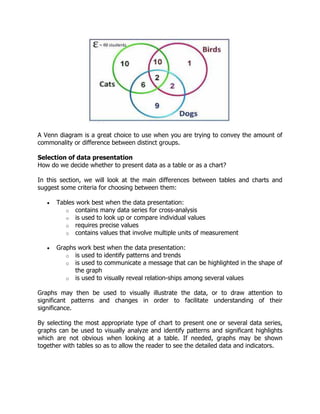
Venn Diagram
Selection of Data Presentation
Using Text to Present Data
Charts
Why Use Charts
Checklist for Designing A Good Chart
What Makes an Effective Chart
Chart Components
Chapter 5
Log and Interrupted Scale
Log Scale
Logarithmic and Semi-Logarithmic Plots and Equations of Lines
Estimating Values in a Diagram with Logarithmic Scale
Graphs on Logarithmic and Semi-Logarithmic Paper
Semi-Logarithmic Graphs
Log-Log Graphs
Preface
This book contains five chapters which deals with the following topics: Report as a
Form of Communication, The Structural Contents of a Report, Tables in a Report,
Graphs and Charts Use in Reports and Log and Interrupted Scale. Statistical report
writing is part of the curriculum of HND Statistics and First Degree Statistics. It is
therefore necessary to have a book of this nature to help young researchers in this
area of study (ie statistics) to get a guide in this course in other to know how to
report their statistical findings. This book can also be very helpful to new (first time)
researchers.
Getting a book that covers the entire course outline in this area is very difficult. It
was in this light that the author sat down to compile this book. Each of the chapters
guides the student through the development of the particular topic, with examples
given so as to illustrate the idea being taught, so that the student who fails to follow
the notes may assimilate the material by studying the example. This gives the
student the confident to do the right thing. There are a lot of books in report writing
but these books sometime do not help the statistics students since they deal with
large data and the way statisticians report their report findings is different from the
other programs of study.
Chapter 1
Report as a form of communication
Introduction
A statistical report serves to inform readers about experiments, research, data and
interviews that lead to knowledge of a subject or project. Experimentation and research
are required to write a statistical report. However, the research is not useful until it is in
a format that can be communicated with others. Writing a statistical report is part of
the communication process.
Communication
Communication is a process of exchanging information, ideas, thoughts, feelings and
emotions through speech, signals, writing, or behavior. In communication process, a
sender encodes a message and then using a medium sends it to the receiver who
decodes the message and after processing information, sends back appropriate
feedback(reply) using a medium.
Types of Communication
People communicate with each other in a number of ways that depend upon the
message and the context in which it is being sent. Choice of communication channel
and your method of communicating also affect communication. So, there are a range of
types of communication.
Types of communication based on the communication channels used are:
1. Verbal Communication
2. Written communication
3. Nonverbal Communication
1. Verbal Communication
Verbal communication refers to the form of communication in which message is
transmitted verbally; communication is done by word of mouth. Objective of
every communication is to have people understand what we are trying to
convey. This is the most common of the many types of communication that we
all have been using for so long. Verbal means you talk to each other. Uttering
words and phrases and sentences is considered a verbal communication. When
we talk to others, we assume that others understand what we are saying
because we know what we are saying.
In order to deliver the right message, you must put yourself on the other side of
the table and think from your receiver’s point of view. Would he understand the
message? How will it sound on the other side of the table?
Verbal Communication is sometimes called Oral Communication. In oral
communication, Spoken words are used. It includes face-to-face conversations,
speech, telephonic conversation, video, radio, television, voice over internet. In
oral communication, communication is influence by pitch, volume, speed and
clarity of expression.
The advantages of Oral communication are that, it brings quick feedback, also in a face-
to-face conversation, by reading facial expression and body language one can guess
whether he/she should trust what’s being said or not.
The disadvantage of oral communication is that in face-to-face discussion, user is
unable to deeply think about what he is delivering.
2. Written Communication
In written communication, written signs or symbols are used to communicate. A written
message may be printed or hand written. In written communication message can be
transmitted via email, letter, report, memo etc. Messages, in written communication, is
influenced by the vocabulary & grammar used, writing style, precision and clarity of the
language used.
Written Communication is most common form of communication being used in
business. So, it is considered central part among business skills.
Memos, reports, bulletins, job descriptions, employee manuals, and electronic mail are
the types of written communication used for internal communication. For
communicating with an external environment in writing, electronic mail, Internet Web
sites, letters, proposals, telegrams, faxes, postcards, contracts, advertisements,
brochures, and news releases are used.
Advantages of written communication are that:
Messages can be edited and revised many time before it is actually sent.
Written communication provides record for every message sent and can be saved for
later study.
A written message enables receiver to fully understand it and send appropriate
feedback.
Disadvantages of written communication include:
Unlike oral communication, written communication doesn’t bring instant feedback.
It takes more time in composing a written message as compared to word-of-mouth and
a number of people struggles with writing ability.
3. Nonverbal Communication
Nonverbal communication is the sending or receiving of wordless messages. We can
say that communication other than oral and written, such as gesture, body language,
posture or facial expressions, is called nonverbal communication. Nonverbal
communication is all about the body language of the speaker.
Nonverbal communication helps the receiver in interpreting the message received.
Often, nonverbal signals reflect the situation more accurately than verbal messages.
Sometimes nonverbal responses contradict verbal communication and hence affect the
effectiveness of the message.
Nonverbal communications have the following two fundamentals:
Manifestation
Speaker: clothing, hairstyle, neatness, use of cosmetics, etc
Surrounding: room size, lighting, decorations, furnishings, etc
Body Language
facial expressions, gestures, postures
Types of Communication Based on Purpose and Style
Based on style and purpose, there are two main categories of communication and they
both bears their own characteristics. Communication types based on style and purpose
are:
1. Formal Communication
2. Informal Communication
1. Formal Communication
In formal communication, certain rules, conventions and principles are followed
while communicating. Formal communication occurs in formal and official style.
Usually professional settings, corporate meetings, conferences undergoes in
formal pattern.
In formal communication, use of slang and foul language is avoided and correct
pronunciation is required. Authority lines are needed to be followed in formal
communication.
2. Informal Communication
Informal communication is done using channels that are in contrast with formal
communication channels. It’s just a casual talk. It is established for societal
affiliations of members in an organization and face-to-face discussions. It
happens among friends and family. In informal communication use of slang
words, foul language is not restricted. Usually informal communication is done
orally and using gestures.
Informal communication, unlike formal communication, doesn’t follow authority
lines. In an organization, it helps in finding out staff grievances as people
express more when talking informally. Informal communication helps in building
relationships.
From the above explanations it indicates that a statistical report is both formal and
written communication which sort to give its readers a firm idea of a research
undertaken.
COMMUNICATING STATISTICAL FINDINGS
Being able to turn data into information or communicate statistical information
accurately is vital for effective decision-making. The following is an overview of writing
statistical commentary and using tables and graphs to communicate statistical findings.
Writing about data
Writing about statistics provides an opportunity to present your analysis in a way that
tells a story about the data. In effect, statistical writing can bring data to life, making it
real, relevant and meaningful to the audience. When communicating statistical
information it is important to ensure that the information presented is clear, concise and
accurate. It is also important to provide contextual information and to draw out the
main relationships, causations and trends in the data.
These are some useful tips to follow when writing about statistics:
• Describe the context within which the topic is
• Present the complete picture to avoid misrepresentation of the data
• Convey the main findings clearly and concisely
• Include definitions to support correct interpretations of the data
• Where necessary include information on how the data was collected,
compiled, processed, edited and validated
• Include information on data quality and data limitations
• Use plain, simple language and minimize the use of jargon
• Ensure information and data are accurate
• Where possible avoid using data that have data quality concerns
• Use tables and graphs to present and support your written commentary.
The following tips can help you ensure that statistical information is accurate, and easy
to read and understand:
 Avoid subjective language or descriptions
 Statements should be backed up by the data (e.g. Twenty percent were minors
as compared with the previous year’s attendance which had all adults)
 Use proportions to improve flow and ease of comprehension (e.g. Nearly one
quarters (25%) of children)
 Use rates when comparing populations of different sizes (e.g. Age specific death
rate, crime rates)
 A percentage change (the relative change between two numbers) is different
from a percentage point change (the absolute difference between two
percentages)
 Be careful of percentage change and small numbers (e.g. The region experiences
a 100% increase in the number of reported crimes (from two reported incidences
in 2002 to four reported incidences in 2003))
 Figures should always be written as numbers (e.g. 45% instead of forty-five
percent)
 Comparison of large numbers can be improved by using a different scale
 Rounded figures are used in text and raw data in tables.
Using tables, graphs and charts to communicate statistical findings
Whether writing a report or making a presentation, the story should be told by your
evidence. A simple table, graph or chart can explain a great deal, and so this type of
direct evidence should be used where appropriate. However, if a particular part of your
analysis represented by a table, graph or chart does not add to or support your
argument, it should be left out.
While representing statistical information in tables, graphs or charts can be highly
effective, it is important to ensure that the information is not presented in a way that
can mislead the reader. The key to presenting effective tables, graphs or charts is to
ensure they are easy to understand and clearly linked to the message. Ensure that all
the necessary information required to understand what the data is showing is provided,
as the table, graph or chart should be able to stand out.
Tables, graphs and charts should:
 Relate directly to the argument
 Support statements made in the text
 Summarize relevant sections of the data analysis
 Be clearly labeled
Using tables to communicate statistical findings
An effective table does not simply present data to the audience, it supports and
highlights the argument or message being presented in the text, and helps to make the
meaning of that message clear, accessible, and memorable for the audience.
The following may be useful when creating tables:
 Label each table separately
• Use a descriptive title for each table
• Label every column
• Provide a source if appropriate
• Provide footnotes with additional information required for understanding
table
• Minimize memory load by removing unnecessary data and minimizing
decimal places
• Use clustering and patterns to highlight important relationships
• Use white space to effect
• Order data meaningfully (e.g. Rank highest to lowest)
• Use a consistent format for each table.
It is also very important not to present too much data in tables. Large expanses of
figures can be demoralizing for a reader, and can actually obscure your message.
Using graphs to communicate statistical findings
Graphs are also a useful tool for presenting data. They provide a way to visually
represent and summarize complex statistical information. They are especially useful for
revealing patterns and relationships that exist in the data and for showing how things
may have changed over time. A well placed graph may also be useful in improving
readability by breaking up large chunks of text and tables.
There are a range of different graphs used for presenting data, such as bar graphs, line
graphs, pie graphs and scatter plots. It is important to use the right type of graph for
presenting the information. Effective graphs are easy to read and clearly present the
key messages. Points to consider when using graphs for presentation purposes are as
follows.
 Title: Use a clear descriptive title to properly introduce the graph and the
information it contains.
 Type of graph: Choose the appropriate graph for your work, avoid using 3D
graphs as they can obscure information.
 Axes: Decide which variable goes on which axis, what scale is most appropriate.
 Labels: All relevant labels should be included, including thousands or
percentages, and the name of the x/y-axis if required.
 Color/shading: Colors can help differentiate, however, know what is appropriate
for the medium you’re using.
 Footnotes: These can help communicate anything unusual about the data, such
as limitations in the data, or a break in the series.
 Data source: Where appropriate, provide the source of data you’ve used for the
graph.
 3/4 Rules: For readability, it’s generally a good rule to make the y axis 3/4 the
size of the x-axis.
Chapter 2
The structural contents of a report
The Scientific Format
The scientific format may seem confusing for the beginning science writer due to its
rigid structure which is so different from writing in the humanities. One reason for using
this format is that it is a means of efficiently communicating statistical findings to the
broad community of statisticians in a uniform manner. Another reason is that this
format allows the paper to be read at several different levels. For example, many
people browse Titles to find out what information is available on a subject. Others may
read only titles and Abstracts. Those wanting to go deeper may look at the Tables and
Figures in the Results, and so on. The main point here is that the scientific format helps
to insure that at whatever level a person reads your paper (beyond title skimming),
they will likely get the key results and conclusions.
Sections of the Paper
Most scientific papers are subdivided into the following sections: Title, Authors and
Affiliation, Abstract, Introduction, Literature review, Methods, Results, Discussion,
Acknowledgments, and Literature Cited. This is the system we will use. This chapter
describes the style, content, and format associated with each section.
The sections appear in a statistical paper in the following prescribed order:
Development Section of Paper
What did I do in the
nutshell?
Abstract
What is the problem? Introduction
Whose work is related to
mine?
Literature review
How did I solve the
problem?
Methods
What did I find out? Results
What does it mean? Discussion
What do I make of all that I
have done?
Conclusion
Whose work did I refer to? Reference
Who helped me out? Acknowledgments (optional)
Extra Information Appendices (optional)
Title, Authors' Names, and Institutional Affiliations
Title
Your paper should begin with a Title that briefly describes the contents of the paper.
Use descriptive words that you would associate strongly with the content of your paper.
A majority of readers will find your paper via electronic database searches and those
search engines key on words found in the title. Please note this;
 The title should be centered at the top of page 1 (DO NOT use a title page - it is
a waste of paper for our purposes); the title is NOT underlined or italicized.
 The authors' names (PI or primary author first) and institutional affiliation are
double-spaced from and centered below the title. When more than two authors,
the names are separated by commas except for the last which is separated from
the previous name by the word "and".
For example:
Infant mortality trends in Ghana
Imana Mallam, Ama Doku, and Wuredu Daniel
Department of Statistics, Tamale Polytechnic, Tamale
The title is not a section, but it is necessary and important. The title should be short
and unambiguous, yet be an adequate description of the work. A general rule-of-thumb
is that the title should contain the key words describing the work presented. Remember
that the title becomes the basis for most on-line computer searches - if your title is
insufficient, few people will find or read your paper.
ABSTRACT
An abstract summarizes, in one paragraph, the major aspects of the entire paper in the
following prescribed sequence:
 The question(s) you researched on, (from Introduction)
o State the purpose very clearly in the first or second sentence.
 The experimental design and methods used, (from Methods)
o Clearly express the basic design of the study.
o Name or briefly describe the basic methodology used without going into
excessive detail-be sure to indicate the key techniques used.
 The major findings including key results, or trends (from Results)
o Report those results which answer the questions you were asking
o Identify trends, relative change or differences, etc.
 A brief summary of your interpretations and conclusions. (from Discussion)
o Clearly state the implications of the answers your results gave you.
Whereas the Title can only make the simplest statement about the content of your
article, the Abstract allows you to elaborate more on each major aspect of the paper.
The length of your Abstract should be kept to about 200-300 words maximum (a typical
standard length for journals.) Limit your statements concerning each segment of the
paper (i.e. purpose, methods, results, etc.) to two or three sentences, if possible. The
Abstract helps readers decide whether they want to read the rest of the paper, or it
may be the only part they can obtain via electronic literature searches or in published
abstracts. Therefore, enough key information (e.g., summary results, observations,
trends, etc.) must be included to make the Abstract useful to someone who may want
to reference your work.
How do you know when you have enough information in your Abstract? A
simple rule is to imagine that you are another researcher doing a study similar to the
one you are reporting. If your Abstract was the only part of the paper you could access,
would you be happy with the information presented there?
The Abstract is ONLY text. Use the active voice when possible, but much of it may
require passive constructions. Write your Abstract using concise, but complete,
sentences, and get to the point quickly. Use past tense.
The Abstract SHOULD NOT contain:
 lengthy background information,
 references to other literature,
 indirect or incomplete sentences,
 abbreviations or terms that may be confusing to readers,
 Any sort of illustration, figure, or table, or references to them.
Although it is the first section of your paper, the Abstract, by definition, must be written
last since it will summarize the paper. To begin composing your Abstract, take whole
sentences or key phrases from each section and put them in a sequence which
summarizes the paper. Then set about revising or adding words to make it all
interconnected and clear. As you become more proficient you will most likely compose
the Abstract from scratch.
Once you have the completed abstract, check to make sure that the information in the
abstract completely agrees with what is written in the paper. Confirm that all the
information appearing in the abstract actually appears in the body of the paper.
INTRODUCTION
The function of the Introduction is to:
 Establish the context of the work being reported. This is accomplished by
discussing the relevant primary research literature (with citations) and
summarizing our current understanding of the problem you are investigating
 State the purpose of the work in the form of the hypothesis, question, or
problem you researched
 Briefly explain your rationale and approach and, if possible, the possible
outcomes your study can reveal.
The Introduction must answer the questions, "What was I studying? Why was it an
important question? What did we know about it before I did this study? How will this
study advance our knowledge?"
Use the active voice as much as possible. Some use of first person is okay, but do not
overdo it.
The structure of the Introduction can be thought of as an inverted triangle - the
broadest part at the top representing the most general information and focusing down
to the specific problem you studied. Organize the information to present the more
general aspects of the topic early in the Introduction, then narrow toward the more
specific topical information that provides context, finally arriving at your statement of
purpose and rationale. A good way to get on track is to sketch out the Introduction
backwards; start with the specific purpose and then decide what context in which you
are asking the question(s) your study addresses. Once the context is decided, then
you'll have a good sense of what level and type of general information with which the
Introduction should begin.
The Introduction can be arranged as follows:
 Begin your Introduction by clearly identifying the subject area of
interest. Do this by using key words from your Title in the first few sentences of
the Introduction to get it focused directly on topic at the appropriate level. This
insures that you get to the primary subject matter quickly without losing focus,
or discussing information that is too general. For example, in the infant mortality
trends in Ghana paper, the words infant and mortality would likely appear within
the first one or two sentences of the Introduction.
 Establish the context by providing a brief and balanced review of the
pertinent published literature that is available on the subject. The key is
to summarize (for the reader) what we knew about the specific problem before
you did your experiments or studies. This is accomplished with a general review
of the primary research literature (with citations) but should not include very
specific, lengthy explanations that you will probably discuss in greater detail later
in the Discussion. The judgment of what is general or specific is difficult at first,
but with practice and reading of the statistics literature you will develop firmer
sense of your audience. In the infant mortality paper, for example, you would
begin the Introduction at the level of defining infant mortality in general, and
then quickly focus to trends and then how serious it is. Lead the reader to your
statement of purpose/hypothesis by focusing your literature review from the
more general context (the big picture e.g., world trends, Africa trends and West
Africa trends) to the more specific topic of interest to you (e.g., trends in
Ghana.)
 What literature should you look for in your review of what we know
about the problem? Focus your efforts on the primary research journals - the
journals that publish original research articles. Although you may read some
general background references (encyclopedias, textbooks, style manuals, etc.) to
get yourself acquainted with the subject area, do not cite these, because they
contain information that is considered fundamental or "common" knowledge
within the discipline. Cite, instead, articles that reported specific results relevant
to your study. Learn, as soon as possible, how to find the primary literature
(research journals) and review articles rather than depending on reference
books. The articles listed in the Literature Cited of relevant papers you find are a
good starting point to move backwards in a line of inquiry. Most academic
libraries support the Citation Index - an index which is useful for tracking a line
of inquiry forward in time. Some of the newer search engines will actually send
you alerts of new papers that cite particular articles of interest to you. Review
articles are particularly useful because they summarize all the research done on
a narrow subject area over a brief period of time (a year to a few years in most
cases).
 Be sure to clearly state the purpose and /or hypothesis that you
investigated. When you are first learning to write in this format it is okay, and
actually preferable, to use a touch statement like, "The purpose of this study was
to...." or "We investigated three possible mechanisms to explain the ...” It is
most usual to place the statement of purpose near the end of the Introduction,
often as the topic sentence of the final paragraph. It is not necessary to use the
words "hypothesis" or "null hypothesis", since these are usually implicit if you
clearly state your purpose and expectations.
 Provide a clear statement of the rationale for your approach to the
problem studied. State briefly how you approached the problem (e.g., you
studied effect of abstinence on teenage pregnancy). This will usually follow your
statement of purpose in the last paragraph of the Introduction. Why did you
choose this kind of experiment or experimental design? What are the statistical
merits of this particular model system? What advantages does it confer in
answering the particular question(s) you are posing? Do not discuss here the
actual techniques or protocols used in your study (this will be done in the
Methodology); your readers will be quite familiar with the usual techniques and
approaches used in your field. If you are using a novel (new, revolutionary, or
never used before) technique or methodology, the merits of the new
technique/method versus the previously used methods should be presented in
the Introduction.
METHODS
This section is sometimes called Methods, Methodology or Methods and
Materials.
In this section you explain clearly how you carried out your study in the following
general structure and organization:
 The area studied (plant, animal, human, society, economy, health etc.) And,
when relevant, their pre-experiment handling and care, and when and where the
study was carried out (only if location and time are important factors)
 If you did a field study, provide a description of the study site, including the
significant physical and biological features, and the precise location (latitude and
longitude, chart, etc);
 The sampling design (i.e., how the study was structured. For example, controls,
what variable(s) were measured, how many samples were collected, replication,
the final form of the data, etc.);
 The protocol for collecting data, i.e., how the study procedures were carried out,
and,
 How the data were analyzed (qualitative analyses and/or statistical procedures
used to determine significance, data transformations used, what probability was
used to decide significance, etc).
Organize your study so your reader will understand the logical flow of the
experiment(s); subheadings work well for this purpose. Each procedure should be
presented as a unit, even if it was broken up over time. The experimental design and
procedure are sometimes most efficiently presented as an integrated unit, because
otherwise it would be difficult to split them up. In general, provide enough quantitative
detail (how much, how long, when, etc.) about your methods such that other
statisticians could reproduce your work. You should also indicate the statistical
procedures used to analyze your results, including the probability level at which you
determined significance (usually at 0.05 probability).
The style in this section should read as if you were verbally describing the conduct of
the work. You may use the active voice to a certain extent, although this section
requires more use of third person, passive constructions than others. Avoid use of the
first person in this section. Remember to use the past tense throughout, the work being
reported is done, and was performed in the past, not the future.
Describe the population used in the study. This includes giving the source (where
and how it were collected), typical size (weight, length, etc), how they were handled
before the study, how they were handled during the study. For some studies, age may
be an important factor. For example, did you use children or adults?
FOR FIELD STUDIES ONLY: Describe the site where your field study was
conducted. The description must include both physical and biological characteristics of
the site pertinent to the study aims. Include the date(s) of the study (e.g., 10-18th May
2014) and the exact location of the study area. Location data must be as precise as
possible. When possible, give the actual latitude and longitude position of the site:
these can be obtained from web resources such as Google Earth(TM) and
ChartQuest(TM). It is often a good idea to include a chart (labeled as a Figure) showing
the study location in relation to some larger more recognizable geographic area.
Someone else should be able to go to the exact location of your study site if they want
to repeat or check your work, or just visit your study area.
Describe your study design clearly. Be sure to include the hypotheses you tested,
controls, variables measured, how many replicates you had, what you actually
measured, what form the data taken, etc. When your paper includes more than one
study, use subheadings to help organize your presentation by study.
Describe the procedures for your study in sufficient detail that other
statisticians could repeat your work to verify your findings. Foremost in your
description should be the "quantitative" aspects of your study that another statistician
needs in order to duplicate your work.
When using a method described in another published source, you can save time and
words by providing the relevant citation to the source. Always make sure to describe
any modifications you have made of a standard or published method.
Describe how the data was summarized and analyzed. Here you will indicate
what types of descriptive statistics were used and which analyses (usually hypothesis
tests) were employed to answer each of the questions or hypotheses tested and
determine statistical significance.
The information should include:
 Statistical software used: Sometimes it is necessary to report which statistical
software you used; this would be at the discretion of your instructor or the
journal;
 How the data were summarized (Means, percent, etc) and how you are reporting
measures of variability (SD,SEM, 95% CI, etc)
o This lets you avoid having to repeatedly indicate you are using mean ± SD
or SEM.
 Which data transformations were used(e.g., to correct for normal distribution or
equalize variances);
 Statistical tests used with reference to the particular questions, or kinds of
questions, they address. For example,
"A Paired t-test was used to compare mean walking time by students before and after
lectures to the hostel."
"One way ANOVA was used to compare mean weight gain in children under three."
 Any other numerical (e.g., normalizing data) or graphical techniques used to
analyze the data
 What probability was used to decide significance; usually reported as the Greek
symbol alpha.
 Note: you do not need to say that you made graphs and tables.
Here is some additional advice on particular problems common to new statisticians
The Methods section is prone to being wordy or overly detailed. Avoid repeatedly using
a single sentence to relate a single action; this results in very lengthy, wordy passages.
A related sequence of actions can be combined into one sentence to improve clarity and
readability:
Avoid using ambiguous terms to identify results, or other study parameters that require
specific identifiers to be clearly understood. Designators such as Group 1, Group 2, or
Site 1 and Site 2 are completely meaningless out of context and difficult to follow in
context.
RESULTS
The purpose of the Results section is to objectively present your key results, without
interpretation, in an orderly and logical sequence using both text and illustrative
materials (Tables and graphs). The results section always begins with text, reporting
the key results and referring to your figures and tables as you proceed. Summaries of
the statistical analyses may appear either in the text (usually incidentally) or in the
relevant Tables or Figures. The Results section should be organized around Tables
and/or Figures that should be sequenced to present your key findings in a logical order.
The text of the Results section should be crafted to follow this sequence and highlight
the evidence needed to answer the questions/hypotheses you investigated. Important
negative results should be reported, too. Authors usually write the text of the results
section based upon the sequence of Tables and Figures.
Write the text of the Results section concisely and objectively. The passive voice will
likely dominate here, but use the active voice as much as possible. Use the past tense.
Avoid repetitive paragraph structures. Do not interpret the data here. The transition
into interpretive language can be a slippery slope.
Things to consider as you write your Results section:
When you pose a question that can be answered by a study, or ask a question that can
be answered by collecting samples, you accumulate observations about those
phenomena. Those observations are then analyzed to yield an answer to the question.
In general, the answer is the “key result".
The above statements apply regardless of the complexity of the analysis you employ.
So, in an introductory course your analysis may consist of visual inspection of figures
and simple calculations of means and standard deviations; in a later course you may be
expected to apply and interpret a variety of statistical tests.
For example, suppose you asked the question, "Is the average height of male students
the same as female students in a pool of randomly selected students?" You would first
collect height data from large random samples of male and female students. You would
then calculate the descriptive statistics for those samples (mean, SD, n, range, etc) and
plot these numbers. In a course where statistical tests are not employed, you would
visually inspect these plots. Suppose you found that males are, on average, 12.5 cm
taller than females; this is the answer to the question. Notice that the outcome of a
statistical analysis is not a key result, but rather an analytical tool that helps us
understand what is our key result.
Differences, directionality, and magnitude: Report your results so as to provide as
much information as possible to the reader about the nature of differences or
relationships. For example, if you testing for differences among groups, and you find a
significant difference, it is not sufficient to simply report that "groups A and B were
significantly different". How are they different? How much are they different? It is much
more informative to say something like, "Group A individuals were 23% larger than
those in Group B", or, "Group B pups gained weight at twice the rate of Group A pups."
Report the direction of differences (greater, larger, smaller, etc) and the magnitude of
differences (% difference, how many times, etc.) whenever possible.
Organize the results section based on the sequence of Tables and Figures
you'll include. Prepare the Tables and Figures as soon as all the data are analyzed
and arrange them in the sequence that best presents your findings in a logical way. A
good strategy is to note, on a draft of each Table or Figure, the one or two key results
you want to address in the text portion of the Results. Simple rules to follow related to
Tables and Figures:
 Tables and Figures are assigned numbers separately and in the sequence that
you will refer to them from the text.
o The first Table you refer to is Table 1, the next Table 2 and so forth.
o Similarly, the first Figure is Figure 1, the next Figure 2, etc.
 Each Table or Figure must include a brief description of the results being
presented and other necessary information in a legend.
o Table legends go above the Table; tables are read from top to bottom.
o Figure legends go below the figure; figures are usually viewed from
bottom to top.
 When referring to a Figure from the text, "Figure" is abbreviated as Fig.,e.g.,
Fig. 1. Table is not abbreviated, e.g., Table 1.
The body of the Results section is a text-based presentation of the key findings which
includes references to each of the Tables and Figures. The text should guide the reader
through your results stressing the key results which provide the answers to the
question(s) investigated. A major function of the text is to provide clarifying
information. You must refer to each Table and/or Figure individually and in sequence
and clearly indicate for the reader the key results that each conveys. Key results
depend on your questions; they might include obvious trends, important differences,
similarities, correlations, maximums, minimums, etc.
Some problems to avoid:
 Do not repeat each value from a Figure or Table - only the key result or trends
that each conveys.
 Do not present the same data in both a Table and Figure - this is considered
redundant and a waste of space and energy. Decide which format best shows
the result and go with it.
 Do not report raw data values when they can be summarized as means,
percents, etc.
Use and over-use of the word "significant": Your results will read much more
cleanly if you avoid overuse of the word significant in any of its forms.
 In scientific studies, the use of this word implies that a statistical test was
employed to make a decision about the data; in this case the test indicated a
larger difference in mean heights than you would expect to get by chance alone.
Limit the use of the word "significant" to this purpose only.
 Likewise, when you report that one group mean is somehow different from
another (larger, smaller, increased, decreased, etc), it will be understood by your
reader that you have tested this and found the difference to be statistically
significant
Report negative results - they are important! If you did not get the anticipated
results, it may mean your hypothesis was incorrect and needs to be reformulated, or
perhaps you have stumbled onto something unexpected that warrants further study.
Moreover, the absence of an effect may be very telling in many situations. In any case,
your results may be of importance to others even though they did not support your
hypothesis. Do not fall into the trap of thinking that results contrary to what you
expected are necessarily "bad data". If you carried out the work well, they are simply
your results and need interpretation. Many important discoveries can be traced to "bad
data".
Always enter the appropriate units when reporting data or summary
statistics.
 For an individual value you would write, "The mean length was 10 m", or, "the
maximum time was 140 min."
 When including a measure of variability, place the unit after the error value, e.g.,
"...was 21 ± 2.3 m".
 Likewise place the unit after the last in a series of numbers all having the same
unit. For example: "lengths of 5, 10, 15, and 20 m", or "no differences were
observed after 2, 4, 6, or 8 min. Of running".
DISCUSSION
The purpose of the Discussion is to interpret your results in the light of what was
already known about the subject of the investigation, and to explain our new
understanding of the problem after taking your results into consideration. The
Discussion will always connect to the Introduction by way of the question(s) or
hypotheses you posed and the literature you cited, but it does not simply repeat or
rearrange the Introduction. Instead, it tells how your study has moved us forward from
the place you left us at the end of the Introduction.
Fundamental questions to answer here include:
 Do your results provide answers to your testable hypotheses? If so, how do you
interpret your findings?
 Do your findings agree with what others have shown? If not, do they suggest an
alternative explanation or perhaps an unforeseen design flaw in your study (or
theirs?)
 Given your conclusions, what is our new understanding of the problem you
investigated and outlined in the Introduction?
 If warranted, what would be the next step in your study, e.g., what experiments
would you do next?
Use the active voice whenever possible in this section. Watch out for wordy phrases; be
concise and make your points clearly. Use of the first person is okay, but too much use
of the first person may actually distract the reader from the main points.
Organize the Discussion to address each of the studies for which you presented the
results; discuss each in the same sequence as presented in the Results, providing your
interpretation of what they mean in the larger context of the problem. Do not waste
entire sentences restating your results; if you need to remind the reader of the result to
be discussed, use "bridge sentences" that relate the result to the interpretation:
You will necessarily make reference to the findings of others in order to support your
interpretations. Use subheadings, if need be, to help organize your presentation. Be
wary of mistaking the replication of a result for an interpretation, and make sure that
no new results are presented here that rightly belong in the results.
You must relate your work to the findings of other studies - including previous
studies you may have done and those of other researchers. As stated previously, you
may find crucial information in someone else's study that helps you interpret your own
data, or perhaps you will be able to reinterpret others' findings in the light of yours. In
either case you should discuss reasons for similarities and differences between yours
and others' findings. Consider how the results of other studies may be combined with
yours to derive a new or perhaps better substantiated understanding of the problem. Be
sure to state the conclusions that can be drawn from your results in the light of these
considerations. You may also choose to briefly mention further studies you would do to
clarify your working hypotheses. Make sure to reference any outside sources use in the
study.
Do not introduce new results in the Discussion. Although you might occasionally
include in this section tables and figures which help explain something you are
discussing, they must not contain new data (from your study) that should have been
presented earlier. They might be flow diagrams, accumulation of data from the
literature, or something that shows how one type of data leads to or correlates with
another, etc.
ACKNOWLEDGMENTS (include as needed)
If, in your study, you received any significant help in thinking up, designing, or carrying
out the work, or received materials from someone who did you a favor by supplying
them, you must acknowledge their assistance and the service or material provided.
Authors always acknowledge outside reviewers of their drafts and any sources of
funding that supported the research. Acknowledgments are always brief and never
elaborate.
LITERATURE CITING
The Literature Cited section gives an alphabetical listing (by first author's last name) of
the references that you actually cited in the body of your paper. Instructions for writing
full citations for various sources are given below:
When using your own words to refer indirectly to another author's work, you must
identify the original source. A complete reference must appear in the Reference List at
the end of your paper.
1. Authors
One author
 In most cases, providing the author's last name and the publication year is
sufficient:
Owusu (1997) compared traveling times...
Within a paragraph; you need not include the year in subsequent references.
Owusu (1997) compared traveling times. Owusu also found that...
Two authors
 If there are two authors, include the last name of each and the publication year:
...as Gyamfi and Adu (1990) demonstrated...
...as has been shown (Gyamfi & Adu, 1990)...
3 - 5 authors
 If there are three to five authors, include only the last name of the first author
followed by "et al." and the year:
Alhassan et al. (2003) also noticed that...
Corporate authors
 The names of groups that serve as authors (e.g. corporations, associations,
government agencies, and study groups) are usually spelled out each time they
appear in a text citation. If it will not cause confusion for the reader, names may
be abbreviated thereafter:
First citation: (Ghana Education Service [GES], 2005)
Subsequent citations: (GES, 2005)
Citing specific parts (pages, sections, & paragraphs)
 To cite a specific part of a source, indicate the page, chapter, figure, table or
equation at the appropriate point in the text:
(Osei & Johnson, 1975, p. 9)
(Aboagye, 1982, Chapter 2)
 For electronic sources that do not provide page numbers, use the paragraph
number, if available, preceded by the ¶ symbol or abbreviation para. If neither is
visible, cite the heading and the number of the paragraph following it to direct
the reader to the quoted material.
(Serwaa, 2005, ¶ 5)
(Boateng, 2001, Conclusion section, para. 1)
 For electronic sources such as Web pages, provide a reference to the author, the
year and the page number (if it is a PDF document), the paragraph number if
visible or a heading followed by the paragraph number.
Indirect citations
 When citing a work which is discussed in another work, include the original
author's name in an explanatory sentence, and then include the source you
actually consulted in your parenthetical reference and in your reference list.
Somed argued that... (As cited in Amankwah, 2000)
Quotations
Direct quotations of sources
Direct quotations allow you to acknowledge a source within your text by providing a
reference to exactly where in that source you found the information. The reader can
then follow up on the complete reference in the Reference List page at the end of your
paper.
Short direct quotations
 Quotations of less than 40 words should be incorporated in the text and enclosed
with double quotation marks. Provide the author, publication year and a page
number.
Mille (1993) found that "the 'speed traveled,' which had been verified in previous
studies, reduces when more people were on board" (p. 123).
Long direct quotations
 When making a quotation of more than 40 words use a free-standing "block
quotation" on a new line, indented five spaces and omit quotation marks.
Reference list - overview
The alphabetical list of references that appears at the end of your paper contains more
information about all of the sources you have used allowing readers to refer to them, as
needed. The main characteristics are:
 The list of references must be on a new page at the end of your text
 The word References should be centered at the top of the page
 Entries are arranged alphabetically by the author's last name or by the title if
there is no author
 Titles of larger works (i.e. books, journals, encyclopedias) are italicized
Below are some examples of the most common types of sources including online
sources.
2. Books
Book with one author
Kreith, F. (1994). A Handbook of Solid Waste. New York, NY: McGraw –Hill.
Electronic book
Replace place and publisher information with the DOI.
Anderson, C.A., Gentile, D.A., & Buckley, K.E. (2007). Violent video game effects on
children and adolescents: Theory, research and public policy.
doi:10.1093/acprof:oso/9780195309836.001.0001
Work with two authors
Michalewicz, Z. and Fogel, D.B (2000), How to solve it: Modern Heuristics. Berlin
Heidelberg New York. NY: Springer-Verlag,.
Two or more works by the same author
Arrange by the year of publication, the earliest first.
Postman, N. (1979). Teaching as a conserving activity. New York, NY: Delacorte Press.
Postman, N. (1985). Amusing ourselves to death: Public discourse in the age of show
business. New York, NY: Viking.
If works by the same author are published in the same year, arrange alphabetically by
title and add a letter after the year as indicated below.
Amponsah, M. (1999a). Business Mathematics. Ghana: Adom Press.
Amponsah, M. (1999b). Mathematical Modeling. Ghana: Adom Press.
Book by a corporate author
Associations, corporations, agencies, government departments and organizations are
considered authors when there is no single author
American Psychological Association. (1972). Ethical standards of psychologists.
Washington, DC: American Psychological Association.
3. Anthologies, Course packs, & Encyclopedias
Anthology or compilation
Gibbs, J. T., & Huang, L. N. (Eds.). (1991). Children of color: Psychological
interventions with minority youth. San Francisco, CA: Jossey-Bass.
Work in an anthology or an essay in a book
Bjork, R. A. (1989). Retrieval inhibition as an adaptive mechanism in human memory.
In H. L. Roediger III, & F. I. M. Craik (Eds.), Varieties of memory & consciousness (pp.
309-330). Hillsdale, NJ: Erlbaum.
Work in a course pack
Goleman, D. (2009). What makes a leader? In D. Demers (Ed.), AHSC 230:
Interpersonal communication and relationships (pp. 47-56). Montreal, Canada:
Concordia University Bookstore. (Reprinted from Harvard Business Review, 76(6),
pp.93-102, 1998).
Work in a dictionary
Indicate whether you are citing a noun, verb, adjective, etc., if there are multiple types
of the word. The in-text citation would be (Protest, 1971).
Protest, v. (1971). Compact edition of the Oxford English dictionary (Vol. 2, p. 2335).
Oxford: Oxford University Press.
Article in a reference book or an entry in an encyclopedia
If the article/entry is signed, include the author's name; if unsigned, begin with the title
of the entry
Guignon, C. B. (1998). Existentialism. In E. Craig (Ed.), Routledge encyclopedia of
philosophy (Vol. 3, pp. 493-502). London, England: Routledge.
4. Articles
Article in a journal - for electronic articles retrieved online;
Meybodi, M., Foote, B., (1995). Hierarchical production planning and scheduling with
random demand and production failure. Annals of Operations Research volume 59 pp
259-280
Klimoski, R., & Palmer, S. (1993). The ADA and the hiring process in organizations.
Consulting Psychology Journal: Practice and Research, 45(2), 10-36.
Article in a newspaper or magazine
Semenak, S. (1995, December 28). Feeling right at home: Government residence
eschews traditional rules. Montreal Gazette, p. A4.
Driedger, S. D. (1998, April 20). After divorce. Maclean's, 111(16), 38-43.
Article from an electronic source
 Provide the same information as you would for a printed journal article and add a
retrieval statement that will identify the source of this information.
 In general, it is not necessary to include database information (APA, 2010, p.
192).
 You can identify your source by including one of the following:
1. DOI (digital object identifier)
A DOI is an alphanumeric string used to identify journal articles and other
documents published electronically. Always include the DOI when it is available
instead of the URL or the database name. It is often found with the bibliographic
information, such as the journal title and volume. It may also be included at the
top or bottom of the first page of the article.
Zhao, S., Grasmuck, S., & Martin, J. (2008). Identity construction on Facebook:
Digital empowerment in anchored relationships. Computers in Human Behavior,
24(5), 1816-1836. doi:10.1016/j.chb.2008.02.012
2. URL for an online periodical
If there is no DOI for an article found in an online periodical, include the URL for
the journal home page.
Cooper, A., & Humphreys, K. (2008). The uncertainty is killing me: Self-triage
decision making and information availability. E-Journal of Applied Psychology,
4(1). Retrieved from http://ojs.lib.swin.edu.au/index.php/ejap/
5. Multimedia
Television or radio program
MacIntyre, L. (Reporter). (2002, January 23). Scandal of the Century [Television series
episode]. In H. Cashore (Producer), The fifth estate. Toronto, Canada: Canadian
Broadcasting Corporation.
Film, video recording or DVD
Kubrick, S. (Director). (1980). The Shining [Motion picture]. United States: Warner
Brothers.
With author's name and screen name
Apsolon, M. [markapsolon]. (2011, September 9). Real ghost girl caught on Video Tape
14 [Video file]. Retrieved from http://www.youtube.com/watch?v=6nyGCbxD848
With only screen name
Bellofolletti. (2009, April 8). Ghost caught on surveillance camera [Video file]. Retrieved
from http://www.youtube.com/watch?v =Dq1ms2JhYBI&feature=related
Online Lecture Notes and Presentation Slides (such as Module)
Cress, C. M. (2009). Curricular strategies for student success and engaged learning
[PowerPoint slides]. Retrieved from
http://www.vtcampuscompact.org/2009/TCL_post/presenter_powerpoints/Christine%20
Cress%20-%20Curricular%20Strategies.ppt
6. Web pages
Web pages & non-periodical documents on the Internet
 Include the author, title of the document, and if available, always include the
date the material was updated or posted online. If the page may be changed or
moved, include the date of retrieval. Include the URL of the document cited.
 If there is no author, place the title in the author position.
 If there is no date, replace the date with (n.d.) to signify that there is no date for
the material.
 Add a description of the source in square brackets after the title, if this is
necessary to clarify the type of source e.g. [Bibliography] [PowerPoint slides]
[Multimedia presentation]
Library and Archives Canada. (2008). Celebrating women's achievements: Women
artists in Canada. Retrieved from http://www.collectionscanada.gc.ca/women/002026-
500-e.html
 If the source material is likely to change over time (e.g. wikis), include the
retrieval date.
Geography of Canada. (2009, September 29). In Wikipedia, the free encyclopedia.
Retrieved September 30, 2009, from
http://en.wikipedia.org/wiki/Geography_of_Canada
APPENDICES
An Appendix contains information that is non-essential to understanding of the paper,
but may present information that further clarifies a point without burdening the body of
the presentation. An appendix is an optional part of the paper, and is only rarely found
in published papers.
Headings: Each Appendix should be identified by a Roman numeral in sequence, e.g.,
Appendix I, Appendix II, etc. Each appendix should contain different material.
Some examples of material that might be put in an appendix are
 Raw data
 Charts (foldout type especially)
 Extra photographs
 Explanation of formulas, either already known ones, or especially if you have
"invented" some statistical or other mathematical procedures for data analysis.
 Specialized computer programs for a particular procedure
 Full generic names of chemicals or compounds that you have referred to in an
abbreviated fashion or by some common name in the text of your paper.
Figures and Tables in Appendices
Figures and Tables are often found in an appendix. These should be numbered in a
separate sequence from those found in the body of the paper. So, the first Figure in the
appendix would be Figure 1, the first Table would be Table 1, and so forth. In situations
when multiple appendices are used, the Table and Figure numbering must indicate the
appendix number as well
Chapter 3
Tables in a report
Introduction
Tables are used to present numerical data in a wide variety of publications from
newspapers, journals, textbooks and many others. They are the format in which most
numerical data are initially stored and analyzed and are likely to be the means you use
to organize data collected during a given work and dissertation research. However,
when writing up your work you will have to make a decision about whether a table is
the best way of presenting the data, or if it would be easier to understand if you were
to use a graph or chart.
Why are tables important
Good tables are an integral part of your work, whether this is a news release, an
analytical article or a research paper. Using tables effectively helps minimize the
number of data values in your text. It also eliminates the need to discuss less important
variables that are not essential to the story line.
Types of tables
There are three types of tables. Which are;
a) Demonstration tables
b) Reference tables and
c) Commentary tables
Presentation (demonstration) tables
They can be used to highlight key figures in a press release, web page or analytical
publication. Demonstration tables are used to illustrate a point. They might appear in
the main body of a report, in a leaflet, or even on a poster. They should be simple to
read and should avoid unnecessary detail. Within Neighborhood Statistics, the tables in
the Neighborhood Summaries are demonstration tables. In this type of tables, data
should be presented in a concise, well-organized way to support the accompanying
analysis. A small, well-formatted table can provide a great deal of information that
readers can quickly absorb. Demonstration tables are intended to make a point or
argument and should be assimilated quickly by the reader. It is important that they are
clear, using reasonable approximations to reduce numbers to relatively few significant
digits. They should be able to stand alone, whether published within a report, article,
publication or web page. Each table should contain enough metadata, such as a
descriptive title and indication of source, to allow it to be copied and pasted into
another document and still make sense. If you ensure that your tables can stand alone,
they are more likely to be understood correctly, within or outside their original context.
The purpose of a table needs to be thought out. Demonstration tables are intended to
be assimilated quickly by the reader or viewer. It is important that they are clear and
well-presented, using reasonable approximations to reduce numbers to relatively few
significant digits.
Large demonstration tables are intimidating and users tend to give up on them. If the
information is all necessary, it should be split into manageable components.
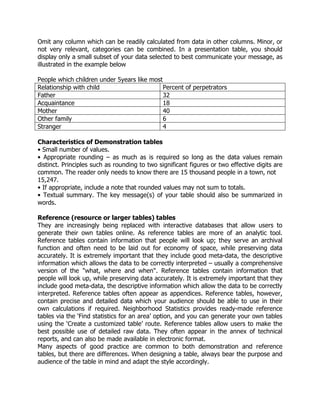
Omit any column which can be readily calculated from data in other columns. Minor, or
not very relevant, categories can be combined. In a presentation table, you should
display only a small subset of your data selected to best communicate your message, as
illustrated in the example below
People which children under 5years like most
Relationship with child Percent of perpetrators
Father 32
Acquaintance 18
Mother 40
Other family 6
Stranger 4
Characteristics of Demonstration tables
• Small number of values.
• Appropriate rounding – as much as is required so long as the data values remain
distinct. Principles such as rounding to two significant figures or two effective digits are
common. The reader only needs to know there are 15 thousand people in a town, not
15,247.
• If appropriate, include a note that rounded values may not sum to totals.
• Textual summary. The key message(s) of your table should also be summarized in
words.
Reference (resource or larger tables) tables
They are increasingly being replaced with interactive databases that allow users to
generate their own tables online. As reference tables are more of an analytic tool.
Reference tables contain information that people will look up; they serve an archival
function and often need to be laid out for economy of space, while preserving data
accurately. It is extremely important that they include good meta-data, the descriptive
information which allows the data to be correctly interpreted – usually a comprehensive
version of the "what, where and when". Reference tables contain information that
people will look up, while preserving data accurately. It is extremely important that they
include good meta-data, the descriptive information which allow the data to be correctly
interpreted. Reference tables often appear as appendices. Reference tables, however,
contain precise and detailed data which your audience should be able to use in their
own calculations if required. Neighborhood Statistics provides ready-made reference
tables via the ‘Find statistics for an area’ option, and you can generate your own tables
using the ‘Create a customized table’ route. Reference tables allow users to make the
best possible use of detailed raw data. They often appear in the annex of technical
reports, and can also be made available in electronic format.
Many aspects of good practice are common to both demonstration and reference
tables, but there are differences. When designing a table, always bear the purpose and
audience of the table in mind and adapt the style accordingly.
Reference tables has
• Potentially many values, including appropriate totals and subtotals.
• Unrounded (or less rounded) data.
Below is a reference table that presents the number of students enrolled in a school by
gender, age and class.
Sample reference table (enrolment by age, class and sex)
Age Primary1 Primary2 Primary3 Primary4 Primary5 Primary6 Primary1-6
M F M F M F M F M F M F M F Total
6 years 80 55 34 21 6 2 2 0 0 0 0 0 122 78 200
7 years 63 50 94 104 5 14 1 5 0 0 0 0 163 173 336
8 years 45 34 68 70 78 98 12 21 2 9 0 0 205 232 437
9 years 12 9 30 24 67 63 94 79 9 17 1 0 213 192 405
10 years 4 1 12 4 31 19 16 12 37 41 9 15 109 92 201
11 years 0 0 2 0 12 4 3 5 89 81 21 52 127 142 269
12 years 0 0 0 0 0 0 0 0 21 18 69 78 90 96 186
Above 12 0 0 0 0 0 0 0 0 4 5 42 31 46 36 82
Total
enrolment
208 150 241 224 199 200 128 122 162 171 142 176 1075 1041 2116
in the above example, we can see that the reference table shows in most cells, absolute
numbers of students detailed by single years of age, class-by-class and separately by
sex (female [f] and male [M]).
This is an important reference table in primary education because it enables in-depth
analysis of the patterns of participation by presenting data about the distribution of
students by age and by class, and the age-class correspondence of students by gender.
The absolute numbers presented in the table can be used to make additional
calculations to derive indicators such as the age-specific and grade-specific enrolment
ratios, and the percentage of over-aged and under-aged students in each class which
are crucial parameters in managing primary education.
By summarizing the calculated indicators and the results of further analysis of detailed
data in the reference tables, we can create investigative tables which present the key
findings for use by non- technical audiences.
Commentary (Exploratory) Tables/ Investigative Tables
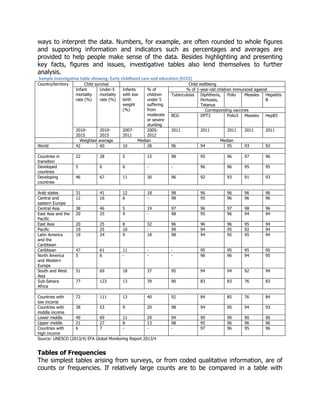
Investigative tables like the one below present only the key data and indicators that can
be understood and interpreted by lay persons. They are often accompanied by
descriptions and explanations which highlight the findings, explain the terms used, and
ways to interpret the data. Numbers, for example, are often rounded to whole figures
and supporting information and indicators such as percentages and averages are
provided to help people make sense of the data. Besides highlighting and presenting
key facts, figures and issues, investigative tables also lend themselves to further
analysis.
Sample investigative table showing: Early childhood care and education (ECCE)
Country/territory Child survival Child wellbeing
Infant
mortality
rate (%)
Under-5
mortality
rate (%)
Infants
with low
birth
weight
(%)
% of
children
under 5
suffering
from
moderate
or severe
stunting
% of 1-year-old children immunized against
Tuberculosis Diphtheria,
Pertussis,
Tetanus
Polio Measles Hepatitis
B
Corresponding vaccines
BCG DPT3 Polio3 Measles HepB3
2010-
2015
2010-
2015
2007-
2011
2005-
2012
2011 2011 2011 2011 2011
Weighted average Median Median
World 42 60 10 28 96 94 95 93 93
Countries in
transition
22 28 5 15 98 95 96 97 96
Developed
countries
5 6 6 - - 96 96 95 95
Developing
countries
46 67 11 30 96 92 93 91 93
Arab states 31 41 12 18 98 96 96 96 96
Central and
eastern Europe
12 16 6 - 98 95 96 96 96
Central Asia 38 46 5 19 97 96 97 98 96
East Asia and the
Pacific
20 25 9 - 98 95 96 94 94
East Asia 20 25 8 32 96 96 96 95 94
Pacific 19 25 10 - 99 94 95 92 94
Latin America
and the
Caribbean
19 24 9 18 98 94 95 95 94
Caribbean 47 61 11 - - 95 95 95 95
North America
and Western
Europe
5 6 - - - 96 96 94 95
South and West
Asia
51 69 18 37 95 94 94 92 94
Sub-Sahara
Africa
77 123 13 39 90 83 83 76 83
Countries with
low income
72 111 13 40 92 84 85 76 84
Countries with
middle income
38 53 9 20 98 94 95 94 93
Lower middle 49 69 11 29 94 90 90 90 90
Upper middle 21 27 8 13 98 95 96 96 96
Countries with
high income
6 7 - - - 97 96 95 96
Source: UNESCO (2013/4) EFA Global Monitoring Report 2013/4
Tables of Frequencies
The simplest tables arising from surveys, or from coded qualitative information, are of
counts or frequencies. If relatively large counts are to be compared in a table with
several rows and columns, it is often helpful to present them as percentages: common
ways to do this involve making the percentages add up to 100 across rows, or down
columns, or across the whole table. These facilitate different types of comparison, and a
careful choice should be made. The sizes of sample on which a percentage table is
based should be made explicit.
Orientation and Order
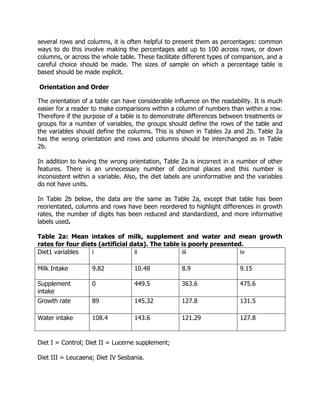
The orientation of a table can have considerable influence on the readability. It is much
easier for a reader to make comparisons within a column of numbers than within a row.
Therefore if the purpose of a table is to demonstrate differences between treatments or
groups for a number of variables, the groups should define the rows of the table and
the variables should define the columns. This is shown in Tables 2a and 2b. Table 2a
has the wrong orientation and rows and columns should be interchanged as in Table
2b.
In addition to having the wrong orientation, Table 2a is incorrect in a number of other
features. There is an unnecessary number of decimal places and this number is
inconsistent within a variable. Also, the diet labels are uninformative and the variables
do not have units.
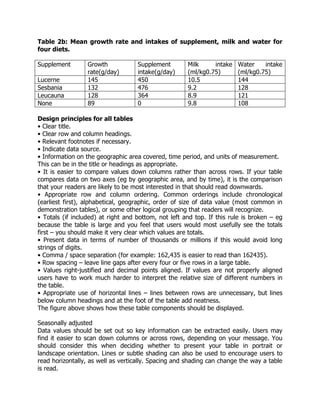
In Table 2b below, the data are the same as Table 2a, except that table has been
reorientated, columns and rows have been reordered to highlight differences in growth
rates, the number of digits has been reduced and standardized, and more informative
labels used.
Table 2a: Mean intakes of milk, supplement and water and mean growth
rates for four diets (artificial data). The table is poorly presented.
Diet1 variables i ii iii iv
Milk Intake 9.82 10.48 8.9 9.15
Supplement
intake
0 449.5 363.6 475.6
Growth rate 89 145.32 127.8 131.5
Water intake 108.4 143.6 121.29 127.8
Diet I = Control; Diet II = Lucerne supplement;
Diet III = Leucaena; Diet IV Sesbania.
Table 2b: Mean growth rate and intakes of supplement, milk and water for
four diets.
Supplement Growth
rate(g/day)
Supplement
intake(g/day)
Milk intake
(ml/kg0.75)
Water intake
(ml/kg0.75)
Lucerne 145 450 10.5 144
Sesbania 132 476 9.2 128
Leucauna 128 364 8.9 121
None 89 0 9.8 108
Design principles for all tables
• Clear title.
• Clear row and column headings.
• Relevant footnotes if necessary.
• Indicate data source.
• Information on the geographic area covered, time period, and units of measurement.
This can be in the title or headings as appropriate.
• It is easier to compare values down columns rather than across rows. If your table
compares data on two axes (eg by geographic area, and by time), it is the comparison
that your readers are likely to be most interested in that should read downwards.
• Appropriate row and column ordering. Common orderings include chronological
(earliest first), alphabetical, geographic, order of size of data value (most common in
demonstration tables), or some other logical grouping that readers will recognize.
• Totals (if included) at right and bottom, not left and top. If this rule is broken – eg
because the table is large and you feel that users would most usefully see the totals
first – you should make it very clear which values are totals.
• Present data in terms of number of thousands or millions if this would avoid long
strings of digits.
• Comma / space separation (for example: 162,435 is easier to read than 162435).
• Row spacing – leave line gaps after every four or five rows in a large table.
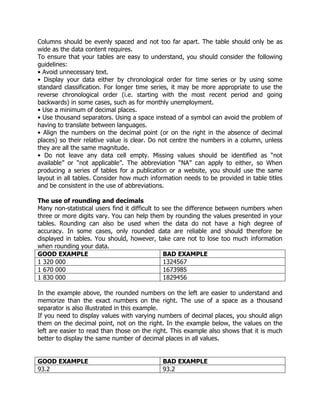
• Values right-justified and decimal points aligned. If values are not properly aligned
users have to work much harder to interpret the relative size of different numbers in
the table.
• Appropriate use of horizontal lines – lines between rows are unnecessary, but lines
below column headings and at the foot of the table add neatness.
The figure above shows how these table components should be displayed.
Seasonally adjusted
Data values should be set out so key information can be extracted easily. Users may
find it easier to scan down columns or across rows, depending on your message. You
should consider this when deciding whether to present your table in portrait or
landscape orientation. Lines or subtle shading can also be used to encourage users to
read horizontally, as well as vertically. Spacing and shading can change the way a table
is read.
Columns should be evenly spaced and not too far apart. The table should only be as
wide as the data content requires.
To ensure that your tables are easy to understand, you should consider the following
guidelines:
• Avoid unnecessary text.
• Display your data either by chronological order for time series or by using some
standard classification. For longer time series, it may be more appropriate to use the
reverse chronological order (i.e. starting with the most recent period and going
backwards) in some cases, such as for monthly unemployment.
• Use a minimum of decimal places.
• Use thousand separators. Using a space instead of a symbol can avoid the problem of
having to translate between languages.
• Align the numbers on the decimal point (or on the right in the absence of decimal
places) so their relative value is clear. Do not centre the numbers in a column, unless
they are all the same magnitude.
• Do not leave any data cell empty. Missing values should be identified as “not
available” or “not applicable”. The abbreviation “NA” can apply to either, so When
producing a series of tables for a publication or a website, you should use the same
layout in all tables. Consider how much information needs to be provided in table titles
and be consistent in the use of abbreviations.
The use of rounding and decimals
Many non-statistical users find it difficult to see the difference between numbers when
three or more digits vary. You can help them by rounding the values presented in your
tables. Rounding can also be used when the data do not have a high degree of
accuracy. In some cases, only rounded data are reliable and should therefore be
displayed in tables. You should, however, take care not to lose too much information
when rounding your data.
GOOD EXAMPLE BAD EXAMPLE
1 320 000 1324567
1 670 000 1673985
1 830 000 1829456
In the example above, the rounded numbers on the left are easier to understand and
memorize than the exact numbers on the right. The use of a space as a thousand
separator is also illustrated in this example.
If you need to display values with varying numbers of decimal places, you should align
them on the decimal point, not on the right. In the example below, the values on the
left are easier to read than those on the right. This example also shows that it is much
better to display the same number of decimal places in all values.
GOOD EXAMPLE BAD EXAMPLE
93.2 93.2
1045.0 1045
385.6 385.63
Numeric values should be right justified. Using the same example, notice how difficult it
is to read the values when the numbers are justified to the left margin as shown below.
GOOD EXAMPLE BAD EXAMPLE
93.2 93.2
1045.0 1045.0
385.6 385.6
Degree of accuracy
Numbers may be rounded to a nearby value using a degree of accuracy that is
appropriate to achieve the goal of the presentation. When rounding numbers,
unnecessary trailing zeros should be removed and the units of measure altered
accordingly. Rounding can be done either:
 To a certain number of digits, such as to the nearest thousand (so 45,647
becomes 46,000) or to the second decimal place (so 45.647 becomes 45.65).
 To a certain number of significant, non-zero, digits. for example, to the 2nd
significant digit (so 343,833 becomes 340,000 and 4,564 becomes 4,600).
 In some cases, we may want to write 46,000 as 46 and note the recording
convention (‘numbers in millions’, or ‘numbers in thousands’ or ‘000’) in the title
or appropriate row or column heading. The same principle applies to decimal
points for percentages, rates and ratios.
Chapter 4
Graphs and charts use in reports
Introduction
In this chapter we shall look at the effective transmission of numerical information in
project reports and serious publications, such as scientific papers which might be
prepared by researchers. We shall give guidelines for layout of graphs and charts, then
for the presentation of results of statistical analyses.
Using charts to present data
Charts can be easier to understand than tables, and are often more effective for
highlighting important information within large data sets for readers who are less apt
with numbers. Charts are especially useful for showing patterns and comparing trends,
and since charts are more visual and attractive than tables, they can help in
presentations. On the other hand, charts are not suitable for communicating more
detailed and precise data, and can be time-consuming and expensive to design.
Charts and graphs have the following advantages. They
 Are more attractive and easy to understand than tables
 Enable the reader to ‘see’ patterns in the data
 Are easy to use for comparisons and analysis
 Allow information to be presented in various ways using different types of charts
 Allow for special designs like demographic pyramids and thematic charts
The main purpose of charts or graphs is to visually impart information that cannot be
easily read and interpreted from a table of data. It can be sometimes difficult to ’see’
patterns, trends and contrasts in a table that has many data points. Using charts can be
a good method of showing trends and changes in statistical data. Charts can also be
used to make predictions and forecasts, and to compare two or more data sets.
Basic components of a chart
Similar to tables, charts should have a title, axis labels (including the units of
measurement), tick marks on the axes (with labels for some tick marks and subgroups),
and footnotes and references to the source data.
When designing a chart, one should take into consideration the order in which the
reader looks at the elements of a graph. By virtue of reading habit, our eyes tend to
first look at the title, then move to the graph itself, and finally to the explanatory labels
and footnotes, before coming back to study the overall pattern and details in order to
understand the key messages.
The explanatory title, labels and footnotes are therefore essential for understanding and
interpreting the chart. One must nevertheless bear in mind that too many text details
and labels can distract the reader from the main message.
An effective chart also has the following characteristics:
 Clear objective and key messages to be presented
 Good choice of graph type for the information that is to be presented
 Appropriate level of simplicity or complexity, depending on the readers’ abilities
to analyze, interpret and understand
Types of chart/graph
There are many different types of chart/graph, some are:
 Pie chart
 Line chart
 Bar chart
 Area chart
 Scatter plot
 Venn Diagram
each of these is described below.
Pie chart
Pie charts are useful for illustrating percentage distributions of components within a
total and are therefore suitable for presenting overviews of data. The breakdown of the
annual education budget by types of expenditure is a good example of information that
can be presented clearly using a pie chart. The area of each slice of the pie is
proportional to the relative share, or frequency, of each item that makes up the total.
The pie chart however is not suitable for displaying data with a high degree of
accuracy. This is especially true when an item represents a very small share of the
total, in which case its slice may be very thin and difficult to measure. It can also be
difficult to see the difference between two items with similar but slightly different
shares of the total. It is usually necessary to clearly label the value of each slice of the
pie in order to overcome this limitation.
Do not include too many data items on the same pie chart. Too many slices, especially
thin slices or slices of a similar size may make a pie chart difficult to interpret. A
maximum of 5 or 6 slices is optimal.
One pie chart can only show the distribution of data items at one point in time. If, for
example, we want to show how the distribution of the education budget changed over
two or more years, we need to create a separate pie chart for each year and place
them next to each other to allow comparisons to be made. The 100% stacked bar chart
(described later in this section) is a more appropriate chart for displaying this type of
proportional data from a time-series.
Line graph
A line graph is a simple way to show time-series or trends. A single graph can display
multiple lines, with one line for each data series or sub-population, such as the number
of students by sex, or gross and net enrolment ratios for boys and girls over time (see
example 8). Horizontal grid- lines make it easier for the eye to follow the plotted lines,
to identify the data values along the data series, and to get a clearer picture of the
trend and changes in the values for different data series. It is generally not advisable to
label every data point in a line chart, unless it is important to show precise values that
are quoted in the accompanying text.
Bar chart
A bar chart displays data as rectangular bars with lengths proportional to the values
that they represent. Bar charts are useful for comparing two or more values. The bars
can be vertically or horizontally oriented. Horizontal bar charts are often used when
there are many bars and each bar requires a long label, which would overlap or be
truncated in vertical bar charts.
Stacked bar charts are used to present values that have components. Below is
stacking the population size of girls for each class on top of that of boys. The entire
length of each bar indicates the total age population in each class. The lengths of
separate component bars for boys and girls (within each bar) show both their absolute
sizes as well as comparison with each other.
The 100% stacked bar chart is especially useful for comparing percentage
distributions, each of which adds up to 100%. Such percentage distributions can refer
to different classes within the school.
Area graph
Area graphs are an alternative to the stacked bar chart (see below). We create an area
graph by drawing lines to connect the values of component data series, and then stack
them one on top of another. Area graphs are particularly effective for showing changes
in total (and component) values over time. When designing an area graph, we must
make sure that the time scale is drawn correctly, using a linear scale for the time
points.
Scatter-plot
Scatter plots are used for showing the relationship between two variables, or data
series, by plotting pairs of values. On this graph, we observe that most of the plotted
points fall below the diagonal line. This shows that most points of x-axis are generally
less disadvantage than the y
With recent improvements in computerized graphic technologies, it has become very
easy to produce 3-dimensional (3D) graphs. Compared with flat 2d graphs, 3d
graphs can show additional data series in the same graph, thereby allowing for more
sophisticated comparisons and analysis. 3d graphs with many data series can however
become overly complex and difficult to interpret, especially when they are not well
conceived and designed.
Venn diagram
The Venn diagram devised by the mathematician John Venn in 1881, is a diagram used
to show overlaps between sets of data.
Each set is represented by a circle. The degree of overlap between the sets is depicted
by the overlap between circles.
The figure below shows 40 students and the pet(s) they like. There are three pets
which are dogs, birds, and cats.
A Venn diagram is a great choice to use when you are trying to convey the amount of
commonality or difference between distinct groups.
Selection of data presentation
How do we decide whether to present data as a table or as a chart?
In this section, we will look at the main differences between tables and charts and
suggest some criteria for choosing between them:
 Tables work best when the data presentation:
o contains many data series for cross-analysis
o is used to look up or compare individual values
o requires precise values
o contains values that involve multiple units of measurement
 Graphs work best when the data presentation:
o is used to identify patterns and trends
o is used to communicate a message that can be highlighted in the shape of
the graph
o is used to visually reveal relation-ships among several values
Graphs may then be used to visually illustrate the data, or to draw attention to
significant patterns and changes in order to facilitate understanding of their
significance.
By selecting the most appropriate type of chart to present one or several data series,
graphs can be used to visually analyze and identify patterns and significant highlights
which are not obvious when looking at a table. If needed, graphs may be shown
together with tables so as to allow the reader to see the detailed data and indicators.
Using text to present data
Tables and charts are often accompanied by descriptive text that highlights the
findings, patterns, issues and implications of the data. Textual descriptions and
discussions play a crucial role in almost every kind of data presentation, especially for
people who are not familiar with data tables and charts. Many people even prefer plain
textual descriptions to tables and charts, or at least need some clear and simple
explanations to help them understand the data and important points presented in the
tables and charts.
Basic rules
One of the important functions of text is to provide a verbal description of the data in
tables and charts. We should remember five basic rules when drafting a text to describe
a table or chart:
1. Try to capture the readers’ interest: While staying within the confines of scientific
firmness, the writer should strive to enliven the text by highlighting key findings
and meanings.
2. Take time to write clearly and concisely; draft and re-draft to clearly and
unambiguously describe the data.
3. Ensure consistency of language and style throughout the report or presentation:
Often sections of a single piece are written separately for each table or chart, a
final check to ensure consistency is advisable.
4. Avoid unnecessary repetition: if parts of the report or presentation are written
separately, contents get repeated. Review the written text to eliminate
unnecessary repetitions and to harmonize the texts.
5. Focus on the main points and minimize unnecessary details – Present the most
important information first, and add details only if absolutely necessary.
A verbal summary should simply accompany the table or chart to explain what the data
reveals. It should not dwell on issues that are too specific or too detailed. Nor should it
repeat what is obvious in a table or chart unless there is a need to emphasize the
importance of a certain aspect or limitations of the data. Sometimes, a verbal summary
is all that is included in a presentation, particularly when the findings are so simple that
any other summarized display like tables and charts are not justified. Or, when
numerical or graphical presentations are too complex, it is better to include them
separately in the appendices. The following are some additional basic rules:
 Keep the summary short: never allow the verbal summary to expand into an
itemized account of each entry in the table or chart. Position the summary in the
text close to the table or chart to which it refers. Quoting directly the key
reference numbers is the best way. eg: “From Table 2 we can see that 46 per
cent of girls (6-15) were out of school in 2001.”
 Use ‘emotional’ descriptions and wording sparingly – Sensational
messages can be effective with a non-technical audience, but they can
communicate biases or lead to biased interpretations. eg “Education expenditure
per student in China rose by 10 per cent” may be better than: “Education
expenditure per student in China shot up by 10 per cent!”.
 Unless writing specifically for expert readers, avoid using unnecessary technical
terms.
 Be cautious when attributing causality to a factor: for example, some irregular
movements in a data series may be due to changes in definitions or
measurement unit, rather than actual changes in the underlying event. Do not
jump to conclusions that ‘this caused that’, unless there is ample evidences to
justify it.
 Avoid long sentences. Short, sharp sentences are more effective.
 Paragraph breaks provide the reader with a short rest, and are necessary to
maintain the reader’s interest. On the other hand, having too many short
paragraphs may ruin the flow of the text and make it confusing and
uninteresting.
 Commas provide pauses within a sentence, but, if over-used, may be
bothersome and misleading. Minimize the use of brackets. When several pairs of
brackets are used in the same sentence or section, the reader may become
confused and lose track of the central theme.
 Avoid repeating the same wording in close proximity. It looks careless and may
be distracting. To avoid this problem, try to search for and use synonyms.
 Avoid unnecessary words and phrases. These give the reader extra work and
may distract them from the central theme or main findings.
 Keep the language simple. Readers are usually more impressed by clear
language than by words that they do not fully understand.
 Be logical. Ensure that the structure is sequential and that the conclusions reflect
the body of the text. This reduces the chances of the readers becoming
confused.
 Ensure that the use of articles is clear. Whenever words such as ‘it’ or ‘that’ are
used, be sure that the reader has no doubt about what these pronouns refer to.
 Adopt conventions and keep to them throughout. Conventions can include
headings, numbering, use of abbreviations and acronyms, or other matters of
style such as the use of digits and written numbers. If necessary, these should
be spelled out by the writer or writing team. If conventions are maintained
throughout, a report will be clearer and better received.
Charts
Why use charts?
Statistics can often be better understood when they are presented in a chart than in a
table. A chart is a visual representation of statistical data, in which the data are
represented by symbols such as bars or lines. It is a very effective visual tool, as it
displays data quickly and easily, facilitates comparison and can reveal trends and
relationships within the data.
Charts can be used to illustrate patterns in a large amount of data or to communicate a
key finding or message. You should consider using charts if you want to show:
• Comparison: How much? Which item is bigger or smaller?
• Changes over time: How does a variable evolve?
• Frequency distribution: How are the items distributed? What are the differences?
• Correlation: Are two variables linked?
• Relative share of a whole: How does one item compare to the total?
Checklist for designing a good chart
If you decide that a chart is the most appropriate way to present your data, then no
matter what type of chart you use, you need to keep the following three guidelines in
mind:
1. Define your target audience: What do they know about the issue?
2. Determine the message you want to communicate: What do the data show?
Is there more than one message?
3. Determine the nature of your message: Do you want to compare items, show
time trends or analyze relationships in your data?
A good chart:
• grabs the reader’s attention;
• presents the information simply, clearly and accurately;
• does not mislead;
• displays the data in a concentrated way (e.g. one line chart instead of many pie
charts);
• facilitates data comparison and highlights trends and differences;
• illustrates messages, themes or storylines in the accompanying text.
A chart is not always the most appropriate tool to present statistical information.
Sometimes a text and/or data table may provide a better explanation to your audience
and save you considerable time and effort.
You should reconsider using charts when your data:
• are very dispersed;
• have too few values;
• have too many values;
• show little or no variation.
What makes an effective chart
Chart components
The different chart components compete with each other for the reader's attention.
The more features you include, the harder it becomes to see your point.
Chart components fall into three categories:
1. Data components that represent the data: bars, lines, areas or points.
2. Support components that assist in understanding the data: title, legend, data
labels, gridlines, footnotes and data source.
3. Decorative features that are not related to the data.
Data components alone are never self-sufficient. To ensure correct understanding of
your charts, you need to include the following support components:
• The chart title should give a clear idea of what the chart is about. It has to be short
and concise. You can have two types of titles: An informative title provides all the
information needed to understand the data. It should answer the three questions
“what”, “where” and “when”. A descriptive title is a caption that highlights the main
pattern or trend displayed in the chart. It states in a few words the story that the chart
illustrates.
• The axis labels should identify the values displayed in the chart. The labels are
displayed horizontally on both axes.
• The axis titles should identify the unit of measure of the data (e.g. “in thousands”,
“%”, “age (in years)” or “$”). You do not need to include an axis title when the unit of
measure is obvious (e.g. “years” for time series).
• Gridlines can be added in bar and line charts to help users read and compare the
values of the data.
• The legend and data labels should identify the symbols, patterns or colors used to
represent the data in the chart. The legend should not be displayed when only one
series of values is represented in the chart. Whenever possible, you should use data
labels rather than a legend. Data labels are displayed on or next to the data
components (bars, areas, lines) to facilitate their identification and understanding.
• A footnote may be used to provide definitions or methodological information.
• The data source should be identified at the bottom of the chart.
Advantages of using a chart
Visually interesting
One of the greatest advantages of using a chart is that it makes
information visually interesting to the audience. A table full of numbers
may contain exactly the same information as a chart, but it is more
difficult for an audience to easily absorb and comprehend. In contrast, a
chart provides a quick, direct way to present information, in a way that is
visually dynamic and of interest to the audience.
Direct emphasis
Another advantage of using a chart is that, depending on the type chosen,
it can directly emphasize the key findings of the data for the audience. For
example, if the data indicates how much of a certain product is sold in the
store, a pie chart could make that readily apparent. If a pie chart shows
one section, which represents one product, accounting for the vast
majority of the whole, the audience will immediately perceive that and
absorb its implications. In contrast, a table of data may also indicate high
sales for that particular product, but it will not drive home the significance
of that information like a chart would.
Disadvantages of using a chart
Lack of precision
A disadvantage of using a chart is that, by design, a chart will likely not be
as precise as the raw data. The data that would make up the chart
includes the numbers that make up the data, which is as accurate as it
gets. However, when you transfer that information into a chart, it
decreases the specificity of that information. A bar graph can quickly
indicate that one category exceeds another, but exactly how much one
exceeds the other will not be as apparent as it would be with the raw
data.
Simplicity
One disadvantage of charts is that it can simplify the information, making
some of its more complicated aspects less apparent. A chart is more
visually interesting and makes apparent the significant portions of the
data, but it does so by emphasizing particular features of the data. While
charts excel at presenting the data in certain ways, it also means that
charts struggle to highlight various aspects of the data for which they are
not designed.
One goal of statistics is to present data in a meaningful way. It's one thing to see a list
of data on a page; it's another to understand the trends and details of the data. Many
times data sets involve millions (if not billions) of data values. This is far too many to
print out in a journal article or sidebar of a magazine story. One effective tool in the
statistician's toolbox is to depict data by the use of a graph.
They say a picture is worth a thousand words. The same thing could be said about a
graph. Good graphs convey information quickly and easily to the user. Graphs highlight
salient features of the data. They can show relationships that are not obvious from
studying a list of numbers. Graphs can also provide a convenient way to compare
different sets of data.
Chapter 5
Log and interrupted scale
Log scale
A logarithmic scale is a graphical scale on one or both sides of a graph where a number
x is printed at a distance c·log(x) from the point marked with the number 1. A slide rule
has logarithmic scales, and monograms often employ logarithmic scales. On a
logarithmic scale, an equal difference in order of magnitude is represented by an equal
distance. The geometric mean of two numbers is midway between the numbers.
Logarithmic graph paper, before the advent of computer graphics, this was a basic
scientific tool. Plots on paper with one log scale can show up exponential laws, and on
log-log paper power laws, as straight lines (see semi-log graph, log-log graph).
Comparing the scales
Comparison of the sequence 1 to 10 and their logs to the base 10
A plot of x verse log10(x). Note two things: first, log(x) increases quickly at first: by x =
3, log(x) is almost at 0.5; it is useful to remember that sqrt(10) ~ 3. Second, log(x)
grows ever more slowly as x approaches 10; this shows how logarithms can be used to
'tame' large numbers.
Logarithmic and semi-logarithmic plots and equations of lines
Log and semilog scales are best used to view two types of equations (for ease, the
natural base 'e' is used):
In the first case, plotting the equation on a semilog scale (log Y versus X) gives:
log Y = −aX, which is linear.
In the second case, plotting the equation on a log-log scale (log Y versus log X) gives:
log Y = b log X, which is linear.
When values that span large ranges need to be plotted, a logarithmic scale can provide
a means of viewing the data that allows the values to be determined from the graph.
The logarithmic scale is marked off in distances proportional to the logarithms of the
values being represented. For example, in the figure below, for both plots, y has the
values of: 1, 2, 3, 4, 5, 6, 7, 8, 9 10, 20, 30, 40, 50, 60, 70, 80, 90 and 100. For the
plot on the left, the log10 of the values of y are plotted on a linear scale. Thus the first
value is log10(1) = 0; the second value is log10(2) = 0.301; the 3rd value is log10(3) =
0.4771; the 4th value is log10(4) = 0.602, and so on. The plot on the right uses
logarithmic (or log, as it is also referred to) scaling on the vertical axis. Note that values
where the exponent term is close to an integral fraction of 10 (0.1, 0.2, 0.3, etc.) are
shown as 10 raised to the power that yields the original value of y. These are shown for
y = 2, 4, 8, 10, 20, 40, 80 and 100.
Plots of the log (base 10) of values of y (see text) on a linear scale (left plot) and of
values of y on a log scale (right plot).
Note that for y = 2 and 20, y = 100.301 and 101.301; for y = 4 and 40, y = 100.602 and
101.602. This is due to the law that
So, knowing log10(2) = 0.301, the rest can be derived:
Note that the values of y are easily picked off the above figure. By comparison, values
of y less than 10 are difficult to determine from the figure below, where they are
plotted on a linear scale, thus confirming the earlier assertion that values spanning
large ranges are more easily read from a logarithmically scaled graph.
Plot of the values of y (see text) on a linear scale.
Log-log plots
Plot on log-log scale of equation F(x) = (x−10 )(1020), which can be expressed as the
line: log(F(x)) = -10 log(x) + 20.
If both the vertical and horizontal axis of a plot is scaled logarithmically, the plot is
referred to as a log-log plot.
Semi logarithmic plots
If only the ordinate or abscissa is scaled logarithmically, the plot is referred to as a semi
logarithmic plot.
Estimating values in a diagram with logarithmic scale
One method for accurate determination of values on a logarithmic axis is as follows:
1. Measure the distance from the point on the scale to the closest decade line with
lower value with a ruler.
2. Divide this distance by the length of a decade (the length between two decade
lines).
3. The value of your chosen point is now the value of the nearest decade line with
lower value times 10a where a is the value found in step 2.
Example: What is the value that lies halfway between the 10 and 100 decades on a
logarithmic axis? Since it is the halfway point that is of interest, the quotient of steps 1
and 2 is 0.5. The nearest decade line with lower value is 10, so the halfway point's
value is (100.5) × 10 = 101.5 ≈ 31.62.
To estimate where a value lies within a decade on a logarithmic axis, use the following
method:
1. Measure the distance between consecutive decades with a ruler. You can use
any units provided that you are consistent.
2. Take the log (value of interest/nearest lower value decade) multiplied by the
number determined in step one.
3. Using the same units as in step 1, count as many units as resulted from step 2,
starting at the lower decade.
Example: To determine where 17 is located on a logarithmic axis, first use a ruler to
measure the distance between 10 and 100. If the measurement is 30mm on a ruler (it
can vary — ensure that the same scale is used throughout the rest of the process).
[log (17/10)] × 30 = 6.9
x = 17 is then 6.9mm after x = 10 (along the x-axis).
Graphs on Logarithmic and Semi-Logarithmic Paper
In a semi logarithmic graph, one axis has a logarithmic scale and the other axis has a
linear scale.
In log-log graphs, both axes have a logarithmic scale.
The idea here is we use semi log or log-log graph paper so that we can more easily see
details for small values of y as well as large values of y.
Semi-Logarithmic Graphs
Example 1: Variable Exponent
Plot the graph of y=5x on normal and then semi logarithmic paper.
Answer we first graph y = 5x using ordinary x- and y- linear scales (the space between
each unit remains fixed for both axes):
We see that the detail for anything less than x = 2 is lost.
Using a semi logarithmic scale on the y axis gives:
We can now see much more detail in the y values when x < 2.
Notice that the graph of an exponential function on a semi-log graph is a straight line.
Notice also that the numbers along the x axis are evenly spaced, while along the y-axis,
we have powers of 10 evenly spaced.
What does the scale mean on the y-axis? To see more clearly, let's zoom in on the
section between 1 and 10:
Now let's zoom in on the section between 0.1 and 1.0.
Log-log Graphs
We can also graph y=5x on log-log paper (i.e. both axes use log scales)
NOTE: Both the domain (x-values) and the range (y-values) must be POSITIVE,
because you cannot have the logarithm of a negative number.
We can see even more detail for small values of x and y now.
Example 2: Variable Raised to a Fractional Exponent
Graph y = x1/2 using all 3 axis types, rectangular, semi-log and log-log. This function is
equivalent to y=x√.
Answer
Using rectangular axes, we can see that the graph of y = x1/2 is half of a parabola on
its side (i.e. its axis is vertical):
We have seen this curve before, in The Parabola section.
Note 1: The detail near (0,0) is not so good using a rectangular grid.
Note 2: The curve passes through (0,0), (1,1), (4,2) and (9,3). In each case, the y-
value is the square root of the x-value, which is to be expected.
Let's see the curve using a semi-logarithmic plot.
Now we have a lot better detail for small x. The lowest value of y that the graph
indicates is y=0.1. We cannot show y=0, since the logarithm of 0 is not defined.
We can see that the curve still passes through (1,1), (4,2) and (9,3).
And now for the log-log graph:
We observe that the graph of y = x1/2 is a straight line when graphed on log-log axes.
Our curve passes through (1,1), (4,2) and (9,3) (indicated by dots on the graph), as it
should
EXPONENTIAL RELATIONS of the form
y = Aemx
where A and m are constant, can be rendered as straight lines on semi-log paper. To
see this, take the logarithm of both sides of
y/A = emx
which gives
log y - log A = x m log e = x m (0.43420...)
Plot x on the linear axis and y on the logarithmic axis. The resulting straight line will
have slope
log y2 - log y1
——————————————— = m log e
x2 - x1
from which the constant m may be easily determined.
The y-intercept of the graph will be the value of the constant A.
The slope of a line on logarithmic paper must be interpreted with care. It may be
evaluated in either of two ways.
(1) Choose two well-separated points on the line (x1, y1) and (x2, y2). Use these to
evaluate the left side of equation.
(2) The value of the numerator of equation may be found by length measurements on
the graph, since the logarithms are proportional to lengths. Measure the length of one
cycle on the paper. Measure the length between y2 and y1. Then
L/C = log2y - log1y
where L is the length along the log axis between the two points, and C is the length of
one cycle measured along that axis.
This is true because for one cycle,
log (10y) - log (y) = log (10) = 1.
This method makes it unnecessary to look up or evaluate the logarithms of the data
points.
POWER RELATIONS of the form
y = Kxp
may be rendered straight by plotting on log-log paper. Take the logarithm of both sides
log y = log K + p log x
Now if y is plotted against x on log-log paper we get a line of slope
log y2 - log y1
——————————————— = p
log x2 - log x1
Where, as before, the points 1 and 2 are well-separated points on the straight line.
Neither intercept has any special, useful, meaning on this graph! (On log paper log x
never has a zero value.)
We have several ways to calculate the slope, once we have specified two well-
separated points on the line, and obtained equation.
References
Bertin, J. (1981), Graphics and Graphic Information-processing, New York, De
Gruyter.
Bertin, J. (1983), Semiology of Graphics: Diagrams Networks Maps, Madison Wis.,
University of Wisconsin Press.
Blessing, C., Bradsher-Fredrick, H., Miller, H., Miller, R. and Rutchik, R. (2003),
Cognitive Testing of Statistical Graphs: Methodology and Results, Washington D.C.,
U.S. Energy Information Administration.
Bosch Ten, O. and Jonge de, E. (2008), “Visualising official statistics”, in Statistical
Journal of the IAOS, vol. 25, nos 3-4, pp. 103-116
Cleveland, W.S. and McGill, R. (1984), “Graphical Perception: Theory,
Experimentation, and Application to the Development of Graphical Methods”, in
Journal of the American Statistical Association, 79, pp. 531-554
Cleveland, W.S. and McGill, R. (1987) “Graphical Perception: The Visual Decoding
of Quantitative Information on Statistical Graphs (with Discussion)”, in Journal of
the Royal Statistical Society Series A, 150, pp. 192-229
Few, S. (2004), Show Me the Numbers: Designing Tables and Graphs to Enlighten,
Oakland CA, Analytics Press.
Gardner, J. (2008), “Blogs, wikis and official statistics: New perspectives on the use
of Web 2.0 by statistical offices”, in Statistical Journal of the IAOS, vol. 25, nos 3-4,
pp. 81-92
Harris, R.L. (2000), Information Graphics, New York and Oxford, Oxford University
Press.
Kennedy, D. (2007), Research Paper: Data Visualization, Canberra, Australian
Bureau of Statistics
Miller, J.E. (2004), The Chicago Guide to Writing About Numbers, Chicago,
University of Chicago Press.
Playfair, W. (1786), The Commercial and Political Atlas: Representing, by Means of
Stained Copper-Plate Charts, the Exports, Imports, and General Trade of England,
at a Single View, London.
Playfair, W. (1801), Statistical Breviary: Shewing, on a Principle Entirely New, the
Resources of Every State and Kingdom in Europe, London, Wallis.
Robbins, N.B. (2005), Creating More Effective Graphs, Hoboken NJ, John Wiley &
Sons.
Schulz, T. (2009), Guidelines on the Presentation of Statistical Maps, UNECE Work
Session on the Communication and Dissemination of Statistics, Warsaw
Smith, A. and Rogers, S. (2008), “Web 2.0 and official statistics: The case for a
multi-disciplinary approach”, in Statistical Journal of the IAOS, vol. 25, nos 3-4, pp.
117-123
Tufte, E.R. (2001), The Visual Display of Quantitative Information (2nd ed.),
Cheshire CT, Graphics Press.
Tufte, E.R. (2006), Beautiful Evidence, Cheshire CT, Graphics Press.
Wainer, H. (1984), “How to Display Data Badly?”, in The American Statistician, vol.
38, no. 2, pp. 137-147
Ware, C. (2004), Information Visualization: Perception for Design, San Francisco
CA, Morgan Kaufmann Publishers.
Fontaine RE, Goodman RA. Describing the findings. In: Gregg MB, editor. Field
epidemiology. 2nd ed. Oxford: Oxford University Press; 2002, p. 109.
Fink, Arlene (2005). How to Conduct Surveys. Thousand Oaks: Sage Publications.
ISBN 1-4129-1423-X.
McNabb, David (2002). Research Methods in Public Administration and Nonprofit
Management. Armonk: M.E. Sharpe. ISBN 0-7656-0957-6.
Morgan, George (2004). Spss for Introductory Statistics. Hillsdale: Lawrence
Erlbaum. ISBN 0-8058-4789-8.
Robey, David (2000). Sound and Structure in the Divine Comedy. Oxford
Oxfordshire: Oxford University Press. ISBN 0-19-818498-0.
Zielinski, Krzysztof (2006). Software Engineering: Evolution and Emerging
Technologies. Amsterdam: IOS Press. ISBN 1-58603-559-2.
Heitmeyer, Constance L. (2002). Software Cost Reduction. Washington D.C.: Naval
Research Laboratory
Breen, Michael (2005). "Experience of using a lightweight formal specification
method for a commercial embedded system product line". Requirements
Engineering Journal 10 (2): 161–172.
Janicki, Ryszard; Parnas, David Lorge; Zucker, Jeffery (1997). "Tabular
representations in relational documents". In Brink, C.; Kahl, W.; Schmidt, G.
Relational Methods in Computer Science. Springer Verlag. ISBN 3-211-82971-7
Leveson, Nancy G.; Heimdahl, Mats P. E.; Reese, Jon Damon (1999). "Designing
Specification Languages for Process-Control Systems: Lessons Learned and Steps to
the Future". Seventh ACM SIGSOFT Symposium on the Foundations on Software
Engineering

A GUIDE TO STATISTICAL REPORT WRITING

  • 1.
    A GUIDE TOSTATISTICAL REPORT WRITING Patience Pokuaa Gambrah BEd Mathematics, University of Education, Winneba MSc, Industrial Mathematics, KNUST, Kumasi
  • 2.
    Copyright © 2015by Patience Pokuaa Gambrah All rights reserved. This book or any portion thereof may not be reproduced or used in any manner whatsoever without the prior written permission of the Author except for the use of brief quotations in a book review. patiencegambrah@yahoo.com Printed in the Ghana First Printing, 2015 ISBN 978-9988-2-1117-2 Design and Printed by: Jadep Printing Works, Accra Ghana (0276018747).
  • 3.
    ACKNOWLEDGEMENT First and foremostI would like to thank the Lord Almighty for giving me the power to believe in my passion and to pursue my dreams. I could never have done this without the faith I have in Him. To my husband, Frederick Owusu, I am so thankful that I have you in my corner pushing me when I am ready to give up. Thanks for not just believing in me, but knowing that I could do this! To my daughters, Richlove, Princess, Nana Akua and Freda I am so grateful to you girls for supporting and understanding me. I love you girls! Also I will like to say a big thank you to my boy Princes Dazie for all the hard work you did on this book. God bless you all.
  • 4.
    I dedicate thisbook to my lovely mother Theresa Adu Serwaa. Mummy God Bless you.
  • 5.
    Contents Preface Chapter 1 Report asA Form of Communication Communication Types of Communication Verbal Communication Written Communication Nonverbal Communication Types of Communication Based On Purpose and Style Formal Communication Informal Communication Communicate Statistical Findings Writing about Data Using Tables, Graphs and Charts to Communicate Statistical Findings Using Tables to Communicate Statistical Findings Using Graphs to Communicate Statistical Findings Chapter2 The Structural Contents of A Report Scientific Format The Sections of the Paper Title, Authors' Names, and Institutional Affiliations Abstract Introduction Methods Results Things to Consider As You Write Your Results Section Discussion Acknowledgments Literature Cited Appendices Figures and Tables in Appendices Chapter 3 Tables in A Report Introduction
  • 6.
    Why Are TablesImportant Types of Tables Presentation (Demonstration) Reference (Resource or Larger) Tables Commentary (Exploratory)/ Investigative Tables Orientation and Order Design Principles for All Tables The Use of Rounding and Decimals Chapter 4 Graphs and Charts Use in Reports Using Charts to Present Data Types of Chart/Graph Pie Chart Line Graph Bar Chart Area Graph Scatter-Plot Venn Diagram Selection of Data Presentation Using Text to Present Data Charts Why Use Charts Checklist for Designing A Good Chart What Makes an Effective Chart Chart Components Chapter 5 Log and Interrupted Scale Log Scale Logarithmic and Semi-Logarithmic Plots and Equations of Lines Estimating Values in a Diagram with Logarithmic Scale Graphs on Logarithmic and Semi-Logarithmic Paper Semi-Logarithmic Graphs Log-Log Graphs
  • 7.
    Preface This book containsfive chapters which deals with the following topics: Report as a Form of Communication, The Structural Contents of a Report, Tables in a Report, Graphs and Charts Use in Reports and Log and Interrupted Scale. Statistical report writing is part of the curriculum of HND Statistics and First Degree Statistics. It is therefore necessary to have a book of this nature to help young researchers in this area of study (ie statistics) to get a guide in this course in other to know how to report their statistical findings. This book can also be very helpful to new (first time) researchers. Getting a book that covers the entire course outline in this area is very difficult. It was in this light that the author sat down to compile this book. Each of the chapters guides the student through the development of the particular topic, with examples given so as to illustrate the idea being taught, so that the student who fails to follow the notes may assimilate the material by studying the example. This gives the student the confident to do the right thing. There are a lot of books in report writing but these books sometime do not help the statistics students since they deal with large data and the way statisticians report their report findings is different from the other programs of study.
  • 8.
    Chapter 1 Report asa form of communication Introduction A statistical report serves to inform readers about experiments, research, data and interviews that lead to knowledge of a subject or project. Experimentation and research are required to write a statistical report. However, the research is not useful until it is in a format that can be communicated with others. Writing a statistical report is part of the communication process. Communication Communication is a process of exchanging information, ideas, thoughts, feelings and emotions through speech, signals, writing, or behavior. In communication process, a sender encodes a message and then using a medium sends it to the receiver who decodes the message and after processing information, sends back appropriate feedback(reply) using a medium. Types of Communication People communicate with each other in a number of ways that depend upon the message and the context in which it is being sent. Choice of communication channel and your method of communicating also affect communication. So, there are a range of types of communication. Types of communication based on the communication channels used are: 1. Verbal Communication 2. Written communication 3. Nonverbal Communication 1. Verbal Communication Verbal communication refers to the form of communication in which message is transmitted verbally; communication is done by word of mouth. Objective of every communication is to have people understand what we are trying to convey. This is the most common of the many types of communication that we all have been using for so long. Verbal means you talk to each other. Uttering words and phrases and sentences is considered a verbal communication. When we talk to others, we assume that others understand what we are saying because we know what we are saying. In order to deliver the right message, you must put yourself on the other side of the table and think from your receiver’s point of view. Would he understand the message? How will it sound on the other side of the table? Verbal Communication is sometimes called Oral Communication. In oral communication, Spoken words are used. It includes face-to-face conversations,
  • 9.
    speech, telephonic conversation,video, radio, television, voice over internet. In oral communication, communication is influence by pitch, volume, speed and clarity of expression. The advantages of Oral communication are that, it brings quick feedback, also in a face- to-face conversation, by reading facial expression and body language one can guess whether he/she should trust what’s being said or not. The disadvantage of oral communication is that in face-to-face discussion, user is unable to deeply think about what he is delivering. 2. Written Communication In written communication, written signs or symbols are used to communicate. A written message may be printed or hand written. In written communication message can be transmitted via email, letter, report, memo etc. Messages, in written communication, is influenced by the vocabulary & grammar used, writing style, precision and clarity of the language used. Written Communication is most common form of communication being used in business. So, it is considered central part among business skills. Memos, reports, bulletins, job descriptions, employee manuals, and electronic mail are the types of written communication used for internal communication. For communicating with an external environment in writing, electronic mail, Internet Web sites, letters, proposals, telegrams, faxes, postcards, contracts, advertisements, brochures, and news releases are used. Advantages of written communication are that: Messages can be edited and revised many time before it is actually sent. Written communication provides record for every message sent and can be saved for later study. A written message enables receiver to fully understand it and send appropriate feedback. Disadvantages of written communication include: Unlike oral communication, written communication doesn’t bring instant feedback. It takes more time in composing a written message as compared to word-of-mouth and a number of people struggles with writing ability. 3. Nonverbal Communication Nonverbal communication is the sending or receiving of wordless messages. We can say that communication other than oral and written, such as gesture, body language, posture or facial expressions, is called nonverbal communication. Nonverbal communication is all about the body language of the speaker.
  • 10.
    Nonverbal communication helpsthe receiver in interpreting the message received. Often, nonverbal signals reflect the situation more accurately than verbal messages. Sometimes nonverbal responses contradict verbal communication and hence affect the effectiveness of the message. Nonverbal communications have the following two fundamentals: Manifestation Speaker: clothing, hairstyle, neatness, use of cosmetics, etc Surrounding: room size, lighting, decorations, furnishings, etc Body Language facial expressions, gestures, postures Types of Communication Based on Purpose and Style Based on style and purpose, there are two main categories of communication and they both bears their own characteristics. Communication types based on style and purpose are: 1. Formal Communication 2. Informal Communication 1. Formal Communication In formal communication, certain rules, conventions and principles are followed while communicating. Formal communication occurs in formal and official style. Usually professional settings, corporate meetings, conferences undergoes in formal pattern. In formal communication, use of slang and foul language is avoided and correct pronunciation is required. Authority lines are needed to be followed in formal communication. 2. Informal Communication Informal communication is done using channels that are in contrast with formal communication channels. It’s just a casual talk. It is established for societal affiliations of members in an organization and face-to-face discussions. It happens among friends and family. In informal communication use of slang words, foul language is not restricted. Usually informal communication is done orally and using gestures. Informal communication, unlike formal communication, doesn’t follow authority lines. In an organization, it helps in finding out staff grievances as people express more when talking informally. Informal communication helps in building relationships.
  • 11.
    From the aboveexplanations it indicates that a statistical report is both formal and written communication which sort to give its readers a firm idea of a research undertaken. COMMUNICATING STATISTICAL FINDINGS Being able to turn data into information or communicate statistical information accurately is vital for effective decision-making. The following is an overview of writing statistical commentary and using tables and graphs to communicate statistical findings. Writing about data Writing about statistics provides an opportunity to present your analysis in a way that tells a story about the data. In effect, statistical writing can bring data to life, making it real, relevant and meaningful to the audience. When communicating statistical information it is important to ensure that the information presented is clear, concise and accurate. It is also important to provide contextual information and to draw out the main relationships, causations and trends in the data. These are some useful tips to follow when writing about statistics: • Describe the context within which the topic is • Present the complete picture to avoid misrepresentation of the data • Convey the main findings clearly and concisely • Include definitions to support correct interpretations of the data • Where necessary include information on how the data was collected, compiled, processed, edited and validated • Include information on data quality and data limitations • Use plain, simple language and minimize the use of jargon • Ensure information and data are accurate • Where possible avoid using data that have data quality concerns • Use tables and graphs to present and support your written commentary. The following tips can help you ensure that statistical information is accurate, and easy to read and understand:  Avoid subjective language or descriptions  Statements should be backed up by the data (e.g. Twenty percent were minors as compared with the previous year’s attendance which had all adults)  Use proportions to improve flow and ease of comprehension (e.g. Nearly one quarters (25%) of children)  Use rates when comparing populations of different sizes (e.g. Age specific death rate, crime rates)  A percentage change (the relative change between two numbers) is different from a percentage point change (the absolute difference between two percentages)  Be careful of percentage change and small numbers (e.g. The region experiences a 100% increase in the number of reported crimes (from two reported incidences in 2002 to four reported incidences in 2003))
  • 12.
     Figures shouldalways be written as numbers (e.g. 45% instead of forty-five percent)  Comparison of large numbers can be improved by using a different scale  Rounded figures are used in text and raw data in tables. Using tables, graphs and charts to communicate statistical findings Whether writing a report or making a presentation, the story should be told by your evidence. A simple table, graph or chart can explain a great deal, and so this type of direct evidence should be used where appropriate. However, if a particular part of your analysis represented by a table, graph or chart does not add to or support your argument, it should be left out. While representing statistical information in tables, graphs or charts can be highly effective, it is important to ensure that the information is not presented in a way that can mislead the reader. The key to presenting effective tables, graphs or charts is to ensure they are easy to understand and clearly linked to the message. Ensure that all the necessary information required to understand what the data is showing is provided, as the table, graph or chart should be able to stand out. Tables, graphs and charts should:  Relate directly to the argument  Support statements made in the text  Summarize relevant sections of the data analysis  Be clearly labeled Using tables to communicate statistical findings An effective table does not simply present data to the audience, it supports and highlights the argument or message being presented in the text, and helps to make the meaning of that message clear, accessible, and memorable for the audience. The following may be useful when creating tables:  Label each table separately • Use a descriptive title for each table • Label every column • Provide a source if appropriate • Provide footnotes with additional information required for understanding table • Minimize memory load by removing unnecessary data and minimizing decimal places • Use clustering and patterns to highlight important relationships • Use white space to effect • Order data meaningfully (e.g. Rank highest to lowest) • Use a consistent format for each table.
  • 13.
    It is alsovery important not to present too much data in tables. Large expanses of figures can be demoralizing for a reader, and can actually obscure your message. Using graphs to communicate statistical findings Graphs are also a useful tool for presenting data. They provide a way to visually represent and summarize complex statistical information. They are especially useful for revealing patterns and relationships that exist in the data and for showing how things may have changed over time. A well placed graph may also be useful in improving readability by breaking up large chunks of text and tables. There are a range of different graphs used for presenting data, such as bar graphs, line graphs, pie graphs and scatter plots. It is important to use the right type of graph for presenting the information. Effective graphs are easy to read and clearly present the key messages. Points to consider when using graphs for presentation purposes are as follows.  Title: Use a clear descriptive title to properly introduce the graph and the information it contains.  Type of graph: Choose the appropriate graph for your work, avoid using 3D graphs as they can obscure information.  Axes: Decide which variable goes on which axis, what scale is most appropriate.  Labels: All relevant labels should be included, including thousands or percentages, and the name of the x/y-axis if required.  Color/shading: Colors can help differentiate, however, know what is appropriate for the medium you’re using.  Footnotes: These can help communicate anything unusual about the data, such as limitations in the data, or a break in the series.  Data source: Where appropriate, provide the source of data you’ve used for the graph.  3/4 Rules: For readability, it’s generally a good rule to make the y axis 3/4 the size of the x-axis. Chapter 2 The structural contents of a report The Scientific Format
  • 14.
    The scientific formatmay seem confusing for the beginning science writer due to its rigid structure which is so different from writing in the humanities. One reason for using this format is that it is a means of efficiently communicating statistical findings to the broad community of statisticians in a uniform manner. Another reason is that this format allows the paper to be read at several different levels. For example, many people browse Titles to find out what information is available on a subject. Others may read only titles and Abstracts. Those wanting to go deeper may look at the Tables and Figures in the Results, and so on. The main point here is that the scientific format helps to insure that at whatever level a person reads your paper (beyond title skimming), they will likely get the key results and conclusions. Sections of the Paper Most scientific papers are subdivided into the following sections: Title, Authors and Affiliation, Abstract, Introduction, Literature review, Methods, Results, Discussion, Acknowledgments, and Literature Cited. This is the system we will use. This chapter describes the style, content, and format associated with each section. The sections appear in a statistical paper in the following prescribed order: Development Section of Paper What did I do in the nutshell? Abstract What is the problem? Introduction Whose work is related to mine? Literature review How did I solve the problem? Methods What did I find out? Results What does it mean? Discussion What do I make of all that I have done? Conclusion Whose work did I refer to? Reference Who helped me out? Acknowledgments (optional) Extra Information Appendices (optional) Title, Authors' Names, and Institutional Affiliations Title Your paper should begin with a Title that briefly describes the contents of the paper. Use descriptive words that you would associate strongly with the content of your paper.
  • 15.
    A majority ofreaders will find your paper via electronic database searches and those search engines key on words found in the title. Please note this;  The title should be centered at the top of page 1 (DO NOT use a title page - it is a waste of paper for our purposes); the title is NOT underlined or italicized.  The authors' names (PI or primary author first) and institutional affiliation are double-spaced from and centered below the title. When more than two authors, the names are separated by commas except for the last which is separated from the previous name by the word "and". For example: Infant mortality trends in Ghana Imana Mallam, Ama Doku, and Wuredu Daniel Department of Statistics, Tamale Polytechnic, Tamale The title is not a section, but it is necessary and important. The title should be short and unambiguous, yet be an adequate description of the work. A general rule-of-thumb is that the title should contain the key words describing the work presented. Remember that the title becomes the basis for most on-line computer searches - if your title is insufficient, few people will find or read your paper. ABSTRACT An abstract summarizes, in one paragraph, the major aspects of the entire paper in the following prescribed sequence:  The question(s) you researched on, (from Introduction) o State the purpose very clearly in the first or second sentence.  The experimental design and methods used, (from Methods) o Clearly express the basic design of the study. o Name or briefly describe the basic methodology used without going into excessive detail-be sure to indicate the key techniques used.  The major findings including key results, or trends (from Results) o Report those results which answer the questions you were asking o Identify trends, relative change or differences, etc.  A brief summary of your interpretations and conclusions. (from Discussion) o Clearly state the implications of the answers your results gave you. Whereas the Title can only make the simplest statement about the content of your article, the Abstract allows you to elaborate more on each major aspect of the paper. The length of your Abstract should be kept to about 200-300 words maximum (a typical standard length for journals.) Limit your statements concerning each segment of the paper (i.e. purpose, methods, results, etc.) to two or three sentences, if possible. The Abstract helps readers decide whether they want to read the rest of the paper, or it may be the only part they can obtain via electronic literature searches or in published
  • 16.
    abstracts. Therefore, enoughkey information (e.g., summary results, observations, trends, etc.) must be included to make the Abstract useful to someone who may want to reference your work. How do you know when you have enough information in your Abstract? A simple rule is to imagine that you are another researcher doing a study similar to the one you are reporting. If your Abstract was the only part of the paper you could access, would you be happy with the information presented there? The Abstract is ONLY text. Use the active voice when possible, but much of it may require passive constructions. Write your Abstract using concise, but complete, sentences, and get to the point quickly. Use past tense. The Abstract SHOULD NOT contain:  lengthy background information,  references to other literature,  indirect or incomplete sentences,  abbreviations or terms that may be confusing to readers,  Any sort of illustration, figure, or table, or references to them. Although it is the first section of your paper, the Abstract, by definition, must be written last since it will summarize the paper. To begin composing your Abstract, take whole sentences or key phrases from each section and put them in a sequence which summarizes the paper. Then set about revising or adding words to make it all interconnected and clear. As you become more proficient you will most likely compose the Abstract from scratch. Once you have the completed abstract, check to make sure that the information in the abstract completely agrees with what is written in the paper. Confirm that all the information appearing in the abstract actually appears in the body of the paper. INTRODUCTION The function of the Introduction is to:  Establish the context of the work being reported. This is accomplished by discussing the relevant primary research literature (with citations) and summarizing our current understanding of the problem you are investigating  State the purpose of the work in the form of the hypothesis, question, or problem you researched  Briefly explain your rationale and approach and, if possible, the possible outcomes your study can reveal.
  • 17.
    The Introduction mustanswer the questions, "What was I studying? Why was it an important question? What did we know about it before I did this study? How will this study advance our knowledge?" Use the active voice as much as possible. Some use of first person is okay, but do not overdo it. The structure of the Introduction can be thought of as an inverted triangle - the broadest part at the top representing the most general information and focusing down to the specific problem you studied. Organize the information to present the more general aspects of the topic early in the Introduction, then narrow toward the more specific topical information that provides context, finally arriving at your statement of purpose and rationale. A good way to get on track is to sketch out the Introduction backwards; start with the specific purpose and then decide what context in which you are asking the question(s) your study addresses. Once the context is decided, then you'll have a good sense of what level and type of general information with which the Introduction should begin. The Introduction can be arranged as follows:  Begin your Introduction by clearly identifying the subject area of interest. Do this by using key words from your Title in the first few sentences of the Introduction to get it focused directly on topic at the appropriate level. This insures that you get to the primary subject matter quickly without losing focus, or discussing information that is too general. For example, in the infant mortality trends in Ghana paper, the words infant and mortality would likely appear within the first one or two sentences of the Introduction.  Establish the context by providing a brief and balanced review of the pertinent published literature that is available on the subject. The key is to summarize (for the reader) what we knew about the specific problem before you did your experiments or studies. This is accomplished with a general review of the primary research literature (with citations) but should not include very specific, lengthy explanations that you will probably discuss in greater detail later in the Discussion. The judgment of what is general or specific is difficult at first, but with practice and reading of the statistics literature you will develop firmer sense of your audience. In the infant mortality paper, for example, you would begin the Introduction at the level of defining infant mortality in general, and then quickly focus to trends and then how serious it is. Lead the reader to your statement of purpose/hypothesis by focusing your literature review from the more general context (the big picture e.g., world trends, Africa trends and West Africa trends) to the more specific topic of interest to you (e.g., trends in Ghana.)  What literature should you look for in your review of what we know about the problem? Focus your efforts on the primary research journals - the
  • 18.
    journals that publishoriginal research articles. Although you may read some general background references (encyclopedias, textbooks, style manuals, etc.) to get yourself acquainted with the subject area, do not cite these, because they contain information that is considered fundamental or "common" knowledge within the discipline. Cite, instead, articles that reported specific results relevant to your study. Learn, as soon as possible, how to find the primary literature (research journals) and review articles rather than depending on reference books. The articles listed in the Literature Cited of relevant papers you find are a good starting point to move backwards in a line of inquiry. Most academic libraries support the Citation Index - an index which is useful for tracking a line of inquiry forward in time. Some of the newer search engines will actually send you alerts of new papers that cite particular articles of interest to you. Review articles are particularly useful because they summarize all the research done on a narrow subject area over a brief period of time (a year to a few years in most cases).  Be sure to clearly state the purpose and /or hypothesis that you investigated. When you are first learning to write in this format it is okay, and actually preferable, to use a touch statement like, "The purpose of this study was to...." or "We investigated three possible mechanisms to explain the ...” It is most usual to place the statement of purpose near the end of the Introduction, often as the topic sentence of the final paragraph. It is not necessary to use the words "hypothesis" or "null hypothesis", since these are usually implicit if you clearly state your purpose and expectations.  Provide a clear statement of the rationale for your approach to the problem studied. State briefly how you approached the problem (e.g., you studied effect of abstinence on teenage pregnancy). This will usually follow your statement of purpose in the last paragraph of the Introduction. Why did you choose this kind of experiment or experimental design? What are the statistical merits of this particular model system? What advantages does it confer in answering the particular question(s) you are posing? Do not discuss here the actual techniques or protocols used in your study (this will be done in the Methodology); your readers will be quite familiar with the usual techniques and approaches used in your field. If you are using a novel (new, revolutionary, or never used before) technique or methodology, the merits of the new technique/method versus the previously used methods should be presented in the Introduction. METHODS
  • 19.
    This section issometimes called Methods, Methodology or Methods and Materials. In this section you explain clearly how you carried out your study in the following general structure and organization:  The area studied (plant, animal, human, society, economy, health etc.) And, when relevant, their pre-experiment handling and care, and when and where the study was carried out (only if location and time are important factors)  If you did a field study, provide a description of the study site, including the significant physical and biological features, and the precise location (latitude and longitude, chart, etc);  The sampling design (i.e., how the study was structured. For example, controls, what variable(s) were measured, how many samples were collected, replication, the final form of the data, etc.);  The protocol for collecting data, i.e., how the study procedures were carried out, and,  How the data were analyzed (qualitative analyses and/or statistical procedures used to determine significance, data transformations used, what probability was used to decide significance, etc). Organize your study so your reader will understand the logical flow of the experiment(s); subheadings work well for this purpose. Each procedure should be presented as a unit, even if it was broken up over time. The experimental design and procedure are sometimes most efficiently presented as an integrated unit, because otherwise it would be difficult to split them up. In general, provide enough quantitative detail (how much, how long, when, etc.) about your methods such that other statisticians could reproduce your work. You should also indicate the statistical procedures used to analyze your results, including the probability level at which you determined significance (usually at 0.05 probability). The style in this section should read as if you were verbally describing the conduct of the work. You may use the active voice to a certain extent, although this section requires more use of third person, passive constructions than others. Avoid use of the first person in this section. Remember to use the past tense throughout, the work being reported is done, and was performed in the past, not the future. Describe the population used in the study. This includes giving the source (where and how it were collected), typical size (weight, length, etc), how they were handled before the study, how they were handled during the study. For some studies, age may be an important factor. For example, did you use children or adults?
  • 20.
    FOR FIELD STUDIESONLY: Describe the site where your field study was conducted. The description must include both physical and biological characteristics of the site pertinent to the study aims. Include the date(s) of the study (e.g., 10-18th May 2014) and the exact location of the study area. Location data must be as precise as possible. When possible, give the actual latitude and longitude position of the site: these can be obtained from web resources such as Google Earth(TM) and ChartQuest(TM). It is often a good idea to include a chart (labeled as a Figure) showing the study location in relation to some larger more recognizable geographic area. Someone else should be able to go to the exact location of your study site if they want to repeat or check your work, or just visit your study area. Describe your study design clearly. Be sure to include the hypotheses you tested, controls, variables measured, how many replicates you had, what you actually measured, what form the data taken, etc. When your paper includes more than one study, use subheadings to help organize your presentation by study. Describe the procedures for your study in sufficient detail that other statisticians could repeat your work to verify your findings. Foremost in your description should be the "quantitative" aspects of your study that another statistician needs in order to duplicate your work. When using a method described in another published source, you can save time and words by providing the relevant citation to the source. Always make sure to describe any modifications you have made of a standard or published method. Describe how the data was summarized and analyzed. Here you will indicate what types of descriptive statistics were used and which analyses (usually hypothesis tests) were employed to answer each of the questions or hypotheses tested and determine statistical significance. The information should include:  Statistical software used: Sometimes it is necessary to report which statistical software you used; this would be at the discretion of your instructor or the journal;  How the data were summarized (Means, percent, etc) and how you are reporting measures of variability (SD,SEM, 95% CI, etc) o This lets you avoid having to repeatedly indicate you are using mean ± SD or SEM.  Which data transformations were used(e.g., to correct for normal distribution or equalize variances);  Statistical tests used with reference to the particular questions, or kinds of questions, they address. For example, "A Paired t-test was used to compare mean walking time by students before and after lectures to the hostel."
  • 21.
    "One way ANOVAwas used to compare mean weight gain in children under three."  Any other numerical (e.g., normalizing data) or graphical techniques used to analyze the data  What probability was used to decide significance; usually reported as the Greek symbol alpha.  Note: you do not need to say that you made graphs and tables. Here is some additional advice on particular problems common to new statisticians The Methods section is prone to being wordy or overly detailed. Avoid repeatedly using a single sentence to relate a single action; this results in very lengthy, wordy passages. A related sequence of actions can be combined into one sentence to improve clarity and readability: Avoid using ambiguous terms to identify results, or other study parameters that require specific identifiers to be clearly understood. Designators such as Group 1, Group 2, or Site 1 and Site 2 are completely meaningless out of context and difficult to follow in context. RESULTS The purpose of the Results section is to objectively present your key results, without interpretation, in an orderly and logical sequence using both text and illustrative materials (Tables and graphs). The results section always begins with text, reporting the key results and referring to your figures and tables as you proceed. Summaries of the statistical analyses may appear either in the text (usually incidentally) or in the relevant Tables or Figures. The Results section should be organized around Tables and/or Figures that should be sequenced to present your key findings in a logical order. The text of the Results section should be crafted to follow this sequence and highlight the evidence needed to answer the questions/hypotheses you investigated. Important negative results should be reported, too. Authors usually write the text of the results section based upon the sequence of Tables and Figures. Write the text of the Results section concisely and objectively. The passive voice will likely dominate here, but use the active voice as much as possible. Use the past tense. Avoid repetitive paragraph structures. Do not interpret the data here. The transition into interpretive language can be a slippery slope. Things to consider as you write your Results section: When you pose a question that can be answered by a study, or ask a question that can be answered by collecting samples, you accumulate observations about those phenomena. Those observations are then analyzed to yield an answer to the question. In general, the answer is the “key result". The above statements apply regardless of the complexity of the analysis you employ. So, in an introductory course your analysis may consist of visual inspection of figures
  • 22.
    and simple calculationsof means and standard deviations; in a later course you may be expected to apply and interpret a variety of statistical tests. For example, suppose you asked the question, "Is the average height of male students the same as female students in a pool of randomly selected students?" You would first collect height data from large random samples of male and female students. You would then calculate the descriptive statistics for those samples (mean, SD, n, range, etc) and plot these numbers. In a course where statistical tests are not employed, you would visually inspect these plots. Suppose you found that males are, on average, 12.5 cm taller than females; this is the answer to the question. Notice that the outcome of a statistical analysis is not a key result, but rather an analytical tool that helps us understand what is our key result. Differences, directionality, and magnitude: Report your results so as to provide as much information as possible to the reader about the nature of differences or relationships. For example, if you testing for differences among groups, and you find a significant difference, it is not sufficient to simply report that "groups A and B were significantly different". How are they different? How much are they different? It is much more informative to say something like, "Group A individuals were 23% larger than those in Group B", or, "Group B pups gained weight at twice the rate of Group A pups." Report the direction of differences (greater, larger, smaller, etc) and the magnitude of differences (% difference, how many times, etc.) whenever possible. Organize the results section based on the sequence of Tables and Figures you'll include. Prepare the Tables and Figures as soon as all the data are analyzed and arrange them in the sequence that best presents your findings in a logical way. A good strategy is to note, on a draft of each Table or Figure, the one or two key results you want to address in the text portion of the Results. Simple rules to follow related to Tables and Figures:  Tables and Figures are assigned numbers separately and in the sequence that you will refer to them from the text. o The first Table you refer to is Table 1, the next Table 2 and so forth. o Similarly, the first Figure is Figure 1, the next Figure 2, etc.  Each Table or Figure must include a brief description of the results being presented and other necessary information in a legend. o Table legends go above the Table; tables are read from top to bottom. o Figure legends go below the figure; figures are usually viewed from bottom to top.  When referring to a Figure from the text, "Figure" is abbreviated as Fig.,e.g., Fig. 1. Table is not abbreviated, e.g., Table 1.
  • 23.
    The body ofthe Results section is a text-based presentation of the key findings which includes references to each of the Tables and Figures. The text should guide the reader through your results stressing the key results which provide the answers to the question(s) investigated. A major function of the text is to provide clarifying information. You must refer to each Table and/or Figure individually and in sequence and clearly indicate for the reader the key results that each conveys. Key results depend on your questions; they might include obvious trends, important differences, similarities, correlations, maximums, minimums, etc. Some problems to avoid:  Do not repeat each value from a Figure or Table - only the key result or trends that each conveys.  Do not present the same data in both a Table and Figure - this is considered redundant and a waste of space and energy. Decide which format best shows the result and go with it.  Do not report raw data values when they can be summarized as means, percents, etc. Use and over-use of the word "significant": Your results will read much more cleanly if you avoid overuse of the word significant in any of its forms.  In scientific studies, the use of this word implies that a statistical test was employed to make a decision about the data; in this case the test indicated a larger difference in mean heights than you would expect to get by chance alone. Limit the use of the word "significant" to this purpose only.  Likewise, when you report that one group mean is somehow different from another (larger, smaller, increased, decreased, etc), it will be understood by your reader that you have tested this and found the difference to be statistically significant Report negative results - they are important! If you did not get the anticipated results, it may mean your hypothesis was incorrect and needs to be reformulated, or perhaps you have stumbled onto something unexpected that warrants further study. Moreover, the absence of an effect may be very telling in many situations. In any case, your results may be of importance to others even though they did not support your hypothesis. Do not fall into the trap of thinking that results contrary to what you expected are necessarily "bad data". If you carried out the work well, they are simply your results and need interpretation. Many important discoveries can be traced to "bad data". Always enter the appropriate units when reporting data or summary statistics.  For an individual value you would write, "The mean length was 10 m", or, "the maximum time was 140 min."  When including a measure of variability, place the unit after the error value, e.g., "...was 21 ± 2.3 m".
  • 24.
     Likewise placethe unit after the last in a series of numbers all having the same unit. For example: "lengths of 5, 10, 15, and 20 m", or "no differences were observed after 2, 4, 6, or 8 min. Of running". DISCUSSION The purpose of the Discussion is to interpret your results in the light of what was already known about the subject of the investigation, and to explain our new understanding of the problem after taking your results into consideration. The Discussion will always connect to the Introduction by way of the question(s) or hypotheses you posed and the literature you cited, but it does not simply repeat or rearrange the Introduction. Instead, it tells how your study has moved us forward from the place you left us at the end of the Introduction. Fundamental questions to answer here include:  Do your results provide answers to your testable hypotheses? If so, how do you interpret your findings?  Do your findings agree with what others have shown? If not, do they suggest an alternative explanation or perhaps an unforeseen design flaw in your study (or theirs?)  Given your conclusions, what is our new understanding of the problem you investigated and outlined in the Introduction?  If warranted, what would be the next step in your study, e.g., what experiments would you do next? Use the active voice whenever possible in this section. Watch out for wordy phrases; be concise and make your points clearly. Use of the first person is okay, but too much use of the first person may actually distract the reader from the main points. Organize the Discussion to address each of the studies for which you presented the results; discuss each in the same sequence as presented in the Results, providing your interpretation of what they mean in the larger context of the problem. Do not waste entire sentences restating your results; if you need to remind the reader of the result to be discussed, use "bridge sentences" that relate the result to the interpretation: You will necessarily make reference to the findings of others in order to support your interpretations. Use subheadings, if need be, to help organize your presentation. Be wary of mistaking the replication of a result for an interpretation, and make sure that no new results are presented here that rightly belong in the results. You must relate your work to the findings of other studies - including previous studies you may have done and those of other researchers. As stated previously, you may find crucial information in someone else's study that helps you interpret your own data, or perhaps you will be able to reinterpret others' findings in the light of yours. In either case you should discuss reasons for similarities and differences between yours
  • 25.
    and others' findings.Consider how the results of other studies may be combined with yours to derive a new or perhaps better substantiated understanding of the problem. Be sure to state the conclusions that can be drawn from your results in the light of these considerations. You may also choose to briefly mention further studies you would do to clarify your working hypotheses. Make sure to reference any outside sources use in the study. Do not introduce new results in the Discussion. Although you might occasionally include in this section tables and figures which help explain something you are discussing, they must not contain new data (from your study) that should have been presented earlier. They might be flow diagrams, accumulation of data from the literature, or something that shows how one type of data leads to or correlates with another, etc. ACKNOWLEDGMENTS (include as needed) If, in your study, you received any significant help in thinking up, designing, or carrying out the work, or received materials from someone who did you a favor by supplying them, you must acknowledge their assistance and the service or material provided. Authors always acknowledge outside reviewers of their drafts and any sources of funding that supported the research. Acknowledgments are always brief and never elaborate. LITERATURE CITING The Literature Cited section gives an alphabetical listing (by first author's last name) of the references that you actually cited in the body of your paper. Instructions for writing full citations for various sources are given below: When using your own words to refer indirectly to another author's work, you must identify the original source. A complete reference must appear in the Reference List at the end of your paper. 1. Authors One author  In most cases, providing the author's last name and the publication year is sufficient: Owusu (1997) compared traveling times... Within a paragraph; you need not include the year in subsequent references. Owusu (1997) compared traveling times. Owusu also found that... Two authors  If there are two authors, include the last name of each and the publication year:
  • 26.
    ...as Gyamfi andAdu (1990) demonstrated... ...as has been shown (Gyamfi & Adu, 1990)... 3 - 5 authors  If there are three to five authors, include only the last name of the first author followed by "et al." and the year: Alhassan et al. (2003) also noticed that... Corporate authors  The names of groups that serve as authors (e.g. corporations, associations, government agencies, and study groups) are usually spelled out each time they appear in a text citation. If it will not cause confusion for the reader, names may be abbreviated thereafter: First citation: (Ghana Education Service [GES], 2005) Subsequent citations: (GES, 2005) Citing specific parts (pages, sections, & paragraphs)  To cite a specific part of a source, indicate the page, chapter, figure, table or equation at the appropriate point in the text: (Osei & Johnson, 1975, p. 9) (Aboagye, 1982, Chapter 2)  For electronic sources that do not provide page numbers, use the paragraph number, if available, preceded by the ¶ symbol or abbreviation para. If neither is visible, cite the heading and the number of the paragraph following it to direct the reader to the quoted material. (Serwaa, 2005, ¶ 5) (Boateng, 2001, Conclusion section, para. 1)  For electronic sources such as Web pages, provide a reference to the author, the year and the page number (if it is a PDF document), the paragraph number if visible or a heading followed by the paragraph number. Indirect citations  When citing a work which is discussed in another work, include the original author's name in an explanatory sentence, and then include the source you actually consulted in your parenthetical reference and in your reference list. Somed argued that... (As cited in Amankwah, 2000)
  • 27.
    Quotations Direct quotations ofsources Direct quotations allow you to acknowledge a source within your text by providing a reference to exactly where in that source you found the information. The reader can then follow up on the complete reference in the Reference List page at the end of your paper. Short direct quotations  Quotations of less than 40 words should be incorporated in the text and enclosed with double quotation marks. Provide the author, publication year and a page number. Mille (1993) found that "the 'speed traveled,' which had been verified in previous studies, reduces when more people were on board" (p. 123). Long direct quotations  When making a quotation of more than 40 words use a free-standing "block quotation" on a new line, indented five spaces and omit quotation marks. Reference list - overview The alphabetical list of references that appears at the end of your paper contains more information about all of the sources you have used allowing readers to refer to them, as needed. The main characteristics are:  The list of references must be on a new page at the end of your text  The word References should be centered at the top of the page  Entries are arranged alphabetically by the author's last name or by the title if there is no author  Titles of larger works (i.e. books, journals, encyclopedias) are italicized Below are some examples of the most common types of sources including online sources. 2. Books Book with one author Kreith, F. (1994). A Handbook of Solid Waste. New York, NY: McGraw –Hill. Electronic book Replace place and publisher information with the DOI. Anderson, C.A., Gentile, D.A., & Buckley, K.E. (2007). Violent video game effects on children and adolescents: Theory, research and public policy. doi:10.1093/acprof:oso/9780195309836.001.0001
  • 28.
    Work with twoauthors Michalewicz, Z. and Fogel, D.B (2000), How to solve it: Modern Heuristics. Berlin Heidelberg New York. NY: Springer-Verlag,. Two or more works by the same author Arrange by the year of publication, the earliest first. Postman, N. (1979). Teaching as a conserving activity. New York, NY: Delacorte Press. Postman, N. (1985). Amusing ourselves to death: Public discourse in the age of show business. New York, NY: Viking. If works by the same author are published in the same year, arrange alphabetically by title and add a letter after the year as indicated below. Amponsah, M. (1999a). Business Mathematics. Ghana: Adom Press. Amponsah, M. (1999b). Mathematical Modeling. Ghana: Adom Press. Book by a corporate author Associations, corporations, agencies, government departments and organizations are considered authors when there is no single author American Psychological Association. (1972). Ethical standards of psychologists. Washington, DC: American Psychological Association. 3. Anthologies, Course packs, & Encyclopedias Anthology or compilation Gibbs, J. T., & Huang, L. N. (Eds.). (1991). Children of color: Psychological interventions with minority youth. San Francisco, CA: Jossey-Bass. Work in an anthology or an essay in a book Bjork, R. A. (1989). Retrieval inhibition as an adaptive mechanism in human memory. In H. L. Roediger III, & F. I. M. Craik (Eds.), Varieties of memory & consciousness (pp. 309-330). Hillsdale, NJ: Erlbaum. Work in a course pack Goleman, D. (2009). What makes a leader? In D. Demers (Ed.), AHSC 230: Interpersonal communication and relationships (pp. 47-56). Montreal, Canada: Concordia University Bookstore. (Reprinted from Harvard Business Review, 76(6), pp.93-102, 1998).
  • 29.
    Work in adictionary Indicate whether you are citing a noun, verb, adjective, etc., if there are multiple types of the word. The in-text citation would be (Protest, 1971). Protest, v. (1971). Compact edition of the Oxford English dictionary (Vol. 2, p. 2335). Oxford: Oxford University Press. Article in a reference book or an entry in an encyclopedia If the article/entry is signed, include the author's name; if unsigned, begin with the title of the entry Guignon, C. B. (1998). Existentialism. In E. Craig (Ed.), Routledge encyclopedia of philosophy (Vol. 3, pp. 493-502). London, England: Routledge. 4. Articles Article in a journal - for electronic articles retrieved online; Meybodi, M., Foote, B., (1995). Hierarchical production planning and scheduling with random demand and production failure. Annals of Operations Research volume 59 pp 259-280 Klimoski, R., & Palmer, S. (1993). The ADA and the hiring process in organizations. Consulting Psychology Journal: Practice and Research, 45(2), 10-36. Article in a newspaper or magazine Semenak, S. (1995, December 28). Feeling right at home: Government residence eschews traditional rules. Montreal Gazette, p. A4. Driedger, S. D. (1998, April 20). After divorce. Maclean's, 111(16), 38-43. Article from an electronic source  Provide the same information as you would for a printed journal article and add a retrieval statement that will identify the source of this information.  In general, it is not necessary to include database information (APA, 2010, p. 192).  You can identify your source by including one of the following: 1. DOI (digital object identifier) A DOI is an alphanumeric string used to identify journal articles and other documents published electronically. Always include the DOI when it is available instead of the URL or the database name. It is often found with the bibliographic information, such as the journal title and volume. It may also be included at the top or bottom of the first page of the article.
  • 30.
    Zhao, S., Grasmuck,S., & Martin, J. (2008). Identity construction on Facebook: Digital empowerment in anchored relationships. Computers in Human Behavior, 24(5), 1816-1836. doi:10.1016/j.chb.2008.02.012 2. URL for an online periodical If there is no DOI for an article found in an online periodical, include the URL for the journal home page. Cooper, A., & Humphreys, K. (2008). The uncertainty is killing me: Self-triage decision making and information availability. E-Journal of Applied Psychology, 4(1). Retrieved from http://ojs.lib.swin.edu.au/index.php/ejap/ 5. Multimedia Television or radio program MacIntyre, L. (Reporter). (2002, January 23). Scandal of the Century [Television series episode]. In H. Cashore (Producer), The fifth estate. Toronto, Canada: Canadian Broadcasting Corporation. Film, video recording or DVD Kubrick, S. (Director). (1980). The Shining [Motion picture]. United States: Warner Brothers. With author's name and screen name Apsolon, M. [markapsolon]. (2011, September 9). Real ghost girl caught on Video Tape 14 [Video file]. Retrieved from http://www.youtube.com/watch?v=6nyGCbxD848 With only screen name Bellofolletti. (2009, April 8). Ghost caught on surveillance camera [Video file]. Retrieved from http://www.youtube.com/watch?v =Dq1ms2JhYBI&feature=related Online Lecture Notes and Presentation Slides (such as Module) Cress, C. M. (2009). Curricular strategies for student success and engaged learning [PowerPoint slides]. Retrieved from http://www.vtcampuscompact.org/2009/TCL_post/presenter_powerpoints/Christine%20 Cress%20-%20Curricular%20Strategies.ppt 6. Web pages Web pages & non-periodical documents on the Internet
  • 31.
     Include theauthor, title of the document, and if available, always include the date the material was updated or posted online. If the page may be changed or moved, include the date of retrieval. Include the URL of the document cited.  If there is no author, place the title in the author position.  If there is no date, replace the date with (n.d.) to signify that there is no date for the material.  Add a description of the source in square brackets after the title, if this is necessary to clarify the type of source e.g. [Bibliography] [PowerPoint slides] [Multimedia presentation] Library and Archives Canada. (2008). Celebrating women's achievements: Women artists in Canada. Retrieved from http://www.collectionscanada.gc.ca/women/002026- 500-e.html  If the source material is likely to change over time (e.g. wikis), include the retrieval date. Geography of Canada. (2009, September 29). In Wikipedia, the free encyclopedia. Retrieved September 30, 2009, from http://en.wikipedia.org/wiki/Geography_of_Canada APPENDICES An Appendix contains information that is non-essential to understanding of the paper, but may present information that further clarifies a point without burdening the body of the presentation. An appendix is an optional part of the paper, and is only rarely found in published papers. Headings: Each Appendix should be identified by a Roman numeral in sequence, e.g., Appendix I, Appendix II, etc. Each appendix should contain different material. Some examples of material that might be put in an appendix are  Raw data  Charts (foldout type especially)  Extra photographs  Explanation of formulas, either already known ones, or especially if you have "invented" some statistical or other mathematical procedures for data analysis.  Specialized computer programs for a particular procedure  Full generic names of chemicals or compounds that you have referred to in an abbreviated fashion or by some common name in the text of your paper. Figures and Tables in Appendices Figures and Tables are often found in an appendix. These should be numbered in a separate sequence from those found in the body of the paper. So, the first Figure in the
  • 32.
    appendix would beFigure 1, the first Table would be Table 1, and so forth. In situations when multiple appendices are used, the Table and Figure numbering must indicate the appendix number as well Chapter 3 Tables in a report
  • 33.
    Introduction Tables are usedto present numerical data in a wide variety of publications from newspapers, journals, textbooks and many others. They are the format in which most numerical data are initially stored and analyzed and are likely to be the means you use to organize data collected during a given work and dissertation research. However, when writing up your work you will have to make a decision about whether a table is the best way of presenting the data, or if it would be easier to understand if you were to use a graph or chart. Why are tables important Good tables are an integral part of your work, whether this is a news release, an analytical article or a research paper. Using tables effectively helps minimize the number of data values in your text. It also eliminates the need to discuss less important variables that are not essential to the story line. Types of tables There are three types of tables. Which are; a) Demonstration tables b) Reference tables and c) Commentary tables Presentation (demonstration) tables They can be used to highlight key figures in a press release, web page or analytical publication. Demonstration tables are used to illustrate a point. They might appear in the main body of a report, in a leaflet, or even on a poster. They should be simple to read and should avoid unnecessary detail. Within Neighborhood Statistics, the tables in the Neighborhood Summaries are demonstration tables. In this type of tables, data should be presented in a concise, well-organized way to support the accompanying analysis. A small, well-formatted table can provide a great deal of information that readers can quickly absorb. Demonstration tables are intended to make a point or argument and should be assimilated quickly by the reader. It is important that they are clear, using reasonable approximations to reduce numbers to relatively few significant digits. They should be able to stand alone, whether published within a report, article, publication or web page. Each table should contain enough metadata, such as a descriptive title and indication of source, to allow it to be copied and pasted into another document and still make sense. If you ensure that your tables can stand alone, they are more likely to be understood correctly, within or outside their original context. The purpose of a table needs to be thought out. Demonstration tables are intended to be assimilated quickly by the reader or viewer. It is important that they are clear and well-presented, using reasonable approximations to reduce numbers to relatively few significant digits. Large demonstration tables are intimidating and users tend to give up on them. If the information is all necessary, it should be split into manageable components.
  • 34.
    Omit any columnwhich can be readily calculated from data in other columns. Minor, or not very relevant, categories can be combined. In a presentation table, you should display only a small subset of your data selected to best communicate your message, as illustrated in the example below People which children under 5years like most Relationship with child Percent of perpetrators Father 32 Acquaintance 18 Mother 40 Other family 6 Stranger 4 Characteristics of Demonstration tables • Small number of values. • Appropriate rounding – as much as is required so long as the data values remain distinct. Principles such as rounding to two significant figures or two effective digits are common. The reader only needs to know there are 15 thousand people in a town, not 15,247. • If appropriate, include a note that rounded values may not sum to totals. • Textual summary. The key message(s) of your table should also be summarized in words. Reference (resource or larger tables) tables They are increasingly being replaced with interactive databases that allow users to generate their own tables online. As reference tables are more of an analytic tool. Reference tables contain information that people will look up; they serve an archival function and often need to be laid out for economy of space, while preserving data accurately. It is extremely important that they include good meta-data, the descriptive information which allows the data to be correctly interpreted – usually a comprehensive version of the "what, where and when". Reference tables contain information that people will look up, while preserving data accurately. It is extremely important that they include good meta-data, the descriptive information which allow the data to be correctly interpreted. Reference tables often appear as appendices. Reference tables, however, contain precise and detailed data which your audience should be able to use in their own calculations if required. Neighborhood Statistics provides ready-made reference tables via the ‘Find statistics for an area’ option, and you can generate your own tables using the ‘Create a customized table’ route. Reference tables allow users to make the best possible use of detailed raw data. They often appear in the annex of technical reports, and can also be made available in electronic format. Many aspects of good practice are common to both demonstration and reference tables, but there are differences. When designing a table, always bear the purpose and audience of the table in mind and adapt the style accordingly.
  • 35.
    Reference tables has •Potentially many values, including appropriate totals and subtotals. • Unrounded (or less rounded) data. Below is a reference table that presents the number of students enrolled in a school by gender, age and class. Sample reference table (enrolment by age, class and sex) Age Primary1 Primary2 Primary3 Primary4 Primary5 Primary6 Primary1-6 M F M F M F M F M F M F M F Total 6 years 80 55 34 21 6 2 2 0 0 0 0 0 122 78 200 7 years 63 50 94 104 5 14 1 5 0 0 0 0 163 173 336 8 years 45 34 68 70 78 98 12 21 2 9 0 0 205 232 437 9 years 12 9 30 24 67 63 94 79 9 17 1 0 213 192 405 10 years 4 1 12 4 31 19 16 12 37 41 9 15 109 92 201 11 years 0 0 2 0 12 4 3 5 89 81 21 52 127 142 269 12 years 0 0 0 0 0 0 0 0 21 18 69 78 90 96 186 Above 12 0 0 0 0 0 0 0 0 4 5 42 31 46 36 82 Total enrolment 208 150 241 224 199 200 128 122 162 171 142 176 1075 1041 2116 in the above example, we can see that the reference table shows in most cells, absolute numbers of students detailed by single years of age, class-by-class and separately by sex (female [f] and male [M]). This is an important reference table in primary education because it enables in-depth analysis of the patterns of participation by presenting data about the distribution of students by age and by class, and the age-class correspondence of students by gender. The absolute numbers presented in the table can be used to make additional calculations to derive indicators such as the age-specific and grade-specific enrolment ratios, and the percentage of over-aged and under-aged students in each class which are crucial parameters in managing primary education. By summarizing the calculated indicators and the results of further analysis of detailed data in the reference tables, we can create investigative tables which present the key findings for use by non- technical audiences. Commentary (Exploratory) Tables/ Investigative Tables Investigative tables like the one below present only the key data and indicators that can be understood and interpreted by lay persons. They are often accompanied by descriptions and explanations which highlight the findings, explain the terms used, and
  • 36.
    ways to interpretthe data. Numbers, for example, are often rounded to whole figures and supporting information and indicators such as percentages and averages are provided to help people make sense of the data. Besides highlighting and presenting key facts, figures and issues, investigative tables also lend themselves to further analysis. Sample investigative table showing: Early childhood care and education (ECCE) Country/territory Child survival Child wellbeing Infant mortality rate (%) Under-5 mortality rate (%) Infants with low birth weight (%) % of children under 5 suffering from moderate or severe stunting % of 1-year-old children immunized against Tuberculosis Diphtheria, Pertussis, Tetanus Polio Measles Hepatitis B Corresponding vaccines BCG DPT3 Polio3 Measles HepB3 2010- 2015 2010- 2015 2007- 2011 2005- 2012 2011 2011 2011 2011 2011 Weighted average Median Median World 42 60 10 28 96 94 95 93 93 Countries in transition 22 28 5 15 98 95 96 97 96 Developed countries 5 6 6 - - 96 96 95 95 Developing countries 46 67 11 30 96 92 93 91 93 Arab states 31 41 12 18 98 96 96 96 96 Central and eastern Europe 12 16 6 - 98 95 96 96 96 Central Asia 38 46 5 19 97 96 97 98 96 East Asia and the Pacific 20 25 9 - 98 95 96 94 94 East Asia 20 25 8 32 96 96 96 95 94 Pacific 19 25 10 - 99 94 95 92 94 Latin America and the Caribbean 19 24 9 18 98 94 95 95 94 Caribbean 47 61 11 - - 95 95 95 95 North America and Western Europe 5 6 - - - 96 96 94 95 South and West Asia 51 69 18 37 95 94 94 92 94 Sub-Sahara Africa 77 123 13 39 90 83 83 76 83 Countries with low income 72 111 13 40 92 84 85 76 84 Countries with middle income 38 53 9 20 98 94 95 94 93 Lower middle 49 69 11 29 94 90 90 90 90 Upper middle 21 27 8 13 98 95 96 96 96 Countries with high income 6 7 - - - 97 96 95 96 Source: UNESCO (2013/4) EFA Global Monitoring Report 2013/4 Tables of Frequencies The simplest tables arising from surveys, or from coded qualitative information, are of counts or frequencies. If relatively large counts are to be compared in a table with
  • 37.
    several rows andcolumns, it is often helpful to present them as percentages: common ways to do this involve making the percentages add up to 100 across rows, or down columns, or across the whole table. These facilitate different types of comparison, and a careful choice should be made. The sizes of sample on which a percentage table is based should be made explicit. Orientation and Order The orientation of a table can have considerable influence on the readability. It is much easier for a reader to make comparisons within a column of numbers than within a row. Therefore if the purpose of a table is to demonstrate differences between treatments or groups for a number of variables, the groups should define the rows of the table and the variables should define the columns. This is shown in Tables 2a and 2b. Table 2a has the wrong orientation and rows and columns should be interchanged as in Table 2b. In addition to having the wrong orientation, Table 2a is incorrect in a number of other features. There is an unnecessary number of decimal places and this number is inconsistent within a variable. Also, the diet labels are uninformative and the variables do not have units. In Table 2b below, the data are the same as Table 2a, except that table has been reorientated, columns and rows have been reordered to highlight differences in growth rates, the number of digits has been reduced and standardized, and more informative labels used. Table 2a: Mean intakes of milk, supplement and water and mean growth rates for four diets (artificial data). The table is poorly presented. Diet1 variables i ii iii iv Milk Intake 9.82 10.48 8.9 9.15 Supplement intake 0 449.5 363.6 475.6 Growth rate 89 145.32 127.8 131.5 Water intake 108.4 143.6 121.29 127.8 Diet I = Control; Diet II = Lucerne supplement; Diet III = Leucaena; Diet IV Sesbania.
  • 38.
    Table 2b: Meangrowth rate and intakes of supplement, milk and water for four diets. Supplement Growth rate(g/day) Supplement intake(g/day) Milk intake (ml/kg0.75) Water intake (ml/kg0.75) Lucerne 145 450 10.5 144 Sesbania 132 476 9.2 128 Leucauna 128 364 8.9 121 None 89 0 9.8 108 Design principles for all tables • Clear title. • Clear row and column headings. • Relevant footnotes if necessary. • Indicate data source. • Information on the geographic area covered, time period, and units of measurement. This can be in the title or headings as appropriate. • It is easier to compare values down columns rather than across rows. If your table compares data on two axes (eg by geographic area, and by time), it is the comparison that your readers are likely to be most interested in that should read downwards. • Appropriate row and column ordering. Common orderings include chronological (earliest first), alphabetical, geographic, order of size of data value (most common in demonstration tables), or some other logical grouping that readers will recognize. • Totals (if included) at right and bottom, not left and top. If this rule is broken – eg because the table is large and you feel that users would most usefully see the totals first – you should make it very clear which values are totals. • Present data in terms of number of thousands or millions if this would avoid long strings of digits. • Comma / space separation (for example: 162,435 is easier to read than 162435). • Row spacing – leave line gaps after every four or five rows in a large table. • Values right-justified and decimal points aligned. If values are not properly aligned users have to work much harder to interpret the relative size of different numbers in the table. • Appropriate use of horizontal lines – lines between rows are unnecessary, but lines below column headings and at the foot of the table add neatness. The figure above shows how these table components should be displayed. Seasonally adjusted Data values should be set out so key information can be extracted easily. Users may find it easier to scan down columns or across rows, depending on your message. You should consider this when deciding whether to present your table in portrait or landscape orientation. Lines or subtle shading can also be used to encourage users to read horizontally, as well as vertically. Spacing and shading can change the way a table is read.
  • 39.
    Columns should beevenly spaced and not too far apart. The table should only be as wide as the data content requires. To ensure that your tables are easy to understand, you should consider the following guidelines: • Avoid unnecessary text. • Display your data either by chronological order for time series or by using some standard classification. For longer time series, it may be more appropriate to use the reverse chronological order (i.e. starting with the most recent period and going backwards) in some cases, such as for monthly unemployment. • Use a minimum of decimal places. • Use thousand separators. Using a space instead of a symbol can avoid the problem of having to translate between languages. • Align the numbers on the decimal point (or on the right in the absence of decimal places) so their relative value is clear. Do not centre the numbers in a column, unless they are all the same magnitude. • Do not leave any data cell empty. Missing values should be identified as “not available” or “not applicable”. The abbreviation “NA” can apply to either, so When producing a series of tables for a publication or a website, you should use the same layout in all tables. Consider how much information needs to be provided in table titles and be consistent in the use of abbreviations. The use of rounding and decimals Many non-statistical users find it difficult to see the difference between numbers when three or more digits vary. You can help them by rounding the values presented in your tables. Rounding can also be used when the data do not have a high degree of accuracy. In some cases, only rounded data are reliable and should therefore be displayed in tables. You should, however, take care not to lose too much information when rounding your data. GOOD EXAMPLE BAD EXAMPLE 1 320 000 1324567 1 670 000 1673985 1 830 000 1829456 In the example above, the rounded numbers on the left are easier to understand and memorize than the exact numbers on the right. The use of a space as a thousand separator is also illustrated in this example. If you need to display values with varying numbers of decimal places, you should align them on the decimal point, not on the right. In the example below, the values on the left are easier to read than those on the right. This example also shows that it is much better to display the same number of decimal places in all values. GOOD EXAMPLE BAD EXAMPLE 93.2 93.2
  • 40.
    1045.0 1045 385.6 385.63 Numericvalues should be right justified. Using the same example, notice how difficult it is to read the values when the numbers are justified to the left margin as shown below. GOOD EXAMPLE BAD EXAMPLE 93.2 93.2 1045.0 1045.0 385.6 385.6 Degree of accuracy Numbers may be rounded to a nearby value using a degree of accuracy that is appropriate to achieve the goal of the presentation. When rounding numbers, unnecessary trailing zeros should be removed and the units of measure altered accordingly. Rounding can be done either:  To a certain number of digits, such as to the nearest thousand (so 45,647 becomes 46,000) or to the second decimal place (so 45.647 becomes 45.65).  To a certain number of significant, non-zero, digits. for example, to the 2nd significant digit (so 343,833 becomes 340,000 and 4,564 becomes 4,600).  In some cases, we may want to write 46,000 as 46 and note the recording convention (‘numbers in millions’, or ‘numbers in thousands’ or ‘000’) in the title or appropriate row or column heading. The same principle applies to decimal points for percentages, rates and ratios. Chapter 4
  • 41.
    Graphs and chartsuse in reports Introduction In this chapter we shall look at the effective transmission of numerical information in project reports and serious publications, such as scientific papers which might be prepared by researchers. We shall give guidelines for layout of graphs and charts, then for the presentation of results of statistical analyses. Using charts to present data Charts can be easier to understand than tables, and are often more effective for highlighting important information within large data sets for readers who are less apt with numbers. Charts are especially useful for showing patterns and comparing trends, and since charts are more visual and attractive than tables, they can help in presentations. On the other hand, charts are not suitable for communicating more detailed and precise data, and can be time-consuming and expensive to design. Charts and graphs have the following advantages. They  Are more attractive and easy to understand than tables  Enable the reader to ‘see’ patterns in the data  Are easy to use for comparisons and analysis  Allow information to be presented in various ways using different types of charts  Allow for special designs like demographic pyramids and thematic charts The main purpose of charts or graphs is to visually impart information that cannot be easily read and interpreted from a table of data. It can be sometimes difficult to ’see’ patterns, trends and contrasts in a table that has many data points. Using charts can be a good method of showing trends and changes in statistical data. Charts can also be used to make predictions and forecasts, and to compare two or more data sets. Basic components of a chart Similar to tables, charts should have a title, axis labels (including the units of measurement), tick marks on the axes (with labels for some tick marks and subgroups), and footnotes and references to the source data. When designing a chart, one should take into consideration the order in which the reader looks at the elements of a graph. By virtue of reading habit, our eyes tend to first look at the title, then move to the graph itself, and finally to the explanatory labels and footnotes, before coming back to study the overall pattern and details in order to understand the key messages. The explanatory title, labels and footnotes are therefore essential for understanding and interpreting the chart. One must nevertheless bear in mind that too many text details and labels can distract the reader from the main message. An effective chart also has the following characteristics:
  • 42.
     Clear objectiveand key messages to be presented  Good choice of graph type for the information that is to be presented  Appropriate level of simplicity or complexity, depending on the readers’ abilities to analyze, interpret and understand Types of chart/graph There are many different types of chart/graph, some are:  Pie chart  Line chart  Bar chart  Area chart  Scatter plot  Venn Diagram each of these is described below. Pie chart Pie charts are useful for illustrating percentage distributions of components within a total and are therefore suitable for presenting overviews of data. The breakdown of the annual education budget by types of expenditure is a good example of information that can be presented clearly using a pie chart. The area of each slice of the pie is proportional to the relative share, or frequency, of each item that makes up the total. The pie chart however is not suitable for displaying data with a high degree of accuracy. This is especially true when an item represents a very small share of the total, in which case its slice may be very thin and difficult to measure. It can also be difficult to see the difference between two items with similar but slightly different shares of the total. It is usually necessary to clearly label the value of each slice of the pie in order to overcome this limitation.
  • 43.
    Do not includetoo many data items on the same pie chart. Too many slices, especially thin slices or slices of a similar size may make a pie chart difficult to interpret. A maximum of 5 or 6 slices is optimal. One pie chart can only show the distribution of data items at one point in time. If, for example, we want to show how the distribution of the education budget changed over two or more years, we need to create a separate pie chart for each year and place them next to each other to allow comparisons to be made. The 100% stacked bar chart (described later in this section) is a more appropriate chart for displaying this type of proportional data from a time-series. Line graph A line graph is a simple way to show time-series or trends. A single graph can display multiple lines, with one line for each data series or sub-population, such as the number of students by sex, or gross and net enrolment ratios for boys and girls over time (see example 8). Horizontal grid- lines make it easier for the eye to follow the plotted lines, to identify the data values along the data series, and to get a clearer picture of the trend and changes in the values for different data series. It is generally not advisable to label every data point in a line chart, unless it is important to show precise values that are quoted in the accompanying text. Bar chart A bar chart displays data as rectangular bars with lengths proportional to the values that they represent. Bar charts are useful for comparing two or more values. The bars can be vertically or horizontally oriented. Horizontal bar charts are often used when there are many bars and each bar requires a long label, which would overlap or be truncated in vertical bar charts.
  • 44.
    Stacked bar chartsare used to present values that have components. Below is stacking the population size of girls for each class on top of that of boys. The entire length of each bar indicates the total age population in each class. The lengths of separate component bars for boys and girls (within each bar) show both their absolute sizes as well as comparison with each other. The 100% stacked bar chart is especially useful for comparing percentage distributions, each of which adds up to 100%. Such percentage distributions can refer to different classes within the school.
  • 45.
    Area graph Area graphsare an alternative to the stacked bar chart (see below). We create an area graph by drawing lines to connect the values of component data series, and then stack them one on top of another. Area graphs are particularly effective for showing changes in total (and component) values over time. When designing an area graph, we must make sure that the time scale is drawn correctly, using a linear scale for the time points.
  • 46.
    Scatter-plot Scatter plots areused for showing the relationship between two variables, or data series, by plotting pairs of values. On this graph, we observe that most of the plotted points fall below the diagonal line. This shows that most points of x-axis are generally less disadvantage than the y With recent improvements in computerized graphic technologies, it has become very easy to produce 3-dimensional (3D) graphs. Compared with flat 2d graphs, 3d graphs can show additional data series in the same graph, thereby allowing for more sophisticated comparisons and analysis. 3d graphs with many data series can however become overly complex and difficult to interpret, especially when they are not well conceived and designed. Venn diagram The Venn diagram devised by the mathematician John Venn in 1881, is a diagram used to show overlaps between sets of data. Each set is represented by a circle. The degree of overlap between the sets is depicted by the overlap between circles. The figure below shows 40 students and the pet(s) they like. There are three pets which are dogs, birds, and cats.
  • 47.
    A Venn diagramis a great choice to use when you are trying to convey the amount of commonality or difference between distinct groups. Selection of data presentation How do we decide whether to present data as a table or as a chart? In this section, we will look at the main differences between tables and charts and suggest some criteria for choosing between them:  Tables work best when the data presentation: o contains many data series for cross-analysis o is used to look up or compare individual values o requires precise values o contains values that involve multiple units of measurement  Graphs work best when the data presentation: o is used to identify patterns and trends o is used to communicate a message that can be highlighted in the shape of the graph o is used to visually reveal relation-ships among several values Graphs may then be used to visually illustrate the data, or to draw attention to significant patterns and changes in order to facilitate understanding of their significance. By selecting the most appropriate type of chart to present one or several data series, graphs can be used to visually analyze and identify patterns and significant highlights which are not obvious when looking at a table. If needed, graphs may be shown together with tables so as to allow the reader to see the detailed data and indicators.
  • 48.
    Using text topresent data Tables and charts are often accompanied by descriptive text that highlights the findings, patterns, issues and implications of the data. Textual descriptions and discussions play a crucial role in almost every kind of data presentation, especially for people who are not familiar with data tables and charts. Many people even prefer plain textual descriptions to tables and charts, or at least need some clear and simple explanations to help them understand the data and important points presented in the tables and charts. Basic rules One of the important functions of text is to provide a verbal description of the data in tables and charts. We should remember five basic rules when drafting a text to describe a table or chart: 1. Try to capture the readers’ interest: While staying within the confines of scientific firmness, the writer should strive to enliven the text by highlighting key findings and meanings. 2. Take time to write clearly and concisely; draft and re-draft to clearly and unambiguously describe the data. 3. Ensure consistency of language and style throughout the report or presentation: Often sections of a single piece are written separately for each table or chart, a final check to ensure consistency is advisable. 4. Avoid unnecessary repetition: if parts of the report or presentation are written separately, contents get repeated. Review the written text to eliminate unnecessary repetitions and to harmonize the texts. 5. Focus on the main points and minimize unnecessary details – Present the most important information first, and add details only if absolutely necessary. A verbal summary should simply accompany the table or chart to explain what the data reveals. It should not dwell on issues that are too specific or too detailed. Nor should it repeat what is obvious in a table or chart unless there is a need to emphasize the importance of a certain aspect or limitations of the data. Sometimes, a verbal summary is all that is included in a presentation, particularly when the findings are so simple that any other summarized display like tables and charts are not justified. Or, when numerical or graphical presentations are too complex, it is better to include them separately in the appendices. The following are some additional basic rules:  Keep the summary short: never allow the verbal summary to expand into an itemized account of each entry in the table or chart. Position the summary in the text close to the table or chart to which it refers. Quoting directly the key reference numbers is the best way. eg: “From Table 2 we can see that 46 per cent of girls (6-15) were out of school in 2001.”  Use ‘emotional’ descriptions and wording sparingly – Sensational messages can be effective with a non-technical audience, but they can communicate biases or lead to biased interpretations. eg “Education expenditure
  • 49.
    per student inChina rose by 10 per cent” may be better than: “Education expenditure per student in China shot up by 10 per cent!”.  Unless writing specifically for expert readers, avoid using unnecessary technical terms.  Be cautious when attributing causality to a factor: for example, some irregular movements in a data series may be due to changes in definitions or measurement unit, rather than actual changes in the underlying event. Do not jump to conclusions that ‘this caused that’, unless there is ample evidences to justify it.  Avoid long sentences. Short, sharp sentences are more effective.  Paragraph breaks provide the reader with a short rest, and are necessary to maintain the reader’s interest. On the other hand, having too many short paragraphs may ruin the flow of the text and make it confusing and uninteresting.  Commas provide pauses within a sentence, but, if over-used, may be bothersome and misleading. Minimize the use of brackets. When several pairs of brackets are used in the same sentence or section, the reader may become confused and lose track of the central theme.  Avoid repeating the same wording in close proximity. It looks careless and may be distracting. To avoid this problem, try to search for and use synonyms.  Avoid unnecessary words and phrases. These give the reader extra work and may distract them from the central theme or main findings.  Keep the language simple. Readers are usually more impressed by clear language than by words that they do not fully understand.  Be logical. Ensure that the structure is sequential and that the conclusions reflect the body of the text. This reduces the chances of the readers becoming confused.  Ensure that the use of articles is clear. Whenever words such as ‘it’ or ‘that’ are used, be sure that the reader has no doubt about what these pronouns refer to.  Adopt conventions and keep to them throughout. Conventions can include headings, numbering, use of abbreviations and acronyms, or other matters of style such as the use of digits and written numbers. If necessary, these should be spelled out by the writer or writing team. If conventions are maintained throughout, a report will be clearer and better received. Charts Why use charts? Statistics can often be better understood when they are presented in a chart than in a table. A chart is a visual representation of statistical data, in which the data are represented by symbols such as bars or lines. It is a very effective visual tool, as it displays data quickly and easily, facilitates comparison and can reveal trends and relationships within the data.
  • 50.
    Charts can beused to illustrate patterns in a large amount of data or to communicate a key finding or message. You should consider using charts if you want to show: • Comparison: How much? Which item is bigger or smaller? • Changes over time: How does a variable evolve? • Frequency distribution: How are the items distributed? What are the differences? • Correlation: Are two variables linked? • Relative share of a whole: How does one item compare to the total? Checklist for designing a good chart If you decide that a chart is the most appropriate way to present your data, then no matter what type of chart you use, you need to keep the following three guidelines in mind: 1. Define your target audience: What do they know about the issue? 2. Determine the message you want to communicate: What do the data show? Is there more than one message? 3. Determine the nature of your message: Do you want to compare items, show time trends or analyze relationships in your data? A good chart: • grabs the reader’s attention; • presents the information simply, clearly and accurately; • does not mislead; • displays the data in a concentrated way (e.g. one line chart instead of many pie charts); • facilitates data comparison and highlights trends and differences; • illustrates messages, themes or storylines in the accompanying text. A chart is not always the most appropriate tool to present statistical information. Sometimes a text and/or data table may provide a better explanation to your audience and save you considerable time and effort. You should reconsider using charts when your data: • are very dispersed; • have too few values; • have too many values; • show little or no variation. What makes an effective chart Chart components The different chart components compete with each other for the reader's attention. The more features you include, the harder it becomes to see your point. Chart components fall into three categories: 1. Data components that represent the data: bars, lines, areas or points. 2. Support components that assist in understanding the data: title, legend, data labels, gridlines, footnotes and data source. 3. Decorative features that are not related to the data.
  • 51.
    Data components aloneare never self-sufficient. To ensure correct understanding of your charts, you need to include the following support components: • The chart title should give a clear idea of what the chart is about. It has to be short and concise. You can have two types of titles: An informative title provides all the information needed to understand the data. It should answer the three questions “what”, “where” and “when”. A descriptive title is a caption that highlights the main pattern or trend displayed in the chart. It states in a few words the story that the chart illustrates. • The axis labels should identify the values displayed in the chart. The labels are displayed horizontally on both axes. • The axis titles should identify the unit of measure of the data (e.g. “in thousands”, “%”, “age (in years)” or “$”). You do not need to include an axis title when the unit of measure is obvious (e.g. “years” for time series). • Gridlines can be added in bar and line charts to help users read and compare the values of the data. • The legend and data labels should identify the symbols, patterns or colors used to represent the data in the chart. The legend should not be displayed when only one series of values is represented in the chart. Whenever possible, you should use data labels rather than a legend. Data labels are displayed on or next to the data components (bars, areas, lines) to facilitate their identification and understanding. • A footnote may be used to provide definitions or methodological information. • The data source should be identified at the bottom of the chart. Advantages of using a chart Visually interesting One of the greatest advantages of using a chart is that it makes information visually interesting to the audience. A table full of numbers may contain exactly the same information as a chart, but it is more difficult for an audience to easily absorb and comprehend. In contrast, a chart provides a quick, direct way to present information, in a way that is visually dynamic and of interest to the audience. Direct emphasis Another advantage of using a chart is that, depending on the type chosen, it can directly emphasize the key findings of the data for the audience. For example, if the data indicates how much of a certain product is sold in the store, a pie chart could make that readily apparent. If a pie chart shows one section, which represents one product, accounting for the vast majority of the whole, the audience will immediately perceive that and absorb its implications. In contrast, a table of data may also indicate high sales for that particular product, but it will not drive home the significance of that information like a chart would.
  • 52.
    Disadvantages of usinga chart Lack of precision A disadvantage of using a chart is that, by design, a chart will likely not be as precise as the raw data. The data that would make up the chart includes the numbers that make up the data, which is as accurate as it gets. However, when you transfer that information into a chart, it decreases the specificity of that information. A bar graph can quickly indicate that one category exceeds another, but exactly how much one exceeds the other will not be as apparent as it would be with the raw data. Simplicity One disadvantage of charts is that it can simplify the information, making some of its more complicated aspects less apparent. A chart is more visually interesting and makes apparent the significant portions of the data, but it does so by emphasizing particular features of the data. While charts excel at presenting the data in certain ways, it also means that charts struggle to highlight various aspects of the data for which they are not designed. One goal of statistics is to present data in a meaningful way. It's one thing to see a list of data on a page; it's another to understand the trends and details of the data. Many times data sets involve millions (if not billions) of data values. This is far too many to print out in a journal article or sidebar of a magazine story. One effective tool in the statistician's toolbox is to depict data by the use of a graph. They say a picture is worth a thousand words. The same thing could be said about a graph. Good graphs convey information quickly and easily to the user. Graphs highlight salient features of the data. They can show relationships that are not obvious from studying a list of numbers. Graphs can also provide a convenient way to compare different sets of data.
  • 53.
    Chapter 5 Log andinterrupted scale Log scale A logarithmic scale is a graphical scale on one or both sides of a graph where a number x is printed at a distance c·log(x) from the point marked with the number 1. A slide rule has logarithmic scales, and monograms often employ logarithmic scales. On a logarithmic scale, an equal difference in order of magnitude is represented by an equal distance. The geometric mean of two numbers is midway between the numbers. Logarithmic graph paper, before the advent of computer graphics, this was a basic scientific tool. Plots on paper with one log scale can show up exponential laws, and on log-log paper power laws, as straight lines (see semi-log graph, log-log graph). Comparing the scales Comparison of the sequence 1 to 10 and their logs to the base 10 A plot of x verse log10(x). Note two things: first, log(x) increases quickly at first: by x = 3, log(x) is almost at 0.5; it is useful to remember that sqrt(10) ~ 3. Second, log(x) grows ever more slowly as x approaches 10; this shows how logarithms can be used to 'tame' large numbers.
  • 54.
    Logarithmic and semi-logarithmicplots and equations of lines Log and semilog scales are best used to view two types of equations (for ease, the natural base 'e' is used): In the first case, plotting the equation on a semilog scale (log Y versus X) gives: log Y = −aX, which is linear. In the second case, plotting the equation on a log-log scale (log Y versus log X) gives: log Y = b log X, which is linear. When values that span large ranges need to be plotted, a logarithmic scale can provide a means of viewing the data that allows the values to be determined from the graph. The logarithmic scale is marked off in distances proportional to the logarithms of the values being represented. For example, in the figure below, for both plots, y has the values of: 1, 2, 3, 4, 5, 6, 7, 8, 9 10, 20, 30, 40, 50, 60, 70, 80, 90 and 100. For the plot on the left, the log10 of the values of y are plotted on a linear scale. Thus the first value is log10(1) = 0; the second value is log10(2) = 0.301; the 3rd value is log10(3) = 0.4771; the 4th value is log10(4) = 0.602, and so on. The plot on the right uses logarithmic (or log, as it is also referred to) scaling on the vertical axis. Note that values where the exponent term is close to an integral fraction of 10 (0.1, 0.2, 0.3, etc.) are shown as 10 raised to the power that yields the original value of y. These are shown for y = 2, 4, 8, 10, 20, 40, 80 and 100.
  • 55.
    Plots of thelog (base 10) of values of y (see text) on a linear scale (left plot) and of values of y on a log scale (right plot). Note that for y = 2 and 20, y = 100.301 and 101.301; for y = 4 and 40, y = 100.602 and 101.602. This is due to the law that So, knowing log10(2) = 0.301, the rest can be derived: Note that the values of y are easily picked off the above figure. By comparison, values of y less than 10 are difficult to determine from the figure below, where they are plotted on a linear scale, thus confirming the earlier assertion that values spanning large ranges are more easily read from a logarithmically scaled graph. Plot of the values of y (see text) on a linear scale.
  • 56.
    Log-log plots Plot onlog-log scale of equation F(x) = (x−10 )(1020), which can be expressed as the line: log(F(x)) = -10 log(x) + 20. If both the vertical and horizontal axis of a plot is scaled logarithmically, the plot is referred to as a log-log plot. Semi logarithmic plots If only the ordinate or abscissa is scaled logarithmically, the plot is referred to as a semi logarithmic plot. Estimating values in a diagram with logarithmic scale One method for accurate determination of values on a logarithmic axis is as follows: 1. Measure the distance from the point on the scale to the closest decade line with lower value with a ruler. 2. Divide this distance by the length of a decade (the length between two decade lines). 3. The value of your chosen point is now the value of the nearest decade line with lower value times 10a where a is the value found in step 2. Example: What is the value that lies halfway between the 10 and 100 decades on a logarithmic axis? Since it is the halfway point that is of interest, the quotient of steps 1 and 2 is 0.5. The nearest decade line with lower value is 10, so the halfway point's value is (100.5) × 10 = 101.5 ≈ 31.62. To estimate where a value lies within a decade on a logarithmic axis, use the following method: 1. Measure the distance between consecutive decades with a ruler. You can use any units provided that you are consistent.
  • 57.
    2. Take thelog (value of interest/nearest lower value decade) multiplied by the number determined in step one. 3. Using the same units as in step 1, count as many units as resulted from step 2, starting at the lower decade. Example: To determine where 17 is located on a logarithmic axis, first use a ruler to measure the distance between 10 and 100. If the measurement is 30mm on a ruler (it can vary — ensure that the same scale is used throughout the rest of the process). [log (17/10)] × 30 = 6.9 x = 17 is then 6.9mm after x = 10 (along the x-axis). Graphs on Logarithmic and Semi-Logarithmic Paper In a semi logarithmic graph, one axis has a logarithmic scale and the other axis has a linear scale. In log-log graphs, both axes have a logarithmic scale. The idea here is we use semi log or log-log graph paper so that we can more easily see details for small values of y as well as large values of y. Semi-Logarithmic Graphs Example 1: Variable Exponent Plot the graph of y=5x on normal and then semi logarithmic paper. Answer we first graph y = 5x using ordinary x- and y- linear scales (the space between each unit remains fixed for both axes): We see that the detail for anything less than x = 2 is lost.
  • 58.
    Using a semilogarithmic scale on the y axis gives: We can now see much more detail in the y values when x < 2. Notice that the graph of an exponential function on a semi-log graph is a straight line. Notice also that the numbers along the x axis are evenly spaced, while along the y-axis, we have powers of 10 evenly spaced. What does the scale mean on the y-axis? To see more clearly, let's zoom in on the section between 1 and 10: Now let's zoom in on the section between 0.1 and 1.0.
  • 59.
    Log-log Graphs We canalso graph y=5x on log-log paper (i.e. both axes use log scales) NOTE: Both the domain (x-values) and the range (y-values) must be POSITIVE, because you cannot have the logarithm of a negative number. We can see even more detail for small values of x and y now. Example 2: Variable Raised to a Fractional Exponent Graph y = x1/2 using all 3 axis types, rectangular, semi-log and log-log. This function is equivalent to y=x√. Answer Using rectangular axes, we can see that the graph of y = x1/2 is half of a parabola on its side (i.e. its axis is vertical):
  • 60.
    We have seenthis curve before, in The Parabola section. Note 1: The detail near (0,0) is not so good using a rectangular grid. Note 2: The curve passes through (0,0), (1,1), (4,2) and (9,3). In each case, the y- value is the square root of the x-value, which is to be expected. Let's see the curve using a semi-logarithmic plot. Now we have a lot better detail for small x. The lowest value of y that the graph indicates is y=0.1. We cannot show y=0, since the logarithm of 0 is not defined. We can see that the curve still passes through (1,1), (4,2) and (9,3). And now for the log-log graph:
  • 61.
    We observe thatthe graph of y = x1/2 is a straight line when graphed on log-log axes. Our curve passes through (1,1), (4,2) and (9,3) (indicated by dots on the graph), as it should EXPONENTIAL RELATIONS of the form y = Aemx where A and m are constant, can be rendered as straight lines on semi-log paper. To see this, take the logarithm of both sides of y/A = emx which gives log y - log A = x m log e = x m (0.43420...) Plot x on the linear axis and y on the logarithmic axis. The resulting straight line will have slope log y2 - log y1 ——————————————— = m log e x2 - x1 from which the constant m may be easily determined. The y-intercept of the graph will be the value of the constant A. The slope of a line on logarithmic paper must be interpreted with care. It may be evaluated in either of two ways.
  • 62.
    (1) Choose twowell-separated points on the line (x1, y1) and (x2, y2). Use these to evaluate the left side of equation. (2) The value of the numerator of equation may be found by length measurements on the graph, since the logarithms are proportional to lengths. Measure the length of one cycle on the paper. Measure the length between y2 and y1. Then L/C = log2y - log1y where L is the length along the log axis between the two points, and C is the length of one cycle measured along that axis. This is true because for one cycle, log (10y) - log (y) = log (10) = 1. This method makes it unnecessary to look up or evaluate the logarithms of the data points. POWER RELATIONS of the form y = Kxp may be rendered straight by plotting on log-log paper. Take the logarithm of both sides log y = log K + p log x Now if y is plotted against x on log-log paper we get a line of slope log y2 - log y1 ——————————————— = p log x2 - log x1 Where, as before, the points 1 and 2 are well-separated points on the straight line. Neither intercept has any special, useful, meaning on this graph! (On log paper log x never has a zero value.) We have several ways to calculate the slope, once we have specified two well- separated points on the line, and obtained equation.
  • 63.
    References Bertin, J. (1981),Graphics and Graphic Information-processing, New York, De Gruyter. Bertin, J. (1983), Semiology of Graphics: Diagrams Networks Maps, Madison Wis., University of Wisconsin Press. Blessing, C., Bradsher-Fredrick, H., Miller, H., Miller, R. and Rutchik, R. (2003), Cognitive Testing of Statistical Graphs: Methodology and Results, Washington D.C., U.S. Energy Information Administration. Bosch Ten, O. and Jonge de, E. (2008), “Visualising official statistics”, in Statistical Journal of the IAOS, vol. 25, nos 3-4, pp. 103-116 Cleveland, W.S. and McGill, R. (1984), “Graphical Perception: Theory, Experimentation, and Application to the Development of Graphical Methods”, in Journal of the American Statistical Association, 79, pp. 531-554 Cleveland, W.S. and McGill, R. (1987) “Graphical Perception: The Visual Decoding of Quantitative Information on Statistical Graphs (with Discussion)”, in Journal of the Royal Statistical Society Series A, 150, pp. 192-229 Few, S. (2004), Show Me the Numbers: Designing Tables and Graphs to Enlighten, Oakland CA, Analytics Press. Gardner, J. (2008), “Blogs, wikis and official statistics: New perspectives on the use of Web 2.0 by statistical offices”, in Statistical Journal of the IAOS, vol. 25, nos 3-4, pp. 81-92 Harris, R.L. (2000), Information Graphics, New York and Oxford, Oxford University Press. Kennedy, D. (2007), Research Paper: Data Visualization, Canberra, Australian Bureau of Statistics Miller, J.E. (2004), The Chicago Guide to Writing About Numbers, Chicago, University of Chicago Press. Playfair, W. (1786), The Commercial and Political Atlas: Representing, by Means of Stained Copper-Plate Charts, the Exports, Imports, and General Trade of England, at a Single View, London.
  • 64.
    Playfair, W. (1801),Statistical Breviary: Shewing, on a Principle Entirely New, the Resources of Every State and Kingdom in Europe, London, Wallis. Robbins, N.B. (2005), Creating More Effective Graphs, Hoboken NJ, John Wiley & Sons. Schulz, T. (2009), Guidelines on the Presentation of Statistical Maps, UNECE Work Session on the Communication and Dissemination of Statistics, Warsaw Smith, A. and Rogers, S. (2008), “Web 2.0 and official statistics: The case for a multi-disciplinary approach”, in Statistical Journal of the IAOS, vol. 25, nos 3-4, pp. 117-123 Tufte, E.R. (2001), The Visual Display of Quantitative Information (2nd ed.), Cheshire CT, Graphics Press. Tufte, E.R. (2006), Beautiful Evidence, Cheshire CT, Graphics Press. Wainer, H. (1984), “How to Display Data Badly?”, in The American Statistician, vol. 38, no. 2, pp. 137-147 Ware, C. (2004), Information Visualization: Perception for Design, San Francisco CA, Morgan Kaufmann Publishers. Fontaine RE, Goodman RA. Describing the findings. In: Gregg MB, editor. Field epidemiology. 2nd ed. Oxford: Oxford University Press; 2002, p. 109. Fink, Arlene (2005). How to Conduct Surveys. Thousand Oaks: Sage Publications. ISBN 1-4129-1423-X. McNabb, David (2002). Research Methods in Public Administration and Nonprofit Management. Armonk: M.E. Sharpe. ISBN 0-7656-0957-6. Morgan, George (2004). Spss for Introductory Statistics. Hillsdale: Lawrence Erlbaum. ISBN 0-8058-4789-8. Robey, David (2000). Sound and Structure in the Divine Comedy. Oxford Oxfordshire: Oxford University Press. ISBN 0-19-818498-0. Zielinski, Krzysztof (2006). Software Engineering: Evolution and Emerging Technologies. Amsterdam: IOS Press. ISBN 1-58603-559-2. Heitmeyer, Constance L. (2002). Software Cost Reduction. Washington D.C.: Naval Research Laboratory
  • 65.
    Breen, Michael (2005)."Experience of using a lightweight formal specification method for a commercial embedded system product line". Requirements Engineering Journal 10 (2): 161–172. Janicki, Ryszard; Parnas, David Lorge; Zucker, Jeffery (1997). "Tabular representations in relational documents". In Brink, C.; Kahl, W.; Schmidt, G. Relational Methods in Computer Science. Springer Verlag. ISBN 3-211-82971-7 Leveson, Nancy G.; Heimdahl, Mats P. E.; Reese, Jon Damon (1999). "Designing Specification Languages for Process-Control Systems: Lessons Learned and Steps to the Future". Seventh ACM SIGSOFT Symposium on the Foundations on Software Engineering