MICROSOFT POWER APPS
101:
BUILD YOUR APPLICATION WITH POWER APPS
MD. TAHMIDUL ABEDIN
MD. TAHMIDUL
ABEDIN
• Software Engineer, Genweb2 Limited
• SharePoint Consultant
• MVP – C# Corner
• Microsoft Certified Solution Developer
• ASP.NET, Office 365 Solutions, Azure
Solution Development
• Email: aunik43@gmail.com
• LinkedIn: /tahmidanik
• www.tahmidulabedin.me
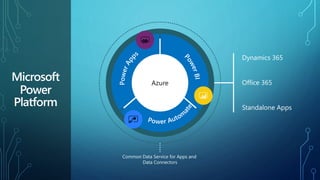
Microsoft
Power
Platform
Dynamics 365
Office 365
Standalone Apps
Azure
Common Data Service for Apps and
Data Connectors
Power Apps is a service
for building and using
custom business apps
that connect to the data
and work across the web
and mobile - without the
time and expense of
custom software
development.
End Users
Experienced
Developers
IT/Admins
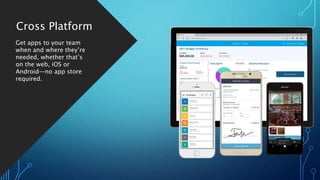
Cross Platform
Get apps to your team
when and where they’re
needed, whether that’s
on the web, iOS or
Android—no app store
required.
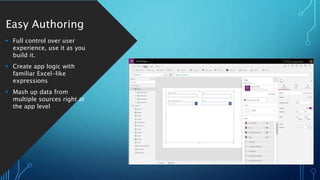
Easy Authoring
 Full control over user
experience, use it as you
build it.
 Create app logic with
familiar Excel-like
expressions
 Mash up data from
multiple sources right at
the app level
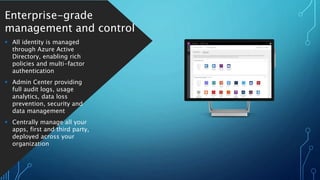
Enterprise-grade
management and control
 All identity is managed
through Azure Active
Directory, enabling rich
policies and multi-factor
authentication
 Admin Center providing
full audit logs, usage
analytics, data loss
prevention, security and
data management
 Centrally manage all your
apps, first and third party,
deployed across your
organization
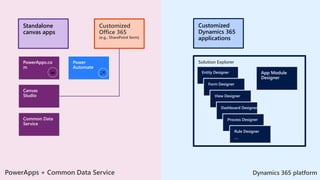
PowerApps + Common Data Service Dynamics 365 platform
Standalone
model-driven
app
Customized
Dynamics 365
applications
Solution Explorer
App Module
Designer
Entity Designer
Form Designer
View Designer
Dashboard Designer
Process Designer
Rule Designer
….
Standalone
canvas apps
Customized
Office 365
(e.g., SharePoint form)
PowerApps.co
m
Canvas
Studio
Common Data
Service
Power
Automate
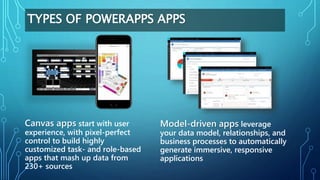
TYPES OF POWERAPPS APPS
Model-driven apps leverage
your data model, relationships, and
business processes to automatically
generate immersive, responsive
applications
Canvas apps start with user
experience, with pixel-perfect
control to build highly
customized task- and role-based
apps that mash up data from
230+ sources
POWERAPPS - CANVAS APPS
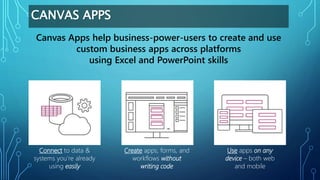
CANVAS APPS
Connect to data &
systems you’re already
using easily
Create apps, forms, and
workflows without
writing code
Use apps on any
device – both web
and mobile
Canvas Apps help business-power-users to create and use
custom business apps across platforms
using Excel and PowerPoint skills
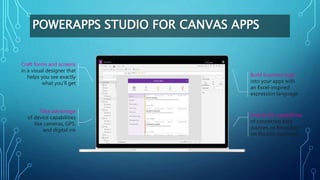
POWERAPPS STUDIO FOR CANVAS APPS
Craft forms and screens
in a visual designer that
helps you see exactly
what you’ll get
Take advantage
of device capabilities
like cameras, GPS,
and digital ink
Extend the capabilities
of connected data
sources, or focus just
on the bits you need
Build business logic
into your apps with
an Excel-inspired
expression language
POWERAPPS MODEL-DRIVEN APPS
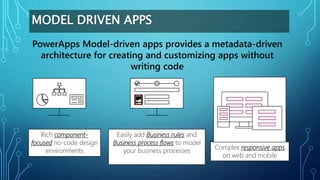
MODEL DRIVEN APPS
Complex responsive apps
on web and mobile
PowerApps Model-driven apps provides a metadata-driven
architecture for creating and customizing apps without
writing code
Easily add Business rules and
Business process flows to model
your business processes
Rich component-
focused no-code design
environments
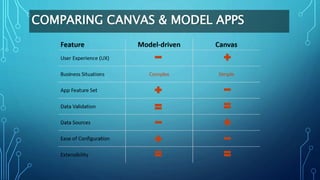
COMPARING CANVAS & MODEL APPS
THANK YOU FOR ATTENDING
www.tahmidulabedin.
me
tahmidanik
tahmidanik12

Microsoft Power Apps 101 : Build your application with power apps

  • 1.
    MICROSOFT POWER APPS 101: BUILDYOUR APPLICATION WITH POWER APPS MD. TAHMIDUL ABEDIN
  • 2.
    MD. TAHMIDUL ABEDIN • SoftwareEngineer, Genweb2 Limited • SharePoint Consultant • MVP – C# Corner • Microsoft Certified Solution Developer • ASP.NET, Office 365 Solutions, Azure Solution Development • Email: aunik43@gmail.com • LinkedIn: /tahmidanik • www.tahmidulabedin.me
  • 3.
    Microsoft Power Platform Dynamics 365 Office 365 StandaloneApps Azure Common Data Service for Apps and Data Connectors
  • 4.
    Power Apps isa service for building and using custom business apps that connect to the data and work across the web and mobile - without the time and expense of custom software development. End Users Experienced Developers IT/Admins
  • 5.
    Cross Platform Get appsto your team when and where they’re needed, whether that’s on the web, iOS or Android—no app store required.
  • 6.
    Easy Authoring  Fullcontrol over user experience, use it as you build it.  Create app logic with familiar Excel-like expressions  Mash up data from multiple sources right at the app level
  • 7.
    Enterprise-grade management and control All identity is managed through Azure Active Directory, enabling rich policies and multi-factor authentication  Admin Center providing full audit logs, usage analytics, data loss prevention, security and data management  Centrally manage all your apps, first and third party, deployed across your organization
  • 8.
    PowerApps + CommonData Service Dynamics 365 platform Standalone model-driven app Customized Dynamics 365 applications Solution Explorer App Module Designer Entity Designer Form Designer View Designer Dashboard Designer Process Designer Rule Designer …. Standalone canvas apps Customized Office 365 (e.g., SharePoint form) PowerApps.co m Canvas Studio Common Data Service Power Automate
  • 9.
    TYPES OF POWERAPPSAPPS Model-driven apps leverage your data model, relationships, and business processes to automatically generate immersive, responsive applications Canvas apps start with user experience, with pixel-perfect control to build highly customized task- and role-based apps that mash up data from 230+ sources
  • 10.
  • 11.
    CANVAS APPS Connect todata & systems you’re already using easily Create apps, forms, and workflows without writing code Use apps on any device – both web and mobile Canvas Apps help business-power-users to create and use custom business apps across platforms using Excel and PowerPoint skills
  • 12.
    POWERAPPS STUDIO FORCANVAS APPS Craft forms and screens in a visual designer that helps you see exactly what you’ll get Take advantage of device capabilities like cameras, GPS, and digital ink Extend the capabilities of connected data sources, or focus just on the bits you need Build business logic into your apps with an Excel-inspired expression language
  • 13.
  • 14.
    MODEL DRIVEN APPS Complexresponsive apps on web and mobile PowerApps Model-driven apps provides a metadata-driven architecture for creating and customizing apps without writing code Easily add Business rules and Business process flows to model your business processes Rich component- focused no-code design environments
  • 15.
  • 16.
    THANK YOU FORATTENDING www.tahmidulabedin. me tahmidanik tahmidanik12