Enlarge
your screen :-)
 Introducing the Google TV

     Matteo Bonifazi - Stefano Sanna

               GDG Roma


     Florence - 2012/10/19
Let’s talk about...
• Speakers

• Android happens elsewhere
• Google TV
 •   timeline
 •   how it works
 •   writing apps for the Google TV
 •   beyond the TV: second screen and Anymote


• DEMO

• Conclusion
                            Enlarge your screen
                       Matteo Bonifazi - Stefano Sanna
Ladies & gentlemen...

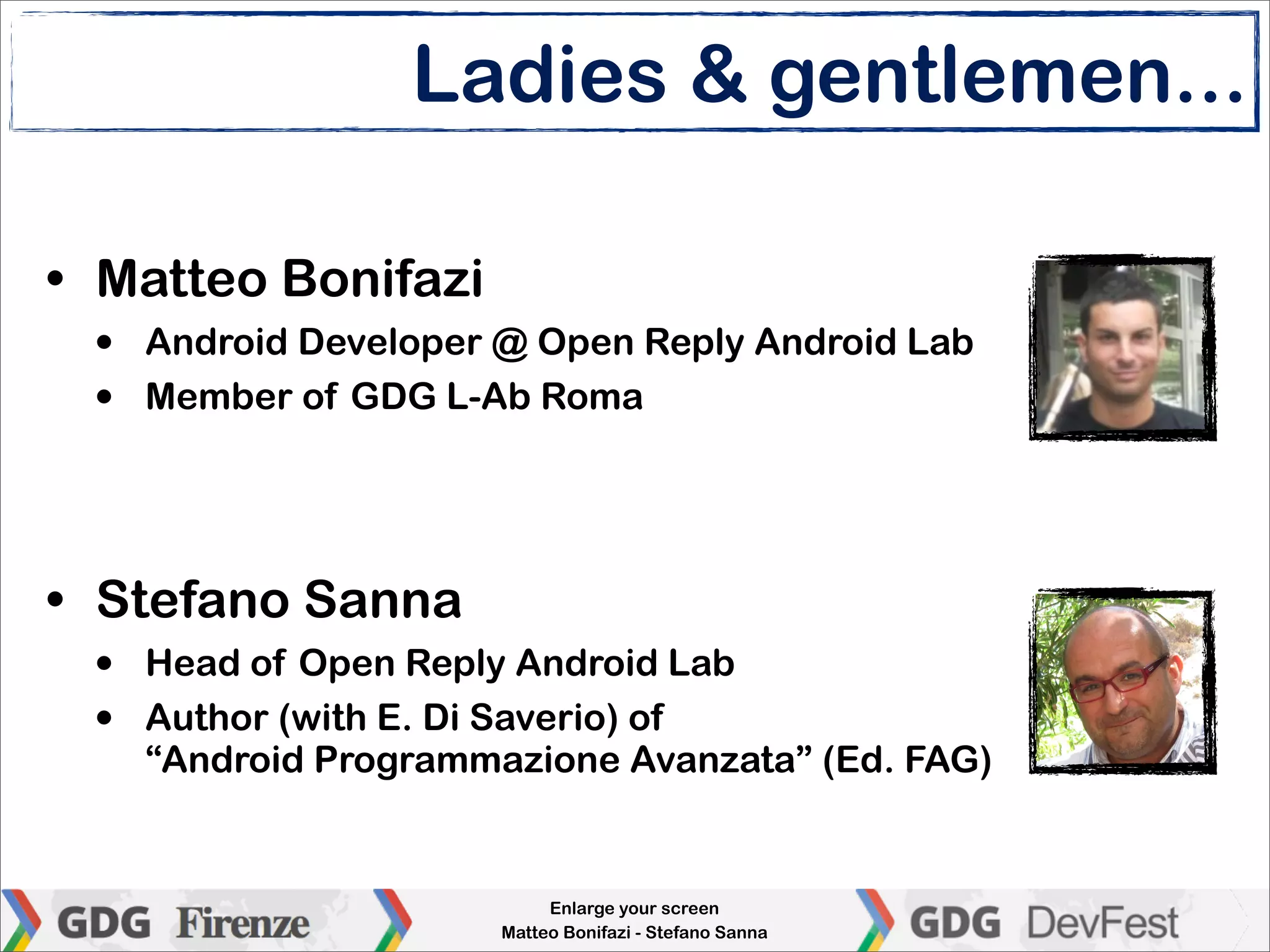
• Matteo Bonifazi
 •   Android Developer @ Open Reply Android Lab
 •   Member of GDG L-Ab Roma


• Stefano Sanna
 •   Head of Open Reply Android Lab
 •   Author (with E. Di Saverio) of
     “Android Programmazione Avanzata” (Ed. FAG)


                            Enlarge your screen
                       Matteo Bonifazi - Stefano Sanna
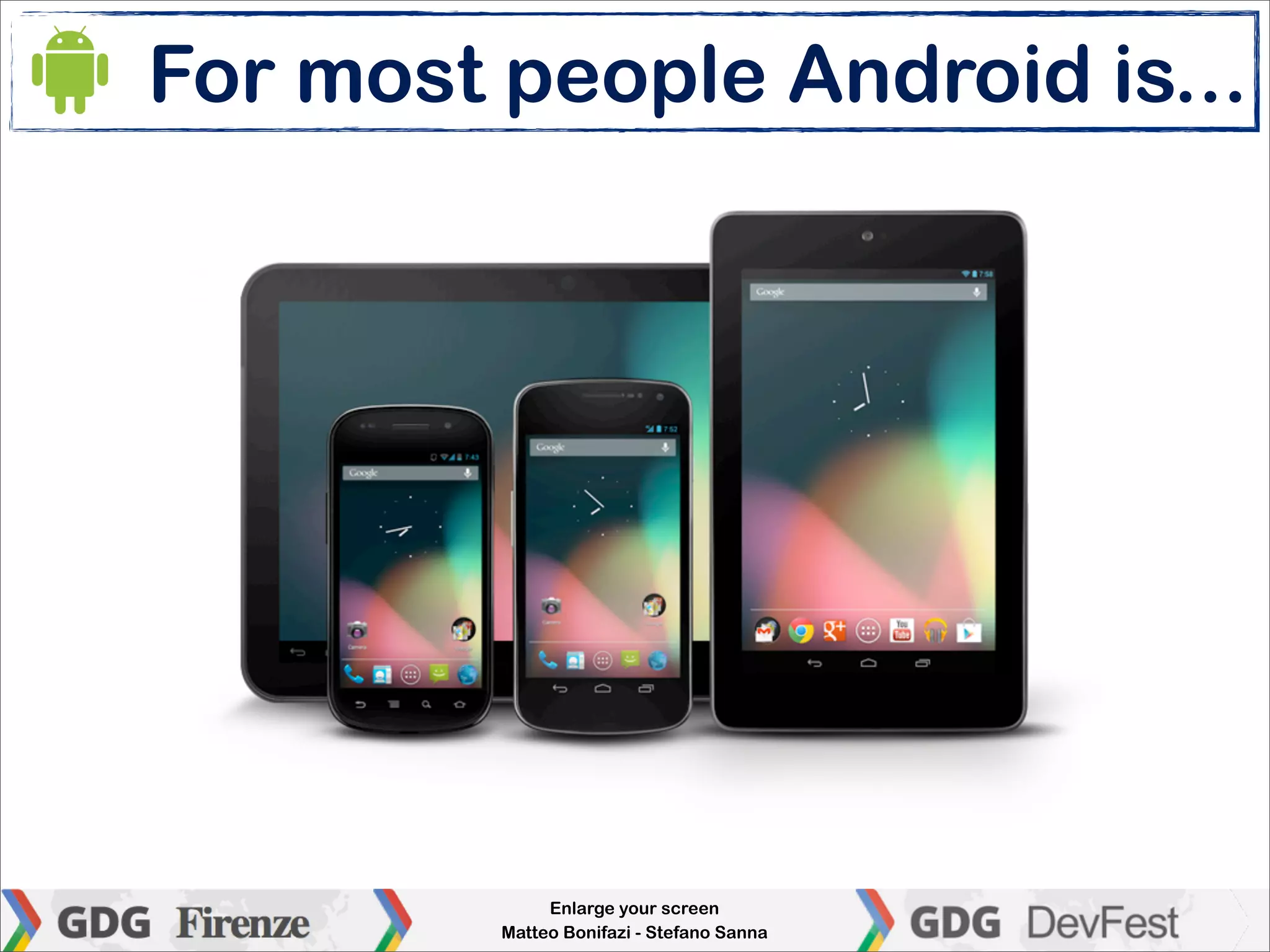
For most people Android is...


              Enlarge your screen
         Matteo Bonifazi - Stefano Sanna
Android happens elsewhere

• “Beyond the product” (being an operating
  system), Android is a rich eco-system: open
  source, widely supported by manufacturers
  and developers...

• Its strong and stable Linux foundation makes
  Android an affordable alternative to “typical
  Linux distribution” for embedded systems


                       Enlarge your screen
                  Matteo Bonifazi - Stefano Sanna
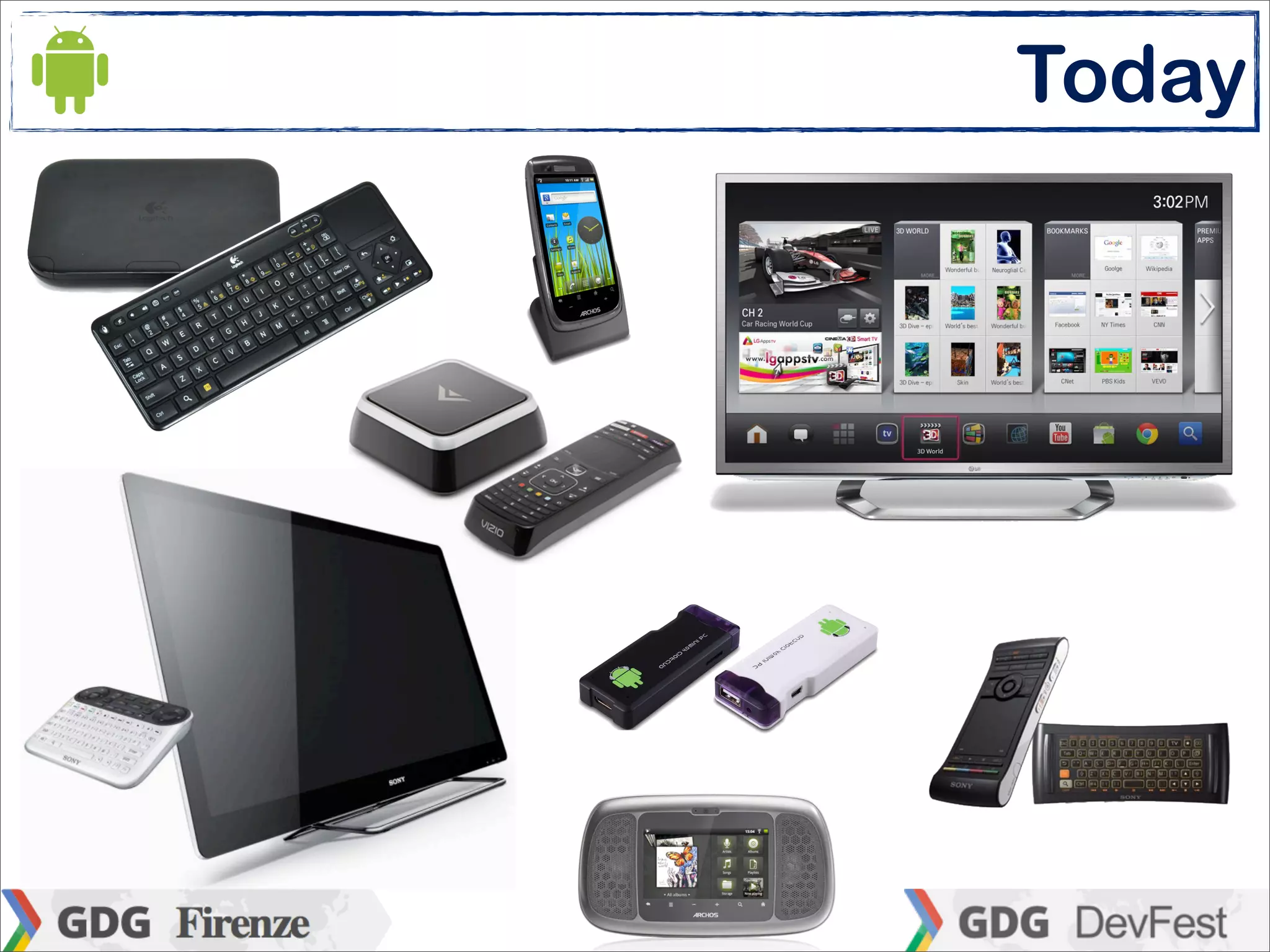
Today
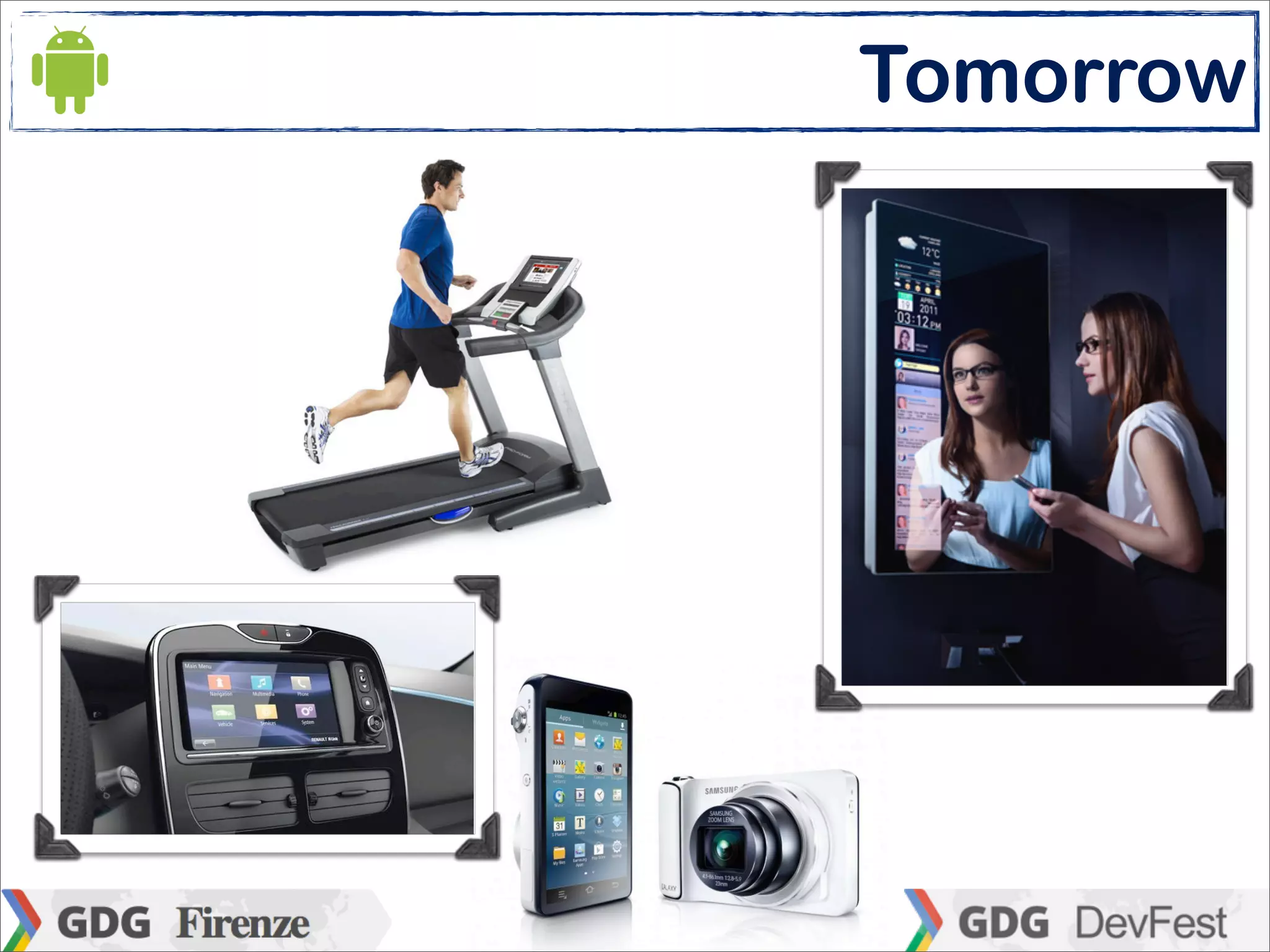
Tomorrow
Today


     Enlarge your screen
Matteo Bonifazi - Stefano Sanna
Google TV

• Among these “unconventional” Android
  devices, the Google TV is the official platform
  for (upcoming?) interactive services “beyond
  smartphones and tablets”

• Although it has still not been announced in
  Italy, Google TV has landed in Europe (UK)
  this year and it will be available in other
  country later in 2012

                       Enlarge your screen
                  Matteo Bonifazi - Stefano Sanna
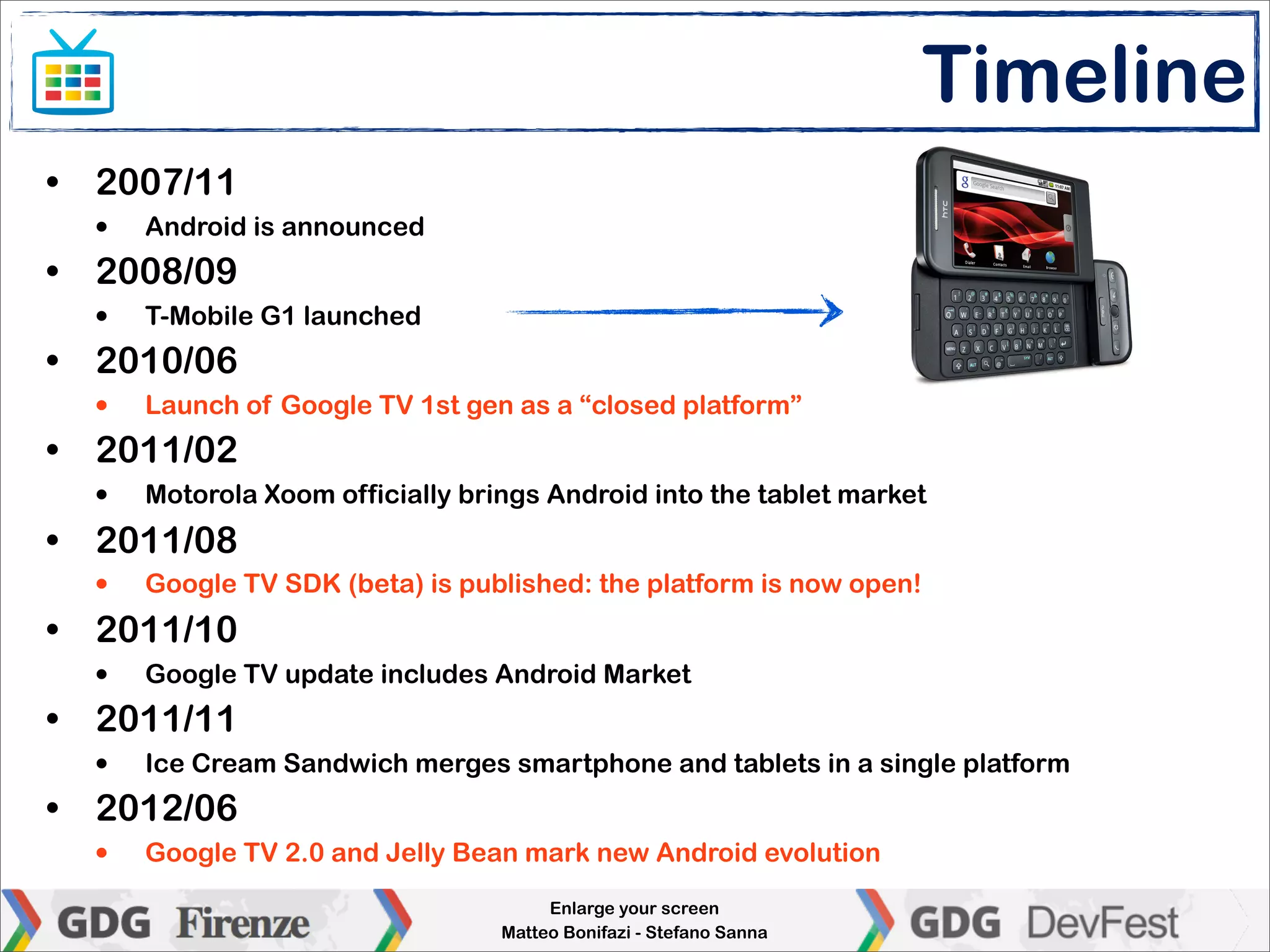
Timeline
• 2007/11
  •   Android is announced
• 2008/09
  •   T-Mobile G1 launched
• 2010/06
  •   Launch of Google TV 1st gen as a “closed platform”
• 2011/02
  •   Motorola Xoom officially brings Android into the tablet market
• 2011/08
  •   Google TV SDK (beta) is published: the platform is now open!
• 2011/10
  •   Google TV update includes Android Market
• 2011/11
  •   Ice Cream Sandwich merges smartphone and tablets in a single platform
• 2012/06
  •   Google TV 2.0 and Jelly Bean mark new Android evolution
                                       Enlarge your screen
                                  Matteo Bonifazi - Stefano Sanna
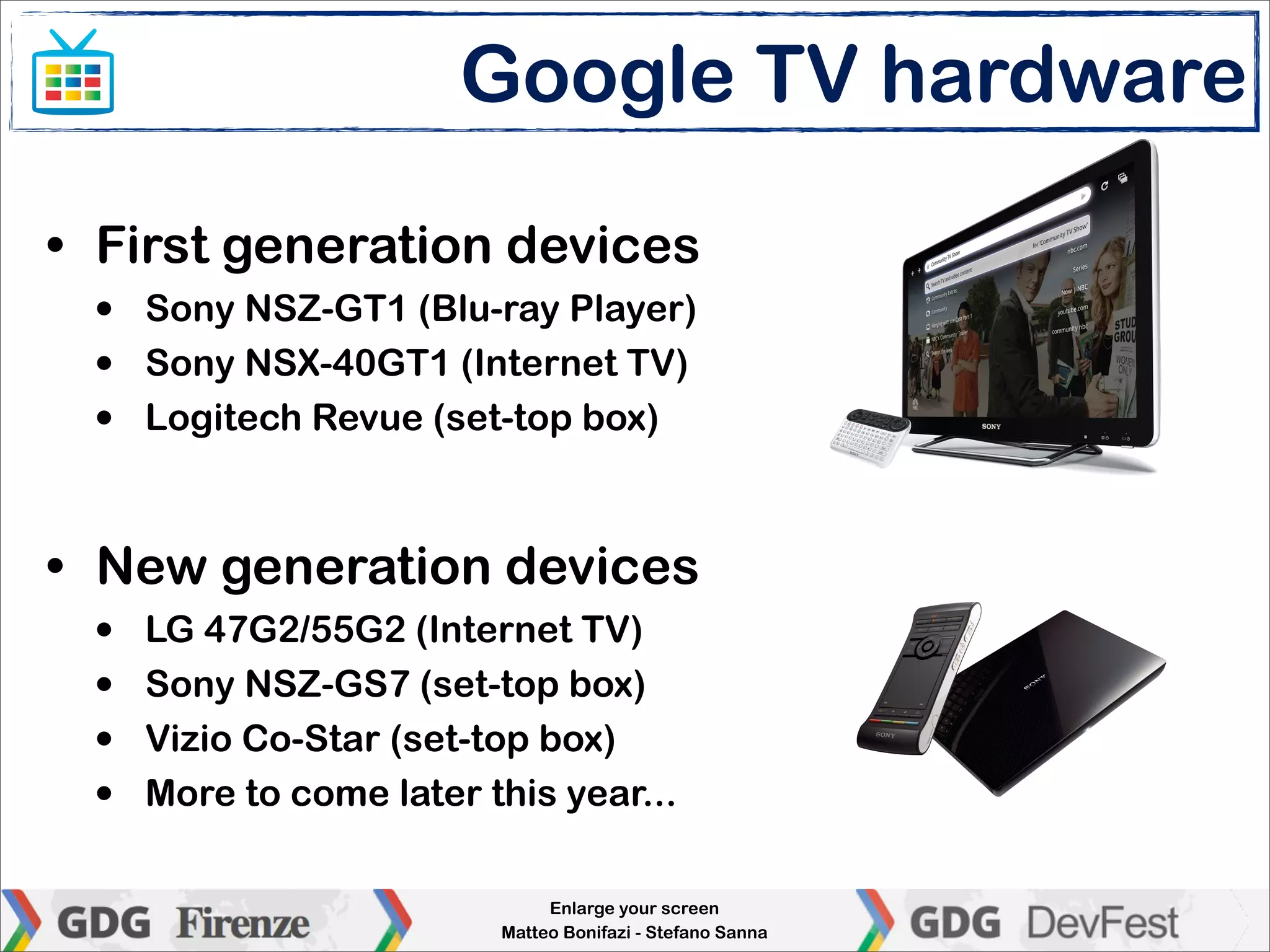
Google TV hardware

• First generation devices
 •   Sony NSZ-GT1 (Blu-ray Player)
 •   Sony NSX-40GT1 (Internet TV)
 •   Logitech Revue (set-top box)


• New generation devices
 •   LG 47G2/55G2 (Internet TV)
 •   Sony NSZ-GS7 (set-top box)
 •   Vizio Co-Star (set-top box)
 •   More to come later this year...

                              Enlarge your screen
                         Matteo Bonifazi - Stefano Sanna
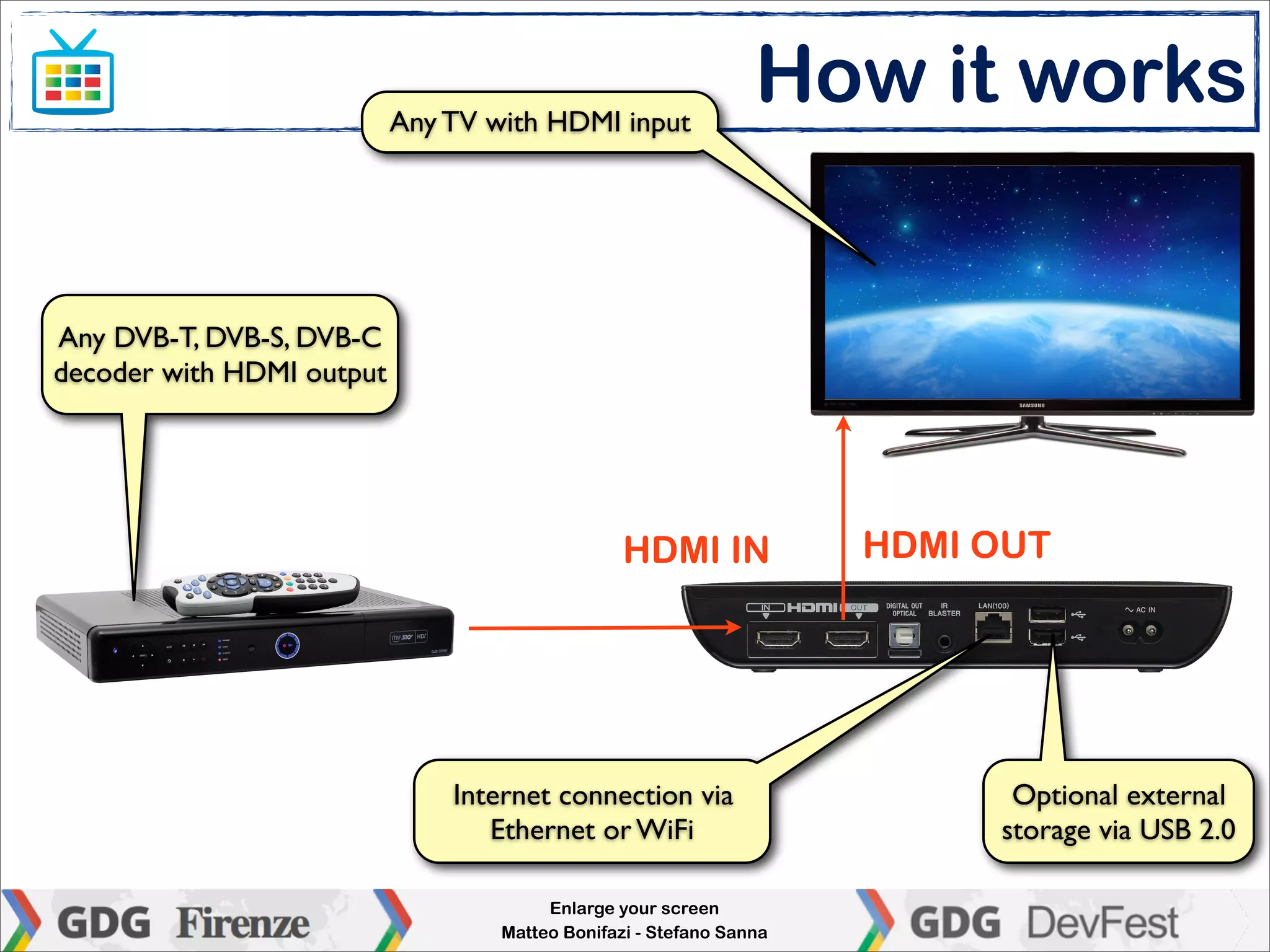
Any TV with HDMI input
                                                                How it works


Any DVB-T, DVB-S, DVB-C
decoder with HDMI output


                                                 HDMI IN             HDMI OUT


                               Internet connection via                     Optional external
                                  Ethernet or WiFi                        storage via USB 2.0

                                        Enlarge your screen
                                   Matteo Bonifazi - Stefano Sanna
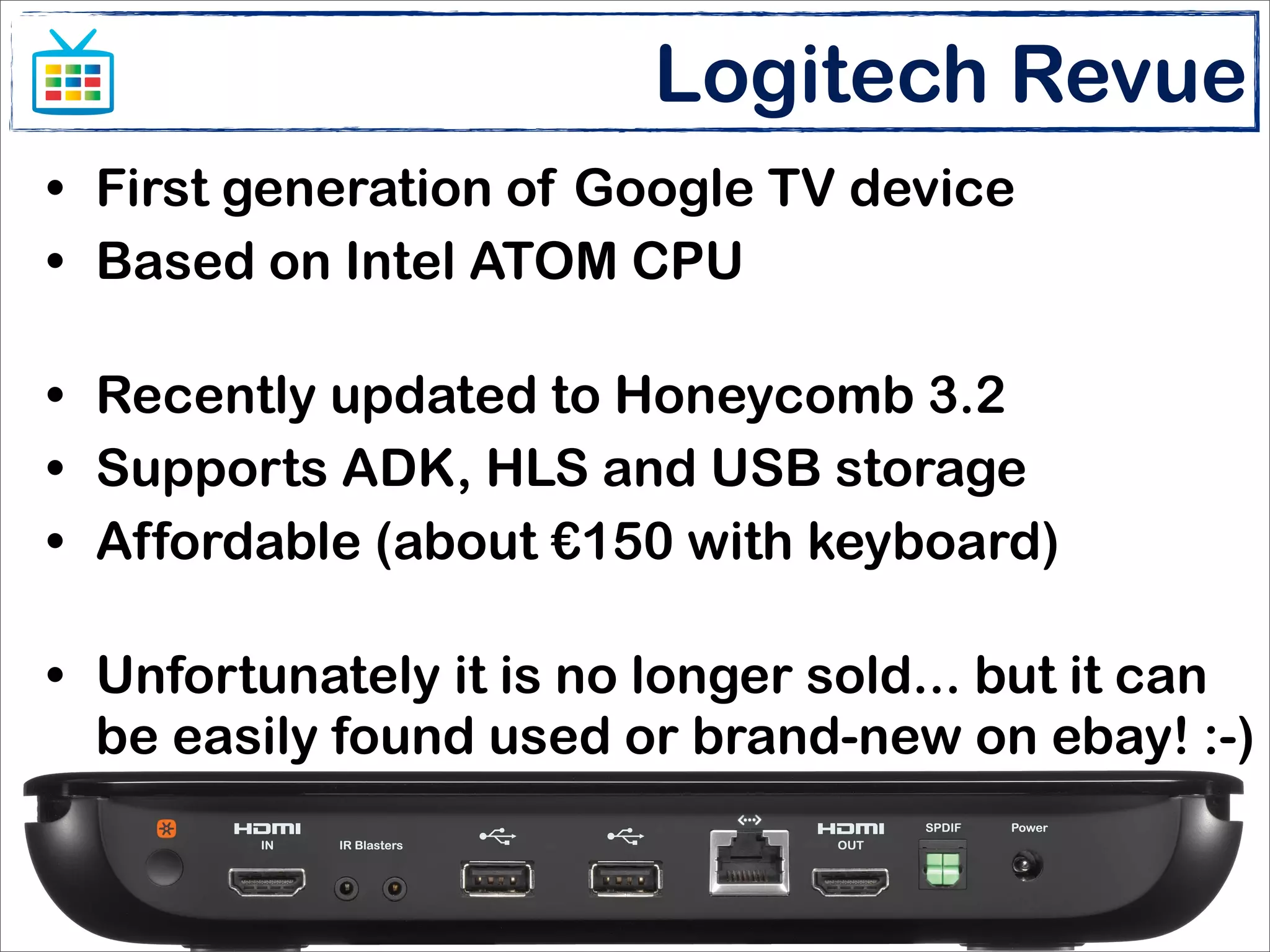
Logitech Revue
• First generation of Google TV device
• Based on Intel ATOM CPU

• Recently updated to Honeycomb 3.2
• Supports ADK, HLS and USB storage
• Affordable (about €150 with keyboard)

• Unfortunately it is no longer sold... but it can
  be easily found used or brand-new on ebay! :-)


                       Enlarge your screen
                  Matteo Bonifazi - Stefano Sanna
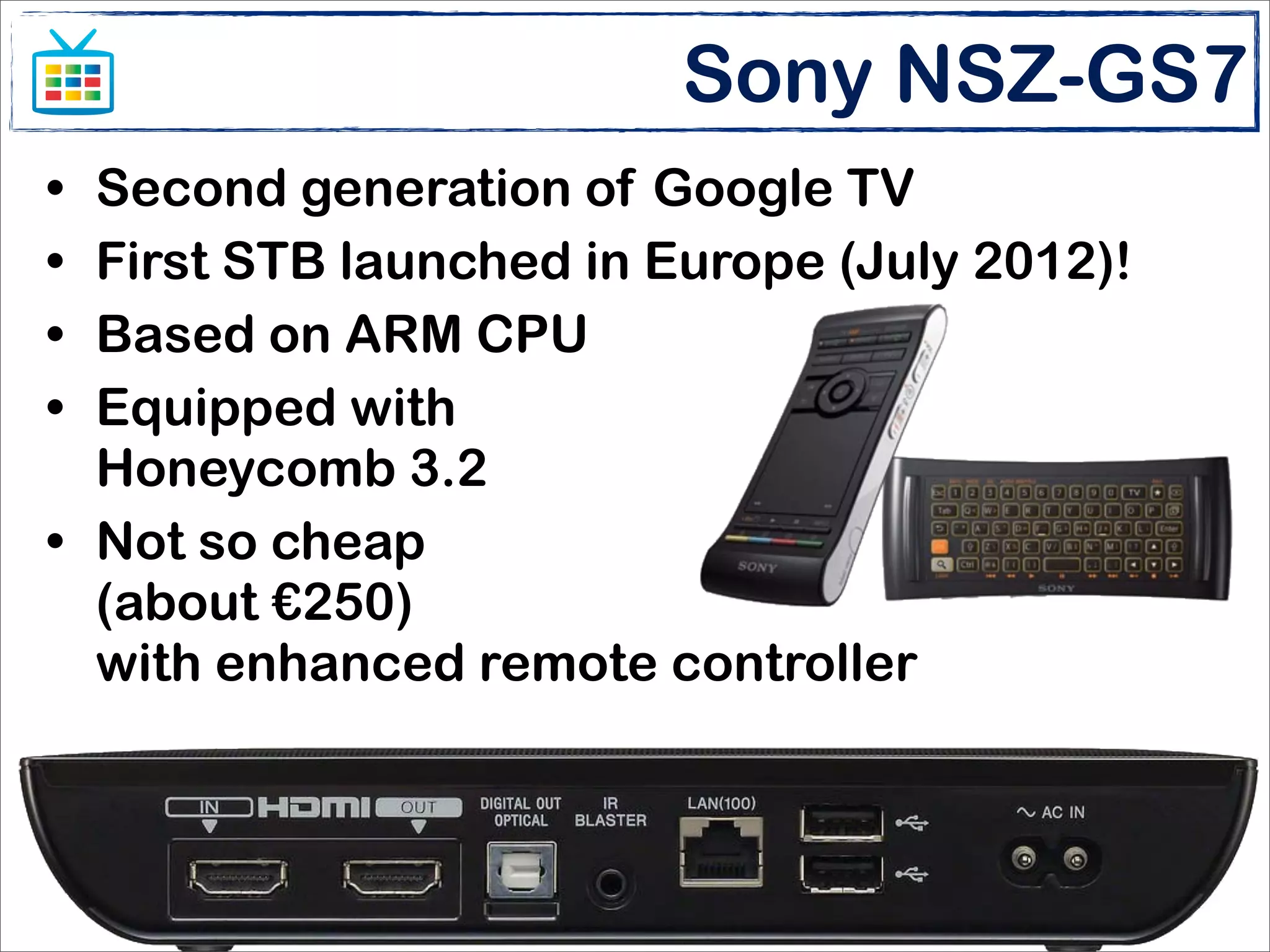
Sony NSZ-GS7
• Second generation of Google TV
• First STB launched in Europe (July 2012)!
• Based on ARM CPU
• Equipped with
  Honeycomb 3.2
• Not so cheap
  (about €250)
  with enhanced remote controller


                       Enlarge your screen
                  Matteo Bonifazi - Stefano Sanna
Google TV main features
• For end-users
 •   Rent movies and TV episodes on demand
 •   Youtube
 •   Chrome
 •   3rd party apps
 •   Movies, pictures, music on local storage


• For developers
 •   Honeycomb 3.2 platform
 •   Rich, powerful and well-known Android multiscreen API
 •   Google Play Store for distributing apps

                             Enlarge your screen
                        Matteo Bonifazi - Stefano Sanna
Google TV API
• The Google TV platform consist of

         0 (ZERO) NEW API
  over the “standard” platform!
• A new Content Provider and a few constants
  provide the way to address channel switching
  and filter platform specific features
• Android SDK and Eclipse are the basic toolkit
  for targeting the Google TV!
                      Enlarge your screen
                 Matteo Bonifazi - Stefano Sanna
Targeting the Google TV
 • The AndroidManifest.xml rules:
<manifest xmlns:android="http://schemas.android.com/apk/res/android"
    package="org.example.phototv" android:versionCode="1" android:versionName="1.0" >

    <uses-sdk android:minSdkVersion="13" android:targetSdkVersion="15" />

    <supports-screens
        android:anyDensity="true" android:largeScreens="true"
        android:normalScreens="false" android:smallScreens="false"
        android:xlargeScreens="false" />

    <uses-feature android:name="android.hardware.touchscreen" android:required="false" />
    <uses-feature android:name="com.google.android.tv" android:required="true"/>

    <uses-permission android:name="com.google.android.tv.permission.READ_CHANNELS">

    <application
        android:icon="@drawable/ic_launcher" android:label="@string/app_name" >
        <activity android:screenOrientation="unspecified"
            android:name=".PhotoTV" android:label="@string/app_name">
            <intent-filter> [...] </intent-filter>
        </activity>
    </application>

</manifest>


                                        Enlarge your screen
                                   Matteo Bonifazi - Stefano Sanna
Test environment
• The best is to have a real set-top box

• If not available, install the Google TV Add-on
  •   Runs on Linux 64bit with KVM Kernel
  •   Can’t run on virtual environments
  •   Does not support video streaming (as for Platform 1.0)


• The DIY way: a old-fashioned Android 1.x
  device (HTC Dream, HTC Magic, Samsung
  Galaxy) with D-PAD can be used to test
  navigation!
                              Enlarge your screen
                         Matteo Bonifazi - Stefano Sanna
Configure the set-top box
• Run the initial configuration (language, screen
  size, network, Google Account...)
• Apps deployment and debugging is over the
  network connection. USB ports work in host
  mode.
• Try to have a fixed IP address for both Google
  TV STB and development workstation
• Enable remote debugging and assign remote
  debugging host IP
  •   If using a Logitech Revue: set resolution to 720p (sigh!) to get
      screenshots via ADB
                               Enlarge your screen
                          Matteo Bonifazi - Stefano Sanna
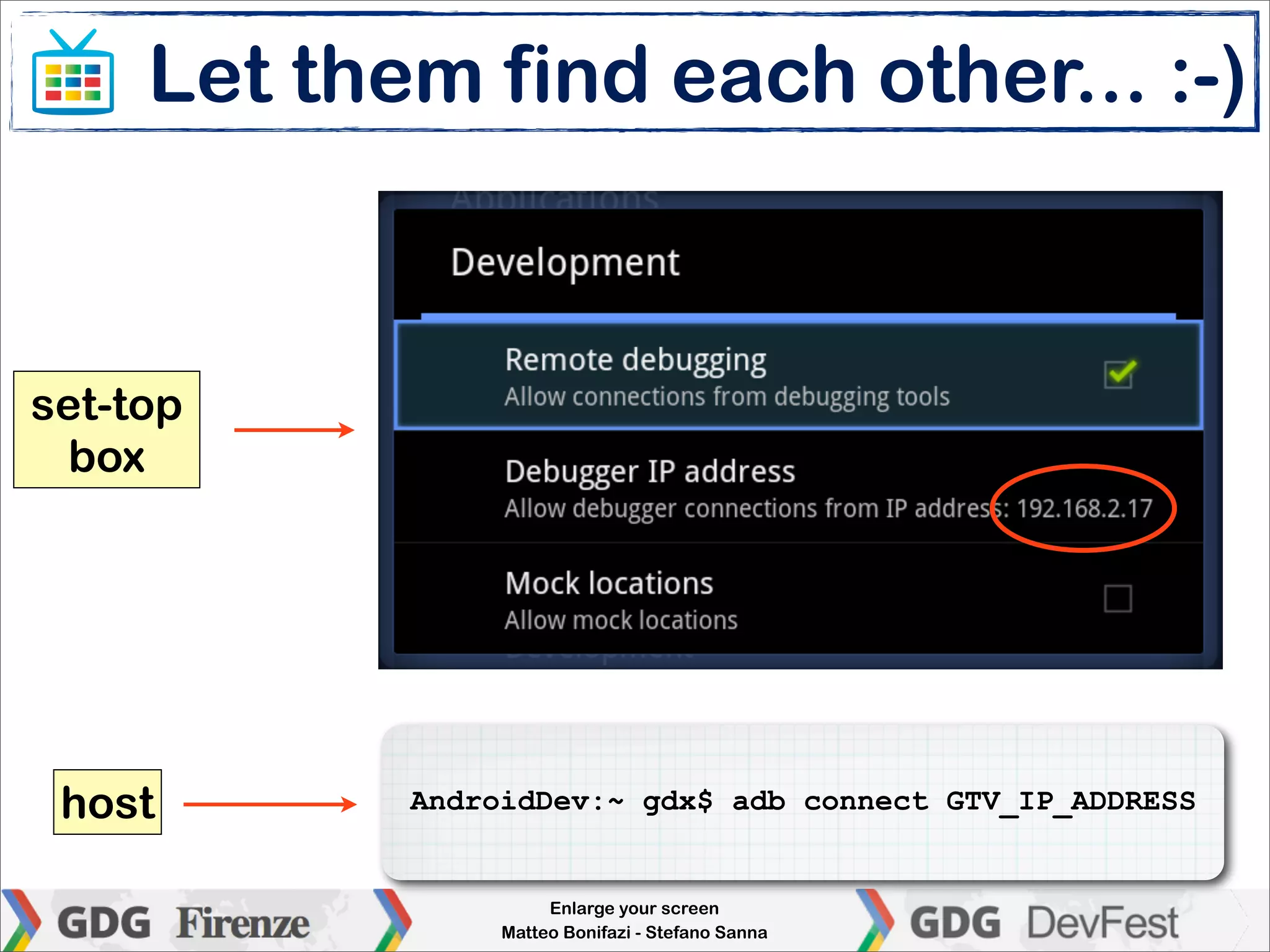
Let them find each other... :-)


set-top
  box


 host       AndroidDev:~ gdx$ adb connect GTV_IP_ADDRESS


                      Enlarge your screen
                 Matteo Bonifazi - Stefano Sanna
Size and density
• The TV screen is classified as “large”

• HD Ready TV (720p) are classified as tvdpi
  density, 213 dpi

• Full HD TV (1080p) are classified as xhdpi
  density, 320 dpi

• 720p and 1080p have the same “independent”
  resolution: 960x540dp
                       Enlarge your screen
                  Matteo Bonifazi - Stefano Sanna
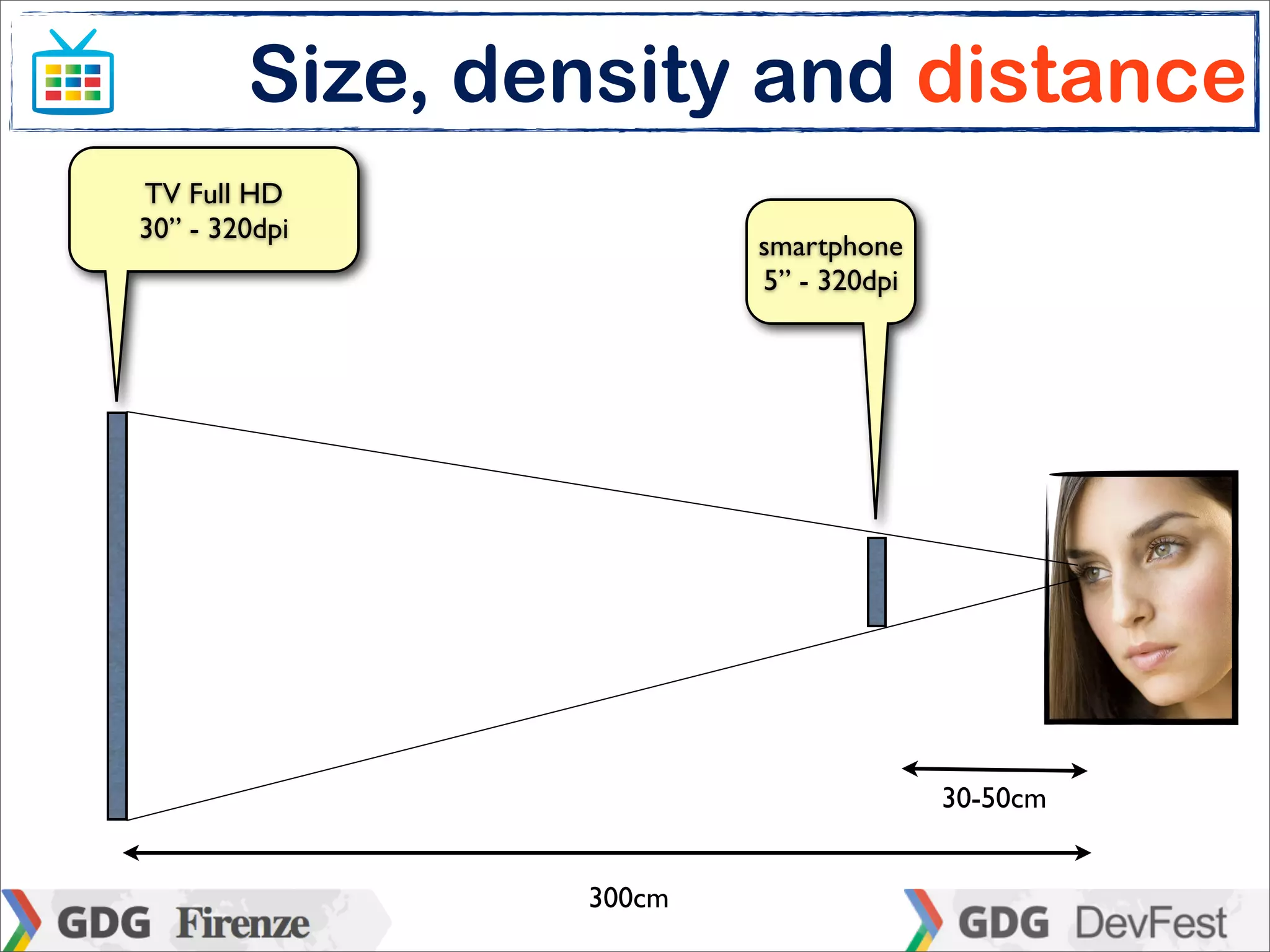
Size, density and distance
TV Full HD
30” - 320dpi
                        smartphone
                        5” - 320dpi


                                      30-50cm


                300cm
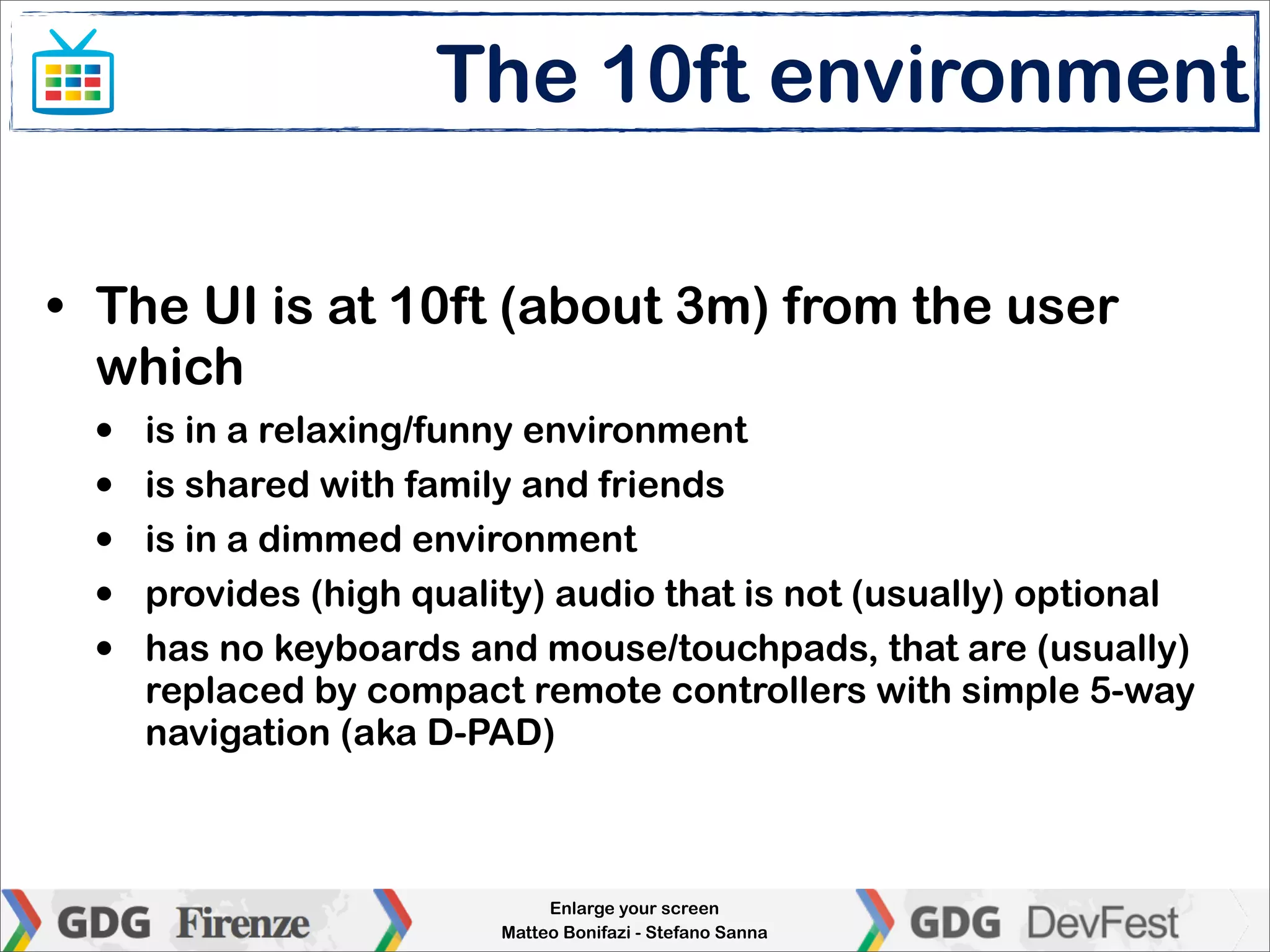
The 10ft environment

• The UI is at 10ft (about 3m) from the user
  which
  •   is in a relaxing/funny environment
  •   is shared with family and friends
  •   is in a dimmed environment
  •   provides (high quality) audio that is not (usually) optional
  •   has no keyboards and mouse/touchpads, that are (usually)
      replaced by compact remote controllers with simple 5-way
      navigation (aka D-PAD)


                               Enlarge your screen
                          Matteo Bonifazi - Stefano Sanna
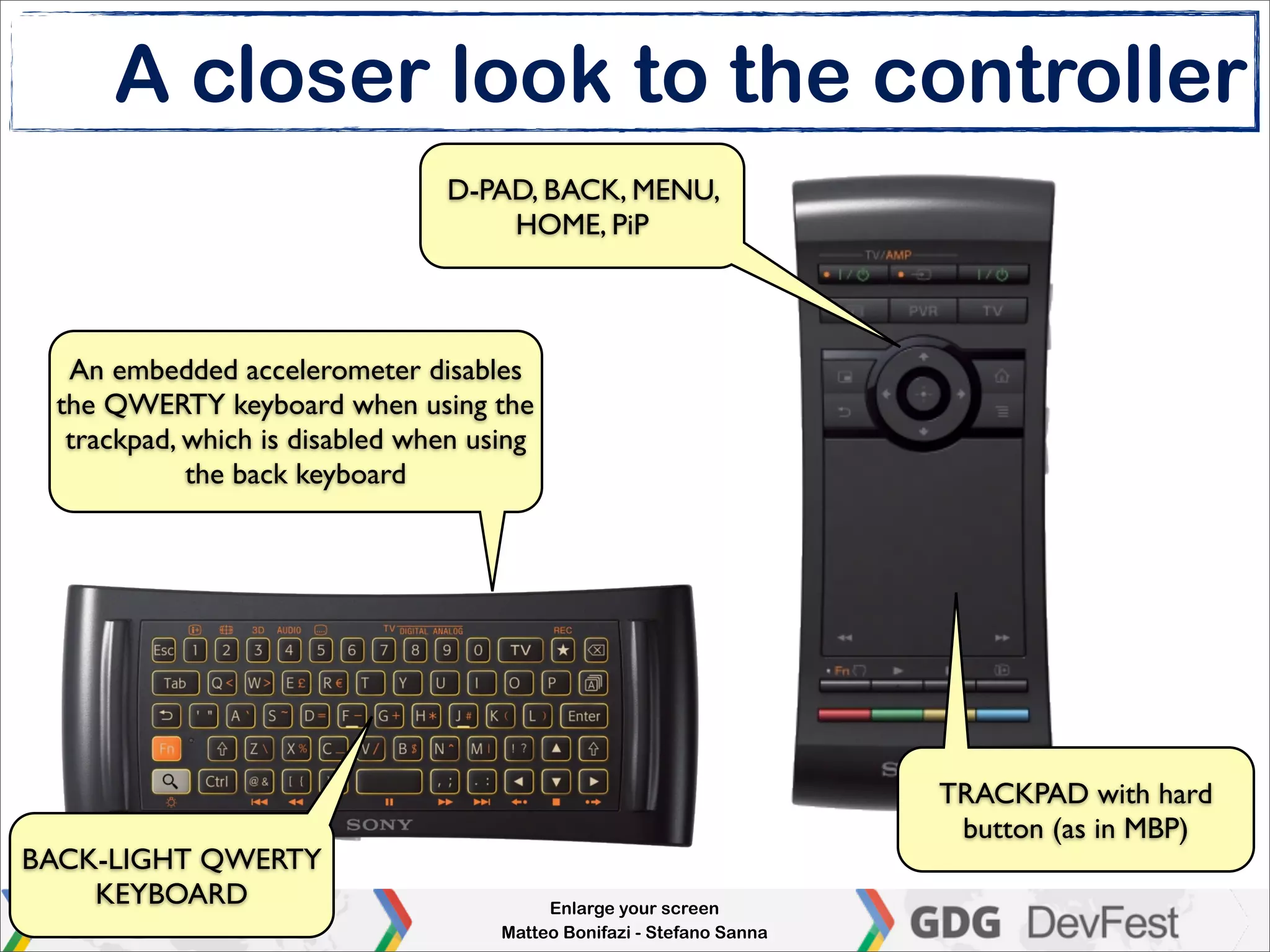
A closer look to the controller
                                D-PAD, BACK, MENU,
                                    HOME, PiP


  An embedded accelerometer disables
 the QWERTY keyboard when using the
  trackpad, which is disabled when using
            the back keyboard


                                                                       TRACKPAD with hard
                                                                        button (as in MBP)
BACK-LIGHT QWERTY
    KEYBOARD                              Enlarge your screen
                                     Matteo Bonifazi - Stefano Sanna
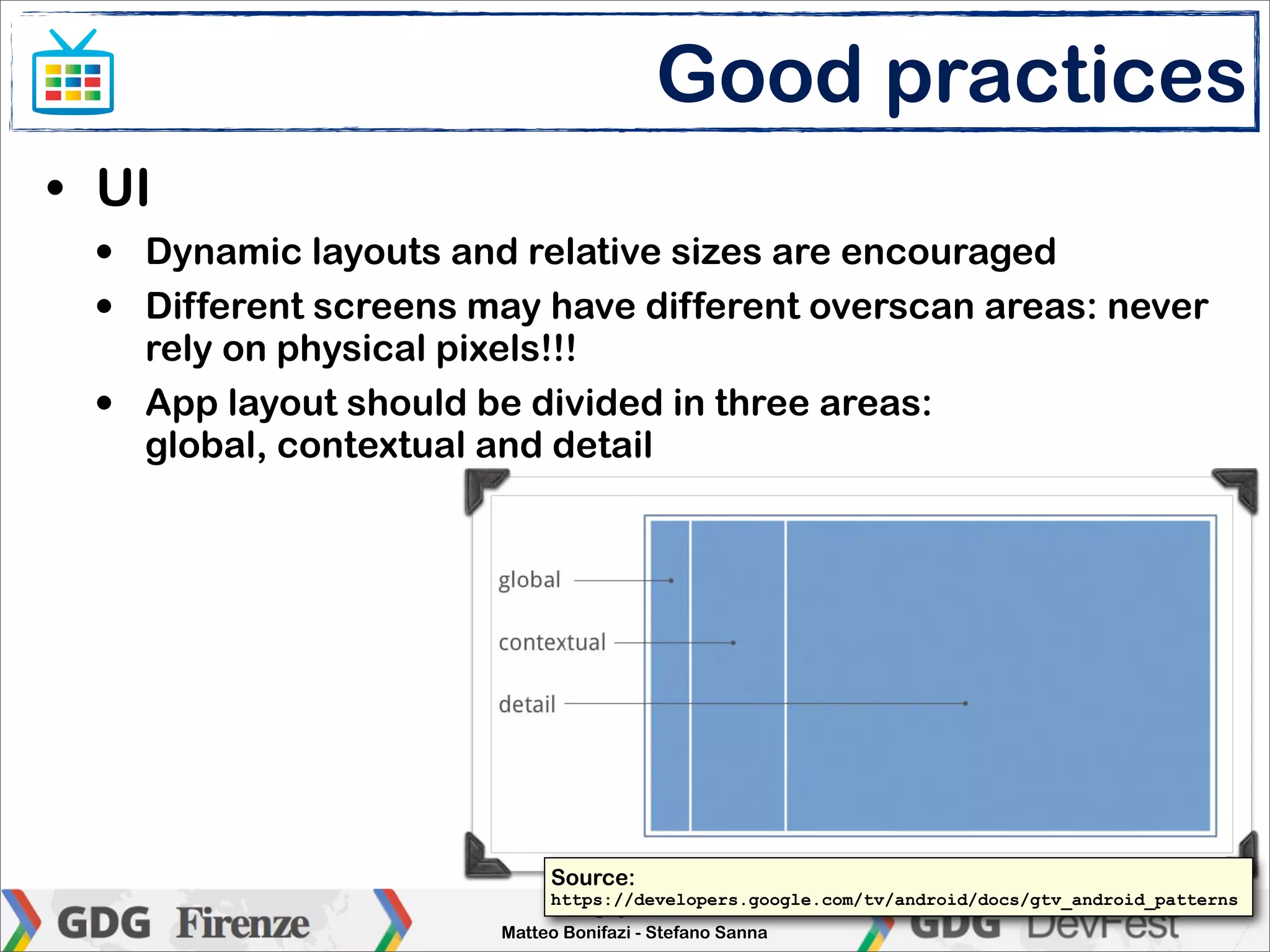
Good practices
• UI
 •   Dynamic layouts and relative sizes are encouraged
 •   Different screens may have different overscan areas: never
     rely on physical pixels!!!
 •   App layout should be divided in three areas:
     global, contextual and detail


                            Source:
                             https://developers.google.com/tv/android/docs/gtv_android_patterns
                             Enlarge your screen
                        Matteo Bonifazi - Stefano Sanna
Good practices
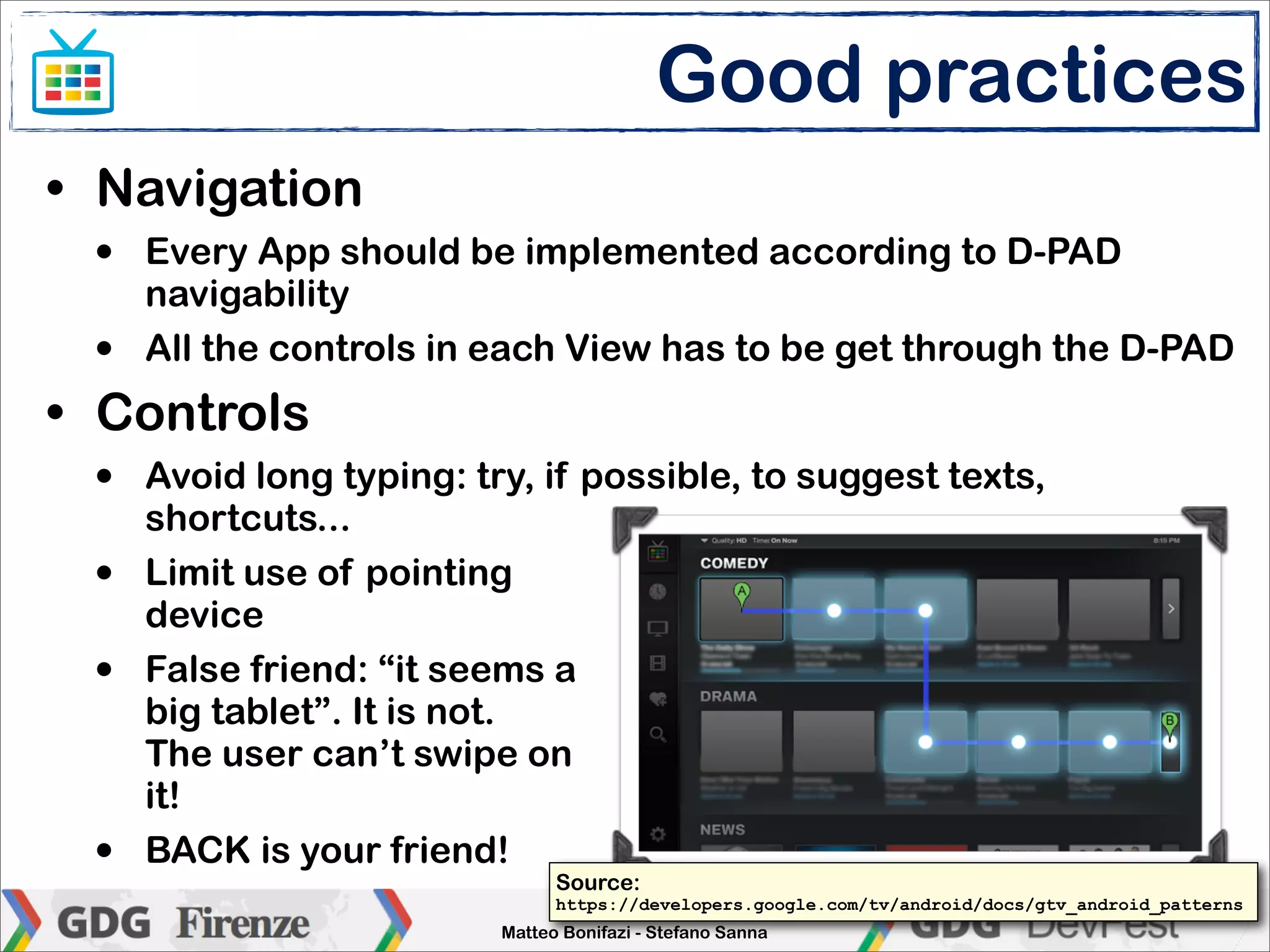
• Navigation
 •   Every App should be implemented according to D-PAD
     navigability
 •   All the controls in each View has to be get through the D-PAD
• Controls
 •   Avoid long typing: try, if possible, to suggest texts,
     shortcuts...
 •   Limit use of pointing
     device
 •   False friend: “it seems a
     big tablet”. It is not.
     The user can’t swipe on
     it!
 •   BACK is your friend!
                               Source:
                                https://developers.google.com/tv/android/docs/gtv_android_patterns
                               Enlarge your screen
                          Matteo Bonifazi - Stefano Sanna
DEMO

a photo viewer


        Enlarge your screen
   Matteo Bonifazi - Stefano Sanna
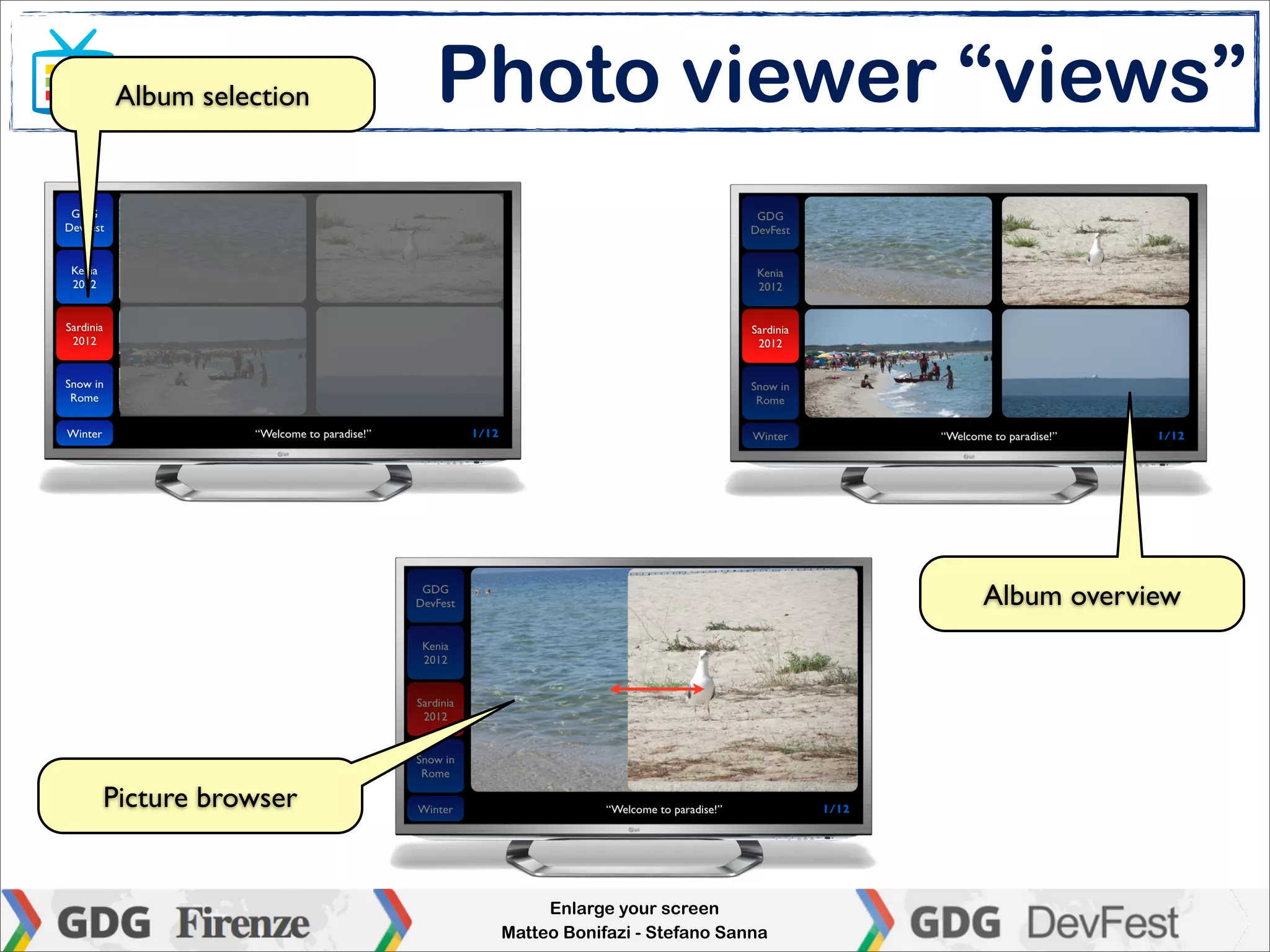
Album selection   Photo viewer “views”


                                                     Album overview


Picture browser


                        Enlarge your screen
                   Matteo Bonifazi - Stefano Sanna
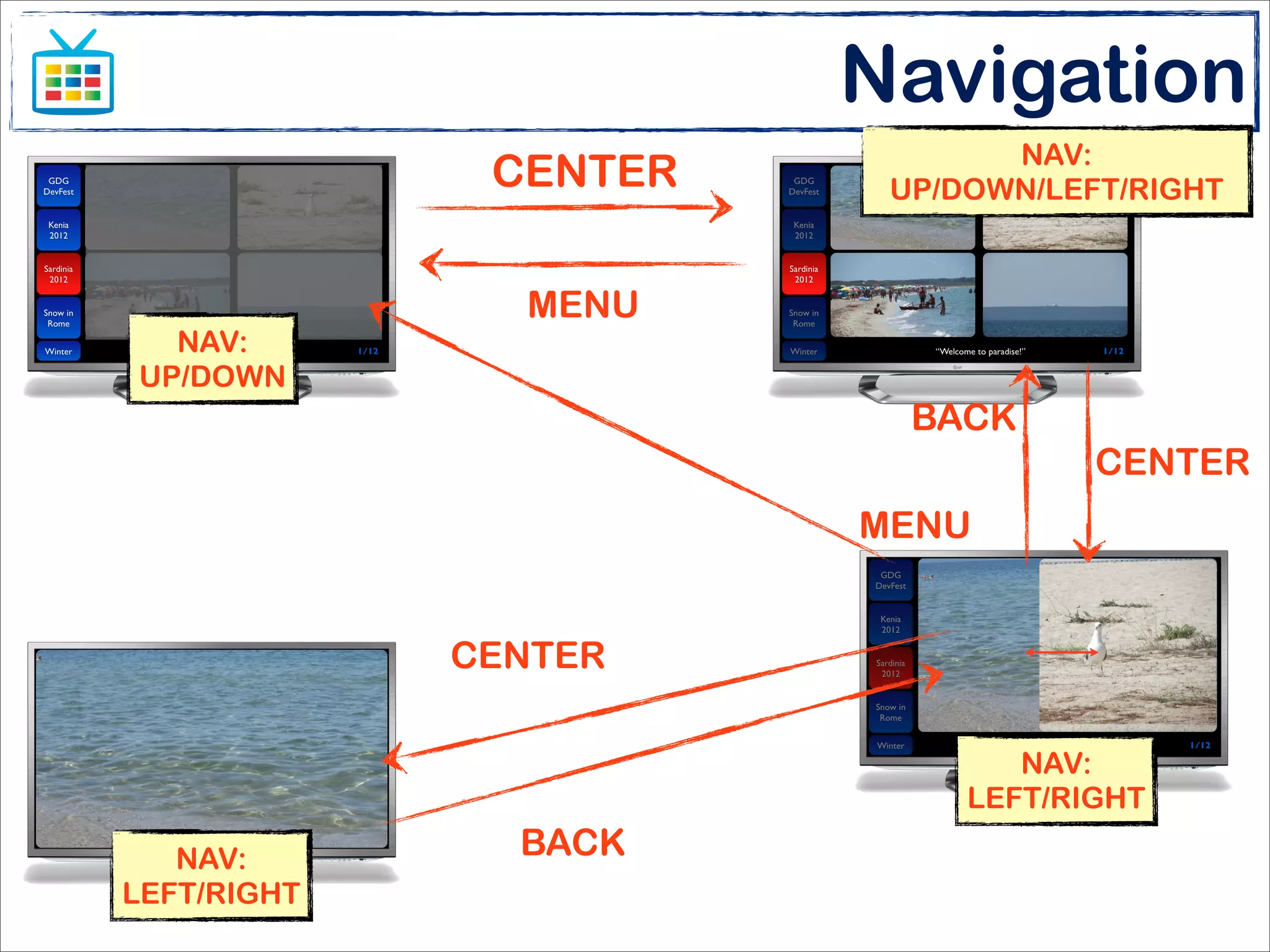
Main and sub navigation
• The developer has to identify main navigation (on
  the detail view, where the user spends more of his
  time) and sub navigation (contextual view, used less
  often)
• In the photo browser app:
  •   Likelihood, the user will spend most of time browsing photos of an
      album, instead of jumping between albums
  •   The main navigation is the photo browser within an album
  •   The sub navigation is the selection of an album
• The main navigation should performed using just
  the D-PAD
• The sub navigation could be accessed using
  secondary button (e.g., MENU and BACK)
                                 Enlarge your screen
                            Matteo Bonifazi - Stefano Sanna
                                                              Google will forgive us for this... ;-)
Navigation
                              NAV:
              CENTER    UP/DOWN/LEFT/RIGHT


               MENU
  NAV:
UP/DOWN
                         BACK
                                   CENTER
                       MENU


             CENTER

                               NAV:
                            LEFT/RIGHT

   NAV:        BACK
LEFT/RIGHT
Beyond the TV


        Enlarge your screen
   Matteo Bonifazi - Stefano Sanna
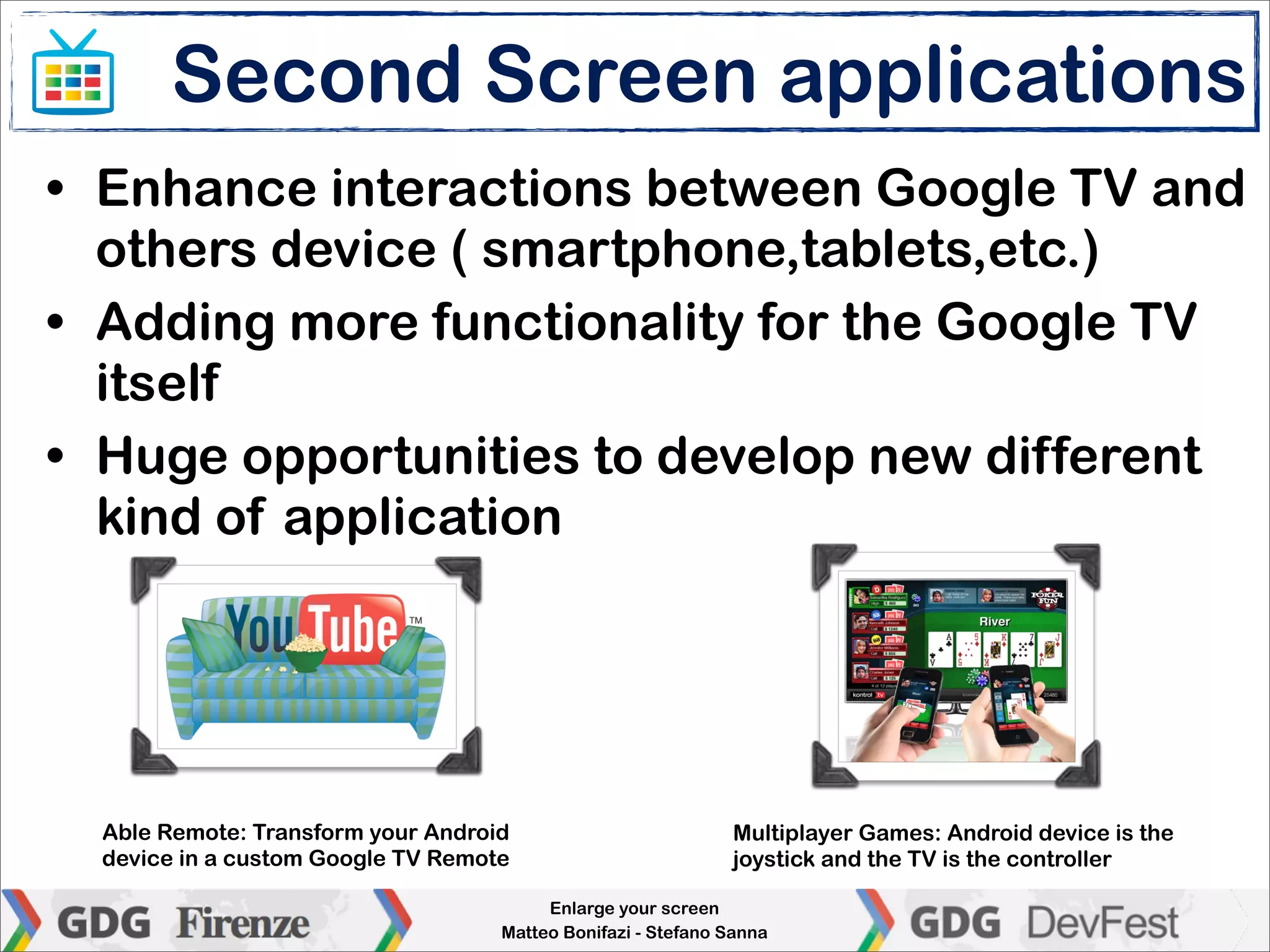
Second Screen applications
• Enhance interactions between Google TV and
  others device ( smartphone,tablets,etc.)
• Adding more functionality for the Google TV
  itself
• Huge opportunities to develop new different
  kind of application


  Able Remote: Transform your Android                         Multiplayer Games: Android device is the
  device in a custom Google TV Remote                         joystick and the TV is the controller

                                         Enlarge your screen
                                    Matteo Bonifazi - Stefano Sanna
Anymote
• Anymote protocol is IP layer protocol

• Devices use TLS/SSL to avoid sniffing issues

• Thanks to Anymote service Google TV stb can
  receive and respond to Anymote messages

• In order to communicate with the Google TV, a
  remote app does:
  •   Identifies Google TV
  •   Authenticates the device through Paring Protocol
  •   Sends events (connection, key, mouse, trackball...)
                               Enlarge your screen
                          Matteo Bonifazi - Stefano Sanna
Conclusions
• Have fun with smartphones and tablet, but
  don’t forget that it is only the beginning!

• Google TV enlarges “screens and
  opportunities”
  •   new entertainment machine for people not so comfortable
      with computers
  •   second screen applications may enhance UX and encourage
      gaming
  •   Google TV could be the cornerstone of new home automation
      application and services: the STB is always powered, always
      connected, always accessible

                              Enlarge your screen
                         Matteo Bonifazi - Stefano Sanna
Resources

• Google TV
 •   http://www.google.com/tv/
 •   https://developers.google.com/tv/
 •   http://googletv.blogspot.it/


• Hardware and community
 •   http://store.sony.com/p/NSZ-GS7/en/p/NSZGS7
 •   http://www.vizio.com/costar/overview
 •   http://www.gtvhacker.com/


                             Enlarge your screen
                        Matteo Bonifazi - Stefano Sanna
Contacts

• Matteo Bonifazi
 •   dekra06 AT gmail DOT com
 •   @mbonifazi


• Stefano Sanna
 •   gerdavax AT gmail DOT com
 •   @gerdavax
 •   http://www.gerdavax.it
 •   http://www.androidavanzato.it


                             Enlarge your screen
                        Matteo Bonifazi - Stefano Sanna
Thank you

Enlarge your screen

  • 1.
    Enlarge your screen :-) Introducing the Google TV Matteo Bonifazi - Stefano Sanna GDG Roma Florence - 2012/10/19
  • 2.
    Let’s talk about... •Speakers • Android happens elsewhere • Google TV • timeline • how it works • writing apps for the Google TV • beyond the TV: second screen and Anymote • DEMO • Conclusion Enlarge your screen Matteo Bonifazi - Stefano Sanna
  • 3.
    Ladies & gentlemen... •Matteo Bonifazi • Android Developer @ Open Reply Android Lab • Member of GDG L-Ab Roma • Stefano Sanna • Head of Open Reply Android Lab • Author (with E. Di Saverio) of “Android Programmazione Avanzata” (Ed. FAG) Enlarge your screen Matteo Bonifazi - Stefano Sanna
  • 4.
    For most peopleAndroid is... Enlarge your screen Matteo Bonifazi - Stefano Sanna
  • 5.
    Android happens elsewhere •“Beyond the product” (being an operating system), Android is a rich eco-system: open source, widely supported by manufacturers and developers... • Its strong and stable Linux foundation makes Android an affordable alternative to “typical Linux distribution” for embedded systems Enlarge your screen Matteo Bonifazi - Stefano Sanna
  • 6.
  • 7.
  • 8.
    Today Enlarge your screen Matteo Bonifazi - Stefano Sanna
  • 9.
    Google TV • Amongthese “unconventional” Android devices, the Google TV is the official platform for (upcoming?) interactive services “beyond smartphones and tablets” • Although it has still not been announced in Italy, Google TV has landed in Europe (UK) this year and it will be available in other country later in 2012 Enlarge your screen Matteo Bonifazi - Stefano Sanna
  • 10.
    Timeline • 2007/11 • Android is announced • 2008/09 • T-Mobile G1 launched • 2010/06 • Launch of Google TV 1st gen as a “closed platform” • 2011/02 • Motorola Xoom officially brings Android into the tablet market • 2011/08 • Google TV SDK (beta) is published: the platform is now open! • 2011/10 • Google TV update includes Android Market • 2011/11 • Ice Cream Sandwich merges smartphone and tablets in a single platform • 2012/06 • Google TV 2.0 and Jelly Bean mark new Android evolution Enlarge your screen Matteo Bonifazi - Stefano Sanna
  • 11.
    Google TV hardware •First generation devices • Sony NSZ-GT1 (Blu-ray Player) • Sony NSX-40GT1 (Internet TV) • Logitech Revue (set-top box) • New generation devices • LG 47G2/55G2 (Internet TV) • Sony NSZ-GS7 (set-top box) • Vizio Co-Star (set-top box) • More to come later this year... Enlarge your screen Matteo Bonifazi - Stefano Sanna
  • 12.
    Any TV withHDMI input How it works Any DVB-T, DVB-S, DVB-C decoder with HDMI output HDMI IN HDMI OUT Internet connection via Optional external Ethernet or WiFi storage via USB 2.0 Enlarge your screen Matteo Bonifazi - Stefano Sanna
  • 13.
    Logitech Revue • Firstgeneration of Google TV device • Based on Intel ATOM CPU • Recently updated to Honeycomb 3.2 • Supports ADK, HLS and USB storage • Affordable (about €150 with keyboard) • Unfortunately it is no longer sold... but it can be easily found used or brand-new on ebay! :-) Enlarge your screen Matteo Bonifazi - Stefano Sanna
  • 14.
    Sony NSZ-GS7 • Secondgeneration of Google TV • First STB launched in Europe (July 2012)! • Based on ARM CPU • Equipped with Honeycomb 3.2 • Not so cheap (about €250) with enhanced remote controller Enlarge your screen Matteo Bonifazi - Stefano Sanna
  • 15.
    Google TV mainfeatures • For end-users • Rent movies and TV episodes on demand • Youtube • Chrome • 3rd party apps • Movies, pictures, music on local storage • For developers • Honeycomb 3.2 platform • Rich, powerful and well-known Android multiscreen API • Google Play Store for distributing apps Enlarge your screen Matteo Bonifazi - Stefano Sanna
  • 16.
    Google TV API •The Google TV platform consist of 0 (ZERO) NEW API over the “standard” platform! • A new Content Provider and a few constants provide the way to address channel switching and filter platform specific features • Android SDK and Eclipse are the basic toolkit for targeting the Google TV! Enlarge your screen Matteo Bonifazi - Stefano Sanna
  • 17.
    Targeting the GoogleTV • The AndroidManifest.xml rules: <manifest xmlns:android="http://schemas.android.com/apk/res/android" package="org.example.phototv" android:versionCode="1" android:versionName="1.0" > <uses-sdk android:minSdkVersion="13" android:targetSdkVersion="15" /> <supports-screens android:anyDensity="true" android:largeScreens="true" android:normalScreens="false" android:smallScreens="false" android:xlargeScreens="false" /> <uses-feature android:name="android.hardware.touchscreen" android:required="false" /> <uses-feature android:name="com.google.android.tv" android:required="true"/> <uses-permission android:name="com.google.android.tv.permission.READ_CHANNELS"> <application android:icon="@drawable/ic_launcher" android:label="@string/app_name" > <activity android:screenOrientation="unspecified" android:name=".PhotoTV" android:label="@string/app_name"> <intent-filter> [...] </intent-filter> </activity> </application> </manifest> Enlarge your screen Matteo Bonifazi - Stefano Sanna
  • 18.
    Test environment • Thebest is to have a real set-top box • If not available, install the Google TV Add-on • Runs on Linux 64bit with KVM Kernel • Can’t run on virtual environments • Does not support video streaming (as for Platform 1.0) • The DIY way: a old-fashioned Android 1.x device (HTC Dream, HTC Magic, Samsung Galaxy) with D-PAD can be used to test navigation! Enlarge your screen Matteo Bonifazi - Stefano Sanna
  • 19.
    Configure the set-topbox • Run the initial configuration (language, screen size, network, Google Account...) • Apps deployment and debugging is over the network connection. USB ports work in host mode. • Try to have a fixed IP address for both Google TV STB and development workstation • Enable remote debugging and assign remote debugging host IP • If using a Logitech Revue: set resolution to 720p (sigh!) to get screenshots via ADB Enlarge your screen Matteo Bonifazi - Stefano Sanna
  • 20.
    Let them findeach other... :-) set-top box host AndroidDev:~ gdx$ adb connect GTV_IP_ADDRESS Enlarge your screen Matteo Bonifazi - Stefano Sanna
  • 21.
    Size and density •The TV screen is classified as “large” • HD Ready TV (720p) are classified as tvdpi density, 213 dpi • Full HD TV (1080p) are classified as xhdpi density, 320 dpi • 720p and 1080p have the same “independent” resolution: 960x540dp Enlarge your screen Matteo Bonifazi - Stefano Sanna
  • 22.
    Size, density anddistance TV Full HD 30” - 320dpi smartphone 5” - 320dpi 30-50cm 300cm
  • 23.
    The 10ft environment •The UI is at 10ft (about 3m) from the user which • is in a relaxing/funny environment • is shared with family and friends • is in a dimmed environment • provides (high quality) audio that is not (usually) optional • has no keyboards and mouse/touchpads, that are (usually) replaced by compact remote controllers with simple 5-way navigation (aka D-PAD) Enlarge your screen Matteo Bonifazi - Stefano Sanna
  • 24.
    A closer lookto the controller D-PAD, BACK, MENU, HOME, PiP An embedded accelerometer disables the QWERTY keyboard when using the trackpad, which is disabled when using the back keyboard TRACKPAD with hard button (as in MBP) BACK-LIGHT QWERTY KEYBOARD Enlarge your screen Matteo Bonifazi - Stefano Sanna
  • 25.
    Good practices • UI • Dynamic layouts and relative sizes are encouraged • Different screens may have different overscan areas: never rely on physical pixels!!! • App layout should be divided in three areas: global, contextual and detail Source: https://developers.google.com/tv/android/docs/gtv_android_patterns Enlarge your screen Matteo Bonifazi - Stefano Sanna
  • 26.
    Good practices • Navigation • Every App should be implemented according to D-PAD navigability • All the controls in each View has to be get through the D-PAD • Controls • Avoid long typing: try, if possible, to suggest texts, shortcuts... • Limit use of pointing device • False friend: “it seems a big tablet”. It is not. The user can’t swipe on it! • BACK is your friend! Source: https://developers.google.com/tv/android/docs/gtv_android_patterns Enlarge your screen Matteo Bonifazi - Stefano Sanna
  • 27.
    DEMO a photo viewer Enlarge your screen Matteo Bonifazi - Stefano Sanna
  • 28.
    Album selection Photo viewer “views” Album overview Picture browser Enlarge your screen Matteo Bonifazi - Stefano Sanna
  • 29.
    Main and subnavigation • The developer has to identify main navigation (on the detail view, where the user spends more of his time) and sub navigation (contextual view, used less often) • In the photo browser app: • Likelihood, the user will spend most of time browsing photos of an album, instead of jumping between albums • The main navigation is the photo browser within an album • The sub navigation is the selection of an album • The main navigation should performed using just the D-PAD • The sub navigation could be accessed using secondary button (e.g., MENU and BACK) Enlarge your screen Matteo Bonifazi - Stefano Sanna Google will forgive us for this... ;-)
  • 30.
    Navigation NAV: CENTER UP/DOWN/LEFT/RIGHT MENU NAV: UP/DOWN BACK CENTER MENU CENTER NAV: LEFT/RIGHT NAV: BACK LEFT/RIGHT
  • 31.
    Beyond the TV Enlarge your screen Matteo Bonifazi - Stefano Sanna
  • 32.
    Second Screen applications •Enhance interactions between Google TV and others device ( smartphone,tablets,etc.) • Adding more functionality for the Google TV itself • Huge opportunities to develop new different kind of application Able Remote: Transform your Android Multiplayer Games: Android device is the device in a custom Google TV Remote joystick and the TV is the controller Enlarge your screen Matteo Bonifazi - Stefano Sanna
  • 33.
    Anymote • Anymote protocolis IP layer protocol • Devices use TLS/SSL to avoid sniffing issues • Thanks to Anymote service Google TV stb can receive and respond to Anymote messages • In order to communicate with the Google TV, a remote app does: • Identifies Google TV • Authenticates the device through Paring Protocol • Sends events (connection, key, mouse, trackball...) Enlarge your screen Matteo Bonifazi - Stefano Sanna
  • 34.
    Conclusions • Have funwith smartphones and tablet, but don’t forget that it is only the beginning! • Google TV enlarges “screens and opportunities” • new entertainment machine for people not so comfortable with computers • second screen applications may enhance UX and encourage gaming • Google TV could be the cornerstone of new home automation application and services: the STB is always powered, always connected, always accessible Enlarge your screen Matteo Bonifazi - Stefano Sanna
  • 35.
    Resources • Google TV • http://www.google.com/tv/ • https://developers.google.com/tv/ • http://googletv.blogspot.it/ • Hardware and community • http://store.sony.com/p/NSZ-GS7/en/p/NSZGS7 • http://www.vizio.com/costar/overview • http://www.gtvhacker.com/ Enlarge your screen Matteo Bonifazi - Stefano Sanna
  • 36.
    Contacts • Matteo Bonifazi • dekra06 AT gmail DOT com • @mbonifazi • Stefano Sanna • gerdavax AT gmail DOT com • @gerdavax • http://www.gerdavax.it • http://www.androidavanzato.it Enlarge your screen Matteo Bonifazi - Stefano Sanna
  • 37.