Think 2018 / March 21, 2018 / © 2018 IBM Corporation
High Availability is easier than ever with IBM MQ
Jamie Squibb
IBM MQ Development
Notices and disclaimers
2
© 2018 International Business Machines Corporation. No part of this
document may be reproduced or transmitted in any form without
written permission from IBM.
U.S. Government Users Restricted Rights — use, duplication or
disclosure restricted by GSA ADP Schedule Contract with IBM.
Information in these presentations (including information relating to
products that have not yet been announced by IBM) has been reviewed
for accuracy as of the date of initial publication and could include
unintentional technical or typographical errors. IBM shall have no
responsibility to update this information. This document is distributed
“as is” without any warranty, either express or implied. In no event,
shall IBM be liable for any damage arising from the use of this
information, including but not limited to, loss of data, business
interruption, loss of profit or loss of opportunity. IBM products and
services are warranted per the terms and conditions of the agreements
under which they are provided.
IBM products are manufactured from new parts or new and used parts.
In some cases, a product may not be new and may have been previously
installed. Regardless, our warranty terms apply.”
Any statements regarding IBM's future direction, intent or product
plans are subject to change or withdrawal without notice.
Performance data contained herein was generally obtained in a
controlled, isolated environments. Customer examples are presented as
illustrations of how those
customers have used IBM products and the results they may have
achieved. Actual performance, cost, savings or other results in other
operating environments may vary.
References in this document to IBM products, programs, or services
does not imply that IBM intends to make such products, programs or
services available in all countries in which IBM operates or does
business.
Workshops, sessions and associated materials may have been prepared
by independent session speakers, and do not necessarily reflect the
views of IBM. All materials and discussions are provided for
informational purposes only, and are neither intended to, nor shall
constitute legal or other guidance or advice to any individual participant
or their specific situation.
It is the customer’s responsibility to insure its own compliance
with legal requirements and to obtain advice of competent legal counsel
as to the identification and interpretation of any relevant laws and
regulatory requirements that may affect the customer’s business and
any actions the customer may need to take to comply with such
laws. IBM does not provide legal advice or represent or warrant that its
services or products will ensure that the customer follows any law.
Think 2018 / March 21, 2018 / © 2018 IBM Corporation
Notices and disclaimers
continued
3Think 2018 / March 21, 2018 / © 2018 IBM Corporation
Information concerning non-IBM products was obtained from the
suppliers of those products, their published announcements or other
publicly available sources. IBM has not tested those products about this
publication and cannot confirm the accuracy of performance,
compatibility or any other claims related to non-IBM
products. Questions on the capabilities of non-IBM products should be
addressed to the suppliers of those products. IBM does not warrant the
quality of any third-party products, or the ability of any such third-party
products to interoperate with IBM’s products. IBM expressly disclaims
all warranties, expressed or implied, including but not limited to, the
implied warranties of merchantability and fitness for a purpose.
The provision of the information contained herein is not intended to, and
does not, grant any right or license under any IBM patents, copyrights,
trademarks or other intellectual property right.
IBM, the IBM logo, ibm.com and [names of other referenced IBM
products and services used in the presentation] are trademarks of
International Business Machines Corporation, registered in many
jurisdictions worldwide. Other product and service names might
be trademarks of IBM or other companies. A current list of IBM
trademarks is available on the Web at "Copyright and trademark
information" at: www.ibm.com/legal/copytrade.shtml.
HA solutions employ:
• Redundancy to eliminate single points of failure
using high speed failover.
• Dynamic routing to redistribute work in
response to failures.
5Think 2018 / DOC ID / Month XX, 2018 / © 2018 IBM Corporation
Applications usually
depend upon multiple
services.
It is important to
consider the complete
workflow.
Technology is not a
substitute for good
planning, system
management and
testing.
Aspects to consider:
• Power supply – UPS, dual supplies
• System hardware & disk storage – RAID, SAN
• Networking connectivity – adapters, cables,
switches, routers, DNS
• Application environment – operating system,
app server/container, application
• External dependencies
High Availability (HA)
Think 2018 / March 21, 2018 / © 2018 IBM Corporation
How quickly must
failover occur?
Is the loss, or
temporary
inaccessibility, of
messages acceptable?
How do applications
connect to the
messaging
infrastructure?
How do messages
flow through the
messaging
infrastructure?
Can messages be
queued or must the
complete workflow
remain available?
Can messages be
routed elsewhere or is
sequence important?
Are there affinities to
messaging resources?
What happens if a
messaging application
fails?
Can another instance
takeover, or must it be
restarted?
6Think 2018 / March 21, 2018 / © 2018 IBM Corporation
High availability and messaging
Queue manager clusters
Queue-sharing groups (z/OS)
Support for cloud orchestration frameworks
e.g. Kubernetes, Docker Swarm, Apache Mesos
7Think 2018 / DOC ID / Month XX, 2018 / © 2018 IBM Corporation
Client connectivity
• Automatic
reconnection
• CCDTs
• Pre-connect exit
Support for HA
clusters and network
storage
Multi-instance queue
managers (Windows,
Linux, UNIX)
IBM MQ Appliance
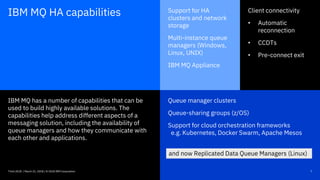
IBM MQ has a number of capabilities that can be
used to build highly available solutions. The
capabilities help address different aspects of a
messaging solution, including the availability of
queue managers and how they communicate with
each other and applications.
IBM MQ HA capabilities
and now Replicated Data Queue Managers (Linux)
Think 2018 / March 21, 2018 / © 2018 IBM Corporation
MQ queue manager clusters
Multiple instances of a named queue can be deployed
into a cluster
Cluster workload management routine distributes
messages between the instances
Benefits:
 Service remains available even if a queue manager
fails
 Workload balancing between instances
Used by most customers who operate critical services
at scale
Up to 1000s of cluster members
Available on all supported MQ platforms
Think 2018 / March 21, 2018 / © 2018 IBM Corporation
cluster
App
8
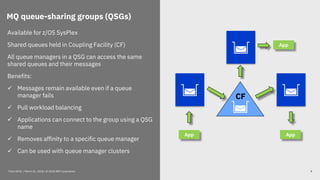
MQ queue-sharing groups (QSGs)
Available for z/OS SysPlex
Shared queues held in Coupling Facility (CF)
All queue managers in a QSG can access the same
shared queues and their messages
Benefits:
 Messages remain available even if a queue
manager fails
 Pull workload balancing
 Applications can connect to the group using a QSG
name
 Removes affinity to a specific queue manager
 Can be used with queue manager clusters
Think 2018 / March 21, 2018 / © 2018 IBM Corporation
App
CF
App
App
9
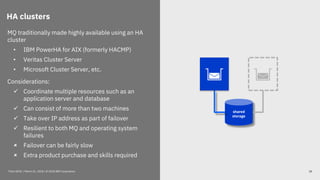
HA clusters
MQ traditionally made highly available using an HA
cluster
• IBM PowerHA for AIX (formerly HACMP)
• Veritas Cluster Server
• Microsoft Cluster Server, etc.
Considerations:
 Coordinate multiple resources such as an
application server and database
 Can consist of more than two machines
 Take over IP address as part of failover
 Resilient to both MQ and operating system
failures
 Failover can be fairly slow
 Extra product purchase and skills required
shared
storage
Think 2018 / March 21, 2018 / © 2018 IBM Corporation 10
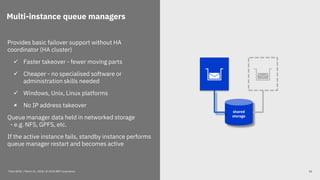
Multi-instance queue managers
Provides basic failover support without HA
coordinator (HA cluster)
 Faster takeover - fewer moving parts
 Cheaper - no specialised software or
administration skills needed
 Windows, Unix, Linux platforms
 No IP address takeover
Queue manager data held in networked storage
- e.g. NFS, GPFS, etc.
If the active instance fails, standby instance performs
queue manager restart and becomes active
shared
storage
Think 2018 / March 21, 2018 / © 2018 IBM Corporation 11
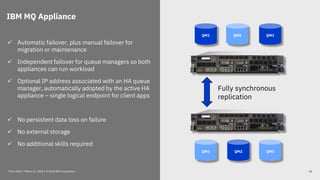
IBM MQ Appliance
 Automatic failover, plus manual failover for
migration or maintenance
 Independent failover for queue managers so both
appliances can run workload
 Optional IP address associated with an HA queue
manager, automatically adopted by the active HA
appliance – single logical endpoint for client apps
 No persistent data loss on failure
 No external storage
 No additional skills required
QM1 QM2 QM3
QM1 QM3QM2
Fully synchronous
replication
Think 2018 / March 21, 2018 / © 2018 IBM Corporation 12
MQ HA Group
Node 2 Node 3Node 1
Synchronous data replication
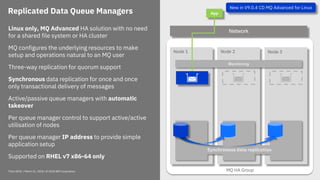
Replicated Data Queue Managers
Linux only, MQ Advanced HA solution with no need
for a shared file system or HA cluster
MQ configures the underlying resources to make
setup and operations natural to an MQ user
Three-way replication for quorum support
Synchronous data replication for once and once
only transactional delivery of messages
Active/passive queue managers with automatic
takeover
Per queue manager control to support active/active
utilisation of nodes
Per queue manager IP address to provide simple
application setup
Supported on RHEL v7 x86-64 only
Monitoring
App
Network
New in V9.0.4 CD MQ Advanced for Linux
Think 2018 / March 21, 2018 / © 2018 IBM Corporation
MQ HA Group
Node 2 Node 3Node 1
Synchronous data replication
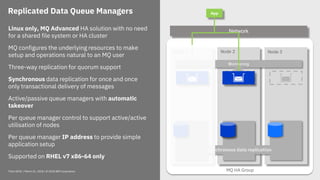
Replicated Data Queue Managers
Monitoring
App
NetworkLinux only, MQ Advanced HA solution with no need
for a shared file system or HA cluster
MQ configures the underlying resources to make
setup and operations natural to an MQ user
Three-way replication for quorum support
Synchronous data replication for once and once
only transactional delivery of messages
Active/passive queue managers with automatic
takeover
Per queue manager control to support active/active
utilisation of nodes
Per queue manager IP address to provide simple
application setup
Supported on RHEL v7 x86-64 only
Think 2018 / March 21, 2018 / © 2018 IBM Corporation
MQ HA Group
Node 2 Node 3Node 1
Replicated Data Queue Managers
QM 1
App
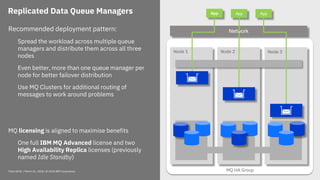
NetworkRecommended deployment pattern:
Spread the workload across multiple queue
managers and distribute them across all three
nodes
Even better, more than one queue manager per
node for better failover distribution
Use MQ Clusters for additional routing of
messages to work around problems
MQ licensing is aligned to maximise benefits
One full IBM MQ Advanced license and two
High Availability Replica licenses (previously
named Idle Standby)
App App
Think 2018 / March 21, 2018 / © 2018 IBM Corporation
Think 2018 / March 21, 2018 / © 2018 IBM Corporation 16
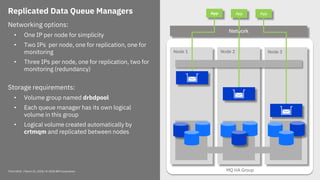
Replicated Data Queue Managers
Networking options:
• One IP per node for simplicity
• Two IPs per node, one for replication, one for
monitoring
• Three IPs per node, one for replication, two for
monitoring (redundancy)
Storage requirements:
• Volume group named drbdpool
• Each queue manager has its own logical
volume in this group
• Logical volume created automatically by
crtmqm and replicated between nodes
MQ HA Group
Node 2 Node 3Node 1
QM 1
App
Network
App App
Think 2018 / March 21, 2018 / © 2018 IBM Corporation 17
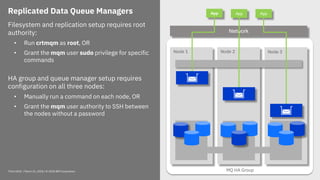
Replicated Data Queue Managers
Filesystem and replication setup requires root
authority:
• Run crtmqm as root, OR
• Grant the mqm user sudo privilege for specific
commands
HA group and queue manager setup requires
configuration on all three nodes:
• Manually run a command on each node, OR
• Grant the mqm user authority to SSH between
the nodes without a password
MQ HA Group
Node 2 Node 3Node 1
QM 1
App
Network
App App
Configuring an RDQM HA group
18Think 2018 / March 21, 2018 / © 2018 IBM Corporation
1. Install MQ Advanced and its prerequisites
2. Create the drbdpool volume group
3. Configure your network and firewall
4. Define the group members in rdqm.ini
5. Optionally, configure sudo and passwordless SSH
6. Configure the group using rdqmadm
Node:
HA_Primary=192.168.101.10
Node:
HA_Primary=192.168.101.11
Node:
HA_Primary=192.168.101.12
[rdqmdemo@mqhavm10-adm ~]$ rdqmadm -c
Configuring the replicated data subsystem.
The replicated data subsystem has been configured on this node.
The replicated data subsystem has been configured on 'mqhavm11-adm'.
The replicated data subsystem has been configured on 'mqhavm12-adm'.
The replicated data subsystem configuration is complete.
Command '/opt/mqm/bin/rdqmadm' run with sudo.
/var/mqm/rdqm.ini
Creating an RDQM HA queue manager
19Think 2018 / March 21, 2018 / © 2018 IBM Corporation
To create a queue manager use the crtmqm command with the -sx option.
[rdqmdemo@mqhavm10-adm ~]$ crtmqm -sx -fs 128M QM1
Creating replicated data queue manager configuration.
Secondary queue manager created on 'mqhavm11-adm'.
Secondary queue manager created on 'mqhavm12-adm'.
IBM MQ queue manager created.
Directory '/var/mqm/vols/qm1/qmgr/qm1' created.
The queue manager is associated with installation 'Installation1'.
Creating or replacing default objects for queue manager 'QM1'.
Default objects statistics : 84 created. 0 replaced. 0 failed.
Completing setup.
Setup completed.
Enabling replicated data queue manager.
Replicated data queue manager enabled.
Command '/opt/mqm/bin/crtmqm' run with sudo.
Configuring a floating IP address
20Think 2018 / March 21, 2018 / © 2018 IBM Corporation
Use the rdqmint command to define a floating IP address.
Note that a secondary IP address has been configured for the named interface.
[rdqmdemo@mqhavm10-adm ~]$ rdqmint -m QM1 -a -f 9.20.123.44 -l eno83889152
The floating IP address '9.20.123.44' has been added to queue manager 'QM1'.
[rdqmdemo@mqhavm10-adm ~]$ ip address | grep eno83889152
4: eno83889152: <BROADCAST,MULTICAST,UP,LOWER_UP> mtu 1500 qdisc mq state UP
inet 9.20.123.43/24 brd 9.20.123.255 scope global eno83889152
inet 9.20.123.44/24 brd 9.20.123.255 scope global secondary eno83889152
Display RDQM HA status
21Think 2018 / March 21, 2018 / © 2018 IBM Corporation
Display the status of an RDQM queue manager using the rdqmstatus command.
[rdqmdemo@mqhavm10-adm ~]$ rdqmstatus -m QM1
Node: mqhavm10-adm
Queue manager status: Running
CPU: 0.00%
Memory: 178MB
Queue manager file system: 50MB used, 0.2GB allocated [42%]
HA role: Primary
HA status: Normal
HA control: Enabled
HA current location: This node
HA preferred location: This node
HA floating IP interface: eno83889152
HA floating IP address: 9.20.123.44
Node: mqhavm11-adm
HA status: Normal
...
Node 2Node 1
data replication
Replicated Data Queue Managers App
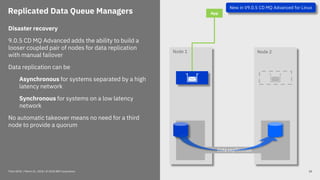
Disaster recovery
9.0.5 CD MQ Advanced adds the ability to build a
looser coupled pair of nodes for data replication
with manual failover
Data replication can be
Asynchronous for systems separated by a high
latency network
Synchronous for systems on a low latency
network
No automatic takeover means no need for a third
node to provide a quorum
Think 2018 / March 21, 2018 / © 2018 IBM Corporation
New in V9.0.5 CD MQ Advanced for Linux
22
Creating an RDQM DR queue manager
23Think 2018 / March 21, 2018 / © 2018 IBM Corporation
To create a queue manager use the crtmqm command, specifying:
• The recovery role of the RDQM node (primary or secondary)
• The replication type (synchronous or asynchronous)
• The local replication IP address
• The remote replication IP address
• The name of the remote RDQM node
• The port to use for replication
Creating an RDQM DR queue manager
24Think 2018 / March 21, 2018 / © 2018 IBM Corporation
To create a queue manager use the crtmqm command
[rdqmdemo@mqhavm10-adm ~]$ crtmqm -rr p -rt a -rl 9.20.123.42 -ri 9.20.123.45
-rn mqhavm11-adm -rp 7001 QM2
Creating replicated data queue manager configuration.
IBM MQ queue manager created.
Directory '/var/mqm/vols/qm2/qmgr/qm2' created.
The queue manager is associated with installation 'Installation1'.
Creating or replacing default objects for queue manager 'QM2'.
Default objects statistics : 84 created. 0 replaced. 0 failed.
Completing setup.
Setup completed.
Issue the following command on node 'mqhavm11-adm' to create the DR secondary
queue manager:
crtmqm -rr s -rt a -rl 9.20.123.45 -ri 9.20.123.42 -rn mqhavm10-adm -rp 7001 QM2
Command '/opt/mqm/bin/crtmqm' run with sudo.
Display RDQM DR status
25Think 2018 / March 21, 2018 / © 2018 IBM Corporation
Display the status of an RDQM queue manager using the rdqmstatus command.
[rdqmdemo@mqhavm10-adm ~]$ rdqmstatus -m QM2
Queue manager status: Ended immediately
Queue manager file system: 58MB used, 2.9GB allocated [2%]
DR role: Primary
DR status: Normal
DR type: Asynchronous
DR port: 7001
DR local IP address: 9.20.123.42
DR remote IP address: 9.20.123.45
Manual DR failover
26Think 2018 / March 21, 2018 / © 2018 IBM Corporation
To initiate manual DR failover use the rdqmdr command.
1. If the original primary node is active make it a DR secondary
2. Convert the recovery node to a DR primary
Reverse the order to failback.
[rdqmdemo@mqhavm10-adm ~]$ rdqmdr -m QM2 -s
Queue manager 'QM2' has been made the DR secondary on this node.
[rdqmdemo@mqhavm11-adm ~]$ rdqmdr -m QM2 -p
Queue manager 'QM2' has been made the DR primary on this node.
Thank you
Think 2018 / March 21, 2018 / © 2018 IBM Corporation
Jamie Squibb
IBM MQ Development
jamie_squibb@uk.ibm.com
Helpshape
thefutureof
MQ… ibm.biz/MQ-Customer-Survey
Think 2018 / March 21, 2018 / © 2018 IBM Corporation

IBM Think 2018: IBM MQ High Availability

  • 1.
    Think 2018 /March 21, 2018 / © 2018 IBM Corporation High Availability is easier than ever with IBM MQ Jamie Squibb IBM MQ Development
  • 2.
    Notices and disclaimers 2 ©2018 International Business Machines Corporation. No part of this document may be reproduced or transmitted in any form without written permission from IBM. U.S. Government Users Restricted Rights — use, duplication or disclosure restricted by GSA ADP Schedule Contract with IBM. Information in these presentations (including information relating to products that have not yet been announced by IBM) has been reviewed for accuracy as of the date of initial publication and could include unintentional technical or typographical errors. IBM shall have no responsibility to update this information. This document is distributed “as is” without any warranty, either express or implied. In no event, shall IBM be liable for any damage arising from the use of this information, including but not limited to, loss of data, business interruption, loss of profit or loss of opportunity. IBM products and services are warranted per the terms and conditions of the agreements under which they are provided. IBM products are manufactured from new parts or new and used parts. In some cases, a product may not be new and may have been previously installed. Regardless, our warranty terms apply.” Any statements regarding IBM's future direction, intent or product plans are subject to change or withdrawal without notice. Performance data contained herein was generally obtained in a controlled, isolated environments. Customer examples are presented as illustrations of how those customers have used IBM products and the results they may have achieved. Actual performance, cost, savings or other results in other operating environments may vary. References in this document to IBM products, programs, or services does not imply that IBM intends to make such products, programs or services available in all countries in which IBM operates or does business. Workshops, sessions and associated materials may have been prepared by independent session speakers, and do not necessarily reflect the views of IBM. All materials and discussions are provided for informational purposes only, and are neither intended to, nor shall constitute legal or other guidance or advice to any individual participant or their specific situation. It is the customer’s responsibility to insure its own compliance with legal requirements and to obtain advice of competent legal counsel as to the identification and interpretation of any relevant laws and regulatory requirements that may affect the customer’s business and any actions the customer may need to take to comply with such laws. IBM does not provide legal advice or represent or warrant that its services or products will ensure that the customer follows any law. Think 2018 / March 21, 2018 / © 2018 IBM Corporation
  • 3.
    Notices and disclaimers continued 3Think2018 / March 21, 2018 / © 2018 IBM Corporation Information concerning non-IBM products was obtained from the suppliers of those products, their published announcements or other publicly available sources. IBM has not tested those products about this publication and cannot confirm the accuracy of performance, compatibility or any other claims related to non-IBM products. Questions on the capabilities of non-IBM products should be addressed to the suppliers of those products. IBM does not warrant the quality of any third-party products, or the ability of any such third-party products to interoperate with IBM’s products. IBM expressly disclaims all warranties, expressed or implied, including but not limited to, the implied warranties of merchantability and fitness for a purpose. The provision of the information contained herein is not intended to, and does not, grant any right or license under any IBM patents, copyrights, trademarks or other intellectual property right. IBM, the IBM logo, ibm.com and [names of other referenced IBM products and services used in the presentation] are trademarks of International Business Machines Corporation, registered in many jurisdictions worldwide. Other product and service names might be trademarks of IBM or other companies. A current list of IBM trademarks is available on the Web at "Copyright and trademark information" at: www.ibm.com/legal/copytrade.shtml.
  • 4.
    HA solutions employ: •Redundancy to eliminate single points of failure using high speed failover. • Dynamic routing to redistribute work in response to failures. 5Think 2018 / DOC ID / Month XX, 2018 / © 2018 IBM Corporation Applications usually depend upon multiple services. It is important to consider the complete workflow. Technology is not a substitute for good planning, system management and testing. Aspects to consider: • Power supply – UPS, dual supplies • System hardware & disk storage – RAID, SAN • Networking connectivity – adapters, cables, switches, routers, DNS • Application environment – operating system, app server/container, application • External dependencies High Availability (HA) Think 2018 / March 21, 2018 / © 2018 IBM Corporation
  • 5.
    How quickly must failoveroccur? Is the loss, or temporary inaccessibility, of messages acceptable? How do applications connect to the messaging infrastructure? How do messages flow through the messaging infrastructure? Can messages be queued or must the complete workflow remain available? Can messages be routed elsewhere or is sequence important? Are there affinities to messaging resources? What happens if a messaging application fails? Can another instance takeover, or must it be restarted? 6Think 2018 / March 21, 2018 / © 2018 IBM Corporation High availability and messaging
  • 6.
    Queue manager clusters Queue-sharinggroups (z/OS) Support for cloud orchestration frameworks e.g. Kubernetes, Docker Swarm, Apache Mesos 7Think 2018 / DOC ID / Month XX, 2018 / © 2018 IBM Corporation Client connectivity • Automatic reconnection • CCDTs • Pre-connect exit Support for HA clusters and network storage Multi-instance queue managers (Windows, Linux, UNIX) IBM MQ Appliance IBM MQ has a number of capabilities that can be used to build highly available solutions. The capabilities help address different aspects of a messaging solution, including the availability of queue managers and how they communicate with each other and applications. IBM MQ HA capabilities and now Replicated Data Queue Managers (Linux) Think 2018 / March 21, 2018 / © 2018 IBM Corporation
  • 7.
    MQ queue managerclusters Multiple instances of a named queue can be deployed into a cluster Cluster workload management routine distributes messages between the instances Benefits:  Service remains available even if a queue manager fails  Workload balancing between instances Used by most customers who operate critical services at scale Up to 1000s of cluster members Available on all supported MQ platforms Think 2018 / March 21, 2018 / © 2018 IBM Corporation cluster App 8
  • 8.
    MQ queue-sharing groups(QSGs) Available for z/OS SysPlex Shared queues held in Coupling Facility (CF) All queue managers in a QSG can access the same shared queues and their messages Benefits:  Messages remain available even if a queue manager fails  Pull workload balancing  Applications can connect to the group using a QSG name  Removes affinity to a specific queue manager  Can be used with queue manager clusters Think 2018 / March 21, 2018 / © 2018 IBM Corporation App CF App App 9
  • 9.
    HA clusters MQ traditionallymade highly available using an HA cluster • IBM PowerHA for AIX (formerly HACMP) • Veritas Cluster Server • Microsoft Cluster Server, etc. Considerations:  Coordinate multiple resources such as an application server and database  Can consist of more than two machines  Take over IP address as part of failover  Resilient to both MQ and operating system failures  Failover can be fairly slow  Extra product purchase and skills required shared storage Think 2018 / March 21, 2018 / © 2018 IBM Corporation 10
  • 10.
    Multi-instance queue managers Providesbasic failover support without HA coordinator (HA cluster)  Faster takeover - fewer moving parts  Cheaper - no specialised software or administration skills needed  Windows, Unix, Linux platforms  No IP address takeover Queue manager data held in networked storage - e.g. NFS, GPFS, etc. If the active instance fails, standby instance performs queue manager restart and becomes active shared storage Think 2018 / March 21, 2018 / © 2018 IBM Corporation 11
  • 11.
    IBM MQ Appliance Automatic failover, plus manual failover for migration or maintenance  Independent failover for queue managers so both appliances can run workload  Optional IP address associated with an HA queue manager, automatically adopted by the active HA appliance – single logical endpoint for client apps  No persistent data loss on failure  No external storage  No additional skills required QM1 QM2 QM3 QM1 QM3QM2 Fully synchronous replication Think 2018 / March 21, 2018 / © 2018 IBM Corporation 12
  • 12.
    MQ HA Group Node2 Node 3Node 1 Synchronous data replication Replicated Data Queue Managers Linux only, MQ Advanced HA solution with no need for a shared file system or HA cluster MQ configures the underlying resources to make setup and operations natural to an MQ user Three-way replication for quorum support Synchronous data replication for once and once only transactional delivery of messages Active/passive queue managers with automatic takeover Per queue manager control to support active/active utilisation of nodes Per queue manager IP address to provide simple application setup Supported on RHEL v7 x86-64 only Monitoring App Network New in V9.0.4 CD MQ Advanced for Linux Think 2018 / March 21, 2018 / © 2018 IBM Corporation
  • 13.
    MQ HA Group Node2 Node 3Node 1 Synchronous data replication Replicated Data Queue Managers Monitoring App NetworkLinux only, MQ Advanced HA solution with no need for a shared file system or HA cluster MQ configures the underlying resources to make setup and operations natural to an MQ user Three-way replication for quorum support Synchronous data replication for once and once only transactional delivery of messages Active/passive queue managers with automatic takeover Per queue manager control to support active/active utilisation of nodes Per queue manager IP address to provide simple application setup Supported on RHEL v7 x86-64 only Think 2018 / March 21, 2018 / © 2018 IBM Corporation
  • 14.
    MQ HA Group Node2 Node 3Node 1 Replicated Data Queue Managers QM 1 App NetworkRecommended deployment pattern: Spread the workload across multiple queue managers and distribute them across all three nodes Even better, more than one queue manager per node for better failover distribution Use MQ Clusters for additional routing of messages to work around problems MQ licensing is aligned to maximise benefits One full IBM MQ Advanced license and two High Availability Replica licenses (previously named Idle Standby) App App Think 2018 / March 21, 2018 / © 2018 IBM Corporation
  • 15.
    Think 2018 /March 21, 2018 / © 2018 IBM Corporation 16 Replicated Data Queue Managers Networking options: • One IP per node for simplicity • Two IPs per node, one for replication, one for monitoring • Three IPs per node, one for replication, two for monitoring (redundancy) Storage requirements: • Volume group named drbdpool • Each queue manager has its own logical volume in this group • Logical volume created automatically by crtmqm and replicated between nodes MQ HA Group Node 2 Node 3Node 1 QM 1 App Network App App
  • 16.
    Think 2018 /March 21, 2018 / © 2018 IBM Corporation 17 Replicated Data Queue Managers Filesystem and replication setup requires root authority: • Run crtmqm as root, OR • Grant the mqm user sudo privilege for specific commands HA group and queue manager setup requires configuration on all three nodes: • Manually run a command on each node, OR • Grant the mqm user authority to SSH between the nodes without a password MQ HA Group Node 2 Node 3Node 1 QM 1 App Network App App
  • 17.
    Configuring an RDQMHA group 18Think 2018 / March 21, 2018 / © 2018 IBM Corporation 1. Install MQ Advanced and its prerequisites 2. Create the drbdpool volume group 3. Configure your network and firewall 4. Define the group members in rdqm.ini 5. Optionally, configure sudo and passwordless SSH 6. Configure the group using rdqmadm Node: HA_Primary=192.168.101.10 Node: HA_Primary=192.168.101.11 Node: HA_Primary=192.168.101.12 [rdqmdemo@mqhavm10-adm ~]$ rdqmadm -c Configuring the replicated data subsystem. The replicated data subsystem has been configured on this node. The replicated data subsystem has been configured on 'mqhavm11-adm'. The replicated data subsystem has been configured on 'mqhavm12-adm'. The replicated data subsystem configuration is complete. Command '/opt/mqm/bin/rdqmadm' run with sudo. /var/mqm/rdqm.ini
  • 18.
    Creating an RDQMHA queue manager 19Think 2018 / March 21, 2018 / © 2018 IBM Corporation To create a queue manager use the crtmqm command with the -sx option. [rdqmdemo@mqhavm10-adm ~]$ crtmqm -sx -fs 128M QM1 Creating replicated data queue manager configuration. Secondary queue manager created on 'mqhavm11-adm'. Secondary queue manager created on 'mqhavm12-adm'. IBM MQ queue manager created. Directory '/var/mqm/vols/qm1/qmgr/qm1' created. The queue manager is associated with installation 'Installation1'. Creating or replacing default objects for queue manager 'QM1'. Default objects statistics : 84 created. 0 replaced. 0 failed. Completing setup. Setup completed. Enabling replicated data queue manager. Replicated data queue manager enabled. Command '/opt/mqm/bin/crtmqm' run with sudo.
  • 19.
    Configuring a floatingIP address 20Think 2018 / March 21, 2018 / © 2018 IBM Corporation Use the rdqmint command to define a floating IP address. Note that a secondary IP address has been configured for the named interface. [rdqmdemo@mqhavm10-adm ~]$ rdqmint -m QM1 -a -f 9.20.123.44 -l eno83889152 The floating IP address '9.20.123.44' has been added to queue manager 'QM1'. [rdqmdemo@mqhavm10-adm ~]$ ip address | grep eno83889152 4: eno83889152: <BROADCAST,MULTICAST,UP,LOWER_UP> mtu 1500 qdisc mq state UP inet 9.20.123.43/24 brd 9.20.123.255 scope global eno83889152 inet 9.20.123.44/24 brd 9.20.123.255 scope global secondary eno83889152
  • 20.
    Display RDQM HAstatus 21Think 2018 / March 21, 2018 / © 2018 IBM Corporation Display the status of an RDQM queue manager using the rdqmstatus command. [rdqmdemo@mqhavm10-adm ~]$ rdqmstatus -m QM1 Node: mqhavm10-adm Queue manager status: Running CPU: 0.00% Memory: 178MB Queue manager file system: 50MB used, 0.2GB allocated [42%] HA role: Primary HA status: Normal HA control: Enabled HA current location: This node HA preferred location: This node HA floating IP interface: eno83889152 HA floating IP address: 9.20.123.44 Node: mqhavm11-adm HA status: Normal ...
  • 21.
    Node 2Node 1 datareplication Replicated Data Queue Managers App Disaster recovery 9.0.5 CD MQ Advanced adds the ability to build a looser coupled pair of nodes for data replication with manual failover Data replication can be Asynchronous for systems separated by a high latency network Synchronous for systems on a low latency network No automatic takeover means no need for a third node to provide a quorum Think 2018 / March 21, 2018 / © 2018 IBM Corporation New in V9.0.5 CD MQ Advanced for Linux 22
  • 22.
    Creating an RDQMDR queue manager 23Think 2018 / March 21, 2018 / © 2018 IBM Corporation To create a queue manager use the crtmqm command, specifying: • The recovery role of the RDQM node (primary or secondary) • The replication type (synchronous or asynchronous) • The local replication IP address • The remote replication IP address • The name of the remote RDQM node • The port to use for replication
  • 23.
    Creating an RDQMDR queue manager 24Think 2018 / March 21, 2018 / © 2018 IBM Corporation To create a queue manager use the crtmqm command [rdqmdemo@mqhavm10-adm ~]$ crtmqm -rr p -rt a -rl 9.20.123.42 -ri 9.20.123.45 -rn mqhavm11-adm -rp 7001 QM2 Creating replicated data queue manager configuration. IBM MQ queue manager created. Directory '/var/mqm/vols/qm2/qmgr/qm2' created. The queue manager is associated with installation 'Installation1'. Creating or replacing default objects for queue manager 'QM2'. Default objects statistics : 84 created. 0 replaced. 0 failed. Completing setup. Setup completed. Issue the following command on node 'mqhavm11-adm' to create the DR secondary queue manager: crtmqm -rr s -rt a -rl 9.20.123.45 -ri 9.20.123.42 -rn mqhavm10-adm -rp 7001 QM2 Command '/opt/mqm/bin/crtmqm' run with sudo.
  • 24.
    Display RDQM DRstatus 25Think 2018 / March 21, 2018 / © 2018 IBM Corporation Display the status of an RDQM queue manager using the rdqmstatus command. [rdqmdemo@mqhavm10-adm ~]$ rdqmstatus -m QM2 Queue manager status: Ended immediately Queue manager file system: 58MB used, 2.9GB allocated [2%] DR role: Primary DR status: Normal DR type: Asynchronous DR port: 7001 DR local IP address: 9.20.123.42 DR remote IP address: 9.20.123.45
  • 25.
    Manual DR failover 26Think2018 / March 21, 2018 / © 2018 IBM Corporation To initiate manual DR failover use the rdqmdr command. 1. If the original primary node is active make it a DR secondary 2. Convert the recovery node to a DR primary Reverse the order to failback. [rdqmdemo@mqhavm10-adm ~]$ rdqmdr -m QM2 -s Queue manager 'QM2' has been made the DR secondary on this node. [rdqmdemo@mqhavm11-adm ~]$ rdqmdr -m QM2 -p Queue manager 'QM2' has been made the DR primary on this node.
  • 26.
    Thank you Think 2018/ March 21, 2018 / © 2018 IBM Corporation Jamie Squibb IBM MQ Development jamie_squibb@uk.ibm.com Helpshape thefutureof MQ… ibm.biz/MQ-Customer-Survey
  • 27.
    Think 2018 /March 21, 2018 / © 2018 IBM Corporation