










8 Simple Tips to
Siphon SEO VALUE
From GOOGLE+
Hi there.
This presentation is an excerpt
from our complete ebook, A
Practical Guide to Improving SEO
With Google+.
To learn more about whether
Google+ is worth your time, how
exactly Google+ can enhance your
SEO, and what types of content to
create and share to Google+ …
You should download the
complete (free!) guide.
Download Your Free Ebook
Now, on to the tips ...
The easiest and most effective thing you can do to get value out of
your Google+ page is to regularly publish the great content you’re
(hopefully) already creating to it. Remember: sharing content to
Google+ helps Google index more of your content faster, and
ultimately gives it a greater chance of getting discovered by your
prospects. That’s why our very first optimization tip is …
HOW TO OPTIMIZE YOUR GOOGLE+ PAGE &
POSTS.
1. PUBLISH TO YOUR GOOGLE+
PAGE WHAT YOU’RE
ALREADY PUBLISHING TO
OTHER SOCIAL CHANNELS.
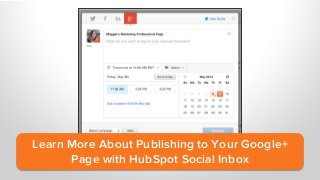
Learn More About
Social Inbox
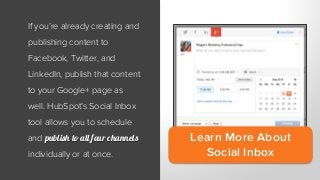
If you’re already creating and
publishing content to
Facebook, Twitter, and
LinkedIn, publish that content
to your Google+ page as
well. HubSpot’s Social Inbox
tool allows you to schedule
and publish to all four channels
individually or at once.
2. CLAIM YOUR PAGE’S
CUSTOM, BRANDED URL.
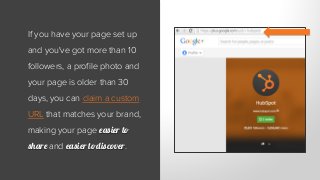
If you have your page set up
and you've got more than 10
followers, a profile photo and
your page is older than 30
days, you can claim a custom
URL that matches your brand,
making your page easier to
share and easier to discover.
3. LINK YOUR WEBSITE TO YOUR
GOOGLE+ PAGE.
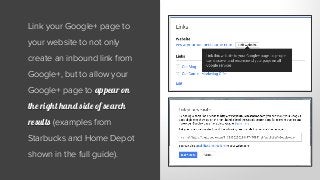
Link your Google+ page to
your website to not only
create an inbound link from
Google+, but to allow your
Google+ page to appear on
the right hand side of search
results (examples from
Starbucks and Home Depot
shown in the full guide).
4. BULK UP YOUR PAGE’S
“LINKS” SECTION.
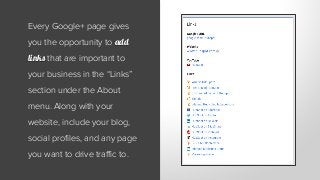
Every Google+ page gives
you the opportunity to add
links that are important to
your business in the “Links”
section under the About
menu. Along with your
website, include your blog,
social profiles, and any page
you want to drive traffic to.
5. GET YOUR “STORY”
STRAIGHT.
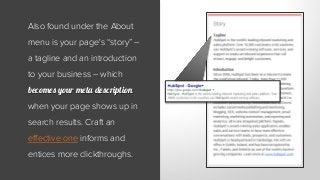
Also found under the About
menu is your page's “story” –
a tagline and an introduction
to your business – which
becomes your meta description
when your page shows up in
search results. Craft an
effective one informs and
entices more clickthroughs.
6. OPTIMIZE THE FIRST 45-50
CHARACTERS OF YOUR
POSTS.
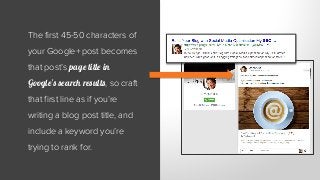
The first 45-50 characters of
your Google+ post becomes
that post’s page title in
Google’s search results, so craft
that first line as if you’re
writing a blog post title, and
include a keyword you’re
trying to rank for.
7. DON’T SKIMP ON THE
VISUALS. INCLUDE PHOTOS,
VIDEOS, OR GIFS.
At HubSpot, we may not
always be sure what we’re
posting will incite the
interaction we want, but one
thing we’re sure of is we’re
better off posting visuals
(images, links with
thumbnails, videos, GIFs)
versus a plain text update.
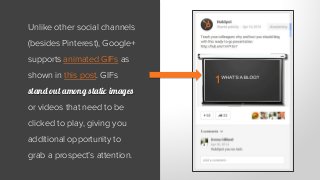
Unlike other social channels
(besides Pinterest), Google+
supports animated GIFs as
shown in this post. GIFs
stand out among static images
or videos that need to be
clicked to play, giving you
additional opportunity to
grab a prospect’s attention.
8. HAVE YOUR BLOG AUTHORS
SIGN UP FOR GOOGLE+
AUTHORSHIP.
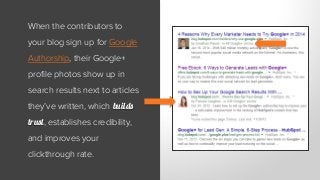
When the contributors to
your blog sign up for Google
Authorship, their Google+
profile photos show up in
search results next to articles
they’ve written, which builds
trust, establishes credibility,
and improves your
clickthrough rate.
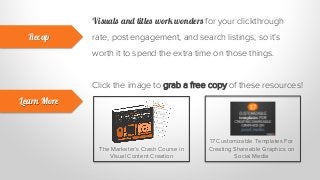
Visuals and titles work wonders for your clickthrough
rate, post engagement, and search listings, so it’s
worth it to spend the extra time on those things.
Recap
Learn More
Click the image to grab a free copy of these resources!
The Marketer’s Crash Course in
Visual Content Creation
17 Customizable Templates For
Creating Shareable Graphics on
Social Media
Created by @shannopop
Want a free copy of the
complete guide?
http://hub.am/Tnv2mM
Learn More About Publishing to Your Google+
Page with HubSpot Social Inbox
What is ?
All-in-one inbound marketing software.
Get a Demo Video Overview
Get a Free Marketing Assessment

8 Tips for Optimizing Your Google+ Page & Posts to Boost SEO

  • 1.
    8 Simple Tipsto Siphon SEO VALUE From GOOGLE+
  • 2.
    Hi there. This presentationis an excerpt from our complete ebook, A Practical Guide to Improving SEO With Google+.
  • 3.
    To learn moreabout whether Google+ is worth your time, how exactly Google+ can enhance your SEO, and what types of content to create and share to Google+ …
  • 4.
    You should downloadthe complete (free!) guide.
  • 5.
  • 6.
    Now, on tothe tips ...
  • 7.
    The easiest andmost effective thing you can do to get value out of your Google+ page is to regularly publish the great content you’re (hopefully) already creating to it. Remember: sharing content to Google+ helps Google index more of your content faster, and ultimately gives it a greater chance of getting discovered by your prospects. That’s why our very first optimization tip is … HOW TO OPTIMIZE YOUR GOOGLE+ PAGE & POSTS.
  • 8.
    1. PUBLISH TOYOUR GOOGLE+ PAGE WHAT YOU’RE ALREADY PUBLISHING TO OTHER SOCIAL CHANNELS.
  • 9.
    Learn More About SocialInbox If you’re already creating and publishing content to Facebook, Twitter, and LinkedIn, publish that content to your Google+ page as well. HubSpot’s Social Inbox tool allows you to schedule and publish to all four channels individually or at once.
  • 10.
    2. CLAIM YOURPAGE’S CUSTOM, BRANDED URL.
  • 11.
    If you haveyour page set up and you've got more than 10 followers, a profile photo and your page is older than 30 days, you can claim a custom URL that matches your brand, making your page easier to share and easier to discover.
  • 12.
    3. LINK YOURWEBSITE TO YOUR GOOGLE+ PAGE.
  • 13.
    Link your Google+page to your website to not only create an inbound link from Google+, but to allow your Google+ page to appear on the right hand side of search results (examples from Starbucks and Home Depot shown in the full guide).
  • 14.
    4. BULK UPYOUR PAGE’S “LINKS” SECTION.
  • 15.
    Every Google+ pagegives you the opportunity to add links that are important to your business in the “Links” section under the About menu. Along with your website, include your blog, social profiles, and any page you want to drive traffic to.
  • 16.
    5. GET YOUR“STORY” STRAIGHT.
  • 17.
    Also found underthe About menu is your page's “story” – a tagline and an introduction to your business – which becomes your meta description when your page shows up in search results. Craft an effective one informs and entices more clickthroughs.
  • 18.
    6. OPTIMIZE THEFIRST 45-50 CHARACTERS OF YOUR POSTS.
  • 19.
    The first 45-50characters of your Google+ post becomes that post’s page title in Google’s search results, so craft that first line as if you’re writing a blog post title, and include a keyword you’re trying to rank for.
  • 20.
    7. DON’T SKIMPON THE VISUALS. INCLUDE PHOTOS, VIDEOS, OR GIFS.
  • 21.
    At HubSpot, wemay not always be sure what we’re posting will incite the interaction we want, but one thing we’re sure of is we’re better off posting visuals (images, links with thumbnails, videos, GIFs) versus a plain text update.
  • 22.
    Unlike other socialchannels (besides Pinterest), Google+ supports animated GIFs as shown in this post. GIFs stand out among static images or videos that need to be clicked to play, giving you additional opportunity to grab a prospect’s attention.
  • 23.
    8. HAVE YOURBLOG AUTHORS SIGN UP FOR GOOGLE+ AUTHORSHIP.
  • 24.
    When the contributorsto your blog sign up for Google Authorship, their Google+ profile photos show up in search results next to articles they’ve written, which builds trust, establishes credibility, and improves your clickthrough rate.
  • 25.
    Visuals and titleswork wonders for your clickthrough rate, post engagement, and search listings, so it’s worth it to spend the extra time on those things. Recap Learn More Click the image to grab a free copy of these resources! The Marketer’s Crash Course in Visual Content Creation 17 Customizable Templates For Creating Shareable Graphics on Social Media
  • 26.
  • 27.
    Want a freecopy of the complete guide? http://hub.am/Tnv2mM
  • 28.
    Learn More AboutPublishing to Your Google+ Page with HubSpot Social Inbox
  • 29.
    What is ? All-in-oneinbound marketing software. Get a Demo Video Overview Get a Free Marketing Assessment