Building A Fully Kafka-Based Product As A
Data Scientist
BAADER
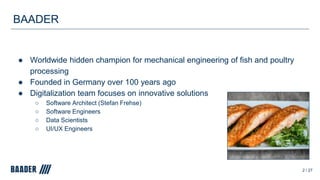
● Worldwide hidden champion for mechanical engineering of fish and poultry
processing
● Founded in Germany over 100 years ago
● Digitalization team focuses on innovative solutions
○ Software Architect (Stefan Frehse)
○ Software Engineers
○ Data Scientists
○ UI/UX Engineers
2 / 27
Content
Transport Manager
Kafka Streams
ksqlDB
Takeaways
3 / 27
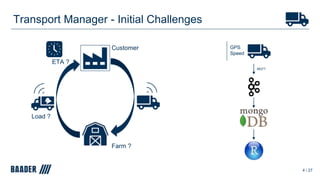
Transport Manager - Initial Challenges
4 / 27
MQTT
Customer GPS
Speed
Farm ?
Load ?
ETA ?
Transport Manager - Data Analytics Solution
5 / 27
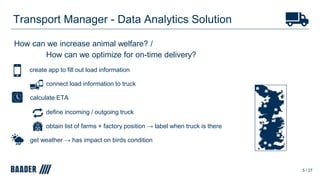
How can we increase animal welfare? /
How can we optimize for on-time delivery?
create app to fill out load information
connect load information to truck
calculate ETA
define incoming / outgoing truck
obtain list of farms + factory position → label when truck is there
get weather → has impact on birds condition
Transport Manager - Application
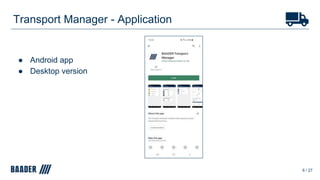
● Android app
● Desktop version
6 / 27
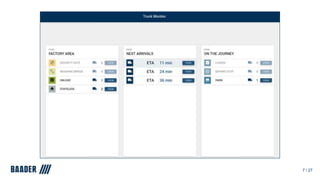
7 / 27
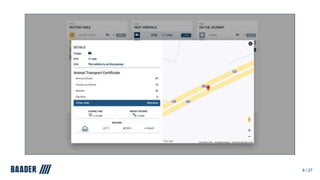
8 / 27
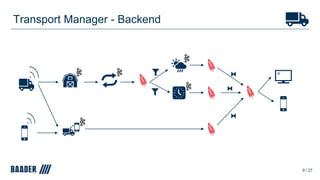
Transport Manager - Backend
9 / 27
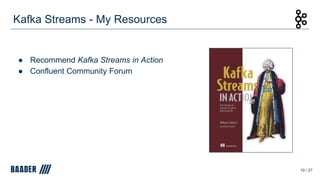
● Recommend Kafka Streams in Action
● Confluent Community Forum
Kafka Streams - My Resources
10 / 27
Kafka Streams - Configuration
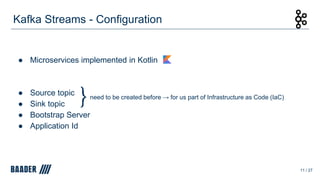
● Microservices implemented in Kotlin
● Source topic
● Sink topic
● Bootstrap Server
● Application Id
11 / 27
need to be created before → for us part of Infrastructure as Code (IaC)
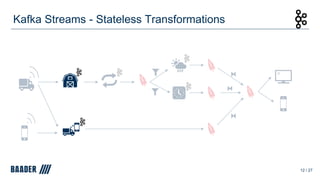
Kafka Streams - Stateless Transformations
12 / 27
Kafka Streams - Stateless Transformations
13 / 27
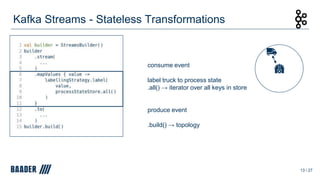
consume event
label truck to process state
.all() → iterator over all keys in store
produce event
.build() → topology
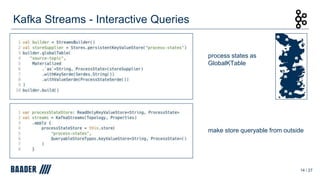
Kafka Streams - Interactive Queries
14 / 27
process states as
GlobalKTable
make store queryable from outside
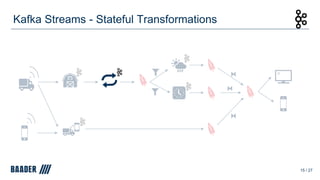
Kafka Streams - Stateful Transformations
15 / 27
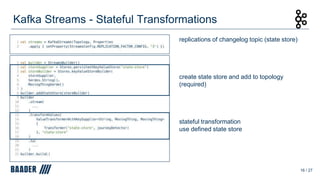
Kafka Streams - Stateful Transformations
16 / 27
replications of changelog topic (state store)
create state store and add to topology
(required)
stateful transformation
use defined state store
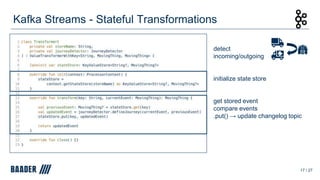
Kafka Streams - Stateful Transformations
17 / 27
detect
incoming/outgoing
initialize state store
get stored event
compare events
.put() → update changelog topic
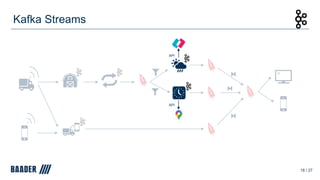
Kafka Streams
18 / 27
API
API
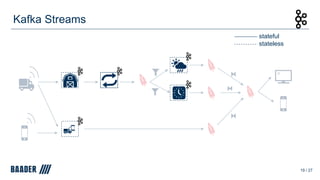
Kafka Streams
19 / 27
stateful
stateless
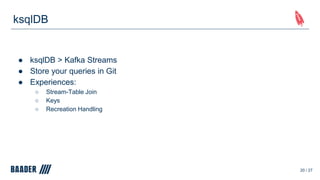
ksqlDB
● ksqlDB > Kafka Streams
● Store your queries in Git
● Experiences:
○ Stream-Table Join
○ Keys
○ Recreation Handling
20 / 27
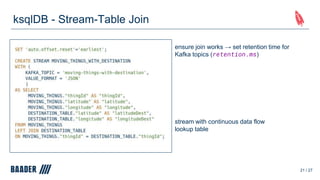
ksqlDB - Stream-Table Join
21 / 27
ensure join works → set retention time for
Kafka topics (retention.ms)
stream with continuous data flow
lookup table
ksqlDB - Keys
22 / 27
ksqlDB < 0.10.0:
rowtime: 2021/05/12 10:30:00.000 Z,
key: [truck_1],
value: {
"thingId" : "truck_1",
"latitude" : 53.61406,
"longitude" : 10.2328,
"speed_m/s" : 16.1
}
rowtime: 2021/05/12 10:30:00.000 Z,
key: [truck_1],
value: {
"latitude" : 53.61406,
"longitude" : 10.2328,
"speed_m/s" : 16.1
}
ksqlDB ≥ 0.10.0:
ksqlDB - Keys
23 / 27
ksqlDB ≥ 0.10.0:
rowtime: 2021/05/12 10:30:00.000 Z,
key: [truck_1],
value: {
"thingId" : "truck_1",
"latitude" : 53.61406,
"longitude" : 10.2328,
"speed_m/s" : 16.1
}
create copy of the key column in the value
More on keys, see Confluent Blog post:
https://www.confluent.io/blog/ksqldb-0-10-updates-
key-columns/
ksqlDB - Recreation Handling
● 0.12.0: update queries via CREATE OR REPLACE
● 0.15.0: drop stream and automatically terminate query via DROP
24 / 27
ksql> DROP STREAM MOVING_THINGS;
Cannot drop MOVING_THINGS.
The following streams and/or tables read from this source: [MOVING_THINGS_WITH_DESTINATION].
You need to drop them before dropping MOVING_THINGS.
ksql> DROP STREAM MOVING_THINGS;
Cannot drop MOVING_THINGS.
The following queries read from this source: [CSAS_MOVING_THINGS_WITH_DESTINATION_265].
The following queries write into this source: [INSERTQUERY_37].
You need to terminate them before dropping MOVING_THINGS.
≥ 0.15.0
Transport Manager - Iterative Process
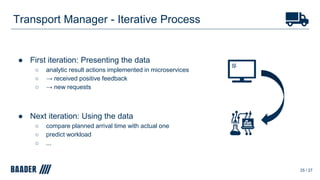
● First iteration: Presenting the data
○ analytic result actions implemented in microservices
○ → received positive feedback
○ → new requests
● Next iteration: Using the data
○ compare planned arrival time with actual one
○ predict workload
○ ...
25 / 27
● ksqlDB > Kafka Streams
○ have an eye on the changelog
● Kafka Streams in Action provides great introduction
● Don’t need to know everything, just start simple
○ improve iteratively
○ once one microservice is developed → several microservices can be as well
● Working with Kafka is fun
Takeaways
26 / 27
Questions?
Patrick Neff
BAADER
patrick.neff@baader.com
patrick-neff
27 / 27

Building a fully Kafka-based product as a Data Scientist | Patrick Neff, BAADER

  • 1.
    Building A FullyKafka-Based Product As A Data Scientist
  • 2.
    BAADER ● Worldwide hiddenchampion for mechanical engineering of fish and poultry processing ● Founded in Germany over 100 years ago ● Digitalization team focuses on innovative solutions ○ Software Architect (Stefan Frehse) ○ Software Engineers ○ Data Scientists ○ UI/UX Engineers 2 / 27
  • 3.
  • 4.
    Transport Manager -Initial Challenges 4 / 27 MQTT Customer GPS Speed Farm ? Load ? ETA ?
  • 5.
    Transport Manager -Data Analytics Solution 5 / 27 How can we increase animal welfare? / How can we optimize for on-time delivery? create app to fill out load information connect load information to truck calculate ETA define incoming / outgoing truck obtain list of farms + factory position → label when truck is there get weather → has impact on birds condition
  • 6.
    Transport Manager -Application ● Android app ● Desktop version 6 / 27
  • 7.
  • 8.
  • 9.
    Transport Manager -Backend 9 / 27
  • 10.
    ● Recommend KafkaStreams in Action ● Confluent Community Forum Kafka Streams - My Resources 10 / 27
  • 11.
    Kafka Streams -Configuration ● Microservices implemented in Kotlin ● Source topic ● Sink topic ● Bootstrap Server ● Application Id 11 / 27 need to be created before → for us part of Infrastructure as Code (IaC)
  • 12.
    Kafka Streams -Stateless Transformations 12 / 27
  • 13.
    Kafka Streams -Stateless Transformations 13 / 27 consume event label truck to process state .all() → iterator over all keys in store produce event .build() → topology
  • 14.
    Kafka Streams -Interactive Queries 14 / 27 process states as GlobalKTable make store queryable from outside
  • 15.
    Kafka Streams -Stateful Transformations 15 / 27
  • 16.
    Kafka Streams -Stateful Transformations 16 / 27 replications of changelog topic (state store) create state store and add to topology (required) stateful transformation use defined state store
  • 17.
    Kafka Streams -Stateful Transformations 17 / 27 detect incoming/outgoing initialize state store get stored event compare events .put() → update changelog topic
  • 18.
  • 19.
    Kafka Streams 19 /27 stateful stateless
  • 20.
    ksqlDB ● ksqlDB >Kafka Streams ● Store your queries in Git ● Experiences: ○ Stream-Table Join ○ Keys ○ Recreation Handling 20 / 27
  • 21.
    ksqlDB - Stream-TableJoin 21 / 27 ensure join works → set retention time for Kafka topics (retention.ms) stream with continuous data flow lookup table
  • 22.
    ksqlDB - Keys 22/ 27 ksqlDB < 0.10.0: rowtime: 2021/05/12 10:30:00.000 Z, key: [truck_1], value: { "thingId" : "truck_1", "latitude" : 53.61406, "longitude" : 10.2328, "speed_m/s" : 16.1 } rowtime: 2021/05/12 10:30:00.000 Z, key: [truck_1], value: { "latitude" : 53.61406, "longitude" : 10.2328, "speed_m/s" : 16.1 } ksqlDB ≥ 0.10.0:
  • 23.
    ksqlDB - Keys 23/ 27 ksqlDB ≥ 0.10.0: rowtime: 2021/05/12 10:30:00.000 Z, key: [truck_1], value: { "thingId" : "truck_1", "latitude" : 53.61406, "longitude" : 10.2328, "speed_m/s" : 16.1 } create copy of the key column in the value More on keys, see Confluent Blog post: https://www.confluent.io/blog/ksqldb-0-10-updates- key-columns/
  • 24.
    ksqlDB - RecreationHandling ● 0.12.0: update queries via CREATE OR REPLACE ● 0.15.0: drop stream and automatically terminate query via DROP 24 / 27 ksql> DROP STREAM MOVING_THINGS; Cannot drop MOVING_THINGS. The following streams and/or tables read from this source: [MOVING_THINGS_WITH_DESTINATION]. You need to drop them before dropping MOVING_THINGS. ksql> DROP STREAM MOVING_THINGS; Cannot drop MOVING_THINGS. The following queries read from this source: [CSAS_MOVING_THINGS_WITH_DESTINATION_265]. The following queries write into this source: [INSERTQUERY_37]. You need to terminate them before dropping MOVING_THINGS. ≥ 0.15.0
  • 25.
    Transport Manager -Iterative Process ● First iteration: Presenting the data ○ analytic result actions implemented in microservices ○ → received positive feedback ○ → new requests ● Next iteration: Using the data ○ compare planned arrival time with actual one ○ predict workload ○ ... 25 / 27
  • 26.
    ● ksqlDB >Kafka Streams ○ have an eye on the changelog ● Kafka Streams in Action provides great introduction ● Don’t need to know everything, just start simple ○ improve iteratively ○ once one microservice is developed → several microservices can be as well ● Working with Kafka is fun Takeaways 26 / 27
  • 27.

Editor's Notes

  • #3 I am a Data Scientist working for the german mechanical engineering company Baader along the entire food value chain using big data and realtime data to develop new products Team of 15 people
  • #5 So what was the starting position -> have a customer that has a poultry processing factory -> trucks drive from the factory, to the farm get loaded and return Problem: in consultation with customer -> we detect several problems -> they do not know the load meaning how many birds are within one truck -> difficult to plan workload -> larriage is too full or too empty -> arriving is scheduled at 1 pm but it actually does at 2 pm -> so can not plan process properly However, the good thing -> trucks are sensored and sending gps and speed data -> send data to kafka running on Confluent Cloud -> MongoDB sink connector -> we tried to answer the following questions
  • #6 question: -> decrease number of dead birds when they arrive at the factory -> on time delivery so that they can improve their processes We came up with the following results and action plan: By clustering methods we were able to We learned that weather This finally leads us to the Transport Manager
  • #8 left column see how many trucks are each process state in the factory are center column see next arrivals with the arrival time right column additional information
  • #9 We flip the side of the coin
  • #10 entire backend no hidden program or software here all icons with the small kaka logo are microservices using kafka Streams -> deployed on kubernetes -> which have just one simple function based on our analytic findings -> easy to monitor -> based on that explain kafka streams frameworks -> in between ksqlDB queries running like filtering and multi join expressions -> from left to right one big stream where information are added pipeline -> infos are added from left to right
  • #11 Before we start, I’d like to talk about my resources Kafka Streams in action -> great book, helped me a lot and gave a great introduction -> covers all you need to know Forum - > to be honest I did not use it much because it is relatively young -> published this year -> believe it is going to be a great and central source -> check it out
  • #12 Aright, let’s dive into it Coded in Kotlin, developed from JetBrains -> can be compiled into Java and vice versa -> simpler than Java - do not need so many lines of code -> great null pointer exceptions -> Coming to the configuration itself, I have to mention there is space for improvement -> do not care about scalability and fault tolerance -> stick to “start simple, improve later” topics needs to be created before we do it by our own service called kafka topic operator -> so kafka topics is part of IaC for us mandatory configs bootstrap server to connect to kafka cluster applicationId -> unique id
  • #13 Lets talk about kafka streams topology frameworks First, I want to talk about stateless transformation -> just need the current event -> no state store required which makes it very simple -> will explain on process state, where we label a truck when it is a certain one -> since the phone truck merging is implemented the same way, we can skip it here
  • #14 Here you can see a part of the topology -> skipped some code for better clarity focus on mapValues the stateless transformation -> takes the current value and inserts it together with a processStateStore into the labelling function labelling strategy -> calculates the distance of the truck to each process states and labels it when it under a certain distance -> .all() exactly returns this iterator -> I know I said no state store processStateStore -> here we query an external database which belongs to the interactive queries framework, explained next slide -> so its not a part of our topology -> mapValues always stateless
  • #15 Interactive queries allows us to query state stores from the outside see last slide have process state in one kafka topic and consume it as a global table -> because then we have all data in all partitions, so we ensure to have full access -> kTable partioned the data -> we need to make a state store out of it -> For that, we always need a store supplier, -> persistent - stores on RocksDB - instead of in memory because its faster when restarting even though it needs more memory -> can be a sessionstore, windowstore, timestampstore -> moreover we need to kustomize state store, here materialized class is needed -> the store method on the stream object exposes the store so that it is queryable -> important this store is always readOnly -> that’s it with a simple mapValues() function as well as an interactive query we can label every truck to a farm or the factory
  • #16 Want to detect incoming / outgoing -> incoming: Driving / before Farm, outgoing Driving / before factory -> this implies we need to compare current event with the previous one, which need to be stored somehow -> This automatically leads us to stateful transformations
  • #17 Stateful require a statestore State Store creates a changelog topic where it stores it updates. -> set replication factor from 1 (default) to 3 to ensure fault tolerance State Store -> we use the store Builder here which also needs again a store supplier -> add to topology transformValues: stateful transformation -> which needs a ValueTransformerWithKeySupplier -> which then needs in turn a ValueTransformerWithKey -> here the Transformer -> using the stateStore and the actual JourneyDetector -> overall this function takes the key and the value and produces a new value -> lets have a closer look to the Transformer
  • #18 ValueTransformer (With Key) Interface: -> close mandatory -> init -> transform: defineJourney does exactly what I explained -> we are done again and could easily compare current with previous events with a state store and the transformValues() to detect incoming and outgoing trucks with transformValues() function
  • #19 The next and two last ones work also with simple stateless transformation -> using an API request to MeteoGroup to obtain weather data -> API to Google Directions API to receive the ETA
  • #20 That’s it. -> simple topologies and configs could implement entire product or microservices with kafka Streams For testing topologies I really recommend the Topology TestDriver -> will not explain in detail here but it is very simple to use So, in between of these microservices there are runnig ksqlDB queries in Confluent Cloud I will wider the focus now to provide tips and share experiences when using ksqlDB
  • #21 try first finding a solution with ksqlDB -> easier just run your query -> very intuitive -> developed very fast: started with 0.6. now 0.15 -> every update brings new great features to solve more problems directly
  • #22 Table retention time -1 Stream möglichst kurz
  • #23 problem: -> either restructure all services -> or find a solution with ksqlDb
  • #25 alredy mentioned that we often need to drop and replace streams -> hightlight updates that helped us much for doing so CREATE OR REPLACE does not work for windows and joins so far DROP you see affected streams which needs to be dropped before automatically terminates query and end of ksqlDB part
  • #26 First -> We detect problems and some action plan -> which is basically just collecting and presenting data -> received very positive feedback -> but also new requests like: Can we see when a truck is coming late? Or can we somehow compute or predict the larriage workload? Next: Using the data -> compare the planned with the acutal arrival time -> notify when trucks arrive at the same time and larriage might be crowded -> some of them are already in progress and I am realliy looking forward to those new features
  • #27 hope to help you with this talk to start working with kafka
  • #28 Question ? -> Feel free to ask -> or connect me on linkedIn