SUCCESSFUL CUSTOMER
ONBOARDING
GEORGIA TSIAMANTA

CUSTOMER SUPPORT AND SUCCESS CONSULTANT
USER ONBOARDING IS THE PROCESS OF
INCREASING THE LIKELIHOOD THAT NEW
USERS BECOME SUCCESSFUL WHEN
ADOPTING YOUR PRODUCT.
Samuel Hulick of UserOnboard.com
THE DEFINITION
THE CHALLENGE
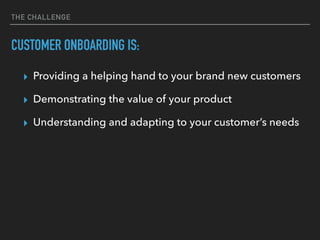
CUSTOMER ONBOARDING IS:
▸ Providing a helping hand to your brand new customers
▸ Demonstrating the value of your product
▸ Understanding and adapting to your customer’s needs
Source: https://ux.useronboard.com/product-people-mind-the-gap-da363018cc57
CREATE A DETAILED
CUSTOMER JOURNEY
BEST PRACTICES FOR ONBOARDING
CREATE A DETAILED CUSTOMER JOURNEY
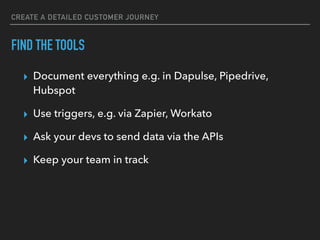
FIND THE TOOLS
▸ Document everything e.g. in Dapulse, Pipedrive,
Hubspot
▸ Use triggers, e.g. via Zapier, Workato
▸ Ask your devs to send data via the APIs
▸ Keep your team in track
CREATE A DETAILED CUSTOMER JOURNEY
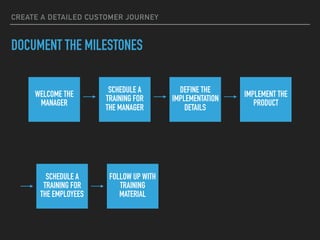
WELCOME THE
MANAGER
SCHEDULE A
TRAINING FOR
THE MANAGER
DEFINE THE
IMPLEMENTATION
DETAILS
IMPLEMENT THE
PRODUCT
SCHEDULE A
TRAINING FOR
THE EMPLOYEES
FOLLOW UP WITH
TRAINING
MATERIAL
DOCUMENT THE MILESTONES
CREATE A DETAILED CUSTOMER JOURNEY
DOCUMENT EACH STEP
SCHEDULE A
TRAINING FOR
THE EMPLOYEES
ASK FOR THEIR EMAILS
SEND THEM YOUR CALENDLY TO PICK A DATE
SEND THEM A CALENDAR INVITE
FOLLOW UP WITH
TRAINING
MATERIAL
INFORM HOW TO LOG IN
INFORM HOW TO REPRODUCE THE TRAINING
SEND THEM HOMEWORK
CREATE A DETAILED CUSTOMER JOURNEY
WELCOME THE
MANAGER
SCHEDULE A
TRAINING FOR
THE MANAGER
DEFINE THE
IMPLEMENTATION
DETAILS
IMPLEMENT THE
PRODUCT
SCHEDULE A
TRAINING FOR
THE EMPLOYEES
FOLLOW UP WITH
TRAINING
MATERIAL
AND NOW WHAT
BUILD YOUR
ONBOARDING TOOLKIT
BEST PRACTICES FOR ONBOARDING
BUILD YOUR ONBOARDING TOOLKIT
WHERE TO PROVIDE THE INFORMATION
▸ Kickstart guide
▸ Media center
▸ Knowledge base
▸ Contact options for this stage
BUILD YOUR ONBOARDING TOOLKIT
THE KICKSTART GUIDE
BUILD YOUR ONBOARDING TOOLKIT
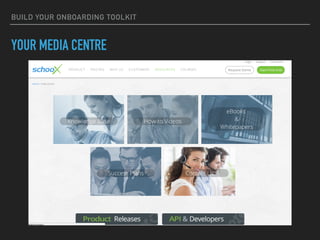
YOUR MEDIA CENTRE
BUILD YOUR ONBOARDING TOOLKIT
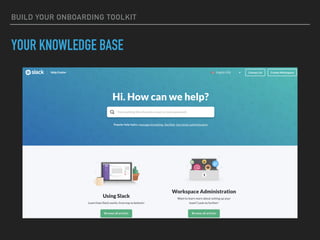
YOUR KNOWLEDGE BASE
BUILD YOUR ONBOARDING TOOLKIT
THE CONTACT OPTIONS
BUILD YOUR ONBOARDING TOOLKIT
HOW TO PROVIDE THE INFORMATION
▸ Lifecycle emails
▸ Walk-thoughs, e.g. WalkMe, APPCUES
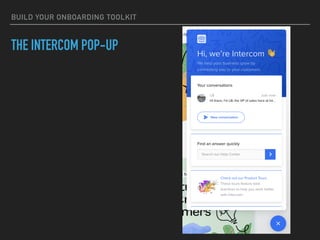
▸ Engagement pop-ups e.g. Intercom
▸ Webinars
BUILD YOUR ONBOARDING TOOLKIT
LIFECYCLE EMAILS
▸ When
▸ How often
▸ How many
▸ Why
BUILD YOUR ONBOARDING TOOLKIT
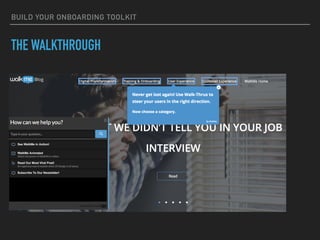
THE WALKTHROUGH
BUILD YOUR ONBOARDING TOOLKIT
THE INTERCOM POP-UP
BUILD YOUR ONBOARDING TOOLKIT
THE WEBINARS
FOLLOW
THE PROGRESS
BEST PRACTICES FOR ONBOARDING
FOLLOW THE PROGRESS
ASSIGN A CUSTOMER SUCCESS MANAGER
▸ Create a single point of contact
▸ Schedule 1-to-1 training
▸ Build a lifelong relationship
▸ Monitor the customer’s progress
FOLLOW THE PROGRESS
MONITOR THE CUSTOMER’S PROGRESS
▸ Implement tools to track the progress, e.g. Mixpanel,
Intercom, Totango
▸ Send trigger-based emails, e.g. with Customer.io
▸ Improve user onboarding with A/B testing tools
▸ Send them a survey, with e.g. Typeform
SET A CLEAR
EXITING POINT
BEST PRACTICES FOR ONBOARDING
SET A CLEAR EXITING POINT
FIND AN EXIT PLAN
▸ Let your customers know all the onboarding steps from
day one
▸ Set a clear completion goal
▸ Be strict on the schedule
▸ Focus on the delays and try to improve these points
▸ Change the point of contact
SET METRICS
BEST PRACTICES FOR ONBOARDING
FOLLOW THE PROGRESS
SET METRICS
▸ Track the number of days a new user gets to the WOW
moment
▸ Track the number of days a new user needs to complete
onboarding
▸ Cohort engagement
▸ Track the average lifecycle of your users
▸ Set targets for the onboarding team
▸ Collect feedback from the users
BE THERE
HAVE EMPATHY

Successful Customer Onboarding

  • 1.
  • 2.
    USER ONBOARDING ISTHE PROCESS OF INCREASING THE LIKELIHOOD THAT NEW USERS BECOME SUCCESSFUL WHEN ADOPTING YOUR PRODUCT. Samuel Hulick of UserOnboard.com THE DEFINITION
  • 3.
    THE CHALLENGE CUSTOMER ONBOARDINGIS: ▸ Providing a helping hand to your brand new customers ▸ Demonstrating the value of your product ▸ Understanding and adapting to your customer’s needs
  • 4.
  • 5.
    CREATE A DETAILED CUSTOMERJOURNEY BEST PRACTICES FOR ONBOARDING
  • 6.
    CREATE A DETAILEDCUSTOMER JOURNEY FIND THE TOOLS ▸ Document everything e.g. in Dapulse, Pipedrive, Hubspot ▸ Use triggers, e.g. via Zapier, Workato ▸ Ask your devs to send data via the APIs ▸ Keep your team in track
  • 7.
    CREATE A DETAILEDCUSTOMER JOURNEY WELCOME THE MANAGER SCHEDULE A TRAINING FOR THE MANAGER DEFINE THE IMPLEMENTATION DETAILS IMPLEMENT THE PRODUCT SCHEDULE A TRAINING FOR THE EMPLOYEES FOLLOW UP WITH TRAINING MATERIAL DOCUMENT THE MILESTONES
  • 8.
    CREATE A DETAILEDCUSTOMER JOURNEY DOCUMENT EACH STEP SCHEDULE A TRAINING FOR THE EMPLOYEES ASK FOR THEIR EMAILS SEND THEM YOUR CALENDLY TO PICK A DATE SEND THEM A CALENDAR INVITE FOLLOW UP WITH TRAINING MATERIAL INFORM HOW TO LOG IN INFORM HOW TO REPRODUCE THE TRAINING SEND THEM HOMEWORK
  • 9.
    CREATE A DETAILEDCUSTOMER JOURNEY WELCOME THE MANAGER SCHEDULE A TRAINING FOR THE MANAGER DEFINE THE IMPLEMENTATION DETAILS IMPLEMENT THE PRODUCT SCHEDULE A TRAINING FOR THE EMPLOYEES FOLLOW UP WITH TRAINING MATERIAL AND NOW WHAT
  • 10.
    BUILD YOUR ONBOARDING TOOLKIT BESTPRACTICES FOR ONBOARDING
  • 11.
    BUILD YOUR ONBOARDINGTOOLKIT WHERE TO PROVIDE THE INFORMATION ▸ Kickstart guide ▸ Media center ▸ Knowledge base ▸ Contact options for this stage
  • 12.
    BUILD YOUR ONBOARDINGTOOLKIT THE KICKSTART GUIDE
  • 13.
    BUILD YOUR ONBOARDINGTOOLKIT YOUR MEDIA CENTRE
  • 14.
    BUILD YOUR ONBOARDINGTOOLKIT YOUR KNOWLEDGE BASE
  • 15.
    BUILD YOUR ONBOARDINGTOOLKIT THE CONTACT OPTIONS
  • 16.
    BUILD YOUR ONBOARDINGTOOLKIT HOW TO PROVIDE THE INFORMATION ▸ Lifecycle emails ▸ Walk-thoughs, e.g. WalkMe, APPCUES ▸ Engagement pop-ups e.g. Intercom ▸ Webinars
  • 17.
    BUILD YOUR ONBOARDINGTOOLKIT LIFECYCLE EMAILS ▸ When ▸ How often ▸ How many ▸ Why
  • 18.
    BUILD YOUR ONBOARDINGTOOLKIT THE WALKTHROUGH
  • 19.
    BUILD YOUR ONBOARDINGTOOLKIT THE INTERCOM POP-UP
  • 20.
    BUILD YOUR ONBOARDINGTOOLKIT THE WEBINARS
  • 21.
  • 22.
    FOLLOW THE PROGRESS ASSIGNA CUSTOMER SUCCESS MANAGER ▸ Create a single point of contact ▸ Schedule 1-to-1 training ▸ Build a lifelong relationship ▸ Monitor the customer’s progress
  • 23.
    FOLLOW THE PROGRESS MONITORTHE CUSTOMER’S PROGRESS ▸ Implement tools to track the progress, e.g. Mixpanel, Intercom, Totango ▸ Send trigger-based emails, e.g. with Customer.io ▸ Improve user onboarding with A/B testing tools ▸ Send them a survey, with e.g. Typeform
  • 24.
    SET A CLEAR EXITINGPOINT BEST PRACTICES FOR ONBOARDING
  • 25.
    SET A CLEAREXITING POINT FIND AN EXIT PLAN ▸ Let your customers know all the onboarding steps from day one ▸ Set a clear completion goal ▸ Be strict on the schedule ▸ Focus on the delays and try to improve these points ▸ Change the point of contact
  • 26.
  • 27.
    FOLLOW THE PROGRESS SETMETRICS ▸ Track the number of days a new user gets to the WOW moment ▸ Track the number of days a new user needs to complete onboarding ▸ Cohort engagement ▸ Track the average lifecycle of your users ▸ Set targets for the onboarding team ▸ Collect feedback from the users
  • 28.