






Virtual CPUs: Right to Ludicrous
Speed
David Klee, Founder & Chief Architect, Heraflux Technologies
If you require assistance
during the session, type
your inquiry into the
question pane on the right
side.
Maximize your screen with
the zoom button on the
top of the presentation
window.
Please fill in the short
evaluation following the
session. It will appear in
your web browser.
Technical Assistance
Thank You to Our Sponsors
Quest helps our customers reduce tedious
administration tasks so they can focus on the
innovation necessary for their businesses to
grow. Quest® solutions are scalable,
affordable and simple-to-use, and they deliver
unmatched efficiency and productivity.
Combined with Quest’s invitation to the global
community to be a part of its innovation, as
well as our firm commitment to ensuring
customer satisfaction, Quest will continue to
accelerate the delivery of the most
comprehensive solutions for Azure cloud
management, SaaS, security, workforce
mobility and data-driven insight.
Melissa Global Intelligence provides data
quality and identity resolution tools for SQL
Server and .NET to perform the tasks of
ensuring new incoming data is in good
condition and maintaining data quality over
time. Utilizing comprehensive reference
datasets, Melissa solutions verify, standardize,
dedupe, enrich, geocode and update global
contact data including address, name, email
and phone data. Since 1985, Melissa has
helped businesses of any size improve data
management, data governance and business
analytics with clean, reliable and actionable
data. Melissa is a Registered Microsoft Partner
with international offices in the U.K, Germany
and India.
Nutanix makes IT infrastructure invisible with
an enterprise cloud platform that delivers the
agility and economics of the public cloud,
without sacrificing the security and control of
on-premises infrastructure. Whether
upgrading existing infrastructure or deploying
new environments, Nutanix is the ideal
solution for virtualized SQL Server
deployments.
• Consolidate SQL Server databases and VMs onto a single
converged platform
• Run Microsoft SQL Server with other critical workloads,
without sacrificing performance or reliability
• Remove the complexity and reduce the costs of traditional
storage
• Eliminate planned downtime and protect against
unplanned issues to deliver continuous availability
• Keep pace with rapidly growing business needs
Access to online
training and
content
Enjoy discounted
event rates
Join Local Groups
and Virtual Groups
Get advance notice
of member
exclusives
PASS is a not-for-profit organization which offers year-round learning opportunities
to data professionals.
Check Out Your Member Benefits Today.
www.pass.org
Make the Most Out of your PASS Membership
Where Data
Professionals Connect,
Share, and Learn
REGISTER NOW www.PASSsummit.com
OCT 31 – NOV 3 SEATTLE WA
Virtual CPUs: Right to Ludicrous
Speed
David, Klee, Founder & Chief Architect, Heraflux Technologies
HEALTH, CAPACITY, & EFFICENCY
Focused on understanding system health, capacity and operations
management, and overall efficiency of all things IT.
David Klee
FOUNDER – HERAFLUX TECHNOLOGIES
Enterprise consulting centered on the convergence of infrastructure,
data, and cloud
DATA INFRASTRUCTURE ARCHITECT
Seventeen years of enterprise SQL Server virtualization experience.
Virtualized some of the largest SQL Servers in the world./davidaklee
/kleegeek
/in/davidaklee
DBA Knowledge Gaps
VIRTUALIZATION & HARDWARE
• What is it?
• How do they work together?
MODERN CPU ARCHITECTURE
• Cores & sockets
• NUMA & memory locality
HYPERVISOR RESOURCE SCHEDULING
• Hypervisor queues, resource overcommit, queue balancing
• “Right-sizing”
• SQL Server balancing
Virtualization Basics
RESOURCES QUEUES
• Compute resources in datacenter
• CPU
• Memory
• Network
• Storage
• Every resource request placed in queue
• Queue time variable
• Queues not FIFO
• Imbalances & overcommitment
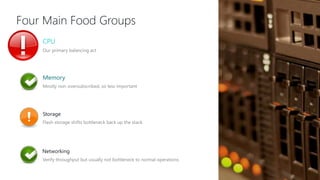
Four Main Food Groups
CPU
Our primary balancing act
Memory
Mostly non-oversubscribed, so less important
Storage
Flash storage shifts bottleneck back up the stack
Networking
Verify throughput but usually not bottleneck to normal operations
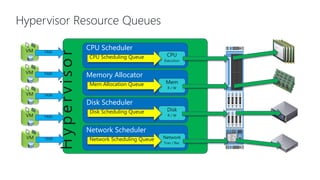
Hypervisor Resource Queues
Hypervisor
CPU Scheduler
CPU
Execution
CPU Scheduling Queue
Memory Allocator
Mem
R / W
Mem Allocation Queue
Disk Scheduler
Disk
R / W
Disk Scheduling Queue
Network Scheduler
Network
Tran / Rec
Network Scheduling Queue
VM TASK
VM TASK
VM TASK
VM TASK
VM TASK
Physical CPU Architecture
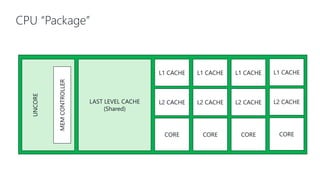
CPU “Package”
UNCORE
LAST LEVEL CACHE
(Shared)
CORE
L1 CACHE
MEMCONTROLLER
L2 CACHE
CORE
L1 CACHE
L2 CACHE
CORE
L1 CACHE
L2 CACHE
CORE
L1 CACHE
L2 CACHE
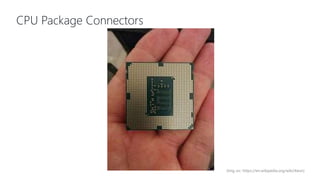
CPU Package Connectors
(Img src: https://en.wikipedia.org/wiki/Xeon)
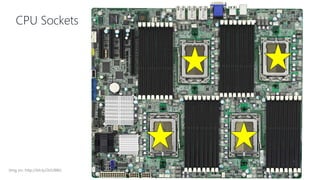
CPU Sockets
(Img src: http://bit.ly/2tJU98k)
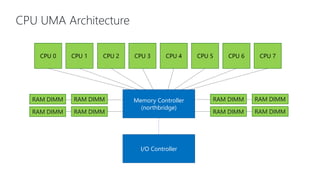
CPU UMA Architecture
CPU 0 CPU 1 CPU 2 CPU 3 CPU 4 CPU 5 CPU 6 CPU 7
Memory Controller
(northbridge)
I/O Controller
RAM DIMM RAM DIMM
RAM DIMM RAM DIMM
RAM DIMM RAM DIMM
RAM DIMM RAM DIMM
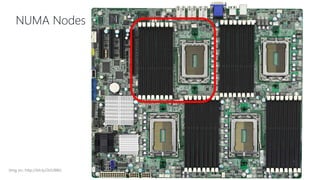
NUMA Nodes
(Img src: http://bit.ly/2tJU98k)
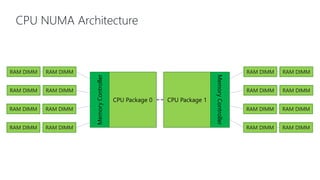
CPU NUMA Architecture
CPU Package 0
RAM DIMM
MemoryController CPU Package 1
MemoryController
RAM DIMM
RAM DIMM RAM DIMM
RAM DIMM RAM DIMM
RAM DIMM RAM DIMM
RAM DIMM RAM DIMM
RAM DIMM RAM DIMM
RAM DIMM RAM DIMM
RAM DIMM RAM DIMM
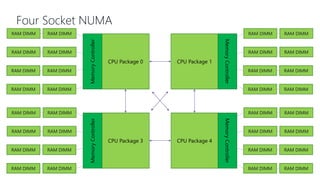
Four Socket NUMA
RAM DIMM RAM DIMM
RAM DIMM RAM DIMM
RAM DIMM RAM DIMM
RAM DIMM RAM DIMM
RAM DIMM RAM DIMM
RAM DIMM RAM DIMM
RAM DIMM RAM DIMM
RAM DIMM RAM DIMM
CPU Package 0
MemoryController
CPU Package 1
MemoryController
RAM DIMM RAM DIMM
RAM DIMM RAM DIMM
RAM DIMM RAM DIMM
RAM DIMM RAM DIMM
RAM DIMM RAM DIMM
RAM DIMM RAM DIMM
RAM DIMM RAM DIMM
RAM DIMM RAM DIMM
CPU Package 3
MemoryController
CPU Package 4
MemoryController
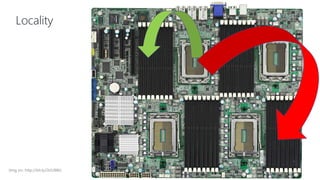
Locality
(Img src: http://bit.ly/2tJU98k)
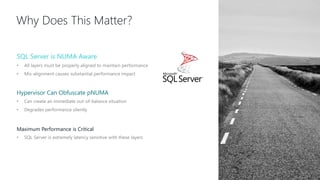
Why Does This Matter?
SQL Server is NUMA Aware
• All layers must be properly aligned to maintain performance
• Mis-alignment causes substantial performance impact
Hypervisor Can Obfuscate pNUMA
• Can create an immediate out-of-balance situation
• Degrades performance silently
Maximum Performance is Critical
• SQL Server is extremely latency sensitive with these layers
Virtual Machine CPUs
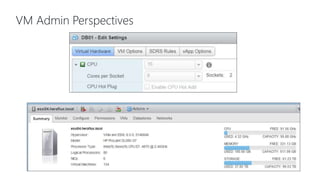
VM Admin Perspectives
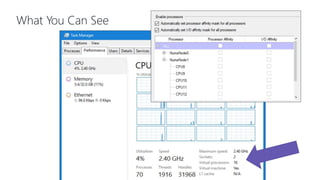
What You Can See
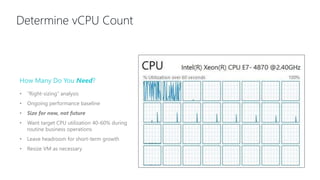
Determine vCPU Count
How Many Do You Need?
• “Right-sizing” analysis
• Ongoing performance baseline
• Size for now, not future
• Want target CPU utilization 40-60% during
routine business operations
• Leave headroom for short-term growth
• Resize VM as necessary
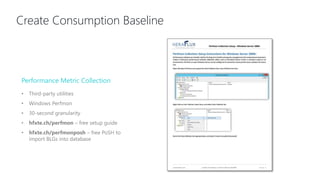
Create Consumption Baseline
Performance Metric Collection
• Third-party utilities
• Windows Perfmon
• 30-second granularity
• hfxte.ch/perfmon – free setup guide
• hfxte.ch/perfmonposh – free PoSH to
import BLGs into database
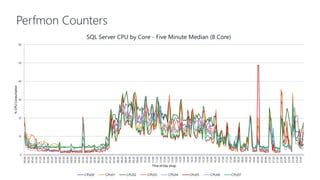
Perfmon Counters
0
10
20
30
40
50
60
00:00
00:20
00:40
01:00
01:20
01:40
02:00
02:20
02:40
03:00
03:20
03:40
04:00
04:20
04:40
05:00
05:20
05:40
06:00
06:20
06:40
07:00
07:20
07:40
08:00
08:20
08:40
09:00
09:20
09:40
10:00
10:20
10:40
11:00
11:20
11:40
12:00
12:20
12:40
13:00
13:20
13:40
14:00
14:20
14:40
15:00
15:20
15:40
16:00
16:20
16:40
17:00
17:20
17:40
18:00
18:20
18:40
19:00
19:20
19:40
20:00
20:20
20:40
21:00
21:20
21:40
22:00
22:20
22:40
23:00
23:20
23:40
%CPUConsumption
Time of Day (Avg)
SQL Server CPU by Core - Five Minute Median (8 Core)
CPU00 CPU01 CPU02 CPU03 CPU04 CPU05 CPU06 CPU07
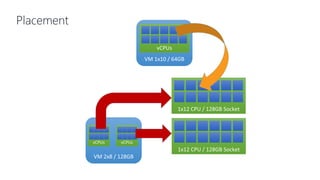
Placement
1x12 CPU / 128GB Socket
VM 1x10 / 64GB
vCPUs
VM 2x8 / 128GB
vCPUs vCPUs
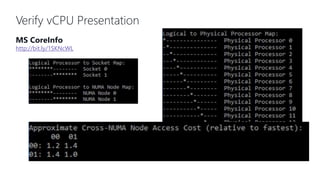
Verify vCPU Presentation
MS CoreInfo
http://bit.ly/1SKNcWL
CPU Scheduling Pressure
VMHost(2x12)VMHost(2x12)
Shared
Storage
VM
(2x8)
VM
(2x8)
VM
(2x8)
VM
(2x8)
VM
(2x8)
VM
(2x8)
DB
DB
DB
DB
DB
DB
DB
DB
DB
DB
DB
DB
DB
DB
DB
DB
DB
DB
DB
DB
DB
DB
DB
DB
DB
DB
DB
DB
DB
DB
DB
DB
DB
DB
DB
DB
DB
DB
DB
DB
DB
DB
DB
DB
DB
DB
DB
DB
DB
DB
DB
DB
DB
DB
DB
DB
DB
DB
DB
DB
DB
DB
DB
DB
DB
DB
DB
DB
DB
DB
DB
DB
DB
DB
DB
DB
DB
DB
DB
DB
DB
DB
DB
DB
DB
DB
DB
DB
DB
DB
DB
DB
DB
DB
DB
DB
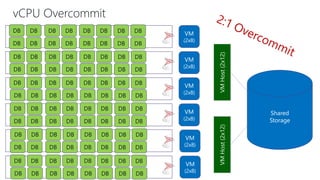
vCPU Overcommit
vCPUTASKEXECUTIONONpCPUS
vCPUTASKSUBMISSIONTOQUEUES
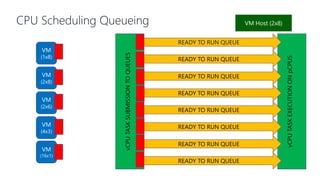
CPU Scheduling Queueing
VM
(1x8)
VM
(2x8)
VM
(2x6)
VM
(4x3)
VM
(16x1)
VM Host (2x8)
READY TO RUN QUEUE
READY TO RUN QUEUE
READY TO RUN QUEUE
READY TO RUN QUEUE
READY TO RUN QUEUE
READY TO RUN QUEUE
READY TO RUN QUEUE
READY TO RUN QUEUE
Scheduling Trouble Measurement
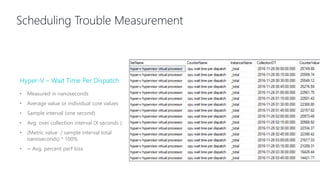
Hyper-V – Wait Time Per Dispatch
• Measured in nanoseconds
• Average value or individual core values
• Sample interval (one second)
• Avg. over collection interval (X seconds )
• (Metric value / sample interval total
nanoseconds) * 100%
• = Avg. percent perf loss
Scheduling Trouble Measurement
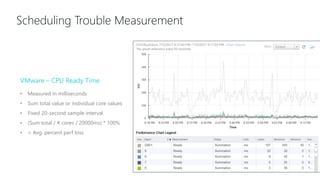
VMware – CPU Ready Time
• Measured in milliseconds
• Sum total value or individual core values
• Fixed 20-second sample interval
• (Sum total / # cores / 20000ms) * 100%
• = Avg. percent perf loss
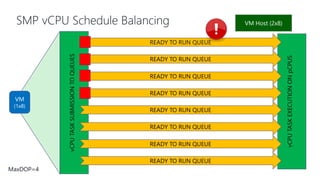
SMP vCPU Schedule Balancing
vCPUTASKEXECUTIONONpCPUS
vCPUTASKSUBMISSIONTOQUEUES
VM
(1x8)
VM Host (2x8)
READY TO RUN QUEUE
READY TO RUN QUEUE
READY TO RUN QUEUE
READY TO RUN QUEUE
READY TO RUN QUEUE
READY TO RUN QUEUE
READY TO RUN QUEUE
READY TO RUN QUEUE
MaxDOP=4
Scheduling Trouble Measurement
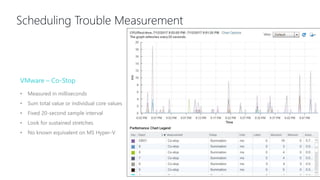
VMware – Co-Stop
• Measured in milliseconds
• Sum total value or individual core values
• Fixed 20-second sample interval
• Look for sustained stretches
• No known equivalent on MS Hyper-V
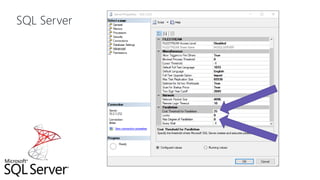
SQL Server
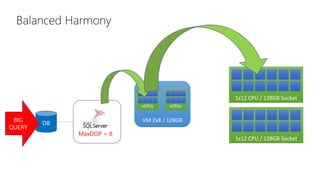
Balanced Harmony
1x12 CPU / 128GB Socket
VM 2x8 / 128GB
vCPUs vCPUs
MaxDOP = 8
DB
BIG
QUERY
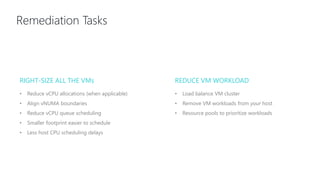
Remediation Tasks
RIGHT-SIZE ALL THE VMs REDUCE VM WORKLOAD
• Reduce vCPU allocations (when applicable)
• Align vNUMA boundaries
• Reduce vCPU queue scheduling
• Smaller footprint easier to schedule
• Less host CPU scheduling delays
• Load balance VM cluster
• Remove VM workloads from your host
• Resource pools to prioritize workloads
QUESTIONS?
Coming up next!
Azure SQL VM - Implementing Basic
AG in SQL 2016 STD
Kenneth Urena
THANK YOU
FOR ATTENDING
Follow @sqlpass
Share your thoughts with #PASS24HOP & #sqlpass
24 Hours of PASS, Summit Preview Session: Virtual SQL Server CPUs

24 Hours of PASS, Summit Preview Session: Virtual SQL Server CPUs

  • 1.
    Virtual CPUs: Rightto Ludicrous Speed David Klee, Founder & Chief Architect, Heraflux Technologies
  • 2.
    If you requireassistance during the session, type your inquiry into the question pane on the right side. Maximize your screen with the zoom button on the top of the presentation window. Please fill in the short evaluation following the session. It will appear in your web browser. Technical Assistance
  • 3.
    Thank You toOur Sponsors Quest helps our customers reduce tedious administration tasks so they can focus on the innovation necessary for their businesses to grow. Quest® solutions are scalable, affordable and simple-to-use, and they deliver unmatched efficiency and productivity. Combined with Quest’s invitation to the global community to be a part of its innovation, as well as our firm commitment to ensuring customer satisfaction, Quest will continue to accelerate the delivery of the most comprehensive solutions for Azure cloud management, SaaS, security, workforce mobility and data-driven insight. Melissa Global Intelligence provides data quality and identity resolution tools for SQL Server and .NET to perform the tasks of ensuring new incoming data is in good condition and maintaining data quality over time. Utilizing comprehensive reference datasets, Melissa solutions verify, standardize, dedupe, enrich, geocode and update global contact data including address, name, email and phone data. Since 1985, Melissa has helped businesses of any size improve data management, data governance and business analytics with clean, reliable and actionable data. Melissa is a Registered Microsoft Partner with international offices in the U.K, Germany and India. Nutanix makes IT infrastructure invisible with an enterprise cloud platform that delivers the agility and economics of the public cloud, without sacrificing the security and control of on-premises infrastructure. Whether upgrading existing infrastructure or deploying new environments, Nutanix is the ideal solution for virtualized SQL Server deployments. • Consolidate SQL Server databases and VMs onto a single converged platform • Run Microsoft SQL Server with other critical workloads, without sacrificing performance or reliability • Remove the complexity and reduce the costs of traditional storage • Eliminate planned downtime and protect against unplanned issues to deliver continuous availability • Keep pace with rapidly growing business needs
  • 4.
    Access to online trainingand content Enjoy discounted event rates Join Local Groups and Virtual Groups Get advance notice of member exclusives PASS is a not-for-profit organization which offers year-round learning opportunities to data professionals. Check Out Your Member Benefits Today. www.pass.org Make the Most Out of your PASS Membership
  • 5.
    Where Data Professionals Connect, Share,and Learn REGISTER NOW www.PASSsummit.com OCT 31 – NOV 3 SEATTLE WA
  • 6.
    Virtual CPUs: Rightto Ludicrous Speed David, Klee, Founder & Chief Architect, Heraflux Technologies
  • 7.
    HEALTH, CAPACITY, &EFFICENCY Focused on understanding system health, capacity and operations management, and overall efficiency of all things IT. David Klee FOUNDER – HERAFLUX TECHNOLOGIES Enterprise consulting centered on the convergence of infrastructure, data, and cloud DATA INFRASTRUCTURE ARCHITECT Seventeen years of enterprise SQL Server virtualization experience. Virtualized some of the largest SQL Servers in the world./davidaklee /kleegeek /in/davidaklee
  • 8.
    DBA Knowledge Gaps VIRTUALIZATION& HARDWARE • What is it? • How do they work together? MODERN CPU ARCHITECTURE • Cores & sockets • NUMA & memory locality HYPERVISOR RESOURCE SCHEDULING • Hypervisor queues, resource overcommit, queue balancing • “Right-sizing” • SQL Server balancing
  • 9.
    Virtualization Basics RESOURCES QUEUES •Compute resources in datacenter • CPU • Memory • Network • Storage • Every resource request placed in queue • Queue time variable • Queues not FIFO • Imbalances & overcommitment
  • 10.
    Four Main FoodGroups CPU Our primary balancing act Memory Mostly non-oversubscribed, so less important Storage Flash storage shifts bottleneck back up the stack Networking Verify throughput but usually not bottleneck to normal operations
  • 11.
    Hypervisor Resource Queues Hypervisor CPUScheduler CPU Execution CPU Scheduling Queue Memory Allocator Mem R / W Mem Allocation Queue Disk Scheduler Disk R / W Disk Scheduling Queue Network Scheduler Network Tran / Rec Network Scheduling Queue VM TASK VM TASK VM TASK VM TASK VM TASK
  • 12.
  • 13.
    CPU “Package” UNCORE LAST LEVELCACHE (Shared) CORE L1 CACHE MEMCONTROLLER L2 CACHE CORE L1 CACHE L2 CACHE CORE L1 CACHE L2 CACHE CORE L1 CACHE L2 CACHE
  • 14.
    CPU Package Connectors (Imgsrc: https://en.wikipedia.org/wiki/Xeon)
  • 15.
    CPU Sockets (Img src:http://bit.ly/2tJU98k)
  • 16.
    CPU UMA Architecture CPU0 CPU 1 CPU 2 CPU 3 CPU 4 CPU 5 CPU 6 CPU 7 Memory Controller (northbridge) I/O Controller RAM DIMM RAM DIMM RAM DIMM RAM DIMM RAM DIMM RAM DIMM RAM DIMM RAM DIMM
  • 17.
    NUMA Nodes (Img src:http://bit.ly/2tJU98k)
  • 18.
    CPU NUMA Architecture CPUPackage 0 RAM DIMM MemoryController CPU Package 1 MemoryController RAM DIMM RAM DIMM RAM DIMM RAM DIMM RAM DIMM RAM DIMM RAM DIMM RAM DIMM RAM DIMM RAM DIMM RAM DIMM RAM DIMM RAM DIMM RAM DIMM RAM DIMM
  • 19.
    Four Socket NUMA RAMDIMM RAM DIMM RAM DIMM RAM DIMM RAM DIMM RAM DIMM RAM DIMM RAM DIMM RAM DIMM RAM DIMM RAM DIMM RAM DIMM RAM DIMM RAM DIMM RAM DIMM RAM DIMM CPU Package 0 MemoryController CPU Package 1 MemoryController RAM DIMM RAM DIMM RAM DIMM RAM DIMM RAM DIMM RAM DIMM RAM DIMM RAM DIMM RAM DIMM RAM DIMM RAM DIMM RAM DIMM RAM DIMM RAM DIMM RAM DIMM RAM DIMM CPU Package 3 MemoryController CPU Package 4 MemoryController
  • 20.
  • 21.
    Why Does ThisMatter? SQL Server is NUMA Aware • All layers must be properly aligned to maintain performance • Mis-alignment causes substantial performance impact Hypervisor Can Obfuscate pNUMA • Can create an immediate out-of-balance situation • Degrades performance silently Maximum Performance is Critical • SQL Server is extremely latency sensitive with these layers
  • 22.
  • 23.
  • 24.
  • 25.
    Determine vCPU Count HowMany Do You Need? • “Right-sizing” analysis • Ongoing performance baseline • Size for now, not future • Want target CPU utilization 40-60% during routine business operations • Leave headroom for short-term growth • Resize VM as necessary
  • 26.
    Create Consumption Baseline PerformanceMetric Collection • Third-party utilities • Windows Perfmon • 30-second granularity • hfxte.ch/perfmon – free setup guide • hfxte.ch/perfmonposh – free PoSH to import BLGs into database
  • 27.
  • 28.
    Placement 1x12 CPU /128GB Socket 1x12 CPU / 128GB Socket VM 1x10 / 64GB vCPUs VM 2x8 / 128GB vCPUs vCPUs
  • 29.
    Verify vCPU Presentation MSCoreInfo http://bit.ly/1SKNcWL
  • 30.
  • 31.
  • 32.
    vCPUTASKEXECUTIONONpCPUS vCPUTASKSUBMISSIONTOQUEUES CPU Scheduling Queueing VM (1x8) VM (2x8) VM (2x6) VM (4x3) VM (16x1) VMHost (2x8) READY TO RUN QUEUE READY TO RUN QUEUE READY TO RUN QUEUE READY TO RUN QUEUE READY TO RUN QUEUE READY TO RUN QUEUE READY TO RUN QUEUE READY TO RUN QUEUE
  • 33.
    Scheduling Trouble Measurement Hyper-V– Wait Time Per Dispatch • Measured in nanoseconds • Average value or individual core values • Sample interval (one second) • Avg. over collection interval (X seconds ) • (Metric value / sample interval total nanoseconds) * 100% • = Avg. percent perf loss
  • 34.
    Scheduling Trouble Measurement VMware– CPU Ready Time • Measured in milliseconds • Sum total value or individual core values • Fixed 20-second sample interval • (Sum total / # cores / 20000ms) * 100% • = Avg. percent perf loss
  • 35.
    SMP vCPU ScheduleBalancing vCPUTASKEXECUTIONONpCPUS vCPUTASKSUBMISSIONTOQUEUES VM (1x8) VM Host (2x8) READY TO RUN QUEUE READY TO RUN QUEUE READY TO RUN QUEUE READY TO RUN QUEUE READY TO RUN QUEUE READY TO RUN QUEUE READY TO RUN QUEUE READY TO RUN QUEUE MaxDOP=4
  • 36.
    Scheduling Trouble Measurement VMware– Co-Stop • Measured in milliseconds • Sum total value or individual core values • Fixed 20-second sample interval • Look for sustained stretches • No known equivalent on MS Hyper-V
  • 37.
  • 38.
    Balanced Harmony 1x12 CPU/ 128GB Socket 1x12 CPU / 128GB Socket VM 2x8 / 128GB vCPUs vCPUs MaxDOP = 8 DB BIG QUERY
  • 39.
    Remediation Tasks RIGHT-SIZE ALLTHE VMs REDUCE VM WORKLOAD • Reduce vCPU allocations (when applicable) • Align vNUMA boundaries • Reduce vCPU queue scheduling • Smaller footprint easier to schedule • Less host CPU scheduling delays • Load balance VM cluster • Remove VM workloads from your host • Resource pools to prioritize workloads
  • 40.
  • 41.
    Coming up next! AzureSQL VM - Implementing Basic AG in SQL 2016 STD Kenneth Urena
  • 42.
    THANK YOU FOR ATTENDING Follow@sqlpass Share your thoughts with #PASS24HOP & #sqlpass

Editor's Notes

  • #2 Welcome to 24 Hours of PASS: Data Security and Data Quality. We’re excited you could join us today for David Klee’s session, Virtual CPUs: Right to Ludicrous Speed. This 24 Hours of PASS event consists of 24 consecutive live webinars, delivered by expert speakers from the PASS community. The sessions will be recorded and posted online after the event. To access any on-demand sessions, please visit http://www.pass.org/24hours/2017/security/Schedule.aspx for all session links. My name is [MODERATOR] [you can say a bit about yourself here if you’d like] I have a few introductory slides before I hand over the reins to David. [move to next slide]
  • #3 If you require technical assistance please type your question into the question pane located on the right side of your screen and someone will assist you. This question pane is also where you may ask any questions throughout the presentation. Feel free to enter your questions at any time and once we get to the Q&A portion of the session, I’ll read your questions aloud to the speaker. You are able to zoom in on the presentation content by using the zoom button located on the top of the presentation window. Please note that there will be a short evaluation at the end of the session. Your feedback is important to us so please take a moment to complete it. It will appear in your web browser. [Note to moderators: You need to determine which questions are the most relevant and ask them out loud to the presenter].
  • #4 I’d like to take a moment to thank our presenting sponsors, Quest, Melissa and Nutanix. The staging of 24 Hours of PASS would not be possible without their generous support, and they are the reason this event is available free of charge. [move to next slide]
  • #5 Make sure you explore everything else PASS has on offer for data professionals! You can join local user groups around the world, special interest groups, find free online resources through our learning center and read up on the latest community news in the Connector Newsletter. [move to next slide]
  • #6 [moderator slide] Next, I’d like to bring your attention to the upcoming PASS Summit. Taking place in Seattle, Washington, from October 31st to November 3rd , PASS Summit 2017 features over 200 sessions with world-class data experts. It’s the perfect place to Connect, Share and Learn from Industry Experts from around the world! To find out more, visit www.passsummit.com [move to next slide] [next slide]
  • #7 And without further ado, here is David with Virtual CPUs: Right to Ludicrous Speed. {speaker begins}
  • #9 Let’s come to an understanding. The hypervisor and the way it manages the CPUs in the physical server must be properly understood before we go any further.
  • #12 Resources & queues
  • #14 Cpu architecture Uncore is a collection of components of a CPU that do not carry out core computational tasks but are essential for core performance, such as power management, interface to I/O devices, and memory controller. L3 cache, or last level cache, is shared between all of the active cores.
  • #16 Cpu architecture
  • #17 Cpu architecture
  • #18 Cpu architecture
  • #19 Cpu architecture
  • #21 Cpu architecture
  • #24 The VM admins see this when they look at a host, and only if they expand a VM’s advanced CPU configuration do they see the cores and socket count. Otherwise, they just see the CPU total count.
  • #26 How many vCPUs do you NEED?
  • #27 How many vCPUs do you NEED?
  • #28 Final right sizing on this one, if this represents every normal day, should be to cut the core count in half and start your testing there.
  • #30 Cpu architecture
  • #32 Lots of these things all together, either on prem through virtualization, or in the cloud, extends the system on a massive scale I’ve seen 19 to 1 overcommit. It’s not pretty.
  • #34 VM is too big & all resources not getting used Too much background activity (cpu overcommit) VM mis-alignment with pNUMA
  • #35 VM is too big & all resources not getting used Too much background activity (cpu overcommit) VM mis-alignment with pNUMA
  • #37 VM is too big & all resources not getting used Too much background activity (cpu overcommit) VM mis-alignment with pNUMA
  • #42 Make sure to stay tuned for our next session, Azure SQL VM - Implementing Basic AG in SQL 2016 STD with Kenneth Urena. [move to next slide]