Trailer Magazine
Development
Brandon Bartram
First I added my main image and blacked
out the eyes for added effect.
Next I added a fog effect behind and in
front of the main image to create a horror
scene.
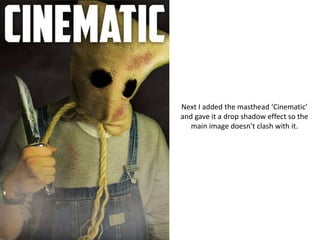
Next I added the masthead ‘Cinematic’
and gave it a drop shadow effect so the
main image doesn’t clash with it.
Next I added the main title of my
magazine. I also added the ‘World
Exclusive’ label above and a tagline below.
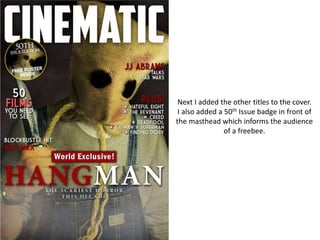
Next I added the other titles to the cover.
I also added a 50th Issue badge in front of
the masthead which informs the audience
of a freebee.
I then added a bunch of images designed
to look like a reel of film. The images and
their titles relate to the main headline.
Finally I added a barcode and an
Interviews section at the bottom of the
cover.

Trailer magazine development

  • 1.
  • 2.
    First I addedmy main image and blacked out the eyes for added effect.
  • 3.
    Next I addeda fog effect behind and in front of the main image to create a horror scene.
  • 4.
    Next I addedthe masthead ‘Cinematic’ and gave it a drop shadow effect so the main image doesn’t clash with it.
  • 5.
    Next I addedthe main title of my magazine. I also added the ‘World Exclusive’ label above and a tagline below.
  • 6.
    Next I addedthe other titles to the cover. I also added a 50th Issue badge in front of the masthead which informs the audience of a freebee.
  • 7.
    I then addeda bunch of images designed to look like a reel of film. The images and their titles relate to the main headline.
  • 8.
    Finally I addeda barcode and an Interviews section at the bottom of the cover.