Download free for 30 days
Sign in
Upload
Language (EN)
Support
Business
Mobile
Social Media
Marketing
Technology
Art & Photos
Career
Design
Education
Presentations & Public Speaking
Government & Nonprofit
Healthcare
Internet
Law
Leadership & Management
Automotive
Engineering
Software
Recruiting & HR
Retail
Sales
Services
Science
Small Business & Entrepreneurship
Food
Environment
Economy & Finance
Data & Analytics
Investor Relations
Sports
Spiritual
News & Politics
Travel
Self Improvement
Real Estate
Entertainment & Humor
Health & Medicine
Devices & Hardware
Lifestyle
Change Language
Language
English
Español
Português
Français
Deutsche
Cancel
Save
Submit search
EN
Uploaded by
Amazon Web Services Japan
18,749 views
20200408 AWS Black Belt Online Seminar AWS ParallelCluster ではじめるクラウドHPC
AWS 公式オンラインセミナー: https://amzn.to/JPWebinar 過去資料: https://amzn.to/JPArchive
Technology
◦
Read more
0
Save
Share
Embed
Embed presentation
1
/ 99
2
/ 99
3
/ 99
4
/ 99
5
/ 99
6
/ 99
7
/ 99
8
/ 99
9
/ 99
10
/ 99
11
/ 99
12
/ 99
13
/ 99
14
/ 99
15
/ 99
16
/ 99
17
/ 99
18
/ 99
19
/ 99
20
/ 99
Most read
21
/ 99
22
/ 99
23
/ 99
24
/ 99
25
/ 99
26
/ 99
27
/ 99
Most read
28
/ 99
29
/ 99
30
/ 99
31
/ 99
32
/ 99
33
/ 99
34
/ 99
35
/ 99
36
/ 99
37
/ 99
38
/ 99
Most read
39
/ 99
40
/ 99
41
/ 99
42
/ 99
43
/ 99
44
/ 99
45
/ 99
46
/ 99
47
/ 99
48
/ 99
49
/ 99
50
/ 99
51
/ 99
52
/ 99
53
/ 99
54
/ 99
55
/ 99
56
/ 99
57
/ 99
58
/ 99
59
/ 99
60
/ 99
61
/ 99
62
/ 99
63
/ 99
64
/ 99
65
/ 99
66
/ 99
67
/ 99
68
/ 99
69
/ 99
70
/ 99
71
/ 99
72
/ 99
73
/ 99
74
/ 99
75
/ 99
76
/ 99
77
/ 99
78
/ 99
79
/ 99
80
/ 99
81
/ 99
82
/ 99
83
/ 99
84
/ 99
85
/ 99
86
/ 99
87
/ 99
88
/ 99
89
/ 99
90
/ 99
91
/ 99
92
/ 99
93
/ 99
94
/ 99
95
/ 99
96
/ 99
97
/ 99
98
/ 99
99
/ 99
More Related Content
PDF
202205 AWS Black Belt Online Seminar Amazon FSx for OpenZFS
by
Amazon Web Services Japan
PDF
202204 AWS Black Belt Online Seminar Amazon Connect Salesforce連携(第1回 CTI Adap...
by
Amazon Web Services Japan
PDF
Amazon Game Tech Night #25 ゲーム業界向け機械学習最新状況アップデート
by
Amazon Web Services Japan
PDF
202204 AWS Black Belt Online Seminar Amazon Connect を活用したオンコール対応の実現
by
Amazon Web Services Japan
PDF
Infrastructure as Code (IaC) 談義 2022
by
Amazon Web Services Japan
PDF
202205 AWS Black Belt Online Seminar Amazon VPC IP Address Manager (IPAM)
by
Amazon Web Services Japan
PDF
202204 AWS Black Belt Online Seminar AWS IoT Device Defender
by
Amazon Web Services Japan
PPTX
20220409 AWS BLEA 開発にあたって検討したこと
by
Amazon Web Services Japan
202205 AWS Black Belt Online Seminar Amazon FSx for OpenZFS
by
Amazon Web Services Japan
202204 AWS Black Belt Online Seminar Amazon Connect Salesforce連携(第1回 CTI Adap...
by
Amazon Web Services Japan
Amazon Game Tech Night #25 ゲーム業界向け機械学習最新状況アップデート
by
Amazon Web Services Japan
202204 AWS Black Belt Online Seminar Amazon Connect を活用したオンコール対応の実現
by
Amazon Web Services Japan
Infrastructure as Code (IaC) 談義 2022
by
Amazon Web Services Japan
202205 AWS Black Belt Online Seminar Amazon VPC IP Address Manager (IPAM)
by
Amazon Web Services Japan
202204 AWS Black Belt Online Seminar AWS IoT Device Defender
by
Amazon Web Services Japan
20220409 AWS BLEA 開発にあたって検討したこと
by
Amazon Web Services Japan
More from Amazon Web Services Japan
PDF
20211203 AWS Black Belt Online Seminar AWS re:Invent 2021アップデート速報
by
Amazon Web Services Japan
PDF
202202 AWS Black Belt Online Seminar Amazon Connect Customer Profiles
by
Amazon Web Services Japan
PDF
202202 AWS Black Belt Online Seminar AWS Managed Rules for AWS WAF の活用
by
Amazon Web Services Japan
PDF
202203 AWS Black Belt Online Seminar Amazon Connect Tasks.pdf
by
Amazon Web Services Japan
PDF
[AWS EXpert Online for JAWS-UG 18] 見せてやるよ、Step Functions の本気ってやつをな
by
Amazon Web Services Japan
PDF
SaaS テナント毎のコストを把握するための「AWS Application Cost Profiler」のご紹介
by
Amazon Web Services Japan
PDF
202202 AWS Black Belt Online Seminar AWS SaaS Boost で始めるSaaS開発⼊⾨
by
Amazon Web Services Japan
PDF
20211209 Ops-JAWS Re invent2021re-cap-cloud operations
by
Amazon Web Services Japan
PDF
機密データとSaaSは共存しうるのか!?セキュリティー重視のユーザー層を取り込む為のネットワーク通信のアプローチ
by
Amazon Web Services Japan
PDF
パッケージソフトウェアを簡単にSaaS化!?既存の資産を使ったSaaS化手法のご紹介
by
Amazon Web Services Japan
PDF
マルチテナント化で知っておきたいデータベースのこと
by
Amazon Web Services Japan
PDF
202110 AWS Black Belt Online Seminar AWS Site-to-Site VPN
by
Amazon Web Services Japan
PDF
Amazon QuickSight の組み込み方法をちょっぴりDD
by
Amazon Web Services Japan
PDF
202112 AWS Black Belt Online Seminar 店内の「今」をお届けする小売業向けリアルタイム配信基盤のレシピ
by
Amazon Web Services Japan
PPTX
[20220126] JAWS-UG 2022初頭までに葬ったAWSアンチパターン大紹介
by
Amazon Web Services Japan
PDF
202201 AWS Black Belt Online Seminar Apache Spark Performnace Tuning for AWS ...
by
Amazon Web Services Japan
PPTX
20211109 JAWS-UG SRE keynotes
by
Amazon Web Services Japan
PPTX
20211109 bleaの使い方(基本編)
by
Amazon Web Services Japan
PDF
Amazon Game Tech Night #24 KPIダッシュボードを最速で用意するために
by
Amazon Web Services Japan
PDF
202111 AWS Black Belt Online Seminar AWSで構築するSmart Mirrorのご紹介
by
Amazon Web Services Japan
20211203 AWS Black Belt Online Seminar AWS re:Invent 2021アップデート速報
by
Amazon Web Services Japan
202202 AWS Black Belt Online Seminar Amazon Connect Customer Profiles
by
Amazon Web Services Japan
202202 AWS Black Belt Online Seminar AWS Managed Rules for AWS WAF の活用
by
Amazon Web Services Japan
202203 AWS Black Belt Online Seminar Amazon Connect Tasks.pdf
by
Amazon Web Services Japan
[AWS EXpert Online for JAWS-UG 18] 見せてやるよ、Step Functions の本気ってやつをな
by
Amazon Web Services Japan
SaaS テナント毎のコストを把握するための「AWS Application Cost Profiler」のご紹介
by
Amazon Web Services Japan
202202 AWS Black Belt Online Seminar AWS SaaS Boost で始めるSaaS開発⼊⾨
by
Amazon Web Services Japan
20211209 Ops-JAWS Re invent2021re-cap-cloud operations
by
Amazon Web Services Japan
機密データとSaaSは共存しうるのか!?セキュリティー重視のユーザー層を取り込む為のネットワーク通信のアプローチ
by
Amazon Web Services Japan
パッケージソフトウェアを簡単にSaaS化!?既存の資産を使ったSaaS化手法のご紹介
by
Amazon Web Services Japan
マルチテナント化で知っておきたいデータベースのこと
by
Amazon Web Services Japan
202110 AWS Black Belt Online Seminar AWS Site-to-Site VPN
by
Amazon Web Services Japan
Amazon QuickSight の組み込み方法をちょっぴりDD
by
Amazon Web Services Japan
202112 AWS Black Belt Online Seminar 店内の「今」をお届けする小売業向けリアルタイム配信基盤のレシピ
by
Amazon Web Services Japan
[20220126] JAWS-UG 2022初頭までに葬ったAWSアンチパターン大紹介
by
Amazon Web Services Japan
202201 AWS Black Belt Online Seminar Apache Spark Performnace Tuning for AWS ...
by
Amazon Web Services Japan
20211109 JAWS-UG SRE keynotes
by
Amazon Web Services Japan
20211109 bleaの使い方(基本編)
by
Amazon Web Services Japan
Amazon Game Tech Night #24 KPIダッシュボードを最速で用意するために
by
Amazon Web Services Japan
202111 AWS Black Belt Online Seminar AWSで構築するSmart Mirrorのご紹介
by
Amazon Web Services Japan
Recently uploaded
PDF
Day 5 - Red Team + Blue Team in the Cloud - 2nd Sight Lab Cloud Security Class
by
2nd Sight Lab
PDF
Day 3 - Data and Application Security - 2nd Sight Lab Cloud Security Class
by
2nd Sight Lab
PDF
Day 2 - Network Security ~ 2nd Sight Lab ~ Cloud Security Class ~ 2020
by
2nd Sight Lab
PDF
Our Digital Tribe_ Cultivating Connection and Growth in Our Slack Community 🌿...
by
sanjeetmishra30
PDF
Access Control 2025: From Security Silo to Software-Defined Ecosystem
by
Memoori
PPTX
DYNAMICALLY.pptx good for the teachers or students to do seminars and for tea...
by
mpoorvika031
PDF
TrustArc Webinar - Looking Ahead: The 2026 Privacy Landscape
by
TrustArc
PDF
Unlocking the Power of Salesforce Architecture: Frameworks for Effective Solu...
by
varsha30tiwari
PDF
Dev Dives: AI that builds with you - UiPath Autopilot for effortless RPA & AP...
by
UiPathCommunity
PDF
GPUS and How to Program Them by Manya Bansal
by
ScyllaDB
PPTX
Coded Agents – with UiPath SDK + LangGraph [Virtual Hands-on Workshop]
by
UiPathCommunity
PDF
Usage Control for Process Discovery through a Trusted Execution Environment
by
ValerioGoretti
PDF
Eredità digitale sugli smartphone: cosa resta di noi nei dispositivi mobili
by
Speck&Tech
PDF
Unser Jahresrückblick – MarvelClient in 2025
by
panagenda
PPTX
Building Cyber Resilience for 2026: Best Practices for a Secure, AI-Driven Bu...
by
Yasir Naveed Riaz
PPTX
AI's Impact on Cybersecurity - Challenges and Opportunities
by
Yasir Naveed Riaz
PPTX
From Backup to Resilience: How MSPs Are Preparing for 2026
by
MSP360
PPTX
Cybersecurity Best Practices - Step by Step guidelines
by
Yasir Naveed Riaz
PDF
December Patch Tuesday
by
Ivanti
PPTX
Chapter 3 Introduction to number system.pptx
by
GetachewAbera9
Day 5 - Red Team + Blue Team in the Cloud - 2nd Sight Lab Cloud Security Class
by
2nd Sight Lab
Day 3 - Data and Application Security - 2nd Sight Lab Cloud Security Class
by
2nd Sight Lab
Day 2 - Network Security ~ 2nd Sight Lab ~ Cloud Security Class ~ 2020
by
2nd Sight Lab
Our Digital Tribe_ Cultivating Connection and Growth in Our Slack Community 🌿...
by
sanjeetmishra30
Access Control 2025: From Security Silo to Software-Defined Ecosystem
by
Memoori
DYNAMICALLY.pptx good for the teachers or students to do seminars and for tea...
by
mpoorvika031
TrustArc Webinar - Looking Ahead: The 2026 Privacy Landscape
by
TrustArc
Unlocking the Power of Salesforce Architecture: Frameworks for Effective Solu...
by
varsha30tiwari
Dev Dives: AI that builds with you - UiPath Autopilot for effortless RPA & AP...
by
UiPathCommunity
GPUS and How to Program Them by Manya Bansal
by
ScyllaDB
Coded Agents – with UiPath SDK + LangGraph [Virtual Hands-on Workshop]
by
UiPathCommunity
Usage Control for Process Discovery through a Trusted Execution Environment
by
ValerioGoretti
Eredità digitale sugli smartphone: cosa resta di noi nei dispositivi mobili
by
Speck&Tech
Unser Jahresrückblick – MarvelClient in 2025
by
panagenda
Building Cyber Resilience for 2026: Best Practices for a Secure, AI-Driven Bu...
by
Yasir Naveed Riaz
AI's Impact on Cybersecurity - Challenges and Opportunities
by
Yasir Naveed Riaz
From Backup to Resilience: How MSPs Are Preparing for 2026
by
MSP360
Cybersecurity Best Practices - Step by Step guidelines
by
Yasir Naveed Riaz
December Patch Tuesday
by
Ivanti
Chapter 3 Introduction to number system.pptx
by
GetachewAbera9
20200408 AWS Black Belt Online Seminar AWS ParallelCluster ではじめるクラウドHPC
1.
© 2020, Amazon
Web Services, Inc. or its Affiliates. All rights reserved.© 2020, Amazon Web Services, Inc. or its Affiliates. All rights reserved. AWS 公式 Webinar https://amzn.to/JPWebinar 過去資料 https://amzn.to/JPArchive Specialist Solutions Architect, HPC Daisuke Miyamoto 2020/04/08 AWS ParallelCluster ではじめるクラウドHPC サービスカットシリーズ [AWS Black Belt Online Seminar]
2.
© 2020, Amazon
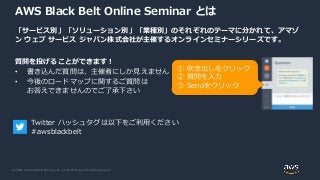
Web Services, Inc. or its Affiliates. All rights reserved. AWS Black Belt Online Seminar とは 「サービス別」「ソリューション別」「業種別」のそれぞれのテーマに分かれて、アマゾ ン ウェブ サービス ジャパン株式会社が主催するオンラインセミナーシリーズです。 質問を投げることができます! • 書き込んだ質問は、主催者にしか見えません • 今後のロードマップに関するご質問は お答えできませんのでご了承下さい ① 吹き出しをクリック ② 質問を入力 ③ Sendをクリック Twitter ハッシュタグは以下をご利用ください #awsblackbelt
3.
© 2020, Amazon
Web Services, Inc. or its Affiliates. All rights reserved. 内容についての注意点 • 本資料では2020年04月08日時点のサービス内容および価格についてご説明しています。最新の 情報はAWS公式ウェブサイト(http://aws.amazon.com)にてご確認ください。 • 資料作成には十分注意しておりますが、資料内の価格とAWS公式ウェブサイト記載の価格に相 違があった場合、AWS公式ウェブサイトの価格を優先とさせていただきます。 • 価格は税抜表記となっています。日本居住者のお客様には別途消費税をご請求させていただきま す。 • AWS does not offer binding price quotes. AWS pricing is publicly available and is subject to change in accordance with the AWS Customer Agreement available at http://aws.amazon.com/agreement/. Any pricing information included in this document is provided only as an estimate of usage charges for AWS services based on certain information that you have provided. Monthly charges will be based on your actual use of AWS services, and may vary from the estimates provided.
4.
© 2020, Amazon
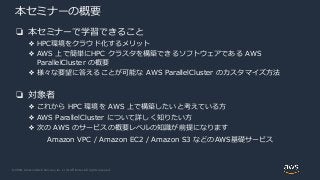
Web Services, Inc. or its Affiliates. All rights reserved. 本セミナーの概要 ❏ 本セミナーで学習できること ❖ HPC環境をクラウド化するメリット ❖ AWS 上で簡単にHPC クラスタを構築できるソフトウェアである AWS ParallelCluster の概要 ❖ 様々な要望に答えることが可能な AWS ParallelCluster のカスタマイズ方法 ❏ 対象者 ❖ これから HPC 環境を AWS 上で構築したいと考えている方 ❖ AWS ParallelCluster について詳しく知りたい方 ❖ 次の AWS のサービスの概要レベルの知識が前提になります Amazon VPC / Amazon EC2 / Amazon S3 などのAWS基礎サービス
5.
© 2020, Amazon
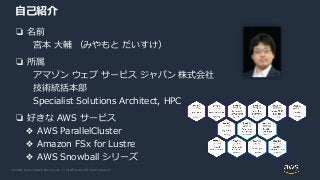
Web Services, Inc. or its Affiliates. All rights reserved. 自己紹介 ❏ 名前 宮本 大輔 (みやもと だいすけ) ❏ 所属 アマゾン ウェブ サービス ジャパン 株式会社 技術統括本部 Specialist Solutions Architect, HPC ❏ 好きな AWS サービス ❖ AWS ParallelCluster ❖ Amazon FSx for Lustre ❖ AWS Snowball シリーズ
6.
© 2020, Amazon
Web Services, Inc. or its Affiliates. All rights reserved. 本日の流れ • HPC on AWS • AWS ParallelCluster とは • AWS ParallelCluster の使い方 • Demo • AWS ParallelCluster の設定 • 基本編 • パフォーマンス編 • ネットワーク構成編 • オペレーション編 • AWS ParallelCluster と他のサービスの連携 • AWS ParallelCluster の活用事例
7.
© 2020, Amazon
Web Services, Inc. or its Affiliates. All rights reserved.© 2020, Amazon Web Services, Inc. or its Affiliates. All rights reserved. HPC on AWS
8.
© 2020, Amazon
Web Services, Inc. or its Affiliates. All rights reserved. これまでの HPC クラスタの課題 • サーバ台数が限られており、需要が増加する時期には長大なキュー待ち時 間が発生する • 同じ環境を複数メンバーで共有するため、アプリケーションによってはリ ソースが無駄になることも • サーバ台数が多く、ハードウェアの保守・管理が煩雑
9.
© 2020, Amazon
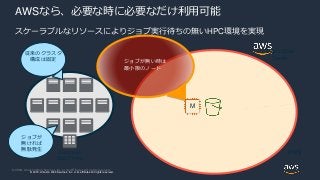
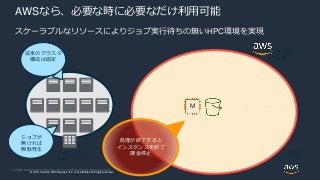
Web Services, Inc. or its Affiliates. All rights reserved. © 2018, Amazon Web Services, Inc. or its affiliates. All rights reserved. Corporate Data Center Elastic Data Center AWSなら、必要な時に必要なだけ利用可能 従来のクラスタ 構成は固定 ジョブが 無ければ 無駄発生 ジョブが無い時は 最小限のノード AWS M スケーラブルなリソースによりジョブ実行待ちの無いHPC環境を実現
10.
© 2020, Amazon
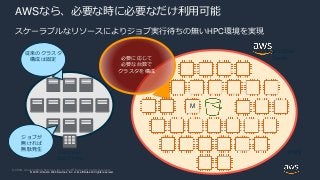
Web Services, Inc. or its Affiliates. All rights reserved. © 2018, Amazon Web Services, Inc. or its affiliates. All rights reserved. Corporate Data Center Elastic Data Center AWSなら、必要な時に必要なだけ利用可能 従来のクラスタ 構成は固定 ジョブが 無ければ 無駄発生 AWS M 必要に応じて 必要な台数で クラスタを構成 スケーラブルなリソースによりジョブ実行待ちの無いHPC環境を実現
11.
© 2020, Amazon
Web Services, Inc. or its Affiliates. All rights reserved. © 2018, Amazon Web Services, Inc. or its affiliates. All rights reserved. Corporate Data Center Elastic Data Center AWSなら、必要な時に必要なだけ利用可能 従来のクラスタ 構成は固定 ジョブが 無ければ 無駄発生 処理が終了すると インスタンスを終了 課金停止 AWS M スケーラブルなリソースによりジョブ実行待ちの無いHPC環境を実現
12.
© 2020, Amazon
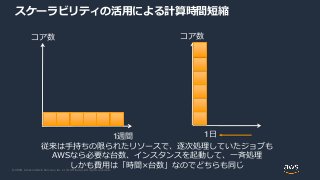
Web Services, Inc. or its Affiliates. All rights reserved. スケーラビリティの活用による計算時間短縮 1日1週間 コア数コア数 従来は手持ちの限られたリソースで、逐次処理していたジョブも AWSなら必要な台数、インスタンスを起動して、一斉処理 しかも費用は「時間×台数」なのでどちらも同じ
13.
© 2020, Amazon
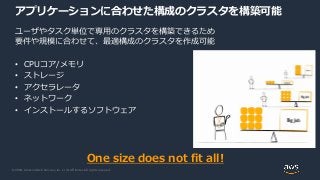
Web Services, Inc. or its Affiliates. All rights reserved. ユーザやタスク単位で専用のクラスタを構築できるため 要件や規模に合わせて、最適構成のクラスタを作成可能 • CPUコア/メモリ • ストレージ • アクセラレータ • ネットワーク • インストールするソフトウェア One size does not fit all! アプリケーションに合わせた構成のクラスタを構築可能
14.
© 2020, Amazon
Web Services, Inc. or its Affiliates. All rights reserved. ・ハードウェア保守 ・ネットワーク管理/保守 ・電源管理 ・空調管理 ・設置場所の費用/運用 計算機の規模が大きくなればなるほど 大変に、、、 計算機管理の手間を抑える 競争優位につながらない物理的管理は全てAWSにお任せ 他社と差別化可能な部分に集中
15.
© 2020, Amazon
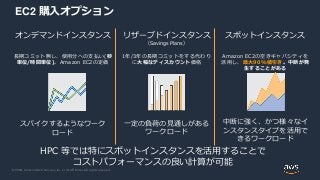
Web Services, Inc. or its Affiliates. All rights reserved. EC2 購入オプション オンデマンドインスタンス 長期コミット無し、使用分への支払い(秒 単位/時間単位)。Amazon EC2の定価 スパイクするようなワーク ロード リザーブドインスタンス (Savings Plans) 1年/3年の長期コミットをする代わり に大幅なディスカウント価格 一定の負荷の見通しがある ワークロード スポットインスタンス Amazon EC2の空きキャパシティを 活用し、最大90%値引き。中断が発 生することがある 中断に強く、かつ様々なイ ンスタンスタイプを活用で きるワークロード HPC 等では特にスポットインスタンスを活用することで コストパフォーマンスの良い計算が可能
16.
© 2020, Amazon
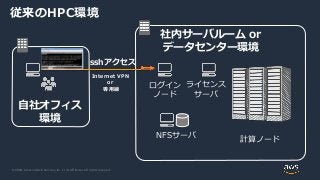
Web Services, Inc. or its Affiliates. All rights reserved. 自社オフィス 環境 社内サーバルーム or データセンター環境 sshアクセス ログイン ノード 計算ノード ライセンス サーバ NFSサーバ Internet VPN or 専用線 従来のHPC環境
17.
© 2020, Amazon
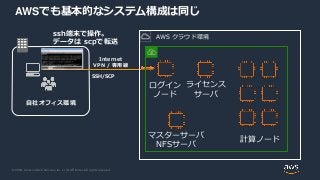
Web Services, Inc. or its Affiliates. All rights reserved. 自社オフィス環境 SSH/SCP ssh端末で操作。 データは scpで転送 ログイン ノード 計算ノード ライセンス サーバ マスターサーバ NFSサーバ Internet VPN / 専用線 AWS クラウド環境 AWSでも基本的なシステム構成は同じ
18.
© 2020, Amazon
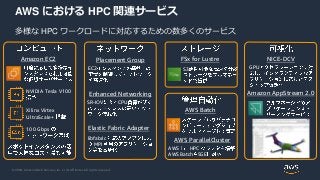
Web Services, Inc. or its Affiliates. All rights reserved. AWS における HPC 関連サービス 多様な HPC ワークロードに対応するための数多くのサービス Amazon EC2 Enhanced Networking Placement Group Elastic Fabric Adapter Amazon AppStream 2.0 NICE-DCV NVIDIA Tesla V100 EC2 AWS ParallelCluster AWS Batch AWS HPC AWS Batch SGE SR-IOV CPU libfabric MPI Xilinx Virtex UltraScale+ 100 Gbps GPU FSx for Lustre S3
19.
© 2020, Amazon
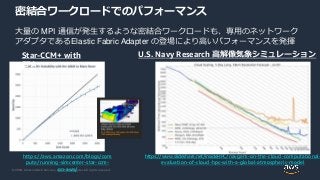
Web Services, Inc. or its Affiliates. All rights reserved. 密結合ワークロードでのパフォーマンス 大量の MPI 通信が発生するような密結合ワークロードも、専用のネットワーク アダプタであるElastic Fabric Adapter の登場により高いパフォーマンスを発揮 https://www.slideshare.net/insideHPC/navgem-on-the-cloud-computational- evaluation-of-cloud-hpc-with-a-global-atmospheric-model https://aws.amazon.com/blogs/com pute/running-simcenter-star-ccm- on-aws/ Star-CCM+ with EFA U.S. Navy Research 高解像気象シミュレーション
20.
© 2020, Amazon
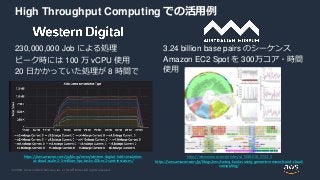
Web Services, Inc. or its Affiliates. All rights reserved. High Throughput Computing での活用例 230,000,000 Job による処理 ピーク時には 100 万 vCPU 使用 20 日かかっていた処理が 8 時間で 3.24 billion base pairs のシーケンス Amazon EC2 Spot を 300万コア・時間 使用 https://www.nature.com/articles/s41588-018-0153-5 https://aws.amazon.com/jp/blogs/aws/saving-koalas-using-genomics-research-and-cloud- computing/ https://aws.amazon.com/jp/blogs/news/western-digital-hdd-simulation- at-cloud-scale-2-5-million-hpc-tasks-40k-ec2-spot-instances/
21.
© 2020, Amazon
Web Services, Inc. or its Affiliates. All rights reserved. re:Invent 2019 Keynote: Monday Night Live https://www.youtube.com/watch?v=GPUWATKe15E
22.
© 2020, Amazon
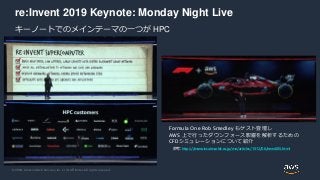
Web Services, Inc. or its Affiliates. All rights reserved. re:Invent 2019 Keynote: Monday Night Live キーノートでのメインテーマの一つが HPC Formula One Rob Smedley もゲスト登壇し AWS 上で行ったダウンフォース影響を解析するための CFDシミュレーションについて紹介 参考: https://monoist.atmarkit.co.jp/mn/articles/1912/06/news085.html
23.
© 2020, Amazon
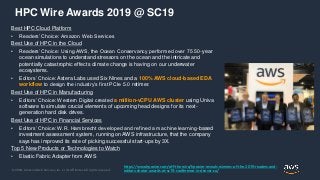
Web Services, Inc. or its Affiliates. All rights reserved. HPC Wire Awards 2019 @ SC19 Best HPC Cloud Platform • Readers’ Choice: Amazon Web Services Best Use of HPC in the Cloud • Readers’ Choice: Using AWS, the Ocean Conservancy performed over 75 50-year ocean simulations to understand stressors on the ocean and the intricate and potentially catastrophic effects climate change is having on our underwater ecosystems. • Editors’ Choice: Astera Labs used Six Nines and a 100% AWS cloud-based EDA workflow to design the industry’s first PCIe 5.0 retimer. Best Use of HPC in Manufacturing • Editors’ Choice: Western Digital created a million-vCPU AWS cluster using Univa software to simulate crucial elements of upcoming head designs for its next- generation hard disk drives. Best Use of HPC in Financial Services • Editors’ Choice: W.R. Hambrecht developed and refined a machine learning-based investment assessment system, running on AWS infrastructure, that the company says has improved its rate of picking successful start-ups by 3X. Top 5 New Products or Technologies to Watch • Elastic Fabric Adapter from AWS https://www.hpcwire.com/off-the-wire/hpcwire-reveals-winners-of-the-2019-readers-and- editors-choice-awards-at-sc19-conference-in-denver-co/
24.
© 2020, Amazon
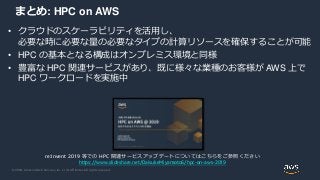
Web Services, Inc. or its Affiliates. All rights reserved. まとめ: HPC on AWS • クラウドのスケーラビリティを活用し、 必要な時に必要な量の必要なタイプの計算リソースを確保することが可能 • HPC の基本となる構成はオンプレミス環境と同様 • 豊富な HPC 関連サービスがあり、既に様々な業種のお客様が AWS 上で HPC ワークロードを実施中 re:Invent 2019 等での HPC 関連サービスアップデートについてはこちらをご参照ください https://www.slideshare.net/DaisukeMiyamoto6/hpc-on-aws-2019
25.
© 2020, Amazon
Web Services, Inc. or its Affiliates. All rights reserved.© 2020, Amazon Web Services, Inc. or its Affiliates. All rights reserved. AWS ParallelCluster とは
26.
© 2020, Amazon
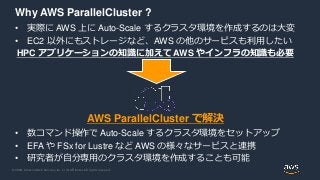
Web Services, Inc. or its Affiliates. All rights reserved. Why AWS ParallelCluster ? • 実際に AWS 上に Auto-Scale するクラスタ環境を作成するのは大変 • EC2 以外にもストレージなど、AWS の他のサービスも利用したい HPC アプリケーションの知識に加えて AWS やインフラの知識も必要 AWS ParallelCluster で解決 • 数コマンド操作で Auto-Scale するクラスタ環境をセットアップ • EFA や FSx for Lustre など AWS の様々なサービスと連携 • 研究者が自分専用のクラスタ環境を作成することも可能
27.
© 2020, Amazon
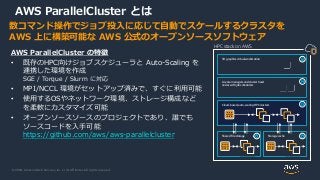
Web Services, Inc. or its Affiliates. All rights reserved. 数コマンド操作でジョブ投入に応じて自動でスケールするクラスタを AWS 上に構築可能な AWS 公式のオープンソースソフトウェア AWS ParallelCluster の特徴 • 既存のHPC向けジョブスケジューラと Auto-Scaling を 連携した環境を作成 SGE / Torque / Slurm に対応 • MPI/NCCL 環境がセットアップ済みで、すぐに利用可能 • 使用するOSやネットワーク環境、ストレージ構成など を柔軟にカスタマイズ可能 • オープンソースソースのプロジェクトであり、誰でも ソースコードを入手可能 https://github.com/aws/aws-parallelcluster AWS ParallelCluster とは HPC stack on AWS 3D graphics virtual workstation License managers and cluster head nodes with job schedulers Cloud-based, auto-scaling HPC clusters Shared file storage Storage cache
28.
© 2020, Amazon
Web Services, Inc. or its Affiliates. All rights reserved. AWS ParallelCluster の利用イメージ まずは自分のPC等に ParallelCluster ソフトウェアをインストール config ファイルを記述し、pcluster create コマンドを実行することで、 ジョブ投入に応じて Auto-Scale するクラスタ環境が自動的に作成される 28 AWS Cloud Users Cluster Master Auto-Scale ComputeAWS CloudFormation Scale-Out / Scale-in ジョブスケジューラ (SGE/Torque/Slurm ) $ pcluster create <NAME> [aws] aws_region_name = ap-northeast-1 [cluster slurm1] master_instance_type = c5.large compute_instance_type = c5.4xlarge max_queue_size = 10 initial_queue_size = 0 scheduler = slurm cluster_type = spot config ファイル /shared NFS mount /home /shared
29.
© 2020, Amazon
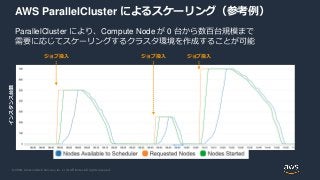
Web Services, Inc. or its Affiliates. All rights reserved. AWS ParallelCluster によるスケーリング(参考例) ParallelCluster により、Compute Node が 0 台から数百台規模まで 需要に応じてスケーリングするクラスタ環境を作成することが可能 インスタンス台数 ジョブ投入 ジョブ投入 ジョブ投入
30.
© 2020, Amazon
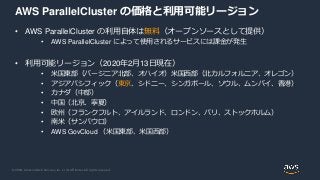
Web Services, Inc. or its Affiliates. All rights reserved. AWS ParallelCluster の価格と利用可能リージョン • AWS ParallelCluster の利用自体は無料(オープンソースとして提供) • AWS ParallelCluster によって使用されるサービスには課金が発生 • 利用可能リージョン(2020年2月13日現在) • 米国東部(バージニア北部、オハイオ)米国西部(北カルフォルニア、オレゴン) • アジアパシフィック(東京、シドニー、シンガポール、ソウル、ムンバイ、香港) • カナダ(中部) • 中国(北京、寧夏) • 欧州(フランクフルト、アイルランド、ロンドン、パリ、ストックホルム) • 南米(サンパウロ) • AWS GovCloud (米国東部、米国西部)
31.
© 2020, Amazon
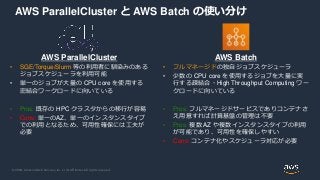
Web Services, Inc. or its Affiliates. All rights reserved. AWS ParallelCluster と AWS Batch の使い分け AWS ParallelCluster • SGE/Torque/Slurm 等の利用者に馴染みのある ジョブスケジューラを利用可能 • 単一のジョブが大量の CPU core を使用する 密結合ワークロードに向いている • Pros: 既存の HPC クラスタからの移行が容易 • Cons: 単一のAZ、単一のインスタンスタイプ での利用となるため、可用性確保には工夫が 必要 AWS Batch • フルマネージドの独自ジョブスケジューラ • 少数の CPU core を使用するジョブを大量に実 行する疎結合・High Throughput Computing ワー クロードに向いている • Pros: フルマネージドサービスでありコンテナさ え用意すれば計算基盤の管理は不要 • Pros: 複数 AZ や複数インスタンスタイプの利用 が可能であり、可用性を確保しやすい • Cons: コンテナ化やスケジューラ対応が必要
32.
© 2020, Amazon
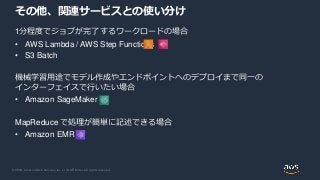
Web Services, Inc. or its Affiliates. All rights reserved. 1分程度でジョブが完了するワークロードの場合 • AWS Lambda / AWS Step Functions • S3 Batch 機械学習用途でモデル作成やエンドポイントへのデプロイまで同一の インターフェイスで行いたい場合 • Amazon SageMaker MapReduce で処理が簡単に記述できる場合 • Amazon EMR その他、関連サービスとの使い分け
33.
© 2020, Amazon
Web Services, Inc. or its Affiliates. All rights reserved. Why AWS ParallelCluster ? (再掲) • 実際に AWS 上に Auto-Scale するクラスタ環境を作成するのは大変 • EC2 以外にもストレージなど、AWS の他のサービスも利用したい HPC アプリケーションの知識に加えて AWS やインフラの知識も必要 AWS ParallelCluster で解決 • 数コマンド操作で Auto-Scale するクラスタ環境をセットアップ • EFA や FSx for Lustre など AWS の様々なサービスと連携 • 研究者が自分専用のクラスタ環境を作成することも可能
34.
© 2020, Amazon
Web Services, Inc. or its Affiliates. All rights reserved.© 2020, Amazon Web Services, Inc. or its Affiliates. All rights reserved. AWS ParallelCluster の使い方
35.
© 2020, Amazon
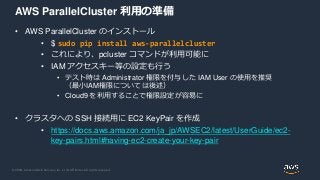
Web Services, Inc. or its Affiliates. All rights reserved. AWS ParallelCluster 利用の準備 • AWS ParallelCluster のインストール • $ sudo pip install aws-parallelcluster • これにより、pcluster コマンドが利用可能に • IAM アクセスキー等の設定も行う • テスト時は Administrator 権限を付与した IAM User の使用を推奨 (最小IAM権限については後述) • Cloud9 を利用することで権限設定が容易に • クラスタへの SSH 接続用に EC2 KeyPair を作成 • https://docs.aws.amazon.com/ja_jp/AWSEC2/latest/UserGuide/ec2- key-pairs.html#having-ec2-create-your-key-pair
36.
© 2020, Amazon
Web Services, Inc. or its Affiliates. All rights reserved. クラスタの設定(config)の作成 pcluster configure を実行するこ とで、対話的な初期設定が可能 最終的に、 ~/.parallelcluster/config に 設定が出力される 設定可能な項目 • リージョン • キーペア • OS • スケジューラ • インスタンスタイプ・最大起動数 • VPC/Subnet $ pcluster configure Allowed values for AWS Region ID: 1. ap-northeast-1 2. ap-northeast-2 ~~~ 中略 ~~~ AWS Region ID [us-east-1]: Allowed values for Scheduler: 1. sge 2. torque 3. slurm 4. awsbatch Scheduler [sge]: Allowed values for Operating System: 1. alinux 4. centos7 6. ubuntu1804 Operating System [centos7]: Minimum cluster size (instances) [0]: Maximum cluster size (instances) [1000]: Master instance type [c5.9xlarge]: Compute instance type [c5n.18xlarge]: https://docs.aws.amazon.com/ja_jp/parallelcluster/latest/ug/commands.html
37.
© 2020, Amazon
Web Services, Inc. or its Affiliates. All rights reserved. クラスタの作成・状態確認・ログイン pcluster create <CLUSTER_NAME> • クラスタを作成を開始する • 作成には5分から10分程度必要 pcluster ssh <CLUSTER_NAME> • SSH を用いてクラスタに接続 • コマンドの最後に -i などのSSH オプションを指定可能 $ pcluster create mycluster Beginning cluster creation for cluster: myclusterCreating stack named: parallelcluster-mycluster Status: CREATE_COMPLETE MasterServer: RUNNING MasterPublicIP: 3.215.21.118 ClusterUser: centos MasterPrivateIP: 10.0.15.151 $ pcluster ssh mycluster –i mykey.pem [centos@ip-10-0-15-151 ~]$ https://docs.aws.amazon.com/ja_jp/parallelcluster/latest/ug/commands.html
38.
© 2020, Amazon
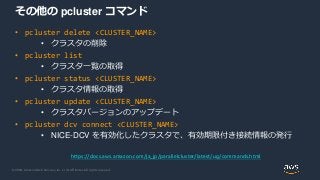
Web Services, Inc. or its Affiliates. All rights reserved. その他の pcluster コマンド • pcluster delete <CLUSTER_NAME> • クラスタの削除 • pcluster list • クラスタ一覧の取得 • pcluster status <CLUSTER_NAME> • クラスタ情報の取得 • pcluster update <CLUSTER_NAME> • クラスタバージョンのアップデート • pcluster dcv connect <CLUSTER_NAME> • NICE-DCV を有効化したクラスタで、有効期限付き接続情報の発行 https://docs.aws.amazon.com/ja_jp/parallelcluster/latest/ug/commands.html
39.
© 2020, Amazon
Web Services, Inc. or its Affiliates. All rights reserved.© 2020, Amazon Web Services, Inc. or its Affiliates. All rights reserved. Demo
40.
© 2020, Amazon
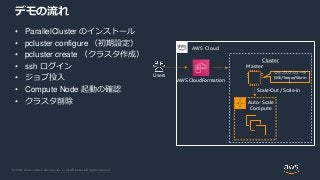
Web Services, Inc. or its Affiliates. All rights reserved. デモの流れ • ParallelCluster のインストール • pcluster configure (初期設定) • pcluster create (クラスタ作成) • ssh ログイン • ジョブ投入 • Compute Node 起動の確認 • クラスタ削除 AWS Cloud Users Cluster Master Auto-Scale Compute AWS CloudFormation Scale-Out / Scale-in ジョブスケジューラ (SGE/Torque/Slurm )
41.
© 2020, Amazon
Web Services, Inc. or its Affiliates. All rights reserved.
42.
© 2020, Amazon
Web Services, Inc. or its Affiliates. All rights reserved.© 2020, Amazon Web Services, Inc. or its Affiliates. All rights reserved. AWS ParallelCluster の設定 基本編
43.
© 2020, Amazon
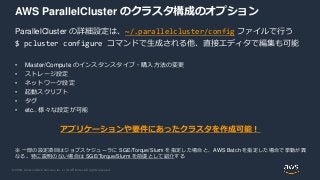
Web Services, Inc. or its Affiliates. All rights reserved. AWS ParallelCluster のクラスタ構成のオプション ParallelCluster の詳細設定は、~/.parallelcluster/config ファイルで行う $ pcluster configure コマンドで生成される他、直接エディタで編集も可能 • Master/Compute のインスタンスタイプ・購入方法の変更 • ストレージ設定 • ネットワーク設定 • 起動スクリプト • タグ • etc.. 様々な設定が可能 アプリケーションや要件にあったクラスタを作成可能! ※ 一部の設定項目はジョブスケジューラに SGE/Torque/Slurm を指定した場合と、AWS Batch を指定した場合で挙動が異 なる。特に説明のない場合は SGE/Torque/Slurm を前提として紹介する
44.
© 2020, Amazon
Web Services, Inc. or its Affiliates. All rights reserved. config ファイルの読み方 • [aws] や、[cluster]といったセクショ ンによって区切られている • [cluster mycluster] といった形式でセ クションに名前をつけることができ、 他のセクションから参照される • 左図の矢印を参照 [aws] aws_region_name = ap-northeast-1 [global] cluster_template = mycluster [cluster mycluster] master_instance_type = c5.large compute_instance_type = c5.4xlarge cluster_type = spot ebs_settings = shared vpc_settings = public [vpc public] master_subnet_id = subnet-******** vpc_id = vpc-********* [ebs shared] volume_type = gp2 volume_size = 400
45.
© 2020, Amazon
Web Services, Inc. or its Affiliates. All rights reserved. クラスタ設定の基本 config ファイルの記述で以下の項目を設定可能 • Master/Compute のインスタンスタイプ • 使用するインスタンス台数の最小/最大値 • ジョブスケジューラ • OS • On-demand / Spot [cluster default] vpc_settings = public key_name = private master_instance_type = c5.large compute_instance_type = c5.4xlarge initial_queue_size = 0 max_queue_size = 10 maintain_initial_size = false scheduler = slurm base_os = centos7 cluster_type = spot https://docs.aws.amazon.com/parallelcluster/latest/ug/cluster-definition.html
46.
© 2020, Amazon
Web Services, Inc. or its Affiliates. All rights reserved. Master/Compute のインスタンスタイプ変更 • master_instance_type / compute_instance_type で設定可能 • GPU や FPGA を搭載したインスタンスタイ プも選択可能 • 計算には直接関わらないが、クラスタ規模が 大きい場合は、Master のサイジングも重要 • デフォルト構成では、各Compute ノードは Master のストレージを NFS マウントしている ため、十分な Master にもネットワーク帯域と EBS最適化スループットが必要 [cluster default] vpc_settings = public key_name = private master_instance_type = c5.large compute_instance_type = c5.4xlarge initial_queue_size = 0 max_queue_size = 10 maintain_initial_size = false scheduler = slurm base_os = centos7 cluster_type = spot https://docs.aws.amazon.com/parallelcluster/latest/ug/cluster-definition.html
47.
© 2020, Amazon
Web Services, Inc. or its Affiliates. All rights reserved. スケーリング台数設定 スケーリング時の最小・最大台数の指定 • initial_queue_size : クラスタ作成時の初期 インスタンス台数 • max_queue_size : 最大インスタンス台数 • maintain_initial_size : • true : 常に initial_queue_size 以上の台数を確 保する • false : ジョブのない場合は0台までスケールイ ン • 参考: [scaling] セクションの scaledown_idletime を指定 することで、スケールインまでの待ち時間を指定可能 [cluster default] vpc_settings = public key_name = private master_instance_type = c5.large compute_instance_type = c5.4xlarge initial_queue_size = 0 max_queue_size = 10 maintain_initial_size = false scheduler = slurm base_os = centos7 cluster_type = spot https://docs.aws.amazon.com/parallelcluster/latest/ug/cluster-definition.html
48.
© 2020, Amazon
Web Services, Inc. or its Affiliates. All rights reserved. ジョブスケジューラの選択 • scheduler 設定により、利用するジョブスケ ジューラを選択可能 • 指定可能な値は以下(デフォルトは sge ) • SGE: sge • Torque: torque • Slurm: slurm • AWS Batch: batch • スケジューラのバージョンは、 ParallelClusterのバージョンによって異なる [cluster default] vpc_settings = public key_name = private master_instance_type = c5.large compute_instance_type = c5.4xlarge initial_queue_size = 0 max_queue_size = 10 maintain_initial_size = false scheduler = slurm base_os = centos7 cluster_type = spot https://docs.aws.amazon.com/parallelcluster/latest/ug/cluster-definition.html
49.
© 2020, Amazon
Web Services, Inc. or its Affiliates. All rights reserved. オペレーティングシステムの選択 • base_os 設定により、利用するオペレー ティングシステムを選択可能 • 指定可能な値は以下 (デフォルトは alinux ) • Amazon Linux: alinux • Amazon Linux2: alinux2 • CentOS 6: centos6 • CentOS 7: centos7 • Ubuntu 16.04: ubuntu1604 • Ubuntu 18.04: ubuntu1804 • ログインユーザ名はOSにより異なる • NICE-DCV連携等、一部機能は特定のOSで しかサポートされていない場合も [cluster default] vpc_settings = public key_name = private master_instance_type = c5.large compute_instance_type = c5.4xlarge initial_queue_size = 0 max_queue_size = 10 maintain_initial_size = false scheduler = slurm base_os = centos7 cluster_type = spot https://docs.aws.amazon.com/parallelcluster/latest/ug/cluster-definition.html
50.
© 2020, Amazon
Web Services, Inc. or its Affiliates. All rights reserved. Spot インスタンスの利用 Spot インスタンスを利用することで、 On-demand 価格の最大 9 割引で利用可能 • cluster_type に true を指定することで、 Compute ノードに Spot インスタンスが利 用される(デフォルトは ondemand) • Spot 割引率は時価で変動し、インスタンス タイプや Region/AZ によっても異なる • 中断が発生する可能性にも注意 [cluster default] vpc_settings = public key_name = private master_instance_type = c5.large compute_instance_type = c5.4xlarge initial_queue_size = 0 max_queue_size = 10 maintain_initial_size = false scheduler = slurm base_os = centos7 cluster_type = spot https://docs.aws.amazon.com/parallelcluster/latest/ug/cluster-definition.html https://www.slideshare.net/AmazonWebServicesJapan/20190306-aws-black-belt-online-seminar-amazon- ec2
51.
© 2020, Amazon
Web Services, Inc. or its Affiliates. All rights reserved.© 2020, Amazon Web Services, Inc. or its Affiliates. All rights reserved. AWS ParallelCluster の設定 パフォーマンス編
52.
© 2020, Amazon
Web Services, Inc. or its Affiliates. All rights reserved. HPC on AWS におけるパフォーマンスの基本 まずはシンプルな構成で試してみる、動かしてみることが重要 CPU/メモリ/ネットワーク/ストレージ等、ボトルネックに応じて対処 (現実的なコスト・計算時間で収まっているのであれば、深追いしないのも一 つの戦略) パフォーマンスチューニングにおける基本的な考え方は AWS 上でも大きく変 わるわけではない
53.
© 2020, Amazon
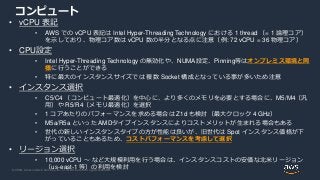
Web Services, Inc. or its Affiliates. All rights reserved. コンピュート • vCPU 表記 • AWS での vCPU 表記は Intel Hyper-Threading Technology における 1 thread (= 1 論理コア) を示しており、物理コア数は vCPU 数の半分となる点に注意(例: 72 vCPU = 36 物理コア) • CPU設定 • Intel Hyper-Threading Technology の無効化や、NUMA設定、Pinning等はオンプレミス環境と同 様に行うことができる • 特に最大のインスタンスサイズでは 複数 Socket 構成となっている事が多いため注意 • インスタンス選択 • C5/C4 (コンピュート最適化)を中心に、より多くのメモリを必要とする場合に、M5/M4(汎 用)や R5/R4(メモリ最適化)を選択 • 1 コアあたりのパフォーマンスを求める場合は Z1d も検討(最大クロック 4 GHz) • M5a/R5a といった AMDタイプインスタンスによりコストメリットが生まれる場合もある • 世代の新しいインスタンスタイプの方が性能は良いが、旧世代は Spot インスタンス価格が下 がっていることもあるため、コストパフォーマンスを考慮して選択 • リージョン選択 • 10,000 vCPU ~ など大規模利用を行う場合は、インスタンスコストの安価な北米リージョン (us-east-1 等)の利用を検討
54.
© 2020, Amazon
Web Services, Inc. or its Affiliates. All rights reserved. Intel Hyper-Threading Technology の無効化 HPC アプリケーションでは、Intel HTT を無 効化することでパフォーマンスが向上するこ ともある • disable_hyperthreading = true を指定(デ フォルトは false、Intel HTT 有効) • 有効、無効両方のケースでベンチマークを 実施することを推奨 [cluster default] vpc_settings = public key_name = private master_instance_type = c5.large compute_instance_type = c5.4xlarge initial_queue_size = 0 max_queue_size = 10 maintain_initial_size = false scheduler = slurm base_os = centos7 cluster_type = spot disable_hyperthreading = true https://docs.aws.amazon.com/parallelcluster/latest/ug/cluster-definition.html
55.
© 2020, Amazon
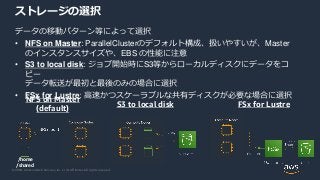
Web Services, Inc. or its Affiliates. All rights reserved. データの移動パターン等によって選択 • NFS on Master: ParallelClusterのデフォルト構成、扱いやすいが、Master のインスタンスサイズや、EBS の性能に注意 • S3 to local disk: ジョブ開始時にS3等からローカルディスクにデータをコ ピー データ転送が最初と最後のみの場合に選択 • FSx for Lustre: 高速かつスケーラブルな共有ディスクが必要な場合に選択 ストレージの選択 NFS on Master (default) /home /shared S3 to local disk FSx for Lustre
56.
© 2020, Amazon
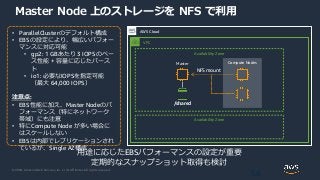
Web Services, Inc. or its Affiliates. All rights reserved. Master Node 上のストレージを NFS で利用 56 AWS Cloud • ParallelClusterのデフォルト構成 • EBSの設定により、幅広いパフォー マンスに対応可能 • gp2: 1 GBあたり 3 IOPSのベー ス性能 + 容量に応じたバース ト • io1: 必要なIOPSを指定可能 (最大 64,000 IOPS) 注意点: • EBS性能に加え、Master Nodeのパ フォーマンス(特にネットワーク 帯域)にも注意 • 特にCompute Node が多い場合に はスケールしない • EBSは内部でレプリケーションされ ているが、Single AZ構成 Master 用途に応じたEBSパフォーマンスの設定が重要 定期的なスナップショット取得も検討 VPC Availability Zone Availability Zone Compute Nodes /shared NFS mount
57.
© 2020, Amazon
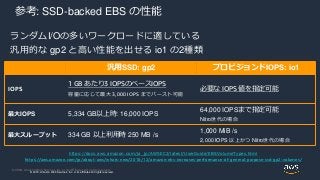
Web Services, Inc. or its Affiliates. All rights reserved. © 2018, Amazon Web Services, Inc. or its affiliates. All rights reserved. 参考: SSD-backed EBS の性能 ランダムI/Oの多いワークロードに適している 汎用的な gp2 と高い性能を出せる io1 の2種類 汎用SSD: gp2 プロビジョンドIOPS: io1 IOPS 1 GB あたり3 IOPSのベースIOPS 容量に応じて最大 3,000 IOPS までバースト可能 必要な IOPS 値を指定可能 最大IOPS 5,334 GB以上時: 16,000 IOPS 64,000 IOPSまで指定可能 Nitro世代の場合 最大スループット 334 GB 以上利用時 250 MB /s 1,000 MiB /s 2,000 IOPS 以上かつ Nitro世代の場合 https://docs.aws.amazon.com/ja_jp/AWSEC2/latest/UserGuide/EBSVolumeTypes.html https://aws.amazon.com/jp/about-aws/whats-new/2018/12/amazon-ebs-increases-performance-of-general-purpose-ssd-gp2-volumes/
58.
© 2020, Amazon
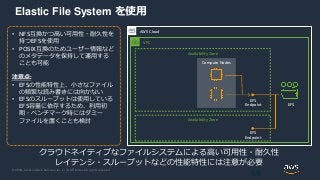
Web Services, Inc. or its Affiliates. All rights reserved. Elastic File System を使用 58 AWS Cloud • NFS互換かつ高い可用性・耐久性を 持つEFSを使用 • POSIX互換のためユーザー情報など のメタデータを保持して運用する ことも可能 注意点: • EFSの性能特性上、小さなファイル の頻繁な読み書きには向かない • EFSのスループットは使用している EFS容量に依存するため、利用初 期・ベンチマーク時にはダミー ファイルを置くことも検討 クラウドネイティブなファイルシステムによる高い可用性・耐久性 レイテンシ・スループットなどの性能特性には注意が必要 VPC Availability Zone Availability Zone Compute Nodes EFS EFS Endpoint EFS Endpoint
59.
© 2020, Amazon
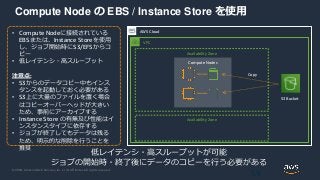
Web Services, Inc. or its Affiliates. All rights reserved. Compute Node の EBS / Instance Store を使用 59 AWS Cloud • Compute Nodeに接続されている EBSまたは、Instance Storeを使用 し、ジョブ開始時にS3/EFSからコ ピー • 低レイテンシ・高スループット 注意点: • S3からのデータコピー中もインス タンスを起動しておく必要がある • S3上に大量のファイルを置く場合 はコピーオーバーヘッドが大きい ため、事前にアーカイブする • Instance Store の有無及び性能はイ ンスタンスタイプに依存する • ジョブが終了してもデータは残る ため、明示的な削除を行うことを 推奨 低レイテンシ・高スループットが可能 ジョブの開始時・終了後にデータのコピーを行う必要がある VPC Availability Zone Availability Zone Compute Nodes S3 Bucket Copy
60.
© 2020, Amazon
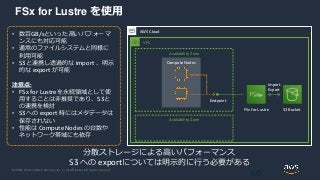
Web Services, Inc. or its Affiliates. All rights reserved. FSx for Lustre を使用 60 AWS Cloud • 数百GB/sといった高いパフォーマ ンスにも対応可能 • 通常のファイルシステムと同様に 利用可能 • S3と連携し透過的な import 、明示 的な export が可能 注意点: • FSx for Lustreを永続領域として使 用することは非推奨であり、S3と の連携を検討 • S3への export 時にはメタデータは 保存されない • 性能は Compute Nodes の台数や ネットワーク帯域にも依存 分散ストレージによる高いパフォーマンス S3 への exportについては明示的に行う必要がある VPC Availability Zone Availability Zone Compute Nodes FSx for Lustre Endpoint S3 Bucket Import Export
61.
© 2020, Amazon
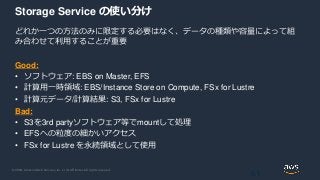
Web Services, Inc. or its Affiliates. All rights reserved. Storage Service の使い分け どれか一つの方法のみに限定する必要はなく、データの種類や容量によって組 み合わせて利用することが重要 Good: • ソフトウェア: EBS on Master, EFS • 計算用一時領域: EBS/Instance Store on Compute, FSx for Lustre • 計算元データ/計算結果: S3, FSx for Lustre Bad: • S3を3rd partyソフトウェア等でmountして処理 • EFSへの粒度の細かいアクセス • FSx for Lustre を永続領域として使用 61
62.
© 2020, Amazon
Web Services, Inc. or its Affiliates. All rights reserved. 共有 EBS ストレージ容量・性能の変更 Master にアタッチされ、Compute から NFS でマウントされている EBS ストレージの容量 等を変更可能 • volume_type , volume_size, volume_iops を 指定 • デフォルトでは、/shared として各ノード からマウント済み • 特定のスナップショットからボリュームを 作成する事も可能 • その他、Master / Compute の root volume のサ イズを変更したい場合は [cluster] セクションの master_root_volume_size / compute_root_volume_size を指定 [cluster default] ebs_settings = ebs1 [ebs ebs1] volume_type = io1 volume_size = 100 volume_iops = 500 https://docs.aws.amazon.com/parallelcluster/latest/ug/ebs-section.html
63.
© 2020, Amazon
Web Services, Inc. or its Affiliates. All rights reserved. FSx for Lustre ファイルシステムの使用 高速な分散ストレージサービスである FSx for Lustre と連携可能 • shared_dir : Master/Compute 各ノードでの マウントポイントを指定 • storage_capacity を指定した場合は新規に ファイルシステムが作成される • export_path , import_path の指定により S3 連 携機能も利用可能 • deployment_type の指定によりSCRATCH_2 や PERSISTENT_1といった新しいストレージタ イプも利用可能 • fsx_fs_id を指定した場合は既存のファイル システムが利用される [cluster default] fsx_settings = fs1 [fsx fs1] shared_dir = /fsx storage_capacity = 4400 deployment_type = SCRATCH_2 export_path = s3://bucket/folder import_path = s3://bucket https://docs.aws.amazon.com/parallelcluster/latest/ug/fsx-section.html https://www.slideshare.net/AmazonWebServicesJapan/20190319-aws-black-belt- online-seminar-amazon-fsx-for-lustre
64.
© 2020, Amazon
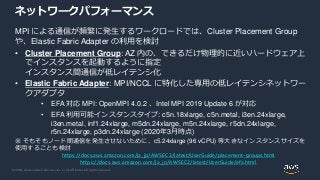
Web Services, Inc. or its Affiliates. All rights reserved. ネットワークパフォーマンス MPI による通信が頻繁に発生するワークロードでは、Cluster Placement Group や、Elastic Fabric Adapter の利用を検討 • Cluster Placement Group: AZ 内の、できるだけ物理的に近いハードウェア上 でインスタンスを起動するように指定 インスタンス間通信が低レイテンシ化 • Elastic Fabric Adapter: MPI/NCCL に特化した専用の低レイテンシネットワー クアダプタ • EFA 対応 MPI: OpenMPI 4.0.2 、Intel MPI 2019 Update 6 が対応 • EFA 利用可能インスタンスタイプ: c5n.18xlarge, c5n.metal, i3en.24xlarge, i3en.metal, inf1.24xlarge, m5dn.24xlarge, m5n.24xlarge, r5dn.24xlarge, r5n.24xlarge, p3dn.24xlarge (2020年3月時点) ※ そもそもノード間通信を発生させないために、c5.24xlarge (96 vCPU) 等大きなインスタンスサイズを 使用することも検討 https://docs.aws.amazon.com/ja_jp/AWSEC2/latest/UserGuide/placement-groups.html https://docs.aws.amazon.com/ja_jp/AWSEC2/latest/UserGuide/efa.html
65.
© 2020, Amazon
Web Services, Inc. or its Affiliates. All rights reserved. Elastic Fabric Adapter の有効化 MPI に特化した低レイテンシネットワークアダ プタであるEFAを有効化する • enable_efa = compute 指定だけでなく、 placement_group = DYNAMIC の指定も必要 • ParallelCluster 2.5.0 以降では、module コマ ンドで OpenMPI と Intel MPI を選択可能 (デフォルトは OpenMPI だが、Intel MPI の利用により パフォーマンスが向上する例もある) • EFA利用環境でも、環境変数設定により、 EFAの有効化・無効化を切り替え可能 • export FI_PROVIDER=sockets • export FI_PROVIDER=efa [cluster default] compute_instance_type = c5n.18xlarge placement_group = DYNAMIC enable_efa = compute https://docs.aws.amazon.com/parallelcluster/latest/ug/cluster-definition.html https://docs.aws.amazon.com/ja_jp/AWSEC2/latest/UserGuide/efa-start.html https://aws.amazon.com/blogs/opensource/scale-hpc-workloads-elastic-fabric-adapter-and-aws- parallelcluster/
66.
© 2020, Amazon
Web Services, Inc. or its Affiliates. All rights reserved.© 2020, Amazon Web Services, Inc. or its Affiliates. All rights reserved. AWS ParallelCluster の設定 ネットワーク構成編
67.
© 2020, Amazon
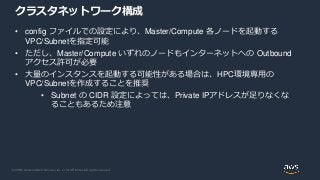
Web Services, Inc. or its Affiliates. All rights reserved. クラスタネットワーク構成 • config ファイルでの設定により、Master/Compute 各ノードを起動する VPC/Subnetを指定可能 • ただし、Master/Compute いずれのノードもインターネットへの Outbound アクセス許可が必要 • 大量のインスタンスを起動する可能性がある場合は、HPC環境専用の VPC/Subnetを作成することを推奨 • Subnet の CIDR 設定によっては、Private IPアドレスが足りなくな ることもあるため注意
68.
© 2020, Amazon
Web Services, Inc. or its Affiliates. All rights reserved. Public subnet Single Public Subnet 構成 • Master/Compute ともに Public Subnet 上で起動 • use_public_ips = true (デフォ ルト true)では、Master に Elastic IP が割り振られる AWS Cloud Master Compute Private subnet VPC Elastic IP Internet IGW [cluster default] vpc_settings = public [vpc public] vpc_id = vpc-xxxxxx master_subnet_id = subnet-<public> use_public_ips = true https://docs.aws.amazon.com/parallelcluster/latest/ug/networking.html
69.
© 2020, Amazon
Web Services, Inc. or its Affiliates. All rights reserved. Private subnetPublic subnet Public Subnet + Private Subnet 構成 AWS Cloud Master Compute VPC Elastic IP NAT gateway IGWInternet • Master はPublic Subnet、Compute はPrivate Subnet 上で起動 • Compute のインターネットアクセ ス用にNAT Gateway が必要 • インターネットへの公開部分が限 られており、推奨構成 [cluster default] vpc_settings = public [vpc public] vpc_id = vpc-xxxxxx master_subnet_id = subnet-<public> compute_subnet_id = subnet-<private> https://docs.aws.amazon.com/parallelcluster/latest/ug/networking.html
70.
© 2020, Amazon
Web Services, Inc. or its Affiliates. All rights reserved. Private subnet Private Subnet + AWS Direct Connect AWS Cloud Master Compute VPC Corporate data center Proxy Server Direct Connect Internet • Master/Compute ともにPrivate Subnet 上で起動 • Internet アクセス用に、オンプレミ ス環境のProxy Server を経由する • 認証付きProxy には対応していない • 監査要件などのある場合に選択 [cluster default] vpc_settings = public proxy_server = http://proxy.corp.net:8080 [vpc public] vpc_id = vpc-xxxxxx master_subnet_id = subnet-<public> use_public_ips = false https://docs.aws.amazon.com/parallelcluster/latest/ug/networking.html
71.
© 2020, Amazon
Web Services, Inc. or its Affiliates. All rights reserved.© 2020, Amazon Web Services, Inc. or its Affiliates. All rights reserved. AWS ParallelCluster の設定 オペレーション編
72.
© 2020, Amazon
Web Services, Inc. or its Affiliates. All rights reserved. NICE-DCV との統合によるリモート可視化 ブラウザからも利用可能なリモートデスクトップアプリケーションである NICE- DCV との統合により、可視化などの処理が容易に • ParallelCluster 2.5.0 以降、Amazon Linux 2, CentOS7, Ubuntu 18.04 のみ対応 • クラスタ起動後、dcv サブコマンドにより アクセス用URLを生成 $ pcluster dcv connect <CLUSTER_NAME> https://aws.amazon.com/jp/hpc/dcv/ https://aws.amazon.com/jp/blogs/opensource/deploy-hpc-cluster-remote-visualization-single-step- parallelcluster/ [cluster default] dcv_settings = dcv1 [dcv dcv1] enable = master
73.
© 2020, Amazon
Web Services, Inc. or its Affiliates. All rights reserved. Ganglia によるモニタリングの有効化 モニタリングソフトである Ganglia を利用可能 • Ganglia は、cfncluster ではデフォルト有効 だったが、ParallelCluster ではオプションの 設定が必須となった • クラスタ作成後、Master ノードの Security Group 設定で、inbound 80/TCP を許可する 必要がある • http://<IP address>/ganglia/ にアクセス [cluster default] extra_json = { "cluster" : { "ganglia_enabled" : "yes" } } https://docs.aws.amazon.com/parallelcluster/latest/ug/moving-from-cfncluster-to-aws- parallelcluster.html
74.
© 2020, Amazon
Web Services, Inc. or its Affiliates. All rights reserved. リソースへのタグ付けによるコスト管理 • Config ファイルで tags を指定する事により、ParallelCluster が生成する各 種リソースにタグが付与される • Cost Allocation Tags の設定を有効化することで、Cost Explorerなどで、利 用金額をタグにより分類することが可能 https://docs.aws.amazon.com/ja_jp/awsaccountbilling/latest/aboutv2/cost-alloc-tags.html Cost Explorer [cluster default] tags = {"Project": "pcluster-benchmark"}
75.
© 2020, Amazon
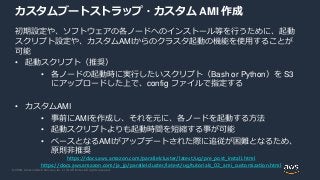
Web Services, Inc. or its Affiliates. All rights reserved. カスタムブートストラップ・カスタム AMI 作成 初期設定や、ソフトウェアの各ノードへのインストール等を行うために、起動 スクリプト設定や、カスタムAMIからのクラスタ起動の機能を使用することが 可能 • 起動スクリプト(推奨) • 各ノードの起動時に実行したいスクリプト(Bash or Python)を S3 にアップロードした上で、config ファイルで指定する • カスタムAMI • 事前にAMIを作成し、それを元に、各ノードを起動する方法 • 起動スクリプトよりも起動時間を短縮する事が可能 • ベースとなるAMIがアップデートされた際に追従が困難となるため、 原則非推奨 https://docs.aws.amazon.com/parallelcluster/latest/ug/pre_post_install.html https://docs.aws.amazon.com/ja_jp/parallelcluster/latest/ug/tutorials_02_ami_customization.html
76.
© 2020, Amazon
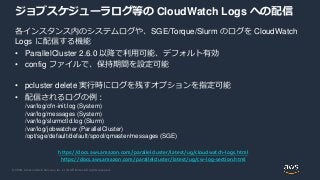
Web Services, Inc. or its Affiliates. All rights reserved. ジョブスケジューラログ等の CloudWatch Logs への配信 各インスタンス内のシステムログや、SGE/Torque/Slurm のログを CloudWatch Logs に配信する機能 • ParallelCluster 2.6.0 以降で利用可能、デフォルト有効 • config ファイルで、保持期間を設定可能 • pcluster delete 実行時にログを残すオプションを指定可能 • 配信されるログの例: /var/log/cfn-init.log (System) /var/log/messages (System) /var/log/slurmctld.log (Slurm) /var/log/jobwatcher (ParallelCluster) /opt/sge/default/default/spool/qmaster/messages (SGE) https://docs.aws.amazon.com/parallelcluster/latest/ug/cloudwatch-logs.html https://docs.aws.amazon.com/parallelcluster/latest/ug/cw-log-section.html
77.
© 2020, Amazon
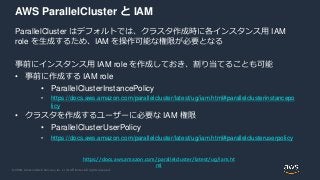
Web Services, Inc. or its Affiliates. All rights reserved. AWS ParallelCluster と IAM ParallelCluster はデフォルトでは、クラスタ作成時に各インスタンス用 IAM role を生成するため、IAM を操作可能な権限が必要となる 事前にインスタンス用 IAM role を作成しておき、割り当てることも可能 • 事前に作成する IAM role • ParallelClusterInstancePolicy • https://docs.aws.amazon.com/parallelcluster/latest/ug/iam.html#parallelclusterinstancepo licy • クラスタを作成するユーザーに必要な IAM 権限 • ParallelClusterUserPolicy • https://docs.aws.amazon.com/parallelcluster/latest/ug/iam.html#parallelclusteruserpolicy https://docs.aws.amazon.com/parallelcluster/latest/ug/iam.ht ml
78.
© 2020, Amazon
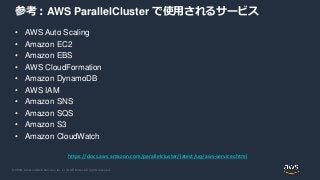
Web Services, Inc. or its Affiliates. All rights reserved. 参考:AWS ParallelCluster で使用されるサービス • AWS Auto Scaling • Amazon EC2 • Amazon EBS • AWS CloudFormation • Amazon DynamoDB • AWS IAM • Amazon SNS • Amazon SQS • Amazon S3 • Amazon CloudWatch https://docs.aws.amazon.com/parallelcluster/latest/ug/aws-services.html
79.
© 2020, Amazon
Web Services, Inc. or its Affiliates. All rights reserved.© 2020, Amazon Web Services, Inc. or its Affiliates. All rights reserved. AWS ParallelCluster と他のサービスの連携
80.
© 2020, Amazon
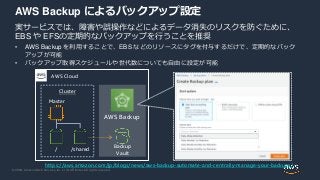
Web Services, Inc. or its Affiliates. All rights reserved. AWS Backup によるバックアップ設定 実サービスでは、障害や誤操作などによるデータ消失のリスクを防ぐために、 EBS や EFSの定期的なバックアップを行うことを推奨 • AWS Backup を利用することで、EBS などのリソースにタグを付与するだけで、定期的なバック アップが可能 • バックアップ取得スケジュールや世代数についても自由に設定が可能 AWS Cloud Cluster Master / /shared https://aws.amazon.com/jp/blogs/news/aws-backup-automate-and-centrally-manage-your-backups/ AWS Backup Backup Vault
81.
© 2020, Amazon
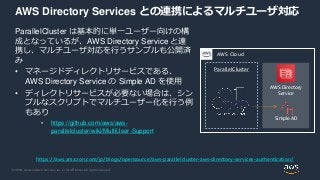
Web Services, Inc. or its Affiliates. All rights reserved. AWS Directory Services との連携によるマルチユーザ対応 ParallelCluster は基本的に単一ユーザー向けの構 成となっているが、AWS Directory Service と連 携し、マルチユーザ対応を行うサンプルも公開済 み • マネージドディレクトリサービスである、 AWS Directory Service の Simple AD を使用 • ディレクトリサービスが必要ない場合は、シン プルなスクリプトでマルチユーザー化を行う例 もあり • https://github.com/aws/aws- parallelcluster/wiki/MultiUser-Support https://aws.amazon.com/jp/blogs/opensource/aws-parallelcluster-aws-directory-services-authentication/ ParallelCluster AWS Cloud AWS Directory Service Simple AD
82.
© 2020, Amazon
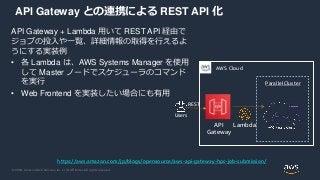
Web Services, Inc. or its Affiliates. All rights reserved. API Gateway との連携による REST API 化 API Gateway + Lambda 用いて REST API 経由で ジョブの投入や一覧、詳細情報の取得を行えるよ うにする実装例 • 各 Lambda は、AWS Systems Manager を使用 して Master ノードでスケジューラのコマンド を実行 • Web Frontend を実装したい場合にも有用 https://aws.amazon.com/jp/blogs/opensource/aws-api-gateway-hpc-job-submission/ ParallelCluster AWS Cloud API Gateway Lambda Users REST
83.
© 2020, Amazon
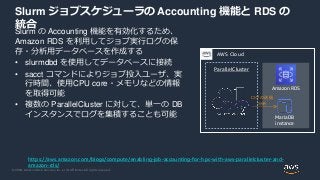
Web Services, Inc. or its Affiliates. All rights reserved. Slurm ジョブスケジューラの Accounting 機能と RDS の 統合 Slurm の Accounting 機能を有効化するため、 Amazon RDS を利用してジョブ実行ログの保 存・分析用データベースを作成する • slurmdbd を使用してデータベースに接続 • sacct コマンドによりジョブ投入ユーザ、実 行時間、使用CPU core・メモリなどの情報 を取得可能 • 複数の ParallelCluster に対して、単一の DB インスタンスでログを集積することも可能 https://aws.amazon.com/blogs/compute/enabling-job-accounting-for-hpc-with-aws-parallelcluster-and- amazon-rds/ ParallelCluster AWS Cloud Amazon RDS MariaDB instance ログの送信 分析
84.
© 2020, Amazon
Web Services, Inc. or its Affiliates. All rights reserved.© 2020, Amazon Web Services, Inc. or its Affiliates. All rights reserved. AWS ParallelCluster の活用事例
85.
© 2020, Amazon
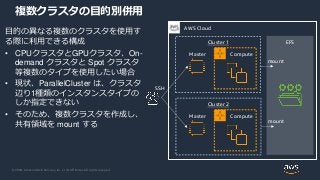
Web Services, Inc. or its Affiliates. All rights reserved. 複数クラスタの目的別併用 目的の異なる複数のクラスタを使用す る際に利用できる構成 • CPUクラスタとGPUクラスタ、On- demand クラスタと Spot クラスタ 等複数のタイプを使用したい場合 • 現状、ParallelCluster は、クラスタ 辺り1種類のインスタンスタイプの しか指定できない • そのため、複数クラスタを作成し、 共有領域を mount する AWS Cloud Cluster 1 Master Compute SSH EFS Cluster 2 Master Compute mount mount
86.
© 2020, Amazon
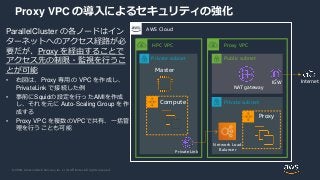
Web Services, Inc. or its Affiliates. All rights reserved. Proxy VPC の導入によるセキュリティの強化 ParallelCluster の各ノードはイン ターネットへのアクセス経路が必 要だが、Proxy を経由することで アクセス先の制限・監視を行うこ とが可能 • 右図は、Proxy 専用の VPC を作成し、 PrivateLink で接続した例 • 事前にSquidの設定を行ったAMIを作成 し、それを元に Auto-Scaling Group を作 成する • Proxy VPC を複数のVPCで共有、一括管 理を行うことも可能 Private subnet AWS Cloud Master Compute HPC VPC Proxy VPC Private subnet Public subnet Network Load Balancer Proxy PrivateLink NAT gateway InternetIGW
87.
© 2020, Amazon
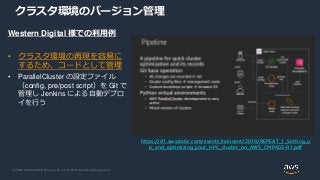
Web Services, Inc. or its Affiliates. All rights reserved. クラスタ環境のバージョン管理 Western Digital 様での利用例 • クラスタ環境の再現を容易に するため、コードとして管理 • ParallelCluster の設定ファイル (config, pre/post script)を Git で 管理し Jenkins による自動デプロ イを行う https://d1.awsstatic.com/events/reinvent/2019/REPEAT_1_Setting_u p_and_optimizing_your_HPC_cluster_on_AWS_CMP402-R1.pdf
88.
© 2020, Amazon
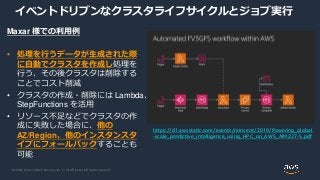
Web Services, Inc. or its Affiliates. All rights reserved. イベントドリブンなクラスタライフサイクルとジョブ実行 Maxar 様での利用例 • 処理を行うデータが生成された際 に自動でクラスタを作成し処理を 行う、その後クラスタは削除する ことでコスト削減 • クラスタの作成・削除には Lambda、 StepFunctions を活用 • リソース不足などでクラスタの作 成に失敗した場合に、他の AZ/Region、他のインスタンスタ イプにフォールバックすることも 可能 https://d1.awsstatic.com/events/reinvent/2019/Powering_global -scale_predictive_intelligence_using_HPC_on_AWS_AIM227-S.pdf
89.
© 2020, Amazon
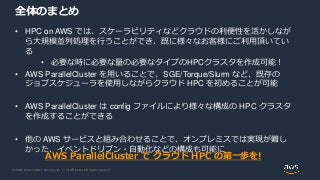
Web Services, Inc. or its Affiliates. All rights reserved. 全体のまとめ • HPC on AWS では、スケーラビリティなどクラウドの利便性を活かしなが ら大規模並列処理を行うことができ、既に様々なお客様にご利用頂いてい る • 必要な時に必要な量の必要なタイプのHPCクラスタを作成可能! • AWS ParallelCluster を用いることで、SGE/Torque/Slurm など、既存の ジョブスケジューラを使用しながらクラウド HPC を初めることが可能 • AWS ParallelCluster は config ファイルにより様々な構成の HPC クラスタ を作成することができる • 他の AWS サービスと組み合わせることで、オンプレミスでは実現が難し かった、イベントドリブン・自動化などの構成も可能に AWS ParallelCluster で クラウド HPC の第一歩を!
90.
© 2020, Amazon
Web Services, Inc. or its Affiliates. All rights reserved. HPC on AWS 関連資料 • HPC on AWS https://aws.amazon.com/jp/hpc/ • HPC on AWS ハンズオン http://bit.ly/aws-hpc • HPC on AWS @ 2019 30分でわかるクラウドHPCの現在 https://www.slideshare.net/DaisukeMiyamoto6/hpc-on-aws-2019 • クラウド規模での Western Digital HDD シミュレーション – HPC タスク 250 万件、EC2 スポッ トインスタンス 4 万個 https://aws.amazon.com/jp/blogs/news/western-digital-hdd-simulation-at-cloud-scale-2-5-million- hpc-tasks-40k-ec2-spot-instances/ • Saving Koalas Using Genomics Research and Cloud Computing https://aws.amazon.com/jp/blogs/aws/saving-koalas-using-genomics-research-and-cloud- computing/
91.
© 2020, Amazon
Web Services, Inc. or its Affiliates. All rights reserved. AWS ParallelCluster 関連 Blog: Architecture • Deploying an HPC cluster and remote visualization in a single step using AWS ParallelCluster https://aws.amazon.com/blogs/opensource/deploy-hpc-cluster-remote-visualization-single-step- parallelcluster/ • AWS API Gateway for HPC job submission https://aws.amazon.com/blogs/opensource/aws-api-gateway-hpc-job-submission/ • AWS ParallelCluster with AWS Directory Services Authentication https://aws.amazon.com/blogs/opensource/aws-parallelcluster-aws-directory-services- authentication/ • Enabling job accounting for HPC with AWS ParallelCluster and Amazon RDS https://aws.amazon.com/blogs/compute/enabling-job-accounting-for-hpc-with-aws-parallelcluster- and-amazon-rds/ • Building an HPC cluster with AWS ParallelCluster and Amazon FSx for Lustre https://aws.amazon.com/blogs/storage/building-an-hpc-cluster-with-aws-parallelcluster-and- amazon-fsx-for-lustre/
92.
© 2020, Amazon
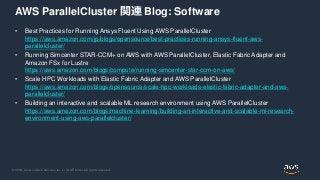
Web Services, Inc. or its Affiliates. All rights reserved. AWS ParallelCluster 関連 Blog: Software • Best Practices for Running Ansys Fluent Using AWS ParallelCluster https://aws.amazon.com/jp/blogs/opensource/best-practices-running-ansys-fluent-aws- parallelcluster/ • Running Simcenter STAR-CCM+ on AWS with AWS ParallelCluster, Elastic Fabric Adapter and Amazon FSx for Lustre https://aws.amazon.com/blogs/compute/running-simcenter-star-ccm-on-aws/ • Scale HPC Workloads with Elastic Fabric Adapter and AWS ParallelCluster https://aws.amazon.com/blogs/opensource/scale-hpc-workloads-elastic-fabric-adapter-and-aws- parallelcluster/ • Building an interactive and scalable ML research environment using AWS ParallelCluster https://aws.amazon.com/blogs/machine-learning/building-an-interactive-and-scalable-ml-research- environment-using-aws-parallelcluster/
93.
© 2020, Amazon
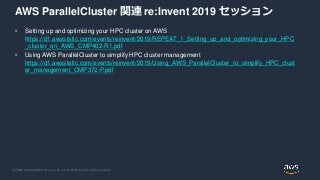
Web Services, Inc. or its Affiliates. All rights reserved. AWS ParallelCluster 関連 re:Invent 2019 セッション • Setting up and optimizing your HPC cluster on AWS https://d1.awsstatic.com/events/reinvent/2019/REPEAT_1_Setting_up_and_optimizing_your_HPC _cluster_on_AWS_CMP402-R1.pdf • Using AWS ParallelCluster to simplify HPC cluster management https://d1.awsstatic.com/events/reinvent/2019/Using_AWS_ParallelCluster_to_simplify_HPC_clust er_management_CMP372-P.pdf
94.
© 2020, Amazon
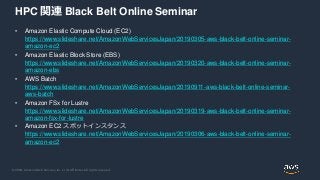
Web Services, Inc. or its Affiliates. All rights reserved. HPC 関連 Black Belt Online Seminar • Amazon Elastic Compute Cloud (EC2) https://www.slideshare.net/AmazonWebServicesJapan/20190305-aws-black-belt-online-seminar- amazon-ec2 • Amazon Elastic Block Store (EBS) https://www.slideshare.net/AmazonWebServicesJapan/20190320-aws-black-belt-online-seminar- amazon-ebs • AWS Batch https://www.slideshare.net/AmazonWebServicesJapan/20190911-aws-black-belt-online-seminar- aws-batch • Amazon FSx for Lustre https://www.slideshare.net/AmazonWebServicesJapan/20190319-aws-black-belt-online-seminar- amazon-fsx-for-lustre • Amazon EC2 スポットインスタンス https://www.slideshare.net/AmazonWebServicesJapan/20190306-aws-black-belt-online-seminar- amazon-ec2
95.
© 2020, Amazon
Web Services, Inc. or its Affiliates. All rights reserved. Q&A お答えできなかったご質問については AWS Japan Blog 「https://aws.amazon.com/jp/blogs/news/」にて 後日掲載します。
96.
© 2020, Amazon
Web Services, Inc. or its Affiliates. All rights reserved. AWS の日本語資料の場所「AWS 資料」で検索 https://amzn.to/JPArchive
97.
© 2020, Amazon
Web Services, Inc. or its Affiliates. All rights reserved. 日々のアップデートチェックは週刊AWSで で[検 索] 週刊AWS
98.
© 2020, Amazon
Web Services, Inc. or its Affiliates. All rights reserved. で[検索]AWS イベント 毎週”W-A個別技術相談会”を実施中 • AWSのソリューションアーキテクト(SA)に 対策などを相談することも可能 • 申込みはイベント告知サイトから (https://aws.amazon.com/jp/about-aws/events/) AWS Well-Architected 個別技術相談会
99.
© 2020, Amazon
Web Services, Inc. or its Affiliates. All rights reserved.© 2020, Amazon Web Services, Inc. or its Affiliates. All rights reserved. AWS 公式 Webinar https://amzn.to/JPWebinar 過去資料 https://amzn.to/JPArchive ご視聴ありがとうございました
![© 2020, Amazon Web Services, Inc. or its Affiliates. All rights reserved.© 2020, Amazon Web Services, Inc. or its Affiliates. All rights reserved.
AWS 公式 Webinar
https://amzn.to/JPWebinar
過去資料
https://amzn.to/JPArchive
Specialist Solutions Architect, HPC
Daisuke Miyamoto
2020/04/08
AWS ParallelCluster ではじめるクラウドHPC
サービスカットシリーズ
[AWS Black Belt Online Seminar]](https://image.slidesharecdn.com/20200408blackbeltparallelcluster-200410042914/85/20200408-AWS-Black-Belt-Online-Seminar-AWS-ParallelCluster-HPC-1-320.jpg?cb=1586493011)


![© 2020, Amazon Web Services, Inc. or its Affiliates. All rights reserved.
AWS ParallelCluster の利用イメージ
まずは自分のPC等に ParallelCluster ソフトウェアをインストール
config ファイルを記述し、pcluster create コマンドを実行することで、
ジョブ投入に応じて Auto-Scale するクラスタ環境が自動的に作成される
28
AWS Cloud
Users
Cluster
Master Auto-Scale
ComputeAWS CloudFormation
Scale-Out / Scale-in
ジョブスケジューラ
(SGE/Torque/Slurm
)
$ pcluster create <NAME>
[aws]
aws_region_name = ap-northeast-1
[cluster slurm1]
master_instance_type = c5.large
compute_instance_type = c5.4xlarge
max_queue_size = 10
initial_queue_size = 0
scheduler = slurm
cluster_type = spot
config ファイル
/shared
NFS mount
/home
/shared](https://image.slidesharecdn.com/20200408blackbeltparallelcluster-200410042914/85/20200408-AWS-Black-Belt-Online-Seminar-AWS-ParallelCluster-HPC-28-320.jpg?cb=1586493011)
![© 2020, Amazon Web Services, Inc. or its Affiliates. All rights reserved.
クラスタの設定(config)の作成
pcluster configure を実行するこ
とで、対話的な初期設定が可能
最終的に、
~/.parallelcluster/config に
設定が出力される
設定可能な項目
• リージョン
• キーペア
• OS
• スケジューラ
• インスタンスタイプ・最大起動数
• VPC/Subnet
$ pcluster configure
Allowed values for AWS Region ID:
1. ap-northeast-1
2. ap-northeast-2
~~~ 中略 ~~~
AWS Region ID [us-east-1]:
Allowed values for Scheduler:
1. sge
2. torque
3. slurm
4. awsbatch
Scheduler [sge]:
Allowed values for Operating System:
1. alinux
4. centos7
6. ubuntu1804
Operating System [centos7]:
Minimum cluster size (instances) [0]:
Maximum cluster size (instances) [1000]:
Master instance type [c5.9xlarge]:
Compute instance type [c5n.18xlarge]:
https://docs.aws.amazon.com/ja_jp/parallelcluster/latest/ug/commands.html](https://image.slidesharecdn.com/20200408blackbeltparallelcluster-200410042914/85/20200408-AWS-Black-Belt-Online-Seminar-AWS-ParallelCluster-HPC-36-320.jpg?cb=1586493011)
![© 2020, Amazon Web Services, Inc. or its Affiliates. All rights reserved.
クラスタの作成・状態確認・ログイン
pcluster create <CLUSTER_NAME>
• クラスタを作成を開始する
• 作成には5分から10分程度必要
pcluster ssh <CLUSTER_NAME>
• SSH を用いてクラスタに接続
• コマンドの最後に -i などのSSH
オプションを指定可能
$ pcluster create mycluster
Beginning cluster creation for cluster:
myclusterCreating
stack named: parallelcluster-mycluster
Status: CREATE_COMPLETE
MasterServer: RUNNING
MasterPublicIP: 3.215.21.118
ClusterUser: centos
MasterPrivateIP: 10.0.15.151
$ pcluster ssh mycluster –i mykey.pem
[centos@ip-10-0-15-151 ~]$
https://docs.aws.amazon.com/ja_jp/parallelcluster/latest/ug/commands.html](https://image.slidesharecdn.com/20200408blackbeltparallelcluster-200410042914/85/20200408-AWS-Black-Belt-Online-Seminar-AWS-ParallelCluster-HPC-37-320.jpg?cb=1586493011)


![© 2020, Amazon Web Services, Inc. or its Affiliates. All rights reserved.
config ファイルの読み方
• [aws] や、[cluster]といったセクショ
ンによって区切られている
• [cluster mycluster] といった形式でセ
クションに名前をつけることができ、
他のセクションから参照される
• 左図の矢印を参照
[aws]
aws_region_name = ap-northeast-1
[global]
cluster_template = mycluster
[cluster mycluster]
master_instance_type = c5.large
compute_instance_type = c5.4xlarge
cluster_type = spot
ebs_settings = shared
vpc_settings = public
[vpc public]
master_subnet_id = subnet-********
vpc_id = vpc-*********
[ebs shared]
volume_type = gp2
volume_size = 400](https://image.slidesharecdn.com/20200408blackbeltparallelcluster-200410042914/85/20200408-AWS-Black-Belt-Online-Seminar-AWS-ParallelCluster-HPC-44-320.jpg?cb=1586493011)
![© 2020, Amazon Web Services, Inc. or its Affiliates. All rights reserved.
クラスタ設定の基本
config ファイルの記述で以下の項目を設定可能
• Master/Compute のインスタンスタイプ
• 使用するインスタンス台数の最小/最大値
• ジョブスケジューラ
• OS
• On-demand / Spot
[cluster default]
vpc_settings = public
key_name = private
master_instance_type = c5.large
compute_instance_type = c5.4xlarge
initial_queue_size = 0
max_queue_size = 10
maintain_initial_size = false
scheduler = slurm
base_os = centos7
cluster_type = spot
https://docs.aws.amazon.com/parallelcluster/latest/ug/cluster-definition.html](https://image.slidesharecdn.com/20200408blackbeltparallelcluster-200410042914/85/20200408-AWS-Black-Belt-Online-Seminar-AWS-ParallelCluster-HPC-45-320.jpg?cb=1586493011)
![© 2020, Amazon Web Services, Inc. or its Affiliates. All rights reserved.
Master/Compute のインスタンスタイプ変更
• master_instance_type /
compute_instance_type で設定可能
• GPU や FPGA を搭載したインスタンスタイ
プも選択可能
• 計算には直接関わらないが、クラスタ規模が
大きい場合は、Master のサイジングも重要
• デフォルト構成では、各Compute ノードは
Master のストレージを NFS マウントしている
ため、十分な Master にもネットワーク帯域と
EBS最適化スループットが必要
[cluster default]
vpc_settings = public
key_name = private
master_instance_type = c5.large
compute_instance_type = c5.4xlarge
initial_queue_size = 0
max_queue_size = 10
maintain_initial_size = false
scheduler = slurm
base_os = centos7
cluster_type = spot
https://docs.aws.amazon.com/parallelcluster/latest/ug/cluster-definition.html](https://image.slidesharecdn.com/20200408blackbeltparallelcluster-200410042914/85/20200408-AWS-Black-Belt-Online-Seminar-AWS-ParallelCluster-HPC-46-320.jpg?cb=1586493011)
![© 2020, Amazon Web Services, Inc. or its Affiliates. All rights reserved.
スケーリング台数設定
スケーリング時の最小・最大台数の指定
• initial_queue_size : クラスタ作成時の初期
インスタンス台数
• max_queue_size : 最大インスタンス台数
• maintain_initial_size :
• true : 常に initial_queue_size 以上の台数を確
保する
• false : ジョブのない場合は0台までスケールイ
ン
• 参考: [scaling] セクションの scaledown_idletime を指定
することで、スケールインまでの待ち時間を指定可能
[cluster default]
vpc_settings = public
key_name = private
master_instance_type = c5.large
compute_instance_type = c5.4xlarge
initial_queue_size = 0
max_queue_size = 10
maintain_initial_size = false
scheduler = slurm
base_os = centos7
cluster_type = spot
https://docs.aws.amazon.com/parallelcluster/latest/ug/cluster-definition.html](https://image.slidesharecdn.com/20200408blackbeltparallelcluster-200410042914/85/20200408-AWS-Black-Belt-Online-Seminar-AWS-ParallelCluster-HPC-47-320.jpg?cb=1586493011)
![© 2020, Amazon Web Services, Inc. or its Affiliates. All rights reserved.
ジョブスケジューラの選択
• scheduler 設定により、利用するジョブスケ
ジューラを選択可能
• 指定可能な値は以下(デフォルトは sge )
• SGE: sge
• Torque: torque
• Slurm: slurm
• AWS Batch: batch
• スケジューラのバージョンは、
ParallelClusterのバージョンによって異なる
[cluster default]
vpc_settings = public
key_name = private
master_instance_type = c5.large
compute_instance_type = c5.4xlarge
initial_queue_size = 0
max_queue_size = 10
maintain_initial_size = false
scheduler = slurm
base_os = centos7
cluster_type = spot
https://docs.aws.amazon.com/parallelcluster/latest/ug/cluster-definition.html](https://image.slidesharecdn.com/20200408blackbeltparallelcluster-200410042914/85/20200408-AWS-Black-Belt-Online-Seminar-AWS-ParallelCluster-HPC-48-320.jpg?cb=1586493011)
![© 2020, Amazon Web Services, Inc. or its Affiliates. All rights reserved.
オペレーティングシステムの選択
• base_os 設定により、利用するオペレー
ティングシステムを選択可能
• 指定可能な値は以下
(デフォルトは alinux )
• Amazon Linux: alinux
• Amazon Linux2: alinux2
• CentOS 6: centos6
• CentOS 7: centos7
• Ubuntu 16.04: ubuntu1604
• Ubuntu 18.04: ubuntu1804
• ログインユーザ名はOSにより異なる
• NICE-DCV連携等、一部機能は特定のOSで
しかサポートされていない場合も
[cluster default]
vpc_settings = public
key_name = private
master_instance_type = c5.large
compute_instance_type = c5.4xlarge
initial_queue_size = 0
max_queue_size = 10
maintain_initial_size = false
scheduler = slurm
base_os = centos7
cluster_type = spot
https://docs.aws.amazon.com/parallelcluster/latest/ug/cluster-definition.html](https://image.slidesharecdn.com/20200408blackbeltparallelcluster-200410042914/85/20200408-AWS-Black-Belt-Online-Seminar-AWS-ParallelCluster-HPC-49-320.jpg?cb=1586493011)
![© 2020, Amazon Web Services, Inc. or its Affiliates. All rights reserved.
Spot インスタンスの利用
Spot インスタンスを利用することで、
On-demand 価格の最大 9 割引で利用可能
• cluster_type に true を指定することで、
Compute ノードに Spot インスタンスが利
用される(デフォルトは ondemand)
• Spot 割引率は時価で変動し、インスタンス
タイプや Region/AZ によっても異なる
• 中断が発生する可能性にも注意
[cluster default]
vpc_settings = public
key_name = private
master_instance_type = c5.large
compute_instance_type = c5.4xlarge
initial_queue_size = 0
max_queue_size = 10
maintain_initial_size = false
scheduler = slurm
base_os = centos7
cluster_type = spot
https://docs.aws.amazon.com/parallelcluster/latest/ug/cluster-definition.html
https://www.slideshare.net/AmazonWebServicesJapan/20190306-aws-black-belt-online-seminar-amazon-
ec2](https://image.slidesharecdn.com/20200408blackbeltparallelcluster-200410042914/85/20200408-AWS-Black-Belt-Online-Seminar-AWS-ParallelCluster-HPC-50-320.jpg?cb=1586493011)
![© 2020, Amazon Web Services, Inc. or its Affiliates. All rights reserved.
Intel Hyper-Threading Technology の無効化
HPC アプリケーションでは、Intel HTT を無
効化することでパフォーマンスが向上するこ
ともある
• disable_hyperthreading = true を指定(デ
フォルトは false、Intel HTT 有効)
• 有効、無効両方のケースでベンチマークを
実施することを推奨
[cluster default]
vpc_settings = public
key_name = private
master_instance_type = c5.large
compute_instance_type = c5.4xlarge
initial_queue_size = 0
max_queue_size = 10
maintain_initial_size = false
scheduler = slurm
base_os = centos7
cluster_type = spot
disable_hyperthreading = true
https://docs.aws.amazon.com/parallelcluster/latest/ug/cluster-definition.html](https://image.slidesharecdn.com/20200408blackbeltparallelcluster-200410042914/85/20200408-AWS-Black-Belt-Online-Seminar-AWS-ParallelCluster-HPC-54-320.jpg?cb=1586493011)
![© 2020, Amazon Web Services, Inc. or its Affiliates. All rights reserved.
共有 EBS ストレージ容量・性能の変更
Master にアタッチされ、Compute から NFS
でマウントされている EBS ストレージの容量
等を変更可能
• volume_type , volume_size, volume_iops を
指定
• デフォルトでは、/shared として各ノード
からマウント済み
• 特定のスナップショットからボリュームを
作成する事も可能
• その他、Master / Compute の root volume のサ
イズを変更したい場合は [cluster] セクションの
master_root_volume_size /
compute_root_volume_size を指定
[cluster default]
ebs_settings = ebs1
[ebs ebs1]
volume_type = io1
volume_size = 100
volume_iops = 500
https://docs.aws.amazon.com/parallelcluster/latest/ug/ebs-section.html](https://image.slidesharecdn.com/20200408blackbeltparallelcluster-200410042914/85/20200408-AWS-Black-Belt-Online-Seminar-AWS-ParallelCluster-HPC-62-320.jpg?cb=1586493011)
![© 2020, Amazon Web Services, Inc. or its Affiliates. All rights reserved.
FSx for Lustre ファイルシステムの使用
高速な分散ストレージサービスである FSx for
Lustre と連携可能
• shared_dir : Master/Compute 各ノードでの
マウントポイントを指定
• storage_capacity を指定した場合は新規に
ファイルシステムが作成される
• export_path , import_path の指定により S3 連
携機能も利用可能
• deployment_type の指定によりSCRATCH_2 や
PERSISTENT_1といった新しいストレージタ
イプも利用可能
• fsx_fs_id を指定した場合は既存のファイル
システムが利用される
[cluster default]
fsx_settings = fs1
[fsx fs1]
shared_dir = /fsx
storage_capacity = 4400
deployment_type = SCRATCH_2
export_path = s3://bucket/folder
import_path = s3://bucket
https://docs.aws.amazon.com/parallelcluster/latest/ug/fsx-section.html
https://www.slideshare.net/AmazonWebServicesJapan/20190319-aws-black-belt-
online-seminar-amazon-fsx-for-lustre](https://image.slidesharecdn.com/20200408blackbeltparallelcluster-200410042914/85/20200408-AWS-Black-Belt-Online-Seminar-AWS-ParallelCluster-HPC-63-320.jpg?cb=1586493011)
![© 2020, Amazon Web Services, Inc. or its Affiliates. All rights reserved.
Elastic Fabric Adapter の有効化
MPI に特化した低レイテンシネットワークアダ
プタであるEFAを有効化する
• enable_efa = compute 指定だけでなく、
placement_group = DYNAMIC の指定も必要
• ParallelCluster 2.5.0 以降では、module コマ
ンドで OpenMPI と Intel MPI を選択可能
(デフォルトは OpenMPI だが、Intel MPI の利用により
パフォーマンスが向上する例もある)
• EFA利用環境でも、環境変数設定により、
EFAの有効化・無効化を切り替え可能
• export FI_PROVIDER=sockets
• export FI_PROVIDER=efa
[cluster default]
compute_instance_type = c5n.18xlarge
placement_group = DYNAMIC
enable_efa = compute
https://docs.aws.amazon.com/parallelcluster/latest/ug/cluster-definition.html
https://docs.aws.amazon.com/ja_jp/AWSEC2/latest/UserGuide/efa-start.html
https://aws.amazon.com/blogs/opensource/scale-hpc-workloads-elastic-fabric-adapter-and-aws-
parallelcluster/](https://image.slidesharecdn.com/20200408blackbeltparallelcluster-200410042914/85/20200408-AWS-Black-Belt-Online-Seminar-AWS-ParallelCluster-HPC-65-320.jpg?cb=1586493011)

![© 2020, Amazon Web Services, Inc. or its Affiliates. All rights reserved.
Public subnet
Single Public Subnet 構成
• Master/Compute ともに Public
Subnet 上で起動
• use_public_ips = true (デフォ
ルト true)では、Master に
Elastic IP が割り振られる
AWS Cloud
Master
Compute
Private subnet
VPC
Elastic IP
Internet IGW
[cluster default]
vpc_settings = public
[vpc public]
vpc_id = vpc-xxxxxx
master_subnet_id = subnet-<public>
use_public_ips = true
https://docs.aws.amazon.com/parallelcluster/latest/ug/networking.html](https://image.slidesharecdn.com/20200408blackbeltparallelcluster-200410042914/85/20200408-AWS-Black-Belt-Online-Seminar-AWS-ParallelCluster-HPC-68-320.jpg?cb=1586493011)
![© 2020, Amazon Web Services, Inc. or its Affiliates. All rights reserved.
Private subnetPublic subnet
Public Subnet + Private Subnet 構成
AWS Cloud
Master
Compute
VPC
Elastic IP
NAT gateway
IGWInternet
• Master はPublic Subnet、Compute
はPrivate Subnet 上で起動
• Compute のインターネットアクセ
ス用にNAT Gateway が必要
• インターネットへの公開部分が限
られており、推奨構成
[cluster default]
vpc_settings = public
[vpc public]
vpc_id = vpc-xxxxxx
master_subnet_id = subnet-<public>
compute_subnet_id = subnet-<private>
https://docs.aws.amazon.com/parallelcluster/latest/ug/networking.html](https://image.slidesharecdn.com/20200408blackbeltparallelcluster-200410042914/85/20200408-AWS-Black-Belt-Online-Seminar-AWS-ParallelCluster-HPC-69-320.jpg?cb=1586493011)
![© 2020, Amazon Web Services, Inc. or its Affiliates. All rights reserved.
Private subnet
Private Subnet + AWS Direct Connect
AWS Cloud
Master
Compute
VPC
Corporate
data
center
Proxy Server Direct
Connect
Internet
• Master/Compute ともにPrivate
Subnet 上で起動
• Internet アクセス用に、オンプレミ
ス環境のProxy Server を経由する
• 認証付きProxy には対応していない
• 監査要件などのある場合に選択
[cluster default]
vpc_settings = public
proxy_server = http://proxy.corp.net:8080
[vpc public]
vpc_id = vpc-xxxxxx
master_subnet_id = subnet-<public>
use_public_ips = false
https://docs.aws.amazon.com/parallelcluster/latest/ug/networking.html](https://image.slidesharecdn.com/20200408blackbeltparallelcluster-200410042914/85/20200408-AWS-Black-Belt-Online-Seminar-AWS-ParallelCluster-HPC-70-320.jpg?cb=1586493011)

![© 2020, Amazon Web Services, Inc. or its Affiliates. All rights reserved.
NICE-DCV との統合によるリモート可視化
ブラウザからも利用可能なリモートデスクトップアプリケーションである NICE-
DCV との統合により、可視化などの処理が容易に
• ParallelCluster 2.5.0 以降、Amazon Linux 2, CentOS7, Ubuntu 18.04 のみ対応
• クラスタ起動後、dcv サブコマンドにより
アクセス用URLを生成
$ pcluster dcv connect <CLUSTER_NAME>
https://aws.amazon.com/jp/hpc/dcv/
https://aws.amazon.com/jp/blogs/opensource/deploy-hpc-cluster-remote-visualization-single-step-
parallelcluster/
[cluster default]
dcv_settings = dcv1
[dcv dcv1]
enable = master](https://image.slidesharecdn.com/20200408blackbeltparallelcluster-200410042914/85/20200408-AWS-Black-Belt-Online-Seminar-AWS-ParallelCluster-HPC-72-320.jpg?cb=1586493011)
![© 2020, Amazon Web Services, Inc. or its Affiliates. All rights reserved.
Ganglia によるモニタリングの有効化
モニタリングソフトである Ganglia を利用可能
• Ganglia は、cfncluster ではデフォルト有効
だったが、ParallelCluster ではオプションの
設定が必須となった
• クラスタ作成後、Master ノードの Security
Group 設定で、inbound 80/TCP を許可する
必要がある
• http://<IP address>/ganglia/ にアクセス
[cluster default]
extra_json = { "cluster" : { "ganglia_enabled" : "yes" } }
https://docs.aws.amazon.com/parallelcluster/latest/ug/moving-from-cfncluster-to-aws-
parallelcluster.html](https://image.slidesharecdn.com/20200408blackbeltparallelcluster-200410042914/85/20200408-AWS-Black-Belt-Online-Seminar-AWS-ParallelCluster-HPC-73-320.jpg?cb=1586493011)
![© 2020, Amazon Web Services, Inc. or its Affiliates. All rights reserved.
リソースへのタグ付けによるコスト管理
• Config ファイルで tags を指定する事により、ParallelCluster が生成する各
種リソースにタグが付与される
• Cost Allocation Tags の設定を有効化することで、Cost Explorerなどで、利
用金額をタグにより分類することが可能
https://docs.aws.amazon.com/ja_jp/awsaccountbilling/latest/aboutv2/cost-alloc-tags.html
Cost Explorer
[cluster default]
tags = {"Project": "pcluster-benchmark"}](https://image.slidesharecdn.com/20200408blackbeltparallelcluster-200410042914/85/20200408-AWS-Black-Belt-Online-Seminar-AWS-ParallelCluster-HPC-74-320.jpg?cb=1586493011)
![© 2020, Amazon Web Services, Inc. or its Affiliates. All rights reserved.
日々のアップデートチェックは週刊AWSで
で[検
索]
週刊AWS](https://image.slidesharecdn.com/20200408blackbeltparallelcluster-200410042914/85/20200408-AWS-Black-Belt-Online-Seminar-AWS-ParallelCluster-HPC-97-320.jpg?cb=1586493011)
![© 2020, Amazon Web Services, Inc. or its Affiliates. All rights reserved.
で[検索]AWS イベント
毎週”W-A個別技術相談会”を実施中
• AWSのソリューションアーキテクト(SA)に
対策などを相談することも可能
• 申込みはイベント告知サイトから
(https://aws.amazon.com/jp/about-aws/events/)
AWS Well-Architected 個別技術相談会](https://image.slidesharecdn.com/20200408blackbeltparallelcluster-200410042914/85/20200408-AWS-Black-Belt-Online-Seminar-AWS-ParallelCluster-HPC-98-320.jpg?cb=1586493011)


![[AWS EXpert Online for JAWS-UG 18] 見せてやるよ、Step Functions の本気ってやつをな](https://cdn.slidesharecdn.com/ss_thumbnails/awsxon18howfarstepfunctionsgo-211124111849-thumbnail.jpg?width=640&height=640&fit=bounds)


![[20220126] JAWS-UG 2022初頭までに葬ったAWSアンチパターン大紹介](https://cdn.slidesharecdn.com/ss_thumbnails/20220126-anti-220126190603-thumbnail.jpg?width=640&height=640&fit=bounds)


![Coded Agents – with UiPath SDK + LangGraph [Virtual Hands-on Workshop]](https://cdn.slidesharecdn.com/ss_thumbnails/codedagentsdeck-251215155422-5497c599-thumbnail.jpg?width=640&height=640&fit=bounds)


