JUnit Kung Fu
Getting more out of your unit tests


                        John Ferguson Smart
                          Principle Consultant
                          Wakaleo Consulting
So who is this guy, anyway?
John Ferguson Smart
Consultant, Trainer, Mentor, Author, Speaker
So who is this guy, anyway?
John Ferguson Smart
Consultant, Trainer, Mentor, Author,...
Agenda
What will we cover today
 Naming your tests
 Hamcrest Assertions and Matchers
 Parameterized tests and JUnit Theories
 JUnit Rules
 Parallel Testing
 JUnit Categories
 Continuous Testing
 Mockito
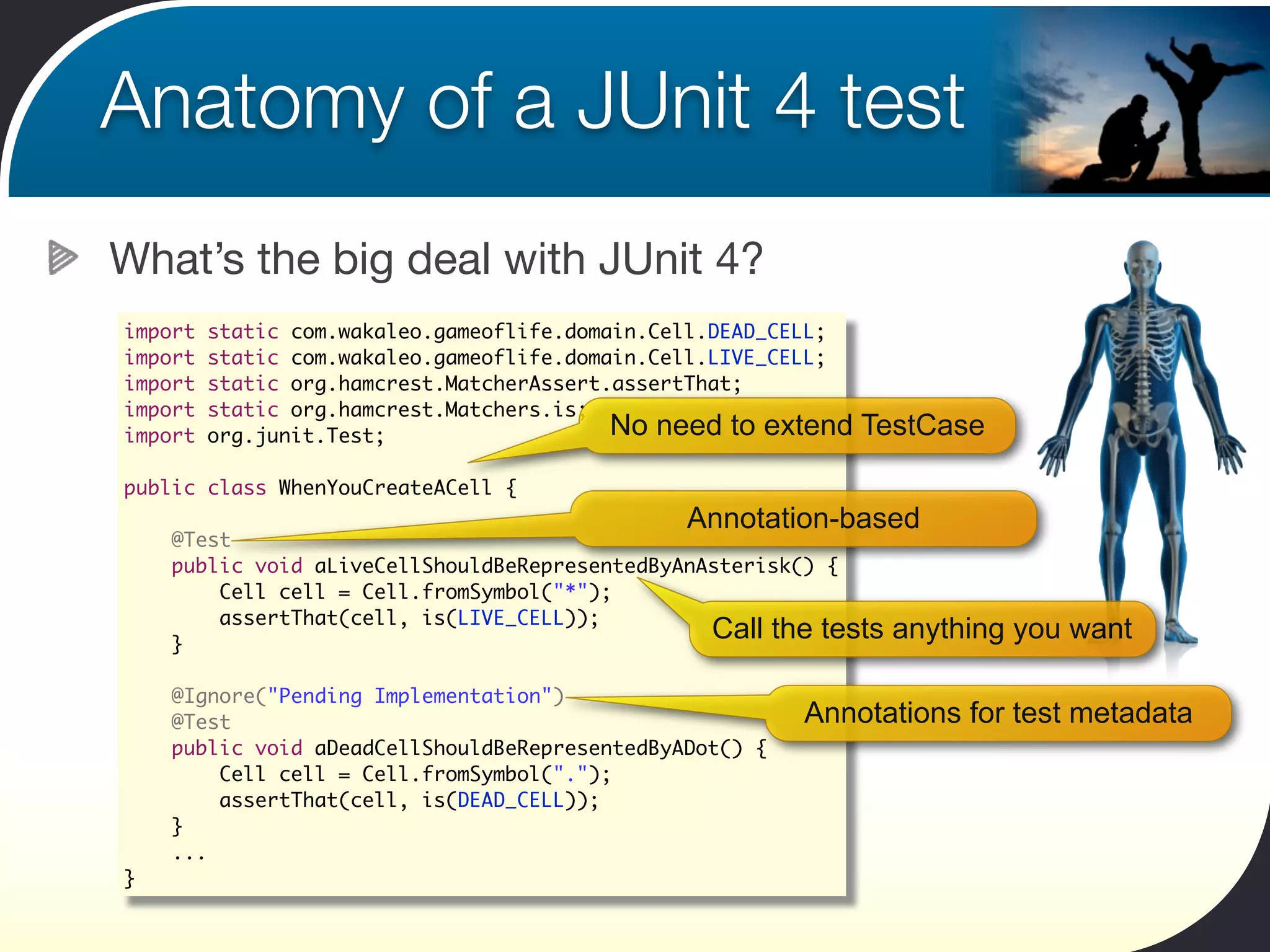
Anatomy of a JUnit 4 test
What’s the big deal with JUnit 4?
import   static com.wakaleo.gameoflife.domain.Cell.DEAD_CELL;
import   static com.wakaleo.gameoflife.domain.Cell.LIVE_CELL;
import   static org.hamcrest.MatcherAssert.assertThat;
import   static org.hamcrest.Matchers.is;
import   org.junit.Test;                   No need to extend    TestCase

public class WhenYouCreateACell {
                                               Annotation-based
    @Test
    public void aLiveCellShouldBeRepresentedByAnAsterisk() {
        Cell cell = Cell.fromSymbol("*");
        assertThat(cell, is(LIVE_CELL));
    }
                                                 Call the tests   anything you want

    @Ignore("Pending Implementation")
    @Test                                                Annotations for test metadata
    public void aDeadCellShouldBeRepresentedByADot() {
        Cell cell = Cell.fromSymbol(".");
        assertThat(cell, is(DEAD_CELL));
    }
    ...
}
What’s in a name
Name your tests well


 "What's in a name? That which we call a rose
   By any other name would smell as sweet."
                  Romeo and Juliet (II, ii, 1-2)
What’s in a name
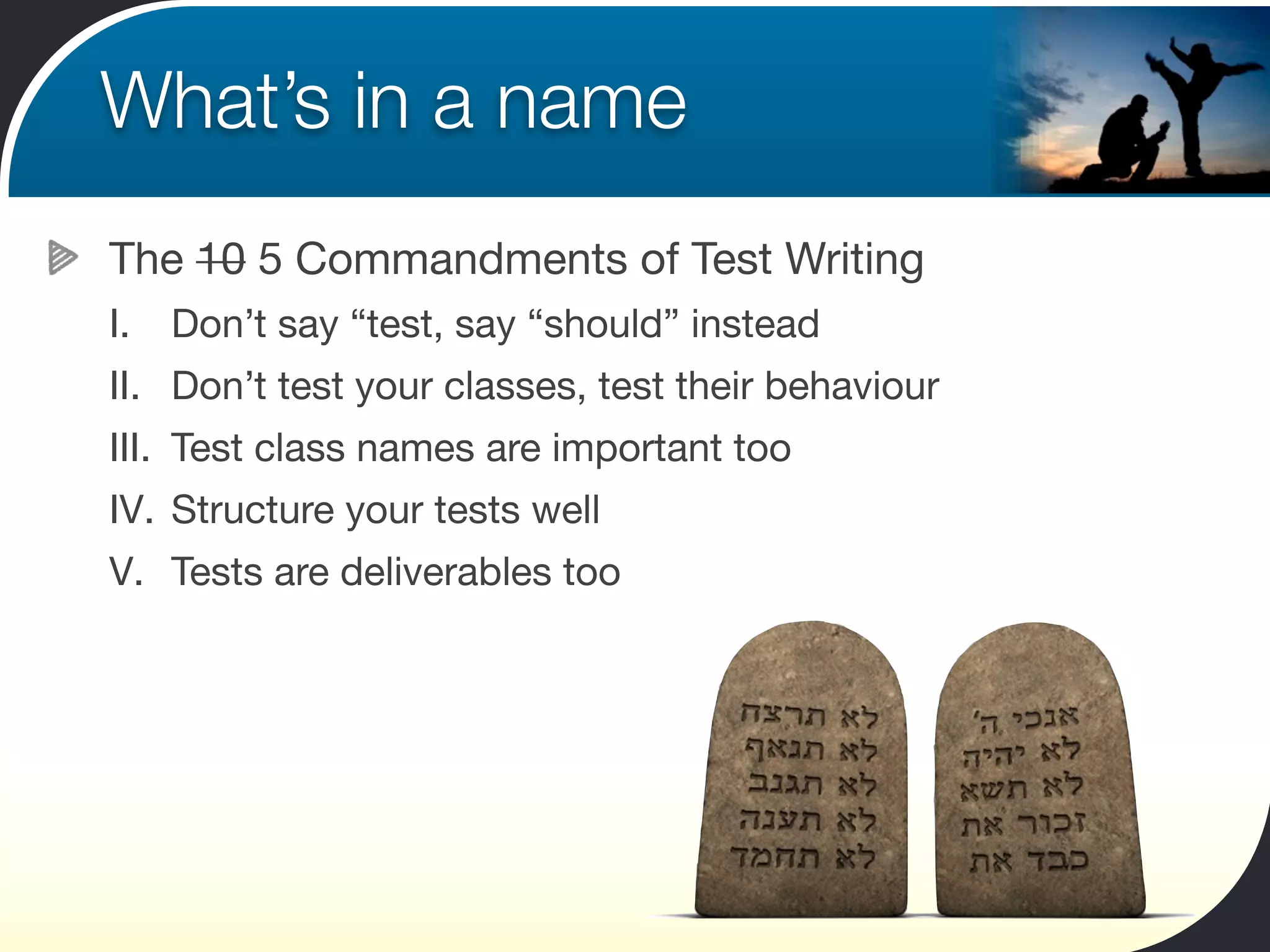
The 10 5 Commandments of Test Writing
I.   Don’t say “test, say “should” instead
II. Don’t test your classes, test their behaviour
III. Test class names are important too
IV. Structure your tests well
V. Tests are deliverables too
What’s in a name
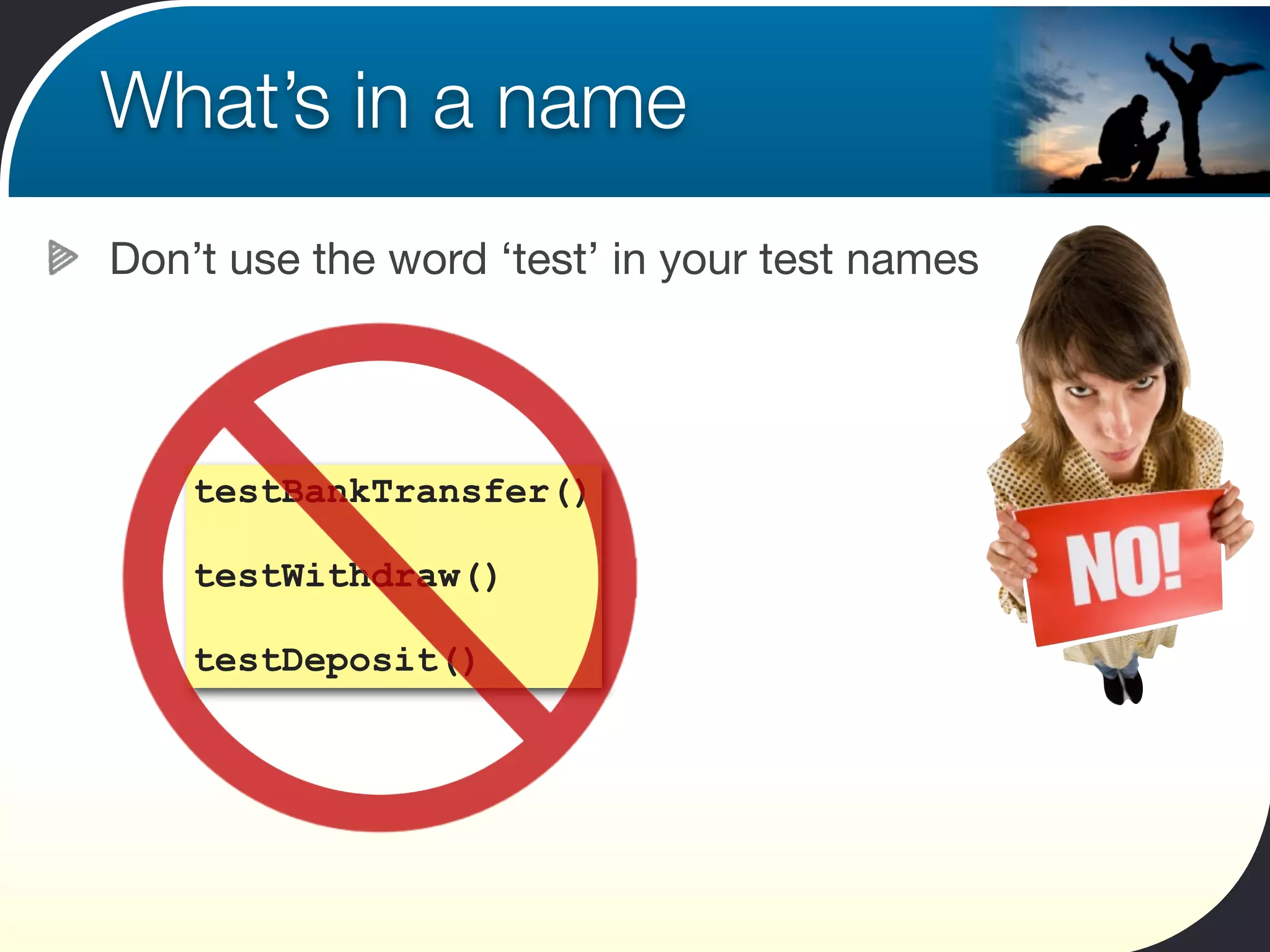
Don’t use the word ‘test’ in your test names


    testBankTransfer()

    testWithdraw()

    testDeposit()
What’s in a name
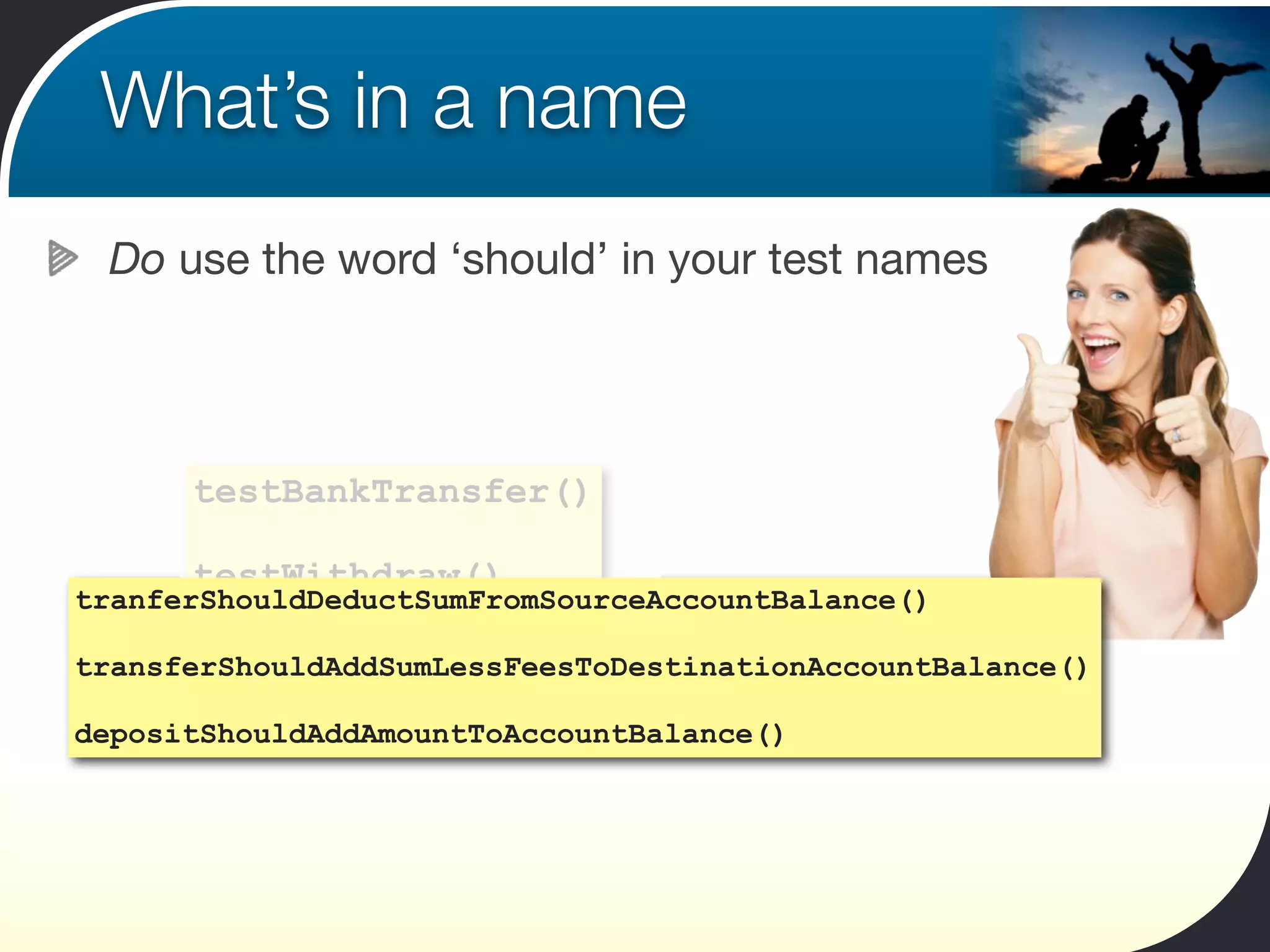
 Do use the word ‘should’ in your test names


      testBankTransfer()

      testWithdraw()
tranferShouldDeductSumFromSourceAccountBalance()

       testDeposit()
transferShouldAddSumLessFeesToDestinationAccountBalance()

depositShouldAddAmountToAccountBalance()
What’s in a name
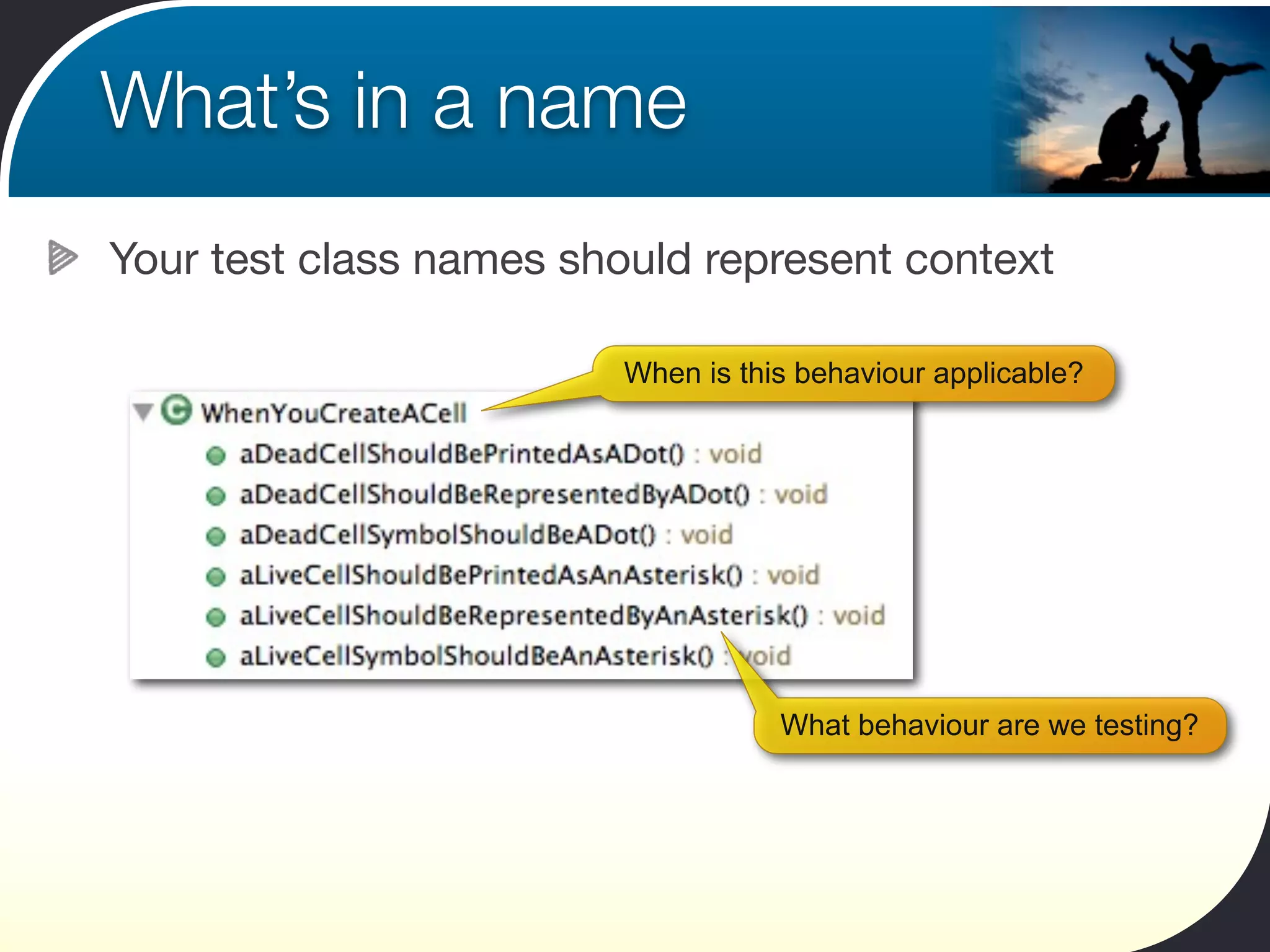
Your test class names should represent context

                         When is this behaviour applicable?


                                    What behaviour are we testing?
What’s in a name
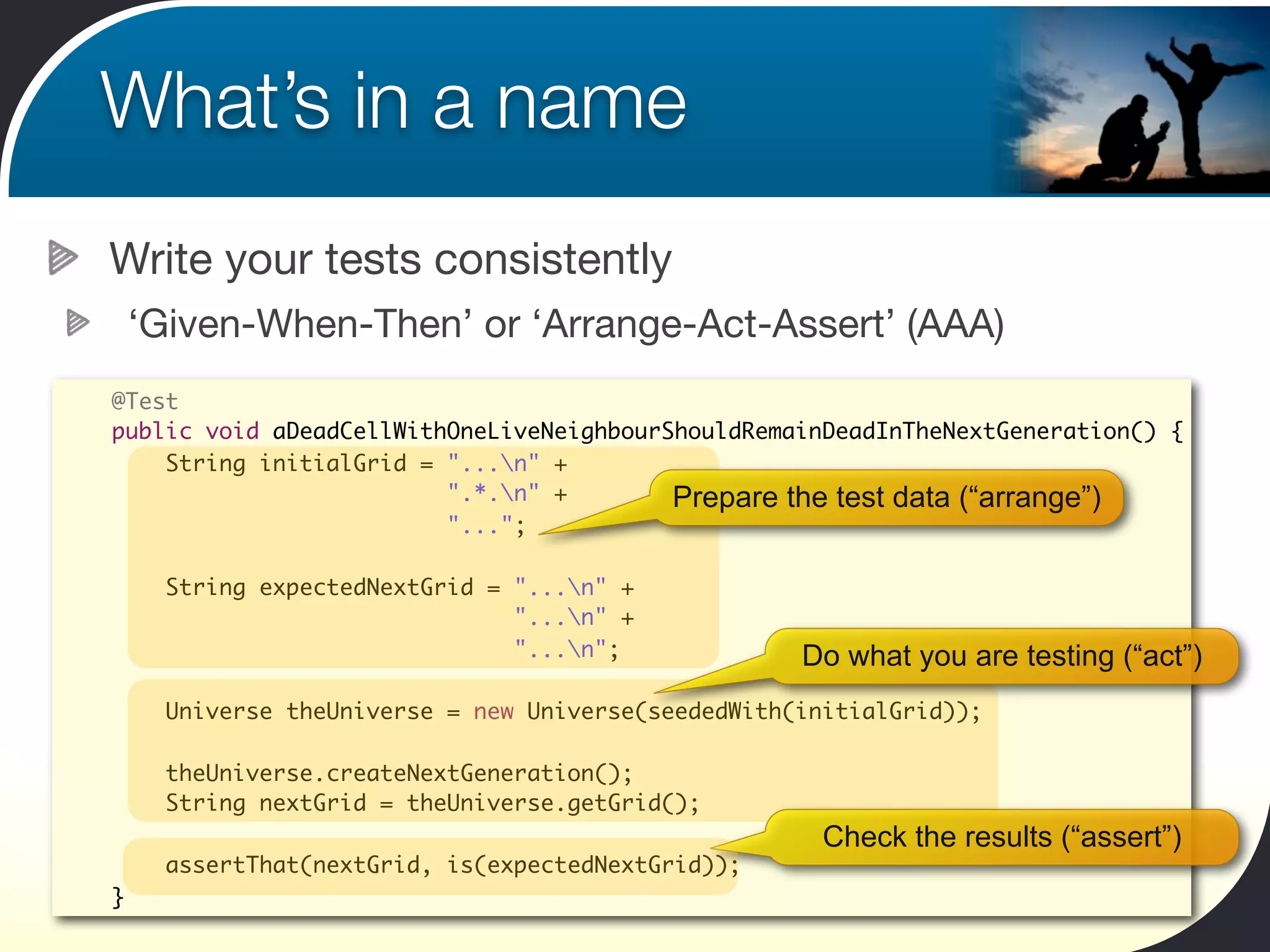
Write your tests consistently
    ‘Given-When-Then’ or ‘Arrange-Act-Assert’ (AAA)
@Test
public void aDeadCellWithOneLiveNeighbourShouldRemainDeadInTheNextGeneration() {
    String initialGrid = "...n" +
                         ".*.n" +        Prepare the test data (“arrange”)
                         "...";

      String expectedNextGrid = "...n" +
                                "...n" +
                                "...n";             Do what you are testing (“act”)
      Universe theUniverse = new Universe(seededWith(initialGrid));

      theUniverse.createNextGeneration();
      String nextGrid = theUniverse.getGrid();
                                                       Check the results (“assert”)
      assertThat(nextGrid, is(expectedNextGrid));
}
What’s in a name
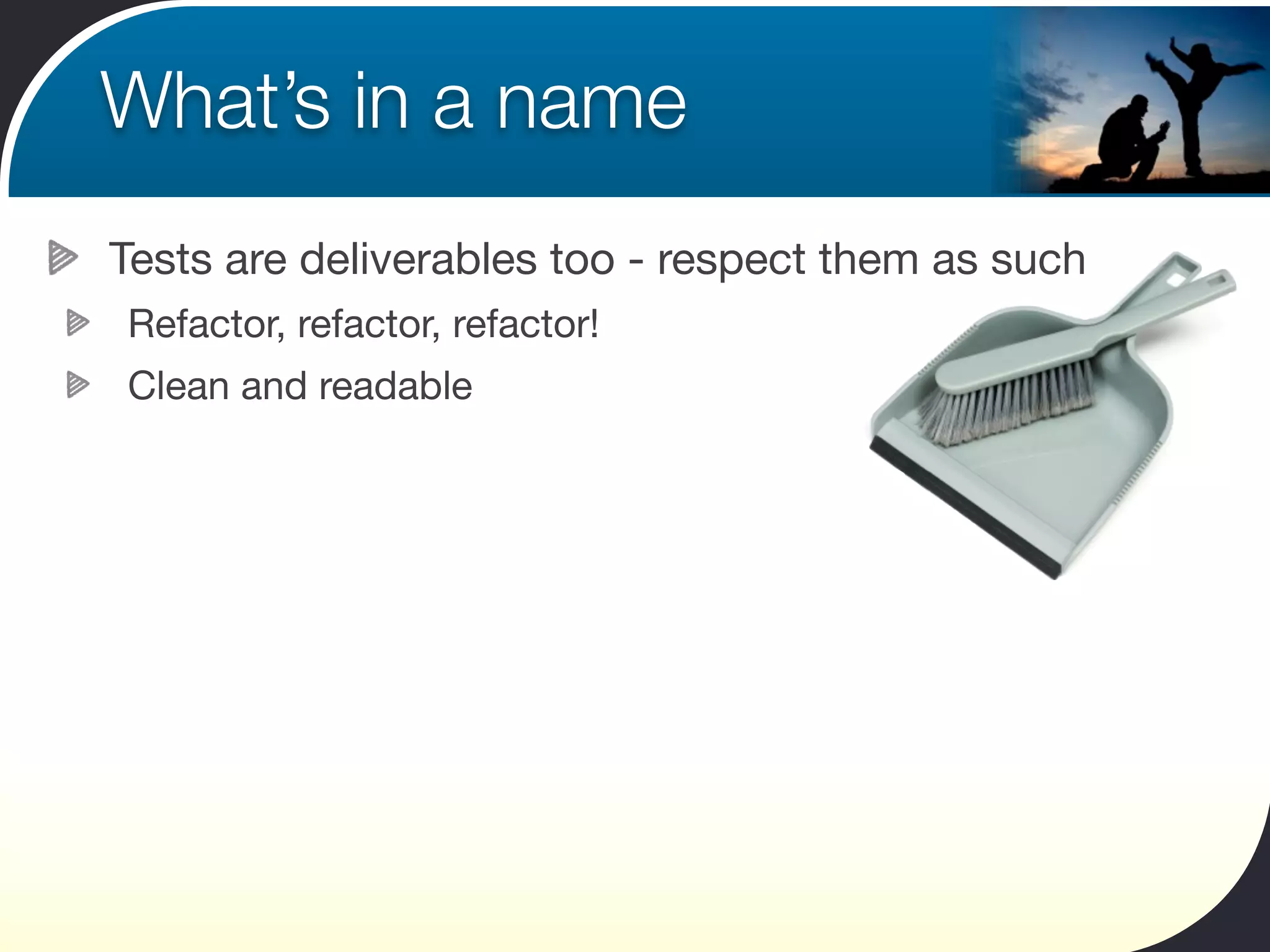
Tests are deliverables too - respect them as such
Refactor, refactor, refactor!
Clean and readable
Express Yourself with Hamcrest
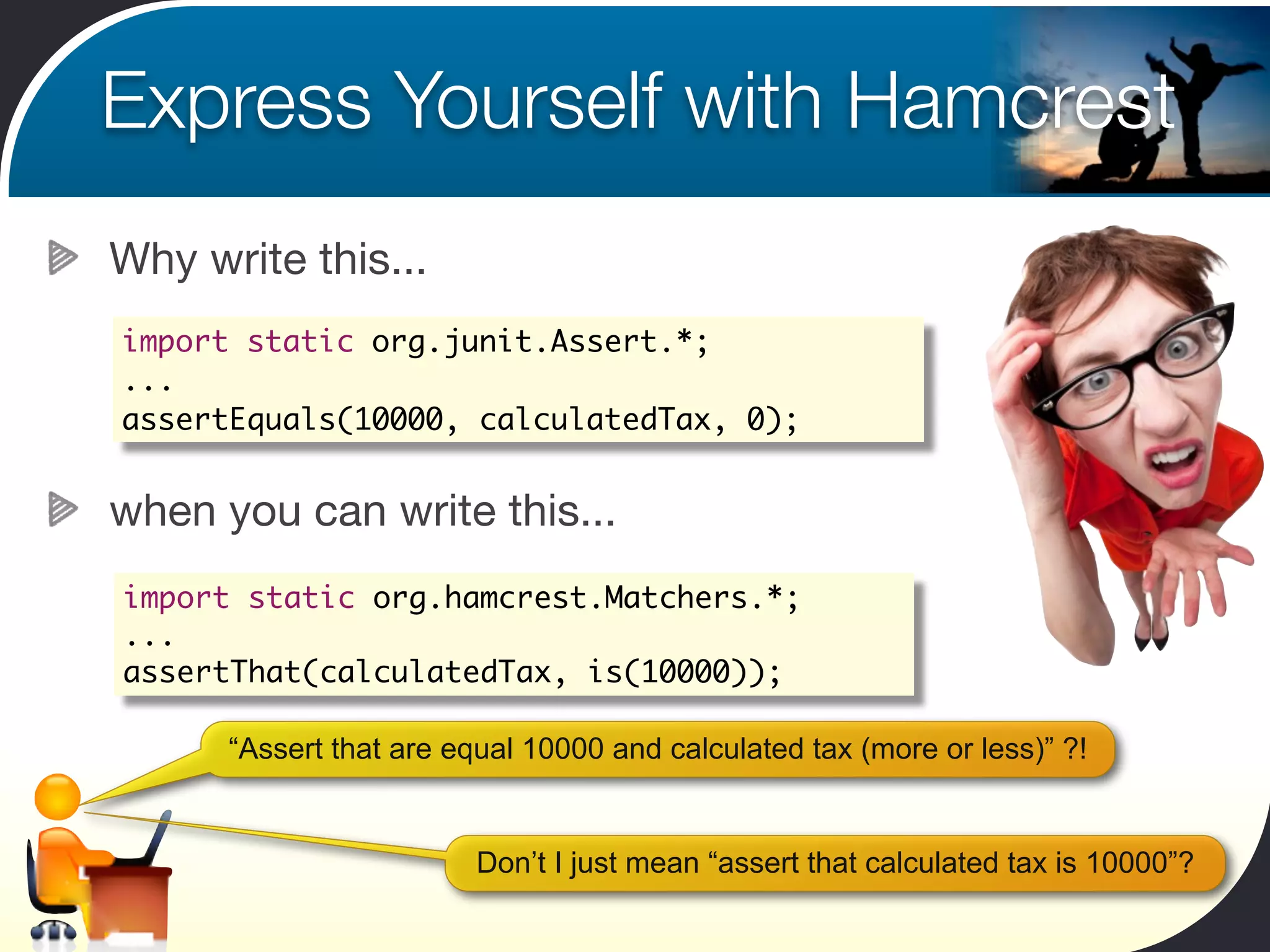
Why write this...
import static org.junit.Assert.*;
...
assertEquals(10000, calculatedTax, 0);


when you can write this...
import static org.hamcrest.Matchers.*;
...
assertThat(calculatedTax, is(10000));

      “Assert that are equal 10000 and calculated tax (more or less)” ?!


                         Don’t I just mean “assert that calculated tax is 10000”?
Express Yourself with Hamcrest
With Hamcrest, you can have your cake and eat it!

 assertThat(calculatedTax, is(expectedTax));


                                        Readable asserts

 String color = "red";
 assertThat(color, is("blue"));


                                                           Informative errors


 String[] colors = new String[] {"red","green","blue"};
 String color = "yellow";
 assertThat(color, not(isIn(colors)));
                                                      Flexible notation
Express Yourself with Hamcrest
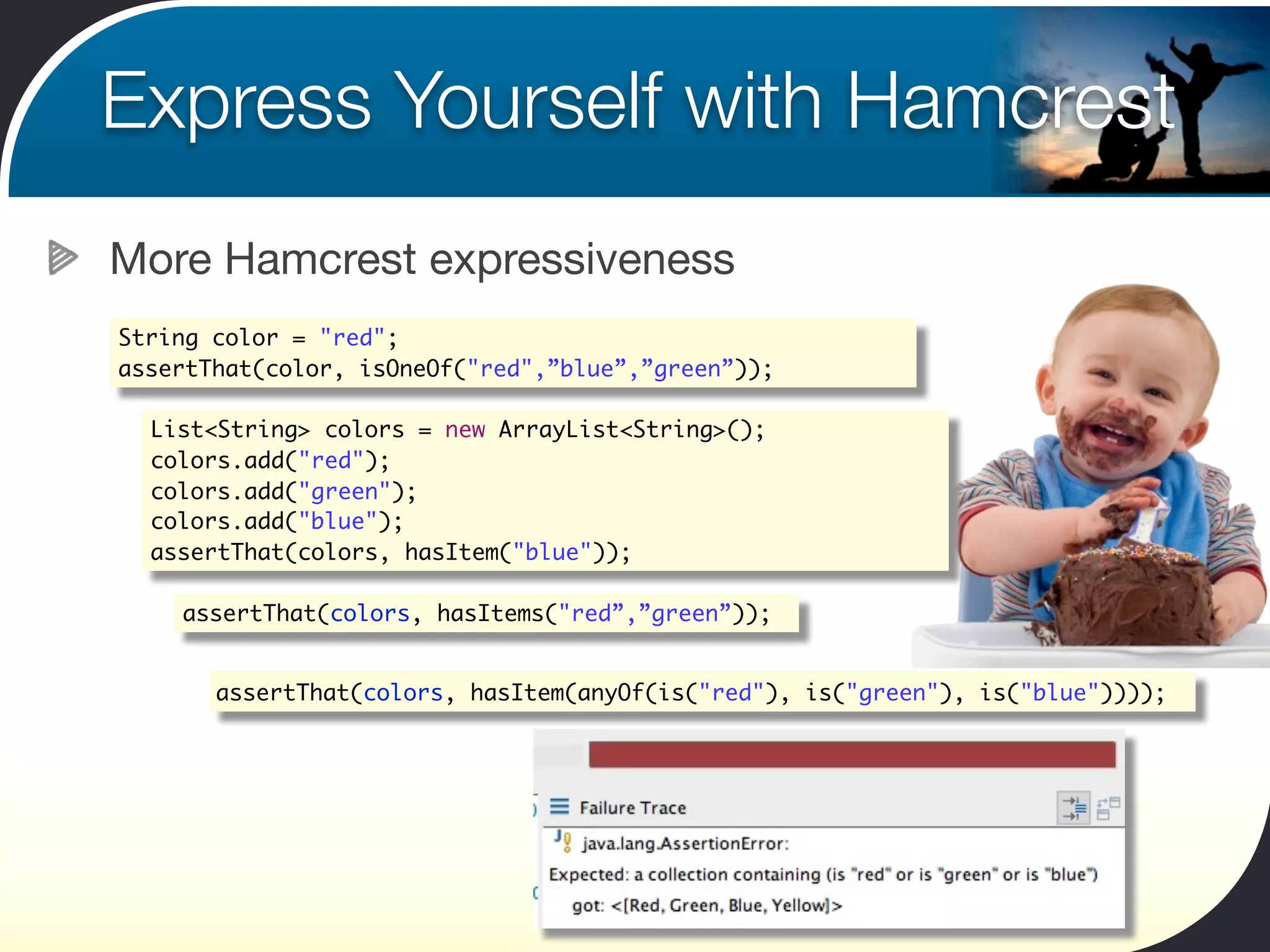
More Hamcrest expressiveness
String color = "red";
assertThat(color, isOneOf("red",”blue”,”green”));

  List<String> colors = new ArrayList<String>();
  colors.add("red");
  colors.add("green");
  colors.add("blue");
  assertThat(colors, hasItem("blue"));

    assertThat(colors, hasItems("red”,”green”));


       assertThat(colors, hasItem(anyOf(is("red"), is("green"), is("blue"))));
Home-made Hamcrest Matchers
Customizing and extending Hamcrest
Combine existing matchers
Or make your own!
Home-made Hamcrest Matchers
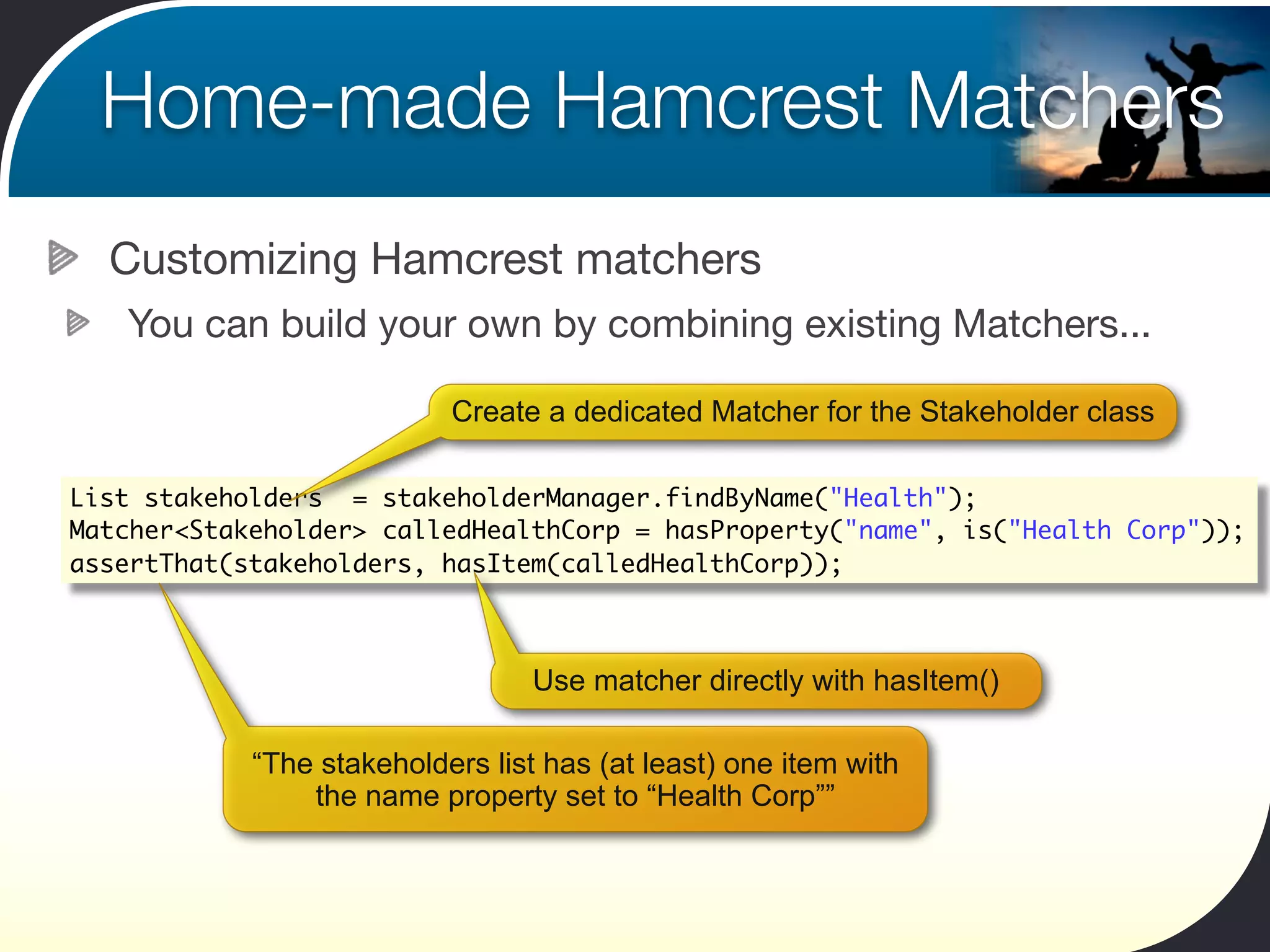
  Customizing Hamcrest matchers
   You can build your own by combining existing Matchers...

                           Create a dedicated Matcher for the Stakeholder class

List stakeholders = stakeholderManager.findByName("Health");
Matcher<Stakeholder> calledHealthCorp = hasProperty("name", is("Health Corp"));
assertThat(stakeholders, hasItem(calledHealthCorp));


                                  Use matcher directly with hasItem()

            “The stakeholders list has (at least) one item with
                the name property set to “Health Corp””
Home-made Hamcrest Matchers
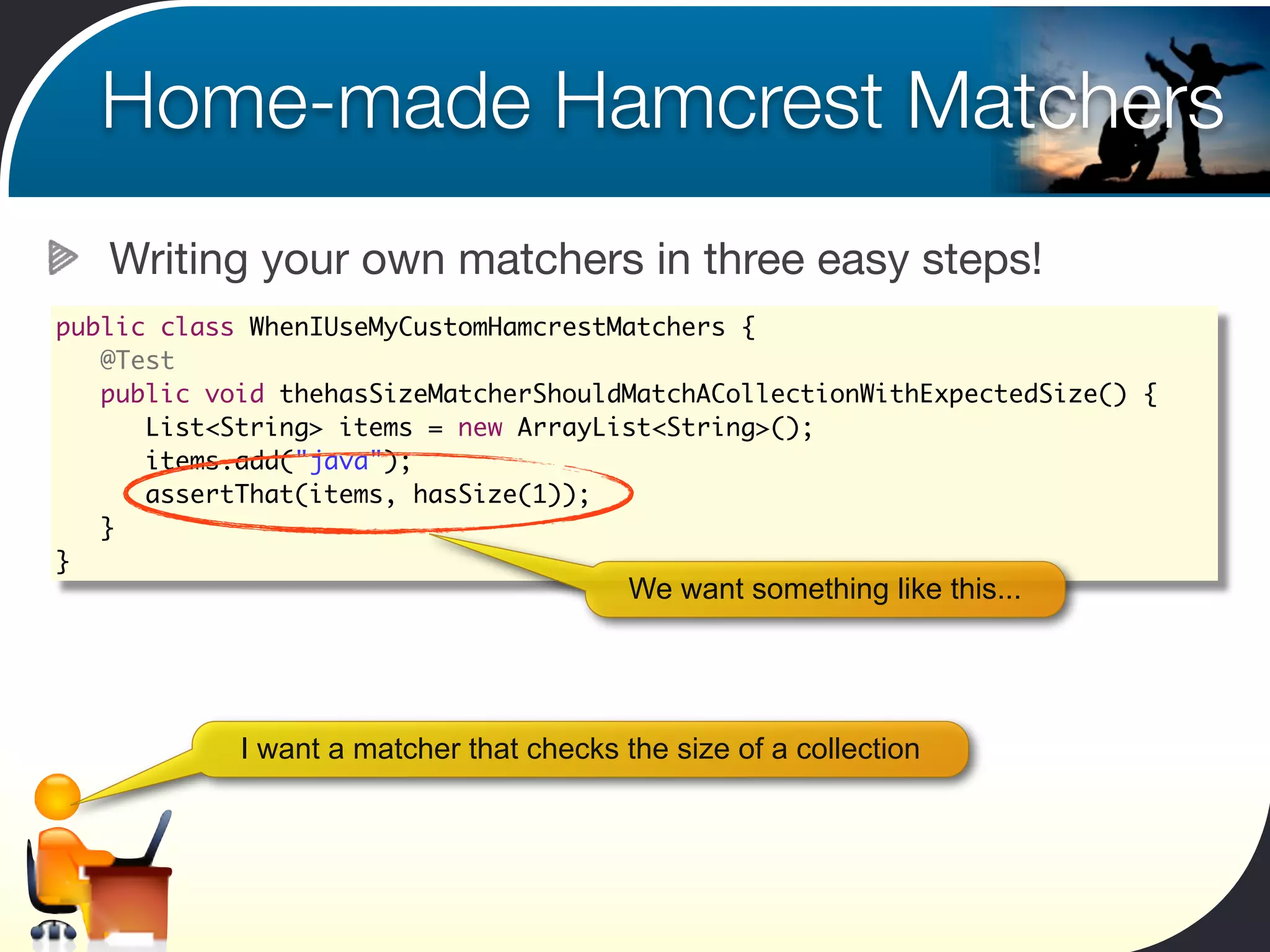
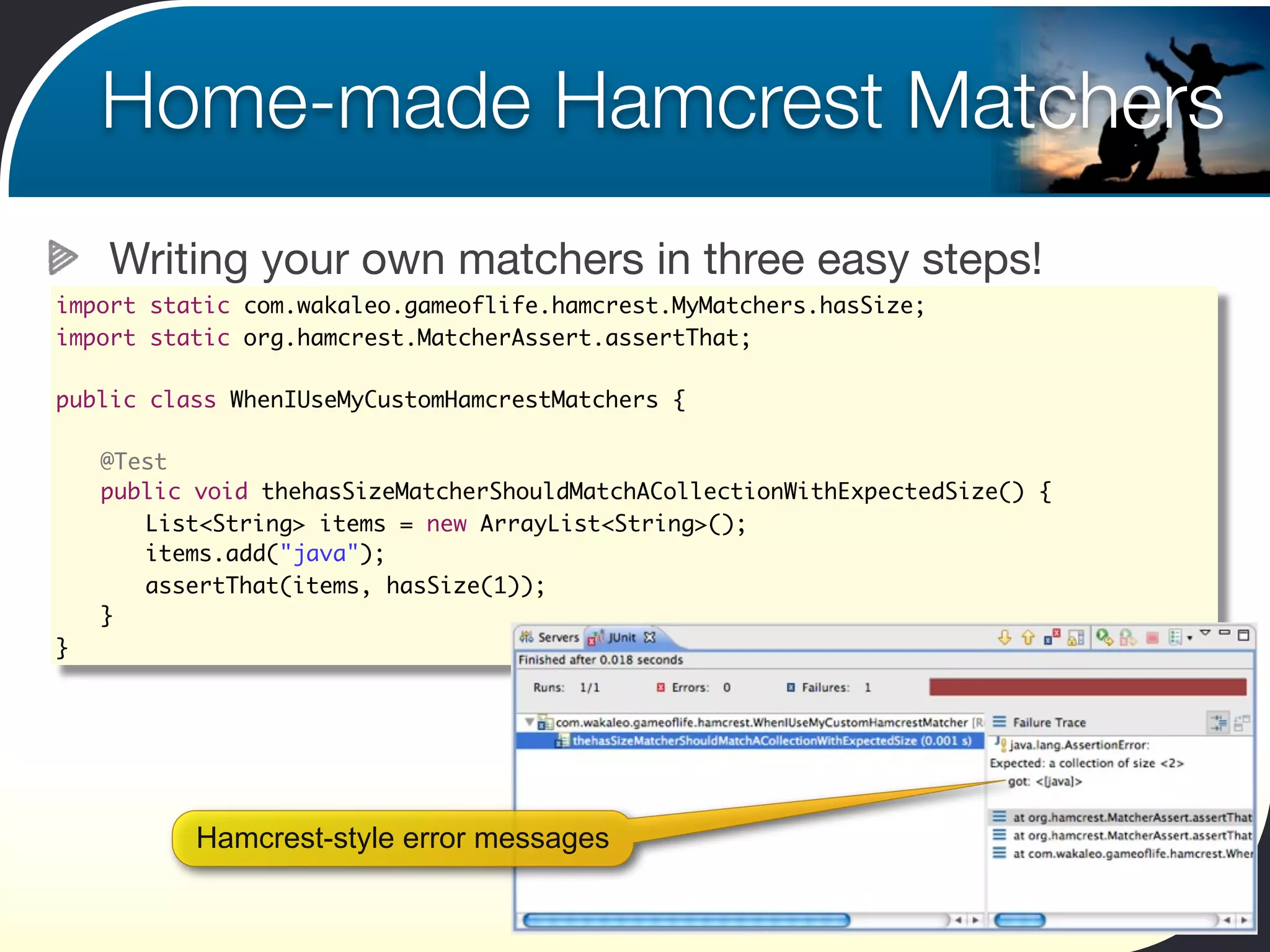
   Writing your own matchers in three easy steps!
public class WhenIUseMyCustomHamcrestMatchers {
	 @Test
	 public void thehasSizeMatcherShouldMatchACollectionWithExpectedSize() {
	 	 List<String> items = new ArrayList<String>();
	 	 items.add("java");	 	
	 	 assertThat(items, hasSize(1));
	 }
}
                                          We want something like this...


            I want a matcher that checks the size of a collection
Home-made Hamcrest Matchers
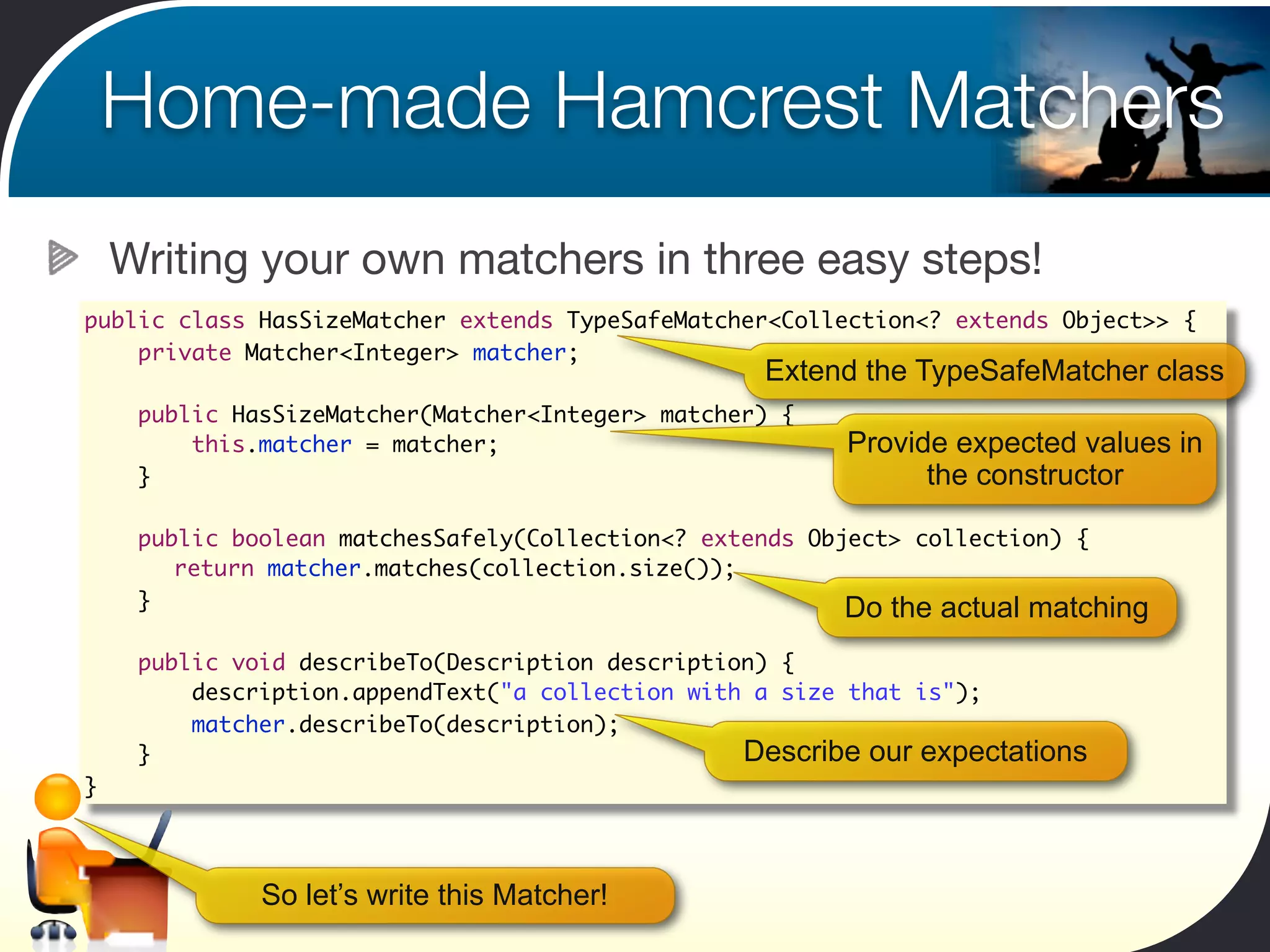
    Writing your own matchers in three easy steps!
public class HasSizeMatcher extends TypeSafeMatcher<Collection<? extends Object>> {
    private Matcher<Integer> matcher;
                                                   Extend the TypeSafeMatcher class
     public HasSizeMatcher(Matcher<Integer> matcher) {
         this.matcher = matcher;                         Provide expected values in
     }                                                         the constructor

     public boolean matchesSafely(Collection<? extends Object> collection) {
     	 return matcher.matches(collection.size());
     }                                                    Do the actual matching
     public void describeTo(Description description) {
         description.appendText("a collection with a size that is");
         matcher.describeTo(description);
     }                                            Describe our expectations
}


              So let’s write this Matcher!
Home-made Hamcrest Matchers
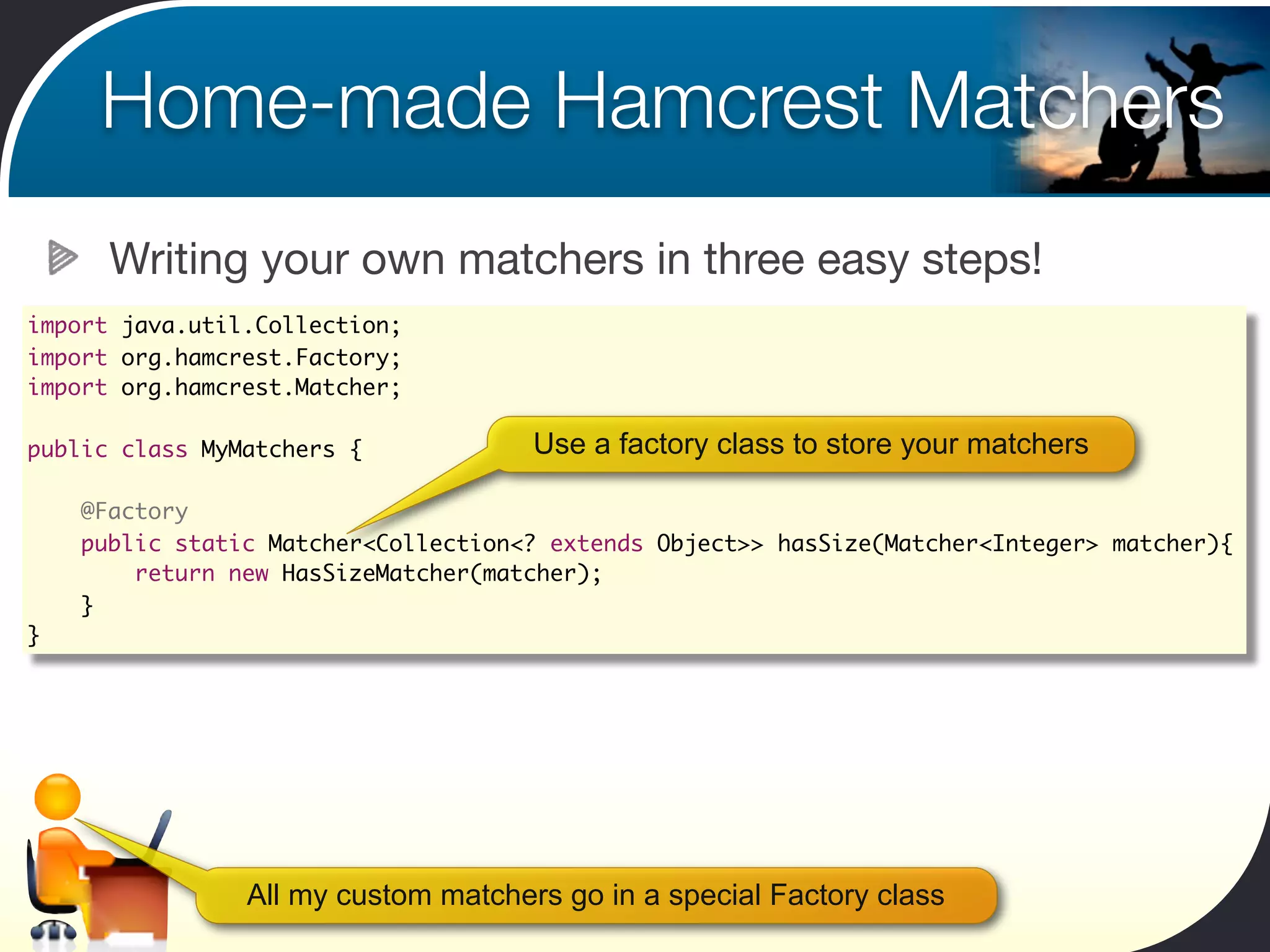
      Writing your own matchers in three easy steps!
import java.util.Collection;
import org.hamcrest.Factory;
import org.hamcrest.Matcher;

public class MyMatchers {             Use a factory class to store your matchers
	
    @Factory
    public static Matcher<Collection<? extends Object>> hasSize(Matcher<Integer> matcher){
        return new HasSizeMatcher(matcher);
    }
}


                All my custom matchers go in a special Factory class
Home-made Hamcrest Matchers
    Writing your own matchers in three easy steps!
import static com.wakaleo.gameoflife.hamcrest.MyMatchers.hasSize;
import static org.hamcrest.MatcherAssert.assertThat;

public class WhenIUseMyCustomHamcrestMatchers {

	   @Test
	   public void thehasSizeMatcherShouldMatchACollectionWithExpectedSize() {
	   	 List<String> items = new ArrayList<String>();
	   	 items.add("java");	 	
	   	 assertThat(items, hasSize(1));
	   }
}


           Hamcrest-style error messages
Home-made Hamcrest Matchers
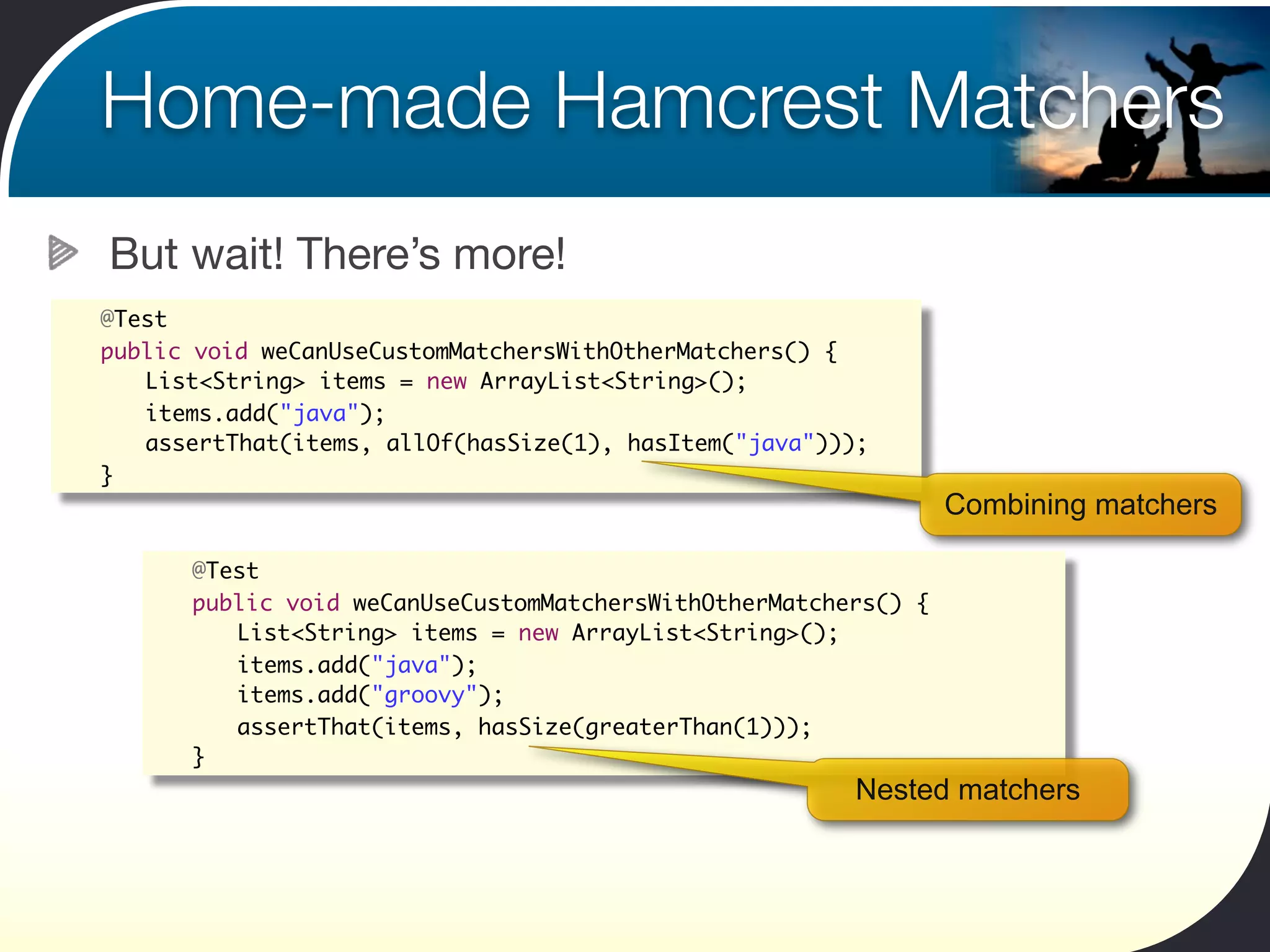
    But wait! There’s more!
	   @Test
	   public void weCanUseCustomMatchersWithOtherMatchers() {
	   	 List<String> items = new ArrayList<String>();
	   	 items.add("java");	 	
	   	 assertThat(items, allOf(hasSize(1), hasItem("java")));
	   }
                                                                     Combining matchers

       	   @Test
       	   public void weCanUseCustomMatchersWithOtherMatchers() {
       	   	 List<String> items = new ArrayList<String>();
       	   	 items.add("java");	 	
       	   	 items.add("groovy");	 	
       	   	 assertThat(items, hasSize(greaterThan(1)));
       	   }
                                                            Nested matchers
Data-Driven Unit Tests
Using Parameterized Tests
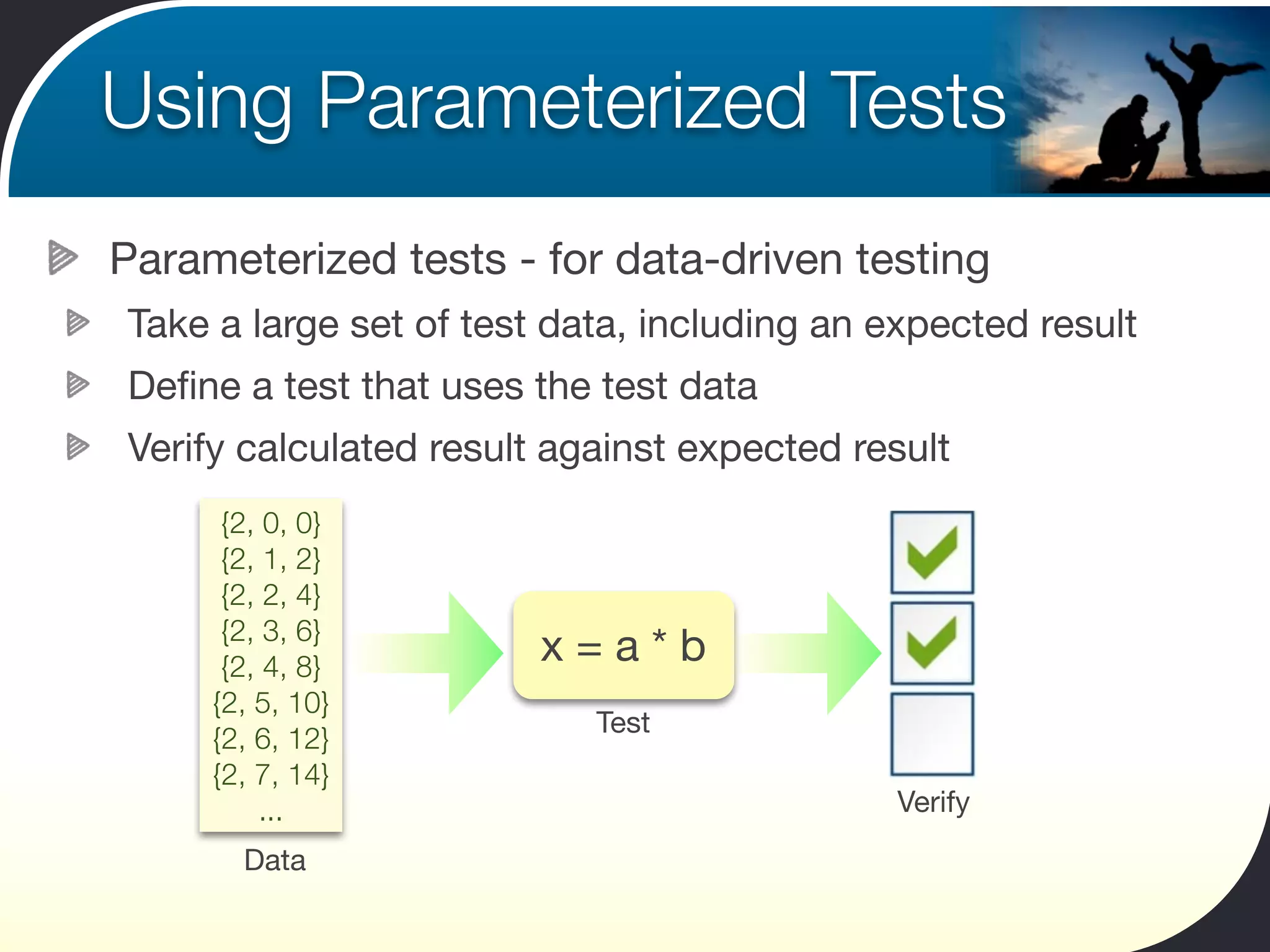
Parameterized tests - for data-driven testing
Take a large set of test data, including an expected result
Define a test that uses the test data
Verify calculated result against expected result
      {2, 0, 0}
      {2, 1, 2}
      {2, 2, 4}
      {2, 3, 6}
      {2, 4, 8}
                        x=a*b
     {2, 5, 10}
                           Test
     {2, 6, 12}
     {2, 7, 14}
         ...                                Verify
       Data
Using Parameterized Tests
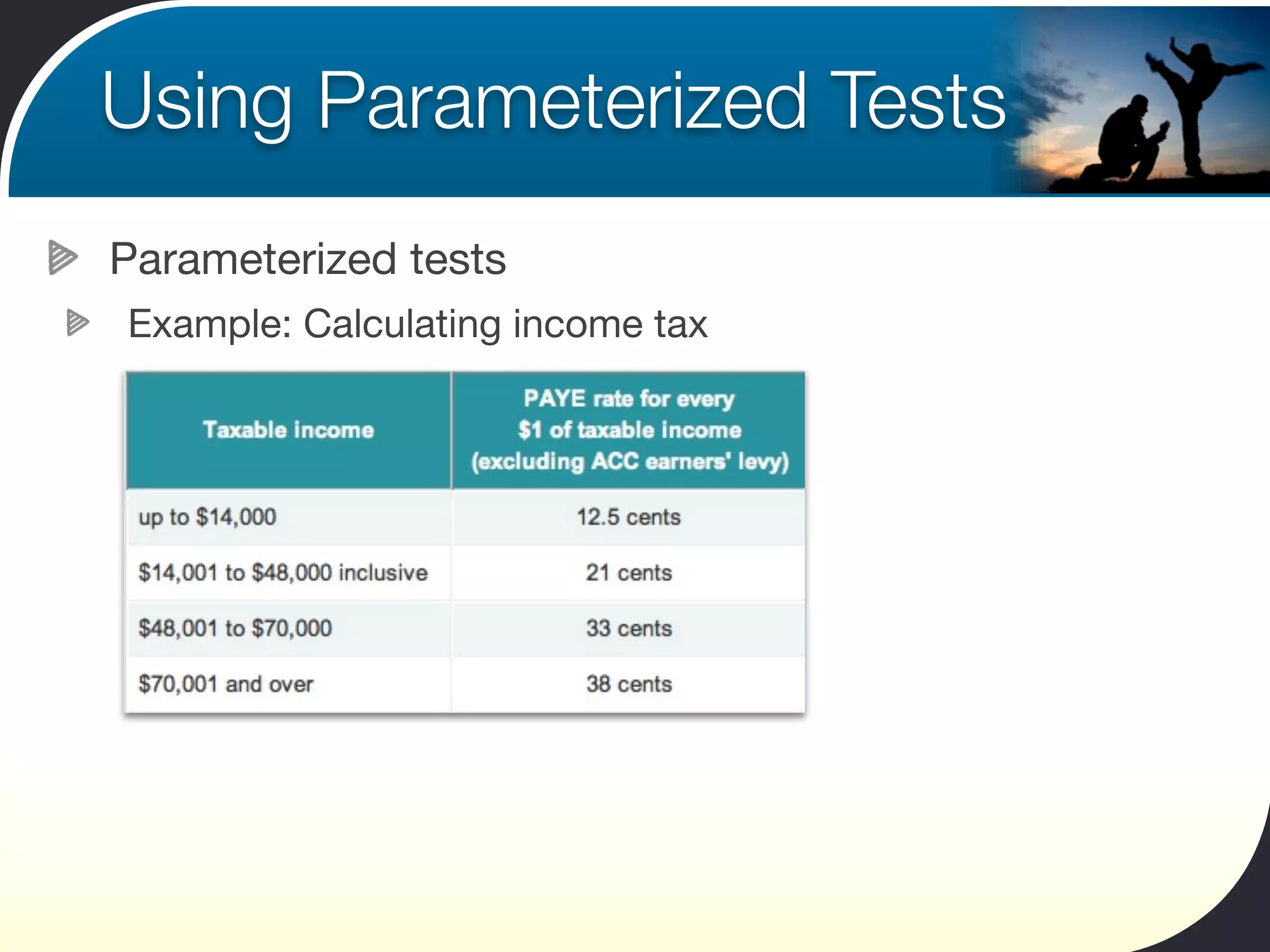
Parameterized tests
Example: Calculating income tax
Using Parameterized Tests
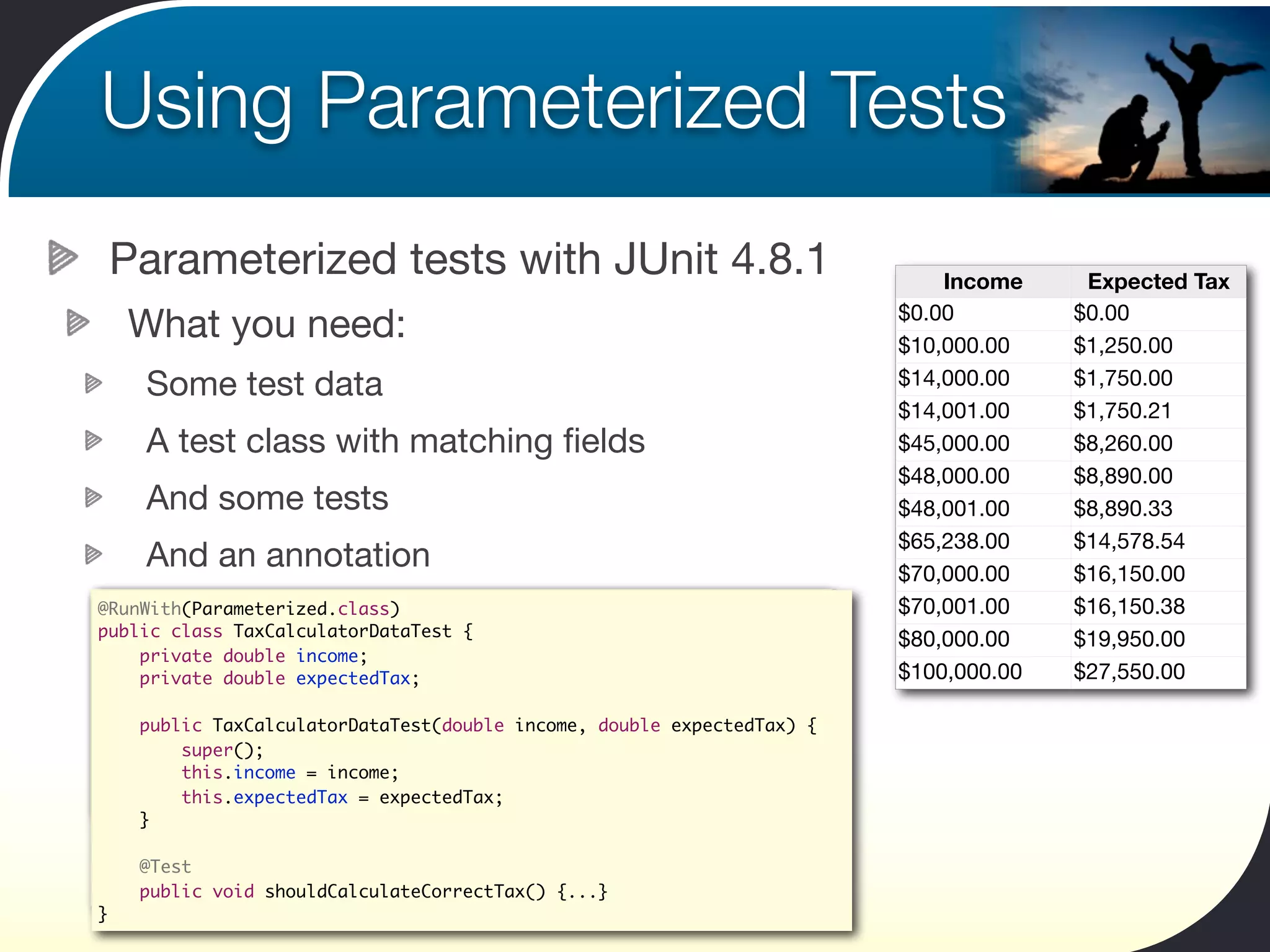
 Parameterized tests with JUnit 4.8.1                                       Income     Expected Tax
                                                                        $0.00         $0.00
  What you need:                                                        $10,000.00    $1,250.00
    Some test data                                                      $14,000.00    $1,750.00
                                                                        $14,001.00    $1,750.21
    A test class with matching fields                                    $45,000.00    $8,260.00
                                                                        $48,000.00    $8,890.00
    And some tests                                                      $48,001.00    $8,890.33
                                                                        $65,238.00    $14,578.54
    And an annotation                                                   $70,000.00    $16,150.00
public class TaxCalculatorDataTest {
@RunWith(Parameterized.class)                                           $70,001.00    $16,150.38
public classdouble income;
    private TaxCalculatorDataTest {
                                                                        $80,000.00    $19,950.00
    private double expectedTax;
                   income;
    private double expectedTax;                                         $100,000.00   $27,550.00
    public TaxCalculatorDataTest(double income, double expectedTax) {
        super();
        this.income = income;
    public TaxCalculatorDataTest(double income, double expectedTax) {
        this.income = income;
        this.expectedTax = expectedTax;
        super();
    }   this.expectedTax = expectedTax;
        this.income = income;
}   }   this.expectedTax = expectedTax;
    }
    @Test
    public void shouldCalculateCorrectTax() {...}
    @Test
}   public void shouldCalculateCorrectTax() {...}
}
Using Parameterized Tests
                                             This is a parameterized test
    How it works                                                                    Income      Expected Tax
@RunWith(Parameterized.class)                                                   $0.00          $0.00
public class TaxCalculatorDataTest {     The @Parameters annotation             $10,000.00     $1,250.00
    private double income;
    private double expectedTax;
                                            indicates the test data             $14,000.00     $1,750.00
    @Parameters                                                                 $14,001.00     $1,750.21
    public static Collection<Object[]> data() {                                 $45,000.00     $8,260.00
        return Arrays.asList(new Object[][] {
                { 0.00, 0.00 },                                                 $48,000.00     $8,890.00
                { 10000.00, 1250.00 }, { 14000.00, 1750.00 },                   $48,001.00     $8,890.33
                { 14001.00, 1750.21 }, { 45000.00, 8260.00 },
                { 48000.00, 8890.00 }, { 48001.00, 8890.33 },                   $65,238.00     $14,578.54
                { 65238.00, 14578.54 }, { 70000.00, 16150.00 },
                                                                                $70,000.00     $16,150.00
                { 70001.00, 16150.38 }, { 80000.00, 19950.00 },
                { 100000.00, 27550.00 }, });                                    $70,001.00     $16,150.38
    }
                                                                                $80,000.00     $19,950.00
    public TaxCalculatorDataTest(double income, double expectedTax) {           $100,000.00    $27,550.00
        super();
        this.income = income;
        this.expectedTax = expectedTax;                           The constructor takes the
    }                                                              fields from the test data
    @Test
    public void shouldCalculateCorrectTax() {
        TaxCalculator calculator = new TaxCalculator();                   The unit tests use data
        double calculatedTax = calculator.calculateTax(income);
        assertThat(calculatedTax, is(expectedTax));                         from these fields.
    }
}
Using Parameterized Tests
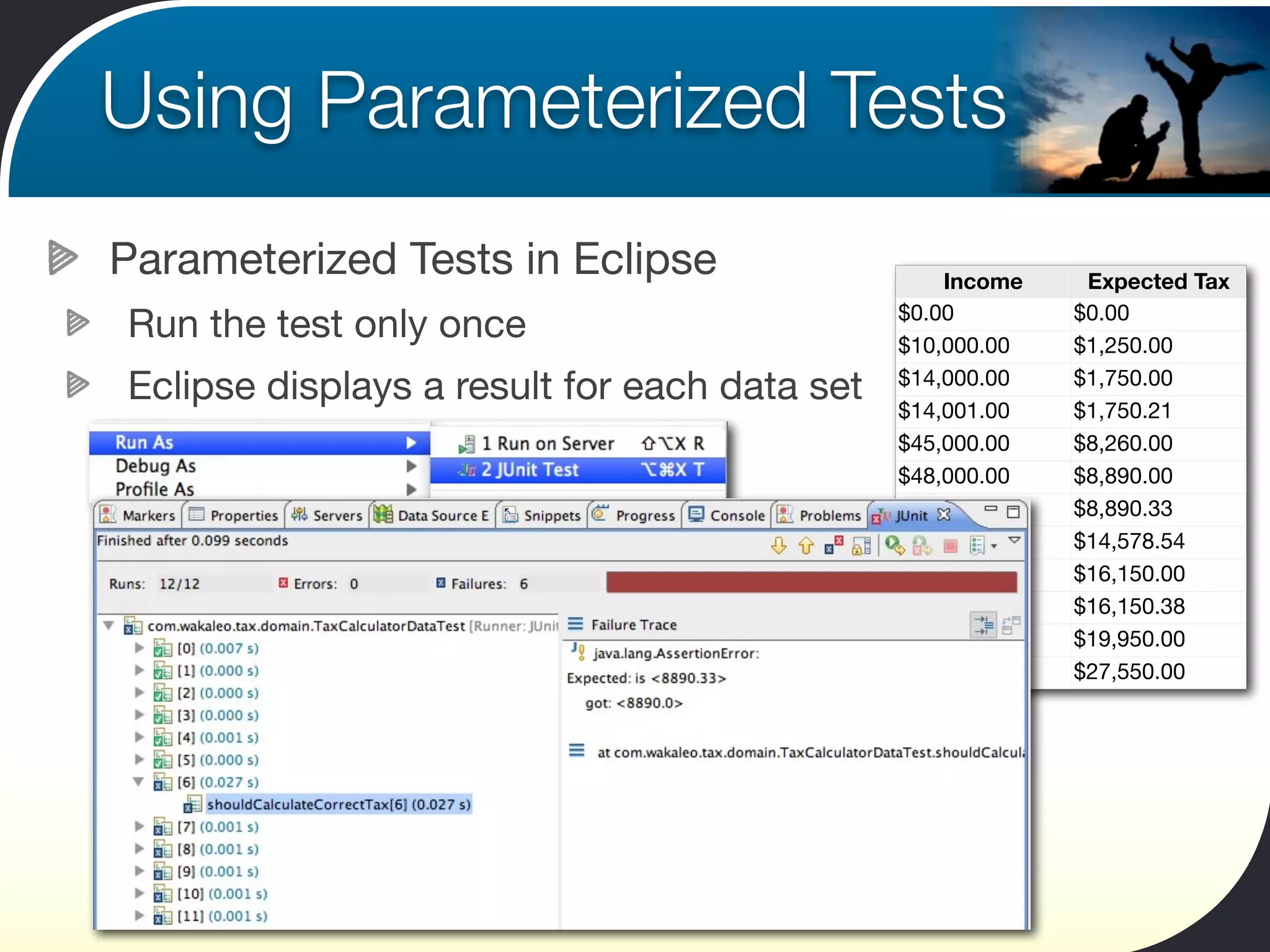
Parameterized Tests in Eclipse                    Income     Expected Tax
                                              $0.00         $0.00
Run the test only once                        $10,000.00    $1,250.00

Eclipse displays a result for each data set   $14,000.00
                                              $14,001.00
                                                            $1,750.00
                                                            $1,750.21
                                              $45,000.00    $8,260.00
                                              $48,000.00    $8,890.00
                                              $48,001.00    $8,890.33
                                              $65,238.00    $14,578.54
                                              $70,000.00    $16,150.00
                                              $70,001.00    $16,150.38
                                              $80,000.00    $19,950.00
                                              $100,000.00   $27,550.00
Using Parameterized Tests
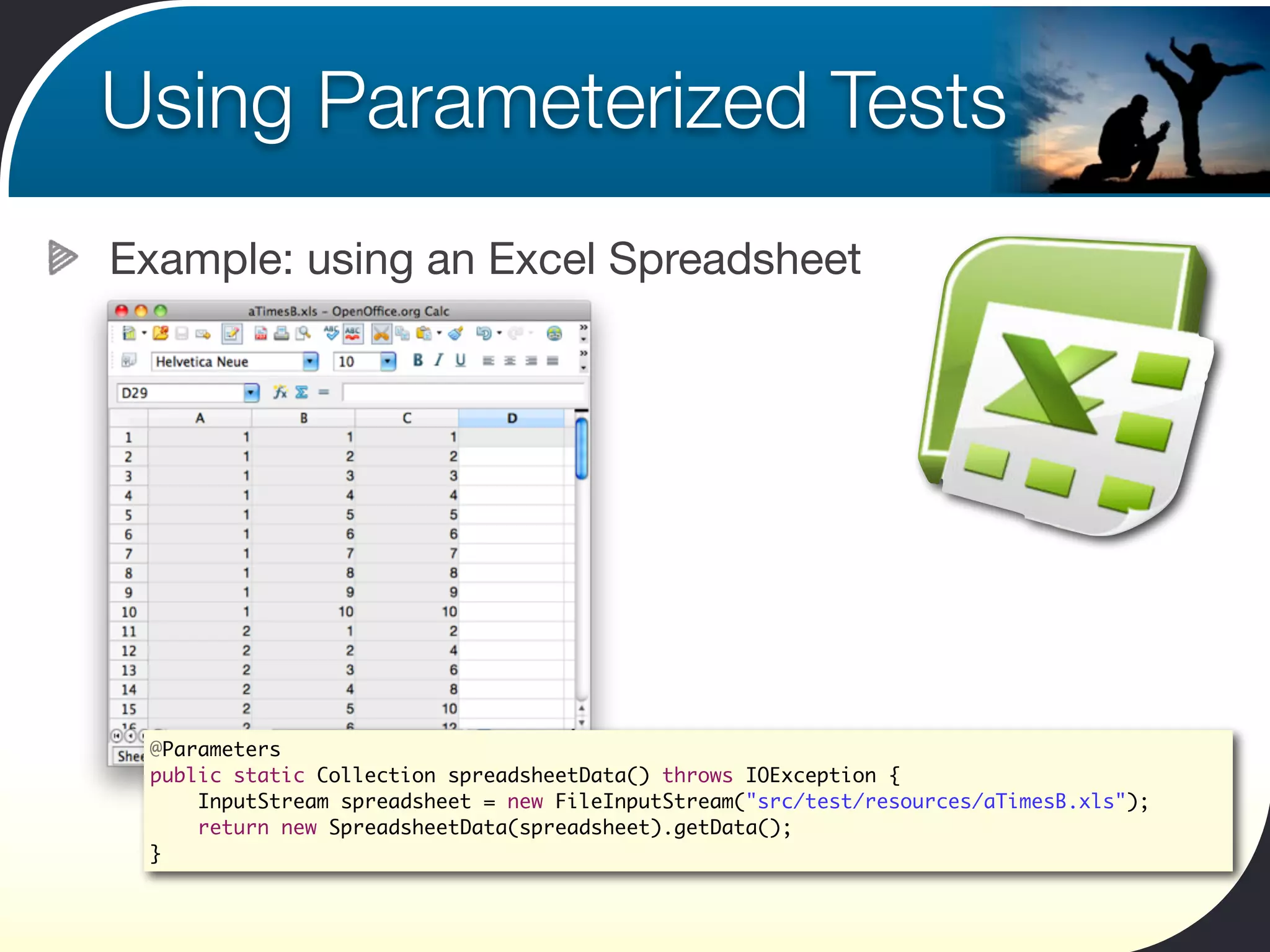
Example: using an Excel Spreadsheet


 @Parameters
 public static Collection spreadsheetData() throws IOException {
     InputStream spreadsheet = new FileInputStream("src/test/resources/aTimesB.xls");
     return new SpreadsheetData(spreadsheet).getData();
 }
Using Parameterized Tests
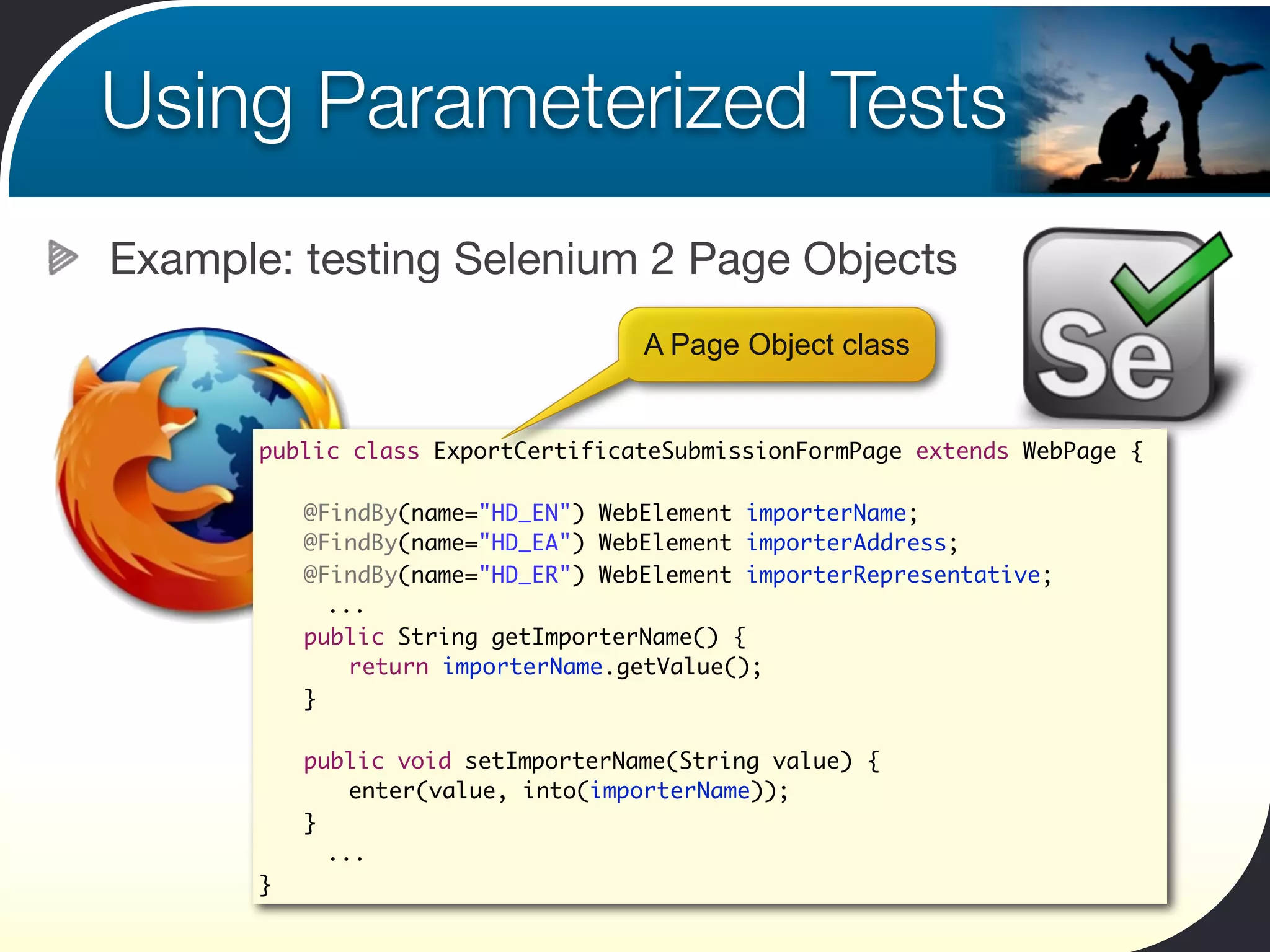
Example: testing Selenium 2 Page Objects
                                    A Page Object class


       public class ExportCertificateSubmissionFormPage extends WebPage {

       	   @FindBy(name="HD_EN") WebElement importerName;
       	   @FindBy(name="HD_EA") WebElement importerAddress;
       	   @FindBy(name="HD_ER") WebElement importerRepresentative;
             ...
       	   public String getImporterName() {
       	   	 return importerName.getValue();
       	   }

       	   public void setImporterName(String value) {
       	   	 enter(value, into(importerName));
       	   }
             ...
       }
Using Parameterized Tests
Example: testing Selenium 2 Page Objects


                                Testing the fields using a parameterized test

 	   @Parameters
 	   public static Collection<Object[]> data() {
 	   	 return Arrays.asList(new Object[][] {
 	   	 	 	 { "importerName", "an-importer-name" },
 	   	 	 	 { "importerAddress", "an-importer-address" },
 	   	 	 	 { "importerRepresentative", "a-importer-representative" },
                 ...
 	   	 	 	 });
 	   }
Using Parameterized Tests
Example: testing Selenium 2 Page Objects


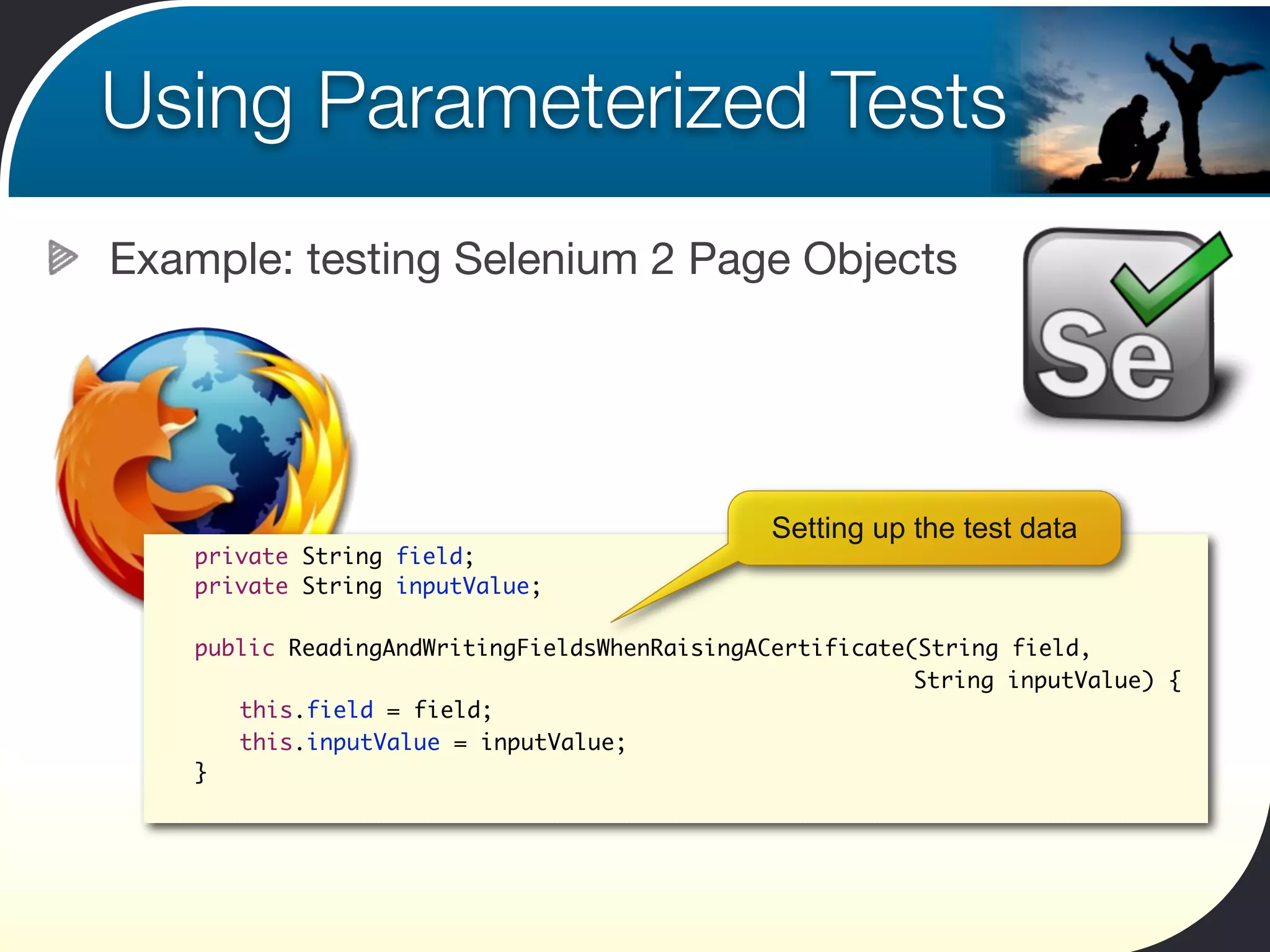
                                                Setting up the test data
 	   private String field;
 	   private String inputValue;

 	   public ReadingAndWritingFieldsWhenRaisingACertificate(String field,
 	   	 	                                                   String inputValue) {
 	   	 this.field = field;
 	   	 this.inputValue = inputValue;
 	   }
Using Parameterized Tests
Example: testing Selenium 2 Page Objects


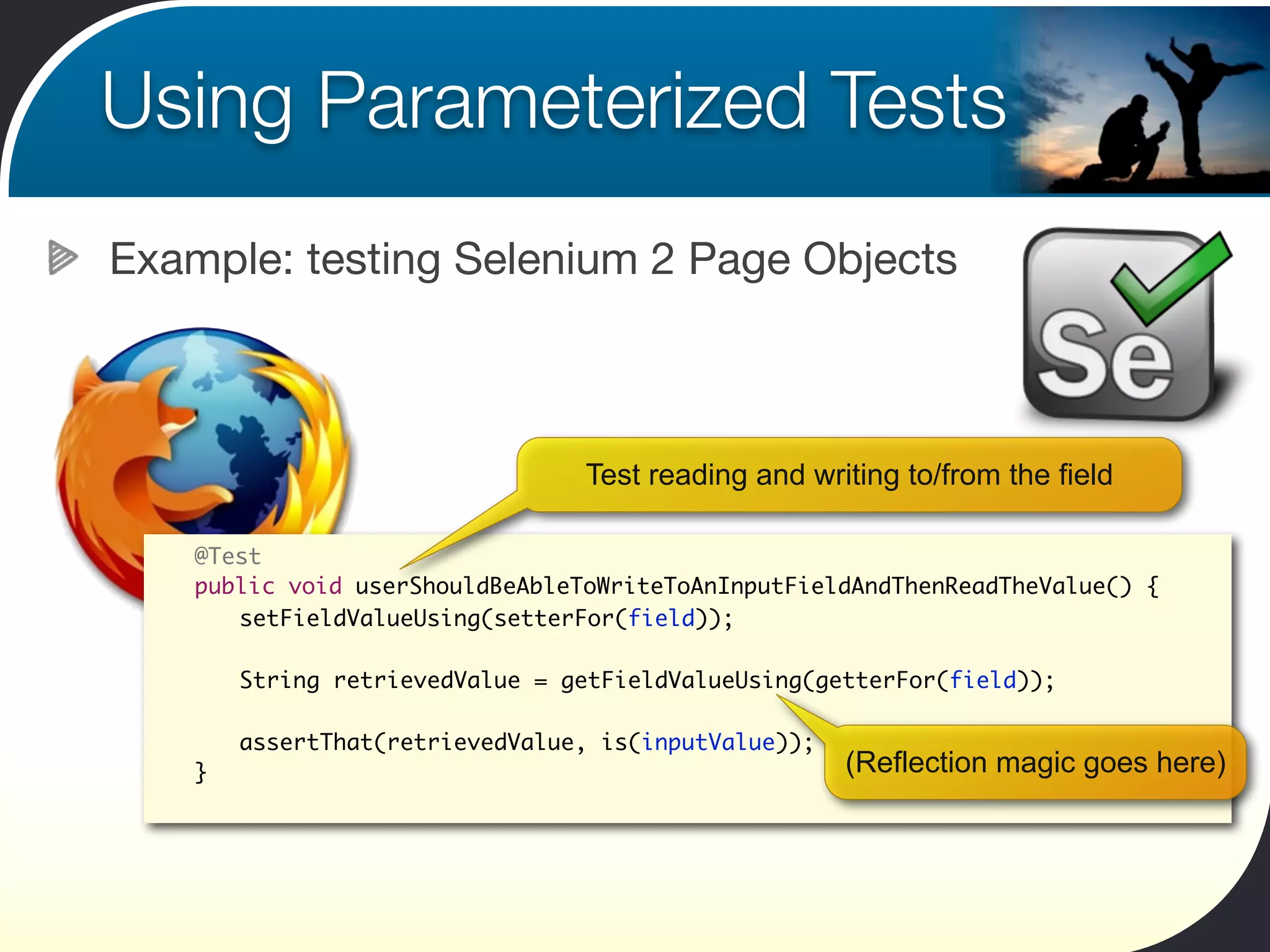
                                  Test reading and writing to/from the field

 	   @Test
 	   public void userShouldBeAbleToWriteToAnInputFieldAndThenReadTheValue() {
 	   	 setFieldValueUsing(setterFor(field));

 	   	   String retrievedValue = getFieldValueUsing(getterFor(field));

 	   	   assertThat(retrievedValue, is(inputValue));
 	   }                                                 (Reflection magic goes here)
JUnit Rules
Using Existing and Custom JUnit Rules
Customize and control how JUnit behaves
JUnit Rules
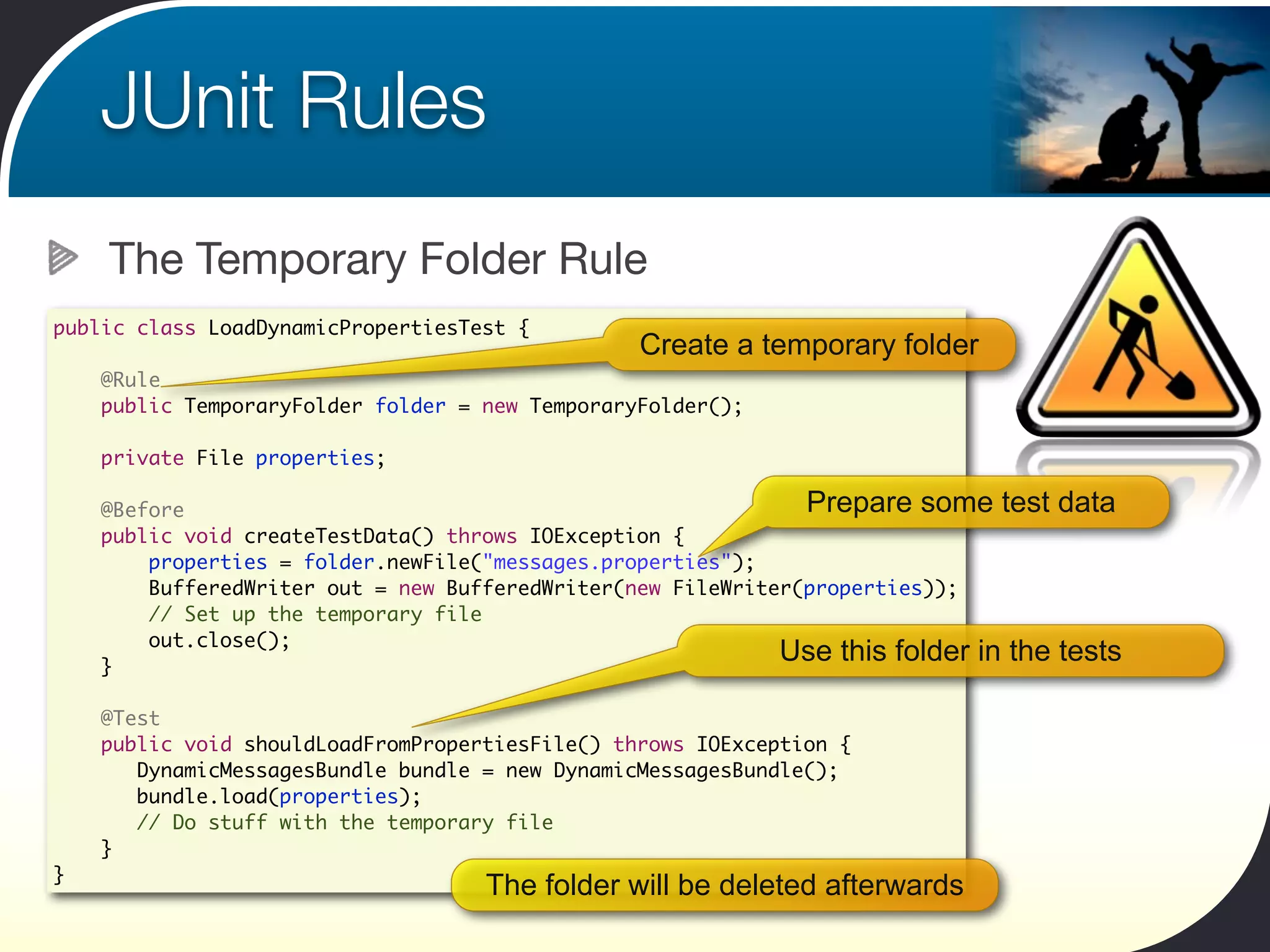
    The Temporary Folder Rule
public class LoadDynamicPropertiesTest {
                                                 Create a temporary folder
    @Rule
    public TemporaryFolder folder = new TemporaryFolder();

    private File properties;

    @Before                                                    Prepare some test      data
    public void createTestData() throws IOException {
        properties = folder.newFile("messages.properties");
        BufferedWriter out = new BufferedWriter(new FileWriter(properties));
        // Set up the temporary file
        out.close();
    }
                                                             Use this folder in the   tests

    @Test
    public void shouldLoadFromPropertiesFile() throws IOException {
       DynamicMessagesBundle bundle = new DynamicMessagesBundle();
       bundle.load(properties);
       // Do stuff with the temporary file
    }
}
                                    The folder will be deleted afterwards
JUnit Rules
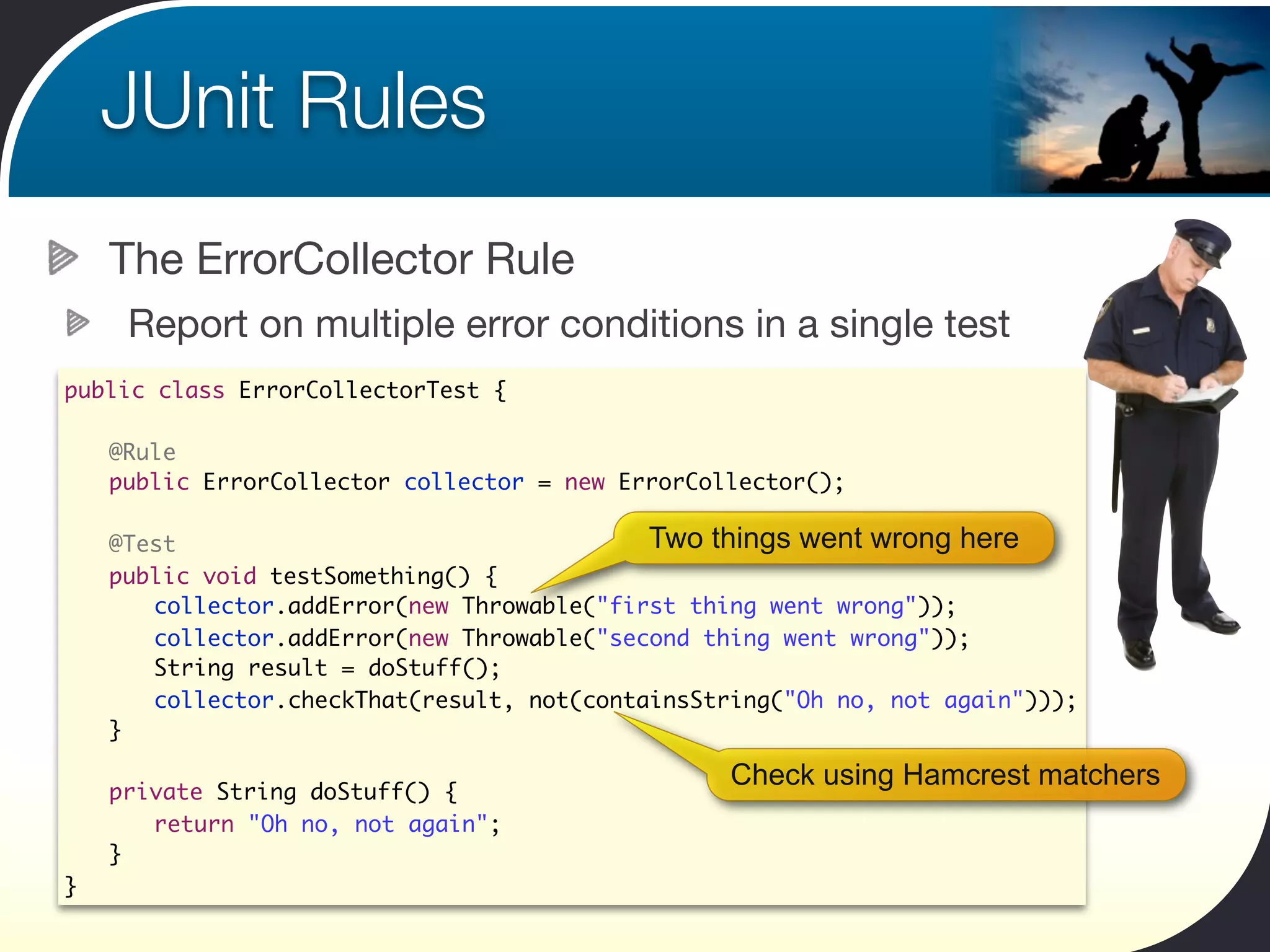
        The ErrorCollector Rule
         Report on multiple error conditions in a single test
public class ErrorCollectorTest {

	       @Rule
	       public ErrorCollector collector = new ErrorCollector();
	
	       @Test                                  Two things went wrong here
	       public void testSomething() {
    	   	 collector.addError(new Throwable("first thing went wrong"));
    	   	 collector.addError(new Throwable("second thing went wrong"));
    	   	 String result = doStuff();
    	   	 collector.checkThat(result, not(containsString("Oh no, not again")));
	       }

                                                      Check using Hamcrest matchers
	       private String doStuff() {
	       	 return "Oh no, not again";
	       }
}
JUnit Rules
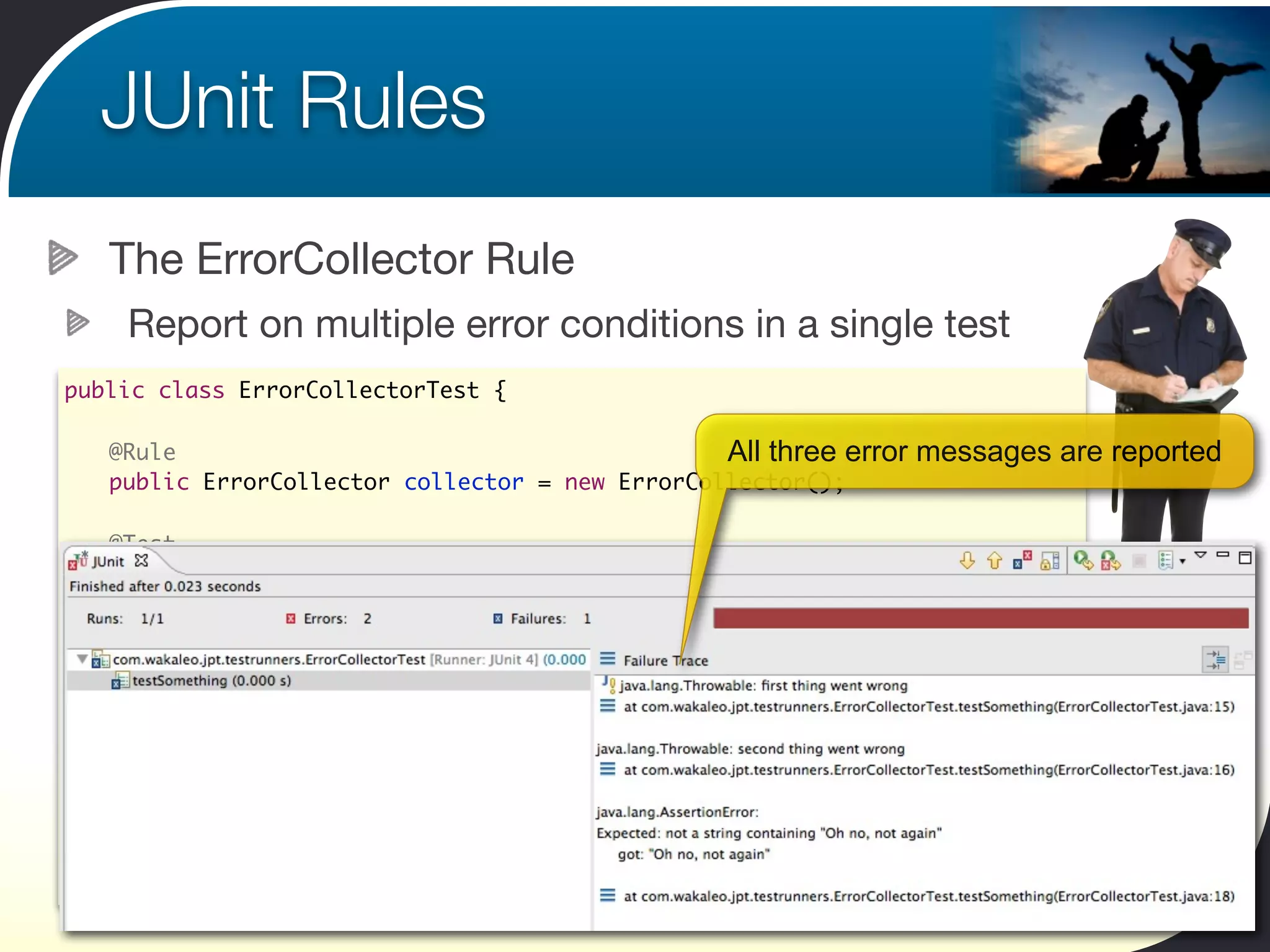
        The ErrorCollector Rule
         Report on multiple error conditions in a single test
public class ErrorCollectorTest {

	       @Rule                                         All three error   messages are reported
	       public ErrorCollector collector = new ErrorCollector();
	
	       @Test
	       public void testSomething() {
    	   	 collector.addError(new Throwable("first thing went wrong"));
    	   	 collector.addError(new Throwable("second thing went wrong"));
    	   	 String result = doStuff();
    	   	 collector.checkThat(result, not(containsString("Oh no, not again")));
	       }

	       private String doStuff() {
	       	 return "Oh no, not again";
	       }
}
JUnit Rules
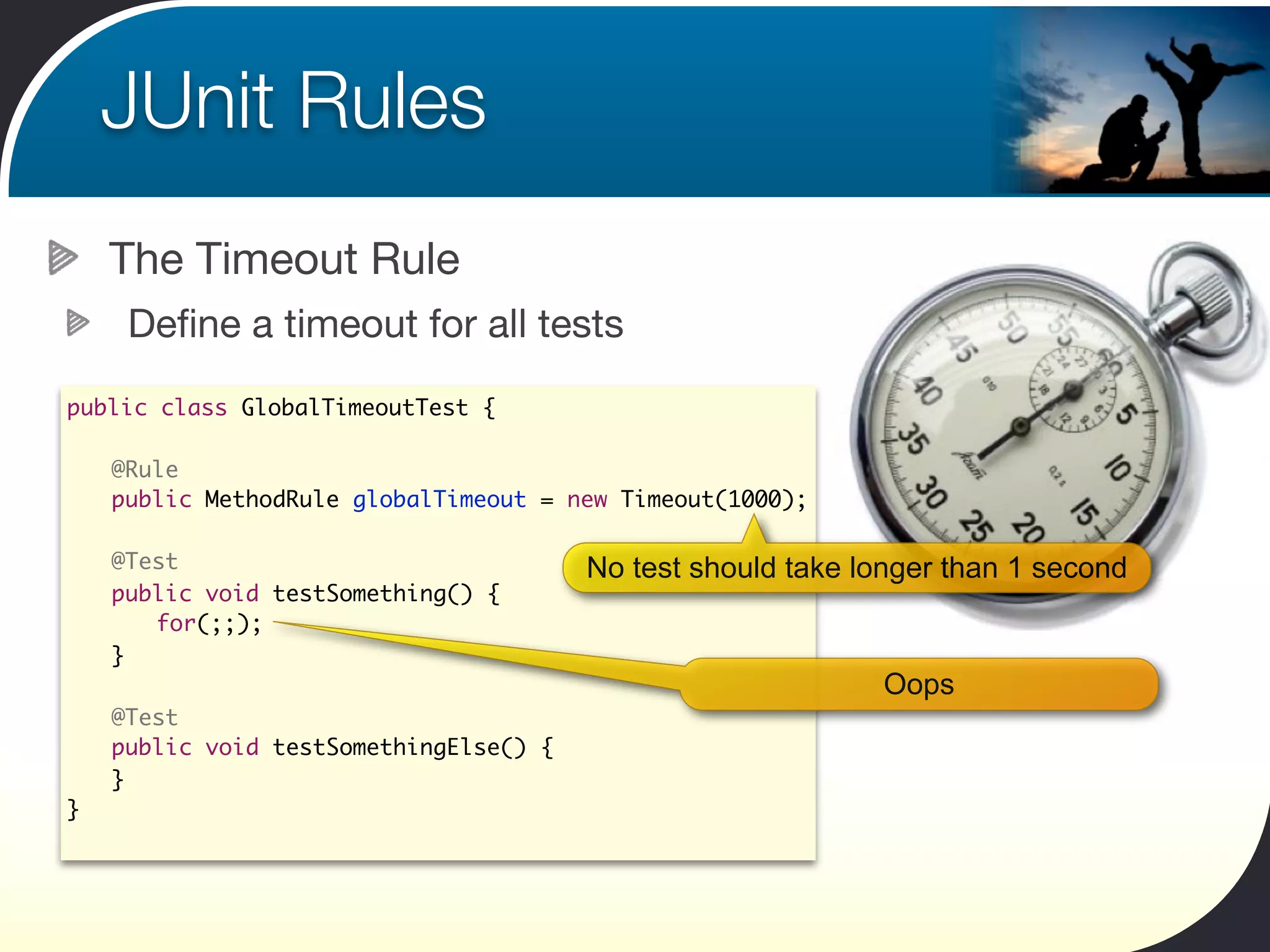
      The Timeout Rule
       Define a timeout for all tests
public class GlobalTimeoutTest {

    	 @Rule
    	 public MethodRule globalTimeout = new Timeout(1000);
	
	     @Test                               No test should take longer than 1 second
	     public void testSomething() {
	     	 for(;;);
	     }
                                                               Oops
	     @Test
	     public void testSomethingElse() {
	     }
}
JUnit Rules
    The Verifier Rule
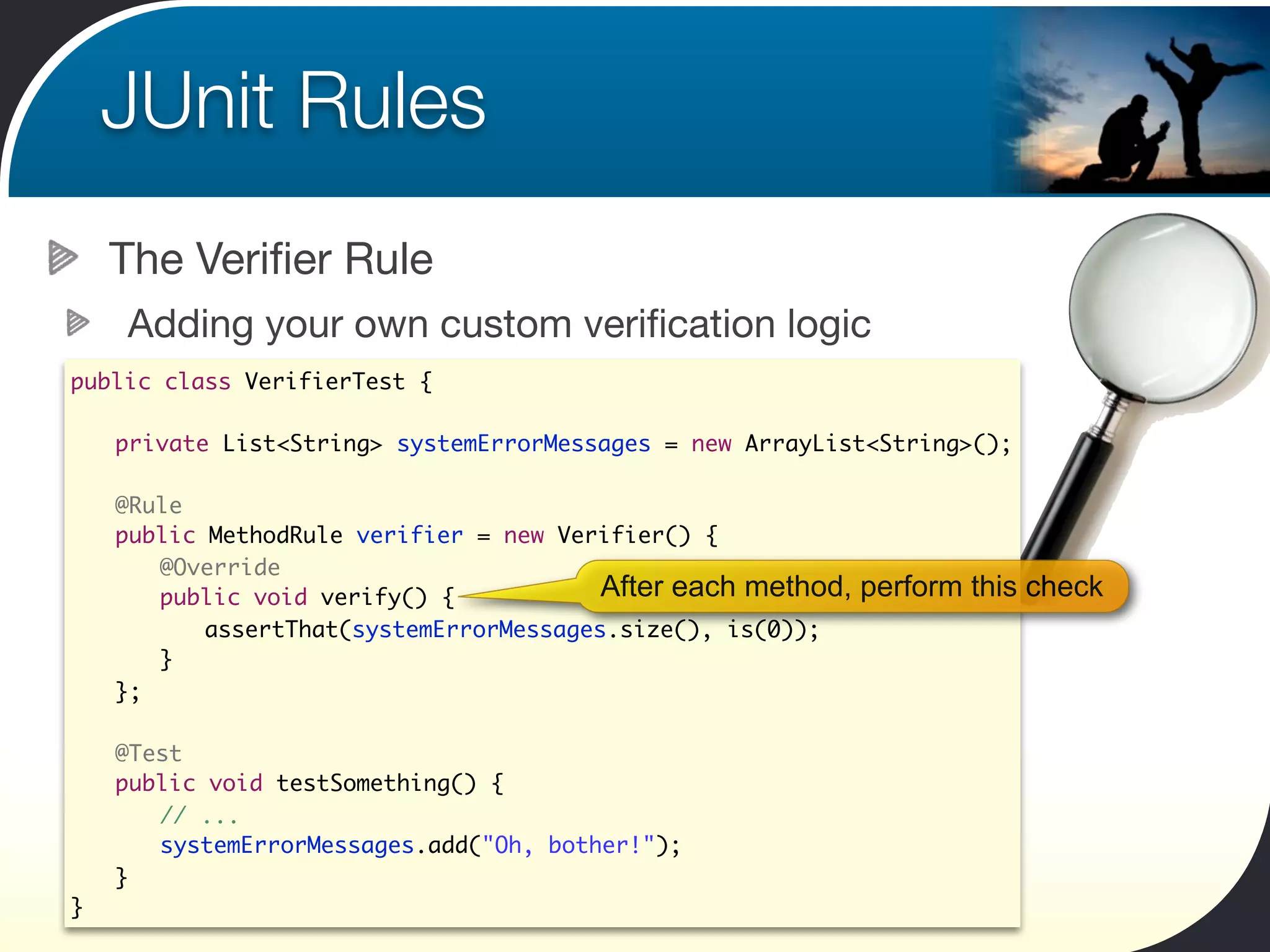
    Adding your own custom verification logic
public class VerifierTest {

	   private List<String> systemErrorMessages = new ArrayList<String>();

	   @Rule
	   public MethodRule verifier = new Verifier() {
	   	 @Override
	   	 public void verify() {            After each method,   perform this check
	   	 	 assertThat(systemErrorMessages.size(), is(0));
	   	 }
	   };

	   @Test
	   public void testSomething() {
	   	 // ...
	   	 systemErrorMessages.add("Oh, bother!");
	   }
}
JUnit Rules
    The Watchman Rule
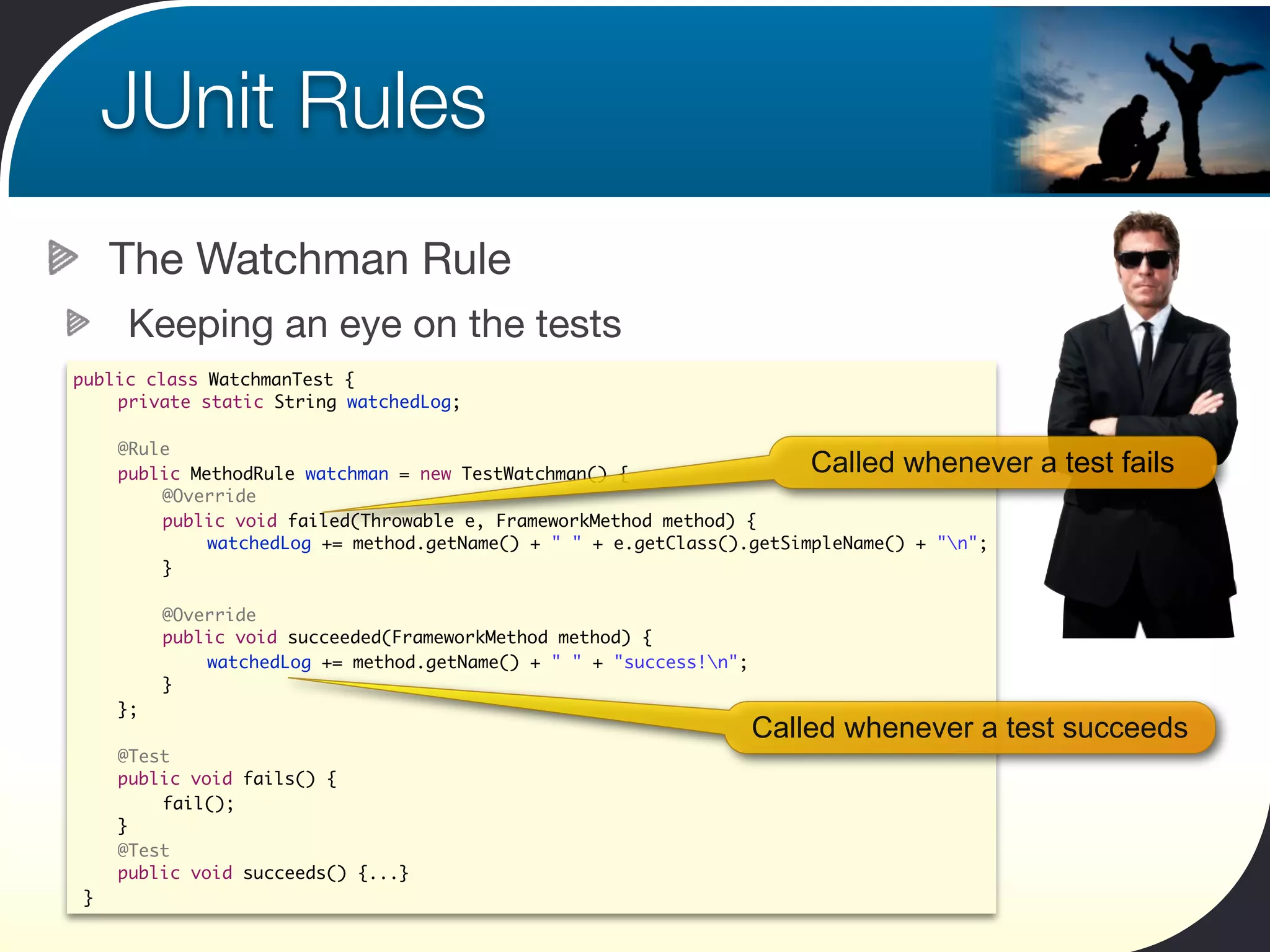
     Keeping an eye on the tests
public class WatchmanTest {
 	 private static String watchedLog;

	   @Rule
	   public MethodRule watchman = new TestWatchman() {                   Called whenever a test fails
	   	   @Override
	   	   public void failed(Throwable e, FrameworkMethod method) {
	   	   	    watchedLog += method.getName() + " " + e.getClass().getSimpleName() + "n";
	   	   }

	   	    @Override
	   	    public void succeeded(FrameworkMethod method) {
	   	    	   watchedLog += method.getName() + " " + "success!n";
	   	    }
	   };
                                                                    Called whenever a test succeeds
	   @Test
	   public void fails() {
	   	   fail();
	   }
	   @Test
	   public void succeeds() {...}
}
JUnit Categories
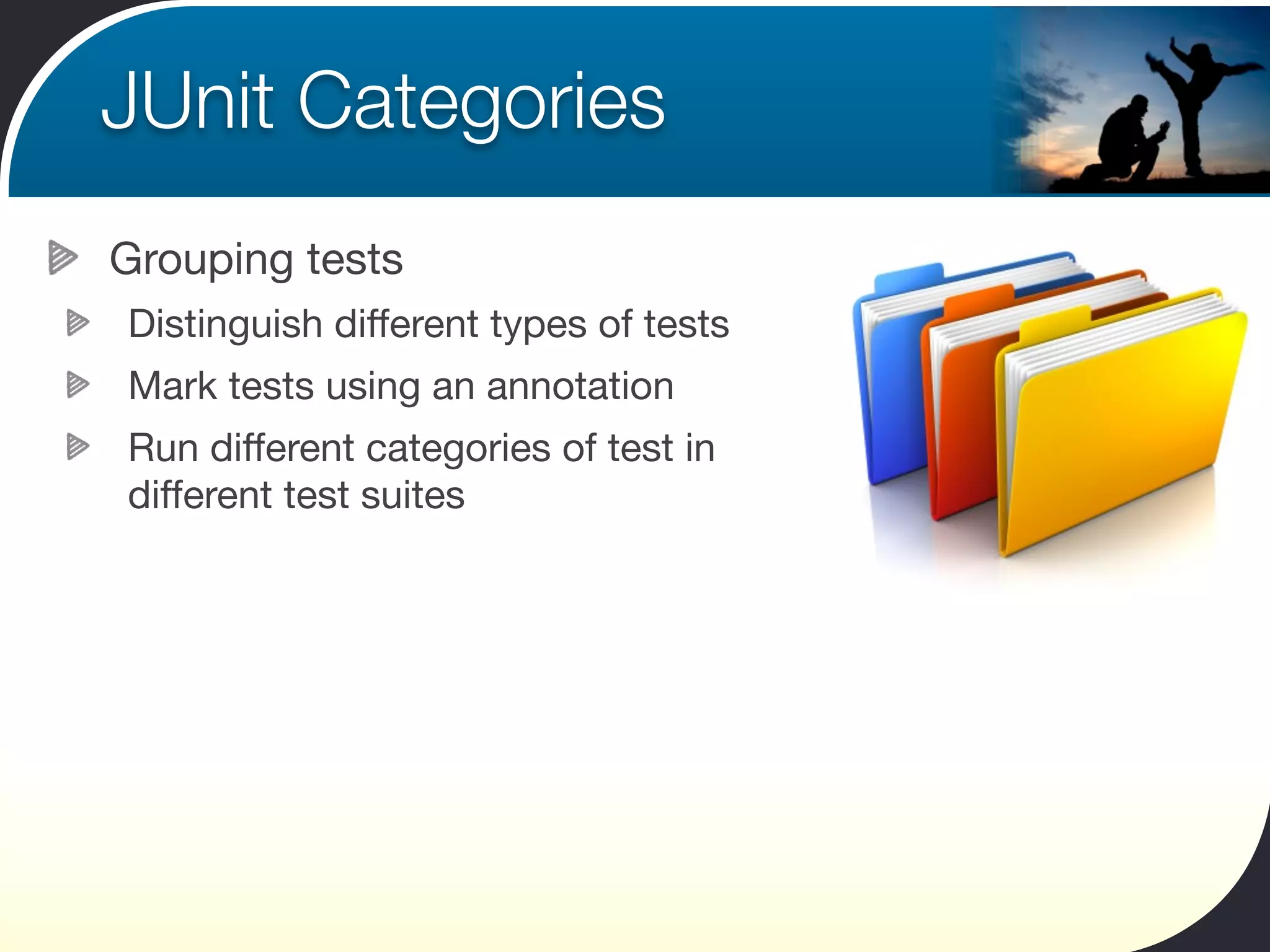
Grouping tests
Distinguish different types of tests
Mark tests using an annotation
Run different categories of test in
different test suites
JUnit Categories
 Setting up JUnit Categories
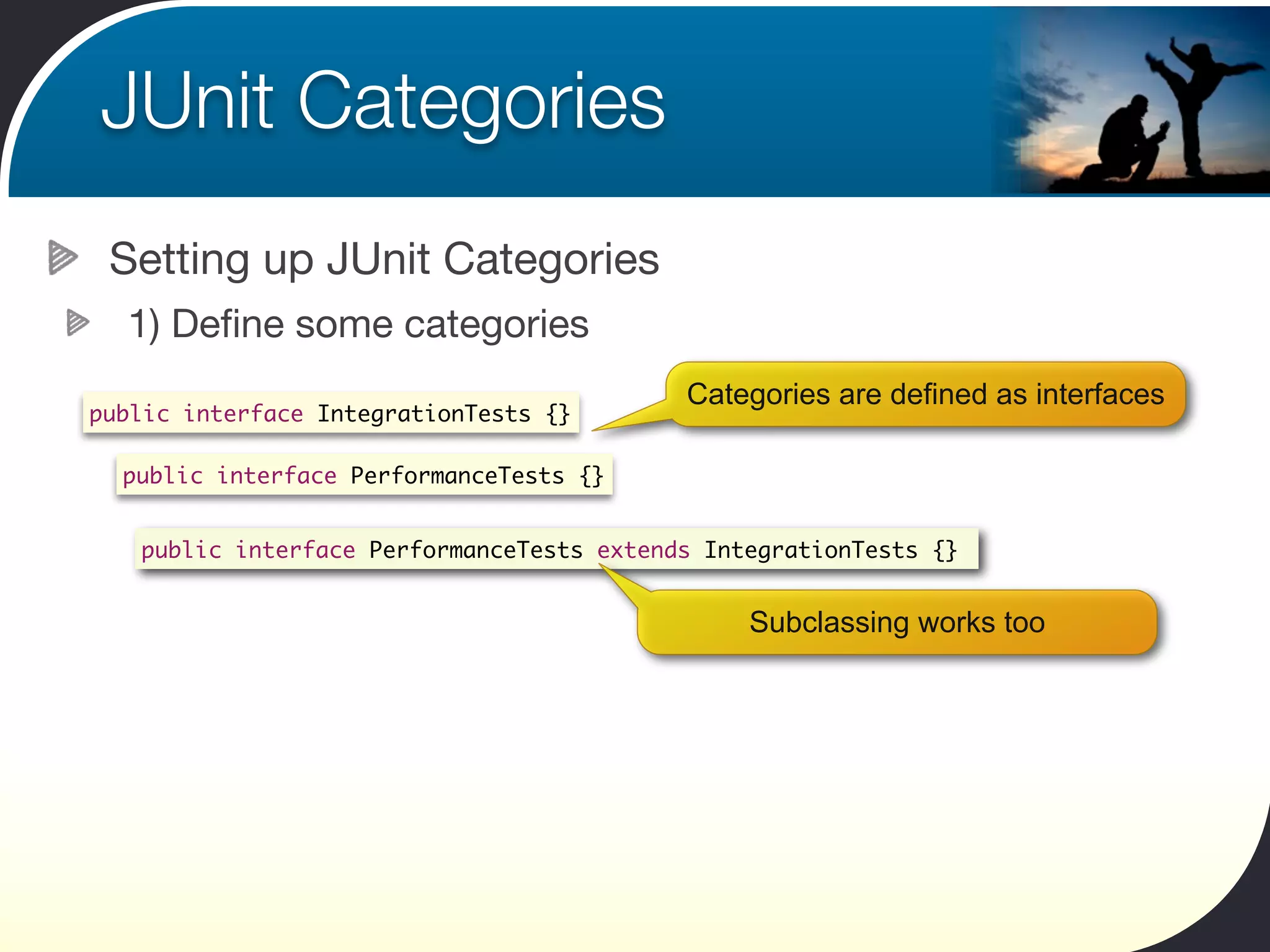
  1) Define some categories
                                           Categories are defined as interfaces
public interface IntegrationTests {}

  public interface PerformanceTests {}


   public interface PerformanceTests extends IntegrationTests {}


                                                Subclassing works too
JUnit Categories
Setting up JUnit Categories
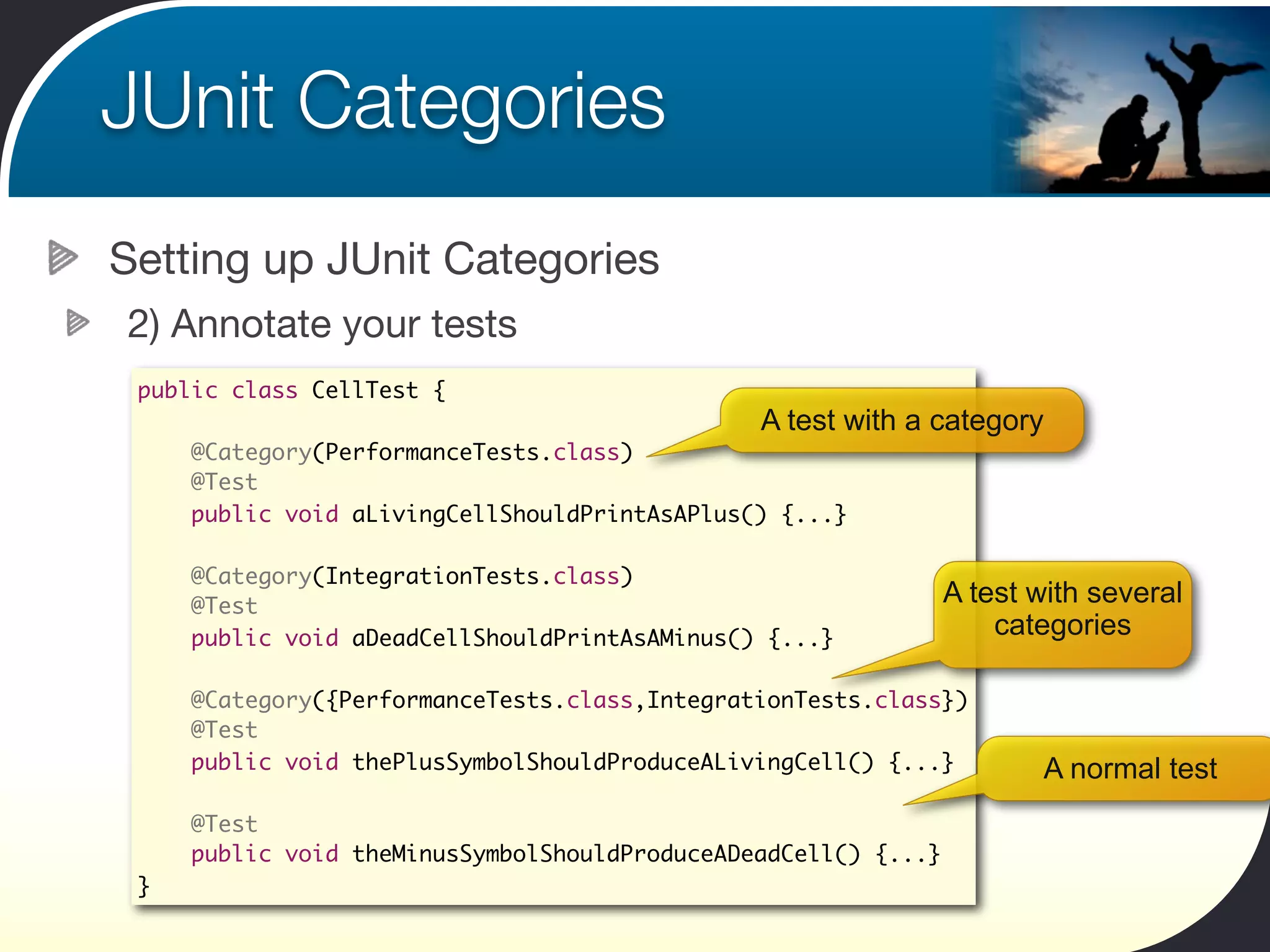
2) Annotate your tests
 public class CellTest {
                                               A test with a category
     @Category(PerformanceTests.class)
     @Test
     public void aLivingCellShouldPrintAsAPlus() {...}

     @Category(IntegrationTests.class)
     @Test                                                      A test with several
     public void aDeadCellShouldPrintAsAMinus() {...}               categories

     @Category({PerformanceTests.class,IntegrationTests.class})
     @Test
     public void thePlusSymbolShouldProduceALivingCell() {...}         A normal test
     @Test
     public void theMinusSymbolShouldProduceADeadCell() {...}
 }
JUnit Categories
Setting up JUnit Categories
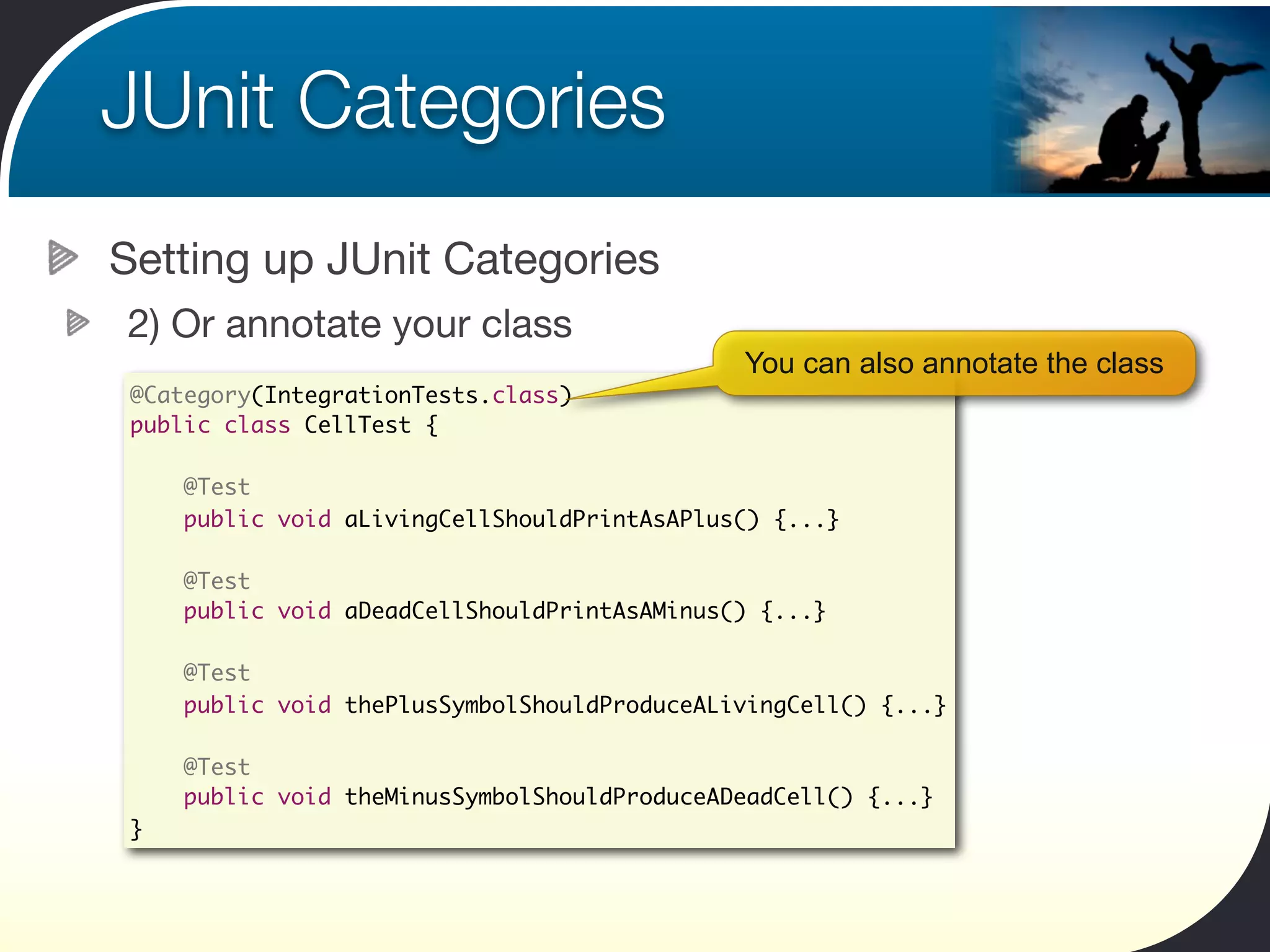
2) Or annotate your class
                                              You can also annotate the class
 @Category(IntegrationTests.class)
 public class CellTest {

     @Test
     public void aLivingCellShouldPrintAsAPlus() {...}

     @Test
     public void aDeadCellShouldPrintAsAMinus() {...}

     @Test
     public void thePlusSymbolShouldProduceALivingCell() {...}

     @Test
     public void theMinusSymbolShouldProduceADeadCell() {...}
 }
JUnit Categories
Setting up JUnit Categories
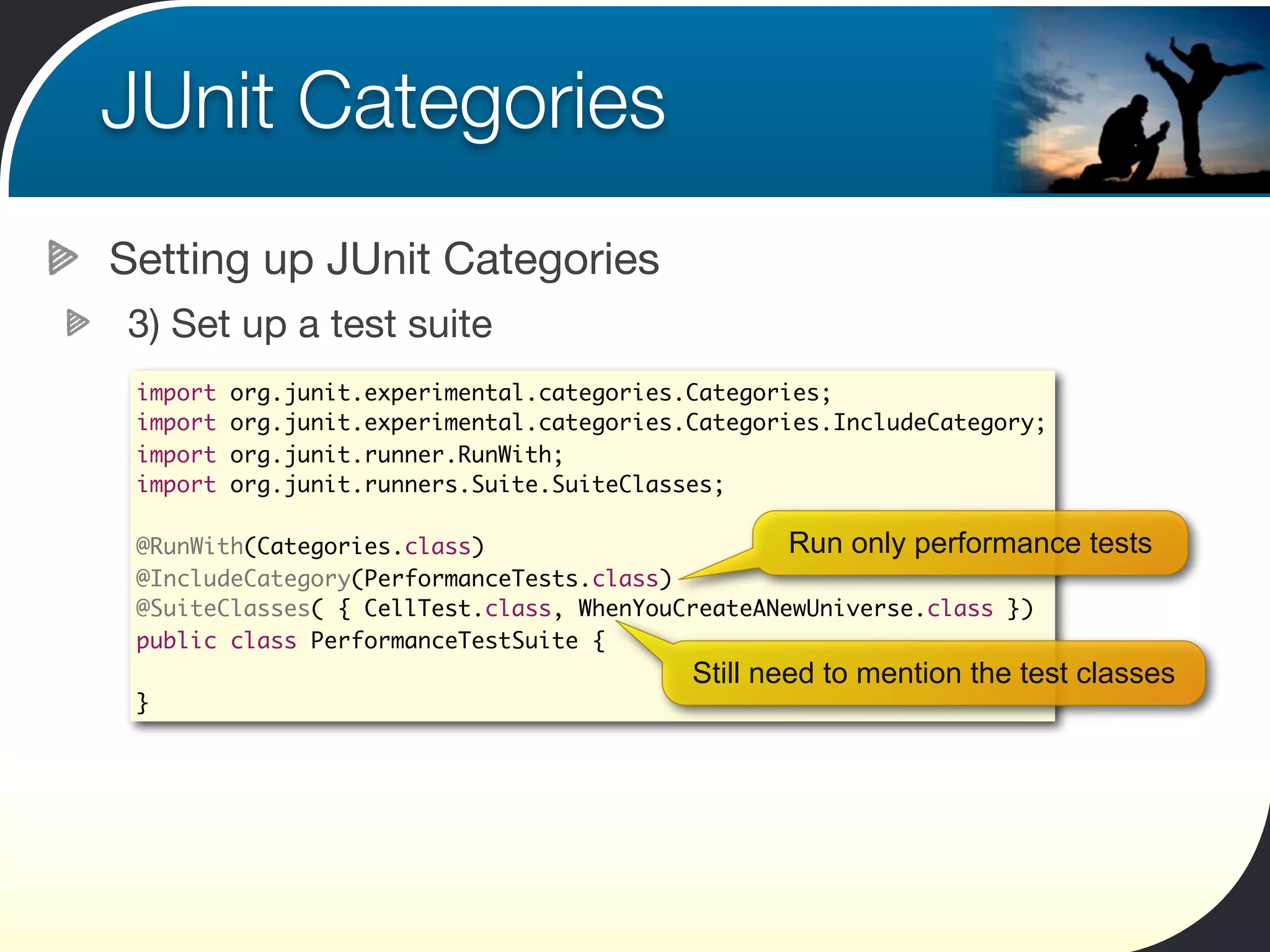
3) Set up a test suite
 import   org.junit.experimental.categories.Categories;
 import   org.junit.experimental.categories.Categories.IncludeCategory;
 import   org.junit.runner.RunWith;
 import   org.junit.runners.Suite.SuiteClasses;

 @RunWith(Categories.class)                       Run only performance     tests
 @IncludeCategory(PerformanceTests.class)
 @SuiteClasses( { CellTest.class, WhenYouCreateANewUniverse.class })
 public class PerformanceTestSuite {
                                            Still need to mention the test classes
 }
JUnit Categories
Setting up JUnit Categories
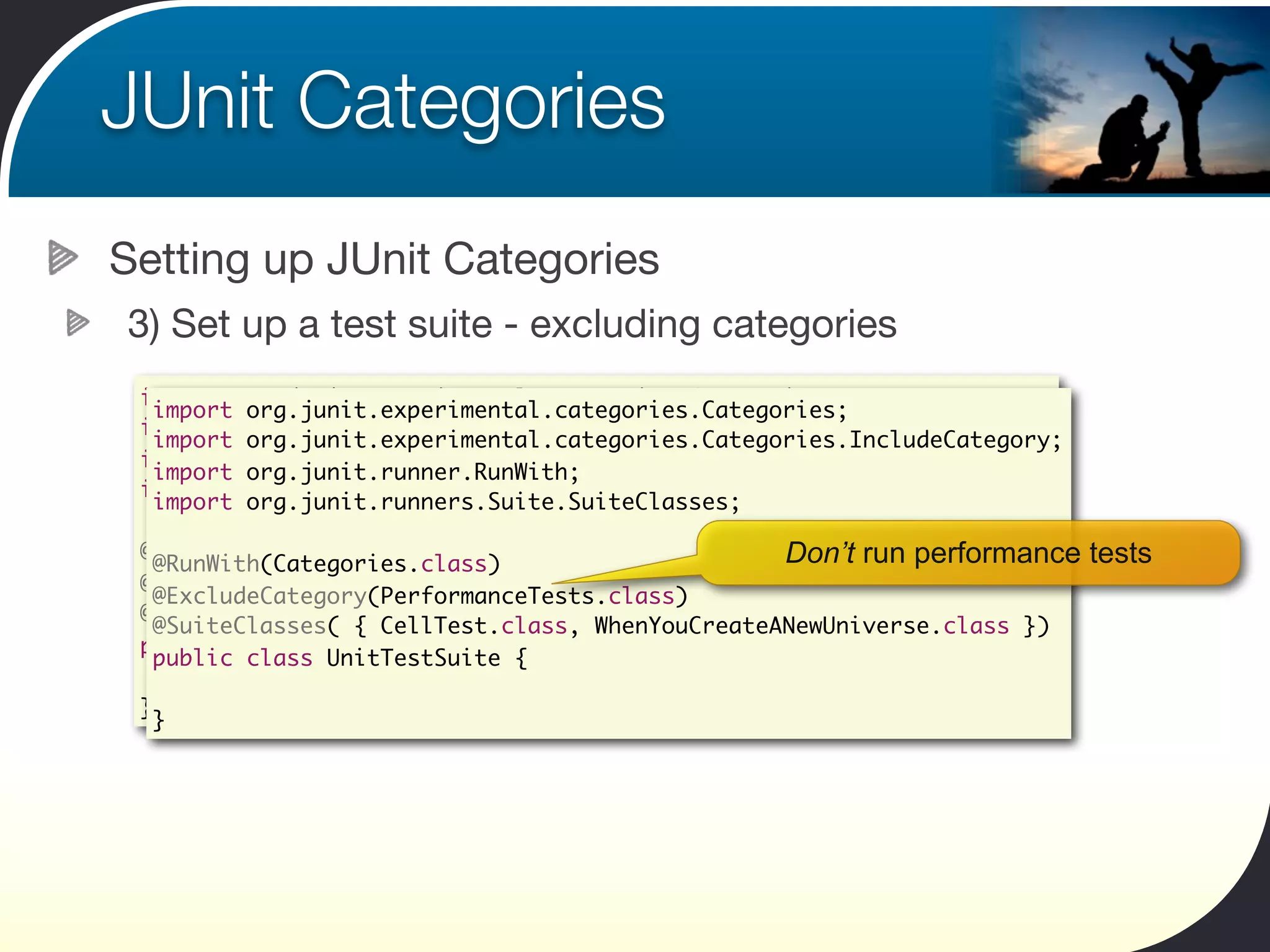
3) Set up a test suite - excluding categories
 import org.junit.experimental.categories.Categories;
  import org.junit.experimental.categories.Categories;
 import org.junit.experimental.categories.Categories.IncludeCategory;
  import org.junit.experimental.categories.Categories.IncludeCategory;
 import org.junit.runner.RunWith;
  import org.junit.runner.RunWith;
 import org.junit.runners.Suite.SuiteClasses;
  import org.junit.runners.Suite.SuiteClasses;

 @RunWith(Categories.class)
  @RunWith(Categories.class)                     Don’t run performance   tests
 @IncludeCategory(PerformanceTests.class)
  @ExcludeCategory(PerformanceTests.class)
 @SuiteClasses( { CellTest.class, WhenYouCreateANewUniverse.class })
  @SuiteClasses( { CellTest.class, WhenYouCreateANewUniverse.class })
 public class PerformanceTestSuite {
  public class UnitTestSuite {

 }
  }
Parallel tests
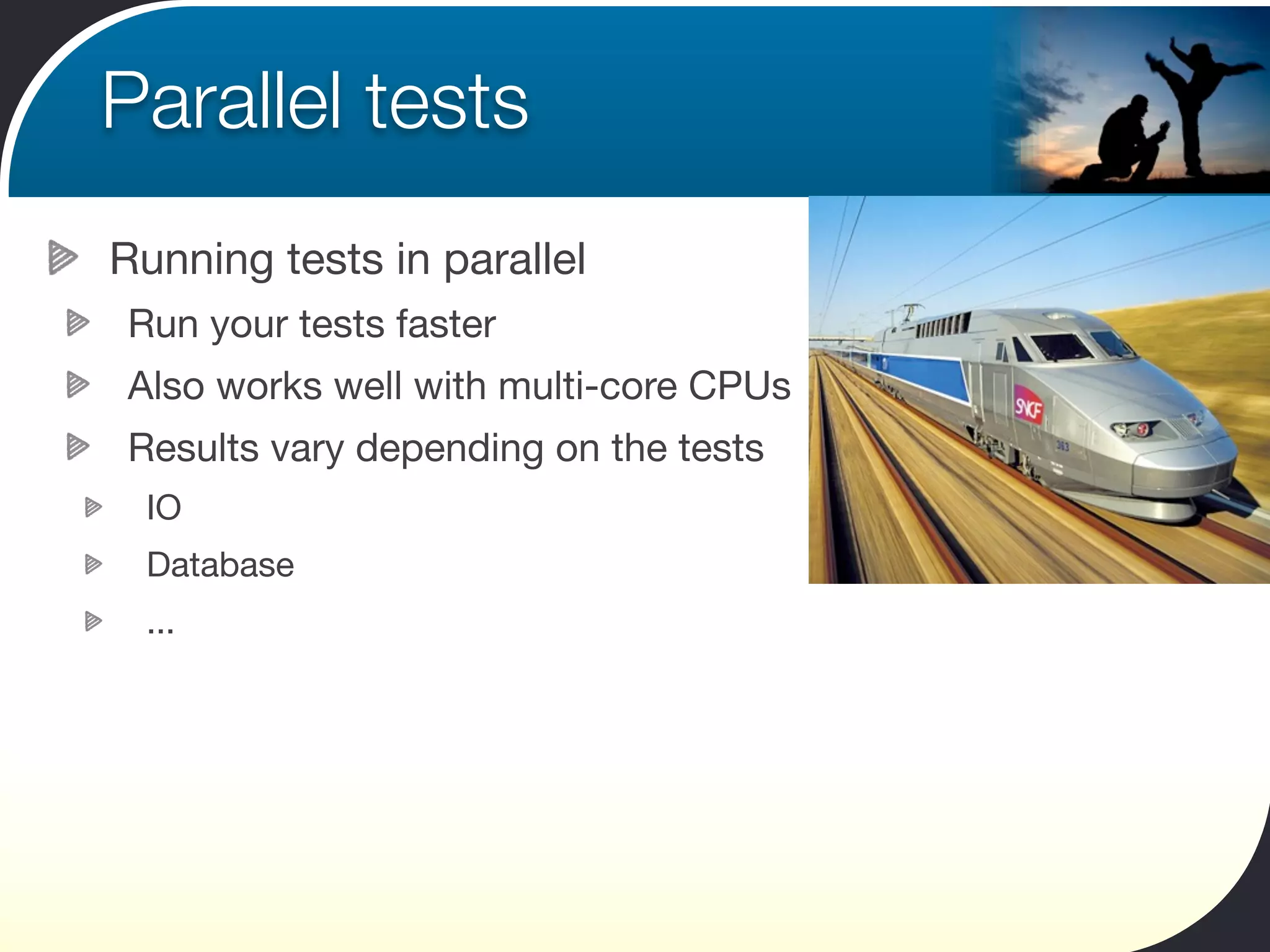
Running tests in parallel
Run your tests faster
Also works well with multi-core CPUs
Results vary depending on the tests
 IO
 Database
 ...
Parallel tests
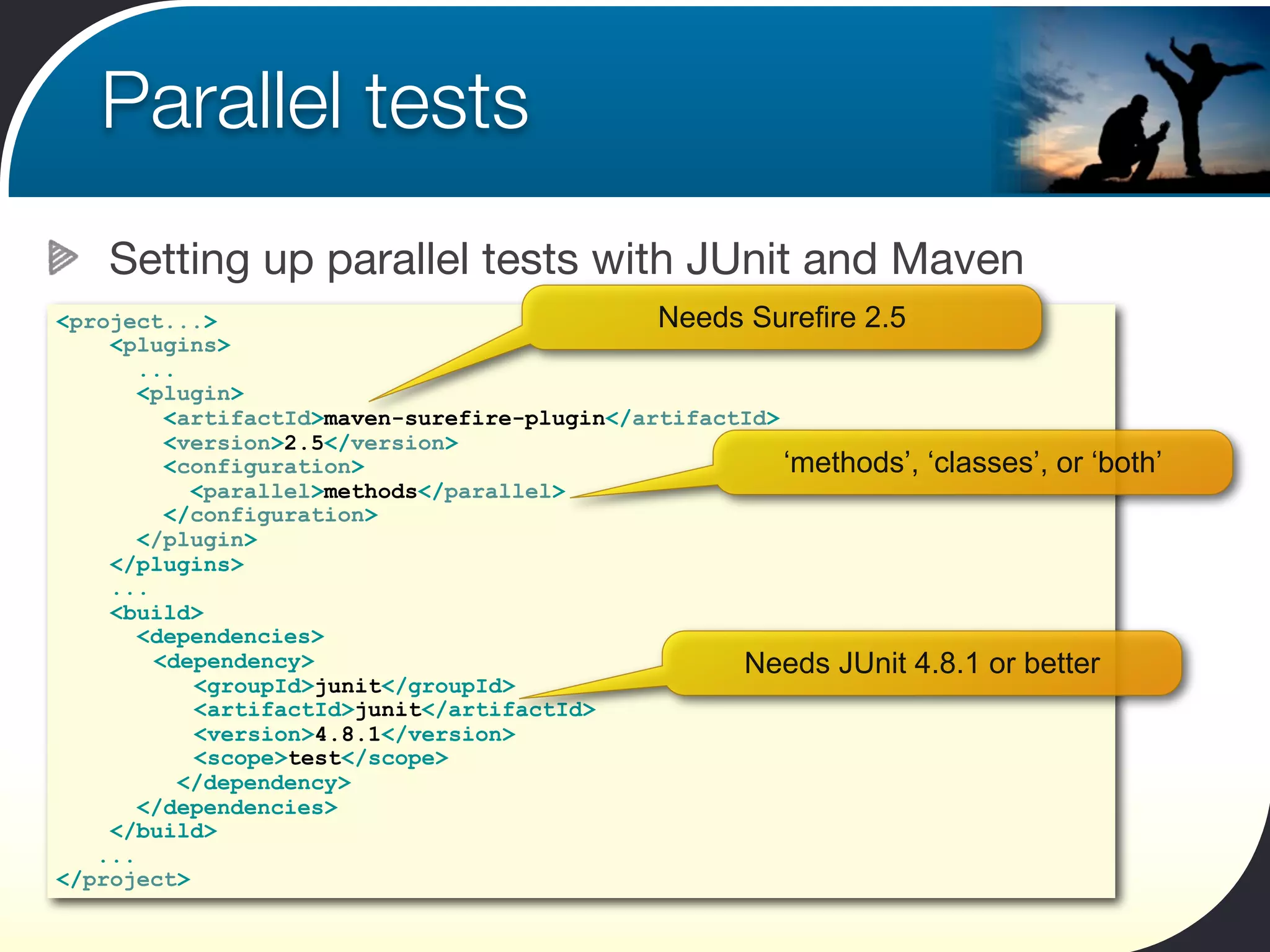
    Setting up parallel tests with JUnit and Maven
<project...>                                  Needs Surefire 2.5
    <plugins>
       ...
       <plugin>
         <artifactId>maven-surefire-plugin</artifactId>
         <version>2.5</version>
         <configuration>                                ‘methods’, ‘classes’, or ‘both’
            <parallel>methods</parallel>
         </configuration>
       </plugin>
    </plugins>
    ...
    <build>
       <dependencies>
        <dependency>                                Needs JUnit 4.8.1 or better
            <groupId>junit</groupId>
            <artifactId>junit</artifactId>
            <version>4.8.1</version>
            <scope>test</scope>
           </dependency>
       </dependencies>
    </build>
   ...
</project>
Continuous Testing
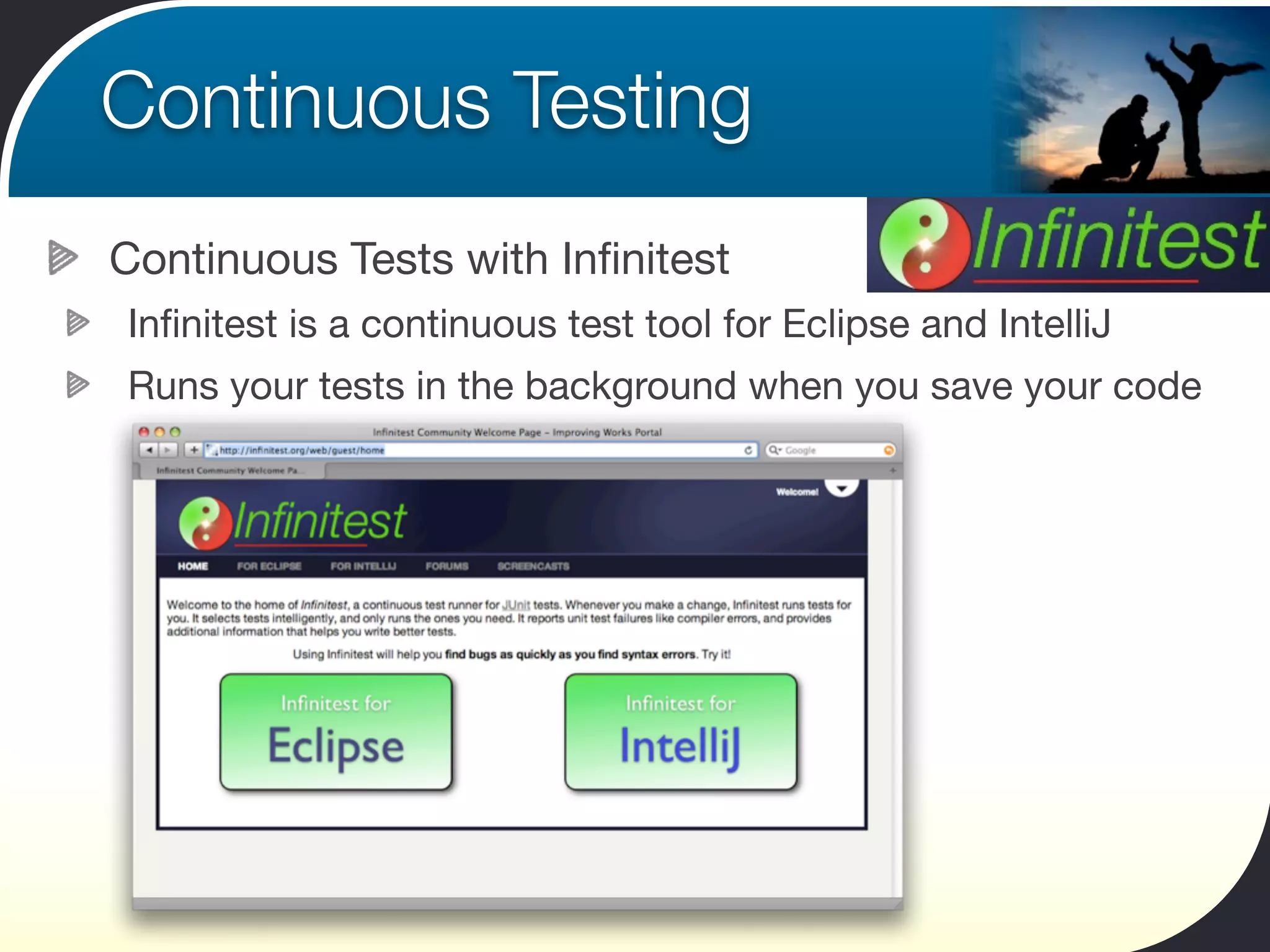
Continuous Tests with Infinitest
Infinitest is a continuous test tool for Eclipse and IntelliJ
Runs your tests in the background when you save your code
Continuous Testing
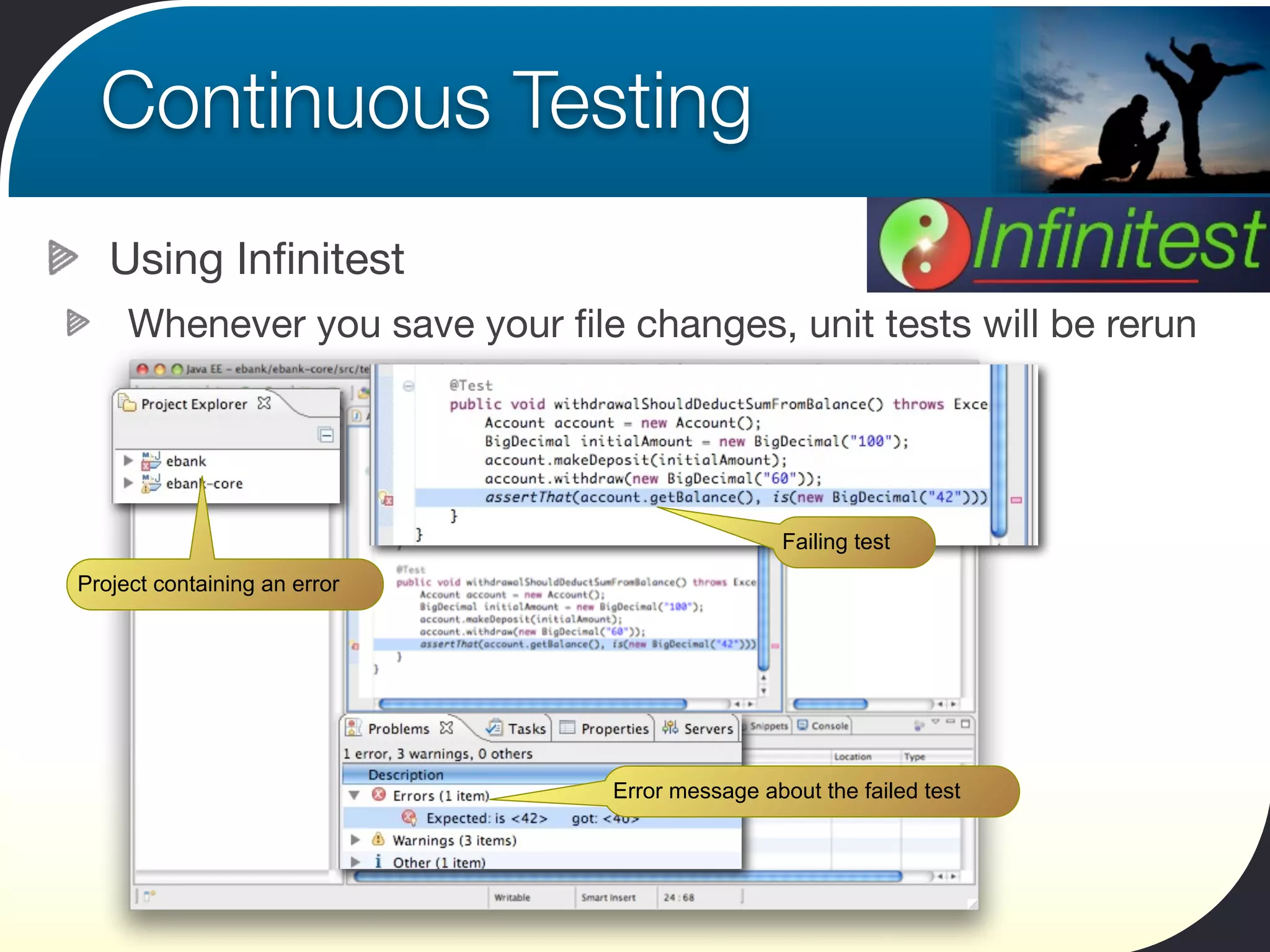
   Using Infinitest
     Whenever you save your file changes, unit tests will be rerun


                                                 Failing test
Project containing an error


                                Error message about the failed test
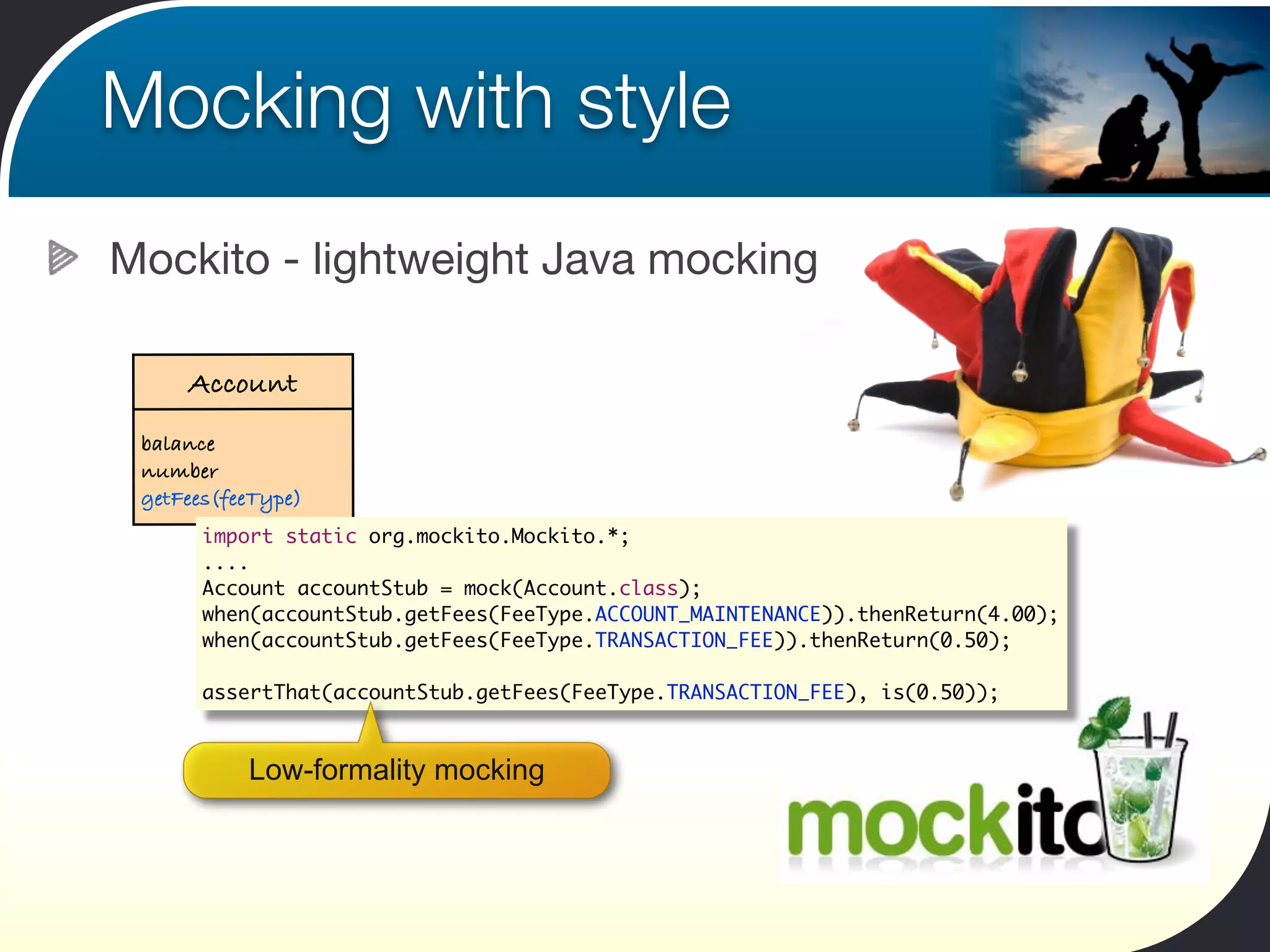
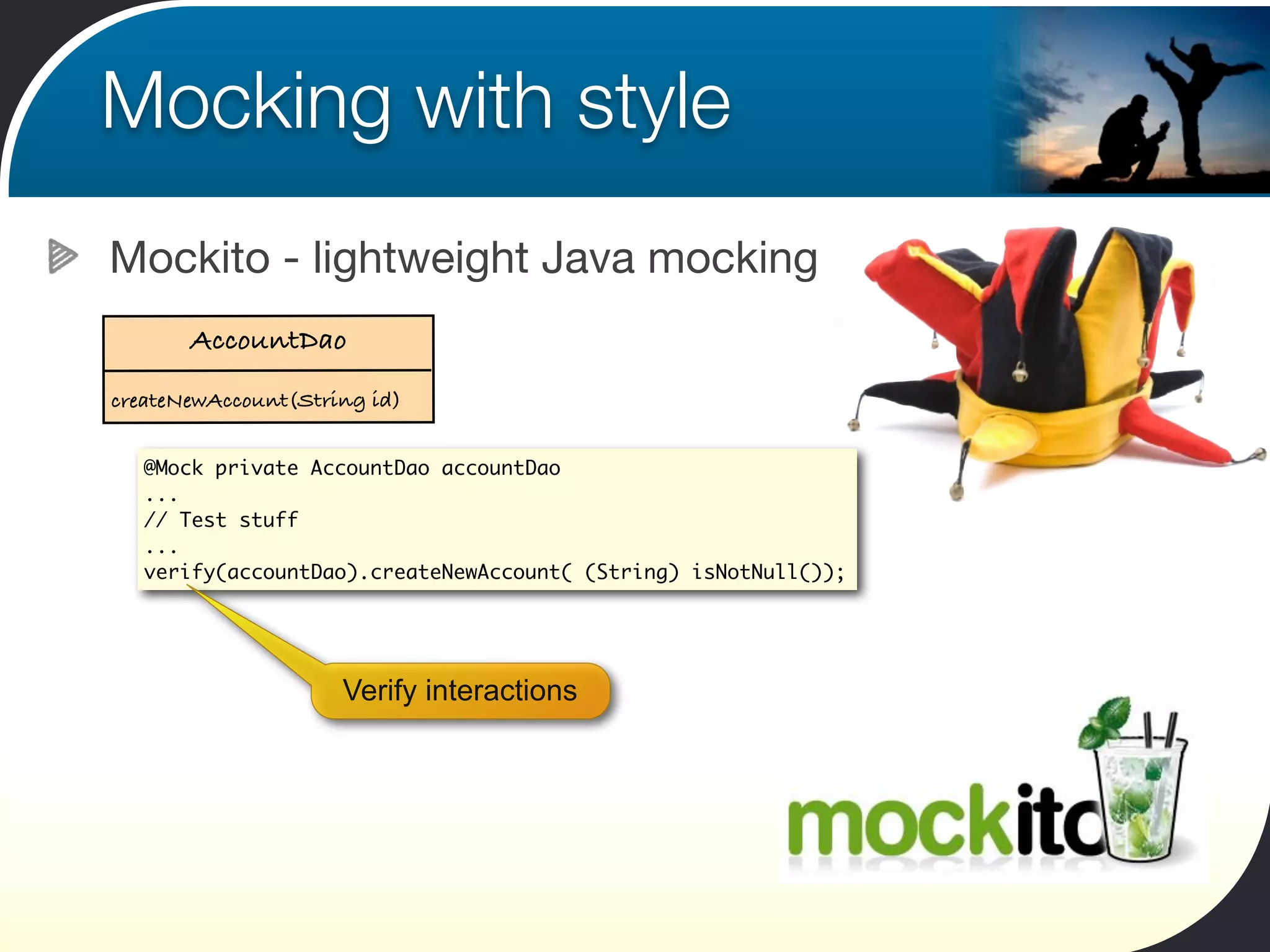
Mocking with style
Mockito - lightweight Java mocking

     Account
 balance
 number
 getFees(feeType)
       import static org.mockito.Mockito.*;
       ....
       Account accountStub = mock(Account.class);
       when(accountStub.getFees(FeeType.ACCOUNT_MAINTENANCE)).thenReturn(4.00);
       when(accountStub.getFees(FeeType.TRANSACTION_FEE)).thenReturn(0.50);

       assertThat(accountStub.getFees(FeeType.TRANSACTION_FEE), is(0.50));


           Low-formality mocking
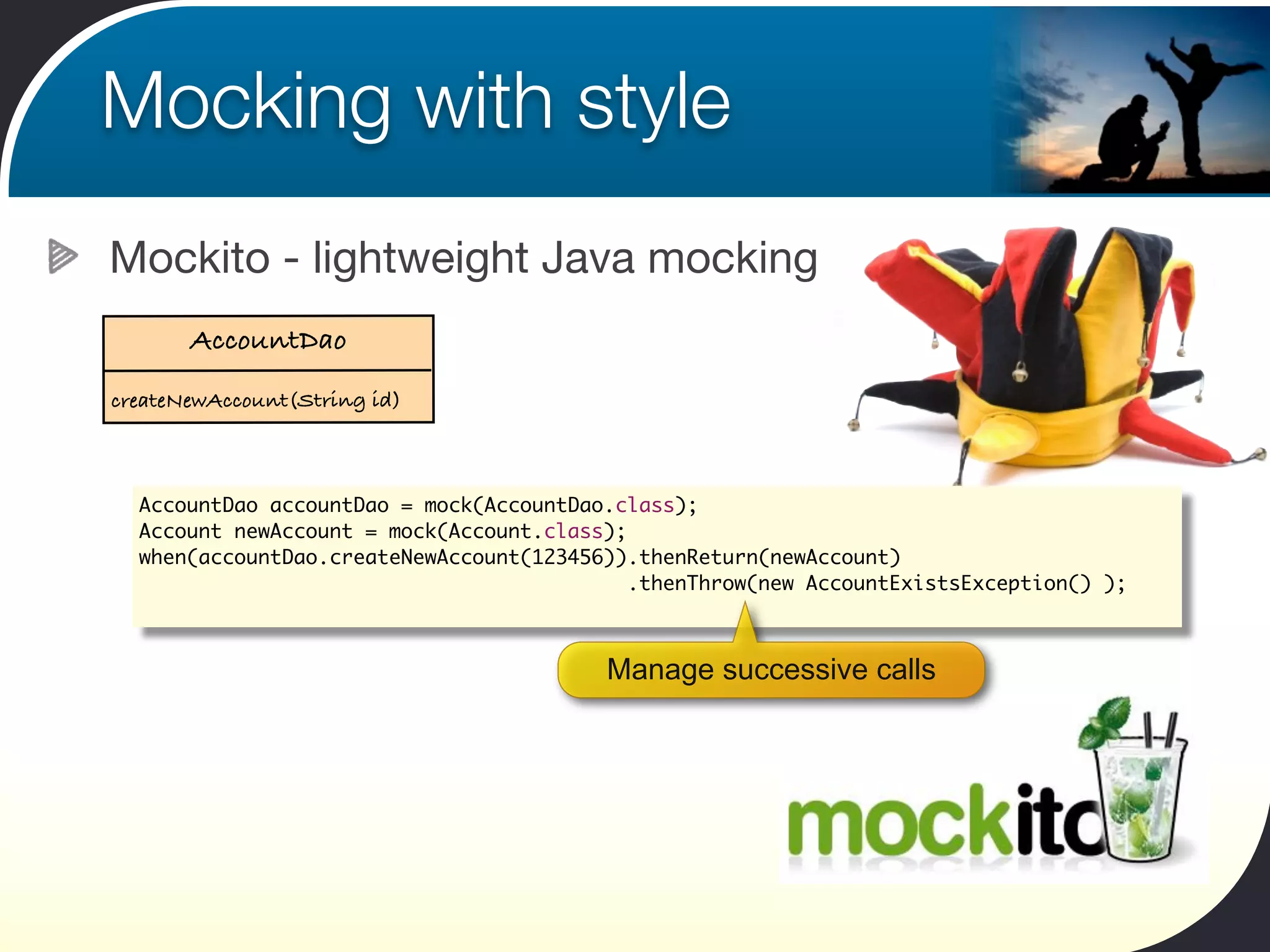
Mocking with style
Mockito - lightweight Java mocking
       AccountDao
createNewAccount(String id)


  AccountDao accountDao = mock(AccountDao.class);
  Account newAccount = mock(Account.class);
  when(accountDao.createNewAccount(123456)).thenReturn(newAccount)
                                            .thenThrow(new AccountExistsException() );


                                         Manage successive calls
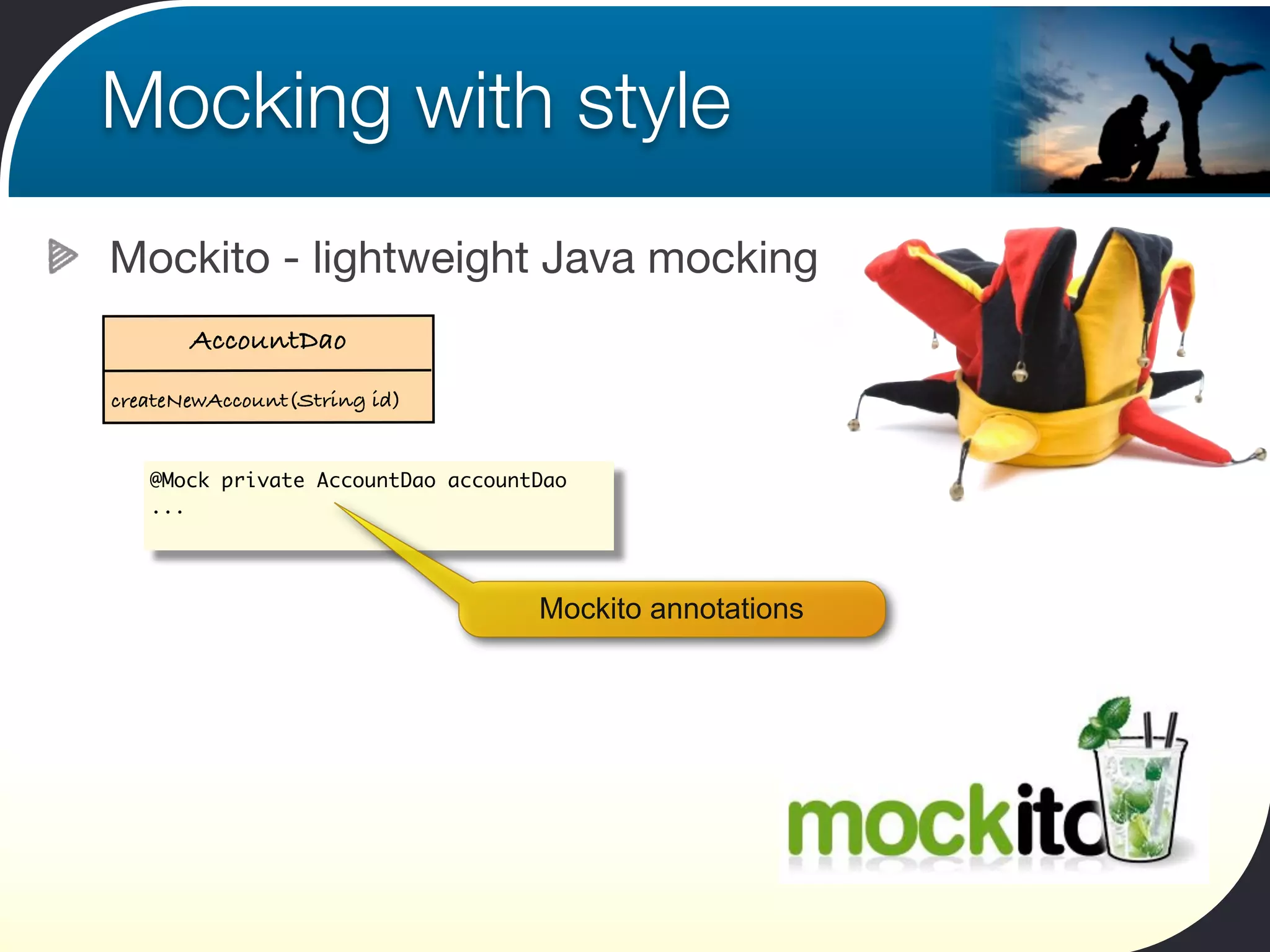
Mocking with style
Mockito - lightweight Java mocking
       AccountDao
createNewAccount(String id)


   @Mock private AccountDao accountDao
   ...


                                   Mockito annotations
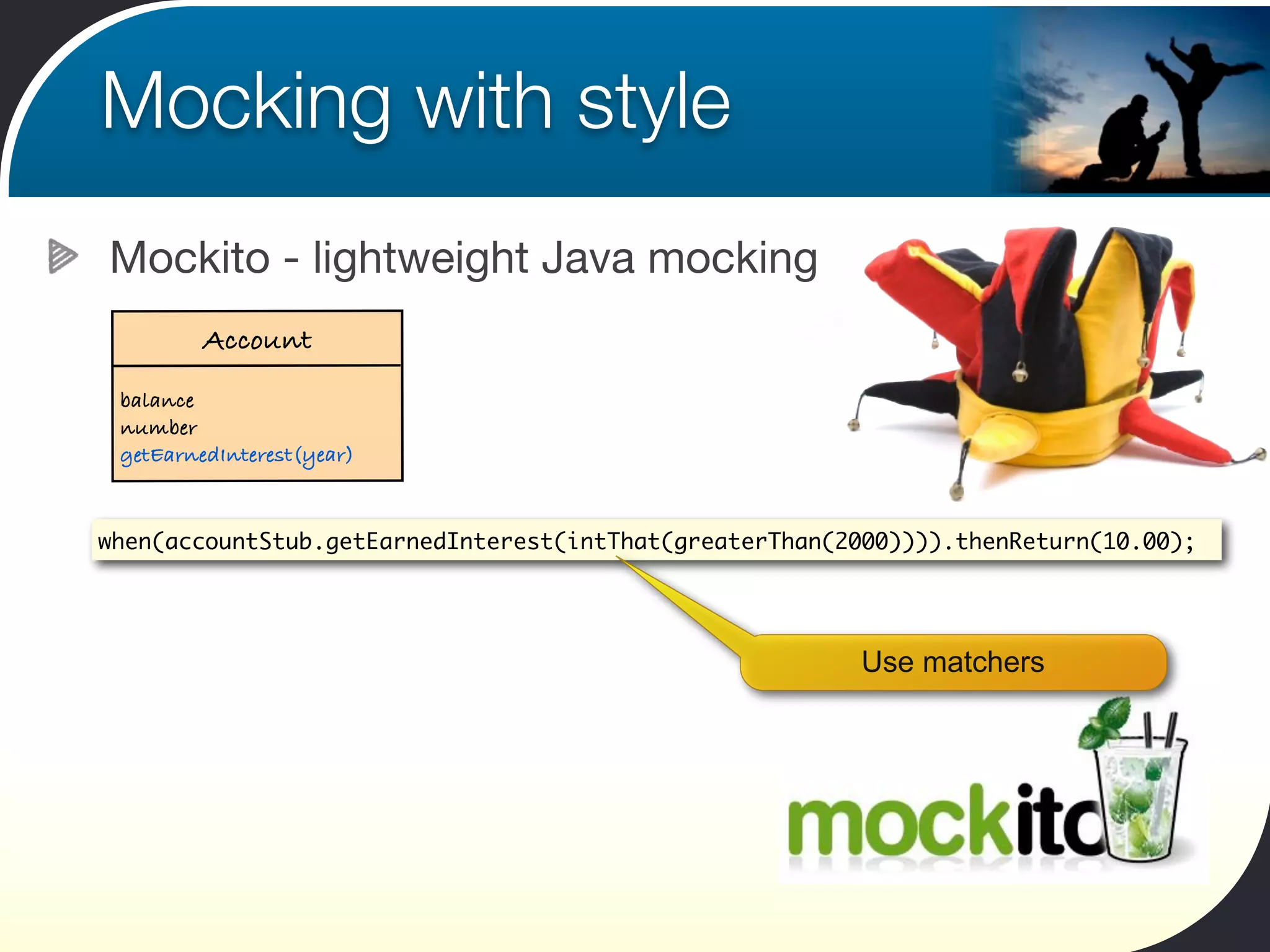
Mocking with style
Mockito - lightweight Java mocking
         Account
 balance
 number
 getEarnedInterest(year)


when(accountStub.getEarnedInterest(intThat(greaterThan(2000)))).thenReturn(10.00);


                                                        Use matchers
Mocking with style
Mockito - lightweight Java mocking
       AccountDao
createNewAccount(String id)


   @Mock private AccountDao accountDao
   ...
   // Test stuff
   ...
   verify(accountDao).createNewAccount( (String) isNotNull());


                     Verify interactions
Thanks for your attention


                  John Ferguson Smart
                 Email: john.smart@wakaleo.com
                  Web: http://www.wakaleo.com
                                 Twitter: wakaleo

JUnit Kung Fu: Getting More Out of Your Unit Tests

  • 1.
    JUnit Kung Fu Gettingmore out of your unit tests John Ferguson Smart Principle Consultant Wakaleo Consulting
  • 2.
    So who isthis guy, anyway? John Ferguson Smart Consultant, Trainer, Mentor, Author, Speaker
  • 3.
    So who isthis guy, anyway? John Ferguson Smart Consultant, Trainer, Mentor, Author,...
  • 4.
    Agenda What will wecover today Naming your tests Hamcrest Assertions and Matchers Parameterized tests and JUnit Theories JUnit Rules Parallel Testing JUnit Categories Continuous Testing Mockito
  • 5.
    Anatomy of aJUnit 4 test What’s the big deal with JUnit 4? import static com.wakaleo.gameoflife.domain.Cell.DEAD_CELL; import static com.wakaleo.gameoflife.domain.Cell.LIVE_CELL; import static org.hamcrest.MatcherAssert.assertThat; import static org.hamcrest.Matchers.is; import org.junit.Test; No need to extend TestCase public class WhenYouCreateACell { Annotation-based @Test public void aLiveCellShouldBeRepresentedByAnAsterisk() { Cell cell = Cell.fromSymbol("*"); assertThat(cell, is(LIVE_CELL)); } Call the tests anything you want @Ignore("Pending Implementation") @Test Annotations for test metadata public void aDeadCellShouldBeRepresentedByADot() { Cell cell = Cell.fromSymbol("."); assertThat(cell, is(DEAD_CELL)); } ... }
  • 6.
    What’s in aname Name your tests well "What's in a name? That which we call a rose By any other name would smell as sweet." Romeo and Juliet (II, ii, 1-2)
  • 7.
    What’s in aname The 10 5 Commandments of Test Writing I. Don’t say “test, say “should” instead II. Don’t test your classes, test their behaviour III. Test class names are important too IV. Structure your tests well V. Tests are deliverables too
  • 8.
    What’s in aname Don’t use the word ‘test’ in your test names testBankTransfer() testWithdraw() testDeposit()
  • 9.
    What’s in aname Do use the word ‘should’ in your test names testBankTransfer() testWithdraw() tranferShouldDeductSumFromSourceAccountBalance() testDeposit() transferShouldAddSumLessFeesToDestinationAccountBalance() depositShouldAddAmountToAccountBalance()
  • 10.
    What’s in aname Your test class names should represent context When is this behaviour applicable? What behaviour are we testing?
  • 11.
    What’s in aname Write your tests consistently ‘Given-When-Then’ or ‘Arrange-Act-Assert’ (AAA) @Test public void aDeadCellWithOneLiveNeighbourShouldRemainDeadInTheNextGeneration() { String initialGrid = "...n" + ".*.n" + Prepare the test data (“arrange”) "..."; String expectedNextGrid = "...n" + "...n" + "...n"; Do what you are testing (“act”) Universe theUniverse = new Universe(seededWith(initialGrid)); theUniverse.createNextGeneration(); String nextGrid = theUniverse.getGrid(); Check the results (“assert”) assertThat(nextGrid, is(expectedNextGrid)); }
  • 12.
    What’s in aname Tests are deliverables too - respect them as such Refactor, refactor, refactor! Clean and readable
  • 13.
    Express Yourself withHamcrest Why write this... import static org.junit.Assert.*; ... assertEquals(10000, calculatedTax, 0); when you can write this... import static org.hamcrest.Matchers.*; ... assertThat(calculatedTax, is(10000)); “Assert that are equal 10000 and calculated tax (more or less)” ?! Don’t I just mean “assert that calculated tax is 10000”?
  • 14.
    Express Yourself withHamcrest With Hamcrest, you can have your cake and eat it! assertThat(calculatedTax, is(expectedTax)); Readable asserts String color = "red"; assertThat(color, is("blue")); Informative errors String[] colors = new String[] {"red","green","blue"}; String color = "yellow"; assertThat(color, not(isIn(colors))); Flexible notation
  • 15.
    Express Yourself withHamcrest More Hamcrest expressiveness String color = "red"; assertThat(color, isOneOf("red",”blue”,”green”)); List<String> colors = new ArrayList<String>(); colors.add("red"); colors.add("green"); colors.add("blue"); assertThat(colors, hasItem("blue")); assertThat(colors, hasItems("red”,”green”)); assertThat(colors, hasItem(anyOf(is("red"), is("green"), is("blue"))));
  • 16.
    Home-made Hamcrest Matchers Customizingand extending Hamcrest Combine existing matchers Or make your own!
  • 17.
    Home-made Hamcrest Matchers Customizing Hamcrest matchers You can build your own by combining existing Matchers... Create a dedicated Matcher for the Stakeholder class List stakeholders = stakeholderManager.findByName("Health"); Matcher<Stakeholder> calledHealthCorp = hasProperty("name", is("Health Corp")); assertThat(stakeholders, hasItem(calledHealthCorp)); Use matcher directly with hasItem() “The stakeholders list has (at least) one item with the name property set to “Health Corp””
  • 18.
    Home-made Hamcrest Matchers Writing your own matchers in three easy steps! public class WhenIUseMyCustomHamcrestMatchers { @Test public void thehasSizeMatcherShouldMatchACollectionWithExpectedSize() { List<String> items = new ArrayList<String>(); items.add("java"); assertThat(items, hasSize(1)); } } We want something like this... I want a matcher that checks the size of a collection
  • 19.
    Home-made Hamcrest Matchers Writing your own matchers in three easy steps! public class HasSizeMatcher extends TypeSafeMatcher<Collection<? extends Object>> { private Matcher<Integer> matcher; Extend the TypeSafeMatcher class public HasSizeMatcher(Matcher<Integer> matcher) { this.matcher = matcher; Provide expected values in } the constructor public boolean matchesSafely(Collection<? extends Object> collection) { return matcher.matches(collection.size()); } Do the actual matching public void describeTo(Description description) { description.appendText("a collection with a size that is"); matcher.describeTo(description); } Describe our expectations } So let’s write this Matcher!
  • 20.
    Home-made Hamcrest Matchers Writing your own matchers in three easy steps! import java.util.Collection; import org.hamcrest.Factory; import org.hamcrest.Matcher; public class MyMatchers { Use a factory class to store your matchers @Factory public static Matcher<Collection<? extends Object>> hasSize(Matcher<Integer> matcher){ return new HasSizeMatcher(matcher); } } All my custom matchers go in a special Factory class
  • 21.
    Home-made Hamcrest Matchers Writing your own matchers in three easy steps! import static com.wakaleo.gameoflife.hamcrest.MyMatchers.hasSize; import static org.hamcrest.MatcherAssert.assertThat; public class WhenIUseMyCustomHamcrestMatchers { @Test public void thehasSizeMatcherShouldMatchACollectionWithExpectedSize() { List<String> items = new ArrayList<String>(); items.add("java"); assertThat(items, hasSize(1)); } } Hamcrest-style error messages
  • 22.
    Home-made Hamcrest Matchers But wait! There’s more! @Test public void weCanUseCustomMatchersWithOtherMatchers() { List<String> items = new ArrayList<String>(); items.add("java"); assertThat(items, allOf(hasSize(1), hasItem("java"))); } Combining matchers @Test public void weCanUseCustomMatchersWithOtherMatchers() { List<String> items = new ArrayList<String>(); items.add("java"); items.add("groovy"); assertThat(items, hasSize(greaterThan(1))); } Nested matchers
  • 23.
    Data-Driven Unit Tests UsingParameterized Tests
  • 24.
    Using Parameterized Tests Parameterizedtests - for data-driven testing Take a large set of test data, including an expected result Define a test that uses the test data Verify calculated result against expected result {2, 0, 0} {2, 1, 2} {2, 2, 4} {2, 3, 6} {2, 4, 8} x=a*b {2, 5, 10} Test {2, 6, 12} {2, 7, 14} ... Verify Data
  • 25.
    Using Parameterized Tests Parameterizedtests Example: Calculating income tax
  • 26.
    Using Parameterized Tests Parameterized tests with JUnit 4.8.1 Income Expected Tax $0.00 $0.00 What you need: $10,000.00 $1,250.00 Some test data $14,000.00 $1,750.00 $14,001.00 $1,750.21 A test class with matching fields $45,000.00 $8,260.00 $48,000.00 $8,890.00 And some tests $48,001.00 $8,890.33 $65,238.00 $14,578.54 And an annotation $70,000.00 $16,150.00 public class TaxCalculatorDataTest { @RunWith(Parameterized.class) $70,001.00 $16,150.38 public classdouble income; private TaxCalculatorDataTest { $80,000.00 $19,950.00 private double expectedTax; income; private double expectedTax; $100,000.00 $27,550.00 public TaxCalculatorDataTest(double income, double expectedTax) { super(); this.income = income; public TaxCalculatorDataTest(double income, double expectedTax) { this.income = income; this.expectedTax = expectedTax; super(); } this.expectedTax = expectedTax; this.income = income; } } this.expectedTax = expectedTax; } @Test public void shouldCalculateCorrectTax() {...} @Test } public void shouldCalculateCorrectTax() {...} }
  • 27.
    Using Parameterized Tests This is a parameterized test How it works Income Expected Tax @RunWith(Parameterized.class) $0.00 $0.00 public class TaxCalculatorDataTest { The @Parameters annotation $10,000.00 $1,250.00 private double income; private double expectedTax; indicates the test data $14,000.00 $1,750.00 @Parameters $14,001.00 $1,750.21 public static Collection<Object[]> data() { $45,000.00 $8,260.00 return Arrays.asList(new Object[][] { { 0.00, 0.00 }, $48,000.00 $8,890.00 { 10000.00, 1250.00 }, { 14000.00, 1750.00 }, $48,001.00 $8,890.33 { 14001.00, 1750.21 }, { 45000.00, 8260.00 }, { 48000.00, 8890.00 }, { 48001.00, 8890.33 }, $65,238.00 $14,578.54 { 65238.00, 14578.54 }, { 70000.00, 16150.00 }, $70,000.00 $16,150.00 { 70001.00, 16150.38 }, { 80000.00, 19950.00 }, { 100000.00, 27550.00 }, }); $70,001.00 $16,150.38 } $80,000.00 $19,950.00 public TaxCalculatorDataTest(double income, double expectedTax) { $100,000.00 $27,550.00 super(); this.income = income; this.expectedTax = expectedTax; The constructor takes the } fields from the test data @Test public void shouldCalculateCorrectTax() { TaxCalculator calculator = new TaxCalculator(); The unit tests use data double calculatedTax = calculator.calculateTax(income); assertThat(calculatedTax, is(expectedTax)); from these fields. } }
  • 28.
    Using Parameterized Tests ParameterizedTests in Eclipse Income Expected Tax $0.00 $0.00 Run the test only once $10,000.00 $1,250.00 Eclipse displays a result for each data set $14,000.00 $14,001.00 $1,750.00 $1,750.21 $45,000.00 $8,260.00 $48,000.00 $8,890.00 $48,001.00 $8,890.33 $65,238.00 $14,578.54 $70,000.00 $16,150.00 $70,001.00 $16,150.38 $80,000.00 $19,950.00 $100,000.00 $27,550.00
  • 29.
    Using Parameterized Tests Example:using an Excel Spreadsheet @Parameters public static Collection spreadsheetData() throws IOException { InputStream spreadsheet = new FileInputStream("src/test/resources/aTimesB.xls"); return new SpreadsheetData(spreadsheet).getData(); }
  • 30.
    Using Parameterized Tests Example:testing Selenium 2 Page Objects A Page Object class public class ExportCertificateSubmissionFormPage extends WebPage { @FindBy(name="HD_EN") WebElement importerName; @FindBy(name="HD_EA") WebElement importerAddress; @FindBy(name="HD_ER") WebElement importerRepresentative; ... public String getImporterName() { return importerName.getValue(); } public void setImporterName(String value) { enter(value, into(importerName)); } ... }
  • 31.
    Using Parameterized Tests Example:testing Selenium 2 Page Objects Testing the fields using a parameterized test @Parameters public static Collection<Object[]> data() { return Arrays.asList(new Object[][] { { "importerName", "an-importer-name" }, { "importerAddress", "an-importer-address" }, { "importerRepresentative", "a-importer-representative" }, ... }); }
  • 32.
    Using Parameterized Tests Example:testing Selenium 2 Page Objects Setting up the test data private String field; private String inputValue; public ReadingAndWritingFieldsWhenRaisingACertificate(String field, String inputValue) { this.field = field; this.inputValue = inputValue; }
  • 33.
    Using Parameterized Tests Example:testing Selenium 2 Page Objects Test reading and writing to/from the field @Test public void userShouldBeAbleToWriteToAnInputFieldAndThenReadTheValue() { setFieldValueUsing(setterFor(field)); String retrievedValue = getFieldValueUsing(getterFor(field)); assertThat(retrievedValue, is(inputValue)); } (Reflection magic goes here)
  • 34.
    JUnit Rules Using Existingand Custom JUnit Rules Customize and control how JUnit behaves
  • 35.
    JUnit Rules The Temporary Folder Rule public class LoadDynamicPropertiesTest { Create a temporary folder @Rule public TemporaryFolder folder = new TemporaryFolder(); private File properties; @Before Prepare some test data public void createTestData() throws IOException { properties = folder.newFile("messages.properties"); BufferedWriter out = new BufferedWriter(new FileWriter(properties)); // Set up the temporary file out.close(); } Use this folder in the tests @Test public void shouldLoadFromPropertiesFile() throws IOException { DynamicMessagesBundle bundle = new DynamicMessagesBundle(); bundle.load(properties); // Do stuff with the temporary file } } The folder will be deleted afterwards
  • 36.
    JUnit Rules The ErrorCollector Rule Report on multiple error conditions in a single test public class ErrorCollectorTest { @Rule public ErrorCollector collector = new ErrorCollector(); @Test Two things went wrong here public void testSomething() { collector.addError(new Throwable("first thing went wrong")); collector.addError(new Throwable("second thing went wrong")); String result = doStuff(); collector.checkThat(result, not(containsString("Oh no, not again"))); } Check using Hamcrest matchers private String doStuff() { return "Oh no, not again"; } }
  • 37.
    JUnit Rules The ErrorCollector Rule Report on multiple error conditions in a single test public class ErrorCollectorTest { @Rule All three error messages are reported public ErrorCollector collector = new ErrorCollector(); @Test public void testSomething() { collector.addError(new Throwable("first thing went wrong")); collector.addError(new Throwable("second thing went wrong")); String result = doStuff(); collector.checkThat(result, not(containsString("Oh no, not again"))); } private String doStuff() { return "Oh no, not again"; } }
  • 38.
    JUnit Rules The Timeout Rule Define a timeout for all tests public class GlobalTimeoutTest { @Rule public MethodRule globalTimeout = new Timeout(1000); @Test No test should take longer than 1 second public void testSomething() { for(;;); } Oops @Test public void testSomethingElse() { } }
  • 39.
    JUnit Rules The Verifier Rule Adding your own custom verification logic public class VerifierTest { private List<String> systemErrorMessages = new ArrayList<String>(); @Rule public MethodRule verifier = new Verifier() { @Override public void verify() { After each method, perform this check assertThat(systemErrorMessages.size(), is(0)); } }; @Test public void testSomething() { // ... systemErrorMessages.add("Oh, bother!"); } }
  • 40.
    JUnit Rules The Watchman Rule Keeping an eye on the tests public class WatchmanTest { private static String watchedLog; @Rule public MethodRule watchman = new TestWatchman() { Called whenever a test fails @Override public void failed(Throwable e, FrameworkMethod method) { watchedLog += method.getName() + " " + e.getClass().getSimpleName() + "n"; } @Override public void succeeded(FrameworkMethod method) { watchedLog += method.getName() + " " + "success!n"; } }; Called whenever a test succeeds @Test public void fails() { fail(); } @Test public void succeeds() {...} }
  • 41.
    JUnit Categories Grouping tests Distinguishdifferent types of tests Mark tests using an annotation Run different categories of test in different test suites
  • 42.
    JUnit Categories Settingup JUnit Categories 1) Define some categories Categories are defined as interfaces public interface IntegrationTests {} public interface PerformanceTests {} public interface PerformanceTests extends IntegrationTests {} Subclassing works too
  • 43.
    JUnit Categories Setting upJUnit Categories 2) Annotate your tests public class CellTest { A test with a category @Category(PerformanceTests.class) @Test public void aLivingCellShouldPrintAsAPlus() {...} @Category(IntegrationTests.class) @Test A test with several public void aDeadCellShouldPrintAsAMinus() {...} categories @Category({PerformanceTests.class,IntegrationTests.class}) @Test public void thePlusSymbolShouldProduceALivingCell() {...} A normal test @Test public void theMinusSymbolShouldProduceADeadCell() {...} }
  • 44.
    JUnit Categories Setting upJUnit Categories 2) Or annotate your class You can also annotate the class @Category(IntegrationTests.class) public class CellTest { @Test public void aLivingCellShouldPrintAsAPlus() {...} @Test public void aDeadCellShouldPrintAsAMinus() {...} @Test public void thePlusSymbolShouldProduceALivingCell() {...} @Test public void theMinusSymbolShouldProduceADeadCell() {...} }
  • 45.
    JUnit Categories Setting upJUnit Categories 3) Set up a test suite import org.junit.experimental.categories.Categories; import org.junit.experimental.categories.Categories.IncludeCategory; import org.junit.runner.RunWith; import org.junit.runners.Suite.SuiteClasses; @RunWith(Categories.class) Run only performance tests @IncludeCategory(PerformanceTests.class) @SuiteClasses( { CellTest.class, WhenYouCreateANewUniverse.class }) public class PerformanceTestSuite { Still need to mention the test classes }
  • 46.
    JUnit Categories Setting upJUnit Categories 3) Set up a test suite - excluding categories import org.junit.experimental.categories.Categories; import org.junit.experimental.categories.Categories; import org.junit.experimental.categories.Categories.IncludeCategory; import org.junit.experimental.categories.Categories.IncludeCategory; import org.junit.runner.RunWith; import org.junit.runner.RunWith; import org.junit.runners.Suite.SuiteClasses; import org.junit.runners.Suite.SuiteClasses; @RunWith(Categories.class) @RunWith(Categories.class) Don’t run performance tests @IncludeCategory(PerformanceTests.class) @ExcludeCategory(PerformanceTests.class) @SuiteClasses( { CellTest.class, WhenYouCreateANewUniverse.class }) @SuiteClasses( { CellTest.class, WhenYouCreateANewUniverse.class }) public class PerformanceTestSuite { public class UnitTestSuite { } }
  • 47.
    Parallel tests Running testsin parallel Run your tests faster Also works well with multi-core CPUs Results vary depending on the tests IO Database ...
  • 48.
    Parallel tests Setting up parallel tests with JUnit and Maven <project...> Needs Surefire 2.5 <plugins> ... <plugin> <artifactId>maven-surefire-plugin</artifactId> <version>2.5</version> <configuration> ‘methods’, ‘classes’, or ‘both’ <parallel>methods</parallel> </configuration> </plugin> </plugins> ... <build> <dependencies> <dependency> Needs JUnit 4.8.1 or better <groupId>junit</groupId> <artifactId>junit</artifactId> <version>4.8.1</version> <scope>test</scope> </dependency> </dependencies> </build> ... </project>
  • 49.
    Continuous Testing Continuous Testswith Infinitest Infinitest is a continuous test tool for Eclipse and IntelliJ Runs your tests in the background when you save your code
  • 50.
    Continuous Testing Using Infinitest Whenever you save your file changes, unit tests will be rerun Failing test Project containing an error Error message about the failed test
  • 51.
    Mocking with style Mockito- lightweight Java mocking Account balance number getFees(feeType) import static org.mockito.Mockito.*; .... Account accountStub = mock(Account.class); when(accountStub.getFees(FeeType.ACCOUNT_MAINTENANCE)).thenReturn(4.00); when(accountStub.getFees(FeeType.TRANSACTION_FEE)).thenReturn(0.50); assertThat(accountStub.getFees(FeeType.TRANSACTION_FEE), is(0.50)); Low-formality mocking
  • 52.
    Mocking with style Mockito- lightweight Java mocking AccountDao createNewAccount(String id) AccountDao accountDao = mock(AccountDao.class); Account newAccount = mock(Account.class); when(accountDao.createNewAccount(123456)).thenReturn(newAccount) .thenThrow(new AccountExistsException() ); Manage successive calls
  • 53.
    Mocking with style Mockito- lightweight Java mocking AccountDao createNewAccount(String id) @Mock private AccountDao accountDao ... Mockito annotations
  • 54.
    Mocking with style Mockito- lightweight Java mocking Account balance number getEarnedInterest(year) when(accountStub.getEarnedInterest(intThat(greaterThan(2000)))).thenReturn(10.00); Use matchers
  • 55.
    Mocking with style Mockito- lightweight Java mocking AccountDao createNewAccount(String id) @Mock private AccountDao accountDao ... // Test stuff ... verify(accountDao).createNewAccount( (String) isNotNull()); Verify interactions
  • 56.
    Thanks for yourattention John Ferguson Smart Email: john.smart@wakaleo.com Web: http://www.wakaleo.com Twitter: wakaleo