
The BDD Way
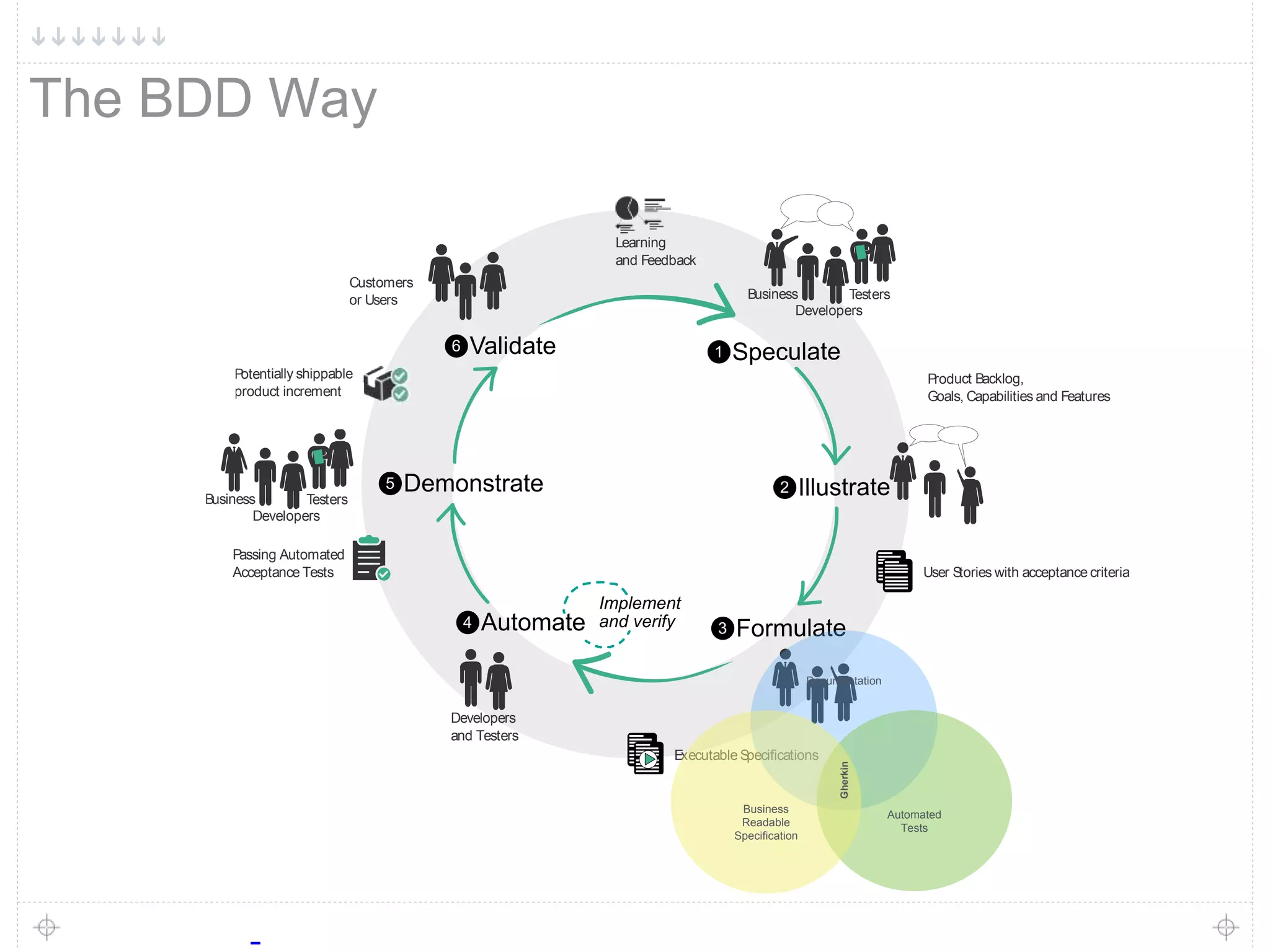
Speculate1
Testers
Developers
Business
Illustrate2
Product Backlog,
Goals, Capabilities and Features
Formulate3
User Stories with acceptance criteria
Automate4
Implement
and verify
Developers
and Testers
Executable Specifications
Demonstrate5
Testers
Developers
Business
Passing Automated
Acceptance Tests
Validate6
Customers
or Users
Potentially shippable
product increment
Learning
and Feedback
Documentation
Automated
Tests
Business
Readable
Specification
Gherkin
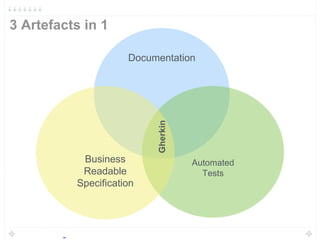
3 Artefacts in 1
Documentation
Automated
Tests
Business
Readable
Specification
Gherkin
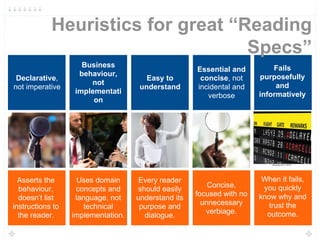
Heuristics for great “Reading
Specs”
Asserts the
behaviour,
doesn’t list
instructions to
the reader.
Uses domain
concepts and
language, not
technical
implementation.
Every reader
should easily
understand its
purpose and
dialogue.
When it fails,
you quickly
know why and
trust the
outcome.
Concise,
focused with no
unnecessary
verbiage.
Declarative,
not imperative
Business
behaviour,
not
implementati
on
Easy to
understand
Fails
purposefully
and
informatively
Essential and
concise, not
incidental and
verbose
A selection of our
favorites
Gherkin
Refactoring
Patterns
Distilling
Descripting
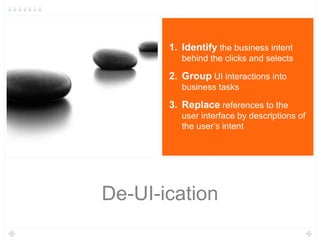
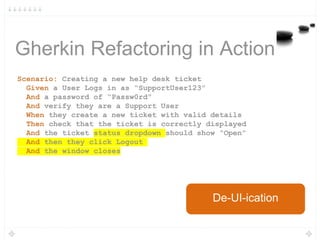
De-UI-ication
De-UI-ication
1. Identify the business intent
behind the clicks and selects
2. Group UI interactions into
business tasks
3. Replace references to the
user interface by descriptions of
the user’s intent
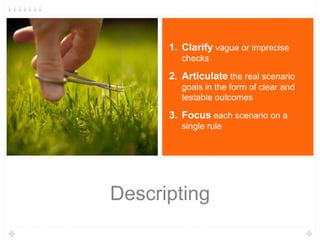
Descripting
1. Clarify vague or imprecise
checks
2. Articulate the real scenario
goals in the form of clear and
testable outcomes
3. Focus each scenario on a
single rule
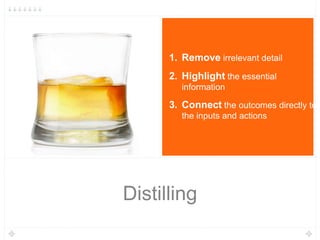
Distilling
1. Remove irrelevant detail
2. Highlight the essential
information
3. Connect the outcomes directly to
the inputs and actions
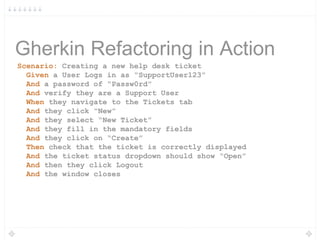
Gherkin Refactoring in Action
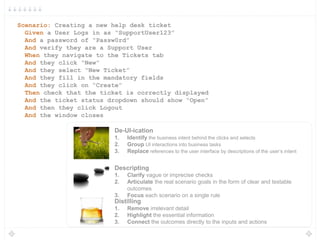
Scenario: Creating a new help desk ticket
Given a User Logs in as “SupportUser123”
And a password of “Passw0rd”
And verify they are a Support User
When they navigate to the Tickets tab
And they click “New”
And they select “New Ticket”
And they fill in the mandatory fields
And they click on “Create”
Then check that the ticket is correctly displayed
And the ticket status dropdown should show “Open”
And then they click Logout
And the window closes
Scenario: Creating a new help desk ticket
Given a User Logs in as “SupportUser123”
And a password of “Passw0rd”
And verify they are a Support User
When they navigate to the Tickets tab
And they click “New”
And they select “New Ticket”
And they fill in the mandatory fields
And they click on “Create”
Then check that the ticket is correctly displayed
And the ticket status dropdown should show “Open”
And then they click Logout
And the window closes
De-UI-ication
1. Identify the business intent behind the clicks and selects
2. Group UI interactions into business tasks
3. Replace references to the user interface by descriptions of the user’s intent
Descripting
1. Clarify vague or imprecise checks
2. Articulate the real scenario goals in the form of clear and testable
outcomes
3. Focus each scenario on a single rule
Distilling
1. Remove irrelevant detail
2. Highlight the essential information
3. Connect the outcomes directly to the inputs and actions
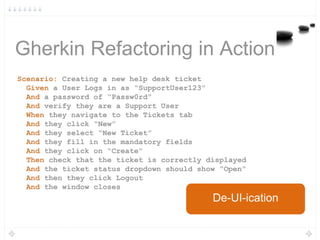
Gherkin Refactoring in Action
Scenario: Creating a new help desk ticket
Given a User Logs in as “SupportUser123”
And a password of “Passw0rd”
And verify they are a Support User
When they navigate to the Tickets tab
And they click “New”
And they select “New Ticket”
And they fill in the mandatory fields
And they click on “Create”
Then check that the ticket is correctly displayed
And the ticket status dropdown should show “Open”
And then they click Logout
And the window closes
De-UI-ication
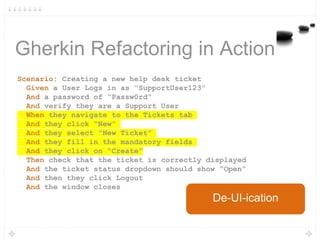
Gherkin Refactoring in Action
Scenario: Creating a new help desk ticket
Given a User Logs in as “SupportUser123”
And a password of “Passw0rd”
And verify they are a Support User
When they navigate to the Tickets tab
And they click “New”
And they select “New Ticket”
And they fill in the mandatory fields
And they click on “Create”
Then check that the ticket is correctly displayed
And the ticket status dropdown should show “Open”
And then they click Logout
And the window closes
De-UI-ication
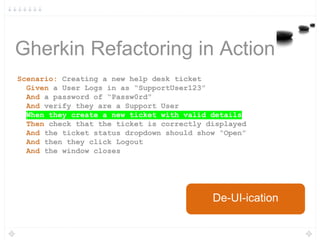
Gherkin Refactoring in Action
Scenario: Creating a new help desk ticket
Given a User Logs in as “SupportUser123”
And a password of “Passw0rd”
And verify they are a Support User
When they create a new ticket with valid details
Then check that the ticket is correctly displayed
And the ticket status dropdown should show “Open”
And then they click Logout
And the window closes
De-UI-ication
Gherkin Refactoring in Action
Scenario: Creating a new help desk ticket
Given a User Logs in as “SupportUser123”
And a password of “Passw0rd”
And verify they are a Support User
When they create a new ticket with valid details
Then check that the ticket is correctly displayed
And the ticket status dropdown should show “Open”
And then they click Logout
And the window closes
De-UI-ication
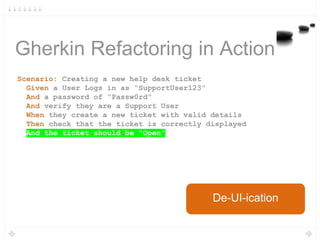
Gherkin Refactoring in Action
Scenario: Creating a new help desk ticket
Given a User Logs in as “SupportUser123”
And a password of “Passw0rd”
And verify they are a Support User
When they create a new ticket with valid details
Then check that the ticket is correctly displayed
And the ticket should be “Open”
De-UI-ication
Gherkin Refactoring in Action
Scenario: Creating a new help desk ticket
Given a User Logs in as “SupportUser123”
And a password of “Passw0rd”
And verify they are a Support User
When they create a new ticket with valid details
Then check that the ticket is correctly displayed
And the ticket should be “Open”
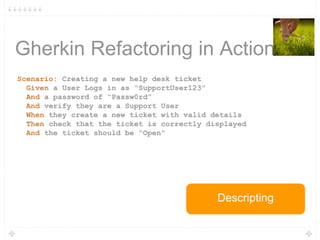
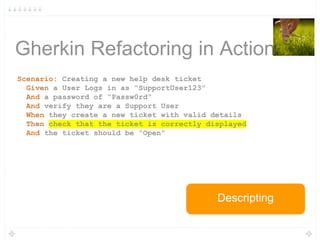
Descripting
Gherkin Refactoring in Action
Scenario: Creating a new help desk ticket
Given a User Logs in as “SupportUser123”
And a password of “Passw0rd”
And verify they are a Support User
When they create a new ticket with valid details
Then check that the ticket is correctly displayed
And the ticket should be “Open”
Descripting
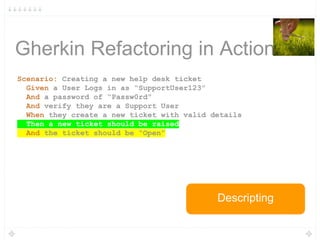
Gherkin Refactoring in Action
Scenario: Creating a new help desk ticket
Given a User Logs in as “SupportUser123”
And a password of “Passw0rd”
And verify they are a Support User
When they create a new ticket with valid details
Then a new ticket should be raised
And the ticket should be “Open”
Descripting
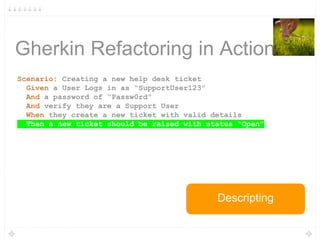
Gherkin Refactoring in Action
Scenario: Creating a new help desk ticket
Given a User Logs in as “SupportUser123”
And a password of “Passw0rd”
And verify they are a Support User
When they create a new ticket with valid details
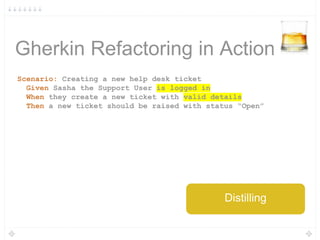
Then a new ticket should be raised with status “Open”
Descripting
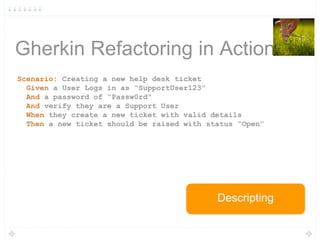
Gherkin Refactoring in Action
Scenario: Creating a new help desk ticket
Given a User Logs in as “SupportUser123”
And a password of “Passw0rd”
And verify they are a Support User
When they create a new ticket with valid details
Then a new ticket should be raised with status “Open”
Descripting
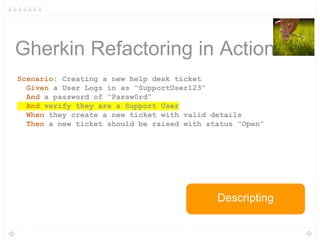
Gherkin Refactoring in Action
Scenario: Creating a new help desk ticket
Given a User Logs in as “SupportUser123”
And a password of “Passw0rd”
And verify they are a Support User
When they create a new ticket with valid details
Then a new ticket should be raised with status “Open”
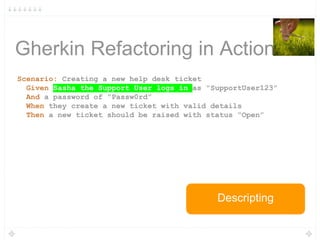
Descripting
Gherkin Refactoring in Action
Scenario: Creating a new help desk ticket
Given Sasha the Support User logs in as “SupportUser123”
And a password of “Passw0rd”
When they create a new ticket with valid details
Then a new ticket should be raised with status “Open”
Descripting
Gherkin Refactoring in Action
Scenario: Creating a new help desk ticket
Given Sasha the Support User logs in as “SupportUser123”
And a password of “Passw0rd”
When they create a new ticket with valid details
Then a new ticket should be raised with status “Open”
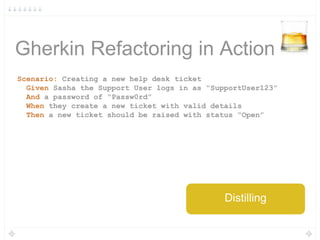
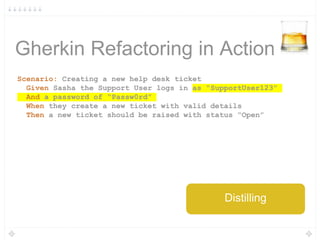
Distilling
Gherkin Refactoring in Action
Scenario: Creating a new help desk ticket
Given Sasha the Support User logs in as “SupportUser123”
And a password of “Passw0rd”
When they create a new ticket with valid details
Then a new ticket should be raised with status “Open”
Distilling
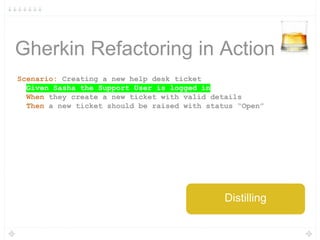
Gherkin Refactoring in Action
Scenario: Creating a new help desk ticket
Given Sasha the Support User is logged in
When they create a new ticket with valid details
Then a new ticket should be raised with status “Open”
Distilling
Gherkin Refactoring in Action
Scenario: Creating a new help desk ticket
Given Sasha the Support User is logged in
When they create a new ticket with valid details
Then a new ticket should be raised with status “Open”
Distilling
Gherkin Refactoring in Action
Scenario: Creating a new help desk ticket
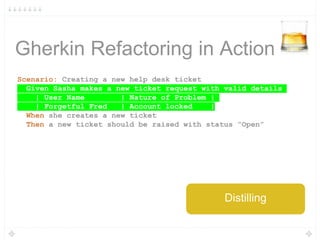
Given Sasha makes a new ticket request with valid details
| User Name | Nature of Problem |
| Forgetful Fred | Account locked |
When she creates a new ticket
Then a new ticket should be raised with status “Open”
Distilling
Gherkin Refactoring in Action
Scenario: Creating a new help desk ticket
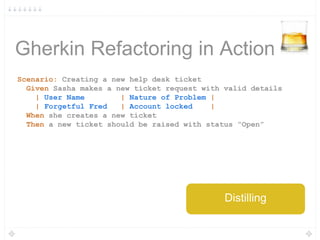
Given Sasha makes a new ticket request with valid details
| User Name | Nature of Problem |
| Forgetful Fred | Account locked |
When she creates a new ticket
Then a new ticket should be raised with status “Open”
Distilling
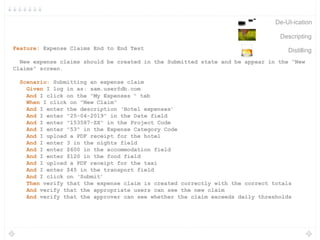
Feature: Expense Claims End to End Test
New expense claims should be created in the Submitted state and be appear in the "New
Claims" screen.
Scenario: Submitting an expense claim
Given I log in as: sam.user@db.com
And I click on the "My Expenses " tab
When I click on "New Claim"
And I enter the description ‘Hotel expenses’
And I enter "25-04-2019" in the Date field
And I enter "153587-ZX" in the Project Code
And I enter "53" in the Expense Category Code
And I upload a PDF receipt for the hotel
And I enter 3 in the nights field
And I enter $600 in the accommodation field
And I enter $120 in the food field
And I upload a PDF receipt for the taxi
And I enter $45 in the transport field
And I click on ‘Submit’
Then verify that the expense claim is created correctly with the correct totals
And verify that the appropriate users can see the new claim
And verify that the approver can see whether the claim exceeds daily thresholds
De-UI-ication
Descripting
Distilling
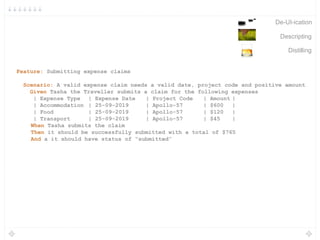
Feature: Submitting expense claims
Scenario: A valid expense claim needs a valid date, project code and positive amount
Given Tasha the Traveller submits a claim for the following expenses
| Expense Type | Expense Date | Project Code | Amount |
| Accommodation | 25-09-2019 | Apollo-57 | $600 |
| Food | 25-09-2019 | Apollo-57 | $120 |
| Transport | 25-09-2019 | Apollo-57 | $45 |
When Tasha submits the claim
Then it should be successfully submitted with a total of $765
And a it should have status of “submitted”
De-UI-ication
Descripting
Distilling
John Ferguson Smart
@wakaleo
johnfergusonsmart.com
Tom Roden
@tommroden
neuri.com
Our Reading Specs

My Reading Specs - Refactoring Patterns for Gherkin Scenarios

  • 1.
    The BDD Way Speculate1 Testers Developers Business Illustrate2 ProductBacklog, Goals, Capabilities and Features Formulate3 User Stories with acceptance criteria Automate4 Implement and verify Developers and Testers Executable Specifications Demonstrate5 Testers Developers Business Passing Automated Acceptance Tests Validate6 Customers or Users Potentially shippable product increment Learning and Feedback Documentation Automated Tests Business Readable Specification Gherkin
  • 2.
    3 Artefacts in1 Documentation Automated Tests Business Readable Specification Gherkin
  • 3.
    Heuristics for great“Reading Specs” Asserts the behaviour, doesn’t list instructions to the reader. Uses domain concepts and language, not technical implementation. Every reader should easily understand its purpose and dialogue. When it fails, you quickly know why and trust the outcome. Concise, focused with no unnecessary verbiage. Declarative, not imperative Business behaviour, not implementati on Easy to understand Fails purposefully and informatively Essential and concise, not incidental and verbose
  • 4.
    A selection ofour favorites Gherkin Refactoring Patterns
  • 5.
  • 6.
    De-UI-ication 1. Identify thebusiness intent behind the clicks and selects 2. Group UI interactions into business tasks 3. Replace references to the user interface by descriptions of the user’s intent
  • 7.
    Descripting 1. Clarify vagueor imprecise checks 2. Articulate the real scenario goals in the form of clear and testable outcomes 3. Focus each scenario on a single rule
  • 8.
    Distilling 1. Remove irrelevantdetail 2. Highlight the essential information 3. Connect the outcomes directly to the inputs and actions
  • 9.
    Gherkin Refactoring inAction Scenario: Creating a new help desk ticket Given a User Logs in as “SupportUser123” And a password of “Passw0rd” And verify they are a Support User When they navigate to the Tickets tab And they click “New” And they select “New Ticket” And they fill in the mandatory fields And they click on “Create” Then check that the ticket is correctly displayed And the ticket status dropdown should show “Open” And then they click Logout And the window closes
  • 10.
    Scenario: Creating anew help desk ticket Given a User Logs in as “SupportUser123” And a password of “Passw0rd” And verify they are a Support User When they navigate to the Tickets tab And they click “New” And they select “New Ticket” And they fill in the mandatory fields And they click on “Create” Then check that the ticket is correctly displayed And the ticket status dropdown should show “Open” And then they click Logout And the window closes De-UI-ication 1. Identify the business intent behind the clicks and selects 2. Group UI interactions into business tasks 3. Replace references to the user interface by descriptions of the user’s intent Descripting 1. Clarify vague or imprecise checks 2. Articulate the real scenario goals in the form of clear and testable outcomes 3. Focus each scenario on a single rule Distilling 1. Remove irrelevant detail 2. Highlight the essential information 3. Connect the outcomes directly to the inputs and actions
  • 11.
    Gherkin Refactoring inAction Scenario: Creating a new help desk ticket Given a User Logs in as “SupportUser123” And a password of “Passw0rd” And verify they are a Support User When they navigate to the Tickets tab And they click “New” And they select “New Ticket” And they fill in the mandatory fields And they click on “Create” Then check that the ticket is correctly displayed And the ticket status dropdown should show “Open” And then they click Logout And the window closes De-UI-ication
  • 12.
    Gherkin Refactoring inAction Scenario: Creating a new help desk ticket Given a User Logs in as “SupportUser123” And a password of “Passw0rd” And verify they are a Support User When they navigate to the Tickets tab And they click “New” And they select “New Ticket” And they fill in the mandatory fields And they click on “Create” Then check that the ticket is correctly displayed And the ticket status dropdown should show “Open” And then they click Logout And the window closes De-UI-ication
  • 13.
    Gherkin Refactoring inAction Scenario: Creating a new help desk ticket Given a User Logs in as “SupportUser123” And a password of “Passw0rd” And verify they are a Support User When they create a new ticket with valid details Then check that the ticket is correctly displayed And the ticket status dropdown should show “Open” And then they click Logout And the window closes De-UI-ication
  • 14.
    Gherkin Refactoring inAction Scenario: Creating a new help desk ticket Given a User Logs in as “SupportUser123” And a password of “Passw0rd” And verify they are a Support User When they create a new ticket with valid details Then check that the ticket is correctly displayed And the ticket status dropdown should show “Open” And then they click Logout And the window closes De-UI-ication
  • 15.
    Gherkin Refactoring inAction Scenario: Creating a new help desk ticket Given a User Logs in as “SupportUser123” And a password of “Passw0rd” And verify they are a Support User When they create a new ticket with valid details Then check that the ticket is correctly displayed And the ticket should be “Open” De-UI-ication
  • 16.
    Gherkin Refactoring inAction Scenario: Creating a new help desk ticket Given a User Logs in as “SupportUser123” And a password of “Passw0rd” And verify they are a Support User When they create a new ticket with valid details Then check that the ticket is correctly displayed And the ticket should be “Open” Descripting
  • 17.
    Gherkin Refactoring inAction Scenario: Creating a new help desk ticket Given a User Logs in as “SupportUser123” And a password of “Passw0rd” And verify they are a Support User When they create a new ticket with valid details Then check that the ticket is correctly displayed And the ticket should be “Open” Descripting
  • 18.
    Gherkin Refactoring inAction Scenario: Creating a new help desk ticket Given a User Logs in as “SupportUser123” And a password of “Passw0rd” And verify they are a Support User When they create a new ticket with valid details Then a new ticket should be raised And the ticket should be “Open” Descripting
  • 19.
    Gherkin Refactoring inAction Scenario: Creating a new help desk ticket Given a User Logs in as “SupportUser123” And a password of “Passw0rd” And verify they are a Support User When they create a new ticket with valid details Then a new ticket should be raised with status “Open” Descripting
  • 20.
    Gherkin Refactoring inAction Scenario: Creating a new help desk ticket Given a User Logs in as “SupportUser123” And a password of “Passw0rd” And verify they are a Support User When they create a new ticket with valid details Then a new ticket should be raised with status “Open” Descripting
  • 21.
    Gherkin Refactoring inAction Scenario: Creating a new help desk ticket Given a User Logs in as “SupportUser123” And a password of “Passw0rd” And verify they are a Support User When they create a new ticket with valid details Then a new ticket should be raised with status “Open” Descripting
  • 22.
    Gherkin Refactoring inAction Scenario: Creating a new help desk ticket Given Sasha the Support User logs in as “SupportUser123” And a password of “Passw0rd” When they create a new ticket with valid details Then a new ticket should be raised with status “Open” Descripting
  • 23.
    Gherkin Refactoring inAction Scenario: Creating a new help desk ticket Given Sasha the Support User logs in as “SupportUser123” And a password of “Passw0rd” When they create a new ticket with valid details Then a new ticket should be raised with status “Open” Distilling
  • 24.
    Gherkin Refactoring inAction Scenario: Creating a new help desk ticket Given Sasha the Support User logs in as “SupportUser123” And a password of “Passw0rd” When they create a new ticket with valid details Then a new ticket should be raised with status “Open” Distilling
  • 25.
    Gherkin Refactoring inAction Scenario: Creating a new help desk ticket Given Sasha the Support User is logged in When they create a new ticket with valid details Then a new ticket should be raised with status “Open” Distilling
  • 26.
    Gherkin Refactoring inAction Scenario: Creating a new help desk ticket Given Sasha the Support User is logged in When they create a new ticket with valid details Then a new ticket should be raised with status “Open” Distilling
  • 27.
    Gherkin Refactoring inAction Scenario: Creating a new help desk ticket Given Sasha makes a new ticket request with valid details | User Name | Nature of Problem | | Forgetful Fred | Account locked | When she creates a new ticket Then a new ticket should be raised with status “Open” Distilling
  • 28.
    Gherkin Refactoring inAction Scenario: Creating a new help desk ticket Given Sasha makes a new ticket request with valid details | User Name | Nature of Problem | | Forgetful Fred | Account locked | When she creates a new ticket Then a new ticket should be raised with status “Open” Distilling
  • 29.
    Feature: Expense ClaimsEnd to End Test New expense claims should be created in the Submitted state and be appear in the "New Claims" screen. Scenario: Submitting an expense claim Given I log in as: sam.user@db.com And I click on the "My Expenses " tab When I click on "New Claim" And I enter the description ‘Hotel expenses’ And I enter "25-04-2019" in the Date field And I enter "153587-ZX" in the Project Code And I enter "53" in the Expense Category Code And I upload a PDF receipt for the hotel And I enter 3 in the nights field And I enter $600 in the accommodation field And I enter $120 in the food field And I upload a PDF receipt for the taxi And I enter $45 in the transport field And I click on ‘Submit’ Then verify that the expense claim is created correctly with the correct totals And verify that the appropriate users can see the new claim And verify that the approver can see whether the claim exceeds daily thresholds De-UI-ication Descripting Distilling
  • 30.
    Feature: Submitting expenseclaims Scenario: A valid expense claim needs a valid date, project code and positive amount Given Tasha the Traveller submits a claim for the following expenses | Expense Type | Expense Date | Project Code | Amount | | Accommodation | 25-09-2019 | Apollo-57 | $600 | | Food | 25-09-2019 | Apollo-57 | $120 | | Transport | 25-09-2019 | Apollo-57 | $45 | When Tasha submits the claim Then it should be successfully submitted with a total of $765 And a it should have status of “submitted” De-UI-ication Descripting Distilling
  • 31.
    John Ferguson Smart @wakaleo johnfergusonsmart.com TomRoden @tommroden neuri.com Our Reading Specs

Editor's Notes

  • #2 Effectiveness: To apply the minimal effort necessary to achieve the desired result Autonomous kindergarteners and Lord of the Flies - Is effectiveness alone enough to make a high performance team?
  • #3 Effectiveness: To apply the minimal effort necessary to achieve the desired result Autonomous kindergarteners and Lord of the Flies - Is effectiveness alone enough to make a high performance team?