
Secure Web Services
    with OAuth
    ~ Matthias Käppler ~


      February 23rd, 2010


Outline
1)   Who Am I

2)   Motivation

3)   Introduction to OAuth

4)   How OAuth works

5)   OAuth on Android with Signpost


Europe's leading local review site

               17M uniques

       I'm the Android guy at Qype.com!


The mobile Web

               What was WAP again?

                      Nevermind.


With today's hardware and infrastructure, mobile
applications have become full blown Web clients.


Mobile HTTP Clients
                  Secure channel?

Data integrity?


      Client                        Web service


Authentication?


         Authorized access?

                          
HTTPS
          Secure Socket Layer + HTTP


Secures the whole communication channel


Uses certificates and public key encryption


               Very secure!
                    But...


Right tool for the job?
     Does all my data need encryption?


Do users know, care about, or trust digital
 certificates? I'm still giving away my password!


     What about authorization, and who
           actually decides that?


What is OAuth?
                          OAuth.net
”An open protocol to allow secure API authorization
 in a simple and standard method from desktop and
                 web applications.”


                         Wikipedia.org
”OAuth is an open protocol that allows users to share
 their private resources [...] stored on one site with
    another site without having to hand out their
              username and password.”


Motivation

    Web users typically have their data spread
    across various, often interweaved websites
              e.g. Flickr, Twitter, Vimeo, ...


Each time users want to access their data, they must
       give away their username and password


Motivation


Now imagine you would do that with
        your credit card!


Where OAuth sets in

Without OAuth, users have to share their credentials
    with potentially untrustworthy applications.
            a.k.a. the ”password anti-pattern”


OAuth solves this by letting the user grant revokable
    access rights over a limited period of time.


Implications

    OAuth does not require the user to trust
            the client application.

                      instead:

OAuth is about trust into the service being used.


Implications

OAuth does not automatically grant clients
 permission by e.g. issueing certificates.

                      instead:

     OAuth is about access right delegation
              from user to client.


How OAuth works
       Ever heard of...


       They use OAuth!


How OAuth works
   Alice wants to read her latest mentions on her
          Android phone using SecTweet.


                    Or in OAuth lingo:

Consumer SecTweet requires user Alice's permission to access the
protected resource http://twitter.com/statuses/mentions from the
                    service provider Twitter.


OAuth Access Delegation
SecTweet does not yet have Alice's permission to
    access Twitter mentions on her behalf.


 However, Alice can pass authorization over to
   SecTweet by means of an access token.

    As long as this token is valid, SecTweet is allowed
                to access Alice's resources.


OAuth Access Delegation


This is done by doing the OAuth dance.

             3-way handshake


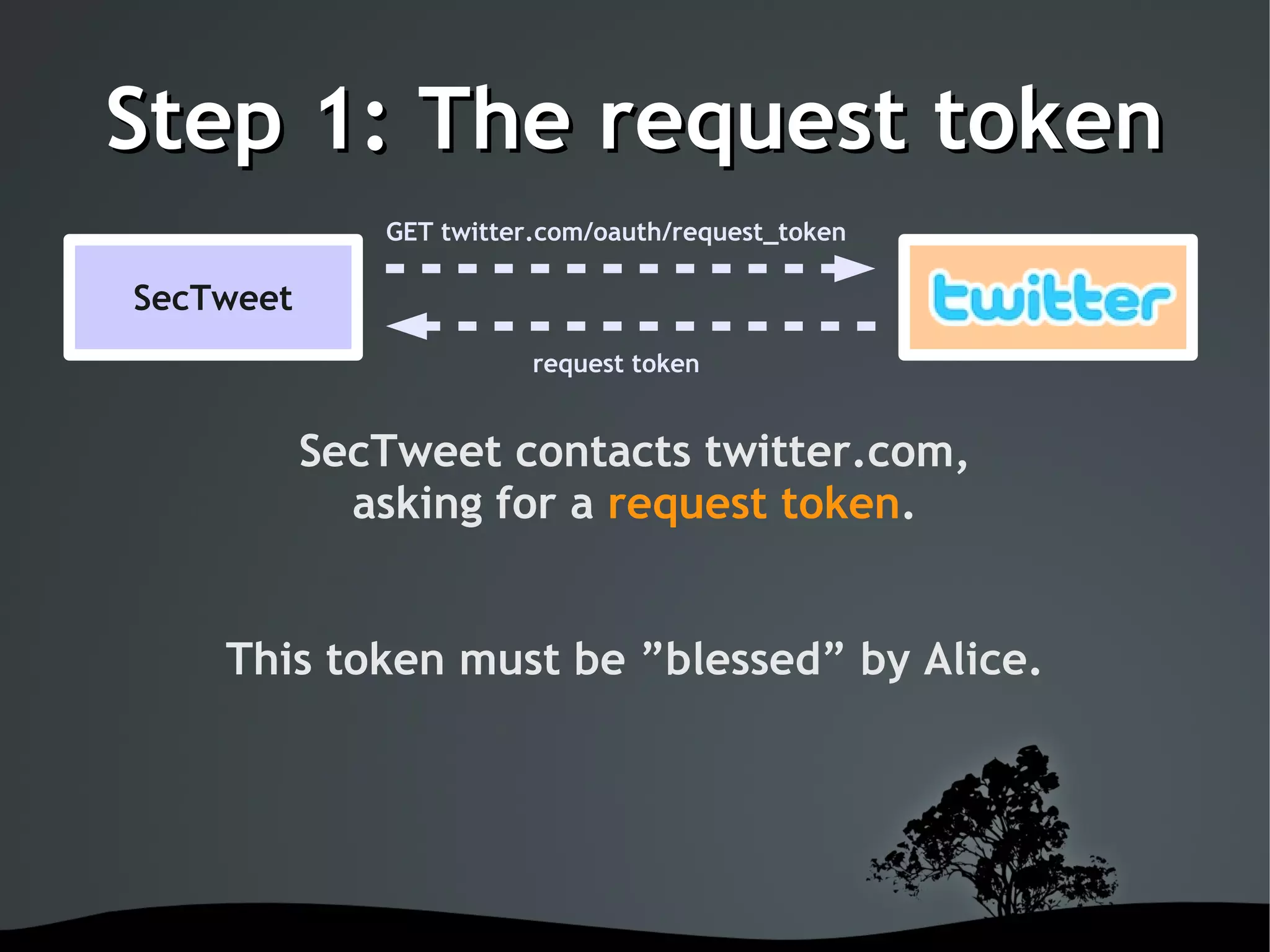
Step 1: The request token
              GET twitter.com/oauth/request_token

SecTweet
                           request token


           SecTweet contacts twitter.com,
             asking for a request token.


    This token must be ”blessed” by Alice.


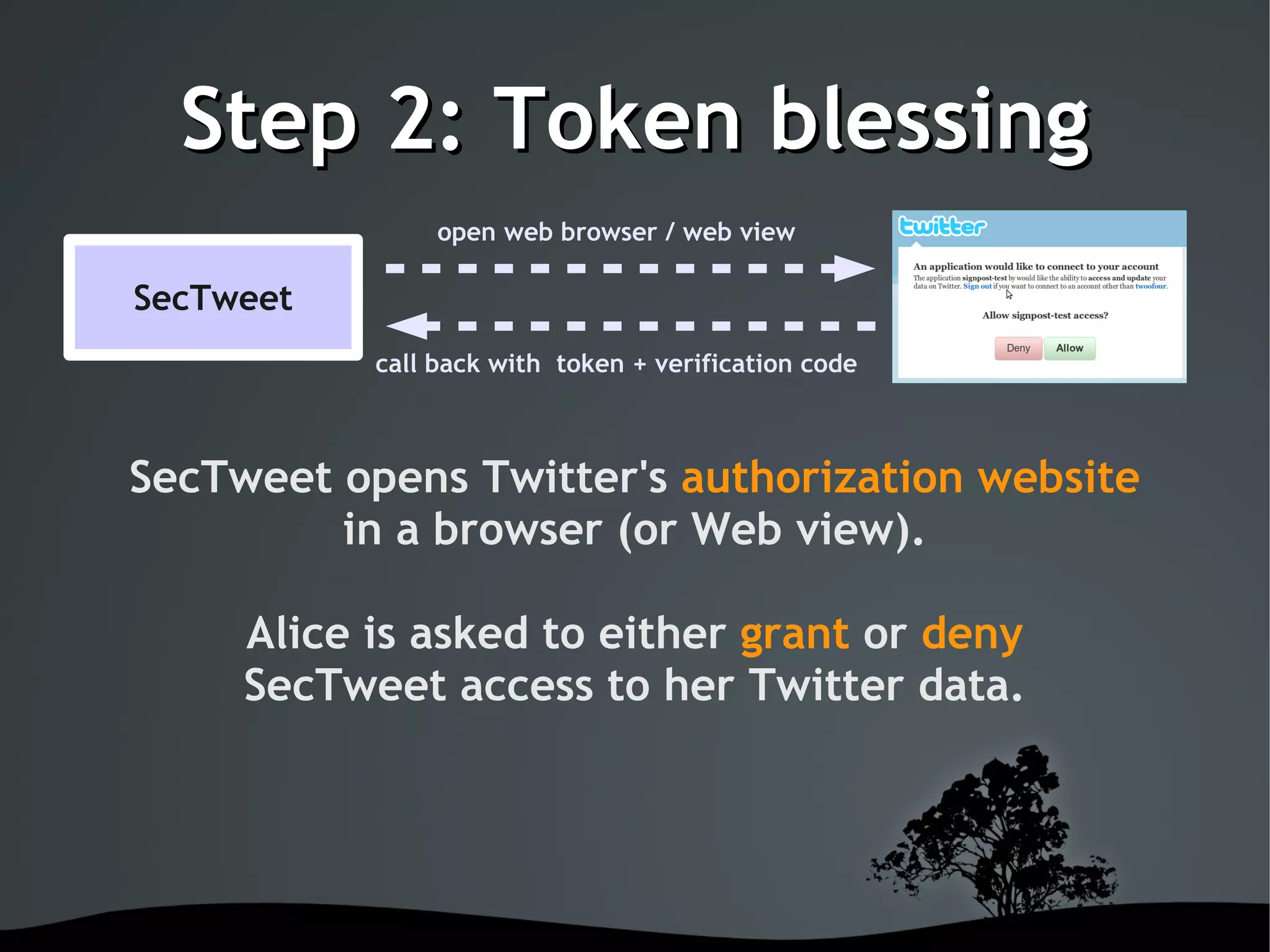
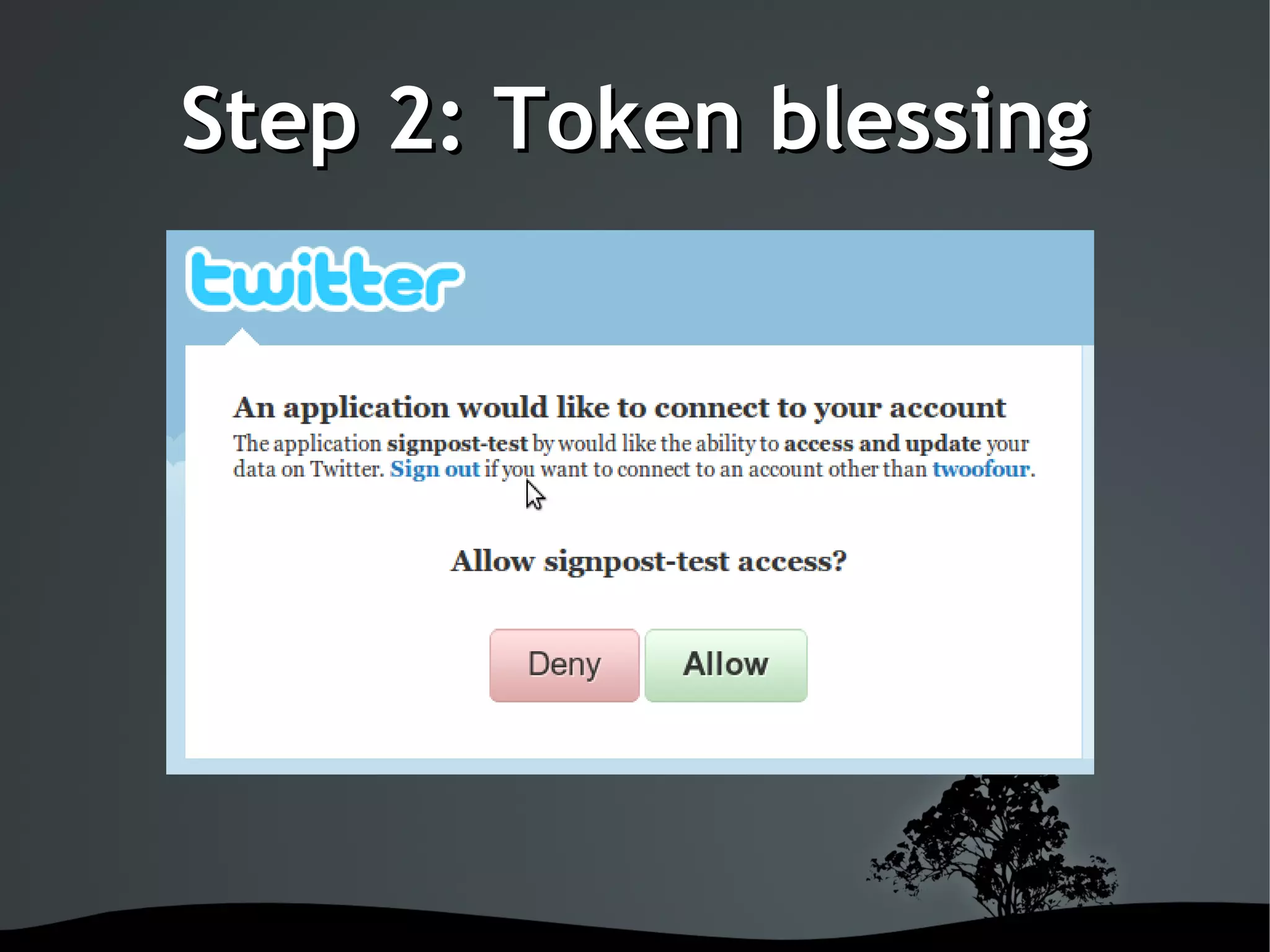
Step 2: Token blessing
                   open web browser / web view

SecTweet
              call back with token + verification code


SecTweet opens Twitter's authorization website
         in a browser (or Web view).

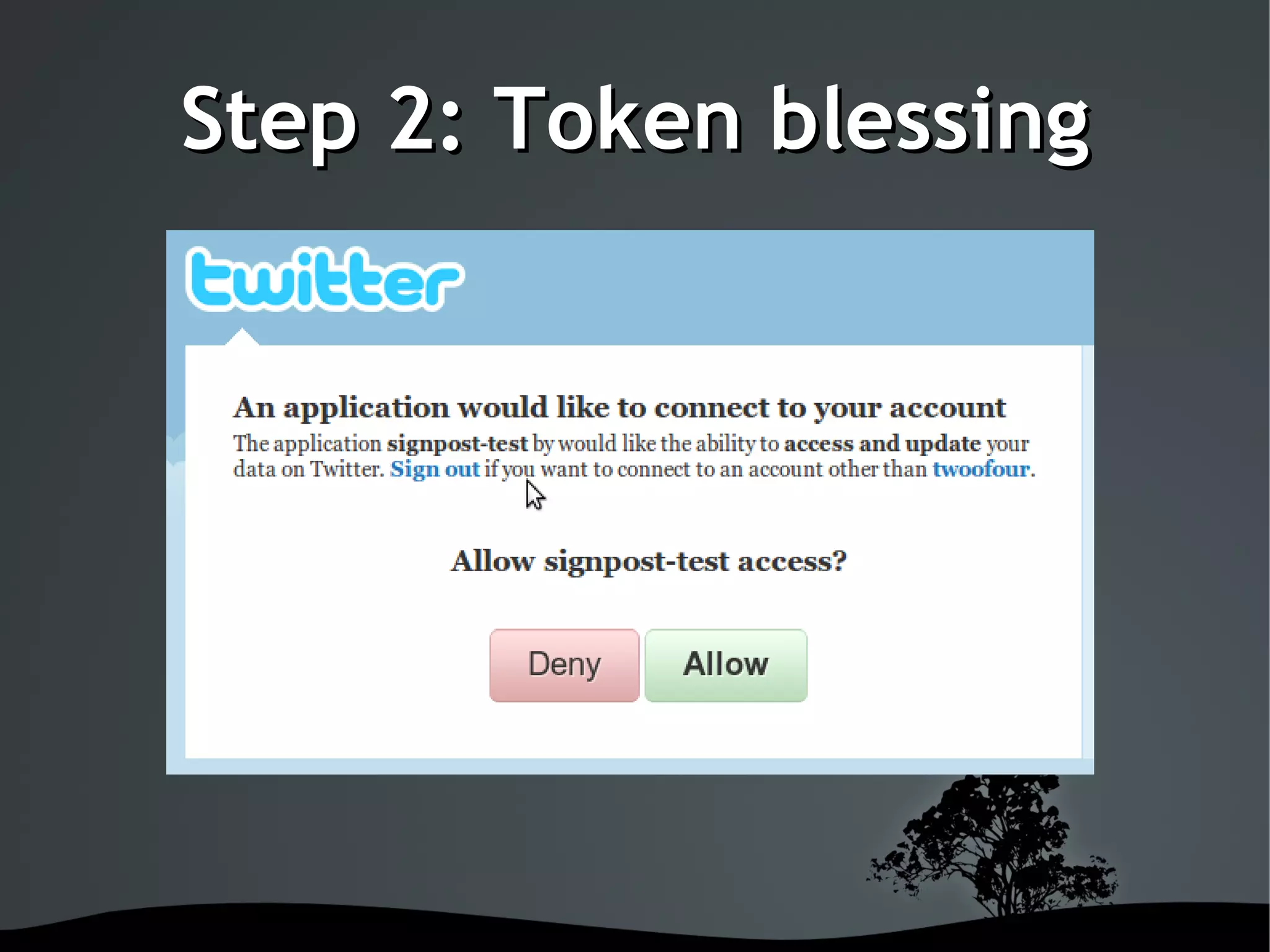
        Alice is asked to either grant or deny
        SecTweet access to her Twitter data.


Step 2: Token blessing


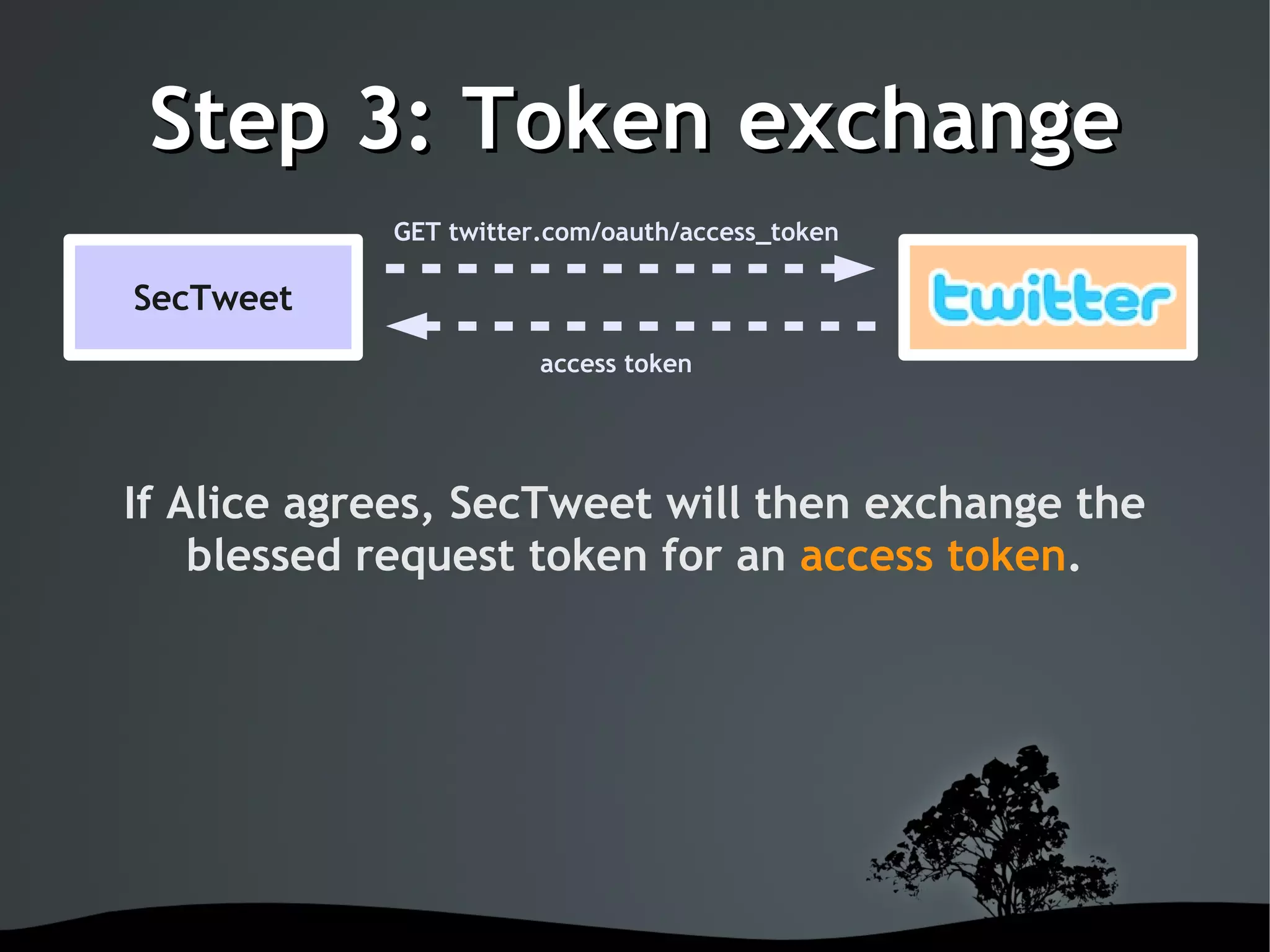
Step 3: Token exchange
            GET twitter.com/oauth/access_token

SecTweet
                        access token


If Alice agrees, SecTweet will then exchange the
    blessed request token for an access token.


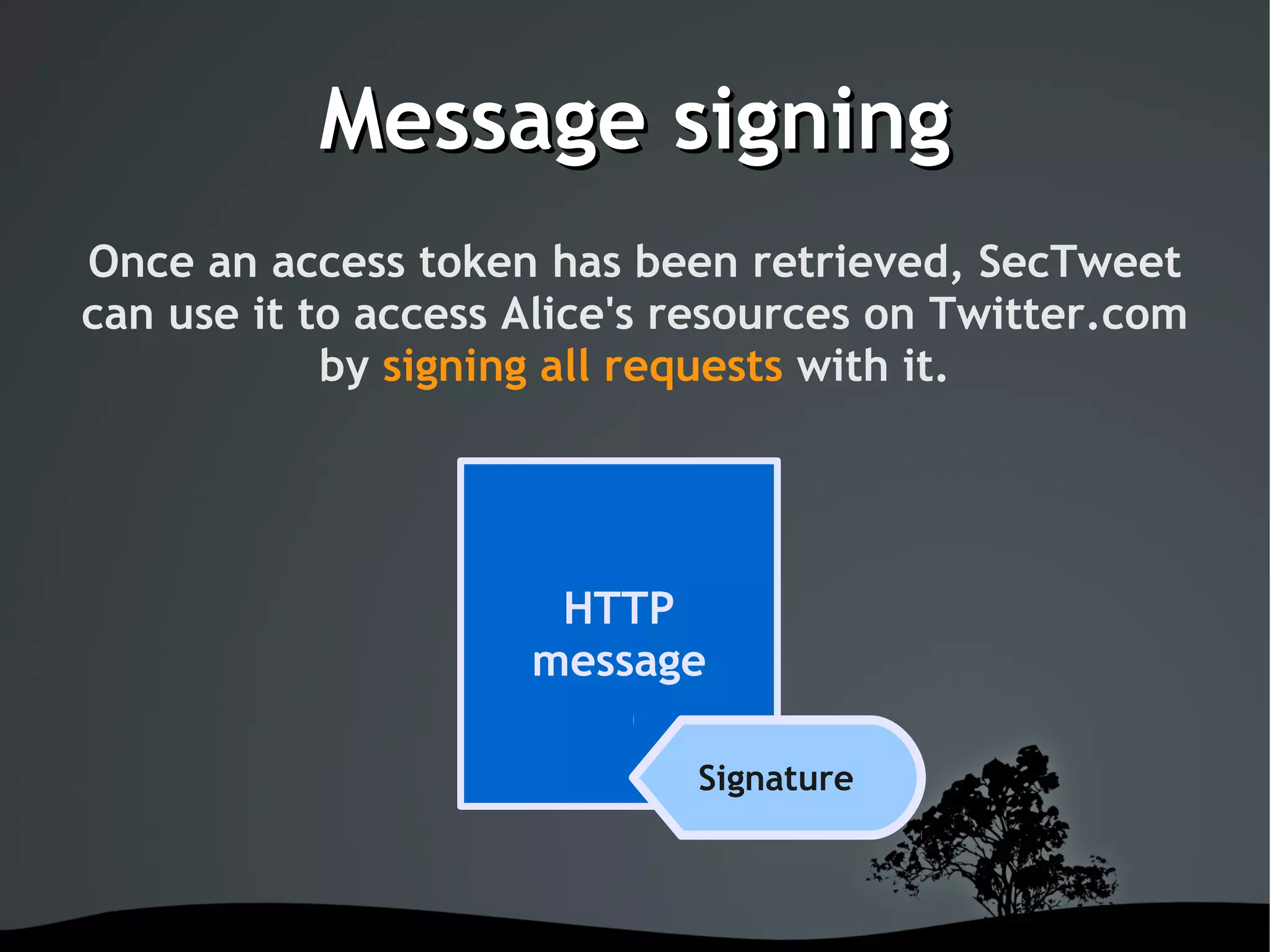
Message signing
Once an access token has been retrieved, SecTweet
can use it to access Alice's resources on Twitter.com
            by signing all requests with it.


                         HTTP
                        message

                              Signature


Message Signing


  There is no need to store Alice's
username or password on the device.


Message Signing
An OAuth signature is a unique fingerprint, typically
computed using keyed cryptographic hash functions.


  Thus, both integrity and authenticity of a signed
     message can be verified by the receiver.


 Signatures are protected from eavesdropping and
  replay attacks by using timestamps and nonces.


Example
GET /statuses/mentions.xml HTTP/1.1
Host: twitter.com
Authorization: OAuth oauth_version='1.0',
oauth_consumer_key='v5Dev9QtVuzkhssYoH',
oauth_token='pbZXhbz2p5w8h6y',
oauth_timestamp='1265563431',
oauth_nonce='73980654659',
oauth_signature='pvISiky7dm9FD45mfZkP0S50yu0=',
oauth_signature_method='HMAC-SHA1'


Observations so far
OAuth is not just about machines. It actually
    involves the user as an authority.

  OAuth protects the user's credentials by
         simply not sending them!

OAuth checks the integrity, authenticity and
    authorization of Web service calls.


Observations so far
OAuth operates on the same OSI layer as HTTP
     and integrates seamlessly with it.

 OAuth does not obfuscate message payload,
         making it easy to debug.

OAuth itself is a fairly non-technical protocol.
  It emerged from real world requirements
                 and use cases.


On the flip-side

OAuth requires a fair amount of set-up work,
e.g. for keeping track of nonces and tokens.


   OAuth affects the user signup journey.
Balancing UX here can be a two-edged sword.


On the flip-side
 OAuth does not guarantee data privacy. It must be
   used in conjunction with existing protocols to
              achieve that (e.g. SSL).


The OAuth standard is unclear and difficult to read at
      times, resulting in compatibility issues.
                         Hammer time!


OAuth on Android
        What we need is a library which is:


               Written in Java.

Integrates with Apache Commons HTTP.

    Is lightweight and easy to integrate.


That would be Signpost

Signpost is an extensible, HTTP layer independent,
  client-side OAuth library for the Java platform.


         It works on Android!


Using Signpost

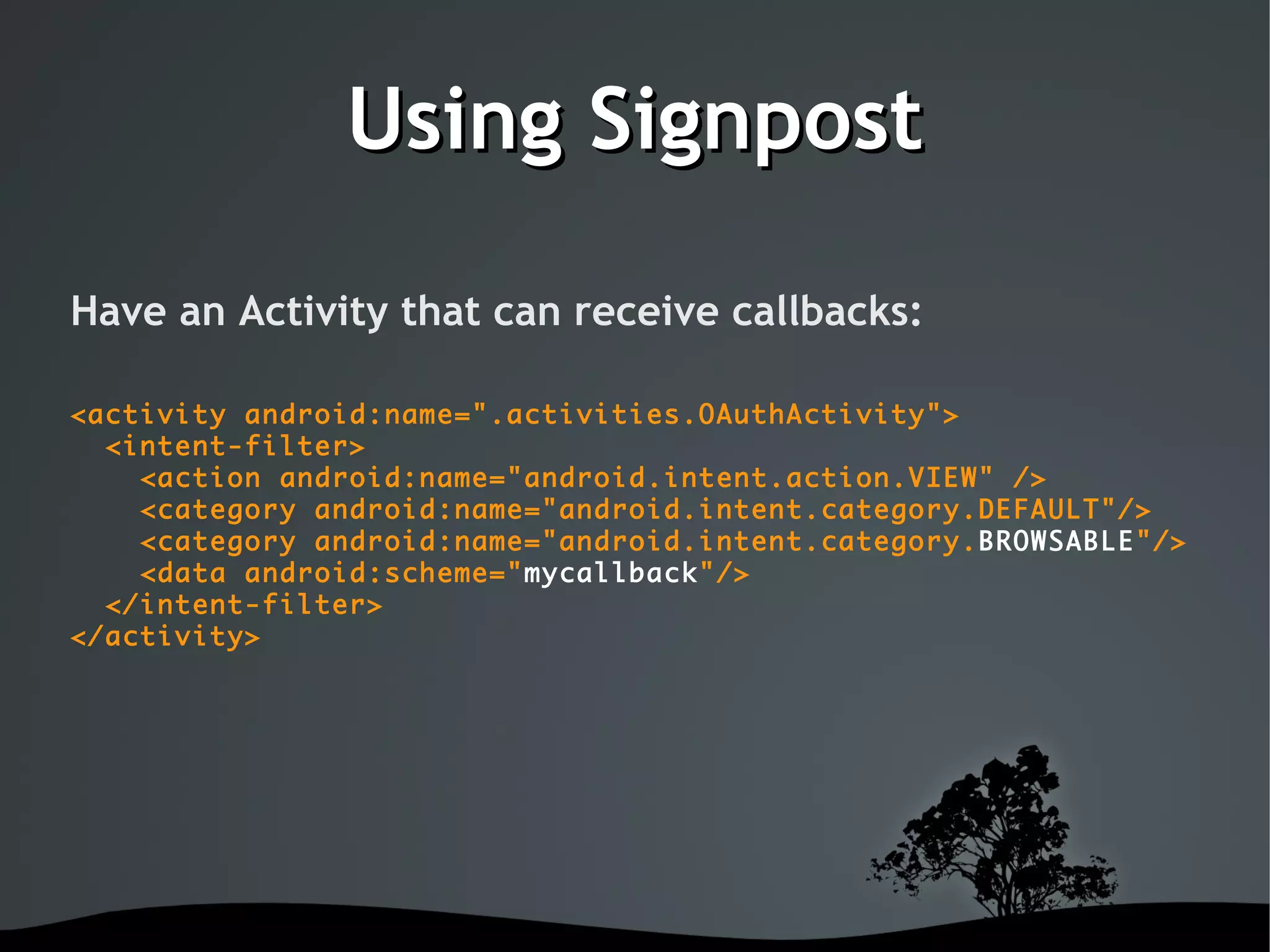
Have an Activity that can receive callbacks:

<activity android:name=".activities.OAuthActivity">
  <intent-filter>
    <action android:name="android.intent.action.VIEW" />
    <category android:name="android.intent.category.DEFAULT"/>
    <category android:name="android.intent.category.BROWSABLE"/>
    <data android:scheme="mycallback"/>
  </intent-filter>
</activity>


Using Signpost
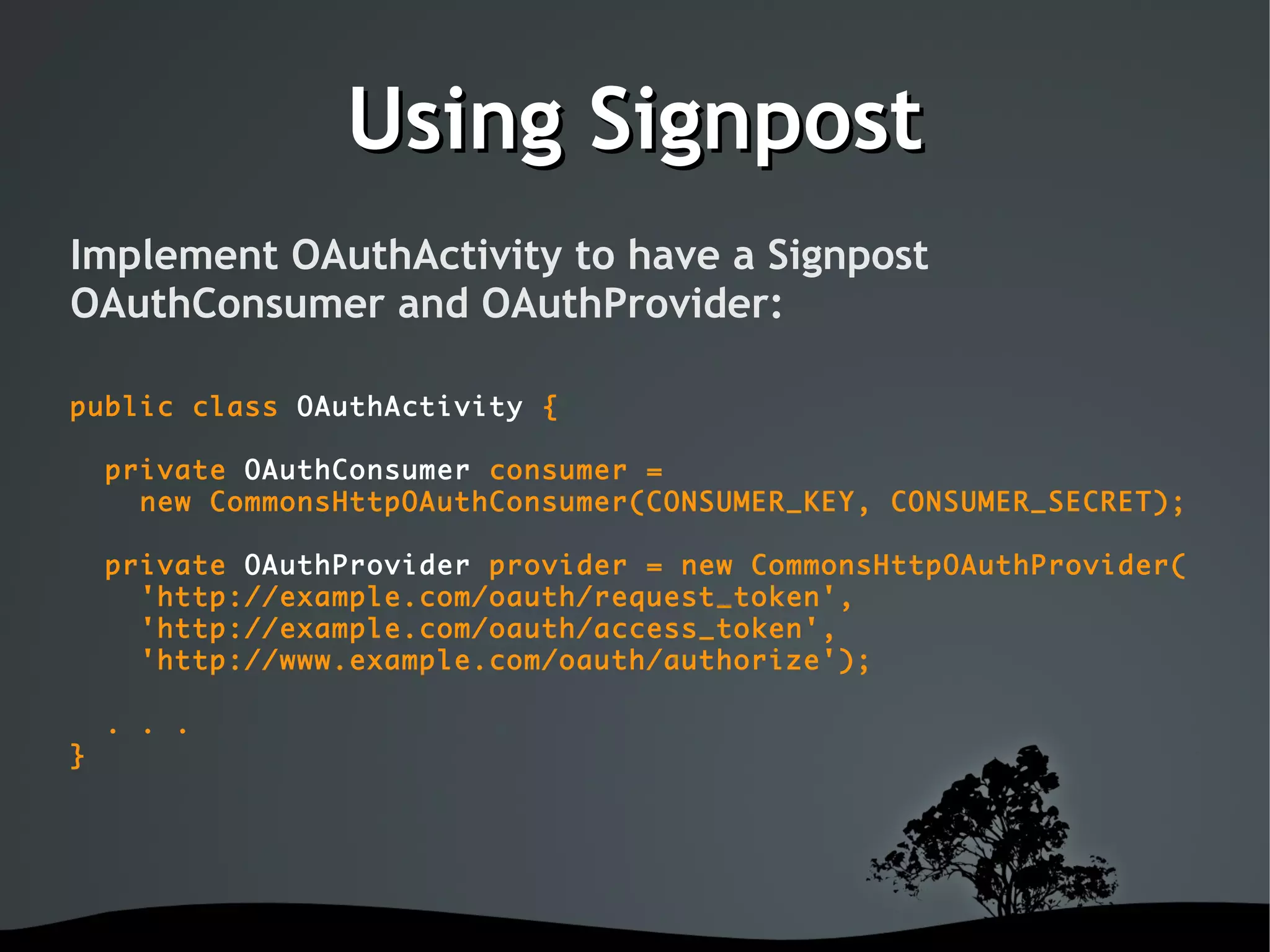
Implement OAuthActivity to have a Signpost
OAuthConsumer and OAuthProvider:

public class OAuthActivity {

    private OAuthConsumer consumer =
      new CommonsHttpOAuthConsumer(CONSUMER_KEY, CONSUMER_SECRET);

    private OAuthProvider provider = new CommonsHttpOAuthProvider(
      'http://example.com/oauth/request_token',
      'http://example.com/oauth/access_token',
      'http://www.example.com/oauth/authorize');

    . . .
}


Using Signpost
Step 1: Retrieving the request token

public class OAuthActivity {

    private void step1() {

        String url =
           provider.retrieveRequestToken(consumer, 'mycallback:///');

        storeTokenToPreferences(consumer.getToken());
        storeTokenSecretToPreferences(consumer.getTokenSecret());

        startActivity(new Intent(Intent.ACTION_VIEW, Uri.parse(url));

    }
}


Step 2: Token blessing


Using Signpost
Step 3: Retrieving the access token

public class OAuthActivity {

    // website called back with:
    // mycallback:///?oauth_token=xxx&oauth_verifier=12345
    private void step3(callbackUrl) {

        String oauthVerifier =
            callbackUrl.getQueryParameter(OAuth.OAUTH_VERIFIER);
        String token = readTokenFromPreferences();
        String secret = readSecretFromPreferences();

        provider.retrieveAccessToken(consumer, oauthVerifier);
        storeTokenToPreferences(consumer.getToken());
        storeTokenSecretToPreferences(consumer.getTokenSecret());
    }
}


Using Signpost
Signing messages sent with HttpClient:

public class AnyActivity {

    private HttpClient httpClient = new DefaultHttpClient();

    private void sendSignedRequest() {

        HttpRequest request =
            new HttpGet('http://example.com/protected.xml');

        consumer.sign(request);

        HttpResponse response = httpClient.execute(request);
        // . . .
    }
}


Outlook: WRAP
 The Web Resource Authorization Protocol is an OAuth
   variant, aiming to simplify and extend OAuth 1.0a


Drops signatures in favor of SSL secured connections and
               short lived access-tokens

       Defines additional ways to retrieve tokens


More information

               oauth.net


      hueniverse.com/oauth


More information


    code.google.com/p/oauth-signpost


Get involved


          $ git clone
git://github.com/kaeppler/signpost.git


Thank you


Secure Webservices

  • 1.
    Secure Web Services with OAuth ~ Matthias Käppler ~ February 23rd, 2010    
  • 2.
    Outline 1) Who Am I 2) Motivation 3) Introduction to OAuth 4) How OAuth works 5) OAuth on Android with Signpost    
  • 3.
    Europe's leading localreview site 17M uniques I'm the Android guy at Qype.com!    
  • 4.
    The mobile Web What was WAP again? Nevermind. With today's hardware and infrastructure, mobile applications have become full blown Web clients.    
  • 5.
    Mobile HTTP Clients Secure channel? Data integrity? Client Web service Authentication? Authorized access?    
  • 6.
    HTTPS Secure Socket Layer + HTTP Secures the whole communication channel Uses certificates and public key encryption Very secure! But...    
  • 7.
    Right tool forthe job? Does all my data need encryption? Do users know, care about, or trust digital certificates? I'm still giving away my password! What about authorization, and who actually decides that?    
  • 8.
    What is OAuth? OAuth.net ”An open protocol to allow secure API authorization in a simple and standard method from desktop and web applications.” Wikipedia.org ”OAuth is an open protocol that allows users to share their private resources [...] stored on one site with another site without having to hand out their username and password.”    
  • 9.
    Motivation Web users typically have their data spread across various, often interweaved websites e.g. Flickr, Twitter, Vimeo, ... Each time users want to access their data, they must give away their username and password    
  • 10.
    Motivation Now imagine youwould do that with your credit card!    
  • 11.
    Where OAuth setsin Without OAuth, users have to share their credentials with potentially untrustworthy applications. a.k.a. the ”password anti-pattern” OAuth solves this by letting the user grant revokable access rights over a limited period of time.    
  • 12.
    Implications OAuth does not require the user to trust the client application. instead: OAuth is about trust into the service being used.    
  • 13.
    Implications OAuth does notautomatically grant clients permission by e.g. issueing certificates. instead: OAuth is about access right delegation from user to client.    
  • 14.
    How OAuth works Ever heard of... They use OAuth!    
  • 15.
    How OAuth works Alice wants to read her latest mentions on her Android phone using SecTweet. Or in OAuth lingo: Consumer SecTweet requires user Alice's permission to access the protected resource http://twitter.com/statuses/mentions from the service provider Twitter.    
  • 16.
    OAuth Access Delegation SecTweetdoes not yet have Alice's permission to access Twitter mentions on her behalf. However, Alice can pass authorization over to SecTweet by means of an access token. As long as this token is valid, SecTweet is allowed to access Alice's resources.    
  • 17.
    OAuth Access Delegation Thisis done by doing the OAuth dance. 3-way handshake    
  • 18.
    Step 1: Therequest token GET twitter.com/oauth/request_token SecTweet request token SecTweet contacts twitter.com, asking for a request token. This token must be ”blessed” by Alice.    
  • 19.
    Step 2: Tokenblessing open web browser / web view SecTweet call back with token + verification code SecTweet opens Twitter's authorization website in a browser (or Web view). Alice is asked to either grant or deny SecTweet access to her Twitter data.    
  • 20.
    Step 2: Tokenblessing    
  • 21.
    Step 3: Tokenexchange GET twitter.com/oauth/access_token SecTweet access token If Alice agrees, SecTweet will then exchange the blessed request token for an access token.    
  • 22.
    Message signing Once anaccess token has been retrieved, SecTweet can use it to access Alice's resources on Twitter.com by signing all requests with it. HTTP message Signature    
  • 23.
    Message Signing There is no need to store Alice's username or password on the device.    
  • 24.
    Message Signing An OAuthsignature is a unique fingerprint, typically computed using keyed cryptographic hash functions. Thus, both integrity and authenticity of a signed message can be verified by the receiver. Signatures are protected from eavesdropping and replay attacks by using timestamps and nonces.    
  • 25.
    Example GET /statuses/mentions.xml HTTP/1.1 Host:twitter.com Authorization: OAuth oauth_version='1.0', oauth_consumer_key='v5Dev9QtVuzkhssYoH', oauth_token='pbZXhbz2p5w8h6y', oauth_timestamp='1265563431', oauth_nonce='73980654659', oauth_signature='pvISiky7dm9FD45mfZkP0S50yu0=', oauth_signature_method='HMAC-SHA1'    
  • 26.
    Observations so far OAuthis not just about machines. It actually involves the user as an authority. OAuth protects the user's credentials by simply not sending them! OAuth checks the integrity, authenticity and authorization of Web service calls.    
  • 27.
    Observations so far OAuthoperates on the same OSI layer as HTTP and integrates seamlessly with it. OAuth does not obfuscate message payload, making it easy to debug. OAuth itself is a fairly non-technical protocol. It emerged from real world requirements and use cases.    
  • 28.
    On the flip-side OAuthrequires a fair amount of set-up work, e.g. for keeping track of nonces and tokens. OAuth affects the user signup journey. Balancing UX here can be a two-edged sword.    
  • 29.
    On the flip-side OAuth does not guarantee data privacy. It must be used in conjunction with existing protocols to achieve that (e.g. SSL). The OAuth standard is unclear and difficult to read at times, resulting in compatibility issues. Hammer time!    
  • 30.
    OAuth on Android What we need is a library which is: Written in Java. Integrates with Apache Commons HTTP. Is lightweight and easy to integrate.    
  • 31.
    That would beSignpost Signpost is an extensible, HTTP layer independent, client-side OAuth library for the Java platform. It works on Android!    
  • 32.
    Using Signpost Have anActivity that can receive callbacks: <activity android:name=".activities.OAuthActivity"> <intent-filter> <action android:name="android.intent.action.VIEW" /> <category android:name="android.intent.category.DEFAULT"/> <category android:name="android.intent.category.BROWSABLE"/> <data android:scheme="mycallback"/> </intent-filter> </activity>    
  • 33.
    Using Signpost Implement OAuthActivityto have a Signpost OAuthConsumer and OAuthProvider: public class OAuthActivity { private OAuthConsumer consumer = new CommonsHttpOAuthConsumer(CONSUMER_KEY, CONSUMER_SECRET); private OAuthProvider provider = new CommonsHttpOAuthProvider( 'http://example.com/oauth/request_token', 'http://example.com/oauth/access_token', 'http://www.example.com/oauth/authorize'); . . . }    
  • 34.
    Using Signpost Step 1:Retrieving the request token public class OAuthActivity { private void step1() { String url = provider.retrieveRequestToken(consumer, 'mycallback:///'); storeTokenToPreferences(consumer.getToken()); storeTokenSecretToPreferences(consumer.getTokenSecret()); startActivity(new Intent(Intent.ACTION_VIEW, Uri.parse(url)); } }    
  • 35.
    Step 2: Tokenblessing    
  • 36.
    Using Signpost Step 3:Retrieving the access token public class OAuthActivity { // website called back with: // mycallback:///?oauth_token=xxx&oauth_verifier=12345 private void step3(callbackUrl) { String oauthVerifier = callbackUrl.getQueryParameter(OAuth.OAUTH_VERIFIER); String token = readTokenFromPreferences(); String secret = readSecretFromPreferences(); provider.retrieveAccessToken(consumer, oauthVerifier); storeTokenToPreferences(consumer.getToken()); storeTokenSecretToPreferences(consumer.getTokenSecret()); } }    
  • 37.
    Using Signpost Signing messagessent with HttpClient: public class AnyActivity { private HttpClient httpClient = new DefaultHttpClient(); private void sendSignedRequest() { HttpRequest request = new HttpGet('http://example.com/protected.xml'); consumer.sign(request); HttpResponse response = httpClient.execute(request); // . . . } }    
  • 38.
    Outlook: WRAP TheWeb Resource Authorization Protocol is an OAuth variant, aiming to simplify and extend OAuth 1.0a Drops signatures in favor of SSL secured connections and short lived access-tokens Defines additional ways to retrieve tokens    
  • 39.
    More information oauth.net hueniverse.com/oauth    
  • 40.
    More information code.google.com/p/oauth-signpost    
  • 41.
    Get involved $ git clone git://github.com/kaeppler/signpost.git    
  • 42.