HOW TO MAKE
A
TARPAPEL
Respect each other
Work quietly as you can
Don’t hesitate to ask
questions / assistance
Be creative
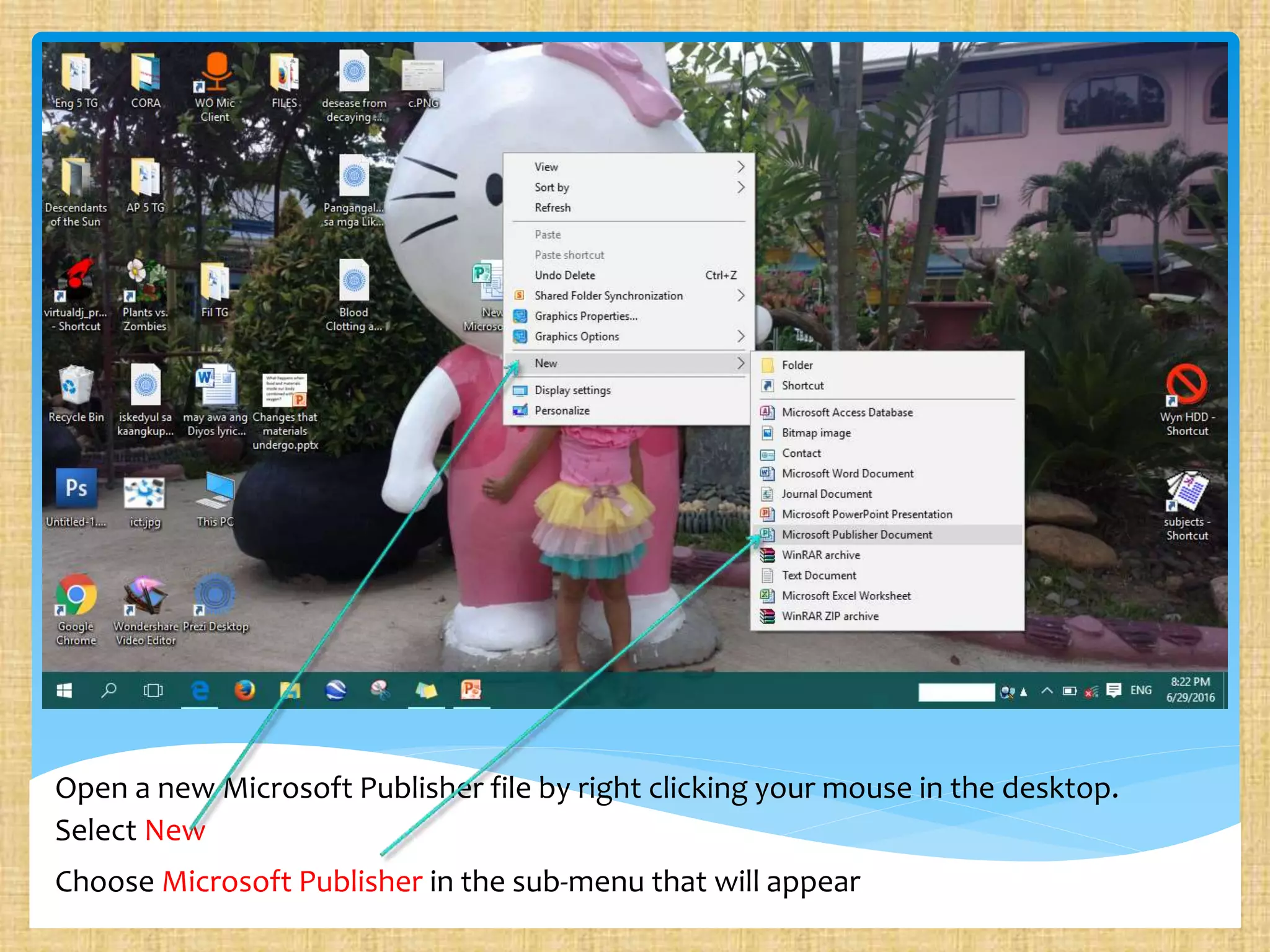
Open a new Microsoft Publisher file by right clicking your mouse in the desktop.
Select New
Choose Microsoft Publisher in the sub-menu that will appear
Rename your new file as TARPAPEL
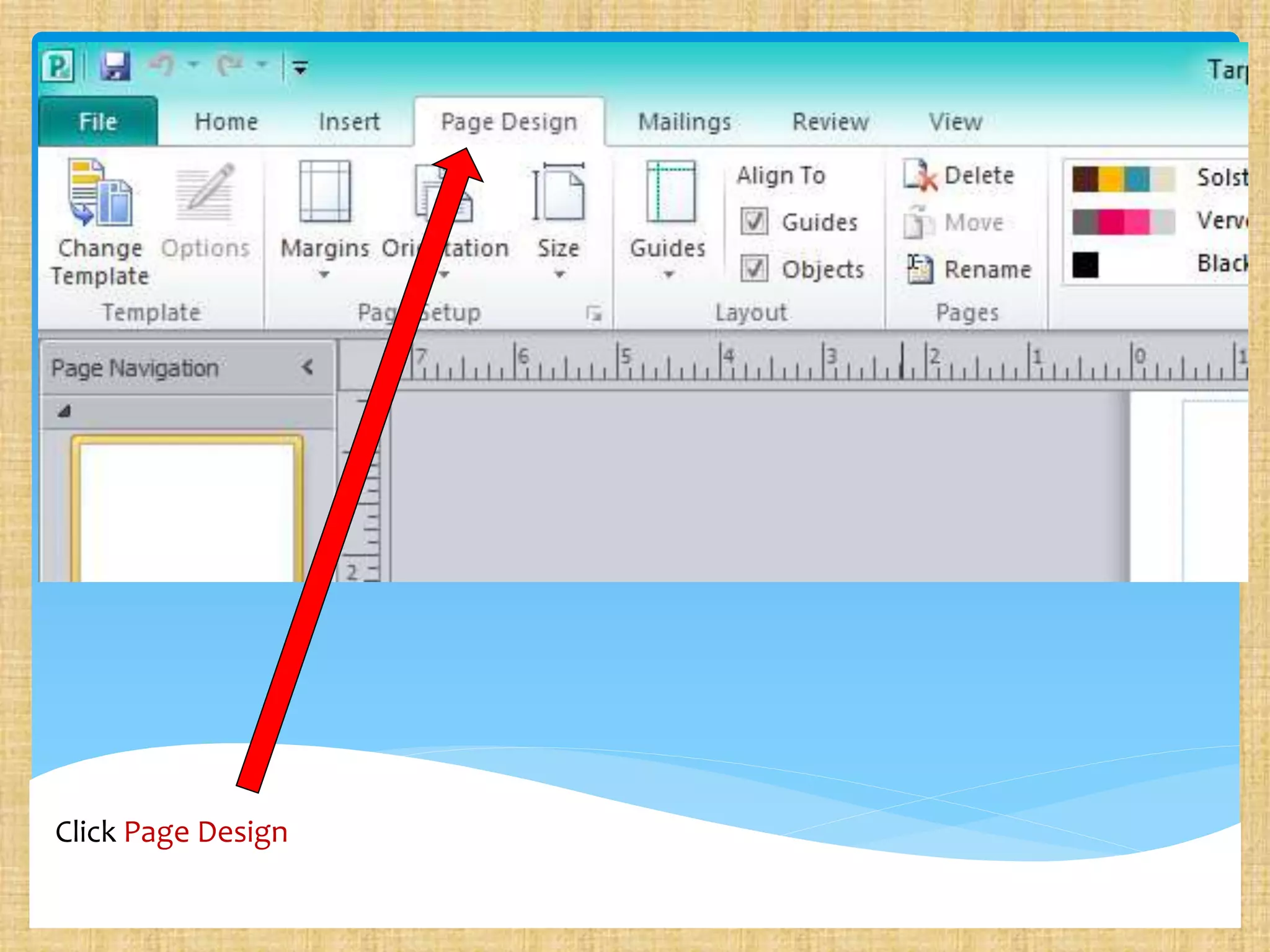
Click Page Design
Click Size
Click Page Setup
Change Width to 20 inches
Change Height to 16 inches then click OK
You now have a blank canvass
Click Insert then Picture
Select your desired picture/image and click Insert
Change the picture to your desired size.
You can also add text by clicking Insert Tab then Text Box
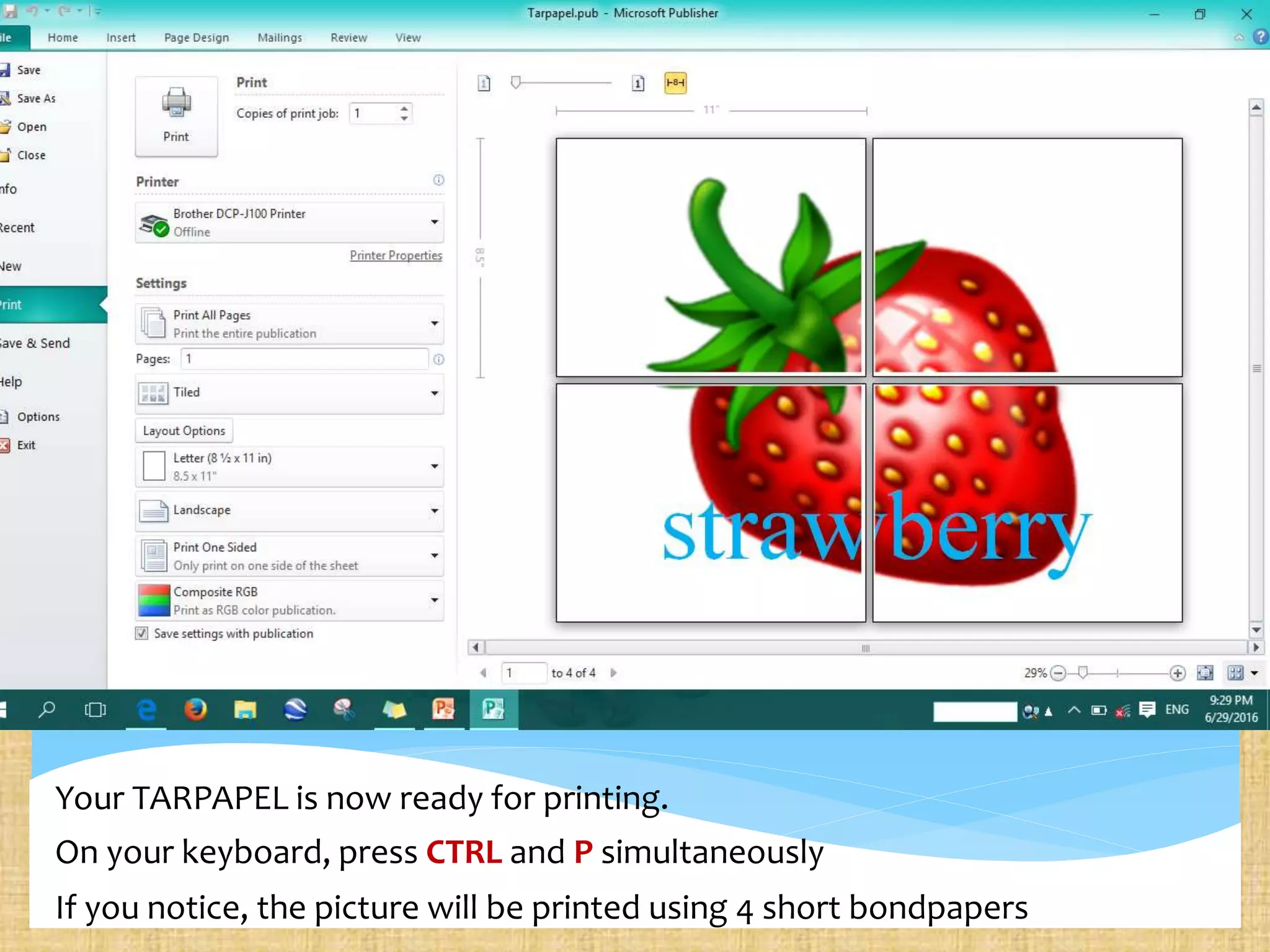
Your TARPAPEL is now ready for printing.
On your keyboard, press CTRL and P simultaneously
If you notice, the picture will be printed using 4 short bondpapers
How will you use this skill in your work?
Where can you use this in delivering
lessons?
What activities can you ask pupils to do
with this?
When is it most appropriate to use this?
Let us remember
In making a Tarpapel
1.Create a new Microsoft Publisher
document.
2.Adjust the desired size and the
orientation of the tarpapel.
3.Don’t forget to insert an image or text and
resize.
4.Set you Printer Preference as the final
step.
5.Print and enjoy teaching.
Success is no accident. It is
hard work, perseverance,
learning, studying, sacrifice
and most of all, love of what
you are doing or learning to
do.
Pele

How to make a tarpapel

  • 1.
  • 3.
    Respect each other Workquietly as you can Don’t hesitate to ask questions / assistance Be creative
  • 4.
    Open a newMicrosoft Publisher file by right clicking your mouse in the desktop. Select New Choose Microsoft Publisher in the sub-menu that will appear
  • 5.
    Rename your newfile as TARPAPEL
  • 6.
  • 7.
  • 8.
    Change Width to20 inches Change Height to 16 inches then click OK
  • 9.
    You now havea blank canvass Click Insert then Picture Select your desired picture/image and click Insert
  • 10.
    Change the pictureto your desired size. You can also add text by clicking Insert Tab then Text Box
  • 11.
    Your TARPAPEL isnow ready for printing. On your keyboard, press CTRL and P simultaneously If you notice, the picture will be printed using 4 short bondpapers
  • 12.
    How will youuse this skill in your work? Where can you use this in delivering lessons? What activities can you ask pupils to do with this? When is it most appropriate to use this?
  • 13.
    Let us remember Inmaking a Tarpapel 1.Create a new Microsoft Publisher document. 2.Adjust the desired size and the orientation of the tarpapel. 3.Don’t forget to insert an image or text and resize. 4.Set you Printer Preference as the final step. 5.Print and enjoy teaching.
  • 14.
    Success is noaccident. It is hard work, perseverance, learning, studying, sacrifice and most of all, love of what you are doing or learning to do. Pele

Editor's Notes

  • #2 Tarpapel- tarpaulin and paper Hindi na tayo pagpapawisan sa kaguguhit ng ating ihahandang leksyon, at hindi na lalaitin ng mga bata yong drawings natin. . Palakpak naman dyan
  • #3 Way back 2014, when I was appointed as teacher 1 in the Department of Education and was assigned at Maasin Elementary School, Ipil District, that’s 6km from the national highway and have to cross 2 spill ways that overflows when the sky is enrage.(palit kog bangka)
  • #4 Way back 2014, when I was appointed as teacher 1 in the Department of Education and was assigned at Maasin Elementary School, Ipil District, that’s 6km from the national highway and have to cross 2 spill ways that overflows when the sky is enrage.
  • #12 Show your sample
  • #13 How will you use this skill in your work? Where
  • #14 I believe that when you go back to your respective stations to teach, it will not be boring anymore. You are now equipped with this simple but helpful skill in making tarpapel. .
  • #15 I believe that when you go back to your respective stations to teach, it will not be boring anymore. You are now equipped with this simple but helpful skill in making tarpapel. .