



Office 2013 loves Web
     Developers
     Fabio Franzini
     MVP SharePoint, Senior Consultant & Trainer
     @franzinifabio

Template designed by
brought to you by
Agenda

Introduction
Document-based Apps
Mail Apps
Distribution
Introduction

               Introduction
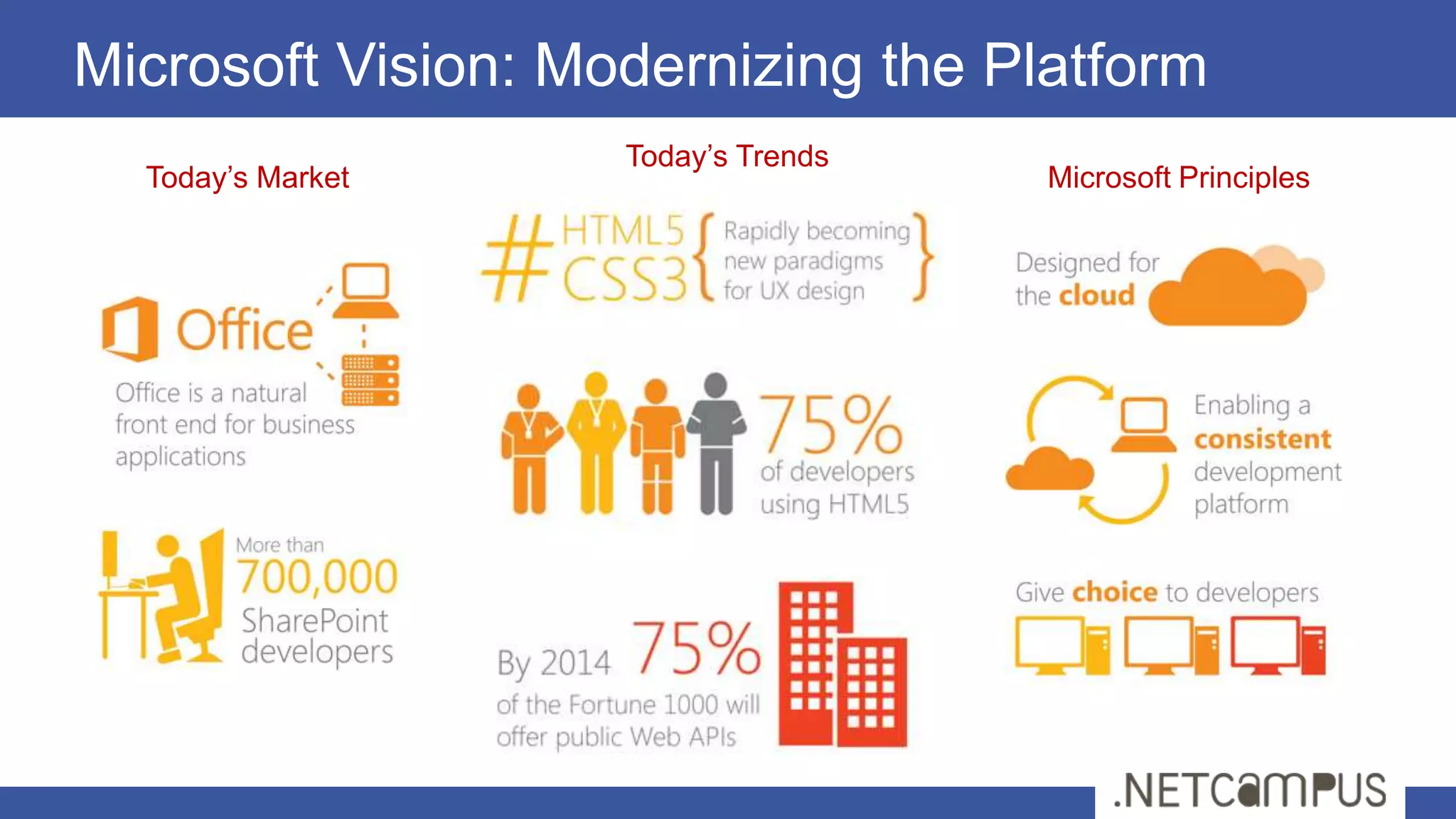
Microsoft Vision: Modernizing the Platform
                    Today’s Trends
  Today’s Market                     Microsoft Principles
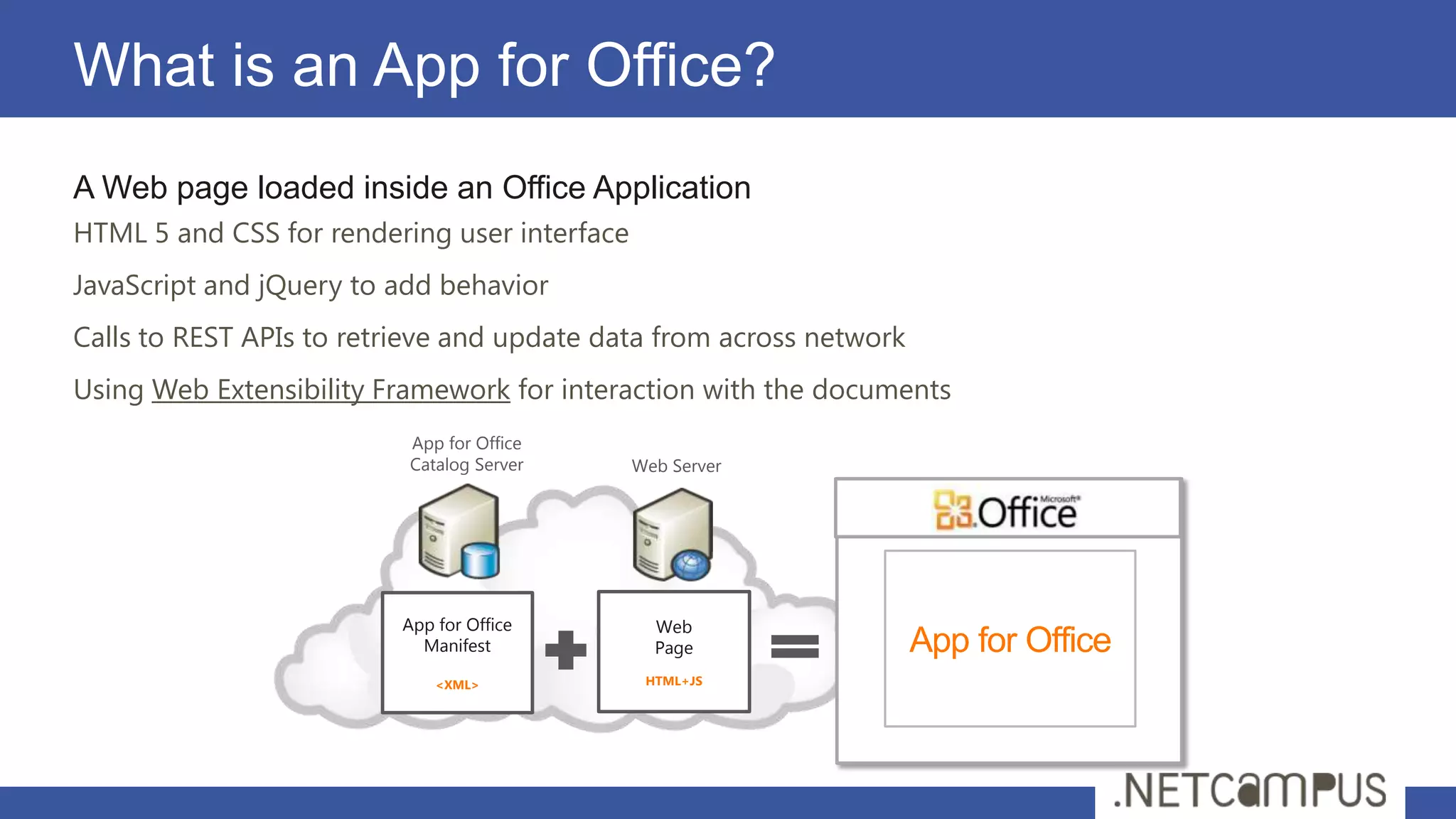
What is an App for Office?
A Web page loaded inside an Office Application
HTML 5 and CSS for rendering user interface
JavaScript and jQuery to add behavior
Calls to REST APIs to retrieve and update data from across network
Using Web Extensibility Framework for interaction with the documents
                          App for Office
                          Catalog Server      Web Server


                          App for Office        Web
                            Manifest            Page                 App for Office
                              <XML>            HTML+JS
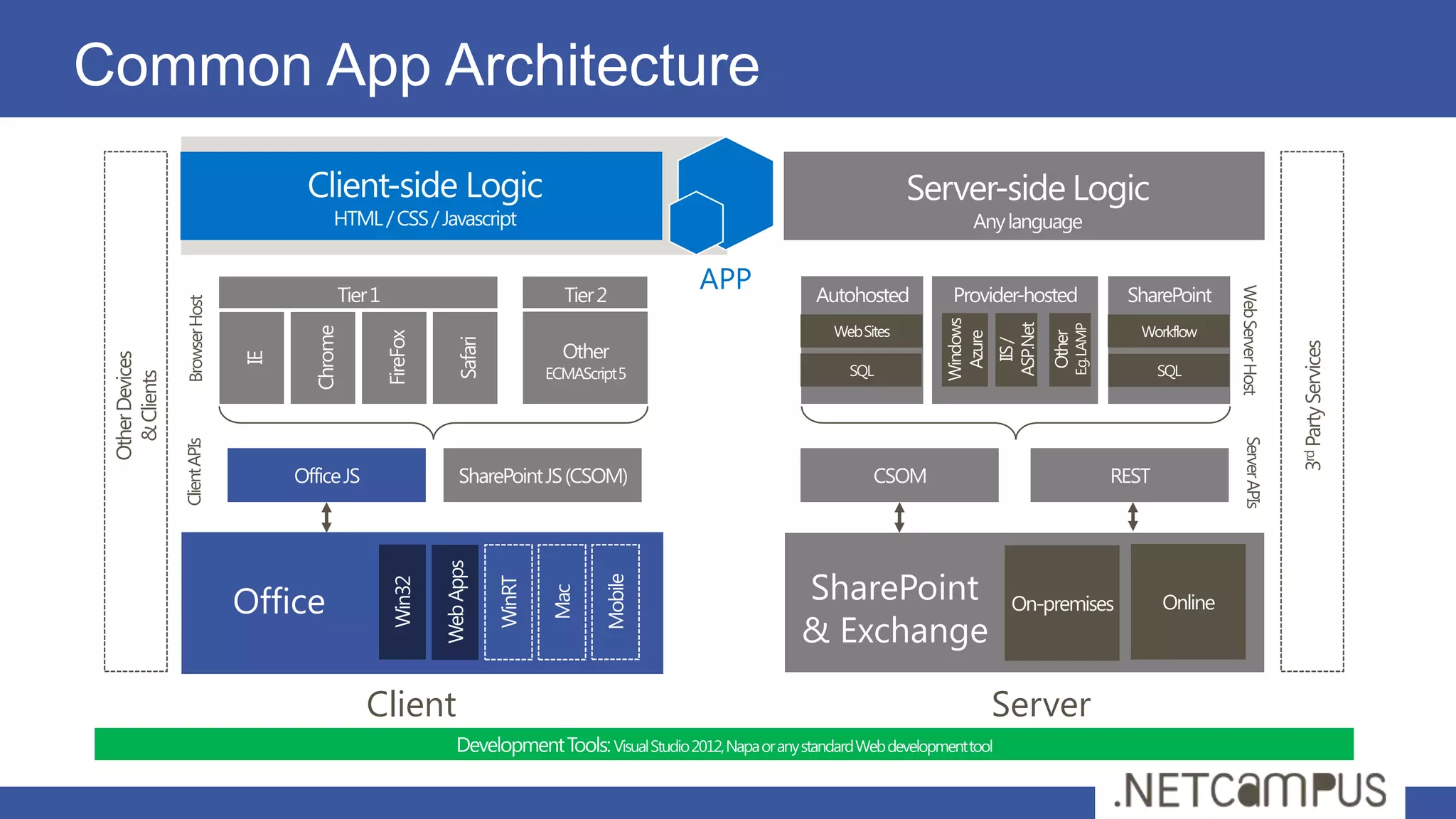
Common App Architecture


                                                  APP


                                                                              Web Server Host
                 Browser Host


                                                                                                3rd Party Services
 Other Devices
   & Clients


                                                                                Server APIs
                 Client APIs


                                Office                  SharePoint
                                                        & Exchange

                                         Client                      Server
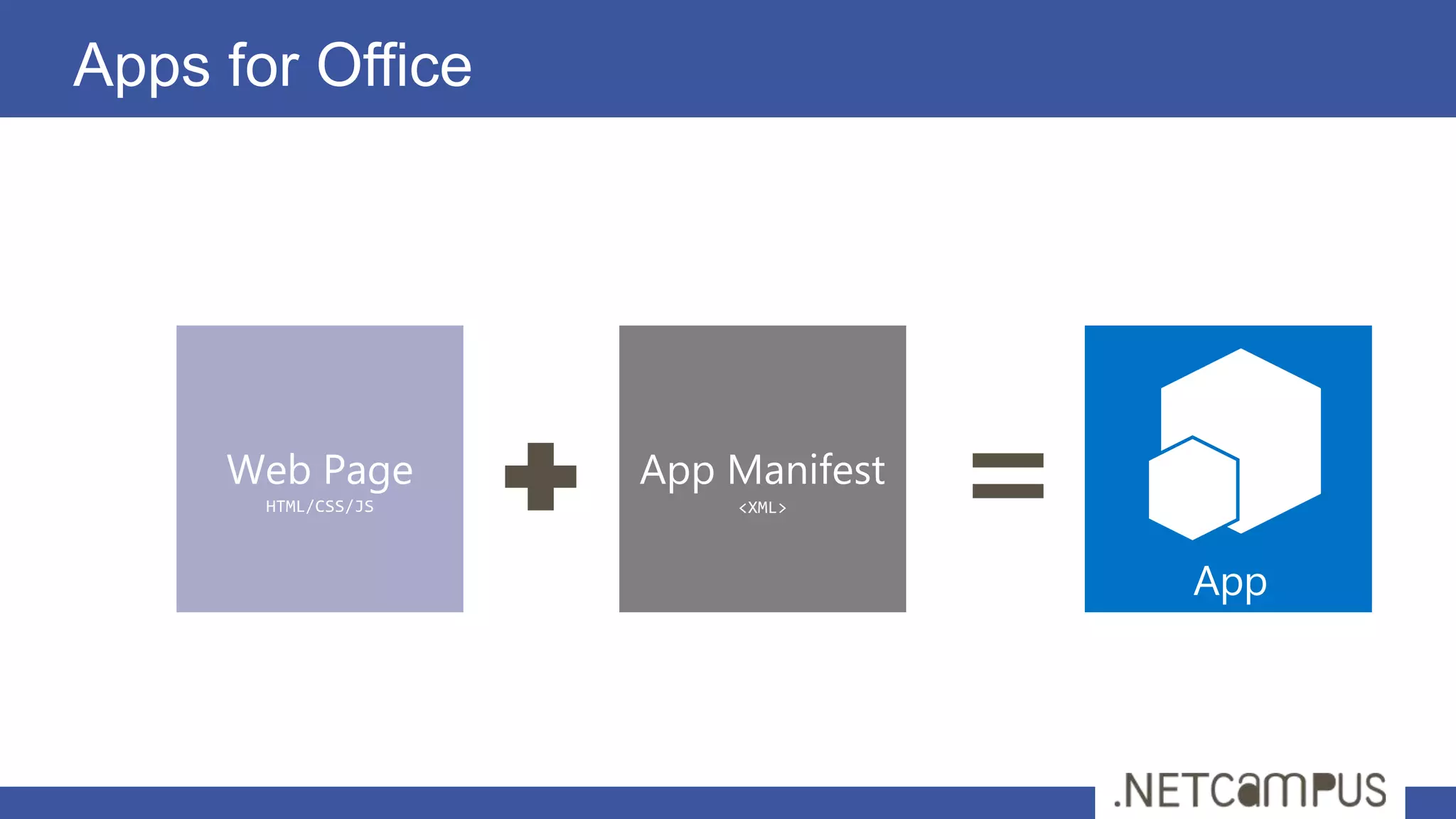
Apps for Office


     Web Page        App Manifest
       HTML/CSS/JS       <XML>


                                    App
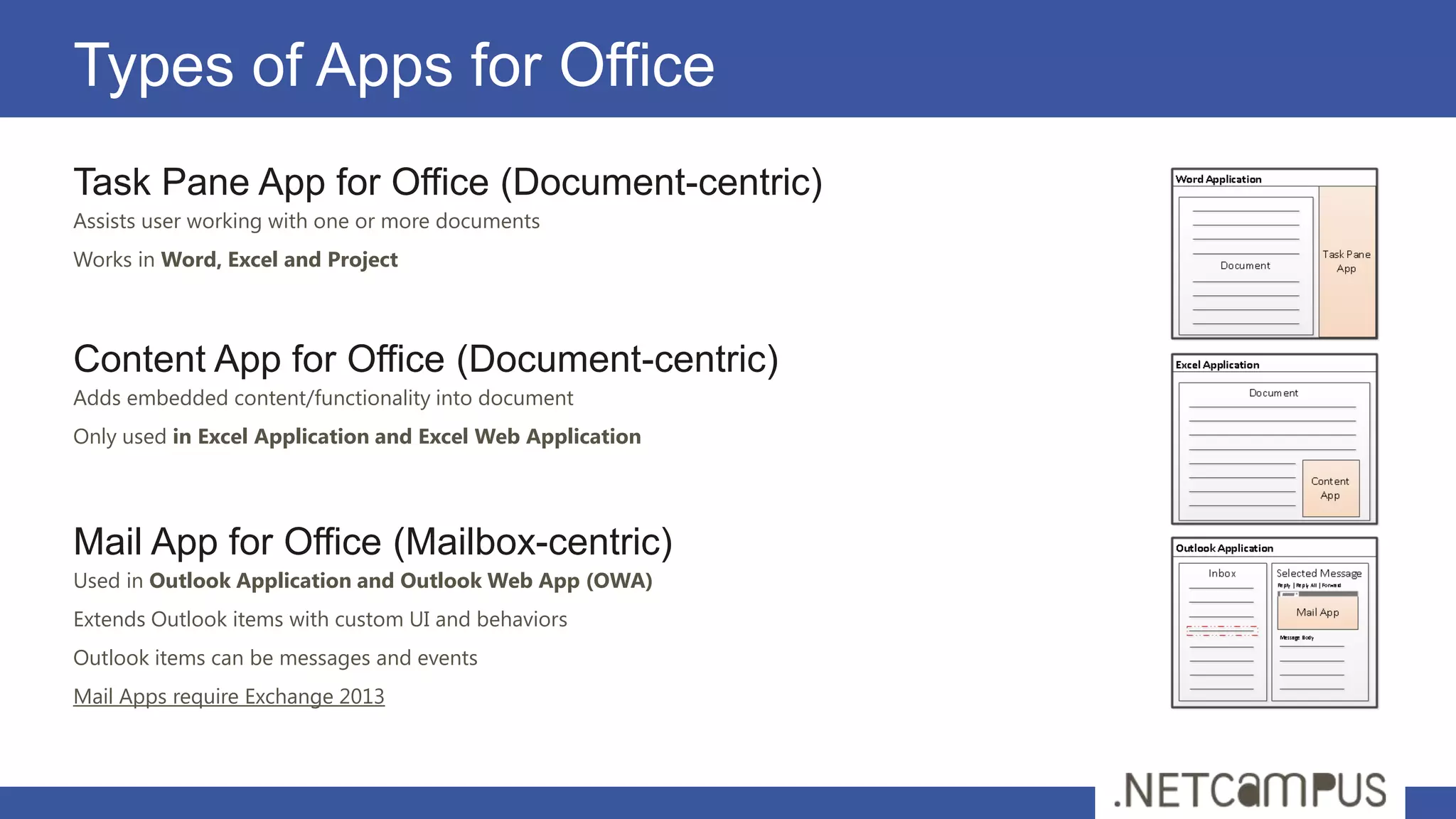
Types of Apps for Office
Task Pane App for Office (Document-centric)
Assists user working with one or more documents
Works in Word, Excel and Project


Content App for Office (Document-centric)
Adds embedded content/functionality into document
Only used in Excel Application and Excel Web Application


Mail App for Office (Mailbox-centric)
Used in Outlook Application and Outlook Web App (OWA)
Extends Outlook items with custom UI and behaviors
Outlook items can be messages and events
Mail Apps require Exchange 2013
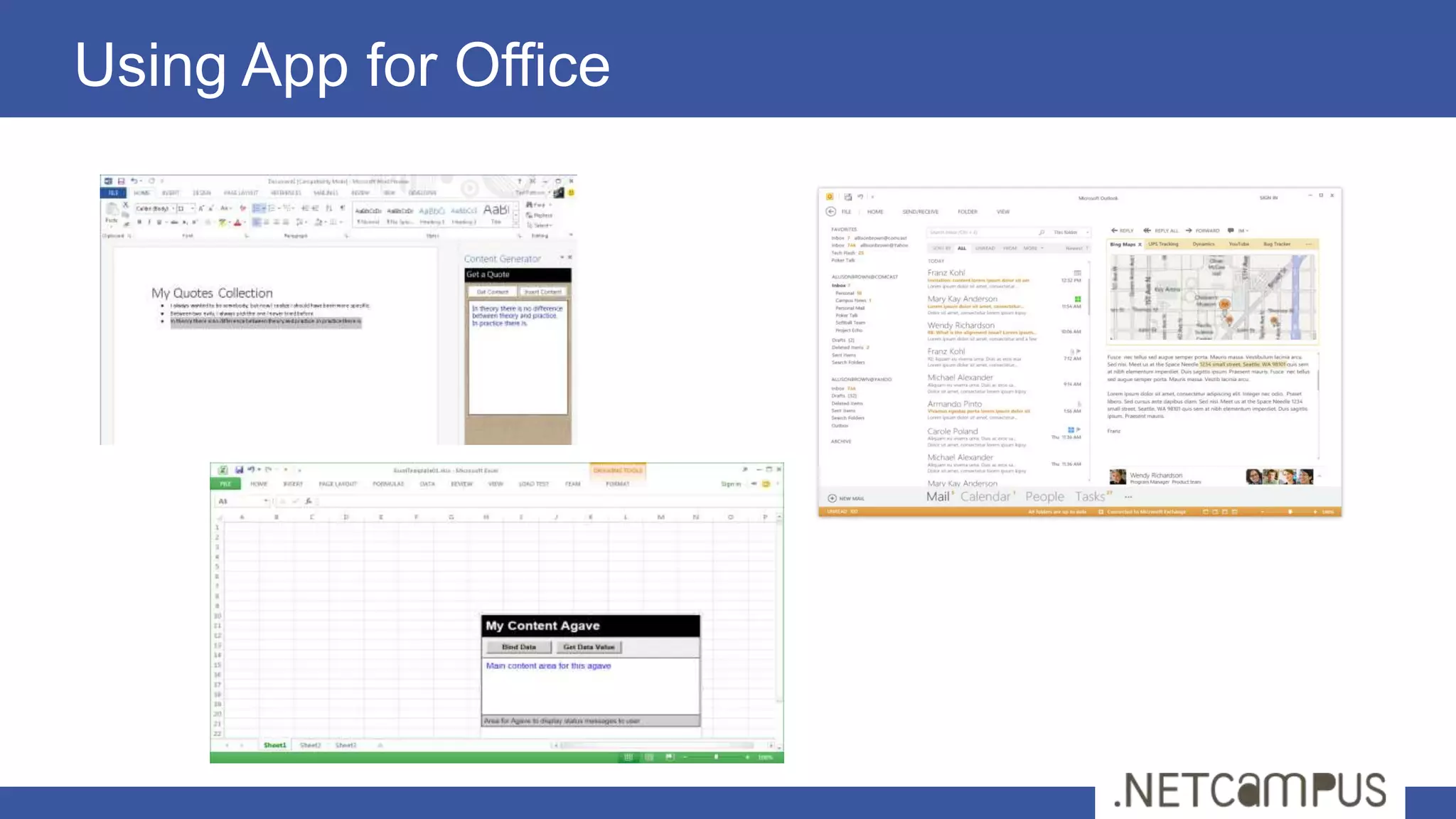
Using App for Office
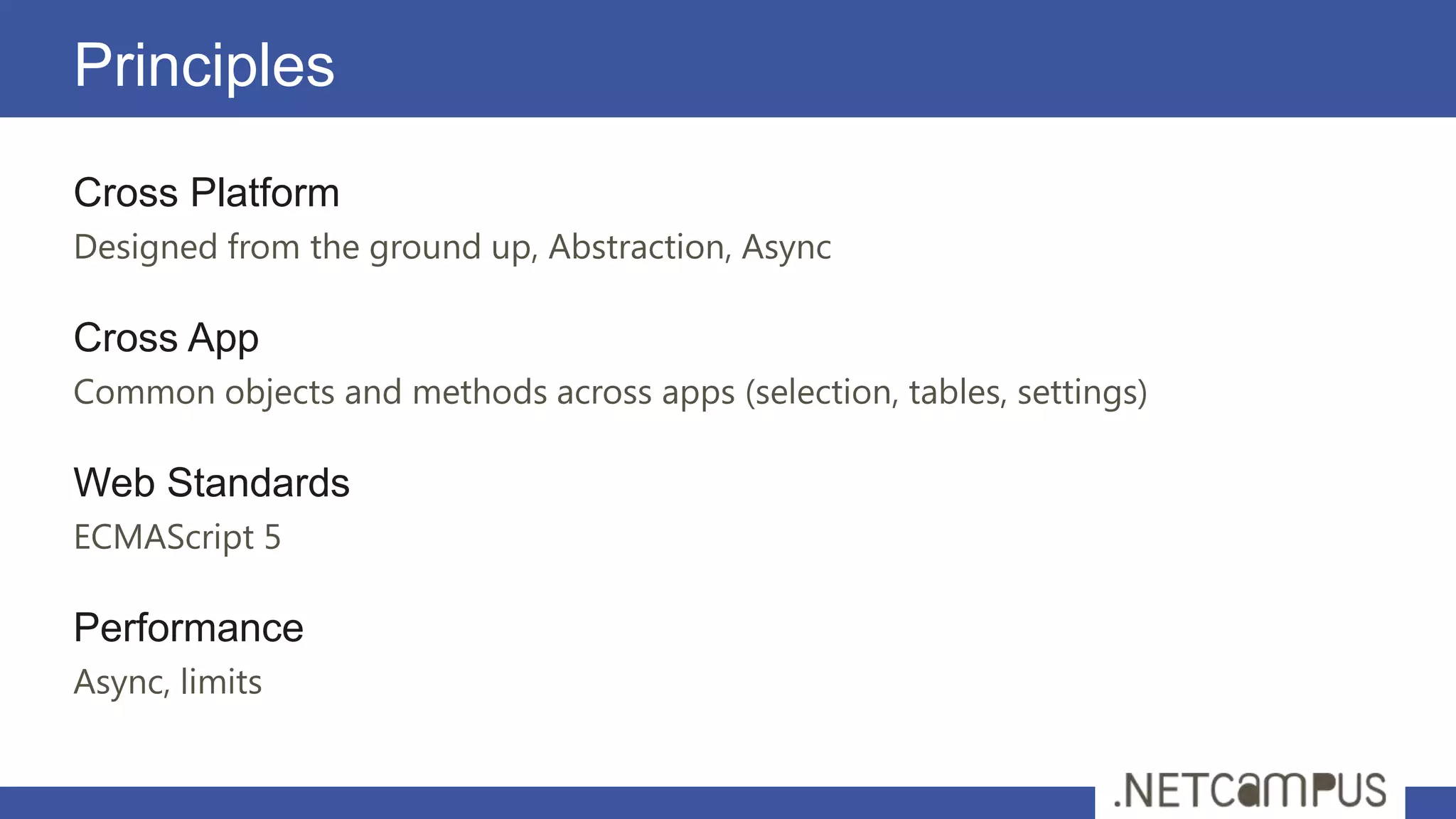
Principles
Cross Platform
Designed from the ground up, Abstraction, Async

Cross App
Common objects and methods across apps (selection, tables, settings)

Web Standards
ECMAScript 5

Performance
Async, limits
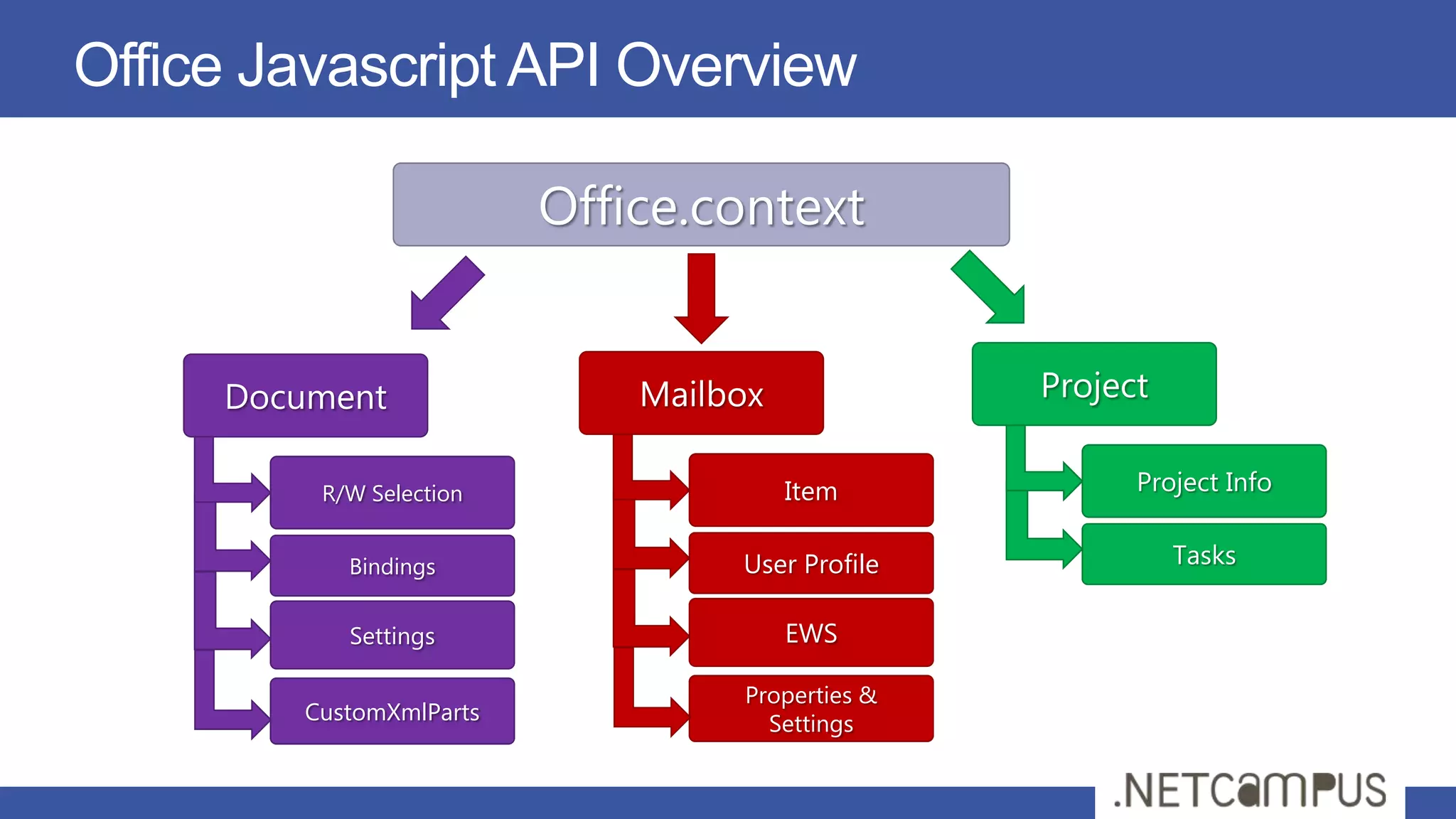
Office Javascript API Overview

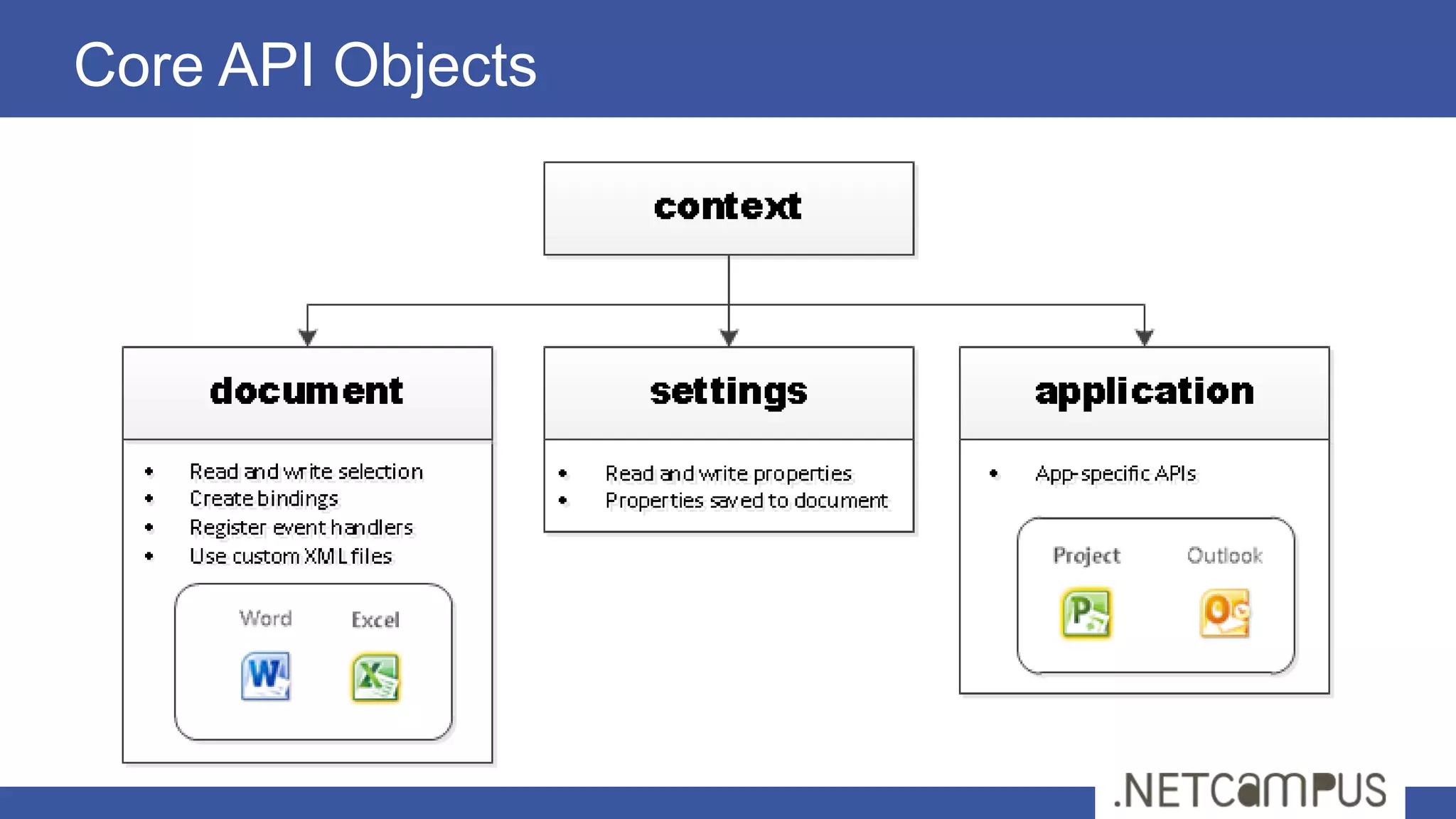
                         Office.context


     Document                Mailbox             Project

         R/W Selection                 Item            Project Info


           Bindings               User Profile             Tasks

           Settings                    EWS

                                  Properties &
        CustomXmlParts              Settings
Document-based Apps
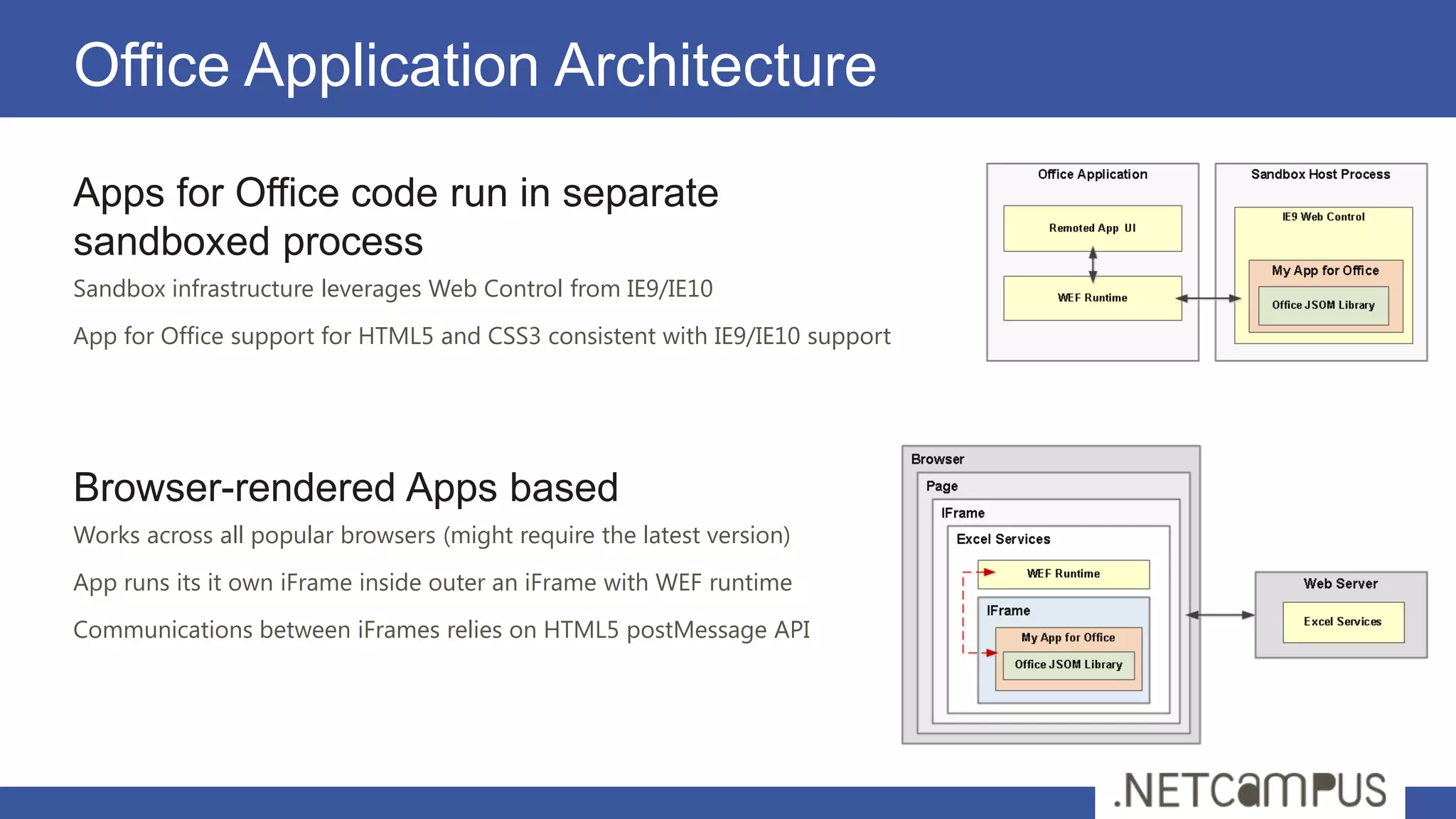
Office Application Architecture
Apps for Office code run in separate
sandboxed process
Sandbox infrastructure leverages Web Control from IE9/IE10
App for Office support for HTML5 and CSS3 consistent with IE9/IE10 support


Browser-rendered Apps based
Works across all popular browsers (might require the latest version)
App runs its it own iFrame inside outer an iFrame with WEF runtime
Communications between iFrames relies on HTML5 postMessage API
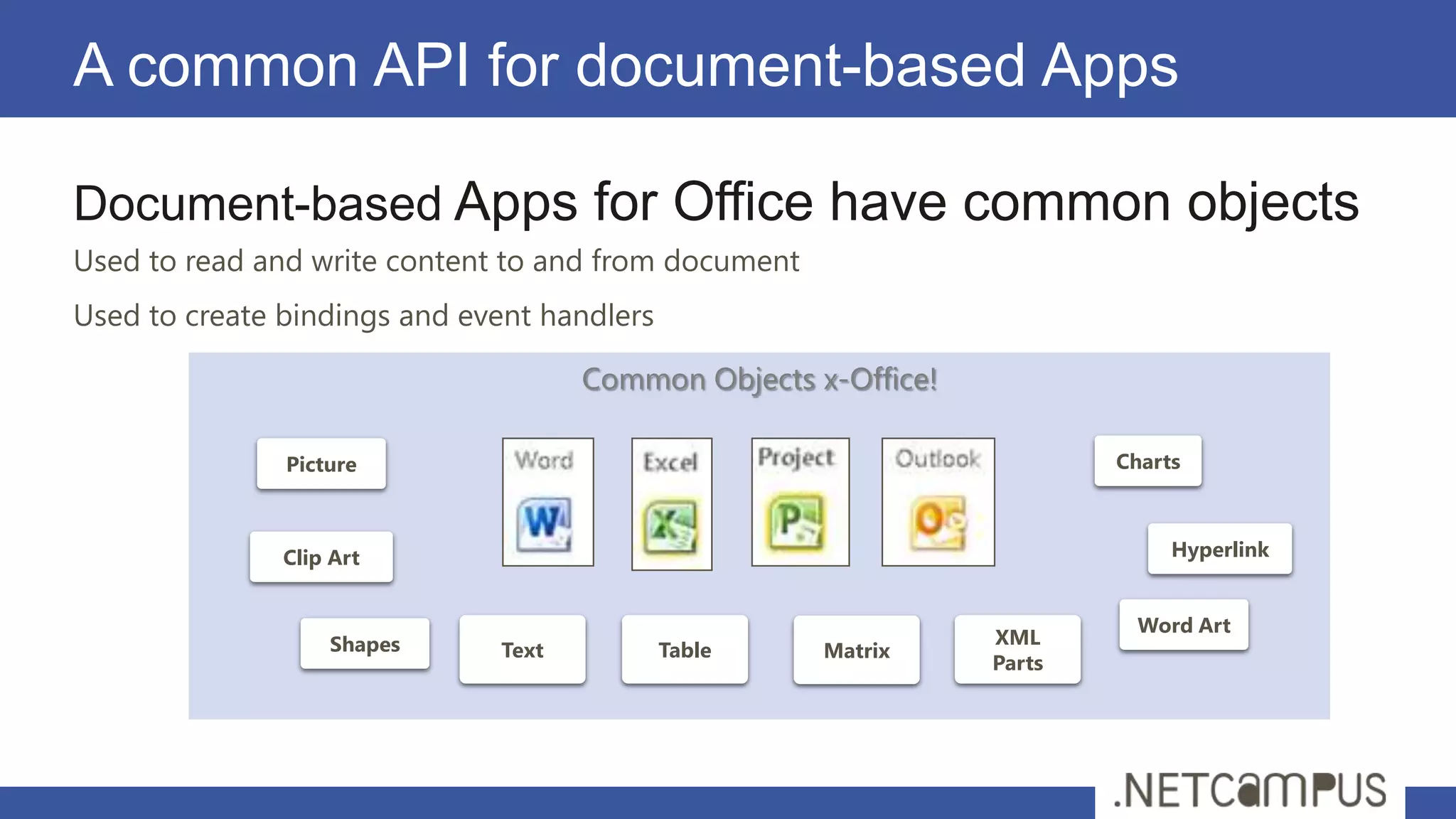
A common API for document-based Apps

Document-based Apps for Office have common objects
Used to read and write content to and from document
Used to create bindings and event handlers

                                     Common Objects x-Office!

               Picture                                                  Charts


               Clip Art                                                      Hyperlink


                                                                         Word Art
                   Shapes                                       XML
                              Text           Table    Matrix
                                                                Parts
Core API Objects
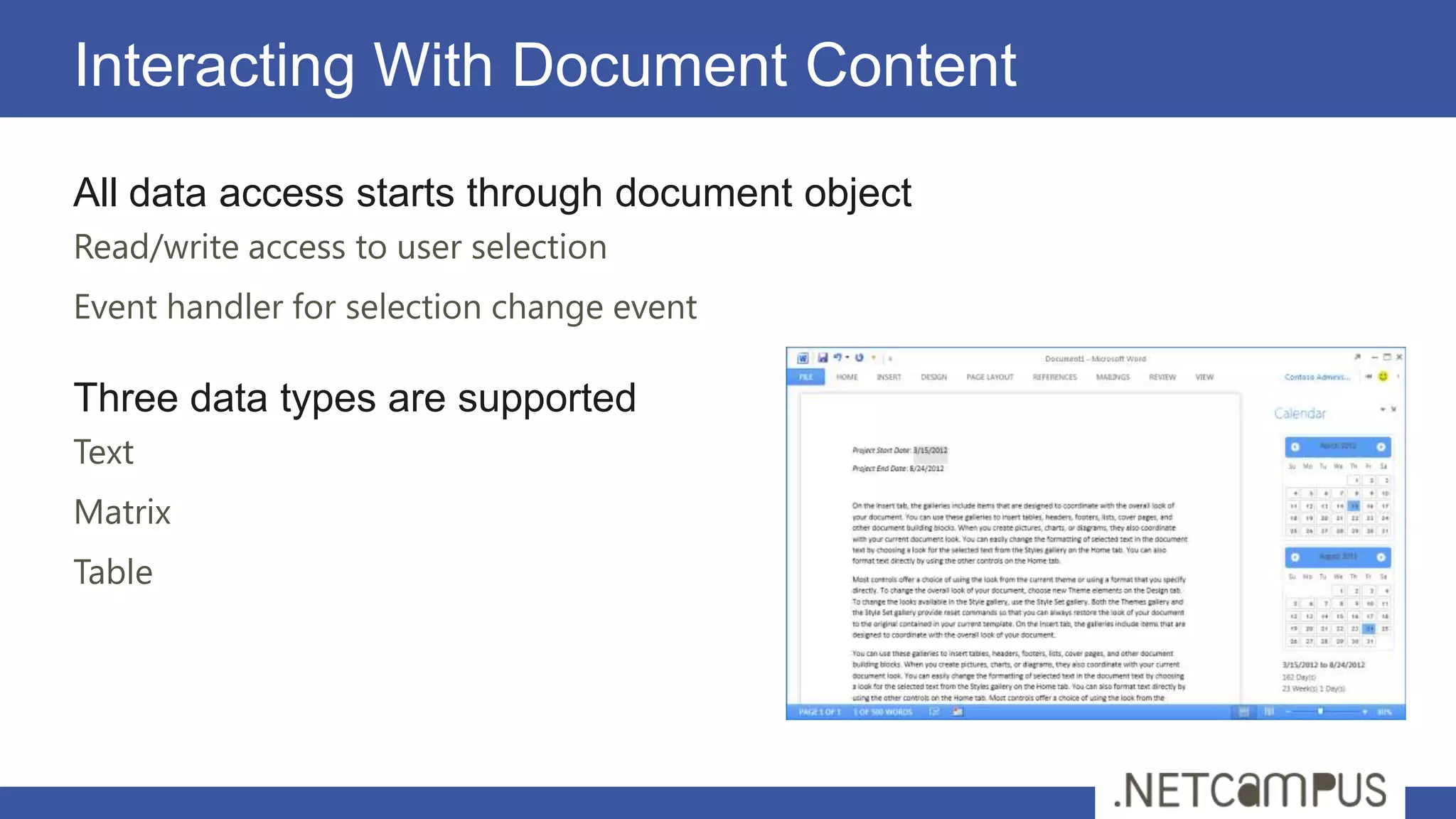
Interacting With Document Content
All data access starts through document object
Read/write access to user selection
Event handler for selection change event

Three data types are supported
Text
Matrix
Table
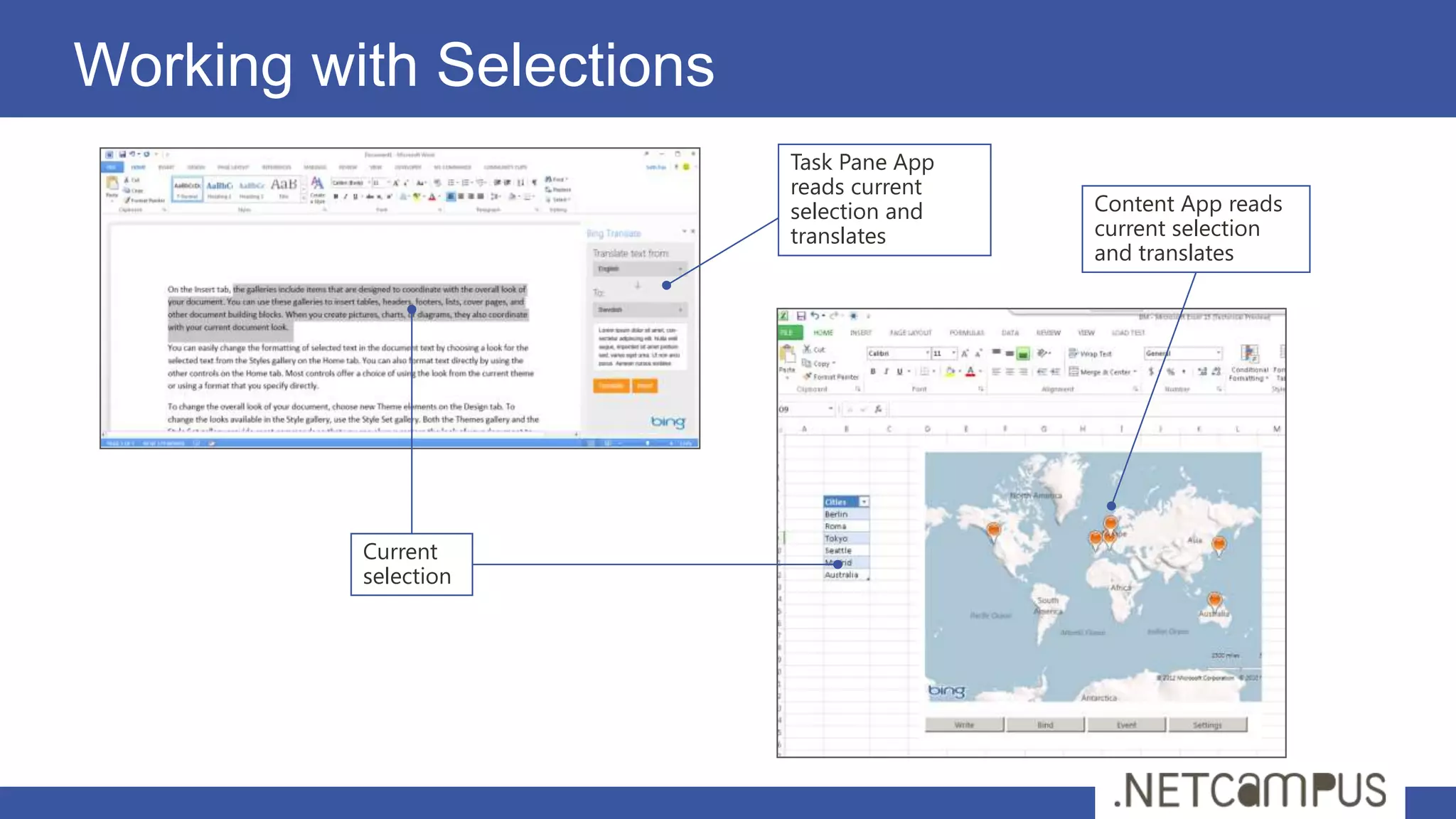
Working with Selections
                          Task Pane App
                          reads current
                          selection and   Content App reads
                          translates      current selection
                                          and translates


          Current
          selection
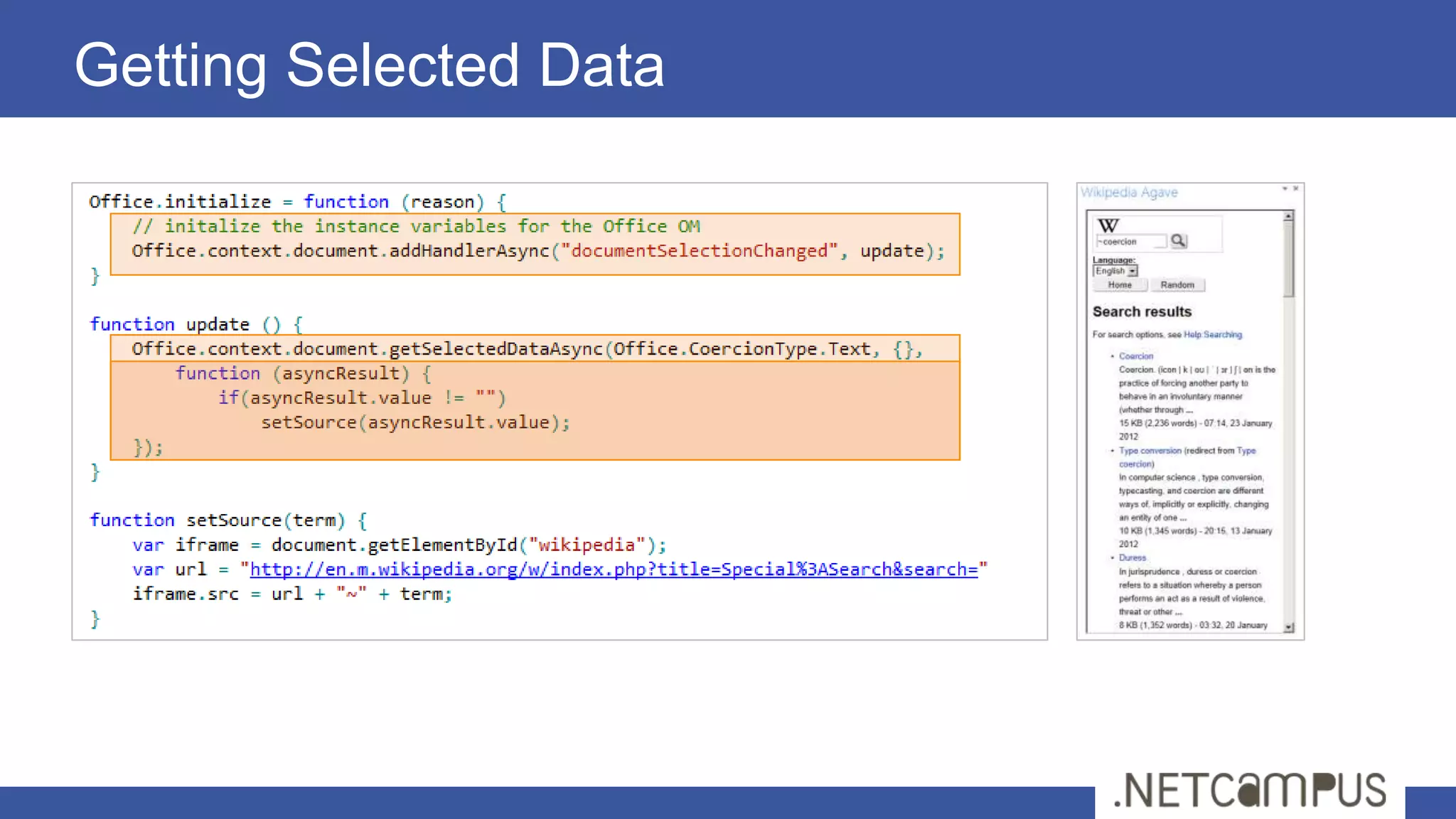
Getting Selected Data
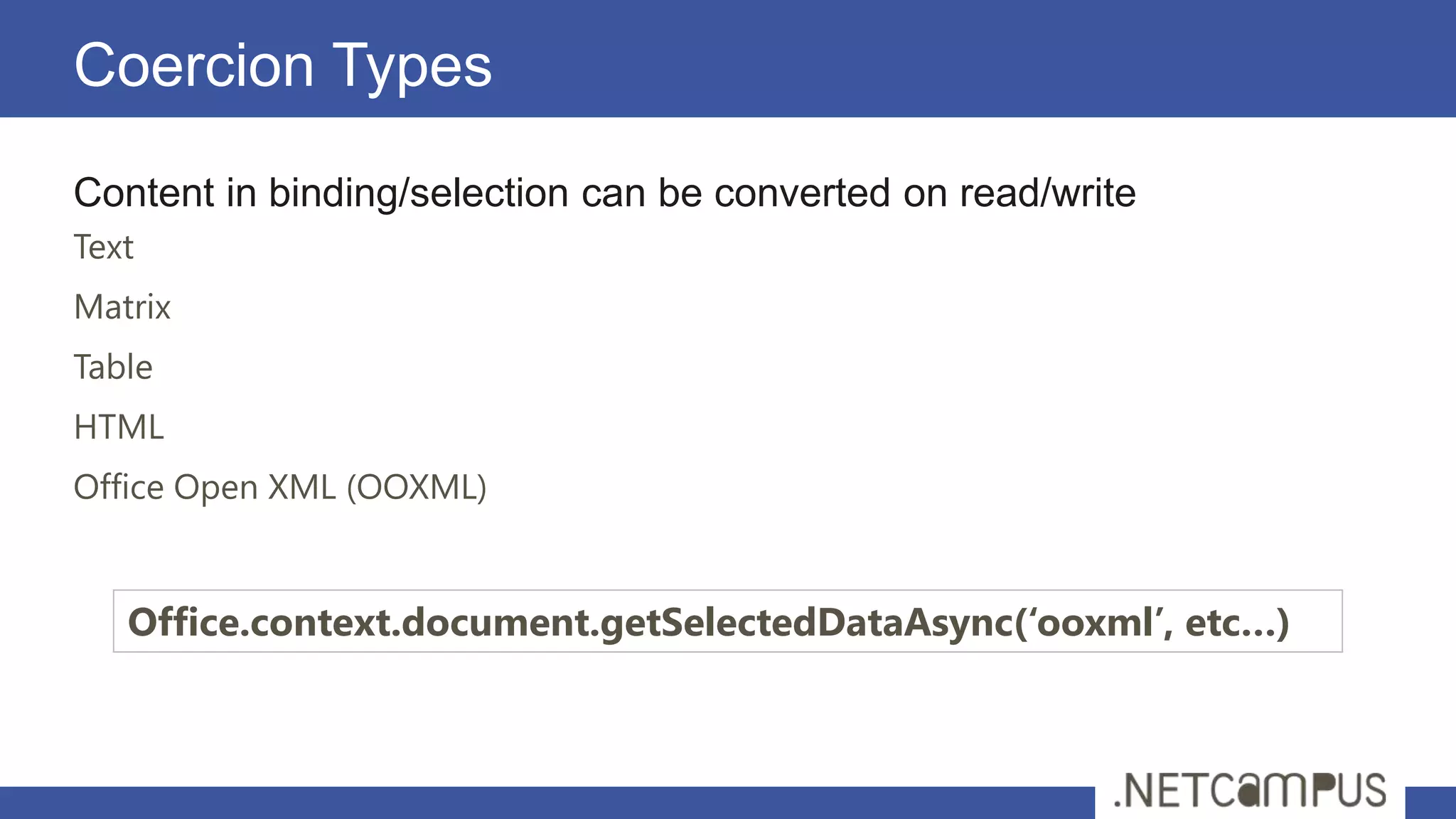
Coercion Types
Content in binding/selection can be converted on read/write
Text
Matrix
Table
HTML
Office Open XML (OOXML)


   Office.context.document.getSelectedDataAsync(‘ooxml’, etc…)
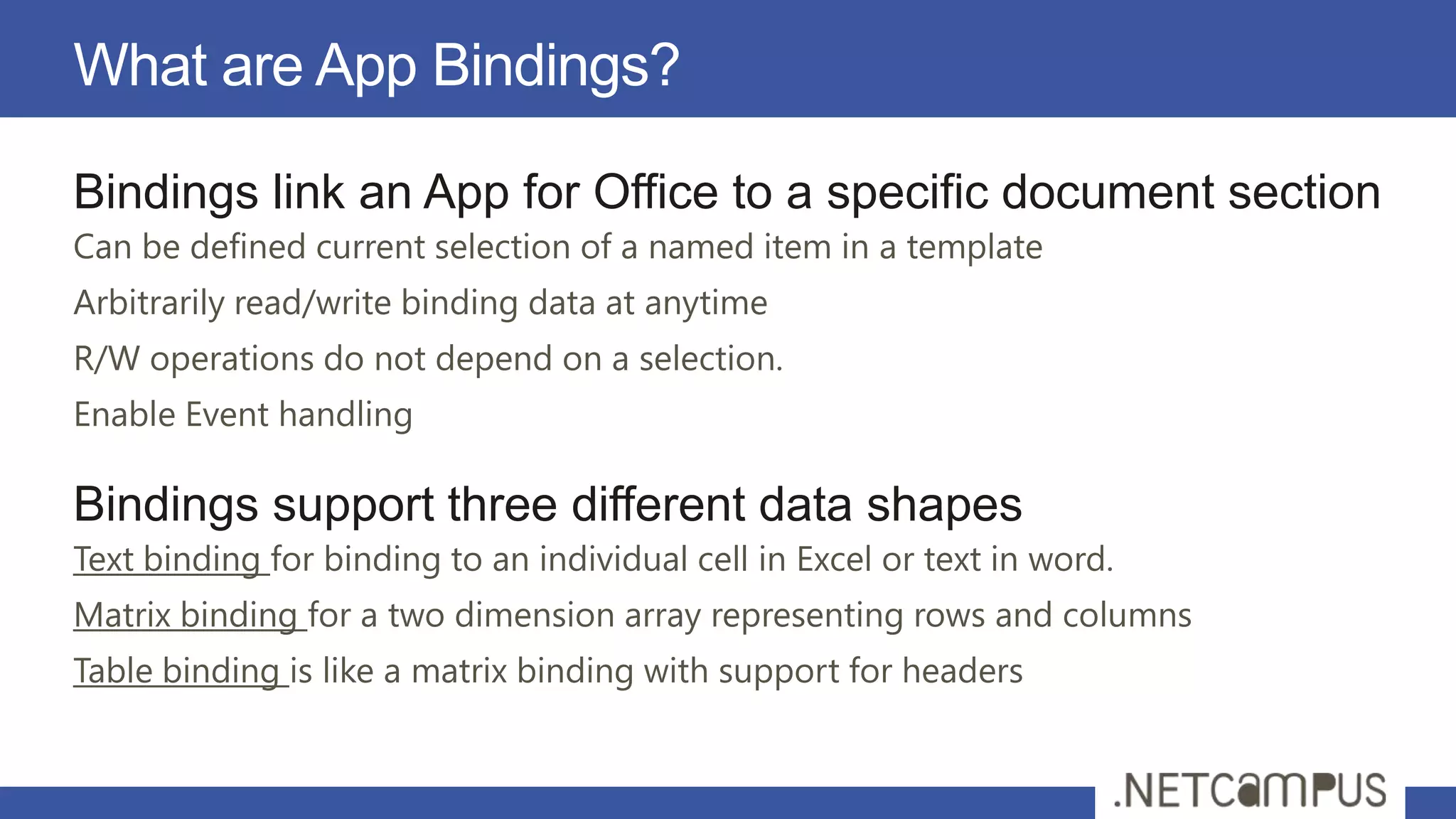
What are App Bindings?

Bindings link an App for Office to a specific document section
Can be defined current selection of a named item in a template
Arbitrarily read/write binding data at anytime
R/W operations do not depend on a selection.
Enable Event handling

Bindings support three different data shapes
Text binding for binding to an individual cell in Excel or text in word.
Matrix binding for a two dimension array representing rows and columns
Table binding is like a matrix binding with support for headers
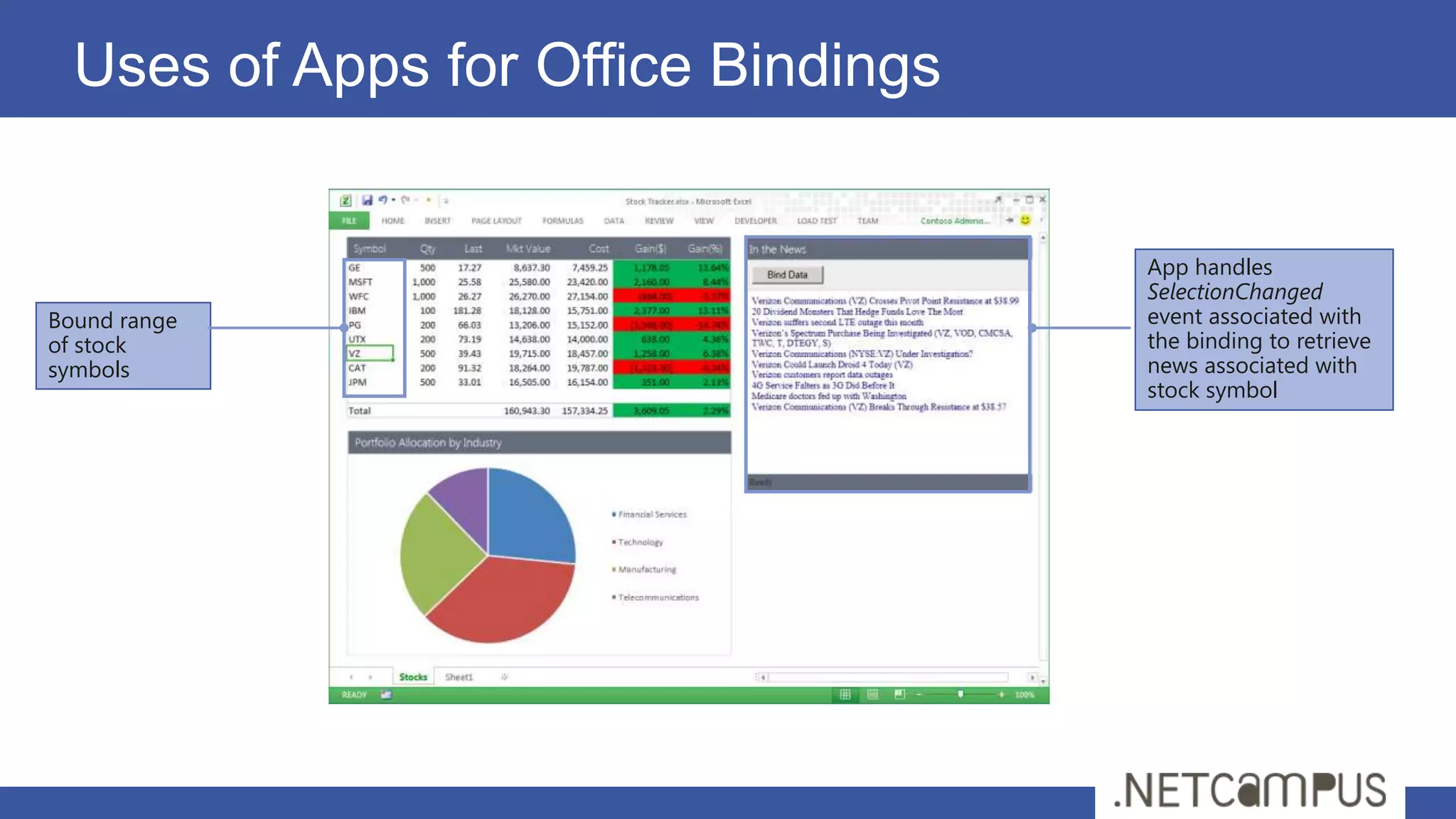
Uses of Apps for Office Bindings


                                     App handles
                                     SelectionChanged
Bound range                          event associated with
of stock                             the binding to retrieve
symbols                              news associated with
                                     stock symbol
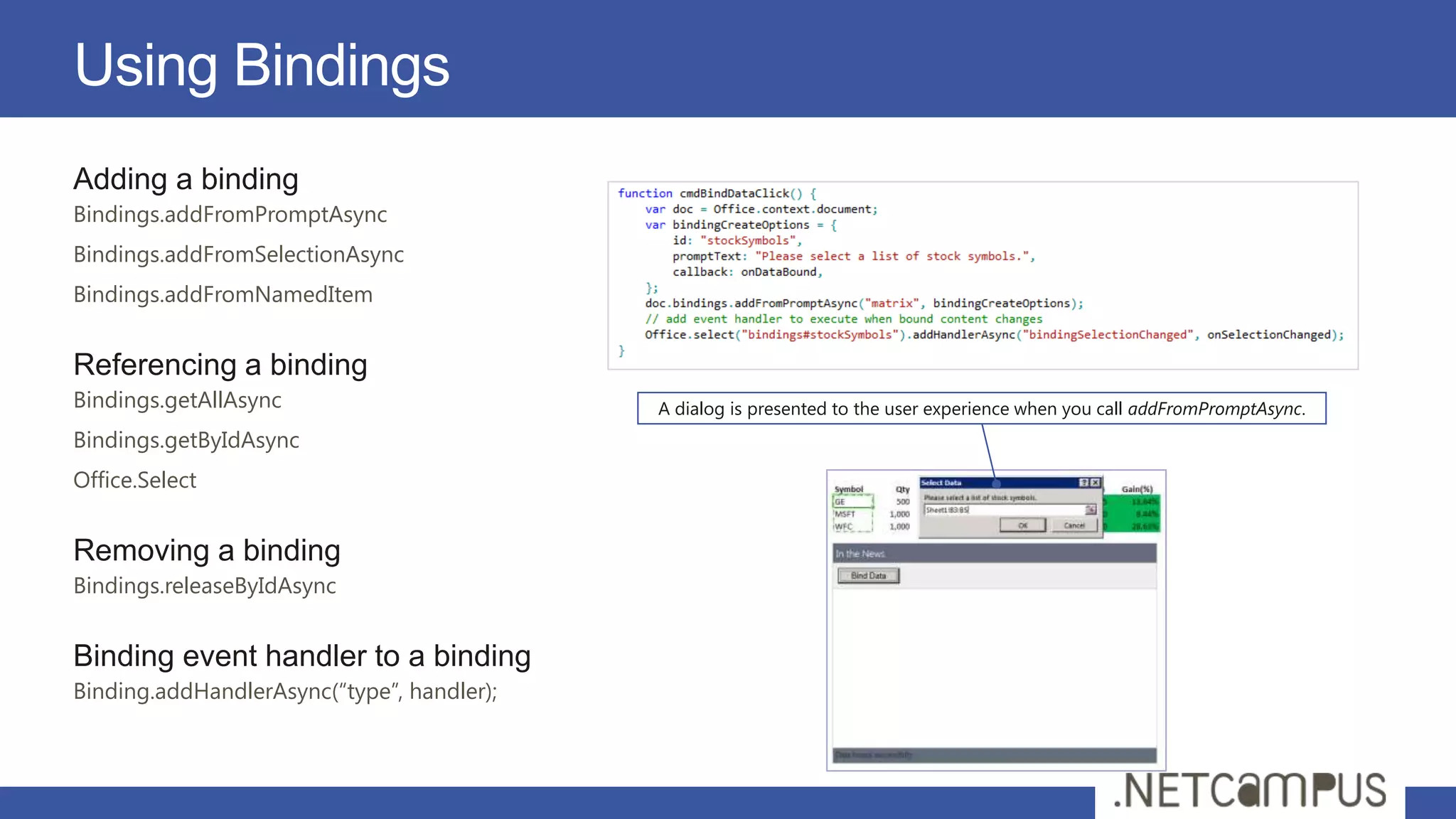
Using Bindings
Adding a binding
Bindings.addFromPromptAsync
Bindings.addFromSelectionAsync
Bindings.addFromNamedItem


Referencing a binding
Bindings.getAllAsync                        A dialog is presented to the user experience when you call addFromPromptAsync.
Bindings.getByIdAsync
Office.Select


Removing a binding
Bindings.releaseByIdAsync


Binding event handler to a binding
Binding.addHandlerAsync(“type”, handler);
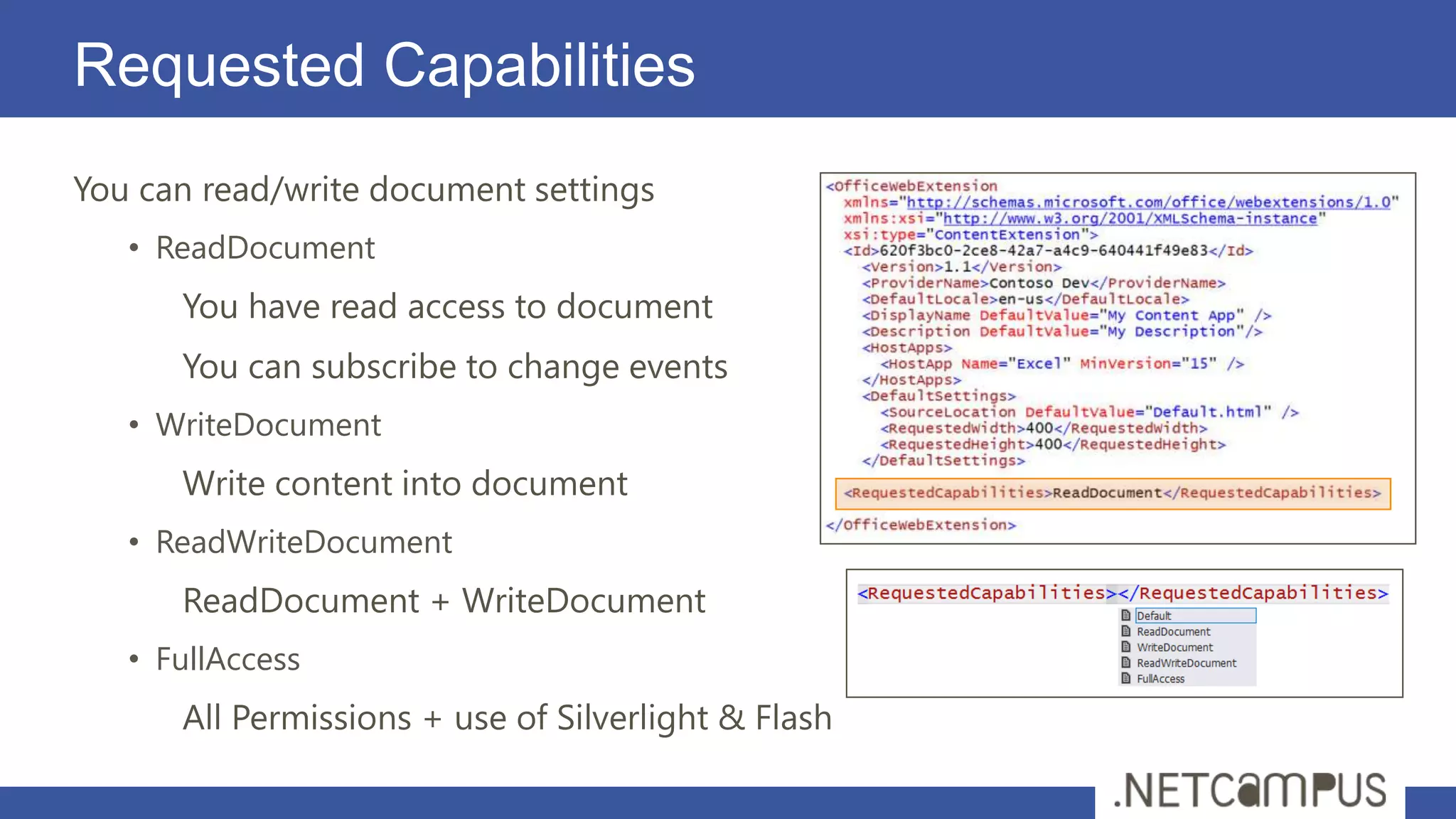
Requested Capabilities
You can read/write document settings
   • ReadDocument
      You have read access to document
      You can subscribe to change events
   • WriteDocument
      Write content into document
   • ReadWriteDocument
      ReadDocument + WriteDocument
   • FullAccess
      All Permissions + use of Silverlight & Flash
demo
Mail Apps
Mail Apps
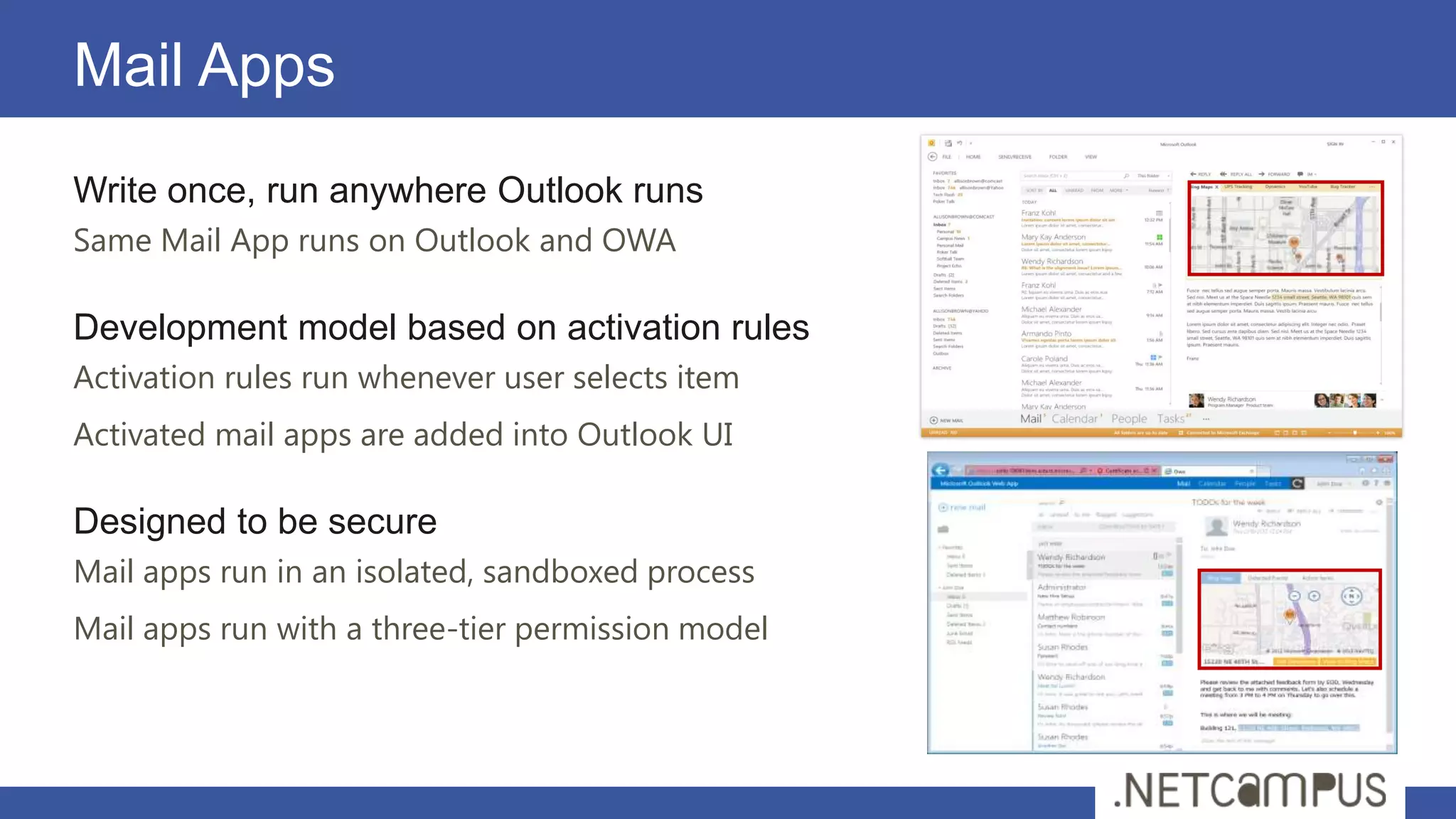
Write once, run anywhere Outlook runs
Same Mail App runs on Outlook and OWA

Development model based on activation rules
Activation rules run whenever user selects item
Activated mail apps are added into Outlook UI

Designed to be secure
Mail apps run in an isolated, sandboxed process
Mail apps run with a three-tier permission model
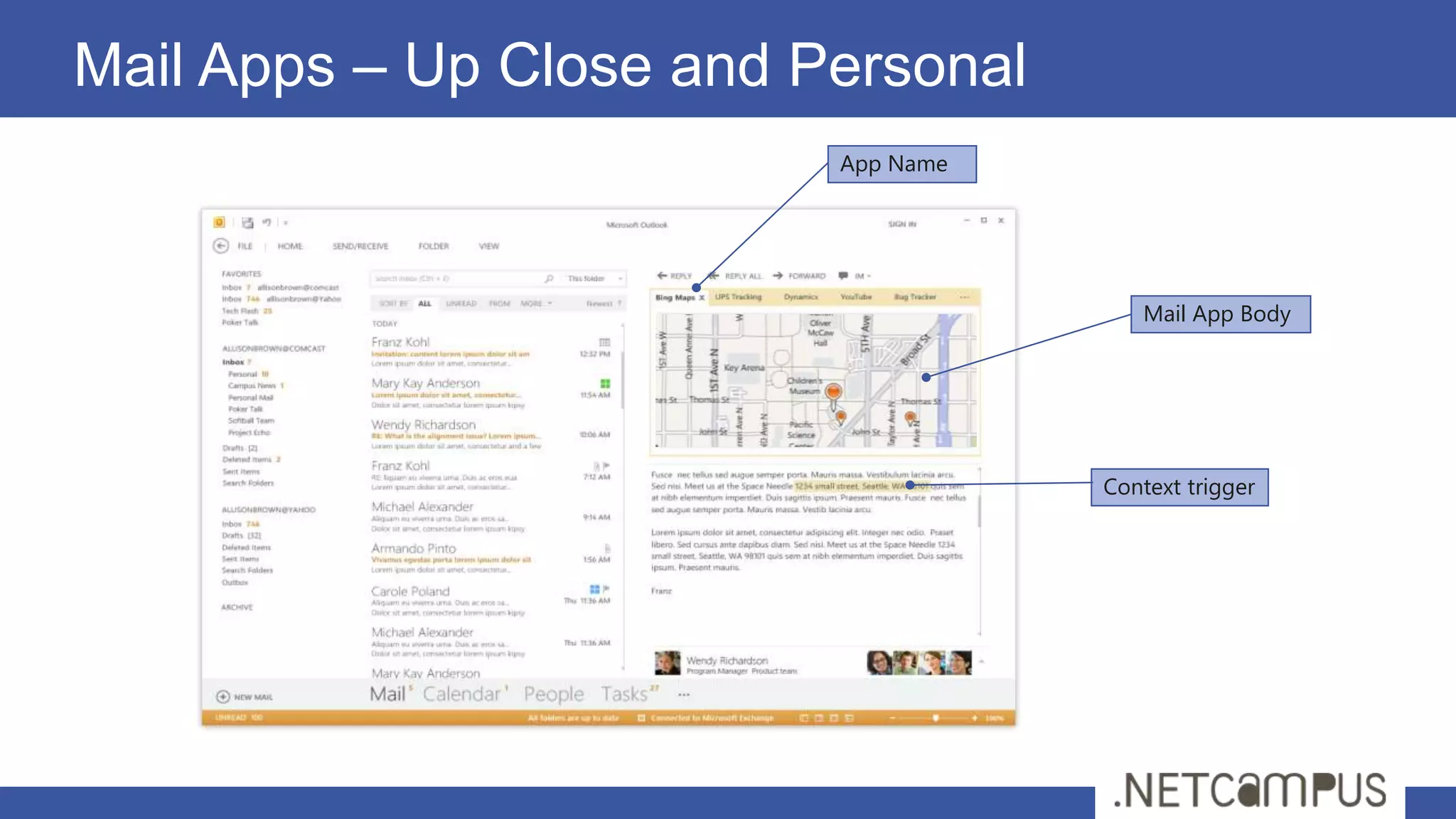
Mail Apps – Up Close and Personal
                          App Name


                                        Mail App Body


                                     Context trigger
Mail App Hosting
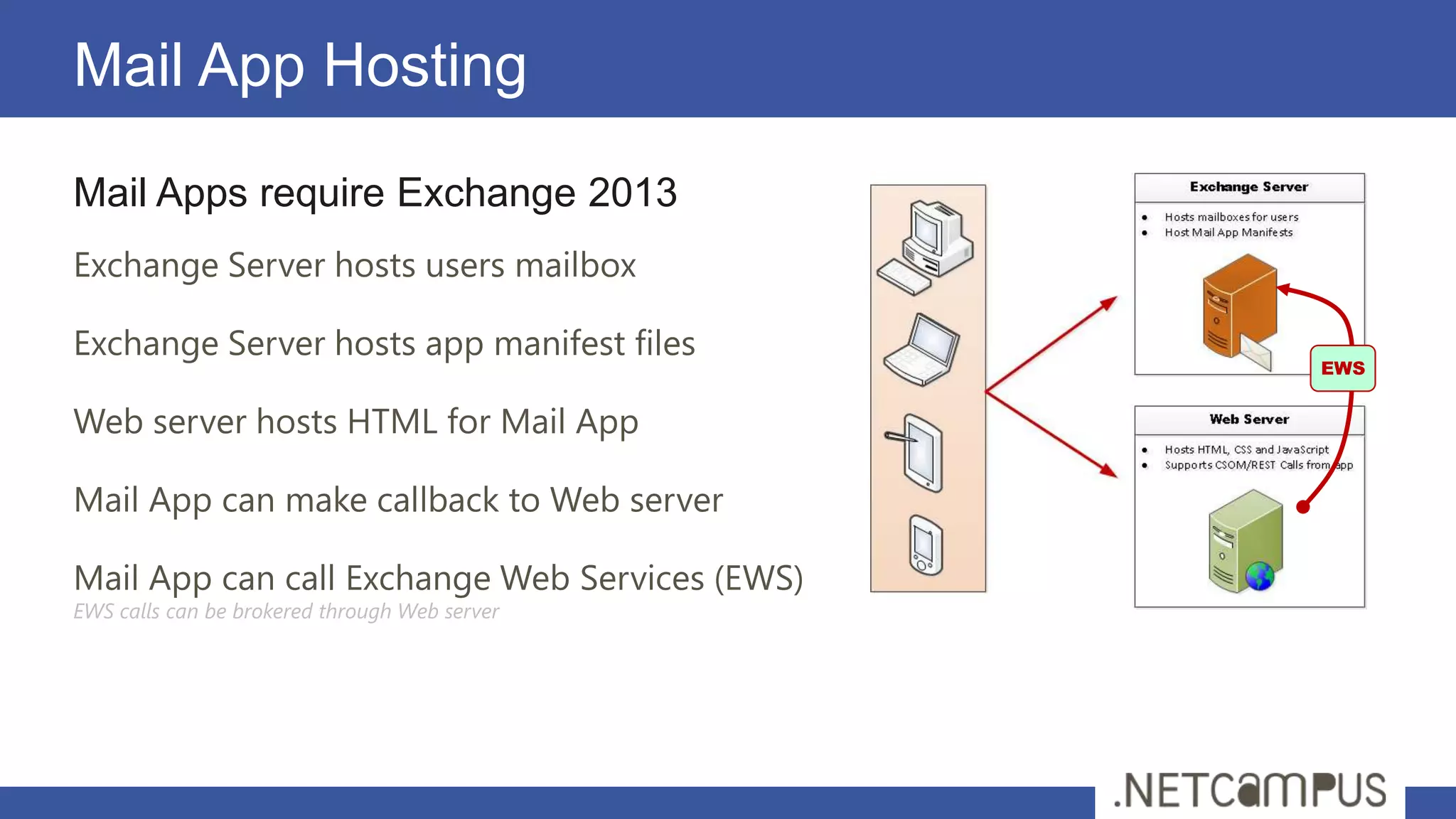
Mail Apps require Exchange 2013
Exchange Server hosts users mailbox

Exchange Server hosts app manifest files
                                                EWS


Web server hosts HTML for Mail App

Mail App can make callback to Web server

Mail App can call Exchange Web Services (EWS)
EWS calls can be brokered through Web server
Extracted Entities
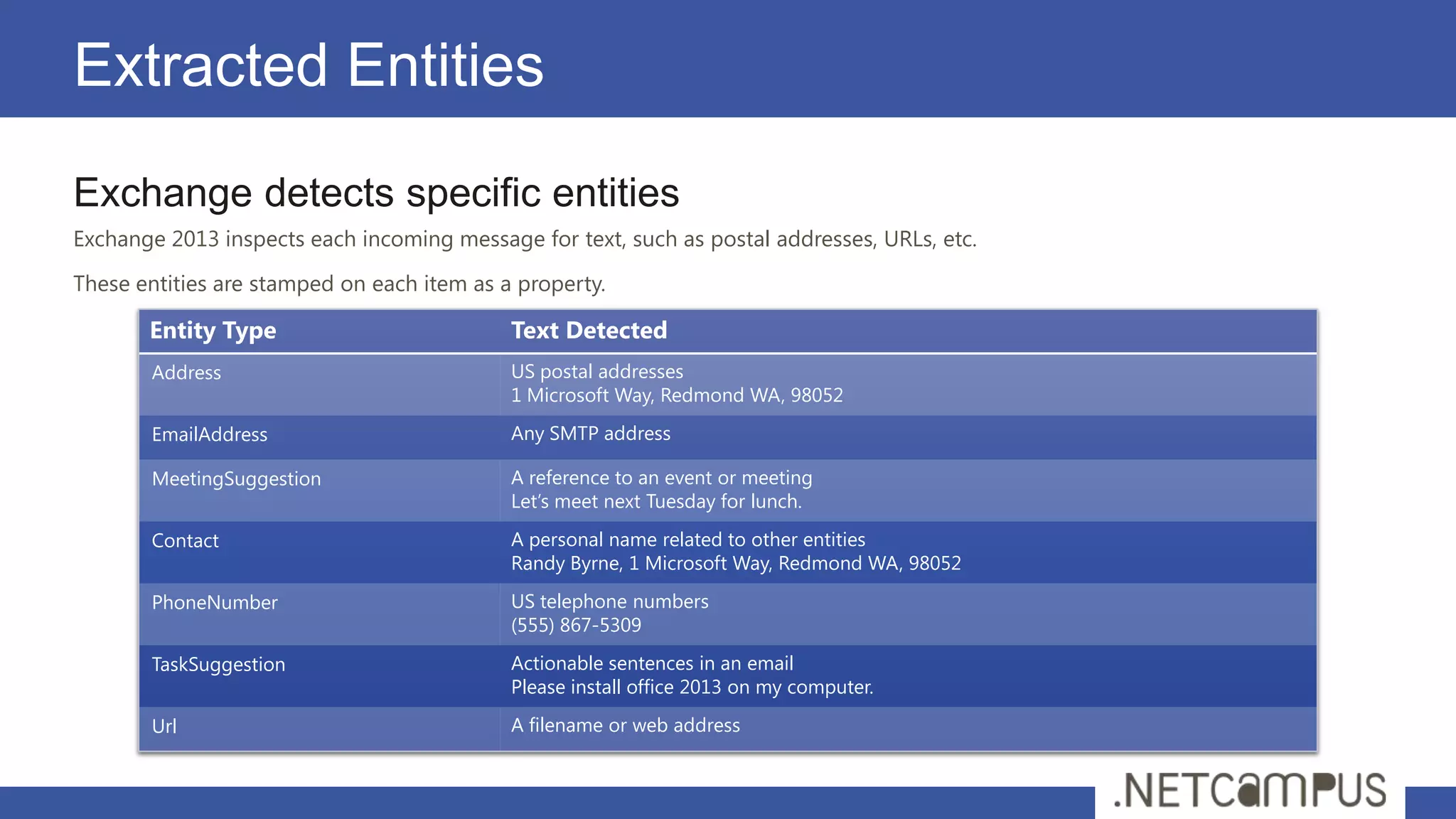
Exchange detects specific entities
Exchange 2013 inspects each incoming message for text, such as postal addresses, URLs, etc.

These entities are stamped on each item as a property.

       Entity Type                          Text Detected
       Address                              US postal addresses
                                            1 Microsoft Way, Redmond WA, 98052
       EmailAddress                         Any SMTP address

       MeetingSuggestion                    A reference to an event or meeting
                                            Let’s meet next Tuesday for lunch.

       Contact                              A personal name related to other entities
                                            Randy Byrne, 1 Microsoft Way, Redmond WA, 98052

       PhoneNumber                          US telephone numbers
                                            (555) 867-5309
       TaskSuggestion                       Actionable sentences in an email
                                            Please install office 2013 on my computer.

       Url                                  A filename or web address
Activation rules
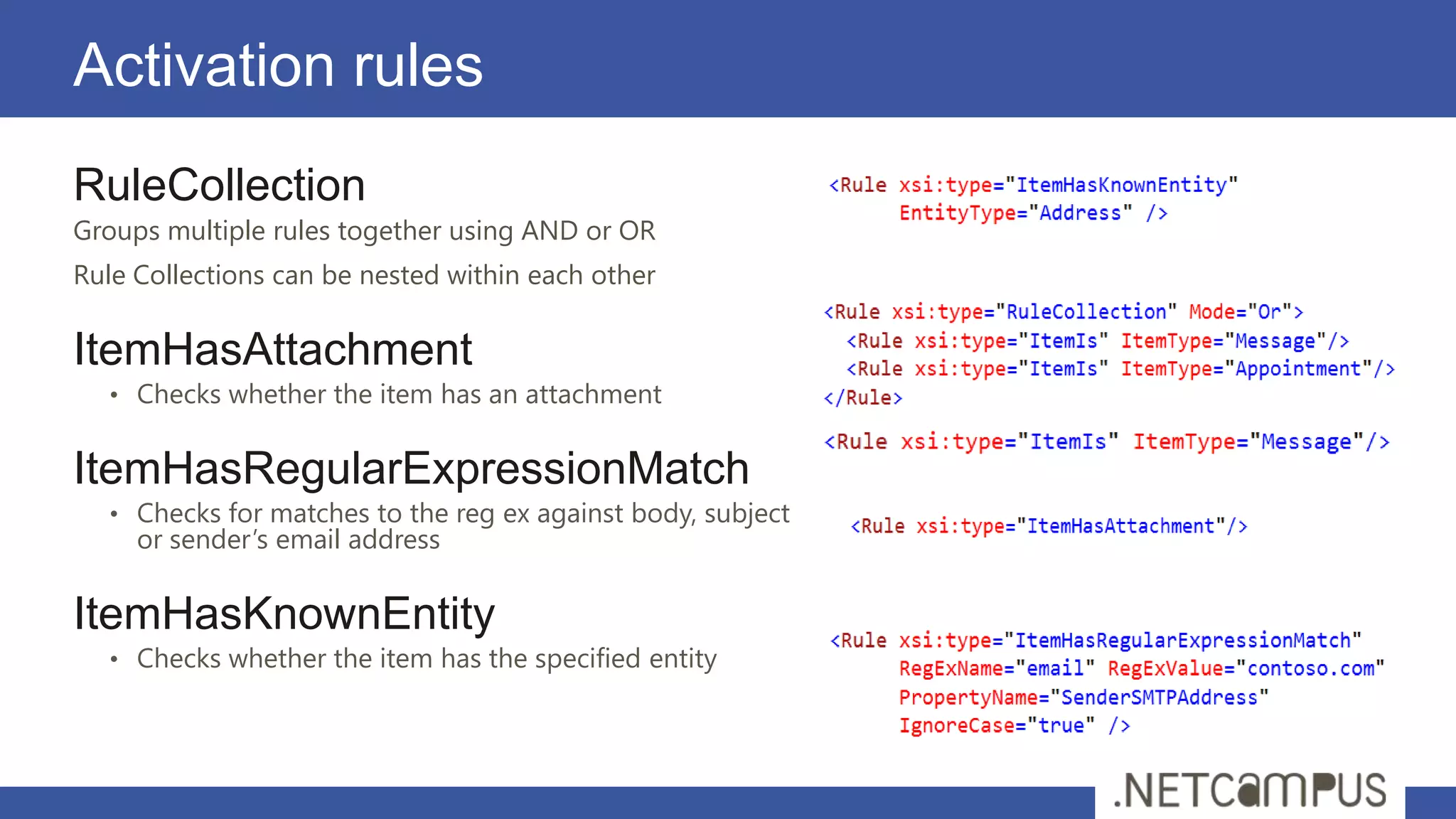
RuleCollection
Groups multiple rules together using AND or OR
Rule Collections can be nested within each other

ItemHasAttachment
   • Checks whether the item has an attachment


ItemHasRegularExpressionMatch
   • Checks for matches to the reg ex against body, subject
     or sender’s email address

ItemHasKnownEntity
   • Checks whether the item has the specified entity
Item properties
                                                              Office.context:
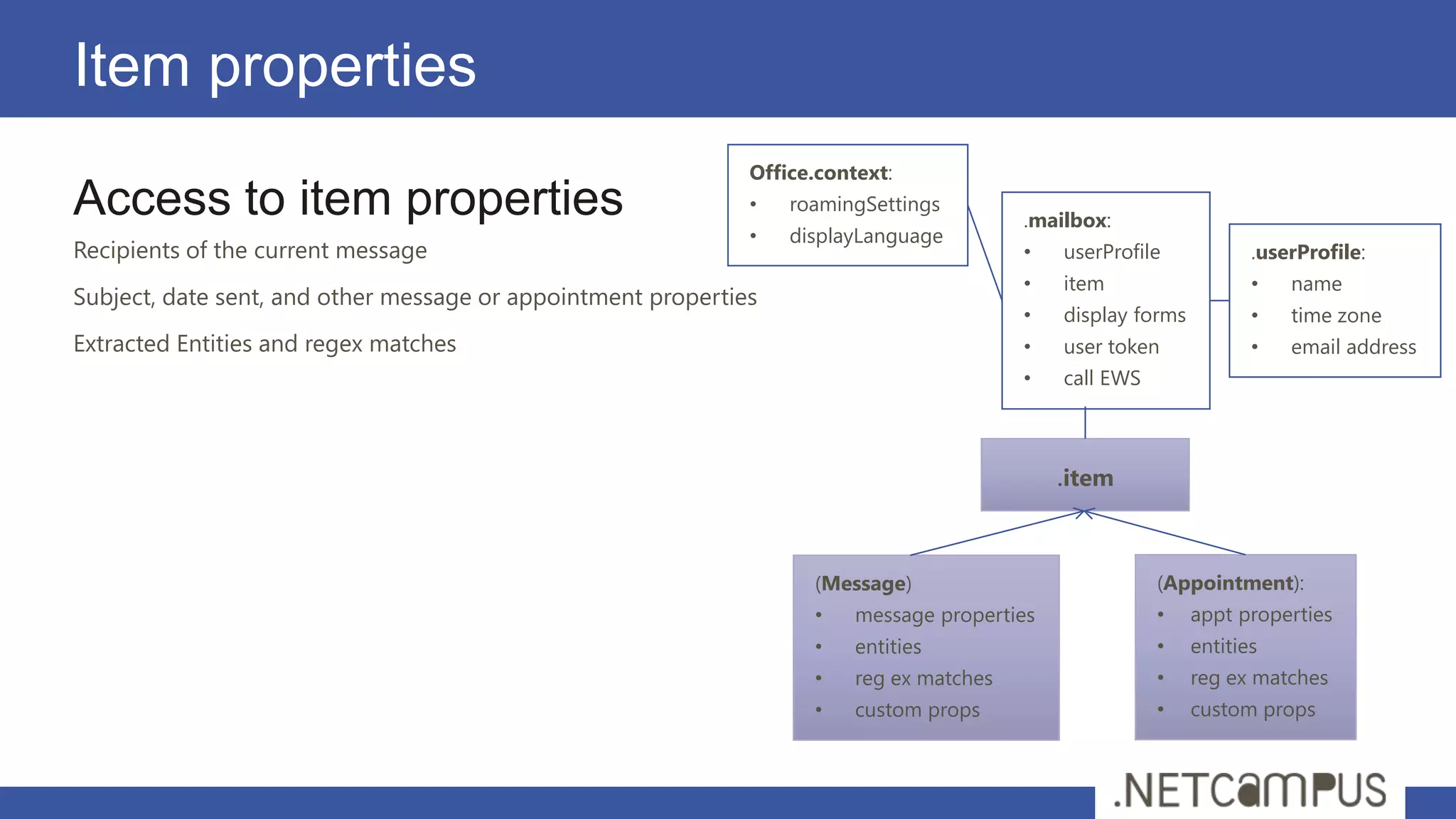
Access to item properties                                     •   roamingSettings
                                                                                          .mailbox:
                                                              •   displayLanguage
Recipients of the current message                                                         •   userProfile            .userProfile:
                                                                                          •   item                   •   name
Subject, date sent, and other message or appointment properties
                                                                                          •   display forms          •   time zone
Extracted Entities and regex matches                                                      •   user token             •   email address
                                                                                          •   call EWS


                                                                                              .item


                                                                    (Message)                            (Appointment):
                                                                    •    message properties              •    appt properties
                                                                    •    entities                        •    entities
                                                                    •    reg ex matches                  •    reg ex matches
                                                                    •    custom props                    •    custom props
Interact with Mailbox
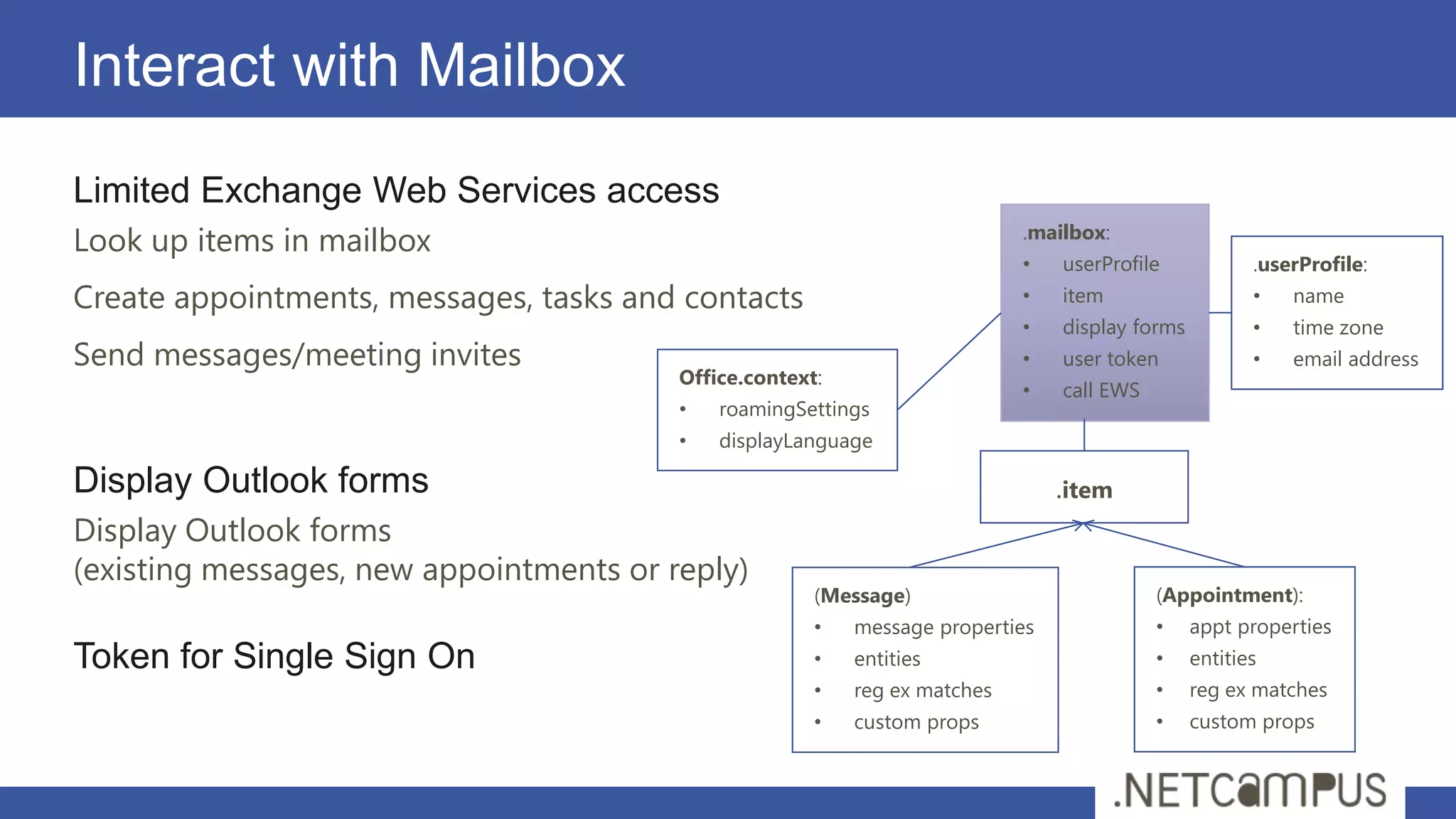
Limited Exchange Web Services access
Look up items in mailbox                                                    .mailbox:
                                                                            •   userProfile            .userProfile:
Create appointments, messages, tasks and contacts                           •   item                   •   name
                                                                            •   display forms          •   time zone
Send messages/meeting invites                                               •   user token             •   email address
                                         Office.context:
                                                                            •   call EWS
                                         •   roamingSettings
                                         •   displayLanguage

Display Outlook forms                                                           .item
Display Outlook forms
(existing messages, new appointments or reply)
                                                       (Message)                           (Appointment):
                                                       •   message properties              •    appt properties
Token for Single Sign On                               •   entities                        •    entities
                                                       •   reg ex matches                  •    reg ex matches
                                                       •   custom props                    •    custom props
User information

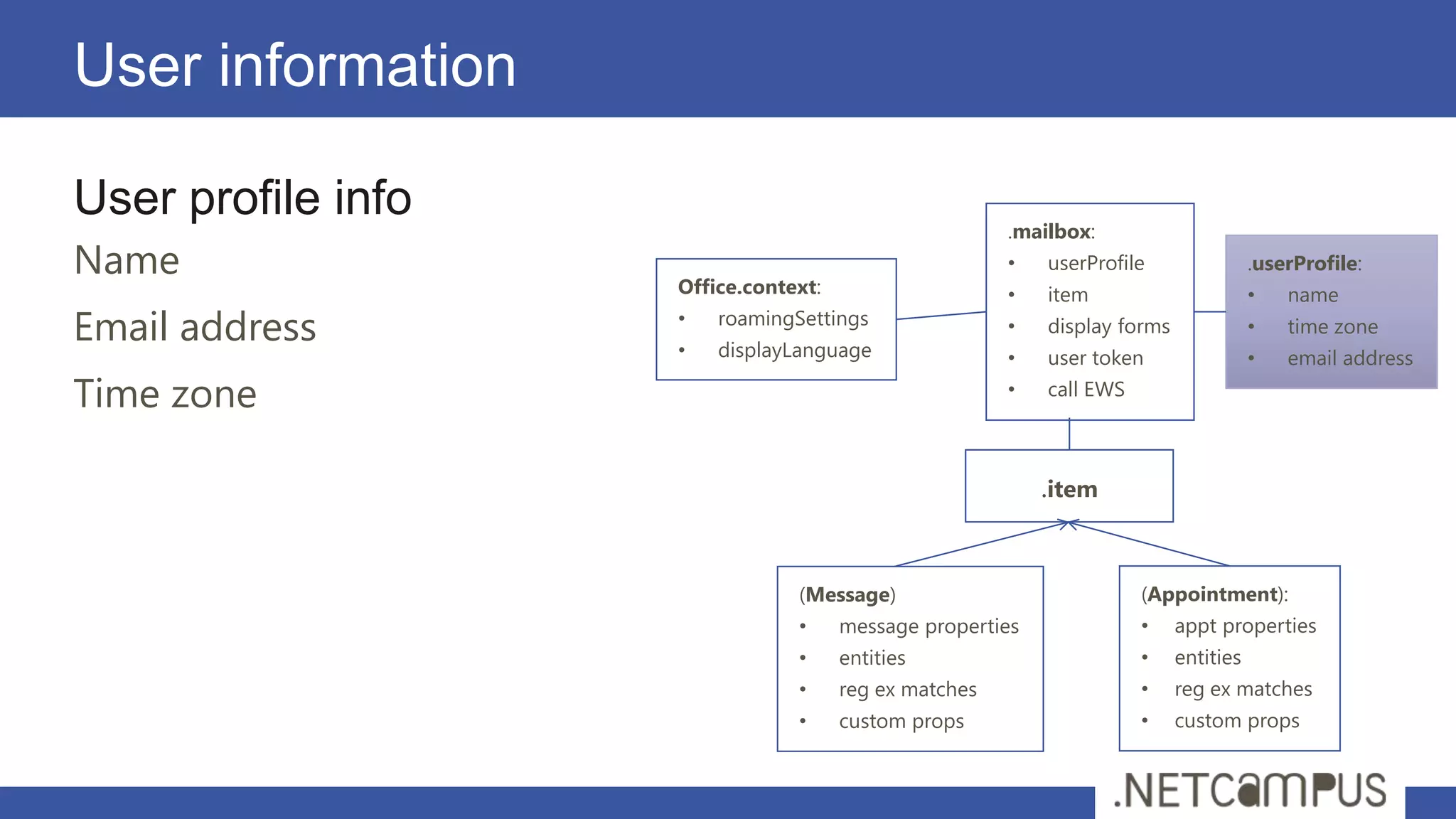
User profile info
                                                       .mailbox:
Name                                                   •   userProfile                .userProfile:
                    Office.context:                    •   item                       •   name
Email address       •
                    •
                        roamingSettings
                        displayLanguage
                                                       •   display forms              •   time zone
                                                       •   user token                 •   email address

Time zone                                              •   call EWS


                                                           .item


                                (Message)                             (Appointment):
                                •     message properties              •    appt properties
                                •     entities                        •    entities
                                •     reg ex matches                  •    reg ex matches
                                •     custom props                    •    custom props
Data storage
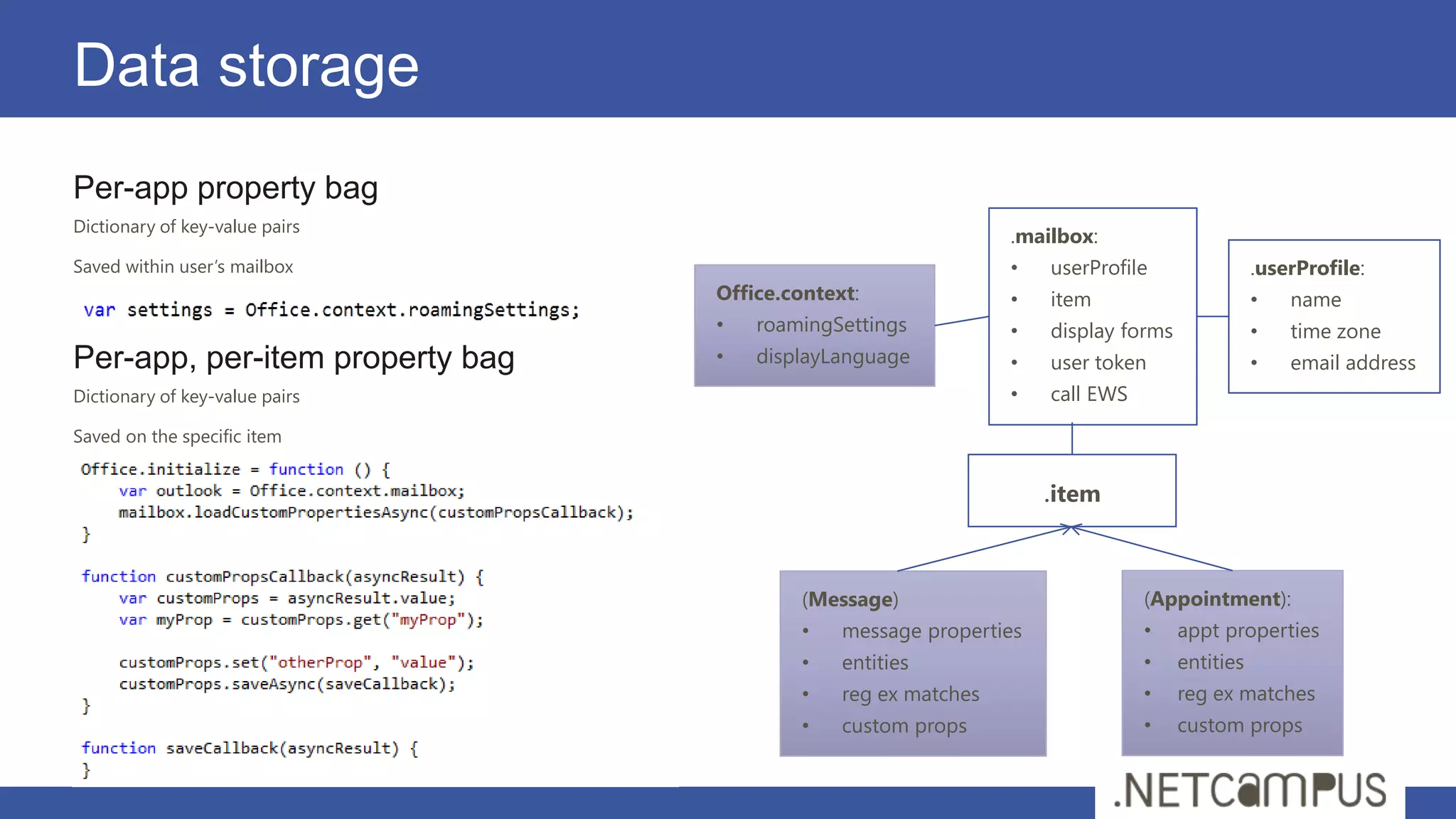
Per-app property bag
Dictionary of key-value pairs
                                                               .mailbox:
Saved within user’s mailbox                                    •   userProfile                .userProfile:
                                 Office.context:               •   item                       •   name
                                 •   roamingSettings           •   display forms              •   time zone
Per-app, per-item property bag   •   displayLanguage           •   user token                 •   email address
Dictionary of key-value pairs                                  •   call EWS

Saved on the specific item


                                                                   .item


                                         (Message)                            (Appointment):
                                         •    message properties              •    appt properties
                                         •    entities                        •    entities
                                         •    reg ex matches                  •    reg ex matches
                                         •    custom props                    •    custom props
Permissions and Capabilities
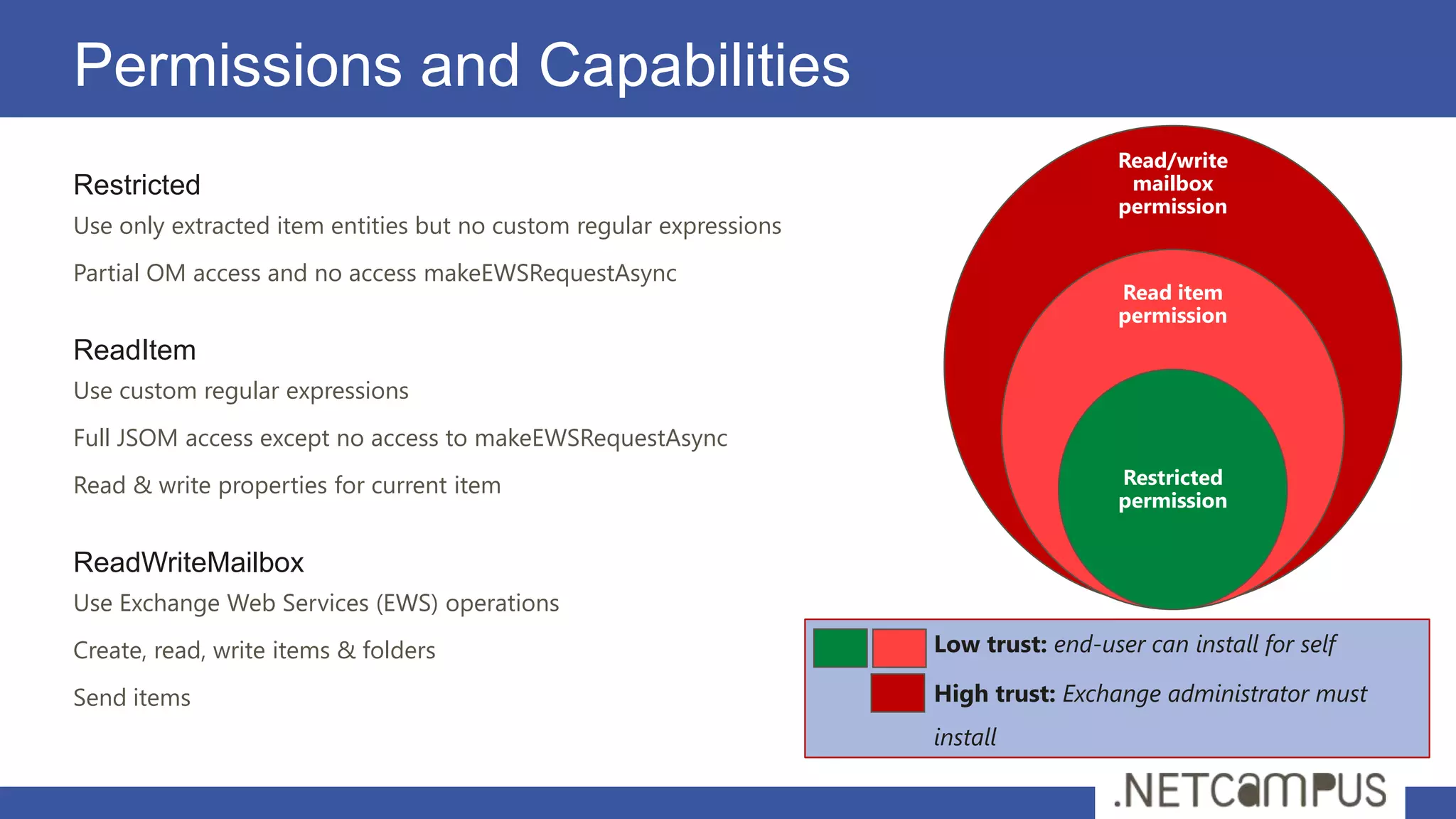
                                                                                       Read/write
Restricted                                                                              mailbox
                                                                                       permission
Use only extracted item entities but no custom regular expressions
Partial OM access and no access makeEWSRequestAsync
                                                                                       Read item
                                                                                       permission
ReadItem
Use custom regular expressions
Full JSOM access except no access to makeEWSRequestAsync
Read & write properties for current item                                               Restricted
                                                                                       permission


ReadWriteMailbox
Use Exchange Web Services (EWS) operations
Create, read, write items & folders                                  Low trust: end-user can install for self

Send items                                                           High trust: Exchange administrator must
                                                                     install
Possibilities
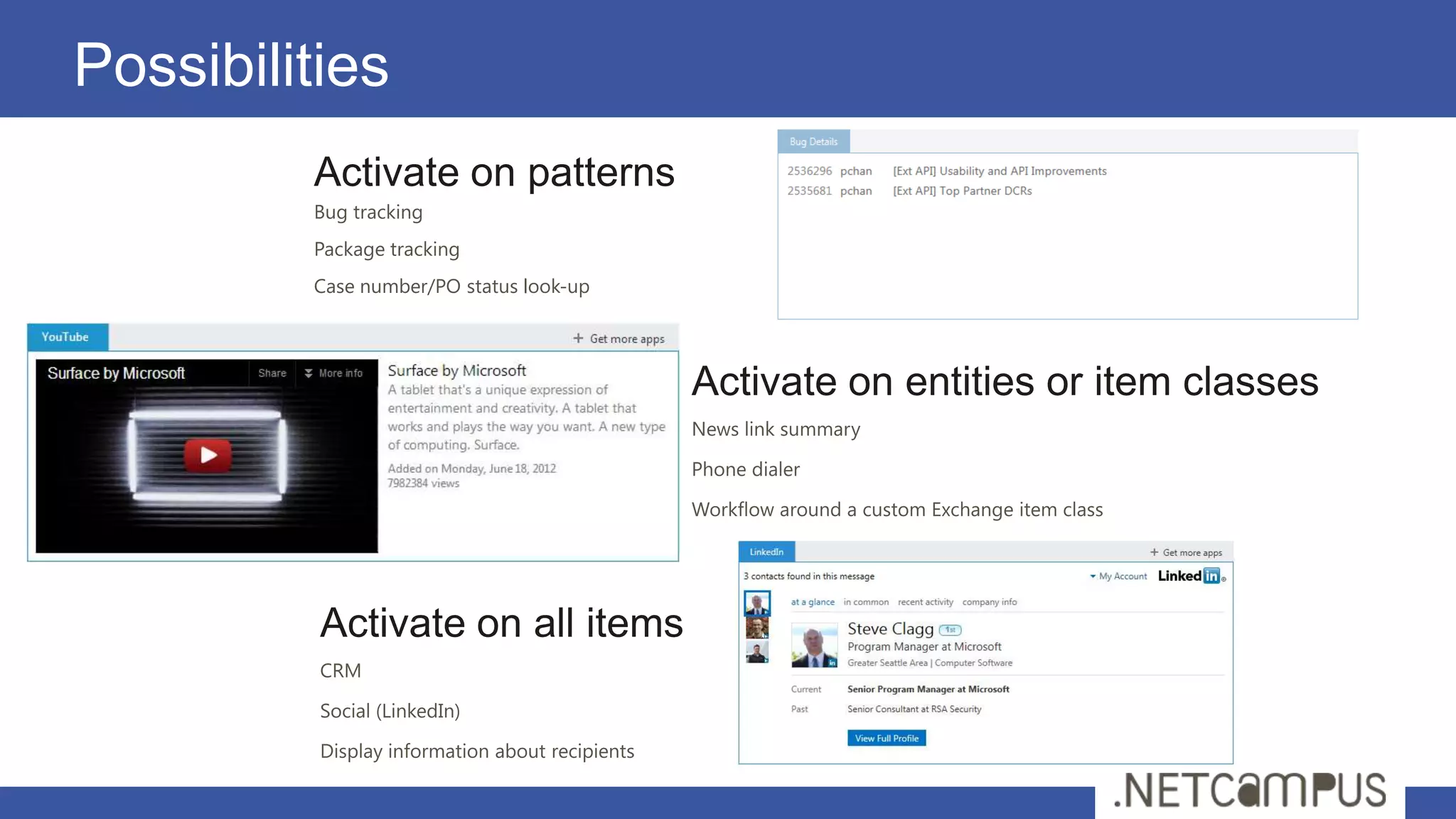
         Activate on patterns
         Bug tracking
         Package tracking
         Case number/PO status look-up
demo
Distribution
Distribution of Apps for Office
Mommy, where do Apps for Office come from?
App for Office distribution/deployment model based on App Catalogs
App for Office is published by uploading its manifest to an App Catalog
User inspect App Catalog with Office Applications UI to discover Apps
User can create and start an App for Office found in App Catalog

There are several different types of Catalogs
Office Store
SharePoint App Catalog
Exchange App Catalog
File Share App Catalog
The Office Store

The Office Store functions as public marketplace
Provides catalog of Apps for Office to consumers and general public
Office Store managed by Office.com
Consumer identity on Office.com established by Windows Live ID
Apps for Office tied to user by using identity established by Live ID logon

It's easy to publish a App for Office to the Office Store
You just need to publish the App for Office manifest
The manifest points to a Web page anywhere on the Internet
Microsoft controls vetting process to ensure integrity of Apps in Office Store
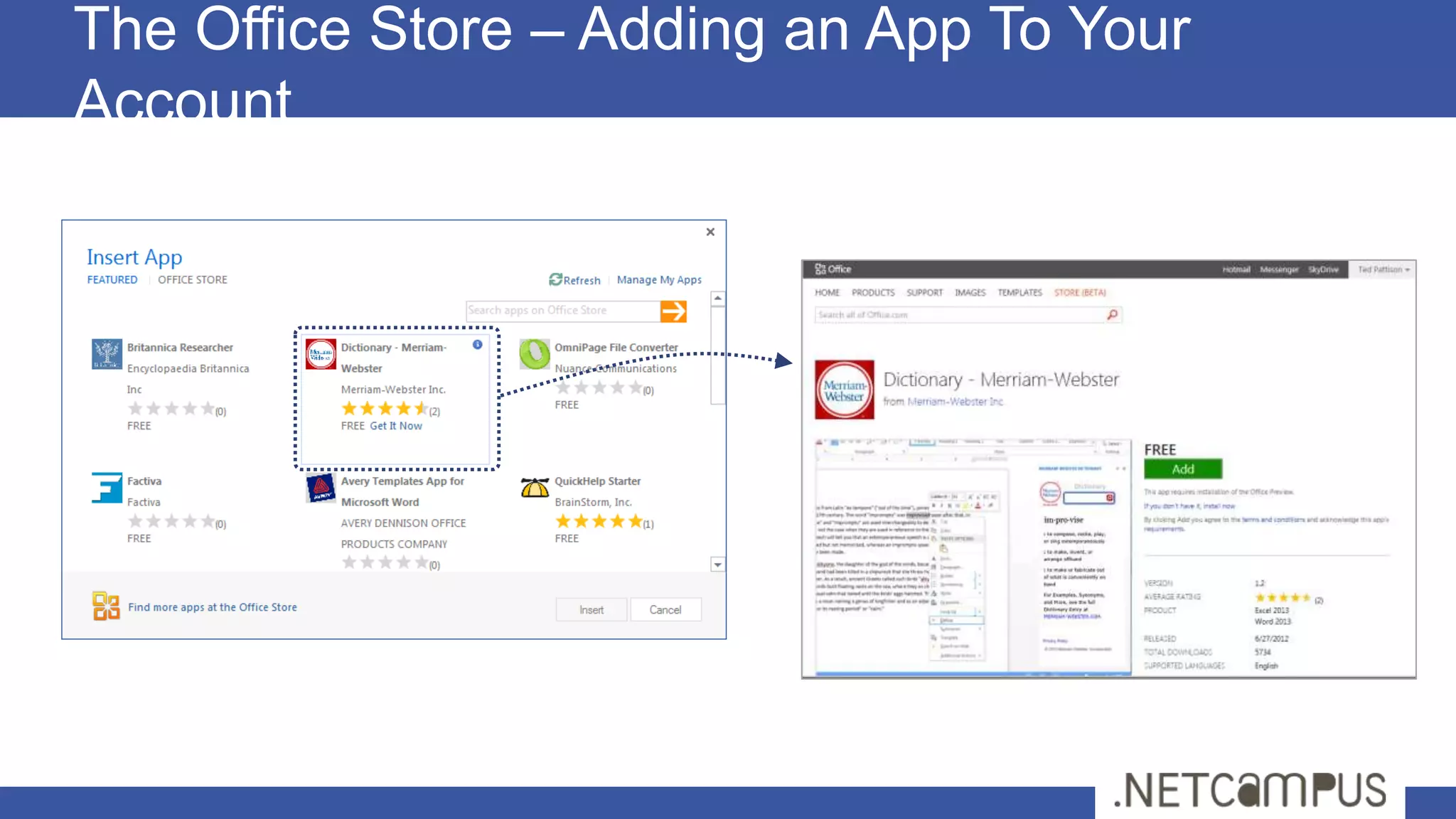
The Office Store – Adding an App To Your
Account
For more info…


       http://dev.office.com
Grazie

Grazie a tutti per la partecipazione
Riceverete il link per il download a slide e demo via email nei
prossimi giorni
Per contattarmi
     fabio@fabiofranzini.com
     @franzinifabio
brought to you by

Office 2013 loves web developers slide

  • 1.
    Office 2013 lovesWeb Developers Fabio Franzini MVP SharePoint, Senior Consultant & Trainer @franzinifabio Template designed by
  • 2.
  • 3.
  • 4.
    Introduction Introduction
  • 5.
    Microsoft Vision: Modernizingthe Platform Today’s Trends Today’s Market Microsoft Principles
  • 6.
    What is anApp for Office? A Web page loaded inside an Office Application HTML 5 and CSS for rendering user interface JavaScript and jQuery to add behavior Calls to REST APIs to retrieve and update data from across network Using Web Extensibility Framework for interaction with the documents App for Office Catalog Server Web Server App for Office Web Manifest Page App for Office <XML> HTML+JS
  • 7.
    Common App Architecture APP Web Server Host Browser Host 3rd Party Services Other Devices & Clients Server APIs Client APIs Office SharePoint & Exchange Client Server
  • 8.
    Apps for Office Web Page App Manifest HTML/CSS/JS <XML> App
  • 9.
    Types of Appsfor Office Task Pane App for Office (Document-centric) Assists user working with one or more documents Works in Word, Excel and Project Content App for Office (Document-centric) Adds embedded content/functionality into document Only used in Excel Application and Excel Web Application Mail App for Office (Mailbox-centric) Used in Outlook Application and Outlook Web App (OWA) Extends Outlook items with custom UI and behaviors Outlook items can be messages and events Mail Apps require Exchange 2013
  • 10.
  • 11.
    Principles Cross Platform Designed fromthe ground up, Abstraction, Async Cross App Common objects and methods across apps (selection, tables, settings) Web Standards ECMAScript 5 Performance Async, limits
  • 12.
    Office Javascript APIOverview Office.context Document Mailbox Project R/W Selection Item Project Info Bindings User Profile Tasks Settings EWS Properties & CustomXmlParts Settings
  • 13.
  • 14.
    Office Application Architecture Appsfor Office code run in separate sandboxed process Sandbox infrastructure leverages Web Control from IE9/IE10 App for Office support for HTML5 and CSS3 consistent with IE9/IE10 support Browser-rendered Apps based Works across all popular browsers (might require the latest version) App runs its it own iFrame inside outer an iFrame with WEF runtime Communications between iFrames relies on HTML5 postMessage API
  • 15.
    A common APIfor document-based Apps Document-based Apps for Office have common objects Used to read and write content to and from document Used to create bindings and event handlers Common Objects x-Office! Picture Charts Clip Art Hyperlink Word Art Shapes XML Text Table Matrix Parts
  • 16.
  • 17.
    Interacting With DocumentContent All data access starts through document object Read/write access to user selection Event handler for selection change event Three data types are supported Text Matrix Table
  • 18.
    Working with Selections Task Pane App reads current selection and Content App reads translates current selection and translates Current selection
  • 19.
  • 20.
    Coercion Types Content inbinding/selection can be converted on read/write Text Matrix Table HTML Office Open XML (OOXML) Office.context.document.getSelectedDataAsync(‘ooxml’, etc…)
  • 21.
    What are AppBindings? Bindings link an App for Office to a specific document section Can be defined current selection of a named item in a template Arbitrarily read/write binding data at anytime R/W operations do not depend on a selection. Enable Event handling Bindings support three different data shapes Text binding for binding to an individual cell in Excel or text in word. Matrix binding for a two dimension array representing rows and columns Table binding is like a matrix binding with support for headers
  • 22.
    Uses of Appsfor Office Bindings App handles SelectionChanged Bound range event associated with of stock the binding to retrieve symbols news associated with stock symbol
  • 23.
    Using Bindings Adding abinding Bindings.addFromPromptAsync Bindings.addFromSelectionAsync Bindings.addFromNamedItem Referencing a binding Bindings.getAllAsync A dialog is presented to the user experience when you call addFromPromptAsync. Bindings.getByIdAsync Office.Select Removing a binding Bindings.releaseByIdAsync Binding event handler to a binding Binding.addHandlerAsync(“type”, handler);
  • 24.
    Requested Capabilities You canread/write document settings • ReadDocument You have read access to document You can subscribe to change events • WriteDocument Write content into document • ReadWriteDocument ReadDocument + WriteDocument • FullAccess All Permissions + use of Silverlight & Flash
  • 25.
  • 26.
  • 27.
    Mail Apps Write once,run anywhere Outlook runs Same Mail App runs on Outlook and OWA Development model based on activation rules Activation rules run whenever user selects item Activated mail apps are added into Outlook UI Designed to be secure Mail apps run in an isolated, sandboxed process Mail apps run with a three-tier permission model
  • 28.
    Mail Apps –Up Close and Personal App Name Mail App Body Context trigger
  • 29.
    Mail App Hosting MailApps require Exchange 2013 Exchange Server hosts users mailbox Exchange Server hosts app manifest files EWS Web server hosts HTML for Mail App Mail App can make callback to Web server Mail App can call Exchange Web Services (EWS) EWS calls can be brokered through Web server
  • 30.
    Extracted Entities Exchange detectsspecific entities Exchange 2013 inspects each incoming message for text, such as postal addresses, URLs, etc. These entities are stamped on each item as a property. Entity Type Text Detected Address US postal addresses 1 Microsoft Way, Redmond WA, 98052 EmailAddress Any SMTP address MeetingSuggestion A reference to an event or meeting Let’s meet next Tuesday for lunch. Contact A personal name related to other entities Randy Byrne, 1 Microsoft Way, Redmond WA, 98052 PhoneNumber US telephone numbers (555) 867-5309 TaskSuggestion Actionable sentences in an email Please install office 2013 on my computer. Url A filename or web address
  • 31.
    Activation rules RuleCollection Groups multiplerules together using AND or OR Rule Collections can be nested within each other ItemHasAttachment • Checks whether the item has an attachment ItemHasRegularExpressionMatch • Checks for matches to the reg ex against body, subject or sender’s email address ItemHasKnownEntity • Checks whether the item has the specified entity
  • 32.
    Item properties Office.context: Access to item properties • roamingSettings .mailbox: • displayLanguage Recipients of the current message • userProfile .userProfile: • item • name Subject, date sent, and other message or appointment properties • display forms • time zone Extracted Entities and regex matches • user token • email address • call EWS .item (Message) (Appointment): • message properties • appt properties • entities • entities • reg ex matches • reg ex matches • custom props • custom props
  • 33.
    Interact with Mailbox LimitedExchange Web Services access Look up items in mailbox .mailbox: • userProfile .userProfile: Create appointments, messages, tasks and contacts • item • name • display forms • time zone Send messages/meeting invites • user token • email address Office.context: • call EWS • roamingSettings • displayLanguage Display Outlook forms .item Display Outlook forms (existing messages, new appointments or reply) (Message) (Appointment): • message properties • appt properties Token for Single Sign On • entities • entities • reg ex matches • reg ex matches • custom props • custom props
  • 34.
    User information User profileinfo .mailbox: Name • userProfile .userProfile: Office.context: • item • name Email address • • roamingSettings displayLanguage • display forms • time zone • user token • email address Time zone • call EWS .item (Message) (Appointment): • message properties • appt properties • entities • entities • reg ex matches • reg ex matches • custom props • custom props
  • 35.
    Data storage Per-app propertybag Dictionary of key-value pairs .mailbox: Saved within user’s mailbox • userProfile .userProfile: Office.context: • item • name • roamingSettings • display forms • time zone Per-app, per-item property bag • displayLanguage • user token • email address Dictionary of key-value pairs • call EWS Saved on the specific item .item (Message) (Appointment): • message properties • appt properties • entities • entities • reg ex matches • reg ex matches • custom props • custom props
  • 36.
    Permissions and Capabilities Read/write Restricted mailbox permission Use only extracted item entities but no custom regular expressions Partial OM access and no access makeEWSRequestAsync Read item permission ReadItem Use custom regular expressions Full JSOM access except no access to makeEWSRequestAsync Read & write properties for current item Restricted permission ReadWriteMailbox Use Exchange Web Services (EWS) operations Create, read, write items & folders Low trust: end-user can install for self Send items High trust: Exchange administrator must install
  • 37.
    Possibilities Activate on patterns Bug tracking Package tracking Case number/PO status look-up
  • 38.
  • 39.
  • 40.
    Distribution of Appsfor Office Mommy, where do Apps for Office come from? App for Office distribution/deployment model based on App Catalogs App for Office is published by uploading its manifest to an App Catalog User inspect App Catalog with Office Applications UI to discover Apps User can create and start an App for Office found in App Catalog There are several different types of Catalogs Office Store SharePoint App Catalog Exchange App Catalog File Share App Catalog
  • 41.
    The Office Store TheOffice Store functions as public marketplace Provides catalog of Apps for Office to consumers and general public Office Store managed by Office.com Consumer identity on Office.com established by Windows Live ID Apps for Office tied to user by using identity established by Live ID logon It's easy to publish a App for Office to the Office Store You just need to publish the App for Office manifest The manifest points to a Web page anywhere on the Internet Microsoft controls vetting process to ensure integrity of Apps in Office Store
  • 42.
    The Office Store– Adding an App To Your Account
  • 43.
    For more info… http://dev.office.com
  • 44.
    Grazie Grazie a tuttiper la partecipazione Riceverete il link per il download a slide e demo via email nei prossimi giorni Per contattarmi fabio@fabiofranzini.com @franzinifabio
  • 45.