TROPO:
TELEPHONY IN THE
     CLOUD


       Wes Gamble
    Bison Consulting
       koached.com
Wes Gamble

• Bison Consulting
• koached.com
• weyus@att.net
• @weyus
What We’ll Discuss
      Today
What We’ll Discuss
        Today

• Why?
What We’ll Discuss
         Today

• Why?
• Tropo offerings
What We’ll Discuss
         Today

• Why?
• Tropo offerings
• Tropo code examples
What We’ll Discuss
         Today

• Why?
• Tropo offerings
• Tropo code examples
• Other stuff
Why?
BEFORE
BEFORE
BEFORE


+
BEFORE


+        +


             (Telephony)
BEFORE


         +                  +


                                 (Telephony)

(cheaper: computer + telephony HW + Asterisk)
NOW
NOW
NOW


 +


(Web)
WHY TROPO?
WHY TROPO?

• FREE to develop (pay for production)
WHY TROPO?

• FREE to develop (pay for production)
• 10+ years of voice application
  experience, infrastructure (Voxeo)
WHY TROPO?

• FREE to develop (pay for production)
• 10+ years of voice application
  experience, infrastructure (Voxeo)
• Multiple channels with one back-end
  (Voice, SMS, IM, Twitter)
WHY TROPO?

• FREE to develop (pay for production)
• 10+ years of voice application
  experience, infrastructure (Voxeo)
• Multiple channels with one back-end
  (Voice, SMS, IM, Twitter)
• Open-source, standards-based (SIP)
WHY TROPO?

• FREE to develop (pay for production)
• 10+ years of voice application
  experience, infrastructure (Voxeo)
• Multiple channels with one back-end
  (Voice, SMS, IM, Twitter)
• Open-source, standards-based (SIP)
• Web developers can do telephony now
Language Support
Language Support


• APIs are available in:
Language Support


• APIs are available in:
 • JavaScript
Language Support


• APIs are available in:
 • JavaScript
 • PHP
Language Support


• APIs are available in:
 • JavaScript
 • PHP
 • Ruby
Language Support


• APIs are available in:
 • JavaScript
 • PHP
 • Ruby
 • Python
Language Support


• APIs are available in:
 • JavaScript
 • PHP
 • Ruby
 • Python
 • Groovy
APIs
APIs

• Scripting API: execute one script file
 • Tropo-hosted or self-hosted
APIs

• Scripting API: execute one script file
 • Tropo-hosted or self-hosted
• Web API
 • Arbitrary Web application endpoint
APIs

• Scripting API: execute one script file
 • Tropo-hosted or self-hosted
• Web API
 • Arbitrary Web application endpoint
• REST API
 • Session initiation, provisioning,
   signal/event passing
Getting Started with
       Tropo
Getting Started with
        Tropo

• Establish an account at Tropo.com
Getting Started with
         Tropo

• Establish an account at Tropo.com
• Create an application
Getting Started with
         Tropo

• Establish an account at Tropo.com
• Create an application
• Choose Scripting or Web API
Getting Started with
         Tropo

• Establish an account at Tropo.com
• Create an application
• Choose Scripting or Web API
• Set script location (scripting) or Web
  app. endpoints (Web API)
Getting Started with
         Tropo

• Establish an account at Tropo.com
• Create an application
• Choose Scripting or Web API
• Set script location (scripting) or Web
  app. endpoints (Web API)
• Provision numbers
DEMO 1: First Steps
            Username: hcc_demo
            Password: hcc_demo

            Calling to: 281 968 8698
             “2012 Doomsday Clock”
  https://github.com/weyus/hcc_tropo_demos/
                  blob/master/
demo1/2012_Doomsday_Countdown_inbound.rb
DEMO 1: First Steps
    Username: hcc_demo
    Password: hcc_demo


    Let’s look at the code
Receiving inbound Calls
        with Tropo


(*) Scripting API - script resides on Tropo server
Receiving inbound Calls
        with Tropo


(*) Scripting API - script resides on Tropo server
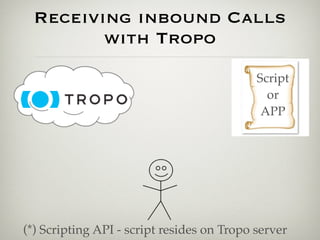
Receiving inbound Calls
        with Tropo
                                            Script
                                              or
                                             APP


(*) Scripting API - script resides on Tropo server
Receiving inbound Calls
        with Tropo
                                            Script
                                              or
                                             APP


(*) Scripting API - script resides on Tropo server
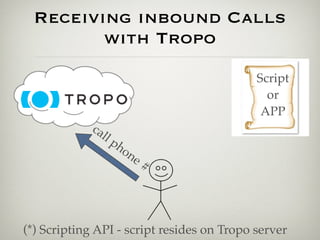
Receiving inbound Calls
        with Tropo
                                            Script
                                              or
                                             APP
            ca
                 ll
                    pho
                          ne
                               #


(*) Scripting API - script resides on Tropo server
Receiving inbound Calls
        with Tropo
                                              Script
                                                or
                                   callback    APP
            ca
                 ll
                    pho
                          ne
                               #


(*) Scripting API - script resides on Tropo server
DEMO: First Steps
   Key Pieces
DEMO: First Steps
       Key Pieces
• Bare Ruby script - just gets executed
DEMO: First Steps
       Key Pieces
• Bare Ruby script - just gets executed
• Tropo API is a DSL that emits JSON for
  consumption by Tropo server
DEMO: First Steps
       Key Pieces
• Bare Ruby script - just gets executed
• Tropo API is a DSL that emits JSON for
  consumption by Tropo server
• Important verbs:
 • say
 • ask, call
 • hangup
 • message (= call + say + hangup)
DEMO: First Steps
 Lessons Learned
DEMO: First Steps
     Lessons Learned

• When an incoming call is picked up by
  Tropo, script is immediately run
DEMO: First Steps
     Lessons Learned

• When an incoming call is picked up by
  Tropo, script is immediately run
• “ask” keyword is synchronous, and
  result is returned when user responds
DEMO: First Steps
     Lessons Learned

• When an incoming call is picked up by
  Tropo, script is immediately run
• “ask” keyword is synchronous, and
  result is returned when user responds
• Voice recognition on input
DEMO: First Steps
     Lessons Learned

• When an incoming call is picked up by
  Tropo, script is immediately run
• “ask” keyword is synchronous, and
  result is returned when user responds
• Voice recognition on input
• Text-to-speech on output
DEMO: First Steps
     Lessons Learned

• When an incoming call is picked up by
  Tropo, script is immediately run
• “ask” keyword is synchronous, and
  result is returned when user responds
• Voice recognition on input
• Text-to-speech on output
• Can be used with voice or SMS
Scripting API:
Current call metadata
Scripting API:
Current call metadata
• There are properties that are set on the
  $currentCall object in Ruby for
  incoming calls
Scripting API:
Current call metadata
• There are properties that are set on the
  $currentCall object in Ruby for
  incoming calls
 • callerID
Scripting API:
Current call metadata
• There are properties that are set on the
  $currentCall object in Ruby for
  incoming calls
 • callerID
 • channel
Scripting API:
Current call metadata
• There are properties that are set on the
  $currentCall object in Ruby for
  incoming calls
 • callerID
 • channel
 • network
Scripting API:
Current call metadata
• There are properties that are set on the
  $currentCall object in Ruby for
  incoming calls
 • callerID
 • channel
 • network
• https://www.tropo.com/docs/
  scripting/call_properties.htm
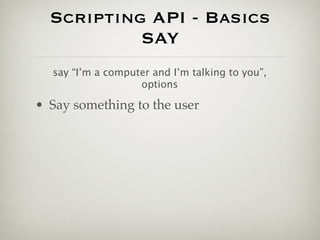
Scripting API - Basics
         SAY
Scripting API - Basics
         SAY
say “I’m a computer and I’m talking to you”,
                 options
Scripting API - Basics
           SAY
  say “I’m a computer and I’m talking to you”,
                   options

• Say something to the user
Scripting API - Basics
           SAY
  say “I’m a computer and I’m talking to you”,
                   options

• Say something to the user
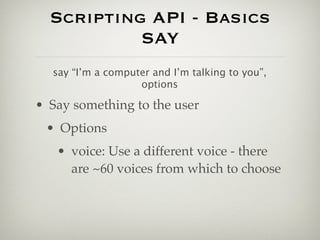
 • Options
Scripting API - Basics
           SAY
  say “I’m a computer and I’m talking to you”,
                   options

• Say something to the user
 • Options
   • voice: Use a different voice - there
     are ~60 voices from which to choose
Scripting API - Basics
           SAY
  say “I’m a computer and I’m talking to you”,
                   options

• Say something to the user
 • Options
   • voice: Use a different voice - there
     are ~60 voices from which to choose
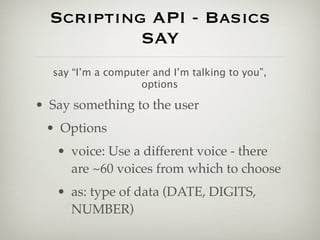
   • as: type of data (DATE, DIGITS,
     NUMBER)
Scripting API - Basics
        ASK
Scripting API - Basics
        ASK
result = ask “Do you like stuff?”, options
Scripting API - Basics
          ASK
   result = ask “Do you like stuff?”, options

• Ask the user a question (say + wait)
Scripting API - Basics
          ASK
   result = ask “Do you like stuff?”, options

• Ask the user a question (say + wait)
• Blocks while waiting for result
Scripting API - Basics
          ASK
   result = ask “Do you like stuff?”, options

• Ask the user a question (say + wait)
• Blocks while waiting for result
• Options
Scripting API - Basics
          ASK
   result = ask “Do you like stuff?”, options

• Ask the user a question (say + wait)
• Blocks while waiting for result
• Options
 • attempts: how many tries do you get?
Scripting API - Basics
          ASK
   result = ask “Do you like stuff?”, options

• Ask the user a question (say + wait)
• Blocks while waiting for result
• Options
 • attempts: how many tries do you get?
 • choices: grammar (allowable input)
Scripting API - Basics
          ASK
   result = ask “Do you like stuff?”, options

• Ask the user a question (say + wait)
• Blocks while waiting for result
• Options
 • attempts: how many tries do you get?
 • choices: grammar (allowable input)
 • onXXXX: Event handlers for: timeout,
   bad input, etc.
Scripting API - Basics
        CALL
Scripting API - Basics
        CALL
 call “+17135551212ppp123”, options
Scripting API - Basics
          CALL
     call “+17135551212ppp123”, options

• Makes an outbound call after session
  initiation (REST API)
Scripting API - Basics
          CALL
     call “+17135551212ppp123”, options

• Makes an outbound call after session
  initiation (REST API)
 • pauses can be inserted into destination
Scripting API - Basics
          CALL
     call “+17135551212ppp123”, options

• Makes an outbound call after session
  initiation (REST API)
 • pauses can be inserted into destination
• Options
Scripting API - Basics
          CALL
     call “+17135551212ppp123”, options

• Makes an outbound call after session
  initiation (REST API)
 • pauses can be inserted into destination
• Options
 • channel: VOICE or TEXT
Scripting API - Basics
          CALL
     call “+17135551212ppp123”, options

• Makes an outbound call after session
  initiation (REST API)
 • pauses can be inserted into destination
• Options
 • channel: VOICE or TEXT
 • network: SIP, GTALK, JABBER, etc.
Scripting API - Basics
          CALL
     call “+17135551212ppp123”, options

• Makes an outbound call after session
  initiation (REST API)
 • pauses can be inserted into destination
• Options
 • channel: VOICE or TEXT
 • network: SIP, GTALK, JABBER, etc.
 • onXXXX: Event handlers
Scripting API - Basics
      HANGUP
Scripting API - Basics
      HANGUP
         hangup
Scripting API - Basics
        HANGUP
                  hangup


• Terminates the call
Scripting API - Basics
      MESSAGE
Scripting API - Basics
        MESSAGE
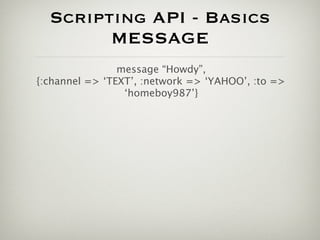
                message “Howdy”,
{:channel => ‘TEXT’, :network => ‘YAHOO’, :to =>
                 ‘homeboy987’}
Scripting API - Basics
        MESSAGE
                message “Howdy”,
{:channel => ‘TEXT’, :network => ‘YAHOO’, :to =>
                 ‘homeboy987’}

• Used for one-off messages to user
Scripting API - Basics
        MESSAGE
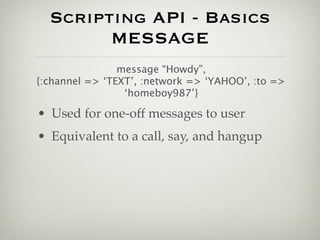
                message “Howdy”,
{:channel => ‘TEXT’, :network => ‘YAHOO’, :to =>
                 ‘homeboy987’}

• Used for one-off messages to user
• Equivalent to a call, say, and hangup
Scripting API - Basics
        MESSAGE
                message “Howdy”,
{:channel => ‘TEXT’, :network => ‘YAHOO’, :to =>
                 ‘homeboy987’}

• Used for one-off messages to user
• Equivalent to a call, say, and hangup
• Options
Scripting API - Basics
        MESSAGE
                message “Howdy”,
{:channel => ‘TEXT’, :network => ‘YAHOO’, :to =>
                 ‘homeboy987’}

• Used for one-off messages to user
• Equivalent to a call, say, and hangup
• Options
  • channel: VOICE or TEXT
Scripting API - Basics
        MESSAGE
                message “Howdy”,
{:channel => ‘TEXT’, :network => ‘YAHOO’, :to =>
                 ‘homeboy987’}

• Used for one-off messages to user
• Equivalent to a call, say, and hangup
• Options
  • channel: VOICE or TEXT
  • network: SIP, MSN, YAHOO
Scripting API - Basics
        MESSAGE
                message “Howdy”,
{:channel => ‘TEXT’, :network => ‘YAHOO’, :to =>
                 ‘homeboy987’}

• Used for one-off messages to user
• Equivalent to a call, say, and hangup
• Options
  • channel: VOICE or TEXT
  • network: SIP, MSN, YAHOO
  • to: destination number, username
Scripting API - Basics
       Events
Scripting API - Basics
        Events
• Handlers can be specified for events on
  some verbs
Scripting API - Basics
        Events
• Handlers can be specified for events on
  some verbs
• ask
 • onBadChoice, onChoice
Scripting API - Basics
        Events
• Handlers can be specified for events on
  some verbs
• ask
  • onBadChoice, onChoice
• call
  • onAnswer, onHangup
Scripting API - Basics
        Events
• Handlers can be specified for events on
  some verbs
• ask
  • onBadChoice, onChoice
• call
  • onAnswer, onHangup
• Signals - generic interrupts
  • https://www.tropo.com/docs/rest/
    rest_tutorials.htm#event_tutorials
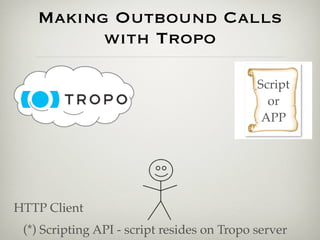
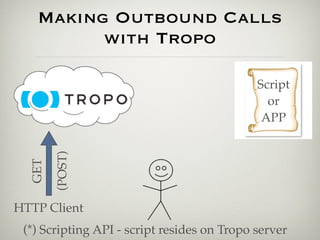
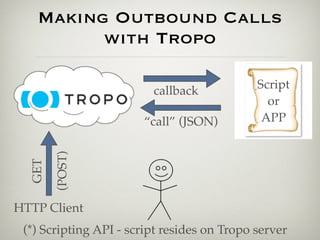
Making Outbound Calls
      with Tropo
Making Outbound Calls
      with Tropo

• An outbound call is kicked off using the
  REST API to initiate a session
Making Outbound Calls
      with Tropo

• An outbound call is kicked off using the
  REST API to initiate a session
• Simulates an inbound message
Making Outbound Calls
      with Tropo

• An outbound call is kicked off using the
  REST API to initiate a session
• Simulates an inbound message
• Programmatic or on-demand
Making Outbound Calls
      with Tropo

• An outbound call is kicked off using the
  REST API to initiate a session
• Simulates an inbound message
• Programmatic or on-demand
 • http://api.tropo.com/1.0/sessions?
   action=create&token=voice_or_text_tok
   en[&custom_param_1=custom_value_1]
Making Outbound Calls
        with Tropo


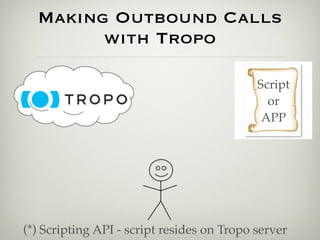
(*) Scripting API - script resides on Tropo server
Making Outbound Calls
        with Tropo


(*) Scripting API - script resides on Tropo server
Making Outbound Calls
        with Tropo

                                            Script
                                              or
                                             APP


(*) Scripting API - script resides on Tropo server
Making Outbound Calls
        with Tropo

                                            Script
                                              or
                                             APP


(*) Scripting API - script resides on Tropo server
Making Outbound Calls
         with Tropo

                                             Script
                                               or
                                              APP


HTTP Client
 (*) Scripting API - script resides on Tropo server
Making Outbound Calls
         with Tropo

                                             Script
                                               or
                                              APP
        (POST)
  GET


HTTP Client
 (*) Scripting API - script resides on Tropo server
Making Outbound Calls
         with Tropo

                                             Script
                         callback
                                               or
                                              APP
        (POST)
  GET


HTTP Client
 (*) Scripting API - script resides on Tropo server
Making Outbound Calls
         with Tropo

                                             Script
                         callback
                                               or
                       “call” (JSON)          APP
        (POST)
  GET


HTTP Client
 (*) Scripting API - script resides on Tropo server
Making Outbound Calls
         with Tropo

                                             Script
                            callback
                                               or
                           “call” (JSON)      APP
                 Ca
                  ll
                   U
        (POST)


                      se
  GET


                       r


HTTP Client
 (*) Scripting API - script resides on Tropo server
DEMO 2: First Steps,
       Outbound
            Username: hcc_demo
            Password: hcc_demo

       Calls Received From: 713 489 7498
             “2012 Doomsday Clock”
https://github.com/weyus/hcc_tropo_demos/blob/
                    master/
demo2/2012_Doomsday_Countdown_outbound.rb
DEMO 2: First Steps,
    outbound
    Username: hcc_demo
    Password: hcc_demo


    Let’s look at the code
DEMO: First Steps, Outbound
     Lessons Learned
DEMO: First Steps, Outbound
     Lessons Learned

  • Simulated inbound call to app. via
    HTTP GET or POST call to session API
DEMO: First Steps, Outbound
     Lessons Learned

  • Simulated inbound call to app. via
    HTTP GET or POST call to session API
  • Can be used with voice or SMS
DEMO: First Steps, Outbound
     Lessons Learned

  • Simulated inbound call to app. via
    HTTP GET or POST call to session API
  • Can be used with voice or SMS
  • $currentCall is not populated on
    outbound call before “call”
INTERNATIONALIZATION
      SUPPORT
INTERNATIONALIZATION
         SUPPORT
• Multi-language voice recognition
  • “recognizer” option on “ask” command
  • https://www.tropo.com/docs/webapi/
    international_speech_recognition.htm
INTERNATIONALIZATION
         SUPPORT
• Multi-language voice recognition
  • “recognizer” option on “ask” command
  • https://www.tropo.com/docs/webapi/
    international_speech_recognition.htm
• Multi-language text-to-speech output
INTERNATIONALIZATION
         SUPPORT
• Multi-language voice recognition
  • “recognizer” option on “ask” command
  • https://www.tropo.com/docs/webapi/
    international_speech_recognition.htm
• Multi-language text-to-speech output
• Voices: 60+
  • https://www.tropo.com/docs/scripting/
    international_speaking_other_languages.htm
INTERNATIONALIZATION
         SUPPORT
• Multi-language voice recognition
  • “recognizer” option on “ask” command
  • https://www.tropo.com/docs/webapi/
    international_speech_recognition.htm
• Multi-language text-to-speech output
• Voices: 60+
  • https://www.tropo.com/docs/scripting/
    international_speaking_other_languages.htm
• Lots of international numbers
ADDITIONAL
CAPABILITIES
ADDITIONAL
            CAPABILITIES
• Record calls and generate transcriptions (up to
  2 hours)
ADDITIONAL
             CAPABILITIES
• Record calls and generate transcriptions (up to
  2 hours)
• Transfer calls
ADDITIONAL
             CAPABILITIES
• Record calls and generate transcriptions (up to
  2 hours)
• Transfer calls
• Conference calling
ADDITIONAL
             CAPABILITIES
• Record calls and generate transcriptions (up to
  2 hours)
• Transfer calls
• Conference calling
• Play audio files
 • Tropo-hosted or self-hosted
ADDITIONAL
             CAPABILITIES
• Record calls and generate transcriptions (up to
  2 hours)
• Transfer calls
• Conference calling
• Play audio files
 • Tropo-hosted or self-hosted
• Reject calls (voice only)
ADDITIONAL
             CAPABILITIES
• Record calls and generate transcriptions (up to
  2 hours)
• Transfer calls
• Conference calling
• Play audio files
 • Tropo-hosted or self-hosted
• Reject calls (voice only)
• Advanced grammars (SRGS/GRXML)
VOICE VS. TEXT
VOICE VS. TEXT
• Inspect channel on inbound message to
  determine what kind of message
VOICE VS. TEXT
• Inspect channel on inbound message to
  determine what kind of message
• Keep in mind for text channel:
 • initialText is set on the “session” input when
   a text comes
 • Throw away the initial text with a blank ask
   if you don’t want to use the inbound text
DEMO 3: Conferences,
    Transfers, Audio
             Username: hcc_demo
             Password: hcc_demo

            Calling to: 713 489 7524
  “Conferences, Transfers, and Audio Files”
https://github.com/weyus/hcc_tropo_demos/blob/
            master/demo3/examples.rb
DEMO 3: Conferences,
  Transfers, Audio
     Username: hcc_demo
     Password: hcc_demo


    Let’s look at the code
Web API
Web API

• Instead of compiling a script internally, Tropo issues
  a HTTP POST to your back end Web application
  (you specify the initial call in the app. setup)
Web API

• Instead of compiling a script internally, Tropo issues
  a HTTP POST to your back end Web application
  (you specify the initial call in the app. setup)
• Example back end code is from a Rails app.
Web API

• Instead of compiling a script internally, Tropo issues
  a HTTP POST to your back end Web application
  (you specify the initial call in the app. setup)
• Example back end code is from a Rails app.
• Valid back end is anything that provides an HTTP
  endpoint and emits valid Tropo JSON
Web API

• Instead of compiling a script internally, Tropo issues
  a HTTP POST to your back end Web application
  (you specify the initial call in the app. setup)
• Example back end code is from a Rails app.
• Valid back end is anything that provides an HTTP
  endpoint and emits valid Tropo JSON
• API helpers for each language
  • Also Node.js, C#, Java, Grails, Erlang (?)
  • Basically provide wrappers for JSON generation
Web API
Web API
• More seamless integration into existing
  application infrastructure than scripts
Web API
• More seamless integration into existing
  application infrastructure than scripts
• Scripts die, apps. (hopefully) do not
Web API
• More seamless integration into existing
  application infrastructure than scripts
• Scripts die, apps. (hopefully) do not
• When you use the session API to make an
  outbound call, each additional parameter in the
  GET (or POST) call are passed in the POST back
  to the application as parameters[param_name]
Web API
• More seamless integration into existing
  application infrastructure than scripts
• Scripts die, apps. (hopefully) do not
• When you use the session API to make an
  outbound call, each additional parameter in the
  GET (or POST) call are passed in the POST back
  to the application as parameters[param_name]
• POST params come in differently depending on
  whether a new session or not
Web API - Events
Web API - Events


• Slightly different event model
Web API - Events


• Slightly different event model
• Each Tropo request must be routed to
  next request URI
Web API - Events


• Slightly different event model
• Each Tropo request must be routed to
  next request URI
• “on” JSON object
 • continue - required
 • timeout
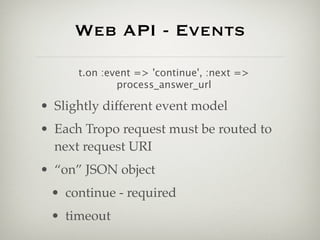
Web API - Events

      t.on :event => 'continue', :next =>
              process_answer_url

• Slightly different event model
• Each Tropo request must be routed to
  next request URI
• “on” JSON object
 • continue - required
 • timeout
DEMO 4: WEB API
       Username: hcc_demo
       Password: hcc_demo


 Calls Received From: 713 489 5682
KOACHED ARBITRARY MESSAGE SEND
DEMO 4: WEB API
  Username: hcc_demo
  Password: hcc_demo


  Let’s look at the code
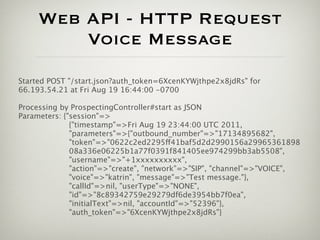
Web API - HTTP Request
         Voice Message
Started POST "/start.json?auth_token=6XcenKYWjthpe2x8jdRs" for
66.193.54.21 at Fri Aug 19 16:44:00 -0700

Processing by ProspectingController#start as JSON
Parameters: {"session"=>
              {"timestamp"=>Fri Aug 19 23:44:00 UTC 2011,
              "parameters"=>{"outbound_number"=>"17134895682",
              "token"=>"0622c2ed2295ff41baf5d2d2990156a29965361898
              08a336e06225b1a77f0391f841405ee974299bb3ab5508",
              "username"=>"+1xxxxxxxxxx",
              "action"=>"create", "network"=>"SIP", "channel"=>"VOICE",
              "voice"=>"katrin", "message"=>"Test message."},
              "callId"=>nil, "userType"=>"NONE",
              "id"=>"8c89342759e29279df6de3954bb7f0ea",
              "initialText"=>nil, "accountId"=>"52396"},
              "auth_token"=>"6XcenKYWjthpe2x8jdRs"}
Web API - JSON Response
     Voice Message

Response is: {"tropo":
      [{"message":
               {"say":[{"value":"Test message."}],
               "from":"17134895682",
               "network":"SIP",
               "to":"+1xxxxxxxxx;postd=p",
               "channel":"VOICE",
               "voice":"katrin"}}]}
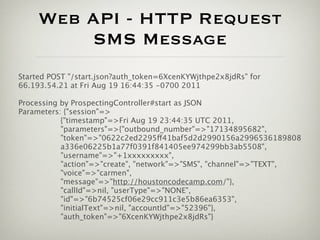
Web API - HTTP Request
         SMS Message
Started POST "/start.json?auth_token=6XcenKYWjthpe2x8jdRs" for
66.193.54.21 at Fri Aug 19 16:44:35 -0700 2011

Processing by ProspectingController#start as JSON
Parameters: {"session"=>
           {"timestamp"=>Fri Aug 19 23:44:35 UTC 2011,
           "parameters"=>{"outbound_number"=>"17134895682",
           "token"=>"0622c2ed2295ff41baf5d2d2990156a2996536189808
           a336e06225b1a77f0391f841405ee974299bb3ab5508",
           "username"=>"+1xxxxxxxxx",
           "action"=>"create", "network"=>"SMS", "channel"=>"TEXT",
           "voice"=>"carmen",
           "message"=>"http://houstoncodecamp.com/"},
           "callId"=>nil, "userType"=>"NONE",
           "id"=>"6b74525cf06e29cc911c3e5b86ea6353",
           "initialText"=>nil, "accountId"=>"52396"},
           "auth_token"=>"6XcenKYWjthpe2x8jdRs"}
Web API - JSON Response
     SMS Message

Response is: {"tropo":
       [{"message":
               {"say":[{"value":"Test message."}],
               "from":"17134895682",
               "network":"SMS",
               "to":"+1xxxxxxxxxx",
               "channel":"TEXT",
               "voice":"carmen"}}]}
Voice Recognition
    Metadata
Voice Recognition
           Metadata

• Tropo provides lots of information about what
  it thinks the user said, which you can use to
  make decisions about it’s validity as
  application input
Voice Recognition
            Metadata

• Tropo provides lots of information about what
  it thinks the user said, which you can use to
  make decisions about it’s validity as
  application input
• "actions": { "name": "account_number",
  "attempts": 1, "disposition": "SUCCESS",
  "confidence": 100, "interpretation": "12345",
  "utterance": "1 2 3 4 5", "concept": "12345" }
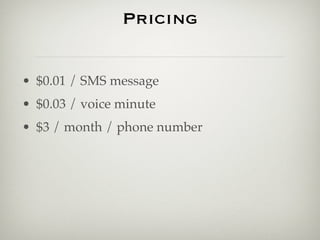
Pricing
Pricing


• $0.01 / SMS message
Pricing


• $0.01 / SMS message
• $0.03 / voice minute
Pricing


• $0.01 / SMS message
• $0.03 / voice minute
• $3 / month / phone number
Pricing


• $0.01 / SMS message
• $0.03 / voice minute
• $3 / month / phone number
• $5 / month / toll-free phone number
Pricing


• $0.01 / SMS message
• $0.03 / voice minute
• $3 / month / phone number
• $5 / month / toll-free phone number
• International rates vary
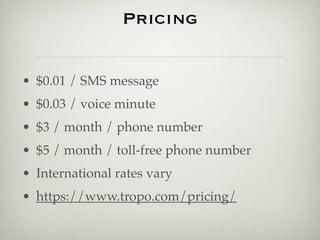
Pricing


• $0.01 / SMS message
• $0.03 / voice minute
• $3 / month / phone number
• $5 / month / toll-free phone number
• International rates vary
• https://www.tropo.com/pricing/
Phono.com and SMSified.com

• phono.com: “a simply jQuery plugin and
  Javascript library that turns any web browser
  into a phone”
Phono.com and SMSified.com

• phono.com: “a simply jQuery plugin and
  Javascript library that turns any web browser
  into a phone”
• smsified.com: “Build powerful SMS
  applications with our easy API”
MISCELLANY
MISCELLANY

• Use Tunnlr to have a local Web server be able to be
  addressed by Tropo
  • https://www.tropo.com/docs/webapi/
    using_tunnlr_reverse_ssh.htm
MISCELLANY

• Use Tunnlr to have a local Web server be able to be
  addressed by Tropo
  • https://www.tropo.com/docs/webapi/
    using_tunnlr_reverse_ssh.htm
• Use Adhearsion (Ruby Asterisk API) for
  integration into Asterisk
MISCELLANY

• Use Tunnlr to have a local Web server be able to be
  addressed by Tropo
  • https://www.tropo.com/docs/webapi/
    using_tunnlr_reverse_ssh.htm
• Use Adhearsion (Ruby Asterisk API) for
  integration into Asterisk
• Tropo vs. Twilio Video: http://
  www.youtube.com/watch?v=1y11S3cajUk
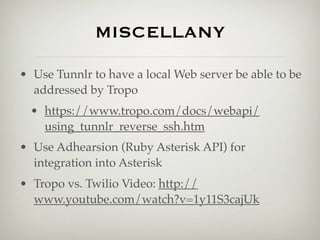
MISCELLANY

• Use Tunnlr to have a local Web server be able to be
  addressed by Tropo
  • https://www.tropo.com/docs/webapi/
    using_tunnlr_reverse_ssh.htm
• Use Adhearsion (Ruby Asterisk API) for
  integration into Asterisk
• Tropo vs. Twilio Video: http://
  www.youtube.com/watch?v=1y11S3cajUk
• Support has good response time for development
Resources
Resources

• https://github.com/weyus/hcc_tropo_demos
Resources

• https://github.com/weyus/hcc_tropo_demos
• https://github.com/tropo/tropo-samples
Resources

• https://github.com/weyus/hcc_tropo_demos
• https://github.com/tropo/tropo-samples
• https://github.com/tropo/tropo-webapi-ruby
Resources

• https://github.com/weyus/hcc_tropo_demos
• https://github.com/tropo/tropo-samples
• https://github.com/tropo/tropo-webapi-ruby
• tropo.com
Resources

• https://github.com/weyus/hcc_tropo_demos
• https://github.com/tropo/tropo-samples
• https://github.com/tropo/tropo-webapi-ruby
• tropo.com
• smsified.com
Resources

• https://github.com/weyus/hcc_tropo_demos
• https://github.com/tropo/tropo-samples
• https://github.com/tropo/tropo-webapi-ruby
• tropo.com
• smsified.com
• phono.com
QUESTIONS?
QUESTIONS?

• weyus@att.net
QUESTIONS?

• weyus@att.net
• @weyus
THANKS!

Tropo: Telephony in the Cloud

  • 1.
    TROPO: TELEPHONY IN THE CLOUD Wes Gamble Bison Consulting koached.com
  • 2.
    Wes Gamble • BisonConsulting • koached.com • weyus@att.net • @weyus
  • 3.
  • 4.
    What We’ll Discuss Today • Why?
  • 5.
    What We’ll Discuss Today • Why? • Tropo offerings
  • 6.
    What We’ll Discuss Today • Why? • Tropo offerings • Tropo code examples
  • 7.
    What We’ll Discuss Today • Why? • Tropo offerings • Tropo code examples • Other stuff
  • 8.
  • 9.
  • 10.
  • 11.
  • 12.
    BEFORE + + (Telephony)
  • 13.
    BEFORE + + (Telephony) (cheaper: computer + telephony HW + Asterisk)
  • 14.
  • 15.
  • 16.
  • 17.
  • 18.
    WHY TROPO? • FREEto develop (pay for production)
  • 19.
    WHY TROPO? • FREEto develop (pay for production) • 10+ years of voice application experience, infrastructure (Voxeo)
  • 20.
    WHY TROPO? • FREEto develop (pay for production) • 10+ years of voice application experience, infrastructure (Voxeo) • Multiple channels with one back-end (Voice, SMS, IM, Twitter)
  • 21.
    WHY TROPO? • FREEto develop (pay for production) • 10+ years of voice application experience, infrastructure (Voxeo) • Multiple channels with one back-end (Voice, SMS, IM, Twitter) • Open-source, standards-based (SIP)
  • 22.
    WHY TROPO? • FREEto develop (pay for production) • 10+ years of voice application experience, infrastructure (Voxeo) • Multiple channels with one back-end (Voice, SMS, IM, Twitter) • Open-source, standards-based (SIP) • Web developers can do telephony now
  • 23.
  • 24.
    Language Support • APIsare available in:
  • 25.
    Language Support • APIsare available in: • JavaScript
  • 26.
    Language Support • APIsare available in: • JavaScript • PHP
  • 27.
    Language Support • APIsare available in: • JavaScript • PHP • Ruby
  • 28.
    Language Support • APIsare available in: • JavaScript • PHP • Ruby • Python
  • 29.
    Language Support • APIsare available in: • JavaScript • PHP • Ruby • Python • Groovy
  • 30.
  • 31.
    APIs • Scripting API:execute one script file • Tropo-hosted or self-hosted
  • 32.
    APIs • Scripting API:execute one script file • Tropo-hosted or self-hosted • Web API • Arbitrary Web application endpoint
  • 33.
    APIs • Scripting API:execute one script file • Tropo-hosted or self-hosted • Web API • Arbitrary Web application endpoint • REST API • Session initiation, provisioning, signal/event passing
  • 34.
  • 35.
    Getting Started with Tropo • Establish an account at Tropo.com
  • 36.
    Getting Started with Tropo • Establish an account at Tropo.com • Create an application
  • 37.
    Getting Started with Tropo • Establish an account at Tropo.com • Create an application • Choose Scripting or Web API
  • 38.
    Getting Started with Tropo • Establish an account at Tropo.com • Create an application • Choose Scripting or Web API • Set script location (scripting) or Web app. endpoints (Web API)
  • 39.
    Getting Started with Tropo • Establish an account at Tropo.com • Create an application • Choose Scripting or Web API • Set script location (scripting) or Web app. endpoints (Web API) • Provision numbers
  • 40.
    DEMO 1: FirstSteps Username: hcc_demo Password: hcc_demo Calling to: 281 968 8698 “2012 Doomsday Clock” https://github.com/weyus/hcc_tropo_demos/ blob/master/ demo1/2012_Doomsday_Countdown_inbound.rb
  • 41.
    DEMO 1: FirstSteps Username: hcc_demo Password: hcc_demo Let’s look at the code
  • 42.
    Receiving inbound Calls with Tropo (*) Scripting API - script resides on Tropo server
  • 43.
    Receiving inbound Calls with Tropo (*) Scripting API - script resides on Tropo server
  • 44.
    Receiving inbound Calls with Tropo Script or APP (*) Scripting API - script resides on Tropo server
  • 45.
    Receiving inbound Calls with Tropo Script or APP (*) Scripting API - script resides on Tropo server
  • 46.
    Receiving inbound Calls with Tropo Script or APP ca ll pho ne # (*) Scripting API - script resides on Tropo server
  • 47.
    Receiving inbound Calls with Tropo Script or callback APP ca ll pho ne # (*) Scripting API - script resides on Tropo server
  • 48.
  • 49.
    DEMO: First Steps Key Pieces • Bare Ruby script - just gets executed
  • 50.
    DEMO: First Steps Key Pieces • Bare Ruby script - just gets executed • Tropo API is a DSL that emits JSON for consumption by Tropo server
  • 51.
    DEMO: First Steps Key Pieces • Bare Ruby script - just gets executed • Tropo API is a DSL that emits JSON for consumption by Tropo server • Important verbs: • say • ask, call • hangup • message (= call + say + hangup)
  • 52.
    DEMO: First Steps Lessons Learned
  • 53.
    DEMO: First Steps Lessons Learned • When an incoming call is picked up by Tropo, script is immediately run
  • 54.
    DEMO: First Steps Lessons Learned • When an incoming call is picked up by Tropo, script is immediately run • “ask” keyword is synchronous, and result is returned when user responds
  • 55.
    DEMO: First Steps Lessons Learned • When an incoming call is picked up by Tropo, script is immediately run • “ask” keyword is synchronous, and result is returned when user responds • Voice recognition on input
  • 56.
    DEMO: First Steps Lessons Learned • When an incoming call is picked up by Tropo, script is immediately run • “ask” keyword is synchronous, and result is returned when user responds • Voice recognition on input • Text-to-speech on output
  • 57.
    DEMO: First Steps Lessons Learned • When an incoming call is picked up by Tropo, script is immediately run • “ask” keyword is synchronous, and result is returned when user responds • Voice recognition on input • Text-to-speech on output • Can be used with voice or SMS
  • 58.
  • 59.
    Scripting API: Current callmetadata • There are properties that are set on the $currentCall object in Ruby for incoming calls
  • 60.
    Scripting API: Current callmetadata • There are properties that are set on the $currentCall object in Ruby for incoming calls • callerID
  • 61.
    Scripting API: Current callmetadata • There are properties that are set on the $currentCall object in Ruby for incoming calls • callerID • channel
  • 62.
    Scripting API: Current callmetadata • There are properties that are set on the $currentCall object in Ruby for incoming calls • callerID • channel • network
  • 63.
    Scripting API: Current callmetadata • There are properties that are set on the $currentCall object in Ruby for incoming calls • callerID • channel • network • https://www.tropo.com/docs/ scripting/call_properties.htm
  • 64.
    Scripting API -Basics SAY
  • 65.
    Scripting API -Basics SAY say “I’m a computer and I’m talking to you”, options
  • 66.
    Scripting API -Basics SAY say “I’m a computer and I’m talking to you”, options • Say something to the user
  • 67.
    Scripting API -Basics SAY say “I’m a computer and I’m talking to you”, options • Say something to the user • Options
  • 68.
    Scripting API -Basics SAY say “I’m a computer and I’m talking to you”, options • Say something to the user • Options • voice: Use a different voice - there are ~60 voices from which to choose
  • 69.
    Scripting API -Basics SAY say “I’m a computer and I’m talking to you”, options • Say something to the user • Options • voice: Use a different voice - there are ~60 voices from which to choose • as: type of data (DATE, DIGITS, NUMBER)
  • 70.
    Scripting API -Basics ASK
  • 71.
    Scripting API -Basics ASK result = ask “Do you like stuff?”, options
  • 72.
    Scripting API -Basics ASK result = ask “Do you like stuff?”, options • Ask the user a question (say + wait)
  • 73.
    Scripting API -Basics ASK result = ask “Do you like stuff?”, options • Ask the user a question (say + wait) • Blocks while waiting for result
  • 74.
    Scripting API -Basics ASK result = ask “Do you like stuff?”, options • Ask the user a question (say + wait) • Blocks while waiting for result • Options
  • 75.
    Scripting API -Basics ASK result = ask “Do you like stuff?”, options • Ask the user a question (say + wait) • Blocks while waiting for result • Options • attempts: how many tries do you get?
  • 76.
    Scripting API -Basics ASK result = ask “Do you like stuff?”, options • Ask the user a question (say + wait) • Blocks while waiting for result • Options • attempts: how many tries do you get? • choices: grammar (allowable input)
  • 77.
    Scripting API -Basics ASK result = ask “Do you like stuff?”, options • Ask the user a question (say + wait) • Blocks while waiting for result • Options • attempts: how many tries do you get? • choices: grammar (allowable input) • onXXXX: Event handlers for: timeout, bad input, etc.
  • 78.
    Scripting API -Basics CALL
  • 79.
    Scripting API -Basics CALL call “+17135551212ppp123”, options
  • 80.
    Scripting API -Basics CALL call “+17135551212ppp123”, options • Makes an outbound call after session initiation (REST API)
  • 81.
    Scripting API -Basics CALL call “+17135551212ppp123”, options • Makes an outbound call after session initiation (REST API) • pauses can be inserted into destination
  • 82.
    Scripting API -Basics CALL call “+17135551212ppp123”, options • Makes an outbound call after session initiation (REST API) • pauses can be inserted into destination • Options
  • 83.
    Scripting API -Basics CALL call “+17135551212ppp123”, options • Makes an outbound call after session initiation (REST API) • pauses can be inserted into destination • Options • channel: VOICE or TEXT
  • 84.
    Scripting API -Basics CALL call “+17135551212ppp123”, options • Makes an outbound call after session initiation (REST API) • pauses can be inserted into destination • Options • channel: VOICE or TEXT • network: SIP, GTALK, JABBER, etc.
  • 85.
    Scripting API -Basics CALL call “+17135551212ppp123”, options • Makes an outbound call after session initiation (REST API) • pauses can be inserted into destination • Options • channel: VOICE or TEXT • network: SIP, GTALK, JABBER, etc. • onXXXX: Event handlers
  • 86.
    Scripting API -Basics HANGUP
  • 87.
    Scripting API -Basics HANGUP hangup
  • 88.
    Scripting API -Basics HANGUP hangup • Terminates the call
  • 89.
    Scripting API -Basics MESSAGE
  • 90.
    Scripting API -Basics MESSAGE message “Howdy”, {:channel => ‘TEXT’, :network => ‘YAHOO’, :to => ‘homeboy987’}
  • 91.
    Scripting API -Basics MESSAGE message “Howdy”, {:channel => ‘TEXT’, :network => ‘YAHOO’, :to => ‘homeboy987’} • Used for one-off messages to user
  • 92.
    Scripting API -Basics MESSAGE message “Howdy”, {:channel => ‘TEXT’, :network => ‘YAHOO’, :to => ‘homeboy987’} • Used for one-off messages to user • Equivalent to a call, say, and hangup
  • 93.
    Scripting API -Basics MESSAGE message “Howdy”, {:channel => ‘TEXT’, :network => ‘YAHOO’, :to => ‘homeboy987’} • Used for one-off messages to user • Equivalent to a call, say, and hangup • Options
  • 94.
    Scripting API -Basics MESSAGE message “Howdy”, {:channel => ‘TEXT’, :network => ‘YAHOO’, :to => ‘homeboy987’} • Used for one-off messages to user • Equivalent to a call, say, and hangup • Options • channel: VOICE or TEXT
  • 95.
    Scripting API -Basics MESSAGE message “Howdy”, {:channel => ‘TEXT’, :network => ‘YAHOO’, :to => ‘homeboy987’} • Used for one-off messages to user • Equivalent to a call, say, and hangup • Options • channel: VOICE or TEXT • network: SIP, MSN, YAHOO
  • 96.
    Scripting API -Basics MESSAGE message “Howdy”, {:channel => ‘TEXT’, :network => ‘YAHOO’, :to => ‘homeboy987’} • Used for one-off messages to user • Equivalent to a call, say, and hangup • Options • channel: VOICE or TEXT • network: SIP, MSN, YAHOO • to: destination number, username
  • 97.
    Scripting API -Basics Events
  • 98.
    Scripting API -Basics Events • Handlers can be specified for events on some verbs
  • 99.
    Scripting API -Basics Events • Handlers can be specified for events on some verbs • ask • onBadChoice, onChoice
  • 100.
    Scripting API -Basics Events • Handlers can be specified for events on some verbs • ask • onBadChoice, onChoice • call • onAnswer, onHangup
  • 101.
    Scripting API -Basics Events • Handlers can be specified for events on some verbs • ask • onBadChoice, onChoice • call • onAnswer, onHangup • Signals - generic interrupts • https://www.tropo.com/docs/rest/ rest_tutorials.htm#event_tutorials
  • 102.
  • 103.
    Making Outbound Calls with Tropo • An outbound call is kicked off using the REST API to initiate a session
  • 104.
    Making Outbound Calls with Tropo • An outbound call is kicked off using the REST API to initiate a session • Simulates an inbound message
  • 105.
    Making Outbound Calls with Tropo • An outbound call is kicked off using the REST API to initiate a session • Simulates an inbound message • Programmatic or on-demand
  • 106.
    Making Outbound Calls with Tropo • An outbound call is kicked off using the REST API to initiate a session • Simulates an inbound message • Programmatic or on-demand • http://api.tropo.com/1.0/sessions? action=create&token=voice_or_text_tok en[&custom_param_1=custom_value_1]
  • 107.
    Making Outbound Calls with Tropo (*) Scripting API - script resides on Tropo server
  • 108.
    Making Outbound Calls with Tropo (*) Scripting API - script resides on Tropo server
  • 109.
    Making Outbound Calls with Tropo Script or APP (*) Scripting API - script resides on Tropo server
  • 110.
    Making Outbound Calls with Tropo Script or APP (*) Scripting API - script resides on Tropo server
  • 111.
    Making Outbound Calls with Tropo Script or APP HTTP Client (*) Scripting API - script resides on Tropo server
  • 112.
    Making Outbound Calls with Tropo Script or APP (POST) GET HTTP Client (*) Scripting API - script resides on Tropo server
  • 113.
    Making Outbound Calls with Tropo Script callback or APP (POST) GET HTTP Client (*) Scripting API - script resides on Tropo server
  • 114.
    Making Outbound Calls with Tropo Script callback or “call” (JSON) APP (POST) GET HTTP Client (*) Scripting API - script resides on Tropo server
  • 115.
    Making Outbound Calls with Tropo Script callback or “call” (JSON) APP Ca ll U (POST) se GET r HTTP Client (*) Scripting API - script resides on Tropo server
  • 116.
    DEMO 2: FirstSteps, Outbound Username: hcc_demo Password: hcc_demo Calls Received From: 713 489 7498 “2012 Doomsday Clock” https://github.com/weyus/hcc_tropo_demos/blob/ master/ demo2/2012_Doomsday_Countdown_outbound.rb
  • 117.
    DEMO 2: FirstSteps, outbound Username: hcc_demo Password: hcc_demo Let’s look at the code
  • 118.
    DEMO: First Steps,Outbound Lessons Learned
  • 119.
    DEMO: First Steps,Outbound Lessons Learned • Simulated inbound call to app. via HTTP GET or POST call to session API
  • 120.
    DEMO: First Steps,Outbound Lessons Learned • Simulated inbound call to app. via HTTP GET or POST call to session API • Can be used with voice or SMS
  • 121.
    DEMO: First Steps,Outbound Lessons Learned • Simulated inbound call to app. via HTTP GET or POST call to session API • Can be used with voice or SMS • $currentCall is not populated on outbound call before “call”
  • 122.
  • 123.
    INTERNATIONALIZATION SUPPORT • Multi-language voice recognition • “recognizer” option on “ask” command • https://www.tropo.com/docs/webapi/ international_speech_recognition.htm
  • 124.
    INTERNATIONALIZATION SUPPORT • Multi-language voice recognition • “recognizer” option on “ask” command • https://www.tropo.com/docs/webapi/ international_speech_recognition.htm • Multi-language text-to-speech output
  • 125.
    INTERNATIONALIZATION SUPPORT • Multi-language voice recognition • “recognizer” option on “ask” command • https://www.tropo.com/docs/webapi/ international_speech_recognition.htm • Multi-language text-to-speech output • Voices: 60+ • https://www.tropo.com/docs/scripting/ international_speaking_other_languages.htm
  • 126.
    INTERNATIONALIZATION SUPPORT • Multi-language voice recognition • “recognizer” option on “ask” command • https://www.tropo.com/docs/webapi/ international_speech_recognition.htm • Multi-language text-to-speech output • Voices: 60+ • https://www.tropo.com/docs/scripting/ international_speaking_other_languages.htm • Lots of international numbers
  • 127.
  • 128.
    ADDITIONAL CAPABILITIES • Record calls and generate transcriptions (up to 2 hours)
  • 129.
    ADDITIONAL CAPABILITIES • Record calls and generate transcriptions (up to 2 hours) • Transfer calls
  • 130.
    ADDITIONAL CAPABILITIES • Record calls and generate transcriptions (up to 2 hours) • Transfer calls • Conference calling
  • 131.
    ADDITIONAL CAPABILITIES • Record calls and generate transcriptions (up to 2 hours) • Transfer calls • Conference calling • Play audio files • Tropo-hosted or self-hosted
  • 132.
    ADDITIONAL CAPABILITIES • Record calls and generate transcriptions (up to 2 hours) • Transfer calls • Conference calling • Play audio files • Tropo-hosted or self-hosted • Reject calls (voice only)
  • 133.
    ADDITIONAL CAPABILITIES • Record calls and generate transcriptions (up to 2 hours) • Transfer calls • Conference calling • Play audio files • Tropo-hosted or self-hosted • Reject calls (voice only) • Advanced grammars (SRGS/GRXML)
  • 134.
  • 135.
    VOICE VS. TEXT •Inspect channel on inbound message to determine what kind of message
  • 136.
    VOICE VS. TEXT •Inspect channel on inbound message to determine what kind of message • Keep in mind for text channel: • initialText is set on the “session” input when a text comes • Throw away the initial text with a blank ask if you don’t want to use the inbound text
  • 137.
    DEMO 3: Conferences, Transfers, Audio Username: hcc_demo Password: hcc_demo Calling to: 713 489 7524 “Conferences, Transfers, and Audio Files” https://github.com/weyus/hcc_tropo_demos/blob/ master/demo3/examples.rb
  • 138.
    DEMO 3: Conferences, Transfers, Audio Username: hcc_demo Password: hcc_demo Let’s look at the code
  • 139.
  • 140.
    Web API • Insteadof compiling a script internally, Tropo issues a HTTP POST to your back end Web application (you specify the initial call in the app. setup)
  • 141.
    Web API • Insteadof compiling a script internally, Tropo issues a HTTP POST to your back end Web application (you specify the initial call in the app. setup) • Example back end code is from a Rails app.
  • 142.
    Web API • Insteadof compiling a script internally, Tropo issues a HTTP POST to your back end Web application (you specify the initial call in the app. setup) • Example back end code is from a Rails app. • Valid back end is anything that provides an HTTP endpoint and emits valid Tropo JSON
  • 143.
    Web API • Insteadof compiling a script internally, Tropo issues a HTTP POST to your back end Web application (you specify the initial call in the app. setup) • Example back end code is from a Rails app. • Valid back end is anything that provides an HTTP endpoint and emits valid Tropo JSON • API helpers for each language • Also Node.js, C#, Java, Grails, Erlang (?) • Basically provide wrappers for JSON generation
  • 144.
  • 145.
    Web API • Moreseamless integration into existing application infrastructure than scripts
  • 146.
    Web API • Moreseamless integration into existing application infrastructure than scripts • Scripts die, apps. (hopefully) do not
  • 147.
    Web API • Moreseamless integration into existing application infrastructure than scripts • Scripts die, apps. (hopefully) do not • When you use the session API to make an outbound call, each additional parameter in the GET (or POST) call are passed in the POST back to the application as parameters[param_name]
  • 148.
    Web API • Moreseamless integration into existing application infrastructure than scripts • Scripts die, apps. (hopefully) do not • When you use the session API to make an outbound call, each additional parameter in the GET (or POST) call are passed in the POST back to the application as parameters[param_name] • POST params come in differently depending on whether a new session or not
  • 149.
    Web API -Events
  • 150.
    Web API -Events • Slightly different event model
  • 151.
    Web API -Events • Slightly different event model • Each Tropo request must be routed to next request URI
  • 152.
    Web API -Events • Slightly different event model • Each Tropo request must be routed to next request URI • “on” JSON object • continue - required • timeout
  • 153.
    Web API -Events t.on :event => 'continue', :next => process_answer_url • Slightly different event model • Each Tropo request must be routed to next request URI • “on” JSON object • continue - required • timeout
  • 154.
    DEMO 4: WEBAPI Username: hcc_demo Password: hcc_demo Calls Received From: 713 489 5682 KOACHED ARBITRARY MESSAGE SEND
  • 155.
    DEMO 4: WEBAPI Username: hcc_demo Password: hcc_demo Let’s look at the code
  • 156.
    Web API -HTTP Request Voice Message Started POST "/start.json?auth_token=6XcenKYWjthpe2x8jdRs" for 66.193.54.21 at Fri Aug 19 16:44:00 -0700 Processing by ProspectingController#start as JSON Parameters: {"session"=> {"timestamp"=>Fri Aug 19 23:44:00 UTC 2011, "parameters"=>{"outbound_number"=>"17134895682", "token"=>"0622c2ed2295ff41baf5d2d2990156a29965361898 08a336e06225b1a77f0391f841405ee974299bb3ab5508", "username"=>"+1xxxxxxxxxx", "action"=>"create", "network"=>"SIP", "channel"=>"VOICE", "voice"=>"katrin", "message"=>"Test message."}, "callId"=>nil, "userType"=>"NONE", "id"=>"8c89342759e29279df6de3954bb7f0ea", "initialText"=>nil, "accountId"=>"52396"}, "auth_token"=>"6XcenKYWjthpe2x8jdRs"}
  • 157.
    Web API -JSON Response Voice Message Response is: {"tropo": [{"message": {"say":[{"value":"Test message."}], "from":"17134895682", "network":"SIP", "to":"+1xxxxxxxxx;postd=p", "channel":"VOICE", "voice":"katrin"}}]}
  • 158.
    Web API -HTTP Request SMS Message Started POST "/start.json?auth_token=6XcenKYWjthpe2x8jdRs" for 66.193.54.21 at Fri Aug 19 16:44:35 -0700 2011 Processing by ProspectingController#start as JSON Parameters: {"session"=> {"timestamp"=>Fri Aug 19 23:44:35 UTC 2011, "parameters"=>{"outbound_number"=>"17134895682", "token"=>"0622c2ed2295ff41baf5d2d2990156a2996536189808 a336e06225b1a77f0391f841405ee974299bb3ab5508", "username"=>"+1xxxxxxxxx", "action"=>"create", "network"=>"SMS", "channel"=>"TEXT", "voice"=>"carmen", "message"=>"http://houstoncodecamp.com/"}, "callId"=>nil, "userType"=>"NONE", "id"=>"6b74525cf06e29cc911c3e5b86ea6353", "initialText"=>nil, "accountId"=>"52396"}, "auth_token"=>"6XcenKYWjthpe2x8jdRs"}
  • 159.
    Web API -JSON Response SMS Message Response is: {"tropo": [{"message": {"say":[{"value":"Test message."}], "from":"17134895682", "network":"SMS", "to":"+1xxxxxxxxxx", "channel":"TEXT", "voice":"carmen"}}]}
  • 160.
  • 161.
    Voice Recognition Metadata • Tropo provides lots of information about what it thinks the user said, which you can use to make decisions about it’s validity as application input
  • 162.
    Voice Recognition Metadata • Tropo provides lots of information about what it thinks the user said, which you can use to make decisions about it’s validity as application input • "actions": { "name": "account_number", "attempts": 1, "disposition": "SUCCESS", "confidence": 100, "interpretation": "12345", "utterance": "1 2 3 4 5", "concept": "12345" }
  • 163.
  • 164.
  • 165.
    Pricing • $0.01 /SMS message • $0.03 / voice minute
  • 166.
    Pricing • $0.01 /SMS message • $0.03 / voice minute • $3 / month / phone number
  • 167.
    Pricing • $0.01 /SMS message • $0.03 / voice minute • $3 / month / phone number • $5 / month / toll-free phone number
  • 168.
    Pricing • $0.01 /SMS message • $0.03 / voice minute • $3 / month / phone number • $5 / month / toll-free phone number • International rates vary
  • 169.
    Pricing • $0.01 /SMS message • $0.03 / voice minute • $3 / month / phone number • $5 / month / toll-free phone number • International rates vary • https://www.tropo.com/pricing/
  • 170.
  • 171.
    Phono.com and SMSified.com •phono.com: “a simply jQuery plugin and Javascript library that turns any web browser into a phone”
  • 172.
    Phono.com and SMSified.com •phono.com: “a simply jQuery plugin and Javascript library that turns any web browser into a phone” • smsified.com: “Build powerful SMS applications with our easy API”
  • 173.
  • 174.
    MISCELLANY • Use Tunnlrto have a local Web server be able to be addressed by Tropo • https://www.tropo.com/docs/webapi/ using_tunnlr_reverse_ssh.htm
  • 175.
    MISCELLANY • Use Tunnlrto have a local Web server be able to be addressed by Tropo • https://www.tropo.com/docs/webapi/ using_tunnlr_reverse_ssh.htm • Use Adhearsion (Ruby Asterisk API) for integration into Asterisk
  • 176.
    MISCELLANY • Use Tunnlrto have a local Web server be able to be addressed by Tropo • https://www.tropo.com/docs/webapi/ using_tunnlr_reverse_ssh.htm • Use Adhearsion (Ruby Asterisk API) for integration into Asterisk • Tropo vs. Twilio Video: http:// www.youtube.com/watch?v=1y11S3cajUk
  • 177.
    MISCELLANY • Use Tunnlrto have a local Web server be able to be addressed by Tropo • https://www.tropo.com/docs/webapi/ using_tunnlr_reverse_ssh.htm • Use Adhearsion (Ruby Asterisk API) for integration into Asterisk • Tropo vs. Twilio Video: http:// www.youtube.com/watch?v=1y11S3cajUk • Support has good response time for development
  • 178.
  • 179.
  • 180.
  • 181.
  • 182.
  • 183.
    Resources • https://github.com/weyus/hcc_tropo_demos • https://github.com/tropo/tropo-samples •https://github.com/tropo/tropo-webapi-ruby • tropo.com • smsified.com
  • 184.
    Resources • https://github.com/weyus/hcc_tropo_demos • https://github.com/tropo/tropo-samples •https://github.com/tropo/tropo-webapi-ruby • tropo.com • smsified.com • phono.com
  • 185.
  • 186.
  • 187.
  • 188.

Editor's Notes

  • #2 \n
  • #3 \n
  • #4 Next slide is video\n
  • #5 Next slide is video\n
  • #6 Next slide is video\n
  • #7 Next slide is video\n
  • #8 \n
  • #9 A big server\nplus money\nplus telephony geek\n
  • #10 A big server\nplus money\nplus telephony geek\n
  • #11 A big server\nplus money\nplus telephony geek\n
  • #12 A big server\nplus money\nplus telephony geek\n
  • #13 Tropo\nplus Web geek\n
  • #14 Tropo\nplus Web geek\n
  • #15 Voxeo back end is a big Java program using SIP Servlet API\nThink of Tropo as ODBC for communication \n
  • #16 Voxeo back end is a big Java program using SIP Servlet API\nThink of Tropo as ODBC for communication \n
  • #17 Voxeo back end is a big Java program using SIP Servlet API\nThink of Tropo as ODBC for communication \n
  • #18 Voxeo back end is a big Java program using SIP Servlet API\nThink of Tropo as ODBC for communication \n
  • #19 Voxeo back end is a big Java program using SIP Servlet API\nThink of Tropo as ODBC for communication \n
  • #20 \n
  • #21 \n
  • #22 \n
  • #23 \n
  • #24 \n
  • #25 \n
  • #26 \n
  • #27 \n
  • #28 \n
  • #29 \n
  • #30 \n
  • #31 \n
  • #32 \n
  • #33 \n
  • #34 1) Show hcc_demo configuration screen: voice URL vs. SMS/messaging URL.\n2) Show application debugger.\n3) Call this # and mic the phone.\n4) Discuss how you can do this with SMS - invite someone in the audience to send anything to this number, and countdown will begin.\n
  • #35 Walk through code - high level.\n
  • #36 \n
  • #37 \n
  • #38 \n
  • #39 \n
  • #40 \n
  • #41 Show documentation for scripting/Web API\n
  • #42 Show documentation for scripting/Web API\n
  • #43 Show documentation for scripting/Web API\n
  • #44 \n
  • #45 \n
  • #46 \n
  • #47 \n
  • #48 \n
  • #49 \n
  • #50 \n
  • #51 \n
  • #52 \n
  • #53 \n
  • #54 Show Tropo documentation\n\n
  • #55 Show Tropo documentation\n\n
  • #56 Show Tropo documentation\n\n
  • #57 Show Tropo documentation\n\n
  • #58 Show Tropo documentation\n\n
  • #59 Talk about grammars\n\n
  • #60 Talk about grammars\n\n
  • #61 Talk about grammars\n\n
  • #62 Talk about grammars\n\n
  • #63 Talk about grammars\n\n
  • #64 Talk about grammars\n\n
  • #65 Talk about grammars\n\n
  • #66 Show Tropo documentation\n\n
  • #67 Show Tropo documentation\n\n
  • #68 Show Tropo documentation\n\n
  • #69 Show Tropo documentation\n\n
  • #70 Show Tropo documentation\n\n
  • #71 Show Tropo documentation\n\n
  • #72 Show Tropo documentation\n\n
  • #73 Show Tropo documentation\n\n
  • #74 Show Tropo documentation\n\n
  • #75 Show Tropo documentation\n\n
  • #76 Show Tropo documentation\n\n
  • #77 Show Tropo documentation\n\n
  • #78 Show Tropo documentation\n\n
  • #79 Show Tropo documentation\n\n
  • #80 Show Tropo documentation\n\n
  • #81 Show Tropo documentation\n\n
  • #82 Show Tropo documentation\n\n
  • #83 Show Tropo documentation\n\n
  • #84 Show Tropo documentation\n\n
  • #85 Show Tropo documentation\n\n
  • #86 \n
  • #87 \n
  • #88 \n
  • #89 \n
  • #90 \n
  • #91 \n
  • #92 \n
  • #93 \n
  • #94 \n
  • #95 \n
  • #96 \n
  • #97 \n
  • #98 1) Mic phone and click on outbound voice link in Tropo app.\n
  • #99 Show call verb and “if $currentCall” code.\n
  • #100 \n
  • #101 \n
  • #102 \n
  • #103 \n
  • #104 \n
  • #105 \n
  • #106 \n
  • #107 \n
  • #108 \n
  • #109 \n
  • #110 \n
  • #111 \n
  • #112 \n
  • #113 \n
  • #114 \n
  • #115 1) Conference: Get one person to call 713 489 7524 and choose 1; get another person to call and choose 1. They should be able to talk to each other.\n2) Get a volunteer number from the audience - change number in code, call and choose #2, call should be transferred.\n3) Call 713 489 7524 and choose #3, hear audio.\n\n
  • #116 Show demo3 code\n
  • #117 Show Tropo documentation\n\n
  • #118 Show Tropo documentation\n\n
  • #119 Show Tropo documentation\n\n
  • #120 Show Tropo documentation\n\n
  • #121 Show Tropo documentation\n\n
  • #122 Show Tropo documentation\n\n
  • #123 Show Tropo documentation\n\n
  • #124 Show Tropo documentation\n\n
  • #125 Show Tropo documentation\n\n
  • #126 Show Tropo documentation\n\n
  • #127 Show Tropo documentation\n\n
  • #128 Show Tropo documentation\n\n
  • #129 1) Show hcc_demo configuration screen: voice URL vs. SMS/messaging URL.\n2) Show application debugger.\n3) Call this # and mic the phone.\n4) Discuss how you can do this with SMS - invite someone in the audience to send anything to this number, and countdown will begin.\n
  • #130 1) Talk about Koached Tropo Generator - add functionality to stock Ruby Tropo Generator\n2) Tropo Controller - generic tropo functionality, convenience methods\n3) Prospecting controller - actual endpoint\n
  • #131 Show Tropo documentation\n\n
  • #132 Show Tropo documentation\n\n
  • #133 Show Tropo documentation\n\n
  • #134 Show Tropo documentation\n\n
  • #135 Show Tropo documentation\n\n
  • #136 Show Tropo documentation\n\n
  • #137 Show Tropo documentation\n\n
  • #138 Show Tropo documentation\n\n
  • #139 Show Tropo documentation\n\n
  • #140 Show Tropo documentation\n\n
  • #141 Show Tropo documentation\n\n
  • #142 Show Tropo documentation\n\n
  • #143 Show Tropo documentation\n\n
  • #144 Show Tropo documentation\n\n
  • #145 Show Tropo documentation\n\n
  • #146 Show Tropo documentation\n\n
  • #147 Show Tropo documentation\n\n
  • #148 Show Tropo documentation\n\n
  • #149 \n
  • #150 \n
  • #151 \n
  • #152 \n
  • #153 \n
  • #154 \n
  • #155 \n
  • #156 \n
  • #157 \n