Zhangshi Yin, Jingli Yang, Bob Bane,
Muhammad Rabi, Richard Ullman
Data Usability Group, NASA/GSFC
NASA/GSFC, Code 423
For HDF-EOS Workshop VII
September 23-25, 2003
HDF-EOS Data Extractor (HEEX) is a tool for data users
to extract HDF-EOS data to binary or ASCII data format
in HTML or XML.
Flat binary and ASCII data are required by some users.
They can be imported to IDL, ARC/INFO and used in
any programming.
Extracted flat binary and ASCII data can be another
intermediate data format for storing EOS data.
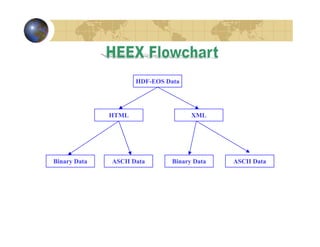
HDF-EOS Data

HTML

Binary Data

ASCII Data

XML

Binary Data

ASCII Data
heex [-aehx] [-f] [FieldName] -o OutputDirectory HDF-EOS5FileName
HDF-EOS5FileName: HDF-EOS5 file name. Required.
-a Extract data to ASCII format. Default is binary. Optional.
-e Extract every field. Optional.
-f FieldName: extract a field data specified by objec/field. Optional.
If no -e and -f options, only index file, no data.
-h Help message. Optional.
-o OutputDirectory: the directory to put data. Required.
-x Extract IndexFile data to XML format. Default is html. Optional.
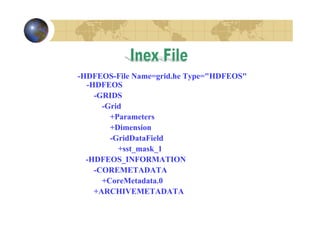
HEEX will extract all data into a directory indicated in
-o optional by user. A file called Index.html or
Index.xml in the directory will show all HDF-EOS data
structure and where data are.
-HDFEOS-File Name=grid.he Type="HDFEOS"
-HDFEOS
-GRIDS
-Grid
+Parameters
+Dimension
-GridDataField
+sst_mask_1
-HDFEOS_INFORMATION
-COREMETADATA
+CoreMetadata.0
+ARCHIVEMETADATA
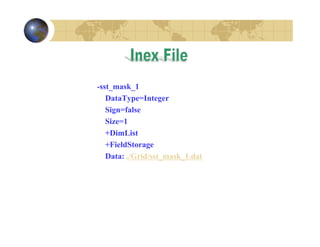
-sst_mask_1
DataType=Integer
Sign=false
Size=1
+DimList
+FieldStorage
Data: ./Grid/sst_mask_1.dat
HDF-EOS Metadata Updater (HEMU) is a tool for
data producers or users to update metadata inside an
HDF-EOS file (HDF-EOS2 and HDF-EOS5).
Users need to read metadata from HDF-EOS data.
Users need to write metadata files to HDF-EOS data replace all
metadata in the HDF-EOS data.
Users need to update metadata in HDF-EOS data by merging
metadata inside HDF-EOS data and metadata from .met files.
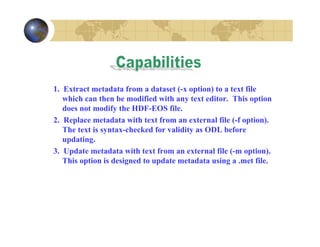
1. Extract metadata from a dataset (-x option) to a text file
which can then be modified with any text editor. This option
does not modify the HDF-EOS file.
2. Replace metadata with text from an external file (-f option).
The text is syntax-checked for validity as ODL before
updating.
3. Update metadata with text from an external file (-m option).
This option is designed to update metadata using a .met file.
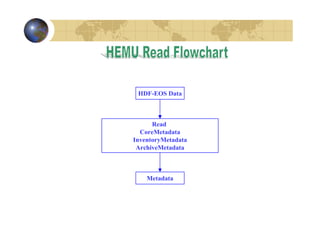
HDF-EOS Data

Read
CoreMetadata
InventoryMetadata
ArchiveMetadata

Metadata
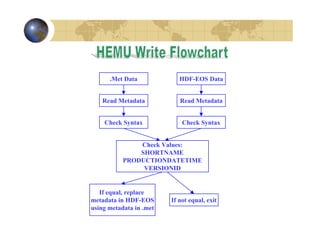
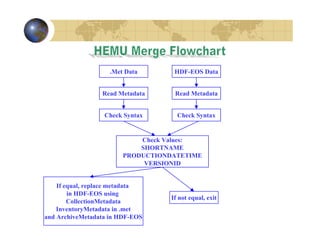
.Met Data

HDF-EOS Data

Read Metadata

Read Metadata

Check Syntax

Check Syntax

Check Values:
SHORTNAME
PRODUCTIONDATETIME
VERSIONID

If equal, replace
metadata in HDF-EOS
using metadata in .met

If not equal, exit
.Met Data

HDF-EOS Data

Read Metadata

Read Metadata

Check Syntax

Check Syntax

Check Values:
SHORTNAME
PRODUCTIONDATETIME
VERSIONID
If equal, replace metadata
in HDF-EOS using
CollectionMetadata
InventoryMetadata in .met
and ArchiveMetadata in HDF-EOS

If not equal, exit
hemu [-h] HDF-EOSFileName -xmf [MetadataFileName]
-h Print help message.
-x Extract metadata from HDFEOS file.
-m Update metadata with a .met file input.
-f Forcibly replace metadata with metadata from input.
HDF-EOSFileName: HDF-EOS file. Required.
MetadataFileName: Metadata file. Optional
(default is standard input/output).
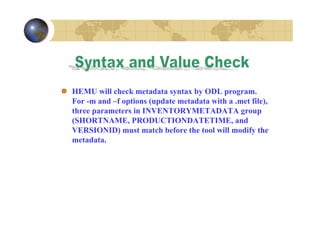
HEMU will check metadata syntax by ODL program.
For -m and –f options (update metadata with a .met file),
three parameters in INVENTORYMETADATA group
(SHORTNAME, PRODUCTIONDATETIME, and
VERSIONID) must match before the tool will modify the
metadata.
http://hdfeos.gsfc.nasa.gov/hdfeos/index.cfm

HDF-EOS Data Extractor & Metadata Updater

  • 1.
    Zhangshi Yin, JingliYang, Bob Bane, Muhammad Rabi, Richard Ullman Data Usability Group, NASA/GSFC NASA/GSFC, Code 423 For HDF-EOS Workshop VII September 23-25, 2003
  • 2.
    HDF-EOS Data Extractor(HEEX) is a tool for data users to extract HDF-EOS data to binary or ASCII data format in HTML or XML.
  • 3.
    Flat binary andASCII data are required by some users. They can be imported to IDL, ARC/INFO and used in any programming. Extracted flat binary and ASCII data can be another intermediate data format for storing EOS data.
  • 4.
    HDF-EOS Data HTML Binary Data ASCIIData XML Binary Data ASCII Data
  • 5.
    heex [-aehx] [-f][FieldName] -o OutputDirectory HDF-EOS5FileName HDF-EOS5FileName: HDF-EOS5 file name. Required. -a Extract data to ASCII format. Default is binary. Optional. -e Extract every field. Optional. -f FieldName: extract a field data specified by objec/field. Optional. If no -e and -f options, only index file, no data. -h Help message. Optional. -o OutputDirectory: the directory to put data. Required. -x Extract IndexFile data to XML format. Default is html. Optional.
  • 6.
    HEEX will extractall data into a directory indicated in -o optional by user. A file called Index.html or Index.xml in the directory will show all HDF-EOS data structure and where data are.
  • 7.
  • 8.
  • 9.
    HDF-EOS Metadata Updater(HEMU) is a tool for data producers or users to update metadata inside an HDF-EOS file (HDF-EOS2 and HDF-EOS5).
  • 10.
    Users need toread metadata from HDF-EOS data. Users need to write metadata files to HDF-EOS data replace all metadata in the HDF-EOS data. Users need to update metadata in HDF-EOS data by merging metadata inside HDF-EOS data and metadata from .met files.
  • 11.
    1. Extract metadatafrom a dataset (-x option) to a text file which can then be modified with any text editor. This option does not modify the HDF-EOS file. 2. Replace metadata with text from an external file (-f option). The text is syntax-checked for validity as ODL before updating. 3. Update metadata with text from an external file (-m option). This option is designed to update metadata using a .met file.
  • 12.
  • 13.
    .Met Data HDF-EOS Data ReadMetadata Read Metadata Check Syntax Check Syntax Check Values: SHORTNAME PRODUCTIONDATETIME VERSIONID If equal, replace metadata in HDF-EOS using metadata in .met If not equal, exit
  • 14.
    .Met Data HDF-EOS Data ReadMetadata Read Metadata Check Syntax Check Syntax Check Values: SHORTNAME PRODUCTIONDATETIME VERSIONID If equal, replace metadata in HDF-EOS using CollectionMetadata InventoryMetadata in .met and ArchiveMetadata in HDF-EOS If not equal, exit
  • 15.
    hemu [-h] HDF-EOSFileName-xmf [MetadataFileName] -h Print help message. -x Extract metadata from HDFEOS file. -m Update metadata with a .met file input. -f Forcibly replace metadata with metadata from input. HDF-EOSFileName: HDF-EOS file. Required. MetadataFileName: Metadata file. Optional (default is standard input/output).
  • 16.
    HEMU will checkmetadata syntax by ODL program. For -m and –f options (update metadata with a .met file), three parameters in INVENTORYMETADATA group (SHORTNAME, PRODUCTIONDATETIME, and VERSIONID) must match before the tool will modify the metadata.
  • 17.