Profile
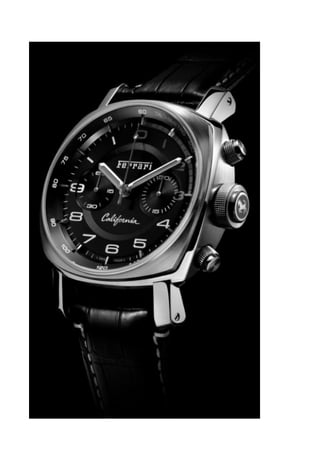
This productis the first wristwatch with FULL HD 1080P digital function,camera function,PC
Camera.It looks lovely,but a useful wristewatch.The lovely designed wristwatch is easy to
operate.
Before use please read the following:
It’s the NEW Design waterproof wristwatch with High Resolution(1080P),when we started
to design it,we consider the workarts of waterproof under 30meters.But because the
construction of this product,it can not be used underwater more than 3 meters.It does a
good job underwater within 3 meters and weatherproof.
1. The nut,A:MIC1 and the nut,B:MIC2 are microphone hole nut,the height of them are
same.
2. The nut A,MIC1 is with a hole in the center of the nut(the following picture),it is for
transmite the sound.If the environment permit,please use this nut.When you take the
video,the equipment also can record the sound.
3. The nut,B:MIC2 is without the hole,but it is with a rubber fitting inside which can anti-
water,When it is in the humidity or dust environment,please use this nut.But when you
use this nut,the equipment can not record the sound.
4. Please tighten the nuts when you use the equipment.
5. Before use the nut,please check if the rubber is inside of the nut.If not,please change
the new one.
Picture1
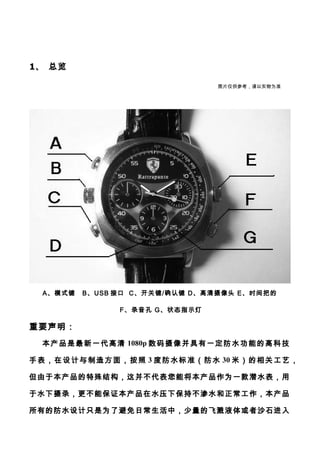
THE NUT STRUCTURE SHOWED AS FOLLOWING PICTURE:
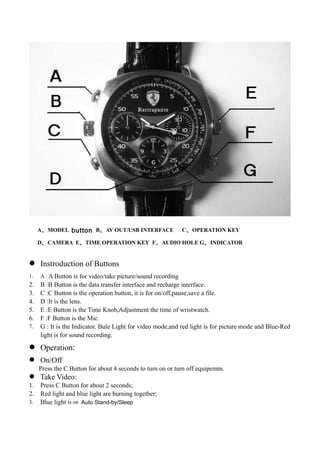
A、MODEL button B、AVOUT/USB INTERFACE C、OPERATION KEY
D、CAMERA E、TIME OPERATION KEY F、AUDIO HOLE G、INDICATOR
Instroduction of Buttons
1. A : A Button is for video/take picture/sound recording
2. B :B Button is the data transfer interface and recharge interface.
3. C :C Button is the operation button, it is for on/off,pause,save a file.
4. D :It is the lens.
5. E :E Button is the Time Knob,Adjustment the time of wristwatch.
6. F :F Button is the Mic.
7. G : It is the Indicator. Bule Light for video mode,and red light is for picture mode and Blue-Red
light is for sound recording.
Operation:
On/Off
Press the C Button for about 4 seconds to turn on or turn off equipemtn.
Take Video:
1. Press C Button for about 2 seconds;
2. Red light and blue light are burning together;
3. Blue light is on Auto Stand-by/Sleep
16.
4. shout pressC and Blue light flashes three times and then turns off is taking video with
audio now.
5. Clike the C Button for two times,the blue light is burning to stop taking video.
6. Clike the C Button for one time,blue light flahes three times to take video.
Take a Picture
1. On Auto Stand-by/Sleep
2. Press A Button then red light is on
3. press C Button one time then take one picture will flash one time after taking one picture.
4. Clike the C Button for two times,the blue light is burning to stop taking video.
Sound Recording
1. On Auto Stand-by/Sleep
2.Press A Button when Red light and blue light are burning togethered light is on
3.press C Button one time then auto sound recording
4.Red light is flash when is sound recording ..
Press C Button long time is Save the file and shut down
harge
1. Connect equipment to PC or charger by USB to recharge the equipment.
2. During charging,the red light is burning,the red light will be off when it is full.
U Disc
1. Turn Off the equipment;
2. Connect it with PC by USB Cable;
3. Open “my computure”
4. You can find it is as the U disc now.
Webcam
1. Install the drive program in CD
2. Turn On the equipment
3. Connect it with PC by USB Cable
4. Open :my computure
5. You can find the sign of webcam.
Time Reset:
This equipment provide two solutions to reset the time stamp on video.
First Solution
1. Turn Off the equipment
2. Connect the equipment to PC by USB
3. Open “My Computure”
4. Open the U disc
5. Creat a file named time.txt
6. Input the new time as YYYY-MM-DD HH:MM:SS
7. Save it and turn off the file
8. Disconnect
Second Solution
1. Change your PC time to the ones you want to show on video
2. Put the CD to CD-ROM of PC
3. Turn Off the equipment
17.
4. Connect theequipment to PC by USB
5. Open the CD
6. Double-Click the files “WriteTime.exe “in CD
7. There is a new small window on screen
8. Click “Update”
FAQ
1. If the capacity is full,the blue light and red light will shine for about five seconds and
power off after it stores the file.
2. If the power is low, the equipment will store the file and power off after the blue light
and red light will be shine alternately for about five seconds.
3. If the equipment stop responding for unknown reason or wrong operating,please press
the mode key and operating key together to reset.
Specifications
Iterm Parameter
VIDEO FORM AVI
Video Coding M-JPEG
Resolution 1920*1080
Player Software Operating systems or mainstream movie playback software
Picture Format JPG
Image Scaling 4:3
Suppot System
Windows me/2000/xp/2003/vista;Mac os 10.4;Linux;
VOL DC-5V
Interface-type Mini USB
Memory Card Format Nand flash
Battery High-capacity polymer lithium battery
Notice
1. Work place:It is only for legal place.
2. Battery:You need to charge it after it does not work for long time.
3. File safty:It is not the professional memory card,so it can not instead of
professional memory card completely.you need to keep back-up.
4. Video quality:It is not the professinal video equipment,so it can not instead of
professional Video Equipment completely.
5. Working tempreture: 0—45°C,it is better to use in the room tempreture.
6. Working humidity:20%-80%,it is with waterproof function.Before you enter into
the waterproof status,do not put it into water or humidy place.
7. Illuminance: Please to use it in the luminous place.
8. Cleanliness:it is better not to use it in the dust place.
9. Other iterms:It can not use in the high magnetic fields , uniform electric field.It can
18.
not be striked,quickhardly.
10. Notice:Please contact the local selleres if you need any other more inforamtion or
help.