高清户外运动 MP3 电筒摄像机
一、结构示意图


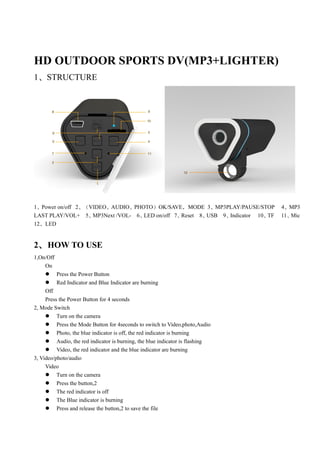
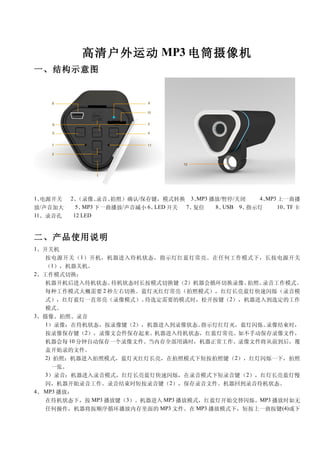
1、电源开关   2、(录像、  录音、拍照)确认/保存键,模式转换 3、   MP3 播放/暂停/关闭   4、MP3 上一曲播
放/声音加大     5、MP3 下一曲播放/声音减小 6、LED 开关 7、复位    8、USB 9、指示灯     10、 卡
                                                                TF
11、录音孔    12 LED


二、产品使用说明
1、开关机
   按电源开关( 1 )开机,机器进入待机状态,指示灯红蓝灯常亮。在任何工作模式下,长按电源开关
   (1),机器关机。
2、工作模式切换:
   机器开机后进入待机状态。  待机状态时长按模式切换键(2)机器会循环切换录像、   拍照、录音工作模式。
   每种工作模式大概需要 2 秒左右切换。蓝灯灭红灯常亮(拍照模式),红灯长亮蓝灯快速闪烁(录音模
   式),红灯蓝灯一直常亮(录像模式)。   待选定需要的模式时,松开按键(2),机器进入到选定的工作
   模式。
3、摄像、拍照、录音
   1)录像:在待机状态,按录像键(2),机器进入到录像状态。    指示灯红灯灭,蓝灯闪烁。 录像结束时,
   按录像保存键(2),录像文会件保存起来。机器进入待机状态,红蓝灯常亮。如不手动保存录像文件,
   机器会每 10 分钟自动保存一个录像文件。当内存全部用满时,机器正常工作。录像文件将从前到后,覆
   盖开始录的文件。
   2) 拍照:机器进入拍照模式,蓝灯灭红灯长亮,在拍照模式下短按拍照键(2),红灯闪烁一下,拍照
     一张。
   3)录音:机器进入录音模式,红灯长亮蓝灯快速闪烁,在录音模式下短录音键(2),红灯长亮蓝灯慢
   闪,机器开始录音工作。录音结束时短按录音键(2),保存录音文件。机器回到录音待机状态。
4、 MP3 播放:
   在待机状态下,按 MP3 播放键(3)。机器进入 MP3 播放模式,红蓝灯开始交替闪烁。MP3 播放时如无
   任何操作,机器将按顺序循环播放内存里面的 MP3 文件。在 MP3 播放模式下,短按上一曲按键(4)或下
一曲按键(5),机器会播放选择后的歌曲。在 MP3 播放模式下,长按 MP3 声音加大键(4)或声音减
    小键(5),可以调节 MP3 播放声音大小。在 MP3 播放时,短按暂停键(3),MP3 将暂停播放。常按
    MP3 停止键(3),MP3 将停止播放,机器进入到待机状态(红蓝灯常亮)。录音文件也可以通过机器
    直接播放。
5、 充电录像:
    机器连接充电器时,机器会自动进入到录像模式,开始录像并给机器充电。         这时红灯灭,蓝灯闪烁。切断
    充电器电源红蓝灯灭,录像文件自动保存。    如不切断电源一直工作,机器会每 10 分钟自动保存一个录像
    文件。当内存全部用满时,机器正常工作。录像文件将从前到后,覆盖开始录的文件。
6、 PC 摄像头:
    先安装光碟里面的摄像头驱动软件。机器连接电脑出现移动硬盘后,长按机器电源开关键(1)。等移动
    硬盘图标断开后,松开按键(1),电脑上会出现摄像头得图标。
7、 低电提醒:
    在任何模式下。  如果电池只能工作 1 分钟时。红蓝灯会一起 0.5-1 秒快速闪烁,直到机器没电自动关机。如
    果在录像时,机器没电自动关机,录像的文文件会自动保存。
8、 充电:
    (1) 通过电脑连接可以给机器充电。
    (2) 通过充电器给机器充电。   连接充电器时常按电源开关键(1),机器进入到充电状态。     充电时红蓝
         灯一起闪烁。充电满后,机器红蓝灯同时长亮。切断电源或电脑的连接后,机器停止充电红蓝灯
         灭。
9、 LED 照明灯
    大功率照明灯,打开照明灯开关(11),可以接通照明灯电源。


三、功能参数
  视频格式      AVI

  视频分辨率     1280×720

  视频编码      M-JPEG

  拍照分辨率     1600*1200

   摄像头      2.0M PIX 像素

  图片格式      JPEG

  音乐格式      MP3
  录音格式      MP3
  播放软件      操作系统自带或主流影音播放软件

  支持系统      Windows me/2000/xp/2003/vista;Mac os 10.4;Linux;

  电池容量      1500HAM,录像工作时间 10 小时。

  接口类型      Mini 5 Pin USB

  存储支持      TF
HD OUTDOOR SPORTS DV(MP3+LIGHTER)
1、STRUCTURE


1、Power on/off 2、(VIDEO、AUDIO、PHOTO)OK/SAVE,MODE 3、MP3PLAY/PAUSE/STOP           4、MP3
LAST PLAY/VOL+ 5、  MP3Next /VOL- 6、LED on/off 7、Reset 8、USB 9、Indicator 10、TF   11、Mic
12、LED


2、 HOW TO USE
1,On/Off
     On
      Press the Power Button
      Red Indicator and Blue Indicator are burning
     Off
     Press the Power Button for 4 seconds
2, Mode Switch
      Turn on the camera
      Press the Mode Button for 4seconds to switch to Video,photo,Audio
      Photo, the blue indicator is off, the red indicator is burning
      Audio, the red indicator is burning, the blue indicator is flashing
      Video, the red indicator and the blue indicator are burning
3, Video/photo/audio
     Video
      Turn on the camera
      Press the button,2
      The red indicator is off
      The Blue indicator is burning
      Press and release the button,2 to save the file
    The red indicator and blue indicator is burning

     Notice, if the user does not save the file handlly, the camera will save one file every 10minutes automatically.
     When the memory is full, the new file will cover the first one.
     Photo
      Turn on Camera
      Swith to photo status
      The blue indicator is off
      The red indicator is burning
      Press and release the button,2
      The red indicator is flash one time
     Audio
      Turn on Camera
      Swith to Audio Status
      The blue indicator is flashing
      The red indicator is burning
      Press and release the button,2
      The red indicator is burning
      The blue indicator is flashing slowly
      Press and release the button,2 to save the file
4, MP3
      Turn on Camera
      Swith to MP3 status
      The blue indicator and the red indicator is flashing alternately
      During Playing,the user can adjust it by pressing the last song(Button,4)
      Next Song(Button,5)
      Press for 4seconds the button,4/5 to Vol+/-
      Press the button,3 to pause or stop
5, Recording during charging
      Connecting to power sourse
      The red indicator is off
      The blue indicator is flashing
      The camera save one file every 10minutes
      When the memory is full
      It will cover the first file
6, PC Camera
      Install the driver program in CD
      Connect the camera and PC
      When there is the Movable disc sign appear, Press the button,1
      When the movable disc is disconnect, please release the button 1
      There is the PC camera sign on PC
7, Low Power
      When it is low Power
      The red indicator and blue indicator will flash together
 When the power is off,the camera will be off automaticaly
8, Recharge
   Via PC to charge
     Connect the camera and PC
     Via Power Source to charge
      Press the power button,1 for 4 seconds
      The blue indicator and red indicator is flashing together
      When it is full,the blue indicator and the red indicator are burning together
      When there is the Movable disc sign appear, Press the button,1


9,LED Torch
    Turn on the power button,11

10,Specification


3、 SPECIFICATIONS


        Video Formate              AVI

       Video Resolution            1280×720

          Video Code               M-JPEG

       Photo Resolution            1600*1200

             Lens                  2000000pixles

        Photo Format               JPEG

        Song Format                MP3
        Audio Format               MP3
          Software                 Operating system or Mainstream audio and video playback software

            System                 Windows me/2000/xp/2003/vista;Mac os 10.4;Linux;
            Battery                1500mAh

   Data Transfer Interface         Mini 5 Pin USB

           Memory                  TF
mp3 camera spy torch cam dvr operation instruction

  • 1.
    高清户外运动 MP3 电筒摄像机 一、结构示意图 1、电源开关 2、(录像、 录音、拍照)确认/保存键,模式转换 3、 MP3 播放/暂停/关闭 4、MP3 上一曲播 放/声音加大 5、MP3 下一曲播放/声音减小 6、LED 开关 7、复位 8、USB 9、指示灯 10、 卡 TF 11、录音孔 12 LED 二、产品使用说明 1、开关机 按电源开关( 1 )开机,机器进入待机状态,指示灯红蓝灯常亮。在任何工作模式下,长按电源开关 (1),机器关机。 2、工作模式切换: 机器开机后进入待机状态。 待机状态时长按模式切换键(2)机器会循环切换录像、 拍照、录音工作模式。 每种工作模式大概需要 2 秒左右切换。蓝灯灭红灯常亮(拍照模式),红灯长亮蓝灯快速闪烁(录音模 式),红灯蓝灯一直常亮(录像模式)。 待选定需要的模式时,松开按键(2),机器进入到选定的工作 模式。 3、摄像、拍照、录音 1)录像:在待机状态,按录像键(2),机器进入到录像状态。 指示灯红灯灭,蓝灯闪烁。 录像结束时, 按录像保存键(2),录像文会件保存起来。机器进入待机状态,红蓝灯常亮。如不手动保存录像文件, 机器会每 10 分钟自动保存一个录像文件。当内存全部用满时,机器正常工作。录像文件将从前到后,覆 盖开始录的文件。 2) 拍照:机器进入拍照模式,蓝灯灭红灯长亮,在拍照模式下短按拍照键(2),红灯闪烁一下,拍照 一张。 3)录音:机器进入录音模式,红灯长亮蓝灯快速闪烁,在录音模式下短录音键(2),红灯长亮蓝灯慢 闪,机器开始录音工作。录音结束时短按录音键(2),保存录音文件。机器回到录音待机状态。 4、 MP3 播放: 在待机状态下,按 MP3 播放键(3)。机器进入 MP3 播放模式,红蓝灯开始交替闪烁。MP3 播放时如无 任何操作,机器将按顺序循环播放内存里面的 MP3 文件。在 MP3 播放模式下,短按上一曲按键(4)或下
  • 2.
    一曲按键(5),机器会播放选择后的歌曲。在 MP3 播放模式下,长按MP3 声音加大键(4)或声音减 小键(5),可以调节 MP3 播放声音大小。在 MP3 播放时,短按暂停键(3),MP3 将暂停播放。常按 MP3 停止键(3),MP3 将停止播放,机器进入到待机状态(红蓝灯常亮)。录音文件也可以通过机器 直接播放。 5、 充电录像: 机器连接充电器时,机器会自动进入到录像模式,开始录像并给机器充电。 这时红灯灭,蓝灯闪烁。切断 充电器电源红蓝灯灭,录像文件自动保存。 如不切断电源一直工作,机器会每 10 分钟自动保存一个录像 文件。当内存全部用满时,机器正常工作。录像文件将从前到后,覆盖开始录的文件。 6、 PC 摄像头: 先安装光碟里面的摄像头驱动软件。机器连接电脑出现移动硬盘后,长按机器电源开关键(1)。等移动 硬盘图标断开后,松开按键(1),电脑上会出现摄像头得图标。 7、 低电提醒: 在任何模式下。 如果电池只能工作 1 分钟时。红蓝灯会一起 0.5-1 秒快速闪烁,直到机器没电自动关机。如 果在录像时,机器没电自动关机,录像的文文件会自动保存。 8、 充电: (1) 通过电脑连接可以给机器充电。 (2) 通过充电器给机器充电。 连接充电器时常按电源开关键(1),机器进入到充电状态。 充电时红蓝 灯一起闪烁。充电满后,机器红蓝灯同时长亮。切断电源或电脑的连接后,机器停止充电红蓝灯 灭。 9、 LED 照明灯 大功率照明灯,打开照明灯开关(11),可以接通照明灯电源。 三、功能参数 视频格式 AVI 视频分辨率 1280×720 视频编码 M-JPEG 拍照分辨率 1600*1200 摄像头 2.0M PIX 像素 图片格式 JPEG 音乐格式 MP3 录音格式 MP3 播放软件 操作系统自带或主流影音播放软件 支持系统 Windows me/2000/xp/2003/vista;Mac os 10.4;Linux; 电池容量 1500HAM,录像工作时间 10 小时。 接口类型 Mini 5 Pin USB 存储支持 TF
  • 3.
    HD OUTDOOR SPORTSDV(MP3+LIGHTER) 1、STRUCTURE 1、Power on/off 2、(VIDEO、AUDIO、PHOTO)OK/SAVE,MODE 3、MP3PLAY/PAUSE/STOP 4、MP3 LAST PLAY/VOL+ 5、 MP3Next /VOL- 6、LED on/off 7、Reset 8、USB 9、Indicator 10、TF 11、Mic 12、LED 2、 HOW TO USE 1,On/Off On  Press the Power Button  Red Indicator and Blue Indicator are burning Off Press the Power Button for 4 seconds 2, Mode Switch  Turn on the camera  Press the Mode Button for 4seconds to switch to Video,photo,Audio  Photo, the blue indicator is off, the red indicator is burning  Audio, the red indicator is burning, the blue indicator is flashing  Video, the red indicator and the blue indicator are burning 3, Video/photo/audio Video  Turn on the camera  Press the button,2  The red indicator is off  The Blue indicator is burning  Press and release the button,2 to save the file
  • 4.
    The red indicator and blue indicator is burning Notice, if the user does not save the file handlly, the camera will save one file every 10minutes automatically. When the memory is full, the new file will cover the first one. Photo  Turn on Camera  Swith to photo status  The blue indicator is off  The red indicator is burning  Press and release the button,2  The red indicator is flash one time Audio  Turn on Camera  Swith to Audio Status  The blue indicator is flashing  The red indicator is burning  Press and release the button,2  The red indicator is burning  The blue indicator is flashing slowly  Press and release the button,2 to save the file 4, MP3  Turn on Camera  Swith to MP3 status  The blue indicator and the red indicator is flashing alternately  During Playing,the user can adjust it by pressing the last song(Button,4)  Next Song(Button,5)  Press for 4seconds the button,4/5 to Vol+/-  Press the button,3 to pause or stop 5, Recording during charging  Connecting to power sourse  The red indicator is off  The blue indicator is flashing  The camera save one file every 10minutes  When the memory is full  It will cover the first file 6, PC Camera  Install the driver program in CD  Connect the camera and PC  When there is the Movable disc sign appear, Press the button,1  When the movable disc is disconnect, please release the button 1  There is the PC camera sign on PC 7, Low Power  When it is low Power  The red indicator and blue indicator will flash together
  • 5.
     When thepower is off,the camera will be off automaticaly 8, Recharge Via PC to charge Connect the camera and PC Via Power Source to charge  Press the power button,1 for 4 seconds  The blue indicator and red indicator is flashing together  When it is full,the blue indicator and the red indicator are burning together  When there is the Movable disc sign appear, Press the button,1 9,LED Torch Turn on the power button,11 10,Specification 3、 SPECIFICATIONS Video Formate AVI Video Resolution 1280×720 Video Code M-JPEG Photo Resolution 1600*1200 Lens 2000000pixles Photo Format JPEG Song Format MP3 Audio Format MP3 Software Operating system or Mainstream audio and video playback software System Windows me/2000/xp/2003/vista;Mac os 10.4;Linux; Battery 1500mAh Data Transfer Interface Mini 5 Pin USB Memory TF