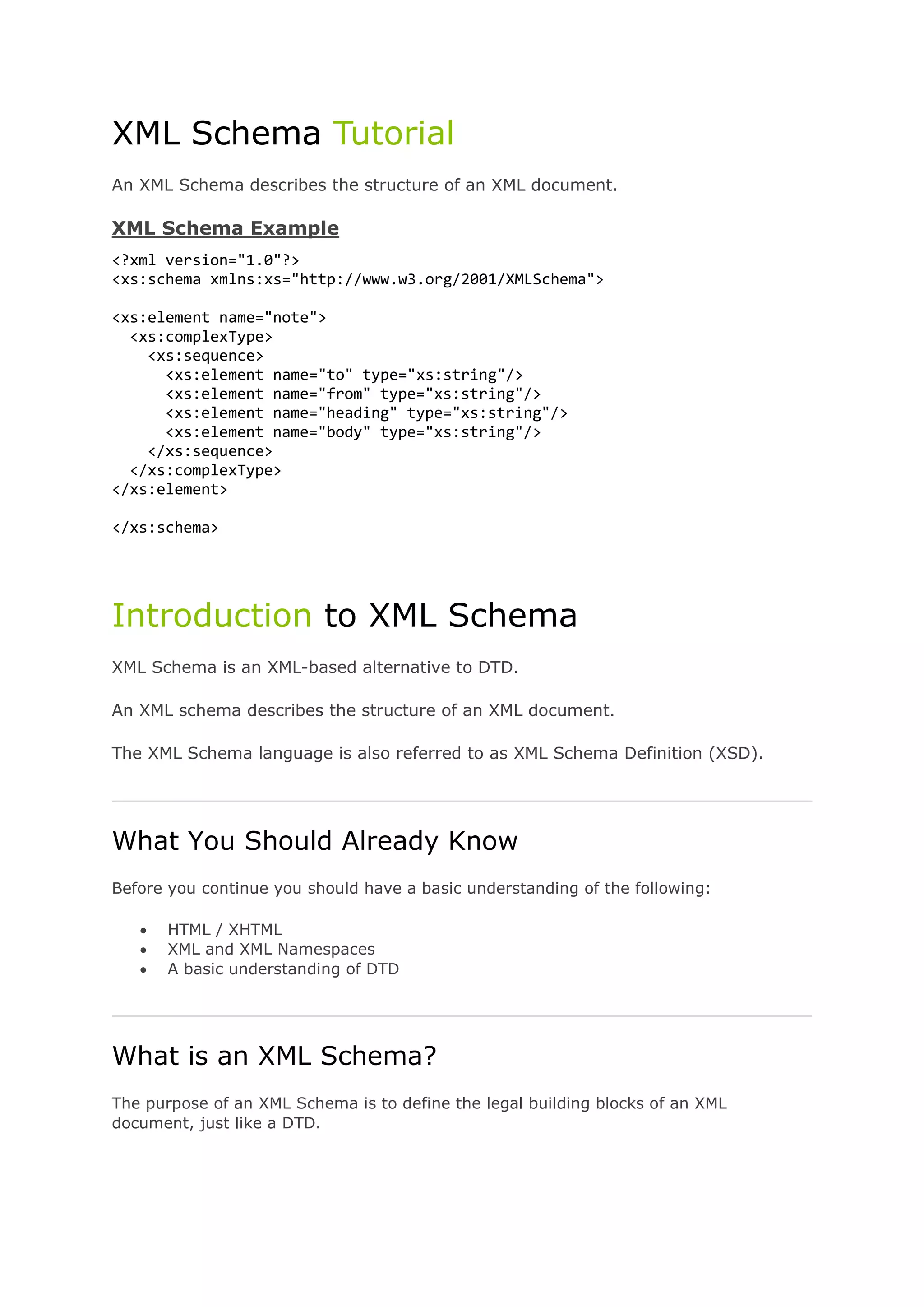
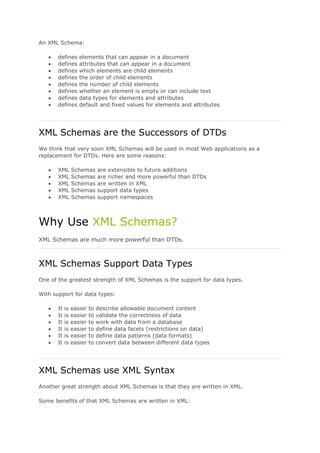
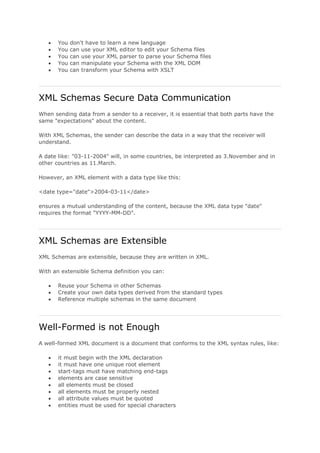
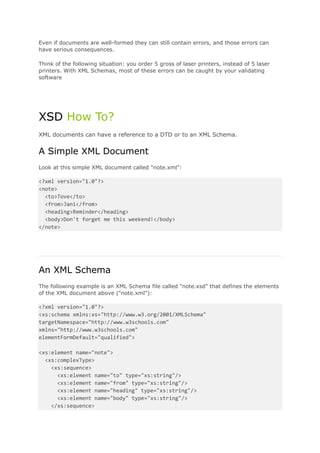
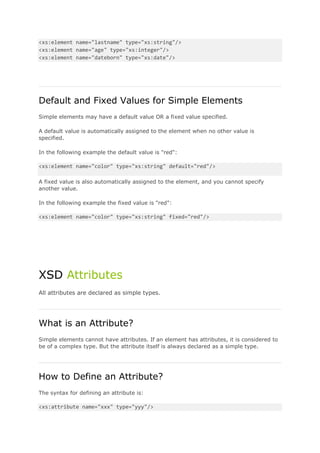
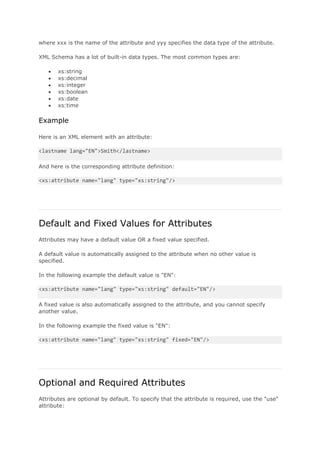
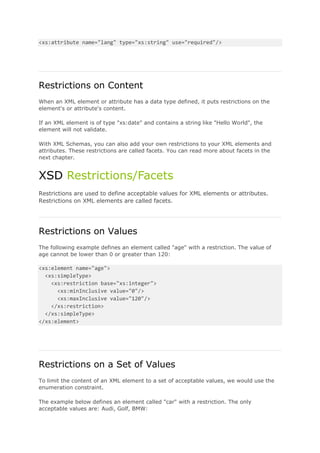
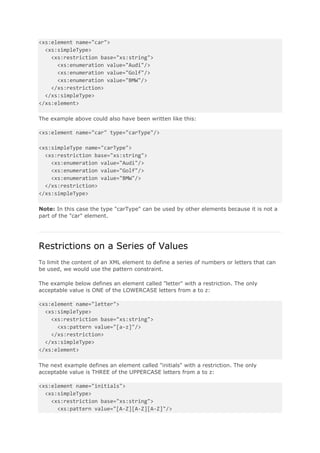
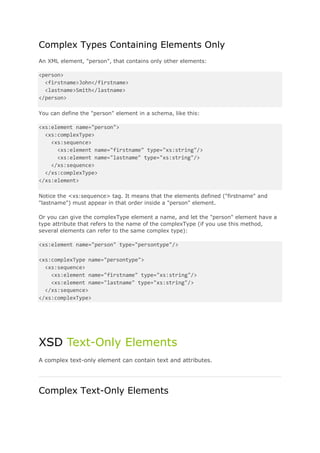
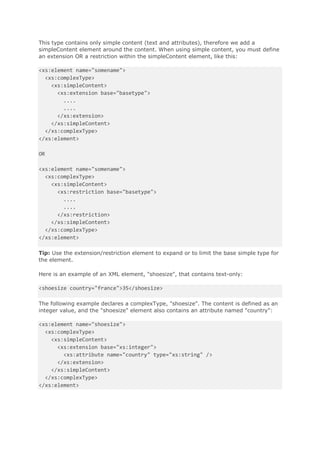
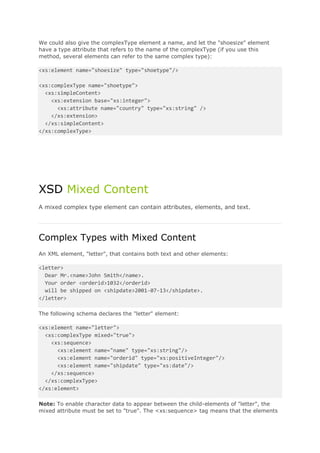
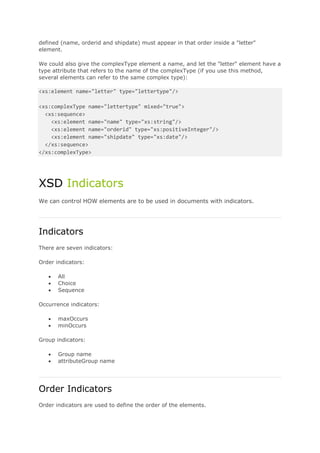
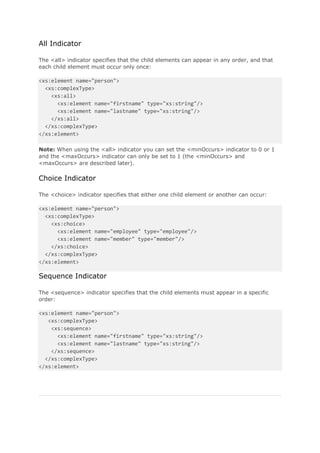
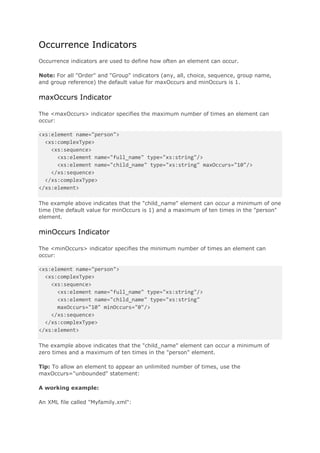
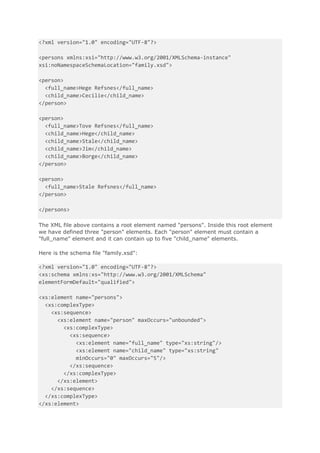
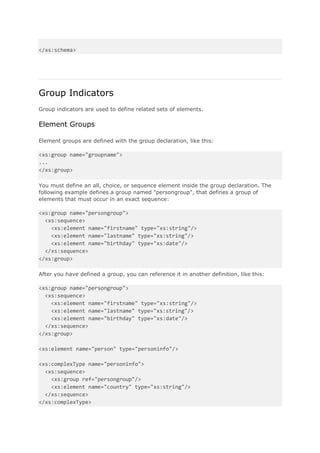
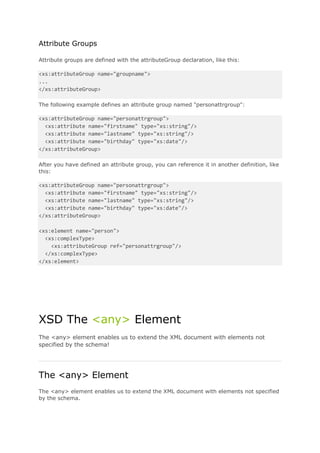
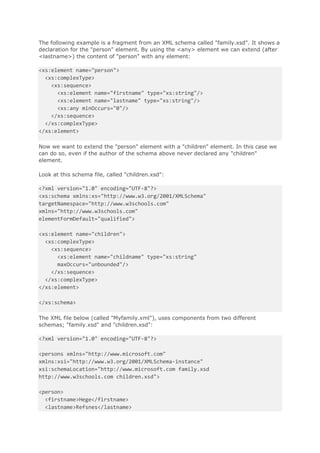
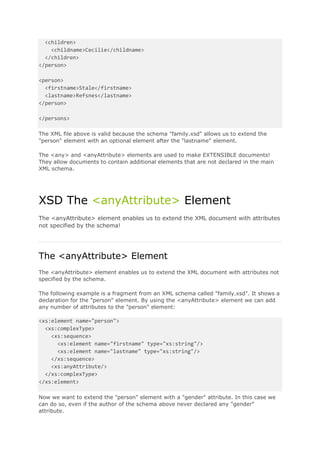
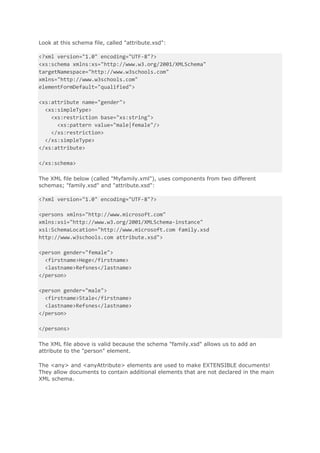
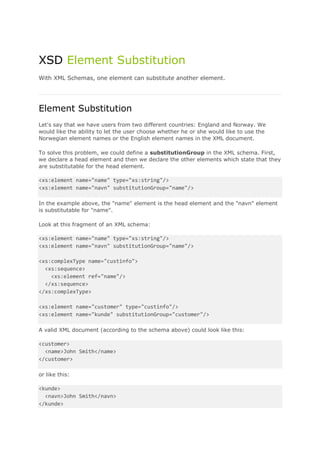
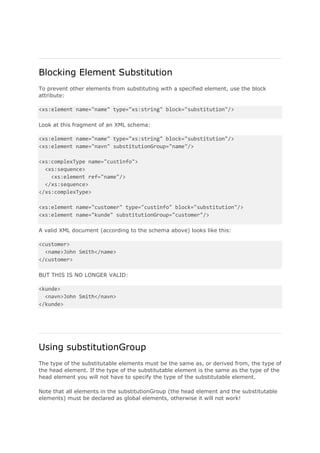
Oracle Service Bus 11g, Handling SOAP Faults 
On the Oracle Forums someone had a question on how to construct your own fault message based 
on the fault-part of the wsdl element. 
In this blog we will add several activities to the flow to constantly see the output which will be 
generated by the proxy service. 
The flow we will be creating should be looking like this 
For the business service i used the helloworld service and imported the wsdl resource and xsd. 
To be able to ‘throw’ the custom soap fault from within the proxy service to the service caller i edited
the same wsdl, and added the fault part to the wsdl with my own fault response.
SOAPUI 
We will be using soapUI to test the soap faults, and also check the http headers we receive back on 
the invokes of the proxy service. 
Create a new project and add the wsdl of the deployed proxy service. 
THE HAPPY FLOW 
The service comes back with a ‘helloResponse’ and HTTP Response of 200 
ERROR SITUATION1 
Change the endpoint of the business service to some non-existing endpoint. At this point we won’t 
add any error handling yet, just to see the response coming back from the Oracle Service Bus. 
Oracle Service Bus generated a SOAP Fault and in the details part we will find extra info about in 
which part of the process it failed. For faultstring it willconcat the values errorCode and reason. 
The service comes back with a HTTP Response of 500, Internal Server Error. 
ERROR SITUATION2 WITH EMPTY SERVICE ERROR HANDLER
Now we only added an empty service error handler to the process. 
The response in soapUI will still look the same. 
If we we test the proxy service from the testconsole we will get the next output.
The service fails, the error gets propogated to the service error handler, in here we do nothing with it, 
and it’s get propogated to the toplevel error handler, the system error handler. 
ERROR SITUATION3 WITH SERIVCE ERROR HANDLER AND REPLY SUCCESS 
Only thing we now are going to add is the ‘reply’ activity in the serivce error handler. First add the 
‘Reply With Success’. 
Now the response in soapUI will look like this 
So the business service triggers a soap fault, we end up in the service error handler, and over here we 
‘handle’ the soap fault and decide our self what to reply back to the ‘caller’. In this case we replied 
back with success. 
So we receive HTTP Response code of 200, but no payload in the body.
Let’s try to send back a ‘helloResponse’ back from the service error handler. 
Add the next replace 
replace .in variable body with expression, Replace Node contents 
viewsourceprint? 
<tns:helloResponse xmlns:tns="http://hello.service.iteye.nl/"xmlns:xsi="http://www.w3.org/2001/XM 
LSchema-instance"> 
<return>Returning helloResponse from within the service error handler</return> 
</tns:helloResponse> 
In this case we also end up in the service error handler, we construct the soap body, and add the 
helloResponse to it. 
We still get a HTTP Response of 200 back. 
This scenario we can use if you never want to reply back a soap fault to the caller. So we propogate all 
errors to the service error handler, and in here we decide what we’re going to do with it. 
In case of no soap faults, we can construct our own helloResponse. So we’re actually transforming a 
soap fault to a business fault, reply it back on the output of the wsdl and the caller itself can decide 
what wants to do with it. Since the soap fault won’t be thrown back to him, he needs to check the 
body of the response to actually see if any error happened. 
In this reply we only used some static message of ‘Returning helloResponse from within the service 
error handler’. At this point the context of the $fault is lost and the caller won’t know anything about 
the ‘real’ error. 
If we still want to reply back any information about the fault context we can also enrich the response 
with values from the $fault. 
for example : 
viewsourceprint?
ERROR SITUATION4 WITH SERVICE ERROR HANDLER AND REPLY FAILURE 
The only situation which is left is the construction of the soap fault, and reply it back on the fault-element 
of the wsdl with the correct HTTP Response. 
First only add the ‘Reply with Failure’ activity, to see what the response will be. 
Again we end up in the service error handler, since we don’t do any handling of the error itself 
besides a reply with failure no soap fault will get propogated (neither the one generated by the 
service bus itself) either. 
So we receive a normal empty soap body response, but with HTTP Response of 500, Interal Server 
Error. 
The only thing what’s left is constructing the soap fault payload. 
If you check the payload of the first error testcase we see the soap envelope with soap fault needs to 
look like this 
The format of the replacement we will base on the ‘helloFaultResponse’ of our xsd and when we reply 
it back we apply to the interface of the wsdl, specifically to the fault-part of the invoke of hello-operation.
To show you a bit what is possible in constructing, the ‘helloFaultResponse’ is rather full of elements. 
It’s just to show you what’s possible with constructing the payload and how you can enrich it by 
making use of the $fault, $inbound, $outbound, etc. 
The replace i used in the service error handler 
viewsourceprint? 
<soap-env:Body> 
<soap-env:Fault> 
<faultcodexmlns:soap="http://schemas.xmlsoap.org/soap/envelope/">soapenv:Server</faultcode> 
<faultstring>{concat($fault/ctx:errorCode,': ',$fault/ctx:reason)}</faultstring> 
<detail> 
<ns2:helloFaultResponsexmlns:ns2="http://hello.service.iteye.nl/"> 
<errorCode>{$fault/ctx:errorCode/text()}</errorCode> 
<reason>{$fault/ctx:reason/text()}</reason> 
<location> 
<node>{$fault/ctx:location/ctx:node/text()}</node> 
<path>{$fault/ctx:location/ctx:path/text()}</path> 
</location> 
<operation>{$inbound/ctx:service/ctx:operation/text()}</operation> 
<uri>{$inbound/ctx:transport/ctx:uri/text()}</uri> 
<host>{$inbound/ctx:transport/ctx:request/tp:headers/http:Host/text()}</host> 
<request_body>{$copyBody}</request_body> 
</ns2:helloFaultResponse> 
</detail> 
</soap-env:Fault> 
</soap-env:Body> 
And the output in soapUI 
I hope it’s a bit clear on how to handle the faults in the Oracle Service Bus. In my testcases i only 
added the logic to the service error handler. But we can also the the error handlers to the other 
locations like stages and routing activities. It depends on the logic you want to execute at which place 
you want to handle the error itself.
Oracle Service Bus, Generic Fault Handling 
For a usecase i needed a construction which would give me the option to implemenent generic service 
error handling in which i could conditionally execute activities like alerts, reports, logging, etc 
One place which will contain all the error handling logic and which could be easily extended both in 
implementation of the logic for handling errors and being able to easily add new errors to be handle 
which the metadata for this error. 
In case third party applications decide to trigger new type of exceptions/faults i don’t want to change 
the fault handling logic of all the process which do a call to this service. I want to be able to add the to 
be executed logic for this new specific error to some sort of error repository together with some setup-settings. 
Definition of the error repository 
In our case the error repository is nothing more then a xml metadata storage which stores settings for 
the errors to be handled. 
The definition of the metadata can be extended with other settings which can be retrieved at one 
central place again and logic for handling the settings will also be centrally defined. 
Definition of the error handling service 
In our case the error handling service will be the central point in which we retrieve instance data from 
the process in which the occured fault. 
Based on this data we will retrieve metadata for the fault and decide in the message flow handling 
what the logic will be to execute. 
ERROR REPOSITORY 
Schema definition 
viewsourceprint? 
01.<?xml version="1.0" encoding="UTF-8"?> 
02.<xs:schema xmlns="http://nl.xenta/services/errorRepository"xmlns:xs="http://www.w3.org/2001/X 
MLSchema"targetNamespace="http://nl.xenta/services/errorRepository"> 
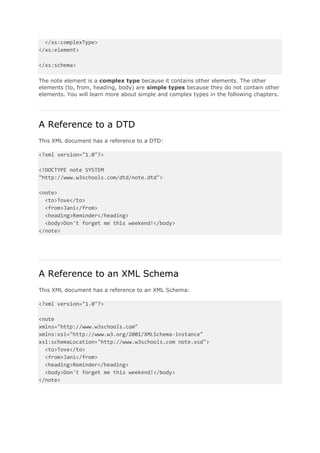
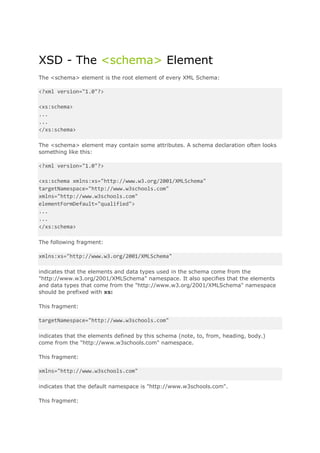
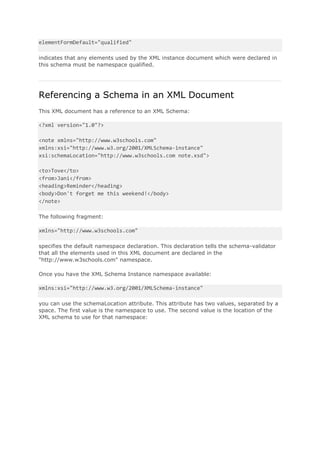
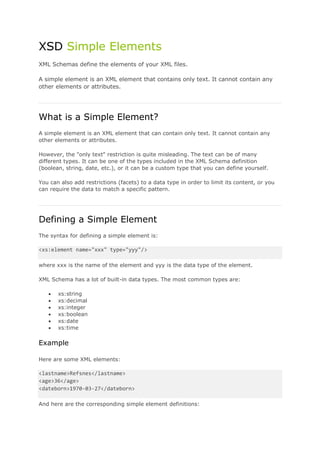
03.<xs:element name="service_error_handling"> 
04.<xs:complexType> 
05.<xs:sequence> 
06.<xs:element ref="error" maxOccurs="unbounded"/> 
07.</xs:sequence> 
08.</xs:complexType> 
09.</xs:element>
10.<xs:element name="indReporting"> 
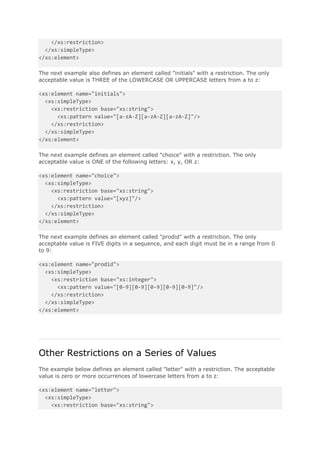
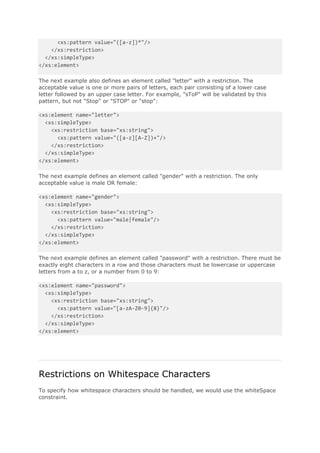
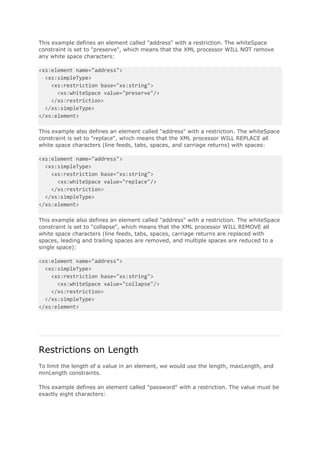
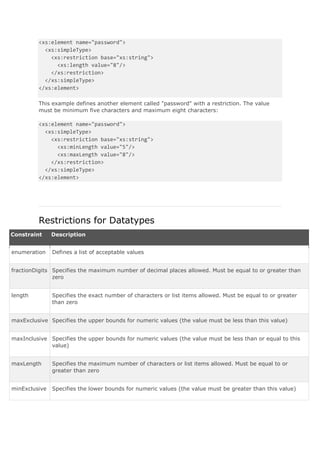
11.<xs:simpleType> 
12.<xs:restriction base="xs:string"> 
13.<xs:enumeration value="Y"/> 
14.<xs:enumeration value="N"/> 
15.</xs:restriction> 
16.</xs:simpleType> 
17.</xs:element> 
18.<xs:element name="description"> 
19.<xs:simpleType> 
20.<xs:restriction base="xs:string"/> 
21.</xs:simpleType> 
22.</xs:element> 
23.<xs:element name="sourceSystem"> 
24.<xs:simpleType> 
25.<xs:restriction base="xs:string"> 
26.<xs:enumeration value="SYSTEM-X"/> 
27.<xs:enumeration value="OSB"/> 
28.<xs:enumeration value="NA"/> 
29.</xs:restriction> 
30.</xs:simpleType> 
31.</xs:element> 
32.<xs:element name="indLogging"> 
33.<xs:simpleType> 
34.<xs:restriction base="xs:string"> 
35.<xs:enumeration value="Y"/> 
36.<xs:enumeration value="N"/> 
37.</xs:restriction> 
38.</xs:simpleType> 
39.</xs:element> 
40.<xs:element name="faultTransformer"> 
41.<xs:simpleType> 
42.<xs:restriction base="xs:string"/> 
43.</xs:simpleType> 
44.</xs:element> 
45.<xs:element name="externalCode"> 
46.<xs:simpleType> 
47.<xs:restriction base="xs:string"> 
48.<xs:enumeration value="XXX_DEFAULT_ERROR"/> 
49.<xs:enumeration value="GENERIC-1234"/> 
50.<xs:enumeration value="VALIDATE-9999"/> 
51.</xs:restriction> 
52.</xs:simpleType> 
53.</xs:element> 
54.<xs:element name="error"> 
55.<xs:complexType> 
56.<xs:sequence> 
57.<xs:element ref="code"/> 
58.<xs:element ref="externalCode"/> 
59.<xs:element ref="description"/> 
60.<xs:element ref="sourceSystem"/>
61.<xs:element ref="faultTransformer"/> 
62.<xs:element ref="indAlert"/> 
63.<xs:element ref="indAlertOverwriteDestionation"/> 
64.<xs:element ref="alertDestination"/> 
65.<xs:element ref="indLogging"/> 
66.<xs:element ref="indReporting"/> 
67.</xs:sequence> 
68.</xs:complexType> 
69.</xs:element> 
70.<xs:element name="code"> 
71.<xs:simpleType> 
72.<xs:restriction base="xs:string"> 
73.<xs:enumeration value="BEA-382505"/> 
74.<xs:enumeration value="DEFAULT"/> 
75.<xs:enumeration value="BEA-380000"/> 
76.</xs:restriction> 
77.</xs:simpleType> 
78.</xs:element> 
79.<xs:element name="indAlertOverwriteDestionation"> 
80.<xs:simpleType> 
81.<xs:restriction base="xs:string"> 
82.<xs:enumeration value="Y"/> 
83.<xs:enumeration value="N"/> 
84.</xs:restriction> 
85.</xs:simpleType> 
86.</xs:element> 
87.<xs:element name="indAlert"> 
88.<xs:simpleType> 
89.<xs:restriction base="xs:string"> 
90.<xs:enumeration value="Y"/> 
91.<xs:enumeration value="N"/> 
92.</xs:restriction> 
93.</xs:simpleType> 
94.</xs:element> 
95.<xs:element name="alertDestination"> 
96.<xs:complexType/> 
97.</xs:element> 
98.</xs:schema> 
MODELING THE ERROR HANDLING PROXY SERVICE 
The error handling proxy service will be the central point of executing location based on the incoming 
occured fault.
Type ‘Any XML Service’ 
The input we will send to this service will be in the format of 
viewsourceprint? 
1.<errorData> 
2.<body>{$body}</body> 
3.<inbound>{$inbound}</inbound> 
4.<fault>{$fault}</fault> 
5.</errorData>
The flow will eventually look something like this 
Let’s look at the individual steps 
1. RETRIEVEERRORMETADATA 
The first step will contain 2 assigns. 
The first assign will assign the ErrorRepository.xq to variable errorList 
The content of the ErrorRepository.xq is the next
viewsourceprint? 
01.xquery version "1.0" encoding "Cp1252"; 
02.(:: pragma type="xs:anyType" ::) 
03. 
04.declare namespace xf = "http://nl.xenta/services/errorRepository"; 
05. 
06.declare function xf:service_error_handling() 
07.as element(*) { 
08.<service_error_handlingxmlns="http://nl.xenta/services/errorRepository"xmlns:xsi="http://www.w 
3.org/2001/XMLSchema-instance"> 
09.<error> 
10.<code>BEA-382505</code> 
11.<externalCode>VALIDATE-9999</externalCode> 
12.<description>Validation of the XML payload failed</description> 
13.<sourceSystem>OSB</sourceSystem> 
14.<faultTransformer>ErrorHandling/errorRepository/GenericFault_To_SOAPFault</faultTransforme 
r> 
15.<indAlert>Y</indAlert> 
16.<indAlertOverwriteDestionation>N</indAlertOverwriteDestionation> 
17.<alertDestination/> 
18.<indLogging>Y</indLogging> 
19.<indReporting>Y</indReporting> 
20.</error> 
21.<error> 
22.<code>BEA-380000</code> 
23.<externalCode>GENERIC-1234</externalCode> 
24.<description>General transport error occured</description> 
25.<sourceSystem>SYSTEM-X</sourceSystem> 
26.<faultTransformer>ErrorHandling/errorRepository/GenericFault_To_SOAPFault2</faultTransform 
er> 
27.<indAlert>Y</indAlert> 
28.<indAlertOverwriteDestionation>N</indAlertOverwriteDestionation> 
29.<alertDestination/> 
30.<indLogging>Y</indLogging> 
31.<indReporting>Y</indReporting> 
32.</error> 
33.<error> 
34.<code>DEFAULT</code> 
35.<externalCode>XXX_DEFAULT_ERROR</externalCode> 
36.<description>Something went wrong!</description> 
37.<sourceSystem>NA</sourceSystem> 
38.<faultTransformer>ErrorHandling/errorRepository/GenericFault_To_SOAPFault</faultTransforme 
r> 
39.<indAlert>Y</indAlert> 
40.<indAlertOverwriteDestionation>N</indAlertOverwriteDestionation> 
41.<alertDestination/> 
42.<indLogging>Y</indLogging> 
43.<indReporting>Y</indReporting> 
44.</error> 
45.</service_error_handling> 
46.};
47. 
48.xf:service_error_handling() 
At this point we have the list of faults together with metadata about what to execute when they 
occure available in the Message Flow. 
In the second assign we retrieve only the the metadata from our occured fault, so we just retrieve 1 
error-element from the list. 
For this we execute the lookupErrorxquery which receives the errorList content and the errorCode 
and will return the error-element. 
If we can’t retrieve any metadata based on the errorCode we will return a default set of metadata (the 
error-element of which the code = DEFAULT). 
The result we will assign to the errorMetadataDetails variable. 
Content of lookupErrorxquery 
2.
CONDITIONALREPORTING 
In all the conditional stages we will now re-use the errorMetadataDetails variable to verify if we want 
to execute certain login. 
If we configurated the indReporting=Y in the error repository xquery file then the if-then loginc will 
evaluate to the if-tree and the Report-activty will be executed. 
In the same way all the other condition stages (conditionalAlert, conditionalSomethingElse) will 
work. We re-use the errorMetadataDetails-variable and just do a simple if-then check to see if certain 
logic needs to be executed. 
3. CONSTRUCTRESPONSE 
The last step of the message flow is the step in which we construct the response of the errorHandler 
process back to the client process. 
In this step we will be using Dynamic Xquery to be able the construct response messages based on the 
incoming fault. 
The example of our ErrorReposity defines 2 faults and 1 default. 
In case for example error BEA-380000 occures, we will use the xquery located at 
ErrorHandling/errorRepository/GenericFault_To_SOAPFault2 to be executed. This xquery will 
construct our soap fault. 
To be able to use Dynamic Xquery all the to be used xquery transformations need to have the same 
interface. Depending on the backend system and the returning faults from it we will use different 
tranformation files. 
But all of them will be using the input paramters ‘body, inbound and fault’. In the expression field we 
will use the faultTransformer-element from the errorMetadataDetails. So for every fault for which we 
want to create a 
different fault response we do need to define a faultTransformer-value in the errorRepository.
And that’s all what is needed to implement in the errorHandler process to receive the metadata, 
handle the fault and construct the response. 
TESTCASE 
For this testcase we created a simple EmployeeService. Create a new proxy service based on the next 
wsdl/xsd content. 
viewsourceprint? 
01.<?xml version="1.0" encoding="UTF-8"?> 
02.<wsdl:definitions xmlns:wsdl="http://schemas.xmlsoap.org/wsdl/"xmlns:soap="http://schemas.xm 
lsoap.org/wsdl/soap/"xmlns:http="http://schemas.xmlsoap.org/wsdl/http/"xmlns:xs="http://www.w3. 
org/2001/XMLSchema"xmlns:soapenc="http://schemas.xmlsoap.org/soap/encoding/"xmlns:mime="ht 
tp://schemas.xmlsoap.org/wsdl/mime/"xmlns:tns="http://new.webservice.namespace"xmlns:ns="http 
://nl.xenta/services/employee"targetNamespace="http://new.webservice.namespace"> 
03.<wsdl:import namespace="http://nl.xenta/services/employee"location="EmployeeService.xsd"/> 
04.<wsdl:message name="NewMessageRequest"> 
05.<wsdl:part name="parameter" element="ns:employee_request"/> 
06.</wsdl:message> 
07.<wsdl:message name="NewMessageResponse">
08.<wsdl:part name="parameter" element="ns:employee_response"/> 
09.</wsdl:message> 
10.<wsdl:portType name="EmployeeServicePort"> 
11.<wsdl:operation name="getEmployee"> 
12.<wsdl:input message="tns:NewMessageRequest"/> 
13.<wsdl:output message="tns:NewMessageResponse"/> 
14.</wsdl:operation> 
15.</wsdl:portType> 
16.<wsdl:binding name="EmployeeServiceBinding"type="tns:EmployeeServicePort"> 
17.<soap:binding style="document"transport="http://schemas.xmlsoap.org/soap/http"/> 
18.<wsdl:operation name="getEmployee"> 
19.<soap:operation soapAction="urn:#NewOperation"/> 
20.<wsdl:input> 
21.<soap:body use="literal"/> 
22.</wsdl:input> 
23.<wsdl:output> 
24.<soap:body use="literal"/> 
25.</wsdl:output> 
26.</wsdl:operation> 
27.</wsdl:binding> 
28.<wsdl:service name="EmployeeService"> 
29.<wsdl:port name="EmployeeServiceSOAPPort"binding="tns:EmployeeServiceBinding"> 
30.<soap:address location="No Target Adress"/> 
31.</wsdl:port> 
32.</wsdl:service> 
33.</wsdl:definitions> 
viewsourceprint? 
01.<?xml version="1.0" encoding="UTF-8"?> 
02.<xs:schema xmlns:xs="http://www.w3.org/2001/XMLSchema"elementFormDefault="qualified"targ 
etNamespace="http://nl.xenta/services/employee"attributeFormDefault="unqualified"> 
03.<xs:element name="employee_request"> 
04.<xs:annotation> 
05.<xs:documentation>Comment describing your root element</xs:documentation> 
06.</xs:annotation> 
07.<xs:complexType> 
08.<xs:sequence> 
09.<xs:element name="emp_id" type="xs:int"/> 
10.</xs:sequence> 
11.</xs:complexType> 
12.</xs:element> 
13.<xs:element name="employee_response"> 
14.<xs:complexType> 
15.<xs:sequence> 
16.<xs:element name="employee"> 
17.<xs:complexType> 
18.<xs:sequence> 
19.<xs:element name="firstname"/> 
20.<xs:element name="lastname"/> 
21.<xs:element name="birthdate"type="xs:date"/> 
22.</xs:sequence>
23.</xs:complexType> 
24.</xs:element> 
25.</xs:sequence> 
26.</xs:complexType> 
27.</xs:element> 
28.</xs:schema> 
And the message flow will eventually look like this
The first assign will assign the body to body_temp so in case of an error situation we still have the 
original body content stored 
The second activity is the validation activity. This one we will be using lateron to trigger a fault which 
will be processed by the errorHandler process. 
Based on the same wsdl as the proxy service i defined a new business service. In the EmployeeService 
proxy we will be routing to this business service. 
Since we won’t be implementing any logic on this side we just update the endpoint of the business 
service to something useless so the route will fail on this one. 
This part is used to the second fault triggering moment in our process. Also this situation will fail and 
the occured fault will get processed by the errorHandler. 
The ‘normal’ message flow of our proxy service is now done. 
Let’s have a look at the service error handler.
The first assign will use the next xquery and assign the result to errorhandler_request 
viewsourceprint? 
01.xquery version "1.0" encoding "Cp1252"; 
02.(:: pragma parameter="$body" type="xs:anyType" ::) 
03.(:: pragma parameter="$fault" type="xs:anyType" ::) 
04.(:: pragma parameter="$inbound" type="xs:anyType" ::) 
05.(:: pragma type="xs:anyType" ::) 
06. 
07.declare namespace xf = "http://tempuri.org/ErrorHandling/proxy/constructErrorHandlingInput/"; 
08. 
09.declare function xf:constructErrorHandlingInput($body as element(*), 
10.$fault as element(*), 
11.$inbound as element(*)) 
12.as element(*) { 
13.<errorData> 
14.<body>{$body}</body> 
15.<inbound>{$inbound}</inbound> 
16.<fault>{$fault}</fault> 
17.</errorData> 
18.}; 
19. 
20.declare variable $body as element(*) external; 
21.declare variable $fault as element(*) external; 
22.declare variable $inbound as element(*) external; 
23. 
24.xf:constructErrorHandlingInput($body, $fault, $inbound)
In the binding we will use the body_temp variable so we have the original body content of the 
process. 
The next activity is the service callout to the errorHandler process 
The third activity is an assign which will assign the constructed body from the errorHandler process 
to the body variable
And the last activity will be a ‘Reply with Failure’ 
TESTRUN 
In the ErrorRepository we defined 2 faults, BEA-382505 and BEA-380000. 
For both faults we defined a different faultTransformer. 
BEA-382505 = ErrorHandling/errorRepository/GenericFault_To_SOAPFault 
BEA-380000 = ErrorHandling/errorRepository/GenericFault_To_SOAPFault2 
GenericFault_To_SOAPFault will return 
viewsourceprint? 
01.<soapenv:Fault> 
02.<faultcode>soapenv:Server</faultcode> 
03.(:<faultstring>{data($errorMetadataDetails/err:omschrijving)}</faultstring>:) 
04.<faultstring>some resource path</faultstring> 
05.<faultactor>{fn:concat($inbound/ctx:transport/ctx:request/tp:headers/http:Host/text(),"/",$inbound/ 
ctx:transport/ctx:uri/text())}</faultactor> 
06.<detail> 
07.<custom_details> 
08.<payload>{$body, $fault, $inbound}</payload> 
09.</custom_details> 
10.</detail> 
11.</soapenv:Fault> 
GenericFault_To_SOAPFault2 will return 
viewsourceprint? 
01.<soapenv:Fault> 
02.<faultcode>soapenv:Server</faultcode> 
03.(:<faultstring>{data($errorMetadataDetails/err:omschrijving)}</faultstring>:) 
04.<faultstring>some resource path</faultstring> 
05.<faultactor>{fn:concat($inbound/ctx:transport/ctx:request/tp:headers/http:Host/text(),"/",$inbound/ 
ctx:transport/ctx:uri/text())}</faultactor> 
06.<detail> 
07.<custom_details2> 
08.<payload>{$body, $fault, $inbound}</payload> 
09.</custom_details2> 
10.</detail> 
11.</soapenv:Fault> 
Deploy the process.
Now test the process either by using the testconsole of some testclient. 
The first testcase will have a valid input message. So the process will pass the Validation activity and 
will fail when routing to the business service. 
Since we used a non-existing host in here the process will trigger a BEA-380000 fault. As we defined 
in the errorRepository this errorCode will have the next set of metadata configured 
viewsourceprint? 
01.<error> 
02.<code>BEA-380000</code> 
03.<externalCode>GENERIC-1234</externalCode> 
04.<description>General transport error occured</description> 
05.<sourceSystem>SYSTEM-X</sourceSystem> 
06.<faultTransformer>ErrorHandling/errorRepository/GenericFault_To_SOAPFault2</faultTransform 
er> 
07.<indAlert>Y</indAlert> 
08.<indAlertOverwriteDestionation>N</indAlertOverwriteDestionation> 
09.<alertDestination/> 
10.<indLogging>Y</indLogging> 
11.<indReporting>Y</indReporting> 
12.</error> 
The generated soap fault is correct. It contains the custom_details2-element, which is generated by the 
GenericFault_To_SOAPFault2 transformer. 
Next check the sbconsole to see if there is also a report triggered for this error (indReporting=Y). 
Next check the weblogic console to see if the alert got executed (indAlert=Y). For this one i created an 
alert with JMS Destionation.
For the second testcase we will use an invalid input message. The validation will throw an error 
(BEA-382505). 
Check the generated soap fault (custom_details-element should get generated now). 
And verify the alert and report too, to see if they got handled correctly. 
Fault Handling in OSB 
As we know, service provider can send the error back to the consumer in the following ways: 
 As a normal response, by populating the fields like “ErrorNumber” and “ErrorMesssage”. Assuming 
that these fields are defined in the response message structure in WSDL. 
 As a SOAP fault
Typically when OSB is mediating between service consumer and service provider, we might have to 
transform this error response or fault response to the response structure defined in the proxy WSDL. 
So we need to understand on what message context variables can be used for this transformation. 
As per WS-I BP, the service provider should send the HTTP response code as 200 when the error is being sent 
back as normal response and 500 should be sent when the error being sent back in form of the SOAP fault. 
When HTTP response code 200 is received, OSB treats it as a normal response and $body will have 
the received response. And when response code 500 is received, the OSB runtime control goes to 
the ‘Service Error Handler’ if present or to ‘System Error Handler’. That means OSB considers the 
fault response also as a normal response and populates $body, when response code is 200 is received 
for fault response. 
And OSB populates different message context variables in case of fault response with 500 code 
depending on whether Routing or Service Callout are used to call the business service. When routing 
is used, the variable $body will have the fault response. When service callout is used, the variable 
$fault will have the fault response in ‘ReceivedFaultDetail’ structure. 
For demonstrating the same, the following SOAP fault structure is used as a response in SOAP UI 
mock service. 
<SOAP-ENV:Envelope xmlns:SOAP-ENV=" 
http://schemas.xmlsoap.org/soap/envelope/"xmlns:xsi="http://www.w3.org/1999/XMLSchema-instance" 
xmlns:xsd="http://www.w3.org/1999/XMLSchema"> 
<SOAP-ENV:Body> 
<SOAP-ENV:Fault> 
<faultcode>SOAP-ENV:Client</faultcode> 
<faultstring>Failed to locate method (ValidateCreditCard) in class</faultstring> 
<detail> 
<ValidationError> 
<ErrorCode>78970989</ErrorCode> 
<ErrorMessage>Validation failed.Credit Card Expired.</ErrorMessage> 
</ValidationError> 
</detail> 
</SOAP-ENV:Fault>
</SOAP-ENV:Body> 
</SOAP-ENV:Envelope> 
Create 2 proxy services with routing and service callout as shown below. 
Proxy with Routing 
Proxy with Service Callout 
The log activities in the error handler are used to log the contents of $bodyand $fault variable for 
demonstration purpose. 
Create a business service by giving the mock service endpoint which returns a SOAP fault as shown 
below.
In case of routing, the following screenshot confirms that $body has the received fault response. So 
the expression fn:empty($body/soap-env:Fault)can be used to find out whether we have received the 
fault or not. 
In case of service callout, the following screenshot confirms that $fault has the received fault 
response. So the expressionfn:empty($fault/ctx:details/con1:ReceivedFaultDetail) can be used to find 
out whether we have received the fault or not. We can come up with similar kind of expressions for 
all other OSB faults that are described in the link.
In case where both service callout and routing are used in single proxy service, a combination of both 
of above expressions has to be used. 
Also look at the note given here that talks about fault handling in OSB.
Fault Handling in OSB 
As we know, service provider can send the error back to the consumer in the following ways: 
 As a normal response, by populating the fields like “ErrorNumber” and “ErrorMesssage”. Assuming 
that these fields are defined in the response message structure in WSDL. 
 As a SOAP fault 
Typically when OSB is mediating between service consumer and service provider, we might have to 
transform this error response or fault response to the response structure defined in the proxy WSDL. 
So we need to understand on what message context variables can be used for this transformation. 
As per WS-I BP, the service provider should send the HTTP response code as 200 when the error is being sent 
back as normal response and 500 should be sent when the error being sent back in form of the SOAP fault. 
When HTTP response code 200 is received, OSB treats it as a normal response and $body will have 
the received response. And when response code 500 is received, the OSB runtime control goes to 
the ‘Service Error Handler’ if present or to ‘System Error Handler’. That means OSB considers the 
fault response also as a normal response and populates $body, when response code is 200 is received 
for fault response. 
And OSB populates different message context variables in case of fault response with 500 code 
depending on whether Routing or Service Callout are used to call the business service. When routing 
is used, the variable $body will have the fault response. When service callout is used, the variable 
$fault will have the fault response in ‘ReceivedFaultDetail’ structure. 
For demonstrating the same, the following SOAP fault structure is used as a response in SOAP UI 
mock service. 
<SOAP-ENV:Envelope xmlns:SOAP-ENV=" 
http://schemas.xmlsoap.org/soap/envelope/"xmlns:xsi="http://www.w3.org/1999/XMLSchema-instance" 
xmlns:xsd="http://www.w3.org/1999/XMLSchema"> 
<SOAP-ENV:Body> 
<SOAP-ENV:Fault> 
<faultcode>SOAP-ENV:Client</faultcode> 
<faultstring>Failed to locate method (ValidateCreditCard) in class</faultstring> 
<detail>
<ValidationError> 
<ErrorCode>78970989</ErrorCode> 
<ErrorMessage>Validation failed.Credit Card Expired.</ErrorMessage> 
</ValidationError> 
</detail> 
</SOAP-ENV:Fault> 
</SOAP-ENV:Body> 
</SOAP-ENV:Envelope> 
Create 2 proxy services with routing and service callout as shown below. 
Proxy with Routing 
Proxy with Service Callout
The log activities in the error handler are used to log the contents of $bodyand $fault variable for 
demonstration purpose. 
Create a business service by giving the mock service endpoint which returns a SOAP fault as shown 
below. 
In case of routing, the following screenshot confirms that $body has the received fault response. So 
the expression fn:empty($body/soap-env:Fault)can be used to find out whether we have received the 
fault or not.
In case of service callout, the following screenshot confirms that $fault has the received fault 
response. So the expressionfn:empty($fault/ctx:details/con1:ReceivedFaultDetail) can be used to find 
out whether we have received the fault or not. We can come up with similar kind of expressions for 
all other OSB faults that are described in the link. 
In case where both service callout and routing are used in single proxy service, a combination of both 
of above expressions has to be used.

Xsd files

  • 1.
    Oracle Service Bus11g, Handling SOAP Faults On the Oracle Forums someone had a question on how to construct your own fault message based on the fault-part of the wsdl element. In this blog we will add several activities to the flow to constantly see the output which will be generated by the proxy service. The flow we will be creating should be looking like this For the business service i used the helloworld service and imported the wsdl resource and xsd. To be able to ‘throw’ the custom soap fault from within the proxy service to the service caller i edited
  • 2.
    the same wsdl,and added the fault part to the wsdl with my own fault response.
  • 4.
    SOAPUI We willbe using soapUI to test the soap faults, and also check the http headers we receive back on the invokes of the proxy service. Create a new project and add the wsdl of the deployed proxy service. THE HAPPY FLOW The service comes back with a ‘helloResponse’ and HTTP Response of 200 ERROR SITUATION1 Change the endpoint of the business service to some non-existing endpoint. At this point we won’t add any error handling yet, just to see the response coming back from the Oracle Service Bus. Oracle Service Bus generated a SOAP Fault and in the details part we will find extra info about in which part of the process it failed. For faultstring it willconcat the values errorCode and reason. The service comes back with a HTTP Response of 500, Internal Server Error. ERROR SITUATION2 WITH EMPTY SERVICE ERROR HANDLER
  • 5.
    Now we onlyadded an empty service error handler to the process. The response in soapUI will still look the same. If we we test the proxy service from the testconsole we will get the next output.
  • 6.
    The service fails,the error gets propogated to the service error handler, in here we do nothing with it, and it’s get propogated to the toplevel error handler, the system error handler. ERROR SITUATION3 WITH SERIVCE ERROR HANDLER AND REPLY SUCCESS Only thing we now are going to add is the ‘reply’ activity in the serivce error handler. First add the ‘Reply With Success’. Now the response in soapUI will look like this So the business service triggers a soap fault, we end up in the service error handler, and over here we ‘handle’ the soap fault and decide our self what to reply back to the ‘caller’. In this case we replied back with success. So we receive HTTP Response code of 200, but no payload in the body.
  • 7.
    Let’s try tosend back a ‘helloResponse’ back from the service error handler. Add the next replace replace .in variable body with expression, Replace Node contents viewsourceprint? <tns:helloResponse xmlns:tns="http://hello.service.iteye.nl/"xmlns:xsi="http://www.w3.org/2001/XM LSchema-instance"> <return>Returning helloResponse from within the service error handler</return> </tns:helloResponse> In this case we also end up in the service error handler, we construct the soap body, and add the helloResponse to it. We still get a HTTP Response of 200 back. This scenario we can use if you never want to reply back a soap fault to the caller. So we propogate all errors to the service error handler, and in here we decide what we’re going to do with it. In case of no soap faults, we can construct our own helloResponse. So we’re actually transforming a soap fault to a business fault, reply it back on the output of the wsdl and the caller itself can decide what wants to do with it. Since the soap fault won’t be thrown back to him, he needs to check the body of the response to actually see if any error happened. In this reply we only used some static message of ‘Returning helloResponse from within the service error handler’. At this point the context of the $fault is lost and the caller won’t know anything about the ‘real’ error. If we still want to reply back any information about the fault context we can also enrich the response with values from the $fault. for example : viewsourceprint?
  • 8.
    ERROR SITUATION4 WITHSERVICE ERROR HANDLER AND REPLY FAILURE The only situation which is left is the construction of the soap fault, and reply it back on the fault-element of the wsdl with the correct HTTP Response. First only add the ‘Reply with Failure’ activity, to see what the response will be. Again we end up in the service error handler, since we don’t do any handling of the error itself besides a reply with failure no soap fault will get propogated (neither the one generated by the service bus itself) either. So we receive a normal empty soap body response, but with HTTP Response of 500, Interal Server Error. The only thing what’s left is constructing the soap fault payload. If you check the payload of the first error testcase we see the soap envelope with soap fault needs to look like this The format of the replacement we will base on the ‘helloFaultResponse’ of our xsd and when we reply it back we apply to the interface of the wsdl, specifically to the fault-part of the invoke of hello-operation.
  • 9.
    To show youa bit what is possible in constructing, the ‘helloFaultResponse’ is rather full of elements. It’s just to show you what’s possible with constructing the payload and how you can enrich it by making use of the $fault, $inbound, $outbound, etc. The replace i used in the service error handler viewsourceprint? <soap-env:Body> <soap-env:Fault> <faultcodexmlns:soap="http://schemas.xmlsoap.org/soap/envelope/">soapenv:Server</faultcode> <faultstring>{concat($fault/ctx:errorCode,': ',$fault/ctx:reason)}</faultstring> <detail> <ns2:helloFaultResponsexmlns:ns2="http://hello.service.iteye.nl/"> <errorCode>{$fault/ctx:errorCode/text()}</errorCode> <reason>{$fault/ctx:reason/text()}</reason> <location> <node>{$fault/ctx:location/ctx:node/text()}</node> <path>{$fault/ctx:location/ctx:path/text()}</path> </location> <operation>{$inbound/ctx:service/ctx:operation/text()}</operation> <uri>{$inbound/ctx:transport/ctx:uri/text()}</uri> <host>{$inbound/ctx:transport/ctx:request/tp:headers/http:Host/text()}</host> <request_body>{$copyBody}</request_body> </ns2:helloFaultResponse> </detail> </soap-env:Fault> </soap-env:Body> And the output in soapUI I hope it’s a bit clear on how to handle the faults in the Oracle Service Bus. In my testcases i only added the logic to the service error handler. But we can also the the error handlers to the other locations like stages and routing activities. It depends on the logic you want to execute at which place you want to handle the error itself.
  • 10.
    Oracle Service Bus,Generic Fault Handling For a usecase i needed a construction which would give me the option to implemenent generic service error handling in which i could conditionally execute activities like alerts, reports, logging, etc One place which will contain all the error handling logic and which could be easily extended both in implementation of the logic for handling errors and being able to easily add new errors to be handle which the metadata for this error. In case third party applications decide to trigger new type of exceptions/faults i don’t want to change the fault handling logic of all the process which do a call to this service. I want to be able to add the to be executed logic for this new specific error to some sort of error repository together with some setup-settings. Definition of the error repository In our case the error repository is nothing more then a xml metadata storage which stores settings for the errors to be handled. The definition of the metadata can be extended with other settings which can be retrieved at one central place again and logic for handling the settings will also be centrally defined. Definition of the error handling service In our case the error handling service will be the central point in which we retrieve instance data from the process in which the occured fault. Based on this data we will retrieve metadata for the fault and decide in the message flow handling what the logic will be to execute. ERROR REPOSITORY Schema definition viewsourceprint? 01.<?xml version="1.0" encoding="UTF-8"?> 02.<xs:schema xmlns="http://nl.xenta/services/errorRepository"xmlns:xs="http://www.w3.org/2001/X MLSchema"targetNamespace="http://nl.xenta/services/errorRepository"> 03.<xs:element name="service_error_handling"> 04.<xs:complexType> 05.<xs:sequence> 06.<xs:element ref="error" maxOccurs="unbounded"/> 07.</xs:sequence> 08.</xs:complexType> 09.</xs:element>
  • 11.
    10.<xs:element name="indReporting"> 11.<xs:simpleType> 12.<xs:restriction base="xs:string"> 13.<xs:enumeration value="Y"/> 14.<xs:enumeration value="N"/> 15.</xs:restriction> 16.</xs:simpleType> 17.</xs:element> 18.<xs:element name="description"> 19.<xs:simpleType> 20.<xs:restriction base="xs:string"/> 21.</xs:simpleType> 22.</xs:element> 23.<xs:element name="sourceSystem"> 24.<xs:simpleType> 25.<xs:restriction base="xs:string"> 26.<xs:enumeration value="SYSTEM-X"/> 27.<xs:enumeration value="OSB"/> 28.<xs:enumeration value="NA"/> 29.</xs:restriction> 30.</xs:simpleType> 31.</xs:element> 32.<xs:element name="indLogging"> 33.<xs:simpleType> 34.<xs:restriction base="xs:string"> 35.<xs:enumeration value="Y"/> 36.<xs:enumeration value="N"/> 37.</xs:restriction> 38.</xs:simpleType> 39.</xs:element> 40.<xs:element name="faultTransformer"> 41.<xs:simpleType> 42.<xs:restriction base="xs:string"/> 43.</xs:simpleType> 44.</xs:element> 45.<xs:element name="externalCode"> 46.<xs:simpleType> 47.<xs:restriction base="xs:string"> 48.<xs:enumeration value="XXX_DEFAULT_ERROR"/> 49.<xs:enumeration value="GENERIC-1234"/> 50.<xs:enumeration value="VALIDATE-9999"/> 51.</xs:restriction> 52.</xs:simpleType> 53.</xs:element> 54.<xs:element name="error"> 55.<xs:complexType> 56.<xs:sequence> 57.<xs:element ref="code"/> 58.<xs:element ref="externalCode"/> 59.<xs:element ref="description"/> 60.<xs:element ref="sourceSystem"/>
  • 12.
    61.<xs:element ref="faultTransformer"/> 62.<xs:elementref="indAlert"/> 63.<xs:element ref="indAlertOverwriteDestionation"/> 64.<xs:element ref="alertDestination"/> 65.<xs:element ref="indLogging"/> 66.<xs:element ref="indReporting"/> 67.</xs:sequence> 68.</xs:complexType> 69.</xs:element> 70.<xs:element name="code"> 71.<xs:simpleType> 72.<xs:restriction base="xs:string"> 73.<xs:enumeration value="BEA-382505"/> 74.<xs:enumeration value="DEFAULT"/> 75.<xs:enumeration value="BEA-380000"/> 76.</xs:restriction> 77.</xs:simpleType> 78.</xs:element> 79.<xs:element name="indAlertOverwriteDestionation"> 80.<xs:simpleType> 81.<xs:restriction base="xs:string"> 82.<xs:enumeration value="Y"/> 83.<xs:enumeration value="N"/> 84.</xs:restriction> 85.</xs:simpleType> 86.</xs:element> 87.<xs:element name="indAlert"> 88.<xs:simpleType> 89.<xs:restriction base="xs:string"> 90.<xs:enumeration value="Y"/> 91.<xs:enumeration value="N"/> 92.</xs:restriction> 93.</xs:simpleType> 94.</xs:element> 95.<xs:element name="alertDestination"> 96.<xs:complexType/> 97.</xs:element> 98.</xs:schema> MODELING THE ERROR HANDLING PROXY SERVICE The error handling proxy service will be the central point of executing location based on the incoming occured fault.
  • 13.
    Type ‘Any XMLService’ The input we will send to this service will be in the format of viewsourceprint? 1.<errorData> 2.<body>{$body}</body> 3.<inbound>{$inbound}</inbound> 4.<fault>{$fault}</fault> 5.</errorData>
  • 14.
    The flow willeventually look something like this Let’s look at the individual steps 1. RETRIEVEERRORMETADATA The first step will contain 2 assigns. The first assign will assign the ErrorRepository.xq to variable errorList The content of the ErrorRepository.xq is the next
  • 15.
    viewsourceprint? 01.xquery version"1.0" encoding "Cp1252"; 02.(:: pragma type="xs:anyType" ::) 03. 04.declare namespace xf = "http://nl.xenta/services/errorRepository"; 05. 06.declare function xf:service_error_handling() 07.as element(*) { 08.<service_error_handlingxmlns="http://nl.xenta/services/errorRepository"xmlns:xsi="http://www.w 3.org/2001/XMLSchema-instance"> 09.<error> 10.<code>BEA-382505</code> 11.<externalCode>VALIDATE-9999</externalCode> 12.<description>Validation of the XML payload failed</description> 13.<sourceSystem>OSB</sourceSystem> 14.<faultTransformer>ErrorHandling/errorRepository/GenericFault_To_SOAPFault</faultTransforme r> 15.<indAlert>Y</indAlert> 16.<indAlertOverwriteDestionation>N</indAlertOverwriteDestionation> 17.<alertDestination/> 18.<indLogging>Y</indLogging> 19.<indReporting>Y</indReporting> 20.</error> 21.<error> 22.<code>BEA-380000</code> 23.<externalCode>GENERIC-1234</externalCode> 24.<description>General transport error occured</description> 25.<sourceSystem>SYSTEM-X</sourceSystem> 26.<faultTransformer>ErrorHandling/errorRepository/GenericFault_To_SOAPFault2</faultTransform er> 27.<indAlert>Y</indAlert> 28.<indAlertOverwriteDestionation>N</indAlertOverwriteDestionation> 29.<alertDestination/> 30.<indLogging>Y</indLogging> 31.<indReporting>Y</indReporting> 32.</error> 33.<error> 34.<code>DEFAULT</code> 35.<externalCode>XXX_DEFAULT_ERROR</externalCode> 36.<description>Something went wrong!</description> 37.<sourceSystem>NA</sourceSystem> 38.<faultTransformer>ErrorHandling/errorRepository/GenericFault_To_SOAPFault</faultTransforme r> 39.<indAlert>Y</indAlert> 40.<indAlertOverwriteDestionation>N</indAlertOverwriteDestionation> 41.<alertDestination/> 42.<indLogging>Y</indLogging> 43.<indReporting>Y</indReporting> 44.</error> 45.</service_error_handling> 46.};
  • 16.
    47. 48.xf:service_error_handling() Atthis point we have the list of faults together with metadata about what to execute when they occure available in the Message Flow. In the second assign we retrieve only the the metadata from our occured fault, so we just retrieve 1 error-element from the list. For this we execute the lookupErrorxquery which receives the errorList content and the errorCode and will return the error-element. If we can’t retrieve any metadata based on the errorCode we will return a default set of metadata (the error-element of which the code = DEFAULT). The result we will assign to the errorMetadataDetails variable. Content of lookupErrorxquery 2.
  • 17.
    CONDITIONALREPORTING In allthe conditional stages we will now re-use the errorMetadataDetails variable to verify if we want to execute certain login. If we configurated the indReporting=Y in the error repository xquery file then the if-then loginc will evaluate to the if-tree and the Report-activty will be executed. In the same way all the other condition stages (conditionalAlert, conditionalSomethingElse) will work. We re-use the errorMetadataDetails-variable and just do a simple if-then check to see if certain logic needs to be executed. 3. CONSTRUCTRESPONSE The last step of the message flow is the step in which we construct the response of the errorHandler process back to the client process. In this step we will be using Dynamic Xquery to be able the construct response messages based on the incoming fault. The example of our ErrorReposity defines 2 faults and 1 default. In case for example error BEA-380000 occures, we will use the xquery located at ErrorHandling/errorRepository/GenericFault_To_SOAPFault2 to be executed. This xquery will construct our soap fault. To be able to use Dynamic Xquery all the to be used xquery transformations need to have the same interface. Depending on the backend system and the returning faults from it we will use different tranformation files. But all of them will be using the input paramters ‘body, inbound and fault’. In the expression field we will use the faultTransformer-element from the errorMetadataDetails. So for every fault for which we want to create a different fault response we do need to define a faultTransformer-value in the errorRepository.
  • 18.
    And that’s allwhat is needed to implement in the errorHandler process to receive the metadata, handle the fault and construct the response. TESTCASE For this testcase we created a simple EmployeeService. Create a new proxy service based on the next wsdl/xsd content. viewsourceprint? 01.<?xml version="1.0" encoding="UTF-8"?> 02.<wsdl:definitions xmlns:wsdl="http://schemas.xmlsoap.org/wsdl/"xmlns:soap="http://schemas.xm lsoap.org/wsdl/soap/"xmlns:http="http://schemas.xmlsoap.org/wsdl/http/"xmlns:xs="http://www.w3. org/2001/XMLSchema"xmlns:soapenc="http://schemas.xmlsoap.org/soap/encoding/"xmlns:mime="ht tp://schemas.xmlsoap.org/wsdl/mime/"xmlns:tns="http://new.webservice.namespace"xmlns:ns="http ://nl.xenta/services/employee"targetNamespace="http://new.webservice.namespace"> 03.<wsdl:import namespace="http://nl.xenta/services/employee"location="EmployeeService.xsd"/> 04.<wsdl:message name="NewMessageRequest"> 05.<wsdl:part name="parameter" element="ns:employee_request"/> 06.</wsdl:message> 07.<wsdl:message name="NewMessageResponse">
  • 19.
    08.<wsdl:part name="parameter" element="ns:employee_response"/> 09.</wsdl:message> 10.<wsdl:portType name="EmployeeServicePort"> 11.<wsdl:operation name="getEmployee"> 12.<wsdl:input message="tns:NewMessageRequest"/> 13.<wsdl:output message="tns:NewMessageResponse"/> 14.</wsdl:operation> 15.</wsdl:portType> 16.<wsdl:binding name="EmployeeServiceBinding"type="tns:EmployeeServicePort"> 17.<soap:binding style="document"transport="http://schemas.xmlsoap.org/soap/http"/> 18.<wsdl:operation name="getEmployee"> 19.<soap:operation soapAction="urn:#NewOperation"/> 20.<wsdl:input> 21.<soap:body use="literal"/> 22.</wsdl:input> 23.<wsdl:output> 24.<soap:body use="literal"/> 25.</wsdl:output> 26.</wsdl:operation> 27.</wsdl:binding> 28.<wsdl:service name="EmployeeService"> 29.<wsdl:port name="EmployeeServiceSOAPPort"binding="tns:EmployeeServiceBinding"> 30.<soap:address location="No Target Adress"/> 31.</wsdl:port> 32.</wsdl:service> 33.</wsdl:definitions> viewsourceprint? 01.<?xml version="1.0" encoding="UTF-8"?> 02.<xs:schema xmlns:xs="http://www.w3.org/2001/XMLSchema"elementFormDefault="qualified"targ etNamespace="http://nl.xenta/services/employee"attributeFormDefault="unqualified"> 03.<xs:element name="employee_request"> 04.<xs:annotation> 05.<xs:documentation>Comment describing your root element</xs:documentation> 06.</xs:annotation> 07.<xs:complexType> 08.<xs:sequence> 09.<xs:element name="emp_id" type="xs:int"/> 10.</xs:sequence> 11.</xs:complexType> 12.</xs:element> 13.<xs:element name="employee_response"> 14.<xs:complexType> 15.<xs:sequence> 16.<xs:element name="employee"> 17.<xs:complexType> 18.<xs:sequence> 19.<xs:element name="firstname"/> 20.<xs:element name="lastname"/> 21.<xs:element name="birthdate"type="xs:date"/> 22.</xs:sequence>
  • 20.
    23.</xs:complexType> 24.</xs:element> 25.</xs:sequence> 26.</xs:complexType> 27.</xs:element> 28.</xs:schema> And the message flow will eventually look like this
  • 21.
    The first assignwill assign the body to body_temp so in case of an error situation we still have the original body content stored The second activity is the validation activity. This one we will be using lateron to trigger a fault which will be processed by the errorHandler process. Based on the same wsdl as the proxy service i defined a new business service. In the EmployeeService proxy we will be routing to this business service. Since we won’t be implementing any logic on this side we just update the endpoint of the business service to something useless so the route will fail on this one. This part is used to the second fault triggering moment in our process. Also this situation will fail and the occured fault will get processed by the errorHandler. The ‘normal’ message flow of our proxy service is now done. Let’s have a look at the service error handler.
  • 22.
    The first assignwill use the next xquery and assign the result to errorhandler_request viewsourceprint? 01.xquery version "1.0" encoding "Cp1252"; 02.(:: pragma parameter="$body" type="xs:anyType" ::) 03.(:: pragma parameter="$fault" type="xs:anyType" ::) 04.(:: pragma parameter="$inbound" type="xs:anyType" ::) 05.(:: pragma type="xs:anyType" ::) 06. 07.declare namespace xf = "http://tempuri.org/ErrorHandling/proxy/constructErrorHandlingInput/"; 08. 09.declare function xf:constructErrorHandlingInput($body as element(*), 10.$fault as element(*), 11.$inbound as element(*)) 12.as element(*) { 13.<errorData> 14.<body>{$body}</body> 15.<inbound>{$inbound}</inbound> 16.<fault>{$fault}</fault> 17.</errorData> 18.}; 19. 20.declare variable $body as element(*) external; 21.declare variable $fault as element(*) external; 22.declare variable $inbound as element(*) external; 23. 24.xf:constructErrorHandlingInput($body, $fault, $inbound)
  • 23.
    In the bindingwe will use the body_temp variable so we have the original body content of the process. The next activity is the service callout to the errorHandler process The third activity is an assign which will assign the constructed body from the errorHandler process to the body variable
  • 24.
    And the lastactivity will be a ‘Reply with Failure’ TESTRUN In the ErrorRepository we defined 2 faults, BEA-382505 and BEA-380000. For both faults we defined a different faultTransformer. BEA-382505 = ErrorHandling/errorRepository/GenericFault_To_SOAPFault BEA-380000 = ErrorHandling/errorRepository/GenericFault_To_SOAPFault2 GenericFault_To_SOAPFault will return viewsourceprint? 01.<soapenv:Fault> 02.<faultcode>soapenv:Server</faultcode> 03.(:<faultstring>{data($errorMetadataDetails/err:omschrijving)}</faultstring>:) 04.<faultstring>some resource path</faultstring> 05.<faultactor>{fn:concat($inbound/ctx:transport/ctx:request/tp:headers/http:Host/text(),"/",$inbound/ ctx:transport/ctx:uri/text())}</faultactor> 06.<detail> 07.<custom_details> 08.<payload>{$body, $fault, $inbound}</payload> 09.</custom_details> 10.</detail> 11.</soapenv:Fault> GenericFault_To_SOAPFault2 will return viewsourceprint? 01.<soapenv:Fault> 02.<faultcode>soapenv:Server</faultcode> 03.(:<faultstring>{data($errorMetadataDetails/err:omschrijving)}</faultstring>:) 04.<faultstring>some resource path</faultstring> 05.<faultactor>{fn:concat($inbound/ctx:transport/ctx:request/tp:headers/http:Host/text(),"/",$inbound/ ctx:transport/ctx:uri/text())}</faultactor> 06.<detail> 07.<custom_details2> 08.<payload>{$body, $fault, $inbound}</payload> 09.</custom_details2> 10.</detail> 11.</soapenv:Fault> Deploy the process.
  • 25.
    Now test theprocess either by using the testconsole of some testclient. The first testcase will have a valid input message. So the process will pass the Validation activity and will fail when routing to the business service. Since we used a non-existing host in here the process will trigger a BEA-380000 fault. As we defined in the errorRepository this errorCode will have the next set of metadata configured viewsourceprint? 01.<error> 02.<code>BEA-380000</code> 03.<externalCode>GENERIC-1234</externalCode> 04.<description>General transport error occured</description> 05.<sourceSystem>SYSTEM-X</sourceSystem> 06.<faultTransformer>ErrorHandling/errorRepository/GenericFault_To_SOAPFault2</faultTransform er> 07.<indAlert>Y</indAlert> 08.<indAlertOverwriteDestionation>N</indAlertOverwriteDestionation> 09.<alertDestination/> 10.<indLogging>Y</indLogging> 11.<indReporting>Y</indReporting> 12.</error> The generated soap fault is correct. It contains the custom_details2-element, which is generated by the GenericFault_To_SOAPFault2 transformer. Next check the sbconsole to see if there is also a report triggered for this error (indReporting=Y). Next check the weblogic console to see if the alert got executed (indAlert=Y). For this one i created an alert with JMS Destionation.
  • 26.
    For the secondtestcase we will use an invalid input message. The validation will throw an error (BEA-382505). Check the generated soap fault (custom_details-element should get generated now). And verify the alert and report too, to see if they got handled correctly. Fault Handling in OSB As we know, service provider can send the error back to the consumer in the following ways:  As a normal response, by populating the fields like “ErrorNumber” and “ErrorMesssage”. Assuming that these fields are defined in the response message structure in WSDL.  As a SOAP fault
  • 27.
    Typically when OSBis mediating between service consumer and service provider, we might have to transform this error response or fault response to the response structure defined in the proxy WSDL. So we need to understand on what message context variables can be used for this transformation. As per WS-I BP, the service provider should send the HTTP response code as 200 when the error is being sent back as normal response and 500 should be sent when the error being sent back in form of the SOAP fault. When HTTP response code 200 is received, OSB treats it as a normal response and $body will have the received response. And when response code 500 is received, the OSB runtime control goes to the ‘Service Error Handler’ if present or to ‘System Error Handler’. That means OSB considers the fault response also as a normal response and populates $body, when response code is 200 is received for fault response. And OSB populates different message context variables in case of fault response with 500 code depending on whether Routing or Service Callout are used to call the business service. When routing is used, the variable $body will have the fault response. When service callout is used, the variable $fault will have the fault response in ‘ReceivedFaultDetail’ structure. For demonstrating the same, the following SOAP fault structure is used as a response in SOAP UI mock service. <SOAP-ENV:Envelope xmlns:SOAP-ENV=" http://schemas.xmlsoap.org/soap/envelope/"xmlns:xsi="http://www.w3.org/1999/XMLSchema-instance" xmlns:xsd="http://www.w3.org/1999/XMLSchema"> <SOAP-ENV:Body> <SOAP-ENV:Fault> <faultcode>SOAP-ENV:Client</faultcode> <faultstring>Failed to locate method (ValidateCreditCard) in class</faultstring> <detail> <ValidationError> <ErrorCode>78970989</ErrorCode> <ErrorMessage>Validation failed.Credit Card Expired.</ErrorMessage> </ValidationError> </detail> </SOAP-ENV:Fault>
  • 28.
    </SOAP-ENV:Body> </SOAP-ENV:Envelope> Create2 proxy services with routing and service callout as shown below. Proxy with Routing Proxy with Service Callout The log activities in the error handler are used to log the contents of $bodyand $fault variable for demonstration purpose. Create a business service by giving the mock service endpoint which returns a SOAP fault as shown below.
  • 29.
    In case ofrouting, the following screenshot confirms that $body has the received fault response. So the expression fn:empty($body/soap-env:Fault)can be used to find out whether we have received the fault or not. In case of service callout, the following screenshot confirms that $fault has the received fault response. So the expressionfn:empty($fault/ctx:details/con1:ReceivedFaultDetail) can be used to find out whether we have received the fault or not. We can come up with similar kind of expressions for all other OSB faults that are described in the link.
  • 30.
    In case whereboth service callout and routing are used in single proxy service, a combination of both of above expressions has to be used. Also look at the note given here that talks about fault handling in OSB.
  • 31.
    Fault Handling inOSB As we know, service provider can send the error back to the consumer in the following ways:  As a normal response, by populating the fields like “ErrorNumber” and “ErrorMesssage”. Assuming that these fields are defined in the response message structure in WSDL.  As a SOAP fault Typically when OSB is mediating between service consumer and service provider, we might have to transform this error response or fault response to the response structure defined in the proxy WSDL. So we need to understand on what message context variables can be used for this transformation. As per WS-I BP, the service provider should send the HTTP response code as 200 when the error is being sent back as normal response and 500 should be sent when the error being sent back in form of the SOAP fault. When HTTP response code 200 is received, OSB treats it as a normal response and $body will have the received response. And when response code 500 is received, the OSB runtime control goes to the ‘Service Error Handler’ if present or to ‘System Error Handler’. That means OSB considers the fault response also as a normal response and populates $body, when response code is 200 is received for fault response. And OSB populates different message context variables in case of fault response with 500 code depending on whether Routing or Service Callout are used to call the business service. When routing is used, the variable $body will have the fault response. When service callout is used, the variable $fault will have the fault response in ‘ReceivedFaultDetail’ structure. For demonstrating the same, the following SOAP fault structure is used as a response in SOAP UI mock service. <SOAP-ENV:Envelope xmlns:SOAP-ENV=" http://schemas.xmlsoap.org/soap/envelope/"xmlns:xsi="http://www.w3.org/1999/XMLSchema-instance" xmlns:xsd="http://www.w3.org/1999/XMLSchema"> <SOAP-ENV:Body> <SOAP-ENV:Fault> <faultcode>SOAP-ENV:Client</faultcode> <faultstring>Failed to locate method (ValidateCreditCard) in class</faultstring> <detail>
  • 32.
    <ValidationError> <ErrorCode>78970989</ErrorCode> <ErrorMessage>Validationfailed.Credit Card Expired.</ErrorMessage> </ValidationError> </detail> </SOAP-ENV:Fault> </SOAP-ENV:Body> </SOAP-ENV:Envelope> Create 2 proxy services with routing and service callout as shown below. Proxy with Routing Proxy with Service Callout
  • 33.
    The log activitiesin the error handler are used to log the contents of $bodyand $fault variable for demonstration purpose. Create a business service by giving the mock service endpoint which returns a SOAP fault as shown below. In case of routing, the following screenshot confirms that $body has the received fault response. So the expression fn:empty($body/soap-env:Fault)can be used to find out whether we have received the fault or not.
  • 34.
    In case ofservice callout, the following screenshot confirms that $fault has the received fault response. So the expressionfn:empty($fault/ctx:details/con1:ReceivedFaultDetail) can be used to find out whether we have received the fault or not. We can come up with similar kind of expressions for all other OSB faults that are described in the link. In case where both service callout and routing are used in single proxy service, a combination of both of above expressions has to be used.