Writing tests

                                       Jonathan Fine

                                  LTS, The Open University
                                     Milton Keynes, UK
                                  Jonathan.Fine@open.ac.uk
                            http://www.slideshare.net/jonathanfine
                              http://jonathanfine.wordpress.com
                                  https://bitbucket.org/jfine

                                    29 September 2012


Jonathan Fine (Open University)           Writing tests             29 September 2012   1 / 15
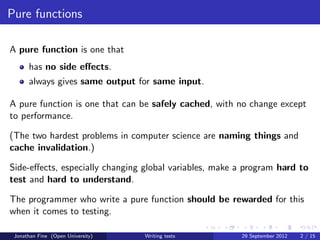
Pure functions

A pure function is one that
      has no side effects.
      always gives same output for same input.

A pure function is one that can be safely cached, with no change except
to performance.

(The two hardest problems in computer science are naming things and
cache invalidation.)

Side-effects, especially changing global variables, make a program hard to
test and hard to understand.

The programmer who write a pure function should be rewarded for this
when it comes to testing.

 Jonathan Fine (Open University)   Writing tests        29 September 2012   2 / 15
Example: Split a string into pieces
Suppose we’re writing a wiki language parser, a syntax highlighter, or
something similar. We’ll have to split the input string(s) into pieces.
Writing the parser is not our present problem.
Our problem here is to write the tests for the function that splits
the string into pieces.
For simplicity, we assume that we want to split the string on repeated
white space. We can write such a splitter using a regular expression.

>>> import re
>>> fn = re.compile(r’’’( +)’’’).split
>>> fn(’this and that ’)
[’this’, ’ ’, ’and’, ’ ’, ’that’, ’ ’]

In fact, our task now is to make it easier to write tests for fn (which
in reality will be much more complicated than the above).
 Jonathan Fine (Open University)   Writing tests          29 September 2012   3 / 15
Writing tests with doctest

Python’s interactive console is very useful for exploring and learning. The
doctest module, part of Python’s standard library, allows console
sessions to be used as tests. Here’s some examples.
>>> import re; fn = re.compile(r’’’( +)’’’).split
>>>
>>> fn(’a b c’)    # As we’d expect.
[’a’, ’ ’, ’b’, ’ ’, ’c’]
>>>
>>> fn(’atb c’) # Tabs not counted as white space.
[’atb’, ’ ’, ’c’]
>>>
>>> fn(’ ’)        # Is this what we want?
[’’, ’ ’, ’’]
Good for examples, but what if we have 20 input-output pairs to test?

 Jonathan Fine (Open University)   Writing tests          29 September 2012   4 / 15
Writing tests with unittest

The unittest module, part of the standard library, is modelled on Java
and Smalltalk testing frameworks. It’s a bit verbose.
import fn              # The function we want to test.

class TestSplitter(unittest.TestCase):     # Container.
    def test_1(self):
        arg = ’a b c’
        expect = [’a’, ’ ’, ’b’, ’ ’, ’c’]
        actual = fn(arg)                   # Boilerplate.
        self.assertEqual(actual, expect)   # Boilerplate.
Problems: (1) It’s verbose (but why?). (2) Every test is a function.
(3) arg and expect are not parameters to the test. (4) Nor is fn.
(5) We have to give every test a name (even if we don’t want to).
(6) We can’t easily loop over (arg, expect) pairs.

 Jonathan Fine (Open University)     Writing tests       29 September 2012   5 / 15
Writing tests with pytest
The pytest package was developed to meet the needs of the PyPy project.
Around 2010 there was a major cleanup refactoring. It’s available on PyPI.
import fn              # The function we want to test.

def test_1():
    arg = ’a b c’
    expect = [’a’, ’ ’, ’b’, ’ ’, ’c’]
    actual = fn(arg)                   # Boilerplate.
    assert actual == expect            # Boilerplate.
Problems: (1) It’s less but still verbose . (2) Every test is a function.
(3) arg and expect are not parameters to the test. (4) Nor is fn.
(5) We have to give every test a name (even if we don’t want to).
(6) We’re not looping over (arg, expect) pairs.
(7) (Not shown): it used to use magic for error reporting.
(8) (Not shown): it now uses rewrite of assert for this.
 Jonathan Fine (Open University)     Writing tests        29 September 2012   6 / 15
Writing tests with nose
The nose package seems to be a rewrite of pytest to meet magic (and
other?) concerns. It’s available on PyPI. Many tests will work for both
packages. Our example (and most of the problems) are the same as before.
import fn              # The function we want to test.

def test_1():
    arg = ’a b c’
    expect = [’a’, ’ ’, ’b’, ’ ’, ’c’]
    actual = fn(arg)                   # Boilerplate.
    assert actual == expect            # Boilerplate.
Problems: (1) It’s less but still verbose . (2) Every test is a function.
(3) arg and expect are not parameters to the test. (4) Nor is fn.
(5) We have to give every test a name (even if we don’t want to).
(6) We’re not looping over (arg, expect) pairs.
(7) (Not shown): it has opaque error reporting.
 Jonathan Fine (Open University)     Writing tests        29 September 2012   7 / 15
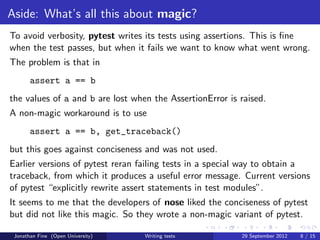
Aside: What’s all this about magic?
To avoid verbosity, pytest writes its tests using assertions. This is fine
when the test passes, but when it fails we want to know what went wrong.
The problem is that in
       assert a == b
the values of a and b are lost when the AssertionError is raised.
A non-magic workaround is to use
       assert a == b, get_traceback()
but this goes against conciseness and was not used.
Earlier versions of pytest reran failing tests in a special way to obtain a
traceback, from which it produces a useful error message. Current versions
of pytest “explicitly rewrite assert statements in test modules”.
It seems to me that the developers of nose liked the conciseness of pytest
but did not like this magic. So they wrote a non-magic variant of pytest.

 Jonathan Fine (Open University)   Writing tests          29 September 2012   8 / 15
Splitting a string into pieces has a special property

Enough of the assert stuff! It’s a distraction. Our problem is to write
tests for a function that splits a string into pieces. In our example
(below) no pieces are lost.
>>> import re; fn = re.compile(r’’’( +)’’’).split
>>> fn(’a b c’)   # As we’d expect.
[’a’, ’ ’, ’b’, ’ ’, ’c’]
The input string is the join of the output (below). So all we have to
do is specify the output (and join it to get the input).
>>> arg = ’a b c’
>>> actual = fn(arg)
>>> ’’.join(actual) == arg
True
Let’s use this special property to help write our tests!

 Jonathan Fine (Open University)   Writing tests           29 September 2012   9 / 15
Creating a sequence of strings from test data
Recall that to write a test all we have to do is specify the ouput. We
can get the input as the join of the output.
Q: What’s an easy way to specify a sequence of strings?
A: How about splitting on a character?
>>> import re; fn = re.compile(r’’’( +)’’’).split
>>>
>>> test_data = ’’’a| |b| |c’’’
>>> expect = test_data.split(’|’)
>>> arg = ’’.join(expect)
>>> arg
’a b c’
>>> expect
[’a’, ’ ’, ’b’, ’ ’, ’c’]
>>> fn(arg) == expect
True

 Jonathan Fine (Open University)   Writing tests      29 September 2012   10 / 15
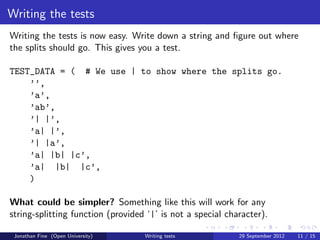
Writing the tests
Writing the tests is now easy. Write down a string and figure out where
the splits should go. This gives you a test.

TEST_DATA = ( # We use | to show where the splits go.
    ’’,
    ’a’,
    ’ab’,
    ’| |’,
    ’a| |’,
    ’| |a’,
    ’a| |b| |c’,
    ’a| |b| |c’,
    )

What could be simpler? Something like this will work for any
string-splitting function (provided ‘|’ is not a special character).

 Jonathan Fine (Open University)   Writing tests            29 September 2012   11 / 15
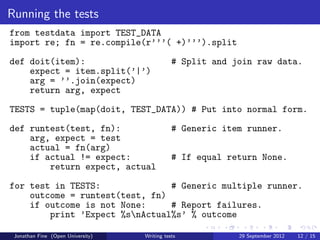
Running the tests
from testdata import TEST_DATA
import re; fn = re.compile(r’’’( +)’’’).split
def doit(item):                               # Split and join raw data.
    expect = item.split(’|’)
    arg = ’’.join(expect)
    return arg, expect
TESTS = tuple(map(doit, TEST_DATA)) # Put into normal form.
def runtest(test, fn):                        # Generic item runner.
    arg, expect = test
    actual = fn(arg)
    if actual != expect:                      # If equal return None.
        return expect, actual
for test in TESTS:              # Generic multiple runner.
    outcome = runtest(test, fn)
    if outcome is not None:     # Report failures.
        print ’Expect %snActual%s’ % outcome

 Jonathan Fine (Open University)   Writing tests           29 September 2012   12 / 15
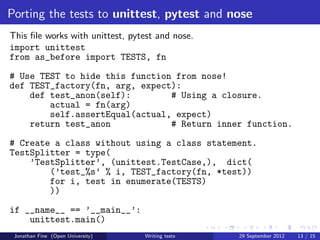
Porting the tests to unittest, pytest and nose
This file works with unittest, pytest and nose.
import unittest
from as_before import TESTS, fn
# Use TEST to hide this function from nose!
def TEST_factory(fn, arg, expect):
    def test_anon(self):        # Using a closure.
        actual = fn(arg)
        self.assertEqual(actual, expect)
    return test_anon            # Return inner function.
# Create a class without using a class statement.
TestSplitter = type(
    ’TestSplitter’, (unittest.TestCase,), dict(
        (’test_%s’ % i, TEST_factory(fn, *test))
        for i, test in enumerate(TESTS)
        ))
if __name__ == ’__main__’:
    unittest.main()
 Jonathan Fine (Open University)   Writing tests   29 September 2012   13 / 15
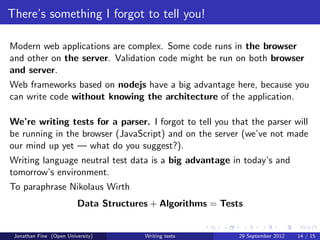
There’s something I forgot to tell you!

Modern web applications are complex. Some code runs in the browser
and other on the server. Validation code might be run on both browser
and server.
Web frameworks based on nodejs have a big advantage here, because you
can write code without knowing the architecture of the application.

We’re writing tests for a parser. I forgot to tell you that the parser will
be running in the browser (JavaScript) and on the server (we’ve not made
our mind up yet — what do you suggest?).
Writing language neutral test data is a big advantage in today’s and
tomorrow’s environment.
To paraphrase Nikolaus Wirth
                         Data Structures + Algorithms = Tests


 Jonathan Fine (Open University)       Writing tests        29 September 2012   14 / 15
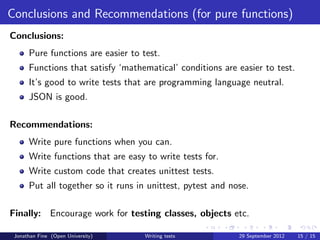
Conclusions and Recommendations (for pure functions)
Conclusions:
      Pure functions are easier to test.
      Functions that satisfy ‘mathematical’ conditions are easier to test.
      It’s good to write tests that are programming language neutral.
      JSON is good.

Recommendations:
      Write pure functions when you can.
      Write functions that are easy to write tests for.
      Write custom code that creates unittest tests.
      Put all together so it runs in unittest, pytest and nose.

Finally: Encourage work for testing classes, objects etc.

 Jonathan Fine (Open University)    Writing tests           29 September 2012   15 / 15

Writing tests

  • 1.
    Writing tests Jonathan Fine LTS, The Open University Milton Keynes, UK Jonathan.Fine@open.ac.uk http://www.slideshare.net/jonathanfine http://jonathanfine.wordpress.com https://bitbucket.org/jfine 29 September 2012 Jonathan Fine (Open University) Writing tests 29 September 2012 1 / 15
  • 2.
    Pure functions A purefunction is one that has no side effects. always gives same output for same input. A pure function is one that can be safely cached, with no change except to performance. (The two hardest problems in computer science are naming things and cache invalidation.) Side-effects, especially changing global variables, make a program hard to test and hard to understand. The programmer who write a pure function should be rewarded for this when it comes to testing. Jonathan Fine (Open University) Writing tests 29 September 2012 2 / 15
  • 3.
    Example: Split astring into pieces Suppose we’re writing a wiki language parser, a syntax highlighter, or something similar. We’ll have to split the input string(s) into pieces. Writing the parser is not our present problem. Our problem here is to write the tests for the function that splits the string into pieces. For simplicity, we assume that we want to split the string on repeated white space. We can write such a splitter using a regular expression. >>> import re >>> fn = re.compile(r’’’( +)’’’).split >>> fn(’this and that ’) [’this’, ’ ’, ’and’, ’ ’, ’that’, ’ ’] In fact, our task now is to make it easier to write tests for fn (which in reality will be much more complicated than the above). Jonathan Fine (Open University) Writing tests 29 September 2012 3 / 15
  • 4.
    Writing tests withdoctest Python’s interactive console is very useful for exploring and learning. The doctest module, part of Python’s standard library, allows console sessions to be used as tests. Here’s some examples. >>> import re; fn = re.compile(r’’’( +)’’’).split >>> >>> fn(’a b c’) # As we’d expect. [’a’, ’ ’, ’b’, ’ ’, ’c’] >>> >>> fn(’atb c’) # Tabs not counted as white space. [’atb’, ’ ’, ’c’] >>> >>> fn(’ ’) # Is this what we want? [’’, ’ ’, ’’] Good for examples, but what if we have 20 input-output pairs to test? Jonathan Fine (Open University) Writing tests 29 September 2012 4 / 15
  • 5.
    Writing tests withunittest The unittest module, part of the standard library, is modelled on Java and Smalltalk testing frameworks. It’s a bit verbose. import fn # The function we want to test. class TestSplitter(unittest.TestCase): # Container. def test_1(self): arg = ’a b c’ expect = [’a’, ’ ’, ’b’, ’ ’, ’c’] actual = fn(arg) # Boilerplate. self.assertEqual(actual, expect) # Boilerplate. Problems: (1) It’s verbose (but why?). (2) Every test is a function. (3) arg and expect are not parameters to the test. (4) Nor is fn. (5) We have to give every test a name (even if we don’t want to). (6) We can’t easily loop over (arg, expect) pairs. Jonathan Fine (Open University) Writing tests 29 September 2012 5 / 15
  • 6.
    Writing tests withpytest The pytest package was developed to meet the needs of the PyPy project. Around 2010 there was a major cleanup refactoring. It’s available on PyPI. import fn # The function we want to test. def test_1(): arg = ’a b c’ expect = [’a’, ’ ’, ’b’, ’ ’, ’c’] actual = fn(arg) # Boilerplate. assert actual == expect # Boilerplate. Problems: (1) It’s less but still verbose . (2) Every test is a function. (3) arg and expect are not parameters to the test. (4) Nor is fn. (5) We have to give every test a name (even if we don’t want to). (6) We’re not looping over (arg, expect) pairs. (7) (Not shown): it used to use magic for error reporting. (8) (Not shown): it now uses rewrite of assert for this. Jonathan Fine (Open University) Writing tests 29 September 2012 6 / 15
  • 7.
    Writing tests withnose The nose package seems to be a rewrite of pytest to meet magic (and other?) concerns. It’s available on PyPI. Many tests will work for both packages. Our example (and most of the problems) are the same as before. import fn # The function we want to test. def test_1(): arg = ’a b c’ expect = [’a’, ’ ’, ’b’, ’ ’, ’c’] actual = fn(arg) # Boilerplate. assert actual == expect # Boilerplate. Problems: (1) It’s less but still verbose . (2) Every test is a function. (3) arg and expect are not parameters to the test. (4) Nor is fn. (5) We have to give every test a name (even if we don’t want to). (6) We’re not looping over (arg, expect) pairs. (7) (Not shown): it has opaque error reporting. Jonathan Fine (Open University) Writing tests 29 September 2012 7 / 15
  • 8.
    Aside: What’s allthis about magic? To avoid verbosity, pytest writes its tests using assertions. This is fine when the test passes, but when it fails we want to know what went wrong. The problem is that in assert a == b the values of a and b are lost when the AssertionError is raised. A non-magic workaround is to use assert a == b, get_traceback() but this goes against conciseness and was not used. Earlier versions of pytest reran failing tests in a special way to obtain a traceback, from which it produces a useful error message. Current versions of pytest “explicitly rewrite assert statements in test modules”. It seems to me that the developers of nose liked the conciseness of pytest but did not like this magic. So they wrote a non-magic variant of pytest. Jonathan Fine (Open University) Writing tests 29 September 2012 8 / 15
  • 9.
    Splitting a stringinto pieces has a special property Enough of the assert stuff! It’s a distraction. Our problem is to write tests for a function that splits a string into pieces. In our example (below) no pieces are lost. >>> import re; fn = re.compile(r’’’( +)’’’).split >>> fn(’a b c’) # As we’d expect. [’a’, ’ ’, ’b’, ’ ’, ’c’] The input string is the join of the output (below). So all we have to do is specify the output (and join it to get the input). >>> arg = ’a b c’ >>> actual = fn(arg) >>> ’’.join(actual) == arg True Let’s use this special property to help write our tests! Jonathan Fine (Open University) Writing tests 29 September 2012 9 / 15
  • 10.
    Creating a sequenceof strings from test data Recall that to write a test all we have to do is specify the ouput. We can get the input as the join of the output. Q: What’s an easy way to specify a sequence of strings? A: How about splitting on a character? >>> import re; fn = re.compile(r’’’( +)’’’).split >>> >>> test_data = ’’’a| |b| |c’’’ >>> expect = test_data.split(’|’) >>> arg = ’’.join(expect) >>> arg ’a b c’ >>> expect [’a’, ’ ’, ’b’, ’ ’, ’c’] >>> fn(arg) == expect True Jonathan Fine (Open University) Writing tests 29 September 2012 10 / 15
  • 11.
    Writing the tests Writingthe tests is now easy. Write down a string and figure out where the splits should go. This gives you a test. TEST_DATA = ( # We use | to show where the splits go. ’’, ’a’, ’ab’, ’| |’, ’a| |’, ’| |a’, ’a| |b| |c’, ’a| |b| |c’, ) What could be simpler? Something like this will work for any string-splitting function (provided ‘|’ is not a special character). Jonathan Fine (Open University) Writing tests 29 September 2012 11 / 15
  • 12.
    Running the tests fromtestdata import TEST_DATA import re; fn = re.compile(r’’’( +)’’’).split def doit(item): # Split and join raw data. expect = item.split(’|’) arg = ’’.join(expect) return arg, expect TESTS = tuple(map(doit, TEST_DATA)) # Put into normal form. def runtest(test, fn): # Generic item runner. arg, expect = test actual = fn(arg) if actual != expect: # If equal return None. return expect, actual for test in TESTS: # Generic multiple runner. outcome = runtest(test, fn) if outcome is not None: # Report failures. print ’Expect %snActual%s’ % outcome Jonathan Fine (Open University) Writing tests 29 September 2012 12 / 15
  • 13.
    Porting the teststo unittest, pytest and nose This file works with unittest, pytest and nose. import unittest from as_before import TESTS, fn # Use TEST to hide this function from nose! def TEST_factory(fn, arg, expect): def test_anon(self): # Using a closure. actual = fn(arg) self.assertEqual(actual, expect) return test_anon # Return inner function. # Create a class without using a class statement. TestSplitter = type( ’TestSplitter’, (unittest.TestCase,), dict( (’test_%s’ % i, TEST_factory(fn, *test)) for i, test in enumerate(TESTS) )) if __name__ == ’__main__’: unittest.main() Jonathan Fine (Open University) Writing tests 29 September 2012 13 / 15
  • 14.
    There’s something Iforgot to tell you! Modern web applications are complex. Some code runs in the browser and other on the server. Validation code might be run on both browser and server. Web frameworks based on nodejs have a big advantage here, because you can write code without knowing the architecture of the application. We’re writing tests for a parser. I forgot to tell you that the parser will be running in the browser (JavaScript) and on the server (we’ve not made our mind up yet — what do you suggest?). Writing language neutral test data is a big advantage in today’s and tomorrow’s environment. To paraphrase Nikolaus Wirth Data Structures + Algorithms = Tests Jonathan Fine (Open University) Writing tests 29 September 2012 14 / 15
  • 15.
    Conclusions and Recommendations(for pure functions) Conclusions: Pure functions are easier to test. Functions that satisfy ‘mathematical’ conditions are easier to test. It’s good to write tests that are programming language neutral. JSON is good. Recommendations: Write pure functions when you can. Write functions that are easy to write tests for. Write custom code that creates unittest tests. Put all together so it runs in unittest, pytest and nose. Finally: Encourage work for testing classes, objects etc. Jonathan Fine (Open University) Writing tests 29 September 2012 15 / 15