Microservices Server – MSS
Workshop
Edgar Silva
edgar @wso2.com
o  This workshop is intend to cover how to use the
WSO2 Microservices Server – MSS, we will cover
some basic overview about some concepts, but we
strongly recommend you look for more detailed
basics about Microservices.
o  Recommended reading:
o  http://nginx.com/blog/introduction-to-microservices/
o  https://www.nginx.com/blog/building-microservices-using-
an-api-gateway/
2
3
4	
Basics Pre-Reqs
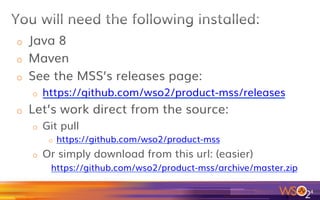
o  Java 8
o  Maven
o  See the MSS’s releases page:
o  https://github.com/wso2/product-mss/releases
o  Let’s work direct from the source:
o  Git pull
o  https://github.com/wso2/product-mss
o  Or simply download from this url: (easier)
https://github.com/wso2/product-mss/archive/master.zip
5
6
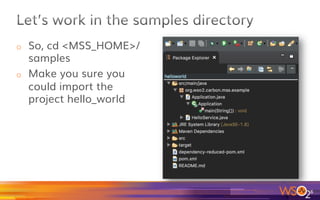
o  So, cd <MSS_HOME>/
samples
o  Make you sure you
could import the
project hello_world
7
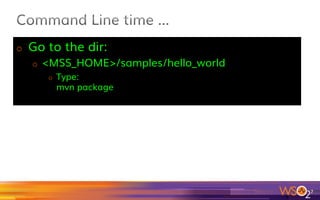
o  Go to the dir:
o  <MSS_HOME>/samples/hello_world
o  Type:
mvn package
8
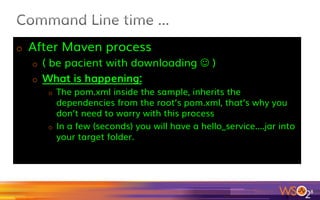
o  After Maven process
o  ( be pacient while downloading J )
o  What is happening:
o  The pom.xml inside the sample, inherits the
dependencies from the root’s pom.xml, that’s why you
don’t need to worry with this process
o  In a few (seconds) you will have a hello_service....jar into
your target folder.
9
10	
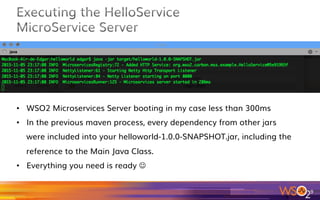
•  WSO2 Microservices Server booting in my case less than 300ms
•  In the previous maven process, every dependency from other jars
were included into your helloworld-1.0.0-SNAPSHOT.jar, including the
reference to the Main Java Class.
•  Everything you need is ready J
11	
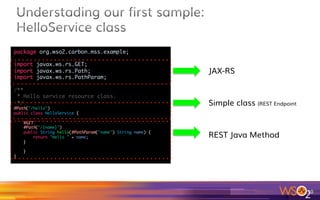
package org.wso2.carbon.mss.example;	
 	
import javax.ws.rs.GET;	
import javax.ws.rs.Path;	
import javax.ws.rs.PathParam;	
 	
/**	
* Hello service resource class.	
*/	
@Path("/hello")	
public class HelloService {	
 	
@GET	
@Path("/{name}")	
public String hello(@PathParam("name") String name) {	
return "Hello " + name;	
}	
 	
}	
}	
JAX-RS
Simple class (REST Endpoint
REST Java Method
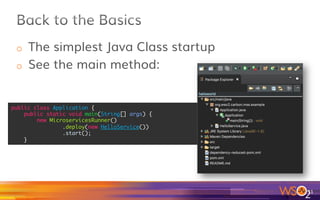
o  The simplest Java Class startup
o  See the main method:
12	
public class Application {	
public static void main(String[] args) {	
new MicroservicesRunner()	
.deploy(new HelloService())	
.start();	
}
13	
edgar$	curl	-v	http://localhost:8080/hello/valentina
o  Take a look on this:
o  http://www.confusedbycode.com/curl/
14
o  Thanks @jpviragine for that great tip:
https://github.com/jkbrzt/httpie
o  Really great tool, works like cURL, but much better and more user
friendly
o  Syntax: http <options> service or URL
o  But if you prefer to be “roots”, ok, continue if cURL
15
16	
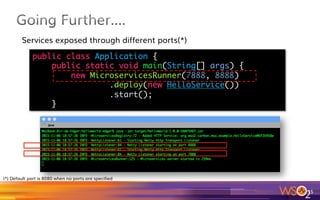
public class Application {	
public static void main(String[] args) {	
new MicroservicesRunner(7888, 8888)	
.deploy(new HelloService())	
.start();	
}	
Services exposed through different ports(*)
(*) Default port is 8080 when no ports are specified
17
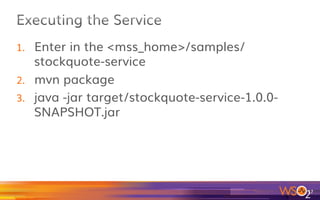
1.  Enter in the <mss_home>/samples/
stockquote-service
2.  mvn package
3.  java -jar target/stockquote-service-1.0.0-
SNAPSHOT.jar
18
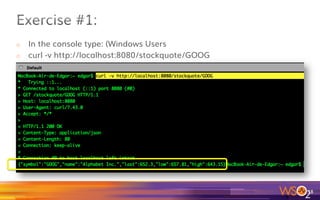
o  In the console type: (Windows Users
o  curl -v http://localhost:8080/stockquote/GOOG
19
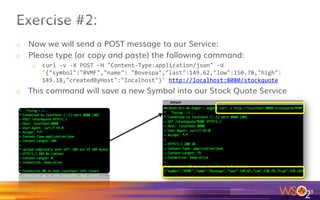
o  Now we will send a POST message to our Service:
o  Please type (or copy and paste) the following command:
o  curl	-v	-X	POST	-H	"Content-Type:application/json"	-d	
'{"symbol":"BVMF","name":	"Bovespa","last":149.62,"low":150.78,"high":
149.18,"createdByHost":"localhost"}'	http://localhost:8080/stockquote	
o  This command will save a new Symbol into our Stock Quote Service
20
o  You had used:
o  Java 8 + maven for building our samples and
exercises
o  Executed Microservices with basic jar –jar
approach
o  You saw how easy you can build REST Services
and deploy them into your Mic’service Server
(powered by WSO2)
21
22
o  Several approaches for a “decoupled SOA”
o  In this tutorial we will use the “Container-
based approach”
o  Microservices are about:
o  Lighter
o  Business Need Oriented
o  Composable
23
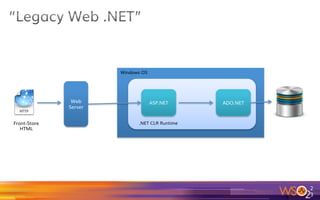
2
4
Web
Server
ASP.NET ADO.NET
Windows OS
.NET CLR RuntimeFront-Store
HTML
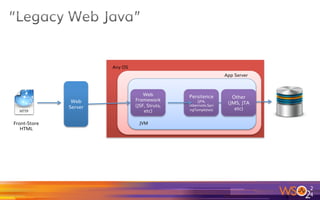
2
5
Web
Server
Web
Framework
(JSF, Struts,
etc)
Persitence
(JPA,
Hibernate,Spri
ngTemplates)
Any OS
JVM
Other
(JMS, JTA
etc)
App Server
Front-Store
HTML
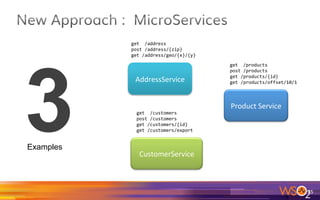
26	
Product	Service	
get		/products	
post	/products	
get	/products/{id}	
get	/products/offset/10/1	
CustomerService	
get		/customers	
post	/customers	
get	/customers/{id}	
get	/customers/export	
AddressService	
get		/address	
post	/address/{zip}	
get	/address/geo/{x}/{y}	
3Examples
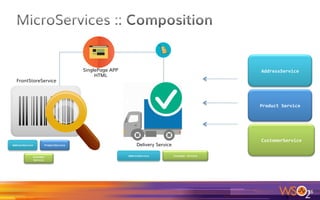
27	
Product	Service	
CustomerService	
AddressService	
AddressService	 ProductService	
Customer	
Service	
AddressService	 Customer	Service	
SinglePage APP
HTML
FrontStoreService
Delivery Service
o  Quick deployments
o  You are deploying a loosely-coupled, modular
component only J
o  Not a huge EAR with dozens of Jars as you used to do in
a monolithic enterprise App
28
29	
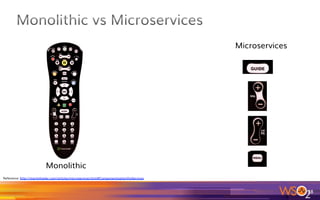
Monolithic
Microservices
Reference: http://martinfowler.com/articles/microservices.html#ComponentizationViaServices
30	
Paulo Merson https://insights.sei.cmu.edu/saturn/2015/11/defining-microservices.html
Great definition, written by another Brazilian J
From an architecture perspective, the microservice style belongs
primarily to the deployment view.
It dictates that the deployment unit should contain only one service or
just a few cohesive services.
The deployment constraint is the distinguishing factor. As a result,
microservices are easier to deploy, become more scalable, and can be
developed more independently by different teams using different
technologies.
“
o  Benefits of using microservices:
o  Deployability
o  Availability
o  Scalability
o  Modifiability
o  Management
31	
Paulo Merson https://insights.sei.cmu.edu/saturn/2015/11/microservices-beyond-the-hype-what-you-gain-and-what-you-lose.html
( Great post )
o  I would add:
o  Deployability
o  Availability (Auto-Scaling via Containers)
o  Analytics
o  Scalability
o  Modifiability
o  Management
32	
Paulo Merson https://insights.sei.cmu.edu/saturn/2015/11/microservices-beyond-the-hype-what-you-gain-and-what-you-lose.html
33
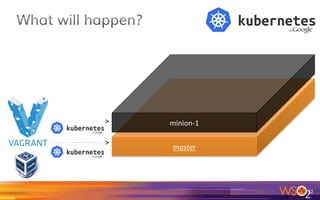
o  Part 2:
We ship in the distro
an example showing how to
run a whole deploy from several
different container machines managed
by Kubernetes.
34
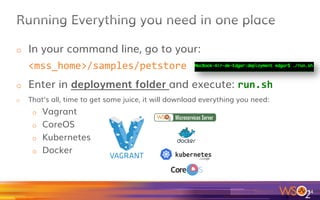
o  In your command line, go to your:
<mss_home>/samples/petstore	
o  Enter in deployment folder and execute: run.sh	
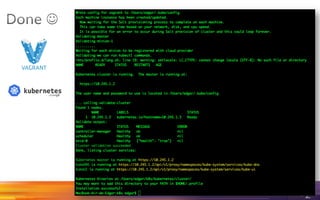
o  That’s all, time to get some juice, it will download everything you need:
o  Vagrant
o  CoreOS
o  Kubernetes
o  Docker
35
o  https://github.com/wso2/product-mss/tree/master/
samples/petstore/deployment/kubernetes-vagrant-
coreos-cluster
o  Disclaimer: This tutorial is focused on WSO2 Micro
Services Server – MSS, and some introduction to the
basics on Kubernetes is strongly recommended
before you move forward on this tutorial.
36
37	
This step will get a few minutes, according to your internet and machine,
So get relaxed while you can enjoy some “Matrix-like” in your console
http://thenextweb.com/wp-content/blogs.dir/1/files/2013/11/relax-at-work.jpg
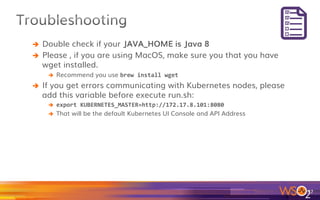
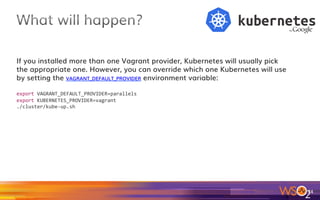
è  Double check if your JAVA_HOME is Java 8
è  Please , if you are using MacOS, make sure you that you have
wget installed.
è  Recommend you use brew	install	wget		
è  If you get errors communicating with Kubernetes nodes, please
add this variable before execute run.sh:
è  export	KUBERNETES_MASTER=http://172.17.8.101:8080	
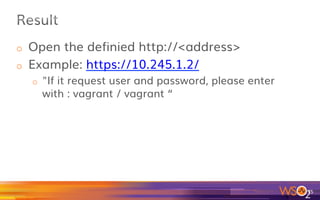
è  That will be the default Kubernetes UI Console and API Address
38
39	
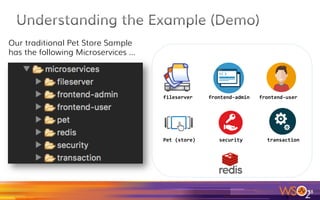
Our traditional Pet Store Sample
has the following Microservices …
fileserver	 frontend-admin	 frontend-user	
Pet	(store)	 transaction	security
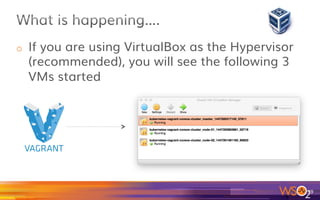
o  If you are using VirtualBox as the Hypervisor
(recommended), you will see the following 3
VMs started
40
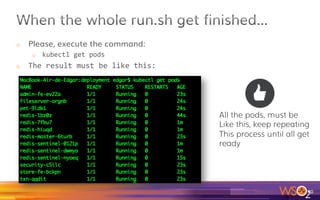
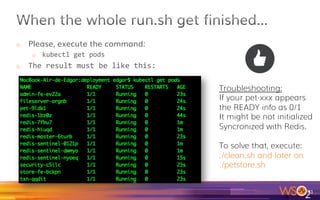
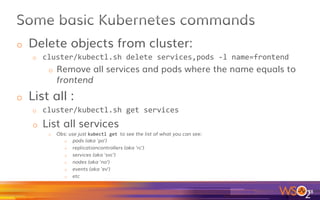
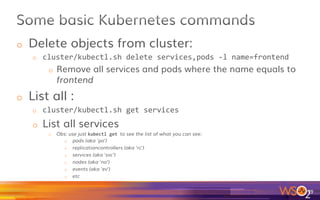
o  Please, execute the command:
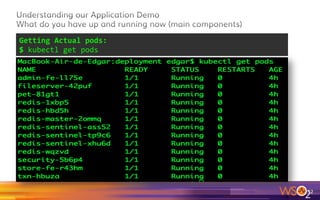
o  kubectl	get	pods	
o  The	result	must	be	like	this:	
41	
All the pods, must be
Like this, keep repeating
This process until all get
ready
o  Please, execute the command:
o  kubectl	get	pods	
o  The	result	must	be	like	this:	
42	
Troubleshooting:
If your pet-xxx appears
the READY info as 0/1
It might be not initialized
Syncronized with Redis.
To solve that, execute:
./clean.sh and later on
./petstore.sh
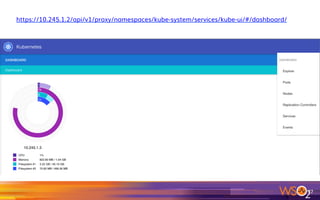
o  Kubernetes UI
o  Nodes
o  Services
o  Pods
o  General Info
o  Pet Store Admin (PHP App)
o  Pet Store Site (PHP App)
43
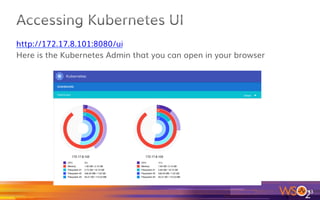
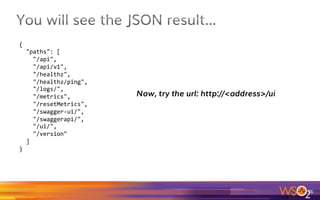
http://172.17.8.101:8080/ui
Here is the Kubernetes Admin that you can open in your browser
44
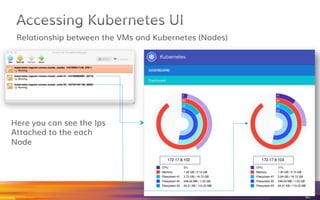
Relationship between the VMs and Kubernetes (Nodes)
45	
Here you can see the Ips
Attached to the each
Node
46	
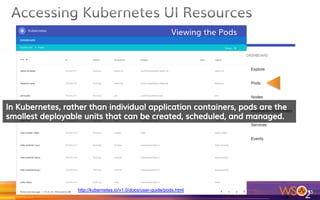
Viewing the Pods
http://kubernetes.io/v1.0/docs/user-guide/pods.html
47	
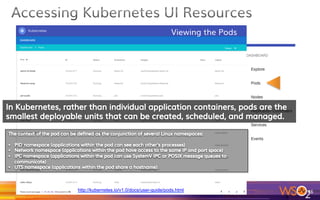
Viewing the Pods
http://kubernetes.io/v1.0/docs/user-guide/pods.html
48	
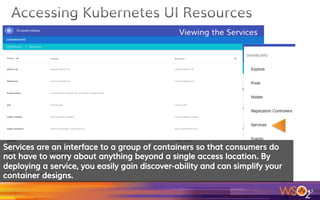
Viewing the Services
49	
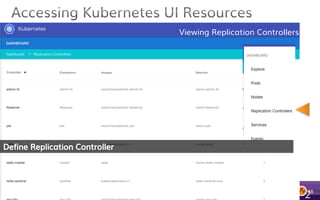
Viewing Replication Controllers
In Kubernetes, the base unit of deployment is a pod (intro to pods), which is
a group of containers that work together and therefore are logically
grouped. The replication controller stores a pod template in order to create
new pods if needed.
https://coreos.com/kubernetes/docs/latest/replication-controller.html
50	
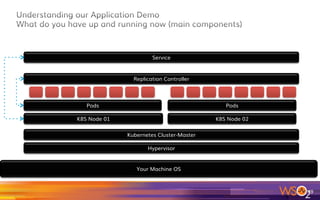
Your Machine OS
Hypervisor
Kubernetes Cluster-Master
K8S Node 01 K8S Node 02
Pods Pods
Replication Controller
Service
51	
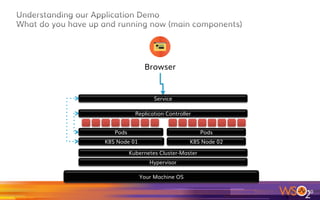
Your Machine OS
Hypervisor
Kubernetes Cluster-Master
K8S Node 01 K8S Node 02
Pods Pods
Replication Controller
Service
Browser
52	
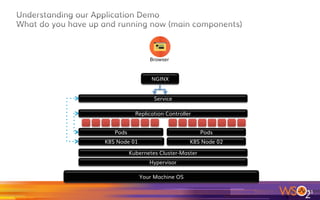
Your Machine OS
Hypervisor
Kubernetes Cluster-Master
K8S Node 01 K8S Node 02
Pods Pods
Replication Controller
Service
Browser
NGINX
53	
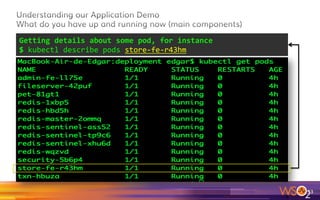
Getting	Actual	pods:		
$	kubectl	get	pods
54	
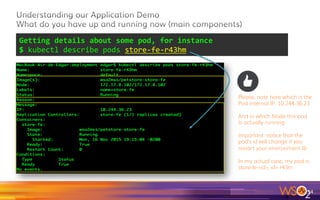
Getting	details	about	some	pod,	for	instance	
$	kubectl	describe	pods	store-fe-r43hm
55	
Getting	details	about	some	pod,	for	instance	
$	kubectl	describe	pods	store-fe-r43hm	
Please, note here which is the
Pod internal IP: 10.244.36.23
And in which Node this pod
Is actually running
Important: notice that the
pod’s id will change if you
restart your environment J
In my actual case, my pod is
store-fe-<id>, id= r43m
56	
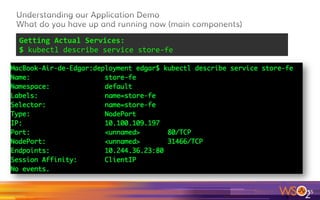
Getting	Actual	Services:		
$	kubectl	describe	service	store-fe
57	
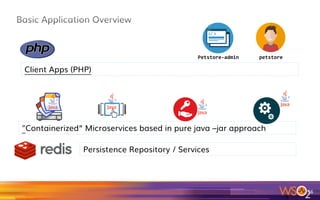
Persistence Repository / Services
"Containerized” Microservices based in pure java –jar approach
Client Apps (PHP)
petstore-admin	 petstore
58	
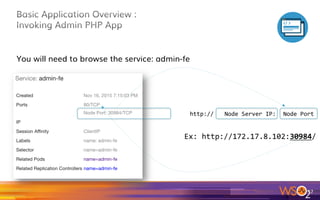
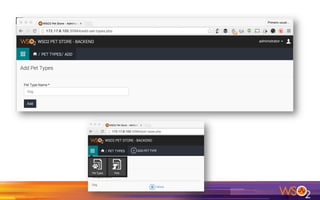
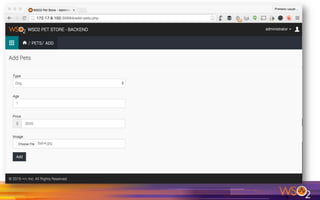
You will need to browse the service: admin-fe
http://	 Node	Server	IP:	 Node	Port	
Ex:	http://172.17.8.102:30984/
59	
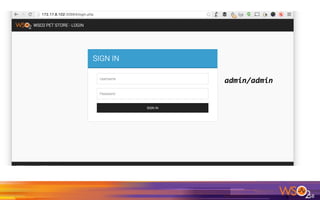
admin/admin
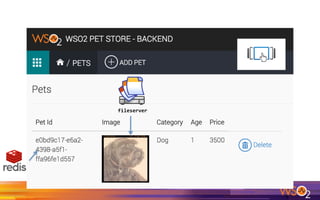
fileserver
63	
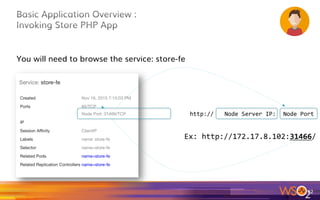
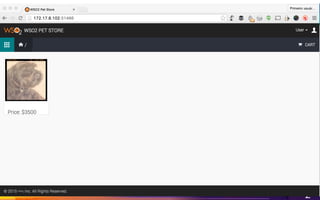
You will need to browse the service: store-fe
http://	 Node	Server	IP:	 Node	Port	
Ex:	http://172.17.8.102:31466/
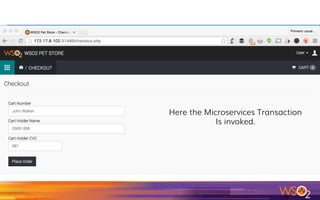
Here the Microservices Transaction
Is invoked.
o  Executing the petstore sample
o  Understanding the basics from Kubernetes
and its concepts, such as pods, services and
Replication Controller.
o  Executing the Services and Apps
o  Proposed Lab:
o  Execute the previous samples from Part1 in
Kubernetes + Docker
67
68
o  Please go to :
http://wso2.com/products/data-analytics-server/
o  Download the product
o  Install the product:
1.  Unzip
2.  That’s all
3.  Let’s call your installation destination folder as DAS_HOME from
now on
o  MySQL for this sample is also required
69
o  Step 1: Configure WSO2 DAS
1.  Go to <MSS_HOME>/analytics/das-setup and execute setup.sh :
1.  /setup.sh	-d	<DAS_HOME>	-u	admin	-p		
2.  Done, everything will be done by the script!
70
o  Step 2: Execute DAS Server
1.  Enter in DAS_HOME
2.  Make sure that Java 8 is in the path
3.  Type sh bin/wso2server.sh
4.  Wait until to see a message in the console like
this:
5.  Open this browser URL, it will let you see the
WSO2 Data Analytics Server Console (default
user admin and password admin)
71
72	
WSO2 DAS is ready and configured!
o  Step 3: (based on
https://github.com/wso2/product-mss/tree/
master/samples/metrics)
1.  Go to <MSS_HOME>/samples/metrics	
2.  Execute mvn	clean	install	
3.  Please, export the following system
variables:
1.  export	METRICS_REPORTING_DAS_DATAAGENTCONFIGPATH="data-agent-conf.xml”	
2.  export	HTTP_MONITORING_DAS_DATAAGENTCONFIGPATH="data-agent-conf.xml”	
73
4.  Execute: $	java	-jar	target/metrics-*.jar	
5.  Invoke the following URLs via command line:
o  curl	-v	http://localhost:8080/test/rand/500	
o  curl	-v	http://localhost:8080/test/total/10	
o  curl	-v	http://localhost:8080/test/echo/test	
o  curl	-v	http://localhost:8080/student/910760234V	
o  curl	-v	--data	
"{'nic':'860766123V','firstName':'Jack','lastName':'Black','age':
29}"	-H	"Content-Type:	application/json"	http://localhost:8080/
student	
o  curl	-v	http://localhost:8080/student/860766123V	
o  curl	-v	http://localhost:8080/student	
74
o  What is happening:
o  Now, after the invocation from cURLs, some
information were sent from WSO2 Microservices
Server to WSO2 Data Analytics Server.
o  The Metrics are also present in the command line
where you are running the jar:
75
76
@GET	
@Path("/{nic}")	
@Produces("application/json")	
@Timed	
@HTTPMonitoring	
public Student getStudent(@PathParam("nic") String nic) {	
return students.get(nic);	
}	
 	
@POST	
@Consumes("application/json")	
@Metered	
@HTTPMonitoring	
public void addStudent(Student student) {	
students.put(student.getNic(), student);	
}
org.wso2.carbon.mss.example.service.StudentService.java
78	
<Agent>	
<Name>Thrift</Name>	
<DataEndpointClass>
org.wso2.carbon.databridge.agent.endpoint.thrift.ThriftDataEndpoint
</DataEndpointClass>	
<TrustSore>client-truststore.jks</TrustSore>	
<TrustSorePassword>wso2carbon</TrustSorePassword>	
….	
Thrift
This file is in charge to define how will MSS communicate with DAS
https://localhost:9443/monitoring/
79
o  http://kubernetes.io/v1.1/
o  https://www.digitalocean.com/community/tutorials/an-
introduction-to-kubernetes
o  https://insights.sei.cmu.edu/saturn/2015/11/defining-
microservices.html
o  http://www.slideshare.net/afkham_azeez/
wso2con-2015usintroductiontomssv2?related=1
o  http://www.slideshare.net/afkham_azeez/wso2conus-2015-
introduction-to-wso2-microservices-server-mss?related=2
82
o  http://wso2.com/products/microservices-server/
o  Lightweight and fast runtime
o  6MB pack size
o  Starts within 400ms
o  Based on the new WSO2 Carbon 5.0 kernel
o  ~25MB memory consumption for the WSO2 MSS framework
o  Simple development, deployment, and monitoring
o  WSO2 Developer Studio-based tooling for generating microservices projects starting from a
Swagger API definition
o  Built-in metrics and analytics APIs via WSO2 Data Analytics Server
o  Tracing of requests using a unique message ID
o  High scalability and reliability
o  Transport based on Netty 4.0
o  JWT-based security
o  Custom interceptors
o  Streaming input and streaming output support
o  Comprehensive samples demonstrating how to develop microservices applications
83
o  Tutorial done!
o  Next steps:
o  Keep watching how WSO2 MSS will evolve
o  Don’t miss our upcoming Webinars covering this
and even more
84
o  Please, if you need to understand more, or
want to talk to one of our specialists to help
you and your company’s projects, please
contact us here:
o  http://wso2.com/contact/
85
86	
@jedgarsilva
http://www.wso2.com
Edgar Silva
edgar@wso2.com
Contact us !

Workshop/Tutorial WSO2 Micro Services Server