Copyright © 2018 HashiCorp
Working with
Terraform on Azure
Tom Harvey
Terraform Engineer, HashiCorp
+
s
Copyright © 2018 HashiCorp
Azure CLI, CloudShell, MSI & Service Principal
!3
Authenticating to Azure
Copyright © 2018 HashiCorp
▪ The AzureRM Provider supports authenticating
via:
▪ Azure CLI
▪ CloudShell
▪ MSI
▪ Service Principal
!4
Supported methods of
authenticating to Azure
from Terraform
Authentication
Methods
Copyright © 2018 HashiCorp
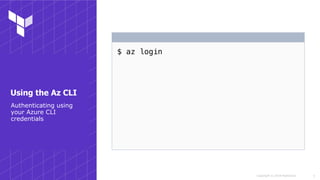
$ az login
!5
Authenticating using
your Azure CLI
credentials
Using the Az CLI
Copyright © 2018 HashiCorp
$ az login
Note, we have launched a browser for you to login. For old
experience with device code, use "az login --use-device-code"
You have logged in. Now let us find all subscriptions you have
access to...
[
{
"cloudName": "AzureCloud",
"id": "00000000-0000-0000-0000-000000000000",
"isDefault": true,
# ...
}
]
!6
Using the Az CLI
Authenticating using
your Azure CLI
credentials
Copyright © 2018 HashiCorp
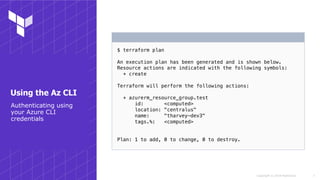
$ terraform plan
An execution plan has been generated and is shown below.
Resource actions are indicated with the following symbols:
+ create
Terraform will perform the following actions:
+ azurerm_resource_group.test
id: <computed>
location: "centralus"
name: "tharvey-dev3"
tags.%: <computed>
Plan: 1 to add, 0 to change, 0 to destroy.
!7
Using the Az CLI
Authenticating using
your Azure CLI
credentials
Copyright © 2018 HashiCorp
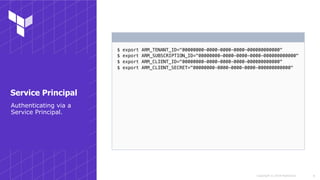
$ export ARM_TENANT_ID="00000000-0000-0000-0000-000000000000"
$ export ARM_SUBSCRIPTION_ID="00000000-0000-0000-0000-000000000000"
$ export ARM_CLIENT_ID="00000000-0000-0000-0000-000000000000"
$ export ARM_CLIENT_SECRET="00000000-0000-0000-0000-000000000000"
!8
Authenticating via a
Service Principal.
Service Principal
Copyright © 2018 HashiCorp
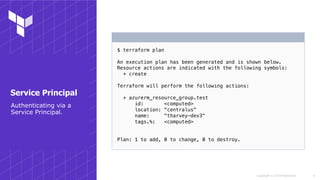
$ terraform plan
An execution plan has been generated and is shown below.
Resource actions are indicated with the following symbols:
+ create
Terraform will perform the following actions:
+ azurerm_resource_group.test
id: <computed>
location: "centralus"
name: "tharvey-dev3"
tags.%: <computed>
Plan: 1 to add, 0 to change, 0 to destroy.
!9
Service Principal
Authenticating via a
Service Principal.
s
Copyright © 2018 HashiCorp
Lesser-known areas of Terraform
!10
Working with Terraform
Copyright © 2018 HashiCorp
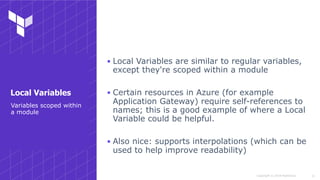
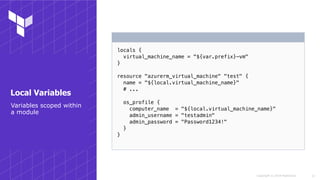
▪ Local Variables are similar to regular variables,
except they're scoped within a module
▪ Certain resources in Azure (for example
Application Gateway) require self-references to
names; this is a good example of where a Local
Variable could be helpful.
▪ Also nice: supports interpolations (which can be
used to help improve readability)
!11
Variables scoped within
a module
Local Variables
Copyright © 2018 HashiCorp
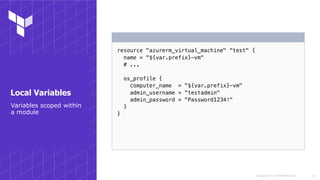
resource "azurerm_virtual_machine" "test" {
name = "${var.prefix}-vm"
# ...
os_profile {
computer_name = "${var.prefix}-vm"
admin_username = "testadmin"
admin_password = "Password1234!"
}
}
!12
Variables scoped within
a module
Local Variables
Copyright © 2018 HashiCorp
locals {
virtual_machine_name = "${var.prefix}-vm"
}
resource "azurerm_virtual_machine" "test" {
name = "${local.virtual_machine_name}"
# ...
os_profile {
computer_name = "${local.virtual_machine_name}"
admin_username = "testadmin"
admin_password = "Password1234!"
}
}
!13
Variables scoped within
a module
Local Variables
Copyright © 2018 HashiCorp
▪ Why? e.g. creating a two-way VPN between two
Azure Subscriptions
▪ Outside of Terraform you could do this via the
Azure CLI / PowerShell / in the Azure Portal
!14
Working across
subscriptions
Using multiple instances
of a Provider
Copyright © 2018 HashiCorp
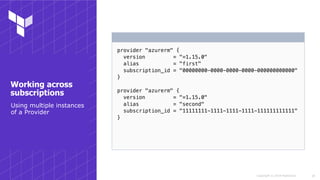
▪ Terraform supports instantiating multiple
versions of a Provider
▪ Each instance of a Provider just needs a
`subscription_id` set to know which
subscription to target
!15
Using multiple instances
of a Provider
Working across
subscriptions
Copyright © 2018 HashiCorp
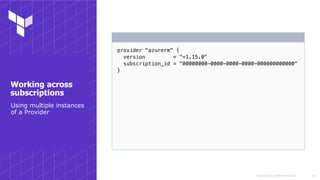
provider "azurerm" {
version = "=1.15.0"
subscription_id = "00000000-0000-0000-0000-000000000000"
}
!16
Working across
subscriptions
Using multiple instances
of a Provider
Copyright © 2018 HashiCorp
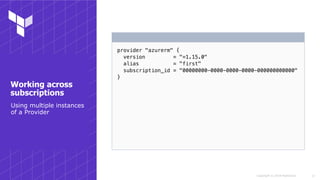
provider "azurerm" {
version = "=1.15.0"
alias = "first"
subscription_id = "00000000-0000-0000-0000-000000000000"
}
!17
Working across
subscriptions
Using multiple instances
of a Provider
Copyright © 2018 HashiCorp
provider "azurerm" {
version = "=1.15.0"
alias = "first"
subscription_id = "00000000-0000-0000-0000-000000000000"
}
provider "azurerm" {
version = "=1.15.0"
alias = "second"
subscription_id = "11111111-1111-1111-1111-111111111111"
}
!18
Working across
subscriptions
Using multiple instances
of a Provider
Copyright © 2018 HashiCorp
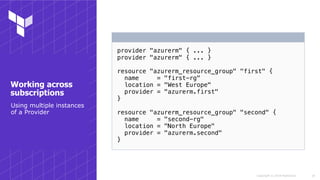
provider "azurerm" { ... }
resource "azurerm_resource_group" "first" {
name = "first-rg"
location = "West Europe"
provider = "azurerm.first"
}
resource "azurerm_resource_group" "second" {
name = "second-rg"
location = "North Europe"
provider = "azurerm.second"
}
!19
Working across
subscriptions
Using multiple instances
of a Provider
s
Copyright © 2018 HashiCorp
Provisioned via some other means
!20
Working with your
existing resources
Copyright © 2018 HashiCorp
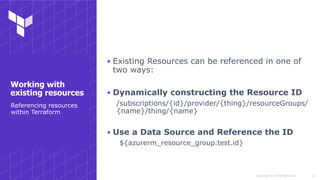
▪ Existing Resources can be referenced in one of
two ways:
▪ Dynamically constructing the Resource ID
/subscriptions/{id}/provider/{thing}/resourceGroups/
{name}/thing/{name}
▪ Use a Data Source and Reference the ID
${azurerm_resource_group.test.id}
!21
Referencing resources
within Terraform
Working with
existing resources
Copyright © 2018 HashiCorp
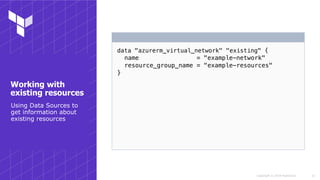
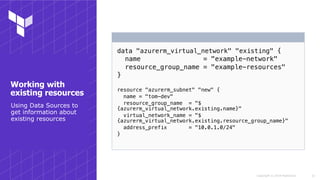
data "azurerm_virtual_network" "existing" {
name = "example-network"
resource_group_name = "example-resources"
}
!22
Using Data Sources to
get information about
existing resources
Working with
existing resources
Copyright © 2018 HashiCorp
data "azurerm_virtual_network" "existing" {
name = "example-network"
resource_group_name = "example-resources"
}
resource "azurerm_subnet" "new" {
name = "tom-dev"
resource_group_name = "$
{azurerm_virtual_network.existing.name}"
virtual_network_name = "$
{azurerm_virtual_network.existing.resource_group_name}"
address_prefix = "10.0.1.0/24"
}
!23
Using Data Sources to
get information about
existing resources
Working with
existing resources
Copyright © 2018 HashiCorp
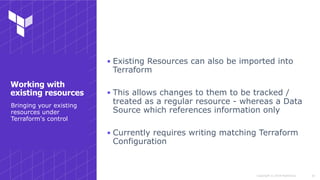
▪ Existing Resources can also be imported into
Terraform
▪ This allows changes to them to be tracked /
treated as a regular resource - whereas a Data
Source which references information only
▪ Currently requires writing matching Terraform
Configuration
!24
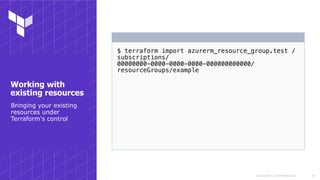
Bringing your existing
resources under
Terraform's control
Working with
existing resources
Copyright © 2018 HashiCorp
$ terraform import azurerm_resource_group.test /
subscriptions/
00000000-0000-0000-0000-000000000000/
resourceGroups/example
!25
Bringing your existing
resources under
Terraform's control
Working with
existing resources
Copyright © 2018 HashiCorp
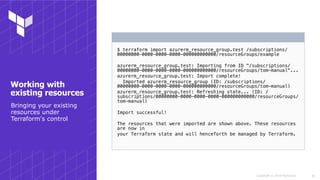
$ terraform import azurerm_resource_group.test /subscriptions/
00000000-0000-0000-0000-000000000000/resourceGroups/example
azurerm_resource_group.test: Importing from ID "/subscriptions/
00000000-0000-0000-0000-000000000000/resourceGroups/tom-manual"...
azurerm_resource_group.test: Import complete!
Imported azurerm_resource_group (ID: /subscriptions/
00000000-0000-0000-0000-000000000000/resourceGroups/tom-manual)
azurerm_resource_group.test: Refreshing state... (ID: /
subscriptions/00000000-0000-0000-0000-000000000000/resourceGroups/
tom-manual)
Import successful!
The resources that were imported are shown above. These resources
are now in
your Terraform state and will henceforth be managed by Terraform.
!26
Bringing your existing
resources under
Terraform's control
Working with
existing resources
s
Copyright © 2018 HashiCorp
Working with Preview functionality and things
not natively supported by Terraform
!27
Using the new shiny
Copyright © 2018 HashiCorp
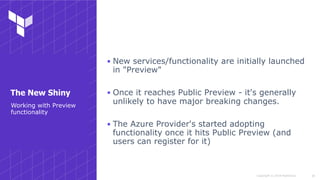
▪ New services/functionality are initially launched
in "Preview"
▪ Once it reaches Public Preview - it's generally
unlikely to have major breaking changes.
▪ The Azure Provider's started adopting
functionality once it hits Public Preview (and
users can register for it)
!28
Working with Preview
functionality
The New Shiny
Copyright © 2018 HashiCorp
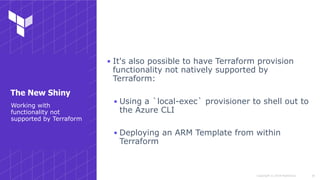
▪ It's also possible to have Terraform provision
functionality not natively supported by
Terraform:
▪ Using a `local-exec` provisioner to shell out to
the Azure CLI
▪ Deploying an ARM Template from within
Terraform
!29
Working with
functionality not
supported by Terraform
The New Shiny
Copyright © 2018 HashiCorp
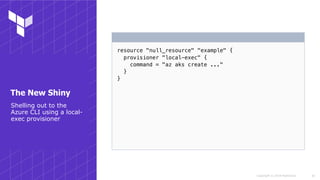
resource "null_resource" "example" {
provisioner "local-exec" {
command = "az aks create ..."
}
}
!30
Shelling out to the
Azure CLI using a local-
exec provisioner
The New Shiny
Copyright © 2018 HashiCorp
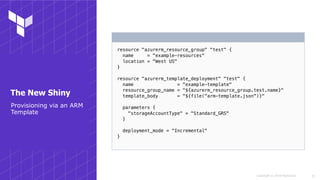
resource "azurerm_resource_group" "test" {
name = "example-resources"
location = "West US"
}
resource "azurerm_template_deployment" "test" {
name = "example-template"
resource_group_name = "${azurerm_resource_group.test.name}"
template_body = "${file("arm-template.json")}"
parameters {
"storageAccountType" = "Standard_GRS"
}
deployment_mode = "Incremental"
}
!31
Provisioning via an ARM
Template
The New Shiny
s
Copyright © 2018 HashiCorp
Lesser known things about working with Azure
!32
Common got-ya's
Copyright © 2018 HashiCorp
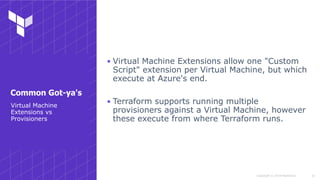
▪ Virtual Machine Extensions allow one "Custom
Script" extension per Virtual Machine, but which
execute at Azure's end.
▪ Terraform supports running multiple
provisioners against a Virtual Machine, however
these execute from where Terraform runs.
!33
Virtual Machine
Extensions vs
Provisioners
Common Got-ya's
Copyright © 2018 HashiCorp
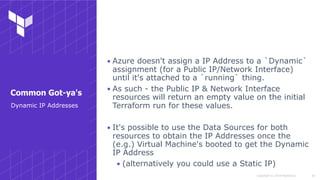
▪ Azure doesn't assign a IP Address to a `Dynamic`
assignment (for a Public IP/Network Interface)
until it's attached to a `running` thing.
▪ As such - the Public IP & Network Interface
resources will return an empty value on the initial
Terraform run for these values.
▪ It's possible to use the Data Sources for both
resources to obtain the IP Addresses once the
(e.g.) Virtual Machine's booted to get the Dynamic
IP Address
▪ (alternatively you could use a Static IP)
!34
Dynamic IP Addresses
Common Got-ya's
Copyright © 2018 HashiCorp
resource "azurerm_public_ip" "test" {
# ...
}
resource "azurerm_virtual_machine" "test" {
# ...
}
data "azurerm_public_ip" "test" {
# ...
depends_on = ["azurerm_virtual_machine.test"]
}
output "dynamic_public_ip_address" {
value = "${data.azurerm_public_ip.test.ip_address}"
}
!35
Common Got-ya's
Dynamic IP Addresses
s
Copyright © 2018 HashiCorp
Reusing Terraform Code
!36
Working with Modules
Copyright © 2018 HashiCorp
▪ Terraform Modules are just regular Terraform
Code, with `inputs` and `outputs`
▪ Can be sourced from the local file system, a Git
repo or a Module Registry.
!37
Working with Modules
Modules
Copyright © 2018 HashiCorp
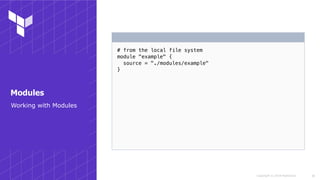
# from the local file system
module "example" {
source = "./modules/example"
}
!38
Working with Modules
Modules
Copyright © 2018 HashiCorp
# from the local file system
module "example" {
source = "./modules/example"
}
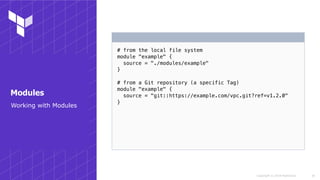
# from a Git repository (a specific Tag)
module "example" {
source = "git::https://example.com/vpc.git?ref=v1.2.0"
}
!39
Working with Modules
Modules
Copyright © 2018 HashiCorp
# from the local file system
module "example" {
source = "./modules/example"
}
# from a Git repository (a specific Tag)
module "example" {
source = "git::https://example.com/vpc.git?ref=v1.2.0"
}
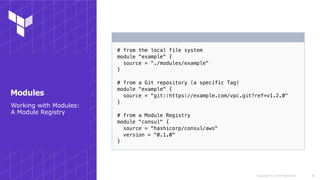
# from a Module Registry
module "consul" {
source = "hashicorp/consul/aws"
version = "0.1.0"
}
!40
Working with Modules:
A Module Registry
Modules
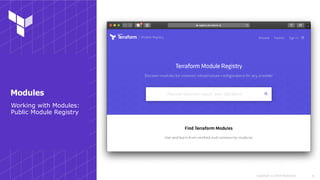
Copyright © 2018 HashiCorp !41
Working with Modules:
Public Module Registry
Modules
Copyright © 2018 HashiCorp
▪ Modules still care about State - so refactoring requires a little
thought (e.g. `terraform state mv`)
▪ Whilst tempting to modularize from the start - sometimes
differences appear over a short-period of time (e.g. between
environments)
▪ Create smaller, opinionated modules rather than generic
modules
▪ Allows for clearer intentions
▪ Consider creating multiple smaller modules rather than a
larger one
▪ Example: module to create a VPN Peering between two
subscriptions, with a separate module for security rules
!42
Suggestions for using
Modules
Modules
Copyright © 2018 HashiCorp
▪ Consider using Semantic Versioning
▪ Testing modules:
▪ TerraTest
▪ github.com/gruntwork-io/terratest
▪ Primarily for AWS/GCP at this point
▪ Kitchen-Terraform
▪ github.com/newcontext-oss/kitchen-terraform
!43
Testing Modules
Modules
Copyright © 2018 HashiCorp
▪ Suggestions for good modules in Azure-land:
▪ App Services
▪ Function Apps
▪ Load Balancers
▪ Virtual Network Peerings (e.g. VPN's)
▪ Virtual Machine Extensions
▪ e.g. Binding a Virtual Machine to a Domain
!44
Suggestions for good
modules with Azure
Modules
October 22-24, 2018 | San Francisco
Copyright © 2018 HashiCorp !46
Questions?
Thank you.
hello@hashicorp.comwww.hashicorp.com

Working with Terraform on Azure

  • 1.
    Copyright © 2018HashiCorp Working with Terraform on Azure Tom Harvey Terraform Engineer, HashiCorp
  • 2.
  • 3.
    s Copyright © 2018HashiCorp Azure CLI, CloudShell, MSI & Service Principal !3 Authenticating to Azure
  • 4.
    Copyright © 2018HashiCorp ▪ The AzureRM Provider supports authenticating via: ▪ Azure CLI ▪ CloudShell ▪ MSI ▪ Service Principal !4 Supported methods of authenticating to Azure from Terraform Authentication Methods
  • 5.
    Copyright © 2018HashiCorp $ az login !5 Authenticating using your Azure CLI credentials Using the Az CLI
  • 6.
    Copyright © 2018HashiCorp $ az login Note, we have launched a browser for you to login. For old experience with device code, use "az login --use-device-code" You have logged in. Now let us find all subscriptions you have access to... [ { "cloudName": "AzureCloud", "id": "00000000-0000-0000-0000-000000000000", "isDefault": true, # ... } ] !6 Using the Az CLI Authenticating using your Azure CLI credentials
  • 7.
    Copyright © 2018HashiCorp $ terraform plan An execution plan has been generated and is shown below. Resource actions are indicated with the following symbols: + create Terraform will perform the following actions: + azurerm_resource_group.test id: <computed> location: "centralus" name: "tharvey-dev3" tags.%: <computed> Plan: 1 to add, 0 to change, 0 to destroy. !7 Using the Az CLI Authenticating using your Azure CLI credentials
  • 8.
    Copyright © 2018HashiCorp $ export ARM_TENANT_ID="00000000-0000-0000-0000-000000000000" $ export ARM_SUBSCRIPTION_ID="00000000-0000-0000-0000-000000000000" $ export ARM_CLIENT_ID="00000000-0000-0000-0000-000000000000" $ export ARM_CLIENT_SECRET="00000000-0000-0000-0000-000000000000" !8 Authenticating via a Service Principal. Service Principal
  • 9.
    Copyright © 2018HashiCorp $ terraform plan An execution plan has been generated and is shown below. Resource actions are indicated with the following symbols: + create Terraform will perform the following actions: + azurerm_resource_group.test id: <computed> location: "centralus" name: "tharvey-dev3" tags.%: <computed> Plan: 1 to add, 0 to change, 0 to destroy. !9 Service Principal Authenticating via a Service Principal.
  • 10.
    s Copyright © 2018HashiCorp Lesser-known areas of Terraform !10 Working with Terraform
  • 11.
    Copyright © 2018HashiCorp ▪ Local Variables are similar to regular variables, except they're scoped within a module ▪ Certain resources in Azure (for example Application Gateway) require self-references to names; this is a good example of where a Local Variable could be helpful. ▪ Also nice: supports interpolations (which can be used to help improve readability) !11 Variables scoped within a module Local Variables
  • 12.
    Copyright © 2018HashiCorp resource "azurerm_virtual_machine" "test" { name = "${var.prefix}-vm" # ... os_profile { computer_name = "${var.prefix}-vm" admin_username = "testadmin" admin_password = "Password1234!" } } !12 Variables scoped within a module Local Variables
  • 13.
    Copyright © 2018HashiCorp locals { virtual_machine_name = "${var.prefix}-vm" } resource "azurerm_virtual_machine" "test" { name = "${local.virtual_machine_name}" # ... os_profile { computer_name = "${local.virtual_machine_name}" admin_username = "testadmin" admin_password = "Password1234!" } } !13 Variables scoped within a module Local Variables
  • 14.
    Copyright © 2018HashiCorp ▪ Why? e.g. creating a two-way VPN between two Azure Subscriptions ▪ Outside of Terraform you could do this via the Azure CLI / PowerShell / in the Azure Portal !14 Working across subscriptions Using multiple instances of a Provider
  • 15.
    Copyright © 2018HashiCorp ▪ Terraform supports instantiating multiple versions of a Provider ▪ Each instance of a Provider just needs a `subscription_id` set to know which subscription to target !15 Using multiple instances of a Provider Working across subscriptions
  • 16.
    Copyright © 2018HashiCorp provider "azurerm" { version = "=1.15.0" subscription_id = "00000000-0000-0000-0000-000000000000" } !16 Working across subscriptions Using multiple instances of a Provider
  • 17.
    Copyright © 2018HashiCorp provider "azurerm" { version = "=1.15.0" alias = "first" subscription_id = "00000000-0000-0000-0000-000000000000" } !17 Working across subscriptions Using multiple instances of a Provider
  • 18.
    Copyright © 2018HashiCorp provider "azurerm" { version = "=1.15.0" alias = "first" subscription_id = "00000000-0000-0000-0000-000000000000" } provider "azurerm" { version = "=1.15.0" alias = "second" subscription_id = "11111111-1111-1111-1111-111111111111" } !18 Working across subscriptions Using multiple instances of a Provider
  • 19.
    Copyright © 2018HashiCorp provider "azurerm" { ... } provider "azurerm" { ... } resource "azurerm_resource_group" "first" { name = "first-rg" location = "West Europe" provider = "azurerm.first" } resource "azurerm_resource_group" "second" { name = "second-rg" location = "North Europe" provider = "azurerm.second" } !19 Working across subscriptions Using multiple instances of a Provider
  • 20.
    s Copyright © 2018HashiCorp Provisioned via some other means !20 Working with your existing resources
  • 21.
    Copyright © 2018HashiCorp ▪ Existing Resources can be referenced in one of two ways: ▪ Dynamically constructing the Resource ID /subscriptions/{id}/provider/{thing}/resourceGroups/ {name}/thing/{name} ▪ Use a Data Source and Reference the ID ${azurerm_resource_group.test.id} !21 Referencing resources within Terraform Working with existing resources
  • 22.
    Copyright © 2018HashiCorp data "azurerm_virtual_network" "existing" { name = "example-network" resource_group_name = "example-resources" } !22 Using Data Sources to get information about existing resources Working with existing resources
  • 23.
    Copyright © 2018HashiCorp data "azurerm_virtual_network" "existing" { name = "example-network" resource_group_name = "example-resources" } resource "azurerm_subnet" "new" { name = "tom-dev" resource_group_name = "$ {azurerm_virtual_network.existing.name}" virtual_network_name = "$ {azurerm_virtual_network.existing.resource_group_name}" address_prefix = "10.0.1.0/24" } !23 Using Data Sources to get information about existing resources Working with existing resources
  • 24.
    Copyright © 2018HashiCorp ▪ Existing Resources can also be imported into Terraform ▪ This allows changes to them to be tracked / treated as a regular resource - whereas a Data Source which references information only ▪ Currently requires writing matching Terraform Configuration !24 Bringing your existing resources under Terraform's control Working with existing resources
  • 25.
    Copyright © 2018HashiCorp $ terraform import azurerm_resource_group.test / subscriptions/ 00000000-0000-0000-0000-000000000000/ resourceGroups/example !25 Bringing your existing resources under Terraform's control Working with existing resources
  • 26.
    Copyright © 2018HashiCorp $ terraform import azurerm_resource_group.test /subscriptions/ 00000000-0000-0000-0000-000000000000/resourceGroups/example azurerm_resource_group.test: Importing from ID "/subscriptions/ 00000000-0000-0000-0000-000000000000/resourceGroups/tom-manual"... azurerm_resource_group.test: Import complete! Imported azurerm_resource_group (ID: /subscriptions/ 00000000-0000-0000-0000-000000000000/resourceGroups/tom-manual) azurerm_resource_group.test: Refreshing state... (ID: / subscriptions/00000000-0000-0000-0000-000000000000/resourceGroups/ tom-manual) Import successful! The resources that were imported are shown above. These resources are now in your Terraform state and will henceforth be managed by Terraform. !26 Bringing your existing resources under Terraform's control Working with existing resources
  • 27.
    s Copyright © 2018HashiCorp Working with Preview functionality and things not natively supported by Terraform !27 Using the new shiny
  • 28.
    Copyright © 2018HashiCorp ▪ New services/functionality are initially launched in "Preview" ▪ Once it reaches Public Preview - it's generally unlikely to have major breaking changes. ▪ The Azure Provider's started adopting functionality once it hits Public Preview (and users can register for it) !28 Working with Preview functionality The New Shiny
  • 29.
    Copyright © 2018HashiCorp ▪ It's also possible to have Terraform provision functionality not natively supported by Terraform: ▪ Using a `local-exec` provisioner to shell out to the Azure CLI ▪ Deploying an ARM Template from within Terraform !29 Working with functionality not supported by Terraform The New Shiny
  • 30.
    Copyright © 2018HashiCorp resource "null_resource" "example" { provisioner "local-exec" { command = "az aks create ..." } } !30 Shelling out to the Azure CLI using a local- exec provisioner The New Shiny
  • 31.
    Copyright © 2018HashiCorp resource "azurerm_resource_group" "test" { name = "example-resources" location = "West US" } resource "azurerm_template_deployment" "test" { name = "example-template" resource_group_name = "${azurerm_resource_group.test.name}" template_body = "${file("arm-template.json")}" parameters { "storageAccountType" = "Standard_GRS" } deployment_mode = "Incremental" } !31 Provisioning via an ARM Template The New Shiny
  • 32.
    s Copyright © 2018HashiCorp Lesser known things about working with Azure !32 Common got-ya's
  • 33.
    Copyright © 2018HashiCorp ▪ Virtual Machine Extensions allow one "Custom Script" extension per Virtual Machine, but which execute at Azure's end. ▪ Terraform supports running multiple provisioners against a Virtual Machine, however these execute from where Terraform runs. !33 Virtual Machine Extensions vs Provisioners Common Got-ya's
  • 34.
    Copyright © 2018HashiCorp ▪ Azure doesn't assign a IP Address to a `Dynamic` assignment (for a Public IP/Network Interface) until it's attached to a `running` thing. ▪ As such - the Public IP & Network Interface resources will return an empty value on the initial Terraform run for these values. ▪ It's possible to use the Data Sources for both resources to obtain the IP Addresses once the (e.g.) Virtual Machine's booted to get the Dynamic IP Address ▪ (alternatively you could use a Static IP) !34 Dynamic IP Addresses Common Got-ya's
  • 35.
    Copyright © 2018HashiCorp resource "azurerm_public_ip" "test" { # ... } resource "azurerm_virtual_machine" "test" { # ... } data "azurerm_public_ip" "test" { # ... depends_on = ["azurerm_virtual_machine.test"] } output "dynamic_public_ip_address" { value = "${data.azurerm_public_ip.test.ip_address}" } !35 Common Got-ya's Dynamic IP Addresses
  • 36.
    s Copyright © 2018HashiCorp Reusing Terraform Code !36 Working with Modules
  • 37.
    Copyright © 2018HashiCorp ▪ Terraform Modules are just regular Terraform Code, with `inputs` and `outputs` ▪ Can be sourced from the local file system, a Git repo or a Module Registry. !37 Working with Modules Modules
  • 38.
    Copyright © 2018HashiCorp # from the local file system module "example" { source = "./modules/example" } !38 Working with Modules Modules
  • 39.
    Copyright © 2018HashiCorp # from the local file system module "example" { source = "./modules/example" } # from a Git repository (a specific Tag) module "example" { source = "git::https://example.com/vpc.git?ref=v1.2.0" } !39 Working with Modules Modules
  • 40.
    Copyright © 2018HashiCorp # from the local file system module "example" { source = "./modules/example" } # from a Git repository (a specific Tag) module "example" { source = "git::https://example.com/vpc.git?ref=v1.2.0" } # from a Module Registry module "consul" { source = "hashicorp/consul/aws" version = "0.1.0" } !40 Working with Modules: A Module Registry Modules
  • 41.
    Copyright © 2018HashiCorp !41 Working with Modules: Public Module Registry Modules
  • 42.
    Copyright © 2018HashiCorp ▪ Modules still care about State - so refactoring requires a little thought (e.g. `terraform state mv`) ▪ Whilst tempting to modularize from the start - sometimes differences appear over a short-period of time (e.g. between environments) ▪ Create smaller, opinionated modules rather than generic modules ▪ Allows for clearer intentions ▪ Consider creating multiple smaller modules rather than a larger one ▪ Example: module to create a VPN Peering between two subscriptions, with a separate module for security rules !42 Suggestions for using Modules Modules
  • 43.
    Copyright © 2018HashiCorp ▪ Consider using Semantic Versioning ▪ Testing modules: ▪ TerraTest ▪ github.com/gruntwork-io/terratest ▪ Primarily for AWS/GCP at this point ▪ Kitchen-Terraform ▪ github.com/newcontext-oss/kitchen-terraform !43 Testing Modules Modules
  • 44.
    Copyright © 2018HashiCorp ▪ Suggestions for good modules in Azure-land: ▪ App Services ▪ Function Apps ▪ Load Balancers ▪ Virtual Network Peerings (e.g. VPN's) ▪ Virtual Machine Extensions ▪ e.g. Binding a Virtual Machine to a Domain !44 Suggestions for good modules with Azure Modules
  • 45.
    October 22-24, 2018| San Francisco
  • 46.
    Copyright © 2018HashiCorp !46 Questions?
  • 47.