Working with Pages in your Student Blog!Literacy – 6th grade
In this activity you will:Be introduced to the differences between posts and pages.
Learn how to write an About Page.
Write your About Page or create a Page on your blog
Visit the Discussion Question for activity three to share what you believe makes a good About page.Step 1: Introduction to PagesBlogs are composed of two main areas where you publish your content: Posts and Pages.
New bloggers frequently struggle with the difference between the two, and hopefully the following will help clear it up.
Pages on blogs are normally used for information that you want to share with your readers but don’t expect to update frequently. Not all blogging software includes the ability to add pages.Step 2: How to write an About PageAn About page is where readers find out more about you and your blog. Readers often use it to decide whether to bother subscribing to a blog.
When you set up a new Edublogs blog it automatically comes set up with an ‘About page’. Readers access this page by clicking on About in the page links at the top of your theme or in the link in your sidebar.
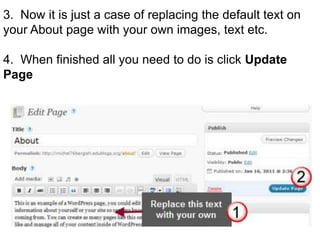
The idea is you change the default text on this About page by inserting your own information.What to Write on Your About PageYour about page is all about letting people know who are you, what’s your interests and what you write about.
Start with telling people more about yourself as people are more likely to engage with your blog if they can relate to you as an individual. Then tell them about your blog and the reasons why you blog.
Not too long and not too short – include photos that help readers relate to you as a person.

Working with Pages in your Student Blog!

  • 1.
    Working with Pagesin your Student Blog!Literacy – 6th grade
  • 2.
    In this activityyou will:Be introduced to the differences between posts and pages.
  • 3.
    Learn how towrite an About Page.
  • 4.
    Write your AboutPage or create a Page on your blog
  • 5.
    Visit the DiscussionQuestion for activity three to share what you believe makes a good About page.Step 1: Introduction to PagesBlogs are composed of two main areas where you publish your content: Posts and Pages.
  • 6.
    New bloggers frequently struggle withthe difference between the two, and hopefully the following will help clear it up.
  • 7.
    Pages on blogsare normally used for information that you want to share with your readers but don’t expect to update frequently. Not all blogging software includes the ability to add pages.Step 2: How to write an About PageAn About page is where readers find out more about you and your blog. Readers often use it to decide whether to bother subscribing to a blog.
  • 8.
    When you setup a new Edublogs blog it automatically comes set up with an ‘About page’. Readers access this page by clicking on About in the page links at the top of your theme or in the link in your sidebar.
  • 9.
    The idea isyou change the default text on this About page by inserting your own information.What to Write on Your About PageYour about page is all about letting people know who are you, what’s your interests and what you write about.
  • 10.
    Start with tellingpeople more about yourself as people are more likely to engage with your blog if they can relate to you as an individual. Then tell them about your blog and the reasons why you blog.
  • 11.
    Not too longand not too short – include photos that help readers relate to you as a person.