WordPress: an application platform? 
Tim Stephenson 
@tstephen10 
Attribution 
CC BY
Why WordPress? 
● Working with lots of startups and SMEs as I do 
I frequently encounter a need for a user-manageable 
content management platform. 
● Combining an initial development phase with 
WordPress 'core' and some carefully chosen 
plugins meets this with an acceptable balance 
of quality and price.
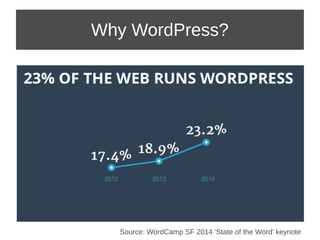
Why WordPress? 
Source: WordCamp SF 2014 'State of the Word' keynote
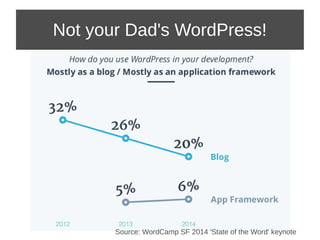
Not your Dad's WordPress! 
Source: WordCamp SF 2014 'State of the Word' keynote
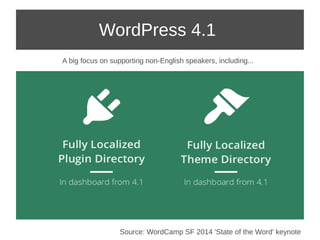
WordPress 4.1 
A big focus on supporting non-English speakers, including... 
Source: WordCamp SF 2014 'State of the Word' keynote
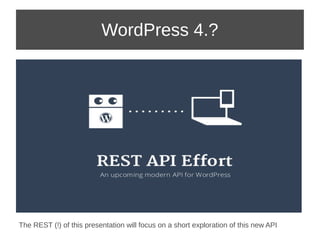
WordPress 4.? 
The REST (!) of this presentation will focus on a short exploration of this new API
The Brief 
 A simple app to record billable work including 
time, project code, description of work etc. 
 Must be mobile browser ready. 
 And the client hates WordPress so I better not 
see any of tell-tale signs of that horrible UI.
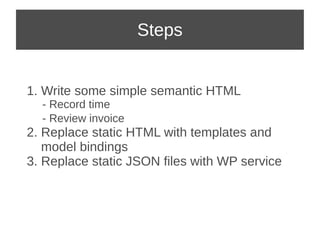
Steps 
1. Write some simple semantic HTML 
- Record time 
- Review invoice 
2. Replace static HTML with templates and 
model bindings 
3. Replace static JSON files with WP service
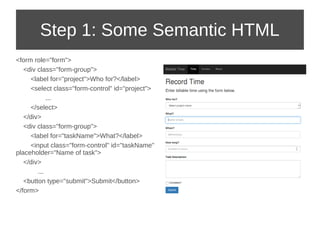
Step 1: Some Semantic HTML 
<form role="form"> 
<div class="form-group"> 
<label for="project">Who for?</label> 
<select class="form-control" id="project"> 
... 
</select> 
</div> 
<div class="form-group"> 
<label for="taskName">What?</label> 
<input class="form-control" id="taskName" 
placeholder="Name of task"> 
</div> 
... 
<button type="submit">Submit</button> 
</form>
Quick Poll: Angular JS 
● Love it! 
● Hate it! 
● “Does the job” 
● Angle what?
Step 2: Templates and Binding 
● Don't get me wrong, Angular has lots of merits 
not least providing structure to larger projects... 
● BUT... 
– It can at be excessively constraining (IMHO) 
– I thought I'd take the opportunity to look at 
Ractive.js, created by The Guardian team
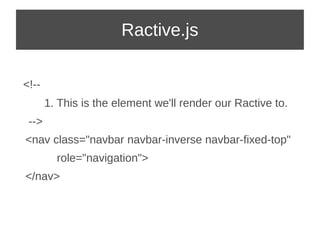
Ractive.js 
<!-- 
1. This is the element we'll render our Ractive to. 
--> 
<nav class="navbar navbar-inverse navbar-fixed-top" 
role="navigation"> 
</nav>
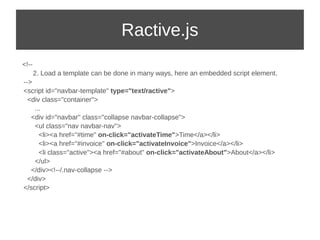
Ractive.js 
<!-- 
2. Load a template can be done in many ways, here an embedded script element. 
--> 
<script id="navbar-template" type="text/ractive"> 
<div class="container"> 
... 
<div id="navbar" class="collapse navbar-collapse"> 
<ul class="nav navbar-nav"> 
<li><a href="#time" on-click="activateTime">Time</a></li> 
<li><a href="#invoice" on-click="activateInvoice">Invoice</a></li> 
<li class="active"><a href="#about" on-click="activateAbout">About</a></li> 
</ul> 
</div><!--/.nav-collapse --> 
</div> 
</script>
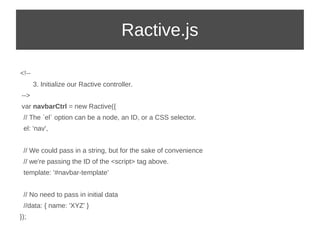
Ractive.js 
<!-- 
3. Initialize our Ractive controller. 
--> 
var navbarCtrl = new Ractive({ 
// The `el` option can be a node, an ID, or a CSS selector. 
el: 'nav', 
// We could pass in a string, but for the sake of convenience 
// we're passing the ID of the <script> tag above. 
template: '#navbar-template' 
// No need to pass in initial data 
//data: { name: 'XYZ' } 
});
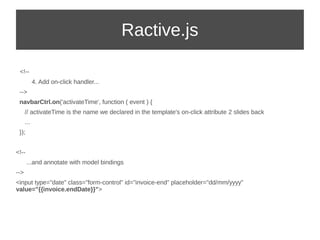
Ractive.js 
<!-- 
4. Add on-click handler... 
--> 
navbarCtrl.on('activateTime', function ( event ) { 
// activateTime is the name we declared in the template's on-click attribute 2 slides back 
... 
}); 
<!-- 
...and annotate with model bindings 
--> 
<input type="date" class="form-control" id="invoice-end" placeholder="dd/mm/yyyy" 
value="{{invoice.endDate}}">
Step 3: Create a [Time] Post 
● The API is quite comprehensive but as with 
WordPress generally, lots of things end up 
being a 'Post' 
● My Time Entry is such an example 
● Visit http://wp-api.org/ for the full list of APIs
Step 3: Create a [Time] Post 
● Create a Time Entry: POST /posts 
– PUT (for update) and DELETE exist too 
● Attach duration and other attributes: POST /posts/id/meta 
$.ajax({ 
type: 'POST', 
url: SRVR+"/wp-json/posts", 
data: JSON.stringify(time) 
}) 
.done(function( data, textStatus, jqXHR ) { 
var msg = 'Successfully created post: <a href="'+data.link+'" target="_newtab">View</a>'; 
$( ".result" ).html( msg ); 
$.ajax({ 
type: 'POST', 
url: SRVR+"/wp-json/posts/"+data.ID+"/meta", 
data: JSON.stringify({key:'duration',value:time.duration}) 
}) 
.done(function( data2 ) { 
... 
}); 
});
Conclusions 
● It is possible to completely mask the WordPress dashboard 
from users and to create modern applications that still have 
access to all the features of a WordPress 'back-end' 
● Clearly that only makes sense when you have a good reason 
to use WordPress already 
● As an app platform making separate calls to manage Posts 
and their associated meta-data could be wasteful if the main 
content is small 
● Admin functionality is not included at present (deploy plugin, 
activate theme etc.)
References 
● WordCamp SF 2014 'State of the Word': 
http://blog.wordpress.tv/2014/10/29/wordcamp-san-francisco-2014-state-of-the-word-keynote/ 
http://www.slideshare.net/photomatt/state-of-the-word-2014 
● WP-API http://wp-api.org/ 
● Ractive.js http://learn.ractivejs.org/partials/1 
● Source: http://github.com/tstephen/wp-invoices

WordPress as a Platform - talk to Bristol Open Source Meetup, 2014-12-08

  • 1.
    WordPress: an applicationplatform? Tim Stephenson @tstephen10 Attribution CC BY
  • 2.
    Why WordPress? ●Working with lots of startups and SMEs as I do I frequently encounter a need for a user-manageable content management platform. ● Combining an initial development phase with WordPress 'core' and some carefully chosen plugins meets this with an acceptable balance of quality and price.
  • 3.
    Why WordPress? Source:WordCamp SF 2014 'State of the Word' keynote
  • 4.
    Not your Dad'sWordPress! Source: WordCamp SF 2014 'State of the Word' keynote
  • 5.
    WordPress 4.1 Abig focus on supporting non-English speakers, including... Source: WordCamp SF 2014 'State of the Word' keynote
  • 6.
    WordPress 4.? TheREST (!) of this presentation will focus on a short exploration of this new API
  • 7.
    The Brief A simple app to record billable work including time, project code, description of work etc.  Must be mobile browser ready.  And the client hates WordPress so I better not see any of tell-tale signs of that horrible UI.
  • 8.
    Steps 1. Writesome simple semantic HTML - Record time - Review invoice 2. Replace static HTML with templates and model bindings 3. Replace static JSON files with WP service
  • 9.
    Step 1: SomeSemantic HTML <form role="form"> <div class="form-group"> <label for="project">Who for?</label> <select class="form-control" id="project"> ... </select> </div> <div class="form-group"> <label for="taskName">What?</label> <input class="form-control" id="taskName" placeholder="Name of task"> </div> ... <button type="submit">Submit</button> </form>
  • 10.
    Quick Poll: AngularJS ● Love it! ● Hate it! ● “Does the job” ● Angle what?
  • 11.
    Step 2: Templatesand Binding ● Don't get me wrong, Angular has lots of merits not least providing structure to larger projects... ● BUT... – It can at be excessively constraining (IMHO) – I thought I'd take the opportunity to look at Ractive.js, created by The Guardian team
  • 12.
    Ractive.js <!-- 1.This is the element we'll render our Ractive to. --> <nav class="navbar navbar-inverse navbar-fixed-top" role="navigation"> </nav>
  • 13.
    Ractive.js <!-- 2.Load a template can be done in many ways, here an embedded script element. --> <script id="navbar-template" type="text/ractive"> <div class="container"> ... <div id="navbar" class="collapse navbar-collapse"> <ul class="nav navbar-nav"> <li><a href="#time" on-click="activateTime">Time</a></li> <li><a href="#invoice" on-click="activateInvoice">Invoice</a></li> <li class="active"><a href="#about" on-click="activateAbout">About</a></li> </ul> </div><!--/.nav-collapse --> </div> </script>
  • 14.
    Ractive.js <!-- 3.Initialize our Ractive controller. --> var navbarCtrl = new Ractive({ // The `el` option can be a node, an ID, or a CSS selector. el: 'nav', // We could pass in a string, but for the sake of convenience // we're passing the ID of the <script> tag above. template: '#navbar-template' // No need to pass in initial data //data: { name: 'XYZ' } });
  • 15.
    Ractive.js <!-- 4.Add on-click handler... --> navbarCtrl.on('activateTime', function ( event ) { // activateTime is the name we declared in the template's on-click attribute 2 slides back ... }); <!-- ...and annotate with model bindings --> <input type="date" class="form-control" id="invoice-end" placeholder="dd/mm/yyyy" value="{{invoice.endDate}}">
  • 16.
    Step 3: Createa [Time] Post ● The API is quite comprehensive but as with WordPress generally, lots of things end up being a 'Post' ● My Time Entry is such an example ● Visit http://wp-api.org/ for the full list of APIs
  • 17.
    Step 3: Createa [Time] Post ● Create a Time Entry: POST /posts – PUT (for update) and DELETE exist too ● Attach duration and other attributes: POST /posts/id/meta $.ajax({ type: 'POST', url: SRVR+"/wp-json/posts", data: JSON.stringify(time) }) .done(function( data, textStatus, jqXHR ) { var msg = 'Successfully created post: <a href="'+data.link+'" target="_newtab">View</a>'; $( ".result" ).html( msg ); $.ajax({ type: 'POST', url: SRVR+"/wp-json/posts/"+data.ID+"/meta", data: JSON.stringify({key:'duration',value:time.duration}) }) .done(function( data2 ) { ... }); });
  • 18.
    Conclusions ● Itis possible to completely mask the WordPress dashboard from users and to create modern applications that still have access to all the features of a WordPress 'back-end' ● Clearly that only makes sense when you have a good reason to use WordPress already ● As an app platform making separate calls to manage Posts and their associated meta-data could be wasteful if the main content is small ● Admin functionality is not included at present (deploy plugin, activate theme etc.)
  • 19.
    References ● WordCampSF 2014 'State of the Word': http://blog.wordpress.tv/2014/10/29/wordcamp-san-francisco-2014-state-of-the-word-keynote/ http://www.slideshare.net/photomatt/state-of-the-word-2014 ● WP-API http://wp-api.org/ ● Ractive.js http://learn.ractivejs.org/partials/1 ● Source: http://github.com/tstephen/wp-invoices