W indows  P resentation  F oundation Next-Generation User Experiences.
Introduction to WPF It is a graphical subsystem for rendering user interfaces in Winforms. WPF, previously known as "Avalon", was initially released as part of .NET Framework 3.0. WPF is essentially an alternative method for developing Windows based applications.
Introduction to WPF (Continued) Designed to remove dependencies on the aging Graphics Device Interface(GDI) subsystem, WPF is built on DirectX, which provides hardware acceleration and enables modern UI features. e.g.:- Transparency, Gradients and Transforms.
Introduction to WPF (Continued) WPF provides a consistent programming model for building applications and provides a clear separation between the user interface and the business logic.
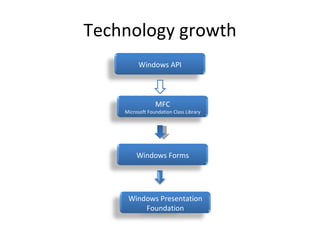
Technology growth Windows API MFC Microsoft Foundation Class Library Windows Forms Windows Presentation Foundation
Advantages of WPF Effective use of Graphics card. Highly suitable for high end /upcoming computers. Built in Animation. Supports most of the media/document formats natively. XAML(Designer and developer can work independently). Silverlight (WPF/e)
Unified Presentation GDI/Windows Forms Flash PDF COM Interop Directx WPF 3D   Documents   Animation    Video     Interactive UI controls    
Disadvantages of WPF WPF will not run on windows 2000 or lower. At the present time there are certain controls available in Windows Forms for which no WPF equivalent exists e.g. :- DataGridView and PropertyGrid
WPF and Silverlight Silverlight (formerly known as WPF/e—the "e" stands for "everywhere") is a restricted version of WPF designed to run securely in a browser while still providing a rich user interface. Because of the security restrictions, Silverlight does not provide  all  the features included in WPF. Some features are missing while others are provided in a restricted way. Currently only in beta form, Silverlight supports Firefox and Internet Explorer 7 on Windows and Firefox and Safari on the MAC.
WPF VS WinForms Development WPF has a number of advantages over Windows Forms development which include Comprehensive Integration – WPF provides a uniform platform for using video, speech, text, 2D and 3D graphics. WPF applications can take advantage of  G raphics  P rocessing  U nits on Graphics cards for smoother graphics.
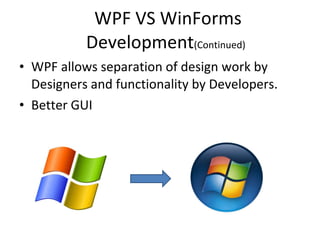
WPF VS WinForms Development (Continued)   WPF allows separation of design work by Designers and functionality by Developers. Better GUI
Window Form
The Future of WinForm Development One of the authors of a leading WPF book, has suggested that there will be no further development by Microsoft for Windows Forms beyond Version 2.0 (released in 2005).
WPF and Windows OS WPF does not explicitly require Windows Vista. WPF also will work with Windows XP Service Pack 2 and with Windows Server 2003 SP1  IT require the .NET Framework Version 3.0, a free download from Microsoft Web site. .NET Framework 3.0 Comes with Windows Vista. So no need to install.
Developer & Designer with WPF
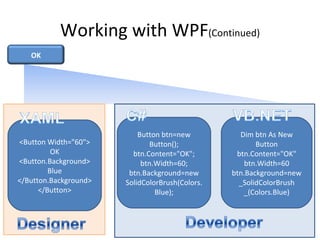
Working with WPF XAML code is principally the textual representation of some visual element – either a graphic object or a user interface object such as a button or a combo box. Easy for tools to consume and generate. It is new to Developers. Under the standard paradigm the User Interface is described in XAML and the underlying functionality is built using C# (or Visual Basic.NET).
Working with WPF (Continued) <Button Width=&quot;60&quot;> OK <Button.Background> Blue </Button.Background> </Button> Button btn=new Button(); btn.Content=&quot;OK&quot;; btn.Width=60; btn.Background=new SolidColorBrush(Colors.Blue); Dim btn As New Button btn.Content=&quot;OK&quot; btn.Width=60 btn.Background=new _SolidColorBrush _(Colors.Blue) OK
Conclusions If you have an existing Windows Forms application or are building a traditional forms-based application and are looking for a mature technology to use with mature tools and component support then Windows Forms is a good fit.  If you’re wanting to create a new experience for your users that is rich, interactive, sophisticated, or highly custom or branded,  WPF is Microsoft’s next-generation platform for your project today.
Conclusions If you’re targeting the web, Silverlight shares the same development model as WPF but is optimized for a lightweight, cross-platform runtime. Investing in either WPF or Silverlight nets you the skills, tools, and assets for both platforms.

Windows presentation foundation

  • 1.
    W indows P resentation F oundation Next-Generation User Experiences.
  • 2.
    Introduction to WPFIt is a graphical subsystem for rendering user interfaces in Winforms. WPF, previously known as &quot;Avalon&quot;, was initially released as part of .NET Framework 3.0. WPF is essentially an alternative method for developing Windows based applications.
  • 3.
    Introduction to WPF(Continued) Designed to remove dependencies on the aging Graphics Device Interface(GDI) subsystem, WPF is built on DirectX, which provides hardware acceleration and enables modern UI features. e.g.:- Transparency, Gradients and Transforms.
  • 4.
    Introduction to WPF(Continued) WPF provides a consistent programming model for building applications and provides a clear separation between the user interface and the business logic.
  • 5.
    Technology growth WindowsAPI MFC Microsoft Foundation Class Library Windows Forms Windows Presentation Foundation
  • 6.
    Advantages of WPFEffective use of Graphics card. Highly suitable for high end /upcoming computers. Built in Animation. Supports most of the media/document formats natively. XAML(Designer and developer can work independently). Silverlight (WPF/e)
  • 7.
    Unified Presentation GDI/WindowsForms Flash PDF COM Interop Directx WPF 3D   Documents   Animation    Video     Interactive UI controls    
  • 8.
    Disadvantages of WPFWPF will not run on windows 2000 or lower. At the present time there are certain controls available in Windows Forms for which no WPF equivalent exists e.g. :- DataGridView and PropertyGrid
  • 9.
    WPF and SilverlightSilverlight (formerly known as WPF/e—the &quot;e&quot; stands for &quot;everywhere&quot;) is a restricted version of WPF designed to run securely in a browser while still providing a rich user interface. Because of the security restrictions, Silverlight does not provide all the features included in WPF. Some features are missing while others are provided in a restricted way. Currently only in beta form, Silverlight supports Firefox and Internet Explorer 7 on Windows and Firefox and Safari on the MAC.
  • 10.
    WPF VS WinFormsDevelopment WPF has a number of advantages over Windows Forms development which include Comprehensive Integration – WPF provides a uniform platform for using video, speech, text, 2D and 3D graphics. WPF applications can take advantage of G raphics P rocessing U nits on Graphics cards for smoother graphics.
  • 11.
    WPF VS WinFormsDevelopment (Continued) WPF allows separation of design work by Designers and functionality by Developers. Better GUI
  • 12.
  • 13.
    The Future ofWinForm Development One of the authors of a leading WPF book, has suggested that there will be no further development by Microsoft for Windows Forms beyond Version 2.0 (released in 2005).
  • 14.
    WPF and WindowsOS WPF does not explicitly require Windows Vista. WPF also will work with Windows XP Service Pack 2 and with Windows Server 2003 SP1 IT require the .NET Framework Version 3.0, a free download from Microsoft Web site. .NET Framework 3.0 Comes with Windows Vista. So no need to install.
  • 15.
  • 16.
    Working with WPFXAML code is principally the textual representation of some visual element – either a graphic object or a user interface object such as a button or a combo box. Easy for tools to consume and generate. It is new to Developers. Under the standard paradigm the User Interface is described in XAML and the underlying functionality is built using C# (or Visual Basic.NET).
  • 17.
    Working with WPF(Continued) <Button Width=&quot;60&quot;> OK <Button.Background> Blue </Button.Background> </Button> Button btn=new Button(); btn.Content=&quot;OK&quot;; btn.Width=60; btn.Background=new SolidColorBrush(Colors.Blue); Dim btn As New Button btn.Content=&quot;OK&quot; btn.Width=60 btn.Background=new _SolidColorBrush _(Colors.Blue) OK
  • 18.
    Conclusions If youhave an existing Windows Forms application or are building a traditional forms-based application and are looking for a mature technology to use with mature tools and component support then Windows Forms is a good fit. If you’re wanting to create a new experience for your users that is rich, interactive, sophisticated, or highly custom or branded, WPF is Microsoft’s next-generation platform for your project today.
  • 19.
    Conclusions If you’retargeting the web, Silverlight shares the same development model as WPF but is optimized for a lightweight, cross-platform runtime. Investing in either WPF or Silverlight nets you the skills, tools, and assets for both platforms.