Windows User-Mode
    Debugging
    Sisimon E S
Agenda
•   Windows concepts
•   Stack Frames
•   WinDBG setup
•   Analyze a simple crash
•   WinDBG commands
•   Analyze an IMA crash from customer
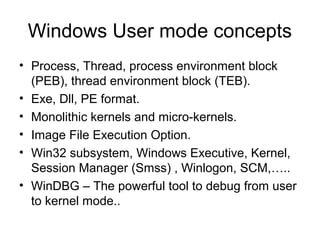
Windows User mode concepts
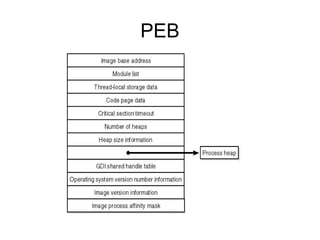
• Process, Thread, process environment block
  (PEB), thread environment block (TEB).
• Exe, Dll, PE format.
• Monolithic kernels and micro-kernels.
• Image File Execution Option.
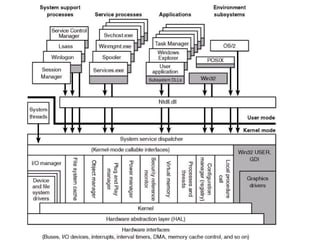
• Win32 subsystem, Windows Executive, Kernel,
  Session Manager (Smss) , Winlogon, SCM,…..
• WinDBG – The powerful tool to debug from user
  to kernel mode..
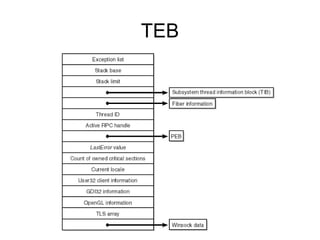
TEB
PEB
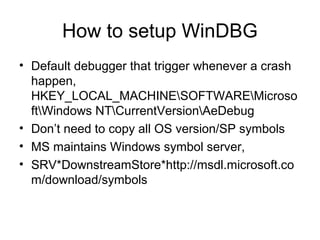
How to setup WinDBG
• Default debugger that trigger whenever a crash
  happen,
  HKEY_LOCAL_MACHINESOFTWAREMicroso
  ftWindows NTCurrentVersionAeDebug
• Don’t need to copy all OS version/SP symbols
• MS maintains Windows symbol server,
• SRV*DownstreamStore*http://msdl.microsoft.co
  m/download/symbols
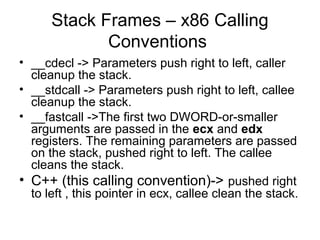
Stack Frames – x86 Calling
             Conventions
• __cdecl -> Parameters push right to left, caller
  cleanup the stack.
• __stdcall -> Parameters push right to left, callee
  cleanup the stack.
• __fastcall ->The first two DWORD-or-smaller
  arguments are passed in the ecx and edx
  registers. The remaining parameters are passed
  on the stack, pushed right to left. The callee
  cleans the stack.
• C++ (this calling convention)-> pushed right
  to left , this pointer in ecx, callee clean the stack.
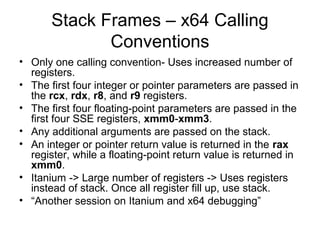
Stack Frames – x64 Calling
              Conventions
• Only one calling convention- Uses increased number of
  registers.
• The first four integer or pointer parameters are passed in
  the rcx, rdx, r8, and r9 registers.
• The first four floating-point parameters are passed in the
  first four SSE registers, xmm0-xmm3.
• Any additional arguments are passed on the stack.
• An integer or pointer return value is returned in the rax
  register, while a floating-point return value is returned in
  xmm0.
• Itanium -> Large number of registers -> Uses registers
  instead of stack. Once all register fill up, use stack.
• “Another session on Itanium and x64 debugging”
Stack Frame continued..
• The purpose EBP – Frame Pointer.
• Function parameter, local variables in
  stack and, it’s the same thread stack (one
  stack per thread).
• EBP + offset points to function parameter
• EBP – offset points to local variables.
• Demo – Start the crash analyze and see
  how stack frame looks like.
Let’s analyze a simple crash.
•   0:000> u Simple_App_Crash3!CSimpleAppCrash3Dlg::OnBnClickedButton1
•   Simple_App_Crash3!CSimpleAppCrash3Dlg::OnBnClickedButton1 [d:sisimonworking
    areapresentationswindbgsimple app crash3simple app crash3simple app crash3dlg.cpp
    @ 154]:
•   00401580 55            push ebp - First Push EBP to stack
•   00401581 8bec           mov ebp,esp  Set new ebp as current esp
•   00401583 83ec14          sub esp,14h  make enough room for local variable
•   00401586 894dec          mov dword ptr [ebp-14h],ecx <- Copy the this pointer to stack
    first element for the current stack frame
•   00401589 c745f400000000 mov dword ptr [ebp-0Ch],0  one of the local var to 0
•   00401590 c745fc0a000000 mov dword ptr [ebp-4],0Ah  Another local var to 10
•   00401597 c745f80f000000 mov dword ptr [ebp-8],0Fh  Another local var to 15
•   0040159e cc           int 3  Our hard coded break point
•  0:000> u
•  Simple_App_Crash3!CSimpleAppCrash3Dlg::OnBnClickedButton1+0x1f
   [d:sisimonworking areapresentationswindbgsimple app crash3simple app
   crash3simple app crash3dlg.cpp @ 160]:
• 0040159f 8b45f4         mov eax,dword ptr [ebp-0Ch]
• 004015a2 50            push eax  push first arg to stack
• 004015a3 8b4df8          mov ecx,dword ptr [ebp-8]
• 004015a6 51            push ecx  push second arg to stack
• 004015a7 8b55fc          mov edx,dword ptr [ebp-4]
• 004015aa 52            push edx push third arg to stack
004015ab 8b4dec        mov ecx,dword ptr [ebp-14h]  set the this pointer to ecx
• 004015ae e82d000000         call Simple_App_Crash3!CSimpleAppCrash3Dlg::Add
   (004015e0)  call Add( unseen this in ecx, arg1, arg2, arg3)
•   0:000> u Simple_App_Crash3!CSimpleAppCrash3Dlg::Add
•   Simple_App_Crash3!CSimpleAppCrash3Dlg::Add [d:sisimonworking
    areapresentationswindbgsimple app crash3simple app crash3simple app crash3dlg.cpp
    @ 166]:
•   004015e0 55          push ebp  push new ebp
•   004015e1 8bec         mov ebp,esp  set new ebp and current esp
•   004015e3 51          push ecx push this to stack
•   004015e4 894dfc        mov dword ptr [ebp-4],ecx
•   004015e7 8b45fc        mov eax,dword ptr [ebp-4]
•   004015ea c7407464000000 mov dword ptr [eax+74h],64h  set
•    this->variable=100
•   004015f1 6838344000      push offset Simple_App_Crash3!
    CSimpleAppCrash3App::`vftable'+0xd8 (00403438)
•   004015f6 ff15a4324000 call dword ptr [Simple_App_Crash3!_imp__printf (004032a4)]
•   0:000> r
•   eax=00000000 ebx=00000111 ecx=0013fe74 edx=00000000 esi=00403444 edi=00000001
•   eip=0040159e esp=0013f860 ebp=0013f874 iopl=0         nv up ei pl nz na pe nc
•   cs=001b ss=0023 ds=0023 es=0023 fs=003b gs=0000                efl=00000206
•   Simple_App_Crash3!CSimpleAppCrash3Dlg::OnBnClickedButton1+0x1e:
•   0040159e cc          int 3
•   0:000> dds 0013f860
•   0013f860 0013fe74
•   0013f864 7e41b788 USER32!GetParent+0x59
•   0013f868 00000000
•   0013f86c 0000000f
•   0013f870 0000000a
•   0013f874 0013f884  push current ebp to stack, set new ebp as esp Stack Frame - 1
•   0013f878 7c1746cc MFC71!_AfxDispatchCmdMsg+0x3d [f:vs70builds3077vcmfcatlshipatlmfcsrcmfccmdtarg.cpp @ 89]
•   0013f87c 00403444 Simple_App_Crash3!CSimpleAppCrash3Dlg::messageMap
•   0013f880 0013fe74
•   0013f884 0013f8b4  push current ebp to stack, set new ebp as esp Stack Frame - 2
•   0013f888 7c171915 MFC71!CCmdTarget::OnCmdMsg+0x10a [f:vs70builds3077vcmfcatlshipatlmfcsrcmfccmdtarg.cpp @ 396]
•   0013f88c 0013fe74
•   0013f890 000003e8
•   0013f894 00000000
•   0013f898 00401580 Simple_App_Crash3!CSimpleAppCrash3Dlg::OnBnClickedButton1 [d:sisimonworking
    areapresentationswindbgsimple app crash3simple app crash3simple app crash3dlg.cpp @ 154]
•   0013f89c 00000000
•   0013f8a0 00000035
•   0013f8a4 00000000
•   0013f8a8 0013fe74
•   0013f8ac 000003e8
•   0013f8b0 00000000
•   0013f8b4 0013f8d8  push current ebp to stack, set new ebp as esp, Stack Frame - 3
•   0013f8b8 7c14db36 MFC71!CDialog::OnCmdMsg+0x1b [f:vs70builds3077vcmfcatlshipatlmfcsrcmfcdlgcore.cpp @ 88]
•   0013f8bc 000003e8
•   0013f8c0 00000000
•   0013f8c4 00000000
•   0013f8c8 00000000
•   0013f8cc 000003e8
•   0013f8d0 0013fe74
•   0013f8d4 00000000
•   0013f8d8 0013f928
•   0013f8dc 7c175cd8 MFC71!CWnd::OnCommand+0x51 [f:vs70builds3077vcmfcatlshipatlmfcsrcmfcwincore.cpp @ 2549]
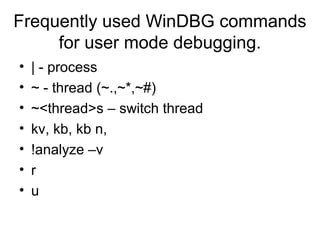
Frequently used WinDBG commands
     for user mode debugging.
•   | - process
•   ~ - thread (~.,~*,~#)
•   ~<thread>s – switch thread
•   kv, kb, kb n,
•   !analyze –v
•   r
•   u
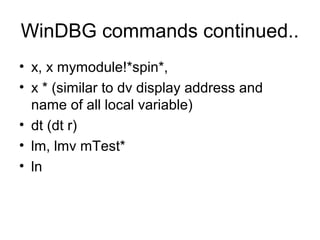
WinDBG commands continued..
• x, x mymodule!*spin*,
• x * (similar to dv display address and
  name of all local variable)
• dt (dt r)
• lm, lmv mTest*
• ln
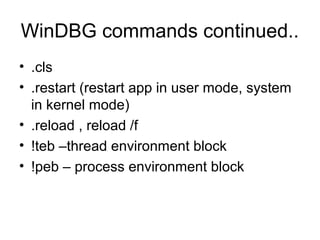
WinDBG commands continued..
• .cls
• .restart (restart app in user mode, system
  in kernel mode)
• .reload , reload /f
• !teb –thread environment block
• !peb – process environment block
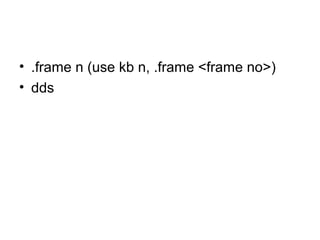
• .frame n (use kb n, .frame <frame no>)
• dds
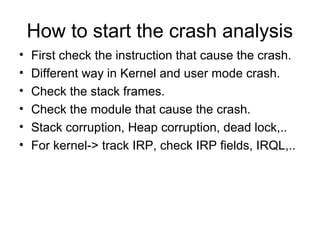
How to start the crash analysis
•   First check the instruction that cause the crash.
•   Different way in Kernel and user mode crash.
•   Check the stack frames.
•   Check the module that cause the crash.
•   Stack corruption, Heap corruption, dead lock,..
•   For kernel-> track IRP, check IRP fields, IRQL,..
• Crash dump analysis example - IMA
  service is crashing, let us analyze the
  dump.

Windows debugging sisimon

  • 1.
    Windows User-Mode Debugging Sisimon E S
  • 2.
    Agenda • Windows concepts • Stack Frames • WinDBG setup • Analyze a simple crash • WinDBG commands • Analyze an IMA crash from customer
  • 3.
    Windows User modeconcepts • Process, Thread, process environment block (PEB), thread environment block (TEB). • Exe, Dll, PE format. • Monolithic kernels and micro-kernels. • Image File Execution Option. • Win32 subsystem, Windows Executive, Kernel, Session Manager (Smss) , Winlogon, SCM,….. • WinDBG – The powerful tool to debug from user to kernel mode..
  • 5.
  • 6.
  • 7.
    How to setupWinDBG • Default debugger that trigger whenever a crash happen, HKEY_LOCAL_MACHINESOFTWAREMicroso ftWindows NTCurrentVersionAeDebug • Don’t need to copy all OS version/SP symbols • MS maintains Windows symbol server, • SRV*DownstreamStore*http://msdl.microsoft.co m/download/symbols
  • 8.
    Stack Frames –x86 Calling Conventions • __cdecl -> Parameters push right to left, caller cleanup the stack. • __stdcall -> Parameters push right to left, callee cleanup the stack. • __fastcall ->The first two DWORD-or-smaller arguments are passed in the ecx and edx registers. The remaining parameters are passed on the stack, pushed right to left. The callee cleans the stack. • C++ (this calling convention)-> pushed right to left , this pointer in ecx, callee clean the stack.
  • 9.
    Stack Frames –x64 Calling Conventions • Only one calling convention- Uses increased number of registers. • The first four integer or pointer parameters are passed in the rcx, rdx, r8, and r9 registers. • The first four floating-point parameters are passed in the first four SSE registers, xmm0-xmm3. • Any additional arguments are passed on the stack. • An integer or pointer return value is returned in the rax register, while a floating-point return value is returned in xmm0. • Itanium -> Large number of registers -> Uses registers instead of stack. Once all register fill up, use stack. • “Another session on Itanium and x64 debugging”
  • 10.
    Stack Frame continued.. •The purpose EBP – Frame Pointer. • Function parameter, local variables in stack and, it’s the same thread stack (one stack per thread). • EBP + offset points to function parameter • EBP – offset points to local variables. • Demo – Start the crash analyze and see how stack frame looks like.
  • 11.
    Let’s analyze asimple crash. • 0:000> u Simple_App_Crash3!CSimpleAppCrash3Dlg::OnBnClickedButton1 • Simple_App_Crash3!CSimpleAppCrash3Dlg::OnBnClickedButton1 [d:sisimonworking areapresentationswindbgsimple app crash3simple app crash3simple app crash3dlg.cpp @ 154]: • 00401580 55 push ebp - First Push EBP to stack • 00401581 8bec mov ebp,esp  Set new ebp as current esp • 00401583 83ec14 sub esp,14h  make enough room for local variable • 00401586 894dec mov dword ptr [ebp-14h],ecx <- Copy the this pointer to stack first element for the current stack frame • 00401589 c745f400000000 mov dword ptr [ebp-0Ch],0  one of the local var to 0 • 00401590 c745fc0a000000 mov dword ptr [ebp-4],0Ah  Another local var to 10 • 00401597 c745f80f000000 mov dword ptr [ebp-8],0Fh  Another local var to 15 • 0040159e cc int 3  Our hard coded break point
  • 12.
    • 0:000>u • Simple_App_Crash3!CSimpleAppCrash3Dlg::OnBnClickedButton1+0x1f [d:sisimonworking areapresentationswindbgsimple app crash3simple app crash3simple app crash3dlg.cpp @ 160]: • 0040159f 8b45f4 mov eax,dword ptr [ebp-0Ch] • 004015a2 50 push eax  push first arg to stack • 004015a3 8b4df8 mov ecx,dword ptr [ebp-8] • 004015a6 51 push ecx  push second arg to stack • 004015a7 8b55fc mov edx,dword ptr [ebp-4] • 004015aa 52 push edx push third arg to stack 004015ab 8b4dec mov ecx,dword ptr [ebp-14h]  set the this pointer to ecx • 004015ae e82d000000 call Simple_App_Crash3!CSimpleAppCrash3Dlg::Add (004015e0)  call Add( unseen this in ecx, arg1, arg2, arg3)
  • 13.
    0:000> u Simple_App_Crash3!CSimpleAppCrash3Dlg::Add • Simple_App_Crash3!CSimpleAppCrash3Dlg::Add [d:sisimonworking areapresentationswindbgsimple app crash3simple app crash3simple app crash3dlg.cpp @ 166]: • 004015e0 55 push ebp  push new ebp • 004015e1 8bec mov ebp,esp  set new ebp and current esp • 004015e3 51 push ecx push this to stack • 004015e4 894dfc mov dword ptr [ebp-4],ecx • 004015e7 8b45fc mov eax,dword ptr [ebp-4] • 004015ea c7407464000000 mov dword ptr [eax+74h],64h  set • this->variable=100 • 004015f1 6838344000 push offset Simple_App_Crash3! CSimpleAppCrash3App::`vftable'+0xd8 (00403438) • 004015f6 ff15a4324000 call dword ptr [Simple_App_Crash3!_imp__printf (004032a4)]
  • 14.
    0:000> r • eax=00000000 ebx=00000111 ecx=0013fe74 edx=00000000 esi=00403444 edi=00000001 • eip=0040159e esp=0013f860 ebp=0013f874 iopl=0 nv up ei pl nz na pe nc • cs=001b ss=0023 ds=0023 es=0023 fs=003b gs=0000 efl=00000206 • Simple_App_Crash3!CSimpleAppCrash3Dlg::OnBnClickedButton1+0x1e: • 0040159e cc int 3 • 0:000> dds 0013f860 • 0013f860 0013fe74 • 0013f864 7e41b788 USER32!GetParent+0x59 • 0013f868 00000000 • 0013f86c 0000000f • 0013f870 0000000a • 0013f874 0013f884  push current ebp to stack, set new ebp as esp Stack Frame - 1 • 0013f878 7c1746cc MFC71!_AfxDispatchCmdMsg+0x3d [f:vs70builds3077vcmfcatlshipatlmfcsrcmfccmdtarg.cpp @ 89] • 0013f87c 00403444 Simple_App_Crash3!CSimpleAppCrash3Dlg::messageMap • 0013f880 0013fe74 • 0013f884 0013f8b4  push current ebp to stack, set new ebp as esp Stack Frame - 2 • 0013f888 7c171915 MFC71!CCmdTarget::OnCmdMsg+0x10a [f:vs70builds3077vcmfcatlshipatlmfcsrcmfccmdtarg.cpp @ 396] • 0013f88c 0013fe74 • 0013f890 000003e8 • 0013f894 00000000 • 0013f898 00401580 Simple_App_Crash3!CSimpleAppCrash3Dlg::OnBnClickedButton1 [d:sisimonworking areapresentationswindbgsimple app crash3simple app crash3simple app crash3dlg.cpp @ 154] • 0013f89c 00000000 • 0013f8a0 00000035 • 0013f8a4 00000000 • 0013f8a8 0013fe74 • 0013f8ac 000003e8 • 0013f8b0 00000000 • 0013f8b4 0013f8d8  push current ebp to stack, set new ebp as esp, Stack Frame - 3 • 0013f8b8 7c14db36 MFC71!CDialog::OnCmdMsg+0x1b [f:vs70builds3077vcmfcatlshipatlmfcsrcmfcdlgcore.cpp @ 88] • 0013f8bc 000003e8 • 0013f8c0 00000000 • 0013f8c4 00000000 • 0013f8c8 00000000 • 0013f8cc 000003e8 • 0013f8d0 0013fe74 • 0013f8d4 00000000 • 0013f8d8 0013f928 • 0013f8dc 7c175cd8 MFC71!CWnd::OnCommand+0x51 [f:vs70builds3077vcmfcatlshipatlmfcsrcmfcwincore.cpp @ 2549]
  • 15.
    Frequently used WinDBGcommands for user mode debugging. • | - process • ~ - thread (~.,~*,~#) • ~<thread>s – switch thread • kv, kb, kb n, • !analyze –v • r • u
  • 16.
    WinDBG commands continued.. •x, x mymodule!*spin*, • x * (similar to dv display address and name of all local variable) • dt (dt r) • lm, lmv mTest* • ln
  • 17.
    WinDBG commands continued.. •.cls • .restart (restart app in user mode, system in kernel mode) • .reload , reload /f • !teb –thread environment block • !peb – process environment block
  • 18.
    • .frame n(use kb n, .frame <frame no>) • dds
  • 19.
    How to startthe crash analysis • First check the instruction that cause the crash. • Different way in Kernel and user mode crash. • Check the stack frames. • Check the module that cause the crash. • Stack corruption, Heap corruption, dead lock,.. • For kernel-> track IRP, check IRP fields, IRQL,..
  • 20.
    • Crash dumpanalysis example - IMA service is crashing, let us analyze the dump.