Win32 App에서 UWP API
호출하기
유영천
Microsoft Visual C++ MVP
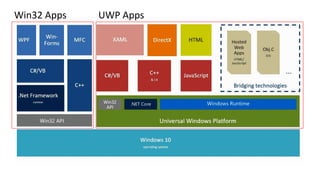
UWP AppsWin32 Apps
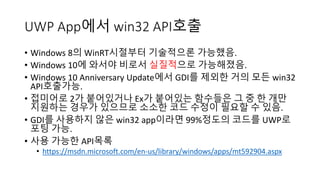
UWP App에서 win32 API호출
• Windows 8의 WinRT시절부터 기술적으론 가능했음.
• Windows 10에 와서야 비로서 실질적으로 가능해졌음.
• Windows 10 Anniversary Update에서 GDI를 제외한 거의 모든 win32
API호출가능.
• 접미어로 2가 붙어있거나 Ex가 붙어있는 함수들은 그 중 한 개만
지원하는 경우가 있으므로 소소한 코드 수정이 필요할 수 있음.
• GDI를 사용하지 않은 win32 app이라면 99%정도의 코드를 UWP로
포팅 가능.
• 사용 가능한 API목록
• https://msdn.microsoft.com/en-us/library/windows/apps/mt592904.aspx
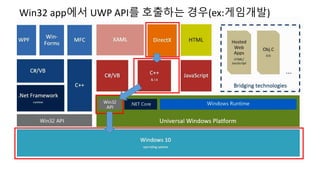
Win32 app에서 UWP API를 호출하는 경우(ex:게임개발)
Win 32 App에서 UWP API호출
• Windows::Web::Http , Windows::Security::Cryptography 등 일부
Windows Runtime API사용 가능
• Windows 8부터 가능.
• Desktop App을 작성할 때 현대적인 언어의 기능들을 사용할 수
있어서 상당히 편리하다.
• C++/CX, Reference Counting을 사용. GC를 사용하지 않음.
C++/CLI와는 다르다.
• 사용 가능한 API목록
• https://msdn.microsoft.com/ko-
kr/library/windows/desktop/dn554295(v=vs.85).aspx
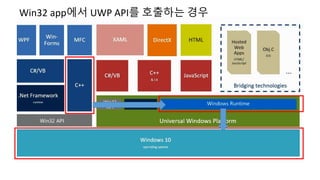
Win32 app에서 UWP API를 호출하는 경우
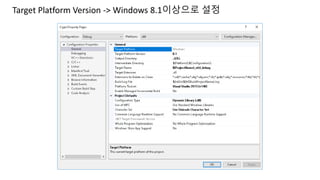
Target Platform Version -> Windows 8.1이상으로 설정
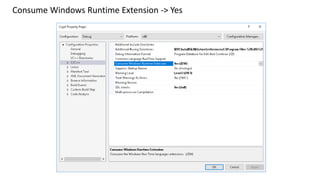
Consume Windows Runtime Extension -> Yes
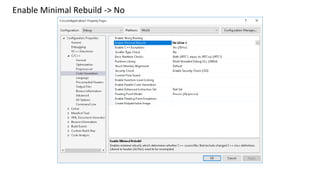
Enable Minimal Rebuild -> No
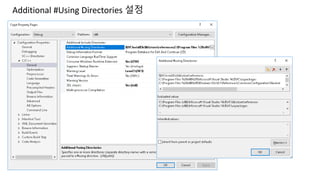
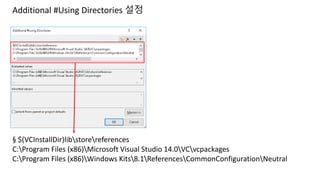
Additional #Using Directories 설정
§ $(VCInstallDir)libstorereferences
C:Program Files (x86)Microsoft Visual Studio 14.0VCvcpackages
C:Program Files (x86)Windows Kits8.1ReferencesCommonConfigurationNeutral
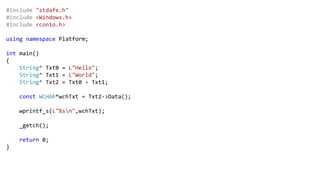
#include "stdafx.h"
#include <Windows.h>
#include <conio.h>
using namespace Platform;
int main()
{
String^ Txt0 = L"Hello";
String^ Txt1 = L"World";
String^ Txt2 = Txt0 + Txt1;
const WCHAR*wchTxt = Txt2->Data();
wprintf_s(L"%sn",wchTxt);
_getch();
return 0;
}
적용 사례
• UWP에서 win32 api를 호출
• IOCP로 작성된 네트워크 라이브러리 코드를 UWP, win32 App에서
공통적으로 사용.
• DirectX로 작성된 게임엔진을 UWP,win32공통으로 사용.
• Win32 App에서 UWP API를 사용
• Win32기반 게임서버에서 동일한 암혹/복호 코드를 작성하기 위해
Windows::Security::Cryptography 를 사용
• Windows::Web::Http 를 사용해서 WinINet을 대체.

win32 app에서 UWP API호출하기

  • 1.
    Win32 App에서 UWPAPI 호출하기 유영천 Microsoft Visual C++ MVP
  • 2.
  • 3.
    UWP App에서 win32API호출 • Windows 8의 WinRT시절부터 기술적으론 가능했음. • Windows 10에 와서야 비로서 실질적으로 가능해졌음. • Windows 10 Anniversary Update에서 GDI를 제외한 거의 모든 win32 API호출가능. • 접미어로 2가 붙어있거나 Ex가 붙어있는 함수들은 그 중 한 개만 지원하는 경우가 있으므로 소소한 코드 수정이 필요할 수 있음. • GDI를 사용하지 않은 win32 app이라면 99%정도의 코드를 UWP로 포팅 가능. • 사용 가능한 API목록 • https://msdn.microsoft.com/en-us/library/windows/apps/mt592904.aspx
  • 4.
    Win32 app에서 UWPAPI를 호출하는 경우(ex:게임개발)
  • 5.
    Win 32 App에서UWP API호출 • Windows::Web::Http , Windows::Security::Cryptography 등 일부 Windows Runtime API사용 가능 • Windows 8부터 가능. • Desktop App을 작성할 때 현대적인 언어의 기능들을 사용할 수 있어서 상당히 편리하다. • C++/CX, Reference Counting을 사용. GC를 사용하지 않음. C++/CLI와는 다르다. • 사용 가능한 API목록 • https://msdn.microsoft.com/ko- kr/library/windows/desktop/dn554295(v=vs.85).aspx
  • 6.
    Win32 app에서 UWPAPI를 호출하는 경우
  • 7.
    Target Platform Version-> Windows 8.1이상으로 설정
  • 8.
    Consume Windows RuntimeExtension -> Yes
  • 9.
  • 10.
  • 11.
    Additional #Using Directories설정 § $(VCInstallDir)libstorereferences C:Program Files (x86)Microsoft Visual Studio 14.0VCvcpackages C:Program Files (x86)Windows Kits8.1ReferencesCommonConfigurationNeutral
  • 12.
    #include "stdafx.h" #include <Windows.h> #include<conio.h> using namespace Platform; int main() { String^ Txt0 = L"Hello"; String^ Txt1 = L"World"; String^ Txt2 = Txt0 + Txt1; const WCHAR*wchTxt = Txt2->Data(); wprintf_s(L"%sn",wchTxt); _getch(); return 0; }
  • 13.
    적용 사례 • UWP에서win32 api를 호출 • IOCP로 작성된 네트워크 라이브러리 코드를 UWP, win32 App에서 공통적으로 사용. • DirectX로 작성된 게임엔진을 UWP,win32공통으로 사용. • Win32 App에서 UWP API를 사용 • Win32기반 게임서버에서 동일한 암혹/복호 코드를 작성하기 위해 Windows::Security::Cryptography 를 사용 • Windows::Web::Http 를 사용해서 WinINet을 대체.