WHAT IS ANOBJECT
Objects are key to understanding object-oriented technology. Look around right now and you will find many
examples of real-world objects: your dog, your desk, your television set, your bicycle etc.
An Objects are real world entities. Anything you can describe in this world is an object.
2.
Object: Object isan instance of class, object has state and behaviours.
An Object has three characteristics:
State
Behaviour
Identity
WHAT IS AN OBJECT
WHAT IS STATEOF THE OBJECT?
What is state of the Object?
The data present inside object of a class at that point of time is known as state of the
object.
What is behavior of the object?
The functionalities associated with the object => Behaviour of the object.
The state of the object changes from time-to-time depending up on the functionalities
that are executed on that object but whereas behaviour of the object would not change
BIRD CLASS ISTHE BLUEPRINT FROM WHICH INDIVIDUAL BIRD OBJECTS CAN BE CREATED.
Bird
Class
Name
color
canSwim
avgLifeTime
weight
Fly
walk
Characteristics
Behavior
Name:sparrow
Color:brown
canSwim:No
avgLifeTime:3Y
Weight:0.34
State
fly() :30k/h
walk():1K/h
Behavior
State
Name:penguin
Color:white & black
canSwim:Yes
avgLifeTime:20Y
Weight:15k.g
Behavior
fly() :can’t fly
walk():3 to 4 K/h
Object
9.
WHAT IS CLASS?
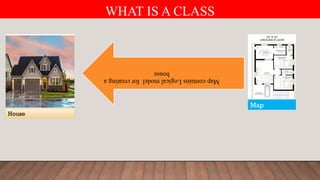
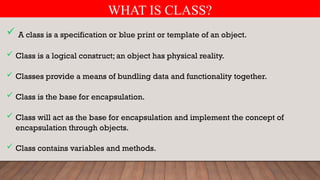
A class is a specification or blue print or template of an object.
Class is a logical construct; an object has physical reality.
Classes provide a means of bundling data and functionality together.
Class is the base for encapsulation.
Class will act as the base for encapsulation and implement the concept of
encapsulation through objects.
Class contains variables and methods.
10.
HOW TO DEFINEA CLASS IN PYTHON
We can write a class to represent properties (attributes) and actions (behaviour)
of object.
Properties can be represented by variables.
Actions can be represented by Methods.
We can define a class by using class keyword.
class <class-name>:
Properties
Behaviour
11.
HOW TO CREATEAN OBJECT IN PYTHON
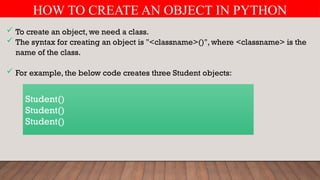
To create an object, we need a class.
The syntax for creating an object is "<classname>()", where <classname> is the
name of the class.
For example, the below code creates three Student objects:
Student()
Student()
Student()
12.
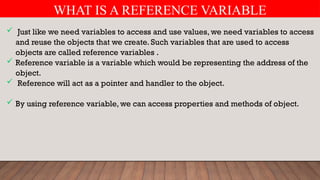
WHAT IS AREFERENCE VARIABLE
Just like we need variables to access and use values, we need variables to access
and reuse the objects that we create. Such variables that are used to access
objects are called reference variables .
Reference variable is a variable which would be representing the address of the
object.
Reference will act as a pointer and handler to the object.
By using reference variable, we can access properties and methods of object.
13.
WHAT IS AREFERENCE VARIABLE
Example: -
Suppose there is a class named Person, then see how to create its object.
p = Person ()
14.
WHAT IS AREFERENCE VARIABLE
Example: -
Suppose there is a class named Customer, then see how to create its object.
c=Customer ()
15.
HOW WE CANREGISTER SERVICE WITH ANGULAR INJECTOR
ProductList ProductDetails
ProductService Injector
16.
WHAT IS STATEOF THE OBJECT?
ProductList ProductDetails
AppModule
AppComponent
17.
REGISTERING SERVICE INPRODUTLISTCOMPONENT
Child-1
ProductDetailsComponent
AppModule
AppComponent
ProductListComponent
Child-2
Register
Service
18.
REGISTERING SERVICE INAPPCOMPONENT
Child-1
ProductDetailsComponent
AppModule
AppComponent
ProductListComponent
Child-2
Register
Service
19.
REGISTERING SERVICE INAPPMODULE
Child-1
ProductDetailsComponent
AppModule
AppComponent
ProductListComponent
Child-2
Register
Service
WHAT IS COMPONENT?
import{ Component } from '@angular/core';
@Component({
selector: 'app-root',
templateUrl: './app.component.html’,
styleUrls: ['./app.component.css']
})
export class AppComponent {
title = ‘Angular';
}
templateUrl points to an HTML file that
represents the view for this component
styleUrls points to an CSS file that
represents the style for this component
This is Component Class Which Contains
the code required for template.
23.
WHAT IS COMPONENT?
import{ Component } from '@angular/core';
@Component({
selector: 'app-root',
templateUrl: './app.component.html’,
styleUrls: ['./app.component.css']
})
export class AppComponent {
title = ‘Angular';
}
templateUrl points to an HTML file that
represents the view for this component
styleUrls points to an CSS file that
represents the style for this component
This is Component Class Which Contains
the code required for template.
24.
WHAT IS ANGULARINTERPOLATION?
Welcome:{{titlle}}
import { Component } from '@angular/core';
@Component({
selector: 'app-root',
templateUrl: './app.component.html',
styleUrls: ['./app.component.css']
})
export class AppComponent {
title = 'Angular-Interpolation-Demo';
}
app.component.ts app.component.html
Data-binding -
From Component to View
Template
we place the component
property name in the view
template, enclosed in double
curly braces:
{{propertyName}}.
This is interpolation in
angular so here evaluate
title property and show
value of title property
25.
TOWER OF HANOIPROBLEM-SOLUTION FOR 2-DISC
A
[From]
B
[Using]
c
[To]
1
2
26.
TOWER OF HANOIPROBLEM-SOLUTION FOR 2-DISC
A
[From]
B
[Using]
c
[To]
1 2
Move a disc from TowerA to TowerB using TowerC
27.
TOWER OF HANOIPROBLEM-SOLUTION FOR 2-DISC
A
[From]
B
[Using]
c
[To]
1
2
Move a disc from TowerA to TowerC
28.
TOWER OF HANOIPROBLEM-SOLUTION FOR 2-DISC
A
[From]
B
[Using]
c
[To]
1
2
Move a disc from TowerB to TowerC using TowerA
29.
TOWER OF HANOIPROBLEM-SOLUTION FOR 3-DISC
A
[From]
B
[Using]
c
[To]
1
2
3
30.
TOWER OF HANOIPROBLEM-SOLUTION FOR 2-DISC
A
[From]
B
[Using]
c
[To]
1 2
3
31.
TOWER OF HANOIPROBLEM-SOLUTION FOR 2-DISC
A
[From]
B
[Using]
c
[To]
1
2
3
32.
TOWER OF HANOIPROBLEM-SOLUTION FOR 2-DISC
A
[From]
B
[Using]
c
[To]
1
2
3
33.
TOWER OF HANOIPROBLEM-SOLUTION FOR 3-DISC
1
[From]
2
[Using]
3
[To]
1
2
3
Tower1 having 3 disc
34.
TOWER OF HANOIPROBLEM-SOLUTION FOR 3-DISC
1
[From]
2
[Using]
3
[To]
1
2
3
Step- 1 => [1-3]
Move disc from Tower1 to Tower3
35.
TOWER OF HANOIPROBLEM-SOLUTION FOR 3-DISC
1
[From]
2
[Using]
3
[To]
1 2 3
Step- 2 => [1-2]
Move disc from Tower1 to Tower2
36.
TOWER OF HANOIPROBLEM-SOLUTION FOR 3-DISC
1
[From]
2
[Using]
3
[To]
1 2
3
Step- 3 => [3-2]
Move disc from Tower3 to Tower2
37.
TOWER OF HANOIPROBLEM-SOLUTION FOR 2-DISC
1
[From]
2
[Using]
3
[To]
1
2
3
Step- 4 => [1-3]
Move disc from Tower3 to Tower2
38.
TOWER OF HANOIPROBLEM-SOLUTION FOR 3-DISC
1
[From]
2
[Using]
3
[To]
1
2
3
Step- 5 => [2-1]
Move disc from Tower2 to Tower1
39.
TOWER OF HANOIPROBLEM-SOLUTION FOR 3-DISC
1
[From]
2
[Using]
3
[To]
1
2
3
Step- 6 => [2-3]
Move disc from Tower2 to Tower3
40.
TOWER OF HANOIPROBLEM-SOLUTION FOR 3-DISC
1
[From]
2
[Using]
3
[To]
1
2
3
Step- 7 => [1-3]
Move disc from Tower1 to Tower3
41.
TOWER OF HANOIPROBLEM-SOLUTION FOR 3-DISC
Select ref-var-name from Entity-Class-Name ref-var-name
42.
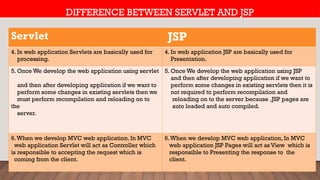
DIFFERENCE BETWEEN SERVLETAND JSP
Servlet JSP
1. If we want to develop web application by using
Servlet Technology then We need to know the
good Knowledge of java.
1. If we want to develop web application by using JSP
Technology then We don't need to know the good
Knowledge of java.
2. Servlet =JAVA+HTML
If we develop Web application using Servlet then we
need to embedded HTML code into JAVA Code
2. JSP=HTML+JAVA
If we develop Web application using JSP then we need
to embedded JAVA code into HTML Code
3.When we develop web application using
servlet then servlets are good at the time of
getting requests and processing that requests.
3.When we develop web application using servlet
then JSP are good when we submitting dynamic
response to the client with very good look and feel.
43.
Servlet JSP
4. Inweb application Servlets are basically used for
processing.
4. In web application JSP are basically used for
Presentation.
5. Once We develop the web application using servlet
and then after developing application if we want to
perform some changes in existing servlets then we
must perform recompilation and reloading on to
the
server.
5. Once We develop the web application using JSP
and then after developing application if we want to
perform some changes in existing servlets then it is
not required to perform recompilation and
reloading on to the server because ,JSP pages are
auto loaded and auto compiled.
6.When we develop MVC web application, In MVC
web application Servlet will act as Controller which
is responsible to accepting the request which is
coming from the client.
6.When we develop MVC web application, In MVC
web application JSP Pages will act as View which is
responsible to Presenting the response to the
client.
DIFFERENCE BETWEEN SERVLET AND JSP
TOWER OF HANOIPROBLEM-SOLUTION FOR 3-DISC
<web-app>
<servlet>
<servlet-name>welcomeServlet</servlet-name>
<servlet-class>com.gst.servlet.WelcomeServlet</servlet-class>
</servlet>
<servlet-mapping>
<servlet-name> welcomeServlet </servlet-name>
<url-pattern>/welcome</url-pattern>
</servlet-mapping>
</web-app>
47.
TOWER OF HANOIPROBLEM-SOLUTION FOR 3-DISC
<web-app>
<servlet>
<servlet-name>welcomeJsp</servlet-name>
<jsp-file>/WEB-INF/classes/welcome.jsp</jsp-file>
</servlet>
<servlet-mapping>
<servlet-name> welcomeServlet </servlet-name>
<url-pattern>/welcome</url-pattern>
</servlet-mapping>
</web-app>
48.
TOWER OF HANOIPROBLEM-SOLUTION FOR 3-DISC
Welcome.jsp
JSP Parsing
Welcome.jsp
JSP Page Translated into Servlet
Welcome_jsp.jsp
Servlet
Compilation
welcome_jsp.class
Byte Code Servlet Loading
_jspService(req,res){
--------------------}
Servlet Instantiation
49.
TOWER OF HANOIPROBLEM-SOLUTION FOR 3-DISC
Loading JSP file into Memory(welcome.jsp)
Translation of JSP Page to Servlet(Translation Phase)[welcome_jsp.java]
Compilation of Servlet[welcome_jsp.class]








![WHAT IS COMPONENT?
import { Component } from '@angular/core';
@Component({
selector: 'app-root',
templateUrl: './app.component.html’,
styleUrls: ['./app.component.css']
})
export class AppComponent {
title = ‘Angular';
}
templateUrl points to an HTML file that
represents the view for this component
styleUrls points to an CSS file that
represents the style for this component
This is Component Class Which Contains
the code required for template.](https://image.slidesharecdn.com/object-251003090747-70875f46/85/What-is-an-object-and-class-in-java-pptx-22-320.jpg)
![WHAT IS COMPONENT?
import { Component } from '@angular/core';
@Component({
selector: 'app-root',
templateUrl: './app.component.html’,
styleUrls: ['./app.component.css']
})
export class AppComponent {
title = ‘Angular';
}
templateUrl points to an HTML file that
represents the view for this component
styleUrls points to an CSS file that
represents the style for this component
This is Component Class Which Contains
the code required for template.](https://image.slidesharecdn.com/object-251003090747-70875f46/85/What-is-an-object-and-class-in-java-pptx-23-320.jpg)
![WHAT IS ANGULAR INTERPOLATION?
Welcome:{{titlle}}
import { Component } from '@angular/core';
@Component({
selector: 'app-root',
templateUrl: './app.component.html',
styleUrls: ['./app.component.css']
})
export class AppComponent {
title = 'Angular-Interpolation-Demo';
}
app.component.ts app.component.html
Data-binding -
From Component to View
Template
we place the component
property name in the view
template, enclosed in double
curly braces:
{{propertyName}}.
This is interpolation in
angular so here evaluate
title property and show
value of title property](https://image.slidesharecdn.com/object-251003090747-70875f46/85/What-is-an-object-and-class-in-java-pptx-24-320.jpg)
![TOWER OF HANOI PROBLEM-SOLUTION FOR 2-DISC
A
[From]
B
[Using]
c
[To]
1
2](https://image.slidesharecdn.com/object-251003090747-70875f46/85/What-is-an-object-and-class-in-java-pptx-25-320.jpg)
![TOWER OF HANOI PROBLEM-SOLUTION FOR 2-DISC
A
[From]
B
[Using]
c
[To]
1 2
Move a disc from TowerA to TowerB using TowerC](https://image.slidesharecdn.com/object-251003090747-70875f46/85/What-is-an-object-and-class-in-java-pptx-26-320.jpg)
![TOWER OF HANOI PROBLEM-SOLUTION FOR 2-DISC
A
[From]
B
[Using]
c
[To]
1
2
Move a disc from TowerA to TowerC](https://image.slidesharecdn.com/object-251003090747-70875f46/85/What-is-an-object-and-class-in-java-pptx-27-320.jpg)
![TOWER OF HANOI PROBLEM-SOLUTION FOR 2-DISC
A
[From]
B
[Using]
c
[To]
1
2
Move a disc from TowerB to TowerC using TowerA](https://image.slidesharecdn.com/object-251003090747-70875f46/85/What-is-an-object-and-class-in-java-pptx-28-320.jpg)
![TOWER OF HANOI PROBLEM-SOLUTION FOR 3-DISC
A
[From]
B
[Using]
c
[To]
1
2
3](https://image.slidesharecdn.com/object-251003090747-70875f46/85/What-is-an-object-and-class-in-java-pptx-29-320.jpg)
![TOWER OF HANOI PROBLEM-SOLUTION FOR 2-DISC
A
[From]
B
[Using]
c
[To]
1 2
3](https://image.slidesharecdn.com/object-251003090747-70875f46/85/What-is-an-object-and-class-in-java-pptx-30-320.jpg)
![TOWER OF HANOI PROBLEM-SOLUTION FOR 2-DISC
A
[From]
B
[Using]
c
[To]
1
2
3](https://image.slidesharecdn.com/object-251003090747-70875f46/85/What-is-an-object-and-class-in-java-pptx-31-320.jpg)
![TOWER OF HANOI PROBLEM-SOLUTION FOR 2-DISC
A
[From]
B
[Using]
c
[To]
1
2
3](https://image.slidesharecdn.com/object-251003090747-70875f46/85/What-is-an-object-and-class-in-java-pptx-32-320.jpg)
![TOWER OF HANOI PROBLEM-SOLUTION FOR 3-DISC
1
[From]
2
[Using]
3
[To]
1
2
3
Tower1 having 3 disc](https://image.slidesharecdn.com/object-251003090747-70875f46/85/What-is-an-object-and-class-in-java-pptx-33-320.jpg)
![TOWER OF HANOI PROBLEM-SOLUTION FOR 3-DISC
1
[From]
2
[Using]
3
[To]
1
2
3
Step- 1 => [1-3]
Move disc from Tower1 to Tower3](https://image.slidesharecdn.com/object-251003090747-70875f46/85/What-is-an-object-and-class-in-java-pptx-34-320.jpg)
![TOWER OF HANOI PROBLEM-SOLUTION FOR 3-DISC
1
[From]
2
[Using]
3
[To]
1 2 3
Step- 2 => [1-2]
Move disc from Tower1 to Tower2](https://image.slidesharecdn.com/object-251003090747-70875f46/85/What-is-an-object-and-class-in-java-pptx-35-320.jpg)
![TOWER OF HANOI PROBLEM-SOLUTION FOR 3-DISC
1
[From]
2
[Using]
3
[To]
1 2
3
Step- 3 => [3-2]
Move disc from Tower3 to Tower2](https://image.slidesharecdn.com/object-251003090747-70875f46/85/What-is-an-object-and-class-in-java-pptx-36-320.jpg)
![TOWER OF HANOI PROBLEM-SOLUTION FOR 2-DISC
1
[From]
2
[Using]
3
[To]
1
2
3
Step- 4 => [1-3]
Move disc from Tower3 to Tower2](https://image.slidesharecdn.com/object-251003090747-70875f46/85/What-is-an-object-and-class-in-java-pptx-37-320.jpg)
![TOWER OF HANOI PROBLEM-SOLUTION FOR 3-DISC
1
[From]
2
[Using]
3
[To]
1
2
3
Step- 5 => [2-1]
Move disc from Tower2 to Tower1](https://image.slidesharecdn.com/object-251003090747-70875f46/85/What-is-an-object-and-class-in-java-pptx-38-320.jpg)
![TOWER OF HANOI PROBLEM-SOLUTION FOR 3-DISC
1
[From]
2
[Using]
3
[To]
1
2
3
Step- 6 => [2-3]
Move disc from Tower2 to Tower3](https://image.slidesharecdn.com/object-251003090747-70875f46/85/What-is-an-object-and-class-in-java-pptx-39-320.jpg)
![TOWER OF HANOI PROBLEM-SOLUTION FOR 3-DISC
1
[From]
2
[Using]
3
[To]
1
2
3
Step- 7 => [1-3]
Move disc from Tower1 to Tower3](https://image.slidesharecdn.com/object-251003090747-70875f46/85/What-is-an-object-and-class-in-java-pptx-40-320.jpg)




![TOWER OF HANOI PROBLEM-SOLUTION FOR 3-DISC
Loading JSP file into Memory(welcome.jsp)
Translation of JSP Page to Servlet(Translation Phase)[welcome_jsp.java]
Compilation of Servlet[welcome_jsp.class]](https://image.slidesharecdn.com/object-251003090747-70875f46/85/What-is-an-object-and-class-in-java-pptx-49-320.jpg)


