School of Computing
COMP155: Object Oriented Programming
Dr Ziaul Hossain
Lec 2: JAVA constructs
2.
Date School ofComputing Slide 2
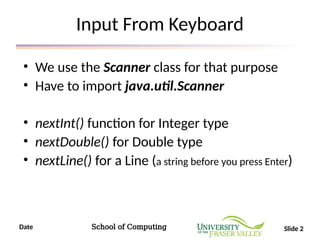
Input From Keyboard
• We use the Scanner class for that purpose
• Have to import java.util.Scanner
• nextInt() function for Integer type
• nextDouble() for Double type
• nextLine() for a Line (a string before you press Enter)
3.
Date School ofComputing Slide 3
Sample code for Integer Input
1 import java.util.Scanner;
2
3 public class InputTest {
4 public static void main(String[] args) {
5 Scanner input = new Scanner(System.in);
6
7 System.out.println("Please enter an integer");
8 int userGivenInteger = input.nextInt();
9
10 System.out.println("You entered: " +
userGivenInteger);
11 }
12 }
4.
Date School ofComputing Slide 4
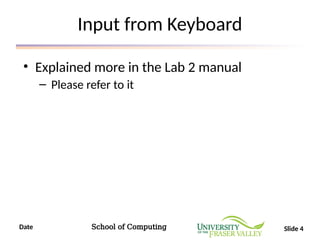
Input from Keyboard
• Explained more in the Lab 2 manual
– Please refer to it
5.
Date School ofComputing Slide 5
Type Conversion
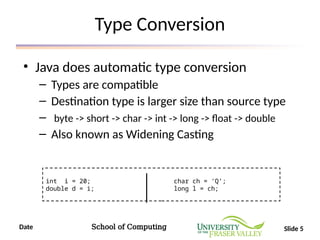
• Java does automatic type conversion
– Types are compatible
– Destination type is larger size than source type
– byte -> short -> char -> int -> long -> float -> double
– Also known as Widening Casting
int i = 20; char ch = ‘Q’;
double d = i; long l = ch;
6.
Date School ofComputing Slide 6
Explicit Casting
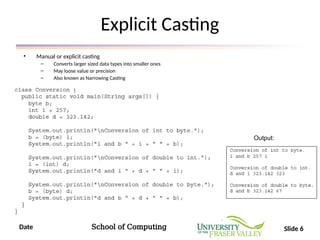
• Manual or explicit casting
– Converts larger sized data types into smaller ones
– May loose value or precision
– Also known as Narrowing Casting
Output:
7.
Date School ofComputing Slide 7
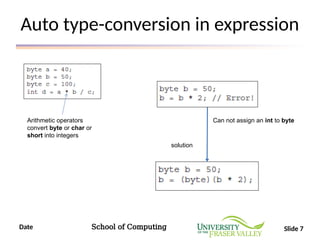
Auto type-conversion in expression
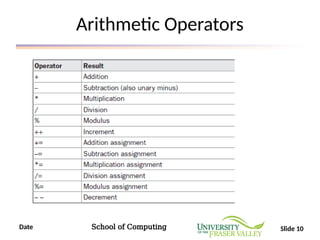
Arithmetic operators
convert byte or char or
short into integers
solution
Can not assign an int to byte
8.
Date School ofComputing Slide 8
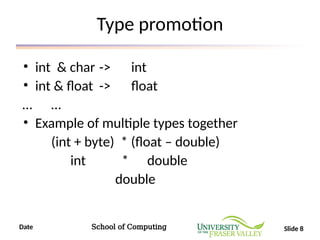
Type promotion
• int & char -> int
• int & float -> float
… …
• Example of multiple types together
(int + byte) * (float – double)
int * double
double
9.
Date School ofComputing Slide 9
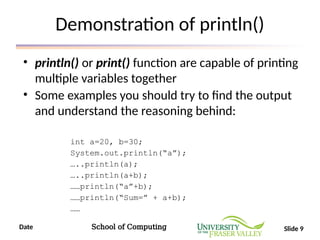
Demonstration of println()
• println() or print() function are capable of printing
multiple variables together
• Some examples you should try to find the output
and understand the reasoning behind:
int a=20, b=30;
System.out.println(“a”);
…..println(a);
…..println(a+b);
……println(“a”+b);
……println(“Sum=” + a+b);
……
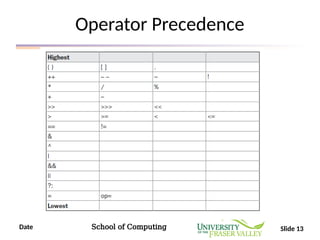
Date School ofComputing Slide 14
If-else example
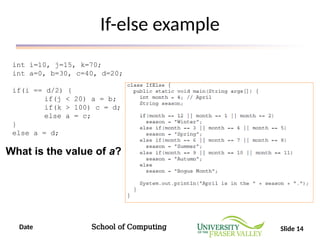
int i=10, j=15, k=70;
int a=0, b=30, c=40, d=20;
if(i == d/2) {
if(j < 20) a = b;
if(k > 100) c = d;
else a = c;
}
else a = d;
What is the value of a?
15.
Date School ofComputing Slide 15
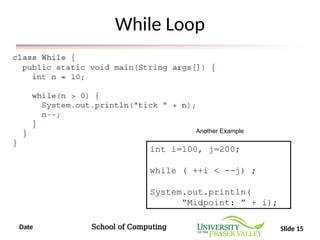
While Loop
int i=100, j=200;
while ( ++i < --j) ;
System.out.println(
“Midpoint: ” + i);
Another Example
16.
Date School ofComputing Slide 16
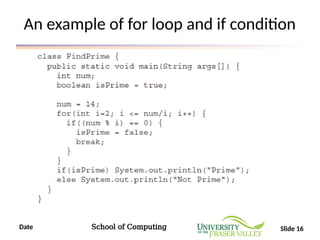
An example of for loop and if condition
17.
Date School ofComputing Slide 17
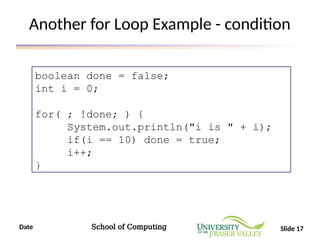
Another for Loop Example - condition
boolean done = false;
int i = 0;
for( ; !done; ) {
System.out.println("i is " + i);
if(i == 10) done = true;
i++;
}
Date School ofComputing Slide 19
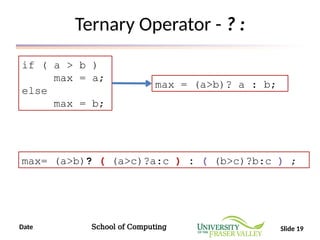
Ternary Operator - ? :
if ( a > b )
max = a;
else
max = b;
max = (a>b)? a : b;
max= (a>b)? ( (a>c)?a:c ) : ( (b>c)?b:c ) ;
20.
Date School ofComputing Slide 20
Arrays
• In C, just declaration was enough
int arr [10];
• In Java, declaration and allocation with new
keyword required
int months[];
months = new int [12]; int months[] = new int [12];
21.
Date School ofComputing Slide 21
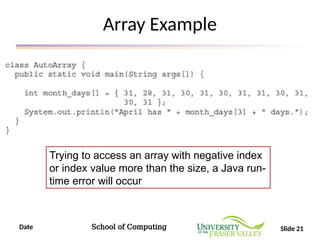
Array Example
Trying to access an array with negative index
or index value more than the size, a Java run-
time error will occur
22.
Date School ofComputing Slide 22
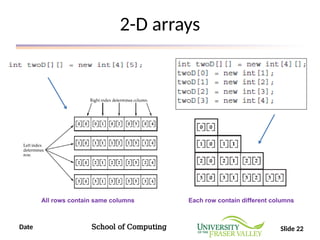
2-D arrays
All rows contain same columns Each row contain different columns
23.
Date School ofComputing Slide 23
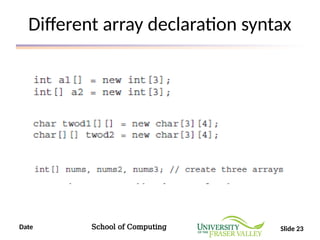
Different array declaration syntax
24.
Date School ofComputing Slide 24
A new format in for loop
int nums[] = { 1, 2, 3, 4, 5, 6, 7, 8, 9, 10 };
int sum = 0;
for(int i=0; i < 10; i++) sum += nums[i];
int nums[] = { 1, 2, 3, 4, 5, 6, 7, 8, 9, 10 };
int sum = 0;
for(int x: nums) sum += x;
New Format allowed in Java
* You can use the break statement if want to finish the loop early
25.
Date School ofComputing Slide 25
Explanation of for loop new format
public class JavaApplication3 {
public static void main(String[] args) {
int nums[] = { 1, 2, 3, 4, 5, 6,
7, 8, 9, 10 };
for(int x : nums) {
System.out.print(x + " ");
x = x * 10; // no effect on nums
System.out.println(x);
}
}
}
1 10
2 20
3 30
4 40
5 50
6 60
7 70
8 80
9 90
10 100
Output:
26.
Date School ofComputing Slide 26
For-each loop in 2D array
public class JavaApplication3 {
public static void main(String[] args) {
int sum = 0;
int nums[][] = new int[3][5];
for(int i = 0; i < 3; i++)
for(int j=0; j < 5; j++)
nums[i][j] = (i+1)*(j+1);
for(int x[] : nums) {
for(int y : x) {
System.out.println("Value is: " + y);
sum += y;
}
}
System.out.println("Summation: " + sum);
}
}
![Date School of Computing Slide 3
Sample code for Integer Input
1 import java.util.Scanner;
2
3 public class InputTest {
4 public static void main(String[] args) {
5 Scanner input = new Scanner(System.in);
6
7 System.out.println("Please enter an integer");
8 int userGivenInteger = input.nextInt();
9
10 System.out.println("You entered: " +
userGivenInteger);
11 }
12 }](https://image.slidesharecdn.com/week02lecjavaintrocontd-250611191113-4e5fe36c/85/Week_02_Lec_-Java-Intro-continueed-pptx-3-320.jpg)
![Date School of Computing Slide 20
Arrays
• In C, just declaration was enough
int arr [10];
• In Java, declaration and allocation with new
keyword required
int months[];
months = new int [12]; int months[] = new int [12];](https://image.slidesharecdn.com/week02lecjavaintrocontd-250611191113-4e5fe36c/85/Week_02_Lec_-Java-Intro-continueed-pptx-20-320.jpg)
![Date School of Computing Slide 24
A new format in for loop
int nums[] = { 1, 2, 3, 4, 5, 6, 7, 8, 9, 10 };
int sum = 0;
for(int i=0; i < 10; i++) sum += nums[i];
int nums[] = { 1, 2, 3, 4, 5, 6, 7, 8, 9, 10 };
int sum = 0;
for(int x: nums) sum += x;
New Format allowed in Java
* You can use the break statement if want to finish the loop early](https://image.slidesharecdn.com/week02lecjavaintrocontd-250611191113-4e5fe36c/85/Week_02_Lec_-Java-Intro-continueed-pptx-24-320.jpg)
![Date School of Computing Slide 25
Explanation of for loop new format
public class JavaApplication3 {
public static void main(String[] args) {
int nums[] = { 1, 2, 3, 4, 5, 6,
7, 8, 9, 10 };
for(int x : nums) {
System.out.print(x + " ");
x = x * 10; // no effect on nums
System.out.println(x);
}
}
}
1 10
2 20
3 30
4 40
5 50
6 60
7 70
8 80
9 90
10 100
Output:](https://image.slidesharecdn.com/week02lecjavaintrocontd-250611191113-4e5fe36c/85/Week_02_Lec_-Java-Intro-continueed-pptx-25-320.jpg)
![Date School of Computing Slide 26
For-each loop in 2D array
public class JavaApplication3 {
public static void main(String[] args) {
int sum = 0;
int nums[][] = new int[3][5];
for(int i = 0; i < 3; i++)
for(int j=0; j < 5; j++)
nums[i][j] = (i+1)*(j+1);
for(int x[] : nums) {
for(int y : x) {
System.out.println("Value is: " + y);
sum += y;
}
}
System.out.println("Summation: " + sum);
}
}](https://image.slidesharecdn.com/week02lecjavaintrocontd-250611191113-4e5fe36c/85/Week_02_Lec_-Java-Intro-continueed-pptx-26-320.jpg)