PRODUCTION TASKS


EDUC W200 Week 7
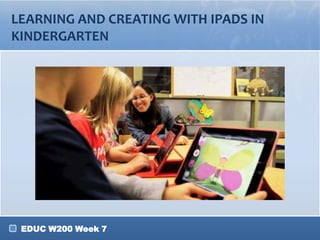
LEARNING AND CREATING WITH IPADS IN
KINDERGARTEN


 EDUC W200 Week 7
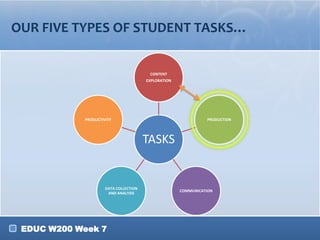
OUR FIVE TYPES OF STUDENT TASKS…


                                        CONTENT
                                       EXPLORATION


            PRODUCTIVITY                                       PRODUCTION


                                       TASKS


                     DATA COLLECTION
                                                     COMMUNICATION
                      AND ANALYSIS


 EDUC W200 Week 7
WHAT ARE STUDENT PRODUCTION TASKS?

• A task given to students to create a form of
  “presentation” to showcase the knowledge
  they have gained…

• Form of learning whereby students create a
  product or concrete artifact that is the focus of their
  learning and shows what they learned


 EDUC W200 Week 7
PRODUCTION TASKS VERSUS OTHER TASKS

• What makes production tasks different from content
  exploration tasks?
• What are the students doing in production tasks that
  make them unique?

• Tip: Think about your webquest.
  o What content exploration tasks you have included?
  o What task do you want your students to do at the end?
    (Refer to your Class Prep #7)


 EDUC W200 Week 7
CHARACTERISTICS OF PRODUCTION TASKS

•    Example: Digital Story

     1.   Deals with authentic (real-world) issues
     2.   Planning, critical thinking, reasoning, and
          creativity
     3.   Multifaceted assessment
          (i.e., rubric)
     4.   Developed over time; Focus on individual progress (i.e., portfolio)
     5.   Student choice
     6.   Teachers facilitate rather than control
          •   Scaffolding/support from a variety of sources
     7.   Individual vs. group responsibility (communication skills)

•    Production tasks are complex, but demonstrate complex
     knowledge, skills, abilities, and attitudes

    EDUC W200 Week 7
THINK BACK…

• …To when you were in elementary, middle,
  or high school
• THINK-PAIR-SHARE (3 minutes)
  o What production tasks did you encounter?
     • Poll everywhere
     • Web polling tool (see next page for details)
  o What tools did you use?
  o What process did you follow?
     • Group work? Individual?
     • In-class? Out-of-class?


 EDUC W200 Week 7
FOR INSTRUCTOR

Web Clicker Tool
1.   Go to Co:lor
     (www.einbrain.com/color)
2.    Click on
     “Quick Teacher”
3.    Type the class name
      (any name you want)
4.    Click on
     “Use this name”
5.    Type your question (in
      Open-ended)
6.    “Make and Publish it!”
7.    Click on “Response” to
      see the student
      response

     EDUC W200 Week 7
FOR STUDENTS

• Web Clicker Tool
  o Go to Co:lor
    (www.einbrain.com/color)
  o Click on
   “Quick Student”
  o Type the class name
    that your instructor
    provides
  o Click on “Connect”
  o Type your answer


 EDUC W200 Week 7
WHAT DO YOU NEED TO CONSIDER FOR
PRODUCTION TASKS?
• What does the task entail?
  o Think about what you want your students to prove they
    know
• Which type of production tools can my
  students use?
  o Hint: think about their abilities, background knowledge, etc.
• How complex is the task?
  o How much time will you need to dedicate?
  o What scaffolding/assistance might the students need?
  o How might the technology complicate/ease the task?
• What resources are available?

 EDUC W200 Week 7
PRODUCTION TASKS INVOLVE
COMPLEX ACTIVITIES

• Learners are not just doing a task – they are:
   o Demonstrating knowledge in action
   o Learning the acceptable and best ways to do a task
      • Ex: How to interact with community leaders
   o Group work:
      • learn about working as a team
   o How to present content, not just the content itself


 EDUC W200 Week 7
PRODUCTION TASKS INVOLVE
COMPLEX ACTIVITIES

• The assessment of a production task is not just the
  product, but the process of creating the product
   o That’s why rubrics are often used with Production Tasks
   o That’s why we will be discussing assessment of production
     tasks later today!


 EDUC W200 Week 7
BRAINSTORMING – PRODUCTION TASK FOR
YOUR WEBQUEST

• Think about the webquest you designed last week.
   o What do you want your students to prove they know?
   o What kind of product can give you confidence that they
     achieved the goal?
   o Are there any limitations?
      • Student ability, background knowledge, etc.
      • Length of the task
   o What resources are available?
      • Technology (think reasonably)
• Share with students in your subject area.
• Share with the whole class (one or two)
 EDUC W200 Week 7                              13

Week 7 spring2013part2

  • 1.
  • 2.
    LEARNING AND CREATINGWITH IPADS IN KINDERGARTEN EDUC W200 Week 7
  • 3.
    OUR FIVE TYPESOF STUDENT TASKS… CONTENT EXPLORATION PRODUCTIVITY PRODUCTION TASKS DATA COLLECTION COMMUNICATION AND ANALYSIS EDUC W200 Week 7
  • 4.
    WHAT ARE STUDENTPRODUCTION TASKS? • A task given to students to create a form of “presentation” to showcase the knowledge they have gained… • Form of learning whereby students create a product or concrete artifact that is the focus of their learning and shows what they learned EDUC W200 Week 7
  • 5.
    PRODUCTION TASKS VERSUSOTHER TASKS • What makes production tasks different from content exploration tasks? • What are the students doing in production tasks that make them unique? • Tip: Think about your webquest. o What content exploration tasks you have included? o What task do you want your students to do at the end? (Refer to your Class Prep #7) EDUC W200 Week 7
  • 6.
    CHARACTERISTICS OF PRODUCTIONTASKS • Example: Digital Story 1. Deals with authentic (real-world) issues 2. Planning, critical thinking, reasoning, and creativity 3. Multifaceted assessment (i.e., rubric) 4. Developed over time; Focus on individual progress (i.e., portfolio) 5. Student choice 6. Teachers facilitate rather than control • Scaffolding/support from a variety of sources 7. Individual vs. group responsibility (communication skills) • Production tasks are complex, but demonstrate complex knowledge, skills, abilities, and attitudes EDUC W200 Week 7
  • 7.
    THINK BACK… • …Towhen you were in elementary, middle, or high school • THINK-PAIR-SHARE (3 minutes) o What production tasks did you encounter? • Poll everywhere • Web polling tool (see next page for details) o What tools did you use? o What process did you follow? • Group work? Individual? • In-class? Out-of-class? EDUC W200 Week 7
  • 8.
    FOR INSTRUCTOR Web ClickerTool 1. Go to Co:lor (www.einbrain.com/color) 2. Click on “Quick Teacher” 3. Type the class name (any name you want) 4. Click on “Use this name” 5. Type your question (in Open-ended) 6. “Make and Publish it!” 7. Click on “Response” to see the student response EDUC W200 Week 7
  • 9.
    FOR STUDENTS • WebClicker Tool o Go to Co:lor (www.einbrain.com/color) o Click on “Quick Student” o Type the class name that your instructor provides o Click on “Connect” o Type your answer EDUC W200 Week 7
  • 10.
    WHAT DO YOUNEED TO CONSIDER FOR PRODUCTION TASKS? • What does the task entail? o Think about what you want your students to prove they know • Which type of production tools can my students use? o Hint: think about their abilities, background knowledge, etc. • How complex is the task? o How much time will you need to dedicate? o What scaffolding/assistance might the students need? o How might the technology complicate/ease the task? • What resources are available? EDUC W200 Week 7
  • 11.
    PRODUCTION TASKS INVOLVE COMPLEXACTIVITIES • Learners are not just doing a task – they are: o Demonstrating knowledge in action o Learning the acceptable and best ways to do a task • Ex: How to interact with community leaders o Group work: • learn about working as a team o How to present content, not just the content itself EDUC W200 Week 7
  • 12.
    PRODUCTION TASKS INVOLVE COMPLEXACTIVITIES • The assessment of a production task is not just the product, but the process of creating the product o That’s why rubrics are often used with Production Tasks o That’s why we will be discussing assessment of production tasks later today! EDUC W200 Week 7
  • 13.
    BRAINSTORMING – PRODUCTIONTASK FOR YOUR WEBQUEST • Think about the webquest you designed last week. o What do you want your students to prove they know? o What kind of product can give you confidence that they achieved the goal? o Are there any limitations? • Student ability, background knowledge, etc. • Length of the task o What resources are available? • Technology (think reasonably) • Share with students in your subject area. • Share with the whole class (one or two) EDUC W200 Week 7 13

Editor's Notes

  • #3 This is a video provide in CP #7. What do the students do? What problems do they have and how the teacher is helping them?
  • #10 For instructor:1. Go to Co:lor (einbrain.com/color)2. Click on “Quick Teacher”3. Type the class name (any name you want)4. Click on “Use this name”5. Type your question (in Open-ended)6. “Make and Publish it”7. Click on “Response” to see the student response