Protection and Security
CS-502 Fall 2007 1
Protection and Security
CS-502 Operating Systems
Fall 2007
(Slides include materials from Operating System Concepts, 7th ed., by Silbershatz, Galvin, & Gagne and
from Modern Operating Systems, 2nd ed., by Tanenbaum)
Protection and Security
CS-502 Fall 2007 2
Concepts
• Protection:
• Mechanisms and policy to keep programs and users
from accessing or changing stuff they should not do
• Internal to OS
• Chapter 14 in Silbershatz
• Security:
• Issues external to OS
• Authentication of user, validation of messages,
malicious or accidental introduction of flaws, etc.
• Chapter 15 of Silbershatz
Protection and Security
CS-502 Fall 2007 3
Outline
• Part 1
• The first computer virus
• Protection mechanisms
• Part 2
• Security issues
• Some cryptographic themes
Protection and Security
CS-502 Fall 2007 4
The First Computer Virus
• Reading assignment:–
Ken Thompson, “Reflections on Trusting Trust,”
Communications of ACM, vol.27, #8, August
1984, pp. 761-763 (pdf)
• Three steps
1. Program that prints a copy of itself
2. Training a compiler to understand a constant
3. Embedding a Trojan Horse without a trace
Protection and Security
CS-502 Fall 2007 5
Step 1 – Program to print copy of itself
• How do we do this?
• First, store character array representing text of
program
• Body of program
• Print declaration of character array
• Loop through array, printing each character
• Print entry array as a string
• Result: general method for program to reproduce
itself to any destination!
Protection and Security
CS-502 Fall 2007 6
Step 2 – Teaching constant values to compiler
/* reading string constants */
if (s[i++] == '')
if (s[i] == 'n') insert ('n');
elseif (s[i] == 'v') insert ('v');
elseif …
• Question: How does compiler know what integer
values to insert for 'n‘, 'v‘, etc.?
Protection and Security
CS-502 Fall 2007 7
Step 2 (continued)
• Answer: In the first compiler for this machine
type, insert the actual character code
• i.e., 11 (decimal) for ‘v’, etc.
/* reading string constants */
if (s[i++] == '')
if (s[i] == 'n') insert ('n');
elseif (s[i] == 'v') insert (11);
elseif …
• Next: Use the first compiler to compile itself!
Protection and Security
CS-502 Fall 2007 8
Step 2 (continued)
• Result: a compiler that “knows” how to interpret
the sequence “v”
• And all compilers derived from this one, forever after!
• Finally: replace the value “11” in the source code
of the compiler with ‘v’ and compile itself again
• Note: no trace of values of special characters in …
– The C Programming Language book
– source code of C compiler
• I.e., special character values are self-reproducing
Protection and Security
CS-502 Fall 2007 9
Step 3 – Inserting a Trojan Horse
• In compiler source, add the text
if (match(sourceString, pattern)
insert the Trojan Horse code
where “pattern” is the login code (for example)
• In compiler source, add additional text
if (match(sourceString, pattern2)
insert the self-reproducing code
where “pattern2” is a part of the compiler itself
• Use this compiler to recompile itself, then
remove source
Protection and Security
CS-502 Fall 2007 10
Step 3 – Concluded
• Result: an infected compiler that will
a. Insert a Trojan Horse in the login code of any Unix
system
b. Propagate itself to all future compilers
c. Leave no trace of Trojan Horse in its source code
• Like a biological virus:
– A small bundle of code that uses the compiler’s own
reproductive mechanism to propagate itself
Protection and Security
CS-502 Fall 2007 11
Questions?
Protection and Security
CS-502 Fall 2007 12
Goals of Protection
• Operating system consists of a collection of
objects (hardware or software)
• Each object has a unique name and can be
accessed through a well-defined set of operations.
• Protection problem – to ensure that each object is
accessed correctly and only by those processes
that are allowed to do so.
Protection and Security
CS-502 Fall 2007 13
Guiding Principles of Protection
• Principle of least privilege
– Programs, users and systems should be given
just enough privileges to perform their tasks
• Separate policy from mechanism
– Mechanism: the stuff built into the OS to make
protection work
– Policy: the data that says who can do what to
whom
Protection and Security
CS-502 Fall 2007 14
Domain Structure
• Access-right = <object-name, rights-set>
where rights-set is a subset of all valid operations
that can be performed on the object.
• Domain = set of access-rights
Protection and Security
CS-502 Fall 2007 15
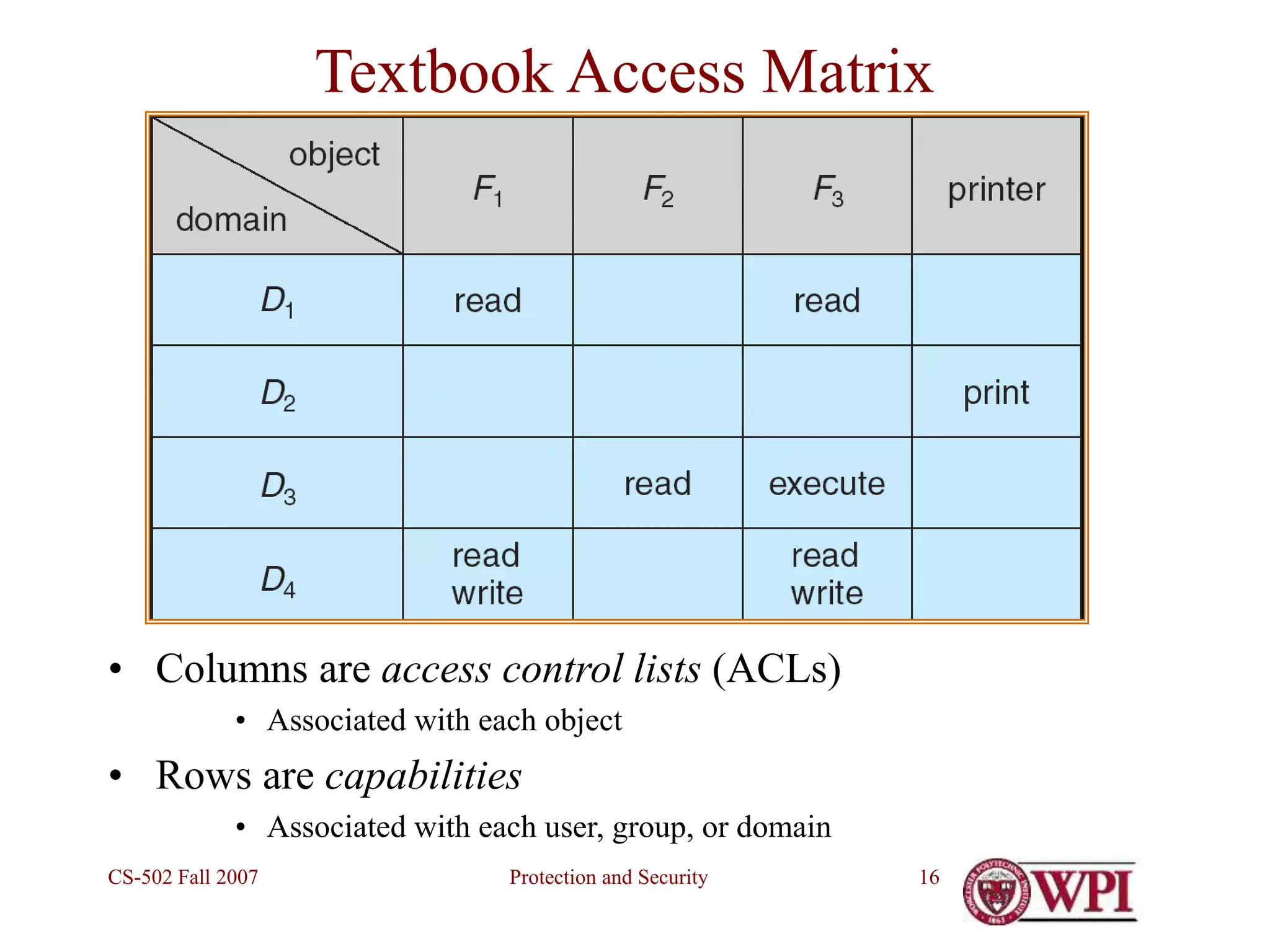
Conceptual Representation – Access Matrix
• View protection as a matrix (access matrix)
• Rows represent domains
• Columns represent objects
• Access(i, j) is set of operations that process
executing in Domaini can invoke on Objectj
Protection and Security
CS-502 Fall 2007 16
Textbook Access Matrix
• Columns are access control lists (ACLs)
• Associated with each object
• Rows are capabilities
• Associated with each user, group, or domain
Protection and Security
CS-502 Fall 2007 17
Unix & Linux
• System comprises many domains:–
– Each user
– Each group
– Kernel/System
• (Windows has even more domains than
this!)
Protection and Security
CS-502 Fall 2007 18
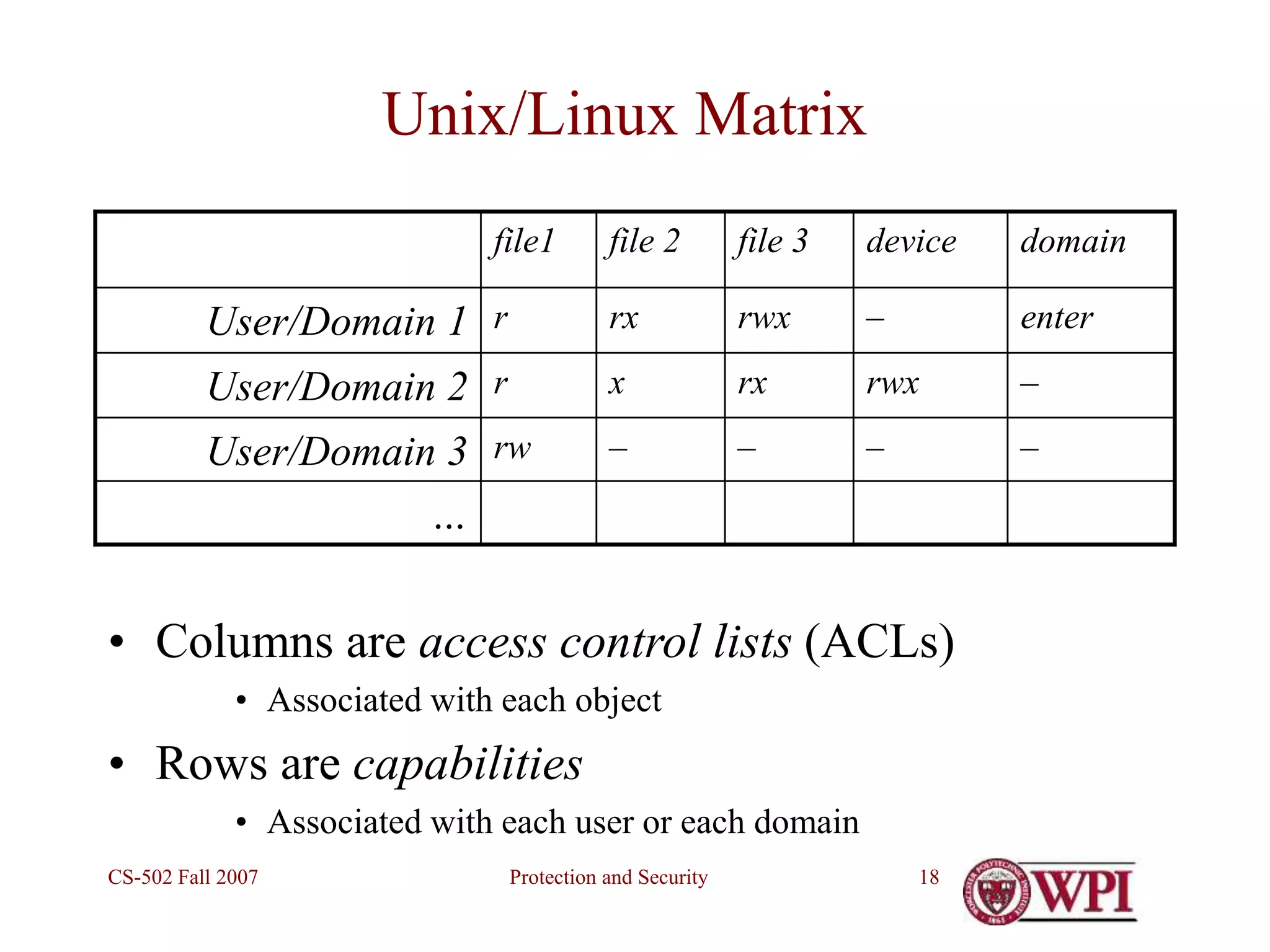
Unix/Linux Matrix
file1 file 2 file 3 device domain
User/Domain 1 r rx rwx – enter
User/Domain 2 r x rx rwx –
User/Domain 3 rw – – – –
…
• Columns are access control lists (ACLs)
• Associated with each object
• Rows are capabilities
• Associated with each user or each domain
Protection and Security
CS-502 Fall 2007 19
Changing Domains (Unix)
• Domain = uid or gid
• Domain switch via file access controls
– Each file has associated with it a domain bit (setuid bit).
• rwS instead of rwx
– When executed with setuid = on, then uid or gid is
temporarily set to owner or group of file.
– When execution completes uid or gid is reset.
• Separate mechanism for entering kernel domain
– System call interface
Protection and Security
CS-502 Fall 2007 20
General (textbook) representation
• Domains as objects added to Access Matrix
Protection and Security
CS-502 Fall 2007 21
Practicalities
• At run-time…
– What does the OS know about the user?
– What does the OS know about the resources?
• What is the cost of checking and enforcing?
– Access to the data
– Cost of searching for a match
• Impractical to implement full Access Matrix
– Size
– Access controls disjoint from both objects and domains
Protection and Security
CS-502 Fall 2007 22
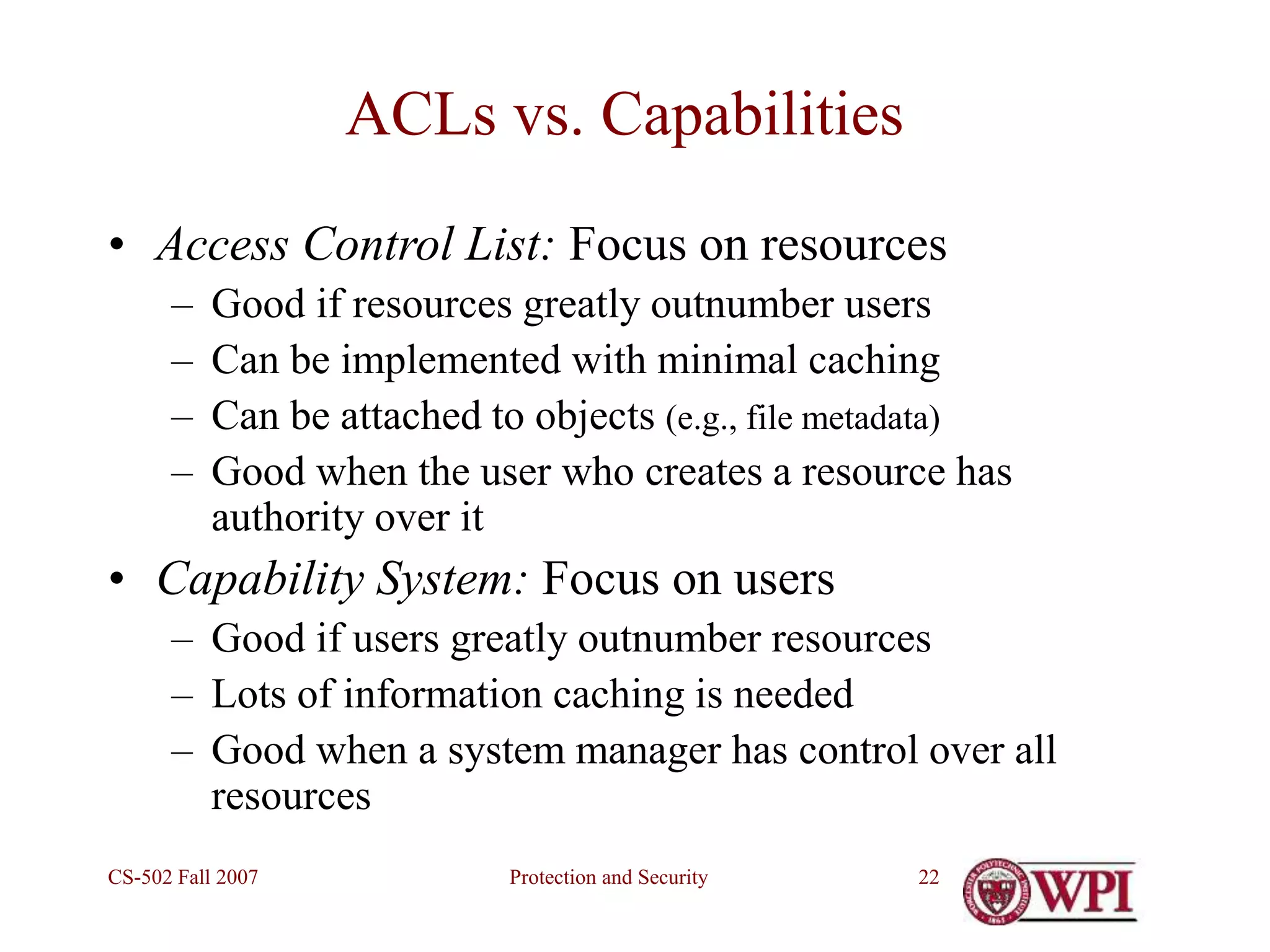
ACLs vs. Capabilities
• Access Control List: Focus on resources
– Good if resources greatly outnumber users
– Can be implemented with minimal caching
– Can be attached to objects (e.g., file metadata)
– Good when the user who creates a resource has
authority over it
• Capability System: Focus on users
– Good if users greatly outnumber resources
– Lots of information caching is needed
– Good when a system manager has control over all
resources
Protection and Security
CS-502 Fall 2007 23
Both are needed
• ACLs for files and other proliferating resources
• Capabilities for major system functions
• The common OSs offer BOTH
– Linux emphasizes an ACL model
• provides good control over files and resources that are file-like
– Windows 2000/XP emphasize Capabilities
• provides good control over access to system functions (e.g.
creating a new user, or doing a system backup…)
• Access control lists for files
Protection and Security
CS-502 Fall 2007 24
…and good management, too!
• What do we need to know to set up a new
user or to change their rights?
• …to set up a new resource or to change the
rights of its users?
• …Who has the right to set/change access
rights?
• No OS allows you to implement all the
possible policies easily.
Protection and Security
CS-502 Fall 2007 25
Enforcing Access Control
• User level privileges must always be less than OS
privileges!
– For example, a user should not be allowed to grab
exclusive control of a critical device
– or write to OS memory space
• …and the user cannot be allowed to raise his
privilege level!
• The OS must enforce it…and the user must not be
able to bypass the controls
• In most modern operating systems, the code which
manages the resource enforces the policy
Protection and Security
CS-502 Fall 2007 26
(Traditional) Requirements–System Call Code
• No user can interrupt it while it is running
• No user can feed it data to make it
– violate access control policies
– stop serving other users
• No user can replace or alter any system call
code
• No user can add functionality to the OS!
• Data must NEVER be treated as code!
Protection and Security
CS-502 Fall 2007 27
“Yeah, but …”
• No user can interrupt it while it is running
• Windows, Linux routinely interrupt system calls
• No user can feed it data to make it
• violate access control policies
• stop serving other users
• No user can replace or alter any system call code
• Except your average virus
• No user can add functionality to the OS!
• Except dynamically loaded device drivers
• Data must NEVER be treated as code!
• “One man’s code is another man’s data” A. Perlis
Protection and Security
CS-502 Fall 2007 28
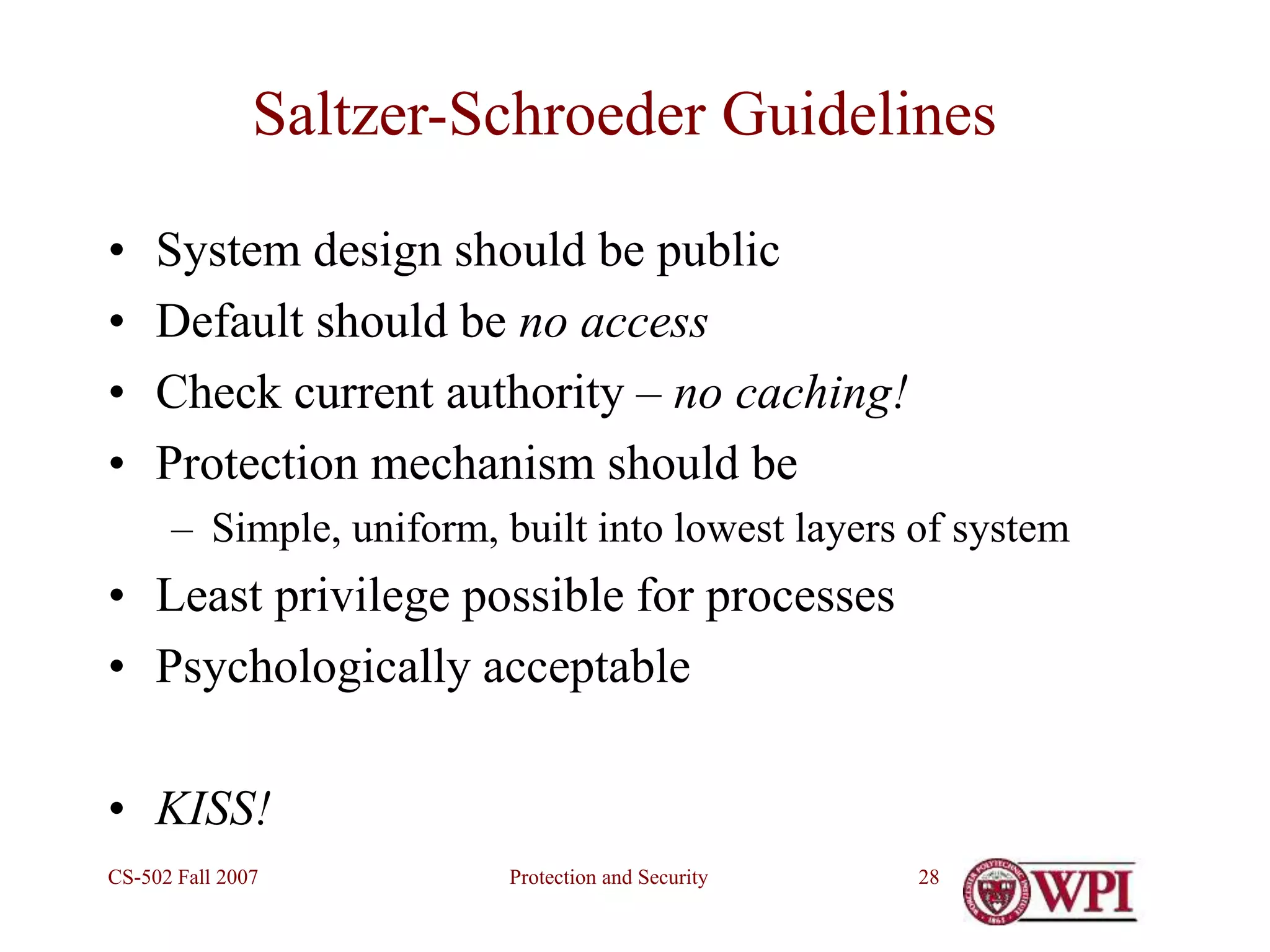
Saltzer-Schroeder Guidelines
• System design should be public
• Default should be no access
• Check current authority – no caching!
• Protection mechanism should be
– Simple, uniform, built into lowest layers of system
• Least privilege possible for processes
• Psychologically acceptable
• KISS!
Protection and Security
CS-502 Fall 2007 29
Reading Assignment
Silbershatz, Chapter 14
Protection and Security
CS-502 Fall 2007 30
Questions?

Week 13, Protection and Security.ppt

  • 1.
    Protection and Security CS-502Fall 2007 1 Protection and Security CS-502 Operating Systems Fall 2007 (Slides include materials from Operating System Concepts, 7th ed., by Silbershatz, Galvin, & Gagne and from Modern Operating Systems, 2nd ed., by Tanenbaum)
  • 2.
    Protection and Security CS-502Fall 2007 2 Concepts • Protection: • Mechanisms and policy to keep programs and users from accessing or changing stuff they should not do • Internal to OS • Chapter 14 in Silbershatz • Security: • Issues external to OS • Authentication of user, validation of messages, malicious or accidental introduction of flaws, etc. • Chapter 15 of Silbershatz
  • 3.
    Protection and Security CS-502Fall 2007 3 Outline • Part 1 • The first computer virus • Protection mechanisms • Part 2 • Security issues • Some cryptographic themes
  • 4.
    Protection and Security CS-502Fall 2007 4 The First Computer Virus • Reading assignment:– Ken Thompson, “Reflections on Trusting Trust,” Communications of ACM, vol.27, #8, August 1984, pp. 761-763 (pdf) • Three steps 1. Program that prints a copy of itself 2. Training a compiler to understand a constant 3. Embedding a Trojan Horse without a trace
  • 5.
    Protection and Security CS-502Fall 2007 5 Step 1 – Program to print copy of itself • How do we do this? • First, store character array representing text of program • Body of program • Print declaration of character array • Loop through array, printing each character • Print entry array as a string • Result: general method for program to reproduce itself to any destination!
  • 6.
    Protection and Security CS-502Fall 2007 6 Step 2 – Teaching constant values to compiler /* reading string constants */ if (s[i++] == '') if (s[i] == 'n') insert ('n'); elseif (s[i] == 'v') insert ('v'); elseif … • Question: How does compiler know what integer values to insert for 'n‘, 'v‘, etc.?
  • 7.
    Protection and Security CS-502Fall 2007 7 Step 2 (continued) • Answer: In the first compiler for this machine type, insert the actual character code • i.e., 11 (decimal) for ‘v’, etc. /* reading string constants */ if (s[i++] == '') if (s[i] == 'n') insert ('n'); elseif (s[i] == 'v') insert (11); elseif … • Next: Use the first compiler to compile itself!
  • 8.
    Protection and Security CS-502Fall 2007 8 Step 2 (continued) • Result: a compiler that “knows” how to interpret the sequence “v” • And all compilers derived from this one, forever after! • Finally: replace the value “11” in the source code of the compiler with ‘v’ and compile itself again • Note: no trace of values of special characters in … – The C Programming Language book – source code of C compiler • I.e., special character values are self-reproducing
  • 9.
    Protection and Security CS-502Fall 2007 9 Step 3 – Inserting a Trojan Horse • In compiler source, add the text if (match(sourceString, pattern) insert the Trojan Horse code where “pattern” is the login code (for example) • In compiler source, add additional text if (match(sourceString, pattern2) insert the self-reproducing code where “pattern2” is a part of the compiler itself • Use this compiler to recompile itself, then remove source
  • 10.
    Protection and Security CS-502Fall 2007 10 Step 3 – Concluded • Result: an infected compiler that will a. Insert a Trojan Horse in the login code of any Unix system b. Propagate itself to all future compilers c. Leave no trace of Trojan Horse in its source code • Like a biological virus: – A small bundle of code that uses the compiler’s own reproductive mechanism to propagate itself
  • 11.
    Protection and Security CS-502Fall 2007 11 Questions?
  • 12.
    Protection and Security CS-502Fall 2007 12 Goals of Protection • Operating system consists of a collection of objects (hardware or software) • Each object has a unique name and can be accessed through a well-defined set of operations. • Protection problem – to ensure that each object is accessed correctly and only by those processes that are allowed to do so.
  • 13.
    Protection and Security CS-502Fall 2007 13 Guiding Principles of Protection • Principle of least privilege – Programs, users and systems should be given just enough privileges to perform their tasks • Separate policy from mechanism – Mechanism: the stuff built into the OS to make protection work – Policy: the data that says who can do what to whom
  • 14.
    Protection and Security CS-502Fall 2007 14 Domain Structure • Access-right = <object-name, rights-set> where rights-set is a subset of all valid operations that can be performed on the object. • Domain = set of access-rights
  • 15.
    Protection and Security CS-502Fall 2007 15 Conceptual Representation – Access Matrix • View protection as a matrix (access matrix) • Rows represent domains • Columns represent objects • Access(i, j) is set of operations that process executing in Domaini can invoke on Objectj
  • 16.
    Protection and Security CS-502Fall 2007 16 Textbook Access Matrix • Columns are access control lists (ACLs) • Associated with each object • Rows are capabilities • Associated with each user, group, or domain
  • 17.
    Protection and Security CS-502Fall 2007 17 Unix & Linux • System comprises many domains:– – Each user – Each group – Kernel/System • (Windows has even more domains than this!)
  • 18.
    Protection and Security CS-502Fall 2007 18 Unix/Linux Matrix file1 file 2 file 3 device domain User/Domain 1 r rx rwx – enter User/Domain 2 r x rx rwx – User/Domain 3 rw – – – – … • Columns are access control lists (ACLs) • Associated with each object • Rows are capabilities • Associated with each user or each domain
  • 19.
    Protection and Security CS-502Fall 2007 19 Changing Domains (Unix) • Domain = uid or gid • Domain switch via file access controls – Each file has associated with it a domain bit (setuid bit). • rwS instead of rwx – When executed with setuid = on, then uid or gid is temporarily set to owner or group of file. – When execution completes uid or gid is reset. • Separate mechanism for entering kernel domain – System call interface
  • 20.
    Protection and Security CS-502Fall 2007 20 General (textbook) representation • Domains as objects added to Access Matrix
  • 21.
    Protection and Security CS-502Fall 2007 21 Practicalities • At run-time… – What does the OS know about the user? – What does the OS know about the resources? • What is the cost of checking and enforcing? – Access to the data – Cost of searching for a match • Impractical to implement full Access Matrix – Size – Access controls disjoint from both objects and domains
  • 22.
    Protection and Security CS-502Fall 2007 22 ACLs vs. Capabilities • Access Control List: Focus on resources – Good if resources greatly outnumber users – Can be implemented with minimal caching – Can be attached to objects (e.g., file metadata) – Good when the user who creates a resource has authority over it • Capability System: Focus on users – Good if users greatly outnumber resources – Lots of information caching is needed – Good when a system manager has control over all resources
  • 23.
    Protection and Security CS-502Fall 2007 23 Both are needed • ACLs for files and other proliferating resources • Capabilities for major system functions • The common OSs offer BOTH – Linux emphasizes an ACL model • provides good control over files and resources that are file-like – Windows 2000/XP emphasize Capabilities • provides good control over access to system functions (e.g. creating a new user, or doing a system backup…) • Access control lists for files
  • 24.
    Protection and Security CS-502Fall 2007 24 …and good management, too! • What do we need to know to set up a new user or to change their rights? • …to set up a new resource or to change the rights of its users? • …Who has the right to set/change access rights? • No OS allows you to implement all the possible policies easily.
  • 25.
    Protection and Security CS-502Fall 2007 25 Enforcing Access Control • User level privileges must always be less than OS privileges! – For example, a user should not be allowed to grab exclusive control of a critical device – or write to OS memory space • …and the user cannot be allowed to raise his privilege level! • The OS must enforce it…and the user must not be able to bypass the controls • In most modern operating systems, the code which manages the resource enforces the policy
  • 26.
    Protection and Security CS-502Fall 2007 26 (Traditional) Requirements–System Call Code • No user can interrupt it while it is running • No user can feed it data to make it – violate access control policies – stop serving other users • No user can replace or alter any system call code • No user can add functionality to the OS! • Data must NEVER be treated as code!
  • 27.
    Protection and Security CS-502Fall 2007 27 “Yeah, but …” • No user can interrupt it while it is running • Windows, Linux routinely interrupt system calls • No user can feed it data to make it • violate access control policies • stop serving other users • No user can replace or alter any system call code • Except your average virus • No user can add functionality to the OS! • Except dynamically loaded device drivers • Data must NEVER be treated as code! • “One man’s code is another man’s data” A. Perlis
  • 28.
    Protection and Security CS-502Fall 2007 28 Saltzer-Schroeder Guidelines • System design should be public • Default should be no access • Check current authority – no caching! • Protection mechanism should be – Simple, uniform, built into lowest layers of system • Least privilege possible for processes • Psychologically acceptable • KISS!
  • 29.
    Protection and Security CS-502Fall 2007 29 Reading Assignment Silbershatz, Chapter 14
  • 30.
    Protection and Security CS-502Fall 2007 30 Questions?